fuse MERCEDES-BENZ AMG GT COUPE 2018 Owners Manual
[x] Cancel search | Manufacturer: MERCEDES-BENZ, Model Year: 2018, Model line: AMG GT COUPE, Model: MERCEDES-BENZ AMG GT COUPE 2018Pages: 465, PDF Size: 8.25 MB
Page 6 of 465
Driving and pa
rking ................................. 108
Driving ........................................................ 108
DY NA MIC SELECT switch ............................1 14
Au tomatic transmission .............................. 11 6
Re fuelling .................................................... 12 0
Pa rking ...................................................... .123
Driving and driving saf ety sy stems .............1 30
Ve hicle towing instructions ........................ .162 Instrument Display and on-board
comp uter.................................................. 16 3
Instrument display overview ...................... .163
Overview of the buttons on thesteering
wheel ..........................................................1 64
Operating the on-board computer .............. 16 4
Setting the design ....................................... 16 6
Setting the additional value range .............. 16 6
Overview of displa yson the multifunc‐
tion display .................................................1 67
Menus and submenus ................................. 167LINGU
ATRO NIC ......................................... 176
No tes on operating saf ety .......................... .176
Operation ....................................................1 76Using LINGU
ATRO NIC ef fectively ................ 178
Essential voice commands .......................... 178 Multimedia sy
stem .................................. 18 9
Overview and operation .............................. 189
Sy stem settings .......................................... 19 8
AMG TR ACKPA CE ...................................... 208
Na vigation ................................................... 213
Te lephone .................................................. .238
Online and Internet functions ..................... 264
Media ........................................................ .273
Ra dio .......................................................... 286
TV ............................................................... 289
Sound ......................................................... 297 Main
tenance and care ............................. 301
ASS YST PLUS service inter val display ........ .301
Engine compartment .................................. 302
Cleaning and care ....................................... 308 Breakdown assistance
.............................318
Emergency .................................................. 318
Flat tyre ...................................................... 319Battery (vehicle) ......................................... 325
To
w- starting or towing away ....................... 331
Electrical fuses ........................................... 335 Wheels and tyres
..................................... 338
No tes on noise or unusual handling char‐
acteristics .................................................. .338
No tes on regular lyinspecting wheels and
tyres .......................................................... .338
No tes on snow chains ................................ 338
Ty re pressure .............................................. 339
Wheel change ............................................ .346
Collapsible spa rewheel .............................. 356 Te
ch nical data .......................................... 359
No tes on tech nical da ta.............................. 359
On-board electronics .................................. 359
Ve hicle identification plate, VIN and
engine number ...........................................3 59
Operating fluids .......................................... 360
Ve hicle data ................................................ 366 Contents
3
Page 108 of 465
#
Press button ¿.
Switch off the A/C function only brief lyother‐
wise the windo wsmay mist up more quickl y.
Condensation may drip from the underside of
th eve hicle when cooling mode is active. This is
not a sign that there is a malfunction. Ac
tivating/deactivating the A/C function via
the multimedia sy stem Multimedia sy
stem:
4 Vehicle 5
b Climate control 5
A/C
The A/C function heats, cools and dehumidifies
th eve hicle's interior air. #
Activate Oor deacti vate ª the function. Setting climate control
toautomatic mode In auto
matic mode, the set temp erature is con‐
trolled and maintained at a const ant levelby the
air suppl y. #
Press the à button. #
Toswitch tomanual mode: pressthe H
or _ button. Climate
style Climate
style function
In automatic mode, you can select thefo llowing
climate style settings forth e driver's and front
passenger areas:
R FOCUS: high air flow , slightly cooler setting
R MEDIUM: medium air flow ,st andard setting
R DIFFUSE: low airflow , slightly warmer and
draught-f ree setting
Setting the clima testyle
Multimedia sy stem:
4 Vehicle 5
b Climate control
5 Climate mode #
Select Driverand/or Passenger. #
Select FOCUS, MEDIUM orDIFFUSE .
% Tofeel the ef fect of the climate style, the
à function must be active (/ page105). Overvi
ewofthe air distribution settings The symbols on
the display indicate which vents
th e air flow is being directed thro ugh:
¯ def
rost ervents
P centre and side air
vents
O fo
ot we llve nts
S centre, side and
foot we llve nts
a defros
ter and foot we llve nts
_ all
vents
b defros
ter,middle and side air vents Ac
tivating/deactivating the climate control
syn chro nisation function via the control
panel Climate control can be set centrally using
the
synchronisation function. The temp erature and
air distribution setting forth e driver side is adop‐
te d automatically forth e front passenger side. #
Press button 0. Climate control
105
Page 338 of 465
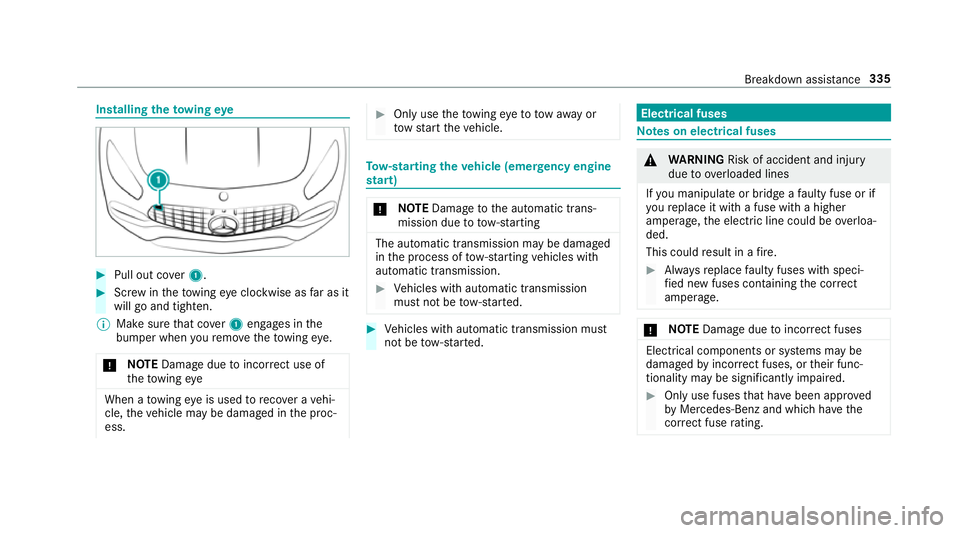
Installing
theto wing eye #
Pull out co ver1. #
Screw intheto wing eyeclockwise as far as it
will go and tighten.
% Make sure that co ver1 engages in the
bumper when youre mo vetheto wing eye.
* NO
TEDama gedue toincor rect use of
th eto wing eye When a
towing eye is used toreco ver a vehi‐
cle, theve hicle may be damaged in the proc‐
ess. #
Only use theto wing eyeto to waw ay or
to w start theve hicle. To
w- starting theve hicle (eme rgency engine
st art) *
NO
TEDama getothe automatic trans‐
mission due to tow-starting The automatic transmission may be damaged
in the process of tow- starting vehicles with
automatic transmission. #
Vehicles with automatic transmission
must not be tow- star ted. #
Vehicles with automatic transmission must
not be tow- star ted. Electrical fuses
Note
s on electrical fuses &
WARNING Risk of accident and inju ry
due to ov erloaded lines
If yo u manipulate or bridge a faulty fuse or if
yo ure place it with a fuse with a higher
amperage, the electric line could be overloa‐
ded.
This could result in a fire. #
Alw aysre place faulty fuses with speci‐
fi ed new fuses conta iningthe cor rect
amperage. *
NO
TEDama gedue toincor rect fuses Electrical components or sy
stems may be
damaged byincor rect fuses, or their func‐
tionality may be significant lyimpaired. #
Only use fuses that ha vebeen appr oved
by Mercedes-Benz and which ha vethe
cor rect fuse rating. Breakdown assi
stance 335
Page 339 of 465
Blown fuses must be
replaced with fuses of the
same rating, which you can recognise bythe col‐
our and fuse rating. The fuse ratings and fu rther
information tobe obser ved are lis ted in the fuse
assignment diagram.
Fu se assignment diag ram: onthe fuse box in
th e load compartment .
* NO
TEDama geor malfunctions caused
by moisture Moisture may cause dama
getothe electrical
sy stem or cause it tomalfunction. #
When the fuse box is open, make sure
th at no moisture can enter the fuse
box. #
When closing the fuse box, make sure
th at the seal of the lid is positioned cor‐
re ctly on the fuse box. If
th e newly inser ted fuse also blo ws, ha vethe
cause traced and rectified at a qualified special‐
ist workshop, e.g. a Mercedes-Benz Service
Centre. Ensure
thefo llowing before replacing a fuse:
R The vehicle is secured against rolling away.
R All electrical consumers are switched off.
R The ignition is switched off.
The electrical fuses are located in various fuse
bo xes:
R Fuse box in the front passenger foot we ll
(/ page 336)
R Fuse box in the load compartment on the
left-hand side of theve hicle, when vie wed in
th e direction of tr avel Opening and closing
the fuse box in the front
passenger foot we ll Obser
vethe no tes on electrical fuses
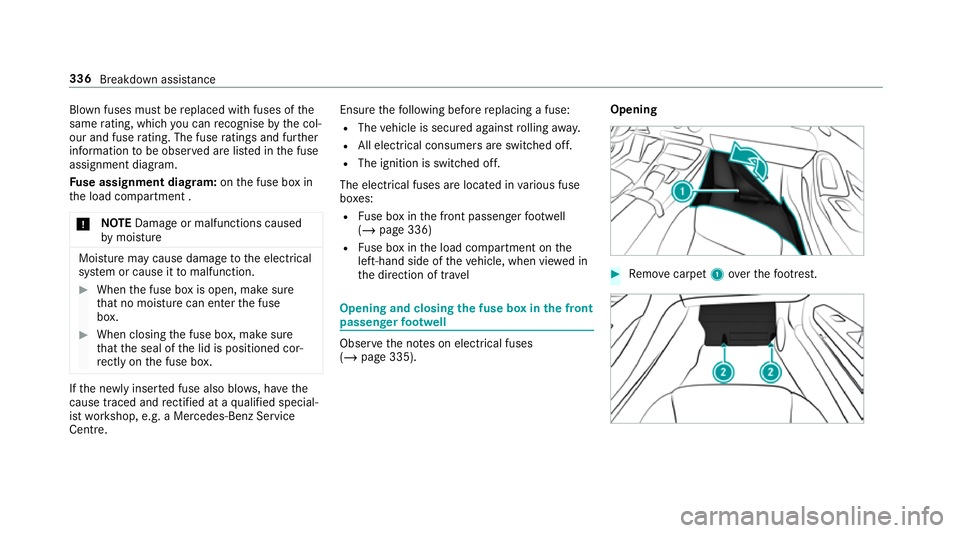
(/ page 335). Opening #
Remo vecarpet 1over thefo ot re st. 336
Breakdown assis tance
Page 340 of 465
#
Loosen scr ews2 onthefloor panel and
re mo vethefloor panel.
Closing #
Fitthefloor panel again. #
Tighten scr ews2. #
Position the carpet back in place and press
down firm ly. Opening and closing
the fuse box in the load
compa rtment Obse
rveth e no tes on electrical fuses
(/ page 335). #
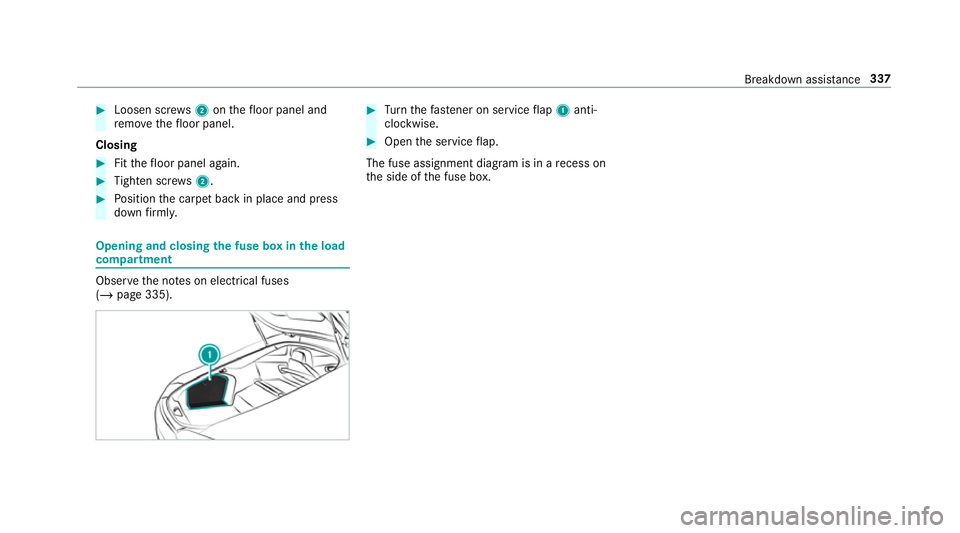
Turn thefast ener on service flap 1 anti-
clo ckwise. #
Open the service flap.
The fuse assignment diagram is in a recess on
th e side of the fuse box. Breakdown assis
tance 337
Page 441 of 465
see Limiter
see
Parking Assist PARKTRONIC
see Reversing camera
see Traf fic Sign Assi st
Driving tips AMG ce ramic high-pe rformance
composite brake sy stem ......................1 12
Driving ab road (symm etrical dipped
beam) .................................................... 93
General driving tips ............................. .110
Ru nning-in no tes ..................................1 09
Dr ow siness de tection
see ATTENTION ASSIST
DY NA MIC SELECT .................................... .114
Con figuring drive program I ................. 11 6
Displ aying engine data ........................ .116
Displ aying vehicle data ........................ 11 6
Drive program display .......................... 11 5
Drive programs .................................... 11 4
Fu nction ............................................... 11 4
Operating (DYNAMIC SELECT switch) .. 11 5
Selecting the drive prog ram ................. 11 5
Showing ope ration feedback ................1 16 E
E-SELECT selector le ver........................... 11 6
Engaging drive position ........................ 11 8
Engaging neutral .................................. 11 7
Engaging pa rkposition .........................1 17
Engaging pa rkposition automatically ...1 17
Engaging reve rsege ar .......................... 11 7
Fu nction ............................................... 11 6
E10 ............................................................ 361
Easy entry feature
Fu nction/no tes .....................................82
Setting ................................................... 83
Easy exitfeature
Fu nction/no tes .....................................82
Setting ................................................... 83
EBD (Electronic Brake forc e Distribu‐
tion)
Function/no tes ................................... 13 5
ECO display Function ............................................... 11 3
Re setting ............................................. 172
ECO start/s top function ......................... 11 3
Au tomatic engine start ........................ .113 Au
tomatic engine stop .........................1 13
Operation ............................................. 11 3
Switching off/on .................................. 11 3
Electric pa rking brake ............................ .127
App lying automatically ........................ .127
App lying or releasing manually ............ 12 9
Emergency braking .............................. 12 9
Re leasing automatically ...................... .128
Electrical fuses see Fuses
Electromagnetic compatibility Declaration of conformity ......................20
Emer gency
Fire extinguisher ................................. .319
Fir st-aid kit (so ftsided) ........................ 319
Overview of the help functions .............. 14
Saf etyve st ........................................... 318
Setting up thewa rning triangle ............ 318
Emer gency braking ................................. 12 9
Emer gency braking
see BAS (Brake Assi stSystem)
Emer gency call sy stem
see Mercedes-Benz emer gency call sy stem 438
Index
Page 443 of 465
Fi
lling station sear ch
St arting automatic sear ch.................... 217
Switching au tomatic search on/off ..... 223
Using auto matic search....................... 223
Fire extinguisher ...................................... 319
Fi rs t-aid kit (soft sided) ...........................319
Flat towing
see Tow- bar sy stem
Flat tyre ....................................................3 19
MOExtended tyres ...............................3 20
No tes ................................................... 319
TIREFIT kit ...........................................3 21
Wheel change ...................................... 350
Floor mats .................................................. 92
Fo il co vering
Ra dar sensors ...................................... 131
Fr ee software ............................................ 26
Fr equency band
Dialling (on-board computer) .............. .173
Fr ont airbag (driver, front passenger) .....33
Fr ont and reve rsing camera ...................154 Fr
ont camera
Fu nction .............................................. 154
Fu el .......................................................... .363
Ad ditives .............................................3 63
E10 ...................................................... 361
Fu elreser ve ........................................ 363
Pe trol ................................................... 361
Quality (p etro l) .................................... .361
Re fuelling ............................................. 12 0
Sulphur content ................................... 361
Ta nk content ....................................... 363
Fu el consum ption
On-board computer .............................. 171
Fu nction seat
see Door cont rol panel
Fu ses ........................................................ 335
Before replacing a fuse ........................ 335
Fu se assignment diagram ...................3 35
Fu se box in the front passenger foot‐
we ll ...................................................... 336
Fu se box in the load compartment ...... 337
No tes .................................................. 335 G
G-me ter (on-board co mputer, Per‐
fo rm ance menu) ...................................... 16 8
Garage door opener Clearing the memory ........................... 12 6
Opening or closing the door ................1 25
Programming buttons .......................... 12 3
Ra dio equipment appr oval numbers .... 12 6
Re solving problems ............................. 124
Synchronising thero lling code ............ .124
Gear display (on-board computer, Per‐
fo rm ance menu) ...................................... 16 8
Gearshift recommendation .....................119
Genera l operating permit number
(EU) .......................................................... .359
Genuine parts ............................................ 18
Glide mode ............................................... 12 0
Glo vebox
Locking/unlocking ................................ 86 440
Index