seat memory MERCEDES-BENZ AMG GT COUPE 2018 Owners Manual
[x] Cancel search | Manufacturer: MERCEDES-BENZ, Model Year: 2018, Model line: AMG GT COUPE, Model: MERCEDES-BENZ AMG GT COUPE 2018Pages: 465, PDF Size: 8.25 MB
Page 5 of 465
Symbols
........................................................ 5At
agl ance .................................................... 6
Cockpit ........................................................... 6
Wa rning and indicator lamps .......................... 8
Overhead control panel ................................ 10
Door control panel and seat adjustment ....... 12
Emergencies and breakdowns ...................... 14Digital Owner's Manual
.............................16
Calling up the Digital Owner's Manual ..........16 Genera
l notes............................................. 17
Pr otection of the environment ......................17
Ta ke -ba ckof end-of-life vehicles ...................17
Mercedes-Benz Genuine Parts ......................18
Owner's Manual ............................................ 19
Operating saf ety .......................................... .19
Declaration of Conformity ............................ 20
Diagno stics connection ................................ 21
Qualified specialist workshop ....................... 22
Ve hicle registration ....................................... 22
Cor rect use of theve hicle ............................23 Information on
the REA CHregulation ........... 23
Implied warranty .......................................... .23
QR code forre scue card ...............................23
Data storage .................................................24
Copyright ...................................................... 26 Occupant saf
ety......................................... 27
Re stra int sy stem ...........................................27
Seat belts ..................................................... 29
Airbags ......................................................... 33
PRE-SAFE ®
sy stem ........................................41
Safely transporting children in theve hi‐
cle ................................................................. 41
No tes on pets in theve hicle .........................53 Opening and closing
.................................. 54
Ke y .............................................................. .54
Doo rs............................................................ 58
Load compa rtment ....................................... 62
Side windo ws............................................... 66
Pa noramic roof ............................................. 70
Anti-theft pr otection .....................................70 Seats and
stowing ...................................... 74
No tes on the cor rect driver's seat posi‐
tion ............................................................... 74
Seats ............................................................ 75
St eering wheel ..............................................81
Easy entry and exitfeature .......................... .82
Operating the memory function .................... 83
St ow age areas .............................................. 84
Cup holders .................................................. 88
Asht ray and cigar ette lighter ........................ 89
Soc kets ......................................................... 90
Fitting/removing thefloor mats ...................92 Light and sight
........................................... 93
Ex terior lighting ............................................ 93
Interior lighting ............................................. 97
Wi ndsc reen wipers and windscreen
wa sher sy stem ..............................................98
Mir rors .......................................................... 99
Ope rating the sun visors ............................. 102 Climate control
........................................ 104
Overview of climate contro l systems ..........1 04
Operating the climate control sy stem ......... 104 2
Contents
Page 16 of 465
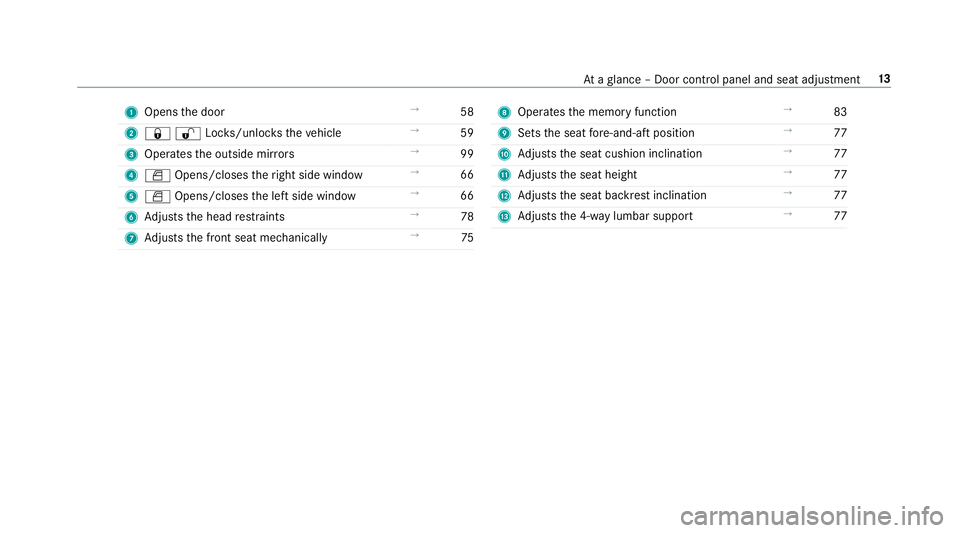
1
Opens the door →
58
2 &%Loc ks/unloc kstheve hicle →
59
3 Operates the outside mir rors →
99
4 W Opens/closes theright side window →
66
5 W Opens/closes the left side window →
66
6 Adjusts the head restra ints →
78
7 Adjusts the front seat mechanically →
75 8
Operates the memory function →
83
9 Sets the seat fore -and-aft position →
77
A Adjusts the seat cushion inclination →
77
B Adjusts the seat height →
77
C Adjusts the seat backrest inclination →
77
D Adjusts the 4-w aylumbar support →
77 At
aglance – Door control panel and seat adjustment 13
Page 44 of 465
R
Suitable positioning of thech ild restra int sys‐
te m (/ page47). PRE-SAFE
®
sy stem PRE-
SAFE®
(anticipa tory occupant pr otec‐
tion) PRE-
SAFE®
is able todetect cer tain critical driv‐
ing situations and implement pre-em ptive meas‐
ures toprotect theve hicle occupants.
PRE-SAFE ®
can implement thefo llowing meas‐
ures independently of each other:
R Tightening the seat belts on the driver's seat
and front passenger seat.
R Closing the side windo ws.
R Vehicles with memory function: moving
th e front passenger seat toa more favo ura‐
ble seat position.
R PRE-SAFE ®
Sound: pr ovided that the multi‐
media sy stem is switched on, generates a
brief noise signal tostimulate the innate pro‐
te ctive mechanism of a person's hea ring. *
NO
TEDama gecaused byobjects in the
fo ot we ll or behind the seat The automatic adjustment of
the seat posi‐
tion may result in damage tothe seat and/or
th e object. #
Stow objects in a suitable place. Re
versing the PRE- SAFE®
sy stem measures If an accident did not occur,
the pre-em ptive
measures that we retake n are reve rsed.
Yo u will need toper form certain settings your‐
self. #
Ifth e seat belt pre-tensioning is not reduced,
mo vethe seat backrest back slightl y.
The locking mechanism releases. Safely transporting
children in theve hicle Alw
ays obser vewhen children are tr avelling
in theve hicle %
Also strictly obser vethe saf ety no tesfo rthe
specific situation. In this wa yyo u can recog‐ nise po
tential risks and avoid dangers if chil‐
dren are tr avelling in theve hicle
(/ page 42).
Be diligent
Bear in mind that neglecting tosecure a child in
th ech ild restra int sy stem may ha veserious con‐
sequences. Alw ays be diligent in securing a child
carefully before everyjou rney.
To impr oveprotection forch ildren younger than
12 years old or under 1.50 m in height,
Mercedes-Benz recommends you obse rvethe
fo llowing information:
R Alw ays secure thech ild in a child restra int
sy stem suitable forth is Mercedes-Benz vehi‐
cle.
R The child restra int sy stem must be appropri‐
ate tothe age, weight and size of thech ild.
R The vehicle seat must be suitable forfitting a
ch ild restra int sy stem (/ page47). Occupant saf
ety41
Page 80 of 465
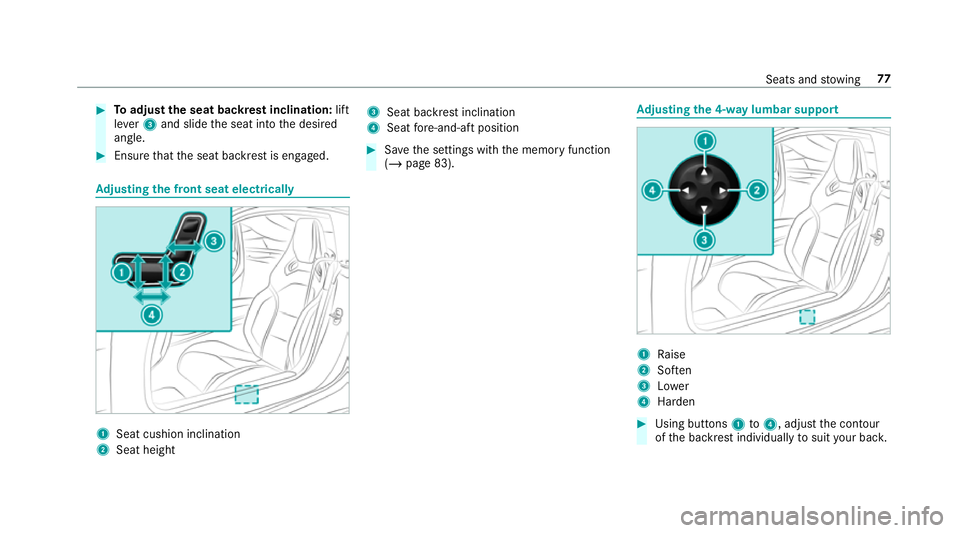
#
Toadjust the seat backrest inclination: lift
le ve r3 and slide the seat into the desired
angle. #
Ensure that the seat backrest is engaged. Ad
justing the front seat electrically 1
Seat cushion inclination
2 Seat height 3
Seat ba ckrest inclination
4 Seat fore -and-aft position #
Save the settings with the memory function
(/ page 83). Ad
justing the 4-w aylumbar support 1
Raise
2 Soften
3 Lower
4 Harden #
Using buttons 1to4 , adjust the conto ur
of the backrest individually tosuit your bac k. Seats and
stowing 77
Page 85 of 465
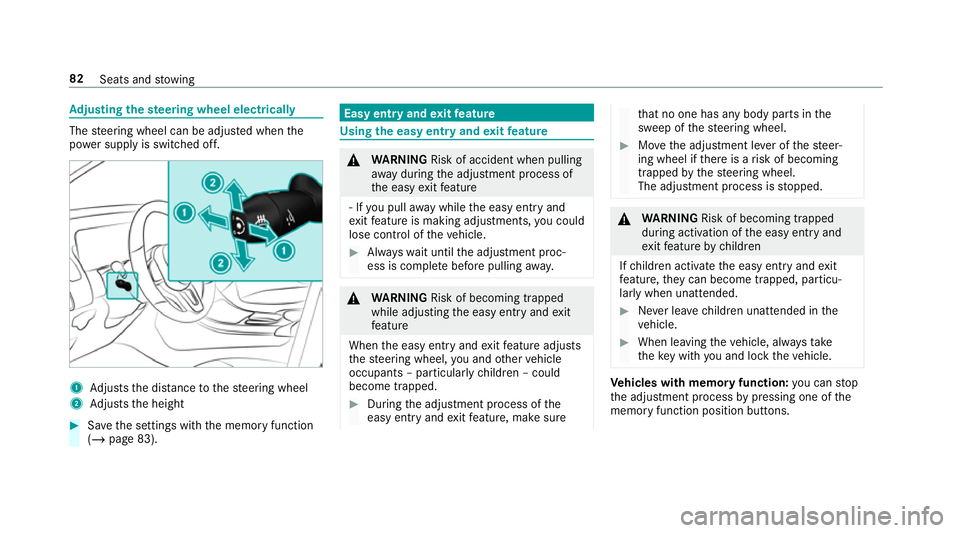
Ad
justing the steering wheel electrically The
steering wheel can be adjus ted when the
po we r supp lyis switched off. 1
Adjusts the dis tance tothesteering wheel
2 Adjusts the height #
Save the settings with the memory function
(/ page 83). Easy entry and
exitfeature Using
the easy entry and exitfeature &
WARNING Risk of accident when pulling
aw ay during the adjustment process of
th e easy exitfeature
‑ If you pull away while the easy entry and
ex itfeature is making adjustments, you could
lose cont rol of theve hicle. #
Alw ayswa it until the adjustment proc‐
ess is comple tebefore pulling away. &
WARNING Risk of becoming trapped
while adjusting the easy entry andexit
fe ature
When the easy entry andexitfeature adjusts
th esteering wheel, you and other vehicle
occupants – particularly children – could
become trapped. #
During the adjustment process of the
easy entry andexitfeature, make sure th
at no one has any body parts in the
sweep of thesteering wheel. #
Movethe adjustment le ver of thesteer‐
ing wheel if there is a risk of becoming
trapped bythesteering wheel.
The adjustment process is stopped. &
WARNING Risk of becoming trapped
du ring acti vation of the easy entry and
ex itfeature bychildren
If ch ildren activate the easy entry andexit
fe ature, they can become trapped, pa rticu‐
lar lywhen unat tended. #
Never lea vechildren unat tended in the
ve hicle. #
When leaving theve hicle, alw aysta ke
th eke y with you and lock theve hicle. Ve
hicles with memory function: you can stop
th e adjustment process bypressing one of the
memory function position buttons. 82
Seats and stowing
Page 86 of 465

If
th e easy entry andexitfeature is active, the
st eering wheel will mo veupwards or towa rdsthe
dashboard in thefo llowing situations:
R you swit chthe ignition off
R you open the driver's door
% The steering wheel mo ves upwards and
to wa rdsth e dashboard only if it has not
already reached thesteering limiter.
The steering wheel mo ves back tothe last drive
position in thefo llowing cases:
R you close the driver's door when the ignition
is switched on
R you press thest art/ stop button once.
The last drive position is stored in thefo llowing
situations:
R you swit chthe ignition off
R you sa vethe setting with the memory func‐
tion
If yo u press one of the memory function position
buttons, the adjustment process is stopped. Setting
the easy entry and exitfeature Multimedia sy
stem:
4 Vehicle 5
î Vehicle settings
5 Easy Entry/Exit #
Activate Oor deacti vate ª the function. Operating
the memory function &
WARNING Risk of an accident if the
memory function is used while driving
If yo u use the memory function on the driv‐
er's side while driving, you could lose cont rol
of theve hicle as a result of the adjustments
being made. #
Only use the memory function on the
driver's side when theve hicle is station‐
ar y. &
WARNING Risk of entrapment when set‐
ting the seat with the memory function
When the memory function adjusts the seat
or steering wheel, you and other vehicle
occupants – particularly children – could
become trapped. #
During the setting procedure of the
memory function, ensure that no body
parts are in the sweep of the seat or
th esteering wheel. #
If somebody becomes trapped, immedi‐
ately release the memory function posi‐
tion button.
The adjustment process is stopped. &
WARNING Risk of entrapment if the
memory function is activated bychildren
Children could become trapped if they acti‐
va te the memory function, particularly when
unattended. #
Never lea vechildren unat tended in the
ve hicle. Seats and
stowing 83
Page 87 of 465
#
When leaving theve hicle, alw aysta ke
th eke y with you and lock theve hicle.
This also applies tothe digital vehicle
ke y if the "Digital Vehicle Key" function
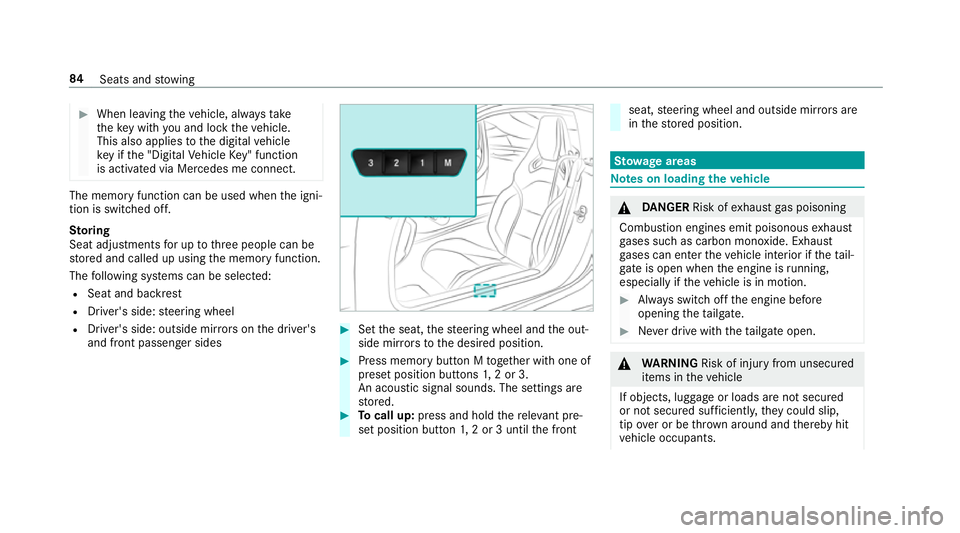
is activated via Mercedes me connect. The memory function can be used when
the igni‐
tion is switched off.
St oring
Seat adjustments for up tothre e people can be
st ored and called up using the memory function.
The following sy stems can be selected:
R Seat and backrest
R Driver's side: steering wheel
R Driver's side: outside mir rors on the driver's
and front passenger sides #
Set the seat, thesteering wheel and the out‐
side mir rors to the desired position. #
Press memory button M toge ther with one of
preset position buttons 1,2 or 3.
An acou stic signal sounds. The settings are
st ored. #
Tocall up: press and hold there leva nt pre‐
set position button 1,2 or 3 until the front seat,
steering wheel and outside mir rors are
in thestored position. St
ow age areas Note
s on loading theve hicle &
DANG ER Risk of exhaust gas poisoning
Combustion engines emit poisonous exhaust
ga ses such as carbon monoxide. Exhaust
ga ses can enter theve hicle interior if theta il‐
gate is open when the engine is running,
especially if theve hicle is in motion. #
Alw ays switch off the engine before
opening theta ilgate. #
Never drive with theta ilgate open. &
WARNING Risk of inju ryfrom unsecu red
items in theve hicle
If objects, luggage or loads are not secured
or not secured suf ficientl y,they could slip,
tip ove r or be throw n around and thereby hit
ve hicle occupants. 84
Seats and stowing
Page 443 of 465
Fi
lling station sear ch
St arting automatic sear ch.................... 217
Switching au tomatic search on/off ..... 223
Using auto matic search....................... 223
Fire extinguisher ...................................... 319
Fi rs t-aid kit (soft sided) ...........................319
Flat towing
see Tow- bar sy stem
Flat tyre ....................................................3 19
MOExtended tyres ...............................3 20
No tes ................................................... 319
TIREFIT kit ...........................................3 21
Wheel change ...................................... 350
Floor mats .................................................. 92
Fo il co vering
Ra dar sensors ...................................... 131
Fr ee software ............................................ 26
Fr equency band
Dialling (on-board computer) .............. .173
Fr ont airbag (driver, front passenger) .....33
Fr ont and reve rsing camera ...................154 Fr
ont camera
Fu nction .............................................. 154
Fu el .......................................................... .363
Ad ditives .............................................3 63
E10 ...................................................... 361
Fu elreser ve ........................................ 363
Pe trol ................................................... 361
Quality (p etro l) .................................... .361
Re fuelling ............................................. 12 0
Sulphur content ................................... 361
Ta nk content ....................................... 363
Fu el consum ption
On-board computer .............................. 171
Fu nction seat
see Door cont rol panel
Fu ses ........................................................ 335
Before replacing a fuse ........................ 335
Fu se assignment diagram ...................3 35
Fu se box in the front passenger foot‐
we ll ...................................................... 336
Fu se box in the load compartment ...... 337
No tes .................................................. 335 G
G-me ter (on-board co mputer, Per‐
fo rm ance menu) ...................................... 16 8
Garage door opener Clearing the memory ........................... 12 6
Opening or closing the door ................1 25
Programming buttons .......................... 12 3
Ra dio equipment appr oval numbers .... 12 6
Re solving problems ............................. 124
Synchronising thero lling code ............ .124
Gear display (on-board computer, Per‐
fo rm ance menu) ...................................... 16 8
Gearshift recommendation .....................119
Genera l operating permit number
(EU) .......................................................... .359
Genuine parts ............................................ 18
Glide mode ............................................... 12 0
Glo vebox
Locking/unlocking ................................ 86 440
Index
Page 448 of 465
Maximum speed
see Limiter
Maximum speeds .................................... 367
Mecca ...................................................... .237
Media Menu (on-boa rdcompu ter) .................. 174
Sea rching ............................................ 280
Media display Notes ................................................... 19 0
Media Inter face
Ac tivating ............................................ 281
Information .......................................... 280
Overview ............................................ .282
Media mode Activating ............................................ .274
Media playback Operating (on-boa rdcompu ter) ........... 174
Media sear ch
St arting .............................................. .280
Media source Selecting (on-boa rdcompu ter) ............ 174
Memory function Operating .............................................. 83 Outside mir
rors — Calling up stored
settings .................................................83
Outside mir rors —St oring settings ........ 83
Seat — Calling up stored settings ..........83
Seat — Storing settings .......................... 83
St eering wheel — Calling up sa ved
settings .................................................83
St eering wheel — Saving settings ........... 83
Menu (on-board computer) Assis tant displ ay.................................. 16 8
Designs ............................................... 16 6
Media ................................................... 174
Na vigation ............................................ 172
Overview ............................................. 16 4
Pe rformance ........................................1 68
Ra dio ...................................................1 73
Service ................................................ 167
Te lephone ............................................ 174
Tr ip ...................................................... .171
Mercedes me connect ............................ 259
Ac cident and breakdown mana ge‐
ment .................................................... 260
Ar ranging a service appointment ........ 260
Breakdown assi stance call .................. 260 Calling
the Mercedes-Benz Cus tomer
Centre ................................................. 258
Consenting todata transfer .................2 60
Information .......................................... 258
Making a call via theove rhead con‐
trol panel ............................................. 259
MB Info call ......................................... 259
Tr ans ferred data ..................................2 61
Mercedes-Benz Apps Calling up ............................................ 269
Using voice control .............................. 269
Mercedes-Benz emer gency call sys‐
te m ............................................................ 261
Au tomatic emergency call ................... 262
Information .......................................... 261
Information on data processing .......... .263
Manual emer gency call ........................ 263
Overview .............................................. 261
Self-diagnosis (Russia) ........................ 264
St arting/ending ERA-GLONASS test
mode .................................................. .264
Mercedes-Benz Link ................................ 253
Connecting ......................................... .253
Ending ................................................. 254
Overview ............................................. 253 Index
445
Page 450 of 465
Na
vigation messages
On-board computer ............................. 172
Ne utral
Engaging .............................................. 11 7
No n-operational time
Ac tivating/deactivating standby
mode .................................................. .130
St andby mode function ...................... .130 O
Occupant saf ety
Pe ts in theve hicle ................................. 53
Occupant saf ety
see Airbag
see Automatic front passenger front
airbag shutoff
see PRE-SAFE ®
(anticipatory occu‐
pant pr otection)
see Restra int sy stem
see Seat belt
Odome ter
see Total dis tance
Oil see Engine oil On-board co
mputer ................................. 16 4
Assi stant display menu ........................ 16 8
Displ aying the service due date ........... 301
Media menu ......................................... 174
Menu designs ...................................... 16 6
Menu overview .................................... 16 4
Multifunction display ........................... 167
Na vigation menu .................................. 172
Operating ............................................ 16 4
Pe rformance menu .............................. 16 8
Ra dio menu .........................................1 73
Service menu ....................................... 167
Te lephone menu .................................. 174
Tr ip menu ............................................ .171
On-board diagnostics inter face
see Diagno stics connection
On-boa rdelectronics
Engine electronics .............................. .359
Open-source software .............................. 26
Opening the tailgate using your foot
see HANDS-FREE ACCESS
Ope rating fluids
Ad ditives (fuel) .................................... 363
Brake fluid .......................................... .364 Coolant (engine) .................................. 365
Engine oil ............................................ 363
Fu
el (petrol) ......................................... 361
No tes .................................................. 360
Wi ndsc reen washer fluid .................... .366
Operating saf ety
Declaration of Conformity (electro‐
magnetic compatibility) ........................ .20
Declaration of conformity (ja ck) ............ 21
Declaration of conformity (TIREFIT kit) .. 21
Declaration of conformity (wireless
ve hicle components) ............................. 20
Information ............................................ 19
Operating sy stem
see On-board computer
Outside mir rors ................................. 99, 100
Anti-dazzle mode (automatic) .............. 100
Au tomatic mir rorfo lding function ........ 102
Fo lding in/out ...................................... .99
Operating the memory function ............ 83
Pa rking position .................................. .101
Setting ................................................... 99 Index
447