econ MERCEDES-BENZ AMG GT S 2016 C190 User Guide
[x] Cancel search | Manufacturer: MERCEDES-BENZ, Model Year: 2016, Model line: AMG GT S, Model: MERCEDES-BENZ AMG GT S 2016 C190Pages: 290, PDF Size: 6.73 MB
Page 55 of 290
Important safety notes
iObserveth e"Importan tsafet ynotes" sec -
tion (Ypage 52).
GWARNIN G
If BA Sis malfunctioning ,th ebraking distanc e
in an emergenc ybraking situation is
increased. Ther eis aris kof an accident.
In an emergenc ybraking situation ,depress
th ebrak epedal wit hfull force .AB Sprevents
th ewheels from locking.
Braking
XKee pth ebrak epedal firmly depressed until
th eemergenc ybraking situation is over.
AB Sprevents th ewheels from locking.
The brakes will function as usual once you
release th ebrak epedal .BA Sis deactivated.
COLLISION PREVENTION ASSIST
PLUS
General information
iObserv eth e"Importan tsafet ynotes" sec -
tion (Ypage 52).
COLLISION PREVENTION ASSIST PLU Sconsist s
of adistanc ewarning function wit han autono -
mous braking function and adaptive Brake
Assist .
COLLISION PREVENTION ASSIST PLU Scan help
you to minimiz eth eris kof afront-en dcollision
wit h a vehicl eahead or reduce th eeffects of
suc h a collision .
If COLLISION PREVENTION ASSIST PLU S
detects that there is aris kof acollision ,you will
be warned visually and acoustically. If you do no t
reac tto th evisual and audible collision warning ,
autonomous braking can be initiate din critical
situations. If you apply th ebrak eyourself in a
critical situation ,th eCOLLISION PREVENTION
ASSIST PLU Sadaptive Brake Assist assist syou.
Important safety notes
In particular, th edetection of obstacles can be
impaire dif:
Rthere is dirt on th esensor sor anythin gelse
covering th esensor s
Rthere is snow or heav yrain
Rthere is interferenc eby other radar source s
Rthere are strongradar reflections, for exam-
ple in parking garages
Ra narrow vehicl etraveling in front, e.g. a
motorbike
Ra vehicl etraveling in fron ton adifferen tlin e
Rne wvehicles or after aservic eon th eCOLLI-
SION PREVENTION ASSIST PLU Ssystem
Observ eth eimportant safet ynote sin th e
"Breaking-in notes" section (
Ypage 101).
Followin gdamag eto th efron ten dof th evehicle,
hav eth econfiguration and operation of th e
radar sensor checke dat aqualified specialist
workshop. This also applie sto collision sat slow
speeds wher ethere is no visible damag eto th e
fron tof th evehicle.
Switching on/off
The COLLISION PREVENTION ASSIST PLU Sis
automatically active after switching on th eigni-
tion .
You can activat eor deactivat eCOLLISION PRE -
VENTION ASSIST PLU Sin th eon-board com-
puter (
Ypage 160). When deactivated, th edis-
tance warning function and th eautonomous
braking function are also deactivated.
If COLLISION PREVENTION ASSIST PLU Sis
deactivated, th eæ symbol appear sin th e
assistanc egraphic sdisplay.
Distance warning function
Gene ral information
The distanc ewarning function can help you to
minimiz eth eris kof afront-en dcollision wit h a
vehicl eahead or reduce th eeffects of suc h a
collision .If th edistanc ewarning function
detects that there is aris kof acollision ,you will
be warned visually and acoustically.
Import ant safety notes
iObserveth e"Importan tsafet ynotes" sec -
tion for driving safet ysystems (Ypage 52).
Driving safety systems53
Safety
Z
Page 60 of 290
GWARNING
If EBD is malfunctioning, the rear wheels can
lock, e.g. under full braking. This increases the
risk of skidding and an accident.
You should therefore adapt your driving style
to the different handling characteristics. Have
the brake system checked at a qualified spe-
cialist workshop.
Observe information regarding indicator and
warning lamps (
Ypage 192) as well as display
messages (Ypage 169).
ADAPTIVE BRAKE
ADAPTIVE BRAKE enhances braking safety and
offers increased braking comfort. In addition to
the braking function, ADAPTIVE BRAKE also fea-
tures the hill start assist function (
Ypage 104).
Protection against theft
Immobilizer
The immobilizer prevents your vehicle from
being started without the correct SmartKey.
XTo activate with KEYLESS-GO start-func-
tion or KEYLESS-GO: switch the ignition off
and open the driver's door.
XTo activate with the SmartKey: remove the
SmartKey from the ignition lock.
XTo deactivate: switch on the ignition.
When leaving the vehicle, always take the
SmartKey with you and lock the vehicle. Anyone
can start the engine if a valid SmartKey has been
left inside the vehicle.
iThe immobilizer is always deactivated when
you start the engine.
In the event that the engine cannot be started
(yet the vehicle's battery is charged), the sys- tem is not operational. Contact an authorized
Mercedes-Benz Center or call
1-800-FOR-MERCedes (in the USA) or
1-800-387-0100 (in Canada).
ATA (anti-theft alarm system)
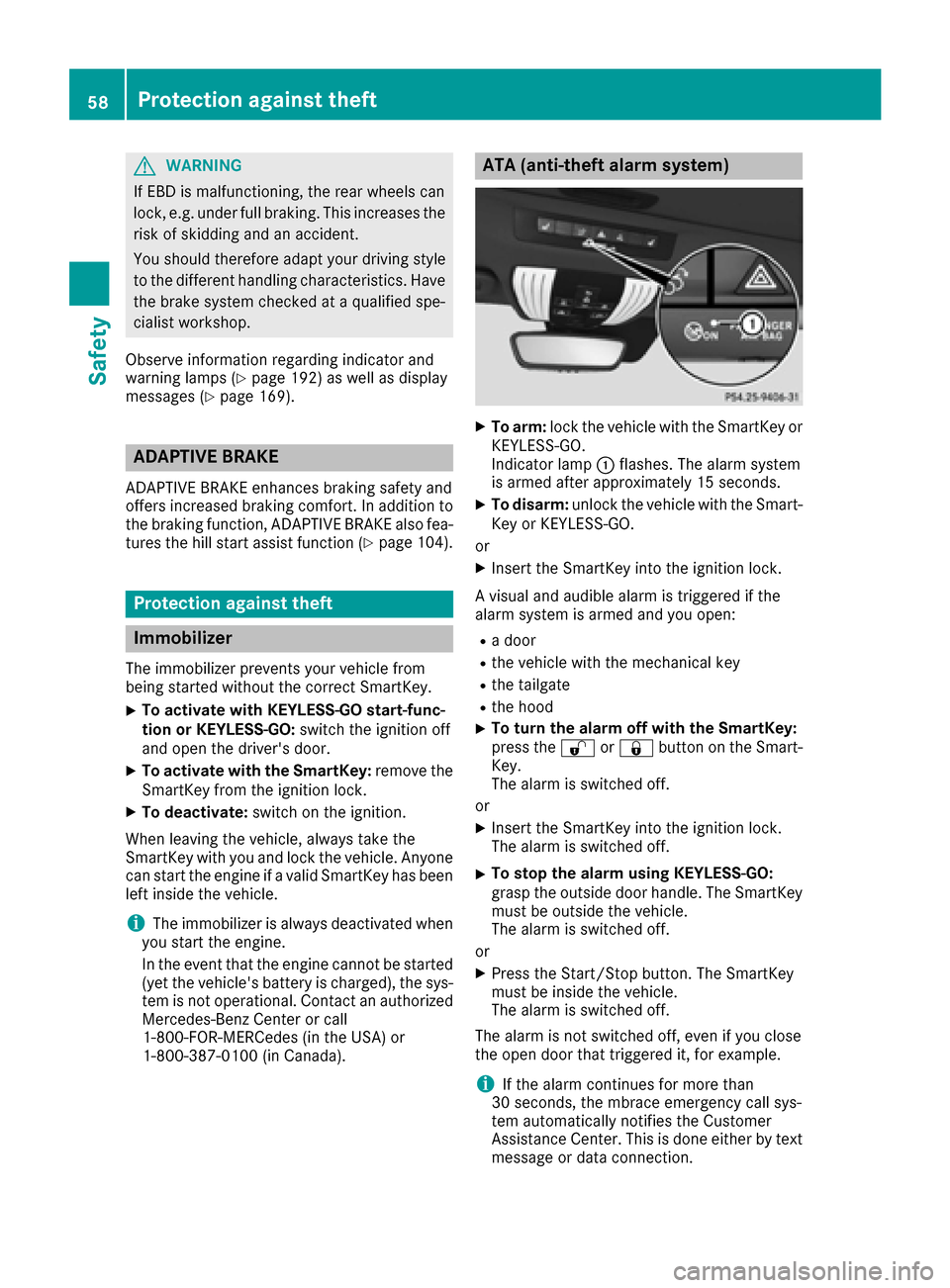
XTo arm: lock the vehicle with the SmartKey or
KEYLESS-GO.
Indicator lamp :flashes. The alarm system
is armed after approximately 15 seconds.
XTo disarm: unlock the vehicle with the Smart-
Key or KEYLESS-GO.
or
XInsert the SmartKey into the ignition lock.
A visual and audible alarm is triggered if the
alarm system is armed and you open:
Ra door
Rthe vehicle with the mechanical key
Rthe tailgate
Rthe hood
XTo turn the alarm off with the SmartKey:
press the %or& button on the Smart-
Key.
The alarm is switched off.
or
XInsert the SmartKey into the ignition lock.
The alarm is switched off.
XTo stop the alarm using KEYLESS-GO:
grasp the outside door handle. The SmartKey
must be outside the vehicle.
The alarm is switched off.
or
XPress the Start/Stop button. The SmartKey
must be inside the vehicle.
The alarm is switched off.
The alarm is not switched off, even if you close
the open door that triggered it, for example.
iIf the alarm continues for more than
30 seconds, the mbrace emergency call sys-
tem automatically notifies the Customer
Assistance Center. This is done either by text
message or data connection.
58Protection against theft
Safety
Page 62 of 290
SmartKey
Important safety notes
GWARNING
If children are left unsupervised in the vehicle,
they could:
Ropen the doors, thus endangering other
people or road users.
Rget out and disrupt traffic.
Roperate the vehicle's equipment.
Additionally, children could set the vehicle in
motion if, for example, they:
Rrelease the parking brake.
Rshifting the automatic transmission out of
park position P
RStart the engine.
There is a risk of an accident and injury.
When leaving the vehicle, always take the
SmartKey with you and lock the vehicle. Never
leave children or animals unattended in the
vehicle. Always keep the SmartKey out of
reach of children.
GWARNING
If you attach heavy or large objects to the
SmartKey, the SmartKey could be uninten-
tionally turned in the ignition lock. This could
cause the engine to be switched off. There is a risk of an accident.
Do not attach any heavy or large objects to the
SmartKey. Remove any bulky key rings before
inserting the SmartKey into the ignition lock.
!Keep the SmartKey away from strong mag-
netic fields. Otherwise, the remote control
function could be affected.
Strong magnetic fields can occur in the vicin-
ity of powerful electrical installations.
Do not keep the SmartKey:
Rwith electronic devices, e.g. a mobile phone
or another SmartKey.
Rwith metallic objects, e.g. coins or metal foil.
Rinside metallic objects, e.g. a metal case.
This can affect the functionality of the Smart- Key. Vehicles with KEYLESS-GO start function:
do
not keep the SmartKey on the cargo compart-
ment cover or in the cargo compartment. Oth-
erwise, the SmartKey may not be detected, e.g.
when starting the engine using the Start/Stop
button.
A check which periodically establishes a radio
connection between the vehicle and the Smart-
Key determines whether a valid SmartKey is in
the vehicle. This occurs, for example:
Rwhen starting the engine
Rwhilst driving
Rwhen using HANDS-FREE ACCESS
Rwhen the external door handles are touched
Rduring convenience closing
SmartKey functions
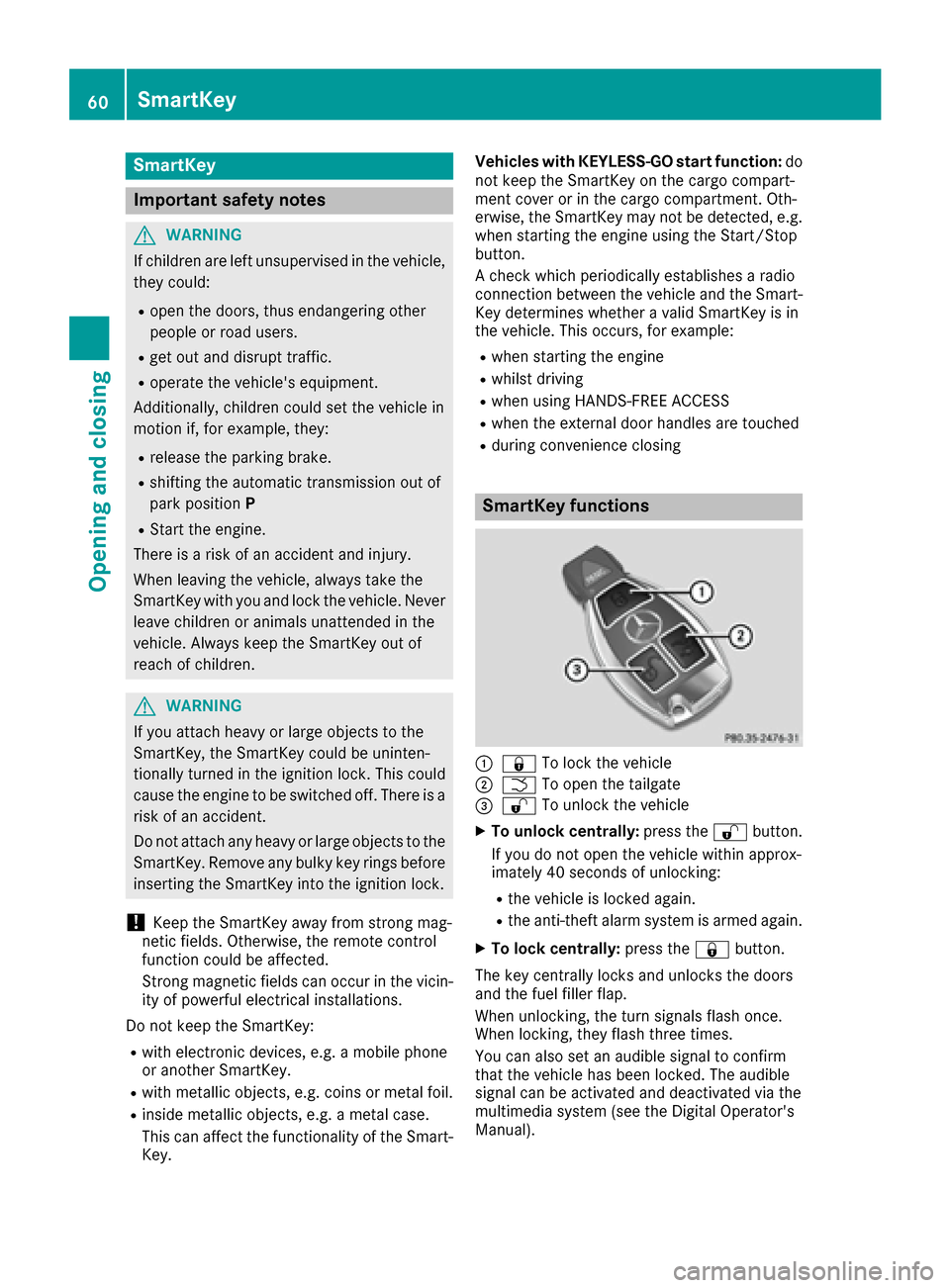
:& To lock the vehicle
;FTo open the tailgate
=%To unlock the vehicle
XTo unlock centrally: press the%button.
If you do not open the vehicle within approx-
imately 40 seconds of unlocking:
Rthe vehicle is locked again.
Rthe anti-theft alarm system is armed again.
XTo lock centrally: press the&button.
The key centrally locks and unlocks the doors
and the fuel filler flap.
When unlocking, the turn signals flash once.
When locking, they flash three times.
You can also set an audible signal to confirm
that the vehicle has been locked. The audible
signal can be activated and deactivated via the
multimedia system (see the Digital Operator's
Manual).
60SmartKey
Opening and closing
Page 64 of 290
Changing the settings of the locking
system
You can change the settings of the locking sys-
tem. This means that only the driver's door and
the fuel filler flap are unlocked when the vehicle
is unlocked. This is useful if you frequently travel
on your own.
XTo change the setting:press and hold down
the % and& buttons simultaneously
for about six seconds until the battery indica-
tor lamp flashes twice (
Ypage 63).
If the setting of the locking system is changed
within the signal range of the vehicle, pressing
the & or% button:
Rlocks or
Runlocks the vehicle
The SmartKey now functions as follows:
XTo unlock: press the%button once.
XTo unlock centrally: press the%button
twice.
XTo lock: press the &button.
The KEYLESS-GO functions can be changed as
follows:
XTo unlock the driver's door: touch the inner
surface of the door handle on the driver's
door.
XTo unlock centrally: touch the inner surface
of the front-passenger door handle.
XTo lock centrally: touch the outer sensor
surface on one of the door handles.
XTo restore the factory settings: press and
hold down the %and& buttons simul-
taneously for approximately six seconds until
the battery check lamp flashes twice
(
Ypage 63).
Mechanical key
General notes
If the vehicle can no longer be locked or
unlocked with the SmartKey or KEYLESS-GO,
use the mechanical key.
If you use the mechanical key to unlock and
open the driver's door, the anti-theft alarm sys-
tem will be triggered. Switch off the alarm
(
Ypage 58). If you unlock the vehicle using the mechanical
key, the fuel filler flap will not be unlocked auto-
matically.
XTo unlock the fuel filler flap:
insert the
SmartKey into the ignition lock.
Removing the mechanical key
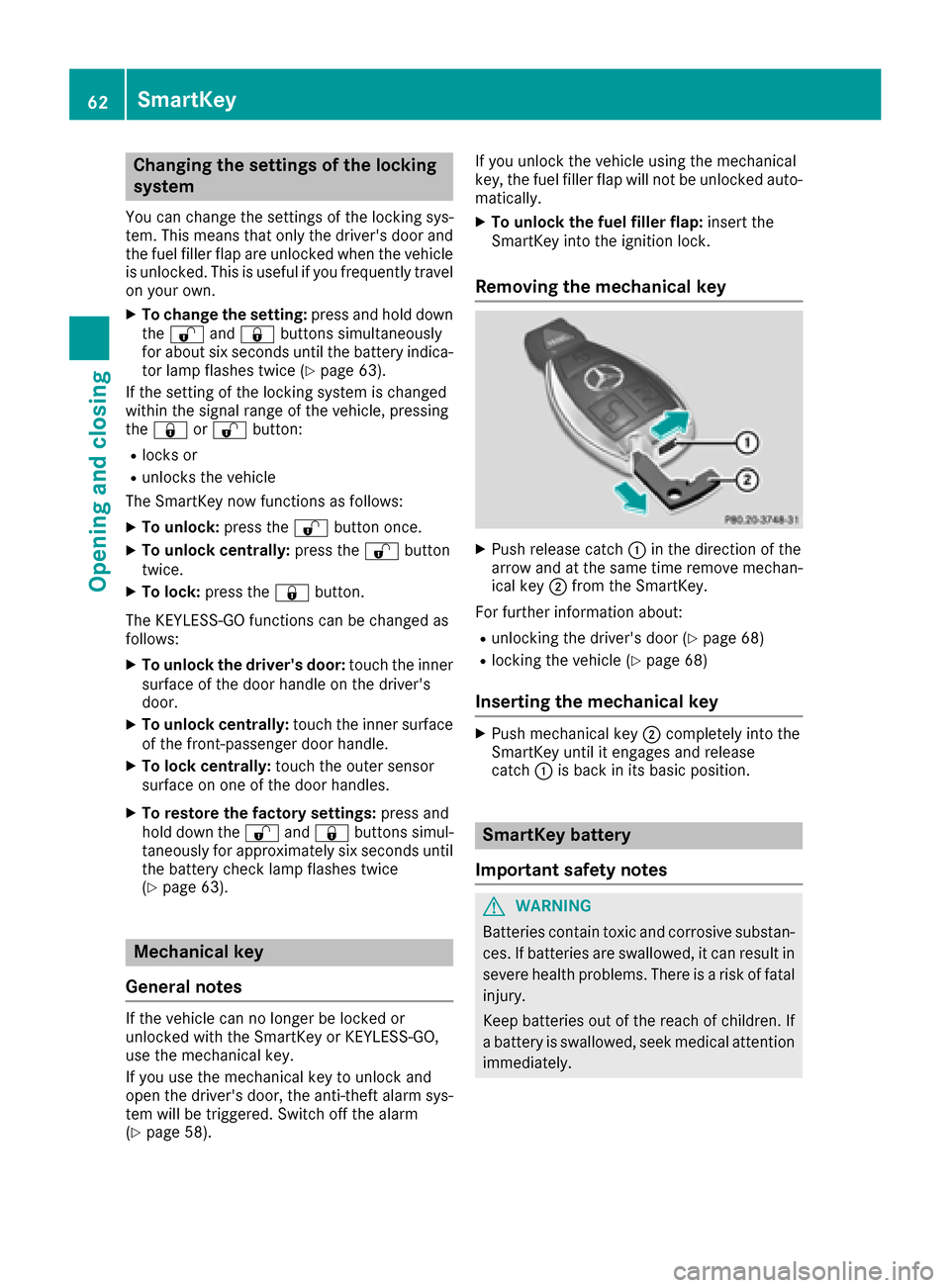
XPush release catch :in the direction of the
arrow and at the same time remove mechan- ical key ;from the SmartKey.
For further information about:
Runlocking the driver's door (Ypage 68)
Rlocking the vehicle (Ypage 68)
Inserting the mechanical key
XPush mechanical key ;completely into the
SmartKey until it engages and release
catch :is back in its basic position.
SmartKey battery
Important safety notes
GWARNING
Batteries contain toxic and corrosive substan- ces. If batteries are swallowed, it can result in
severe health problems. There is a risk of fatalinjury.
Keep batteries out of the reach of children. If
a battery is swallowed, seek medical attention
immediately.
62SmartKey
Opening and closing
Page 69 of 290
!The side windows will not open/close if the
battery is discharged or if the side windows
have iced up. It will then not be possible to
close the door. Do not attempt to force the
door closed. You could otherwise damage the
door or the side window.
Unlocking and opening doors from
the inside
You can open a door from inside the vehicle
even if it has been locked. If the vehicle has been
locked with the SmartKey or with KEYLESS-GO,
opening a door from the inside will trigger the
anti-theft alarm system. Switch off the alarm
(
Ypage 58).
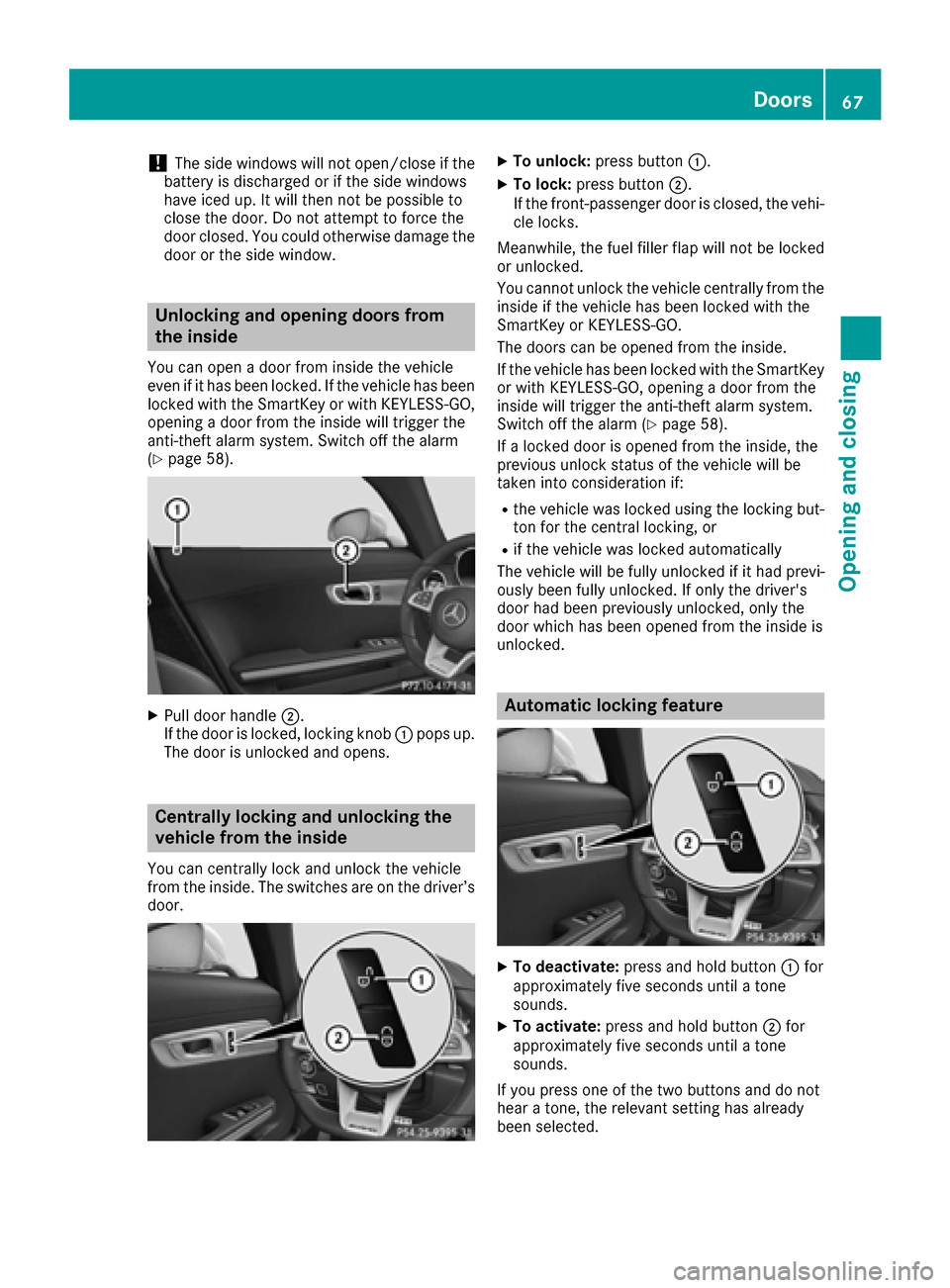
XPull door handle ;.
If the door is locked, locking knob :pops up.
The door is unlocked and opens.
Centrally locking and unlocking the
vehicle from the inside
You can centrally lock and unlock the vehicle
from the inside. The switches are on the driver’s
door.
XTo unlock: press button :.
XTo lock:press button ;.
If the front-passenger door is closed, the vehi-
cle locks.
Meanwhile, the fuel filler flap will not be locked
or unlocked.
You cannot unlock the vehicle centrally from the
inside if the vehicle has been locked with the
SmartKey or KEYLESS-GO.
The doors can be opened from the inside.
If the vehicle has been locked with the SmartKey
or with KEYLESS-GO, opening a door from the
inside will trigger the anti-theft alarm system.
Switch off the alarm (
Ypage 58).
If a locked door is opened from the inside, the
previous unlock status of the vehicle will be
taken into consideration if:
Rthe vehicle was locked using the locking but-
ton for the central locking, or
Rif the vehicle was locked automatically
The vehicle will be fully unlocked if it had previ-
ously been fully unlocked. If only the driver's
door had been previously unlocked, only the
door which has been opened from the inside is
unlocked.
Automatic locking feature
XTo deactivate: press and hold button :for
approximately five seconds until a tone
sounds.
XTo activate: press and hold button ;for
approximately five seconds until a tone
sounds.
If you press one of the two buttons and do not
hear a tone, the relevant setting has already
been selected.
Doors67
Opening and closing
Z
Page 72 of 290
Observe the following points:
RCarry your KEYLESS-GO key about your per-
son. The KEYLESS-GO key must be in the rear
detection range of the vehicle.
RWhen making the kicking movement, make
sure that you are standing firmly on the
ground and that there is sufficient clearance
to the rear of the vehicle. You could otherwise
lose your balance e.g. on ice.
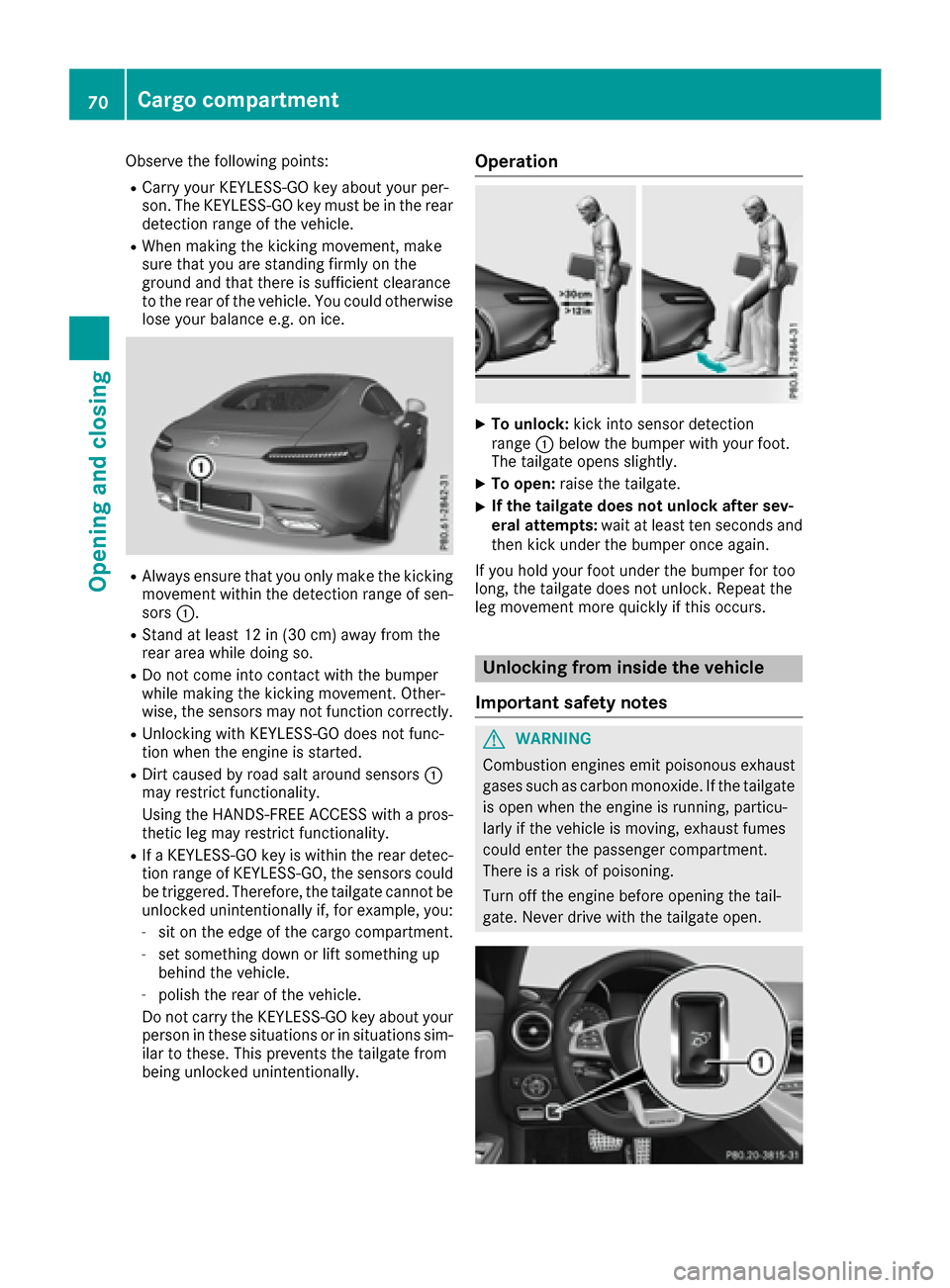
RAlways ensure that you only make the kicking
movement within the detection range of sen-
sors :.
RStand at least 12 in (30 cm) away from the
rear area while doing so.
RDo not come into contact with the bumper
while making the kicking movement. Other-
wise, the sensors may not function correctly.
RUnlocking with KEYLESS-GO does not func-
tion when the engine is started.
RDirt caused by road salt around sensors :
may restrict functionality.
Using the HANDS-FREE ACCESS with a pros-
thetic leg may restrict functionality.
RIf a KEYLESS-GO key is within the rear detec-
tion range of KEYLESS-GO, the sensors could
be triggered. Therefore, the tailgate cannot be
unlocked unintentionally if, for example, you:
-sit on the edge of the cargo compartment.
-set something down or lift something up
behind the vehicle.
-polish the rear of the vehicle.
Do not carry the KEYLESS-GO key about your
person in these situations or in situations sim-
ilar to these. This prevents the tailgate from
being unlocked unintentionally.
Operation
XTo unlock: kick into sensor detection
range :below the bumper with your foot.
The tailgate opens slightly.
XTo open: raise the tailgate.
XIf the tailgate does not unlock after sev-
eral attempts: wait at least ten seconds and
then kick under the bumper once again.
If you hold your foot under the bumper for too
long, the tailgate does not unlock. Repeat the
leg movement more quickly if this occurs.
Unlocking from inside the vehicle
Important safety notes
GWARNING
Combustion engines emit poisonous exhaust
gases such as carbon monoxide. If the tailgate is open when the engine is running, particu-
larly if the vehicle is moving, exhaust fumes
could enter the passenger compartment.
There is a risk of poisoning.
Turn off the engine before opening the tail-
gate. Never drive with the tailgate open.
70Cargo compartment
Opening and closing
Page 75 of 290
Using the SmartKey
XPress and hold the&button until the side
windows are fully closed.
XMake sure that all the side windows are
closed.
XTo interrupt convenience closing: release
the & button.
Using KEYLESS-GO
The driver's door and the door at which the han-
dle is used, must both be closed. The SmartKey
must be outside the vehicle. The gap between
the SmartKey and the corresponding door han-
dle should not be greater than 3 ft (1 m).
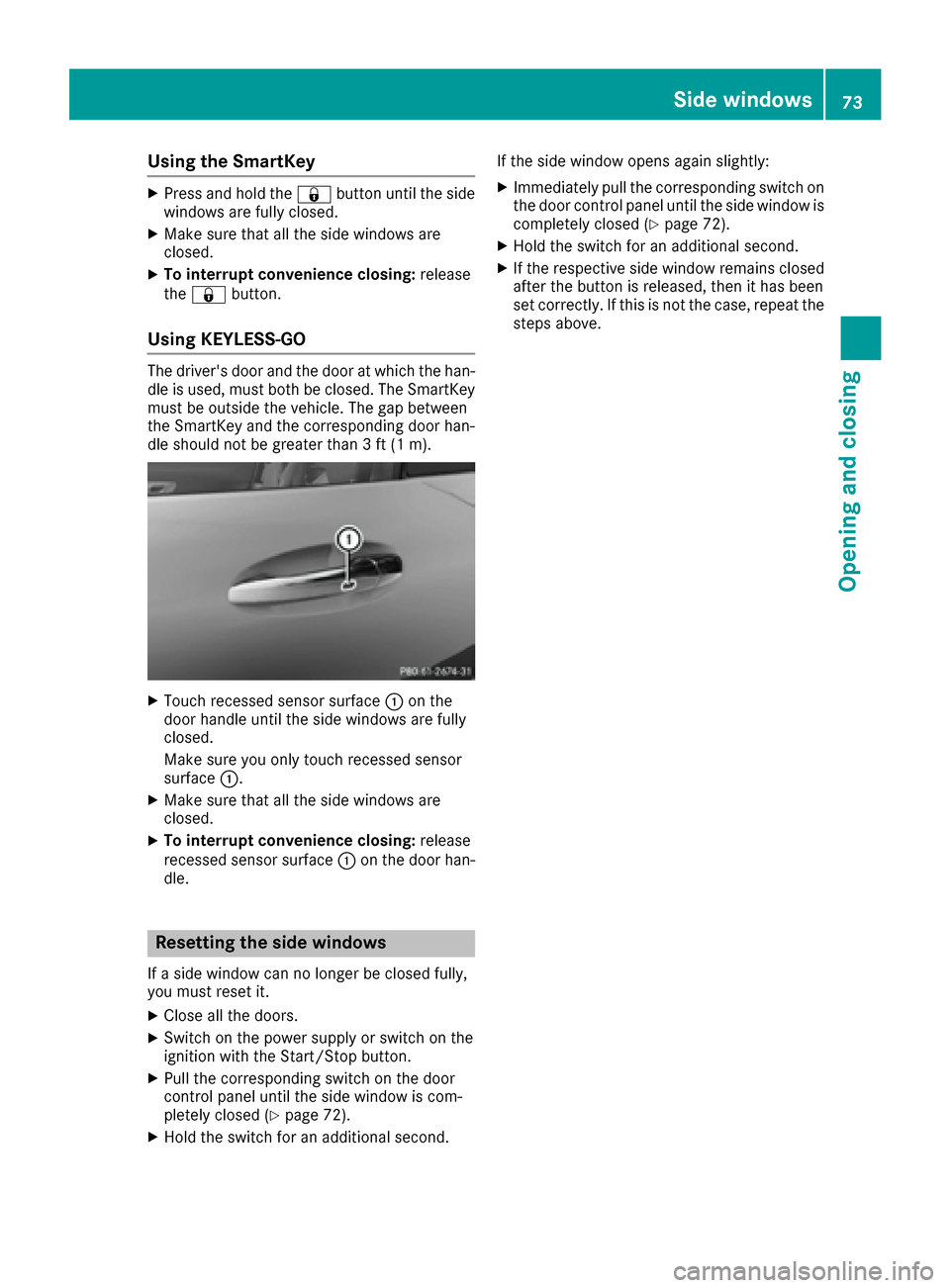
XTouch recessed sensor surface :on the
door handle until the side windows are fully
closed.
Make sure you only touch recessed sensor
surface :.
XMake sure that all the side windows are
closed.
XTo interrupt convenience closing: release
recessed sensor surface :on the door han-
dle.
Resetting the side windows
If a side window can no longer be closed fully,
you must reset it.
XClose all the doors.
XSwitch on the power supply or switch on the
ignition with the Start/Stop button.
XPull the corresponding switch on the door
control panel until the side window is com-
pletely closed (
Ypage 72).
XHold the switch for an additional second. If the side window opens again slightly:
XImmediately pull the corresponding switch on
the door control panel until the side window is
completely closed (
Ypage 72).
XHold the switch for an additional second.
XIf the respective side window remains closed
after the button is released, then it has been
set correctly. If this is not the case, repeat the
steps above.
Side windows73
Opening and closing
Z
Page 78 of 290
GWARNING
You could lose control of your vehicle if you do the following while driving:
Radjust the driver's seat, head restraint,
steering wheel or mirrors
Rfasten the seat belt
There is a risk of an accident.
Adjust the driver's seat, head restraint, steer-
ing wheel and mirror and fasten your seat belt before starting the engine.
For safety reasons, seat fore-and-aft adjustment
on electrically adjustable seats is only possible
for a maximum of two seconds when the vehicle
is in motion. The seat fore-and-aft adjustment
can then no longer be set.
GWARNING
If you adjust the seat height carelessly, you or
other vehicle occupants could be trapped and
thereby injured. Children in particular could
accidentally press the electrical seat adjust-
ment buttons and become trapped. There is a
risk of injury.
While moving the seats, make sure that your
hands or other body parts do not get under the
lever assembly of the seat adjustment sys-
tem.
GWARNING
If head restraints are not adjusted correctly,
they cannot provide protection as intended.
There is an increased risk of injury in the head
and neck area, e.g. in the event of an accident or when braking.
Before driving off, make sure for every vehicle
occupant that the center of the head restraint
supports the back of the head at about eye
level.
GWARNING
The seat belt does not offer the intended level of protection if you have not moved the back-
rest to an almost vertical position. When brak-
ing or in the event of an accident, you could
slide underneath the seat belt and sustain
abdomen or neck injuries, for example. This
poses an increased risk of injury or even fatal injury.
Adjust the seat properly before beginning
your journey. Always ensure that the backrest
is in an almost vertical position and that the
shoulder section of your seat belt is routed
across the center of your shoulder.
!To avoid damage to the seats and the seat
heating, observe the following information:
Rkeep liquids from spilling on the seats. If
liquid is spilled on the seats, dry them as
soon as possible.
Rif the seat covers are damp or wet, do not
switch on the seat heating. The seat heat-
ing should also not be used to dry the seats.
Rclean the seat covers as recommended;
see "Interior care".
Rdo not transport heavy loads on the seats.
Do not place sharp objects on the seat
cushions, e.g. knives, nails or tools. The
seats should only be occupied by passen-
gers, if possible.
Rwhen the seat heating is in operation, do
not cover the seats with insulating materi-
als, e.g. blankets, coats, bags, seat covers,
child seats or booster seats.
!Make sure that there are no objects in the
footwell under or behind the seats when mov-
ing the seats back. There is a risk that the
seats and/or the objects could be damaged.
Adjusting the seats manually
General notes
The manually adjustable seat is only available in
Canada.
76Seats
Seats, steering wheel and mirrors
Page 79 of 290
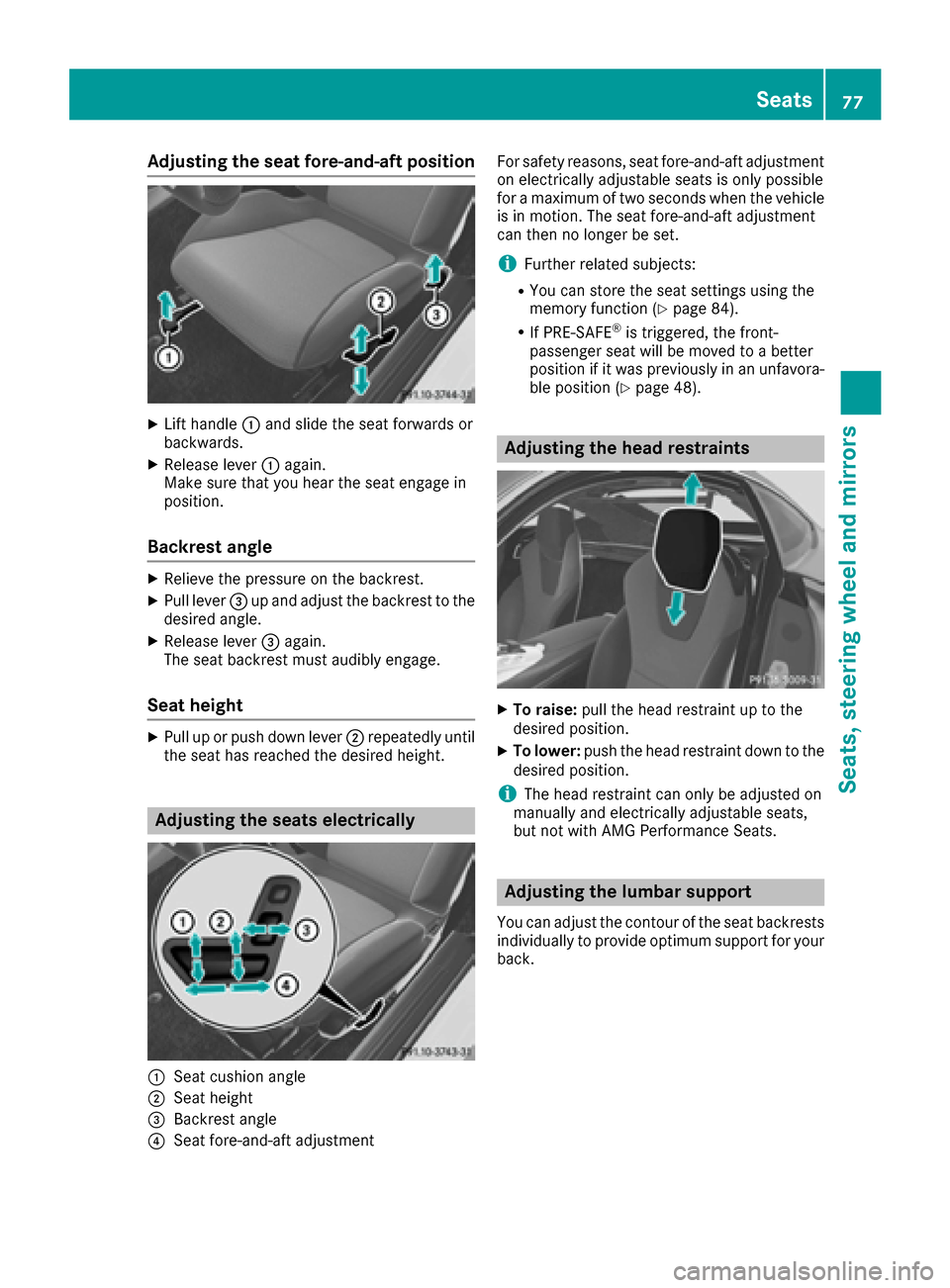
Adjusting the seat fore-and-aft position
XLifthandle :and slid eth eseat forward sor
backwards .
XReleaselever :again .
Mak esur ethat you hear th eseat engage in
position .
Backrest angle
XRelieveth epressur eon th ebackrest .
XPull lever =up and adjust th ebackrest to th e
desired angle.
XReleas elever =again .
The seat backrest mus taudibly engage .
Seat height
XPull up or push down lever ;repeatedly until
th eseat has reached th edesired height .
Adjusting the seats electri cally
:Seat cushion angle
;Seat height
=Backrest angle
?Seat fore-and-aftadjustmen t Fo
rsafet yreasons, seat fore-and-af tadjustmen t
on electrically adjustable seat sis only possibl e
for amaximum of two seconds when th evehicl e
is in motion .The seat fore-and-af tadjustmen t
can then no longer be set .
iFurther relatedsubjects :
RYou can store th eseat setting susin gth e
memory function (Ypage 84).
RIf PRE-SAFE®is triggered ,th efront-
passenger seat will be moved to abette r
position if it was previously in an unfavora-
ble position (
Ypage 48).
Adjusting the head restraints
XTo raise: pull thehead restrain tup to th e
desired position .
XTo lower:push th ehead restrain tdown to th e
desired position .
iThe head restrain tcan only be adjusted on
manually and electrically adjustable seats,
but no twit hAM GPerformance Seats .
Adjusting the lumbar support
You can adjust thecontour of th eseat backrest s
individually to provid eoptimum support for your
back.
Seats77
Seats, steering wheel and mirrors
Z
Page 85 of 290
Automa tic anti-glare mirrors
GWARNING
Electrolyt emay escape if th eglas sin an auto -
matic anti-glare mirror breaks .The electrolyt e
is harmful and causes irritation .It mus tno t
come int ocontact wit hyour skin, eyes ,res -
piratory organs or clothing or be swallowed.
There is aris kof injury.
If you come int ocontact wit hth eelectrolyte,
observ eth efollowing:
RRins eoff th eelectrolyt efrom your skin
immediately wit hwater.
RImmediately rinse th eelectrolyt eout of
your eyes thoroughly wit hclean water.
RIf th eelectrolyt eis swallowed, immediately
rinse your mout hout thoroughly. Do no t
induce vomiting .
RIf electrolytecomes int ocontact wit hyour
skin or hair or is swallowed, see kmedical
attention immediately.
RImmediately chang eout of clothing whic h
has come int ocontact wit helectrolyte.
RIf an allergic reaction occurs, see kmedical
attention immediately.
The rear-view mirror and th eexterio rmirror on
th edriver's side automatically go int oanti-glare
mod eif th efollowin gcondition sare met simul-
taneously:
Rth eignition is switched on
Rinciden tligh tfrom headlamp sstrikes th esen -
sor in th erear-view mirror
The mirror sdo no tgo int oanti-glare mod eif
revers egear is engage dor if th einte
rior lighting
is switched on .
Parking position for the exteri or mir-
ror on the front-passenger side
Stori ng the pa rking position
You can position th efront-passenger side exte -
rio rmirror in suc h away that you can see th e
rear whee lon that side as soo nas you engage
revers egear .You can store this position .
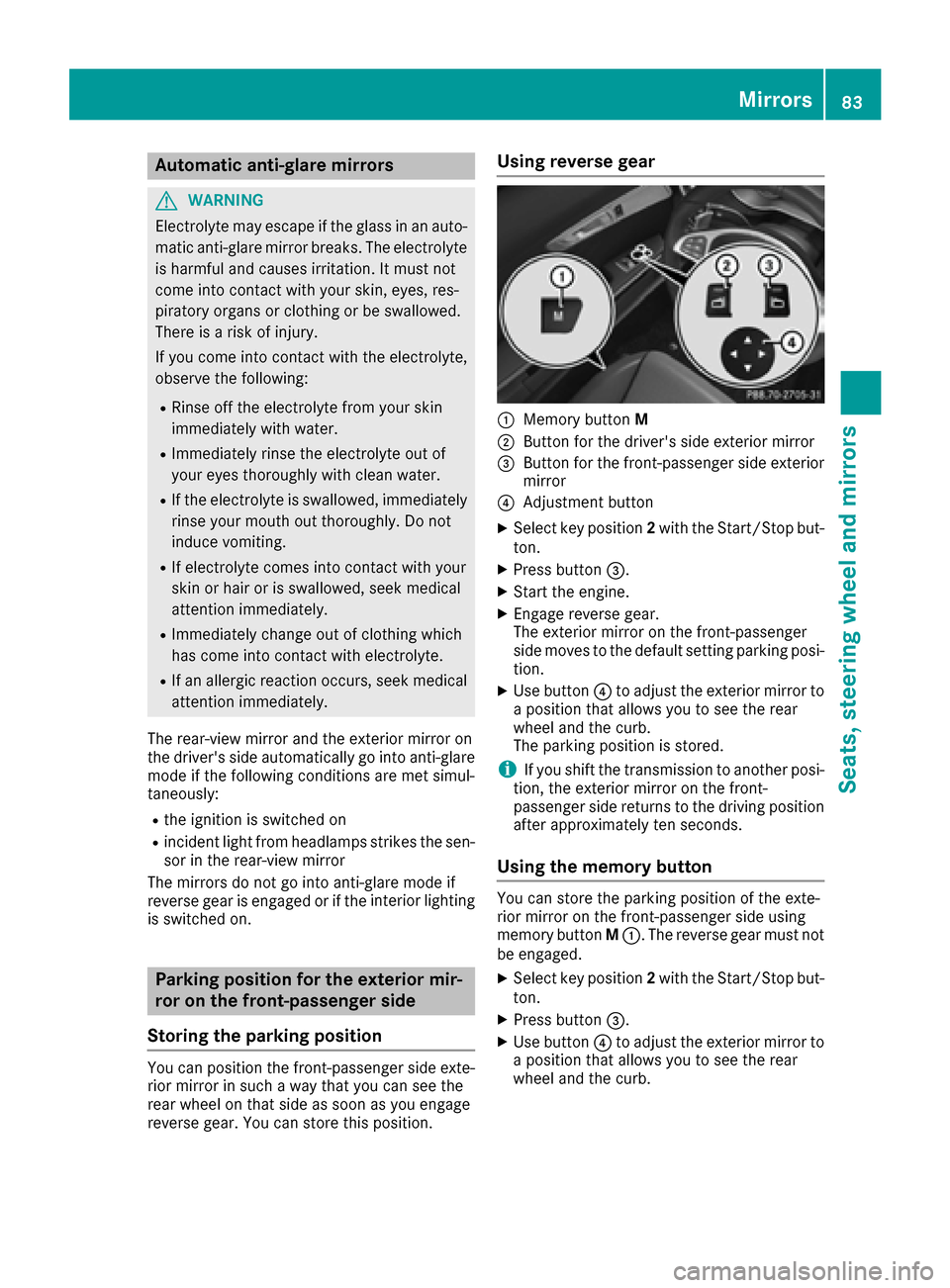
Using reverse gear
:Memory buttonM
;Butto nfor th edriver's side exterio rmirror
=Butto nfor th efront-passenger side exterio r
mirror
?Adjustmen tbutto n
XSelec tke yposition 2wit hth eStart/Sto pbut -
ton.
XPress butto n=.
XStart th eengine.
XEngage revers egear .
The exterio rmirror on th efront-passenger
side moves to th edefault setting parking posi-
tion .
XUse butto n? to adjust th eexterio rmirror to
a position that allows you to see th erear
whee land th ecurb.
The parking position is stored.
iIf you shif tth etransmission to another posi-
tion ,th eexterio rmirror on th efront-
passenger side return sto th edrivin gposition
after approximately te nseconds.
Using the mem orybutton
You can store th eparking position of th eexte -
rio rmirror on th efront-passenger side usin g
memory butto nM :. The revers egear mus tno t
be engaged.
XSelec tke yposition 2wit hth eStart/Sto pbut -
ton.
XPress butto n=.
XUse butto n? to adjust th eexterio rmirror to
a position that allows you to see th erear
whee land th ecurb.
Mirrors83
Seats, steering wheel and mirrors
Z