air condition MERCEDES-BENZ B-Class ELECTRIC 2016 W246 Owner's Guide
[x] Cancel search | Manufacturer: MERCEDES-BENZ, Model Year: 2016, Model line: B-Class ELECTRIC, Model: MERCEDES-BENZ B-Class ELECTRIC 2016 W246Pages: 342, PDF Size: 7.53 MB
Page 145 of 342
The high-voltage battery can be charged as
follows:
Rthrough energy recuperation while the
vehicle is in motion
Rwith the charging cable at a mains socket
while the vehicle is stationary
Rwith the charging cable at a charging sta-
tion while the vehicle is stationary
The high-voltage battery can be charged
using a single-phase charging cable in a volt-
age range from 100 V to 240 V.
If the condition of charge drops to less than
13%, the high-voltage battery reserve indica-
tor lamp lights up in the instrument cluster.
Charge the high-voltage battery as soon as
possible.
Below a condition of charge of 5%, the per-
formance of the vehicle is reduced. The vehi-
cle's high-voltage electrical system switches
off at a condition of charge of 0%.
Use of the pre-entry climate control function
may mean that the high-voltage battery is not
fully charged.
High and low outside temperatures
Low outside temperatures
The efficiency of the high-voltage battery is
significantly reduced at very low outside tem-
peratures. The high-voltage battery is then no longer able to provide the normal electrical
power output.
High outside temperatures
To prevent damage to the high-voltage bat-
tery due to very high outside temperatures,
the maximum power output of the high-volt-
age battery is reduced automatically.
The E-CELL display indicates the maximum
amount of power available (
Ypage 183).
Notes on battery care
Avoid storing or transporting the vehicle in
high temperatures over a long period (e.g.
container transport). If you park the vehicle and leave it stationary
for longer periods, connect it to a power sup-
ply.
Temperatures below
Ò13‡(Ò25 †) and over
104 ‡ (40 †), which affect the vehicle for a
period of more than seven days, can cause
irreversible damage.
Discharged battery
The vehicle's high-voltage electrical system
switches off if the high-voltage battery is com-
pletely discharged. 30 seconds prior to this,
you are informed of the switch-off by the
Battery level too low. Stop and
charge immediatelymessage. This pro-
tects the battery from exhaustive discharge.
It is not possible to restart the drive system
until after charging.
Do not leave the vehicle parked for longer
than 14 days with a high-voltage battery con- dition of charge below 20%.
You can check the condition of charge in the
charge level display (
Ypage 184).
Further information on the "Energy flow dis-
play" can be found in the "Trip" menu
(
Ypage 187).
Energy consumption and range
This range is reduced by:
Rhigh and low outside temperatures
Ra non-anticipatory driving style
Rswitching on consumers, e.g. air-condition-
ing system or heating.
The battery's physical characteristics are
such that leaving the vehicle parked for an
extended period at low outdoor temperatures
without charging it can lead to:
Ra reduction in battery performance
Rlonger charge times
In extreme cases, this could mean that the
vehicle cannot be started. For this reason,
connect the charging cable when leaving the
vehicle parked for long periods at low outdoor
temperatures.
High-voltage battery143
Driving and parking
Z
Page 161 of 342
Do not depress the brake pedal continuously
while the vehicle is in motion, e.g. causing the
brakes to rub by constantly applying light
pressure to the pedal. This results in exces-
sive and premature wear to the brake pads.
Heavy and light loads
GWARNING
If you rest your foot on the brake pedal while
driving, the braking system can overheat. This increases the stopping distance and can even
cause the braking system to fail. There is a
risk of an accident.
Never use the brake pedal as a footrest. Never
depress the brake pedal and the accelerator
pedal at the same time.
!Depressing the brake pedal constantly
results in excessive and premature wear to
the brake pads.
If the brakes have been subjected to a heavy
load, do not stop the vehicle immediately.
Drive on for a short while. This allows the air-
flow to cool the brakes more quickly.
Wet roads
If you have driven for a long time in heavy rain
without braking, there may be a delayed reac-
tion from the brakes when braking for the first
time. This may also occur after the vehicle has
been washed or driven through deep water.
You have to depress the brake pedal more
firmly. Maintain a greater distance from the
vehicle in front.
After driving on a wet road or having the vehi-
cle washed, brake firmly while paying atten-
tion to the traffic conditions. This will warm up
the brake discs, thereby drying them more
quickly and protecting them against corro-
sion.
Limited braking performance on salt-
treated roads
If you drive on salted roads, a layer of salt
residue may form on the brake discs and brake pads. This can result in a significantly
longer braking distance.
RIn order to prevent any salt build-up, apply
the brakes occasionally while paying atten-
tion to the traffic conditions.
RCarefully depress the brake pedal and the
beginning and end of a journey.
RMaintain a greater distance to the vehicle
ahead.
Servicing the brakes
!The brake fluid level may be too low, if:
Rif the red brake warning lamp lights up in
the instrument cluster and
Ryou hear a warning tone while the engineis running
Observe additional warning messages in
the multifunction display.
The brake fluid level may be too low due to
brake pad wear or leaking brake lines.
Have the brake system checked immedi-
ately. Consult a qualified specialist work-
shop to arrange this.
!A function or performance test should
only be carried out on a 2-axle dynamom-
eter. If you wish to operate the vehicle on
such a dynamometer, please consult a
qualified specialist workshop in advance.
You could otherwise damage the drive train
or the brake system.
!As the ESP®system operates automati-
cally, the engine and the ignition must be
switched off (the SmartKey must be in posi-
tion 0or 1in the ignition lock) if:
Rthe electric parking brake is tested on a
brake dynamometer (for a maximum of
ten second s)
Rthe vehicle is towed with the front axle
raised.
Braking triggered automatically by ESP
®
may seriously damage the brake system.
Driving tips159
Driving and parking
Z
Page 163 of 342
XHold test gageAvertically on brake
disc :and slide measuring pin ;onto
brake disc :.
XCheck which color field ?the arrow on
measuring pin ;is pointing to.
Green: the brake pad/lining thickness is
sufficient.
Red: the brake pad/lining thickness is not
sufficient. Have the brake pads/lining
checked at a qualified specialist workshop.
To avoid an inaccurate measurement:
Rmake sure you position the wheels suitably
Rdo not put the measuring pin on a recess in
the brake disc
Driving on wet roads
Hydroplaning
If water has accumulated to a certain depth
on the road surface, there is a danger of
hydroplaning occurring, even if:
Ryou drive at low speeds.
Rthe tires have adequate tread depth.
For this reason, in the event of heavy rain or in conditions in which hydroplaning may occur,
you must drive in the following manner:
Rlower your speed.
Ravoid ruts.
Ravoid sudden steering movements.
Rbrake carefully.
Driving on flooded roads
!Do not drive through flooded areas.
Check the depth of any water before driving through it. Drive slowly through standing
water. Otherwise, water may enter the
vehicle interior or the engine compartment.
This can damage the electronic compo-
nents in the engine or the automatic trans-
mission. Water can also be drawn in by the
engine's air suction nozzles and this can
cause engine damage.
Winter driving
GWARNING
If you increase the recuperation level on slip-
pery road surfaces, the drive wheels may lose
their traction. There is an increased danger of
skidding and accidents.
Do not increase the recuperation level on slip-
pery road surfaces.
Have your vehicle winter-proofed at a quali-
fied specialist workshop at the onset of win-
ter.
Drive particularly carefully on slippery road
surfaces. Avoid sudden acceleration, steering and braking maneuvers. Do not use cruise
control.
If the vehicle threatens to skid or cannot be
stopped when moving at low speed:
XShift the DIRECT SELECT lever to position
N.
The outside temperature indicator is not
designed to serve as an ice-warning device
and is therefore unsuitable for that purpose.
Changes in the outside temperature are dis-
played after a short delay.
Indicated temperatures just above the freez-
ing point do not guarantee that the road sur-
face is free of ice. The road may still be icy,
especially in wooded areas or on bridges.
You should pay special attention to road con-
ditions when temperatures are around freez-
ing point.
For more information on driving with snow
chains, see (
Ypage 305).
For more information on driving with summer
tires, see (
Ypage 304).
Observe the notes in the "Winter operation"
section (
Ypage 304).
Driving tips161
Driving and parking
Z
Page 180 of 342
Always observe the traffic conditions care-
fully, and maintain a safe lateral distance.
Blind Spot Assist is only an aid. It may fail to
detect some vehicles and is no substitute for
attentive driving. Always ensure that there is
sufficient distance to the side for other road
users and obstacles.
iUSA only:
This device has been approved by the FCC
as a "Vehicular Radar System". The radar
sensor is intended for use in an automotive
radar system only. Removing, tampering
with, or altering the device will void any
warranties, and is not permitted by the
FCC. Do not tamper with, alter, or use in
any non-approved way.
Any unauthorized modification to this
device could void the user’s authority to
operate the equipment.
Radar sensors
The radar sensors for Blind Spot Assist are
integrated into the rear bumper. Make sure
that the bumpers are free from dirt, ice or
slush. The sensors must not be covered, for
example by cycle racks or overhanging loads. Following a severe impact or in the event of
damage to the bumpers, have the function of
the radar sensors checked at a qualified spe-
cialist workshop. Blind Spot Assist may no
longer work properly.
Monitoring range of the sensors
In particular, the detection of obstacles can
be impaired if:
Rthere is dirt on the sensors or anything else
covering the sensors
Rthere is poor visibility, e.g. due to fog, heavy
rain or snow
Ra narrow vehicle traveling in front, e.g. a
motorbike or bicycle
Rthe road has very wide lanes
Rthe road has narrow lanes
Ryou are not driving in the middle of the lane
Rthere are barriers or similar lane borders
Vehicles in the monitoring range are then not indicated.
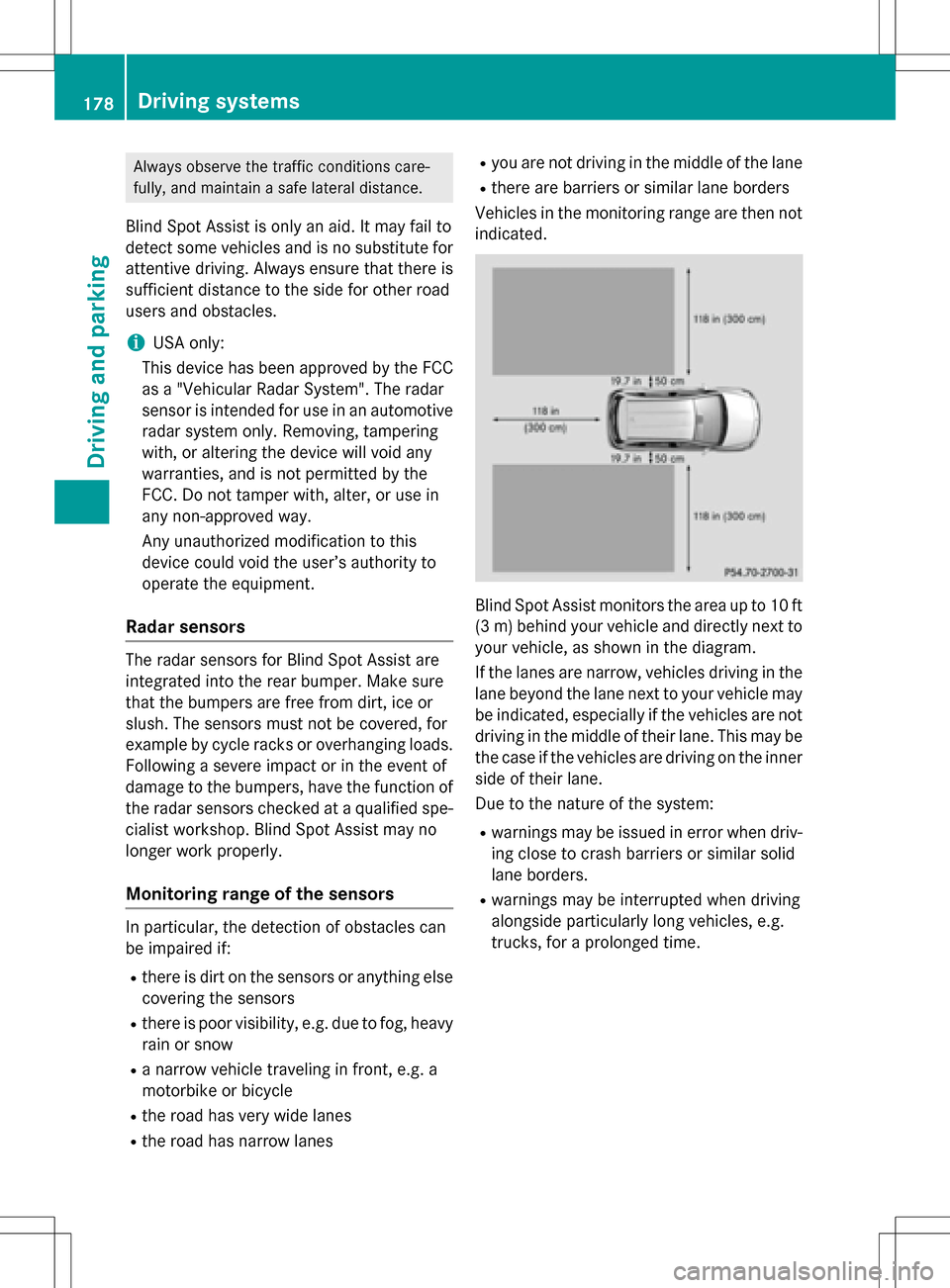
Blind Spot Assist monitors the area up to 10 ft
(3 m) behind your vehicle and directly next to
your vehicle, as shown in the diagram.
If the lanes are narrow, vehicles driving in the
lane beyond the lane next to your vehicle may
be indicated, especially if the vehicles are not
driving in the middle of their lane. This may be
the case if the vehicles are driving on the inner
side of their lane.
Due to the nature of the system:
Rwarnings may be issued in error when driv-
ing close to crash barriers or similar solid
lane borders.
Rwarnings may be interrupted when driving
alongside particularly long vehicles, e.g.
trucks, for a prolonged time.
178Driving systems
Driving and parking
Page 184 of 342
Useful information
i
This Operator's Manual describes all
models and all standard and optional equip-
ment of your vehicle available at the time of
publication of the Operator's Manual.
Country-specific differences are possible.
Please note that your vehicle may not be
equipped with all features described. This
also applies to safety-related systems and
functions.
iRead the information on qualified special-
ist workshops (
Ypage 26).
Important safety notes
GWARNING
If you operate information systems and com-
munication equipment integrated in the vehi-
cle while driving, you will be distracted from
traffic conditions. You could also lose control
of the vehicle. There is a risk of an accident.
Only operate the equipment when the traffic
situation permits. If you are not sure that this
is possible, park the vehicle paying attention
to traffic conditions and operate the equip-
ment when the vehicle is stationary.
You must observe the legal requirements for
the country in which you are currently driving
when operating the on-board computer.
GWARNING
If the instrument cluster has failed or mal-
functioned, you may not recognize function
restrictions in systems relevant to safety. The
operating safety of your vehicle may be
impaired. There is a risk of an accident.
Drive on carefully. Have the vehicle checked
at a qualified specialist workshop immedi-
ately.
The on-board computer only shows messages
or warnings from certain systems in the mul-
tifunction display. You should therefore make sure your vehicle is operating safely at all
times.
If the operating safety of your vehicle is
impaired, pull over as soon as it is safe to do
so. Contact a qualified specialist workshop.
For an overview, see the instrument panel
illustration (
Ypage 31).
Displays and operation
Instrument cluster lighting
The light sensor in the instrument cluster
automatically controls the brightness of the
multifunction display. In daylight, the displays
in the instrument cluster are not illuminated.
The lighting in the instrument cluster, in the
displays and the controls in the vehicle inte-
rior can be adjusted using the brightness con-
trol knob.
The brightness control knob is located on the
bottom left of the instrument cluster
(
Ypage 31).
XTurn the brightness control knob clockwise
or counter-clockwise.
If the light switch is set to the
Ã,Tor
L position, the brightness is dependent
upon the brightness of the ambient light.
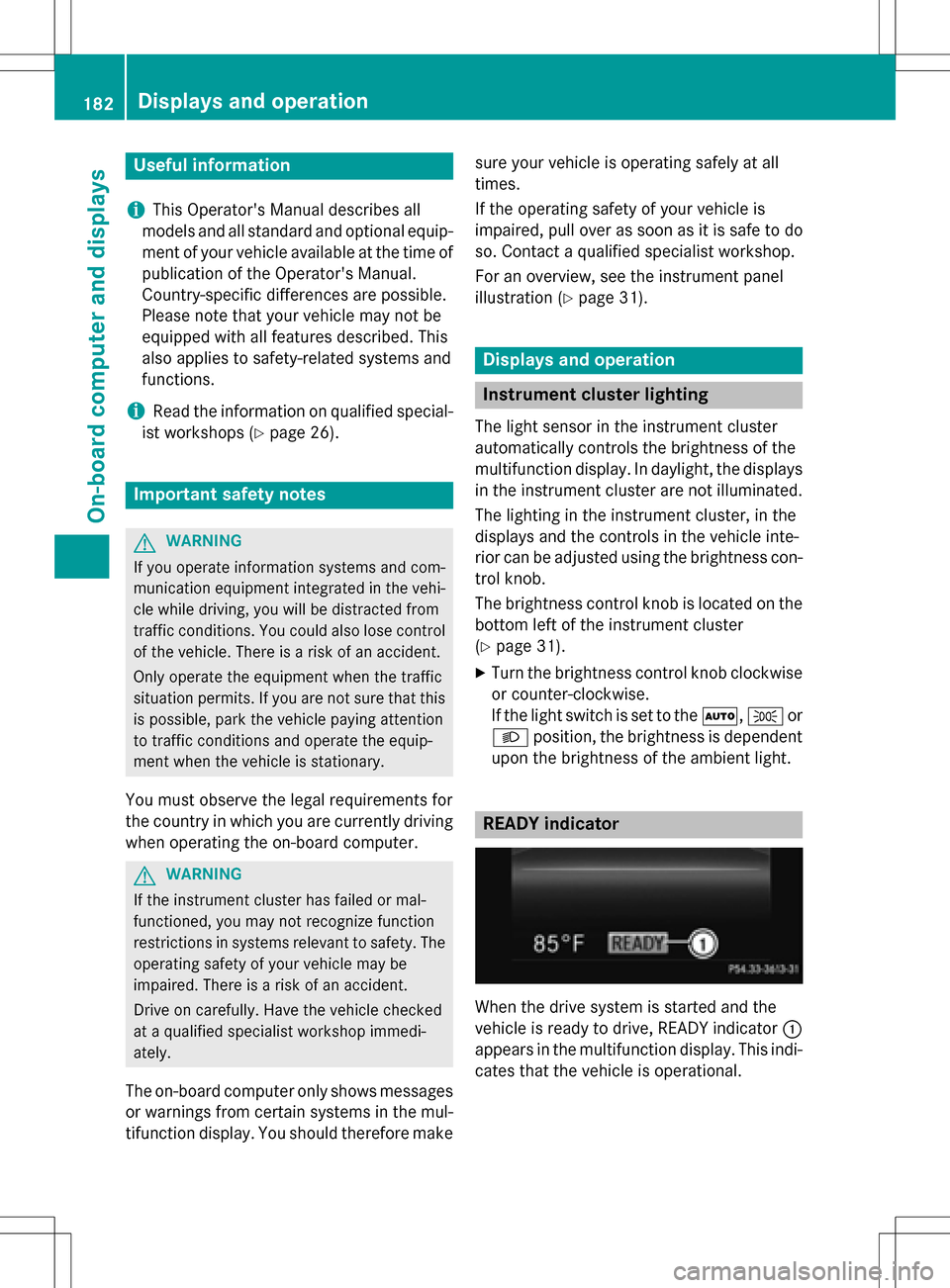
READY indicator
When the drive system is started and the
vehicle is ready to drive, READY indicator :
appears in the multifunction display. This indi-
cates that the vehicle is operational.
182Displays and operation
On-board computer and displays
Page 210 of 342
Display messagesPossible causes/consequences andMSolutions
F(USA
only)
!(Canada
only)
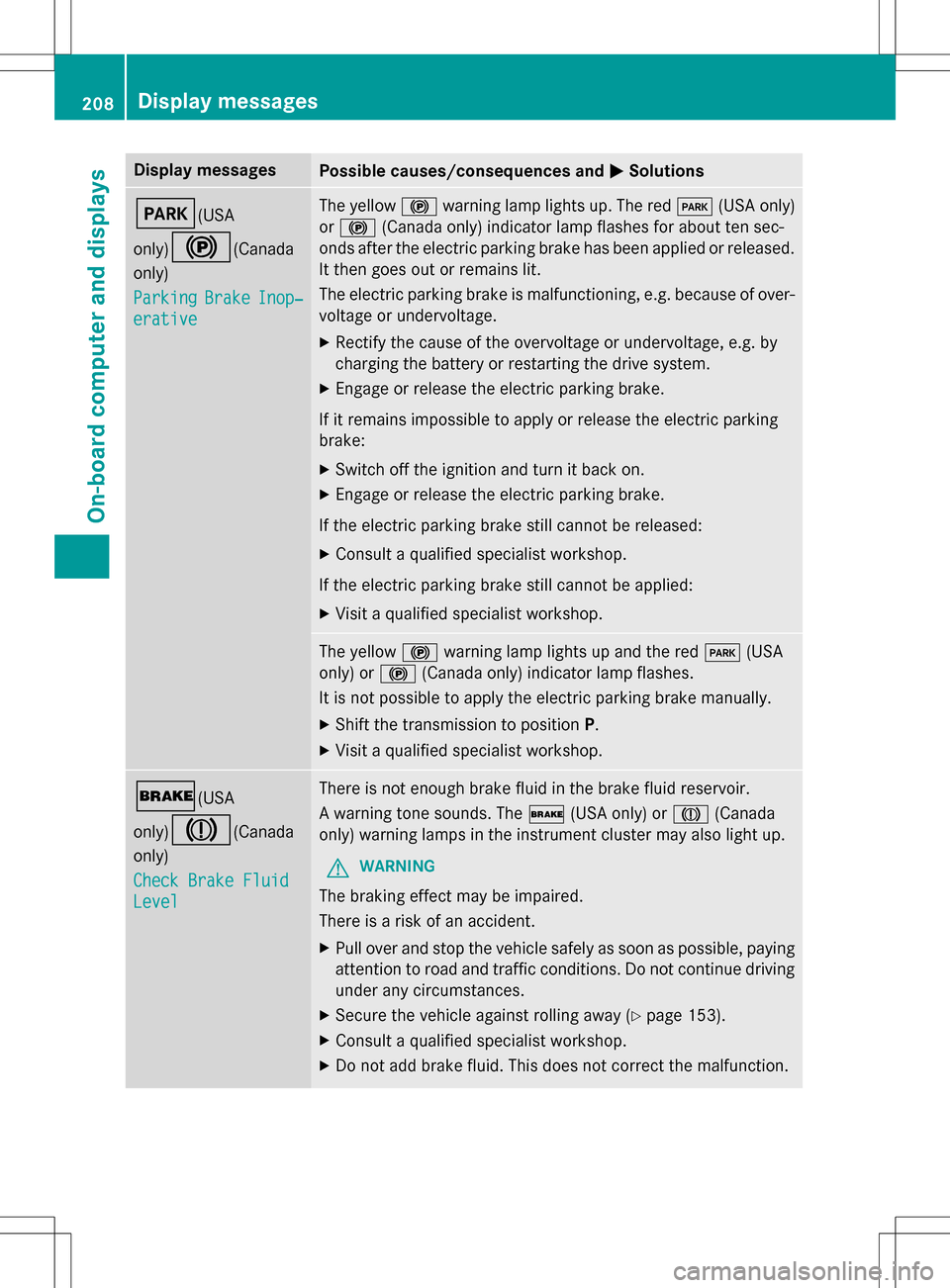
Parking
BrakeInop‐
erative
The yellow !warning lamp lights up. The red F(USA only)
or ! (Canada only) indicator lamp flashes for about ten sec-
onds after the electric parking brake has been applied or released.
It then goes out or remains lit.
The electric parking brake is malfunctioning, e.g. because of over-
voltage or undervoltage.
XRectify the cause of the overvoltage or undervoltage, e.g. by
chargin gth ebattery or restarting the drive system.
XEngage or release the electric parking brake.
If it remains impossible to apply or release the electric parking
brake:
XSwitc h offthe ignition and turn it back on.
XEngage or release the electric parking brake.
If th e electric parking brake still cannot be released:
XConsult a qualified specialist workshop.
If th e electric parking brake still cannot be applied:
XVisit a qualified specialist workshop.
The yellow !warning lamp lights up and the red F(USA
only) or !(Canada only) indicator lamp flashes.
It is no t possible to apply the electric parking brake manually.
XShift th e transmission to position P.
XVisit a qualified specialist workshop.
$(USA
only)
J(Canada
only)
Check Brake Fluid
Level
There is not enough brake fluid in the brake fluid reservoir.
A warning tone sounds. The $(USA only) or J(Canada
only) warning lamps in the instrument cluster may also light up.
GWARNING
The braking effect may be impaired.
There is a risk of an accident.
XPull over and stop the vehicle safely as soon as possible, paying
attention to road and traffic conditions. Do not continue driving
under any circumstances.
XSecur eth e vehicle against rolling away (Ypage 153).
XConsult a qualified specialist workshop.
XDo no t add brake fluid. This does not correctth e malfunction.
208Display messages
On-board computer and displays
Page 212 of 342
Display messagesPossible causes/consequences andMSolutions
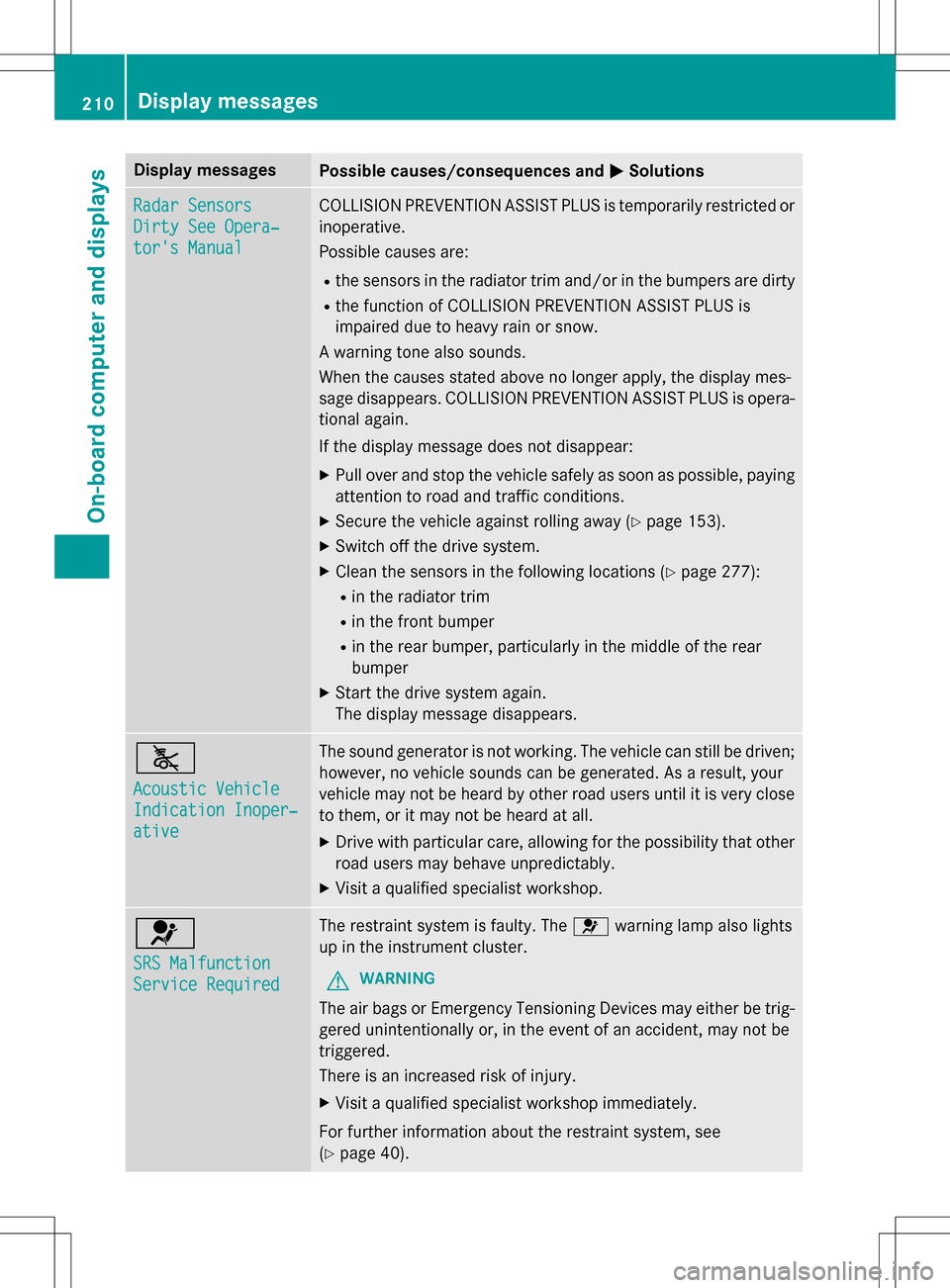
Radar Sensors
Dirty See Opera‐
tor's Manual
COLLISION PREVENTION ASSIST PLUS is temporarily restricted or
inoperative.
Possible causes are:
Rthe sensors in the radiator trim and/or in the bumpers are dirty
Rthe function of COLLISION PREVENTION ASSIST PLUS is
impaired due to heavy rain or snow.
A warning tone also sounds.
When the causes stated above no longer apply, the display mes-
sage disappears. COLLISION PREVENTION ASSIST PLUS is opera-
tional again.
If th e display message does not disappear:
XPull over and stop the vehicle safely as soon as possible, paying
attention to road and traffic conditions.
XSecur eth e vehicle against rolling away (Ypage 153).
XSwitc h offthe drive system.
XClean the sensors in the following location s(Ypage 277):
Rin the radiatortrim
Rin thefront bumper
Rin the rear bumper, particularly in the middle of the rear
bumper
XStart th e drive system again.
The display message disappears.
ã
Acoustic Vehicle
Indication Inoper‐
ative
The sound generator is not working. The vehicle can still be driven;
however, no vehicle sounds can be generated. As a result, your
vehicle may not be heard by other road users until it is very close
to them, or it may not be heard at all.
XDrive with particular care, allowing for the possibility that other
road users may behave unpredictably.
XVisit a qualified specialist workshop.
6
SRS Malfunction
Service Required
The restraint system is faulty. The 6warning lamp also lights
up in the instrument cluster.
GWARNING
The air bags or Emergency Tensioning Devices may either be trig-
gered unintentionally or, in the event of an accident, may not be
triggered.
There is an increased risk of injury.
XVisit a qualified specialist workshop immediately.
Fo r further information about the restraint system, see
(
Ypage 40).
210Display messages
On-board computer and displays
Page 214 of 342
Display messagesPossible causes/consequences andMSolutions
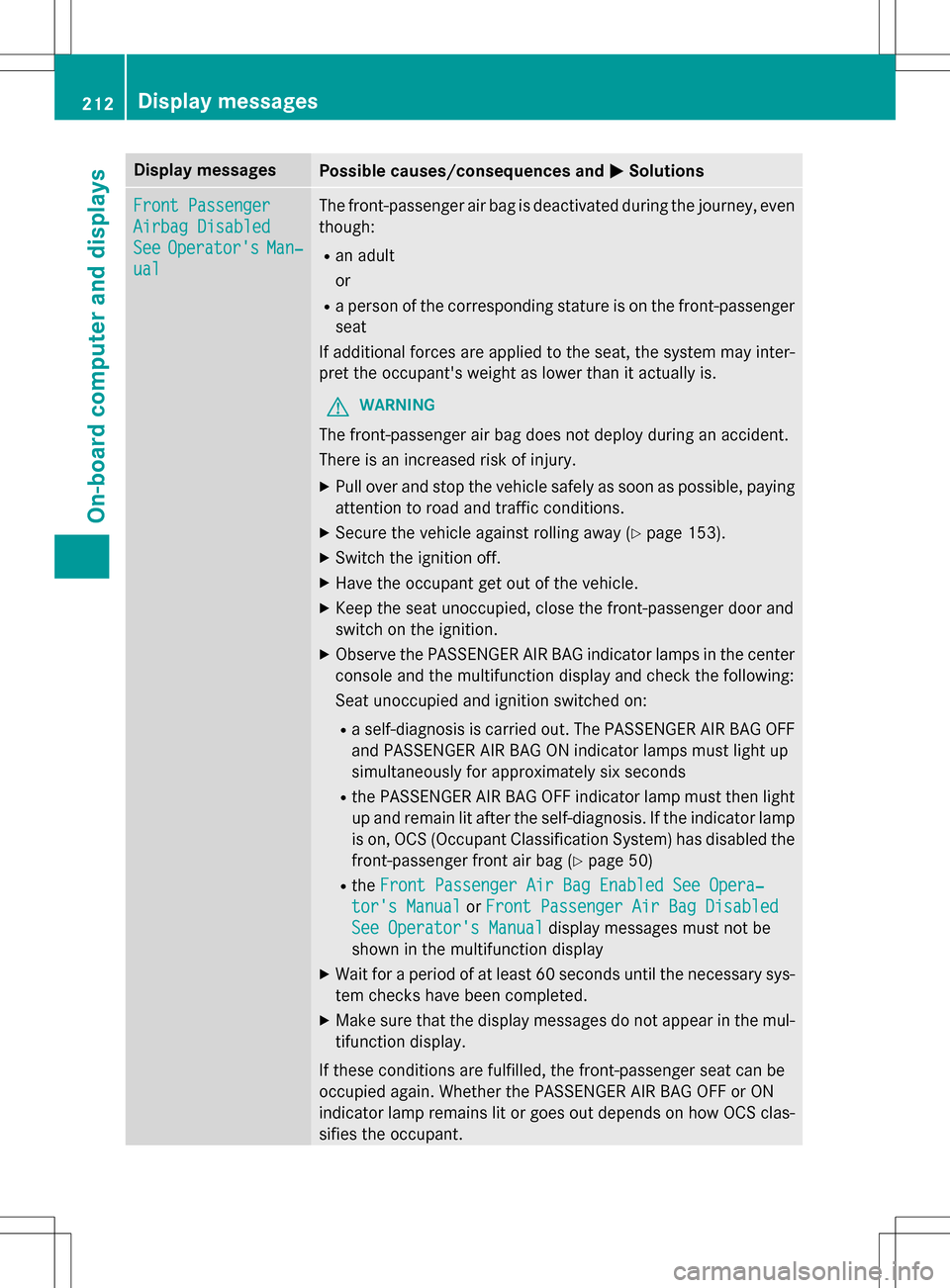
Front Passenger
Airbag Disabled
SeeOperator'sMan‐
ual
The front-passenger air bag is deactivated during the journey, even
though:
Ran adult
or
Ra person of the corresponding stature is on the front-passenger
seat
If additional forces are applied to the seat, the system may inter-
pret the occupant's weight as lower than it actually is.
GWARNING
The front-passenger air bag does not deploy during an accident.
There is an increased risk of injury.
XPull over and stop the vehicle safely as soon as possible, paying
attention to road and traffic conditions.
XSecur eth e vehicle against rolling away (Ypage 153).
XSwitc hth e ignition off.
XHave the occupant get out of the vehicle.
XKeep the seat unoccupied, close the front-passenger door and
switch on the ignition.
XObserve thePASSENGER AI RBA G indicator lamps in the center
console and th e multifunction display and check the following:
Seat unoccupied and ignition switched on:
Ra self-diagnosis is carried out. The PASSENGER AIR BAG OFF
and PASSENGER AI RBA G ON indicator lamps must light up
simultaneously for approximately six seconds
Rth ePASSENGER AI RBA G OFF indicator lamp must then light
up and remain lit after the self-diagnosis. If the indicator lamp
is on, OCS (Occupant Classification System) has disabled the
front-passenger front air bag (
Ypage 50)
Rth eFront Passenger Air Bag Enabled See Opera‐
tor's Manualor Front Passenger Air Bag Disabled
See Operator's Manualdisplay messages must not be
shown in the multifunction display
XWait fo raperiod of at least 60 seconds until the necessary sys-
te m checks have been completed.
XMake sure that the display messages do not appear in the mul-
tifunction display.
If these conditions are fulfilled, the front-passenger seat can be
occupied again. Whether the PASSENGER AIRBA G OFF or ON
indicator lamp remains lit or goes out depends on how OCS clas-
sifies the occupant.
212Display messages
On-board computer and displays
Page 215 of 342
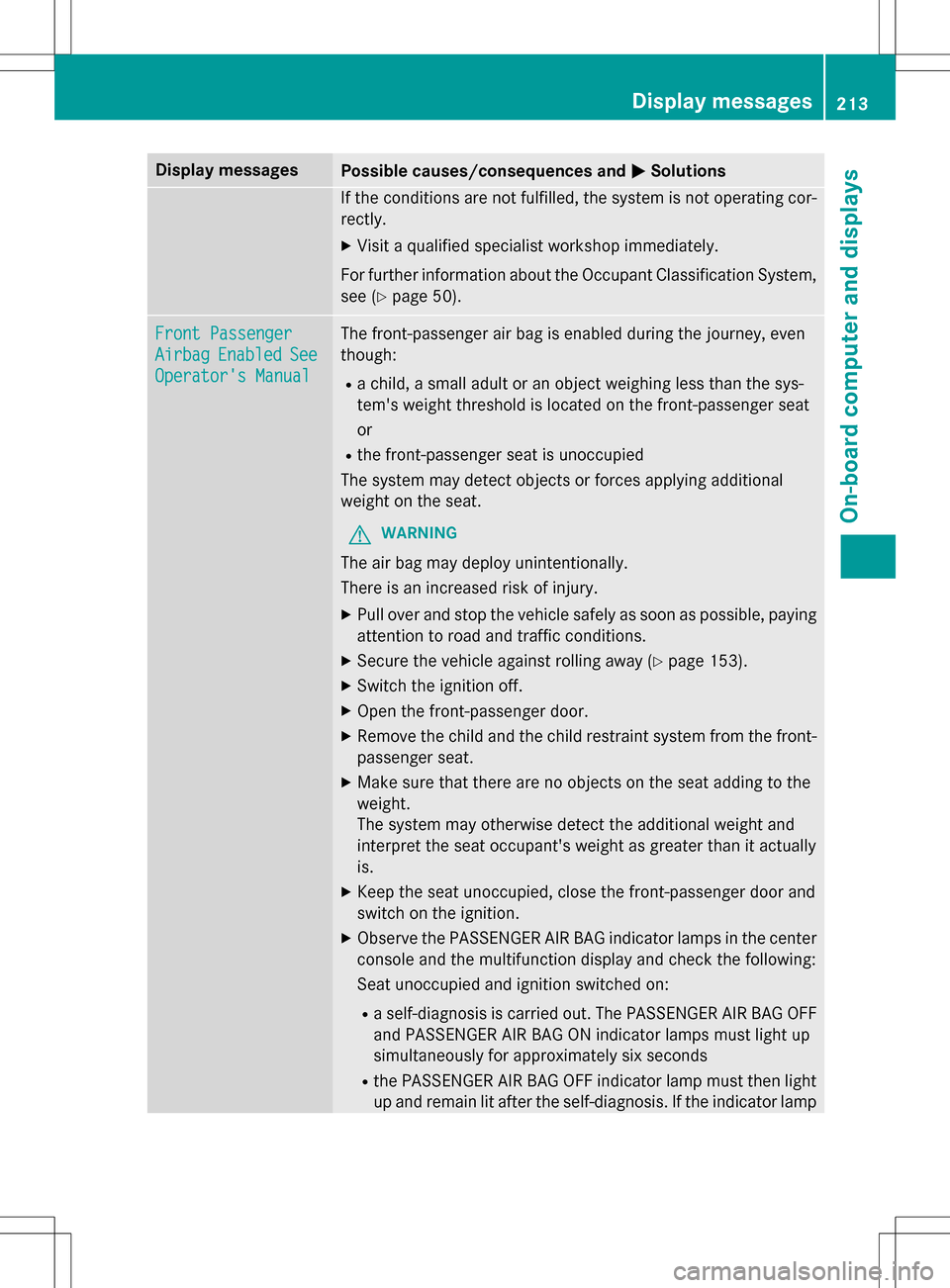
Display messagesPossible causes/consequences andMSolutions
If the conditions are not fulfilled, the system is not operating cor-
rectly.
XVisit a qualified specialist workshop immediately.
Fo r further information about the Occupant Classification System,
see (
Ypage 50).
Front Passenger
AirbagEnabledSee
Operator's Manual
The front-passenger air bag is enabled during the journey, even
though:
Ra child, a small adult or an object weighing less than the sys-
tem' s weight threshold is located on the front-passenger seat
or
Rth e front-passenger seat is unoccupied
The system may detect objects or forces applying additional
weight on the seat.
GWARNING
The air bag may deploy unintentionally.
There is an increased risk of injury.
XPull over and stop the vehicle safely as soon as possible, paying
attention to road and traffic conditions.
XSecur eth e vehicle against rolling away (Ypage 153).
XSwitc hth e ignition off.
XOpen the front-passenger door.
XRemove th e child and the child restraint system from the front-
passenger seat.
XMake sure that there are no objects on the seat adding to the
weight.
The system may otherwise detect the additional weight and
interpret the seat occupant's weight as greater than it actually
is.
XKeep the seat unoccupied, close the front-passenger door and
switch on the ignition.
XObserve thePASSENGER AI RBA G indicator lamps in the center
console and th e multifunction display and check the following:
Se at unoccupied and ignition switched on:
Ra self-diagnosis is carried out. The PASSENGER AIR BAG OFF
and PASSENGER AI RBA G ON indicator lamps must light up
simultaneously for approximately six seconds
Rth ePASSENGER AI RBA G OFF indicator lamp must then light
up and remain lit after the self-diagnosis. If the indicator lamp
Display messages21 3
On-board computer and displays
Z
Page 216 of 342
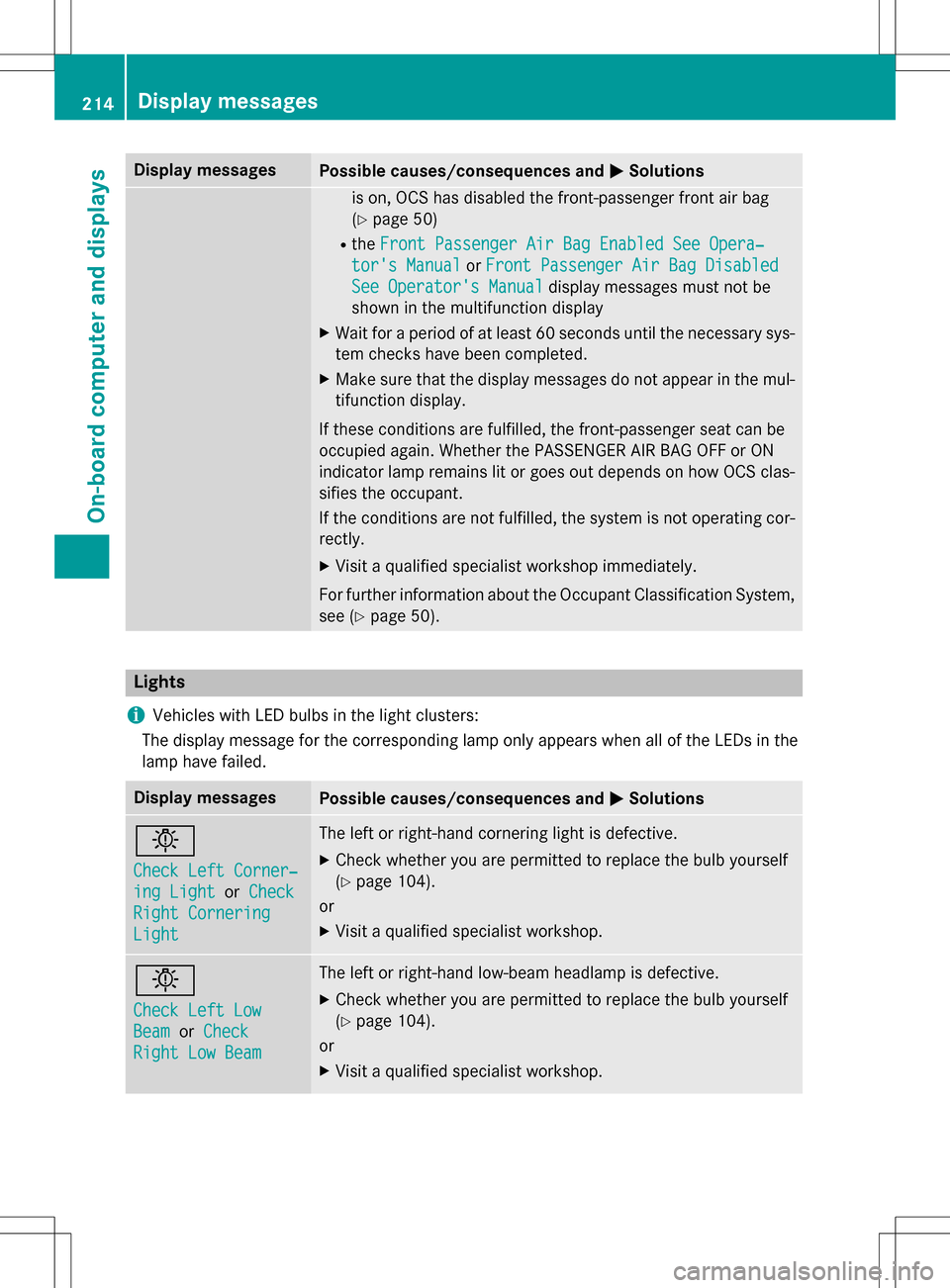
Display messagesPossible causes/consequences andMSolutions
is on, OCS has disabled the front-passenger front air bag
(
Ypage 50)
RtheFront Passenger Air Bag Enabled See Opera‐
tor's Manualor Front Passenger Air Bag Disabled
See Operator's Manualdisplay messages must not be
shown in the multifunction display
XWait fo raperiod of at least 60 seconds until the necessary sys-
te m checks have been completed.
XMake sure that the display messages do not appear in the mul-
tifunction display.
If these conditions are fulfilled, the front-passenger seat can be
occupied again. Whether the PASSENGER AIRBA G OFF or ON
indicator lamp remains lit or goes out depends on how OCS clas-
sifies the occupant.
If th e conditions are not fulfilled, the system is not operating cor-
rectly.
XVisit a qualified specialist workshop immediately.
Fo r further information about the Occupant Classification System,
see (
Ypage 50).
Lights
i
Vehicles with LED bulbs in the light clusters:
The display message for the corresponding lamp only appears when all of the LEDs in the
lamp have failed.
Display messagesPossible causes/consequences and MSolutions
b
Check Left Corner‐
ing LightorCheck
Right Cornering
Light
The left or right-hand cornering light is defective.
XCheck whether you are permitted to replace the bulb yourself
(
Ypage 104).
or
XVisit a qualified specialist workshop.
b
Check Left Low
Beamor Check
Right Low Beam
The left or right-hand low-beam headlamp is defective.
XCheck whether you are permitted to replace the bulb yourself
(
Ypage 104).
or
XVisit a qualified specialist workshop.
214Display messages
On-board computer and displays