phone MERCEDES-BENZ C-CLASS CABRIOLET 2020 Owner's Guide
[x] Cancel search | Manufacturer: MERCEDES-BENZ, Model Year: 2020, Model line: C-CLASS CABRIOLET, Model: MERCEDES-BENZ C-CLASS CABRIOLET 2020Pages: 542, PDF Size: 45.17 MB
Page 302 of 542
#
Ifth ecodes match: con firm thecode on
th emobile phone.
Connecting amobile phone(authorizat ion by
ent ering apa ssk ey) #
Select themobile phone. #
Choose aone tosixt een-digit numbercombi‐
nation asapassk ey. #
On themu ltim edia system: enterthepass‐
ke yand select0076. #
On themobil eph one: enterthepassk ey
ag ain and confirm .
% Upto15 mobil ephones canbeauthor ized
on themultimedia system.
Au thor ized mobile phones arere connect ed
au tomatical ly.
Connect ingasecond mobilephone (two
ph one mod e)
Re quirement s:
R Atleas tone mobile phoneis alr eady connec‐
te dto themultimedia system viaBlue tooth®
. Multimedia
system:
4 Phone 5
00A5 Devic es #
Select Connec tNew Devic e. #
Select Start Search onSystem.
The available mobilephon esaredispla yed. #
Select themobile phone. #
Answ ertheHow would youliketocon nect
the new device? prom pt. #
Toreplac ethe currentl yconnect ed
mobile phone:selectPhone 1.
The currentl yconne cted mob ile pho neis
re placed bythene wmobile phone.
or #
Toconnect thesecond mobileph one:
selec tPhon e2.
The newmobile phoneis con nectedas
Phone 2.Iftw omobile phones have already
been connected, thesecon dte lephon eis
re placed bythene wmobile phone.
or #
Touse themobil eph one asan aud io
sour ce:selec tAudio Source(/ page33 4). %
Amobile phonecan beoperat edboth as an
audio sourceaswellas telephon ein par allel.
% Itis possible atanyfut urepoint tochang e
th etype ofcon nect ionforth emobile phone
alr eady connect edand tosetth is as Phon e
1, Phon e2 or Audio Source(/ page300) .
Fu nctions ofthemobil eph one intw oph one
mod e
Fu nctions overview Mobile
phoneinthe
fo re gr ound Mobile
phone inthe
bac kground
Fu llra ng eof func ‐
tio ns Incom
ingcalls In
te rchangi ngmobil ephone s(tw ophone
mode)
Re quirement s:
R The mobile phonesareaut hor ized
(/ page299) . 300
Multime diasystem
Page 303 of 542
Multimedia
system:
4 Phone 5
00A5 Devic es #
Inthede vice overview, select amobile phone
whic hhas already been author ized andset
as Phone 1or Phone 2.
Af terint erch ang ingthemobile phones, the
mobil ephone inthefo re grou nd isreplaced by
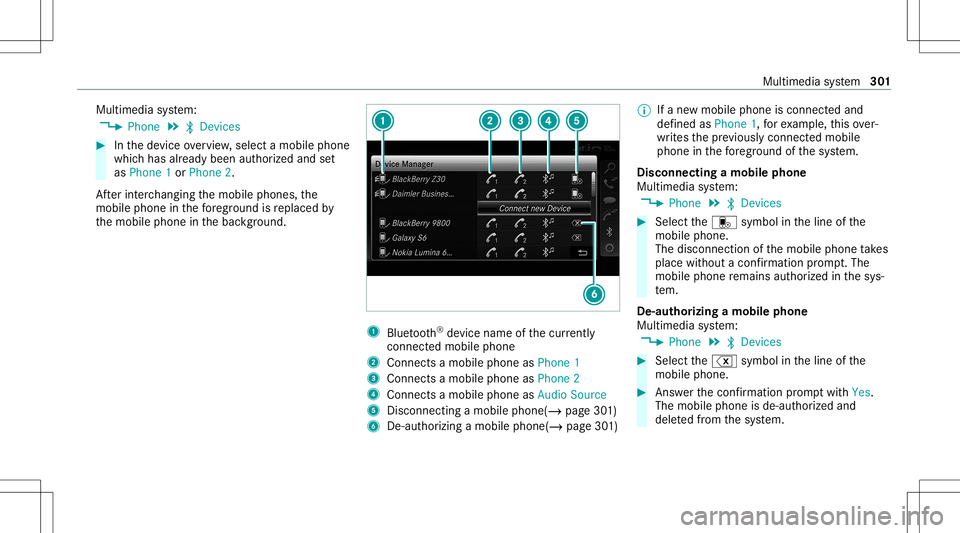
th emobile phoneinthebac kground. 1
Blue tooth®
de vice name ofthecur rently
conne cted mob ile pho ne
2 Connects amob ile pho neasPho ne1
3 Connects amob ile pho neasPho ne2
4 Connects amob ile pho neasAud ioSou rce
5 Disc onnec tingamob ile pho ne(/ page 301)
6 De-au thor izing amobile phone(/page30 1) %
Ifane wmobile phoneisconn ectedand
def ined asPhone 1,forex am ple, this ov er‐
wr ites thepr ev iousl ycon nectedmobile
phone inthefo re grou nd ofthesy stem.
Disconnec tingamobile phone
Multimedia system:
4 Phone 5
00A5 Devic es #
Select thei symbol intheline ofthe
mobil ephone.
The disconnection ofthemobile phonetake s
place without acon firm atio npr om pt.The
mob ile pho neremains author ized inthesy s‐
te m.
De -aut horizing amobil ephone
Mul timedi asy stem:
4 Phone 5
00A5 Devic es #
Select the% symbol intheline ofthe
mobil ephone. #
Answ erthecon firm atio npr om ptwit hYes.
The mobile phoneis de- aut hor ized and
dele tedfrom thesy stem. Multimedia
system 30
1
Page 304 of 542
Inf
orma tion onNearField Comm unication
(NFC)
NFC enabl esshor t-ra ng ewi reless datatransf er
or (re)con nection ofamobile phonewit hth e
multime diasystem.
The follo wing functionsar eav ailable without
ha vin gaut hor izedamobi lephon e:
R Trans ferring aURL tobe viewe din themulti‐
media system (see themanuf acturer'soper‐
ating instruction s).
R Setting uptheve hicle's Wi-Fi acce ssdata via
th esy stem settings (/page26 1).
Fu rther information canbefound at:ht tp :/ /
www .merced es-ben z.co m/ conn ect
Using themobil eph one withNe arField Com‐
mu nicat ion(NFC)
Re quirement s:
R NFC isact ivat ed on themobile phone(see
th emanuf acturer'soper ating instruction s)
R The mobile phone's screen isswitc hedon
and unloc ked(see themanuf acturer'soper‐
ating instruction s) #
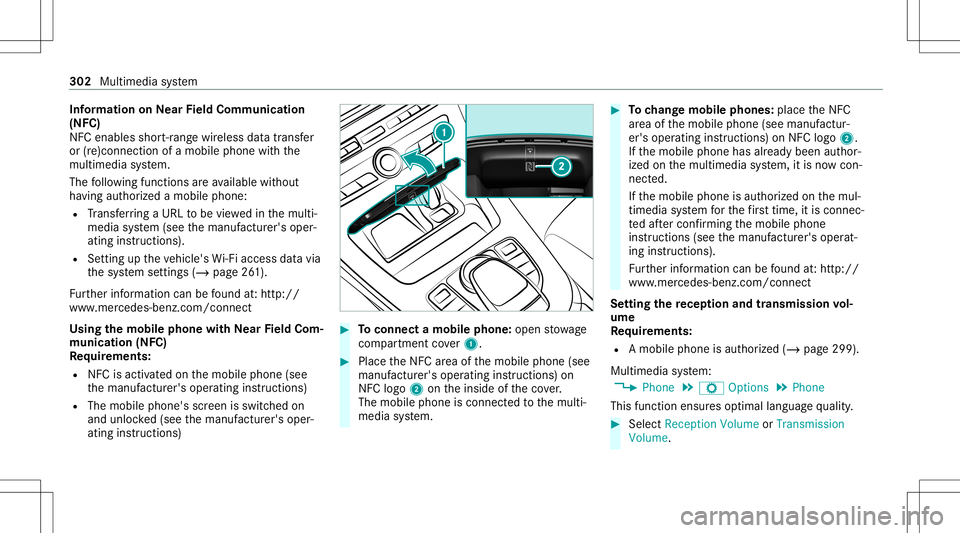
Toconnect amob ilephone: open stow age
com partment cover1. #
PlacetheNFC area ofthemobile phone(see
manuf acturer'soper ating instruction s)on
NFC logo2ontheinside oftheco ver.
The mobile phoneisconn ectedtothemulti‐
media system. #
Tochang emobi lephone s:pla cetheNFC
ar ea ofthemobile phone(seemanuf actur‐
er's oper ating instruction s)on NFC logo2.
If th emobile phonehasalready been author‐
ized onthemultimedia system, itis no wcon ‐
nect ed.
If th emobile phoneisaut hor ized onthemul‐
timedia system forth efirs ttim e,itis conne c‐
te daf te rconf irming themobile phone
ins truction s(see themanuf acturer'soper at‐
ing instruction s).
Fu rther information canbefound at:ht tp :/ /
www .merced es-ben z.co m/ conn ect
Se tting there cep tion andtrans mis sion vol‐
um e
Re quirement s:
R Amobile phoneis aut hor ized (/page299 ).
Multime diasystem:
4 Phone 5
Z Option s5
Phone
This function ensur esoptimal languag equ alit y. #
Select Recepti onVol ume orTra nsmi ssion
Vol ume. 302
Multimed iasystem
Page 305 of 542
#
Setth evo lume.
Fu rther information onthere comme ndedrecep‐
tion andtransm ission volume: http:/ /
www .mercedes-ben z.com/ connect
Ad jus tingthe calland ringt one volum e
Multime diasystem:
4 System 5
õ Audio 5
Phone #
Select CallVolume orRington eVolume. #
Setth evo lume.
St arting/ stopping mobilephon evo ice recog‐
nit ion
Re quirement s:
R The mobile phoneis con nectedto themulti‐
media system (/ page299).
St arting mobi lephone voice recognit ion #
Press and hold the00E3 buttononthemulti‐
func tion steer ing wheel formor eth an one
sec ond.
Yo ucan usemob ilephon evo ice recogni tion. St
opp ingmobil eph one voice recognit ion #
Press the0063 or0076 buttononthemulti‐
func tion steer ing wheel. Calls
Using
thete lephone
Multime diasystem:
4 Phone 5
ª Contac ts
Making acall #
Select Numerical Keypad. #
Enterth enumber . #
Select 0097.
The callismade.
Ac cep tingacall #
Select Accep t.
Re jec tingaca ll #
Select Reject .
En din gaca ll #
Select 005A. Ac
tiv atin gfunc tions dur ingacal l #
Tosho wall functions, navig atedo wn.
The follo wing functionsar eav ailable during a
call:
R EndCall
R Mak eAdd ition alCall
R Keybo ard(sho wto send DTMF tones)
R Swi tchMu teMicon 0073 oroff0053.
R Private Mode(a nacti vecal lin ha nds-fr ee
mod eis transf erredove rto thete lephon e)
Condu ctingcallswithse ve ralpar ticip ants
Re quirement s:
R Ther eis an act ive call (/ page303).
R Another call isbeing made.
Switc hingbetw een calls #
Select call003B.
The select edcall isactiv e.The other call is
on hold.
Ac tiv atin gor endin gacal lon hol d #
Select Continu eCa llor End Call. Mu
ltimed iasystem 303
Page 306 of 542
Condu
ctingaconf erence call #
Sele ctCreat eConf erenceCall inthete le‐
phon emen u.
The newpar ticipant isinc luded inthecon fer‐
ence call.
Endin gan activ ecall #
Select 005A.
% Onsome mobilephones, thecall onhold is
activ ated assoon astheactiv ecall isended.
Ac cep ting/r eject ingawa iting call
Re quirement s:
R Ther eis an act ive call (/ page303 ).
If yo ure cei veacall while already inacall, a
mes sageis displa yed. An acous ticsignal also
sounds. #
Select Accept.
The incom ingcall isactiv e.
If onl yone mobile phoneiscon nectedwit h
th emultimedia system, thepr ev ious callwill
be put onhold. If
dur ing acall youacc epta call withth e
ot her mobile phonewhenintwophone mode
th en theex istin gcall isended . #
Selec tRejec t.
% This function andbeha viordepen dson your
mob ilephon ene tworkpr ov ider andthe
mobil ephone (seethemanuf acturer'soper‐
ating instruction s). Contacts
Inf
ormat ionabout thecontact smenu
The contacts menu contains allcont acts from
ex istin gdat asour ces, e.g.mobile phoneor
memo rycard. Youcan stor eup to6,000 con‐
ta cts.
Depe nding onthedat asour ce,youha ve thefo l‐
lo wing numb erofcon tacts:
R Perm anen tly sa ve dcon tacts: 3,000 entries
R Contacts loaded from themobile phone:
3,000 entries Fr
om thecon tacts menu ,yo ucan perform the
fo llo wing actions :
R Usin gth ete lephon e:
- Calling acon tact (/ page 306)
- Calling ane wnumbe r(/ page303)
R Navig ation (/page27 7)
R Com pose me ssag es (/ page30 7)
If amo bileph oneis connect edtothemultimedia
sy stem (/ page299) andautomatic callingup
(/ page304) isactiv ated, themobile phone's
con tacts aredispl ayed intheaddr essbook .
Do wnloading mobilephonecontacts
Multimedia system:
4 Phone 5
Z Option s5
Contac ts
Au tomatic ally #
Swi tchSyn chro nize Contacts Automatica lly
on 0073.
Man ually #
Dea ctivate0053 Synchro nize Contacts Auto-
ma tica lly. 30
4
Mu ltimed iasystem
Page 307 of 542

#
Select Synch ronizeContacts .
Cal ling up contacts
Mu ltimed iasystem:
4 Phone 5
ª Contac ts
Depen dingonthech aract erset,th efo llo wing
op tion scan beused tosear chforcont acts:
R searc hingbyinit ials
R sear ching byname
R searching byphone number #
Enterch aract ersint oth esear chfield.
A select ionofpossible contacts appea rs.
Ent ering mor ech aract ersint oth esear ch
fi eld narrows down thenumber ofpossible
select ions. #
Select thecon tact.
A cont actcan cont ain th efo llo wing details:
R phon enumb ers
R navig ation addresses
R geo-coor dinates
R Interne taddr ess Editing
thefo rm atofaco ntact's name
Mul timedi asy stem:
4 Phone 5
Z Option s5
Contac ts
5 Name Format
The follo wing option sar eav ailable:
R Last Name ,Fir stName
R Last Name FirstName
R FirstName LastName #
Select anoptio n.
Ov ervie wof impor tingcontact s
Contact sfrom various sour ces Sour
ce Requirement s
ò Memor ycar dT heSD memor ycar d
is inser ted.
ò USBdevice TheUSB device is
inser tedin theUSB
por t. Sour
ce Requirement s
ñ Bluetooth®
con‐
nectio n If
th esendin gof
vCar dsvia Blue tooth®
is suppor ted, vCar ds
can berecei vedon
mobile phones ornet‐
book s,forex am ple.
Blue tooth®
is act iva‐
te din themultimedia
sy stem and onthe
re spectiv ede vice
(see themanuf actur‐
er's oper ating instruc‐
tion s).
ó Mobile phone Themobile phoneis
con nect edtothemul‐
timedia system. Im
por ting contacts intoth econtact smenu
Multi media system:
4 Phone 5
Z Option s5
Contac ts #
Select Import. #
Select anoption . Multimedia
system 305
Page 308 of 542
Sa
ving amobile phonecontact
Multimedia system:
4 Phone 5
ª Contac ts #
Select themobile phonecontact ó. #
Sele ctp. #
Sele ctSave toVeh icle.
The cont actsave din themultimedia system
is identif iedbythef symbol.
Calling acontact
Multimedia system:
4 Phone 5
ª Contac ts #
Enterch aract ersint oth esear chfield. #
Select thecon tact. #
Sele ctthete lephon enumb er.
The numb erisdialed.
Selecting further options inthecontact s
menu
Multi media system:
4 Phone 5
ª Contac ts #
Select acon tact. #
Sele ctp. Depe
nding onthestor ed dat a,thefo llo wing
op tion sar eav ailable:
R Call
R Sen dTex tMess age
R Show Webs ite(ifan Inte rn et addr esshas
been stor ed)
R Navigate (ifan addr esshas been stor ed)
R Save MyFavorite
R Send DTMF Tones (for anumber withDT MF
to nes) #
Select anoptio n.
De letin gaco ntact
Mu ltimed iasystem:
4 Phone 5
ª Contac ts
Yo ucan deletecont acts stor ed intheve hicle. #
Sear chforth econ tact. #
Sele ctthecon tact. #
Sele ctp. #
Sele ctDele teCo ntact . #
Sele ctYes . Cal
lli st Call
listove rview
Depen dingonwhe ther your mob ilephon esup‐
por tsthePB AP Blue tooth®
pr ofile ornot,th is
can have differe nt effects onthepr esent ation
and func tionsof thecall list.
If th ePB AP Blue tooth®
pr ofile issuppor ted, the
ef fects are asfollo ws :
R The calllists from themobile phonearedis‐
pla yedin themultimedia system.
R When connect ingthemobile phone, youma y
ha ve toconf irm thecon nect ionforth ePB AP
Blue tooth®
pr ofile.
If th ePB AP Blue tooth®
pr ofile isno tsuppor ted,
th eef fects areas follo ws :
R The multimedia system gener ates its owncal l
li st s.
R The calllistis no tsync hronized withth ecall
lis ts inthemobile phone. 306
Multimedia system
Page 309 of 542

Making
acall from thecall list
Multi media system:
4 Phone 5
ø Recent Calls #
Select anumber .
The callismade. Te
xt messag es Ov
ervie wof text messag efunctions
If th econ nect edmobile phonesuppor tsthe
MAP Bluetooth®
pr ofile, thete xt mes sage func‐
tions canbeuse don themultimedia system.
Yo ucan obtain further information aboutset‐
ting sand suppor tedfunc tionsof Blue tooth®
-
cap ablemob ile pho nes from anauthor ized
Mer cedes-B enzCent eror at:htt p://
www .mercedes-ben z.com/con nect
Some mobile phones requ ire fur ther settings
af te rbeing connect edtothemultimedia system
(see manuf acturer'soper ating instruction s).
Ne wmessag esareidentif iedbythei sym‐
bol inthemedia displayand anaudible signal. Depen
dingonthemobile phone, themultimedia
sy stem onlydispla ysnewinco ming text mes ‐
sa ge sor the10 0ne we sttext mes sage s.
Conf iguringthete xt messag esdispla yed
Multimedia system:
4 Phone 5
Z Option s5
Text Message
5 Message Display #
Select p.
A menu withth efo llo wing option sis sho wn:
R AllMessage s
R New andUnread Message s
R New Message s
R Off (The text mes sage sar eno tdispla yed
aut omat ically.) #
Select anoption.
% The setting mayno tbe acti veunt ilth e
mobil ephone isreconnect ed. Re
ading text messag es
Multimedia system:
4 Phone 5
i TextMessage
Re ading ate xt messag e #
Select ate xt mes sage .
The messag ete xt isdispl ayed.
Using there ad-aloud function #
Select ate xt mes sage . #
Select Read Alou d.
The text mes sage isread aloud.
Com posingand send ingate xt messag e
Multimedia system:
4 Phone 5
i TextMessage #
Select WriteNewTextMessage.
Ad ding are cipie nt #
Select PresstoAdd Recip ient. #
Select thecon tact.
Di ctating text #
Select PresstoDictat e. Multimedia
system 30
7
Page 310 of 542
#
Tostar tth edictat ionfunction: press on
th ecent ralcon trol elemen t.
The app forth edict ation function isloaded.
If th er ewa sno prior Interne tconn ection, a
conn ection isno wes tablished. #
Sayth emessag e.
The dictation endsautomaticall yaf te ryo u
ha ve finis hed speaking.
Af terth evo ice mess agehas been proces sed,
it is sho wnastext. #
Toreplac eamess age:sel ect Replace mes-
sag e.
The text that has been dictat edand shown
on thedispla yis rese tand canbedict ated
ag ain.
Editing text #
Select thewo rd. #
Tocall upthecor rection menu:press on
th ecent ralcon trol elemen t.
The follo wing option sar eav ailable:
R Adjus ting thecapit alization ofwo rds(if
suppor tedby thech aract erset) R
Expand ingthech oice ofwo rds
R Deleting theselect ion
R Recor ding ane wdict ati on #
Tolea vethemenu :selec tDon e.
Send ingtext messag es #
Select SendTextMessage .
Re plyin gto ate xt messag e
Multimedia system:
4 Phone 5
i TextMessage #
Open thete xt mes sage . #
Select p. #
Select Reply.
Cal ling ate xt messag esender
Multimedia system:
4 Phone 5
i TextMessage #
Open thete xt mes sage . #
Select p. #
Select CallSende r. De
leting text messag es
Multimedia system:
4 Phone 5
i TextMessage #
Select p. #
Todel eteate xt messag e:select Delete. #
Outbox
or #
Select Drafts. Mer
cedes-Benz link Ov
ervie wof Mer cedes-Benz Link &
WARNIN GRisk ofdist ra ction from infor‐
mati onsystems andcomm unication s
eq uipment
If yo uoper ateinf ormat ionand comm unic a‐
tio neq uipme ntintegratedin theve hicle
when driving, youwill bedistract ed from the
tr af fic situ ation. Thiscou ldalso cau seyouto
lose control of theve hicle. #
Onlyoper ateth is eq uipmen twhen the
tr af fic situ ation per mits. 308
Multimed iasystem
Page 311 of 542
#
Ifyo ucan notbe sur eof this, stop the
ve hicle whilstpa ying attention toroad
and traffic condi tions andoperate the
eq uipment withth eve hicle statio nary. Using
Mercedes-Benz Link,va rious funct ions
and select edmobile phoneappscanbetransf er‐
re dto themedia display.
The Mercedes-B enzLink controlbo xsupplemen ‐
ta ry equipment isrequ ired forth is. Youcan
obt ain this at an aut hor ized Mercedes -Benz Cen‐
te r.
% The Mercedes-B enzLink controlbo xuses
th eAn droid oper ating system.
% The service prov ider isresponsible forth ese
apps andtheser vices andcontent conne c‐
te dto it.
Connecting Mercedes-B enzLink withth e
mu ltim edia system #
Conn ecttheMer cedes- BenzLinkcontrol bo x
wit hth eç USBportof themultimedia
con nect ionunit using asuit able connect ing
cable. %
Asuit able connect ingcable isavailable sep‐
ar atelyat an aut hor izedMer cedes-Ben zCen‐
te r.
Using Mercedes-Benz Link
Re quirement s:
R The Mercedes- BenzLink control bo xis con ‐
nec tedwit hth emultimedia system using the
ç USBport.
Multimedi asy stem:
4 Connec t #
Select Mercedes- BenzLink. #
Select MBLink.
The mobile phonefunctionsand apps are
av ailable andshownonthemedia display.
Yo ucan find mor einf orma tionin theMer cedes-
Benz Linkcontrol bo xoper ating instruction s.
Ending Mercedes-Benz Link
Multimedia system:
4 Connec t5
Mercedes- BenzLink #
Select Disconnect.
The connect ionisended. The
mobile phonecontinues tobe supplied
wit helect ricity .
or #
Disco nnect thecon nect ingcable between
th eMer cedes- BenzLinkcontrol bo xand the
multime diasystem.
% Mer cedes- Benzrecomme ndsdisconnecti ng
th econ nect ingcable onlywhen theve hicle
is statio nary. App
leCar Play® Ov
ervie wof App leCar Play® &
WARNIN GRisk ofdist ra ction from infor‐
mati onsystems andcomm unication s
eq uipment
If yo uoper ateinf ormat ionand comm unic a‐
tio neq uipme ntintegratedin theve hicle
when driving, youwill bedistract edfrom the
tr af fic situ ation. Thiscou ldalso cau seyouto
lose control of theve hicle. Multimedia
system 309