mirror MERCEDES-BENZ C-Class COUPE 2017 CL205 Owner's Guide
[x] Cancel search | Manufacturer: MERCEDES-BENZ, Model Year: 2017, Model line: C-Class COUPE, Model: MERCEDES-BENZ C-Class COUPE 2017 CL205Pages: 354, PDF Size: 8.66 MB
Page 107 of 354
Problems with the steering wheel heating
ProblemPossible causes/consequences andMSolutions
The steering wheel heat-
ing has switched off pre-
maturely or cannot be
switched on.The on-board voltage is too low because too many electrical consum-
ers are switched on.
XSwitch off electrical consumers that you do not need, such as the
rear window defroster or interior lighting.
EASY-ENTRY/EXIT feature
Important safety notes
GWARNING
When the EASY-ENTRY/EXIT feature adjusts
the steering wheel, you and other vehicle
occupants –particularly children –could
become trapped. There is arisk of injury.
While the EASY-ENTRY/EXIT feature is mak-
ing adjustments, make sure that no one has
any body parts in the sweep of the steering
wheel.
Move the steering wheel adjustment lever if
there is arisk of entrapment by the steering
wheel. The adjustment process is stopped.
Press one of the memory function position but-
tons. The adjustment process is stopped. This
function is only available on vehicles with mem-
ory function.
GWARNING
If children activate the EASY-ENTRY/EXIT fea-
ture, they can become trapped, particularly
when unattended. There is arisk of injury.
When leaving the vehicle, always take the
SmartKey with you and lock the vehicle. Never
leave children unsupervised in the vehicle.
GWARNING
If you drive off while the EASY-ENTRY/EXIT
feature is making adjustments, you could lose
control of the vehicle. There is arisk of an
accident.
Always wait until the adjustment process is
complete before driving off. The EASY-ENTRY/EXIT feature makes gettingi
n
and out of your vehicle easier.
You can activate and deactivate the EASY-
ENTRY/EXIT feature using the multimedia sys-
tem (see the separate operating instructions).
Position of the steering wheel when the
EASY-ENTRY/EXIT featureisa ctive
The steering wheel swings upwards when you:
Rremove the SmartKey from the ignition lock
Rwith KEYLESS-GO:open the driver's door;
KEYLESS-GO must be in position 1
Rwith the SmartKey:open the driver's door;
the SmartKey must be in position 0or 1in the
ignition lock (
Ypage 131)
Ropen the driver's door when the ignition is
switched off
iThe steering wheel only tilts upwards if the
driving position is stored after the steering
column adjustment has been adjusted
(
Ypage 109).
The most recent driving position of the steering
wheel is stored if:
Rthe ignition is switched off
Rthe settingiss tored with the memory function
(Ypage 109).
iThe steering wheel only moves upwards if it
has not already reached the upper steering
limiter.
Steering wheel105
Seats, steering wheela nd mirrors
Z
Page 108 of 354
Position of the steering wheel for driv-
ing
The steering wheel is moved to the last selected
position when:
Rthe driver's door is closed and you insert the
SmartKey into the ignition lock
Ryou close the driver's door when the ignition
is switched on
Ryou press the Start/Stop button once on vehi-
cles with KEYLESS-GO
iThe steering wheel only returns to the last
set position if the driving position is stored
after the seat or steering column has been
adjusted (
Ypage 109).
The most recent driving position of the steering
wheel is stored if:
Rthe ignition is switched off
Rthe settingiss tored with the memory function
(Ypage 109).
Crash-responsive EASY-EXIT feature
If the crash-responsive EASY-EXIT feature is trig-
gered in an accident, the steering column will
move upwards when the driver's door is opened
or the SmartKey is removed from the ignition
lock. This makes it easier to exit the vehicle and
rescue the occupants.
The crash-responsive EASY-EXIT feature is only
operational if the EASY-EXIT/ENTRY feature is
activated in the multimedia system (see the sep-
arate operating instructions).
Mirrors
Exterior mirrors
Important safety notes
GWARNING
You could lose control of your vehicle if you do the following while driving:
Radjust the driver's seat, head restraint,
steering wheel or mirrors
Rfasten the seat belt
There is arisk of an accident.
Adjust the driver's seat, head restraint,s teer-
ing wheel and mirror and fasten your seat belt
before startin gthe engine.
GWARNING
The exterior mirror on the front-passenger
side reduces the size of the image. Visible
object sare actually closer than they appear.
This means that you could misjudge the dis-
tance from road users traveling behind, e.g.
when changing lane. There is arisk of an acci-
dent.
For this reason, always make sure of the
actual distance from the road users traveling
behind by glancing over your shoulder.
Adjusting the exterior mirrors
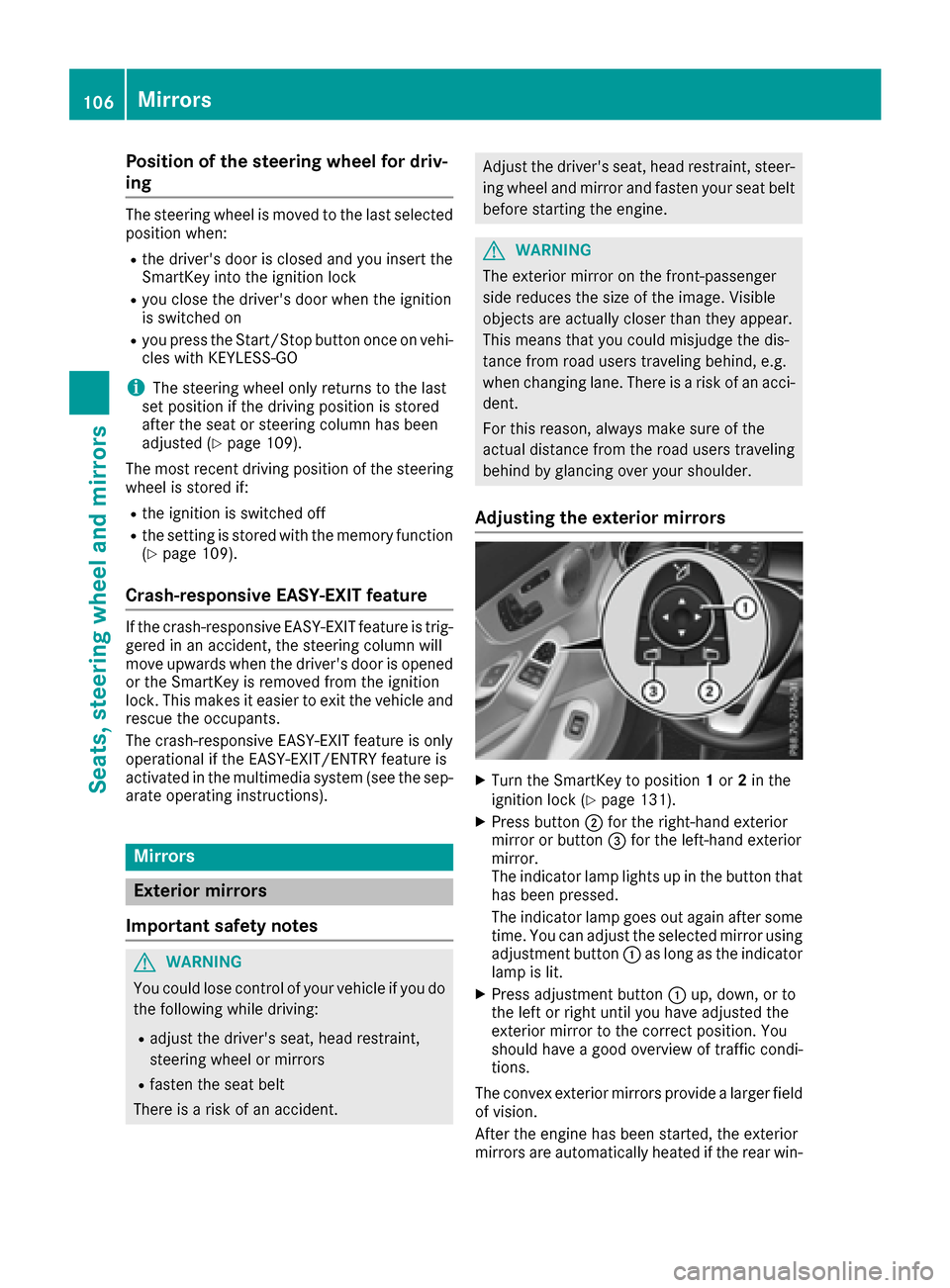
XTurn the SmartKey to position 1or 2in the
ignition lock (Ypage 131).
XPress button ;for the right-hande xterior
mirror or button =for the left-hand exterior
mirror.
The indicator lamp lights up in the button that
has been pressed.
The indicator lamp goes out again after some
time. You can adjust the selected mirror using
adjustment button :as long as the indicator
lamp is lit.
XPress adjustment button :up, down, or to
the left or right until you have adjusted the
exterior mirror to the correct position. You
should have agood overview of traffic condi-
tions.
The convex exterior mirrors provide alarger field
of vision.
After the engine has been started, the exterior
mirrors are automatically heated if the rear win-
106Mirrors
Seats, steering wheela nd mirrors
Page 109 of 354

dow defroster is switched on and the outside
temperature is low.
Folding the exterior mirrorsinorout
electrically
XTurn the SmartKey to position 1or 2in the
ignition lock (Ypage 131).
XBriefly press :.
Bothe xterior mirrorsf old in or out.
iMake sure that the exterior mirrorsa re
always folded out fully while driving .They
could otherwise vibrate.
iIf you are driving faster than 30 mph
(47 km/h), you can no longer fold in the exte-
rior mirrors.
Setting the exterior mirrors
If the battery has been disconnected or com-
pletely discharged, the exterior mirrorsm ust be
reset.T he exterior mirrorsw ill otherwise not
fold in when you select the Automatic
MirrorFoldingfunction in the multimedia system.
XTurn the SmartKey to position 1or 2in the
ignition lock (Ypage 131).
XBriefly press :.
Folding the exterior mirror sinorout
automatically
When the Automatic Mirror Foldingfunc-
tion is activated in the multimedia system (see
the separate operatin ginstructions):
Rthe exterior mirrorsf old in automatically as
soon as you lock the vehicle from the outside.
Rthe exterior mirrorsf old out automatically
again as soon as you unlock the vehicle.
iIf the exterior mirrorsh ave been folded in
manually, they do not fold out.
Exterior mirror pushed out of position
If an exterior mirror has been pushed out of
position ,proceed as follows:
XVehicles without electrically folding exte-
rior mirrors: move the exterior mirror into
the correct position manually.
XVehicles with electrically folding exterior
mirrors: press and hold button :until you
hear aclick and then the mirror engaging in
position (
Ypage 107).
The mirror housing is engaged again and you
can adjust the exterior mirrorsasu sual
(
Ypage 106).
Automatic anti-glare mirrors
GWARNING
Electrolyte may escape if the glass in an auto-
matic anti-glare mirror breaks. The electrolyte
is harmful and causes irritation. It must not
come int ocontact with your skin ,eyes, res-
piratory organs or clothing or be swallowed.
There is arisk of injury.
If you come int ocontact with the electrolyte,
observe the following:
RRinse off the electrolyte from your skin
immediately with water.
RImmediately rinse the electrolyte out of
your eyes thoroughly with clean water.
RIf the electrolyte is swallowed, immediately
rinse your mouth out thoroughly. Do not
induce vomiting.
RIf electrolyte comes int ocontact with your
skin or hair or is swallowed, seek medical
attention immediately.
RImmediately chang eout of clothing which
has come int ocontact with electrolyte.
RIf an allergic reaction occurs, seek medical
attention immediately.
Mirrors107
Seats, steering wheel and mirrors
Z
Page 110 of 354
The rear-view mirror and the exterior mirror on
the driver's side automatically go into anti-glare
mode if the following conditions are met simul-
taneously:
Rthe ignition is switched on
Rincident light from headlamps strikes the sen-
sor in the rear-view mirror
The mirrors do not go into anti-glare mode if
reverse gear is engaged or if the interior lighting
is switched on.
Parking position for the exterior mir-
ror on the front-passenger side
Storing the parking position
You can position the front-passenger side exte-
rior mirror in such away that you can see the
rear wheel on that side as soon as you engage
reverse gear. You can store this position.
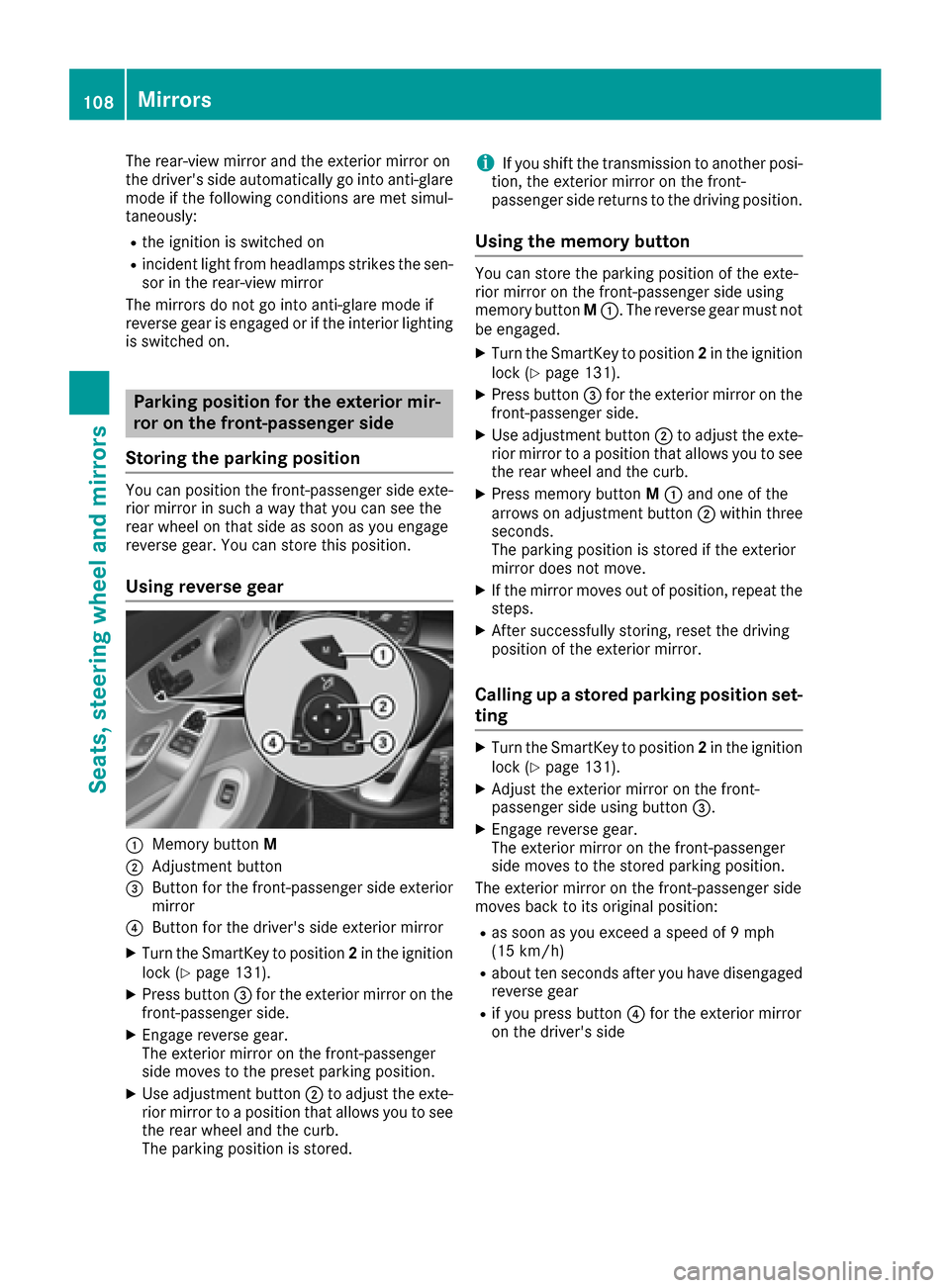
Using reverse gear
:Memory button M
;Adjustment button
=Button for the front-passenger side exterior
mirror
?Button for the driver's side exterior mirror
XTurn the SmartKey to position 2in the ignition
lock (Ypage 131).
XPress button =for the exterior mirror on the
front-passenger side.
XEngage reverse gear.
The exterior mirror on the front-passenger
side moves to the preset parking position.
XUse adjustmen tbutton ;to adjust the exte-
rior mirror to aposition that allows you to see
the rear wheel and the curb.
The parking position is stored.
iIf you shift the transmission to another posi-
tion, the exterior mirror on the front-
passenger side return stothe driving position.
Using the memor ybutton
You can store the parking position of the exte-
rior mirror on the front-passenger side using
memory button M:.T he reverse gear must not
be engaged.
XTurn the SmartKey to position 2in the ignition
lock (Ypage 131).
XPress button =for the exterior mirror on the
front-passenger side.
XUse adjustmen tbutton ;to adjust the exte-
rior mirror to aposition that allows you to see
the rear wheel and the curb.
XPress memory button M: and one of the
arrows on adjustmen tbutton ;within three
seconds.
The parking position is stored if the exterior
mirror does not move.
XIf the mirror moves out of position, repeat the
steps.
XAfter successfully storing, reset the driving
position of the exterior mirror.
Calling up astored parking position set-
ting
XTurn the SmartKey to position 2in the ignition
lock (Ypage 131).
XAdjust the exterior mirror on the front-
passenger side using button =.
XEngage reverse gear.
The exterior mirror on the front-passenger
side moves to the stored parking position.
The exterior mirror on the front-passenger side
moves back to its original position:
Ras soon as you exceed aspeed of 9mph
(15 km/h)
Rabout ten seconds after you have disengaged
reverse gear
Rif you press button ?for the exterior mirror
on the driver's side
108Mirrors
Seats, steering wheel and mirrors
Page 111 of 354
Memory function
Important safety notes
GWARNING
If you use the memory function on the driver's side while driving, you coul dlose control of
the vehicleasar esult of the adjustments
being made .There is arisk of an accident.
Only use the memory function on the driver's
side when the vehicleiss tationary.
GWARNING
When the memory function adjusts the seat or steering wheel, you and other vehicleo ccu-
pants –particularly children –coul db ecome
trapped. There is arisk of injury.
Whil ethe memory function is making adjust-
ments, make sure that no one has any body
parts in the swee pofthe seat or steering
wheel. If somebody becomest rapped, imme-
diately release the memory function position
button. The adjustment process is stopped.
GWARNING
Childre ncoul db ecome trappe difthey acti-
vate the memory function, particularly when
unattended .There is arisk of injury.
When leaving the vehicle, alway stake the
SmartKey with you and lock the vehicle. Never
leave children unsupervised in the vehicle.
The memory function can be use datany time,
e.g. even when the key is not in the ignitio nlock.
Storing settings
With the memory function, you can store up to
three different settings, e.g. for three different
people.
The following settings are stored as asingle
memory preset:
Rposition of the seat, backrest and head
restraint
Rdriver's side:p osition of the exterior mirrors
on the driver's and front-passenger sides
Rposition of the head-up display
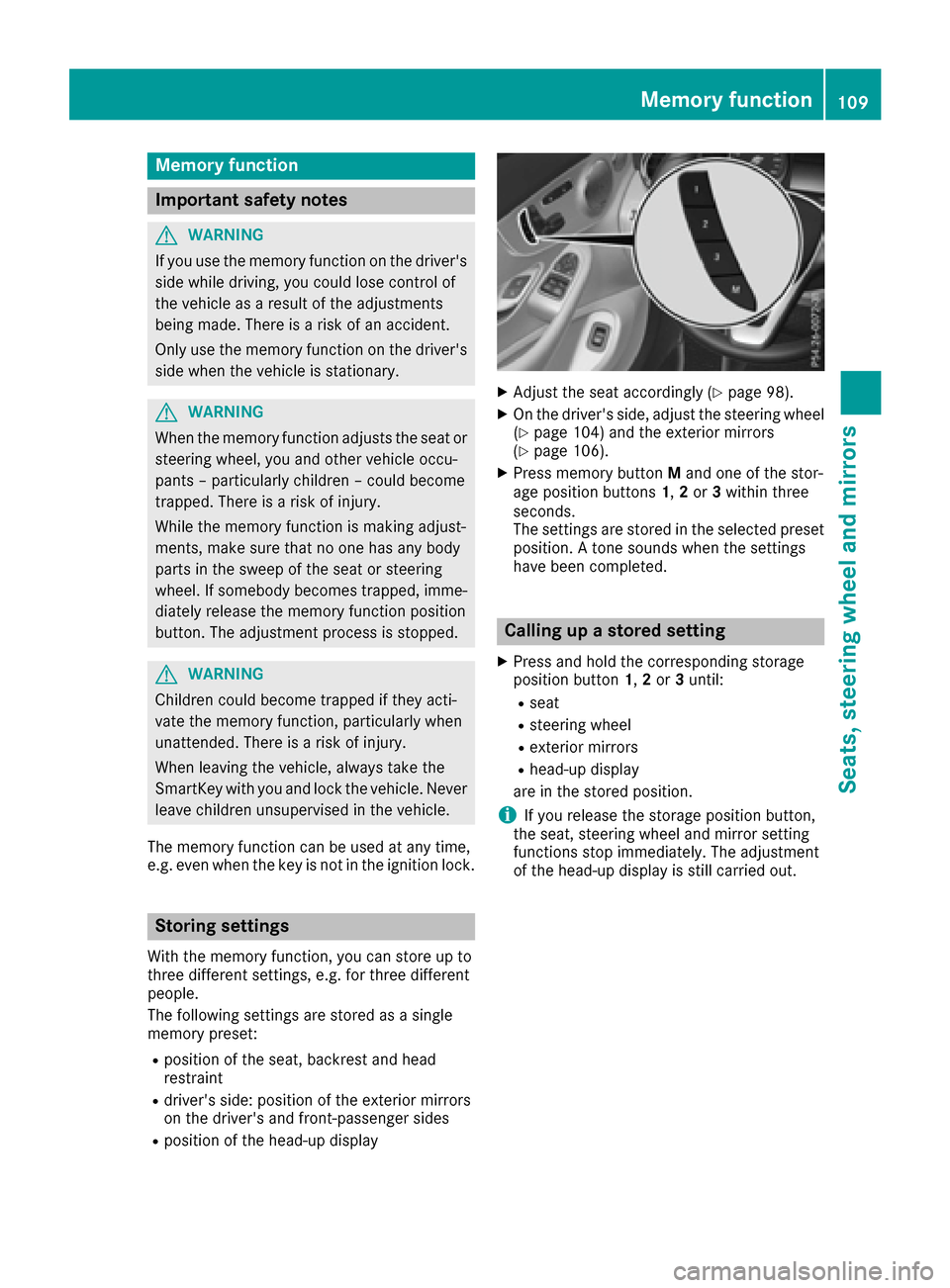
XAdjust the seat accordingly (Ypag e98).
XOn the driver's side ,adjust the steering wheel
(Ypag e104) and the exterior mirrors
(Ypag e106).
XPress memory button Mand one of the stor-
age position buttons 1,2or 3withi nthree
seconds.
The settings are stored in the selected preset
position. Atone sound swhen the settings
have been completed.
Calling up astored setting
XPress and hold the corresponding storage
position button 1,2or 3until:
Rseat
Rsteering wheel
Rexterior mirrors
Rhead-up display
are in the stored position.
iIf you release the storage position button,
the seat, steering whee land mirror setting
functions stop immediately. The adjustment
of the head-up display is still carrie dout.
Memory function109
Seats, steering wheel and mirrors
Z
Page 183 of 354
PARKTRONIC is still available. You can take over
the steering, before the vehicle has exited the
parking space completely. This is useful, for
example when you recognize that it is already
possible to pull out of the parking space.
Canceling Active Parking Assist
XStop the movementofthe multifunction
steerin gwheel or steer yourself.
Active Parking Assist will be canceled at once.
The Park Assist Canceled
message
appears in the multifunction display.
or
XPress the PARKTRONIC button (Ypage 176).
PARKTRONIC is switched off and Active Park-
ing Assist is immediately canceled. The Park
Assist Canceledmessage appears in the
multifunction display.
Active Parking Assist is canceled automatically
if:
Rthe electric parking brake is engaged
Rtransmission position Pis selected
Rparking using Active Parking Assist is no lon-
ger possible
Ryou are driving faster than 6mph (1 0km/ h)
Raw heel spins, ESP®intervene sorfails.The
÷ warning lamp lightsupint heinstrument
cluster
Aw arning tone sounds. The parking symbo ldis-
appearsa nd themultifunction display showst he
ParkA ssist Canceled
message.
When Activ eParking Assist is canceled, you
must steer and brak eagain yourself.
If as ystem malfunctio noccurs, th evehicle is
braked to astandstill. To driv eon,depress the
accelerato ragain.
Rea rview camera
General notes
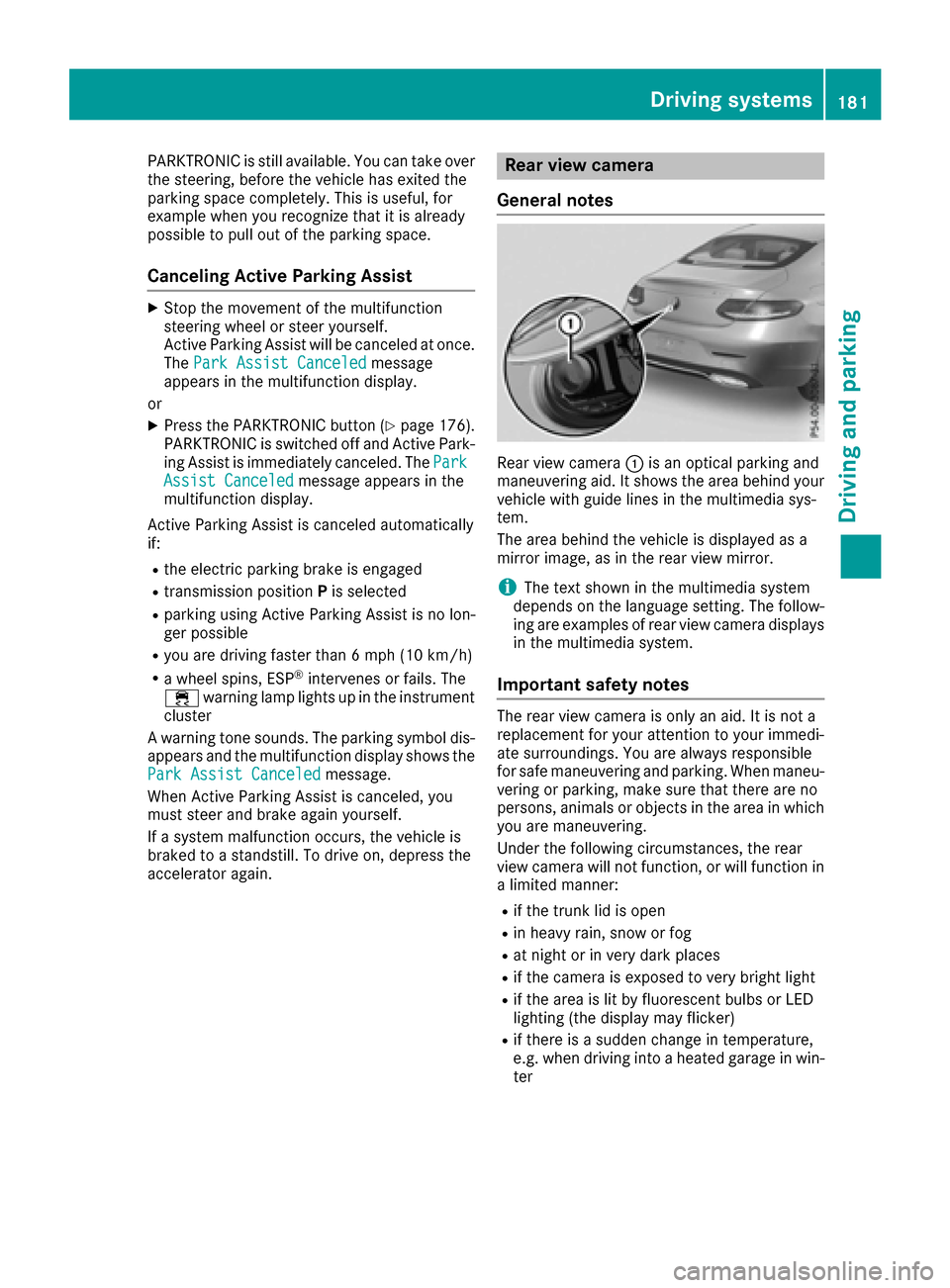
Rear view camera :is an optical parking and
maneuvering aid. It showst hearea behindy our
vehicle with guide line sinthemultimedia sys-
tem.
The area behindt hevehicle is displayedasa
mirror image ,asintherear view mirror.
iThe text shownint hemultimedia system
depends on th elanguage setting. The follow-
ing are examples of rear view camera displays
in th emultimedia system.
Important safety notes
The rear view camera is only an aid. It is no ta
replacement for your attention to your immedi-
ate surroundings. You are always responsible
for safe maneuvering and parking .When maneu-
vering or parking ,makes ure that there are no
persons, animals or object sinthearea in which
you are maneuvering.
Under th efollowingc ircumstances, th erear
view camera will no tfunction,orw ill function in
al imited manner:
Rif th etrunk lid is open
Rin heavyr ain,sno worf og
Rat night or in ver ydark places
Rif th ecamera is exposed to ver ybright light
Rif th earea is lit by fluorescent bulbs or LED
lighting (th edisplay may flicker)
Rif there is asudden chang eintemperature,
e.g .when driving int oaheated garag einwin-
ter
Driving systems181
Driving and parking
Z
Page 184 of 354
Rif the cameralens is dirtyoro bstructed
Observe the notes on cleaning
(
Ypage 296)
Rif the rear of your vehicle is damaged. In this
event, have the camer aposition and setting
checked at aqualified specialist workshop
The field of vision and other function softhe rear
view camer amay be restricted due to additional
accessories on the rear of the vehicle (e.g.
license plate holder,b icycle rack).
iThe rear view cameraisprotected fromr ain-
drops and dust by meansofaf lap. When the
rear view camer aisactivated, this flap opens.
The flap closes again when:
Ryou have finished the maneuveringp rocess
Ryou switchoff the engine
Ryou open the trunk
Observe the notes on cleaning (
Ypage 296).
For technical reasons, the flap may remain
open briefly after the rear view camer ahas
been deactivated.
Activating/deactivating th erearv iew
camera
XTo activate: make sure that the SmartKey is
in position 2in the ignition lock.
XMake sure that the Activation byRgearfunction is selected in the multimedia system
(see the separateo perating instructions).
XEngage reverse gear.
The rear view camer aflap opens. The multi-
media system shows the area behindt he vehi-
cle with guide lines.
The image fromt he rear view camer aisavail-
able throughout the maneuveringp rocess.
To deactivate: the rear view camer adeacti-
vate sify ou shift the transmission to Por after
drivingf orwards ashortd istance.
Multimedia display
The rear view camer amay show adistorted view
of obstacles, show the mincorrectly or not at all.
The rear view camer adoes not show object sin
the followingp ositions:
Rvery closetothe rear bumper
Runder the rear bumper
Rin clos erang eabove the handle on the trunk
lid
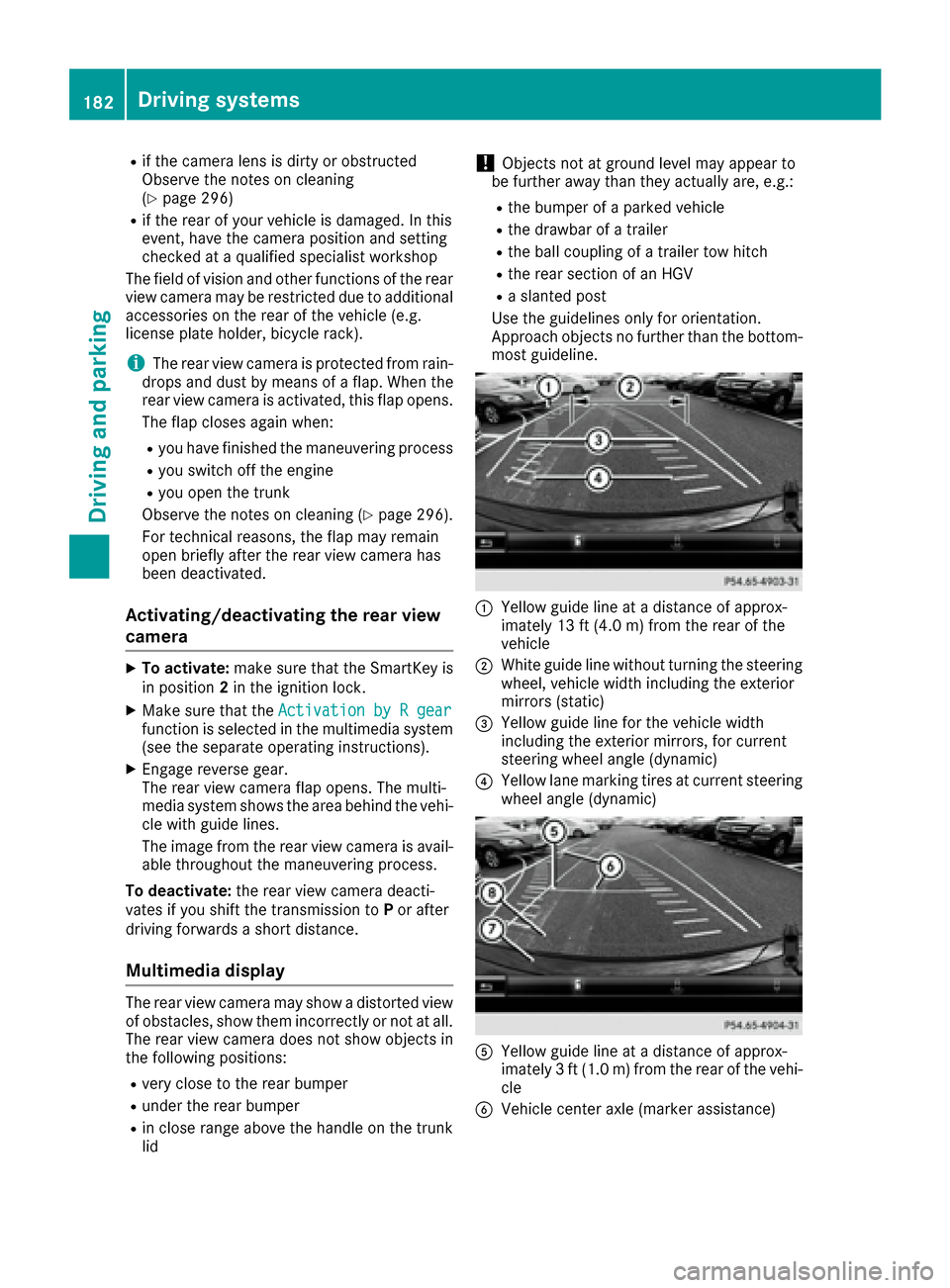
!Object snot at groundl evel may appear to
be further away than the yactually are, e.g.:
Rthe bumper of aparked vehicle
Rthe drawbar of atrailer
Rthe ball couplin gofatrailer tow hitch
Rthe rear section of an HGV
Ras lanted post
Use the guideline sonly for orientation.
Approach object snofurther than the bottom-
most guideline.
:Yellow guide line at adistanc eofapprox-
imately 13 ft (4. 0m)fromthe rear of the
vehicle
;Whiteg uide line without turning the steering
wheel, vehicle width including the exterior
mirrors (static)
=Yellow guide line for the vehicle width
including the exterior mirrors, for current
steeringw heel angle (dynamic)
?Yellow lane marking tires at current steering
wheel angle (dynamic)
AYellow guide line at adistanc eofapprox-
imately 3ft(1.0m)f romthe rear of the vehi-
cle
BVehicle center axle (marker assistance)
182Driving systems
Driving and parking
Page 185 of 354
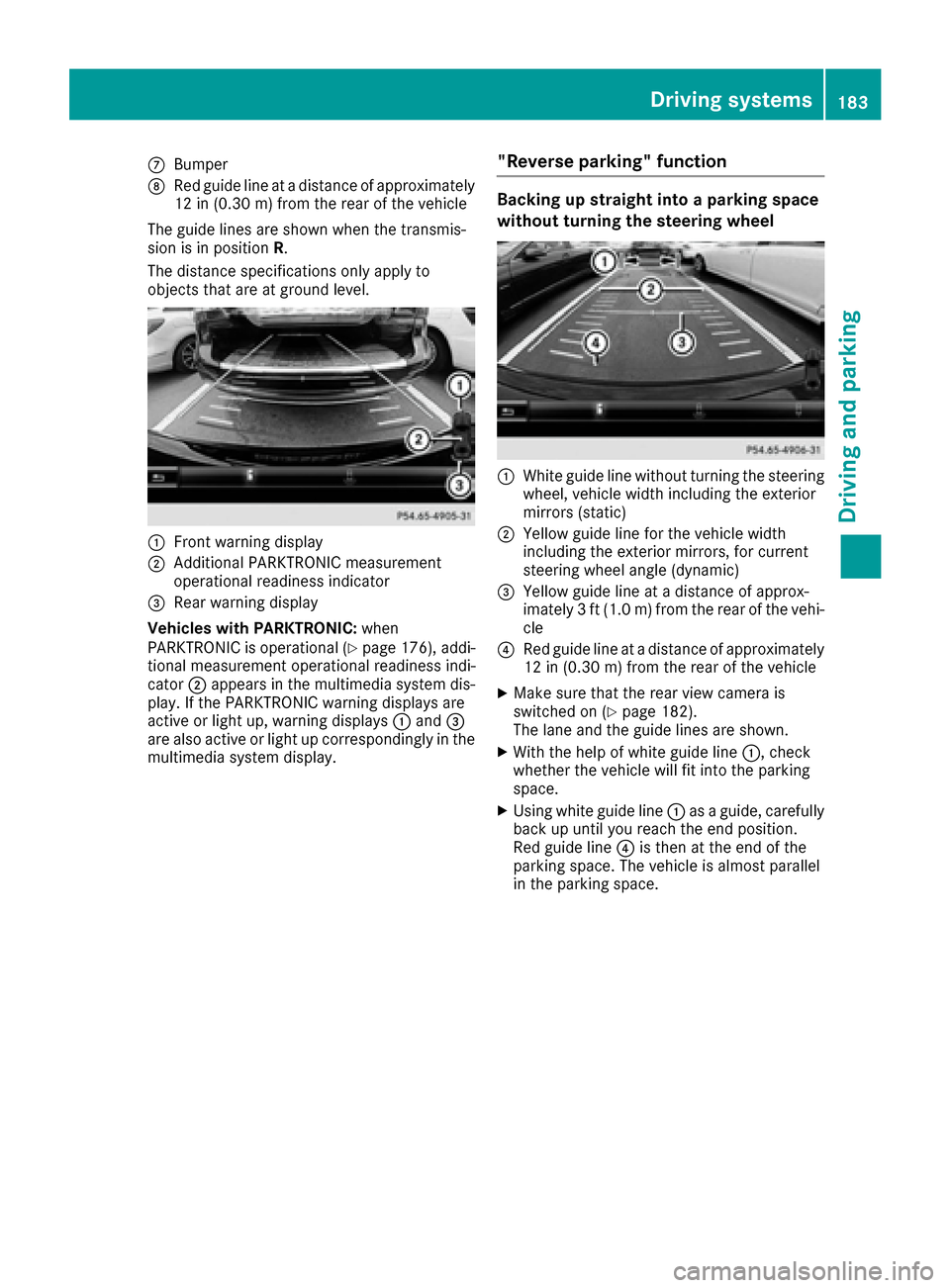
CBumper
DRedg uide line at adistance of approximately
12 in (0.30 m) fromthe rearofthe vehicle
The guid elines ar eshown when the transmis-
sion is in position R.
The distance specifications onl yapply to
objects thata reat ground level.
:Fron twarning display
;Additiona lPARKTRONI Cmeasurement
operational readines sindicator
=Rear warning display
Vehicle swithP ARKTRONIC: when
PARKTRONI Cisoperational (
Ypage 176), addi-
tional measurement operational readines sindi-
cator ;appear sinthe multimedia systemd is-
play .Ifthe PARKTRONI Cwarning displays are
active or light up ,warning displays :and =
ar ea lsoa ctive or light up correspondingl yinthe
multimedia systemd isplay.
"Reverse parking "function
Backin gupstraight into aparking space
without turning the steering wheel
:White guid elinew ithou tturning the steering
wheel, vehicl ewidth including the exterior
mirrors (static)
;Yellow guid elinef or the vehicl ewidth
including the exterio rmirrors, for current
steering whee langle (dynamic)
=Yellow guid elineatad istance of approx-
imately 3ft(1.0 m) fromt he rearofthe vehi-
cle
?Re dg uide line at adistance of approximately
12 in (0.3 0m)fromt he rea rofthe vehicle
XMake sure thatt he rearviewc amera is
switched on (Ypage 182).
The lane and the guid elines ar eshown.
XWith the help of white guid eline :,c heck
whether the vehicl ewillf it into the parking
space.
XUsing white guid eline: asag uide ,carefully
back up unti lyou reach the end position.
Re dg uide line?is thenatt he end of the
parking space .The vehicl eisalmostp aralle l
in the parking space.
Driving system s183
Driving an dparking
Z
Page 186 of 354
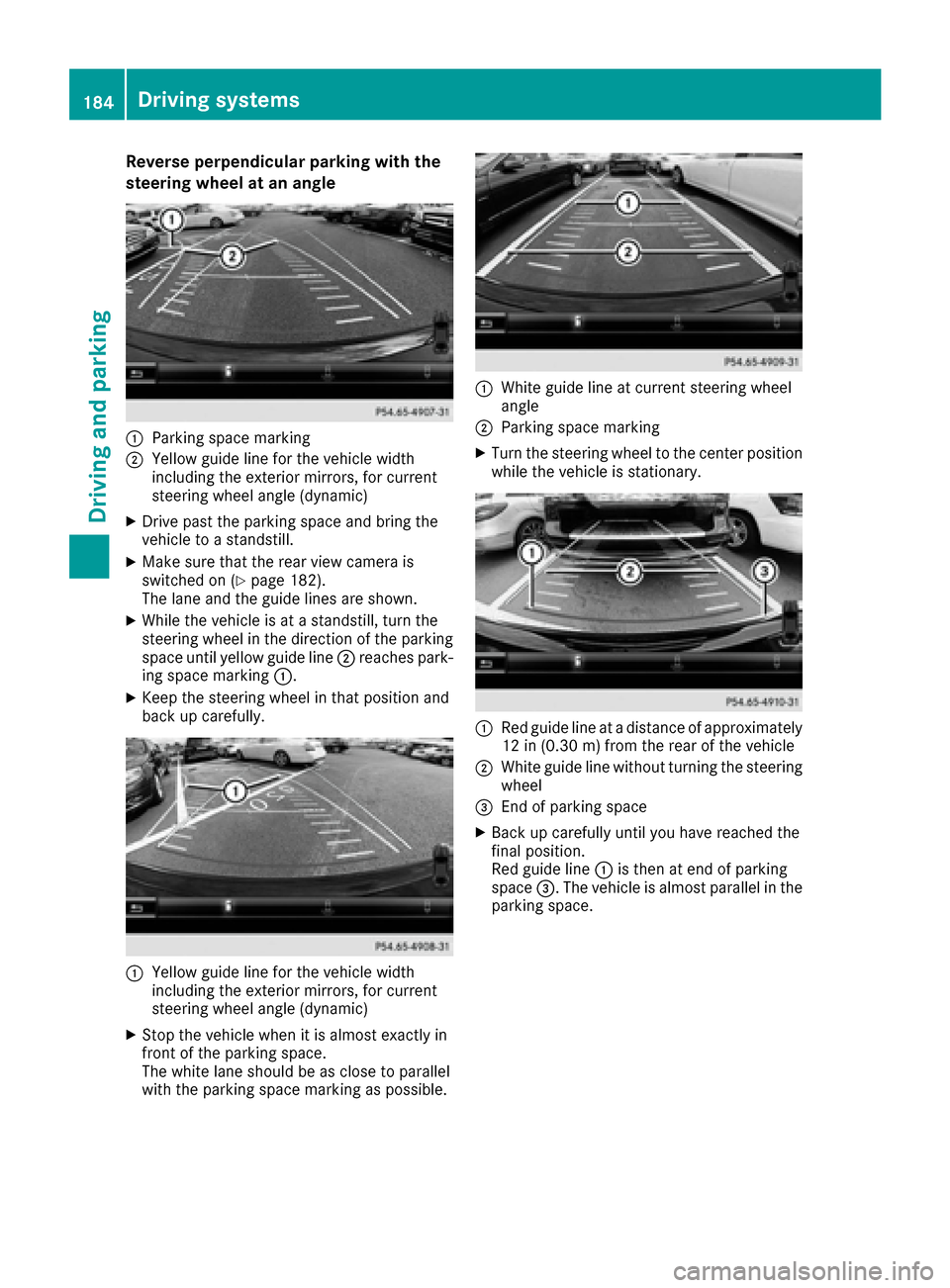
Reverse perpendicular parkingwitht he
steering wheel at an angle
:Parking space marking
;Yellow guid elinef or the vehicle width
including the exterior mirrors, for current
steering wheel angle (dynamic)
XDrive past the parking space and bring the
vehicle to astandstill.
XMake sure that the rea rviewc amera is
switched on (Ypage 182).
The lane and the guid elines are shown.
XWhile the vehicle is at astandstill, turn the
steering wheel in the direction of the parking
space unti lyello wguide line;reaches park-
ing space marking :.
XKeepthe steering wheel in that position and
back up carefully.
:Yellow guid elinef or the vehicle width
including the exterior mirrors, for current
steering wheel angle (dynamic)
XStop the vehicle whe nitisalmost exactly in
front of the parking space.
The white lane shoul dbeasclose to parallel
with the parking space marking as possible.
:White guid elineatc urrent steering wheel
angle
;Parking space marking
XTurn the steering wheel to the center position
while the vehicle is stationary.
:Re dg uide line at adistance of approximately
12 in (0.30 m) fromthe rearofthe vehicle
;White guid elinew ithou tturning the steering
wheel
=End of parking space
XBac kupcarefull yuntilyou have reache dthe
final position.
Re dg uide line:is thenate nd of parking
space =.The vehicl eisalmostp aralle linthe
parking space.
184Driving system s
Driving an dparking
Page 187 of 354
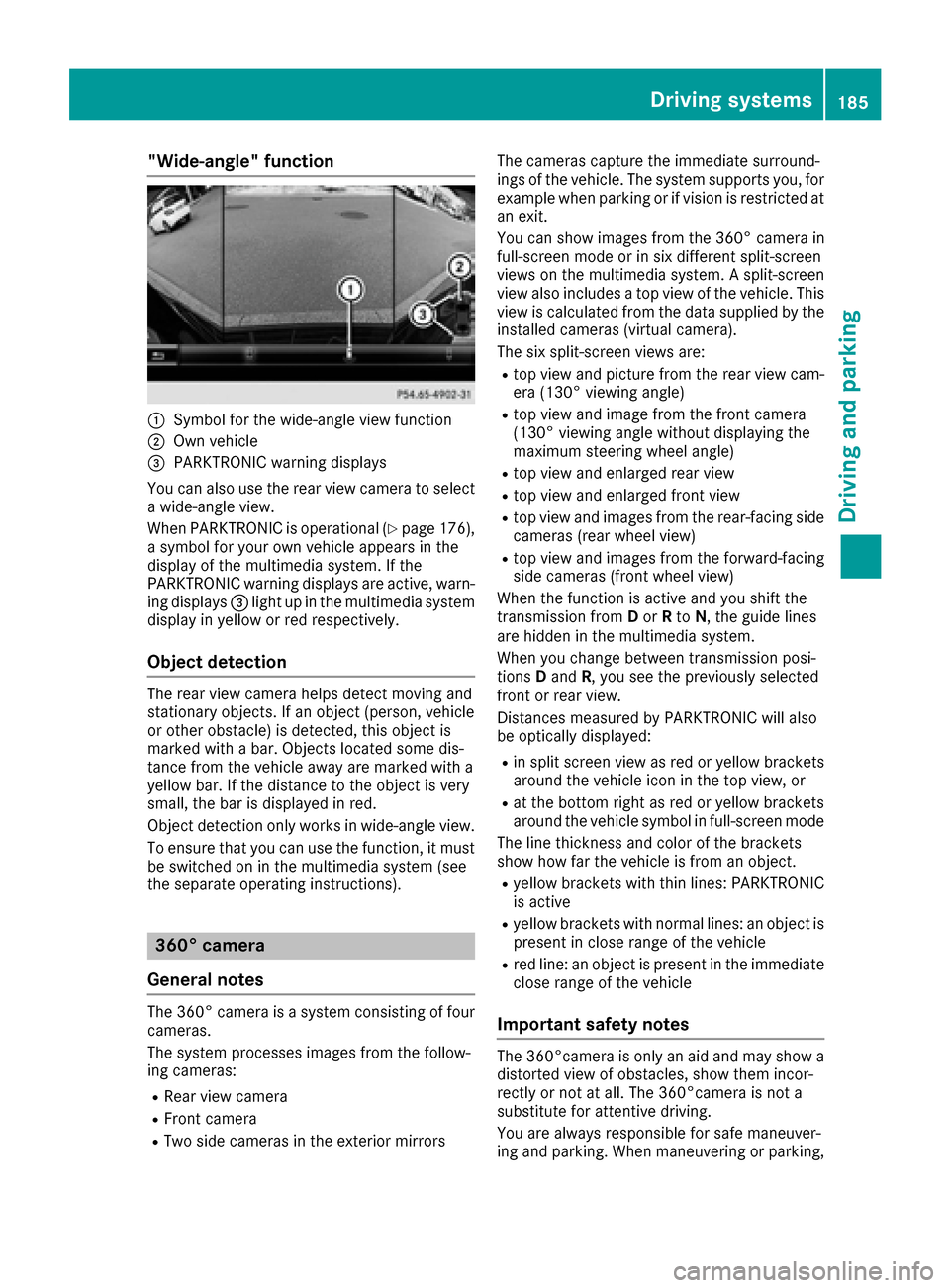
"Wide-angle" function
:Symbol for the wide-angle view function
;Own vehicle
=PARKTRONIC warning displays
You can also use the rear view camera to select
aw ide-angle view.
When PARKTRONIC is operational (
Ypage 176),
as ymbol for your own vehicle appears in the
displayoft he multimedia system. If the
PARKTRONIC warning displays are active, warn-
ing displays =light up in the multimedia system
displayiny ellow or red respectively.
Object detection
The rear view camera helps detect moving and
stationary objects. If an object (person, vehicle
or other obstacle) is detected, this object is
marked with abar. Objects located some dis-
tance from the vehicle awaya re marked with a
yellow bar. If the distance to the object is very
small, the bar is displayed in red.
Object detection only works in wide-angle view.
To ensure that you can use the function, it must
be switched on in the multimedia system (see
the separate operating instructions).
360° camera
General notes
The 360° camera is asystem consisting of four
cameras.
The system processes images from the follow-
ing cameras:
RRear view camera
RFront camera
RTwo side cameras in the exterior mirrors The cameras capture the immediate surround-
ings of the vehicle. The system supports you, for
example when parking or if vision is restricted at
an exit.
You can show images from the 360° camera in
full-screen mode or in six different split-screen
views on the multimedia system.
Asplit-screen
view also includes atop view of the vehicle. This
view is calculated from the data supplied by the
installed cameras (virtual camera).
The six split-screen views are:
Rtop view and picture from the rear view cam-
era (130° viewing angle)
Rtop view and image from the front camera
(130° viewing angle without displaying the
maximum steering wheel angle)
Rtop view and enlarged rear view
Rtop view and enlarged front view
Rtop view and images from the rear-facing side
cameras (rear wheel view)
Rtop view and images from the forward-facing
side cameras (front wheel view)
When the function is active and you shift the
transmission from Dor Rto N,t he guide lines
are hidden in the multimedia system.
When you change between transmission posi-
tions Dand R,you see the previouslys elected
front or rear view.
Distances measured by PARKTRONIC will also
be optically displayed:
Rin split screen view as red or yellow brackets around the vehicle icon in the top view, or
Rat the bottom right as red or yellow brackets
around the vehicle symbol in full-screen mode
The line thickness and color of the brackets
show how far the vehicle is from an object.
Ryellow brackets with thin lines: PARKTRONIC
is active
Ryellow brackets with normal lines: an object is present in close range of the vehicle
Rred line: an object is present in the immediate
close range of the vehicle
Important safety notes
The 360°camera is only an aid and may show a
distorted view of obstacles, show them incor-
rectly or not at all. The 360°camera is not a
substitute for attentive driving.
You are always responsible for safe maneuver-
ing and parking. When maneuvering or parking,
Driving systems185
Driving and parking
Z