ECO mode MERCEDES-BENZ C-CLASS SEDAN 2019 User Guide
[x] Cancel search | Manufacturer: MERCEDES-BENZ, Model Year: 2019, Model line: C-CLASS SEDAN, Model: MERCEDES-BENZ C-CLASS SEDAN 2019Pages: 534, PDF Size: 48.63 MB
Page 154 of 534
th
emultifunc tiondispla y.Ifyo udo notswit choff
th eignition ,th eignition isaut omaticall y
switc hedoffaf te rth re eminut es.
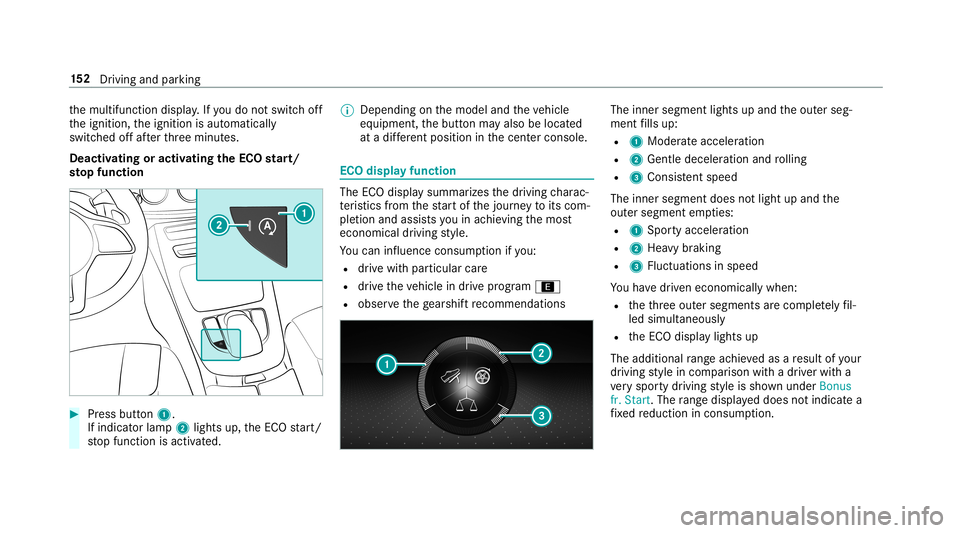
Deactiv atingoractiv ating theECO star t/
sto pfunc tion 0007
Press button 1.
If indi catorlamp 2light sup, theEC Ostar t/
st op funct ionisactiv ated. 0009
Depending onthemodel andtheve hicle
eq uipment, thebutt onmayalso belocat ed
at adif fere nt positio nin thecent ercon sole. ECO
displa yfunction The
ECOdispla ysummar izesthedr iving charac‐
te rist ics from thest ar tof thejour neyto its com ‐
ple tion andassis tsyouin achie vingth emos t
econ omical driving style.
Yo ucan influen ceconsum ption ifyo u:
R drive wit hpar ticular care
R drive th eve hicle indrive pr ogr am ;
R obser vethege arshif tre comme ndations The
inner segment lights upand theout erseg‐
ment fills up:
R 1 Moderat eacc eler ation
R 2 Gent ledecele ratio nand rolling
R 3 Consis tent spe ed
The inne rseg ment does notlight upand the
out ersegment empties:
R 1 Spor tyacc eler ation
R 2 Hea vybrakin g
R 3 Fluct uation sin speed
Yo uha ve driven econ omicall ywhen:
R theth re eout ersegment sar ecom pletely fil‐
led simult aneousl y
R theEC Odispla ylights up
The additional rang eac hieve das are sult ofyour
dr ivin gst yle in com parison withadr iver wit ha
ve ry spor tydriving style is sho wnunder Bonus
fr. Start .The rang edispl ayed does notindicat ea
fi xe dre duction incon sum ption. 15
2
Driving and parking
Page 159 of 534
0007
Todeac tivate: pullst eer ing wheel paddle
shif ter2 and hold itin pla ce.
The transmiss ionposi tion 005Bapp earsin the
multifu nctiondisplay.
Pe rm anen tse tting: 0007
Cha ngeto drive pr og ram
= (0013 page15 3). 0007
Select drive pr ogr am Manua l
(0013 page 153).
Me rcedes- AMGvehicl es:obse rveth eno tesin
th eSupplement .Ot her wise, youma yfa ilto rec‐
ogni zedangers. Gearshif
tre comm endation Mer
cedes -AMG vehicl es:obse rveth eno tesin
th eSupplement .Ot her wise, youma yfa ilto rec‐
ogni zedangers.
The gearshif tre comme ndation assists youin
adop tingan eco nomic aldrivin gst yle. 0007
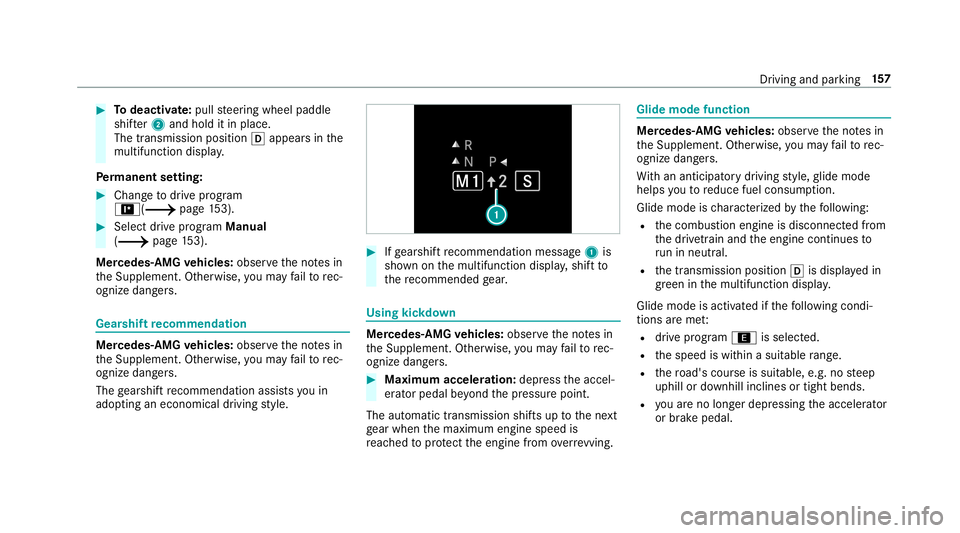
Ifge arshif tre comme ndation mess age1 is
sho wnonthemultifunc tiondispla y,shif tto
th ere comme ndedgear. Using
kickdow n Mer
cede s-AMG vehicl es:obse rveth eno tesin
th eSupplement .Ot her wise, youma yfa ilto rec‐
ogni zedangers. 0007
Maxi mum acceler atio n:dep ress theaccel‐
er ator pedal beyond thepr essur epoint .
The automatic transmiss ionshiftsup tothene xt
ge ar when themaximum enginespeedis
re ac hed toprotect theengine from overrev ving. Glide
mode functio n Mer
cede s-AMG vehicl es:obse rveth eno tesin
th eSupplement .Ot her wise, youma yfa ilto rec‐
ogni zedangers.
Wi th an ant icip ator ydr ivin gst yle, glide mode
helps youto reduce fuelconsum ption.
Glide mode isch aract erize dby thefo llo wing:
R thecombus tionengine isdiscon nectedfrom
th edr ivet ra in and theengine continues to
ru nin neu tral .
R thetra nsmiss ionposition 005Bisdispla yedin
gr een inthemultifunc tiondispla y.
Glide mode isact ivat ed ifth efo llo wing condi‐
tion sar eme t:
R drive pr og ram ; issele cted.
R thespeed iswit hin asuit able rang e.
R thero ad's courseissuit able, e.g.no steep
uphill ordownhill inclinesortight bends.
R youar eno longerdepr essing theacceler ator
or brak epedal. Dr
iving andparking 15
7
Page 160 of 534
0009
Glide mode canalso beact ivat ed ifyo uha ve
select edthe"Eco" setting forth edr ive in the
dr ive pr og ram =.
Gli de mode isdea ctivated again ifone ofthe
condi tions isno long erme t.
Gl ide mod ecan also be preve nted bythefo llo w‐
ing parame ters:
R Incline R
Downhill gradi ent
R Temp eratur e
R Height
R Speed
R Oper ating status oftheengine
R Traf fic situ ation 0009
Glide mod ecan beende dby pressing the
ri ght- hand steer ing wheel paddle shifter
( 0013 page15 6). Pr
obl em swit hth etransm ission Pr
oblem
Possible causes/conseq uencesand0050 0050
Solutions
The transmission hasafa ulty gearshif t. The transm issionis losin goil. 0007
Have thetra nsmiss ioncheckedat aqu alif ied spec ialistwo rkshop immediat ely.
The acceler ationcharact eristic sar e
de terior ating.
The transmission nolong ershif tsgear. The
transm issionis in emer gency operati on mod e.
It is only possi ble to shif tto one gear and reve rsege ar. 0007
Pull overand stop theve hicle safely assoon aspossible, paying attention toroad and traf fic condi tions. 0007
Swi tchth etra nsmiss iontoposition 005D. 0007
Switc hof fth eengine. 0007
Waitat leas tte nseco ndsbefore restar tin gth eengine. 15
8
Driving and parking
Page 192 of 534
Ste
ering and touc hde tection
The driver isrequ ired tokeep their hands onthe
st eer ing wheel atall times andbeable tointer‐
ve ne atanytime tocor rect thecour seofthe
ve hicle andkeep itin lane. Thedriver mus t
ex pect ach ang efrom active to passiv emode or
vice versaat anytim e. If
th esy stem reac hes asy stem limit ation orthe
dr iver has notst eer edtheve hicle fora consider‐
abl eper iod oftime orhas remo vedth eir hands
fr om thesteer ing wheel, thesy stem will,
depending onthesituation ,aler tth edr iver
eit her withavisual warning oravisual and
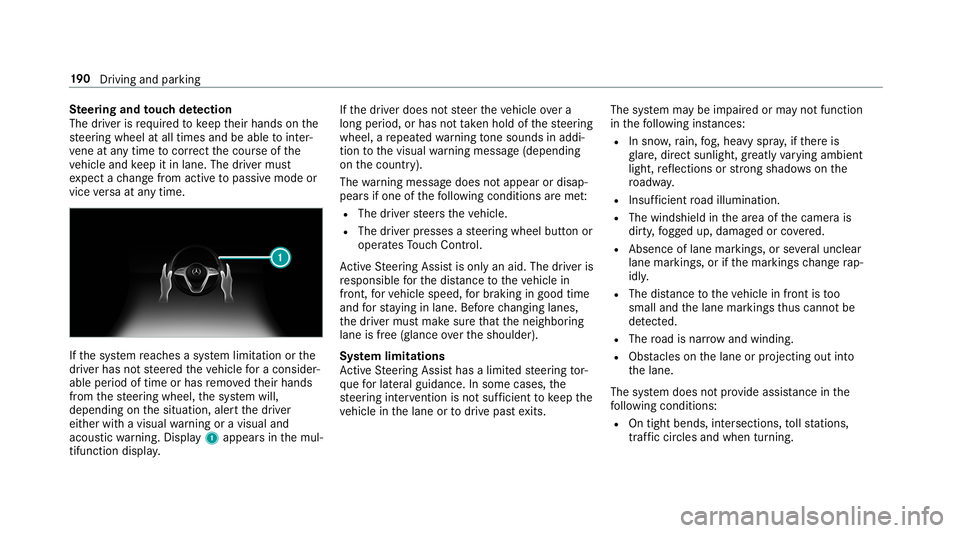
acous ticwarning. Disp lay 1 appear sin themul‐
tifun ction displa y. If
th edr iver does notst eer theve hicle overa
long period, orhas notta ke nhol dof thesteer ing
wheel, are peat edwarning tone sou nds inad di‐
tio nto thevisual warning mess age(depen ding
on thecount ry).
The warning mess agedoes notappear ordisap‐
pear sif one ofthefo llo wing condition sar eme t:
R The driver steer sth eve hicle.
R The driver presses ast eer ing wheel buttonor
oper ates Touc hCon trol.
Ac tiveSt eer ing Assis tis onl yan aid. Thedriver is
re sponsible forth edis tance totheve hicle in
fr ont, forve hicle speed, forbr aking ingood time
and forst ay ing inlane. Beforech ang inglane s,
th edr iver mus tmak esur eth at theneighbor ing
lane isfree (glance over theshoulder).
Sy stem limita tions
Ac tiveSt eer ing Assis thas alimit edsteer ing tor‐
qu efo rlat eral gui dance. Insome cases, the
st eer ing interve ntio nis no tsu fficien tto keep the
ve hicle inthelane ortodrive pas tex its. The
system maybe impair edorma yno tfunc tion
in thefo llo wing instances:
R Insno w,rain, fog, hea vyspr ay,if th er eis
gl ar e, dir ect sunlight ,gr ea tly varying ambien t
light ,re flect ions orstro ng sha dows onthe
ro adw ay.
R Insuf ficie ntroad illumin ation.
R The wind shieldinthear ea ofthecamer ais
dir ty,fo gg ed up, damag edorcovered.
R Absence oflane markings, orseveralunc lear
lane markings, orifth emar king sch ang era p‐
idly .
R The distance totheve hicle infront istoo
small andthelane marking sth us can notbe
de tected.
R The road isnar row and windin g.
R Obs tacle son thelane orprojec ting outinto
th elane.
The system does notpr ov ide assis tance inthe
fo llo wing condition s:
R Ontigh tbends ,int ersect ions,to llst atio ns,
traf fic cir cle sand whentur ning. 19
0
Driving and parking
Page 277 of 534
ENER
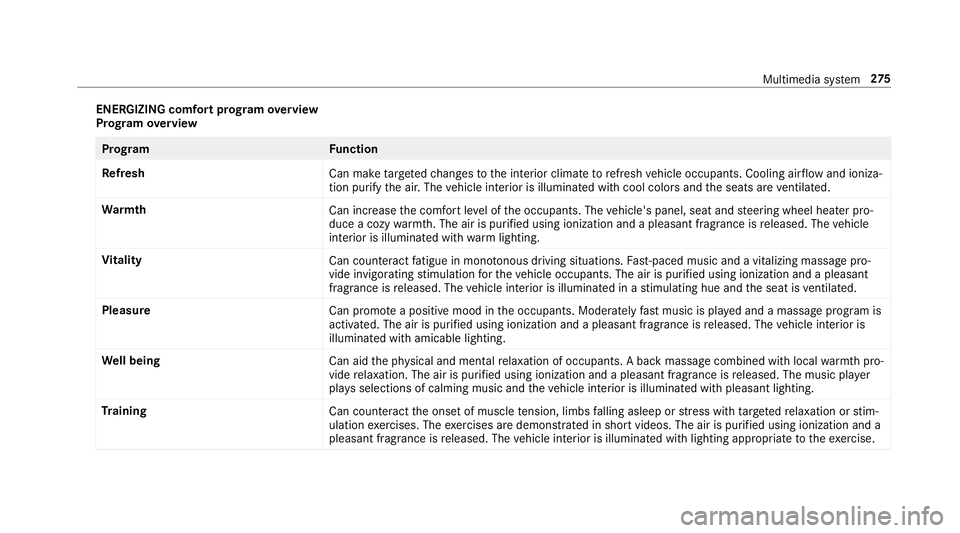
GIZIN Gcomf ortpr og ram ove rview
Pr og ram ove rview Pr
og ramF unction
Re fresh
Canmaketa rgeted chang estotheint erior climat eto refresh vehicle occupants. Coolingairflow and ioniza‐
tio npur ifytheair .The vehicle interior isillu minat edwithcool color sand theseats areve ntil ated .
Wa rmth
Canincrease thecomf ortle ve lof theoccupant s.The vehicle's panel,seatandsteer ing wheel heaterpro‐
duce acoz ywa rmth.The airis pu rified using ionizat ionand apleasant fragr ance isreleased. Thevehicle
int erior isillu minat edwithwa rm light ing.
Vi tali ty
Cancoun tera ct fatig ue inmono tonou sdr ivi ng situa tions. Fast-pa ced music and avit alizi ng mas sage pro‐
vide invigor ating stimulatio nfo rth eve hicle occupants. Theairispur ified using ionization andapleasa nt
fr agr ance isreleased. Thevehicle interior isillu minat edinast imulatin ghue and theseat isventil ated .
Pl eas ure
Canpr omo teaposit ive moo din theoccupant s.Moder atelyfa st musi cis pla yedand amassag epr ogr am is
activ ated. The airispur ified using ionization andapleasant fragr ance isreleased. Thevehicle interior is
illu minat edwithamicable lighting.
We llbeing
Canaidtheph ysical and men talre lax ation ofocc upant s.Abac kmassag ecom bined withlocal warmthpro‐
vide relax ation .The airispur ified using ionization andapleasant fragr anc eis released. Themusic player
pla ysselections ofcalming musicandtheve hicle interior isillu minat edwithpleasa ntlighting.
Tr aini ng
Cancount eract theonse tof muscle tensi on, limbs falling asleep orstre ss wit hta rgeted relax ation orstim‐
ulation exercises. Theexercises aredemon stra tedin shor tvideos. Theairispur ified using ionization anda
pleasant fragr ance isreleased. Thevehicle interior isillu minat edwithlighting appropriateto theex ercise. Multimedia
system 27
5
Page 285 of 534
Ent
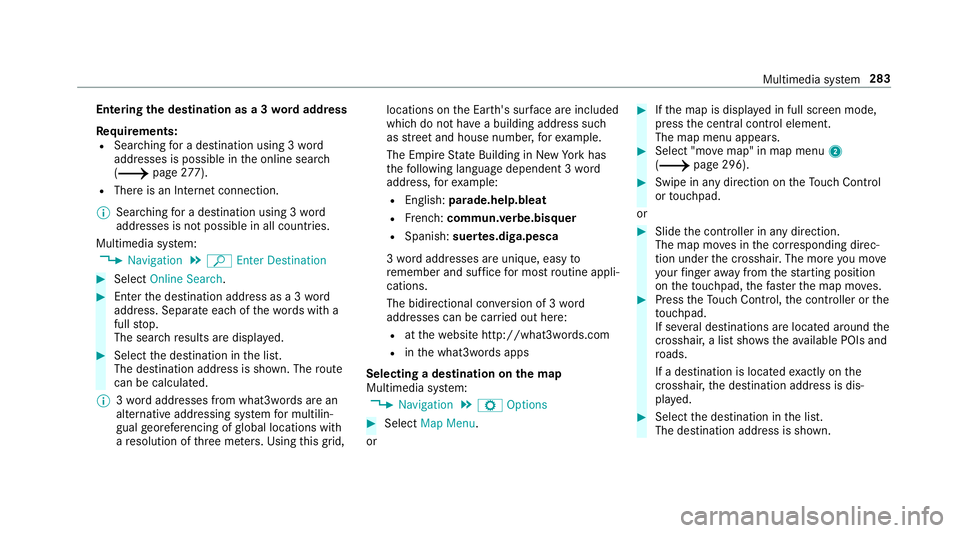
ering thedes tina tion asa3 wo rdaddr ess
Re quirement s:
R Sear ching fora des tination using 3wo rd
addr esse sis poss ibleintheonline search
( 0013 page27 7).
R Ther eis an Interne tconnection.
0009 Sear ching fora des tination using 3wo rd
addr esse sis no tposs ibleinall coun tries.
Mult imed iasystem:
0018 Navigation 0019
ª Enter Dest ination 0007
Select Online Search. 0007
Enterth edes tinat ionaddr essasa3 wo rd
addr ess. Separateeac hof thewo rdswit ha
full stop.
The sear chresults aredispla yed. 0007
Select thedes tinat ioninthelis t.
The destinat ionaddr essissho wn. The route
can becalc ulated.
0009 3wo rdaddr esse sfrom what 3words arean
alt ernat ive addr essingsystem formulti lin‐
gua lge orefer encin gof global locations with
a re solution ofthre eme ters.Usi ngthis grid, locat
ionsontheEar th's sur face areincl uded
whi chdo notha ve abuildin gaddr esssuch
as stre et and house number,fo rex am ple.
The EmpireSt ateBuild inginNe wYo rk has
th efo llo wing languag edepen dent3wo rd
addr ess, forex am ple:
R English: parade.he lp.bleat
R Frenc h:commu n.verbe.bisq uer
R Spanish: suertes.dig a.pesca
3 wo rdaddr esse sar euniq ue,easy to
re member andsuffice formos tro utin eappli‐
cat ions.
The bidir ectionalco nve rsion of3wo rd
addr esse scan becar ried out here:
R atthewe bsit ehtt p:// what3w ords.c om
R inthewhat3w ords apps
Selecting ades tinat iononthema p
Multi media system:
0018 Navigation 0019
Z Option s 0007
Select MapMenu.
or 0007
Ifth emap isdispla yedin full screen mode,
pr ess thecent ralcon trol elemen t.
The map menuappear s. 0007
Selec t"mo vemap" inmap menu 2
(0013 page296) . 0007
Swipe inanydir ection ontheTo uc hCon trol
or touc hpad.
or 0007
Slid eth econ troller inanydir ect ion.
The map movesin thecor responding direc‐
tion under thecr osshair .The moreyo umo ve
yo ur fing er aw ay from thest ar tin gposit ion
on theto uc hpad, thefa ster themap moves. 0007
Press theTo uc hCon trol, thecon troller orthe
to uc hpad.
If se veraldes tination sar elocat edaround the
cr oss hair,a list sho wstheav ailable POIsand
ro ads.
If ades tinatio nis loc ated exact lyon the
cr oss hair,th edes tinat ionaddr essisdis‐
pla yed. 0007
Select thedes tinat ioninthelis t.
The destinat ionaddr essissho wn. Multimedia
system 283
Page 291 of 534
Ther
ear eth re ephases whenchang ingdirect ion:
R Preparation phase
If th er eis enough timebetween thech ang es
of dir ect ion,th emultimedia system prepar es
yo ufo rth eupcoming chang eof dir ect ion.A
na vig atio nann oun cem entisissue d,e.g .
"Pr epar eto tur nright".
The map appear sin full-scr eenmode.
R Ann ouncemen tphase
The multimedia system announ cesthe
upco mingch ang eof dir ect ion,e.g .by
ann oun cing"T ur nright in300 ft(100 m)".
The displa yis split intotw opar ts.The map is
displa yedon thelef t;on theright, ther eis a
de tailed imag eof theint ersect ionora3D
imag eof theupcoming chang eof dir ect ion.
R Chan ge-of-d irecti onpha se
The multimed iasystem announ cestheimmi‐
nen tch ang eof dir ect ion,e.g .by ann oun cing
"No wtur nright".
The displa yis split intotw opar ts.
The vehicle hassuccessfull ych ang eddirec‐
tio nwhen thelight- color barontheright dr
ops down to0feet (0 m) and thecur rent
ve hicle position symbolhasreac hed the
highlight edchang e-of-dir ect ion poin t.
When thech ang eof dir ect ion iscom plete,
th emap appear sin full-scr eenmode.
0009 Chang esofdir ect ion arealso showninthe
Ins trument Display.
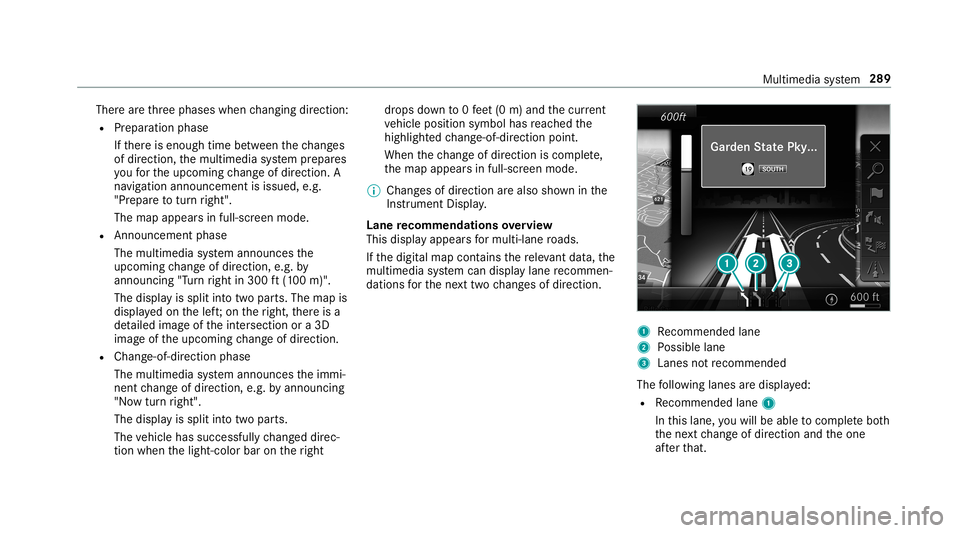
Lane recomm endationsov ervie w
This displa yappear sfo rmulti -lane roads.
If th edigit almap contains there leva nt data,th e
multime diasystem can displa ylane recomme n‐
da tions forth ene xt twoch ang esofdir ect ion. 1
Recomme ndedlane
2 Possible lane
3 Lanes notre comme nded
The follo wing lanes aredispla yed:
R Recomme ndedlane 1
In this lane, youwill beable tocom plet ebo th
th ene xt chang eof dir ect ion and theone
af te rth at. Mult
imed iasystem 289
Page 294 of 534
Ov
ervie wof routeguidanc efrom anoff-r oad
loc ation toades tinatio n
Of f-road position: thecur rent vehicle position is
locat edwithin thedigit almap onroads that are
no tav ailable.
When routeguidan cebegin sth efo llo wing dis‐
pla ysappear :
R The Road NotMapped messageis sho wn.
R Adir ect ion arro w sho wing thelinear direc‐
tion tothePOI.
When theve hicle isbac kon aro ad know nto the
multime diasystem, routeguidan cecontinue sas
no rm al.
Ov ervie wof off-ro ad status during route
guidanc e
Due toroadw orks ,fo rex am ple, ther ema ybe dif‐
fe re nces betwee nth edat aon thedigit almap
and theactual courseofthero ad. Insuc hcas es,
th emultimedia system will temp orarily be
unable tolocat eth eve hicle's current positio non
th edigit almap. Thevehicle isoff-r oad. When
theve hicle isoff-r oad, thefo llo wing dis‐
pla ysaresho wn:
R theRoad NotMapped message
R adir ect ion arrow showing thelinear direct ion
to thePOI
When theve hicle isbac kon aro ad know nto the
multime diasystem, routeguidan cecontinue sas
no rm al. Des
tination Sa
ving thecur rent vehicl eposi tion
Mul timedi asy stem:
0018 Navigation 0007
Ifth emap isdispla yedin full screen mode,
pr ess thecent ralcon trol elemen t.
The map menuappear s. 0007
Selec t1 onthemap menu
(0013 page296).
The current vehicle position issave dto the
"Pr evious destination s"memo ry. St
oring ama pposit ion
Mult imedia system:
0018 Navigation
The map isin full-scr eenmode. 0007
Press theTo uc hCon trol, thecon troller orthe
to uc hpad. 0007
Select "mo vemap" inmap menu 2
(0013 page296) . 0007
Select aposi tion onthemap.
If multiple entries areav ailable fora map
posi tion, alis tapp ears. 0007
Highl ightanentr y. 0007
Select 0080 Store in"Previ ousDesti na-
tions ".
The map position issave dto the"Pr evious
des tination s"memo ry.
Edit ingthepr ev ious destina tions
Multime diasystem:
0018 Navigation
0019 ¬ Previous andOther Destination s
0019 Previous Destination s 0007
Highlight oneofthepr ev ious destination s. 292
Multim ediasystem
Page 296 of 534
Inf
ormation ontheve hicle's position isregular ly
sent toDai mle rAG .The data isimmed iatelyre n‐
de redanon ymous byDai mle rAG and forw arded
to thetra ffic dat apr ov ider .Usin gth is dat a,traf‐
fi c re por tsreleva nt totheve hicle's position are
sent totheve hicle. Thevehicle actsasasensor
fo rth eflow oftraf fic and helpstoimprove the
qu alit yof thetra ffic repor ts.
If yo udo notwish totrans mityo ur vehicle posi‐
tion, youcan have this ser vice deact ivat ed atan
aut hor ized Mercedes -Benz Cent er.
Displa yingsubscr iption informa tion
Re quirement s:
R The vehicle iseq uipped withLiv eTr af fic
Inf ormation.
Multime diasystem:
0018 Navigation 0019
Z Option s
The subscr iption expir ation dateis aut omatic ally
displa yed:
R one mont hbef oreth eex pir ation date.
R one week bef oreth eex pir ation date.
R ontheex pir ation date. 0007
Todispl aymanu ally:select LiveTraffic Sub-
scription Info.
Depending onthest atus ,on eof thefo llo wing
mess ages appear s:
R theper iod ofvalidity forth esubscr iption
is displa yed.
R thesubscr iption hasexpir ed.
0009 The subscr iption canbeextende d:
R atan author ized Mercedes-B enzCent er
R viaanMB Infocall totheMer cedes- Benz
Cus tomer Assis tance Center
Di spl aying thetraf fic ma p
Re quirement s:
R ForLiv eTr af fic Inf ormati on:theve hicle is
eq uipped withacommunication modulefea‐
tur ing anact ivat ed, integrat edSIM car d.
R When theve hicle isstar ted, thecomm unica‐
tion module automaticall yes tablishes an
Int erne tcon nection .Tr af fic inf ormati onis
mad eav ailable shortly af te rw ards. Mult
imed iasystem:
0018 Navigation 0019
Z Option s
0019 Map Menu 0007
Alternativ ely:ifth emap isdispla yedin full
scr een mode, press theTo uc hCon trol, the
contr oller or theto uc hpad.
The map menuappear s. 0007
Activateº 0073.
Th etraf fic map showsthefo llo wing informatio n,
fo rex am ple:
R traf fic inci dents ,fo rex am ple:
- roadw orks
- road bloc ks
- warning mess ages
The symbols fortr af fic inci dents aredis‐
pl ay ed incolor (onthero ute) or gray (offth e
ro ute).
R traf fic flow informatio n:
- traf fic jam (red line)
- slow-mo ving traf fic (or ang eline)
- hea vytraf fic (yel lo w line) 29
4
Mu ltimed iasystem
Page 298 of 534
Map
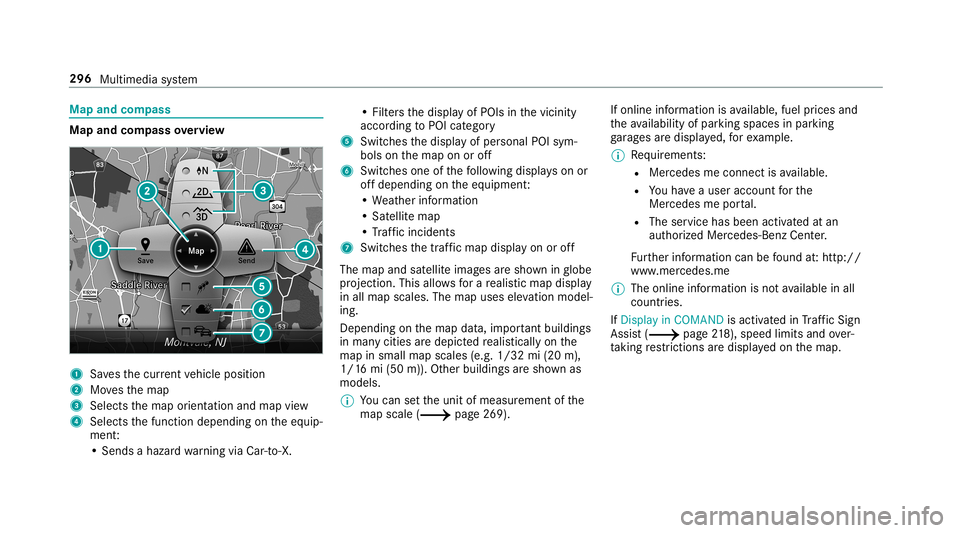
andcom pass Map
andcom pass overview 1
Savesth ecur rent vehicle position
2 Movesth emap
3 Select sth emap orient ation andmap view
4 Select sth efunc tion depending ontheeq uip‐
ment :
• Sends ahazar dwa rning viaCar -to-X . •
Filt ersth edispla yof POIs inthevicinit y
accor dingtoPOI categor y
5 Switc hesthedispla yof per sonal POIsym‐
bols onthemap onoroff
6 Switc hesone ofthefo llo wing displa yson or
of fdepending ontheeq uipment :
• We ather informat ion
• Sat ellit emap
• Traf fic inci dents
7 Switches thetra ffic map displa yon oroff
The map andsatellit eimag esaresho wninglobe
pr oject ion.This allowsfora re alis ticmap displa y
in all map scales. Themap uses elevatio nmod el‐
ing .
Dep endingonthemap data,im por tant buildi ngs
in ma nyciti esaredep icted realis ticallyon the
map insmal lmap scale s(e.g. 1/32 mi(20 m),
1/1 6mi (50 m)). Other buildings aresho wnas
model s.
0009 Youcan setth eunit ofmeasur ementofthe
map scale (0013 page269) . If
online information isavailable, fuelprice sand
th eav ailabilit yof par kingspac esinpar king
ga rage sar edispla yed, forex am ple.
0009 Requiremen ts:
R Mer cedes meconnectis available.
R Youha ve auser accoun tfo rth e
Mer cedes meportal.
R The service hasbeen activat ed atan
aut hor ized Mercedes -Benz Cent er.
Fu rther information canbefound at:ht tp :/ /
www .merced es.me
0009 The onlineinf ormat ionisno tav ailable inall
coun tries.
If Dis play inCOMA NDisact ivat ed inTraf fic Sign
Assi st(0013 page21 8),sp ee dlim its an dove r‐
ta king restrictions aredispl ayed on themap. 296
Multimedia system