belt MERCEDES-BENZ CLA 2018 Owners Manual
[x] Cancel search | Manufacturer: MERCEDES-BENZ, Model Year: 2018, Model line: CLA, Model: MERCEDES-BENZ CLA 2018Pages: 326, PDF Size: 7.97 MB
Page 7 of 326
Information abou tS ervice ............ .2 61
Resetting the service interva ld is-
pla y. ............................................... 261
Service message ............................ 261
Specia ls ervice requirements ......... 261
ATA (Anti-Theft Alarm system)
Activating/deactivating ................... 68
Function .......................................... .6 8
Switching off the alarm .................... 68
ATTENTIO NA SSIS T
Activating/deactivating ................. 185
Displa ym essage ............................ 207
Function/note s. ............................ 171
Audi om en u( on -board computer) .... 182
Audi os ystem
see separate operating instructions
Authorized Mercedes-Benz Center
see Qualifie ds pecialist workshop
Authorized workshop
see Qualifie ds pecialist workshop
AUTO lights
Displa ym essage ............................ 204
see Lights
Automatic car was h( ca re) ............... 262
Automatic engine start (ECO start/
sto pf unction) .................................... 126
Automatic engine switch-off (ECO
start/sto pf unction) .......................... 126
Automatic headlamp mode .............. 100
Automatic transmission
Accelerator peda lp osition ............. 133
Changing gea r. .............................. 133
DIREC TS ELECT lever ..................... 130
Drive progra m. ............................... 134
Drive progra md is play .................... 130
Driving tip s. ................................... 133
DYNAMIC SELECT button (all vehi-
cle se xcept Mercedes-AM Gv ehi-
cles) ............................................... 128
DYNAMIC SELECT controller
(Mercedes-AM Gv ehicles) .............. 129
Emergency running mod e. ............. 138
Engaging drive position .................. 132
Engaging neutral ............................ 131
Engaging park position
(Mercedes-AM Gv ehicles) .............. 132 Engaging park position automati-
cally ............................................... 131
Engaging reverse gea r. .................. 131
Engaging the park position ............ 130
Holding the ve hi cl es tationary on
uphill gradients .............................. 134
Kickdow n. ...................................... 134
Manua ls hifting .............................. 136
Oil temperature (on-board com-
puter, Mercedes-AM Gv ehicles) ..... 188
Overview ........................................ 130
Problem (malfunction) ................... 138
Pulling away ................................... 125
Selector lever ................................ 132
Starting the engine ........................ 124
Steering whee lp addl es hifters ...... 136
Transmission position display ........ 132
Transmission position display
(DIRECT SELECT lever) ................... 130
Transmission positions .................. 133
Automatic transmissio ne mer-
genc ym ode ....................................... 138
B
Back button ....................................... 230
Backup lamp
Displa ym essage ............................ 203
BAS (Brake Assist System) ................. 61
Battery (SmartKey)
Checking .......................................... 73
Important safety notes .................... 73
Replacing ......................................... 73
Battery (vehicle)
Charging ........................................ 278
Displa ym essage ............................ 206
Important safety notes .................. 276
Jump starting ................................. 278
Belt
see Sea tb el ts
Bel tw arning ......................................... 44
Blind Spo tA ssis t
Activating/deactivating (on-
board computer) ............................ 186
Displa ym essage ............................ 208
Notes/function .............................. 172
Bluetooth ®
Searching for am obil ep hone ........ 233Index 5
Page 9 of 326
Child
Restrain ts ystem .............................. 56
Child seat
Forward-facing restraint system ...... 59
LATCH-type (ISOFIX) child seat
anchor s. .......................................... .5 7
On th ef ront-pa ssenger seat ............ 58
Rearward-facin gr estraint system .... 59
Top Tether ...................................... .5 7
Child-proof locks
Important safety note s. .................. .5 9
Rear door s. ...................................... 60
Children
Special seat belt retracto r. .............. 55
Children in th ev ehicle
Important safety note s. .................. .5 4
Cigarett el ighter ................................ 244
Cleaning
Mirror tur ns ignal .......................... .2 65
Climate control
Air-conditioning system ................. 111
Automatic climate control (dual-
zone) .............................................. 113
Controlling automatically .............. .1 16
Cooling with ai rd ehumidification .. 115
Defrosting the windows ................. 118
Defrosting the windshield .............. 117
General notes ................................ 110
Indicator lamp ................................ 116
Information about using auto-
matic climate control ..................... 114
Maximum cooling .......................... 118
Notes on using the air-condition-
ing system ..................................... 112
Overview of systems ..................... .1 10
Problem with the rea r window
defroster ........................................ 119
Problems with cooling with air
dehumidification ............................ 116
Refrigerant ..................................... 319
Refrigerant filling capacity ............. 320
Setting the ai rd istribution ............. 116
Setting the ai rv ents ..................... .1 20
Setting the airflow ......................... 117
Setting the temperature ................ 116
Switching air-recirculation mode
on/off ............................................ 119
Switching on/off ........................... 115 Switching residua lh ea to n/off ...... 119
Switching the rear window
defroster on/off ............................ 118
Switching the ZONE function
on/off ............................................ 117
Cockpit
Overview .......................................... 32
COMAND display
Cleaning ......................................... 266
Combination switch .......................... 101
Compass
Calibrating ..................................... 255
Calling up ....................................... 255
Magnetic fiel dz one map s. ............. 255
Setting .......................................... .2 55
Connectin gaU SB device
see also Digita lO perator's Man-
ua l. ................................................ .2 29
Consumptio ns tatistic s( on -board
computer) .......................................... 180
Controller .......................................... .2 30
Convenience closing feature .............. 83
Convenience opening feature ............ 83
Coolan t( en gine)
Checking the leve l. ........................ 260
Display message ............................ 205
Filling capacity ............................... 319
Important safety notes .................. 318
Temperature (on-board computer,
Mercedes-AMG vehicles) .............. .1 88
Temperature gauge ........................ 177
Warning lamp ................................. 225
Cooling
see Climate control
Copyright ............................................. 31
Co rnerin gl i ght function
Di splay message ............................ 202
Cruis ec on trol
Activatio nc onditions ..................... 150
Cruise control leve r. ...................... 149
Deactivating ................................... 150
Display message ............................ 210
Driving system ............................... 149
Function/notes ............................ .1 49
Important safety notes .................. 149
Setting as pee d. ............................. 150Index 7
Page 16 of 326
Introduction to the restraint sys-
tem .................................................. 40
Occupant Classification System
(OCS) ............................................... 47
PASSENGER AIR BAG indicator
lamp s. .............................................. 41
Pets in the vehicle ........................... 60
Restraint system warning lamp ........ 41
Seat belt .......................................... 41
OCS
Conditions ....................................... 48
Faults ............................................... 51
Operation ........................................ .4 8
System self-test ............................... 50
Odometer ........................................... 180
On-board computer
AMG menu ..................................... 188
Assistance graphi cm enu ............... 185
Assistance menu ........................... 184
Audio menu ................................... 182
Convenience submenu .................. 188
Displa ym essages .......................... 190
Displaying as ervice message ........ 261
Factory settings ............................. 188
Important safety notes .................. 176
Instrument cluster submenu .......... 186
Lighting submenu .......................... 187
Menu overview .............................. 179
Message memory .......................... 191
Navigation menu ............................ 181
Operation ....................................... 177
RACETIMER ................................... 189
Service menu ................................. 186
Setting sm enu ............................... 186
Standard display ............................ 180
Telephone menu ............................ 183
Tri pm enu ...................................... 180
Vehicl es ub menu ........................... 187
Video DVD operation ..................... 183
Opening and closin gt he side trim
panels ................................................. 106
Operatin gs afety
Declaration of conformity ................ 27
Important safety notes .................... 27
Operatin gs ystem
see On-board computer
Operation
Digital Operator's Manua l. ............... 23 Operator's Manual
Vehicl ee quipment ........................... 25
Outside temperature display ........... 176
Overhead contro lp anel ...................... 39
Override feature
Rear side w indow s. .......................... 60
P Paint code number ............................ 314
Paintwork (cleaning instructions) ... 263
Panic alarm .......................................... 40
Panorama roo fw it hp ower tilt/
sliding panel
Important safety notes .................... 85
Operating ......................................... 86
Operating the rolle rs un blind sf or
the sliding sunroo f. .......................... 87
Problem (malfunction) ..................... 89
Reversing feature ............................. 86
Parking
Important safety notes .................. 141
Parking brake ................................ 142
Parking position for the exterior
mirror on the front-passenger
side .................................................. 98
Rear vie wc amera .......................... 167
Parking aid
see Exterior mirrors
see Rear vie wc amera
Parking Assist PARKTRONIC
Deactivating/activating ................. 163
Driving system ............................... 161
Function/note s. ............................ 161
Important safety notes .................. 161
Problems (malfunctions ). ............... 163
Senso rr ang e. ................................ 161
Warning display ............................. 162
Parking assistance
see Parking Assist PARKTRONIC
Parking brake
Applying automaticall y. .................. 143
Applying or releasing manually ...... 142
Displa ym essage ............................ 194
Electric parking brake .................... 142
Emergency braking ........................ 143
Genera ln otes ................................ 142
Releasing automaticall y. ................ 14314
Index
Page 18 of 326
Remote control
Garag ed oo ro pener ....................... 252
Programming (garag ed oor
opener) .......................................... 252
Replacing bulbs
Brake lamp .................................... 106
High-beam headlamp s. .................. 106
Important safety notes .................. 104
Installing/removing the cover
(front whee la rch ). ......................... 105
Low-bea mh eadlamp s. ................... 105
Overview of bulb types .................. 104
Rear fog lamp ................................ 106
Turn signal s( front) ......................... 106
Turn signal s( rear) .......................... 106
Reporting safety defects .................... 28
Rescue card ......................................... 29
Reserve (fuel tank)
see Fuel
Reserve fuel
Displa ym essage ............................ 206
Warning lamp ................................. 224
see Fuel
Residual hea t( clim ate control) ........ 119
Restrain ts ystem
Displa ym essage ............................ 198
Introduction ..................................... 40
Warning lamp ................................. 224
Warning lamp (function) ................... 41
Revers eg ea r( selecto rl ever ) ........... 132
Reversin gf eature
Roller sunblind ................................. 87
Sid ew in dow s. .................................. 82
Roadside Assistance (breakdown) .... 26
Rolle rs unblind
Panorama roo fw it hp ower tilt/
sliding panel ..................................... 87
Roo fc arrier ........................................ 241
Roo fl inin ga nd carpets (cleaning
guidelines) ......................................... 268
Roo fl oa d( maximum) ........................ 320
Route guidance
see also Digital Operator's Man-
ua l. ................................................. 229 S Safety
Childre nint he vehicl e. .................... 54
see Occupant safety
Safety system
see Driving safety systems
SD card
Inserting ........................................ 235
Inserting/removing ........................ 235
Removing ....................................... 235
SD memory card
see also Digital Operator's Man-
ua l. ................................................. 229
Search &S en d
see also Digital Operator's Man-
ua l. ................................................. 229
Seat
Correct driver' ss ea tp osition ........... 90
Seat belts
Adjusting the height ......................... 44
Cleaning ......................................... 267
Correct usag e. ................................. 43
Fastening ......................................... 44
Important safety guideline s. ............ 42
Introduction ..................................... 41
Releasing ......................................... 44
Warning lamp ................................. 218
Warning lamp (function) ................... 44
Seats
Adjusting (electrically) ..................... 92
Adjusting (manually) ........................ 91
Adjusting (Performance Seat) .......... 94
Adjusting the 4-wa yl um ba rs up -
por t. ................................................. 93
Adjusting the hea dr estraint ............ 92
Cleaning the cove r. ........................ 267
Folding the backres t( rear com-
partment) forwards/back .............. 240
Important safety notes .................... 90
Sea th eating problem ...................... 95
Storing settings (memory func-
tion) ................................................. 99
Switching sea th eating on/of f. ........ 94
Securing cargo .................................. 241
Selecto rl ever
Cleaning ......................................... 267
Sensors (cleaning instructions) ....... 26516
Index
Page 19 of 326
Service center
see Qualified specialist workshop
Service Center
see Qualified specialist workshop
Service menu (on-board com-
puter) .................................................. 186
Service message
see ASSYST PLUS
Service products
Brake fluid .................................... .3 18
Coolant (engine) ............................ 318
Engine oil ....................................... 317
Fuel ................................................ 315
Important safety notes .................. 315
Refrigerant (air-conditioning sys-
tem) ............................................... 319
Washer fluid ................................... 319
Settin gt he air distribution .............. .1 16
Settin gt he airflow ............................ 117
Settin gt he date/time format
see also Digita lO perator's Man-
ua l. ................................................ .2 29
Settin gt he language
see also Digita lO perator's Man-
ua l. ................................................ .2 29
Settin gt he time
see also Digita lO perator's Man-
ua l. ................................................ .2 29
Settings
Factory (on-board computer) ......... 188
On-board computer ....................... 186
SETUP (on-board computer,
Mercedes-AMG vehicles) .................. 188
Side impact air bag ............................ .4 7
Side marker lamp (display mes-
sage) ................................................... 204
Side windows
Cleaning ......................................... 264
Convenienc ec losing feature ............ 83
Convenienc eo pening feature ......... .8 3
Important safety information ........... 81
Opening/closing .............................. 82
Proble m( malfunction) .................... .8 4
Resettin g. ........................................ 84
Reversin gf eature ............................ .8 2 SIRIUS services
see also Digital Operator's Man-
ual .................................................. 229
Sliding sunroof
see Panorama roof with power
tilt/sliding panel
SmartKey
Changing the battery ....................... 73
Changing the programming ............ .7 2
Checkin gt he battery ...................... .7 3
Convenience closin gf eature ............ 83
Convenience opening feature .......... 83
Display message ............................ 216
Door central locking/unlocking ...... .7 0
Important safety notes .................... 70
KEYLESS-GO start function .............. 71
Loss ................................................ .7 4
Mechanical key ................................ 72
Positions (ignition lock) ................. 122
Problem (malfunction) ..................... 74
Starting the engine ........................ 124
SmartKey positions (ignition lock) .. 122
Smartphone
Starting the engine ........................ 124
SMS
see also Digital Operator's Man-
ual .................................................. 229
Snow chains ...................................... 290
Sound
Switching on/off ........................... 230
Special seat belt retractor .................. 55
Specialist workshop ........................... .2 8
Speed, controlling
see Cruise control
Speedometer
Activating/deactivating the addi-
tional speedometer ........................ 187
Digital ............................................ 181
In the Instrument cluster ................. 33
Segment s. ..................................... 176
Selectin gt he display unit ...... ......... 186
SPORT handling mode
Deactivating/activat ing
(Mercedes-AMG
vehicles) ............... .6 6
Warning lamp ................................. 222
Standing lamps
Display message ........................... .2 03
Switching on/off ........................... 101 Index 17
Page 32 of 326
After am al functio nh as been rectified, the infor-
matio ni sd elete df rom the malfunctio nm emory
or is continuall yo verwritten.
Whe no pe rating the vehicle, situations ar ec on-
ceivabl einw hi ch thi st echnica ld at a, in connec-
tio nw it ho the ri nformatio n( if necessary ,u nder
consultatio nw it hana ut horize de xpert) ,c ould
be traced to ap er son.
Examples include: R
accident reports R
damage to the vehicle R
witness statements
Further additional functions tha th av eb ee nc on-
tractuall ya gr ee du po nw it ht he custome ra llow
certain vehicl ed at atobec onveye dbyt he vehi-
cle as well .T he additional functions include, for
example, vehicl el oc ation in cas eofane mer-
gency.
COMAND/mbrace If the vehicl eise quippe dw it hC OM AND or
mbrace ,a ddit ional data abou tt he vehicle's
operation, the us eoft he vehicl einc ertain sit-
uations, and the location of the vehicl em ay be
compiled throug hC OM AND or the mbrace sys-
tem.
For additional informatio np leas er efer to the
COMAND Use rM an ua lort he Digita lO perator's
Manua la nd/or the mbrace Terms and Condi-
tions.
Even td ata recordersThi sv ehicl eise quippe dw it hane vent data
recorde r( EDR). Thi sv ehicl eise quippe dw it ha n
event data recorde r( EDR). The main purpose of
an EDR is to record, in certain crash or near
crash-like situations, such as an ai rb ag deploy-
ment or hitting ar oa do bs tacle ,d at at ha tw il l
assist in understanding how av ehicle's systems
performed .T he EDR is designe dtor ecord data
relate dtov ehicl ed yn amics and safety systems
for as hort perio doft ime ,t ypicall y30s econds
or less.
The EDR in thi sv ehicl eisd esig ne dtor ecord
such data as: R
How various system siny ou rv ehicl ew er e
operating R
Whether or not the driver and passenger
safety belts were buckled/fastened R
How far (i fata ll )t he driver wa sd ep ressing the
accelerator and/or brake peda la ndR
How fas tt he vehicl ew as traveling.
These data can hel pp rovid eab et ter under-
standing of the circumstances in which crashes
and injurie so ccur. NOTE: EDR data ar er ecorded
by your vehicl eo nl yifan on-trivia lc rash situa-
tio no ccurs; no data ar er ecorde dbyt he EDR
under normal driving conditions and no personal
data (e.g. name, gender, ag ea nd crash location)
ar er ecorded. However, othe rp ar ti es, such as
l a we nforcement could combine the EDR data
with the typ eofp er sonally identifying data rou-
tinely acquired during ac rash investigation.
Acces stot he vehicl ea nd/or the EDR is needed
to rea dd at at ha ti sr ecorde dbyanE DR, and
specia le quipment is required .Ina ddit io ntot he
vehicl em an ufacturer ,o the rp ar tie st ha th av e
the specia le quipment ,s uc hasl aw enforce-
ment, can rea dt he informatio nb ya ccessing the
vehicl eort he EDR.
EDR data ma ybeu se dinc ivi la nd crimina lm at -
ters as at ool in accident reconstruction, acci-
dent claims and vehicl es af ety .S ince the Crash
Data Retrieva lC DR tool tha ti su se dtoe xtract
data from the EDR is commercially available,
Mercedes-Benz USA, LLC ("MBUSA" )e xpressly
disclaims any and al ll iabili ty arising from the
extractio noft hi si nformatio nb yu nauthorized
Mercedes-Benz personnel.
MBUSA will not share EDR data with others
withou tt he consent of the vehicl eo wn ers or, if
the vehicl eisl eased, withou tt he consent of the
lessee. Exceptions to thi sr epresentation
includ er esponses to subpoenas by la we nforce-
ment; by federal, state or local government; in
connectio nw it hora risin go ut of litigation involv-
ing MBUSA or its subsidiarie sa nd affilia tes; o r,
a s required by law.
Warning :T he EDR is ac omponent of the
Restraint System Module. Tampering with, alter-
ing ,m odifying or removing the EDR component
ma yr esul tina malfunctio noft he Restraint Sys-
tem Modul ea nd othe rs ys tems.
State laws or regulations regarding EDRs that
conflict with federa lr egulation ar ep re-empted.
Thi sm eans tha tint he event of such conflict, the
federa lr egulation governs .AsofF ebruar y2 013,
13 states have enacted laws relating to EDRs.30
Data stored in the vehicle
Introduction
Page 42 of 326
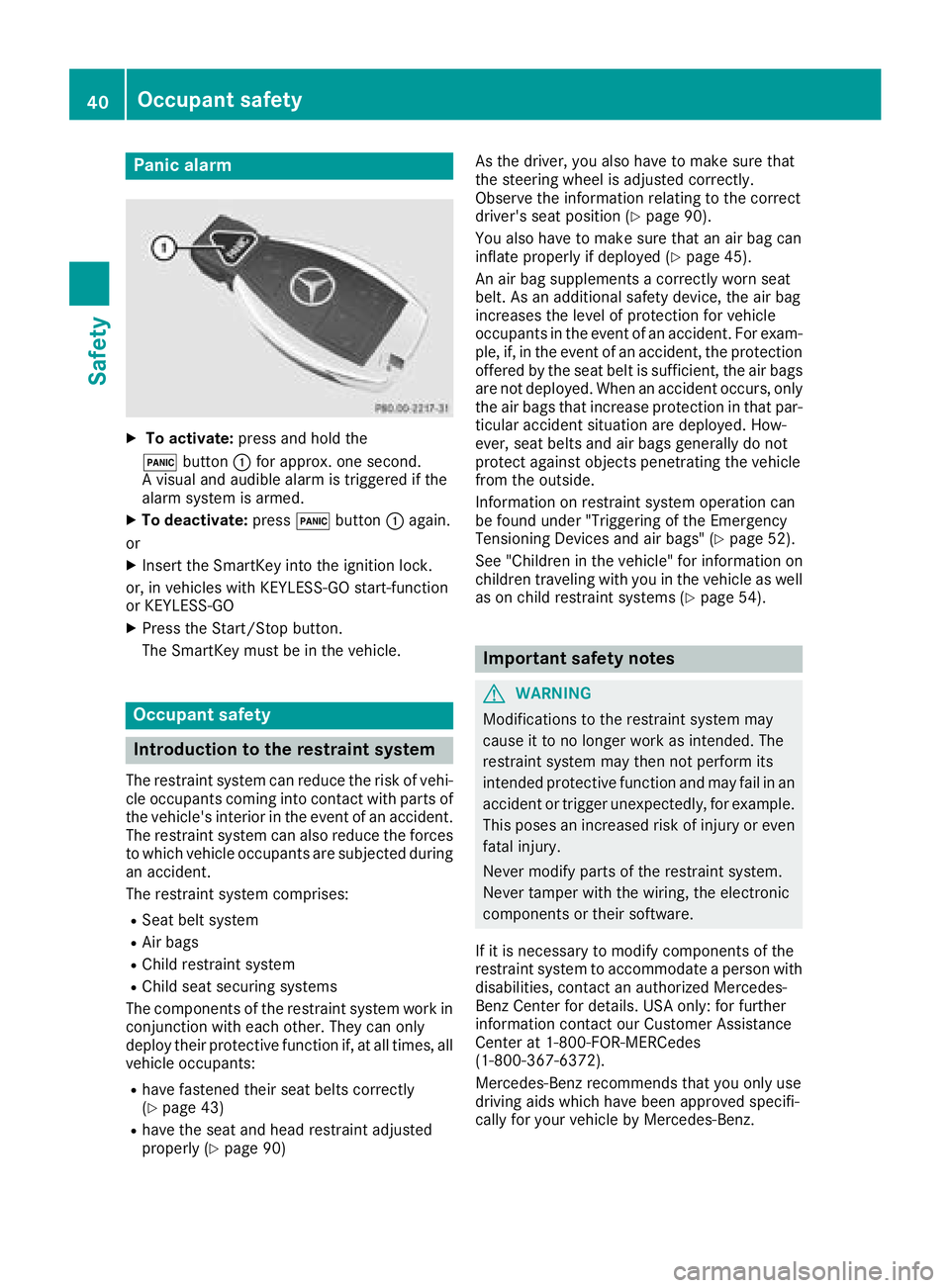
Panic alarm X
To activate: press and hold the
3 button C for approx. one second.
Av isual and audible alarm is triggered if the
alarm system is armed. X
To deactivate: press 3 button C again.
or X
Insert the SmartKey into the ignition lock.
or, in vehicles with KEYLESS-GO start-function
or KEYLESS ‑ GOX
Press the Start/Stop button.
The SmartKey must be in the vehicle.
Occupant safety
Introduction to the restraint system The restraint system can reduce the risk of vehi-
cle occupants coming into contact with parts of
the vehicle's interior in the event of an accident.
The restraint system can also reduce the forces
to which vehicle occupants are subjected during
an accident.
The restraint system comprises: R
Seat belt system R
Air bags R
Child restraint system R
Child seat securing systems
The components of the restraint system work in
conjunction with each other. They can only
deploy their protective function if, at all times, all
vehicle occupants: R
have fastened their seat belts correctly
( Y
page 43)R
have the seat and head restraint adjusted
properly ( Y
page 90) As the driver, you also have to make sure that
the steering wheel is adjusted correctly.
Observe the information relating to the correct
driver's seat position ( Y
page 90).
You also have to make sure that an air bag can
inflate properly if deploye d( Y
page 45).
An air bag supplements ac orrectly worn seat
belt. As an additional safety device, the air bag
increases the level of protection for vehicle
occupants in the event of an accident. For exam-
ple, if, in the event of an accident, the protection
offered by the seat belt is sufficient, the air bags
are not deployed. When an accident occurs, only
the air bags that increase protection in that par-
ticular accident situation are deployed. How-
ever, seat belts and air bags generally do not
protect against object sp enetrating the vehicle
from the outside.
Information on restraint system operation can
be found under "Triggering of the Emergency
Tensioning Devices and air bags" ( Y
page 52).
See "Children in the vehicle" for information on
children traveling with you in the vehicle as well
as on child restraint systems ( Y
page 54).
Important safety notes
G WARNING
Modifications to the restraint system may
cause it to no longer work as intended. The
restraint system may then not perform its
intended protective function and may fail in an
accident or trigger unexpectedly, for example.
This poses an increased risk of injury or even
fatal injury.
Never modify parts of the restraint system.
Never tamper with the wiring, the electronic
components or their software.
If it is necessary to modify components of the
restraint system to accommodate ap erson with
disabilities, contact an authorized Mercedes-
Benz Center for details. USA only: for further
information contact our Customer Assistance
Center at 1-800-FOR-MERCedes
(1 ‑ 800 ‑ 367 ‑ 6372).
Mercedes-Benz recommends that you only use
driving aids which have been approved specifi-
cally for your vehicle by Mercedes-Benz.40
Occupant safety
Safety
Page 43 of 326
Restraint system warnin gl ampThe functions of the restraint system are
checke da fte rt he ignition is switched on and at
regular interval sw hile the engine is running.
Therefore, malfunctions can be detected in
goo dt ime.
The u restraint system warning lamp on the
instrument cluster lights up when the ignition is
switched on. It goe so ut no later than af ew sec-
onds afte rt he vehicl eiss tarted. The compo-
nents of the restraint system are in operational
readiness.
Am alfunction ha so ccurred if the u restraint
system warning lamp: R
doe sn ot light up afte rt he ignition is switched
on R
doe sn ot go ou ta fte raf ew seconds with the
engine running R
lights up agai nw hile the engine is running
G WARNING
If the restraint system is malfunctioning,
restraint system components may be trig-
gered unintentionally or may not deplo ya s
intended during an accident. Thi sc an affect
for exampl et he Emergency Tensioning
Device or the ai rb ag .T hi sp oses an increased
ris kofi njury or eve nf ata li njury.
Have the restraint system checke da nd
repaired in aq uali fied specialist worksho pa s
soo na sp ossible.
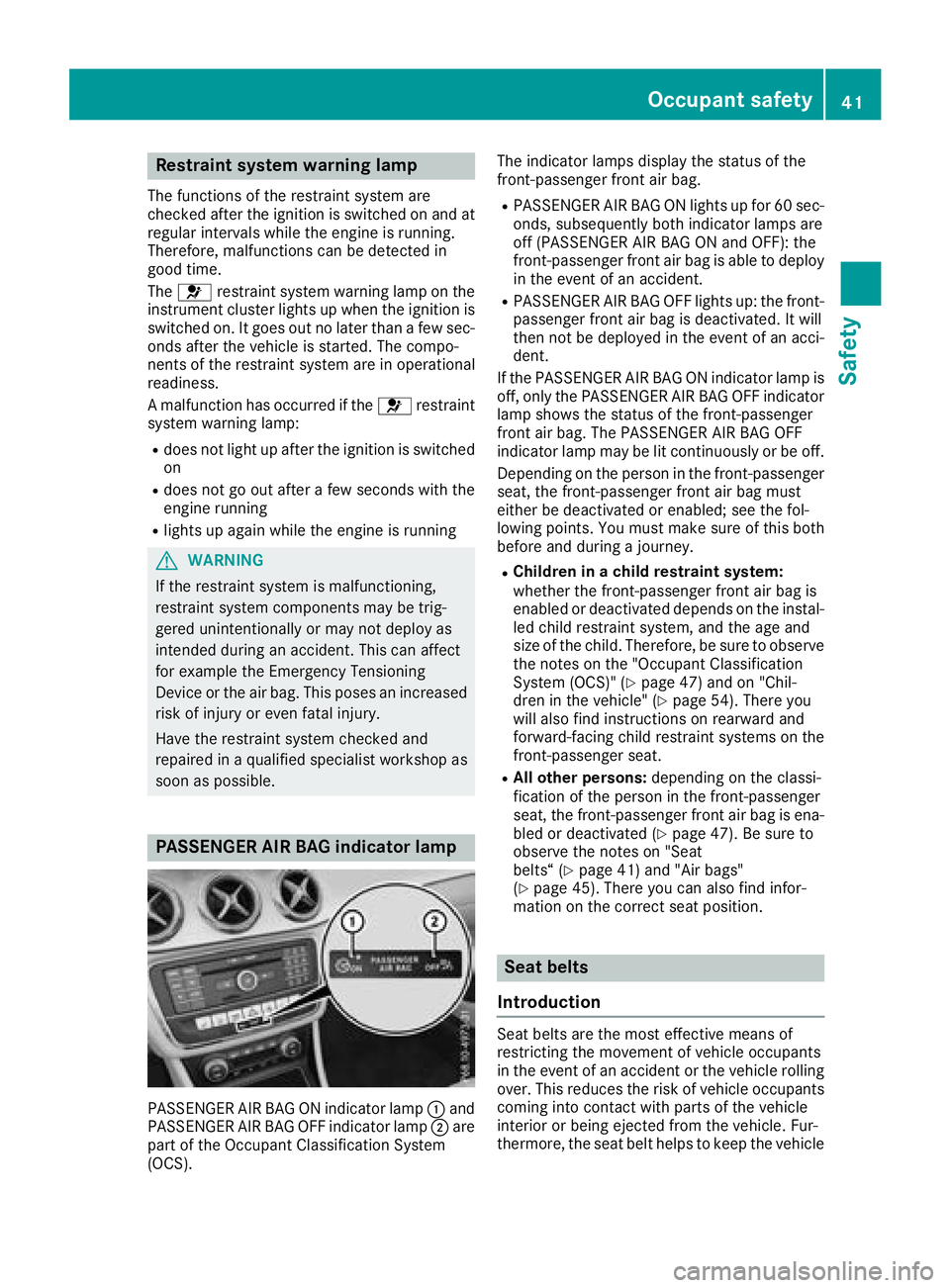
PASSENGER AI RB AG indicator lamp
PASSENGER AIR BAG ON indicator lamp C and
PASSENGER AIR BAG OFF indicator lamp D are
part of the Occupant Classification System
(OCS). The indicator lamps display the statu soft he
front-passenger front ai rb ag .R
PASSENGER AIR BAG ON lights up for 60 sec-
onds ,s ub sequently both indicator lamps are
off (PASSENGER AIR BAG ON and OFF) :t he
front-passenger front ai rb ag is able to deploy
in the event of an accident. R
PASSENGER AIR BAG OFF lights up :t he front-
passenger front ai rb ag is deactivated. It will
then not be deploye dint he event of an acci-
dent.
If the PASSENGER AIR BAG ON indicator lamp is
off, only the PASSENGER AIR BAG OFF indicator
lamp shows the statu soft he front-passenger
front ai rb ag .T he PASSENGER AIR BAG OFF
indicator lamp may be li tc ontinuously or be off.
Depending on the person in the front-passenger
seat, the front-passenger front ai rb ag must
either be deactivated or enabled; see the fol-
lowing points. Yo um us tm ake sure of this both
before and during aj ourney.R
Childre ninac hild restrain ts ystem:
whethe rt he front-passenger front ai rb ag is
enabled or deactivated depends on the instal-
le dc hild restraint system, and the ag ea nd
size of the child .T herefore, be sure to observe
the notes on the "Occupant Classification
System (OCS)" ( Y
page 47 )a nd on "Chil-
dre nint he vehicle" ( Y
page 54). There you
wil l also find instructions on rearward and
forwa rd-facing child restraint systems on the
front-passenger seat. R
Al lo the rp ersons: depending on the classi-
fication of the person in the front-passenger
seat, the front-passenger front ai rb ag is ena-
bled or deactivated ( Y
page 47). Be sure to
observe the notes on "Seat
belts“ ( Y
page 41 )a nd "Ai rb ag s"
( Y
page 45). There yo uc an also find infor-
mation on the correct sea tp osition.
Seat belts
Introduction
Sea tb elts are the most effective means of
restricting the movement of vehicl eo ccupants
in the event of an accident or the vehicl er olling
over. Thi sr educe st he ris kofv ehicl eo ccupants
coming into contact with parts of the vehicle
interio rorb eing ejecte df rom the vehicle. Fur-
thermore ,t he sea tb el th elps to keep the vehicleOccupan ts afety 41
Safety Z
Page 44 of 326
occupant in the best position in relation to the
air bag.
The seat belt system comprises: R
Seat belts R
Emergency Tensionin gD evices for the front
seat belts and the outer seat belts in the rear R
Seat belt force limiters for the front seat belts
and the outer seat belts in the rear
If the seat belt is pulled out of the belt outlet
quickly or with aj erk ym ovement ,t he belt
retractor locks. The belt strap cannot be extrac-
ted any further.
The Emergency Tensionin gD evice tighten st he
seat belt in an accident ,p ulling the belt close
against the body. However it does not pull the
vehicle occupant back in the direction of the
backrest.
The Emergency Tensionin gD evice does not cor-
rect an incorrect seat position or the routing of
an incorrectly fastened seat belt.
When triggered, as eat belt force limiter helps to
reduce the force exerted by the seat belt on the
vehicle occupant.
The seat belt force limiters for the front seats are
synchronized with the front air bags, which
absorb part of the deceleration force. This can
reduce the force exerted on the vehicle occu-
pants during an accident.
! If the front-passenger seat is not occupied,
do not engage the seat belt tongue in the
buckle on the front-passenger seat. Other-
wise, the Emergency Tensionin gD evice and
side impact air bag could be triggered in the
event of an accident and would need to be
replaced.
Important safety notes The use of seat belts and child restraint systems
is required by law in: R
all 50 states R
the U.S. territories R
the District of Columbia R
all Canadian provinces
Even where this is not required by law, all vehicle
occupant ss hould correctly fasten their seat
belts before starting the journey.
G WARNING
If the seat belt is not worn correctly, it cannot
perform its intended protective function. An incorrectly fastened seat belt can also cause
injuries, for example, in the event of an acci-
dent or when braking or changing direction
abruptly. This poses an increased risk of injury
or even fatal injury.
Always ensure that all vehicle occupant sh ave
their seat belts fastened correctly and are sit-
ting properly.
The components of the restraint system work in
conjunction with each other. They can only
deploy their protective function if, at all times, all
vehicle occupants: R
have fastened their seat belts correctly
( Y
page 43) R
have the seat and head restraint adjusted
properly ( Y
page 90)
G WARNING
The seat belt does not offer the intended level
of protection if you have not moved the back-
rest to an almost vertical position. When brak-
ing or in the event of an accident ,y ou could
slide underneath the seat belt and sustain
abdomen or neck injuries, for example. This
poses an increased risk of injury or even fatal
injury.
Adjust the seat properly before beginning
your journey. Always ensure that the backrest
is in an almost vertical position and that the
shoulder section of your seat belt is routed
across the center of your shoulder.
G WARNING
Persons less than 5ft( 1.50 m) tall cannot
wear the seat belt correctly without an addi-
tional and suitable restraint system. If the
seat belt is not worn correctly, it cannot per-
form its intended protective function. An
incorrectly fastened seat belt can also cause
injuries, for example, in the event of an acci-
dent or when braking or changing direction
abruptly. This poses an increased risk of injury
or even fatal injury.
For this reason, alway ss ecure persons under
5ft( 1.50 m) tall in suitable additional restraint
systems.42
Occupant safety
Safety
Page 45 of 326

If ac hild younger than twelve years old and
under 5ft( 1.5 0m)inh eight is travelin gint he
vehicle: R
always secur et he child in ac hild restraint
system suitable for this Mercedes-Ben zv ehi-
cle. The child restraint system must be appro-
priat etot he age, weight and size of the childR
always observe the instructions and safety
notes on "Children in the vehicle"
( Y
page 54) in addition to the child restraint
system manufacturer' si nstallation and oper-
atin gi nstructionsR
always observe the instructions and safety
notes on the "Occupant classification system
(OCS)" ( Y
page 47)
G WARNING
The seat belts may not perform their intended
protective function if: R
the ya re damaged, modified, extremely
dirty, bleache dord yedR
the seat belt buckle is damaged or
extremely dirty R
the Emergency Tensionin gD evices, belt
anchorage sori nertia reels have been modi-
fied.
Seat belts may be damaged in an accident,
althoug ht he damage may not be visible, e.g.
due to splinters of glass. Modifie dord amaged
seat belts may tear or fail, e.g. in an accident.
Modifie dE me rgency Tensionin gD evices
could accidentally trigger or fail to deploy
when necessary. This poses an increased risk
of injury or even fatal injury.
Never modif yt he seat belts ,E me rgency Ten-
sioning Devices, belt anchorage sa nd inertia
reels. Make sure that the seat belts are
undamaged, not worn out and clean .F ollow-
ing an accident ,h ave the seat belts checked
immediately at aq ualified specialist work-
shop.
Only use seat belts that have been approved for
your vehicle by Mercedes-Benz.
Sports seat or AMG Performance seat: this
seat is designed for the standard three-point
seat belt. If you install another multi-point seat
belt, e.g. sport or racin gs eat belts ,t he restraint system cannot provide the best level of protec-
tion.
G WARNING
If you feed seat belts through the opening in
the seat backrest ,t he seat backrest may be
damaged or may even break in the even tofa n
accident .T his poses an increased risk of
injury or even fatal injury.
Only use the standard three-point seat belt.
Never modif yt he seat belt system.
Proper use of th es eat beltsObserve the safet yn otes on the seat belt
( Y
page 42).
All vehicle occupant sm ust be wearin gt he seat
belt correctly befor eb eginnin gt he journey. Also
make sure that all vehicle occupant sa re always
wearing the seat belt correctly while the vehicle
is in motion.
When fastenin gt he seat belt, always make sure
that: R
the seat belt buckle tongue is inserted only
int ot he belt buckle belonging to that seat R
the seat belt is pulled tigh ta cross your body
Avoid wearing bulky clothing ,e .g. aw inter
coat. R
the seat belt is not twisted
Only the nc an the forces which occur be dis-
tributed over the area of the belt. R
the shoulder section of the belt is routed
across the center of your shoulder
The shoulder section of the seat belt should
not touc hy our nec korber outed under your
arm or behin dy our back .W here possible,
adjust the seat belt to the appropriate height. R
the lap belt is taut and passes across your lap
as low down as possible
The lap belt must always be routed across
your hip joints and not across your abdomen.
This applies particularly to pregnant women.
If necessary, push the lap belt down to your
hip join ta nd pull it tigh tu sing the shoulder
section of the belt. R
the seat belt is not routed across sharp, poin-
ted or fragile objects
If you have such item sl ocated on or in your
clothing ,e .g. pens ,k eys or eyeglasses ,s tore
these in as uitable place. R
only one perso nisu sing as eat beltOccupant safety 43
Safety Z