park assist MERCEDES-BENZ CLA-Class 2017 C117 Owner's Guide
[x] Cancel search | Manufacturer: MERCEDES-BENZ, Model Year: 2017, Model line: CLA-Class, Model: MERCEDES-BENZ CLA-Class 2017 C117Pages: 318, PDF Size: 8.02 MB
Page 172 of 318
(200 km/h) range. If ATTENTION ASSIST
detects typical indicators of fatigue or increas-
ing lapses in concentration on the part of the
driver, it suggests taking a break.
Important safety notes
ATTENTION ASSIST is only an aid to the driver. It
might not always recognize fatigue or increasinginattentiveness in time or fail to recognize them
at all. The system is not a substitute for a well-
rested and attentive driver.
The functionality of ATTENTION ASSIST is
restricted and warnings may be delayed or not
occur at all:
Rif the length of the journey is less than approx-
imately 30 minutes
Rif the road condition is poor, e.g. if the surface
is uneven or if there are potholes
Rif there is a strong side wind
Rif you have adopted a sporty driving style with
high cornering speeds or high rates of accel-
eration
Rif you are predominantly driving slower than
37 mph (60 km/h) or faster than 125 mph
(200 km/ h)
Rif the time has been set incorrectly
Rin active driving situations, such as when you
change lanes or change your speed
ATTENTION ASSIST is reset when you continue
your journey and starts assessing your tiredness
again if:
Ryou switch off the engine
Ryou take off your seat belt and open the driv-
er's door, e.g. for a change of drivers or to
take a break
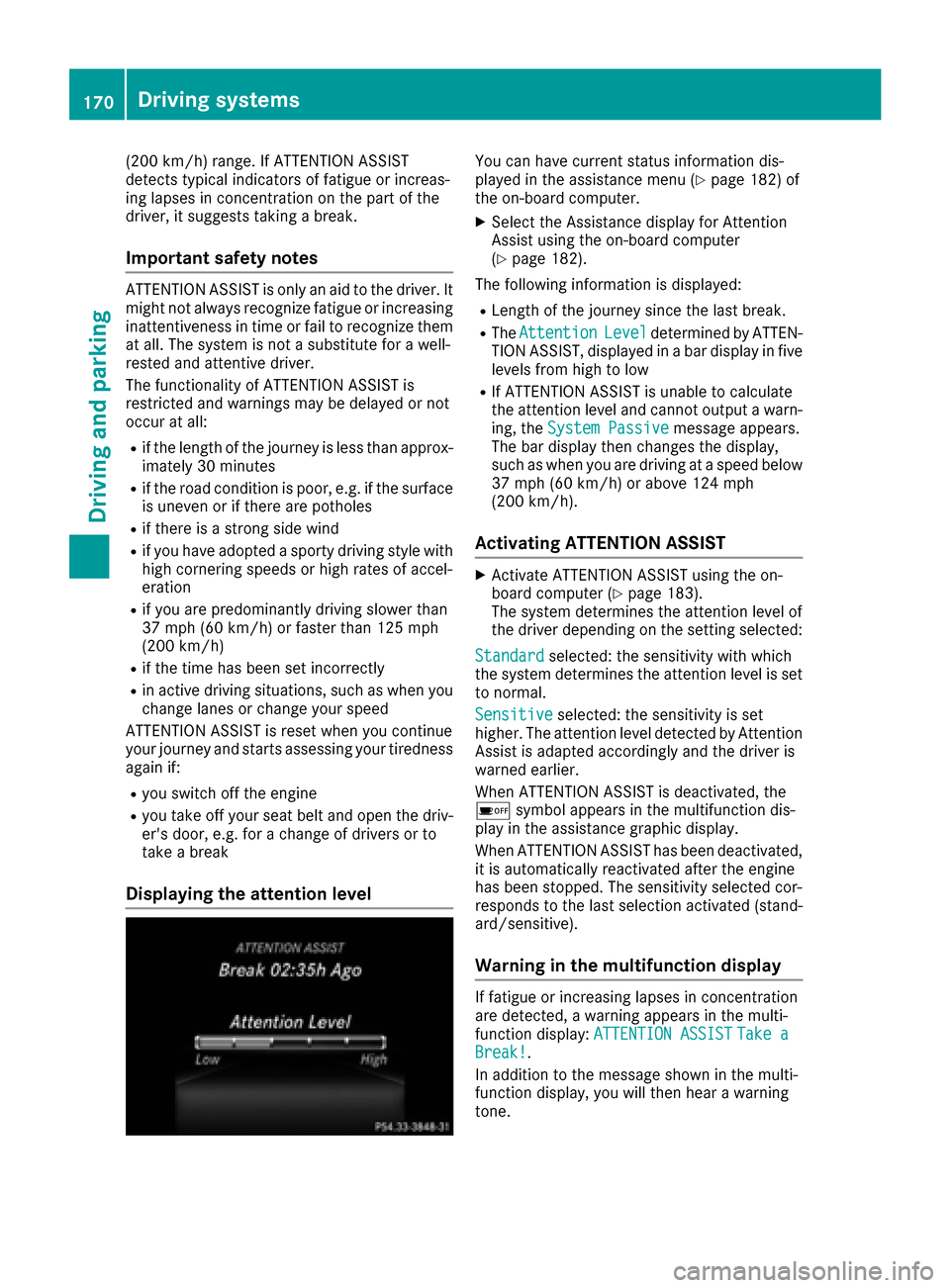
Displaying the attention level
You can have current status information dis-
played in the assistance menu (Ypage 182) of
the on-board computer.
XSelect the Assistance display for Attention
Assist using the on-board computer
(
Ypage 182).
The following information is displayed:
RLength of the journey since the last break.
RThe AttentionLeveldetermined by ATTEN-
TION ASSIST, displayed in a bar display in five
levels from high to low
RIf ATTENTION ASSIST is unable to calculate
the attention level and cannot output a warn-
ing, the System Passive
message appears.
The bar display then changes the display,
such as when you are driving at a speed below
37 mph (60 km/h) or above 124 mph
(200 km/h).
Activating ATTENTION ASSIST
XActivate ATTENTION ASSIST using the on-
board computer (Ypage 183).
The system determines the attention level of
the driver depending on the setting selected:
Standard
selected: the sensitivity with which
the system determines the attention level is set
to normal.
Sensitive
selected: the sensitivity is set
higher. The attention level detected by Attention
Assist is adapted accordingly and the driver is
warned earlier.
When ATTENTION ASSIST is deactivated, the
é symbol appears in the multifunction dis-
play in the assistance graphic display.
When ATTENTION ASSIST has been deactivated,
it is automatically reactivated after the engine
has been stopped. The sensitivity selected cor-
responds to the last selection activated (stand-
ard/sensitive).
Warning in the multifunction display
If fatigue or increasing lapses in concentration
are detected, a warning appears in the multi-
function display: ATTENTION ASSIST
Take aBreak!.
In addition to the message shown in the multi-
function display, you will then hear a warning
tone.
170Driving systems
Driving and parking
Page 173 of 318
XIf necessary, take a break.
XConfirm the message by pressing thea
button on the steering wheel.
On long journeys, take regular breaks in good
time to allow yourself to rest properly. If you do
not take a break and ATTENTION ASSIST still
detects increasing lapses in concentration, you
will be warned again after 15 minutes at the
earliest. This will only happen if ATTEN-
TION ASSIST still detects typical indicators of
fatigue or increasing lapses in concentration.
Vehicles with the COMAND multimedia sys-
tem: if a warning is output in the multifunction
display, a service station search is performed in
the multimedia system. You can select a service
station and navigation to this service station will
then begin. This function can be activated or
deactivated in the multimedia system; see the
Digital Operator's Manual.
Lane Tracking package
General notes
The Lane Tracking package consists of Blind
Spot Assist (Ypage 171) and Lane Keeping
Assist (Ypage 172).
Blind Spot Assist
General notes
Blind Spot Assist monitors the areas on either
side of the vehicle that are not visible to the
driver with two lateral, rear-facing radar sen-
sors. A warning display in the exterior mirrors
draws your attention to vehicles detected in the
monitored area. If you then switch on the cor-
responding turn signal to change lane, you will
also receive an optical and audible warning.
Blind Spot Assist supports you from a speed of
approximately 20 mph (30 km/h).
Important safety notes
GWARNING
Blind Spot Assist does not react to:
Rvehicles overtaken too closely on the side,
placing them in the blind spot area
Rvehicles which approach with a large speed
differential and overtake your vehicle
As a result, Blind Spot Assist may not give
warnings in such situations. There is a risk of
an accident.
Always observe the traffic conditions care-
fully, and maintain a safe lateral distance.
Blind Spot Assist is only an aid. It may fail to
detect some vehicles and is no substitute for
attentive driving. Always ensure that there is
sufficient distance to the side for other road
users and obstacles.
iUSA only:
This device has been approved by the FCC as
a "Vehicular Radar System". The radar sensor
is intended for use in an automotive radar
system only. Removing, tampering with, or
altering the device will void any warranties,
and is not permitted by the FCC. Do not tam-
per with, alter, or use in any non-approved
way.
Any unauthorized modification to this device
could void the user’s authority to operate the
equipment.
Radar sensors
The radar sensors for Blind Spot Assist are inte-
grated into the rear bumper. Make sure that the
bumpers are free from dirt, ice or slush. The
sensors must not be covered, for example by
cycle racks or overhanging loads. Following a
severe impact or in the event of damage to the
bumpers, have the function of the radar sensors
checked at a qualified specialist workshop.
Blind Spot Assist may no longer work properly.
Monitoring range of the sensors
In particular, the detection of obstacles can be
impaired if:
Rthere is dirt on the sensors or anything else
covering the sensors
Rthere is poor visibility, e.g. due to fog, heavy
rain or snow
Ra narrow vehicle traveling in front, e.g. a
motorbike or bicycle
Rthe road has very wide lanes
Rthe road has narrow lanes
Ryou are not driving in the middle of the lane
Rthere are barriers or other road boundaries
Vehicles in the monitoring range are then not
indicated.
Driving systems171
Driving and parking
Z
Page 174 of 318
Blind Spot Assist monitors the area up to 10 ft
(3 m) behind your vehicle and directly next to it.
If the lanes are narrow, vehicles driving in the
lane beyond the lane next to your vehicle may be
indicated, especially if the vehicles are not driv-
ing in the middle of their lane. This may be the
case if the vehicles are driving on the inner side
of their lane.
Due to the nature of the system:
Rwarnings may be issued in error when driving
close to crash barriers or similar solid lane
borders.
Rwarnings may be interrupted when driving
alongside particularly long vehicles, e.g.
trucks, for a prolonged time.
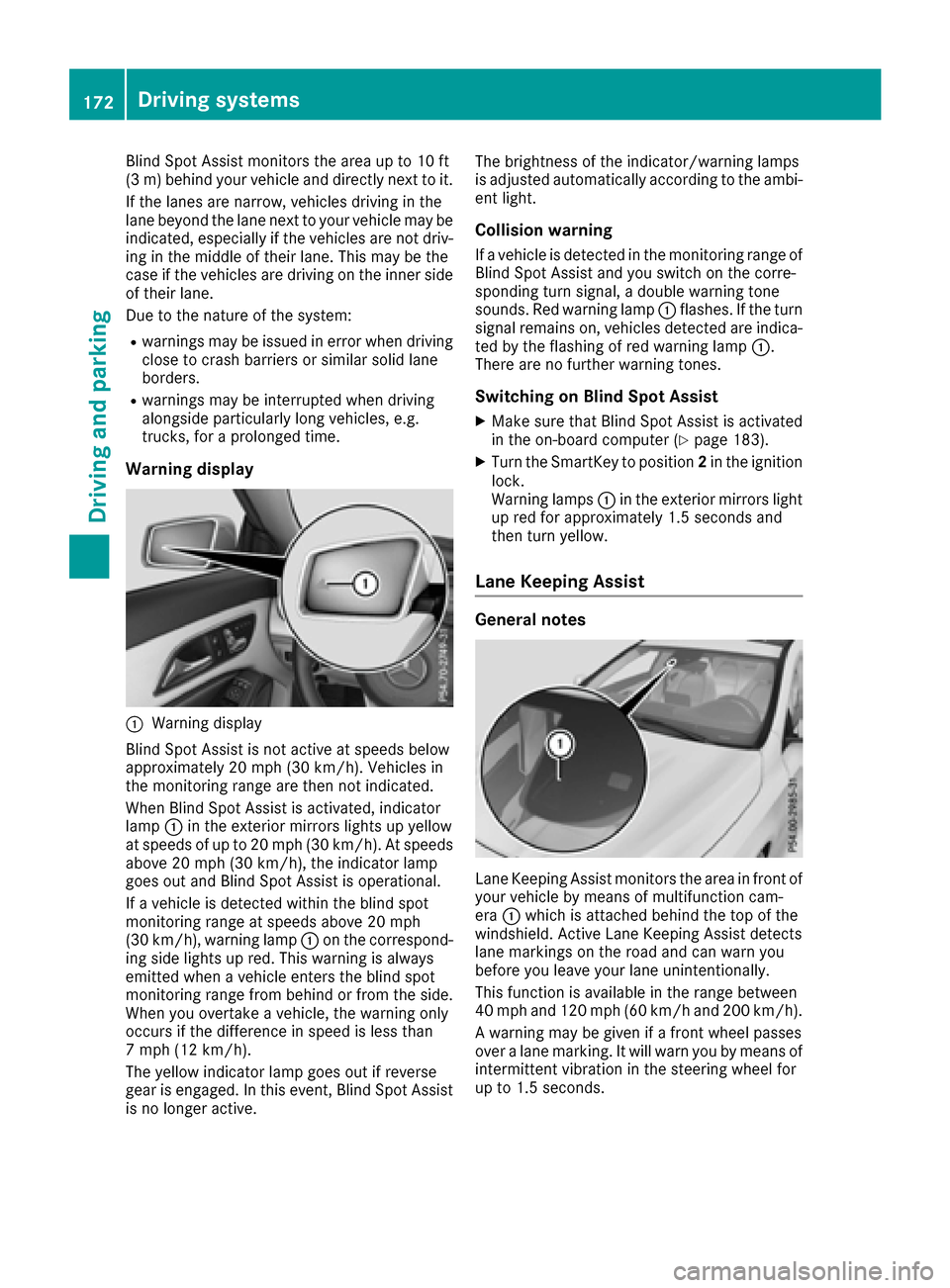
Warning display
:Warning display
Blind Spot Assist is not active at speeds below
approximately 20 mph (30 km/h). Vehicles in
the monitoring range are then not indicated.
When Blind Spot Assist is activated, indicator
lamp :in the exterior mirrors lights up yellow
at speeds of up to 20 mph (30 km/h). At speeds
above 20 mph (30 km/h), the indicator lamp
goes out and Blind Spot Assist is operational.
If a vehicle is detected within the blind spot
monitoring range at speeds above 20 mph
(30 km/h), warning lamp :on the correspond-
ing side lights up red. This warning is always
emitted when a vehicle enters the blind spot
monitoring range from behind or from the side.
When you overtake a vehicle, the warning only
occurs if the difference in speed is less than
7 mph (12 km/h).
The yellow indicator lamp goes out if reverse
gear is engaged. In this event, Blind Spot Assist
is no longer active. The brightness of the indicator/warning lamps
is adjusted automatically according to the ambi-
ent light.
Collision warning
If a vehicle is detected in the monitoring range of
Blind Spot Assist and you switch on the corre-
sponding turn signal, a double warning tone
sounds. Red warning lamp
:flashes. If the turn
signal remains on, vehicles detected are indica-
ted by the flashing of red warning lamp :.
There are no further warning tones.
Switching on Blind Spot Assist
XMake sure that Blind Spot Assist is activated
in the on-board computer (Ypage 183).
XTurn the SmartKey to position 2in the ignition
lock.
Warning lamps :in the exterior mirrors light
up red for approximately 1.5 seconds and
then turn yellow.
Lane Keeping Assist
General notes
Lane Keeping Assist monitors the area in front of
your vehicle by means of multifunction cam-
era :which is attached behind the top of the
windshield. Active Lane Keeping Assist detects
lane markings on the road and can warn you
before you leave your lane unintentionally.
This function is available in the range between
40 mph and 120 mph (60 km/h and 200 km/h).
A warning may be given if a front wheel passes
over a lane marking. It will warn you by means of
intermittent vibration in the steering wheel for
up to 1.5 seconds.
172Driving systems
Driving and parking
Page 175 of 318
Important safety notes
GWARNING
Lane Keepin g Assist may not always clearly
recognize lane markings.
In this case, Lane Keepin g Assist may:
Rgive an unnecessary warning
Rnot give a warning
There isa risk of an acc ident.
Always pay particular attention to the traff ic
situation and stay inlane, inparticular if
warned byLane Keepin g Assist.
GWARNING
The Lane Keepin g Assist warning does not
return the veh icleto the original lane. There is
a risk of an acc ident.
You should always steer, brake or accelerate
yourself, inparticular ifwarned byLane Keep-
ing Assist.
If you fail to adapt your driving style, Lane Keep-
ing Assist can neither reduce the risk of an acc i-
dent nor overr idethe laws of physics. Lane
Keepin g Assist cannot take into account the
road, traff icand weather conditions. Lane Keep-
ing Assist ismerely an aid.You are responsible
for the distance to the veh icle infront, for veh i-
cle speed, for braking ingood time and for stay-
ing inyour lane.
The Lane Keepin g Assist does not keep the veh i-
cle inthe lane.
The system may beimpaired or may not function
if:
Rthere ispoor vis ibility, e.g. due to insuff icient
illumi nation of the road, or due to snow, rain,
fog or spray
Rthere isglare, e.g. from oncoming traffic, the
sun or reflection from other veh icles (e.g. if
the road surface iswet)
Rthe windshield is dirty, fogged up, damaged or
covered, for instance bya sticker, inthe vicin-
ity of the camera
Rthere are no, several or unclear lane markings
for a lane, e.g. inareas with road construction
work
Rthe lane markings are worn away, dark or cov-
ered up, e.g. by dirtor snow
Rthe distance to the vehicle in front istoo small
and the lane markings thus cannot be detec-
ted
Rthe lane markings change quickly, e.g. lanes
branch off, cross one another or merge
Rthe road isnarrow and winding
Rthere are highly variable shade conditions on
the roadway
Switching on Lane Keeping Assist
XSwit ch on Active Lane Keeping Assist using
the on-board computer; to do so, select
Standard
or Adaptive(Ypage 183).
If you drive at speeds above 40 mph
(60 km/ h)and lane markings are detected,
the lines in the assistance graphics display
(
Ypage 182) are shown in green. Lane Keep-
ing Assist is ready for use.
If Standard
is selected, no warning vibration
occurs if:
Ryou have switched on the turn signal. In this
event, the warnings are suppressed for a cer-
tain period of time.
Ra driving safety system intervenes, e.g. ABS,
BAS or ESP®.
When Adaptive
is selected, no warning vibra-
tion occurs if:
Ryou have switched on the turn signal. In this
event, the warnings are suppressed for a cer-
tain period of time.
Ra driving safety system intervenes, e.g. ABS,
BAS or ESP®.
Ryou accelerate hard, e.g. kickdown.
Ryou brake hard.
Ryou steer actively, e.g. swerve to avoid an
obstacle or change lanes quickly.
Ryou cut the corner on a sharp bend.
In order that you are warned only when neces-
sary and in good time if you cross the lane mark-
ing, the system recognizes certain conditions
and warns you accordingly.
The warning vibration occurs earlier if:
Ryou approach the outer lane marking on a
bend.
Rthe road has very wide lanes, e.g. a highway.
Rthe system detects solid lane markings.
The warning vibration occurs later if:
Rthe road has narrow lanes.
Ryou cut the corner on a bend.
Driving systems173
Driving and parking
Z
Page 193 of 318
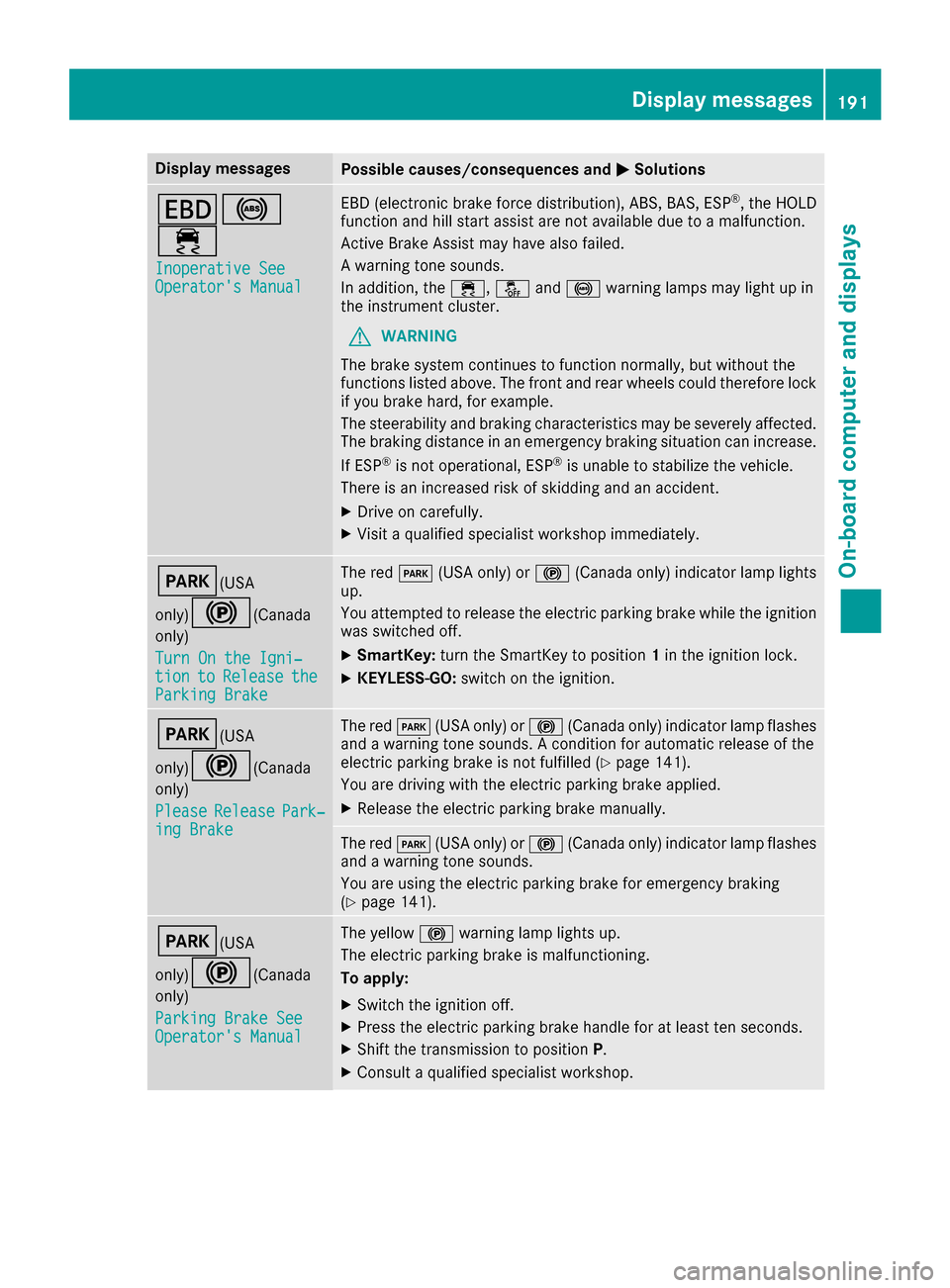
Display messagesPossible causes/consequences andMSolutions
T!
÷
Inoperative SeeOperator'sManual
EB D(electronic brak eforce distribution), ABS, BAS, ES P®,th eHOLD
function and hill start assist are no tavailable due to amalfunction .
Active Brake Assis tmay hav ealso failed.
A warning tone sounds.
In addition ,th e÷, åand! warning lamp smay ligh tup in
th einstrumen tcluster.
GWARNIN G
The brak esystem continues to function normally, but without th e
function slisted above. The fron tand rear wheels could therefor eloc k
if you brak ehard, for example.
The steerabilit yand braking characteristics may be severely affected.
The braking distanc ein an emergenc ybraking situation can increase.
If ES P
®is no toperational, ES P®is unable to stabiliz eth evehicle.
There is an increased ris kof skiddin gand an accident.
XDrive on carefully.
XVisit aqualified specialist workshop immediately.
F(USA
only)
!( Canada
only)
Tur nOn the Igni‐
tio ntoReleas etheParkingBrake
The red F(USAonly) or !(Canada only) indicator lamp lights
up.
You attempte dto release th eelectric parking brak ewhile th eignition
was switched off .
XSmartKey:tur nth eSmartKey to position 1in th eignition lock.
XKEYLESS-GO: switch on theignition .
F(USA
only)
!( Canada
only)
Please
Releas ePark‐ing Brake
The red F(USAonly) or !(Canada only) indicator lamp flashes
and awarning tone sounds. Acondition for automatic release of th e
electric parking brak eis no tfulfilled (
Ypage 141).
You are drivin gwit hth eelectric parking brak eapplied.
XReleas eth eelectric parking brak emanually.
The red F(USAonly) or !(Canada only) indicator lamp flashes
and awarning tone sounds.
You are usin gth eelectric parking brak efor emergenc ybraking
(
Ypage 141).
F(USA
only)
!( Canada
only)
Parkin gBrake See
Operator' sManual
The yellow !warning lamp lights up.
The electric parking brak eis malfunctioning .
To apply :
XSwitchth eignition off .
XPress theelectric parking brak ehandle for at least te nseconds.
XShift th etransmission to position P.
XConsultaqualified specialist workshop .
Display messages191
On-board computer and displays
Z
Page 196 of 318
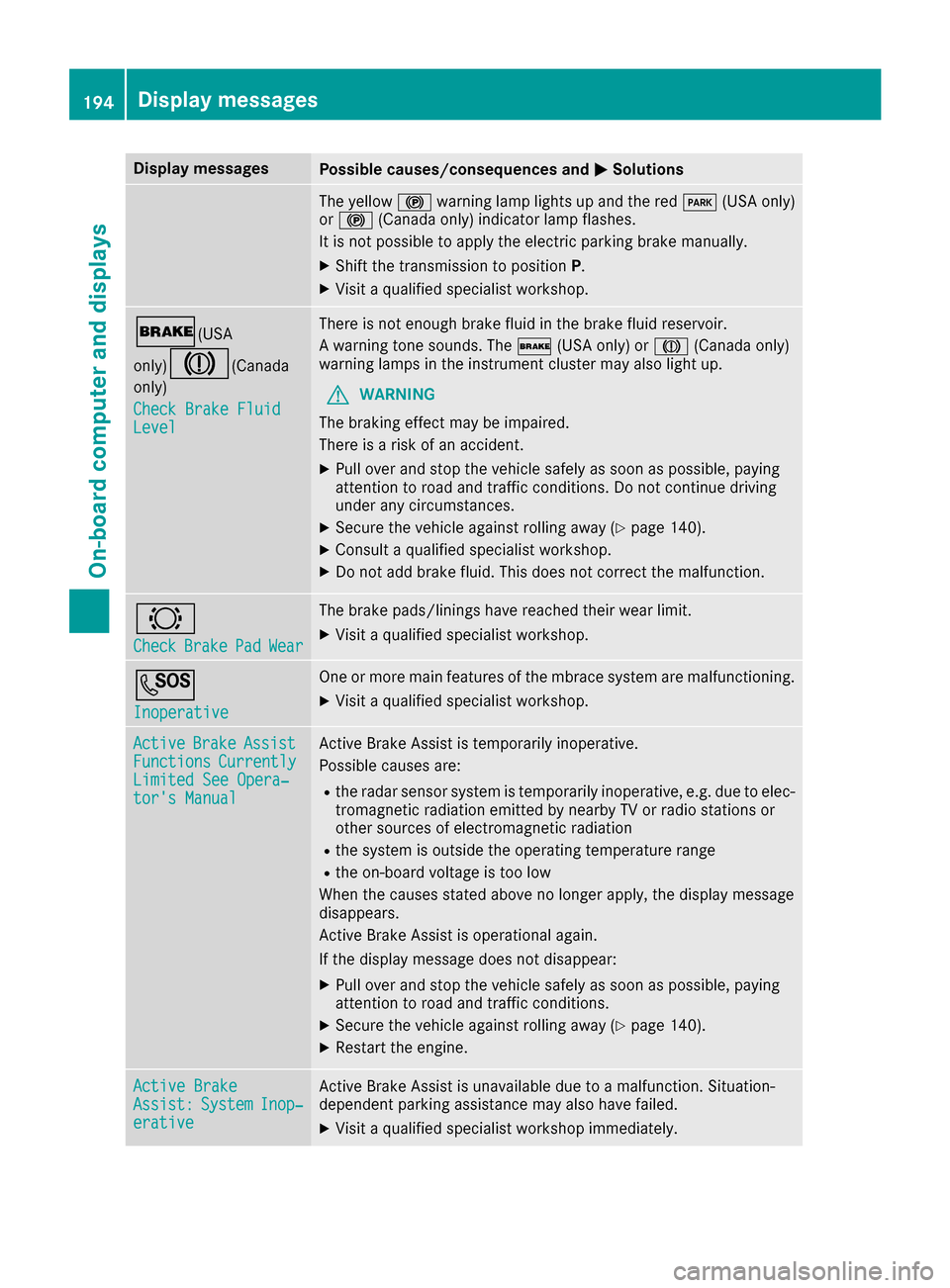
Display messagesPossible causes/consequences andMSolutions
The yellow!warning lamp lights up and th ered F (USAonly)
or ! (Canada only) indicator lamp flashes .
It is no tpossibl eto apply th eelectric parking brak emanually.
XShift th etransmission to position P.
XVisitaqualified specialist workshop .
$(USA
only)
J( Canada
only)
Check Brake Fluid
Level
There is no tenough brak efluid in th ebrak efluid reservoir .
A warning tone sounds. The $(USAonly) or J(Canada only)
warning lamp sin th einstrumen tcluste rmay also ligh tup.
GWARNIN G
The braking effec tmay be impaired.
There is aris kof an accident.
XPull ove rand stop th evehicl esafely as soo nas possible, payin g
attention to roa dand traffic conditions. Do no tcontinu edrivin g
under any circumstances.
XSecur eth evehicl eagainst rollin gaway (Ypage 140).
XConsult aqualified specialist workshop .
XDo notadd brak efluid .This does no tcorrec tth emalfunction .
#
CheckBrakePadWear
The brak epads/linings hav ereached their wear limit.
XVisit aqualified specialist workshop .
G
Inoperative
Oneor mor emain features of th embrace system are malfunctioning .
XVisitaqualified specialist workshop .
ActiveBrakeAssistFunctionsCurrentlyLimitedSee Opera‐tor's Manual
Active Brake Assis tis temporarily inoperative.
Possibl ecauses are:
Rth eradar sensor system is temporarily inoperative, e.g. due to elec -
tromagneti cradiation emitted by nearby TV or radi ostation sor
other source sof electromagneti cradiation
Rth esystem is outside th eoperating temperature range
Rth eon-boar dvoltag eis to olow
Whe nth ecauses state dabov eno longer apply, th edisplay message
disappears.
Active Brake Assis tis operational again .
If th edisplay message does no tdisappear :
XPull overand stop th evehicl esafely as soo nas possible, payin g
attention to roa dand traffic conditions.
XSecur eth evehicl eagainst rollin gaway (Ypage 140).
XRestart th eengine.
Active BrakeAssist :SystemInop‐erative
Active Brake Assis tis unavailable due to amalfunction .Situation -
dependen tparking assistanc emay also hav efailed.
XVisit aqualified specialist workshop immediately.
194Display messages
On-board computer and displays
Page 208 of 318

Display messagesPossible causes/consequences andMSolutions
Blind SpotAssistCurrently Unavaila‐ble See Operator' sManual
Blind Spot Assistis temporarily inoperative.
Possibl ecauses are:
Rth eradar sensor system is temporarily inoperative, e.g. due to elec -
tromagneti cradiation emitted by nearby TV or radi ostation sor
other source sof electromagneti cradiation
Rth eradar sensor system is outside th eoperating temperature range
The yellow 9indicator lamp salso ligh tup in th eexterio rmirrors.
Whe nth ecauses state dabov eno longer apply, th edisplay message
disappears.
Blind Spot Assis tis operational again .
If th edisplay message does no tdisappear :
XPull overand stop th evehicl esafely as soo nas possible, payin g
attention to roa dand traffic conditions.
XSecur eth evehicl eagainst rollin gaway (Ypage 140).
XRestart th eengine.
Blind Spo tAssistInoperativeBlind Spot Assis tis faulty.
The yellow 9indicator lamp salso ligh tup in th eexterio rmirrors.
XVisit aqualified specialist workshop .
ParkingPilot Can ‐celedThe driver's door is open and th edriver's seat belt has no tbeen fas -
tened.
XRepeat th eparking process wit hth eseat belt fastene dand th e
driver's door closed .
You haveinadvertentl ytouched th emultifunction steering whee lwhile
steering intervention was active .
XWhilesteering intervention is active ,mak esur ethat th emultifunc-
tion steering whee lis no ttouched unintentionally.
The vehicl ehas started to skid and ES P®has intervened.
XUse Parking Pilotagain later (Ypage 162).
ParkingPilot Inop‐erativ eYou hav ejus tcarrie dout alarg enumber of turnin gor parking maneu-
vers.
Parking Pilo twill become available again after approximately te n
minute s (
Ypage 162).
XPull ove rand stop th evehicl esafely as soo nas possible, payin g
attention to roa dand traffic conditions.
XSwitc hoff and restar tth eengine.
If th emultifunction display still shows th edisplay message :
XVisitaqualified specialist workshop .
Parking AssistPARKTRONI Cis malfunctioning .
XVisitaqualified specialist workshop .
206Display messages
On-board computer and displays
Page 209 of 318

Display messagesPossible causes/consequences andMSolutions
ParkingPilot Fin ‐ishedThe vehicleis parked. Awarning tone also sounds.
The display message disappear sautomatically.
Distance Pilot OffDistanc ePilo tDISTRONI Cis deactivated (Ypage 150).
If it was no tdeactivated by th edriver , awarning tone also sounds.
Distance Pilot NowAvailableDistanc ePilo tDISTRONI Cis operational again after having been tem-
porarily unavailable .You can no wreactivat eDistanc ePilo t
DISTRONI C (
Ypage 150).
Distance Pilot Cur ‐rently UnavailableSee Operator'sMan ‐ual
Distanc ePilo tDISTRONI Cis temporarily inoperative.
Possibl ecauses are:
Rth eradar sensor system is temporarily inoperative, e.g. due to elec -
tromagneti cradiation emitted by nearby TV or radi ostation sor
other source sof electromagneti cradiation
Rth esystem is outside th eoperating temperature range
Rth eon-boar dvoltag eis to olow
A warning tone also sounds.
Whe nth ecauses state dabov eno longer apply, th edisplay message
disappears.
Distanc ePilo tDISTRONI Cis operational again .
If th edisplay message does no tdisappear :
XPull overand stop th evehicl esafely as soo nas possible, payin g
attention to roa dand traffic conditions.
XSecur eth evehicl eagainst rollin gaway (Ypage 140).
XRestart th eengine.
DistancePilotInop‐erativ eDistanc ePilo tDISTRONI Cis malfunctioning .Situation-dependen t
parking assistanc emay also hav efailed.
A warning tone also sounds.
XVisit aqualified specialist workshop .
Distance Pilot Sus‐pendedYou havedepressed th eaccelerato rpedal .Distanc ePilo tDISTRONI C
is no longer controllin gth espeed of th evehicle.
XRemove your foo tfrom th eaccelerato rpedal .
Distance Pilot
- - - mph
Acondition for activating Distanc ePilo tDISTRONI Chas no tbeen met .
XCheckth eactivation condition sfor Distanc ePilo tDISTRONI C
(Ypage 150).
Display messages20 7
On-board computer and displays
Z
Page 251 of 318
Currently inactive areas canbeactivated bytext
message.
Triggering the vehicle alarm
With th isfunction, you can trigger the veh icle's
panic alarm via text message. An alarm sounds
and the exterior lighting flashes. Dependin g on
the setting, the panic alarm lasts five or ten sec-
onds. Afterwards, the alarm switches off.
Garage door opener
General notes
The HomeLink®garage door opener integrated
in the rear-view mirror allowsyou to operate up
to three different door and gate systems.
Use the integrated garage door opener only on
garage doors that:
Rhave safety stop and reverse features and
Rmeet current U.S. federal safety standards
Once programed, the integrated garage door
opener inthe rear-view mirror willassume the
function of the garage door system's remote
control. Please also read the operating instruc-
tions for the garage door system.
When programming a garage door opener, park
the veh icleoutside the garage. Do not leave the
engine running whileprogramming.
Certain garage door drives are incompatib le
wit h the integrated garage door opener. Ifyou
have difficulty programing the integrated garage
door opener, contact a Mercedes-Benz Service
Center.
Alternatively, you can call the foll owing tele-
phone assistance services:
RUSA: Mercedes-Benz Customer Assistance
Center at 1-800-FOR-M ERCedes
RCanada: Customer Service at
1-800-387-0100
RHomeLink®hotlin e 1-800-355-3515 (free of
charge)
More information on HomeLink
®and/or com-
patible products isalso availab leonlin e at
http:/ /www. homelin k.com.
Notes on the declaration of conformity
(
Ypage 26).
USA: FCC ID: CB2HMIHL4
Canada: IC: 279B-H MIHL4
Important safety notes
GWARNING
When you operate or program the garage door
with the integrated garage door opener, per-
sons in the range of movement of the garage
door can become trapped or struck by the
garage door. There is a risk of injury.
When using the integrated garage door
opener, always make sure that nobody is
within the range of movement of the garage
door.
GWARNING
Combustion engines emit poisonous exhaust
gases such as carbon monoxide. Inhaling
these exhaust gases leads to poisoning. There
is a risk of fatal injury. Therefore never leave
the engine running in enclosed spaces with-
out sufficient ventilation.
Programming
Programming the buttons
Pay attention to the "Important safety notes"
(Ypage 249).
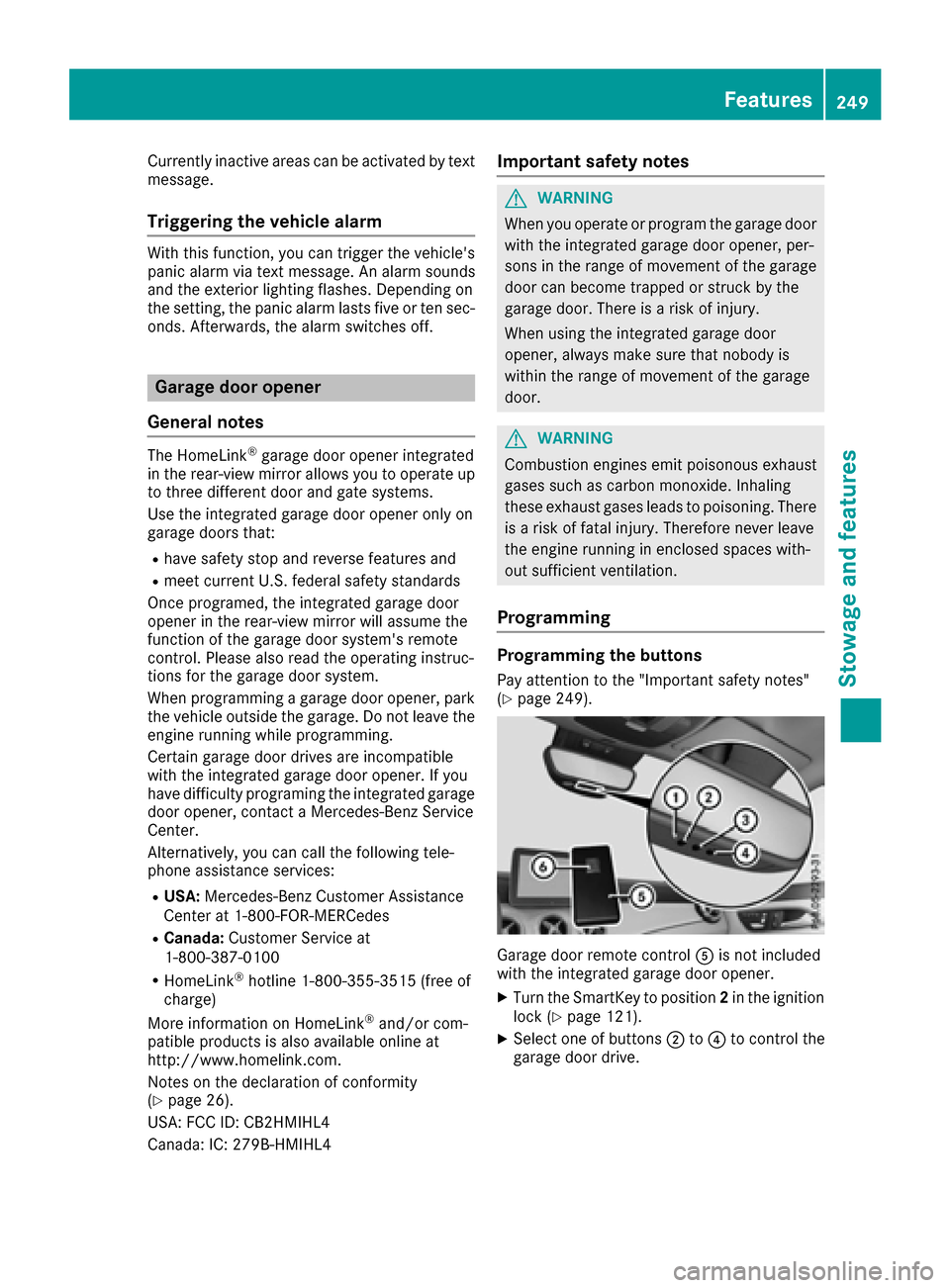
Garage door remote control Ais not included
with the integrated garage door opener.
XTurn the SmartKey to position 2in the ignition
lock (Ypage 121).
XSelect one of buttons ;to? to control the
garage door drive.
Features249
Stowage and features
Z
Page 274 of 318
the household rubbish. They
must be collected separatelyand recycled to protect the
environment.
Dispose of batteries in an
environmentally friendly
manner. Take discharged
batteries to a qualified spe-
cialist workshop or a special
collection point for used bat-
teries.
!Have the battery checked regularly at a
qualified specialist workshop.
Observe the service intervals in the Mainte-
nance Booklet or contact a qualified specialist
workshop for more information.
!You should have all work involving the bat-
tery carried out at a qualified specialist work-
shop. In the exceptional case that it is neces-
sary for you to disconnect the battery your-
self, make sure that:
Ryou switch off the engine and remove the
key. On vehicles with KEYLESS-GO, ensure
that the ignition is switched off. Check that
all the indicator lamps in the instrument
cluster are off. Otherwise, electronic com-
ponents, such as the alternator, may be
damaged.
Ryou first remove the negative terminal
clamp and then the positive terminal
clamp. Never swap the terminal clamps.
Otherwise, the vehicle's electronic system
may be damaged.
Rin vehicles with automatic transmission,
the transmission is locked in position P
after disconnecting the battery. The vehicle
is s
ecured against rolling away. You can
then no longer move the vehicle.
The battery and the cover of the positive ter-
minal clamp must be installed securely during
operation.
Comply with safety precautions and take pro-
tective measures when handling batteries.
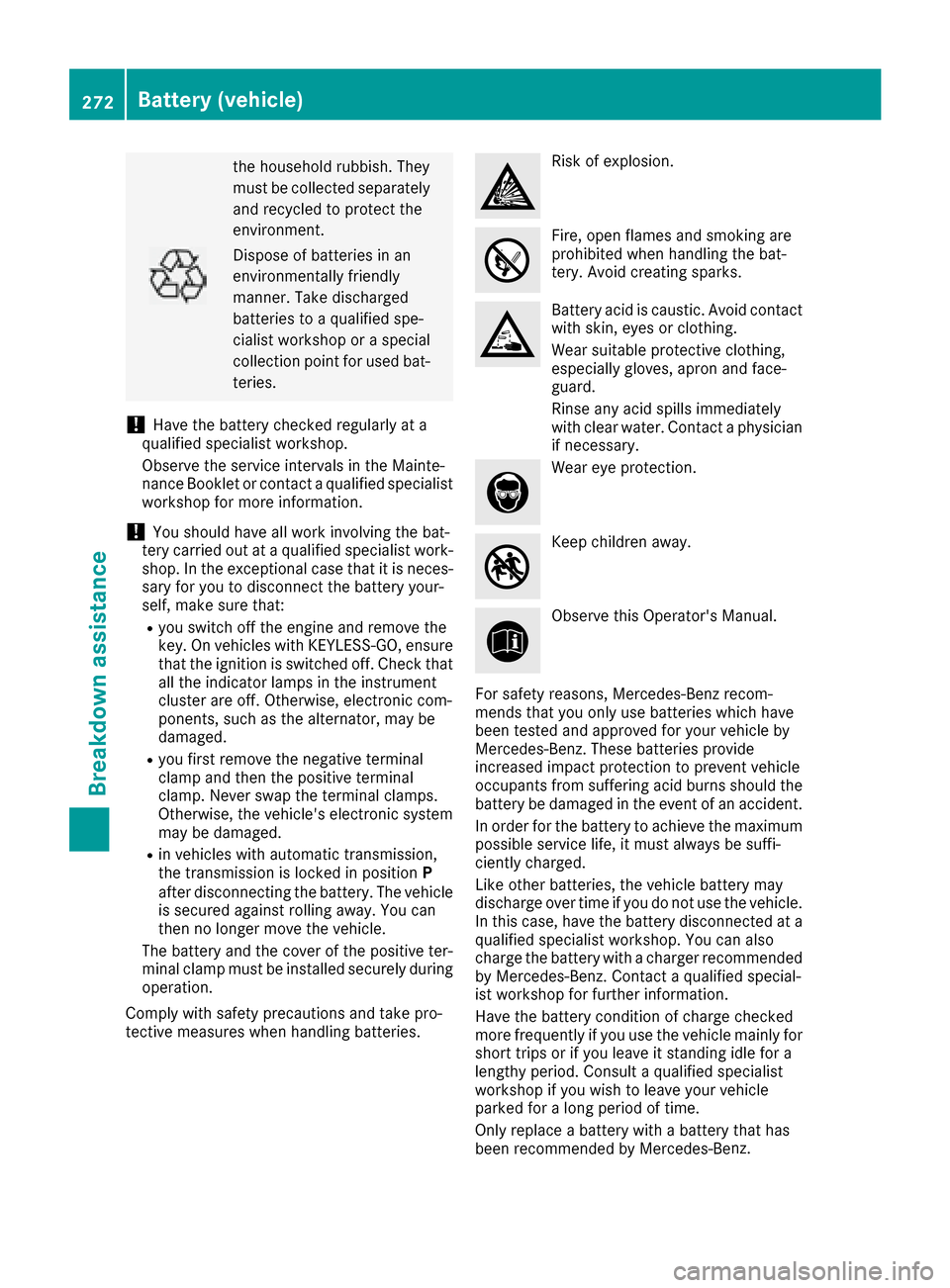
Risk of explosion.
Fire, open flames and smoking are
prohibited when handling the bat-
tery. Avoid creating sparks.
Battery acid is caustic. Avoid contact
with skin, eyes or clothing.
Wear suitable protective clothing,
especially gloves, apron and face-
guard.
Rinse any acid spills immediately
with clear water. Contact a physician
if necessary.
Wear eye protection.
Keep children away.
Observe this Operator's Manual.
For safety reasons, Mercedes-Benz recom-
mends that you only use batteries which have
been tested and approved for your vehicle by
Mercedes-Benz. These batteries provide
increased impact protection to prevent vehicle
occupants from suffering acid burns should the
battery be damaged in the event of an accident.
In order for the battery to achieve the maximum
possible service life, it must always be suffi-
ciently charged.
Like other batteries, the vehicle battery may
discharge over time if you do not use the vehicle.
In this case, have the battery disconnected at a
qualified specialist workshop. You can also
charge the battery with a charger recommended
by Mercedes-Benz. Contact a qualified special-
ist workshop for further information.
Have the battery condition of charge checked
more frequently if you use the vehicle mainly for
short trips or if you leave it standing idle for a
lengthy period. Consult a qualified specialist
workshop if you wish to leave your vehicle
parked for a long period of time.
Only replace a battery with a battery that has
been recommended by Mercedes-Be nz.
272Battery (vehicle)
Breakdown assistance