reset MERCEDES-BENZ CLS-Class 2013 W218 Owner's Guide
[x] Cancel search | Manufacturer: MERCEDES-BENZ, Model Year: 2013, Model line: CLS-Class, Model: MERCEDES-BENZ CLS-Class 2013 W218Pages: 376, PDF Size: 13.45 MB
Page 167 of 376
Drive particularly carefully on slippery road
surfaces.
Avoid sudden acceleration, steering
and braking maneuvers. Do not use the cruise
control or DISTRONIC PLUS.
i For more information on driving with
snow chains, see ( Y page 329).Driving systems
Cruise control
Important safety notes G
WARNING
The cruise control is a convenience system
designed to assist the driver during vehicle
operation. The driver is and must always
remain responsible for the vehicle's speed
and for safe brake operation.
Only
use the cruise control if the road, traffic,
and weather conditions make it advisable to
travel at a constant speed.
R The use of the cruise control can be
dangerous on winding roads or in heavy
traffic because conditions do not allow safe
driving at a constant speed.
R The use of the cruise control can be
dangerous on slippery roads. Rapid
changes in tire traction can result in wheel
spin and loss of control.
R Deactivate the cruise control when driving
in fog.
The "Resume" function should only be
operated if the driver is fully aware of the
previously set speed and wishes to resume
this particular preset speed.
General notes Cruise control maintains a constant road
speed
for you. It brakes automatically in order
to avoid exceeding the set speed. On long and
steep downhill gradients, especially if the
vehicle is laden, you must select shift range
1, 2 or 3 in good time. By doing so, you will
make use of the braking effect of the engine, which relieves the load on the brake system
and prevents the brakes from overheating
and wearing too quickly.
Use cruise control only if road and traffic
conditions make it appropriate to maintain a
steady
speed for a prolonged period. You can
store any road speed above 20 mph
(30 km/h).
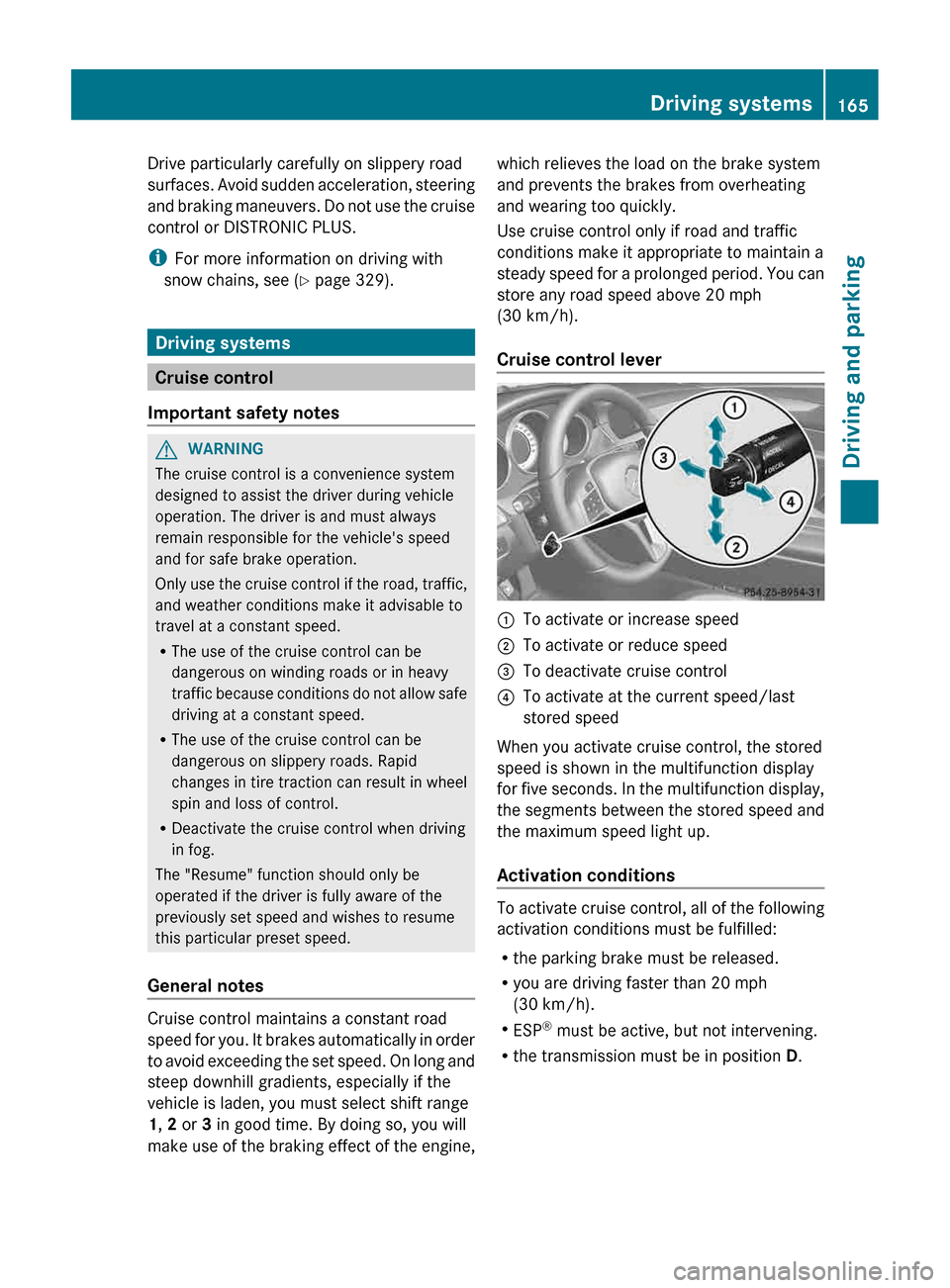
Cruise control lever :
To activate or increase speed
; To activate or reduce speed
= To deactivate cruise control
? To activate at the current speed/last
stored speed
When you activate cruise control, the stored
speed is shown in the multifunction display
for
five seconds. In the multifunction display,
the segments between the stored speed and
the maximum speed light up.
Activation conditions To activate cruise control, all of the following
activation conditions must be fulfilled:
R
the parking brake must be released.
R you are driving faster than 20 mph
(30 km/h
).
R ESP ®
must be active, but not intervening.
R the transmission must be in position D. Driving systems
165
Driving and parking Z
Page 168 of 376
Storing and maintaining the current
speed
You can adopt the current speed if you are
driving faster than 20 mph (30 km/h
).
X Accelerate the vehicle to the desired
speed.
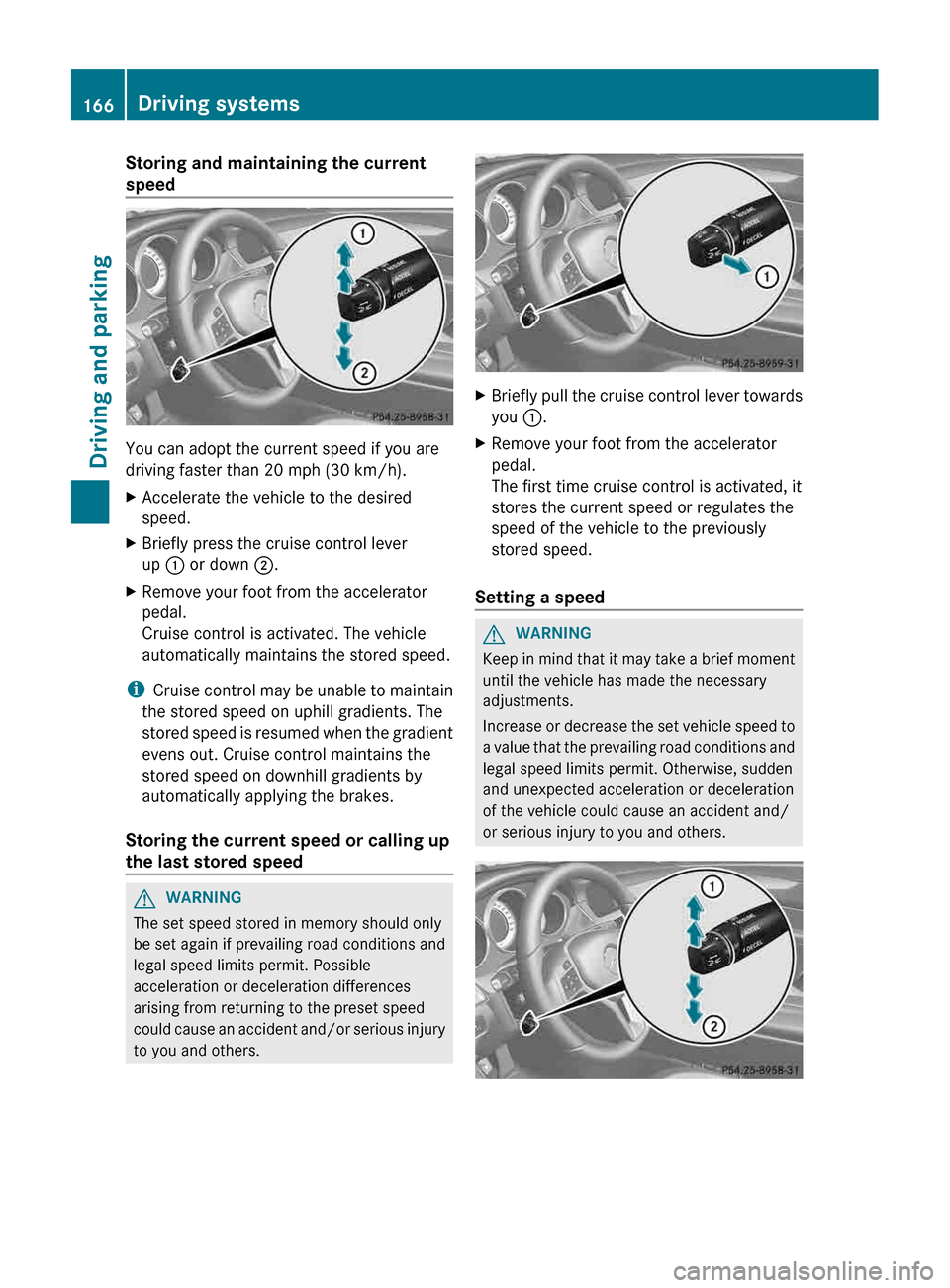
X Briefly press the cruise control lever
up : or down ;.
X Remove your foot from the accelerator
pedal.
Cruise control is activated. The vehicle
automatically maintains the stored speed.
i Cruise
control may be unable to maintain
the stored speed on uphill gradients. The
stored speed is resumed when the gradient
evens out. Cruise control maintains the
stored speed on downhill gradients by
automatically applying the brakes.
Storing the current speed or calling up
the last stored speed G
WARNING
The set speed stored in memory should only
be set again if prevailing road conditions and
legal speed limits permit. Possible
acceleration or deceleration differences
arising from returning to the preset speed
could
cause an accident and/or serious injury
to you and others. X
Briefly pull the cruise control lever towards
you :.
X Remove your foot from the accelerator
pedal.
The first time cruise control is activated, it
stores the current speed or regulates the
speed of the vehicle to the previously
stored speed.
Setting a speed G
WARNING
Keep in mind that it may take a brief moment
until the vehicle has made the necessary
adjustments.
Increase
or decrease the set vehicle speed to
a value that the prevailing road conditions and
legal speed limits permit. Otherwise, sudden
and unexpected acceleration or deceleration
of the vehicle could cause an accident and/
or serious injury to you and others. 166
Driving systems
Driving and parking
Page 170 of 376
could result in wrong or missing distance
warnings.
G
WARNING
DISTRONIC PLUS distance is not a substitute
for the active intervention of the driver. It does
not detect pedestrians or stationary objects,
nor can it detect, recognize or predict the
road's course or the movements of vehicles
in front. DISTRONIC PLUS can only brake the
vehicle using 40% of the vehicle's maximum
available brake force.
DISTRONIC PLUS may not detect narrow
vehicles driving in front, e.g. motorcycles, or
vehicles driving in the lane beyond the lane
next to your vehicle, especially if the vehicles
are not driving on the middle of their lane.
The driver must always pay careful attention
to the road, weather and traffic conditions.
The driver must drive, steer and brake in a
manner which will allow him to always have
control of the vehicle.
Sources of high-frequency radio waves, such
as toll stations, speed-measuring radar, etc.,
can cause DISTRONIC PLUS to fail
temporarily. G
WARNING
The DISTRONIC PLUS cannot take road and
traffic conditions into account. Only use the
DISTRONIC PLUS if the road, weather and
traffic conditions make it advisable to travel
at a constant speed. G
WARNING
Use of the DISTRONIC PLUS can be
dangerous on slippery roads. Rapid changes
in tire traction can result in wheel spin and
loss of control.
The DISTRONIC PLUS does not function in
adverse
sight and distance conditions. Do not
use the DISTRONIC PLUS during conditions of
fog, heavy rain, snow or sleet. G
WARNING
The DISTRONIC PLUS cannot take weather
conditions into account. Switch off the
DISTRONIC PLUS or do not switch it on if:
R roads
are slippery or covered with snow or
ice. The wheels could lose traction while
braking or accelerating, and the vehicle
could skid.
R the DISTRONIC PLUS system sensor covers
are dirty or visibility is diminished due to
snow, rain or fog, for example. The distance
control system functionality could be
impaired.
Always pay attention to surrounding traffic
conditions even while the DISTRONIC PLUS is
switched on. Otherwise, you may not be able
to recognize dangerous situations until it is
too late. This could cause an accident in which
you and/or others could be injured. G
WARNING
The "Resume" function should only be
operated if the driver is fully aware of the
previously set speed and wishes to resume
this particular preset speed. G
WARNING
Your undivided attention to street and traffic
conditions is necessary at all times whether
DISTRONIC PLUS is active or not.
The use of DISTRONIC PLUS can be
dangerous
on winding roads or in heavy traffic
because conditions do not allow safe driving
at a constant speed.
DISTRONIC PLUS does not react to stationary
objects on the road (for example, a vehicle
stopped in traffic or an abandoned vehicle).
DISTRONIC PLUS likewise does not react to
oncoming vehicles. 168
Driving systems
Driving and parking
Page 171 of 376
Deactivate DISTRONIC PLUS:
R
when changing to the right lane, if the
vehicles in the left lane are driving slower
R when driving into a filter lane or an
expressway exit
R in complex driving situations, for example
in construction sites on an expressway
In these situations DISTRONIC PLUS will
maintain
the set speed if it is not deactivated.
DISTRONIC PLUS is intended only for
maintaining a set speed and a set distance
from the objects moving in front of the
vehicle. G
WARNING
An intermittent warning sounds and the
distance
warning lamp · in the instrument
cluster is illuminated if the DISTRONIC PLUS
system calculates that the distance to the
vehicle ahead and your vehicle's current
speed indicate that the DISTRONIC PLUS will
not be capable of slowing the vehicle
sufficiently to maintain the preset following
distance, which creates a danger of a
collision.
Immediately brake the vehicle to increase
your distance to the preceding vehicle. The
warning sound is intended as a final caution
in which you should intercede with your own
braking inputs to avoid a potentially
dangerous situation. Do not wait for the
operation of the warning signal to intercede
with your own braking. This will result in
potentially dangerous emergency braking
which will not always result in an impact being
avoided.
Tailgating increases the risk of an accident. G
WARNING
DISTRONIC PLUS brakes your vehicle with a
maximum deceleration of 13 ft/s 2
(4 m/s 2
).
This corresponds to approximately
40% of
your vehicle's maximum braking force.
To avoid a collision, you must apply the brakes
yourself. DISTRONIC PLUS brakes the vehicle just enough to restore the preset speed or the
preset distance to the vehicle in front.
G
WARNING
If you do not receive visual or acoustic
warning signals during a critical traffic
situation, DISTRONIC PLUS has either not
recognized the collision risk, has been
deactivated or is malfunctioning.
Remember,
whether or not DISTRONIC PLUS
is operating, it is ultimately always the drivers
responsibility to apply the brakes in order to
control the vehicle and avoid a collision.
General notes DISTRONIC PLUS regulates the speed and
automatically helps you maintain the
distance to the vehicle detected in front.
DISTRONIC PLUS brakes automatically so
that the set speed is not exceeded.
If DISTRONIC PLUS detects a slower-moving
vehicle
in front, your vehicle is braked in order
to maintain the preset distance to the vehicle
in front.
If you want DISTRONIC PLUS to assist you,
the radar sensor system must be activated
(Y page 223) and operational.
If there is no vehicle in front, DISTRONIC
PLUS operates in the same way as cruise
control in the speed range between 20 mph
(Canada: 30 km/h) and120 mph (Canada:
200 km/h). If a vehicle is driving in front of
you, it operates in the speed range between
0 mph (0 km/h) and 120 mph (Canada:
200 km/h).
Do not use DISTRONIC PLUS while driving on
roads with steep gradients.
As DISTRONIC PLUS transmits radar waves,
it can resemble the radar detectors of the
responsible authorities. You can refer to the
relevant chapter in the Operator's Manual if
questions are asked about this.
i USA only:
This device has been approved by the FCC
as a “Vehicular Radar System”. The radar Driving systems
169
Driving and parking Z
Page 176 of 376
Storing the current speed or calling up
a stored speed
G
WARNING
The set speed stored in memory should only
be set again if prevailing road conditions and
legal speed limits permit. Possible
acceleration or deceleration differences
arising from returning to the preset speed
could
cause an accident and/or serious injury
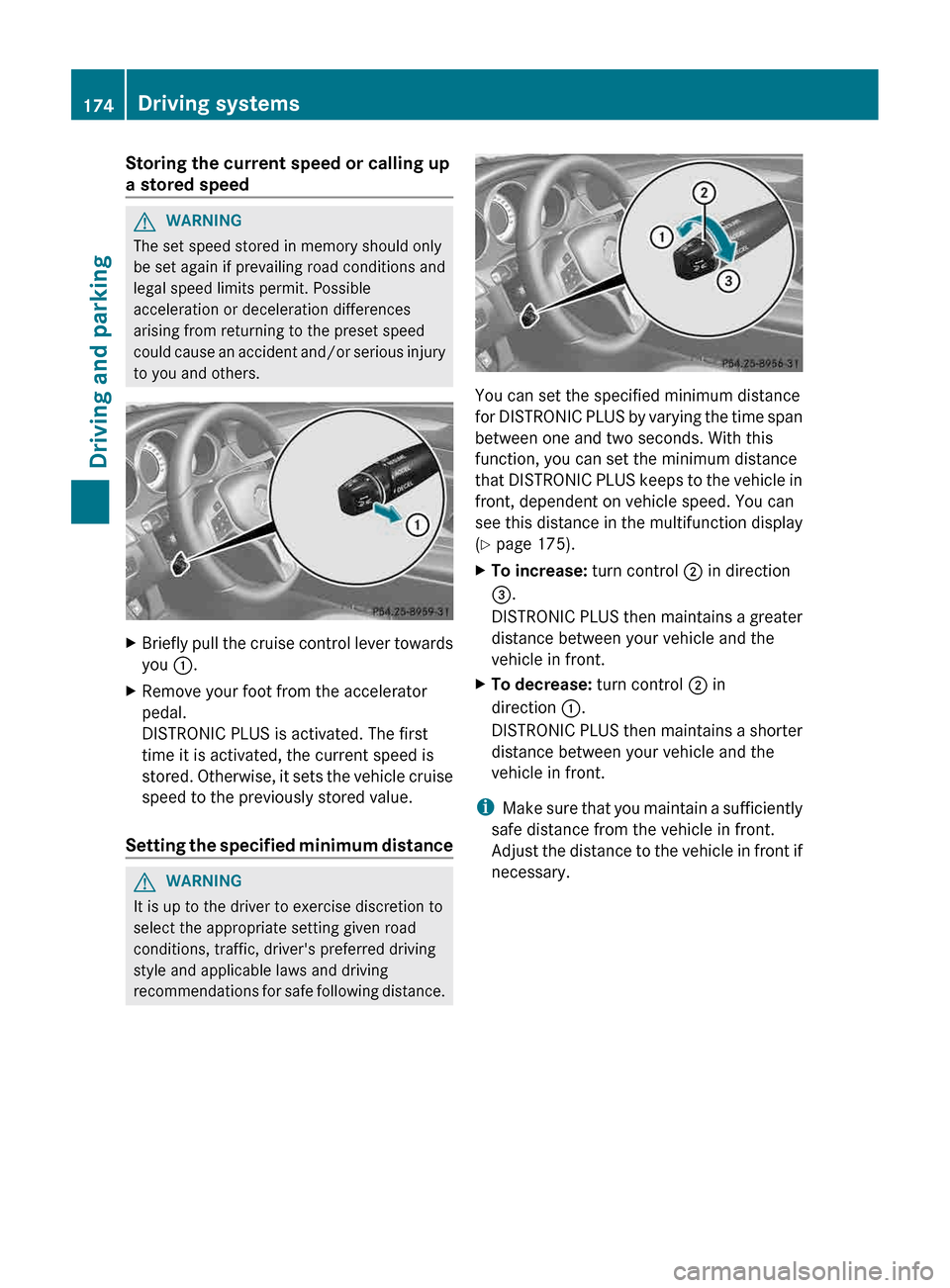
to you and others. X
Briefly pull the cruise control lever towards
you :.
X Remove your foot from the accelerator
pedal.
DISTRONIC PLUS is activated. The first
time it is activated, the current speed is
stored.
Otherwise, it sets the vehicle cruise
speed to the previously stored value.
Setting the specified minimum distance G
WARNING
It is up to the driver to exercise discretion to
select the appropriate setting given road
conditions, traffic, driver's preferred driving
style and applicable laws and driving
recommendations
for safe following distance. You can set the specified minimum distance
for
DISTRONIC PLUS by varying the time span
between one and two seconds. With this
function, you can set the minimum distance
that DISTRONIC PLUS keeps to the vehicle in
front, dependent on vehicle speed. You can
see this distance in the multifunction display
(Y page 175).
X To increase: turn control ; in direction
=.
DISTRONIC
PLUS then maintains a greater
distance between your vehicle and the
vehicle in front.
X To decrease: turn control ; in
direction :.
DISTRONIC
PLUS then maintains a shorter
distance between your vehicle and the
vehicle in front.
i Make
sure that you maintain a sufficiently
safe distance from the vehicle in front.
Adjust the distance to the vehicle in front if
necessary. 174
Driving systems
Driving and parking
Page 194 of 376
The functionality of ATTENTION ASSIST is
restricted and warnings may be delayed or
not occur at all:
R
if the road condition is poor, e.g. if the
surface is uneven or if there are potholes
R if there is a strong side wind
R if you have adopted a sporty driving style
with
high cornering speeds or high rates of
acceleration
R if you are predominantly driving slower
than 50 mph (80 km/h) or faster than
112 mph (180 km/h)
R if you are currently using COMAND or
making a telephone call with it
R if the time has been set incorrectly
R in active driving situations, such as when
you change lanes or change your speed
Warning and display messages in the
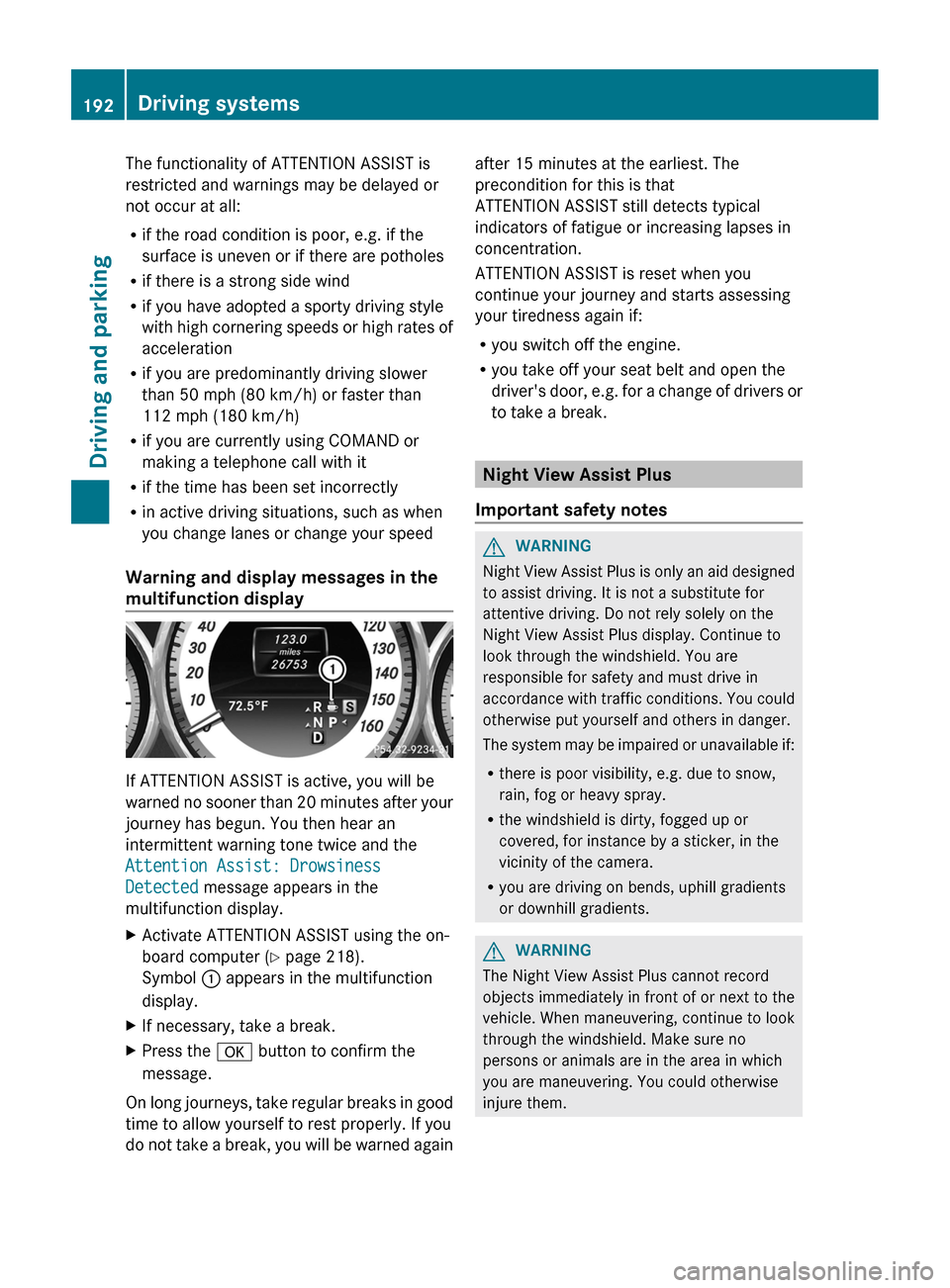
multifunction display If ATTENTION ASSIST is active, you will be
warned
no sooner than 20 minutes after your
journey has begun. You then hear an
intermittent warning tone twice and the
Attention Assist: Drowsiness
Detected message appears in the
multifunction display.
X Activate ATTENTION ASSIST using the on-
board computer ( Y page 218).
Symbol : appears in the multifunction
display.
X If necessary, take a break.
X Press the a button to confirm the
message.
On long journeys, take regular breaks in good
time to allow yourself to rest properly. If you
do
not take a break, you will be warned again after 15 minutes at the earliest. The
precondition for this is that
ATTENTION ASSIST still detects typical
indicators of fatigue or increasing lapses in
concentration.
ATTENTION ASSIST is reset when you
continue your journey and starts assessing
your tiredness again if:
R
you switch off the engine.
R you take off your seat belt and open the
driver's
door, e.g. for a change of drivers or
to take a break. Night View Assist Plus
Important safety notes G
WARNING
Night View Assist Plus is only an aid designed
to assist driving. It is not a substitute for
attentive driving. Do not rely solely on the
Night View Assist Plus display. Continue to
look through the windshield. You are
responsible for safety and must drive in
accordance
with traffic conditions. You could
otherwise put yourself and others in danger.
The system may be impaired or unavailable if:
R there is poor visibility, e.g. due to snow,
rain, fog or heavy spray.
R the windshield is dirty, fogged up or
covered, for instance by a sticker, in the
vicinity of the camera.
R you are driving on bends, uphill gradients
or downhill gradients. G
WARNING
The Night View Assist Plus cannot record
objects immediately in front of or next to the
vehicle. When maneuvering, continue to look
through the windshield. Make sure no
persons or animals are in the area in which
you are maneuvering. You could otherwise
injure them. 192
Driving systems
Driving and parking
Page 214 of 376
Text field : shows the selected menu or
submenu as well as display messages.
The following messages may appear in the
multifunction display:
XjY
Active Parking Assist (Y page 186)
CRUISE Cruise control (
Y page 165)
_ Adaptive Highbeam Assist
(Y page 116)
À ATTENTION ASSIST (Y page 191)
¤ ECO start/stop function
(Y page 142)
à Lane Keeping Assist (Y page 197)
à Active Lane Keeping Assist
(Y page 202)
ë HOLD function ( Y page 178)
Ä PRE-SAFE ®
Brake (Y page 69) Menus and submenus
Menu overview
Press the = or ; button on the
steering wheel to call up the menu bar and
select a menu.
Operating the on-board computer
(Y page 210).
Depending on the equipment installed in the
vehicle, you can call up the following menus:
R Trip menu (Y page 212)
R Navi menu (navigation instructions)
(Y page 214)
R Audio menu (Y page 215)
R Tel menu (telephone) ( Y page 216)
R DriveAssist menu (assistance)
(Y page 217)
R Serv. menu (Y page 219)
R Sett. menu (Y page 219)
R AMG menu in AMG vehicles ( Y page 224) Trip menu
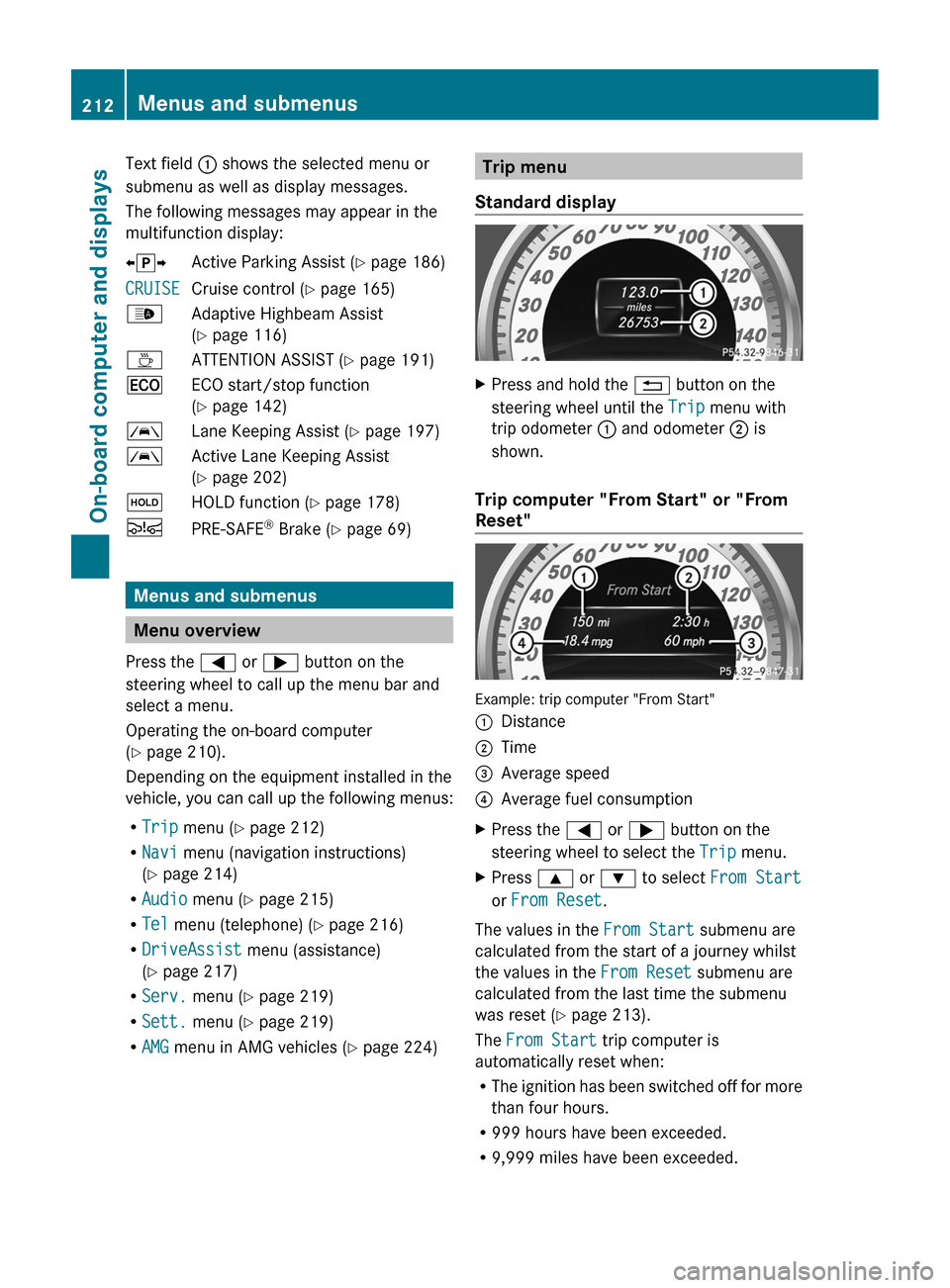
Standard display X
Press and hold the % button on the
steering wheel until the Trip menu with
trip odometer : and odometer ; is
shown.
Trip computer "From Start" or "From
Reset" Example: trip computer "From Start"
:
Distance
; Time
= Average speed
? Average fuel consumption
X Press the = or ; button on the
steering wheel to select the Trip menu.
X Press 9 or : to select From Start
or From Reset.
The values in the From Start submenu are
calculated from the start of a journey whilst
the values in the From Reset submenu are
calculated from the last time the submenu
was reset ( Y page 213).
The From Start trip computer is
automatically reset when:
R The
ignition has been switched off for more
than four hours.
R 999 hours have been exceeded.
R 9,999 miles have been exceeded.212
Menus and submenus
On-board computer and displays
Page 215 of 376
The From Reset trip computer is
automatically reset if the value exceeds
9,999 hours or 99,999 miles.
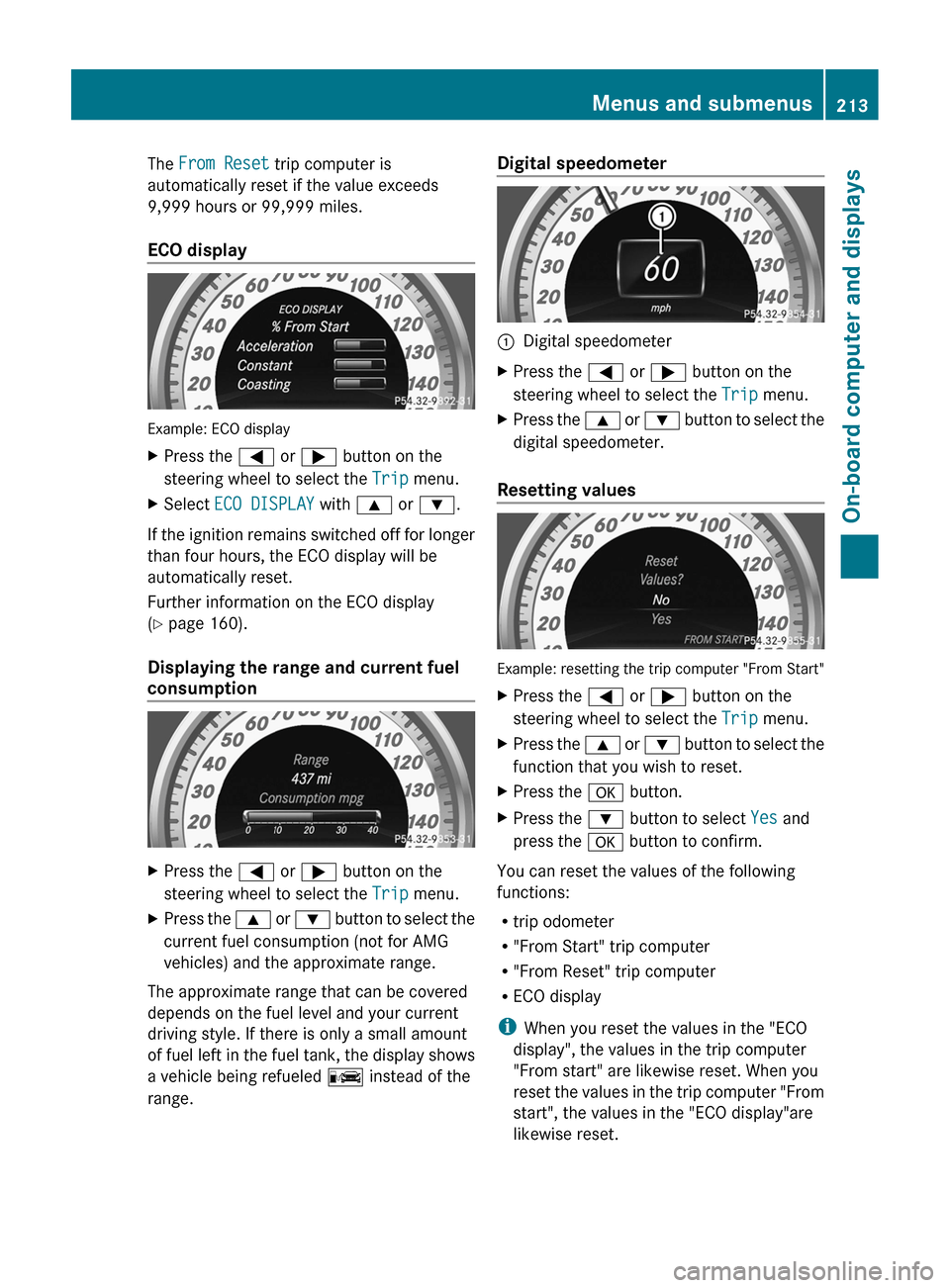
ECO display
Example: ECO display
X
Press the = or ; button on the
steering wheel to select the Trip menu.
X Select ECO DISPLAY with 9 or :.
If the ignition remains switched off for longer
than four hours, the ECO display will be
automatically reset.
Further information on the ECO display
(Y page 160).
Displaying the range and current fuel
consumption X
Press the = or ; button on the
steering wheel to select the Trip menu.
X Press the 9 or : button to select the
current fuel consumption (not for AMG
vehicles) and the approximate range.
The approximate range that can be covered
depends on the fuel level and your current
driving style. If there is only a small amount
of
fuel left in the fuel tank, the display shows
a vehicle being refueled C instead of the
range. Digital speedometer
:
Digital speedometer
X Press the = or ; button on the
steering wheel to select the Trip menu.
X Press the 9
or : button to select the
digital speedometer.
Resetting values Example: resetting the trip computer "From Start"
X
Press the = or ; button on the
steering wheel to select the Trip menu.
X Press the 9
or : button to select the
function that you wish to reset.
X Press the a button.
X Press the : button to select Yes and
press the a button to confirm.
You can reset the values of the following
functions:
R trip odometer
R "From Start" trip computer
R "From Reset" trip computer
R ECO display
i When you reset the values in the "ECO
display", the values in the trip computer
"From start" are likewise reset. When you
reset
the values in the trip computer "From
start", the values in the "ECO display"are
likewise reset. Menus and submenus
213
On-board computer and displays Z
Page 226 of 376
X
Press the = or ; button on the
steering wheel to select the Sett. menu.
X Press the : or 9 button to select the
Convenience submenu.
X Press a to confirm.
X Press : or 9 to select the Auto.
Mirror Folding function.
If the Auto. Mirror Folding function is
activated, the vehicle's exterior mirror is
displayed in red in the multifunction
display.
X Press the a button to save the setting. :
To fold the exterior mirrors in or out
If you have switched on the Auto. Mirror
Folding
function and you fold in the exterior
mirrors by pressing button :, the exterior
mirrors will not fold out automatically
(Y page 105).
You can then only fold out the exterior mirrors
using button :.
Restoring the factory settings X
Press the = or ; button on the
steering wheel to select the Sett. menu.
X Press the :
or 9 button to select the
Factory Setting submenu.
X Press a to confirm.
The Reset All Settings? message
appears. X
Press the : or 9 button to select
No or Yes.
X Press a to confirm the selection.
If
you have selected Yes, the multifunction
display shows a confirmation message.
For safety reasons, the Daytime Running
Lights function in the Lights submenu is
only reset if the vehicle is stationary. AMG menu in AMG vehicles
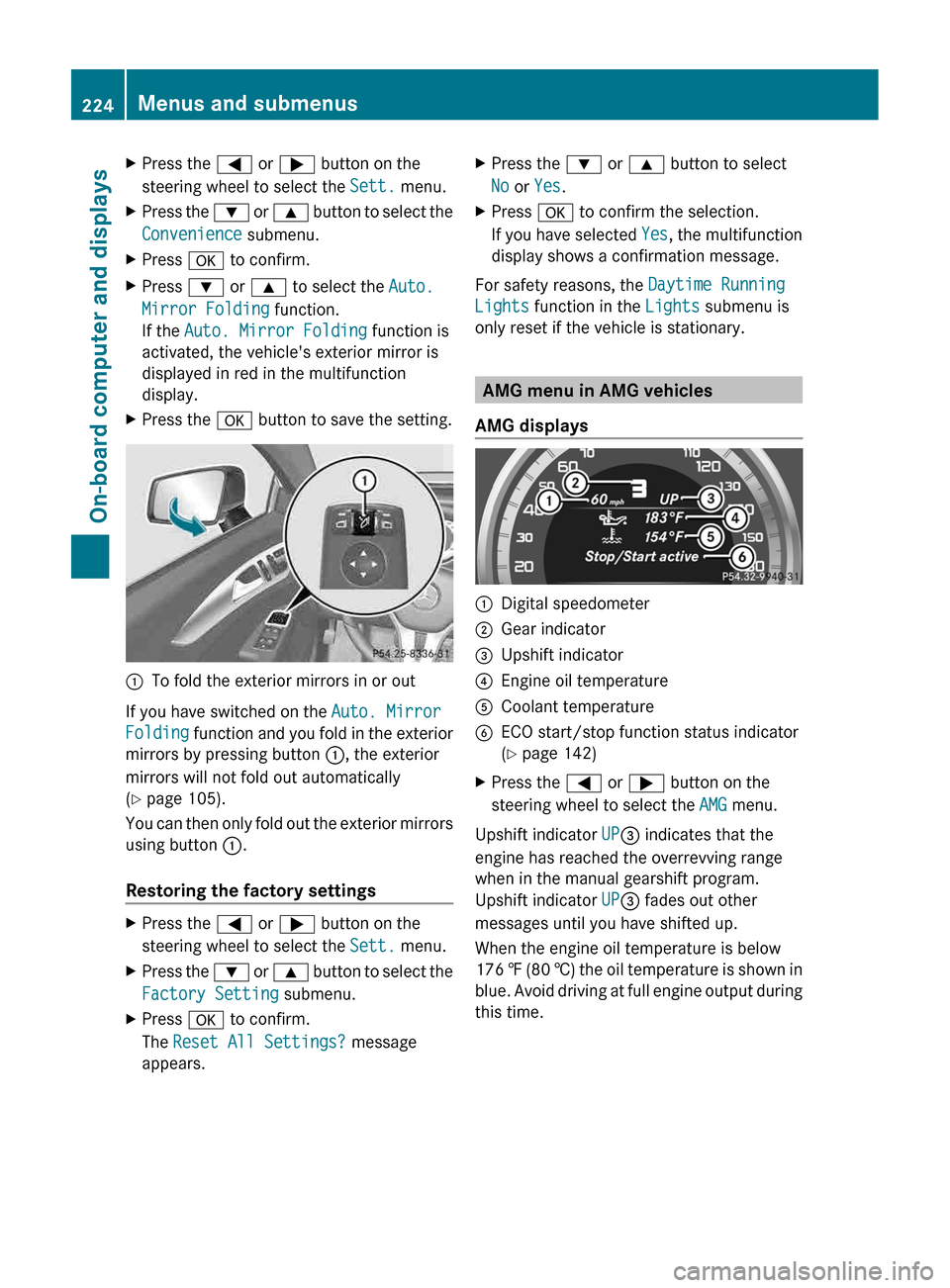
AMG displays :
Digital speedometer
; Gear indicator
= Upshift indicator
? Engine oil temperature
A Coolant temperature
B ECO start/stop function status indicator
(Y page 142)
X Press the = or ; button on the
steering wheel to select the AMG menu.
Upshift indicator UP= indicates that the
engine has reached the overrevving range
when in the manual gearshift program.
Upshift indicator UP= fades out other
messages until you have shifted up.
When the engine oil temperature is below
176 ‡
(80 †) the oil temperature is shown in
blue. Avoid driving at full engine output during
this time. 224
Menus and submenus
On-board computer and displays
Page 228 of 376
Stopping the RACETIMER
X
Press the % button on the steering
wheel.
X Press a to confirm Yes.
The RACETIMER interrupts timing when you
stop the vehicle and turn the SmartKey to
position 1
in the ignition lock. When you turn
the SmartKey to position 2 or 3 and then
press a to confirm Start, timing is
continued.
Resetting the current lap
X Stop the RACETIMER.
X Press = or ; to select Reset Lap.
X Press a to reset the lap time to "0".
Deleting all laps If you switch off the engine, the RACETIMER
is reset to "0" after 30 seconds. All laps are
deleted.
You cannot delete individual stored laps. If
you have stopped 16 laps, the current lap
does not have to be reset.
X
Reset the current lap.
X Press a to confirm Reset.
Reset Race Timer? appears in the
multifunction display.
X Press the : button to select Yes and
press the a button to confirm.
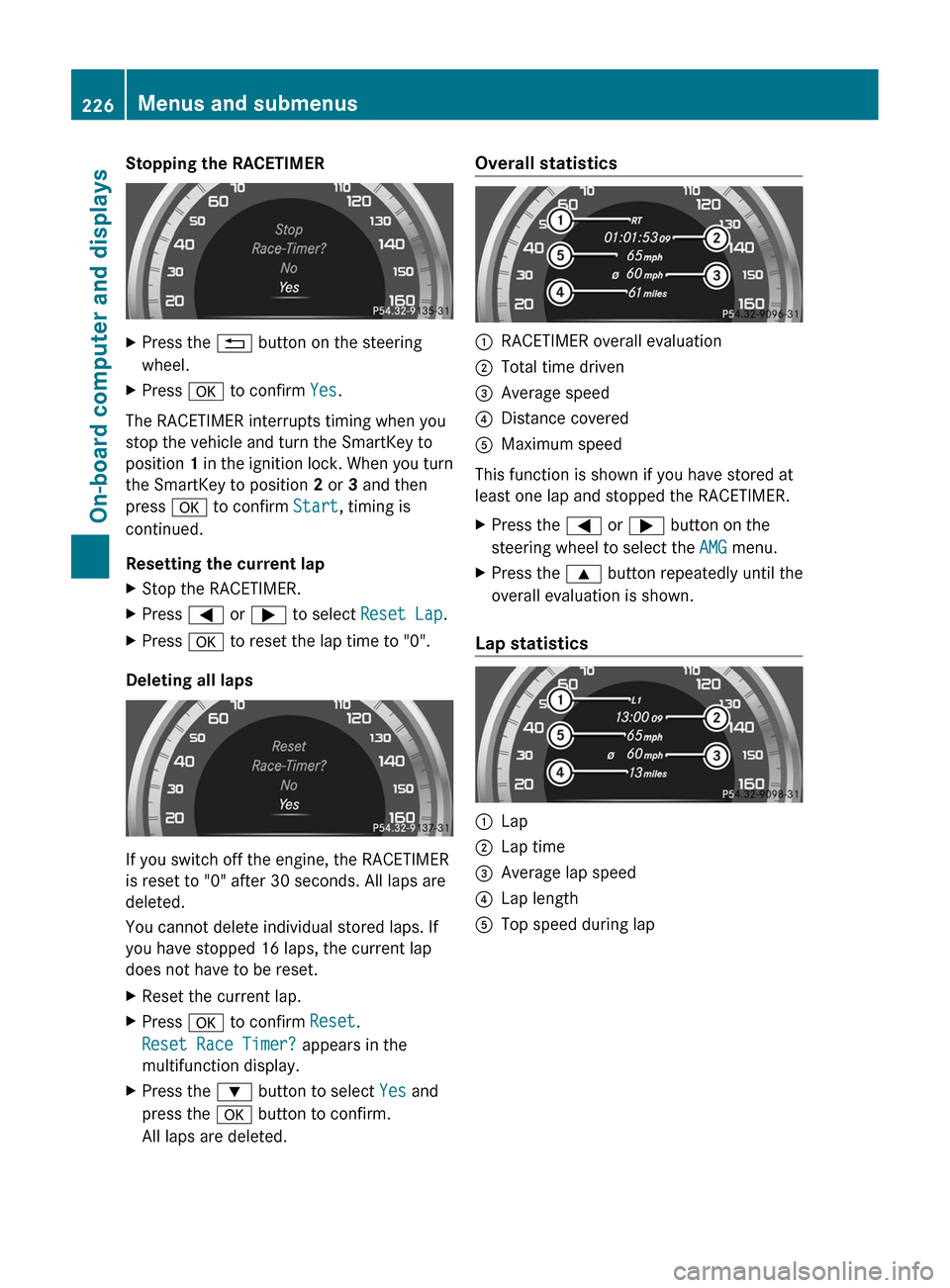
All laps are deleted. Overall statistics
:
RACETIMER overall evaluation
; Total time driven
= Average speed
? Distance covered
A Maximum speed
This function is shown if you have stored at
least one lap and stopped the RACETIMER.
X Press the = or ; button on the
steering wheel to select the AMG menu.
X Press the 9 button repeatedly until the
overall evaluation is shown.
Lap statistics :
Lap
; Lap time
= Average lap speed
? Lap length
A Top speed during lap226
Menus and submenus
On-board computer and displays