window MERCEDES-BENZ CLS-Class 2013 W218 Owner's Guide
[x] Cancel search | Manufacturer: MERCEDES-BENZ, Model Year: 2013, Model line: CLS-Class, Model: MERCEDES-BENZ CLS-Class 2013 W218Pages: 376, PDF Size: 13.45 MB
Page 128 of 376
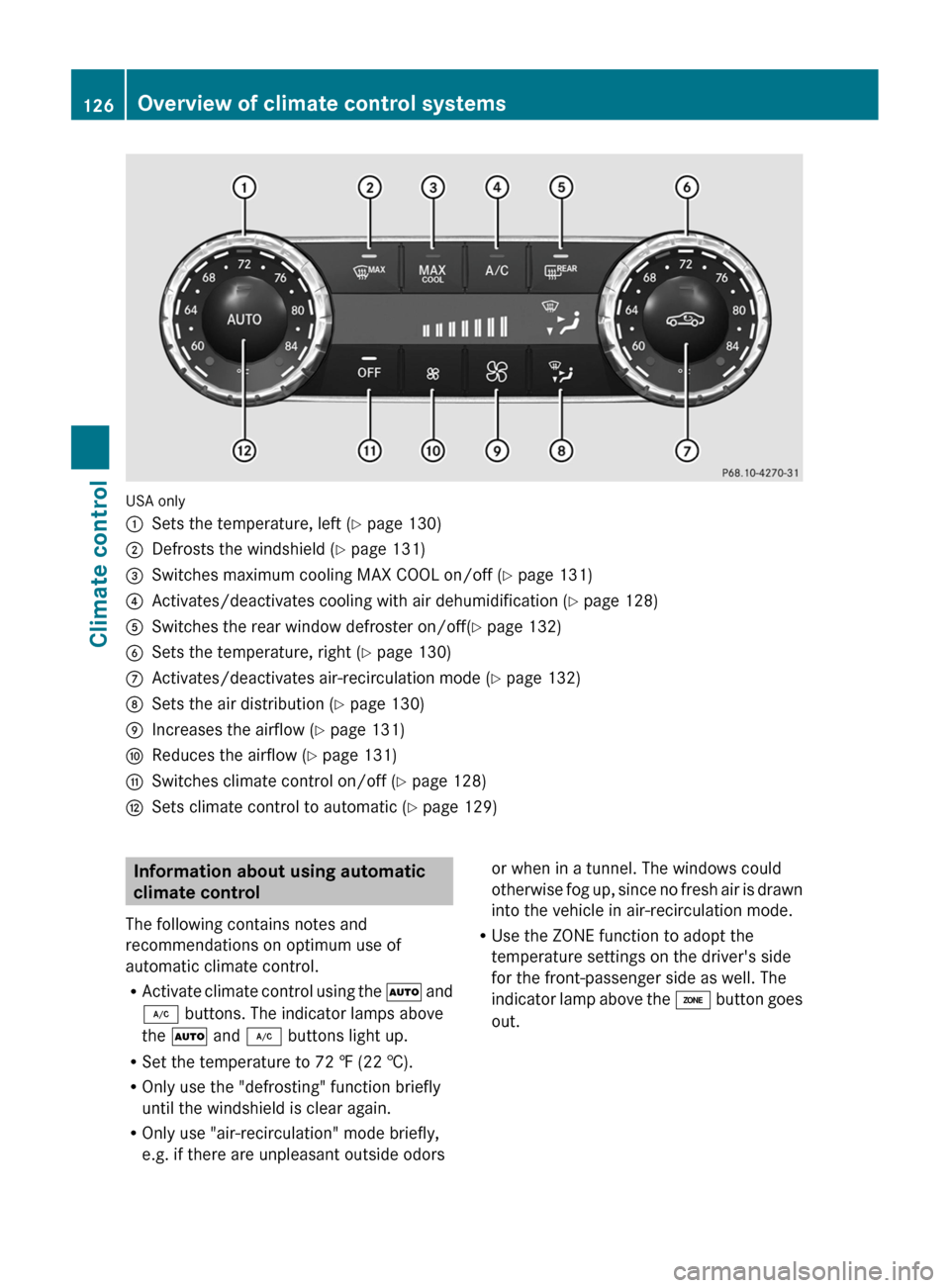
USA only
:
Sets the temperature, left ( Y page 130)
; Defrosts the windshield ( Y page 131)
= Switches maximum cooling MAX COOL on/off ( Y page 131)
? Activates/deactivates cooling with air dehumidification ( Y page 128)
A Switches the rear window defroster on/off( Y page 132)
B Sets the temperature, right ( Y page 130)
C Activates/deactivates air-recirculation mode (Y page 132)
D Sets the air distribution (Y page 130)
E Increases the airflow ( Y page 131)
F Reduces the airflow ( Y page 131)
G Switches climate control on/off ( Y page 128)
H Sets climate control to automatic (Y page 129) Information about using automatic
climate control
The following contains notes and
recommendations on optimum use of
automatic climate control.
R Activate
climate control using the à and
¿ buttons. The indicator lamps above
the à and ¿ buttons light up.
R Set the temperature to 72 ‡ (22 †).
R Only use the "defrosting" function briefly
until the windshield is clear again.
R Only use "air-recirculation" mode briefly,
e.g. if there are unpleasant outside odors or when in a tunnel. The windows could
otherwise
fog up, since no fresh air is drawn
into the vehicle in air-recirculation mode.
R Use the ZONE function to adopt the
temperature settings on the driver's side
for the front-passenger side as well. The
indicator lamp above the á button goes
out. 126
Overview of climate control systems
Climate control
Page 129 of 376
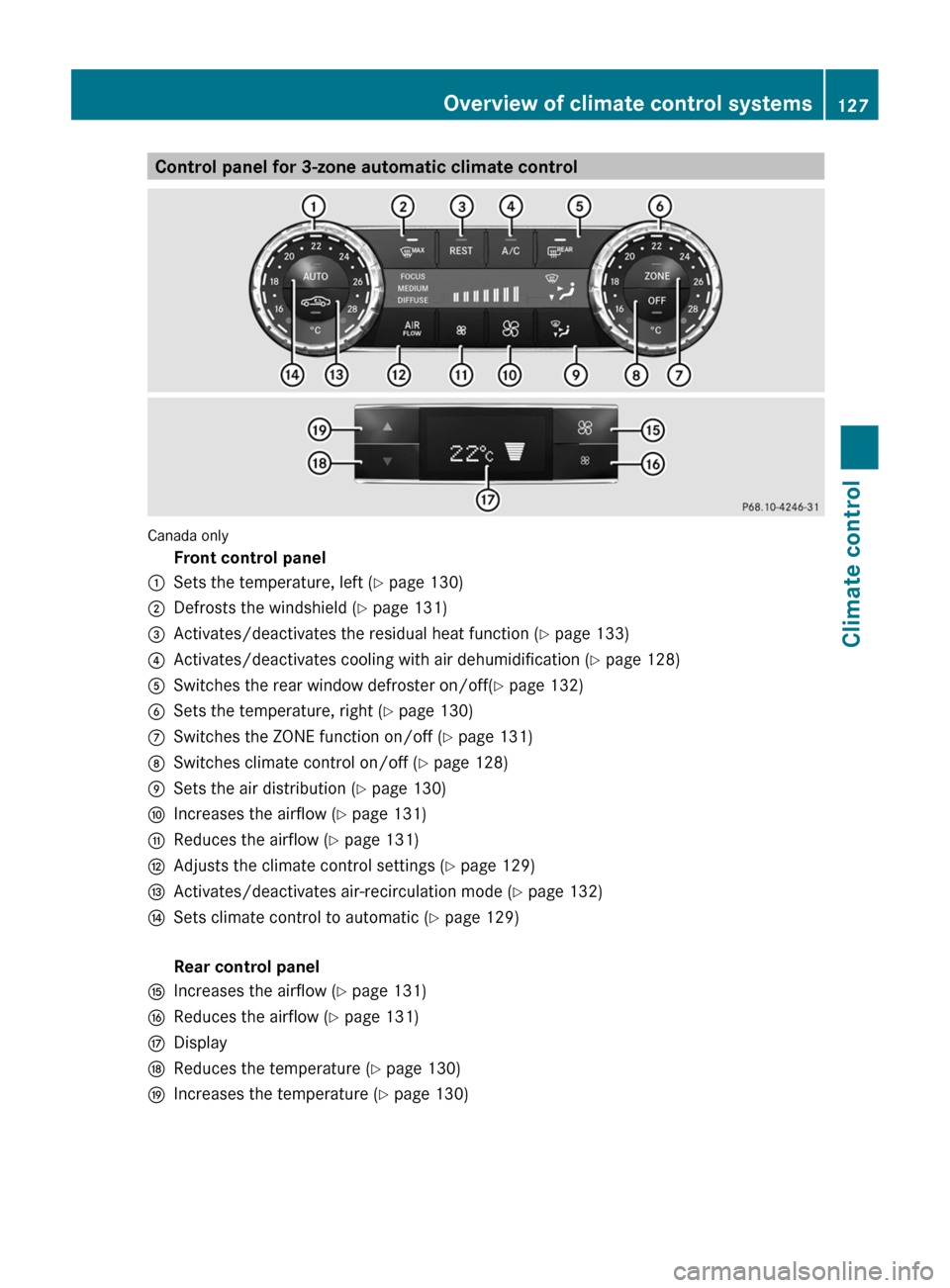
Control panel for 3-zone automatic climate control
Canada only
Front control panel
: Sets the temperature, left ( Y page 130)
; Defrosts the windshield ( Y page 131)
= Activates/deactivates the residual heat function (Y page 133)
? Activates/deactivates cooling with air dehumidification ( Y page 128)
A Switches the rear window defroster on/off( Y page 132)
B Sets the temperature, right ( Y page 130)
C Switches the ZONE function on/off ( Y page 131)
D Switches climate control on/off ( Y page 128)
E Sets the air distribution (Y page 130)
F Increases the airflow ( Y page 131)
G Reduces the airflow ( Y page 131)
H Adjusts the climate control settings (Y page 129)
I Activates/deactivates air-recirculation mode (Y page 132)
J Sets climate control to automatic (Y page 129)
Rear control panel
K Increases the airflow ( Y page 131)
L Reduces the airflow ( Y page 131)
M Display
N Reduces the temperature ( Y page 130)
O Increases the temperature (Y page 130) Overview of climate control systems
127Climate control Z
Page 130 of 376
Information about using 3-zone
automatic climate control
The following contains instructions and
recommendations to enable you to get the
most out of your automatic climate control.
R Activate
climate control using the à and
¿ buttons. The indicator lamps above
the à and ¿ buttons light up.
R In automatic mode, you can also use the
ñ button to set a climate mode
(FOCUS/MEDIUM/DIFFUSE). The
MEDIUM level is recommended.
R Set the temperature to 72 ‡ (22 †).
R Only use the "defrosting" function briefly
until the windshield is clear again.
R Only use "air-recirculation" mode briefly,
e.g. if there are unpleasant outside odors
or when in a tunnel. The windows could
otherwise fog up, since no fresh air is drawn
into the vehicle in air-recirculation mode.
R Use the ZONE function to adopt the
temperature settings on the driver's side
for the front-passenger side and the rear
compartment as well. The indicator lamp
above the á button goes out.
R Use the residual heat function if you want
to heat or ventilate the vehicle interior
when the ignition is switched off. The
"residual heat" function can only be
activated or deactivated with the ignition
switched off. Operating the climate control
systems
Activating/deactivating climate
control
Points to observe before use G
WARNING
When the climate control system is
deactivated, the outside air supply and
circulation are also deactivated. Only choose
this setting for a short time. Otherwise the windows could fog up, impairing visibility and
endangering you and others.
i Switch on climate control primarily using
the à button ( Y page 129).
Activating/deactivating X
Turn the SmartKey to position 2 in the
ignition lock.
X To switch on: press the à button.
The
indicator lamp in the à button lights
up. Airflow and air distribution are set to
automatic mode.
or
X Press the ^ button.
The
indicator lamp in the ^ button goes
out. The previously selected settings are
restored.
X To switch off: press the ^ button.
The
indicator lamp in the ^ button lights
up. Activating/deactivating cooling with
air dehumidification
Points to observe before use G
WARNING
If you switch off the cooling function, the
vehicle will not be cooled when weather
conditions
are warm. The windows can fog up
more quickly. This may prevent you from
observing the traffic conditions, thereby
causing an accident.
The cooling with air dehumidification function
is only available when the engine is running.
The air inside the vehicle is cooled and
dehumidified according to the temperature
selected.
Condensation may drip from the underside of
the vehicle when it is in cooling mode. This is
normal and not a sign that there is a
malfunction. 128
Operating the climate control systems
Climate control
Page 131 of 376
i
The cooling with air dehumidification
function uses refrigerant R134a. This
coolant does not contain
chlorofluorocarbons, and therefore does
not damage the ozone layer.
Activating/deactivating X
To activate: press the ¿ button.
The indicator lamp in the ¿ button lights
up.
X To deactivate: press the ¿ button.
The
indicator lamp in the ¿ button goes
out. The cooling with air dehumidification
function has a delayed switch-off feature.
Problems with the cooling with air
dehumidification function When you press the
¿ button, the
indicator lamp in the button flashes three
times
or remains off. You can no longer switch
on the cooling with air dehumidification
function.
X Visit a qualified specialist workshop. Setting climate control to automatic
G
WARNING
If you switch off the cooling function, the
vehicle will not be cooled when weather
conditions
are warm. The windows can fog up
more quickly. Window fogging may impair
visibility and endanger you and others.
In automatic mode, the set temperature is
maintained automatically at a constant level.
The system automatically regulates the
temperature of the dispensed air, the airflow
and the air distribution.
Automatic mode will achieve optimal
operation if cooling with air dehumidification
is also activated. If desired, cooling with air
dehumidification can be deactivated. X
Turn the SmartKey to position 2 in the
ignition lock.
X Set the desired temperature.
X To activate: press the à button.
The
indicator lamp in the à button lights
up. Automatic air distribution and airflow
are activated.
i 3-zone automatic climate control: when
automatic mode is activated, you can
select a climate mode setting
(Y page 129).
X To switch off: press the _ button.
or
X Press the I or K button.
The
indicator lamp in the à button goes
out. Adjusting the climate mode settings
You can select the following climate mode
settings in automatic mode:
FOCUS high airflow that is set slightly cooler
MEDIUM medium airflow, standard setting
DIFFUSE low airflow that is set slightly warmer and with less draft
X Turn the SmartKey to position 2 in the
ignition lock.
X Press the à button.
X Press the ñ button repeatedly until the
desired climate mode appears in the
display. Operating the climate control systems
129
Climate control Z
Page 133 of 376
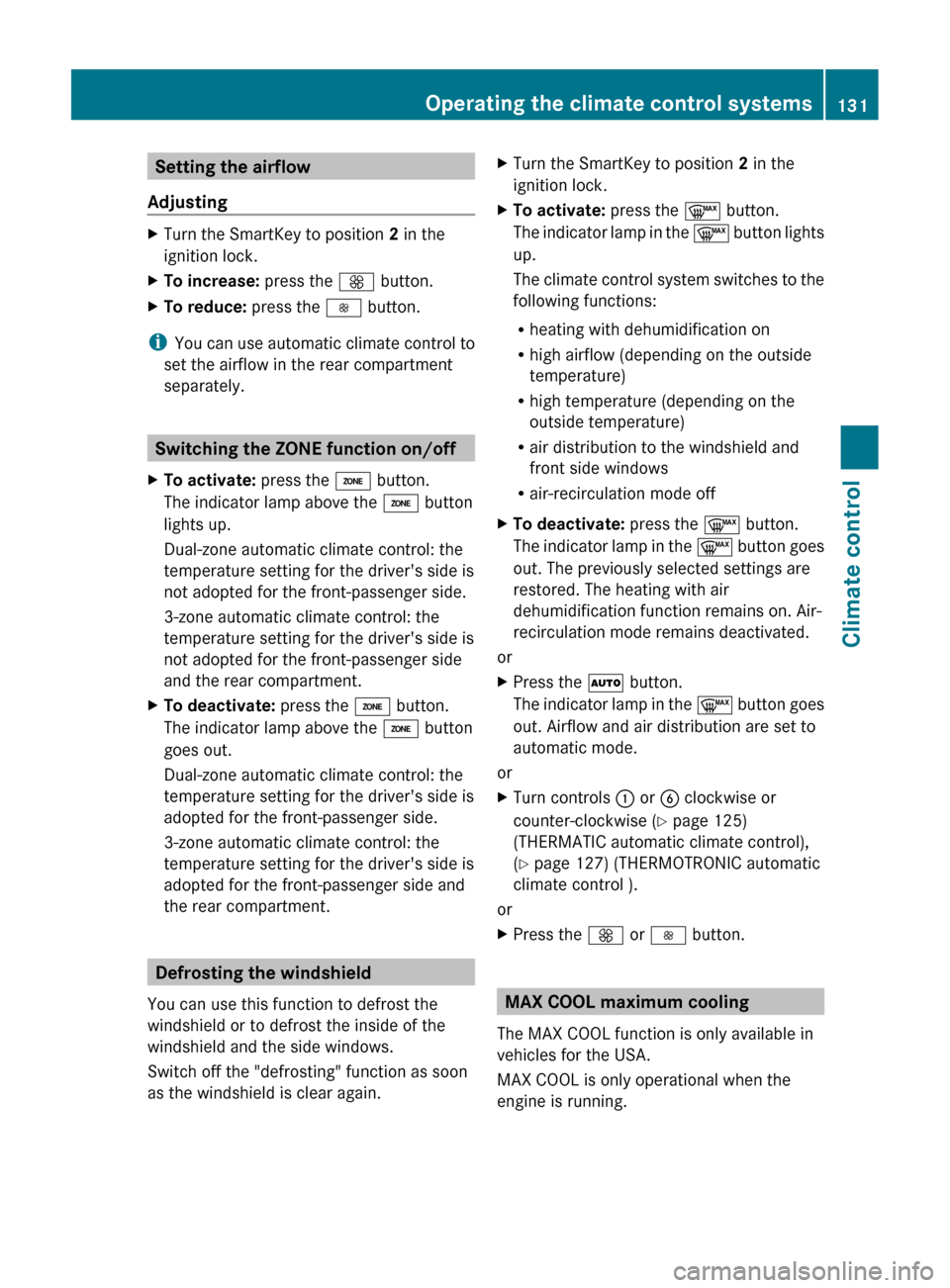
Setting the airflow
Adjusting X
Turn the SmartKey to position 2 in the
ignition lock.
X To increase: press the K button.
X To reduce: press the I button.
i You can use automatic climate control to
set the airflow in the rear compartment
separately. Switching the ZONE function on/off
X To activate: press the á button.
The indicator lamp above the á button
lights up.
Dual-zone automatic climate control: the
temperature setting for the driver's side is
not adopted for the front-passenger side.
3-zone automatic climate control: the
temperature setting for the driver's side is
not adopted for the front-passenger side
and the rear compartment.
X To deactivate: press the á button.
The indicator lamp above the á button
goes out.
Dual-zone automatic climate control: the
temperature setting for the driver's side is
adopted for the front-passenger side.
3-zone automatic climate control: the
temperature setting for the driver's side is
adopted for the front-passenger side and
the rear compartment. Defrosting the windshield
You can use this function to defrost the
windshield or to defrost the inside of the
windshield and the side windows.
Switch off the "defrosting" function as soon
as the windshield is clear again. X
Turn the SmartKey to position 2 in the
ignition lock.
X To activate: press the ¬ button.
The
indicator lamp in the ¬ button lights
up.
The climate control system switches to the
following functions:
R heating with dehumidification on
R high airflow (depending on the outside
temperature)
R high temperature (depending on the
outside temperature)
R air distribution to the windshield and
front side windows
R air-recirculation mode off
X To deactivate: press the ¬ button.
The
indicator lamp in the ¬ button goes
out. The previously selected settings are
restored. The heating with air
dehumidification function remains on. Air-
recirculation mode remains deactivated.
or
X Press the à button.
The
indicator lamp in the ¬ button goes
out. Airflow and air distribution are set to
automatic mode.
or
X Turn controls : or B clockwise or
counter-clockwise ( Y page 125)
(THERMATIC automatic climate control),
(Y page 127) (THERMOTRONIC automatic
climate control ).
or
X Press the K or I button. MAX COOL maximum cooling
The MAX COOL function is only available in
vehicles for the USA.
MAX COOL is only operational when the
engine is running. Operating the climate control systems
131
Climate control Z
Page 134 of 376
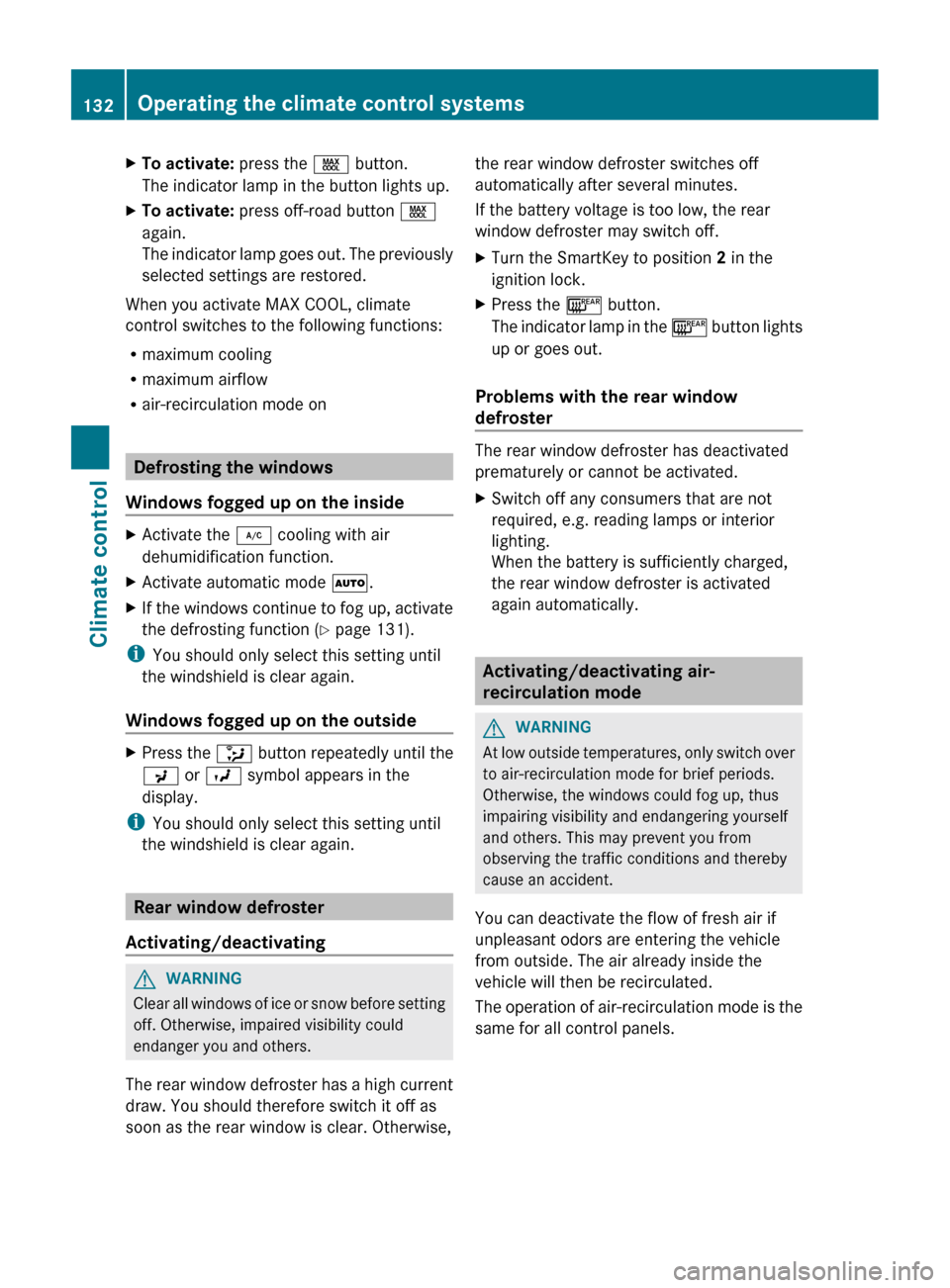
X
To activate: press the Ù button.
The indicator lamp in the button lights up.
X To activate: press off-road button Ù
again.
The
indicator lamp goes out. The previously
selected settings are restored.
When you activate MAX COOL, climate
control switches to the following functions:
R maximum cooling
R maximum airflow
R air-recirculation mode on Defrosting the windows
Windows fogged up on the inside X
Activate the ¿ cooling with air
dehumidification function.
X Activate automatic mode Ã.
X If the windows continue to fog up, activate
the defrosting function
(Y page 131).
i You should only select this setting until
the windshield is clear again.
Windows fogged up on the outside X
Press the _ button repeatedly until the
P or O symbol appears in the
display.
i You should only select this setting until
the windshield is clear again. Rear window defroster
Activating/deactivating G
WARNING
Clear all windows of ice or snow before setting
off. Otherwise, impaired visibility could
endanger you and others.
The
rear window defroster has a high current
draw. You should therefore switch it off as
soon as the rear window is clear. Otherwise, the rear window defroster switches off
automatically after several minutes.
If the battery voltage is too low, the rear
window defroster may switch off.
X
Turn the SmartKey to position 2 in the
ignition lock.
X Press the ¤ button.
The
indicator lamp in the ¤ button lights
up or goes out.
Problems with the rear window
defroster The rear window defroster has deactivated
prematurely or cannot be activated.
X
Switch off any consumers that are not
required, e.g. reading lamps or interior
lighting.
When the battery is sufficiently charged,
the rear window defroster is activated
again automatically. Activating/deactivating air-
recirculation mode
G
WARNING
At low outside temperatures, only switch over
to air-recirculation mode for brief periods.
Otherwise, the windows could fog up, thus
impairing visibility and endangering yourself
and others. This may prevent you from
observing the traffic conditions and thereby
cause an accident.
You can deactivate the flow of fresh air if
unpleasant odors are entering the vehicle
from outside. The air already inside the
vehicle will then be recirculated.
The
operation of air-recirculation mode is the
same for all control panels. 132
Operating the climate control systems
Climate control
Page 136 of 376
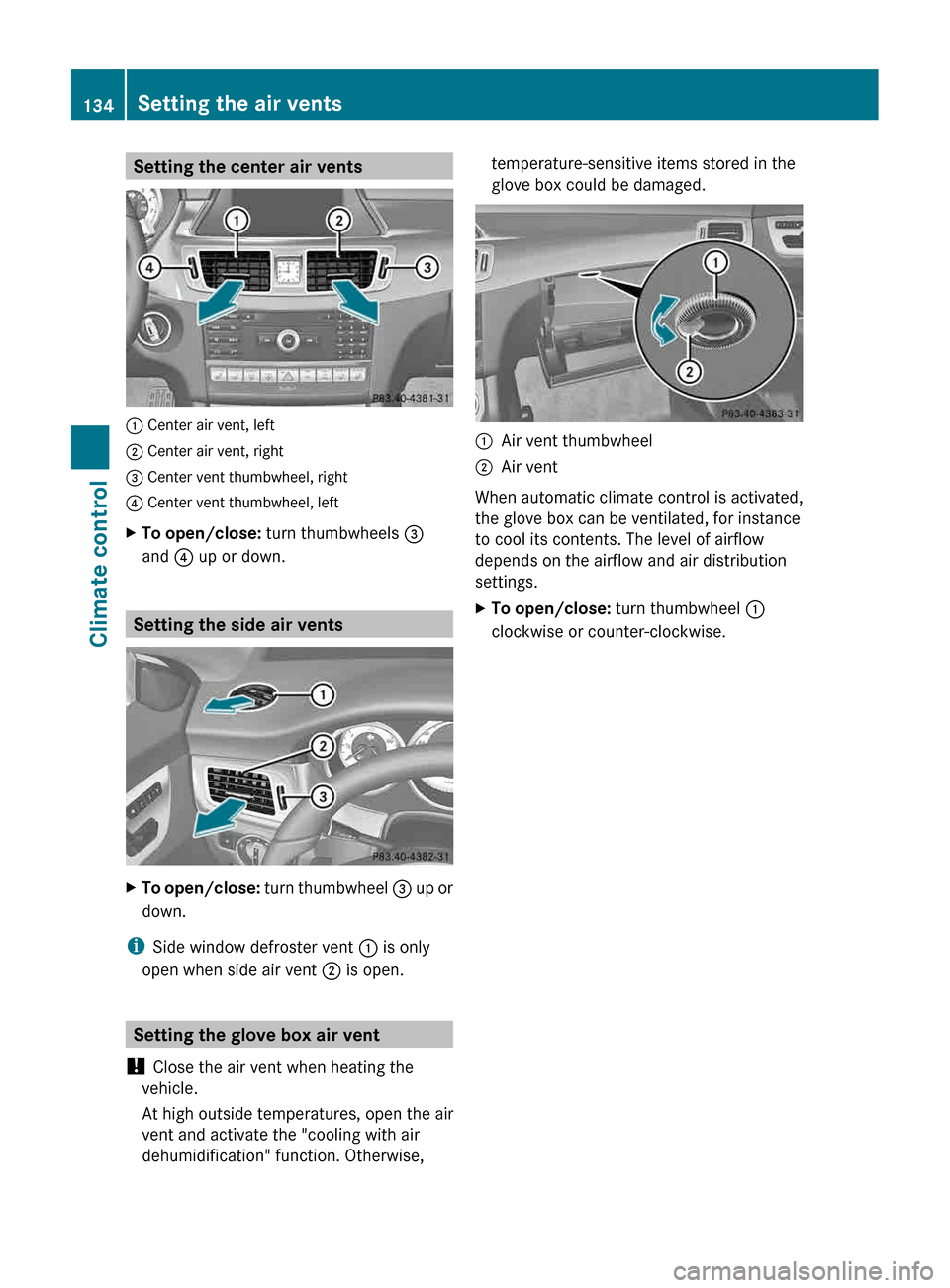
Setting the center air vents
: Center air vent, left
; Center air vent, right
= Center vent thumbwheel, right
? Center vent thumbwheel, left
X
To open/close: turn thumbwheels =
and ? up or down. Setting the side air vents
X
To open/close: turn thumbwheel = up or
down.
i Side window defroster vent : is only
open when side air vent ; is open.Setting the glove box air vent
! Close the air vent when heating the
vehicle.
At high outside temperatures, open the air
vent and activate the "cooling with air
dehumidification" function. Otherwise, temperature-sensitive items stored in the
glove box could be damaged.
:
Air vent thumbwheel
; Air vent
When automatic climate control is activated,
the glove box can be ventilated, for instance
to cool its contents. The level of airflow
depends on the airflow and air distribution
settings.
X To open/close: turn thumbwheel :
clockwise or counter-clockwise. 134
Setting the air vents
Climate control
Page 162 of 376
Fuel consumption also increases when
driving
in cold weather, in stop-and-go traffic
and in mountainous terrain.
Drinking and driving G
WARNING
Drinking and driving and/or taking drugs and
driving are very dangerous combinations.
Even a small amount of alcohol or drugs can
affect your reflexes, perceptions and
judgment.
The possibility of a serious or even fatal
accident
are greatly increased when you drink
or take drugs and drive.
Do not drink or take drugs and drive or allow
anyone to drive who has been drinking or
taking drugs.
Pedals G
WARNING
Make sure absolutely no objects are
obstructing the pedals' range of movement.
Keep the driver's footwell clear of all
obstacles. If there are any floormats or
carpets in the footwell, make sure that the
pedals still have sufficient clearance.
During sudden driving or braking maneuvers,
the objects could get caught between the
pedals. You could then no longer brake or
accelerate. This could lead to accidents and
injury.
Rolling with the engine switched off G
WARNING
There is no power assistance for the steering
and
the brake when the engine is not running.
Steering and braking requires significantly
more effort and you could lose control of the
vehicle and cause an accident as a result.
Do not turn off the engine while the vehicle is
in motion. Exhaust check G
WARNING
Inhalation of exhaust gas is hazardous to your
health. All exhaust gas contains carbon
monoxide (CO), and inhaling it can cause
unconsciousness and possible death.
Do
not run the engine in confined areas (such
as a garage) which are not properly ventilated.
If you think that exhaust gas fumes are
entering the vehicle while driving, have the
cause determined and corrected
immediately. If you must drive under these
conditions, drive only with at least one
window fully open at all times.
Certain engine systems are designed to keep
the level of poisonous components in exhaust
fumes within legal limits.
These systems only work at peak efficiency if
they are serviced exactly in accordance with
the manufacturer's specifications. Only have
work on the engine carried out by qualified
and authorized Mercedes-Benz technicians.
The engine settings must not be changed
under any circumstances. Furthermore, all
specific service work must be carried out at
regular intervals and in accordance with the
Mercedes-Benz service requirements. Details
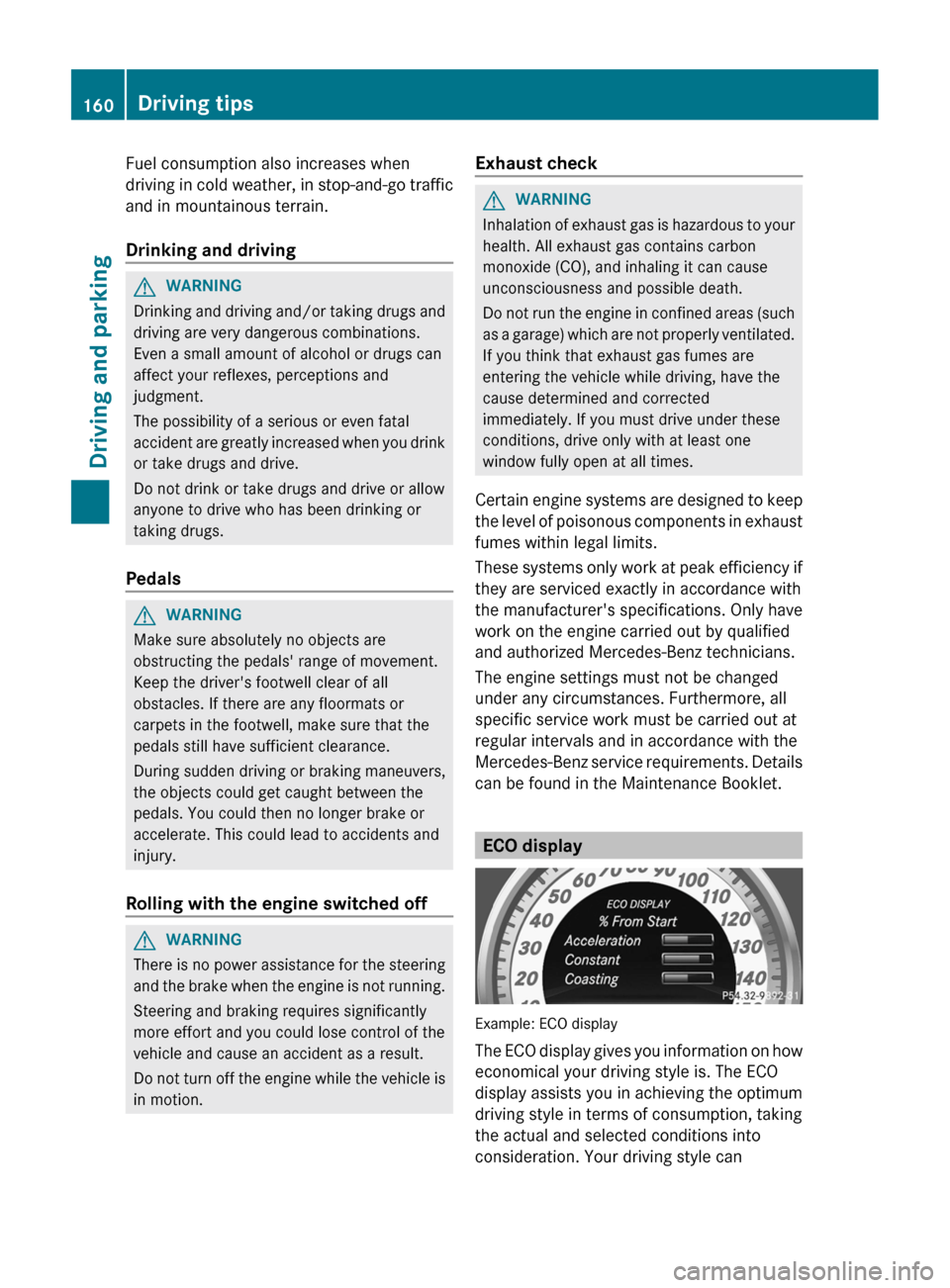
can be found in the Maintenance Booklet. ECO display
Example: ECO display
The
ECO display gives you information on how
economical your driving style is. The ECO
display assists you in achieving the optimum
driving style in terms of consumption, taking
the actual and selected conditions into
consideration. Your driving style can 160
Driving tips
Driving and parking
Page 166 of 376
high-performance driving in particular, it is
important to maintain and have the brake
system checked regularly.
Driving on wet roads
Hydroplaning If water has accumulated to a certain depth
on the road surface, there is a danger of
hydroplaning occurring, even if:
R
you drive at low speeds.
R the tires have adequate tread depth.
For this reason, in the event of heavy rain or
in conditions in which hydroplaning may
occur, you must drive in the following
manner:
R lower your speed.
R avoid ruts.
R brake carefully.
Driving on flooded roads !
Do not drive through flooded areas.
Check
the depth of any water before driving
through it. Drive slowly through standing
water. Otherwise, water may enter the
vehicle interior or the engine compartment.
This can damage the electronic
components in the engine or the automatic
transmission. Water can also be drawn in
by the engine's air suction nozzles and this
can cause engine damage. Winter driving
Important safety notes G
WARNING
If you shift down on a slippery road surface in
an attempt to increase the engine's braking
effect, the drive wheels could lose their grip.
There is an increased danger of skidding and
accidents.
Do not shift down for additional engine
braking on a slippery road surface. G
DANGER
If the exhaust pipe is blocked or adequate
ventilation is not possible, poisonous gases
such
as carbon monoxide (CO) may enter the
vehicle. This is the case, e.g. if the vehicle
becomes trapped in snow. There is a risk of
fatal injury.
If you leave the engine or the auxiliary heating
running, make sure the exhaust pipe and area
around the vehicle are clear of snow. To
ensure an adequate supply of fresh air, open
a window on the side of the vehicle that is not
facing into the wind.
Have your vehicle winterproofed at a qualified
specialist workshop at the onset of winter.
Observe the notes in the "Winter operation"
section ( Y page 328).
Driving with summer tires Observe the notes in the "Winter operation"
section (
Y page 328).
Slippery road surfaces G
WARNING
If you shift down on a slippery road surface in
an attempt to increase the engine's braking
effect, the drive wheels could lose their grip.
There is an increased danger of skidding and
accidents.
Do not shift down for additional engine
braking on a slippery road surface. G
WARNING
The outside temperature indicator is not
designed to serve as an ice-warning device
and is therefore unsuitable for that purpose.
Indicated temperatures just above the
freezing
point do not guarantee that the road
surface is free of ice. The road may still be icy,
especially in wooded areas or on bridges.
If the vehicle threatens to skid or cannot be
stopped when moving at low speed:
X Shift the transmission to position N.164
Driving tips
Driving and parking
Page 196 of 376
R
pedestrians do not contrast with the
surroundings.
R pedestrians are not standing upright, for
example, if they are sitting, crouching or
lying down. :
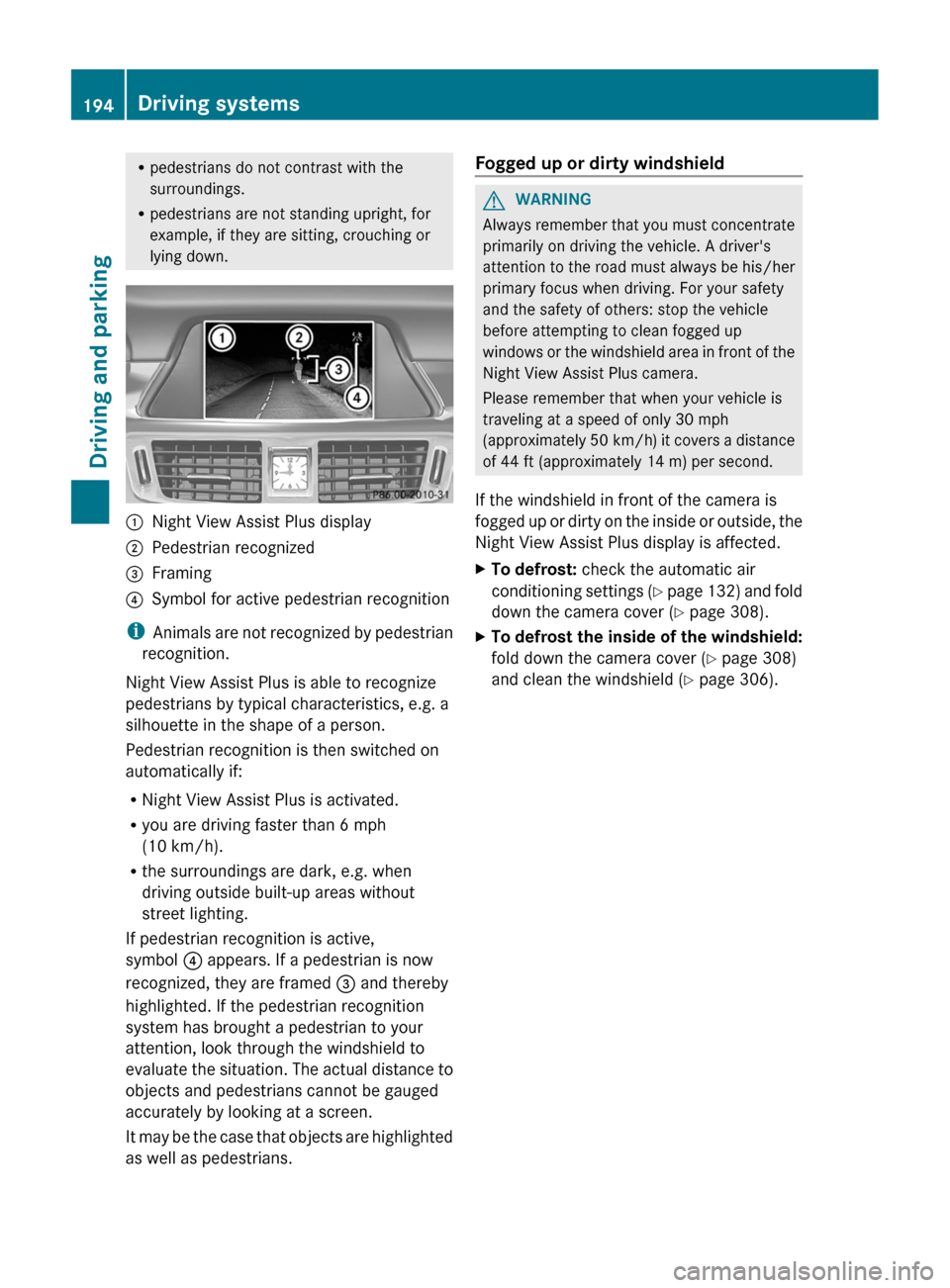
Night View Assist Plus display
; Pedestrian recognized
= Framing
? Symbol for active pedestrian recognition
i Animals are not recognized by pedestrian
recognition.
Night View Assist Plus is able to recognize
pedestrians by typical characteristics, e.g. a
silhouette in the shape of a person.
Pedestrian recognition is then switched on
automatically if:
R Night View Assist Plus is activated.
R you are driving faster than 6 mph
(10 km/h).
R the surroundings are dark, e.g. when
driving outside built-up areas without
street lighting.
If pedestrian recognition is active,
symbol ? appears. If a pedestrian is now
recognized, they are framed = and thereby
highlighted. If the pedestrian recognition
system has brought a pedestrian to your
attention, look through the windshield to
evaluate the situation. The actual distance to
objects and pedestrians cannot be gauged
accurately by looking at a screen.
It may be the case that objects are highlighted
as well as pedestrians. Fogged up or dirty windshield G
WARNING
Always remember that you must concentrate
primarily on driving the vehicle. A driver's
attention
to the road must always be his/her
primary focus when driving. For your safety
and the safety of others: stop the vehicle
before attempting to clean fogged up
windows or the windshield area in front of the
Night View Assist Plus camera.
Please remember that when your vehicle is
traveling at a speed of only 30 mph
(approximately 50 km/h) it covers a distance
of 44 ft (approximately 14 m) per second.
If the windshield in front of the camera is
fogged up or dirty on the inside or outside, the
Night View Assist Plus display is affected.
X To defrost: check the automatic air
conditioning
settings (Y page 132) and fold
down the camera cover (Y page 308).
X To defrost the inside of the windshield:
fold down the camera cover ( Y page 308)
and clean the windshield
(Y page 306). 194
Driving systems
Driving and parking