mirror MERCEDES-BENZ CLS-Class 2014 W218 Owner's Guide
[x] Cancel search | Manufacturer: MERCEDES-BENZ, Model Year: 2014, Model line: CLS-Class, Model: MERCEDES-BENZ CLS-Class 2014 W218Pages: 382, PDF Size: 5.36 MB
Page 112 of 382

The indicator lamp goes out again after
some time. You can adjust the selected
mirror using adjustmen
tbutton 0024as long
as the indicator lamp is lit.
X Press adjustmen tbutton 0024up, down ,or
to th eleft or right until you have adjusted
th ee xter iorm irror to th ecorrect position.
You should have agood overview of traffic
conditions.
The convex exterio rmirrors provide alarger
field of vision.
After the engine has been started, the
exterior mirrors are automatically heate dif
the rear window defroster is switched on and
the outside temperature is low. Heating takes
am aximum of 10 minutes.
i The exterior mirrors can also be heated
manually by switching on the rear window
defroster.
Folding th eexterior mirror sinorout
electrically X
Turn the SmartKey to position 1or 2in the
ignition (Y page 147).
X Briefly press button 001A.
Bot hexterior mirrors fold in or out.
i Make sure that the exterior mirrors are
always folded out fully while driving. They
could otherwise vibrate.
i If you are drivin gfaster than 30 mp/h
(47 km/h), you can no longer fold in the
exterior mirrors. Setting th
eexterior mirrors If the battery has been disconnected or
completely discharged, the exterior mirrors
must be reset
.The exterior mirrors will
otherwise not fold in when you select the
"Fold in mirrors when locking" function in the
on-board computer (Y page 233)
X Turn the SmartKey to position 1in the
ignition lock (Y page 147).
X Briefly press button 001A.
Folding the exterior mirrors in or out
automatically If the "Fold in mirrors when locking" function
is activated in the on-board computer
(Y
page 233):
R the exterior mirrors fold in automatically as
soon as you lock the vehicle from the
outside.
R the exterior mirrors fold out again
automatically as soon as you unlock the
vehicle and then open the driver's or front-
passenger door.
i If the exterior mirrors have been folded in
manually,t hey do not fold out.
Exterior mirror pushed out of position If an exterior mirror has been pushed out of
position, proceed as follows:
X
Vehicles without electrically folding
exterior mirrors: move the exterior mirror
into the correct position manually.
X Vehicles with electrically folding
exterior mirrors: press and hold mirror-
folding button 001Auntil you hear aclick and
then the mirrors engage in position
(Y page 110).
The mirror housing is engaged again and
you can adjust the exterior mirrors as usual
(Y page 109). 110
MirrorsSeats, steering wheela
nd mirrors
Page 113 of 382
Automati
canti-glar emirrors
The rear-view mirror and th eexter iorm irror
on th edriver' sside automatically go int oanti-
glar emodeift hefollowin gcondition sare met
simultaneously:
R the ignition is switched on and
R incident light from headlamps strikes the
sensor in the rear-view mirror.
The mirrors do not go into anti-glare mode if
reverse gear is engaged or if the interior
lighting is switched on. Parking position for the exterior
mirror on the front-passenger side
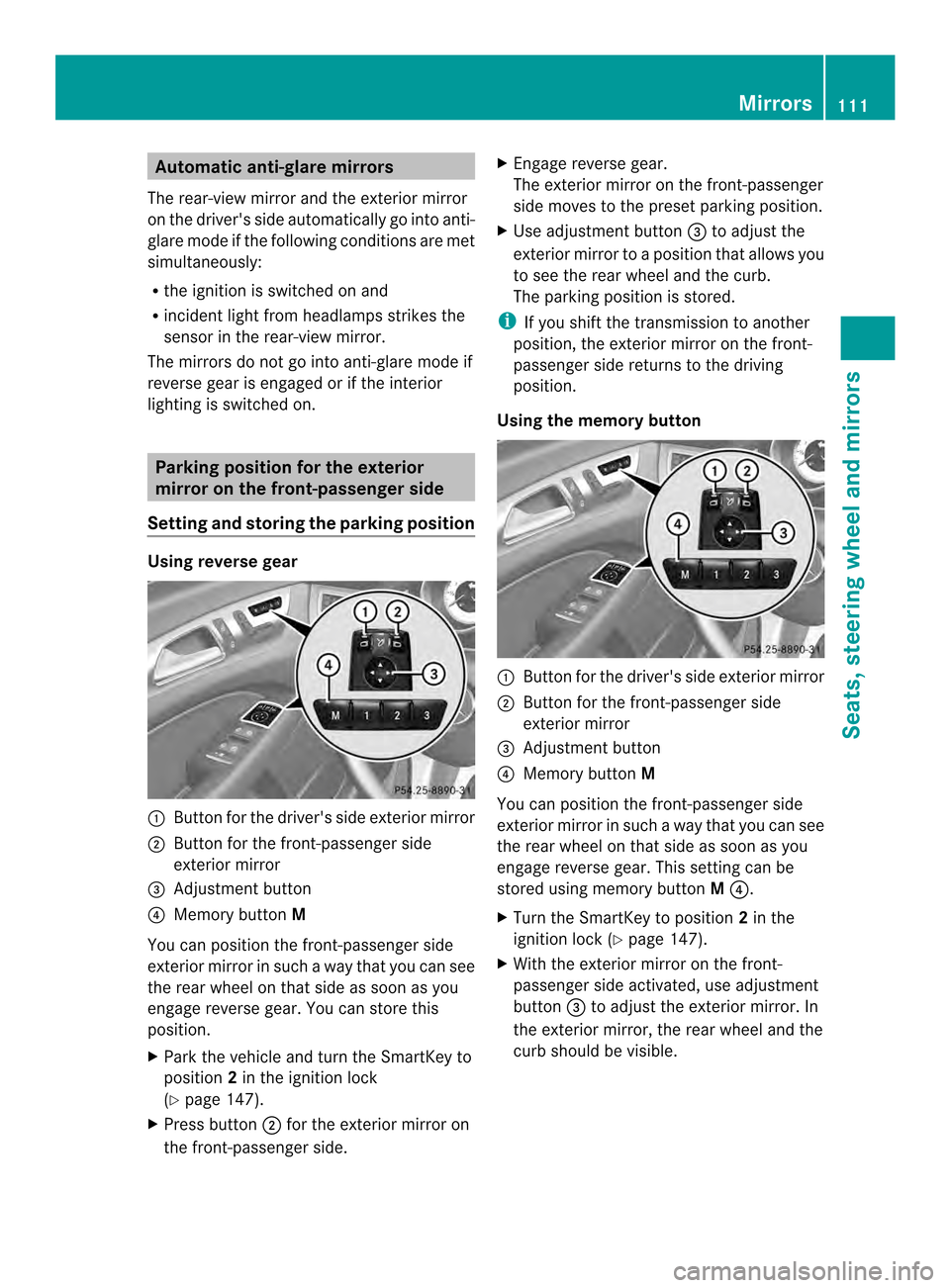
Setting and storing the parking position Using reverse gear
001A
Button for the driver's side exterior mirror
0010 Button for the front-passenger side
exterior mirror
0024 Adjustment button
0021 Memory button M
You can position the front-passenger side
exterior mirror in such away that you can see
the rear wheel on that side as soon as you
engage reverse gear. You can store this
position.
X Park the vehicle and turn the SmartKey to
position 2in the ignition lock
(Y page 147).
X Press button 0010for the exterior mirror on
the front-passenger side. X
Engage reverse gear.
The exterior mirror on the front-passenger
side moves to the preset parking position.
X Use adjustmen tbutton 0024to adjust the
exterior mirror to aposition that allows you
to see the rear wheel and the curb.
The parking position is stored.
i If you shift the transmission to another
position, the exterior mirror on the front-
passenger side return stothe driving
position.
Using the memoryb utton 001A
Button for the driver's side exterior mirror
0010 Button for the front-passenger side
exterior mirror
0024 Adjustment button
0021 Memory button M
You can position the front-passenger side
exterior mirror in such away that you can see
the rear wheel on that side as soon as you
engage reverse gear. This setting can be
stored using memory button M0021.
X Turn the SmartKey to position 2in the
ignition lock (Y page 147).
X With the exterior mirror on the front-
passenger side activated, use adjustment
button 0024to adjust the exterior mirror. In
the exterior mirror, the rear wheel and the
curb should be visible. Mirrors
111Seats, steering wheel and mirrors Z
Page 114 of 382
X
Press memory button M0021 and one of the
arrows on adjustmen tbutton 0024within
three seconds.
The parking position is stored if the exterior
mirror does not move.
X If the exterior mirror moves out of position,
repeat the steps.
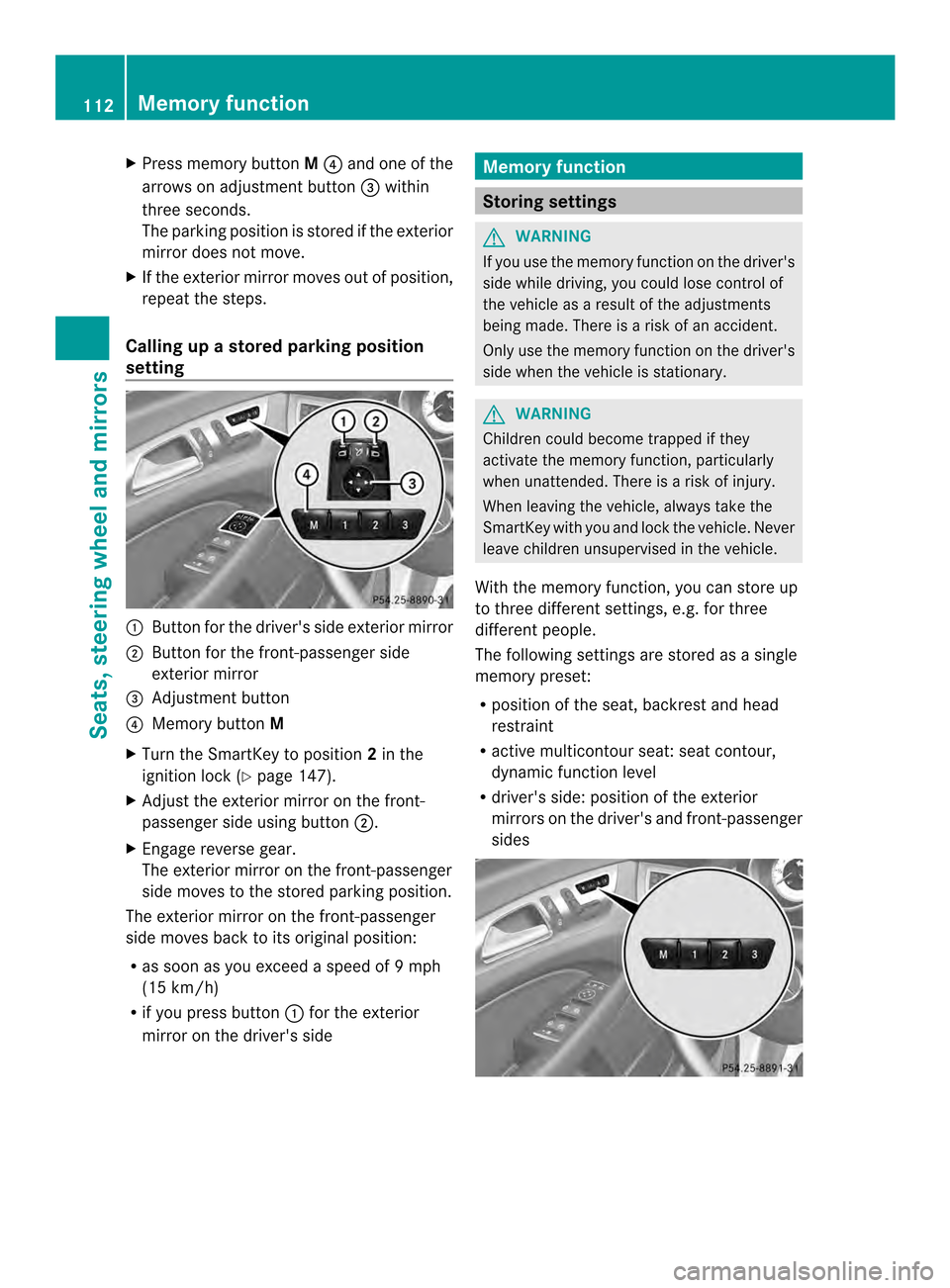
Calling up astored parking position
setting 001A
Button for the driver's side exterior mirror
0010 Button for the front-passenger side
exterior mirror
0024 Adjustmen tbutton
0021 Memory button M
X Turn the SmartKey to position 2in the
ignition lock (Y page 147).
X Adjust the exterior mirror on the front-
passenger side using button 0010.
X Engage reverse gear.
The exterior mirror on the front-passenger
side moves to the stored parking position.
The exterior mirror on the front-passenger
side moves back to its original position:
R as soon as you exceed aspeed of 9mph
(15 km/h)
R if you press button 001Afor the exterior
mirror on the driver' sside Memor
yfunction Storing settings
G
WARNING
If you use the memor yfunctio nonthe driver's
side while driving, you could lose control of
the vehicle as aresult of the adjustments
being made. There is arisk of an accident.
Only use the memory function on the driver's
side when the vehicle is stationary. G
WARNING
Children could become trapped if they
activate the memory function, particularly
when unattended. There is arisk of injury.
When leavin gthe vehicle, always tak ethe
SmartKey with you and lock the vehicle. Never
leave children unsupervised in the vehicle.
With the memory function ,you can store up
to three differen tsettings, e.g. for three
differen tpeople.
The following settings are stored as asingle
memory preset:
R position of the seat, backrest and head
restraint
R active multicontour seat: seat contour,
dynamic function level
R driver's side: position of the exterior
mirror sonthe driver's and front-passenger
sides 112
Memor
yfunctionSeats, steering wheel and mirrors
Page 115 of 382
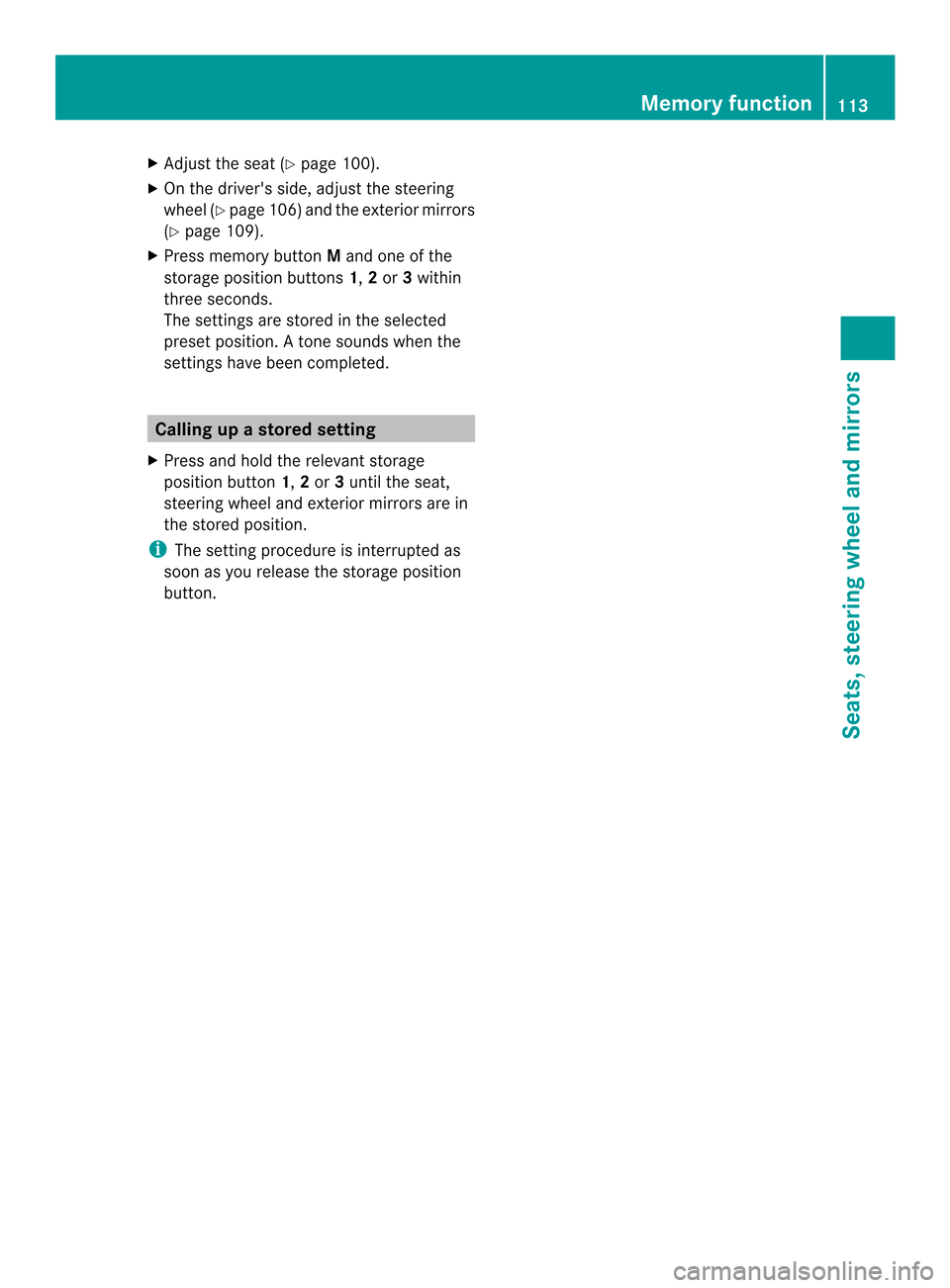
X
Adjust the sea t(Ypage 100).
X On the driver' sside, adjust the steering
wheel (Y page 106 )and the exterio rmirrors
(Y page 109).
X Press memory button Mand one of the
storage position buttons 1,2or 3within
three seconds.
The settings are stored in the selected
prese tposition. Atone sounds when the
settings have been completed. Calling up
astore dsetting
X Pres sand hold th erelevant storage
position button 1,2or 3until th eseat,
steerin gwheel and exterio rmirrors are in
the stored position.
i The settin gprocedure is interrupted as
soon as you release the storage position
button. Memory function
113Seats, steering wheel and mirrors Z
Page 202 of 382
R
if the camera is exposed to very bright light
R if the area is lit by fluorescen tlight or LED
lighting (th edisplay may flicker)
R if there is asudden change in temperature,
e.g. when drivin gintoah eatedgarage in
winter
R if the camera lens is dirt yorobstructed
R if the rear of your vehicle is damaged. In
this event, have the camera position and
settin gchecked at aqualified specialist
workshop.
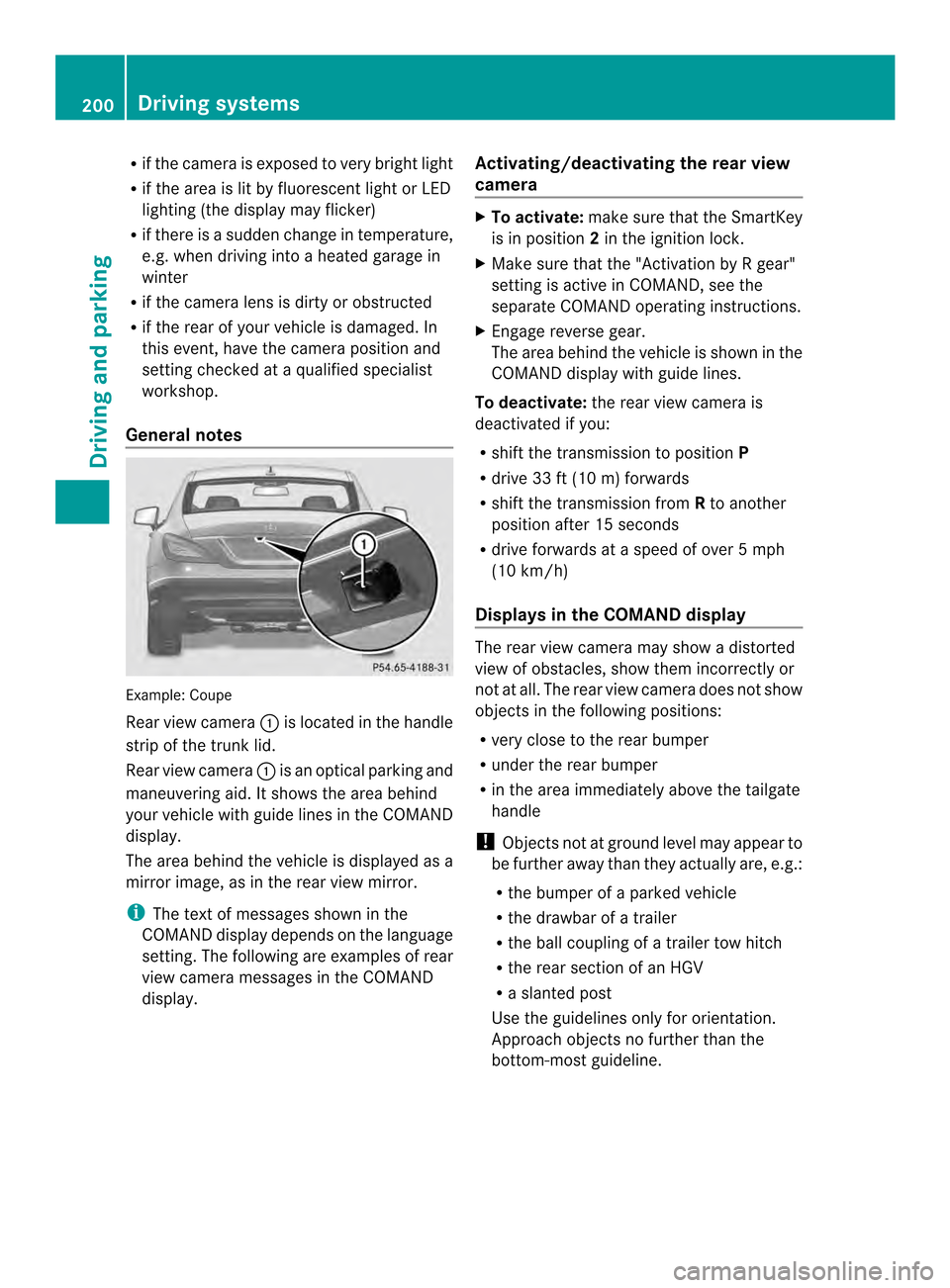
General notes Example: Coupe
Rear view camera
001Ais located in the handle
strip of the trunk lid.
Rear view camera 001Ais an optical parking and
maneuverin gaid. It shows the area behind
your vehicle with guide lines in the COMAND
display.
The area behin dthe vehicle is displayed as a
mirror image, as in the rear view mirror.
i The tex tofmessages shown in the
COMAND display depends on the language
setting. The following are examples of rear
view camera messages in the COMAND
display. Activating/deactivating the rear view
camera X
To activate: make sure that the SmartKey
is in position 2in the ignition lock.
X Make sure that the "Activation by Rgear"
setting is active in COMAND ,see the
separate COMAND operatin ginstructions.
X Engage revers egear.
The area behind the vehicle is shown in the
COMAND display with guide lines.
To deactivate: the rear view camera is
deactivated if you:
R shift the transmission to position P
R drive 33 ft (10 m) forwards
R shift the transmission from Rto another
position after 15 seconds
R drive forwards at aspeed of over 5mph
(10 km/h)
Displays in the COMAND display The rear view camera may show
adistorted
view of obstacles, show them incorrectly or
not at all. The rear view camera does not show
objects in the following positions:
R very close to the rear bumper
R under the rear bumper
R in the area immediately above the tailgate
handle
! Objects not at ground level may appear to
be further away than they actually are, e.g.:
R the bumper of aparked vehicle
R the drawbar of atrailer
R the ball coupling of atrailer tow hitch
R the rear section of an HGV
R as lanted post
Use the guidelines only for orientation.
Approac hobjects no further than the
bottom-most guideline. 200
Driving systemsDriving and parking
Page 203 of 382
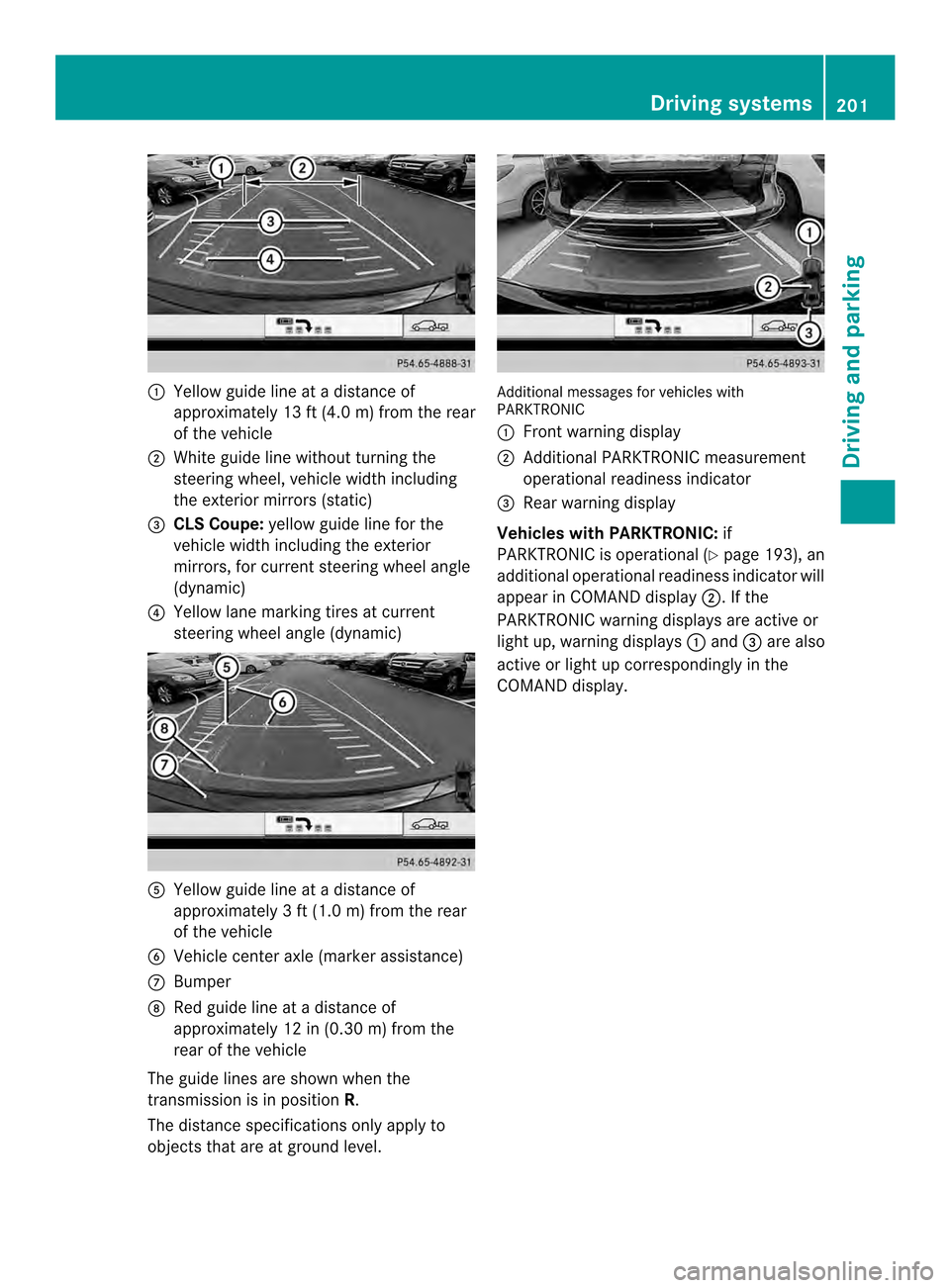
001A
Yellow guide line at adistanc eof
approximately 13 ft (4.0 m) from the rear
of the vehicle
0010 White guide line without turning the
steering wheel, vehicle width including
the exterior mirrors (static)
0024 CLSC oupe: yellow guide line for the
vehicle width including the exterior
mirrors ,for current steering wheel angle
(dynamic)
0021 Yellow lane marking tires at current
steering wheel angl e(dynamic) 001E
Yellow guide line at adistance of
approximately 3ft(1.0 m) from the rear
of the vehicle
0025 Vehicle center axle (marker assistance)
0009 Bumper
0016 Red guide line at adistance of
approximately 12 in (0.30 m) from the
rear of the vehicle
The guide line sare show nwhen the
transmission is in position R.
The distance specifications only apply to
objectst hat are at ground level. Additional messages for vehicles with
PARKTRONIC
001A
Front warning display
0010 Additional PARKTRONIC measurement
operational readiness indicator
0024 Rear warning display
Vehicles with PARKTRONIC: if
PARKTRONIC is operational (Y page 193), an
additional operational readiness indicator will
appearinC OMAND display 0010.Ifthe
PARKTRONIC warning displays are active or
light up, warning displays 001Aand 0024are also
active or light up correspondingly in the
COMAND display. Driving systems
201Driving and parking Z
Page 204 of 382
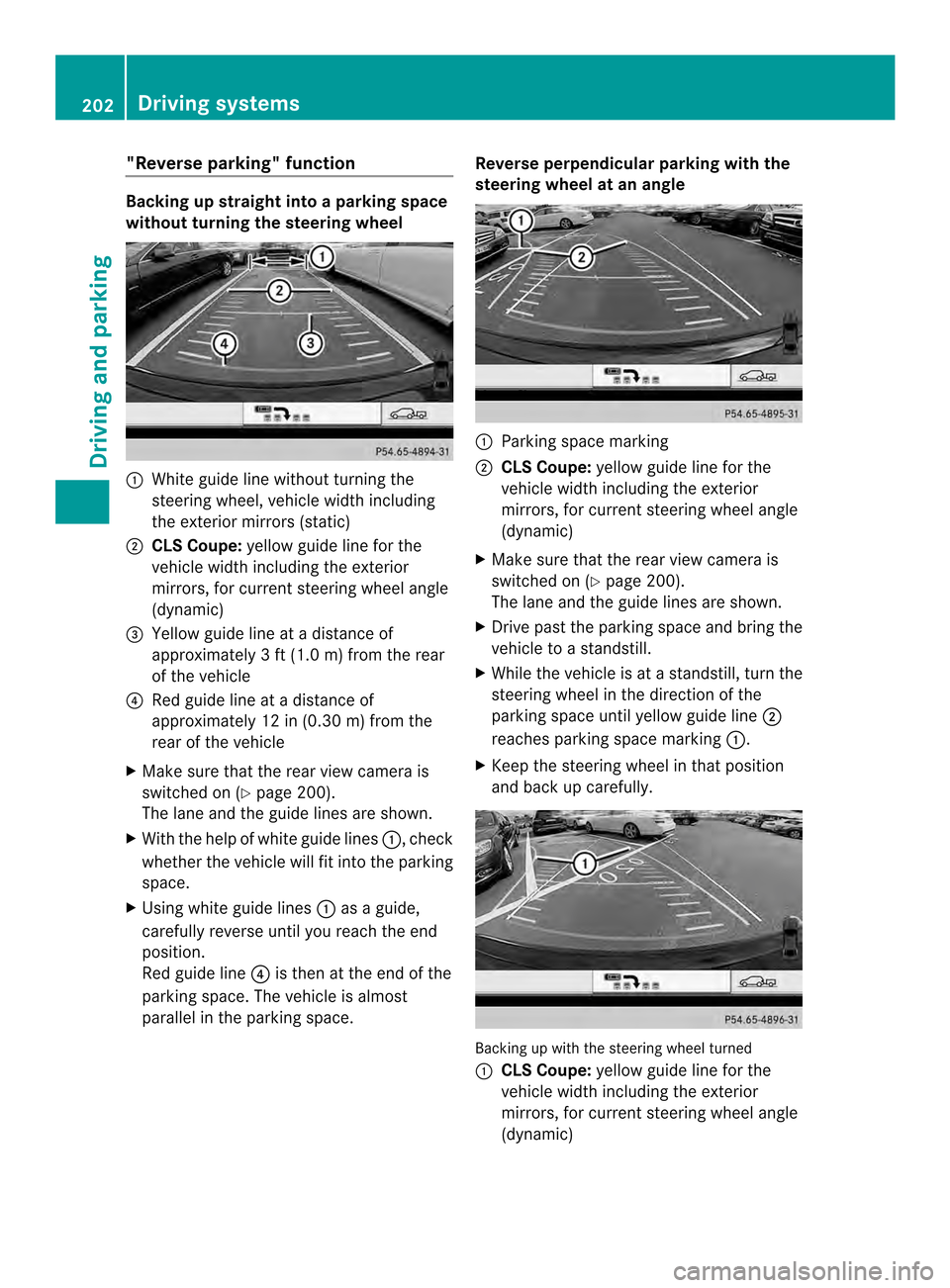
"Reverse parking" function
Backing up straight into
aparking space
without turning the steering wheel 001A
White guide line without turning the
steering wheel, vehicle width including
the exterior mirrors (static)
0010 CLS Coupe: yellow guide line for the
vehicle width including the exterior
mirrors, for current steering wheel angle
(dynamic)
0024 Yellowg uide line at adistance of
approximately 3ft(1.0 m) from the rear
of the vehicle
0021 Red guide line at adistance of
approximately 12 in (0.30 m) from the
rear of the vehicle
X Make sure that the rear view camera is
switched on (Y page 200).
The lane and the guide lines are shown.
X With the help of white guide lines 001A,check
whether the vehicle will fit into the parking
space.
X Using white guide lines 001Aasag uide,
carefully reverse until you reach the end
position.
Red guide line 0021is then at the end of the
parking space. The vehicle is almost
parallel in the parking space. Reverse perpendicular parking with the
steering wheel at an angle
001A
Parking space marking
0010 CLS Coupe: yellow guide line for the
vehicle width including the exterior
mirrors, for current steering wheel angle
(dynamic)
X Make sure that the rear view camera is
switched on (Y page 200).
The lane and the guide lines are shown.
X Drive past the parking space and bring the
vehicle to astandstill.
X While the vehicle is at astandstill, turn the
steering wheel in the direction of the
parking space until yellow guide line 0010
reaches parking space marking 001A.
X Keep the steering wheel in that position
and back up carefully. Backing up with the steering wheel turned
001A
CLS Coupe: yellow guide line for the
vehicle width including the exterior
mirrors, for current steering wheel angle
(dynamic) 202
Driving systemsDriving and parking
Page 209 of 382
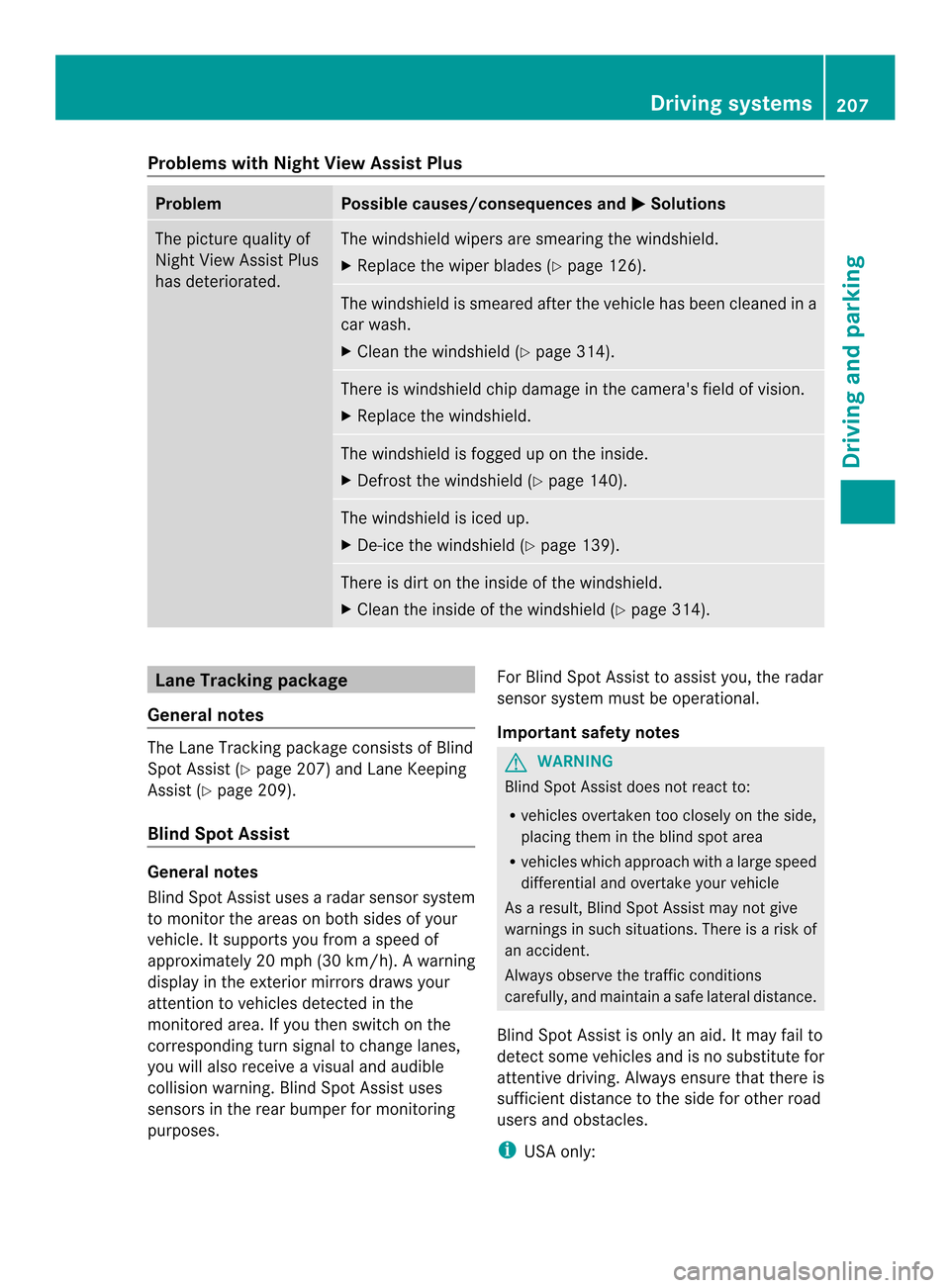
Problems with Night View Assist Plus
Problem Possible causes/consequences and
000B Solutions
The picture quality of
Night View Assist Plus
has deteriorated. The windshield wipers are smearing the windshield.
X
Replace the wiper blades (Y page 126). The windshield is smeared after the vehicle has been cleaned in a
car wash.
X
Cleant he windshield (Y page 314). There is windshield chip damage in the camera's field of vision.
X
Replace the windshield. The windshield is fogged up on the inside.
X
Defrost the windshield (Y page 140). The windshield is iced up.
X
De-ice the windshield (Y page 139). There is dirt on the inside of the windshield.
X
Cleant he inside of the windshield (Y page 314).Lane Tracking package
General notes The Lane Tracking package consistsofB
lind
Spot Assist (Y page 207) and Lane Keeping
Assist (Y page 209).
Blind Spot Assist General notes
Blind Spot Assist uses
aradar sensor system
to monitor the areas on both sides of your
vehicle. It supports you from aspeed of
approximately 20 mph (30k m/h). Awarning
displa yinthe exterio rmirrors draws your
attention to vehicles detected in the
monitored area. If you the nswitc hont he
correspondin gturns ignal to change lanes,
you will also receive avisual and audible
collision warning. Blin dSpot Assist uses
sensors in the rear bumper for monitoring
purposes. For Blin
dSpot Assist to assist you, the radar
sensor system must be operational.
Important safety notes G
WARNING
Blin dSpot Assist does not reac tto:
R vehicles overtaken too closely on the side,
placin gthemint he blind spot area
R vehicles which approach with alarge speed
differential and overtake your vehicle
As aresult, Blind Spot Assist may not give
warnings in such situations. There is arisk of
an accident.
Always observe the traffic conditions
carefully, and maintain asafe lateral distance.
Blind Spot Assist is only an aid. It may fail to
detect some vehicles and is no substitute for
attentive driving. Always ensure that there is
sufficient distance to the side for other road
users and obstacles.
i USA only: Driving systems
207Driving and parking Z
Page 210 of 382

This device has been approved by the FCC
as
a"Vehicular RadarS ystem". The radar
sensor is intended fo ruse in an automotive
radar system only. Removing, tampering
with, or altering the device will void any
warranties, and is not permitted by the
FCC. Do not tamper with, alter, or use in
any non-approved way.
Any unauthorized modification to this
device could void the user’s authority to
operate the equipment.
Monitoring range of the sensors
In particular, the detection of obstacles can
be impaired if:
R dirt on the sensors or anything else
covering the sensors
R poor visibility, e.g. due to fog, heavy rain,
snow or spray
R narrow vehicles, e.g. motorcycles or
bicycles
R the road has very wide lanes
R the road has narrow lanes
R you are not driving in the middle of the lane
R there are barriers or similarl ane borders
Vehicle sinthemonitorin grang eare then not
indicated. Blin
dSpotA ssist monitors the area up to
10 ft (3 m) behind your vehicle and directly
next to your vehicle, as shown in the diagram. If the lanes are narrow, vehicles driving in the
lane beyond the lane next to your vehicle may
be indicated, especially if the vehicles are not
driving in the middle of their lane. This may
be the case if there are vehicles driving at the
inner edge of their lanes.
Due to the nature of the system:
R
warnings may be issued in error when
driving close to crash barriers or similar
solid lane borders.
R the warning is canceled when driving for an
extended period next to long vehicles, such
as trucks.
The two radar sensors for Blind Spot Assist
are integrated into the sides of the rear
bumper. Make sure that the bumper is free of
dirt, ice or slush in the vicinity of the sensors.
The sensors must not be covered, for
example by cycle racks or overhanging loads.
Following asevere impact or in the event of
damage to the bumpers, have the function of
the sensors checked at aqualified specialist
workshop. Blind Spot Assist may otherwise
not work properly.
Indicator and warning display 001A
Yellowi ndicator lamp/red warning lamp
Active Blind Spot Assist is not active at
speeds below approximately 20 mph
(30 km/h). Vehicles in the monitoring range
are then not indicated.
When Blind Spot Assist is activated, indicator
lamp 001Ain the exterior mirrors lights up
yellow at speeds of up to 20 mph (30k m/h).
At speeds above 20 mph (30 km/h) the 208
Driving systemsDriving and parking
Page 211 of 382
indicator lamp goes out and Blin
dSpot Assist
is operational.
If av ehicle is detected within the monitoring
rang eofB lindS pot Assist at speeds above
20 mph (30 km/h), warnin glamp 001Aon the
correspondin gside light supred. This warning
is always emitted when avehicle enters the
blind spot monitoring rang efrom behind or
from the side .When you overtake avehicle,
the warning only occurs if the difference in
speed is less than 7mph (12km/h).
The yellow indicator lamp goes out if reverse
gear is engaged. In this event ,Blind Spot
Assist is no longer active.
The brightness of the indicator/warning
lamps is adjusted automatically according to
the ambient light.
Collision warning
If av ehicle is detected in the monitoring range
of Blind Spot Assist and you switc honthe
correspondin gturn signal, adouble warning
ton esounds. Red warning lamp 001Aflashes. If
the turn signal remains on, vehicles detected
are indicated by the flashing of red warning
lamp 001A.There are no further warning tones.
Switching on Blind Spot Assist
X Make sure that Blind Spot Assist
(Y page 228) is activated in the on-board
computer.
X Turn the SmartKey to position 2in the
ignition lock.
Warning lamps 001Ain the exterior mirrors
light up red for approximately
1.5 seconds and then turn yellow.
Lane Keeping Assist Important safety notes
G
WARNING
Lane Keeping Assist may not always clearly
recognizel ane markings. In this case, Lane Keeping Assist may:
R
give an unnecessary warning
R not give awarning
There is arisk of an accident.
Always pay particular attention to the traffic
situation and stay in lane, in particular if
warned by Lane Keeping Assist. G
WARNING
The Lane Keeping Assist warning does not
return the vehicle to the original lane. There
is ar isk of an accident.
You should always steer, brake or accelerate
yourself, in particular if warned by Lane
Keeping Assist.
If you fail to adapt your driving style, Lane
Keeping Assist can neither reduce the risk of
an accident nor override the laws of physics.
Lane Keeping Assist cannot take into account
the road, traffic and weather conditions. Lane
Keeping Assist is merely an aid. You are
responsible for the distance to the vehicle in
front,f or vehicle speed, for braking in good
time and for staying in your lane.
The Lane Keeping Assist does not keep the
vehicle in the lane.
The system may be impaired or may not
function if:
R there is poor visibility, e.g. due to
insufficient illumination of the road, or due
to snow, rain, fog or spray
R there is glare, e.g. from oncomingt raffic,
the sun or reflections (e.g. when the road
surface is wet)
R the windshield is dirty, fogged up, damaged
or covered, for instancebyas ticker, in the
vicinity of the camera
R there are no, several or unclear lane
markings for alane, e.g. in areas with road
construction work
R the lane markings are worn away,d ark or
covered up, e.g. by dirt or snow Driving systems
209Driving and parking Z