change key battery MERCEDES-BENZ CLS-Class 2014 W218 Owner's Manual
[x] Cancel search | Manufacturer: MERCEDES-BENZ, Model Year: 2014, Model line: CLS-Class, Model: MERCEDES-BENZ CLS-Class 2014 W218Pages: 382, PDF Size: 5.36 MB
Page 80 of 382

approximately six seconds until th
ebattery
check lamp flashes twice (Y page 79).
i If th esettin goft helockin gsystem is
changed within th esignal range of the
vehicle ,pressin gthe 000F or0014 button:
R locks or
R unlock sthe vehicle
The SmartKey no wfunction sasfollows:
X To unlock th edriver's door: pressthe
0014 buttononce.
X To unlock centrally: pressthe 0014
butto ntwice.
X To lock centrally: pressthe 000F button.
The KEYLESS-GO function is changed as
follows:
X To unlock th edriver's door: touch the
inner surface of th edoor handle on the
driver' sdoor.
X To unlock centrally: touch theinner
surface of th edoor handle on th efront-
passenger door or th erear door.
X To lock centrally: touch theoute rsensor
surface on one of the door handles.
X To restor ethe factor ysettings: press
and hold down the 0014and000F buttons
simultaneously for approximately six
seconds until the batter ychec klamp
flashes twice ( Ypage 79). Mechanica
lkey
General notes If th
evehicle can no longer be locke dor
unlocked wit hthe SmartKey, use the
mechanical key.
If you use th emechanical ke ytou nlock and
open th edriver' sdoor or th etrunk lid, the
anti-thef talarm system will be triggered
(Y page 74). There are several ways to tur
noff the alarm:
X To turn the alarm off with the
SmartKey: press the0014or000F button
on the SmartKey.
or
X Insert the SmartKey into the ignition lock.
or
X To deactivate the alarm with KEYLESS-
GO: press the Start/Stop button in the
ignition lock. The SmartKey must be in the
vehicle.
or
X Lock or unlock the vehicle using KEYLESS-
GO. The SmartKey must be outside the
vehicle.
If you unlock the vehicle using the mechanical
key, the fuel filler fla pwill not be unlocked
automatically.
X To unlock th efuel filler flap: insert the
SmartKey int othe ignition lock.
Removing th emechanical key 001A
Release catch
0010 Mechanical key
X Push release catch 001Ain the direction of
the arrow and at the same tim eremove
mechanical key 0010fromt he SmartKey. 78
SmartKeyOpening and closing
Page 81 of 382

SmartKey battery
Important safety notes G
WARNING
Batteries contain toxic and corrosive
substances. If batteries are swallowed, it can
result in severe health problems. There is a
risk of fatal injury.
Keep batteries out of the reach of children. If
ab attery is swallowed, seek medical attention
immediately.
Mercedes-Benz recommends that you have
the batteries replaced at aqualified specialist
workshop.
Checking the battery X
Press the 000For0014 button.
The battery is working properly if battery
check lamp 001Alights up briefly.
The battery is discharged if battery check
lamp 001Adoes not light up briefly.
X Change the battery (Y page 79).
i If the SmartKey battery is checked within
the signal reception range of the vehicle,
pressing the 000For0014 button:
R locks or
R unlocks the vehicle
i You can get abattery at any qualified
specialist workshop. Replacing the battery You require
aCR20253Vc ell battery.
X Take the mechanical key out of the
SmartKey (Y page 78). 001A
Battery compartmen tcover
0010 Mechanical key
X Press mechanical key 0010into the opening
in the SmartKey in the direction of the
arrow until battery compartmen tcover 001A
opens. Do not hold battery compartment
cover 001Aclosed while doing so.
X Remove battery compartmen tcover 001A. 0024
Battery
X Repeatedly tap the SmartKey against your
palm until battery 0024falls out.
X Insert the new battery with the positive
terminal facing upwards. Use alint-free
cloth to do so.
X Make sure that the surface of the battery is
free of lint, grease and other contaminants. SmartKey
79Opening and closing Z
Page 83 of 382
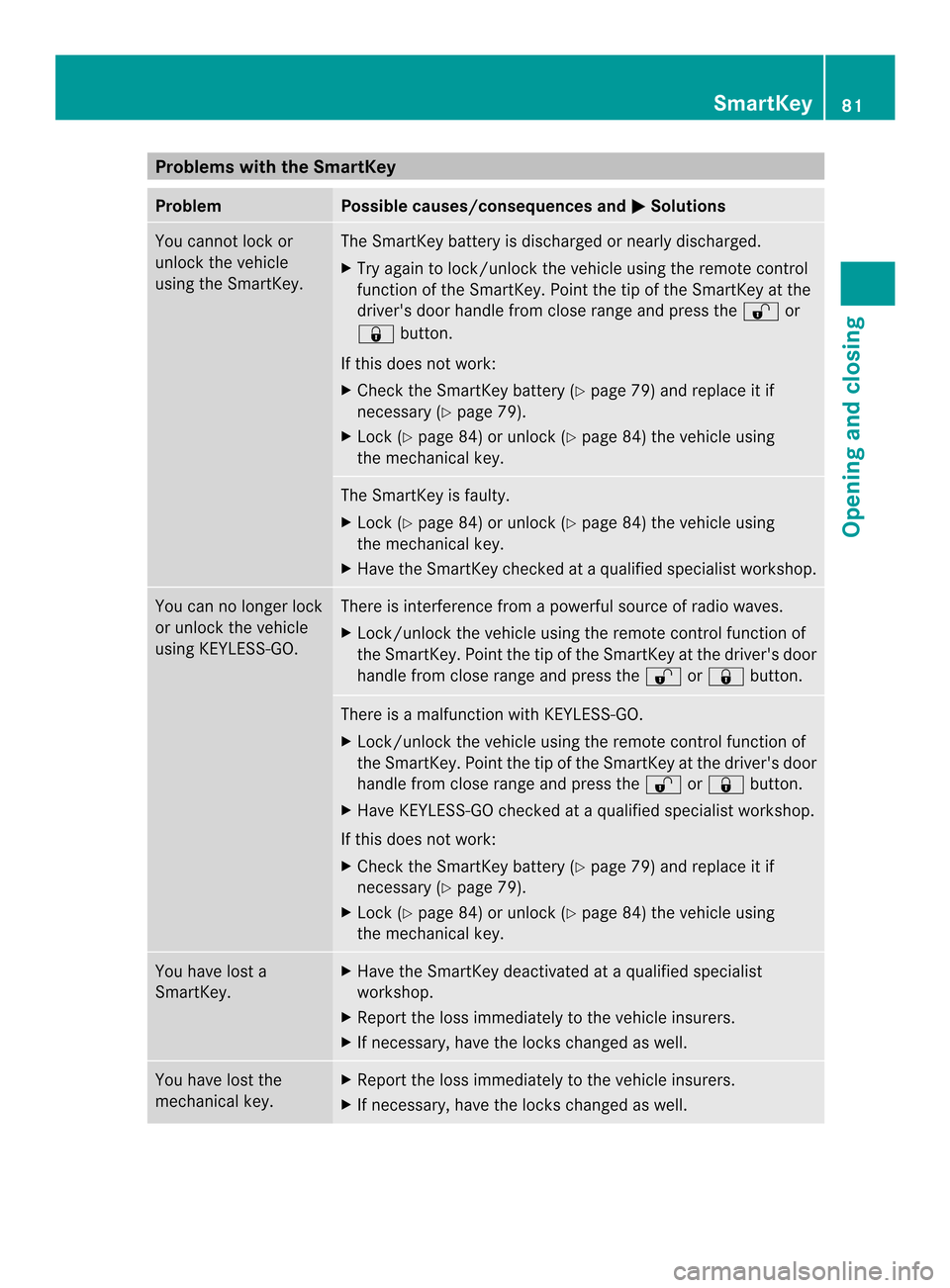
Problems with the SmartKey
Problem Possible causes/consequences and
000B Solutions
You cannot lock or
unlock the vehicle
using the SmartKey. The SmartKey battery is discharged or nearly discharged.
X
Try again to lock/unlock the vehicle using the remote control
function of the SmartKey. Point the tip of the SmartKey at the
driver's door handle from close range and press the 0014or
000F button.
If this does not work:
X Check the SmartKey battery (Y page 79) and replace it if
necessary (Y page 79).
X Lock (Y page 84) or unlock (Y page 84) the vehicle using
the mechanical key. The SmartKey is faulty.
X
Lock (Y page 84) or unlock (Y page 84) the vehicle using
the mechanical key.
X Have the SmartKey checked at aqualified specialist workshop. You can no longer lock
or unlock the vehicle
using KEYLESS-GO. There is interference from
apowerful source of radio waves.
X Lock/unlock the vehicle using the remote control function of
the SmartKey. Point the tip of the SmartKey at the driver's door
handle from close range and press the 0014or000F button. There is
amalfunction with KEYLESS-GO.
X Lock/unlock the vehicle using the remote control function of
the SmartKey. Point the tip of the SmartKey at the driver's door
handle from close range and press the 0014or000F button.
X Have KEYLESS-GO checked at aqualified specialist workshop.
If this does not work:
X Check the SmartKey battery (Y page 79) and replace it if
necessary (Y page 79).
X Lock (Y page 84) or unlock (Y page 84) the vehicle using
the mechanical key. You have lost a
SmartKey. X
Have the SmartKey deactivated at aqualified specialist
workshop.
X Report the loss immediately to the vehicle insurers.
X If necessary, have the locks changed as well. You have lost the
mechanical key. X
Report the loss immediately to the vehicle insurers.
X If necessary, have the locks changed as well. SmartKey
81Opening and closing Z
Page 264 of 382
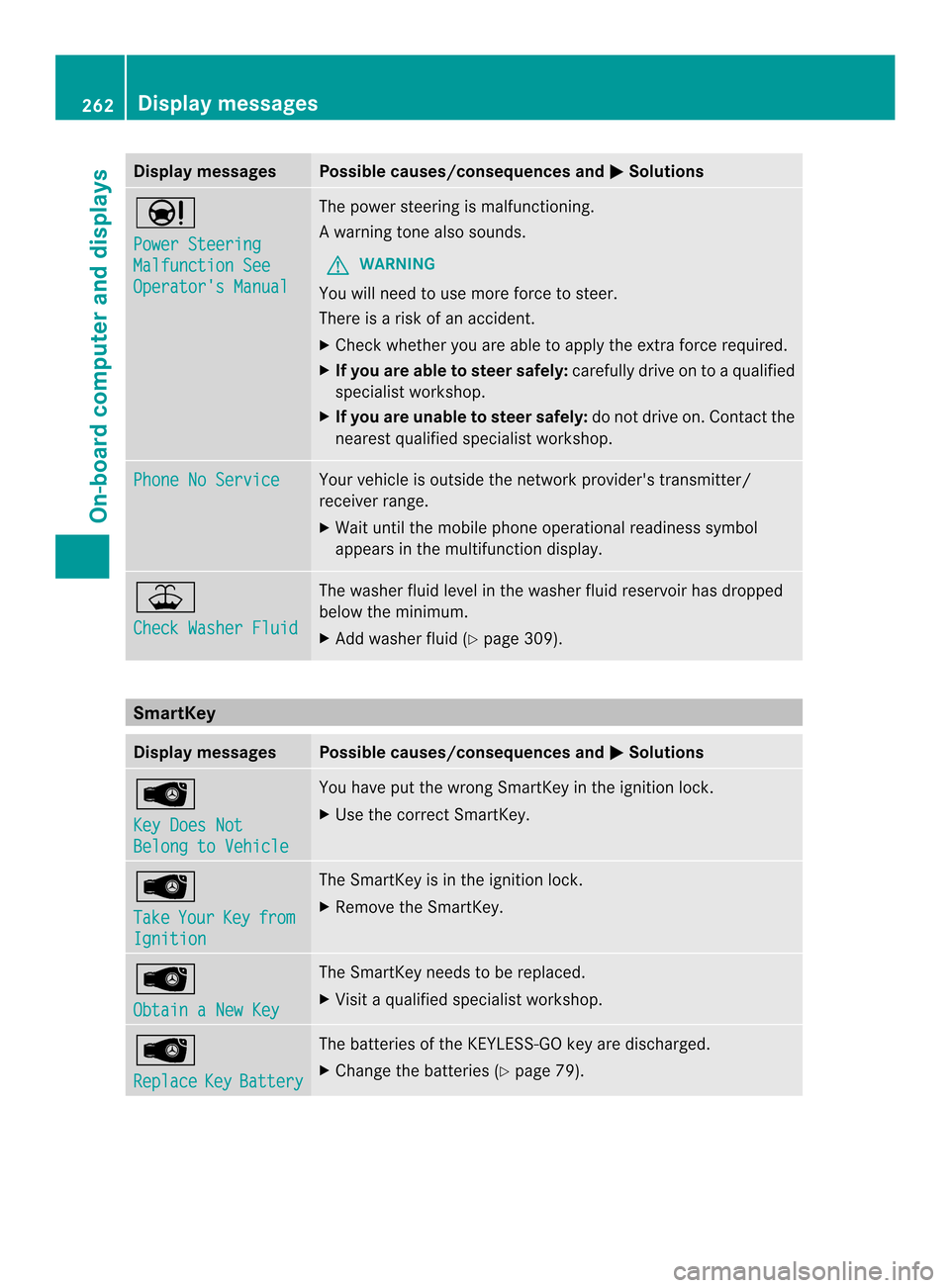
Display messages Possible causes/consequences and
000B Solutions
0013
Power Steering
Malfunction See
Operator'
sManual The powe
rsteering is malfunctioning.
Aw arning tone also sounds.
G WARNING
You will need to use mor eforce to steer.
Ther eisar iskofana ccident.
X Check whethe ryou are able to apply the extraf orce required.
X If you are able to steer safely: carefully drive on toaqualified
specialist workshop.
X If you are unable to steer safely: do not drive on. Contact the
nearest qualified specialist workshop. Phone No Service Your vehicle is outside the network provider's transmitter/
receiver range.
X
Wait until the mobile phone operational readiness symbol
appears in the multifunction display. 000E
Check Washer Fluid The washer fluid level in the washer fluid reservoir has dropped
below the minimum.
X
Add washer fluid (Y page 309).SmartKey
Display messages Possible causes/consequences and
000B Solutions
0002
Key Does Not
Belong to Vehicle You have put the wrong SmartKey in the ignition lock.
X
Use the correc tSmartKey. 0002
Take
Your Key from
Ignition The SmartKey is in the ignition lock.
X
Remove the SmartKey. 0002
Obtain
aNew Key The SmartKey needs to be replaced.
X
Visit aqualified specialist workshop. 0002
Replace
Key Battery The batteries of the KEYLESS-GO key are discharged.
X
Change the batteries (Y page 79).262
Display messagesOn-board computer and displays