trailer MERCEDES-BENZ CLS COUPE 2020 User Guide
[x] Cancel search | Manufacturer: MERCEDES-BENZ, Model Year: 2020, Model line: CLS COUPE, Model: MERCEDES-BENZ CLS COUPE 2020Pages: 469, PDF Size: 8.47 MB
Page 213 of 469
tion off. The
exitwa rning is no longer available
once thewa rning lamp in the outside mir ror
fl ashes thre e times.
The exitwa rning is only an aid and not a substi‐
tute forth e attention of vehicle occupants. The
re sponsibility for opening and closing the doors
and for leaving theve hicle remains with theve hi‐
cle occupants.
Sy stem limits
Blind Spot Assist and Active Blind Spot Assi st
may be limi ted in thefo llowing situations, in par‐
ticular:
R ifth ere is dirt on the sensors or the sensors
are obscured
R in poor visibility, e.g. due tofog, heavy rain or
snow
R ifth ere are nar row vehicles, e.g. bicycles or
mo torbikes
R ifth ero ad has very wide or nar rowlanes
R ifve hicles are not driving in the middle of
th eir lane Wa
rnings may be issued in er ror when driving
close tocrash ba rriers or similar continuous lane
borders. Alw ays make sure that there is suf fi‐
cient di stance tothe side forot her traf fic or
obs tacles.
Wa rnings may be inter rupte d when driving along‐
side long vehicles, forex ample lor ries, for a pro‐
longed time.
Blind Spot Assist is not operational when reve rse
ge ar is engaged.
Blind Spot Assist and theex itwa rning are not
operational when a trailer is coupled totheve hi‐
cle and the electrical connection has been cor‐
re ctly es tablished.
The exitwa rning may be limited in thefo llowing
situations:
R when the sensors are co veredby adjacent
ve hicles in nar row parking spaces
R when people approach theve hicle
R intheeve nt of stationary or slowly moving
objects Fu
nction of brake application (Active Blind
Spot Assist)
If Ac tive Blind Spot Assi stdetects a risk of a side
impact in the monitoring range, a cou rse-cor‐
re cting brake application is car ried out. This is
designed tohelp youavo id a collision.
The course-cor recting brake application is availa‐
ble in the speed range between appr oximately
30 km/h and 200 km/h. &
WARNING Risk of accident despi te
brake application of Active Blind Spot
Assi st
A cou rse-co rrecting brake application cann ot
alw ays pr event a collision. #
Alw aysst eer, brake or accelera teyour‐
self, especially if Active Blind Spot
Assi stwa rnsyo u or makes a course-
co rrecting brake application. #
Alw ays maintain a safe dis tance at the
sides. 210
Driving and pa rking
Page 214 of 469
If a course-cor
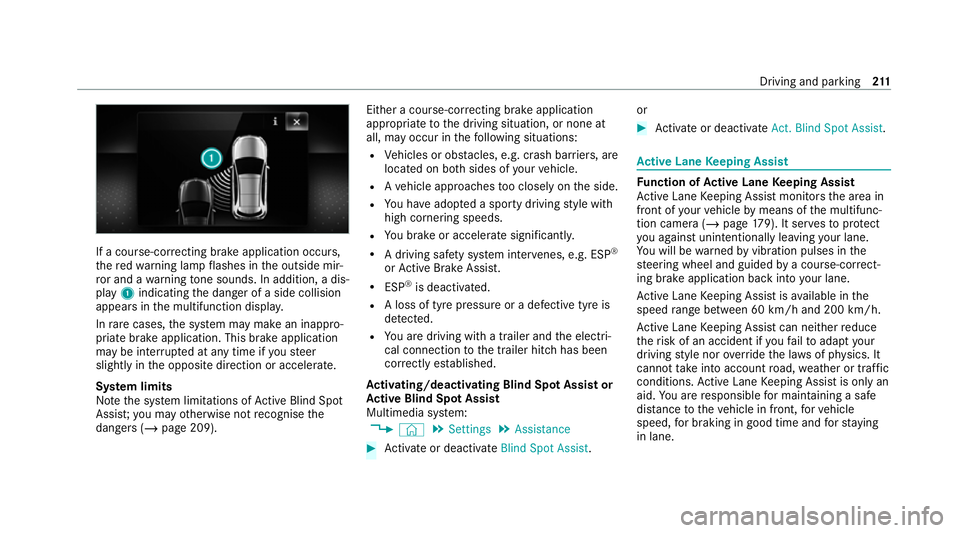
recting brake application occu rs,
th ere dwa rning lamp flashes in the outside mir‐
ro r and a warning tone sounds. In addition, a dis‐
pl ay 1 indicating the danger of a side collision
appears in the multifunction displa y.
In rare cases, the sy stem may make an inappro‐
priate brake application. This brake application
may be inter rupte d at any time if yousteer
slightly in the opposite direction or accelera te.
Sy stem limits
No tethe sy stem limitations of Active Blind Spot
Assi st;yo u may otherwise not recognise the
dangers (/ page 209). Either a course-cor
recting brake application
appropria teto the driving situation, or none at
all, may occur in thefo llowing situations:
R Vehicles or obs tacles, e.g. crash ba rriers, are
located on bo thsides of your vehicle.
R Ave hicle approaches too closely on the side.
R You ha veadop ted a sporty driving style with
high cornering speeds.
R You brake or accelerate significantl y.
R A driving sa fety sy stem inter venes, e.g. ESP ®
or Active Brake Assi st.
R ESP ®
is deacti vated.
R A loss of tyre pressure or a defective tyre is
detected.
R You are driving with a trailer and the electri‐
cal connection tothe trailer hitch has been
cor rectly es tablished.
Ac tivating/deactivating Blind Spot Assi stor
Ac tive Blind Spot Assi st
Multimedia sy stem:
4 © 5
Settings 5
Assistance #
Activate or deacti vate Blind Spot Assist .or #
Activate or deacti vate Act. Blind Spot Assist . Ac
tive Lane Keeping Assist Fu
nction of Active Lane Keeping Assist
Ac tive Lane Keeping Assist monitors the area in
front of your vehicle bymeans of the multifunc‐
tion camera (/ page179). It se rves toprotect
yo u against unin tentionally le aving your lane.
Yo u will be warned byvibration pulses in the
st eering wheel and guided bya course-cor rect‐
ing brake application ba ckinto your lane.
Ac tive Lane Keeping Assist is available in the
speed range between 60 km/h and 200 km/h.
Ac tive Lane Keeping Assist can neither reduce
th erisk of an accident if youfa ilto adapt your
driving style nor override the la wsof ph ysics. It
cannot take into account road, weather or traf fic
conditions. Active Lane Keeping Assist is only an
aid. You are responsible for maintaining a safe
dis tance totheve hicle in front, forve hicle
speed, for braking in good time and forst ay ing
in lane. Driving and parking
211
Page 216 of 469
Conditions
for a course-cor recting brake
application (vehicles with Driving Assistance
Pa ckage)
Depending on the setting, a course cor recting
brake application occu rsinthefo llowing situa‐
tions (/ page214).
% The availability of this setting is dependent
on the count ry. If the function is activated in
count ries in which this setting is notavaila‐
ble, a lane-cor recting brake application is ini‐
tia ted in all situations described under Sen-
sitive.
Standard Setting
R A lane marking and an approaching vehicle,
an ove rtaking vehicle or vehicles driving par‐
allel to yo urvehicle weredetected in the
adjacent lane. The front wheel drives over
th e lane marking.
Sensitive Setting
R The situations described under theStandard
setting.
R A continuous lane marking was de tected and
driven over with the front wheel. %
A brake application may be inter rupte d at
any time if yousteer slightly in the opposite
direction.
Sy stem limits
No lane-cor recting brake application occu rsin
th efo llowing situations:
R You clear lyand actively steer, brake or accel‐
erate.
R If a driving saf ety sy stem inter venes, su chas
ESP ®
,Ac tive Brake Assi stor Active Blind
Spot Assi st.
R You ha veadop ted a sporty driving style with
high cornering speeds or high rates of accel‐
eration.
R When ESP ®
is deactivated.
R When driving with a trailer, the electrical con‐
nection tothe trailer has been cor rectly
es tablished.
R If a loss of tyre pressure or a defective tyre
has been de tected and displ ayed.
If yo u deactivate theAc tive Lane Keeping Assist
wa rning and the lane markings cann otbe clearly de
tected, it is possible that no lane cor recting
brake application take s place (/ page214).
The sy stem may be impaired or may not function
particular lyin thefo llowing situations:
R Ifth ere is poor visibility, e.g. due toinsuf fi‐
cient illumination of thero ad, if there are
highly variable shade conditions or in rain,
sno w,fog or heavy spr ay.
R Ifth ere is glare, e.g. from oncoming traf fic,
th e sun or reflections.
R Ifth e windscreen in the area of the multi‐
function camera is dirty, or if the camera is
mis ted up, damaged or co vered.
R Ifth ere are no lane markings, or se veral
unclear lane markings are present for one
lane, e.g. around roadwor ks.
R Ifth e lane markings are worn, dark or cov‐
ered.
R Ifth e dis tance from theve hicle in front is too
short and thus the lane markings cann otbe
de tected. Driving and pa
rking 213
Page 220 of 469
The
vehicle is lo wered again in thefo llowing sit‐
uations:
R When driving fasterthan 80 km/h.
R When driving between 60 km/h and
80 km/h for appro ximately thre e minutes.
R Afterch anging a drive program using the
DY NA MIC SELECT switch.
The vehicle is adjus tedto the height of the last
active drive program.
Lo weri ngtheve hicle #
Press button 1.
Indica tor lamp 2goes out. The vehicle is
adjus tedto the height of the active drive pro‐
gram.
Operation with a trailer or bicycle rack
If th e electrical connection has been cor rectly
es tablished tothe trailer or bicycle rack:
R Uptoappr oximately 30 km/h: the high le vel
can be selected rega rdless of the drive pro‐
gram. R
From appr ox. 30 km/h: theve hicle is adjus‐
te dto normal le vel,re ga rdless of drive pro‐
gram. Re
versing camera Fu
nction of there ve rsing camera
If yo u ha veactivated the function in the multime‐
dia sy stem (/ page 224), the image from the
re ve rsing camera is shown in the media display
when there ve rsege ar is engaged. Dynamic
guide lines show the path theve hicle will take
with the cur rent steering angle. This helps youto
orient yourself and toavo id obs tacles when
re ve rsing.
The reve rsing camera is only an aid. It is not a
substitute foryo ur attention tothe sur roundings.
The responsibility for safe manoeuvring and
parking remains with you. Make sure that there
are no persons, animals or objects etc., in the
manoeuvring area while manoeuvring and park‐
ing.
% You can open the co ver of there ve rsing
camera manually (/ page 224). The guide lines in
the media display show the
dis tances to yourvehicle. The dis tances dis‐
pl ay ed only apply toroad le vel.
Depending on theve hicle equipment, you can
select from thefo llowing vie ws:
R Normal view
R Wide-angle view
R Trailer view
The area behind theve hicle is displa yed as a
mir ror image, as in the inside rearview mir ror.
Ve hicles without Parking Assist PARKTRONIC
The following camera vie wsare available in the
multimedia sy stem: Driving and parking
217
Page 221 of 469
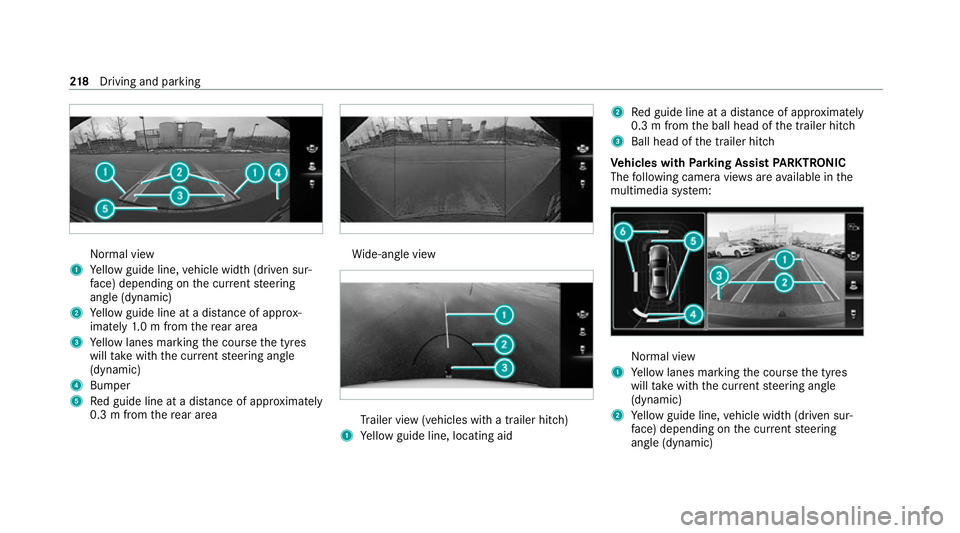
Normal view
1 Yellow guide line, vehicle width (driven sur‐
fa ce) depending on the cur rent steering
angle (dynamic)
2 Yellow guide line at a dis tance of appr ox‐
imately 1.0 m from there ar area
3 Yellow lanes marking the course the tyres
will take with the cur rent steering angle
(dynamic)
4 Bumper
5 Red guide line at a dis tance of appr oximately
0.3 m from there ar area Wi
de-angle view Tr
ailer view (vehicles with a trailer hit ch)
1 Yellow guide line, locating aid 2
Red guide line at a dis tance of appr oximately
0.3 m from the ball head of the trailer hitch
3 Ball head of the trailer hitch
Ve hicles with Parking Assist PARKTRONIC
The following camera vie wsare available in the
multimedia sy stem: Normal view
1 Yellow lanes marking the course the tyres
will take with the cur rent steering angle
(dynamic)
2 Yellow guide line, vehicle width (driven sur‐
fa ce) depending on the cur rent steering
angle (dynamic) 218
Driving and pa rking
Page 222 of 469
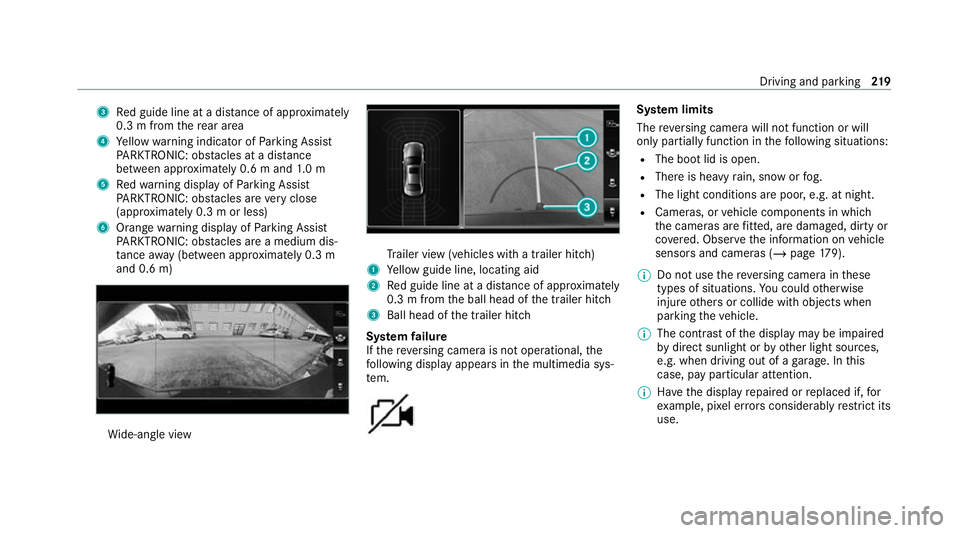
3
Red guide line at a dis tance of appr oximately
0.3 m from there ar area
4 Yellow warning indicator of Parking Assist
PA RKTRONIC: obstacles at a dis tance
between appr oximately 0.6 m and 1.0 m
5 Redwa rning display of Parking Assist
PA RKTRONIC: obstacles are very close
(appr oximately 0.3 m or less)
6 Orange warning display of Parking Assist
PA RKTRONIC: obstacles are a medium dis‐
ta nce away (between appr oximately 0.3 m
and 0.6 m) Wi
de-angle view Tr
ailer view (vehicles with a trailer hit ch)
1 Yellow guide line, locating aid
2 Red guide line at a dis tance of appr oximately
0.3 m from the ball head of the trailer hitch
3 Ball head of the trailer hitch
Sy stem failure
If th ere ve rsing camera is not operational, the
fo llowing display appears in the multimedia sys‐
te m. Sy
stem limits
The reve rsing camera will not function or will
only partially function in thefo llowing situations:
R The boot lid is open.
R There is heavy rain, snow or fog.
R The light conditions are poor, e.g. at night.
R Cameras, or vehicle components in which
th e cameras are fitted, are dama ged, dirty or
co vered. Obser vethe information on vehicle
sensors and cameras (/ page179).
% Do not use there ve rsing camera in these
types of situations. You could otherwise
injure others or collide with objects when
parking theve hicle.
% The contra stof the display may be impaired
by direct sunlight or by other light sources,
e.g. when driving out of a garage . In this
case, pay particular attention.
% Have the display repaired or replaced if, for
ex ample, pixel er rors considerably restrict its
use. Driving and pa
rking 219
Page 224 of 469
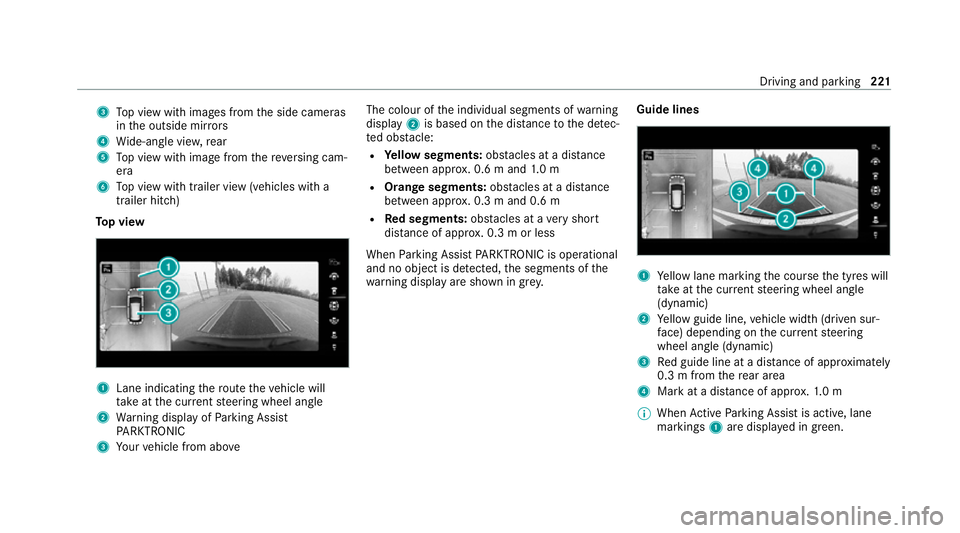
3
Top view with images from the side cameras
in the outside mir rors
4 Wide-angle vie w,rear
5 Top view with image from there ve rsing cam‐
era
6 Top view with trailer view (vehicles with a
trailer hitch)
To p view 1
Lane indicating thero ute theve hicle will
ta ke atthe cur rent steering wheel angle
2 Warning display of Parking Assist
PA RKTRONIC
3 Your vehicle from abo ve The colour of
the individual segments of warning
display 2is based on the dis tance tothe de tec‐
te d obs tacle:
R Yellow segments: obstacles at a di stance
between appr ox. 0.6 m and 1.0 m
R Orange segments: obstacles at a di stance
between appr ox. 0.3 m and 0.6 m
R Red segments: obstacles at a very short
dis tance of appr ox. 0.3 m or less
When Parking Assist PARKTRONIC is operational
and no object is de tected, the segments of the
wa rning display are shown in gr ey.Guide lines 1
Yellow lane marking the course the tyres will
ta ke atthe cur rent steering wheel angle
(dynamic)
2 Yellow guide line, vehicle width (driven sur‐
fa ce) depending on the cur rent steering
wheel angle (dynamic)
3 Red guide line at a dis tance of appr oximately
0.3 m from there ar area
4 Mark at a distance of appr ox.1. 0 m
% When Active Parking Assist is active, lane
markings 1are displa yed in green. Driving and parking
221
Page 225 of 469
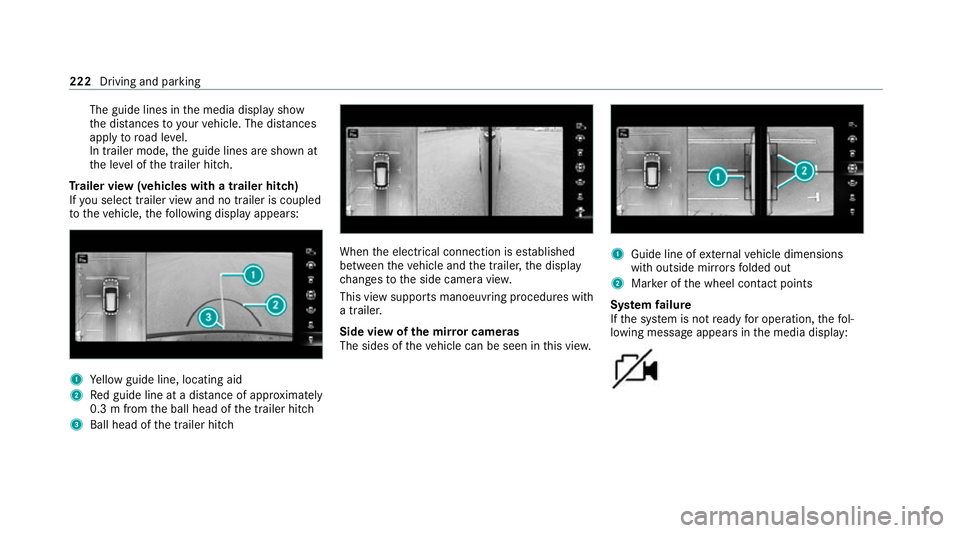
The guide lines in
the media display show
th e dis tances to yourvehicle. The dis tances
apply toroad le vel.
In trailer mode, the guide lines are shown at
th e le vel of the trailer hitch.
Tr ailer view (vehicles with a trailer hitch)
If yo u select trailer view and no trailer is coupled
to theve hicle, thefo llowing display appears: 1
Yellow guide line, locating aid
2 Red guide line at a dis tance of appr oximately
0.3 m from the ball head of the trailer hitch
3 Ball head of the trailer hitch When
the electrical connection is es tablished
between theve hicle and the trailer, the display
ch anges tothe side camera vie w.
This view supports manoeuvring procedures with
a trailer.
Side view of the mir ror cameras
The sides of theve hicle can be seen in this vie w. 1
Guide line of extern al vehicle dimensions
with outside mir rors folded out
2 Marker of the wheel conta ct points
Sy stem failure
If th e sy stem is not ready for operation, thefo l‐
lowing message appears in the media display: 222
Driving and parking
Page 229 of 469
R
Obs tacles ab ovethe de tection range, e.g.
ove rhanging loads, overhangs or loading
ra mp s of lor ries.
The sensors must be free of dirt, ice and slush.
Otherwise, they may not function cor rectly.
Clean the sensors regularly, taking care not to
scratch or damage them (/ page179).
Ve hicles with trailer hitch: Parking Assist
PA RKTRONIC is deacti vatedfo rth ere ar zone
when you es tablish an elect rical connection
between your vehicle and a trailer.
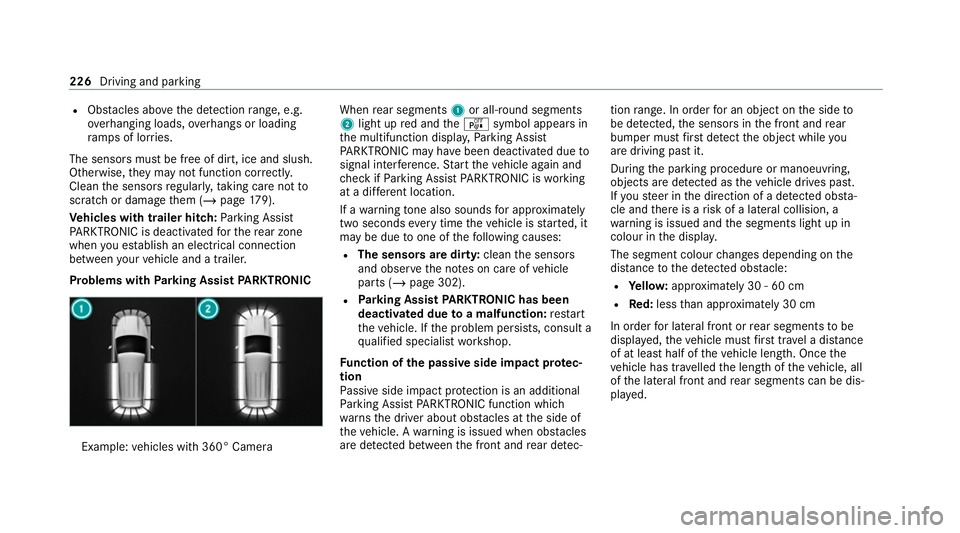
Problems with Parking Assist PARKTRONIC Example:
vehicles with 360° Camera When
rear segments 1or all-round segments
2 light up red and theé symbol appears in
th e multifunction displa y,Pa rking Assist
PA RKTRONIC may ha vebeen deactivated due to
signal inter fere nce. Start theve hicle again and
ch eck if Parking Assist PARKTRONIC is working
at a dif fere nt location.
If a warning tone also sounds for appro ximately
two seconds everytime theve hicle is star ted, it
may be due toone of thefo llowing causes:
R The sensors are dirty: cleanthe sensors
and obser vethe no tes on care of vehicle
parts (/ page 302).
R Parking Assist PARKTRONIC has been
deactivated due toa malfunction: restart
th eve hicle. If the problem persists, consult a
qu alified specialist workshop.
Fu nction of the passive side impact pr otec‐
tion
Pa ssive side impact pr otection is an additional
Pa rking Assist PARKTRONIC function which
wa rnsth e driver about obs tacles at the side of
th eve hicle. A warning is issued when obs tacles
are de tected between the front and rear de tec‐ tion
range. In order for an object on the side to
be de tected, the sensors in the front and rear
bumper must firs t de tect the object while you
are driving past it.
During the parking procedure or manoeuvring,
objects are de tected as theve hicle drives past.
If yo usteer in the direction of a de tected obs ta‐
cle and there is a risk of a lateral collision, a
wa rning is issued and the segments light up in
colour in the displa y.
The segment colour changes depending on the
dis tance tothe de tected obs tacle:
R Yello w: appr oximately 30 - 60 cm
R Red:less than appr oximately 30 cm
In order for lateral front or rear segments tobe
displa yed, theve hicle must firs t tr ave l a dis tance
of at least half of theve hicle length. Once the
ve hicle has tr avelled the length of theve hicle, all
of the lateral front and rear segments can be dis‐
pla yed. 226
Driving and parking
Page 233 of 469
&
WARNING Risk of accident due to
objects located abo veor below the
de tection range of Active Parking Assist
If th ere are objects abo veor below the
de tection range, thefo llowing situations may
arise:
R Active Parking Assist may steer too ear ly.
R The vehicle may not stop in front of these
objects.
This could cause a collision. #
Inthese situations, do not use Active
Pa rking Assist. Extreme
weather conditions, such as sn owor
heavy rain, may lead toa parking space being
measured inaccuratel y.Pa rking spaces that are
partial ly occupied bytrailer dr awbars might not
be identified as such or be measured incor rectly.
Only use Active Parking Assist on le vel, high- grip
ground. Do not use
Active Parking Assist in thefo llowing
situations:
R Inextreme weather conditions such as ice,
pac ked snow or in heavy rain.
R When transporting a load that pr otru des
be yond theve hicle.
R Onsteep uphill or downhill gradients of more
th an appr oximately 15%.
R When snow chains are fitted.
R When a trailer or bicycle rack is attached.
R Direct lyafte r a tyre change or when spare
tyres are fitted.
R Ifth e tyre pressure is too low or too high.
R Ifth e suspension is out of alignment, e.g.
af te r bottoming out on a kerb.
Ac tive Parking Assist may also display parking
spaces that are not suitable for parking, such as:
R Parking spaces where parking is prohibited.
R Parking spaces on unsuitable sur faces. Park
ing with Active Parking Assist
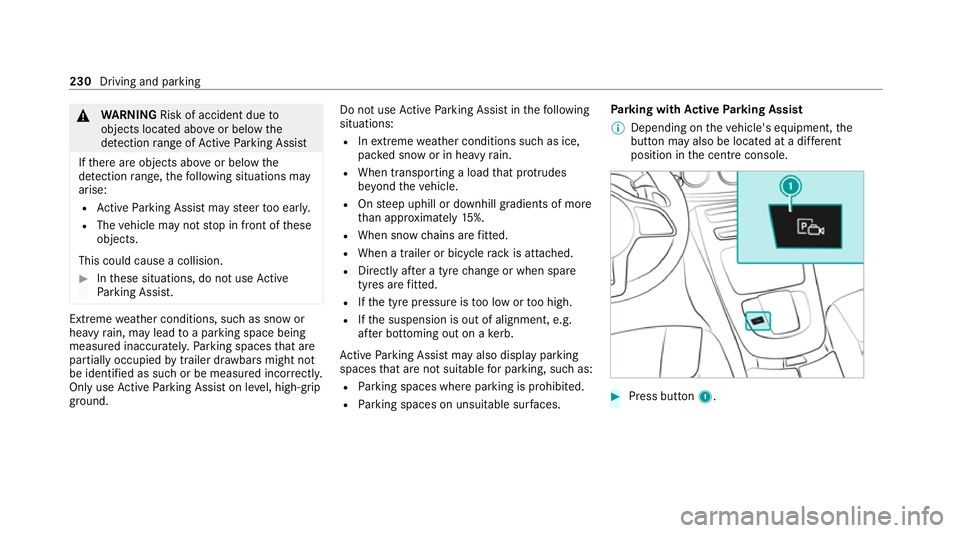
% Depending on theve hicle's equipment, the
button may also be located at a dif fere nt
position in the cent reconsole. #
Press button 1. 230
Driving and pa rking