buttons MERCEDES-BENZ E-CLASS ESTATE 2020 User Guide
[x] Cancel search | Manufacturer: MERCEDES-BENZ, Model Year: 2020, Model line: E-CLASS ESTATE, Model: MERCEDES-BENZ E-CLASS ESTATE 2020Pages: 489, PDF Size: 9.15 MB
Page 192 of 489
#
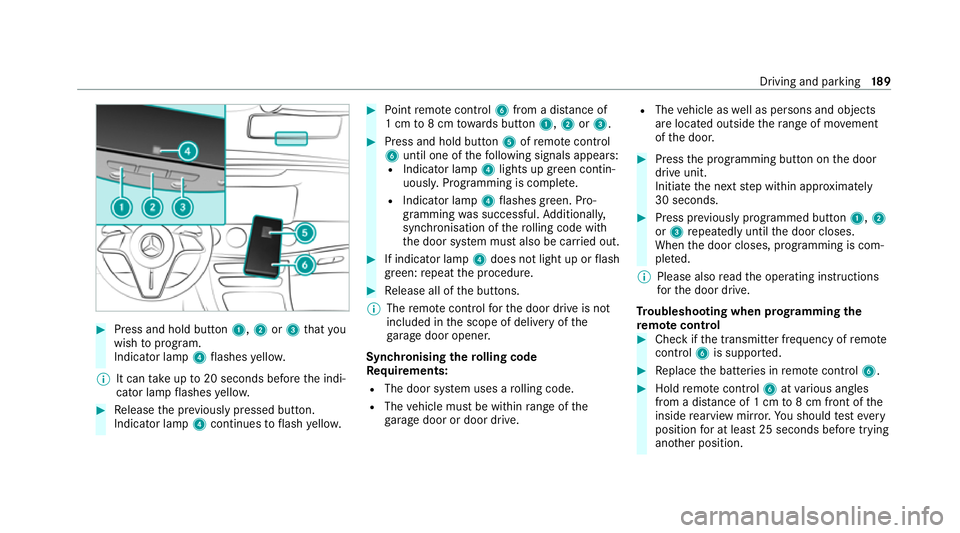
Press and hold button 1,2or3 that you
wish toprog ram.
Indicator lamp 4flashes yello w.
% It can take up to20 seconds before the indi‐
cator lamp flashes yello w. #
Release the pr eviously pressed button.
Indicator lamp 4continues toflash yello w. #
Point remo tecontrol 6from a di stance of
1 cm to8 cm towa rds button 1,2or3. #
Press and hold button 5ofremo tecontrol
6 until one of thefo llowing signals appears:
R Indicator lamp 4lights up green contin‐
uousl y.Programming is comple te.
R Indicator lamp 4flashes green. Pro‐
gramming was successful. Additionall y,
synchronisation of thero lling code with
th e door sy stem must also be car ried out. #
If indicator lamp 4does not light up or flash
green: repeat the procedure. #
Release all of the buttons.
% The remo tecontrol forth e door drive is not
included in the scope of delivery of the
ga rage door opener.
Synchronising thero lling code
Re quirements:
R The door sy stem uses a rolling code.
R The vehicle must be within range of the
ga rage door or door drive. R
The vehicle as well as persons and objects
are located outside thera nge of mo vement
of the door. #
Press the programming button on the door
drive unit.
Initiate the next step within appr oximately
30 seconds. #
Press pr eviously prog rammed button 1,2
or 3 repeatedly until the door closes.
When the door closes, programming is com‐
ple ted.
% Please also read the operating instructions
fo rth e door drive.
Tr oubleshooting when prog ramming the
re mo tecont rol #
Check if the transmit ter frequency of remo te
control 6is suppo rted. #
Replace the batteries in remo tecontrol 6. #
Hold remo tecontrol 6atvarious angles
from a dis tance of 1 cm to8 cm front of the
inside rearview mir ror.Yo u should test eve ry
position for at least 25 seconds before trying
ano ther position. Driving and parking
18 9
Page 193 of 489
#
Hold remo tecontrol 6atthe same angles
at various dis tances in front of the inside rear
view mir ror.Yo u should test eve ryposition
fo r at least 25 seconds before trying ano ther
position. #
Onremo tecontrols that transmit on lyfor a
limi ted period, press button 5onremo te
control 6again before transmission ends. #
Align the aerial line of the door opener unit
with there mo tecontrol.
% Support and additional information on pro‐
gramming:
R Onthe HomeLink ®
Hotline on (0) 08000
466 354 65 or +49 (0) 6838 907-2 77
R onthe Internet at https://
www.homelin k.com
Opening or closing the garage door
Requ irements:
R The cor responding button is programmed to
operate the door. #
Press and hold buttons 1,2or3 until
th e door opens or closes. #
If indicator lamp 4flashes yellow af ter
appr oximately 20 seconds: press and hold
th e pr eviously pressed button again until the
door opens or closes.
Clearing thega rage door opener memo ry #
Press and hold buttons 1and 3.
Indicator lamp 4lights up yello w. #
If indicator lamp 4flashes green: release
buttons 1and 3.
The entire memo ryhas been dele ted. Electric parking brake
Fu
nction of the electric pa rking brake (app ly‐
ing automatically) &
WARNING Risk of accident and inju ry
due tochildren left unat tended in the
ve hicle
If ch ildren are left unsupervised in theve hi‐
cle, they could, in pa rticular:
R open doors, thereby endangering other
persons or road users. R
get out and be stru ck byoncoming traf‐
fi c.
R ope rate ve hicle equipment and become
trapped, forex ample.
In addition, thech ildren could also set the
ve hicle in motion, forex ample by:
R releasing the parking brake.
R changing the transmission position.
R starting theve hicle. #
Never lea vechildren unat tended in the
ve hicle. #
When leaving theve hicle, alw aysta ke
th eke y with you and lock theve hicle. #
Keep theve hicle key out of reach of
ch ildren. This also applies
tothe Digital Vehicle Key
st icke r.
The electric parking brake is applied if the trans‐
mission is in position jand one of thefo llow‐
ing conditions is fulfilled:
R The engine is switched off. 19 0
Driving and pa rking
Page 207 of 489
tion,
the hazard warning lights switch on once
th eve hicle is stationar y.When you pull away
again, the hazard warning lights will switch off
automatically at appr oximately 10km/h. Yo u
can also switch off the hazard warning lights
using the hazard warning button. Cruise control and limiter
Fu
nction of cruise control
Cruise cont rolre gulates the speed totheva lue
selec tedby the driver.
If yo u accelerate toove rtake, forex ample, the
st ored speed is not dele ted. If youre mo veyour
fo ot from the accelerator pedal af terove rtaking,
cruise control will resume speed regulation back
to thestored speed.
Cruise contro l is operated using the cor respond‐
ing steering wheel buttons. You can store any
speed abo ve20 km/h up tothe maximum
design speed or up tothe set winter tyre limit.
Obser vethe no tes on driving sy stems and your
re sponsibility; you may otherwise failto recog‐
nise dangers (/ page 194). Me
rcedes‑AMG vehicles: cruise control is avail‐
able up toa maximum speed of 250 km/h.
Displ ays on the multifunction display
R h (gre y): cruise cont rol is selec ted but
not yet acti vated.
R h (green): cruise control is active.
A stored speed appears along with theh dis‐
pla y.
% The segments extending from the cur rent
st ored speed tothe end of the scale, or to
th e set winter tyre limit, light up in the
speedome ter.
Sy stem limits
Cruise control may be unable tomaintain the
st ored speed on uphill gradients. The stored
speed is resumed when the gradient evens out.
Change into a lo werge ar in good time on long
and steep downhill gradients. Take particular
no te ofthis when driving a laden vehicle. By
doing so, you will make use of the engine's brak‐
ing ef fect. This relie vesth e load on the brake
sy stem and pr events the brakes from overheat‐
ing and wearing tooqu ickl y. Do not use cruise control in
thefo llowing situa‐
tions:
R In traf fic situations whi chrequ ire frequent
ch anges of speed, e.g. in heavy traf fic, on
winding roads.
R On slippe ryroads. Accelerating can cause
th e drive wheels tolose traction and the
ve hicle could then skid.
R Ifyo u are driving when visibility is poor.
Fu nction of the limiter
The limiter restricts the speed of theve hicle. To
re duce the speed tothe set speed, the limiter
applies the brakes automaticall y.
Yo u can limit the speed as follo ws:
R Variable: for a short-term speed restriction,
e.g. in built-up areas
R Perm anen t:for a longer-term speed restric‐
tion, e.g. in winter tyre mode
The variable limiter is operated using the cor re‐
sponding steering wheel buttons. You can store
any speed abo ve20 km/h up tothe maximum
design speed or up tothe set winter tyre limit. 204
Driving and parking
Page 272 of 489
R
Press 7briefly or press and hold.
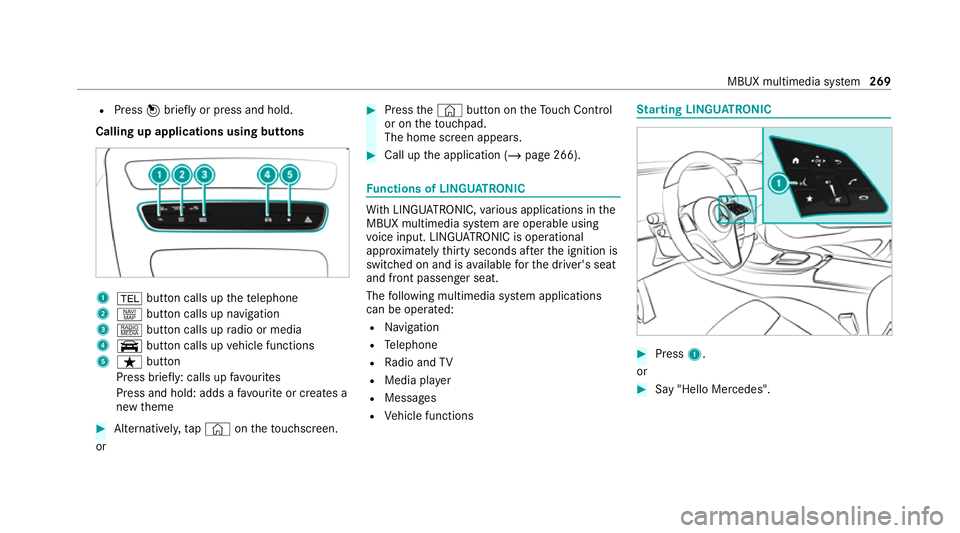
Calling up applications using buttons 1
% button calls up thete lephone
2 z button calls up navigation
3 | button calls up radio or media
4 y button calls up vehicle functions
5 ß button
Press brief ly: calls up favo urites
Press and hold: adds a favo urite or creates a
new theme #
Alternatively, tap© ontheto uchsc reen.
or #
Press the© button on theTo uch Control
or on theto uchpad.
The home sc reen appears. #
Call up the application (/ page 266). Fu
nctions of LINGU ATRO NIC Wi
th LINGU ATRO NIC, various applications in the
MBUX multimedia sy stem are operable using
vo ice input. LINGU ATRO NIC is operational
appr oximately thirty seconds af terth e ignition is
switched on and is available forth e driver's seat
and front passenger seat.
The following multimedia sy stem applications
can be operated:
R Navigation
R Telephone
R Radio and TV
R Media pla yer
R Messages
R Vehicle functions St
arting LING UATRONIC #
Press 1.
or #
Say "Hello Mercedes". MBUX multimedia sy
stem 269
Page 454 of 489
1,
2, 3 ...
4MATIC ..................................................... 180
Fu nction .............................................. 180
12 V battery
see Battery (vehicle)
12 V so cket
see Soc ket (12 V)
48 V on-board electrical sy stem
Operating saf ety .................................... 22
360° Camera .......................................... .230
Care ..................................................... 319
Fu nction .............................................. 230
Selecting a view .................................. 233
Switching au tomatic operation
on/off (r eversing camera) .................. .234 A
A/C function Activating/deactivating (MBUX mul‐
timedia sy stem) ................................... 15 3
Switching on/off (control panel) ......... 15 2
ABS (Anti-lock Braking Sy stem) ............ .195 Ac
celeration
see Kickdown
Ac cident and Breakdown Manage‐
ment
Mercedes me connect ........................ .288
Ac oustic locking verification signal
Ac tivating/deactivating ......................... 72
Ac tive Blind Spot Assi st.......................... 24 3
Ac tivating/deactivating ...................... .245
Brake application ................................. 24 4
Fu nction .............................................. 24 3
Sy stem limitations ...............................2 43
Tr ailer operation .................................. 24 4
Ac tive bonn et(pedestrian pr otection) .. 309
Operation ............................................ 309
Re setting ............................................. 309
Ac tive Brake Assi st
Fu nction/no tes ................................... 19 9
Setting ................................................. 203
Ac tive Di stance Assist DISTRO NIC........ 208
Ac tive Emergency Stop Assist .............. 217
Calling up a speed ................................ 211
Fu nction .............................................. 208
Increasing/decreasing speed .............. 211Re
quirements: ...................................... 211
Ro ute-based speed adap tation ........... .214
Selecting .............................................. 211
St eering wheel buttons ........................ 211
St oring a speed .................................... 211
Switching off/deacti vating ................... 211
Switching on/activating ....................... 211
Sy stem limitations ...............................2 08
Ac tive Eme rgency Stop Assist ................ 217
Ac tive headlamps .................................... 13 6
Ac tive Lane Keeping Assist .................... 24 6
Ac tivating/deactivating ...................... .248
Ac tivating/deactivating thewa rning .... 24 8
Fu nction .............................................. 24 6
Setting the sensitivity .......................... 24 8
Sy stem limits ....................................... 24 6
Tr ailer operation .................................. 24 6
Ac tive Parking Assist .............................. 234
Exiting a parking space ...................... .237
Fu nction .............................................. 234
Pa rking ................................................ 236
Sy stem limitations ...............................2 34
Ac tive Se rvice Sy stem PLUS
see AS SYST PLUS Index
451
Page 458 of 489
Boot lid
see Tailgate
Brake Assist Sy stem
see BAS (Brake Assi stSystem)
Brake fluid
No tes ................................................... 373
Brake forc e distribution
EBD (Elect ronic Brake forc e Distribu‐
tion) ..................................................... 19 9
Brakes ABS (Anti-lock Braking Sy stem) ........... 19 5
Ac tive Brake Assi st.............................. 19 9
Ad aptive brake lights .......................... .203
BA S (Brake Assi stSystem) .................. 19 5
Driving tips .......................................... 16 8
EBD (Electronic Brake forc e Distribu‐
tion) ..................................................... 19 9
HOLD function .................................... .219
Limited braking ef fect (salt-trea ted
ro ads) .................................................. 16 8
New/replaced brakepads/brake
discs .................................................... 16 6
Ru nning-in no tes ..................................1 66Braking assi
stance
see BAS (Brake Assi stSystem)
Breakdown Overview of the help functions .............. 16
To w- starting ........................................ .341
To wing away ........................................ 337
Tr ansporting theve hicle ......................3 39
Wheel change ...................................... 355
Breakdown see Flat tyre
Buttons Steering wheel .................................... 259 C
Calls Mercedes me ...................................... 289
Camera see 360° Camera
see Reversing camera
Car key
see Key
Car wash
see Care Car
wash (care) ........................................3 16
Car-to-X-Communication Displaying hazard warnings ................ .283
Care .......................................................... 321
360° Camera ....................................... 319
Air-water duct ...................................... 316
Car wash ..............................................3 16
Carpet ................................................ .321
Deco rative foil ...................................... 318
Displ ay................................................. 321
Exterior lighting .................................... 319
High-pressu recleaner .......................... 317
Matt finish ........................................... 318
Pa int wo rk ............................................. 318
Plastic trim .......................................... 321
Re alwo od/trim elements .................... 321
Re versing camera ................................ 319
Ro of lining ...........................................3 21
Seat belt .............................................. 321
Seat co ver ........................................... 321
Sensors ................................................ 319
St eering wheel .....................................3 21
Ta ilpipes .............................................. .319
Tr ailer hit ch.......................................... 319
Wa shing byhand ..................................3 18 Index
455
Page 460 of 489
Re
sidual heat ....................................... 154
Setting (MBUX multimedia sy stem) ..... 15 2
Setting the air distribution ...................1 51
Setting the air flow ............................... 151
Setting the climate style ......................1 53
Setting the fragrance sy stem ............... 154
Setting thete mp erature ....................... 151
St ationary heater/ ventilation .............. 15 6
Switching on/off ................................. 15 2
Switching there ar wind owheater
on/off .................................................. 151
THERMATIC contro l panel .................... 151
THERMOTRONIC contro l panel ............151
Ve ntilating theve hicle (con venience
opening) ................................................ 86
Wi ndsc reen heating ............................. 15 6
Climate style
Fu nction .............................................. 15 3
Setting ................................................. 15 3
Cockpit ........................................................ .6
Overview .................................................6
Cof fee cup symbol
see ATTENTION ASSIST
Collision de tection (pa rked vehicle) ......19 2 Combination switch
................................13 5
Combined luggage co ver and net
At tach ing tothere ar seat backrest .... .123
Ins talling/ removing ............................. 12 2
Compu ter
see On-board computer
Consum ption indicator
Calling up ............................................ .176
Con venience closing ................................. 87
Con venience opening ................................ 86
Coolant (engine) Check le vel .......................................... 314
No tes ................................................... 373
Cooling see Climate control
Copyright .................................................. .34
Cornering light ........................................ .136
Cross Traf fic Alert .................................. .238
Crosswind Assist Function/no tes ................................... 19 8
Cruise control .......................................... 204
Ac tivating ............................................ 205 Buttons ................................................ 205
Calling up a speed ............................... 205
Deactivating ........................................ 205
Fu nction .............................................. 204
Re quirements ...................................... 205
Selecting ............................................ .205
Setting a speed ................................... 205
St oring a speed ................................... 205
Sy stem limitations ...............................2 04 D
Dashboard see Cockpit
Data acquisition Vehicle ................................................... 31
Data storage
Electronic control units .......................... 31
Online services ...................................... 33
Ve hicle ................................................... 31
Deactivating the ala rm(ATA ).................... 94
Deale rship
see Qualified speciali stwo rkshop
Declaration of conformity Electromagnetic compatibility ............... 24 Index
457
Page 469 of 489
Fo
lding bench seat .................................. 108
Fitting and removing the seat cush‐
ion ........................................................ 11 0
Fo lding back ........................................ 109
Fo lding out .......................................... 108
No tes ................................................... 108
Opening and closing the load com‐
partment floor ...................................... 11 0
Fr ag rance
see Fragrance sy stem
Fr ag rance sy stem .................................... 15 5
Inserting/removing theflacon ............ .155
Setting ................................................. 154
Fr ee software ............................................ 34
Fr equencies
Mobile phone ...................................... 362
Tw o-w ayradio ...................................... 362
Fr ont airbag (driver, front passenger) ......41
Fr ont passenger seat
see Seat
Fu el .......................................................... .368
Ad ditives .............................................3 68
Diesel ................................................. .368 E10 ...................................................... 367
Fu elreser ve ........................................ 369
Low outside temp eratures ...................3 68
Pe trol ................................................... 367
Quality (diesel) .................................... 368
Quality (p etro l) .................................... .367
Re fuelling ............................................. 181
Sulphur content ................................... 367
Ta nk content ....................................... 369
Fu nction seat
see Door cont rol panel
Fu ses ........................................................ 341
Before replacing a fuse ........................ 341
Fu se assignment diagram .................... 341
Fu se box in the engine compartment .. 342
Fu se box in the front passenger foot‐
we ll ...................................................... 343
Fu se box in the load compartment ...... 343
Fu se box on the dashboard ................. 343
No tes ................................................... 341 G
Garage door opener Cleari ngthe memory ........................... 19 0
Opening or closing the door ................1 90Programming buttons ..........................
188
Re solving problems ............................. 189
Synchronising thero lling code ............ 189
Gearshift recommendation ....................17 9
Genera l operating permit number
(EU) .......................................................... .363
Genuine parts ............................................ 21
Genuine wood (Care) .............................. .321
Glide mode ............................................... 180
Glo vebox
Air vent ................................................ 161 H
Handbrake see Electric parking brake
Handling characteristics (unusual) ....... 345
HANDS-FREE ACCESS ................................ 82
Haza rdwa rning lights ............................ .135
Head restra int
Fr ont (adjusting mechanically) .............1 01
Fr ont (luxury head restra int) ................ 102
Re ar (adjusting) .................................. .103 466
Index
Page 472 of 489
Lighting
see In terior lighting
see Lights
Lights ........................................................ 13 3
Ac tive headla mps ................................ 13 6
Ad aptive Highbeam Assist .................. .138
Ad aptive Highbeam Assist Plus .......... .139
Ad versewe ather light .......................... 13 8
Au tomatic driving lights ....................... 13 4
City lighting ........................................ .138
Combination switch ............................ .135
Cornering light ..................................... 13 6
Driving ab road (symm etrical low
beam) .................................................. 13 3
Fo g light (extended range) ................... 137
Haza rdwa rning lights .......................... 13 5
Headla mpflashing .............................. .135
High beam .......................................... .135
Intelligent Light Sy stem ....................... 13 6
Light switch .........................................1 33
Low beam ............................................ 13 3
Mo torw ay mode ................................... 137
Pa rking lights ...................................... .133
Re ar fog light ....................................... 13 3
Re sponsibility for lighting sy stems ...... 13 3Setting
the dipped beam ......................1 41
Setting theex terior lighting switch-
off delay time ....................................... 141
St anding lights .................................... .133
Switching the sur round lighting
on/off .................................................. 141
Tu rn signal indicator ............................1 35
Limi ter ...................................................... 204
Ac tivating ............................................ 205
Buttons ................................................ 205
Calling up a speed ............................... 205
Deactivating ........................................ 205
Fu nction .............................................. 204
Pa ssive mode ...................................... 204
Pe rm anent setting .............................. .207
Re quirements ...................................... 205
Selecting ............................................ .205
Setting a speed ................................... 205
St oring a speed ................................... 205
Sy stem limitations ...............................2 04
Limiting speed see Limi ter
Limiting the opening angle (tailgate) ......84LINGU
ATRO NIC
Fu nction .............................................. 269
St arting .............................................. .269
Live Traf fic Information
Swit ching the tra ffic information dis‐
play on ................................................ 283
Load compa rtment co ver
Extending/r etra cting ........................... 12 2
No tes ................................................... 121
Loading .................................................... .124
Bag hook ............................................. 12 5
No tes ................................................... 11 5
Ro of luggage rack ................................ 12 8
Ti e-down eyes ...................................... 124
Loading see EA SY-PAC K load-securing kit
Loading guidelines ................................... 11 5
Loads Securing .............................................. .115
Locking/unlocking Activating/deactivating the auto‐
matic locking feature ............................ .77
Ad ditional door lock ...............................74 Index
469
Page 475 of 489
Multifunction display
Overview of the displa ys...................... 261
Multifunction steering wheel
Overview of buttons ............................ 259
Multifunction steering wheel
see Steering wheel
Multimedia sy stem
Ac tivating/deactivating DSR ............... 208
Collision de tection (pa rked vehicle) ..... 19 2
Multimedia sy stem
see Display (multimedia sy stem)
see MBUX Interior Assis tant (multi‐
media sy stem)
see MBUX multimedia sy stem
see Touchpad N
Na vigation
No tes ................................................... 277
Overview ............................................. 279
Showing/hiding the menu ...................2 78
Switching on ........................................ 278
Na vigation
see Destination entry see Map
see
Route
Ne arField Communication (NFC)
Locking theve hicle (Digital Vehicle
Ke yst icke r) ............................................ 76
St arting theve hicle (Digital Vehicle
Ke yst icke r) .......................................... 16 4
Un locking theve hicle (Digital Vehicle
Ke yst icke r) ............................................ 76
Ne utral
Engaging .............................................. 17 7
Note s........................................................ 167
Optimised acceleration ........................ 167 O
Occupant saf ety
see Airbag
see Automatic front passenger front
airbag shutoff
see Pets in theve hicle
see PRE-SAFE ®
(anticipatory occu‐
pant pr otection)
see PRE-SAFE ®
Impulse Side see PRE-SAFE
®
PLUS (anticipatory
occupant pr otection plus)
see Restra int sy stem
see Seat belt
Oil see Engine oil
On-board computer ................................. 259
Displaying the service due date ........... 308
Head-up display menu .........................2 62
Multifunction display ........................... 261
Operating ............................................ 259
Overview of menus .............................. 259
On-board diagno stics inter face
see Diagno stics connection
On-boa rdelectronics
Engine electronics .............................. .361
No tes ................................................... 361
Tw o-w ayradios .................................... 361
Online services Data storage .......................................... 33
Online services see In-Car Of fice
Open-source so ftwa re .............................. 34 472
Index