trunk MERCEDES-BENZ E-Class SEDAN 2015 W212 Owner's Guide
[x] Cancel search | Manufacturer: MERCEDES-BENZ, Model Year: 2015, Model line: E-Class SEDAN, Model: MERCEDES-BENZ E-Class SEDAN 2015 W212Pages: 426, PDF Size: 8.27 MB
Page 100 of 426
X
Insert the mechanical key into the trunk lid
lock as far as it will go.
X Turn the mechanical key clockwise from
position 0047to position 0048.
X Remove the mechanical key.
X Insert the mechanical key into the Smart-
Key. Unlocking the trunk (Sedan)
! The trunk lid swings upwards when
opened. Therefore, make sure that there is sufficient clearance above the trunk lid.
If the trunk cannot be unlocked with the
SmartKey or KEYLESS-GO, use the mechani-
cal key.
If you use the mechanical key to unlock and
open the trunk lid, the anti-theft alarm system
will be triggered (Y page 81).
X Take the mechanical key out of the Smart-
Key (Y page 86).
X Insert the mechanical key into the trunk lid
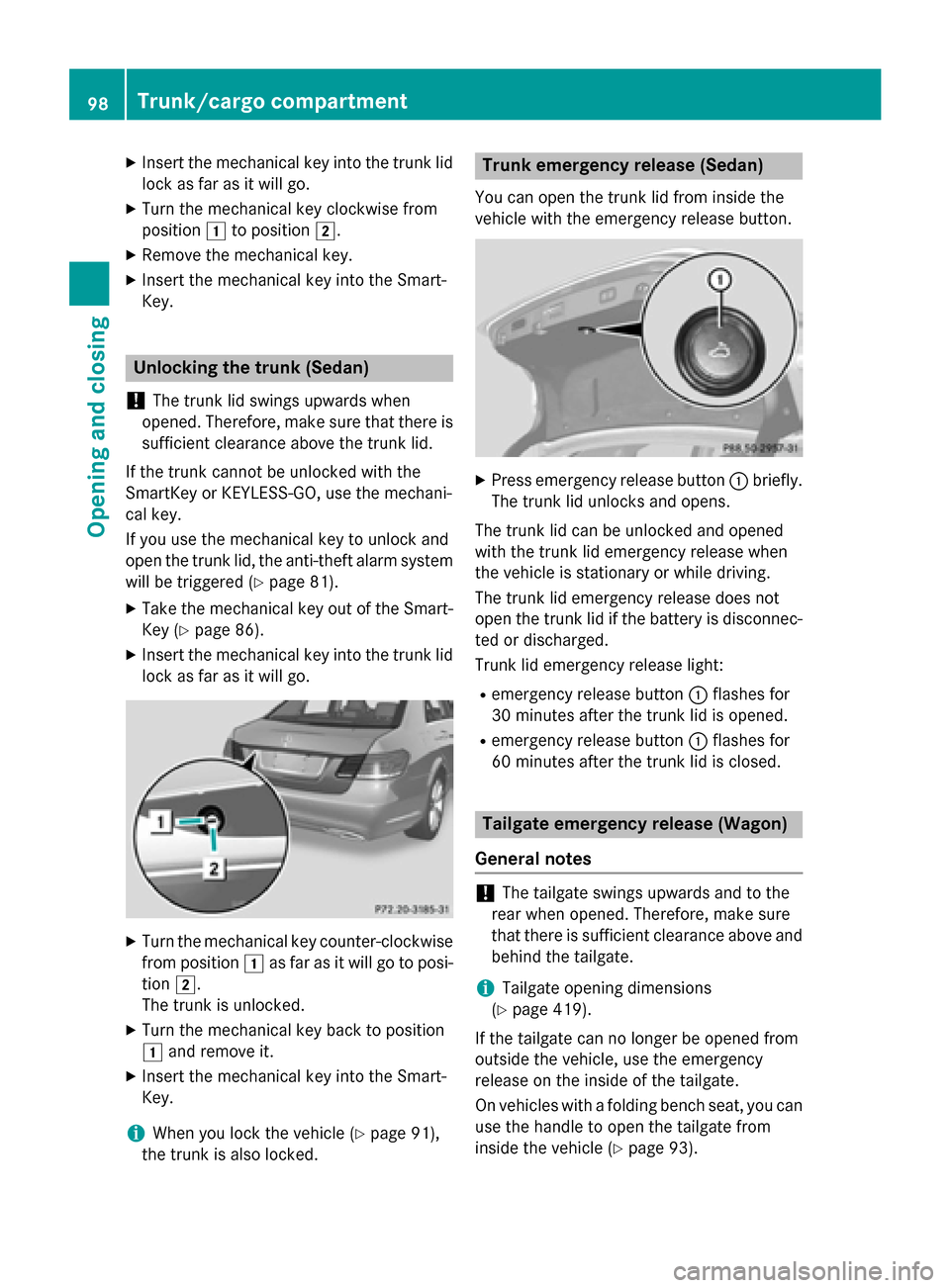
lock as far as it will go. X
Turn the mechanical key counter-clockwise
from position 0047as far as it will go to posi-
tion 0048.
The trunk is unlocked.
X Turn the mechanical key back to position
0047 and remove it.
X Insert the mechanical key into the Smart-
Key.
i When you lock the vehicle (Y
page 91),
the trunk is also locked. Trunk emergency release (Sedan)
You can open the trunk lid from inside the
vehicle with the emergency release button. X
Press emergency release button 0043briefly.
The trunk lid unlocks and opens.
The trunk lid can be unlocked and opened
with the trunk lid emergency release when
the vehicle is stationary or while driving.
The trunk lid emergency release does not
open the trunk lid if the battery is disconnec- ted or discharged.
Trunk lid emergency release light:
R emergency release button 0043flashes for
30 minutes after the trunk lid is opened.
R emergency release button 0043flashes for
60 minutes after the trunk lid is closed. Tailgate emergency release (Wagon)
General notes !
The tailgate swings upwards and to the
rear when opened. Therefore, make sure
that there is sufficient clearance above and behind the tailgate.
i Tailgate opening dimensions
(Y page 419).
If the tailgate can no longer be opened from
outside the vehicle, use the emergency
release on the inside of the tailgate.
On vehicles with a folding bench seat, you can
use the handle to open the tailgate from
inside the vehicle (Y page 93).98
Trunk/cargo compartmentOpening and closing
Page 177 of 426
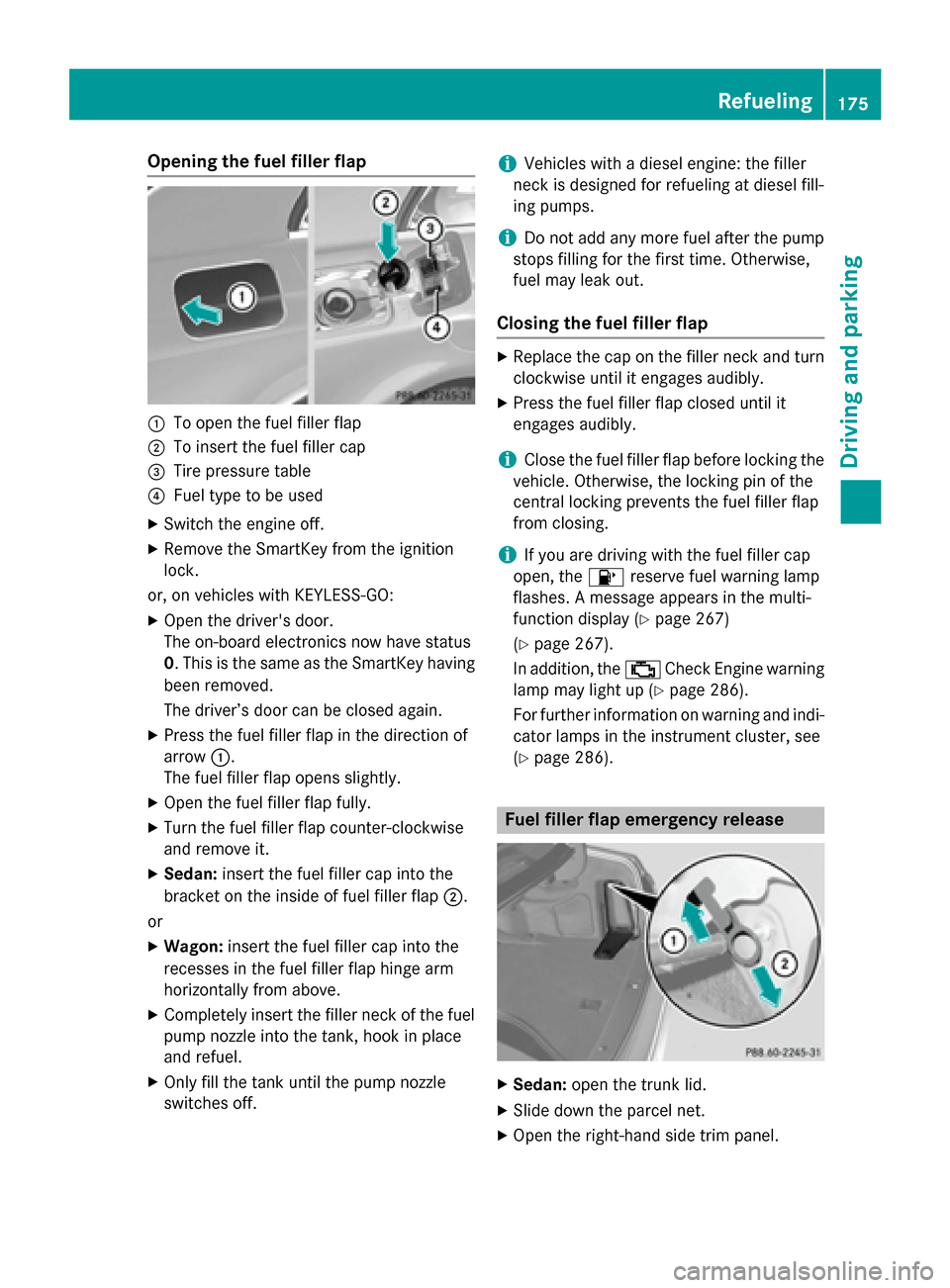
Opening the fuel filler flap
0043
To open the fuel filler flap
0044 To insert the fuel filler cap
0087 Tire pressure table
0085 Fuel type to be used
X Switch the engine off.
X Remove the SmartKey from the ignition
lock.
or, on vehicles with KEYLESS‑GO: X Open the driver's door.
The on-board electronics now have status
0. This is the same as the SmartKey having
been removed.
The driver’s door can be closed again.
X Press the fuel filler flap in the direction of
arrow 0043.
The fuel filler flap opens slightly.
X Open the fuel filler flap fully.
X Turn the fuel filler flap counter-clockwise
and remove it.
X Sedan: insert the fuel filler cap into the
bracket on the inside of fuel filler flap 0044.
or X Wagon: insert the fuel filler cap into the
recesses in the fuel filler flap hinge arm
horizontally from above.
X Completely insert the filler neck of the fuel
pump nozzle into the tank, hook in place
and refuel.
X Only fill the tank until the pump nozzle
switches off. i
Vehicles with a diesel engine: the filler
neck is designed for refueling at diesel fill-
ing pumps.
i Do not add any more fuel after the pump
stops filling for the first time. Otherwise,
fuel may leak out.
Closing the fuel filler flap X
Replace the cap on the filler neck and turn
clockwise until it engages audibly.
X Press the fuel filler flap closed until it
engages audibly.
i Close the fuel filler flap before locking the
vehicle. Otherwise, the locking pin of the
central locking prevents the fuel filler flap
from closing.
i If you are driving with the fuel filler cap
open, the 00B6reserve fuel warning lamp
flashes. A message appears in the multi-
function display (Y page 267)
(Y page 267).
In addition, the 00B9Check Engine warning
lamp may light up (Y page 286).
For further information on warning and indi- cator lamps in the instrument cluster, see
(Y page 286). Fuel filler flap emergency release
X
Sedan: open the trunk lid.
X Slide down the parcel net.
X Open the right-hand side trim panel. Refueling
175Driving and parking Z
Page 180 of 426
membranes and to the eyes. You may expe-
rience a burning sensation in your eyes, nose
and throat. Coughing and watering of the
eyes are possible.
Do not inhale ammonia vapors. Fill the DEF
tank only in well-ventilated areas.
DEF must not come into contact with your
skin, eyes or clothing and must not be swal-
lowed. Keep DEF away from children.
If you or other persons come into contact with DEF, observe the following:
R Rinse DEF from your skin immediately with
soap and water.
R If DEF comes into contact with your eyes,
immediately rinse them thoroughly with
clean water. Seek medical assistance with- out delay.
R If DEF has been swallowed, rinse your
mouth out immediately. Drink plenty of
water. Seek medical assistance without
delay.
R Change out of clothing contaminated with
DEF immediately.
! Only use DEF in accordance with
ISO 22241. Do not mix any additives with
DEF, and do not dilute DEF with water. This
may destroy the BlueTEC exhaust gas after-
treatment system.
! Rinse surfaces that have come into con-
tact with DEF immediately with water or
remove DEF using a damp cloth and cold
water. If the DEF has already crystallized,
use a sponge and cold water to clean it. DEF residues crystallize after time and contam-inate the affected surfaces.
! DEF is not a fuel additive and must not be
added to the fuel tank. If DEF is added to
the fuel tank, this can lead to engine dam-
age.
! Only screw on the DEF refill bottle hand-
tight. It could otherwise be damaged.
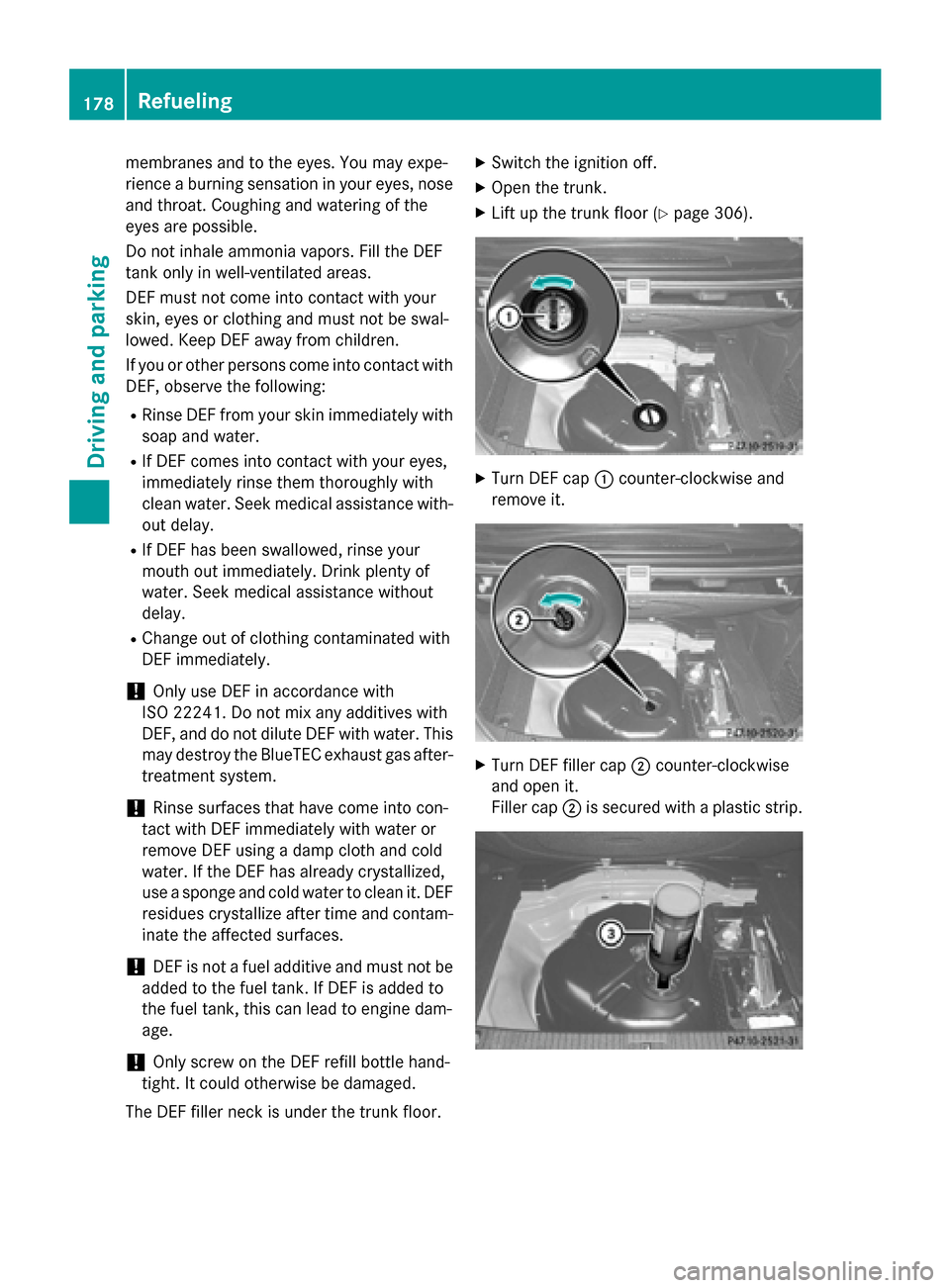
The DEF filler neck is under the trunk floor. X
Switch the ignition off.
X Open the trunk.
X Lift up the trunk floor (Y page 306). X
Turn DEF cap 0043counter-clockwise and
remove it. X
Turn DEF filler cap 0044counter-clockwise
and open it.
Filler cap 0044is secured with a plastic strip. 178
RefuelingDriving and parking
Page 181 of 426
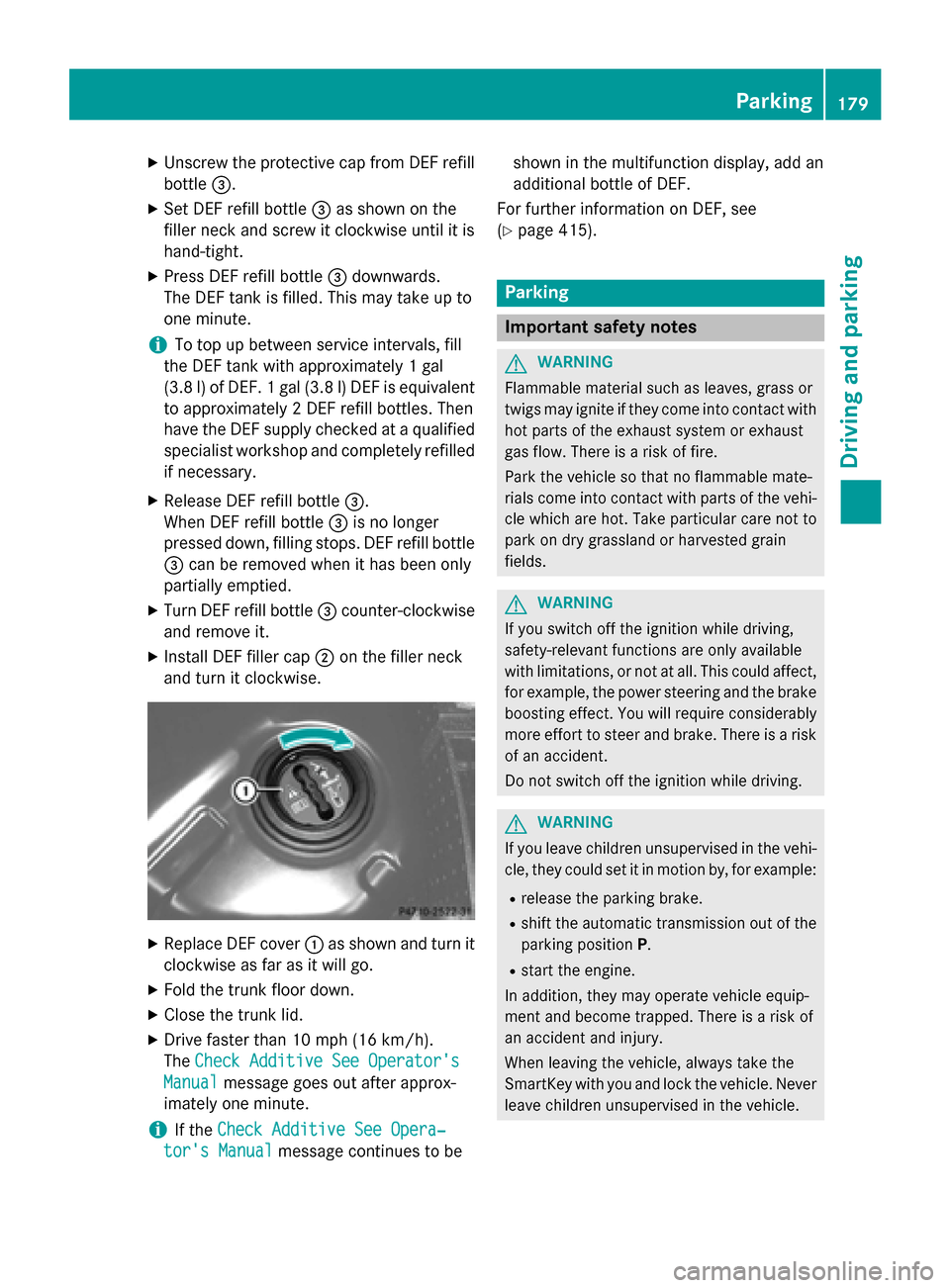
X
Unscrew the protective cap from DEF refill
bottle 0087.
X Set DEF refill bottle 0087as shown on the
filler neck and screw it clockwise until it is
hand-tight.
X Press DEF refill bottle 0087downwards.
The DEF tank is filled. This may take up to
one minute.
i To top up between service intervals, fill
the DEF tank with approximately 1 gal
(3.8 l) of DEF. 1 gal (3.8 l)DEF is equivalent
to approximately 2 DEF refill bottles. Then
have the DEF supply checked at a qualified specialist workshop and completely refilled
if necessary.
X Release DEF refill bottle 0087.
When DEF refill bottle 0087is no longer
pressed down, filling stops. DEF refill bottle 0087 can be removed when it has been only
partially emptied.
X Turn DEF refill bottle 0087counter-clockwise
and remove it.
X Install DEF filler cap 0044on the filler neck
and turn it clockwise. X
Replace DEF cover 0043as shown and turn it
clockwise as far as it will go.
X Fold the trunk floor down.
X Close the trunk lid.
X Drive faster than 10 mph (16 km/h).
The Check Additive See Operator's Check Additive See Operator's
Manual
Manual message goes out after approx-
imately one minute.
i If the
Check Additive See Opera‐
Check Additive See Opera‐
tor's Manual
tor's Manual message continues to be shown in the multifunction display, add an
additional bottle of DEF.
For further information on DEF, see
(Y page 415). Parking
Important safety notes
G
WARNING
Flammable material such as leaves, grass or
twigs may ignite if they come into contact with hot parts of the exhaust system or exhaust
gas flow. There is a risk of fire.
Park the vehicle so that no flammable mate-
rials come into contact with parts of the vehi- cle which are hot. Take particular care not to
park on dry grassland or harvested grain
fields. G
WARNING
If you switch off the ignition while driving,
safety-relevant functions are only available
with limitations, or not at all. This could affect, for example, the power steering and the brake
boosting effect. You will require considerably
more effort to steer and brake. There is a risk of an accident.
Do not switch off the ignition while driving. G
WARNING
If you leave children unsupervised in the vehi- cle, they could set it in motion by, for example:
R release the parking brake.
R shift the automatic transmission out of the
parking position P.
R start the engine.
In addition, they may operate vehicle equip-
ment and become trapped. There is a risk of
an accident and injury.
When leaving the vehicle, always take the
SmartKey with you and lock the vehicle. Never
leave children unsupervised in the vehicle. Parking
179Driving an d parking Z
Page 207 of 426
X
To store: press AMG button 0044until you
hear a tone.
X To call up: press AMG button 0044.
The stored suspension tuning and drive
program are selected.
X To display: briefly press AMG button 0044.
Your selection appears in the multifunction display.
Vehicle level Important safety notes
G
WARNING
When the vehicle is being lowered, people
could become trapped if their limbs are
between the vehicle body and the wheels or
underneath the vehicle. There is a risk of
injury.
Make sure no one is underneath the vehicle or in the immediate vicinity of the wheel arches
when the vehicle is being lowered.
The vehicle lowers when you press the button for selecting the suspension tuning or the
AMG button. The vehicle also lowers if it is
stationary.
! If Sport or Sport + suspension tuning has
been selected, the vehicle's ground clear-
ance decreases. Make sure that no objects
become trapped or that the vehicle does
not become damaged, for example, on the
curb.
i The vehicle level may change visibly at the
rear axle if you park the vehicle and the
outside temperature changes. If the tem-
perature drops, the vehicle level lowers;
with an increase in temperature, the vehi-
cle level rises.
Changing the rear axle ride height
This function is only available for the E 63
AMG 4MATIC.
The vehicle level at the rear axle depends on
the selected suspension tuning and the vehi-
cle speed. The vehicle level at the rear axle changes dur-
ing the journey depending on the selected
suspension tuning:
R Comfort: +0.4 in (+10 mm)
R Sport + and Sport: -0.6 in (-15 mm)
When changing from Comfort to Sport or
Sport +, the axle is lowered approximately
1.0 in (25 mm). When changing from Sport or Sport + to Comfort, the axle is raised approx-
imately 1.0 in (25 mm). This level change also
takes place when the vehicle is stationary.
If you drive faster than 105 mph (170 km/h), the rear axle level is set to a middle level. Thisincreases driving safety and reduces air
resistance. If you then drive slower than
93 mph (150 km/h), the level of the rear axle
is again adjusted to correspond to the selec-
ted suspension mode.
Load compensation
The vehicle can compensate differences in
the vehicle level by raising or lowering the
rear axle. This is the case, for example, if peo- ple get out or if luggage is being loaded.
Load compensation takes place if:
R a door or the trunk lid/tailgate is opened
R the parked vehicle is unlocked
For larger level changes, the engine must be
running. 4MATIC (permanent four-wheel drive)
If you fail to adapt your driving style, 4MATIC
can neither reduce the risk of accident nor
override the laws of physics. 4MATIC cannot
take account of road, weather and traffic con-
ditions. 4MATIC is only an aid. You are
responsible for the distance to the vehicle in
front, for vehicle speed, for braking in good
time and for staying in your lane.
If a drive wheel spins due to insufficient grip:
R Only depress the accelerator pedal as far as
necessary when pulling away.
R Accelerate less when driving. Driving systems
205Driving and parking Z
Page 216 of 426
R
parking using Active Parking Assist is no
longer possible
R you are driving faster than 6 mph (10 km/h)
R a wheel spins, ESP ®
intervenes or fails. In
such cases the 00E5warning lamp lights up
in the instrument cluster.
A warning tone sounds. The parking symbol
disappears and the multifunction display
shows the Park Assist Canceled
Park Assist Canceled mes-
sage.
When Active Parking Assist is canceled, you
must steer and brake again yourself.
If a system malfunction occurs, the vehicle is braked to a standstill. To drive on, depress the
accelerator again. Rear view camera
General notes Example: Sedan
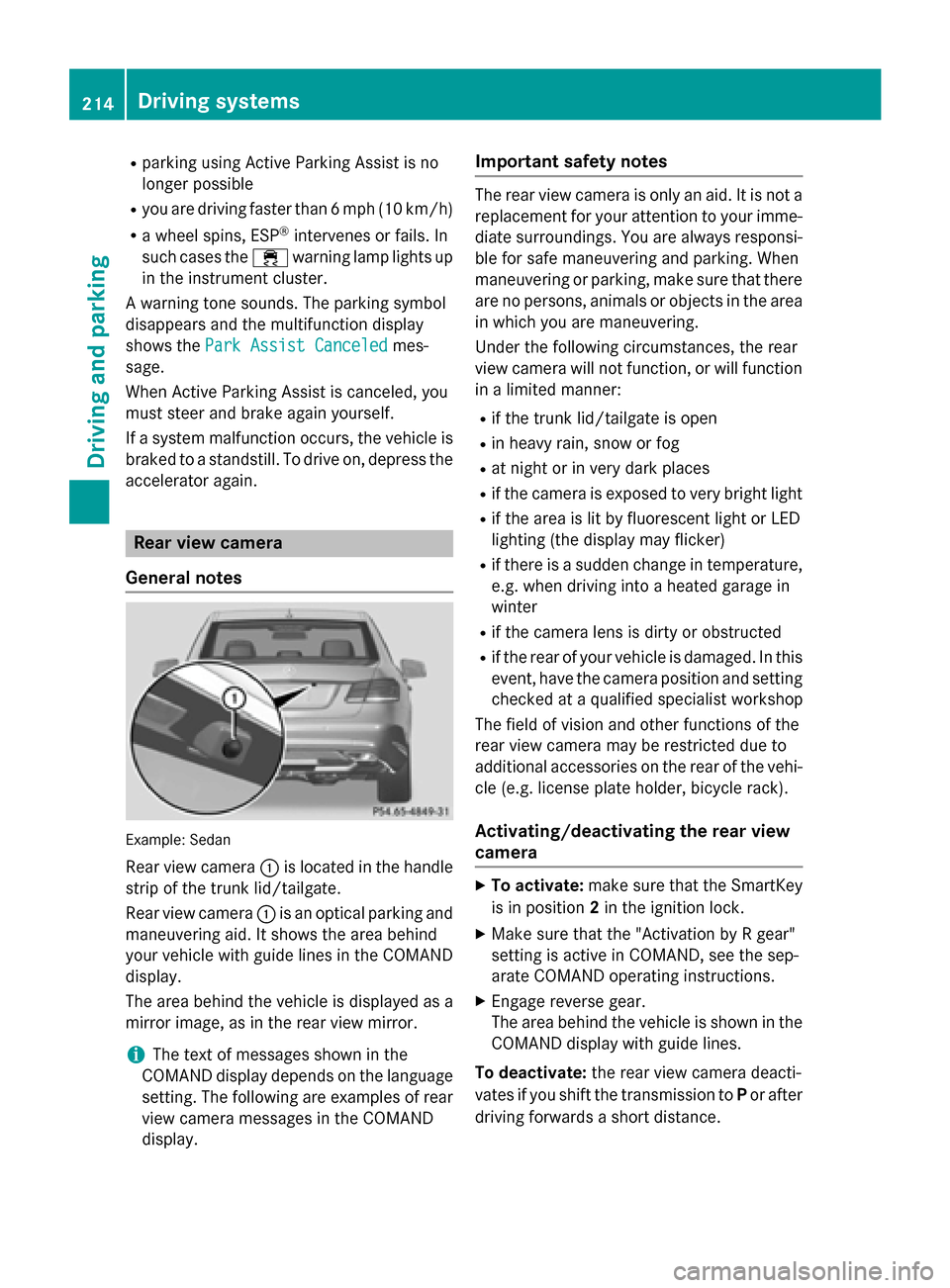
Rear view camera 0043is located in the handle
strip of the trunk lid/tailgate.
Rear view camera 0043is an optical parking and
maneuvering aid. It shows the area behind
your vehicle with guide lines in the COMAND display.
The area behind the vehicle is displayed as a
mirror image, as in the rear view mirror.
i The text of messages shown in the
COMAND display depends on the language
setting. The following are examples of rear view camera messages in the COMAND
display. Important safety notes The rear view camera is only an aid. It is not a
replacement for your attention to your imme-
diate surroundings. You are always responsi-
ble for safe maneuvering and parking. When
maneuvering or parking, make sure that there are no persons, animals or objects in the area in which you are maneuvering.
Under the following circumstances, the rear
view camera will not function, or will function
in a limited manner:
R if the trunk lid/tailgate is open
R in heavy rain, snow or fog
R at night or in very dark places
R if the camera is exposed to very bright light
R if the area is lit by fluorescent light or LED
lighting (the display may flicker)
R if there is a sudden change in temperature,
e.g. when driving into a heated garage in
winter
R if the camera lens is dirty or obstructed
R if the rear of your vehicle is damaged. In this
event, have the camera position and setting checked at a qualified specialist workshop
The field of vision and other functions of the
rear view camera may be restricted due to
additional accessories on the rear of the vehi-
cle (e.g. license plate holder, bicycle rack).
Activating/deactivating the rear view
camera X
To activate: make sure that the SmartKey
is in position 2in the ignition lock.
X Make sure that the "Activation by R gear"
setting is active in COMAND, see the sep-
arate COMAND operating instructions.
X Engage reverse gear.
The area behind the vehicle is shown in the
COMAND display with guide lines.
To deactivate: the rear view camera deacti-
vates if you shift the transmission to Por after
driving forwards a short distance. 214
Driving systemsDriving and parking
Page 217 of 426
360° camera
General notes The 360° camera is a system consisting of
four cameras.
The system analyzes images from the follow-
ing cameras:
R Rear view camera
R Front camera
R Two cameras in the exterior rear view mir-
rors
The cameras capture the immediate sur-
roundings of the vehicle. The system sup-
ports you, e.g. when parking or if vision is
restricted at an exit.
The 360° camera images can be shown in full
screen mode or in six different split-screen
views on the COMAND display. A split-screen view also includes a top view of the vehicle.
This view is calculated from the data supplied
by the installed cameras (virtual camera).
The six split-screen views are:
R top view and picture from the rear view
camera (130° viewing angle)
R top view and image from the front camera
(130° viewing angle without displaying the
maximum steering wheel angle)
R top view and enlarged rear view
R top view and enlarged front view
R top view and pictures from the rearward
facing mirror cameras (rear wheel view)
R top view and pictures from the forward
facing mirror cameras (front wheel view)
When the function is active and you shift the
transmission from Dor Rto N, the dynamic
guidelines are hidden.
When you change between transmission
positions Dand R, you see the previously
selected front or rear view.
Important safety notes The 360°camera is only an aid and may show
a distorted view of obstacles, show them incorrectly or not at all. The 360°camera is
not a substitute for attentive driving.
You are always responsible for safe maneu-
vering and parking. When maneuvering or
parking, make sure that there are no persons,
animals or objects in the area in which you are maneuvering.
You are always responsible for safety, and
must always pay attention to your surround-
ings when parking and maneuvering. This
applies to the areas behind, in front of and
beside the vehicle. You could otherwise
endanger yourself and others.
The 360° camera will not function or will
function in a limited manner:
R if the doors are open
R if the exterior mirrors are folded in
R if the trunk lid/tailgate is open
R in heavy rain, snow or fog
R at night or in very dark places
R if the cameras are exposed to very bright
light
R if the area is lit by fluorescent bulbs or LED
lighting (the display may flicker)
R if there is a sudden change in temperature,
e.g. when driving into a heated garage in
winter
R if the camera lenses are dirty or covered
R if the vehicle components in which the
cameras are installed are damaged. In this
event, have the camera position and setting checked at a qualified specialist workshop.
Do not use the 360° camera in this case. You
can otherwise injure others or cause damage to objects or the vehicle.
Guide lines are always shown at road level.
Activation conditions The 360° camera image can be displayed if:
R your vehicle is equipped with a 360° cam-
era
R the SmartKey is in position 2in the ignition
lock Driving systems
215Driving and parking Z
Page 218 of 426
R
COMAND/Audio 20 is switched on
R the 360° Camera
360° Camera function is switched on
Activating the 360° camera using the
SYS button X
Press the 0066button in the center con-
sole for longer than 2 seconds.
Depending on whether position Dor Ris
engaged, the following is shown:
R full screen display with the image from
the front camera
R full screen display with the image from
the rear view camera
Activating the 360° camera with
COMAND X
Press the 0066button in the center con-
sole.
or X Select System System by turning 00790052007Athe
COMAND controller and press 0098to con-
firm.
X Select 360° Camera
360° Camera and press0098to con-
firm.
Depending on whether position Dor Ris
engaged, the following is shown:
R a split screen with top view and the
image from the front camera or
R a split screen with top view and the
image from the rear view camera
Activating the 360° camera using
reverse gear The 360° camera images can be automati-
cally displayed by engaging reverse gear.
X Make sure that the SmartKey is in position
2 in the ignition lock.
X Make sure that the Activation by R
Activation by R
gear
gear function is selected in COMAND/ Audio 20, see the separate COMAND/
Audio 20 operating instructions.
X To show the 360° camera image: engage
reverse gear.
The area behind the vehicle is shown in the COMAND/Audio 20 display in split-screen
mode. You see the top view of the vehicle
and the image from the rear view camera.
Selecting the split-screen and full
screen displays X
To switch between split screen views:
switch to the line with the vehicle icons by
sliding 00970052the controller.
X Turn 00790052007A the controller and select one of
the vehicle icons.
X To switch to full screen mode: select
Full Screen Full Screen by turning00790052007Athe control-
ler and press 0098to confirm.
i The
Full Screen
Full Screen option is only available
in the following views:
R Top view with picture from the rear view
camera
R Top view with picture from the front cam-
era
Displays in the COMAND/Audio 20 dis-
play Important safety notes
The camera system may show a distorted
view of obstacles, show them incorrectly or
not at all. Obstacles are not shown by the
system in the following locations:
R under the front and rear bumpers
R very close to the front and rear bumpers
R in the area immediately above the tailgate
handle/trunk lid handle
R very close to the exterior mirrors
R in the transitional areas between the vari-
ous cameras in the virtual top view 216
Driving systemsDriving an
d parking
Page 247 of 426
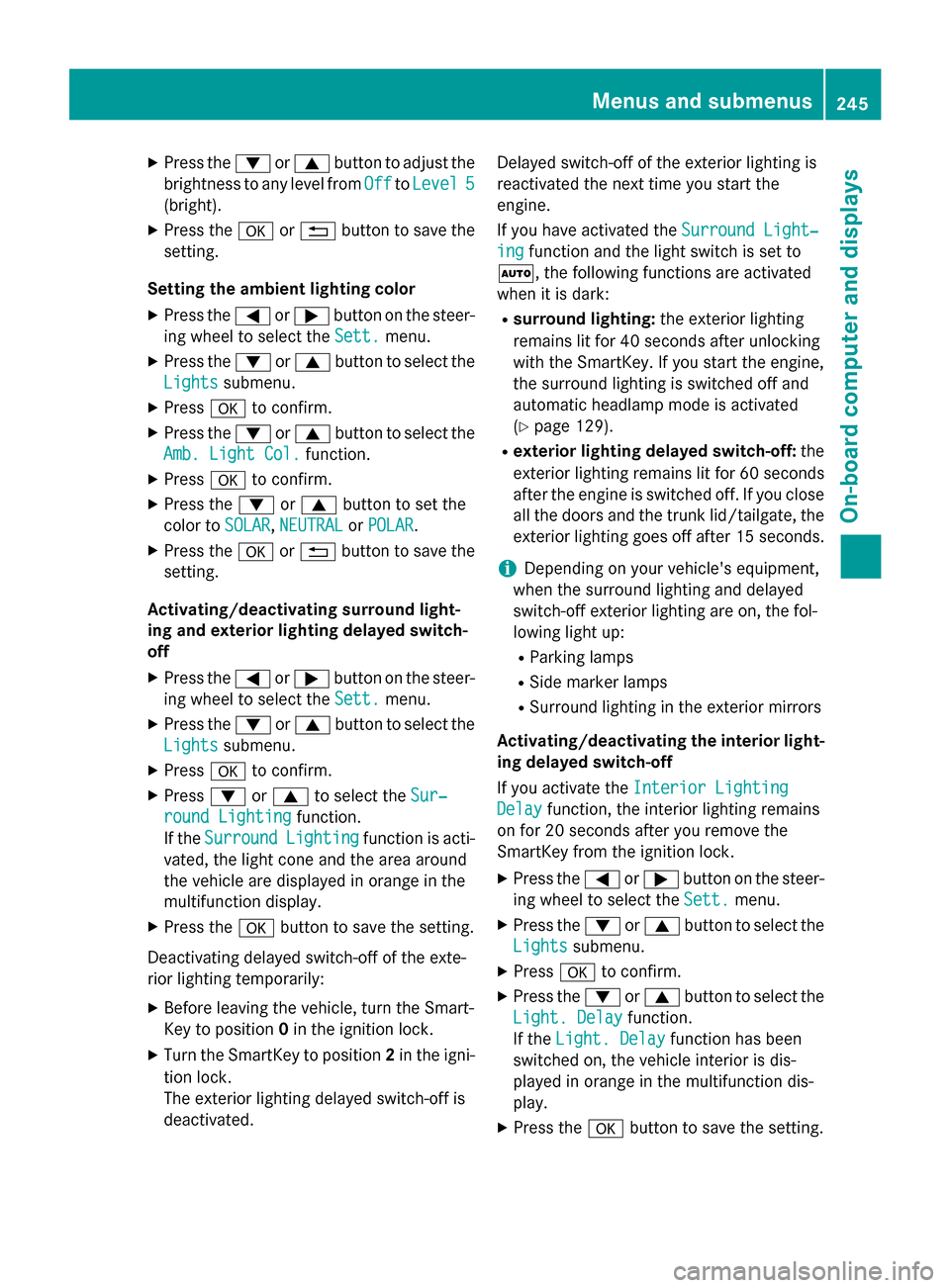
X
Press the 0064or0063 button to adjust the
brightness to any level from Off OfftoLevel 5 Level 5
(bright).
X Press the 0076or0038 button to save the
setting.
Setting the ambient lighting color
X Press the 0059or0065 button on the steer-
ing wheel to select the Sett.
Sett. menu.
X Press the 0064or0063 button to select the
Lights
Lights submenu.
X Press 0076to confirm.
X Press the 0064or0063 button to select the
Amb. Light Col.
Amb. Light Col. function.
X Press 0076to confirm.
X Press the 0064or0063 button to set the
color to SOLAR
SOLAR,NEUTRAL
NEUTRAL orPOLAR
POLAR.
X Press the 0076or0038 button to save the
setting.
Activating/deactivating surround light-
ing and exterior lighting delayed switch-
off
X Press the 0059or0065 button on the steer-
ing wheel to select the Sett.
Sett. menu.
X Press the 0064or0063 button to select the
Lights
Lights submenu.
X Press 0076to confirm.
X Press 0064or0063 to select the Sur‐ Sur‐
round Lighting
round Lighting function.
If the Surround
Surround Lighting
Lightingfunction is acti-
vated, the light cone and the area around
the vehicle are displayed in orange in the
multifunction display.
X Press the 0076button to save the setting.
Deactivating delayed switch-off of the exte-
rior lighting temporarily:
X Before leaving the vehicle, turn the Smart-
Key to position 0in the ignition lock.
X Turn the SmartKey to position 2in the igni-
tion lock.
The exterior lighting delayed switch-off is
deactivated. Delayed switch-off of the exterior lighting is
reactivated the next time you start the
engine.
If you have activated the
Surround Light‐
Surround Light‐
ing ing function and the light switch is set to
0058, the following functions are activated
when it is dark:
R surround lighting: the exterior lighting
remains lit for 40 seconds after unlocking
with the SmartKey. If you start the engine,
the surround lighting is switched off and
automatic headlamp mode is activated
(Y page 129).
R exterior lighting delayed switch-off: the
exterior lighting remains lit for 60 seconds
after the engine is switched off. If you close all the doors and the trunk lid/tailgate, the
exterior lighting goes off after 15 seconds.
i Depending on your vehicle's equipment,
when the surround lighting and delayed
switch-off exterior lighting are on, the fol-
lowing light up:
R Parking lamps
R Side marker lamps
R Surround lighting in the exterior mirrors
Activating/deactivating the interior light-
ing delayed switch-off
If you activate the Interior Lighting
Interior Lighting
Delay Delay function, the interior lighting remains
on for 20 seconds after you remove the
SmartKey from the ignition lock.
X Press the 0059or0065 button on the steer-
ing wheel to select the Sett. Sett.menu.
X Press the 0064or0063 button to select the
Lights
Lights submenu.
X Press 0076to confirm.
X Press the 0064or0063 button to select the
Light. Delay
Light. Delay function.
If the Light. Delay
Light. Delay function has been
switched on, the vehicle interior is dis-
played in orange in the multifunction dis-
play.
X Press the 0076button to save the setting. Menus and submenus
245On-board computer and displays Z
Page 279 of 426
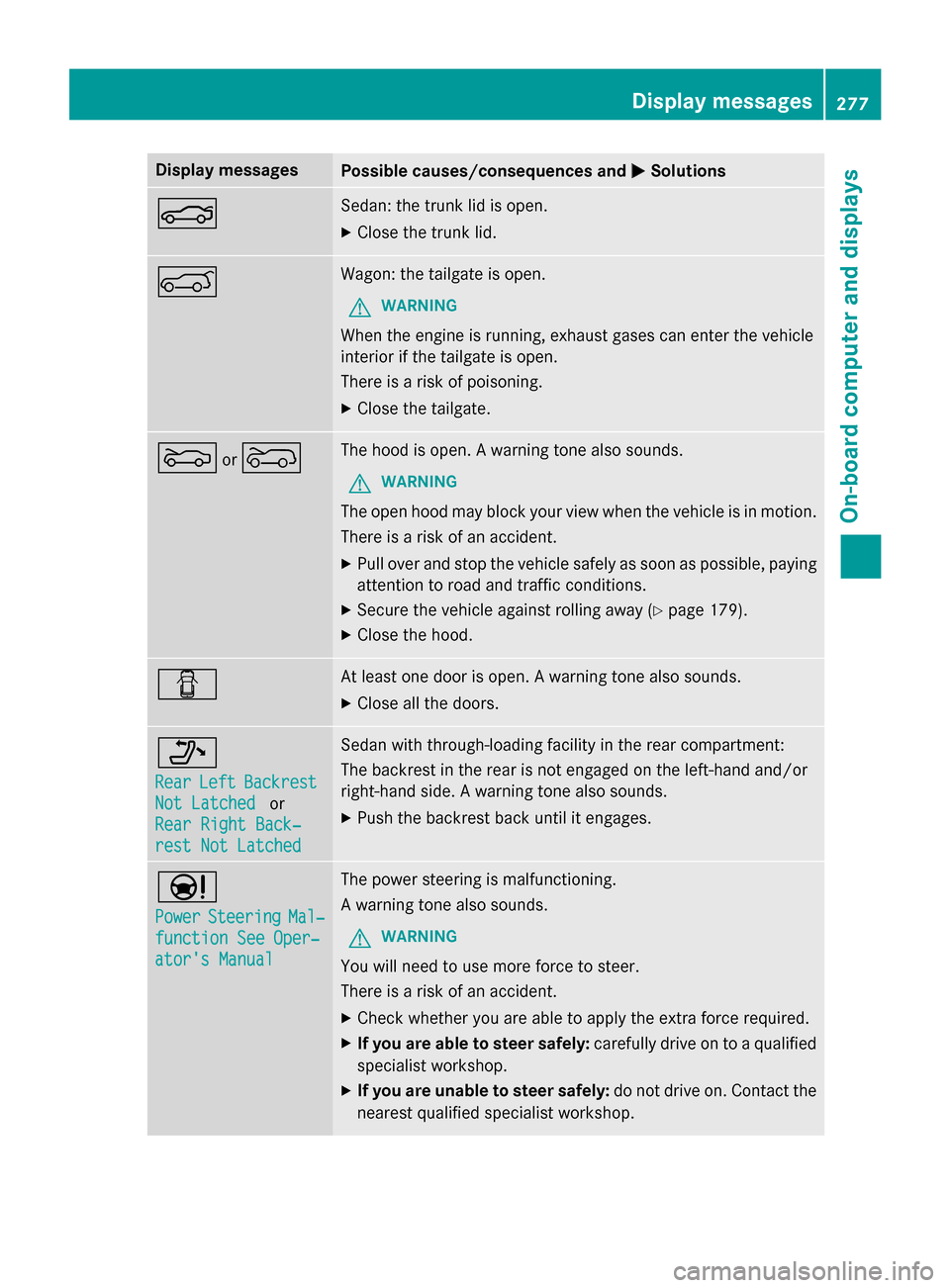
Display messages
Possible causes/consequences and
0050
0050Solutions 0084 Sedan: the trunk lid is open.
X Close the trunk lid. 0065 Wagon: the tailgate is open.
G WARNING
When the engine is running, exhaust gases can enter the vehicle
interior if the tailgate is open.
There is a risk of poisoning.
X Close the tailgate. 0083
or0066 The hood is open. A warning tone also sounds.
G WARNING
The open hood may block your view when the vehicle is in motion.
There is a risk of an accident.
X Pull over and stop the vehicle safely as soon as possible, paying
attention to road and traffic conditions.
X Secure the vehicle against rolling away (Y page 179).
X Close the hood. 0051 At least one door is open. A warning tone also sounds.
X Close all the doors. 006F
Rear Rear
Left
LeftBackrest
Backrest
Not Latched
Not Latched or
Rear Right Back‐
Rear Right Back‐
rest Not Latched rest Not Latched Sedan with through-loading facility in the rear compartment:
The backrest in the rear is not engaged on the left-hand and/or
right-hand side. A warning tone also sounds.
X Push the backrest back until it engages. 00CC
Power Power
Steering
Steering Mal‐
Mal‐
function See Oper‐
function See Oper‐
ator's Manual ator's Manual The power steering is malfunctioning.
A warning tone also sounds.
G WARNING
You will need to use more force to steer.
There is a risk of an accident. X Check whether you are able to apply the extra force required.
X If you are able to steer safely: carefully drive on to a qualified
specialist workshop.
X If you are unable to steer safely: do not drive on. Contact the
nearest qualified specialist workshop. Display
messages
277On-board computer and displays Z