change wheel MERCEDES-BENZ GLA SUV 2020 User Guide
[x] Cancel search | Manufacturer: MERCEDES-BENZ, Model Year: 2020, Model line: GLA SUV, Model: MERCEDES-BENZ GLA SUV 2020Pages: 346, PDF Size: 51.22 MB
Page 179 of 346
The
Parking AssistActiveSelectR Parking
AssistActiveSelectR
Observe Surrounding s Observe
Surrounding smessage appearson
the multifunct iondisplay .
As soon asthe parking procedure iscomplete,
the Active Parking AssistFinished Active
Parking AssistFinished mes-
sage appears andawarning tonesounds. The
vehicle isnow parked.
The vehicle iskept station arywithout the
driver having todepress thebrake pedal. The
braking effectiscanceled whenyoudepress
the accelerator pedal.
Act ive Parking Assistnolonger supports you
with steerin ginter ventions andbrake applica-
tions. When Active Parking Assistisfinished,
you must steer andbrake againyourself.
Act ive Parking Assistisstill availabl e.
Parking tips:
R The way your vehicle ispositioned inthe
parking spaceafterparking isdependent on
various factors.These include theposition
and shape ofthe vehicles parkedinfront
and behind itand thecondit ionsofthe loca-
tion. Itmay bethe case thatActive Parking
Assist guides youtoofarinto aparking
space, ornot farenough intoit.Insome
cases, itmay alsolead youacross oront o
the curb. Ifnecessary, canceltheparking
procedure withActive Parking Assist.
R You canalso preselect transmission position
005B. The vehicle redirect sand does notdrive
as far into theparking space.Should the
trans mission changetakeplace tooearly,
the parking procedure iscanceled. Asensi-
ble parking position cannolonger beach-
ieved fromthisposition.
Exiting apar king space In
order thatActive Parking Assistcansupport
you when exitingthe parking space:
R you need tohave parked usingActive Park-
ing Assist .
R the border ofthe parking spacemustbe
high enough atthe front andtherear. A
curb stoneis too small, forexample.
R the border ofthe parking spacemustnotbe
too wide, asthe position ofthe vehicle must
not exceed anangle of45° tothe start ing
position asitis maneuvered intotheparking
space.
R amaneuvering distanceofat least 3.3ft
(1.0 m)must beavailabl e. Act
ive Parking Assistcanonly assist youwith
exitin gaparking spaceifyou have parked the
vehicle parallel tothe direction oftravel using
Act ive Parking Assist.
i If
Act ive Parking Assistdetectsobstacles,
Act ive Parking Assistbrakes automatically
while thevehicle isexitin gthe parking
space. Youareresponsible forbraking in
good time.
X Start theengine.
X Release theelectric parking brake.
X Switch onthe turn signal inthe direction
you willdrive outofthe parking space.
X Shift thetrans mission toposition 005Bor005E.
The Start Parking Assist? Start
Parking Assist?Yes:OK Yes:
OKNo: No:
0038 message appearsonthe multifunct ion
display .
X To cancel theprocedur e:press the0038
button onthe multifunct ionsteerin gwheel
or pull away .
or X To
exit apar king space usingActive
Park ingAssist: pressthe0076 button on
the multifunct ionsteerin gwheel.
The Parking AssistActiveAcceler‐ Parking
AssistActiveAcceler‐
ate andBrake ate
andBrake Observe Surrounding s Observe
Surrounding s
message appearsonthe multifunct iondis-
play.
X Let goofthe multifunct ionsteerin gwheel.
X Pull away ,being ready tobrake atall times.
Do not exceed amaximum speedofapprox-
imately 6mph (10km/ h)when exitinga
park ingspac e.Otherwis e,Ac tivePark ing
As sist willbecan cele d.
X Dep endingonthemess ageoras requir ed,
shif tth etransm ission toposit ion005Bor005E.
Ac tivePark ingAssist imme diatelysteers in
th eoth erdirec tion.The Park ingAssist Park
ingAssist
Acti veAcce lerateand Brake Acti
veAcce lerateand BrakeObse rve Obse
rve
Surr oundings Surr
oundings messageappears onthe
mult ifunction display.
i You
willachie vethebest result sby waitin g
for thest eerin gproc edure tocom plete
befo repulling away.
If you back upafteract ivat ion, thest eerin g
wheel ismov edtothest raight -aheadposi-
tio n.
X Dr ive forwards andreverse asprom ptedby
th eAc tivePark ingAssist warn ingdisplays,
seve raltim esifnec essar y. Drivin
gsyst ems
177Driving andparking Z
Page 180 of 346
Once
youhave exited theparking spacecom-
pletely, thesteering wheelismoved tothe
straight-ahead position.Youhear atone and
the Active Parking AssistFinished Active
Parking AssistFinished mes-
sage appea rson the multifunction display.You
will then have tosteer andmerge intotraffic
on your own. Active Parking Assistisstill avail -
able. Youcantake overthesteering beforethe
vehicle hasexited theparking spacecom-
pletely. Thisisuseful ,for example whenyou
recognize thatitis alrea dypossible topull out
of the parking space.
Cance lingActive Parking Assist X
Stop themovement ofthe multifunction
steering wheelorsteer yoursel f.
Act ive Parking Assistwillbecanceled at
once. TheActive Parking AssistCan‐ Active
Parking AssistCan‐
celed celed
message appearsinthe multifunction
displa y.
or X Press thePARKTRONIC button
(Y page 173).
Act ive Parking Assistisswitched offand
Act ive Parking Assistisimmediately can-
celed. TheActive Parking AssistCan‐ Active
Parking AssistCan‐
celed celed
message appearsinthe multifunction
displa y.
Act ive Parking Assistiscanceled automaticall y
if:
R the electric parking brakeisengaged
R transmission position005Disselected
R parking usingActive Parking Assistisno
longer possible
R you aredriving fasterthan6mph (10km/h )
R awheel spins,ESP®
intervenes orfails. In
such cases the00E5 warning lamplights up
in the instrument cluster
A warning tonesounds. Theparking symbol
disapp earsandthemultifunction display
shows theActive Parking AssistCan‐ Active
Parking AssistCan‐
celed celed
message.
When Active Parking Assistiscanceled, you
must steer andbrake againyoursel f.
If asystem malfunction occurs,thevehicle is
braked toastandstill. Todrive on,depress the
accelerator again. Rear
view camera
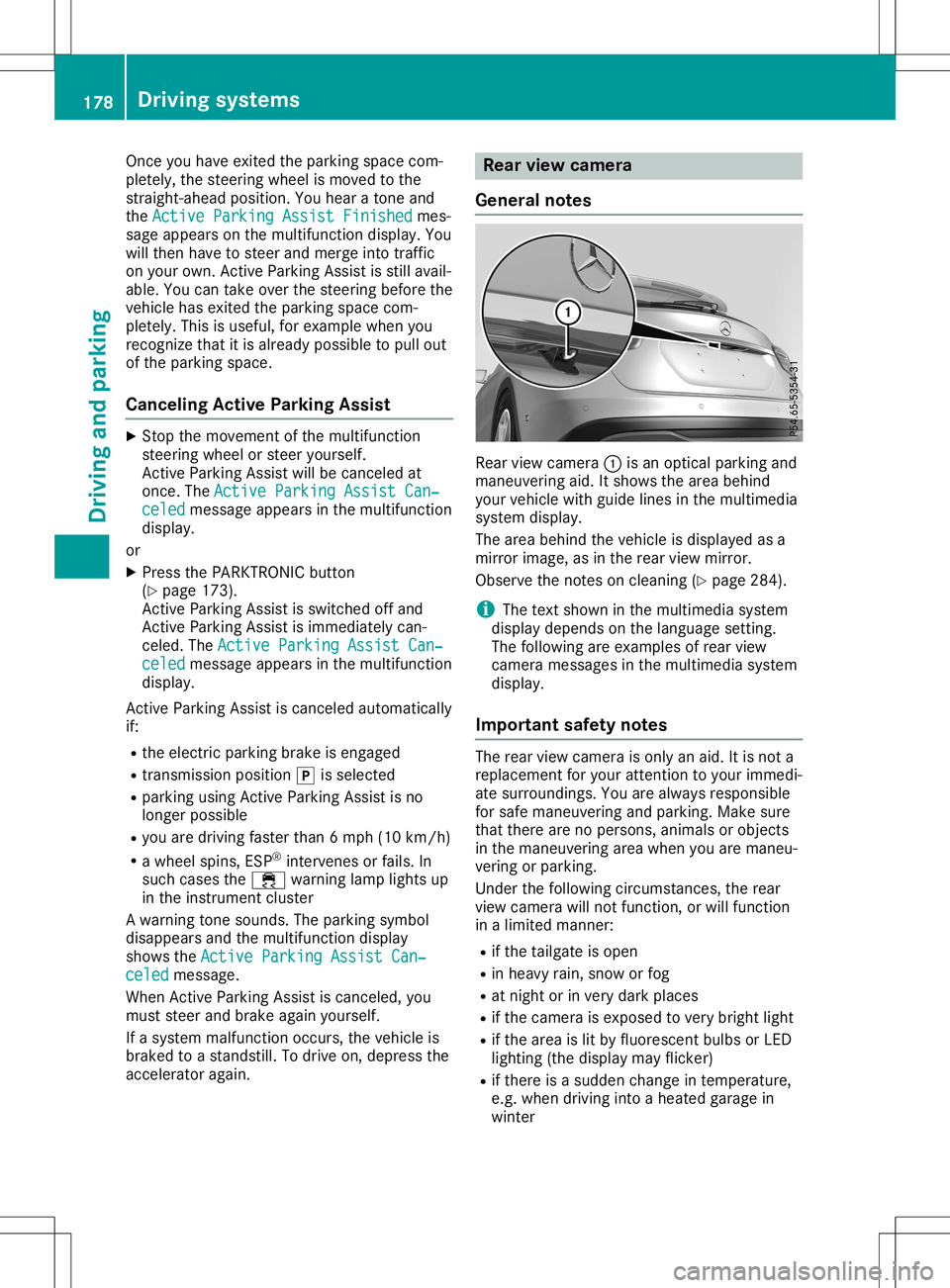
General notes Rear
viewcamera 0043isan optical parking and
maneuvering aid.Itshows thearea behind
your vehicle withguide linesinthe multimedia
system display.
The area behind thevehicle isdispla yedasa
mirror image, asinthe rear view mirror.
Observe thenotes oncleaning (Ypage 284).
i The
text shown inthe multimedia system
displa ydepends onthe langua gesetting.
The followi ngare examples ofrear view
camera messages inthe multimedia system
displa y.
Importa ntsafety notes The
rear view camera isonly anaid. Itis not a
replacement foryour attent iontoyour immedi-
ate surroundings. Youarealwa ysresponsible
for safe maneuvering andparking. Makesure
that there arenopersons, animalsorobjects
in the maneuvering areawhen youaremaneu-
vering orparking.
Under thefollowi ngcircumstances, therear
view camera willnotfunction, orwill function
in alimited manner:
R ifthe tailgate isopen
R in heavy rain,snow orfog
R at night orinvery dark places
R ifthe camera isexposed tovery bright light
R ifthe area islit by fluorescent bulbsorLED
lighting (thedispla ymay flicker)
R ifthere isasudden changeintemperature,
e.g. when driving intoaheated garagein
winter 178
Driving
systemsDriving andparking
Page 191 of 346
The
outside temperat uredisplay isin the mul-
tifunc tiondisplay (Ypage 191).
There isashort delay before achange inout-
side temperat ureappears inthe multifunct ion
display . Coolant
temperaturegauge G
WARNIN
G
Opening thehood when theengine isover-
heated orwhen thereisafire inthe engine
compart mentcould expose youtohot gases
or other service products. Thereisarisk of
injury.
Let anoverheated enginecooldown before
opening thehood. Ifthere isafire inthe engine
compart ment,keep thehood closed
and cont actthe fire department .
! A
display message isshown ifthe coolant
temperat ureistoo high.
If the coolant temperat ureisover 248‡
(120 †),donot cont inue driving. The
engine willotherwise bedamaged.
The coolant temperat uregage isin the instr u-
ment cluster onthe right- hand side
(Y page 32).
The Hmarking inthe coolant temperat ure
gauge correspon dstoacoolant temperat ure
of approximately 248‡(120 †).
Under normal operating conditionsandatthe
correc tcoolant level,thecoolant temperat ure
gauge mayrisetothe Hmarking. Opera
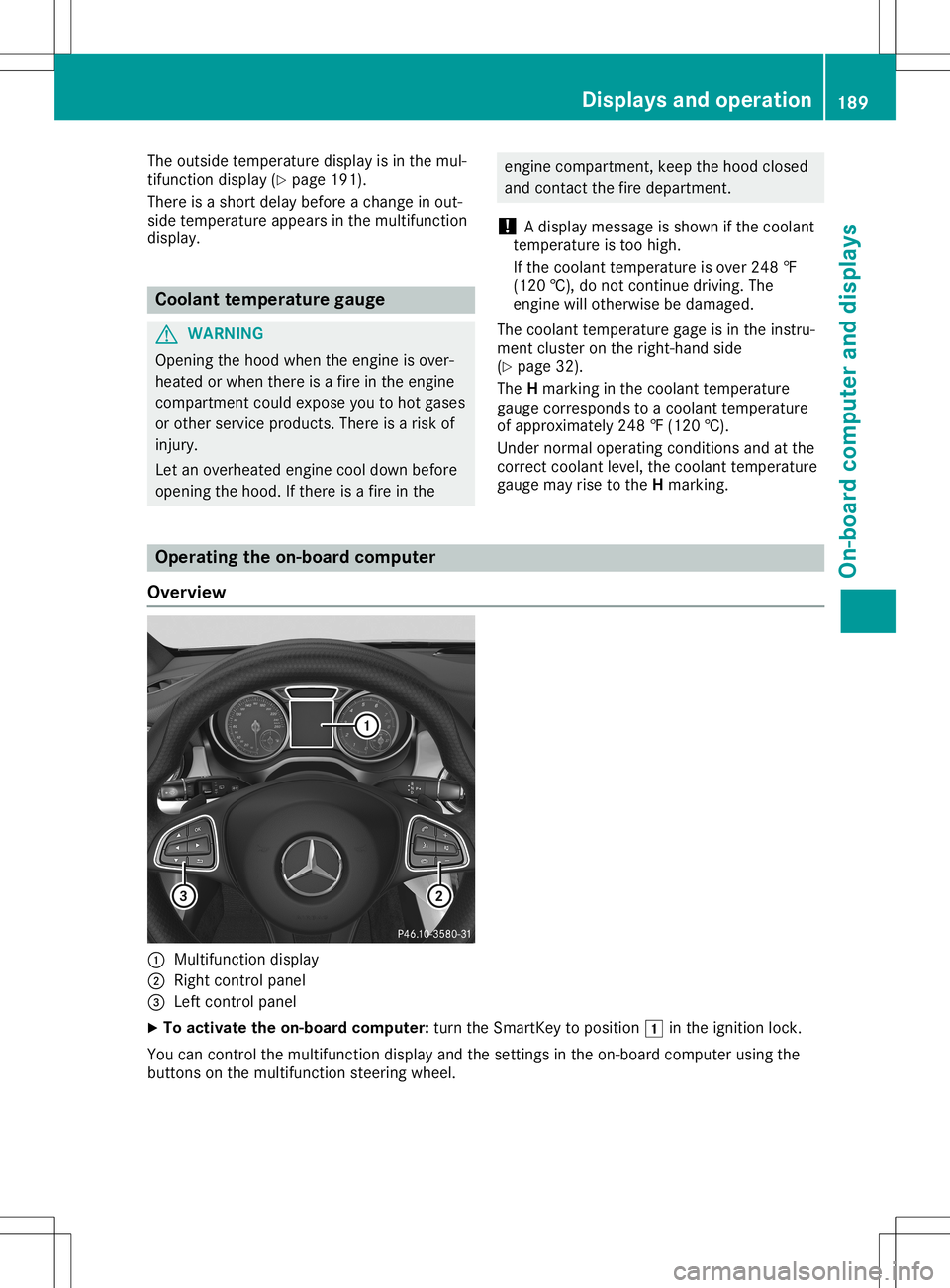
tingtheon-board computer
Overview 0043
Multifunct iondisplay
0044 Right controlpanel
0087 Left controlpanel
X To activat ethe on-board computer:turn theSmart Keytoposition 0047inthe ignition lock.
You cancont rolthe multifunct iondisplay andthesettings inthe on-board computer usingthe
button son the multifunct ionsteerin gwheel. Displays
andoperat ion
189On-board computerand display s Z
Page 266 of 346
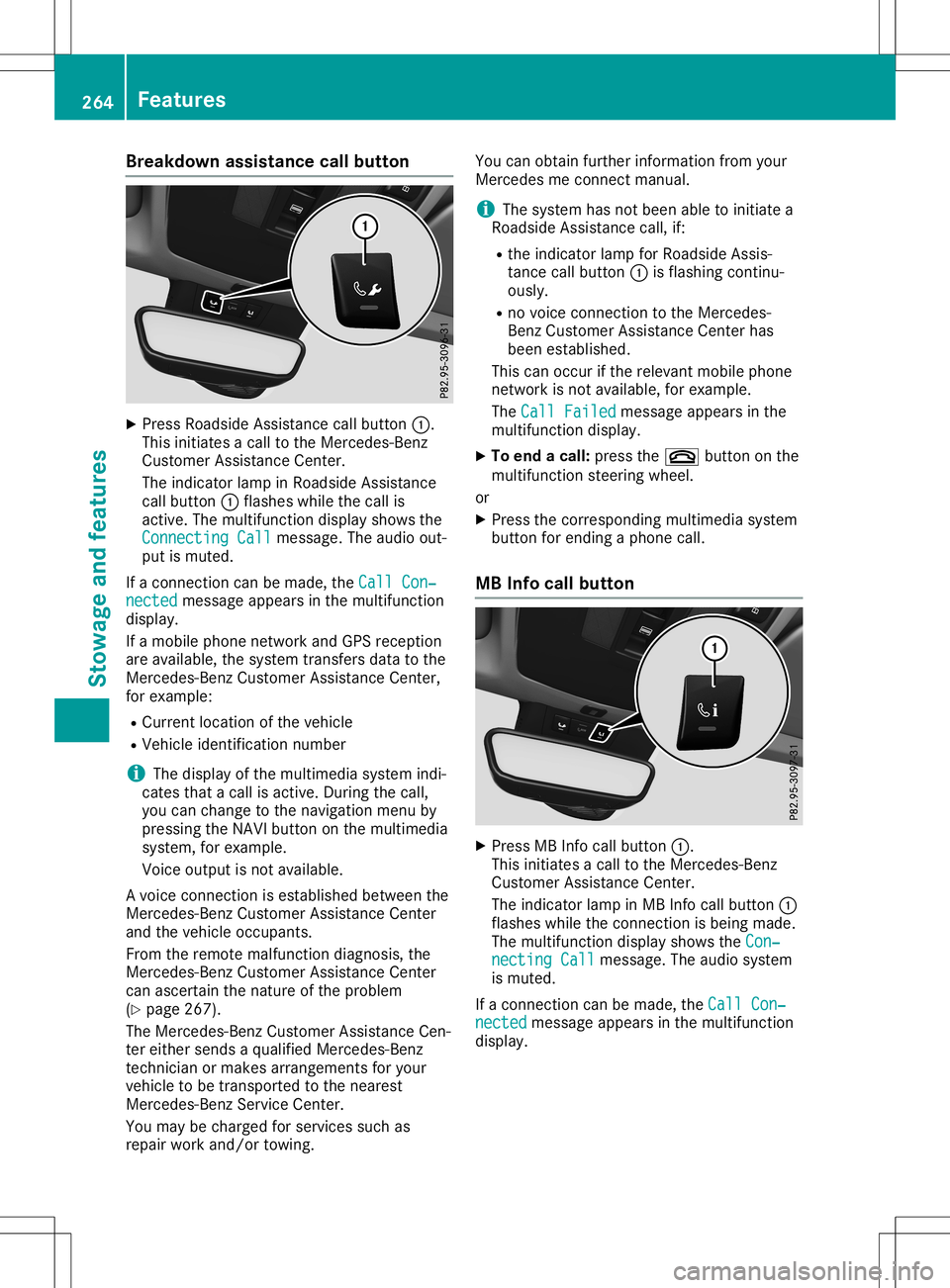
Break
downass istanc ecal lbutto n X
Pre ssRoadside Assi stance callbu tton 0043.
Thi sini tia tes acal lto the Mer cedes-B enz
Cu stom erAssi stance Center.
The indicator lamp inRo adside Assi stance
cal lbu tton 0043flashe swh ile the callis
acti ve.The multifunc tiondispl aysho wsthe
Con nectingCal l Con
nectingCal lmes sage. The audio ou t-
pu tis mu ted .
If aconne ctioncan bemade,the CallCon ‐ Cal
lCon ‐
nec ted nec
ted message appe ars inthe multifunc tion
di spl ay.
If amob ile pho nenetw orkand GPSrece ption
are availab le,the system transfersdata to the
Mer cedes-B enzCustom erAssi stance Center,
for exa mpl e:
R Cu rre ntlocati onofthe vehicle
R Veh icleidenti ficationnum ber
i The
displ ayofthe multimed iasystem indi-
cate stha ta cal lis acti ve.Duri ngthe call,
yo ucan change tothe navi gatio nmenu by
pre ssing the NAVI button onthe multimed ia
sy stem ,for exa mpl e.
Voi ceoutpu tis not availab le.
A voi ce conne ctionis esta blished betwe enthe
Mer cedes-B enzCustom erAssi stance Center
and thevehicleoccu pants.
From therem otemalfunctio ndiag nosi s,the
Mer cedes-B enzCustom erAssi stance Center
can ascerta inthe natu reofthe problem
(Y page 267 ).
The Mercedes-B enzCustom erAssi stance Cen-
ter either send sa qu alifi ed Mer cedes-B enz
techni cianor ma kes arrang eme ntsforyour
veh icleto be trans ported tothe nearest
Mer cedes-B enzServ iceCenter.
Yo uma ybe cha rgedfor service ssu ch as
rep airwo rkand /or towing. Yo
ucan obtainfur ther informa tionfrom your
Mer cedesme conne ctma nua l.
i The system hasnot been ableto initia te a
Ro adside Assi stance call,if:
R the indicator lamp forRoadside Assi s-
tance callbu tton 0043isfla shi ng conti nu-
ou sly.
R no voice conne ctionto the Mer cedes-
Benz Custom erAssi stance Center has
be en esta blished .
Thi scan occu rif the releva ntmob ile pho ne
netw orkisnot availab le,for exa mpl e.
The CallFai led Cal
lFai led message appe ars inthe
mu ltifunc tiondispl ay.
X To endacal l:pre ssthe 0076 button onthe
mu ltifunc tionstee ring wheel.
or X Pre ssthe corr espond ingmultimed iasystem
bu tton forend ingapho necall.
MB Info cal lbutto n X
Pre ssMB Info callbu tton 0043.
Thi sini tia tes acal lto the Mer cedes-B enz
Cu stom erAssi stance Center.
The indicator lamp inMB Info callbu tton 0043
fla she swh ile the conne ctionis be ing made.
The multifunc tiondispl aysho wsthe Con‐ Con
‐
nec tingCal l nec
tingCal lmes sage. The audio sy stem
is mu ted .
If aconne ctioncan bemade,the CallCon ‐ Cal
lCon ‐
nec ted nec
ted message appe ars inthe multifunc tion
di spl ay. 26
4 Fe
aturesSto wag ean dfe ature s
Page 267 of 346
If
amobil ephone network andGPS reception
are avai lable,the system transfers datatothe
Mercedes-Benz Customer Assistance Center,
for example :
R Curre ntlocation ofthe vehicle
R Vehicle identifica tionnumber
i The
displ ayofthe multimed iasystem indi-
cates thatacall isactive. During thecall,
you can change tothe naviga tionmenu by
pressing theNAVI button onthe multimed ia
system, forexample .
Voice outputis not avai lable.
A voice connection isestabl ishedbetween the
Mercedes-Benz Customer Assistance Center
and thevehicle occupants.
You receive information aboutopera tingyour
vehicle ,abou tthe nearest Mercedes-Benz Ser-
vice Center andabou tother productsand
services fromMercedes-Benz.
USA only: youcan find further information on
the Mercedes meconnect systemunder"Own-
ers Online" athttp://www.mbusa .com.
i The system hasnotbeen ableto initiate an
MB Info call, if:
R the indicator lampinMB Info callbut-
ton 0043isflashi ngcontinuously .
R no voice connection tothe Mercedes-
Benz Customer Assistance Centerhas
been establ ished.
This canoccur ifthe releva ntmobil ephone
network isnot avai lable,for example .
The Call Failed Call
Failed message appearsinthe
multifu nctiondisplay.
X To end acall: press the0076 button onthe
multifu nctionsteering wheel.
or X Press thecorresponding multimediasystem
button forending aphone call.
Call priority When
service callsareactive, e.g.Roadside
Assistance orMB Info calls ,an emergency call
can stillbeinitiated .In this case, anemer-
gency callwilltake priori tyand override all
other active calls.
The indicator lampofthe respective button
flashe suntil thecall isended. An
emergency callcan only beterminated by
the Mercedes-Benz Customer Assistance Cen-
ter.
All other callscanbeended bypressing:
R the 0076 button onthe multifu nctionsteer-
ing wheel
R the corresponding buttoninthe multime dia
system toend thevoice call
i When
acall isinitiated ,the audiosystem
is muted. Themobil ephone isno longer
connected tothe multime diasystem. How-
ever, ifyou want touse yourmobil ephone,
do soonly when thevehicle isstationary
and inasafe location.
Do wnl oading destination sin COMA ND Dow
nloadin gdestination s
Download ingdestinations givesyouaccess to
a datab asewith over 15mill ion points ofinter-
est (POIs). Thesecanbedownlo adedonthe
naviga tionsystem inyou rvehicle .If you know
the destination, theaddre sscan bedownlo a-
ded. Alternatively ,you can obtain thelocation
of Points ofInterest (POIs)/important destina-
tions inthe vicinity.
Furthermore, youcan downlo adroutes withup
to 20 way points.
You areprompted toconfirm routeguidance
to the addre ssentered.
The system calculatestheroute andsubse -
quently startstheroute guidance withthe
addre ssentered.
i If
you select No No,
the addre sscan besaved
in the addre ssbook.
i The
Destination Downloadfunctionis
avai lableifthe releva ntmobil ephone net-
work isavai lableand data transfer ispossi-
ble.
i The
Destination Downloadfunctioncan
only beused ifthe vehicle isequi pped with
a naviga tionsystem.
Route Assistance
This service ispart ofthe Mercedes mecon-
nect PLUS Package andcannot beobtained
sepa rately .
i You
canalso usetheRou teAssistance
function ifyou rvehicle isnot equi pped with
a naviga tionsystem. Fe
atur es
265Stowag eand features Z
Page 290 of 346
so,
cont actyour local waste disposa lcom-
pany. Vehicle
toolkit
General notes Vehicles
withaTIREFIT kit:the TIREFIT kitis
located inthe stowage wellunder thecargo
compartment floor.
Vehicles withatire-change toolkit:the tire-
change toolkitisin the stowage wellunder
the cargo compartment floor.
Apart fromcertain country-specific variations,
the vehicles arenot equip pedwith atire-
change toolkit.Some toolsforchanging a
wheel arespecific tothe vehicle. Formore
information onwhich tirechanging toolsare
required andapproved toperform awheel
change onyour vehicle, consultaqual ified
speciali stworkshop.
Tools required forchanging awheel may
include, forexample:
R Jack
R Wheel chock
R Lug wrench
R Alignment bolt
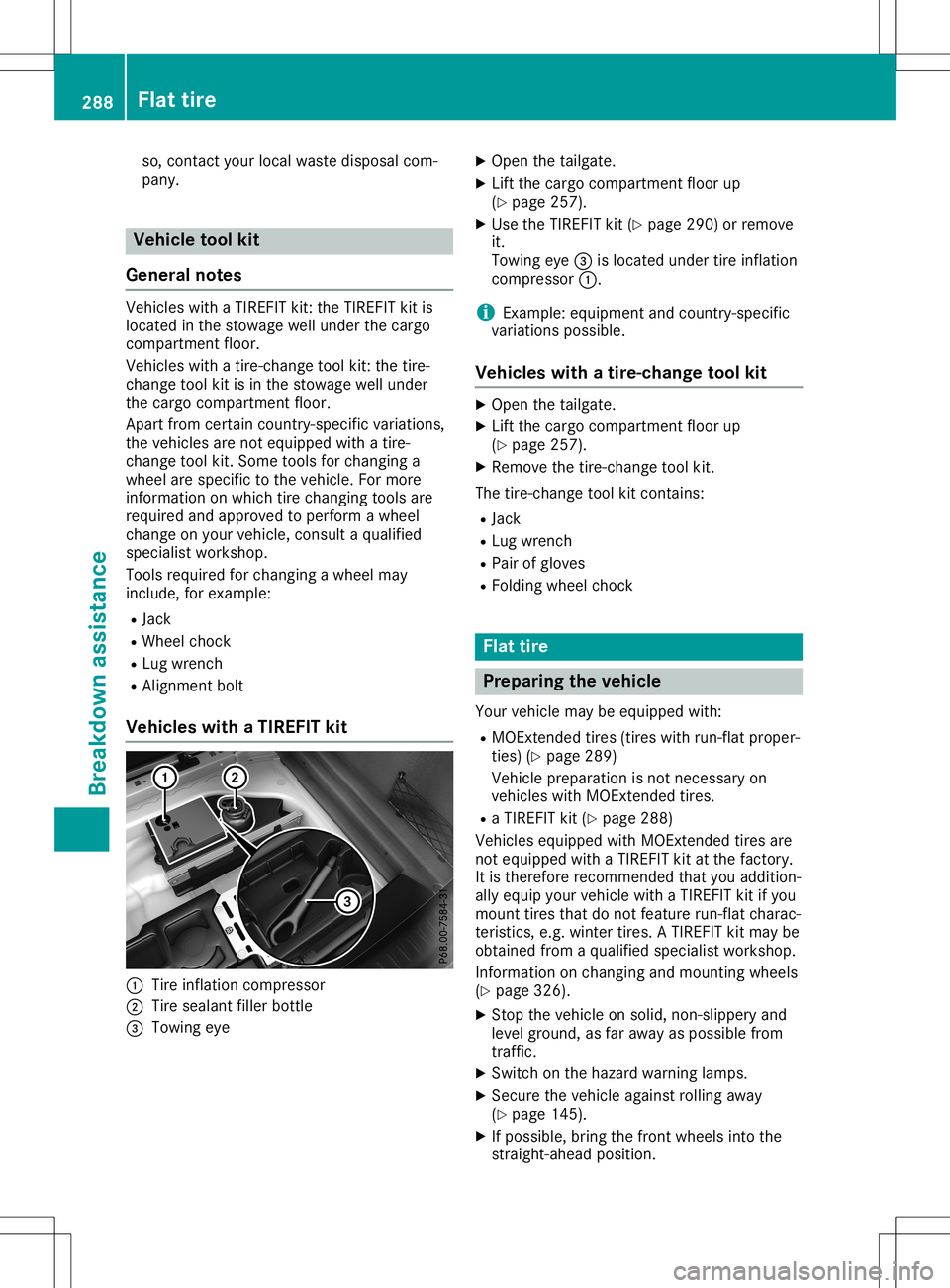
Vehicle swith aTIREFIT kit 0043
Tire inflation compressor
0044 Tire seala ntfiller bottle
0087 Towing eye X
Open thetailgate.
X Lift the cargo compartment floorup
(Y page 257).
X Use theTIREFIT kit(Ypage 290)orremove
it.
Towing eye0087islocated undertireinflation
compressor 0043.
i Example:
equipment andcountry-specific
variations possible.
Vehicle swith atire-change toolkit X
Open thetailgate.
X Lift the cargo compartment floorup
(Y page 257).
X Remove thetire-change toolkit.
The tire-change toolkitcont ains:
R Jack
R Lug wrench
R Pair ofgloves
R Folding wheelchock Flat
tire Prepar
ingthe vehicl e
Your vehicle maybeequip pedwith:
R MOExt ended tires(tires withrun-flat proper-
ties) (Ypage 289)
Vehicle preparation isnot necessary on
vehicles withMOExt ended tires.
R aTIREFIT kit(Ypage 288)
Vehicles equippedwith MOExt ended tiresare
not equip pedwith aTIREFIT kitatthe factory.
It is therefore recommended thatyouaddition-
ally equip yourvehicle withaTIREFIT kitifyou
mount tiresthatdonot feature run-flat charac-
teristics, e.g.winter tires.ATIREFIT kitmay be
obtained fromaqual ified speciali stworkshop.
Information onchanging andmounting wheels
(Y page 326).
X Stop thevehicle onsolid, non-slippery and
level ground, asfar awa yas possible from
traffic.
X Switch onthe hazard warning lamps.
X Secure thevehicle againstrolling away
(Y page 145).
X Ifpossible ,bring thefront wheels intothe
straight-ahead position.288
Flat
tireBreakdown assistance
Page 291 of 346
X
Swi tch offthe engi ne.
X Vehi cles without KEYLES S-GO :remo ve
the Smar tKeyfrom theigniti onlock.
X Vehi
cles with KEYLES S-GO start-fun c-
tio nor KEYLES S-GO :ope nthe driver' s
doo r.
The vehicleelectro nicsarenow inpos ition
005A. Thisis the same asthe Smar tKeyhaving
bee nremo ved.
X Vehi
cles with KEYLES S-GO start-fun c-
tio nor KEYLES S-GO :remo vethe Start/
Stop button from theigniti onlock
(Y page 125 ).
X Ma kesure that theengi necanno tbe star ted
via your sma rtpho ne(Ypage 126 ).
X Ma kesure that thepasse nger sare not
enda ngeredasthey doso. Makesure that
no one isnea rthe danger areawh ile a
wh eel isbei ng cha nged .Anyo newhois not
di rectl yas sis ting inthe wheel change
sho uld, for exa mpl e,stand behindthe bar-
rie r.
X Ge tou tof the vehicle. Pa yattenti ontotraf-
fic condi tions when doing so.
X Close thedriver' sdoo r. MOE
xtendedtires(ti res with run-fl at
prope rties)
Gen eral notes Wi
th MOExtend edtire s(ti res with run flat
cha racte ristics) ,yo ucan continu eto drive your
veh icleeve nif there isatotal loss ofpre ssu re
in one ormore tires.The affected tiremus tnot
sho wany clearlyvis ible da mag e.
You canreco gnize anMOExtend edtire bythe
MOExtend edmar king which appea rson the
sid ewallof the tire.You willfind thismarking
next tothe tire size designati on,the load -bea r-
ing capacityand thespeedindex
(Y page 321 ).
MOExtend edtire smay beused only incon-
juncti onwith an acti vate dtire pressu reloss
wa rning system (Cana daonly )or tire pressu re
moni tor(USA only). If
apres sure loss warn ingmess age
appears inthe multi functiondis play :
R obs erve theinstru ctions inthe displ aymes -
sa ges (Ypage 224 ).
R check thetire fordamag e
R ifdri ving on,observe thefollowi ng notes
The driving distance possiblein run-fl atmod e
is ap pro xima tely50miles(80 km)wh en the
veh icleis pa rtia lly la den. Whenthe vehicleis
ful lyladen itis ap pro xima tely19miles
(30 km).
In addition tothe vehicleload ,the driving dis-
tance possibledep ends upon:
R Veh iclespe ed
R Ro ad condi tion
R Ou tsid etemp erature
The driving distance possiblein run-fl atmod e
may bered uce dby extrem edri ving condi tions
or mane uvers,oritcan beincre ased throu gha
mod eratesty leof dri ving .
The driving distance possiblein run-fl atmod e
is cou nted from themome ntthe tire pressu re
lo ss wa rning appea rsinthe multifunction dis-
pl ay .
You mustnot excee dthe maxi mum permis si-
bl e spe edfor limp-h omemodeof 50 mph
(80 km/h ).
Whe nrep lacing oneoralltire s,plea se obs erve
the followi ng spe cificati ons foryour veh icle's
tire s:
R Size
R Type and
R The "MOExtend ed"marking
If atire hasgone flatand canno tbe rep laced
wi th an MOExtend edtire ,a stand ardtire may
be used asatemp orarymea sure. Makesure
that youus ethe proper size andtype(su mmer
or winter tire).
Veh icles equ ipped with MOExtend edtire sare
not equipped with aTIR EFIT kitatthe facto ry.
It is there forerecommend edthat youad dition-
al ly equ ipyour veh iclewi th aTIR EFIT kitifyo u
mou nttire sthat donot feature run-fl atcha rac-
teri stics ,e.g. winter tires.ATIR EFIT kitmay be
obta inedfrom aqu alifi ed spe cialist wo rksho p. Fl
at tire
289Breakdo wnassistanc e
Page 303 of 346
X
When thevehicle isstation ary,depress the
brake pedalandkeep itdepressed.
X Shift theautomatic transmission toposition
005D.
X Release thebrake pedal.
X Release theelectr icparking brake.
X Switc hoff the automatic locking
(Y page 199).
X Switc hon the hazard warning lamps
(Y page 104).
X Turn theSmart Keyinthe ignition lockto
position 005Aand leave theSmart Keyinthe
ignition lock. Towing
avehicle withboth axles on
the ground
It is importan tthat youobserve thesafety
inst ruction swhen towing awayyourvehicle
(Y page 299).
X On
vehicles withKEYLE SS-GO orthe
KEYLE SS-GO startfunction: youmust use
the Smart Keyinstead ofthe Start/S topbut-
ton (Ypage 126).
The automatic transmission automatically
shifts toposition 005Dwhen youopen thedriv-
er's orfron t-passenger doororwhen you
remove theSmart Keyfrom theignition lock.In
order toensure thattheautomatic transmis-
sion stays inposition 005Cwhen towing away
the vehicle, youmust observe thefollowing
points :
X Make surethatthevehicle isstation ary.
X Turn theSmart Keytoposition 0048inthe igni-
tion lock.
X Depress andhold thebrake pedal.
X Shift theautomatic transmission toposition
005C.
X Leave theSmart Keyinposition 0048inthe
ignition lock.
X Release thebrake pedal.
X Release theelectr icparking brake.
X Switc hon the hazard warning lamps
(Y page 104).
i In
order tosignal achange ofdirect ion
when towing thevehicle withthehazard
warning lampsswitched on,use thecombi-
nation switch asusual. Inthis case, onlythe
indicator lampsforthe direct ionoftravel flash.
Afterresett ingthe combin ation
switch, thehazard warning lampstarts
flashing again. Perm
ittedtowing methods
Mercedes- Benzrecomm endstransportin gyour
vehicle inthe case ofabreakdown, ratherthan
towing itaway.
When towing away,useatowing ropeora
towing barwith both axles onthe ground. Do
not use anytow barsystems. Tr
anspor tingthevehicle
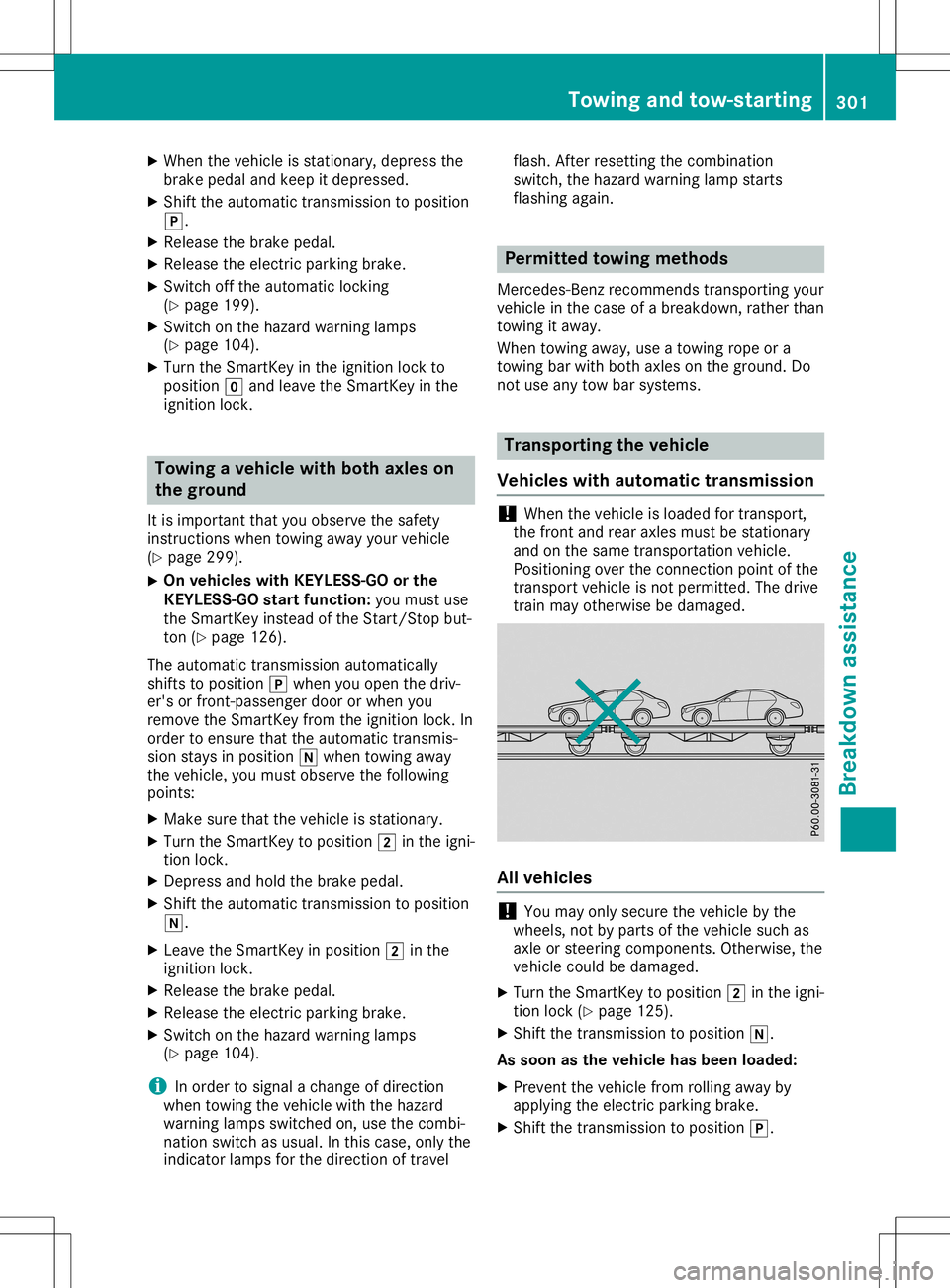
Vehicles withautomat ictransmission !
When
thevehicle isloaded fortran sport,
the fron tand rear axles mustbestation ary
and onthe same transportat ionvehicle.
Position ingover theconn ection pointofthe
tran sport vehicle isnot permitt ed.The drive
train mayotherwise bedamaged. All
vehicles !
You
may onlysecure thevehicle bythe
wheels, notbyparts ofthe vehicle suchas
axle orsteerin gcompon ents.Other wise, the
vehicle couldbedamaged.
X Turn theSmart Keytoposition 0048inthe igni-
tion lock (Ypage 125).
X Shift thetran smission toposition 005C.
As soon asthe vehicle hasbeen loaded:
X Preven tthe vehicle fromrolling awayby
applying theelectr icparking brake.
X Shift thetran smission toposition 005D. Towing
andtow-sta rting
301Breakdown assistance Z
Page 309 of 346
(tire
swith run-flatcharac teristic s)"sect ion
(Y page 289).
R Only mount tiresof the corr ectsize ontothe
wheels.
R Break innew tiresat moderat espeeds for
the first 60miles (100 km). Thenew tires
only reach theirfullperfor manceafter this
distan ce.
R Do not drive withtireswhich havetoolittle
tre ad depth. Thissignif icantlyreduces the
trac tion onwet roads (hydroplanin g).
R Replace thetiresafter sixyears atthe lat-
est, regardles sof wear.
Observ ethe noteson the emerge ncyspare
wheel (Ypage 331). MOExt
ended tires (tir eswith run-fla t
pr opert ies)
With MOExtended tires(tire swith runflat
charac teristic s),you can continue todrive your
vehic leeven ifther eis atot alloss ofpressur e
in one ormore tires.
MOE xtended tiresmay onlybeused incon -
jun ction with anact ivated tirepressur eloss
warnin gsystem (Canada only)ortire pressur e
mon itor(USA only)andonly onwheels specifi-
cally testedbyMerc edes-B enz.
Not eson drivin gwith MOExtended tireswith a
flat tire (Ypage 289).
Vehicles equipped withMOExtended tiresare
not equipped withaTIREF ITkit atthe factory.
It is ther efore recommen dedthat youaddition -
ally equip yourvehic lewith aTIREF ITkit ifyou
mount tiresthat donot featur erun- flatcharac -
ter istic s,e.g. wintertire s.ATIREF ITkit may be
obtain edfrom aqualified specialist workshop. Wint
eropera tion Genera
lnotes
Have yourvehic lewint er-proof edataqualified
specialist workshopatthe onset ofwint er.
Observ ethe notesinthe "Changing awheel"
sect ion(Ypage 326). Driving
withsummer tires
At tem peratur esbelow 45‡(+7†), summer
tire slose elastic ityand therefore traction and
brakin gpower. Change thetireson your vehi-
cle toM+S tires.Using summer tiresat very
cold temperatur escould cause crackstoform ,
ther eby damaging thetiresperman ently.
Merc edes-B enzcann otaccept responsibility
for this type ofdamage. G
WARN
ING
Damaged tirescan cause tireinflat ionpres-
sure loss. Asaresult ,you could losecontrol
of your vehic le.There isarisk ofacciden t.
Check thetiresregularly forsigns ofdam-
age and replace anydamaged tiresimmedi-
ately. M+S
tires G
WARN
ING
M+S tireswith atire tread depth ofless than
00CF in(4 mm) arenot suitable foruse inwin-
ter and donot provide sufficienttraction.
There isarisk ofan acciden t.
M+S tireswith atre ad depth ofless than 00CF
in (4 mm) must bereplaced immediat ely.
At tem peratur esbelow 45‡(+7 †), use win-
ter tiresor all-season tires.Bot htypes oftire
are ident ifiedbythe M+S marking.
Only wintertire sbearing the004D snowf lake
symbol inaddition tothe M+S markingprovide
the best possible gripinwint ryroad condi-
tion s.Only thesetire swill allow drivingsafet y
system ssuch asABSand ESP®
to func tion
optim allyinwint er.These tireshave been
developed specificallyfordrivin gin snow.
Use M+S tiresof the same make andtread on
all wheels tomaint ainsafe handlin gcharac ter-
istic s.
Always observethe maxim umpermiss ible
speed specifiedforthe M+S tiresyou have
mount ed. Wint
eropera tion
307Wheels andtires Z
Page 310 of 346
When
youhave mount edthe M+S tires:
X Check thetire pressures (Ypage 308).
X Restart thetire pressure monitor(USA only)
(Y page 315).
X Restart thetire pressure losswarning sys-
tem (Canada) (Ypage 312) Snow
chains G
WARNIN
G
If snow chains aremount edon the rear
wheels, thesnow chains couldcause abra-
sion tothe vehicle bodyortochassis com-
ponen ts.This could cause damage tothe
vehicle orthe tires. There isarisk ofan
accident .
To avoid hazardous situations:
R never mount snowchains onthe rear
wheels
R only mount snowchains inpairs onthe
fron twheels.
! On
some tiresizes there isnot enough
space forsnow chains. Toavoid damage to
the vehicle ortires, observe the"Wheel and
tire combin ations" sectionunder "Tiresand
wheels".
For safety reasons, Mercedes- Benzrecom-
mends thatyouonly usesnow chains that
have been specially approved foryour vehicle
by Mercedes- Benz,or are ofacorr esponding
standard ofquality. Formore inform ation,
please contactaqualified specialist workshop.
If you inten dto mount snowchains, please
bear thefollowing pointsinmind:
R Sno wchains maynotbemount edon all
wheel/tire combinations.Permissible
wheel-tire combinations(Ypage 330).
R Only usesnow chains whendriving onroads
complet elycovered bysnow. Remove the
snow chains assoon aspossible whenyou
come toaroad thatisnot snow-c overed.
R Local regulations mayrestrictthe use of
snow chains. Observe theappropriate regu-
lations ifyou wish tomount snowchains. R
Do not exceed themaximum permissible
speed of30mph (50km/ h).
R Ifsnow chains areinstalled, youcann otuse
Act ive Parking Assist(Ypage 176).
You may wish todeactivat eES P®
when pulling
away withsnow chains installed .This allows
the wheels tospin inacont rolled manner,ach-
ieving increased propulsive force(cutt ing
action ).
R Deact ivateESP®
(all vehicles except
Mercedes- AMGvehicles) (Ypage 64)
R Deact ivateESP®
(Mercedes- AMGvehicles)
(Y page 65)
Inf ormation aboutdriving withanemergen cy
spare wheel (Ypage 331). Tir
epr essure Tir
epr essure specifications
Impor tantsafety notes G
WARNIN
G
Underin flatedoroverinf latedtirespose the
following risks:
R the tires mayburst, especially asthe load
and vehicle speedincrease.
R the tires maywear exces sively and/or
unevenly, whichmaygreatly impairtire
trac tion.
R the driving charact eristics,as well as
steerin gand braking, maybegreatly
impaired.
There isarisk ofan accident .
Follow recomm endedtireinflation pressures
and check thepressure ofall the tires
including thespare wheel:
R mont hly,atleast
R ifthe load changes
R before beginnin galong journ ey
R under differen toperating conditions,e.g.
off- road driving
If neces sary,correctthe tire pressure.
i The
data onthe Tire andLoading Informa-
tion placard andtirepressure tableshown
here areexamples. Tirepressure specifica- 308
Tir
epr essureWheels andtires