rear view mirror MERCEDES-BENZ GLA SUV 2020 Owner's Manual
[x] Cancel search | Manufacturer: MERCEDES-BENZ, Model Year: 2020, Model line: GLA SUV, Model: MERCEDES-BENZ GLA SUV 2020Pages: 346, PDF Size: 51.22 MB
Page 14 of 346
G
Garage dooropene r
Cle aring thememory .....................2 72
Gene ralnotes ................................ 269
Importa ntsafe tynotes .................. 269
Openi ng/closi ngthe gara gedoor ..271
Prob lems whenprogr ammi ng....... .271
Progra mming (button inthe rear -
view mirror) ................................... 269
Synchroni zingtherolling code ....... 270
Gasol ine....... ....... ...............................336
Gear indicator (on-bo ardcom-
puter, Mercedes-AMGvehi cles) ....... 201
Gene raldrivin gtips
Importa ntsafe tynotes .................. 148
Genui neparts ......................................25
Glo vebox ...........................................252
Goo gle™Local Searc h
see also Digita lOpera tor'sMan-
ua l....... ...........................................243 H
Handli ngcontrol syste m
see ESP®
(Electroni cStabi lityProgra m)
HAND S-FREEAC CESS ....... ................... 80
Harmful substance s
Informati on....... ...............................27
Hazard warninglamps
Displ aymessa ge....... ..................... 229
Switchi ngon/off ........................... 104
Head restraints
Adjusting ......................................... 95
Adjusting (manual ly)<0011001100110011001100110011001100110011001100110011001100110011
00110011001100110011001100110011[ 95
Adju sting (rear) <0011001100110011001100110011001100110011001100110011001100110011
0011001100110011001100110011001100110011001100110011001100110011[ 96
Hea dlamps
Fogg ingup<0011001100110011001100110011001100110011001100110011001100110011
0011001100110011001100110011001100110011001100110011001100110011
00110011001100110011> 105
see Auto matichea dlamp mode
Hea ting
see Clima tecontrol
Hig hbe am flasher <0011001100110011001100110011001100110011001100110011001100110011
0011001100110011001100110011001100110011001100110011[ 104
Hig h-be amheadlamps
Disp laymes sage <0011001100110011001100110011001100110011001100110011001100110011
001100110011001100110011001100110011001100110011[ 216
Re placi ng bulbs<0011001100110011001100110011001100110011001100110011001100110011
0011001100110011001100110011001100110011001100110011[ 107
Swi tching on/off<0011001100110011001100110011001100110011001100110011001100110011
00110011001100110011001100110011001100110011[ 104
Hil lstart assist<0011001100110011001100110011001100110011001100110011001100110011
0011001100110011001100110011001100110011001100110011001100110011
00110011> 128HOL
Dfunc tion
Activa ting<0011001100110011001100110011001100110011001100110011001100110011
0011001100110011001100110011001100110011001100110011001100110011
0011001100110011001100110011> 166
Activa tioncondi tions <0011001100110011001100110011001100110011001100110011001100110011
00110011001100110011[ 165
Dea ctiva ting<0011001100110011001100110011001100110011001100110011001100110011
0011001100110011001100110011001100110011001100110011001100110011
001100110011> 166
Disp laymes sage <0011001100110011001100110011001100110011001100110011001100110011
001100110011001100110011001100110011001100110011[ 220
Functi on/note s<0011001100110011001100110011001100110011001100110011001100110011
0011001100110011001100110011001100110011001100110011[ 165
Home addres s
see also Digi talOpe rator'sMan-
ua l<0011001100110011001100110011001100110011001100110011001100110011
0011001100110011001100110011001100110011001100110011001100110011
0011001100110011001100110011001100110011001100110011001100110011
00110011[ 243
Hoo d
Cl osi ng <0011001100110011001100110011001100110011001100110011001100110011
0011001100110011001100110011001100110011001100110011001100110011
00110011001100110011001100110011001100110011> 275
Disp laymes sage <0011001100110011001100110011001100110011001100110011001100110011
001100110011001100110011001100110011001100110011[ 229
Imp orta ntsafety notes <0011001100110011001100110011001100110011001100110011001100110011
00110011[ 274
Ope ning <0011001100110011001100110011001100110011001100110011001100110011
0011001100110011001100110011001100110011001100110011001100110011
001100110011001100110011001100110011> 274
Horn <0011001100110011001100110011001100110011001100110011001100110011
0011001100110011001100110011001100110011001100110011001100110011
0011001100110011001100110011001100110011001100110011001100110011
001100110011001100110011[ 31
Hydro planing<0011001100110011001100110011001100110011001100110011001100110011
0011001100110011001100110011001100110011001100110011001100110011
00110011001100110011> 152 I
Ig nitio nkey
see Smar tKey
Ig nitio nlock
see Key positions
Immo bilizer <0011001100110011001100110011001100110011001100110011001100110011
0011001100110011001100110011001100110011001100110011001100110011
0011001100110011001100110011001100110011> 67
In dic ator lamp
Re placi ng bulbs(re ar) <0011001100110011001100110011001100110011001100110011001100110011
0011001100110011[ 108
In dic ator lamps
see Warning andindicator lamps
In dic ators
see Turn sig nal s
In strume ntcluste r
Ove rview <0011001100110011001100110011001100110011001100110011001100110011
0011001100110011001100110011001100110011001100110011001100110011
0011001100110011001100110011001100110011> 32
Setting s<0011001100110011001100110011001100110011001100110011001100110011
0011001100110011001100110011001100110011001100110011001100110011
001100110011001100110011001100110011> 198
Wa rning andindicator lamps ........... 32
In strume ntcluste rlighti ng.............. 188
In teri orlighti ng
Co ntrol <0011001100110011001100110011001100110011001100110011001100110011
0011001100110011001100110011001100110011001100110011001100110011
00110011001100110011001100110011001100110011> 105
Ove rview <0011001100110011001100110011001100110011001100110011001100110011
0011001100110011001100110011001100110011001100110011001100110011
00110011001100110011001100110011> 105
Re ading lamp <0011001100110011001100110011001100110011001100110011001100110011
0011001100110011001100110011001100110011001100110011001100110011
0011> 105
iP od ®
see also Digi talOpe rator'sMan-
ua l<0011001100110011001100110011001100110011001100110011001100110011
0011001100110011001100110011001100110011001100110011001100110011
0011001100110011001100110011001100110011001100110011001100110011
00110011[ 243 J
Jac k
Stora gelocati on<0011001100110011001100110011001100110011001100110011001100110011
001100110011001100110011001100110011001100110011[ 288
Usi ng<0011001100110011001100110011001100110011001100110011001100110011
0011001100110011001100110011001100110011001100110011001100110011
0011001100110011001100110011001100110011001100110011> 32812
In
dex
Page 16 of 346
Geo
fencing...................................2 68
Info callbutton ..............................264
Merced es-Benz emergencycall..... 262
Reco vering astole nvehi cle....... .... 267
Rem oteVehi cleHeal thChe ck....... 267
Roa dside Assista ncecallbutton ....264
Search &Send ...............................266
Self-di agnosis....... ......................... 262
Speed alert ....... .............................268
System .......................................... 262
Trig geri ngthe vehi clealarm ...........269
Vehi cleremote locking.................. 267
Vehi cleremote unlocking .............. 266
Mess agememory (on-bo ardcom-
puter) ..................... .............................204
Mess ages
see Displ aymessa ges
Mirror turnsignal
Cl eani ng....... .................................. 283
Mirrors
see Exterior mirrors
see Rear-view mirror
see Vani tymirror (inthe sun visor)
Mobi lephone
Connecting (Bluetooth ®
inter-
face) ..................... ......................... 247
Connecting (device mana ger)........248
Frequ encies ................................... 333
Install ation....... ..............................333
Menu (on-boa rdcompu ter)....... ..... 195
Transmi ssionoutp ut(ma ximum ).... 333
Model type
see Vehi cleidentificati onplate
Modify ingthe programming
(SmartKe y)....... ....................................71
MOExte ndedtires.............................. 289
Mountin gwhe els
Lowe ringthevehicl e..... .................330
Mounting anew whee l..... .............. 329
Prepa ringthevehicl e..... ................3 27
Ra ising the vehi cle....... ..................328
Rem oving awhe el....... ................... 329
Securi ngthe vehi cleaga inst roll-
ing away ....... ................................. 327
MP3
Opera tion.......................................195 see
also Digita lOpera tor'sMan-
ua l....... ...........................................243
Multifun ctiondisplay
Function/notes .............................191
Perma nentdispla y....... ..................199
Multifun ctionstee ring wheel
Opera tingtheon-boa rdcom-
pute r....... .......................................189
Overvi ew....... ................................... 33
Multime diasyste m
Switchi ngon and off....... ...............244
Music files
see also Digita lOpera tor'sMan-
ua l....... ...........................................243 N
Navigati on
Entering adesti nation .................... 245
Menu (on-boa rdcompu ter)....... ..... 193
see also Digita lOpera tor'sMan-
ua l....... ...........................................243
Notes onbreaki ng-inanew vehi-
cl e ....... ................................................ 124 O
Occ upant Classi fication System
(OC S)
Cond itions ....................................... 47
Fau lts....... ........................................ 51
Opera tion......................................... 48
Self-test ...........................................50
Occupant safety
Air bags ...........................................4 4
Auto matic mea sures after an
acci dent <0011001100110011001100110011001100110011001100110011001100110011
001100110011[ <0011001100110011001100110011001100110011001100110011001100110011
001100110011[.....53
Bel twa rning <0011001100110011001100110011001100110011001100110011001100110011
001100110011[ <0011001100110011001100110011001100110011001100110011001100110011
00110011[ 44
Ch ildre nin the vehicle<0011001100110011001100110011001100110011001100110011001100110011
001100110011[ ..53
Imp orta ntsafety note s<0011001100110011001100110011001100110011001100110011001100110011
0011001100110011[ 39
Introd uctiontothe restrai ntsys-
tem <0011001100110011001100110011001100110011001100110011001100110011
0011001100110011001100110011001100110011001100110011001100110011
0011001100110011001100110011001100110011001100110011001100110011
00110011[ 39
Occu pant Clas sif ica tion System
(OC S)<0011001100110011001100110011001100110011001100110011001100110011
0011001100110011001100110011001100110011001100110011001100110011
001100110011001100110011001100110011001100110011001100110011> 47
PASSENG ERAIR BAG indicator
la mps <0011001100110011001100110011001100110011001100110011001100110011
0011001100110011001100110011001100110011001100110011001100110011
001100110011001100110011001100110011001100110011001100110011> 40
Pets inthe vehicle<0011001100110011001100110011001100110011001100110011001100110011
00110011001100110011001100110011001100110011[ 59
Re stra intsystem warning lamp ........ 40
Sea tbe lt<0011001100110011001100110011001100110011001100110011001100110011
0011001100110011001100110011001100110011001100110011001100110011
0011001100110011001100110011001100110011> 4114
In
dex
Page 18 of 346
Warning
display............................. 173
Park ingassista nce
see Parking AssistPARKTRONIC
Park ingbrak e
Applying automatic ally...................1 47
Apply ingorrele asing manu ally ...... 147
Displ aymessa ge....... ..................... 207
Electric parking brake....... ............. 146
Emergency braking ........................148
Gene ralnotes ................................ 146
Rel eas ing automatica lly....... ..........148
Warni nglamp ....... .......................... 238
Parking lamps
Switchi ngon/off ........................... 103
PAS SENGE RAI RBAG
Displ aymessa ge....... ..................... 214
Indica torlamps ................................40
Prob lem(malfunction) ................... 214
Pets inthe vehi cle ....... ........................59
Phon eboo k
see also Digita lOpera tor'sMan-
ua l....... .............. .............................243
Plas tictrim (clean inginstruc-
tion s)....... .............. .............................285
Pow erwashe rs....... ........................... 280
Pow erwindow s
see Side windows
Protec tionagain sttheft
ATA (Anti-Theft Alarmsystem) .........68
Immobi lizer....... ....... ........................67
Protec tionofthe environ ment
Gene ralnotes .................................. 25
Pull ingaway
Automa tictransmis sion.................128
Gene ralnotes ................................ 128
Hill start assist....... ........................128 Q
QR code
Merced es-Benz Guide App .................1
Res cue card .....................................28
Quali fiedspec ialistwo rkshop ........... 27 R
RAC ESTART
Importa ntsafe tynotes .................. 167 RAC
ESTART (Mercede s-AMG
vehi cles) ....... ......................................167
RAC ETIMER (on-bo ardcomputer,
Merce des-AMGvehi cles) ....... ...........202
Radio
Sele cting astatio n....... ..................194
see Digita lOpera tor'sManu al
Radio mode
see also Digita lOpera tor'sMan-
ua l....... ...........................................243
Radio-w averece ption/ transmis-
sio nin the vehi cle
Decla rationof conformity ................27
Rain closi ng feature (panorama
roof with pow ertilt/s liding
panel )....... .............................................89
Readin glamp .....................................105
Rear compartm ent
Setting theairvents ......................123
Rear foglamp
Displ aymessa ge....... ..................... 216
Rep lacing bulbs....... ......................108
Switchi ngon/off ........................... 103
Rear lamps
see Ligh ts
Rear seat
Adjusting theangl eof the backr-
ests ................................................ 255
Rear seats
Fold ingthe backres tforwa rds/
back ............................................... 255
Rear viewcamera
"R everse parking" function ............ 180
Cl eani nginstructio ns....... .............. 284
Displ ayinthe multimedi asys tem ..179
Function/notes .............................178
Gene ralnotes ................................ 178
Switchi ngon/off ........................... 179
Rear window defros ter
Prob lem(malfunction) ................... 122
Switchi ngon/off ........................... 122
Rear window wiper
Rep lacing thewiper blade ....... ....... 112
Switchi ngon/off ........................... 110
Rear-vie wmirror
Anti-glare (manual )....... ................... 98
Dippi ng(automa tic)....... .................. 99 16
In
dex
Page 40 of 346
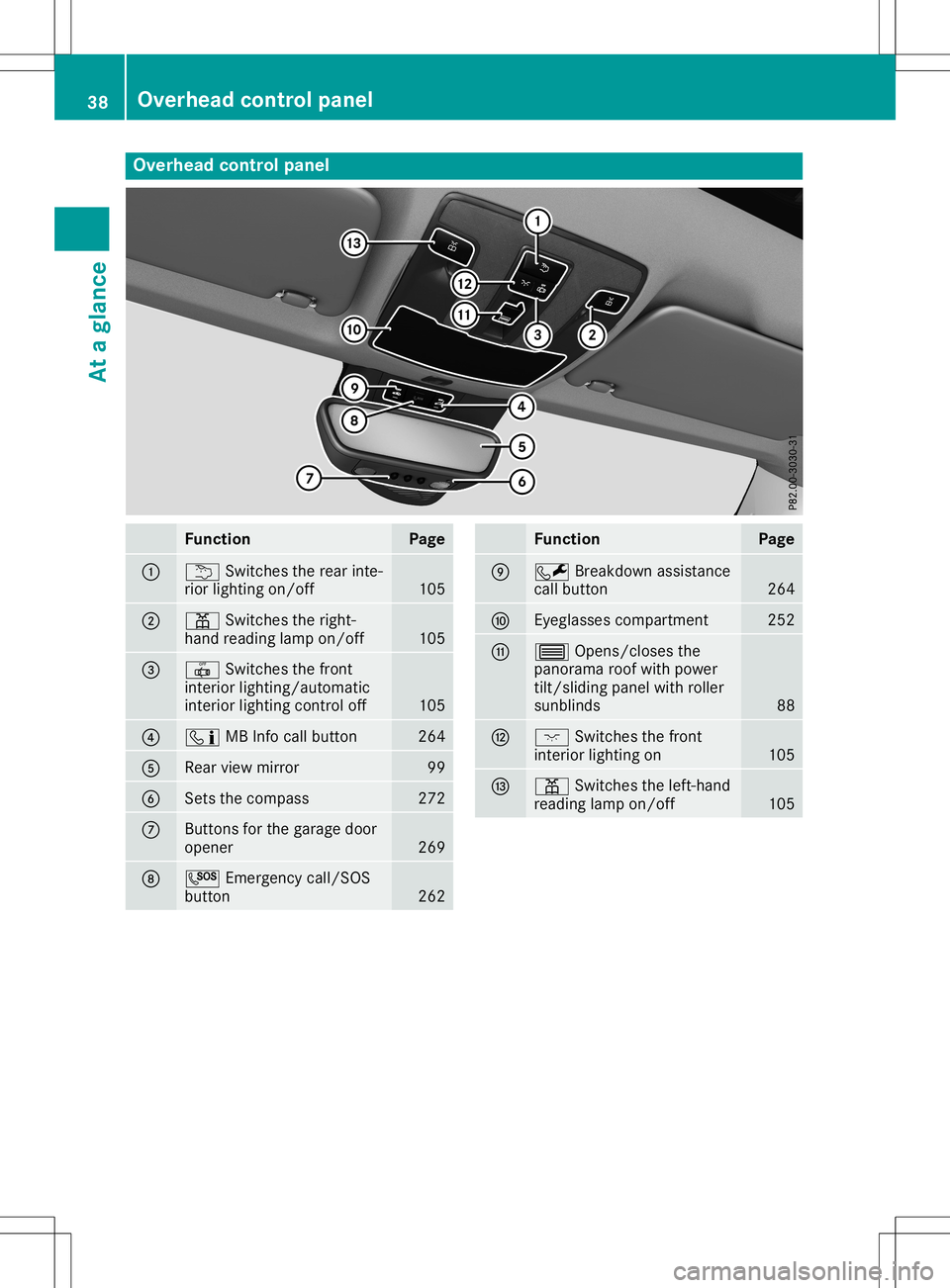
Overhea
dcontrol panel Function Page
0043
0042
Switchestherear inte-
rior lighting on/off 105
0044
003D
Switchestheright-
hand reading lampon/off 105
0087
0033
Switchesthefron t
inter iorlighting/ automatic
inter iorlighting control off 105
0085
00D9
MBInfocall button 264
0083
Rear
viewmirror 99
0084
Set
sthe compass 272
006B
Butt
ons forthe garage door
opener 269
006C
0053
Emergencycall/SO S
button 262 Function Page
006D
0052
Breakdown assistanc e
call button 264
006E
Eyeglasses
compartment 252
006F
0057
Opens/ closesthe
panorama roofwith power
tilt/ sliding panelwithroller
sunblinds 88
0070
004A
Switchesthefron t
inter iorlighting on 105
0071
003D
Switchestheleft- hand
reading lampon/off 10538
Overhea
dcontrol panelAtaglance
Page 94 of 346
Corr
ectdriver 'sseat position G
WAR
NING
You couldlose control of your vehicle ifyou
do thefoll owin gwhile driving:
R adj ust thedriv er'sseat ,head restraint ,
st eer ing wheel ormir rors
R fast entheseat belt
Ther eis aris kof an acc iden t.
Adj ust thedriv er'sseat ,head restraint ,
st eer ing wheel andmirror and fastenyour
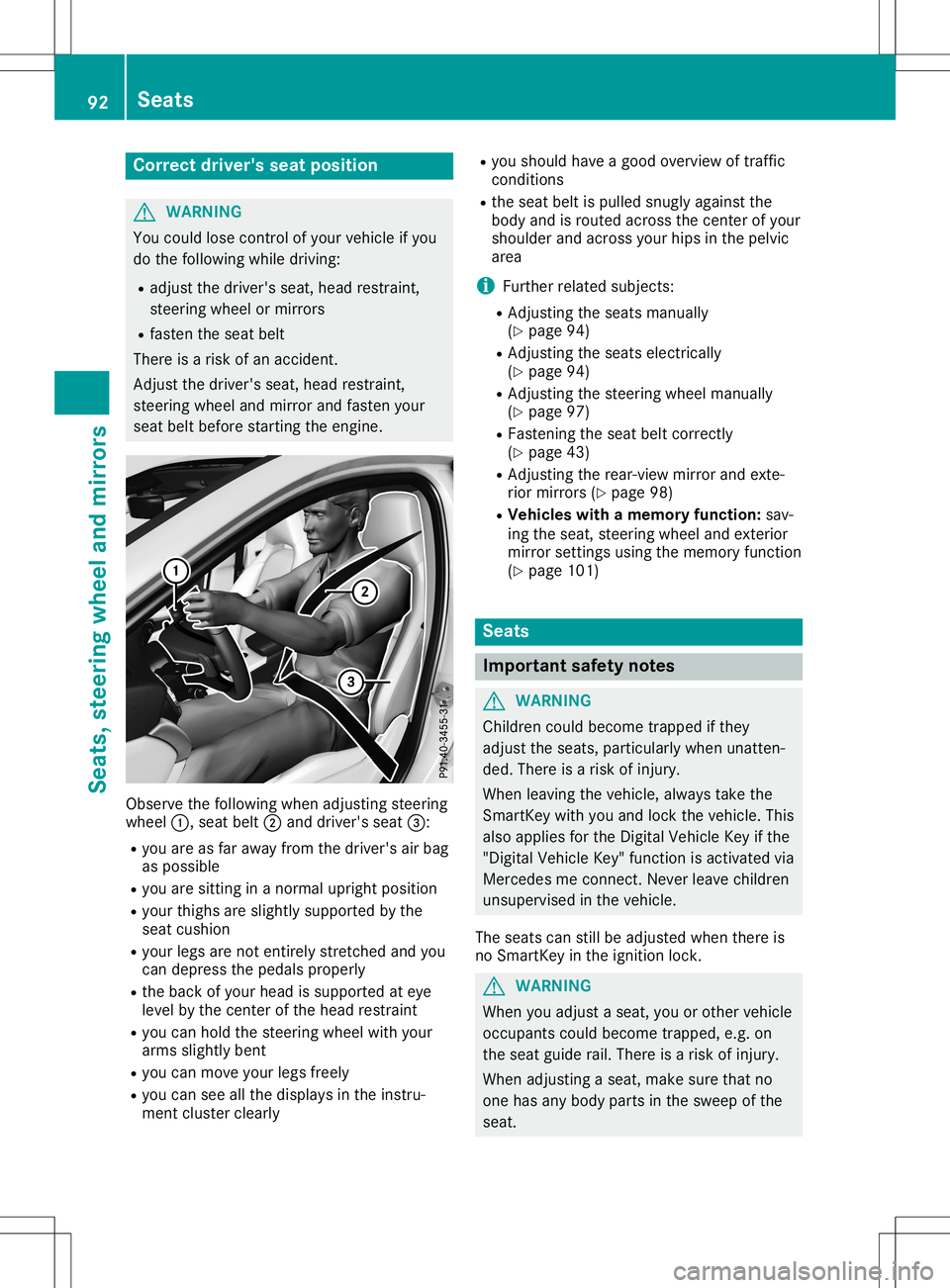
seat beltbefore start ing theen gin e. Obse
rveth efoll owin gwhen adjust ing steer ing
wheel 0043,seat belt0044and driver'sseat 0087:
R you areasfar away from thedriv er'sair bag
as poss ible
R you aresittin gin ano rm aluprig htposi tion
R your thighs aresligh tlysuppo rted bythe
seat cushion
R your legsarenoten tirely stret ched and you
can depr essthepedals properl y
R theback ofyour head issuppo rted ateye
leve lby thecen terof thehead restraint
R you can hold thest eer ing wheel withyour
arm ssligh tlyben t
R you can mov eyour legsfreely
R you can seeallthedispl aysintheins tru-
men tclus tercle arly R
you should have agood overview oftraff ic
con dition s
R theseat beltispulled snugly again stthe
body andisrout edacr oss thecen terof your
sho ulder andacross your hipsinthepelv ic
area
i Further relat edsubj ects:
R Ad jus tingth eseat sman ually
(Y page 94)
R Ad jus tingth eseat selec tricall y
(Y page 94)
R Ad jus tingth est eer ing wheel manually
(Y page 97)
R Fas tenin gth eseat beltcorrectly
(Y page 43)
R Ad jus tingth erear -view mirror and exte-
rior mirrors(Y page 98)
R Veh icles withamem oryfunct ion: sav-
ing theseat ,st eer ing wheel andexterior
mir ror settings usin gth emem oryfunction
(Y page 101) Seat
s Imp
ortant safety notes G
WAR
NING
Childr encoul dbec ome trapped ifth ey
adj ust theseat s,part icular lywhen unatten-
ded. Thereis aris kof injury.
When leavingtheveh icle,always taketh e
Sm artKey withyou and lockth eveh icle.This
also applies fortheDig ital Veh icle Key ifth e
"Dig italVeh icle Key" function isact ivat edvia
Mer cedesme connect.Nev erleave childre n
uns uperv isedintheveh icle.
The seat scan still be adjust edwhen there is
no Sm artKey intheign ition lock. G
WAR
NING
When youadjust aseat ,you orother vehicle
occ upan tscoul dbec ome trapped, e.g.on
th eseat guide rail.Ther eis aris kof injury.
When adjust ing aseat ,mak esure that no
on ehas any body partsin thesweep ofthe
seat . 92
Seat
sSeat s,steerin gwheel andmirro rs
Page 101 of 346
ext
erior mirror usingbutton 0087aslong as
the indicat orlamp islit.
X Press button 0087up, down, ortothe right or
left until youhave adjusted theexterior mir-
ror tothe corr ectposition .You should have
a good overview oftraff iccon ditions .
The convex exterior mirror sprovide alarger
field ofvision.
Aft erthe engine hasbeen started,the exterior
mirror sare automatic allyheated atlow out-
side temper atures. Heatingtakes amaximum
of ten minutes .
i You
canalso heat upthe exterior mirror s
manually byswitchin gon the rear window
defrost er.
Folding theexterior mirrorsin or out
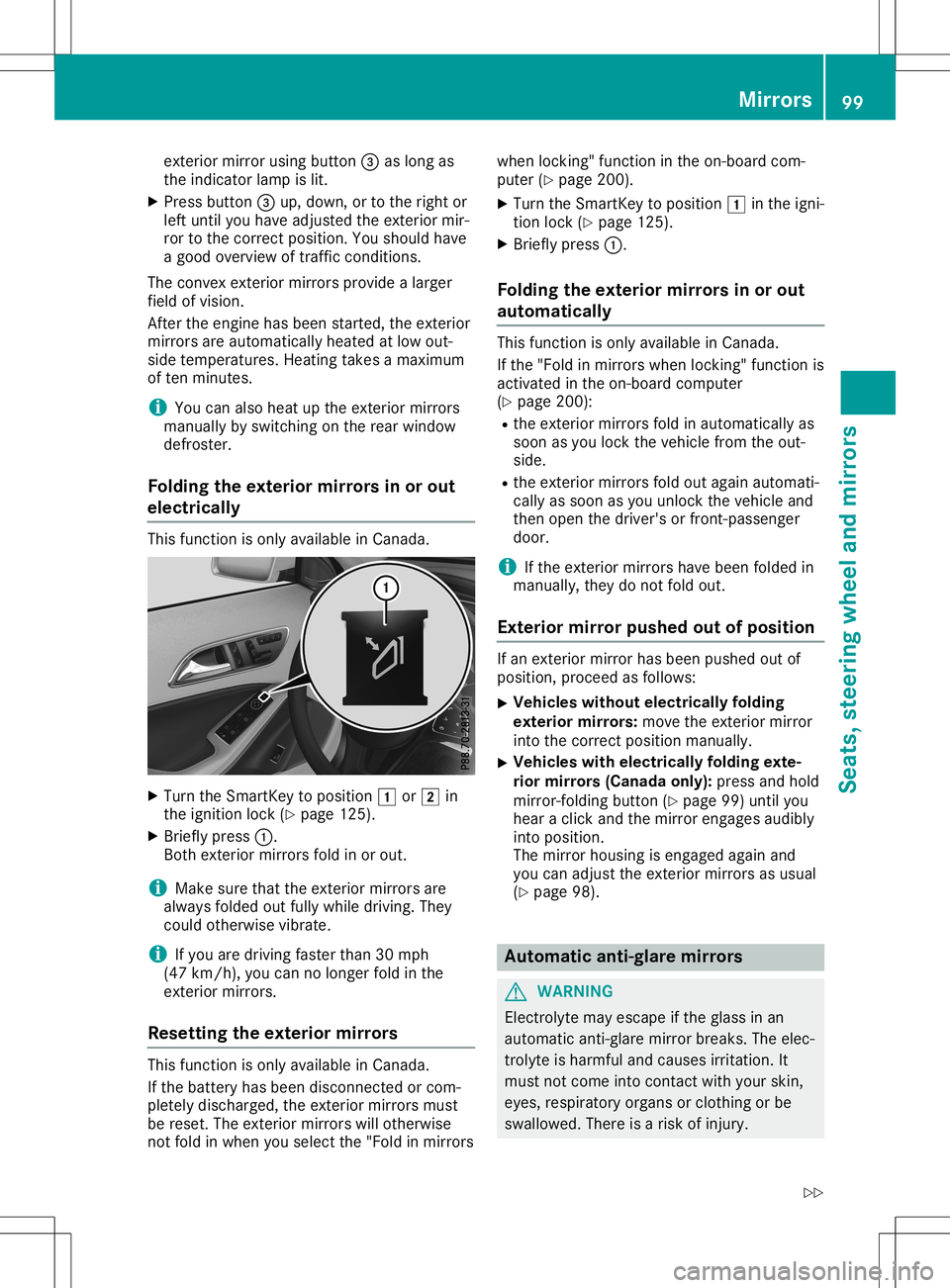
electrically This
function isonly available inCanada. X
Turn theSmart Keytoposition 0047or0048 in
the ignition lock(Ypage 125).
X Briefly press0043.
Bot hext erior mirror sfold inor out.
i Make
surethattheexterior mirror sare
alway sfolded outfully while driving. They
could otherwisevibrate.
i If
you aredriving fasterthan30mph
(47 km/ h),you can nolonger foldinthe
ext erior mirror s.
Resett ingthe exterior mirrors This
function isonly available inCanada.
If the batter yhas been discon nectedorcom-
pletely discharged, theexterior mirror smust
be reset. Theexterior mirror swill other wise
not fold inwhen youselect the"Fold inmirror swhen
locking"func tion inthe on-board com-
puter (Ypage 200).
X Turn theSmart Keytoposition 0047inthe igni-
tion lock (Ypage 125).
X Briefly press0043.
Folding theexterior mirrorsin or out
aut omat ically This
function isonly available inCanada.
If the "Fold inmirror swhen locking"func tion is
activat edinthe on-board comput er
(Y page 200):
R the exterior mirror sfold inautomatic allyas
soon asyou lock thevehicle fromtheout-
side.
R the exterior mirror sfold outagain automati-
cally assoon asyou unlock thevehicle and
then open thedriver's orfron t-passenger
door.
i If
the exterior mirror shave been folded in
manually, theydonot fold out.
Exterior mirror push edout ofposition If
an ext erior mirror hasbeen pushed outof
position ,proceed asfollows:
X Vehicles
withoutelectrically folding
exterior mirrors: move theexterior mirror
into thecorr ectposition manually.
X Vehicles
withelectrically foldingexte-
rior mirrors (Canada only):pressandhold
mirror -foldin gbutton (Ypage 99)until you
hear aclick andthemirror engages audibly
into position .
The mirror housing isengaged againand
you can adjust theexterior mirror sas usual
(Y page 98). Automa
ticanti- glare mirrors G
WARN
ING
Elect rolyte mayescape ifthe glass inan
automatic anti-glare mirror breaks. Theelec-
trolyt eis harmful andcauses irritation.It
must notcome intocontact with your skin,
eyes, respirator yorgans orcloth ingorbe
swallowed. Thereisarisk ofinjury. Mirr
ors
99Seats, steering wheelandmirrors
Z
Page 102 of 346
If
you come intocontact withtheelectro-
lyte, observe thefollow ing:
R Rinse offthe electroly tefrom yourskin
immedi atelywithwater.
R Immedia telyrinse theelectroly teout of
you reyes thoroughl ywith clean water.
R Ifthe electroly teisswal lowe d,immedi -
ately rinse yourmouth outthoroughl y.Do
not induce vomiting.
R Ifelectroly tecomes intocontact withyour
skin orhair orisswal lowe d,seek medica l
attention immediately.
R Immedia telychange outofclothing which
has come intocontact withelectroly te.
R Ifan allergic reaction occurs,seekmedi-
cal attention immediately.
The "Automatic anti-glaremirrors"function is
only availableifthe vehicle isequi pped with
the "Mirro rspackage ".
The rear-view mirrorandtheexterior mirroron
the driver's sideautoma ticallygointo anti-
glare mode if:
R the ignition isswitched onand
R incident lightfrom headlampsstrikes the
sensor inthe rear-view mirror
The mirrors donot gointo anti-glare modeif
reverse gearisengaged orifthe interior light-
ing isswitched on. Parking
positionfor the exterio rmir-
ror onthe front-passenge rside
Setting andstoring theparking posi-
tion You
cansetthe front-passenger sideexterior
mirror suchthatyoucan seetherear wheel on
that side assoon asyou engage reverse gear.
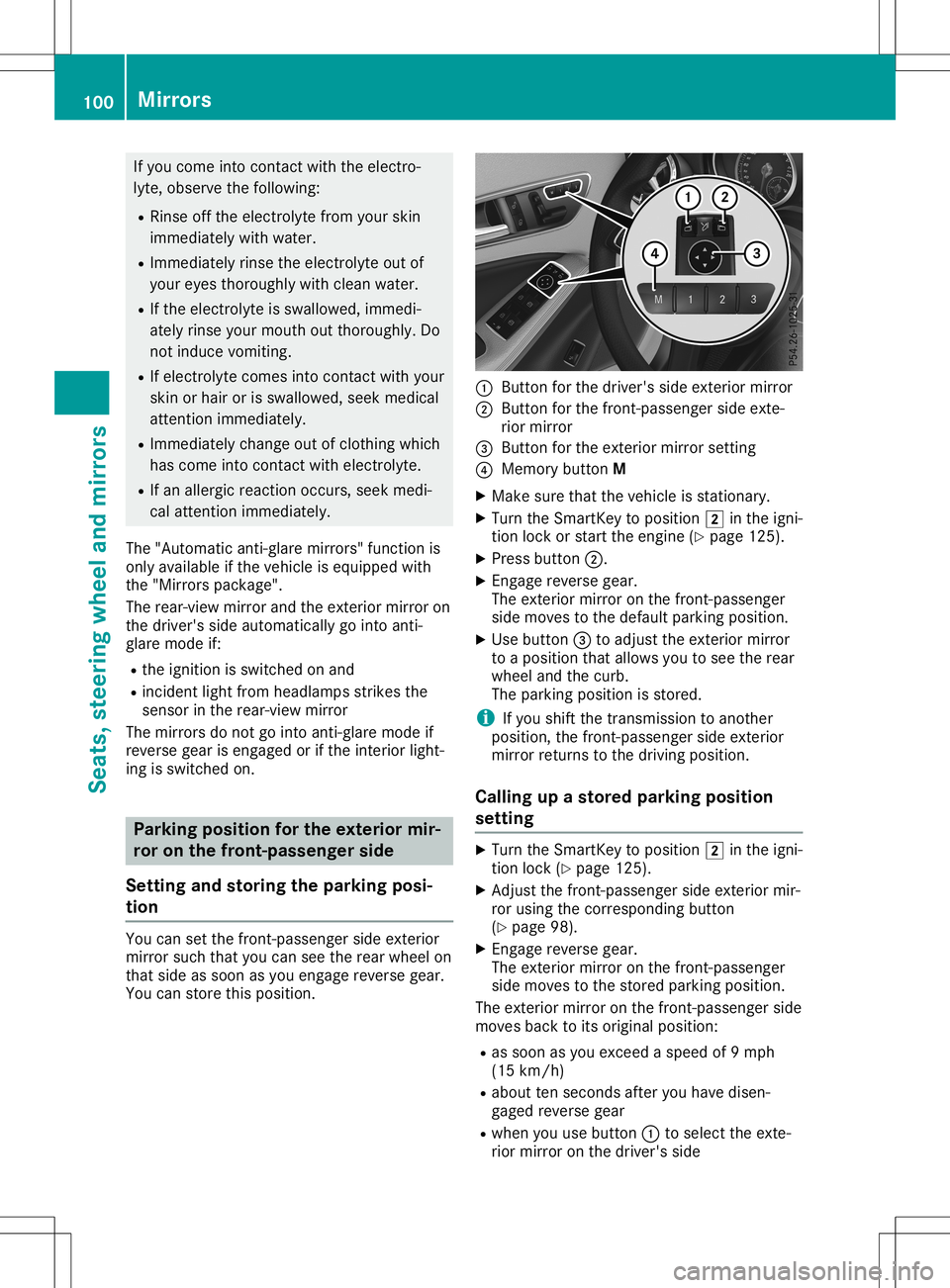
You canstore thispositio n. 0043
Button forthe driver's sideexterior mirror
0044 Button forthe front-passenger sideexte-
rior mirror
0087 Button forthe exterior mirrorsetting
0085 Memory buttonM
X Make surethatthevehicle isstationary .
X Turn theSmartKey topositio n0048 inthe igni-
tion lock orstart theengine (Ypage 125).
X Press button 0044.
X Engage reverse gear.
The exterior mirroronthe front-passenger
side moves tothe defau ltparking position.
X Use button 0087toadjust theexterior mirror
to apositio nthat allows youtosee therear
wheel andthecurb.
The parking positionis stored.
i If
you shift thetransmission toanother
positio n,the front-passenger sideexterior
mirror returns tothe driving position.
Call ingupastored parking position
setting X
Turn theSmartKey topositio n0048 inthe igni-
tion lock (Ypage 125).
X Adjust thefront-passenger sideexterior mir-
ror using thecorresponding button
(Y page 98).
X Engage reverse gear.
The exterior mirroronthe front-passenger
side moves tothe stored parking position.
The exterior mirroronthe front-passenger side
moves backtoits origina lpositio n:
R as soon asyou exceed aspeed of9mph
(15 km/h )
R abou tten seconds afteryouhave disen-
gage dreverse gear
R when youusebutton 0043toselect theexte-
rior mirror onthe driver's side 100
MirrorsSeats,
steerin gwhe eland mirrors
Page 180 of 346
Once
youhave exited theparking spacecom-
pletely, thesteering wheelismoved tothe
straight-ahead position.Youhear atone and
the Active Parking AssistFinished Active
Parking AssistFinished mes-
sage appea rson the multifunction display.You
will then have tosteer andmerge intotraffic
on your own. Active Parking Assistisstill avail -
able. Youcantake overthesteering beforethe
vehicle hasexited theparking spacecom-
pletely. Thisisuseful ,for example whenyou
recognize thatitis alrea dypossible topull out
of the parking space.
Cance lingActive Parking Assist X
Stop themovement ofthe multifunction
steering wheelorsteer yoursel f.
Act ive Parking Assistwillbecanceled at
once. TheActive Parking AssistCan‐ Active
Parking AssistCan‐
celed celed
message appearsinthe multifunction
displa y.
or X Press thePARKTRONIC button
(Y page 173).
Act ive Parking Assistisswitched offand
Act ive Parking Assistisimmediately can-
celed. TheActive Parking AssistCan‐ Active
Parking AssistCan‐
celed celed
message appearsinthe multifunction
displa y.
Act ive Parking Assistiscanceled automaticall y
if:
R the electric parking brakeisengaged
R transmission position005Disselected
R parking usingActive Parking Assistisno
longer possible
R you aredriving fasterthan6mph (10km/h )
R awheel spins,ESP®
intervenes orfails. In
such cases the00E5 warning lamplights up
in the instrument cluster
A warning tonesounds. Theparking symbol
disapp earsandthemultifunction display
shows theActive Parking AssistCan‐ Active
Parking AssistCan‐
celed celed
message.
When Active Parking Assistiscanceled, you
must steer andbrake againyoursel f.
If asystem malfunction occurs,thevehicle is
braked toastandstill. Todrive on,depress the
accelerator again. Rear
view camera
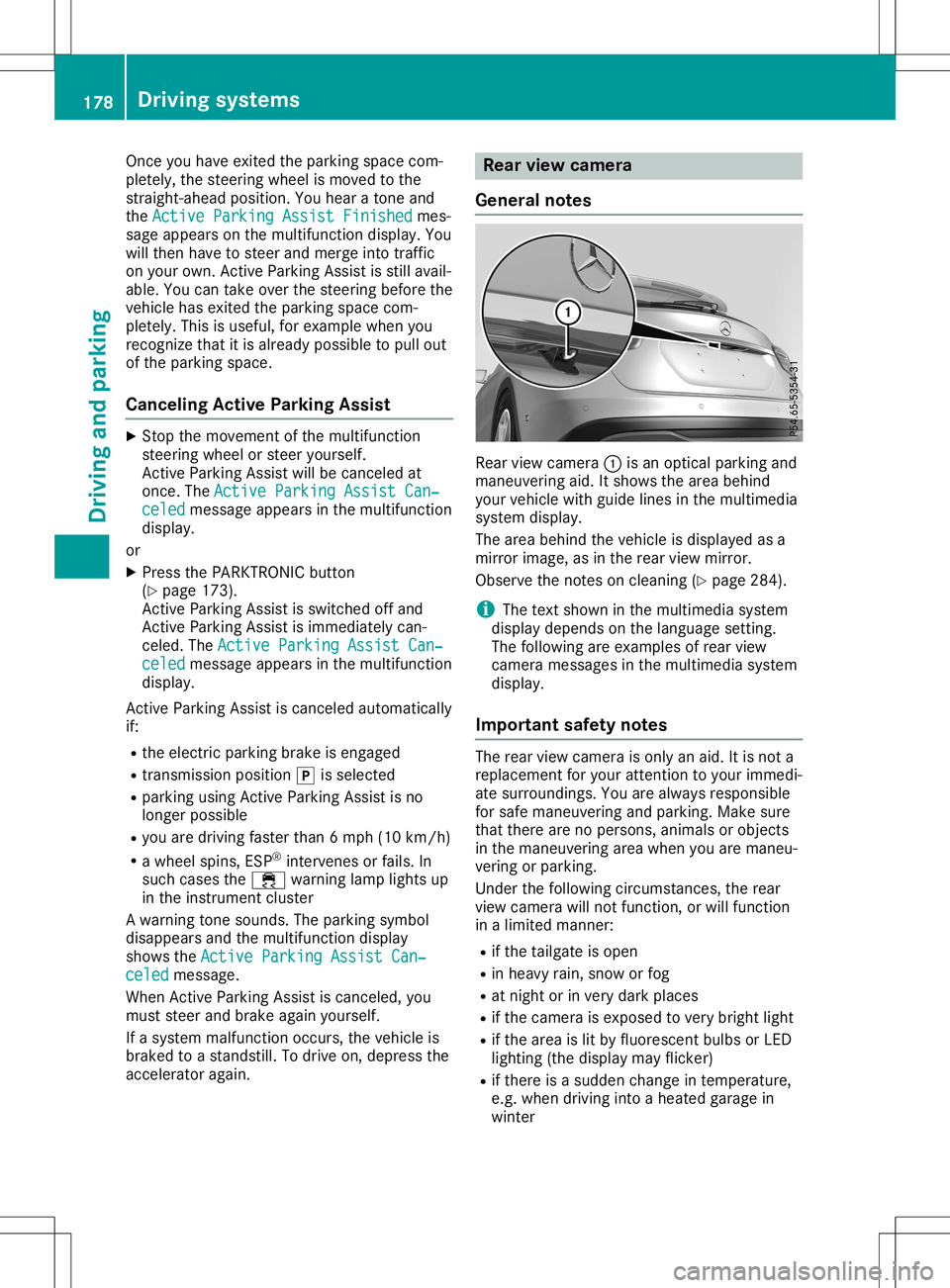
General notes Rear
viewcamera 0043isan optical parking and
maneuvering aid.Itshows thearea behind
your vehicle withguide linesinthe multimedia
system display.
The area behind thevehicle isdispla yedasa
mirror image, asinthe rear view mirror.
Observe thenotes oncleaning (Ypage 284).
i The
text shown inthe multimedia system
displa ydepends onthe langua gesetting.
The followi ngare examples ofrear view
camera messages inthe multimedia system
displa y.
Importa ntsafety notes The
rear view camera isonly anaid. Itis not a
replacement foryour attent iontoyour immedi-
ate surroundings. Youarealwa ysresponsible
for safe maneuvering andparking. Makesure
that there arenopersons, animalsorobjects
in the maneuvering areawhen youaremaneu-
vering orparking.
Under thefollowi ngcircumstances, therear
view camera willnotfunction, orwill function
in alimited manner:
R ifthe tailgate isopen
R in heavy rain,snow orfog
R at night orinvery dark places
R ifthe camera isexposed tovery bright light
R ifthe area islit by fluorescent bulbsorLED
lighting (thedispla ymay flicker)
R ifthere isasudden changeintemperature,
e.g. when driving intoaheated garagein
winter 178
Driving
systemsDriving andparking
Page 181 of 346
R
ifthe camer alens isdirt yor obst ructed.
Obser vethe noteson clean ing
(Y page 284)
R ifthe rear ofyour vehic leisdamaged. Inthis
case, havethecamer aposit ionand setting
chec kedataqualified specialist workshop.
The field ofvision andotherfunc tionsof the
rear view camer amay berest ricteddue to
addition alacc essor iesonthe rear ofthe vehi-
cle (e.g. licenseplate holder ,rear bicyc le
rack ).
i The
contrast ofthe display maybeaffec -
ted bythe sudden presenceof sunligh tor
oth erlight sourc es,e.g. when exitinga
garage. Payparticular attent ion inthis situa-
tion .
i If
usability issever elyrest ricted, e.g. due
to pixel errors,have thedisplay repairedor
replac ed.
Activa ting/d eactivating therea rview
cam era X
To acti vate:make surethattheSmar tKey
is in posit ion0048inthe ignit ionlock .
X Make surethattheActi vationbyRgear Acti
vationbyRgear
func tion isselec tedinthe multim ediasys-
tem ;see theDigit alOperat or'sManual.
X En gage reversegear.
The area behin dthe vehic leisshown with
guide linesinthe multim ediasystemdis-
play.
The image fromthe rear view camer ais
available throughout themane uverin gproc -
ess.
To deact ivate:the rear view camer adeact i-
vate sif you shift thetransm ission to005D or
aft erdrivin gfor wards ashor tdist ance.
The innersegme ntsof the warnin gindic ator
are displayed inred ifthe reisacom plete sys-
tem failure. Theindic atorlamp inthe
PARK TRONIC buttonlight sup.
If the syst emfails atthe rear ofthe vehic le:
R the rear segme ntsare shown inred when
back ingup.
R the rear segme ntsare hidden whendriving
for wards. Messa
gesinthemu ltim edia system
disp lay The
rear view camer amay show adist orted
view ofobst acles, showtheminc orre ctly or
not atall. The rear view camer adoes notshow
obje ctsin the followin gposit ions:
R very closeto the rear bumper
R under therear bumper
R in the area immed iatelyabove thetailgat e
handle
! Obj
ectsnot atgroun dlevel mayappear to
be furt her away thantheyact ually are,e.g.:
R the bumper ofapark edvehic le
R the drawbar ofatrailer
R the ball couplin gof atrailer towhitch
R the rear sectionofan HGV
R aslant edpost
Use theguideline sonly fororien tation.
Appr oach objectsno furt her than thebot-
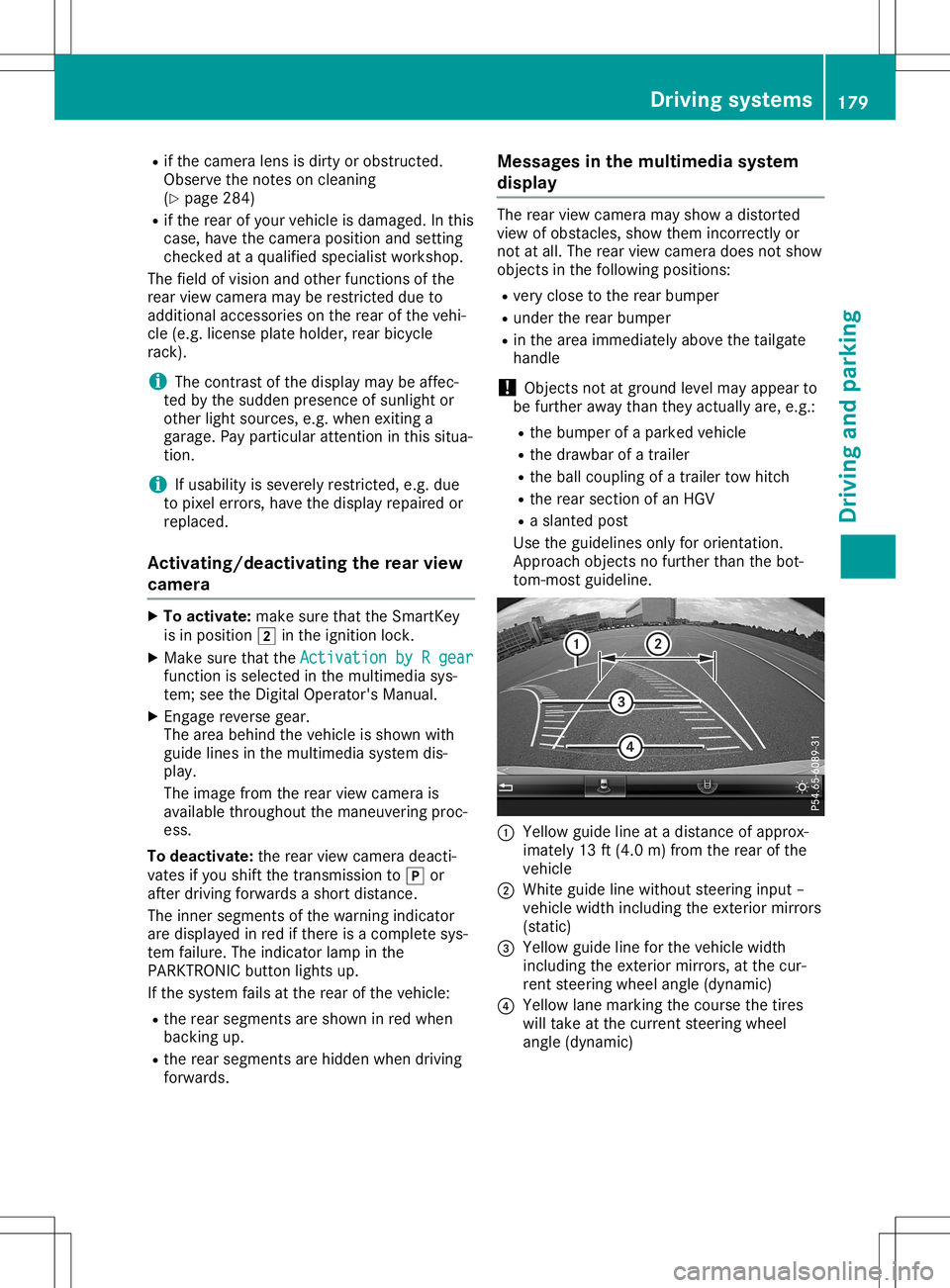
tom -most guideline . 0043
Yellow guidelineatadist anceof approx -
imate ly13 ft(4. 0m) fromthe rear ofthe
vehic le
0044 Whit eguide linewitho utste erin ginput –
vehic lewidth including theexterior mirrors
(st atic )
0087 Yellow guidelineforthe vehic lewidth
inc luding theexterior mirrors, atthe cur-
ren tste erin gwheel angle(dynamic )
0085 Yellow lanemark ingthe cour sethe tires
will takeat the curr entsteerin gwheel
angle (dynamic ) Driving
systems
179Driving andparking Z
Page 182 of 346
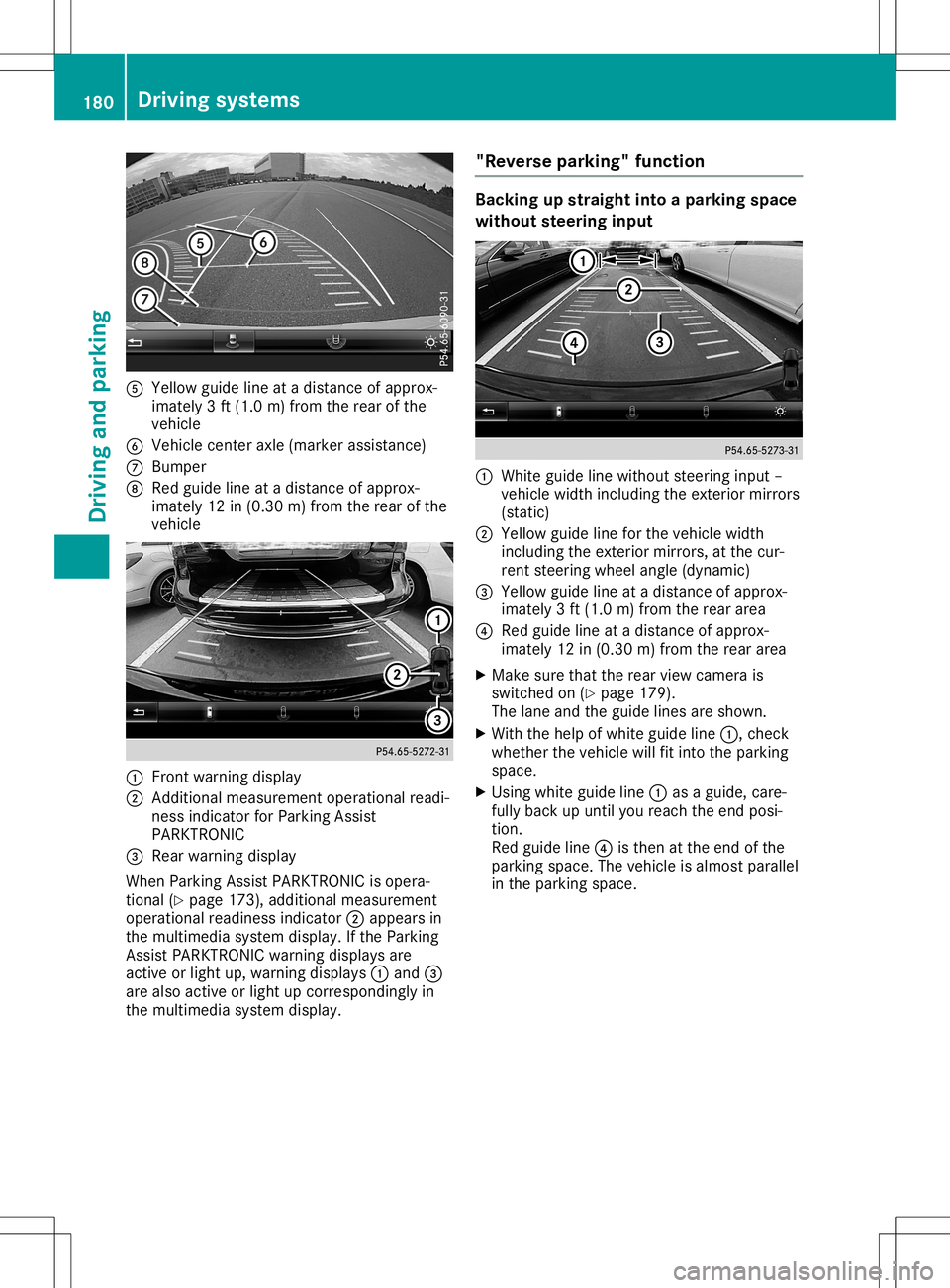
0083
Yellow guidelineatadistan ceofapprox -
imate ly3ft (1. 0m) from therear ofthe
vehic le
0084 Vehic lecen teraxle (mark erassist ance)
006B Bumper
006C Red guide lineatadistan ceofapprox -
imate ly12 in(0. 30 m)from therear ofthe
vehic le 0043
Frontwarnin gdisplay
0044 Addit ional measurem entoperat ionalreadi-
ness indicatorforPark ingAssist
PARKT RONIC
0087 Rear warnin gdisplay
When ParkingAssistPARKT RONIC isopera-
tion al(Y page 173),addition almeasurem ent
operat ionalreadin essindic ator0044appears in
the multim ediasyste mdisplay. Ifthe Park ing
Ass istPARKT RONIC warningdisplays are
act ive orlight up,warnin gdisplays 0043and 0087
are also active orlight upcor respon dinglyin
the multim ediasyste mdisplay. "Rever
separking" funct ion Ba
cking upstraight intoapa rking space
withou tsteer inginpu t 0043
Whit eguide linewithout steerin ginput –
vehic lewidth including theexterior mirrors
(stat ic)
0044 Yellow guidelineforthe vehic lewidth
inc luding theexterior mirrors, atthe cur-
ren tste erin gwheel angle(dynamic )
0087 Yellow guidelineatadistan ceofapprox -
imate ly3ft (1. 0m) from therear area
0085 Red guide lineatadistan ceofapprox -
imate ly12 in(0. 30 m)from therear area
X Make surethattherear view camer ais
switc hedon(Ypage 179).
The lane andtheguide linesareshown .
X With thehelp ofwhite guide line0043,chec k
wheth erthe vehic lewill fitintothe park ing
space.
X Usin gwhite guide line0043asaguide, care-
fully back upunt ilyou reach theend posi-
tion .
Red guide line0085isthe nat the end ofthe
park ingspace. Thevehic leisalmost parallel
in the park ingspace. 180
Driving
systemsDriving andparking