light MERCEDES-BENZ GLC SUV 2017 X253 User Guide
[x] Cancel search | Manufacturer: MERCEDES-BENZ, Model Year: 2017, Model line: GLC SUV, Model: MERCEDES-BENZ GLC SUV 2017 X253Pages: 374, PDF Size: 6.23 MB
Page 18 of 374
Oilsee Engine oil
On-board computer
AMG menu .................................... .224
Assistance graphic menu ...............2 19
Assistance menu ........................... 220
Display messages .......................... 227
Displaying a service message ........3 10
Displays and operation .................. 208
DISTRONIC PLUS ........................... 168
Factory settings ............................. 223
G-Meter ......................................... 224
Head-up display ............................. 211
Head-up display menu ................... 222
Important safety notes .................. 208
Instrument cluster menu ............... 223
Lights menu ................................... 223
Media menu ................................... 216
Menu overview .............................. 212
Message memory .......................... 227
Navigation menu ............................ 214
RACETIMER ................................... 225
Radio menu ................................... 216
Service menu ................................. 219
Settings menu ............................... 220
Standard display ............................ 212
Telephone menu ............................ 218
Trip menu ...................................... 212
Video DVD operation ..................... 217
Opening and closing the side trim
panels ................................................. 118
Operating safety
Declaration of conformity ................ 30
Important safety notes .................... 30
Operating system
see On-board computer
Operation
Digital Operator's Manual ................ 26
Operator's Manual
Overview .......................................... 28
Vehicle equipment ........................... 28
Outside temperature display ........... 209
Overhead control panel ...................... 41
Override feature
Rear side windows ........................... 64P
Paddle shifterssee Steering wheel paddle shifters
Paint code number ............................ 363
Paintwork (cleaning instructions) ... 313
Panic alarm .......................................... 43
Panorama roof with power tilt/
sliding panel
Important safety notes .................... 93
Operating ......................................... 94
Problem (malfunction) ..................... 96
Rain closing feature ......................... 95
Reversing feature ............................. 94
Panoramic roof
Operating the roller sunblinds .......... 95
Parcel net ........................................... 286
Parking
Important safety notes .................. 154
Parking brake ................................ 155
Parking position for the exterior
mirror on the front-passenger
side ................................................ 108
Rear view camera .......................... 182
Switching off the engine ................ 155
see PARKTRONIC
Parking aid
see 360° camera
see Active Parking Assist
see Exterior mirrors
see PARKTRONIC
see Rear view camera
Parking Assist
Display message ............................ 246
Parking brake
Applying automatically ................... 156
Applying or releasing manually ...... 156
Display message ............................ 230
Electric parking brake .................... 155
Emergency braking ........................ 157
General notes ................................ 155
Releasing automatically ................. 156
Warning lamp ................................. 262
Parking lamps
Switching on/off ........................... 112
PARKTRONIC
Deactivating/activating ................. 177
Driving system ............................... 175
16Index
Page 25 of 374
Tow-startingEmergency engine starting ............ 333
Important safety notes .................. 330
Towing a trailer
Axle load, permissible .................... 371
Cleaning the trailer tow hitch ......... 316
Coupling up a trailer ...................... 204
Decoupling a trailer ....................... 206
Driving tips .................................... 203
ESP
®(Electronic Stability Pro-
gram) ............................................... 73
Important safety notes .................. 202
Installing the ball coupling ............. 204
Lights display message .................. 239
Power supply ................................. 206
Pulling away with a trailer .............. 135
Removing the ball coupling ............ 206
Trailer loads ................................... 371
Towing away
Important safety guidelines ........... 330
Installing the towing eye ................ 331
Notes for 4MATIC vehicles ............ 333
Removing the towing eye ............... 332
Transporting the vehicle ................ 332
With both axles on the ground ....... 332
Towing eye ......................................... 320
Traffic reports
see also Digital Operator's Man-
ual .................................................. 268
Traffic Sign Assist
Display message ............................ 247
Function/notes ............................. 192
Important safety notes .................. 193
Instrument cluster display ............. 193
Trailer coupling
see Towing a trailer
Trailer loads and drawbar nose-
weights ............................................... 206
Trailer towing
Active Lane Keeping Assist ............ 202
Blind Spot Assist ............................ 195
Permissible trailer loads and
drawbar noseweights ..................... 206
Transfer case ..................................... 148
Transmission
Display message ............................ 253
see Automatic transmission Transmission oil
Temperature (on-board computer,
Mercedes-AMG vehi
cles) ............... 224
Transmission position display ......... 142
Transporting the vehicle .................. 332
Trim pieces (cleaning instruc-
tions) .................................................. 317
Trip computer (on-board com-
puter) .................................................. 213
Trip odometer
Calling up ....................................... 212
Resetting (on-board computer) ...... 214
Trunk
see Cargo compartment
Trunk load (maximum) ...................... 370
Turn signals
Display message ............................ 239
Replacing bulbs (front) ................... 117
Switching on/off ........................... 112
Two-way radio
Frequencies ................................... 362
Installation ..................................... 362
Transmission output (maximum) .... 362
Type identification plate
see Vehicle identification plate
U
UnlockingEmergency unlocking ....................... 84
From inside the vehicle (central
unlocking button) ............................. 83
USB devices
Connecting to the Media Inter-
face ............................................... 276
V
Vanity mirror (in the sun visor) ........ 291
Vehicle
Correct use ...................................... 31
Data acquisition ............................... 32
Display message ............................ 252
Electronics ..................................... 362
Equipment ....................................... 28
Individual settings .......................... 220
Limited Warranty ............................. 32
Loading .......................................... 346
Index23
Page 34 of 374
essary, contact us at one of the following
addresses.
In the USA
Customer Assistance Center
Mercedes-Benz USA, LLC
3 Mercedes Drive
Montvale, NJ 07645-0350
In Canada
Customer Relations Department
Mercedes-Benz Canada, Inc.
98 Vanderhoof Avenue
Toronto, Ontario M4G 4C9
Reporting safety defects
USA only:
The following text is reproduced as required of
all manufacturers under Title 49, Code of U.S.
Federal Regulations, Part 575 pursuant to the
National Traffic and Motor Vehicle Safety Act of
1966.
If you believe that your vehicle has a defect
which could cause a crash or could cause injury
or death, you should immediately inform the
National Highway Traffic Safety Administration
(NHTSA) in addition to notifying Mercedes-Benz
USA, LLC.
If NHTSA receives similar complaints, it may
open an investigation, and if it finds that a safety
defect exists in a group of vehicles, it may order
a recall and remedy campaign. However, NHTSA
cannot become involved in individual problems
between you, your dealer, or Mercedes-Benz
USA, LLC.
To contact NHTSA, you may call the Vehicle
Safety Hotline toll-free at 1-888-327-4236
(TTY: 1-800-424-9153); go tohttp://
www.safercar.gov; or write to: Administrator,
NHTSA, 400 Seventh Street, SW., Washington,
DC 20590.
You can also obtain other information about
motor vehicle safety from
http://www.safercar.gov
Limited Warranty
!
Follow the instructions in this manual about
the proper operation of your vehicle as well as
about possible vehicle damage. Damage to
your vehicle that arises from culpable contra- ventions against these instructions is not cov-
ered either by the Mercedes-Benz Limited
Warranty or by the New or Used-Vehicle War-
ranty.
QR codes for the rescue card
The QR codes are secured in the fuel filler flap
and on the opposite side on the B-pillar. In the
event of an accident, rescue services can use
the QR code to quickly find the appropriate res-
cue card for your vehicle. The current rescue
card contains the most important information
about your vehicle in a compact form, e.g. the
routing of the electric cables.
You can find more information under
www.mercedes-benz.de/qr-code.
Data stored in the vehicle
Data storage
A wide range of electronic components in your
vehicle contain data memories.
These data memories temporarily or perma-
nently store technical information about:
Rthe vehicle's operating state
Rincidents
Rmalfunctions
In general, this technical information docu-
ments the state of a component, a module, a
system or the surroundings.
These include, for example:
Roperating conditions of system components,
e.g. fluid levels
Rthe vehicle's status messages and those of its
individual components, e.g. number of wheel
revolutions/speed, deceleration in move-
ment, lateral acceleration, accelerator pedal
position
Rmalfunctions and defects in important system
components, e.g. lights, brakes
Rvehicle reactions and operating conditions in
special driving situations, e.g. air bag deploy-
ment, intervention of stability control sys-
tems
Rambient conditions, e.g. outside temperature
32Data stored in the vehicle
Introduction
Page 37 of 374
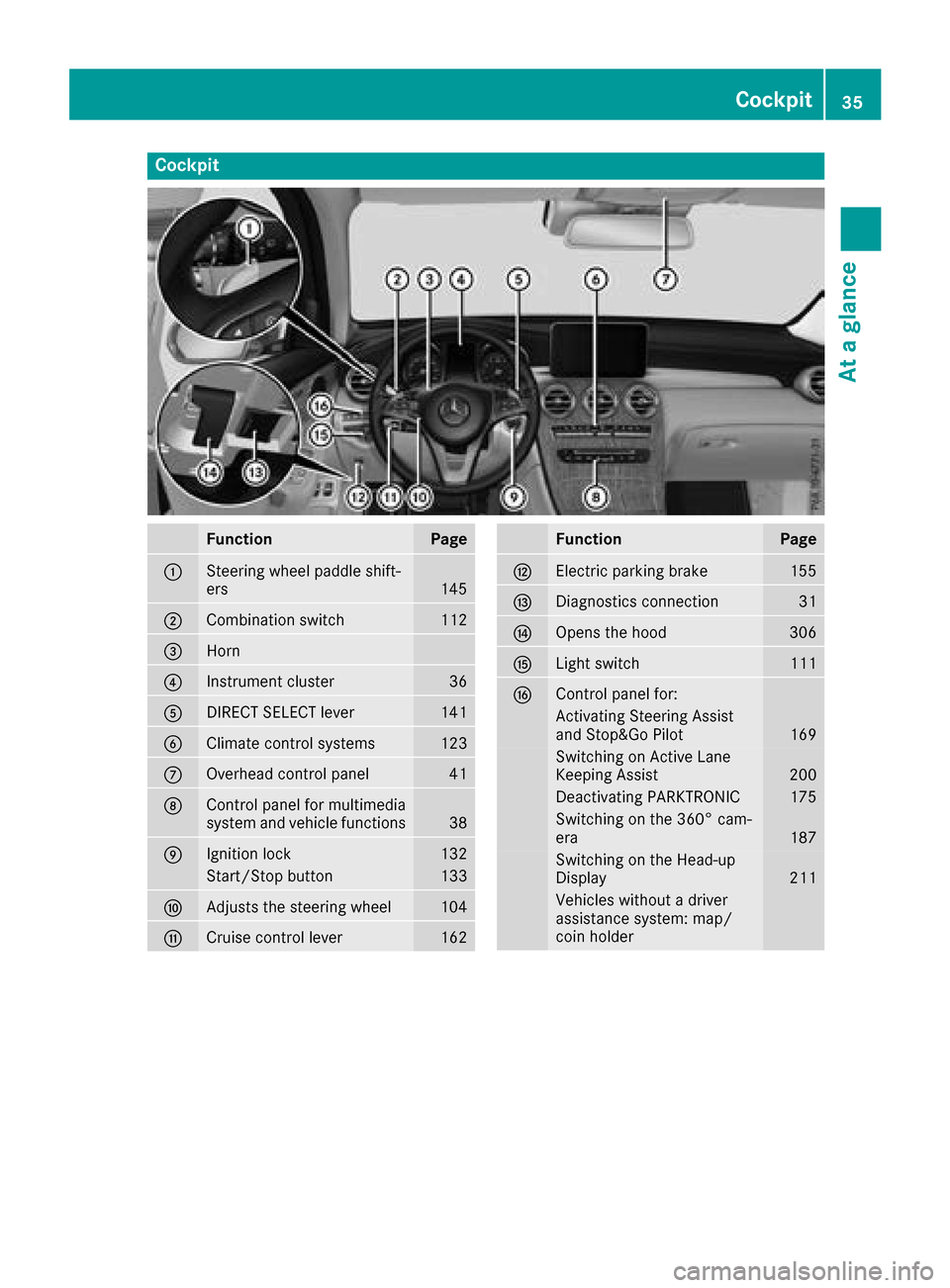
Cockpit
FunctionPage
:Steering wheel paddle shift-
ers145
;Combination switch112
=Horn
?Instrument cluster36
ADIRECT SELECT lever141
BClimate control systems123
COverhead control panel41
DControl panel for multimedia
system and vehicle functions38
EIgnition lock132
Start/Stop button133
FAdjusts the steering wheel104
GCruise control lever162
FunctionPage
HElectric parking brake155
IDiagnostics connection31
JOpens the hood306
KLight switch111
LControl panel for:
Activating Steering Assist
and Stop&Go Pilot169
Switching on Active Lane
Keeping Assist200
Deactivating PARKTRONIC175
Switching on the 360° cam-
era187
Switching on the Head-up
Display211
Vehicles without a driver
assistance system: map/
coin holder
Cockpit35
At a glance
Page 41 of 374
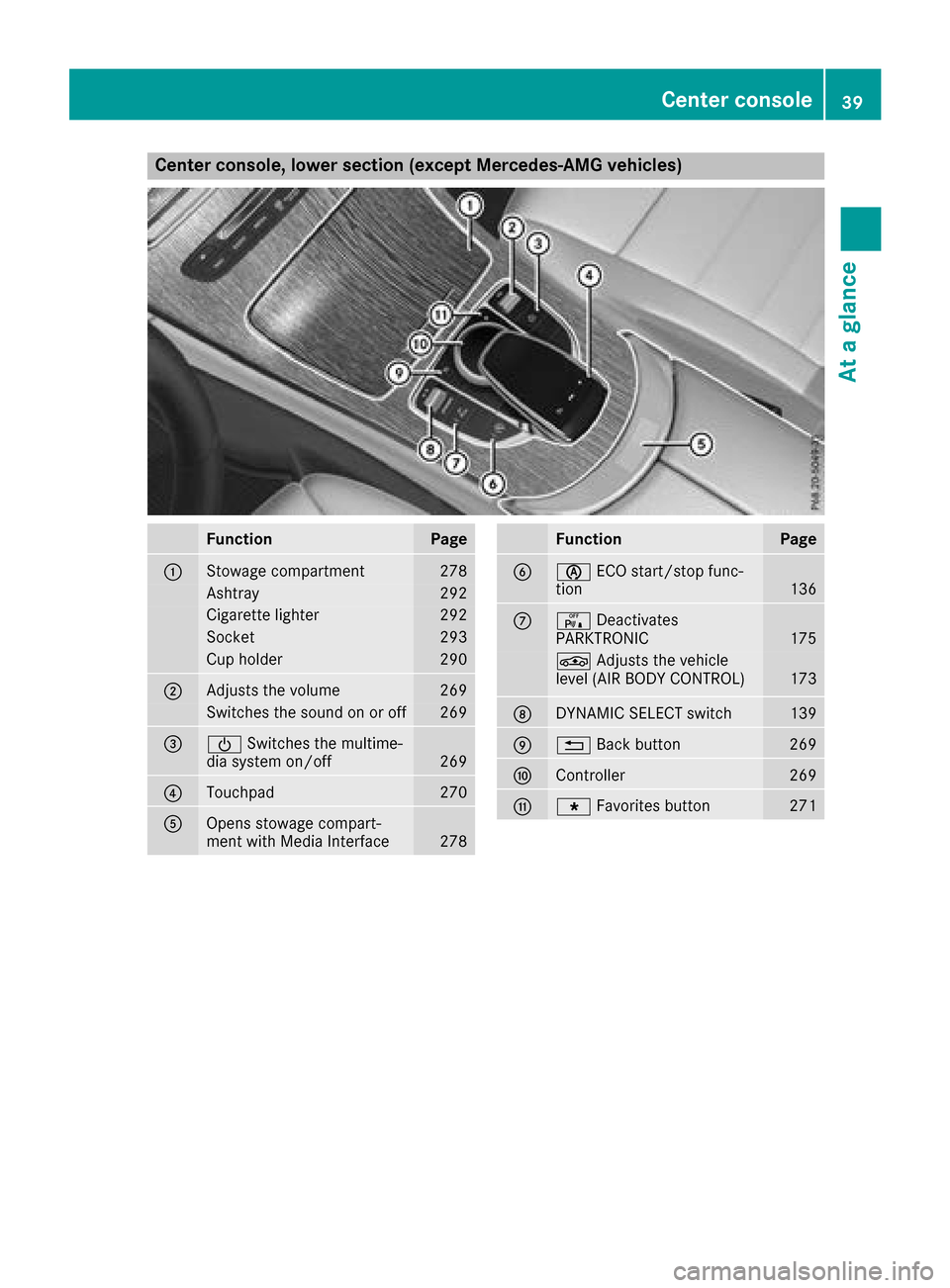
Center console, lower section (except Mercedes-AMG vehicles)
FunctionPage
:Stowage compartment278
Ashtray292
Cigarette lighter292
Socket293
Cup holder290
;Adjusts the volume269
Switches the sound on or off269
=ÜSwitches the multime-
dia system on/off269
?Touchpad270
AOpens stowage compart-
ment with Media Interface278
FunctionPage
Bè ECO start/stop func-
tion136
Cc Deactivates
PARKTRONIC175
É Adjusts the vehicle
level (AIR BODY CONTROL)173
DDYNAMIC SELECT switch139
E% Back button269
FController269
GgFavorites button271
Center console39
At a glance
Page 42 of 374
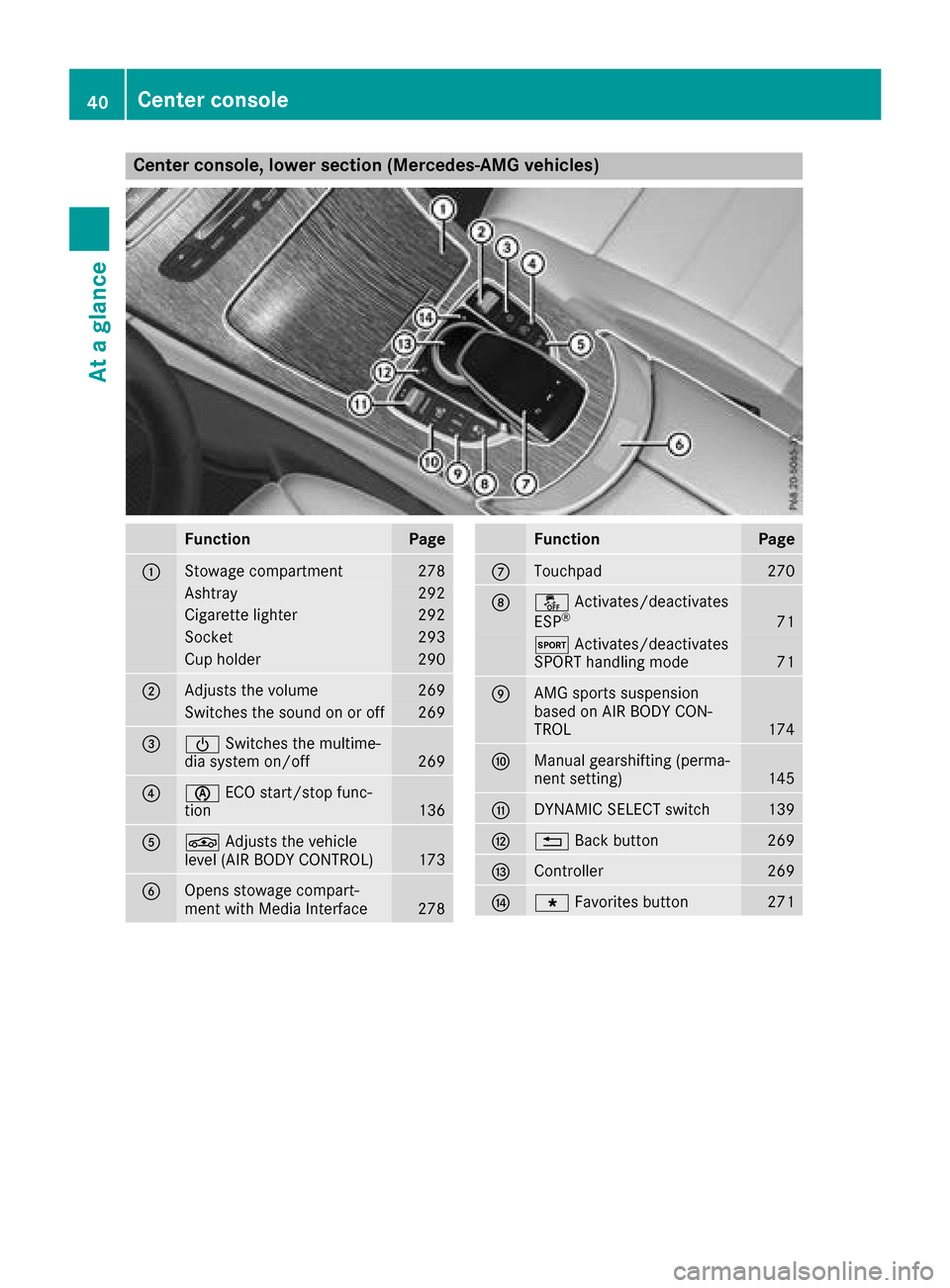
Center console, lower section (Mercedes-AMG vehicles)
FunctionPage
:Stowage compartment278
Ashtray292
Cigarette lighter292
Socket293
Cup holder290
;Adjusts the volume269
Switches the sound on or off269
=ÜSwitches the multime-
dia system on/off269
?è ECO start/stop func-
tion136
AÉ Adjusts the vehicle
level (AIR BODY CONTROL)173
BOpens stowage compart-
ment with Media Interface278
FunctionPage
CTouchpad270
Då Activates/deactivates
ESP®71
M Activates/deactivates
SPORT handling mode71
EAMG sports suspension
based on AIR BODY CON-
TROL
174
FManual gearshifting (perma-
nent setting)145
GDYNAMIC SELECT switch139
H% Back button269
IController269
JgFavorites button271
40Center console
At a glance
Page 43 of 374
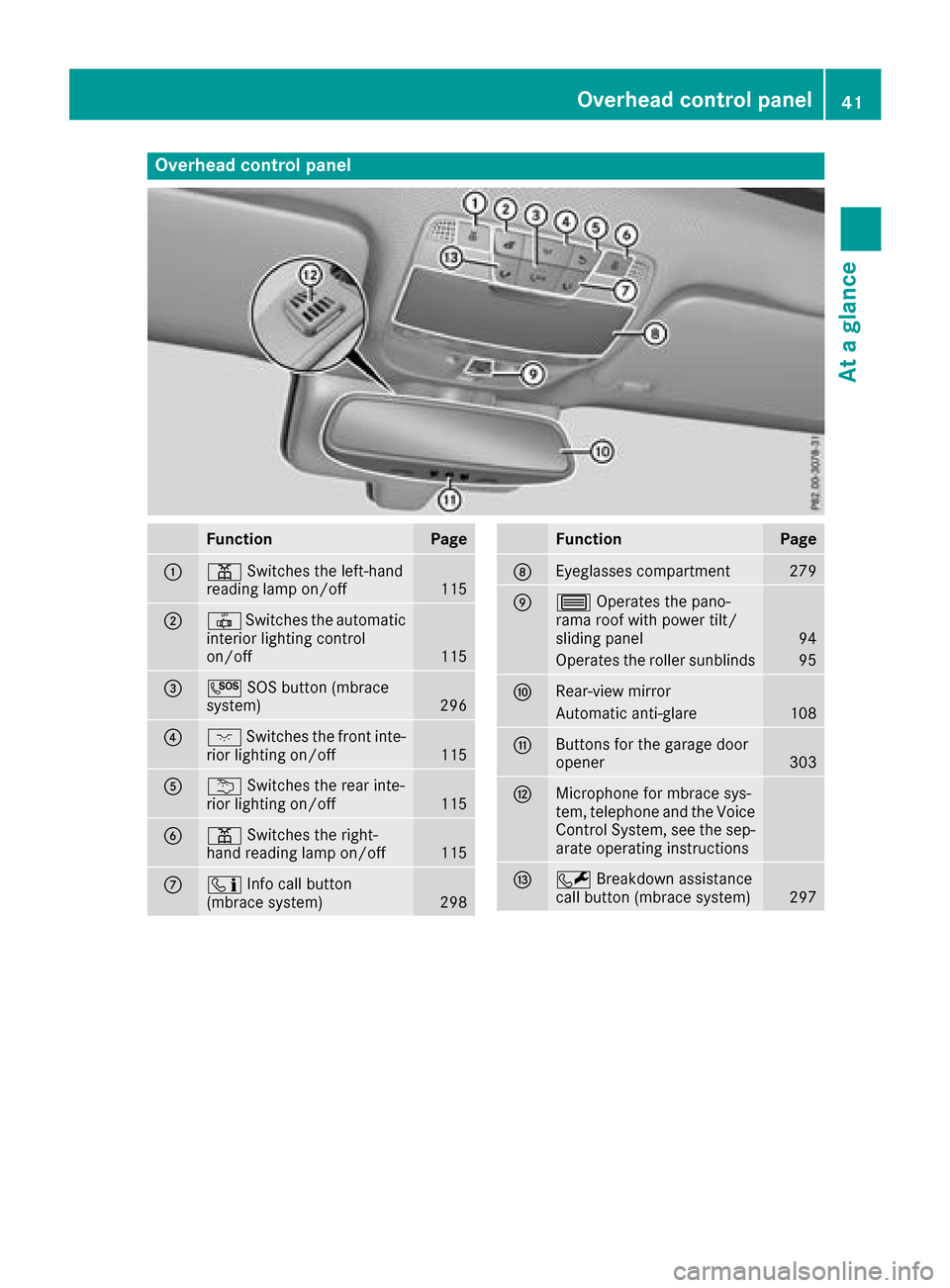
Overhead control panel
FunctionPage
:pSwitches the left-hand
reading lamp on/off115
;| Switches the automatic
interior lighting control
on/off
115
=G SOS button (mbrace
system)296
?c Switches the front inte-
rior lighting on/off115
Au Switches the rear inte-
rior lighting on/off115
Bp Switches the right-
hand reading lamp on/off115
Cï Info call button
(mbrace system)298
FunctionPage
DEyeglasses compartment279
E3 Operates the pano-
rama roof with power tilt/
sliding panel
94
Operates the roller sunblinds95
FRear-view mirror
Automatic anti-glare108
GButtons for the garage door
opener303
HMicrophone for mbrace sys-
tem, telephone and the Voice
Control System, see the sep-
arate operating instructions
IF Breakdown assistance
call button (mbrace system)297
Overhead control panel41
At a glance
Page 46 of 374
Restraint system warning lamp
The functions of the restraint system are
checked after the ignition is switched on and at
regular intervals while the engine is running.
Therefore, malfunctions can be detected in
good time.
The6 restraint system warning lamp in the
instrument cluster lights up when the ignition is
switched on. It goes out no later than a few sec-
onds after the vehicle is started. The compo-
nents of the restraint system are in operational
readiness.
A malfunction has occurred if the 6restraint
system warning lamp:
Rdoes not light up after the ignition is switched
on
Rdoes not go out after a few seconds with the
engine running
Rlights up again while the engine is running
GWARNING
If the restraint system is malfunctioning,
restraint system components may be trig-
gered unintentionally or may not deploy as
intended during an accident. This can affect
for example the Emergency Tensioning
Device or the air bag. This poses an increased
risk of injury or even fatal injury.
Have the restraint system checked and
repaired in a qualified specialist workshop as
soon as possible.
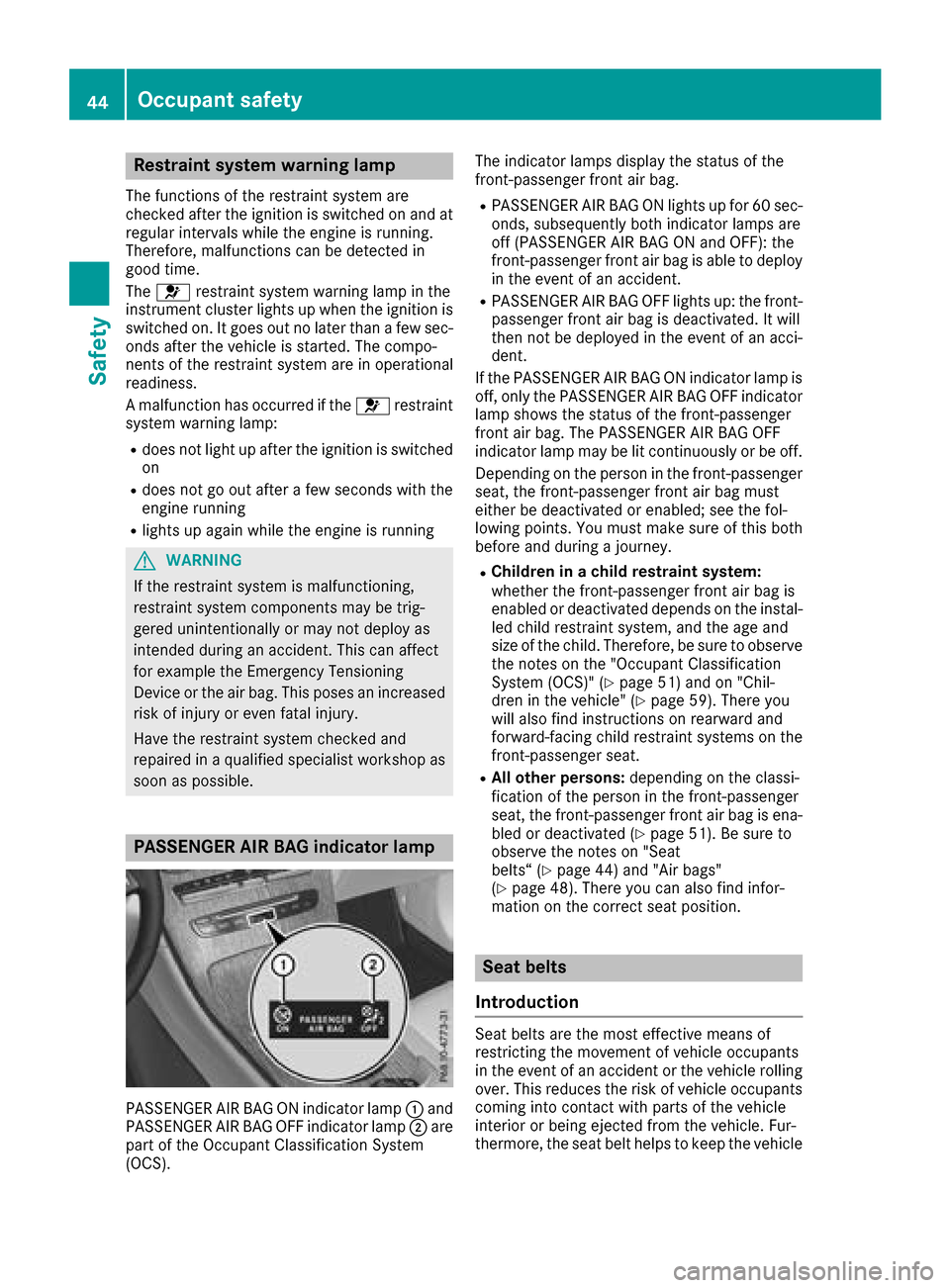
PASSENGER AIR BAG indicator lamp
PASSENGER AIR BAG ON indicator lamp :and
PASSENGER AIR BAG OFF indicator lamp ;are
part of the Occupant Classification System
(OCS). The indicator lamps display the status of the
front-passenger front air bag.
RPASSENGER AIR BAG ON lights up for 60 sec-
onds, subsequently both indicator lamps are
off (PASSENGER AIR BAG ON and OFF): the
front-passenger front air bag is able to deploy
in the event of an accident.
RPASSENGER AIR BAG OFF lights up: the front-
passenger front air bag is deactivated. It will
then not be deployed in the event of an acci-
dent.
If the PASSENGER AIR BAG ON indicator lamp is
off, only the PASSENGER AIR BAG OFF indicator lamp shows the status of the front-passenger
front air bag. The PASSENGER AIR BAG OFF
indicator lamp may be lit continuously or be off.
Depending on the person in the front-passenger
seat, the front-passenger front air bag must
either be deactivated or enabled; see the fol-
lowing points. You must make sure of this both
before and during a journey.
RChildren in a child restraint system:
whether the front-passenger front air bag is
enabled or deactivated depends on the instal-led child restraint system, and the age and
size of the child. Therefore, be sure to observe
the notes on the "Occupant Classification
System (OCS)" (
Ypage 51) and on "Chil-
dren in the vehicle" (Ypage 59). There you
will also find instructions on rearward and
forward-facing child restraint systems on the
front-passenger seat.
RAll other persons: depending on the classi-
fication of the person in the front-passenger
seat, the front-passenger front air bag is ena-
bled or deactivated (
Ypage 51). Be sure to
observe the notes on "Seat
belts“ (
Ypage 44) and "Air bags"
(Ypage 48). There you can also find infor-
mation on the correct seat position.
Seat belts
Introduction
Seat belts are the most effective means of
restricting the movement of vehicle occupants
in the event of an accident or the vehicle rolling over. This reduces the risk of vehicle occupants
coming into contact with parts of the vehicle
interior or being ejected from the vehicle. Fur-
thermore, the seat belt helps to keep the vehicle
44Occupant safety
Safety
Page 49 of 374
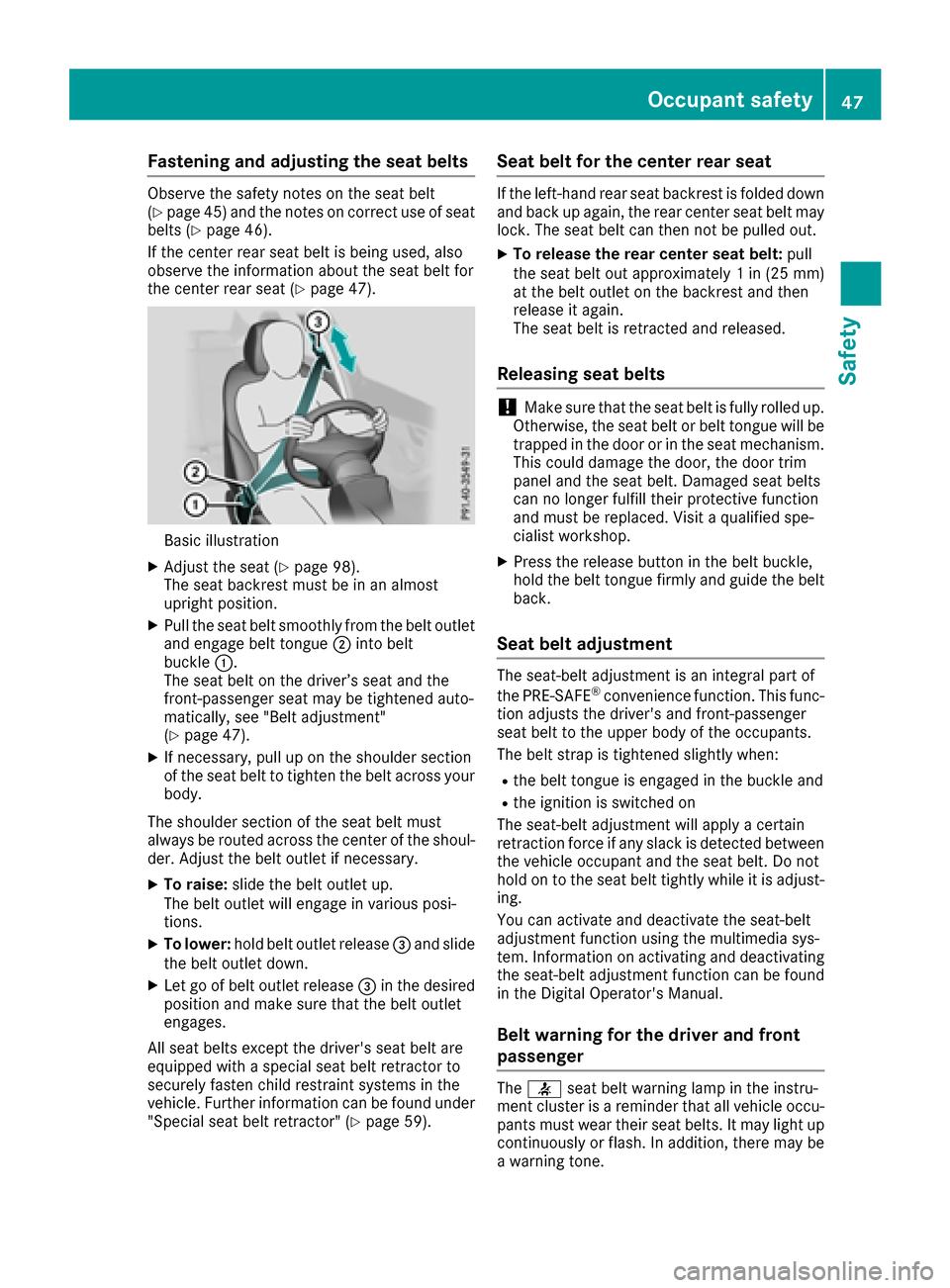
Fastening and adjusting the seat belts
Observeth esafet ynote son th eseat belt
(Ypage 45) and th enote son correct use of seat
belt s (Ypage 46) .
If th ecente rrear seat belt is bein gused, also
observ eth einformation about th eseat belt for
th ecente rrear seat (
Ypage 47).
Basic illustration
XAdjustth eseat (Ypage 98).
The seat backrest must be in an almost
upright position .
XPull theseat belt smoothly from th ebelt outlet
and engage belt tongue ;intobelt
buckle :.
The seat belt on th edriver’s seat and th e
front-passenger seat may be tightened auto -
matically, see "Belt adjustment"
(
Ypage 47).
XIf necessary, pull up on th eshoulder section
of th eseat belt to tighten th ebelt across your
body.
The shoulder section of th eseat belt must
always be routed across th ecente rof th eshoul-
der .Adjus tth ebelt outlet if necessary.
XTo raise: slide thebelt outlet up.
The belt outlet will engage in various posi-
tions.
XTo lower :hold belt outlet release =and slide
th ebelt outlet down .
XLet go of belt outlet release =in th edesired
position and mak esure that th ebelt outlet
engages.
All seat belt sexcep tth edriver' sseat belt are
equipped wit h aspecial seat belt retracto rto
securel yfaste nchild restrain tsystems in th e
vehicle. Further information can be foun dunder
"Special seat belt retractor" (
Ypage 59).
Seat belt for the center rear seat
If theleft-han drear seat backrest is folded down
and bac kup again ,th erear cente rseat belt may
lock. The seat belt can then no tbe pulled out .
XTo releaseth erea rcenter sea tbelt :pull
th eseat belt out approximately 1in (25 mm )
at th ebelt outlet on th ebackrest and then
release it again .
The seat belt is retracte dand released.
Releasing seat belts
!Mak esure that th eseat belt is fully rolled up.
Otherwise, th eseat belt or belt tongue will be
trapped in th edoor or in th eseat mechanism .
This could damag eth edoor ,th edoor trim
panel and th eseat belt .Damaged seat belt s
can no longer fulfill their protective function
and must be replaced. Visit aqualified spe-
cialist workshop.
XPress th erelease butto nin th ebelt buckle,
hold th ebelt tongue firmly and guide th ebelt
back.
Seat belt adjustment
The seat-belt adjustmen tis an integral part of
th ePRE-SAF E®convenience function .This func-
tion adjust sth edriver' sand front-passenger
seat belt to th eupper body of th eoccupants.
The belt strap is tightened slightly when :
Rthebelt tongue is engage din th ebuckle and
Rth eignition is switched on
The seat-belt adjustmen twill apply acertai n
retraction force if any slac kis detected between
th evehicl eoccupant and th eseat belt .Do no t
hold on to th eseat belt tightly while it is adjust -
ing .
You can activat eand deactivat eth eseat-belt
adjustmen tfunction usin gth emultimedia sys-
tem. Information on activating and deactivating
th eseat-belt adjustmen tfunction can be foun d
in th eDigital Operator's Manual.
Belt warning for the driver and front
passenger
The 7 seat belt warning lamp in th einstru-
men tcluste ris areminder that all vehicl eoccu-
pants must wear their seat belts. It may ligh tup
continuously or flash. In addition ,there may be
a warning tone .
Occupant safety47
Safety
Z
Page 50 of 374
Regardlessof whether th edriver' sseat belt has
already been fastened, th e7 seat belt warn -
ing lamp lights up for six seconds eac htime th e
engin eis started. If ,after six seconds, th edriver
or front-passenger seat belt has no tbeen fas -
tene dand th edoor sare closed, th e7 seat
belt warning lamp lights up. As soo nas th edriv -
er' sand front-passenger seat belt sare fastene d
or afron tdoor is opened again ,th e7 seat
belt warning lamp goes out .
If th edriver' sseat belt is no tfastene dafter th e
engin eis started, an additional warning tone will
sound. The warning tone switches off after six
seconds or once th edriver' sseat belt is fas -
tened.
If th evehicle's spee dexceeds 15 mph
(25 km/h) once and th edriver' sand front-
passenger seat belt sare no tfastened, awarning
tone sounds. Awarning tone also sounds wit h
increasing intensit yfor 60 seconds or until th e
driver or fron tpassenger hav efastene dtheir
seat belts.
If th edriver or fron tpassenger unfasten their
seat belt sduring th ejourney, th eseat belt warn -
ing is activated again .
Air bags
Introduction
The installation poin tof an air bag can be rec -
ognized by th eAI R BA Gsymbol.
An air bag complements th ecorrectl yfastene d
seat belt .It is no substitut efor th eseat belt .The
air bag provide sadditional protection in appli-
cable acciden tsituations.
Not all air bags are deployed in an accident. The
differen tair bag systems function independ-
entl yfrom on eanother (
Ypage 55).
However, no system available today can com-
pletely eliminate injurie sand fatalities.
It is also no tpossibl eto rule out aris kof injury
caused by an air bag due to th ehigh spee dat
whic hth eair bag mus tbe deployed.
Important safety notes
GWARNIN G
If you do no tsit in th ecorrec tseat position ,
th eair bag canno tprotect as intended and
could eve ncaus eadditional injury when
deployed. This poses an increased ris kof
injury or eve nfatal injury.
To avoi dhazardous situations, always mak e
sur ethat all of th evehicle's occupants:
Rhav efastene dtheir seat belt scorrectly,
includin gpregnant women
Rare sitting correctl yand maintai nth egreat-
est possibl edistanc eto th eair bags
Rfollow th efollowin ginstruction s
Always mak esur ethat there are no objects
between th eair bag and th evehicle's occu-
pants .
RAdjus tth eseat sproperly before beginning
your journey. Always mak esur ethat th eseat
is in an almost upright position .The center of
th ehead restrain tmus tsupport th ehead at
about eye level.
RMov eth edriver' sand front-passenger seat s
as far bac kas possible. The driver' sseat posi-
tion mus tallow th evehicl eto be driven safely.
ROnly hold th esteering whee lon th eoutside .
This allows th eair bag to be fully deployed.
RAlways lean against th ebackrest while driv -
ing .Do no tlean forwards or lean against th e
door or side window. You may otherwise be in
th edeploymen tarea of th eair bags .
RAlways keep your fee tin th efootwell in fron t
of th eseat .Do no tput your fee ton th edash -
board, for example. Your fee tmay otherwise
be in th edeploymen tarea of th
ea
ir bag.
RFo rthis reason ,always secure person sless
than 5ft (1.5 0m) tall in suitable restraint sys-
tems. Up to this height, the seat belt cannot
be worn correctly.
If a child is traveling in your vehicle, also
observe the following notes:
RAlways secure children under twelve years of
age and less than 5 ft (1.50 m)tall in suitable
child restraint systems.
RChild restraint systems should be installed on
the rear seats.
ROnly secure a child in a rearward-facing child
restraint system on the front-passenger seat
when the front-passenger front air bag is
deactivated. If the PASSENGER AIR BAG OFF
indicator lamp is permanently lit, the front-
48Occupant safety
Safety