phone audio MERCEDES-BENZ M-Class 2015 W166 Comand Manual
[x] Cancel search | Manufacturer: MERCEDES-BENZ, Model Year: 2015, Model line: M-Class, Model: MERCEDES-BENZ M-Class 2015 W166Pages: 270, PDF Size: 5.82 MB
Page 216 of 270
Reconnecting a Bluetooth
®
audio
device The Bluetooth
®
audio profiles are connected
automatically under the following circum-
stances:
R one of the last two mobile phones to have
been connected has also been used as a
Bluetooth ®
audio player (if this function is
supported by the mobile phone).
R the mobile phone takes over the automatic
connection itself.
A Bluetooth ®
audio player without telephone
functions is not automatically reconnected,
even if it was the last device connected.
If the No Bluetooth Audio Device Con‐
No Bluetooth Audio Device Con‐
nected nected message appears, you have two
options to connect a Bluetooth ®
audio
device:
Connecting last device
X Confirm Connect Last Device
Connect Last Device in the
basic display by pressing 0098the COMAND
controller.
If COMAND can locate the Bluetooth ®
audio device, it will be connected and start
playing.
i With some Bluetooth ®
audio devices,
playback must first be started on the device itself so that COMAND can play the audio
files.
Connecting a device from a list
X Select BT Audio BT Audio by turning 00790052007Athe
COMAND controller and press 0098to con-
firm.
X Confirm Bluetooth Audio Device List
Bluetooth Audio Device List
by pressing 0098the COMAND controller.
X Select a Bluetooth ®
audio device by turning
00790052007A the COMAND controller and press 0098
to confirm.
If COMAND can locate the Bluetooth ®
audio device, it will be connected and start
playing.
i With some Bluetooth ®
audio devices,
playback must be initially started on the device itself so that COMAND can play the
audio files.
Bluetooth ®
audio device and simultane-
ous search for mobile phones During the search for mobile phones, the con-
nection with the Bluetooth ®
audio device is
terminated (Y page 127). In the Bluetooth ®
audio basic display, you will see the No NoBlue‐
Blue‐
tooth Audio Device Connected
tooth Audio Device Connected message
and the Connect Last Device
Connect Last Device menu item
cannot be selected.
Displaying details X
Select a Bluetooth ®
audio device in the
Bluetooth ®
device list.
X Select the symbol to the right of the Blue-
tooth ®
audio device by sliding 00520096the
COMAND controller and press 0098to con-
firm.
X Select Details Details and press 0098to confirm.
The following information concerning the
selected mobile phone is shown:
R Bluetooth ®
name
R Bluetooth ®
address
R availability status (shown after an
update)
R authorization status
X To close the detailed view: turn00790052007A or
slide 009500520096 the COMAND controller.
De-authorizing (deregistering) a Blue-
tooth ®
audio device X
Select a Bluetooth ®
audio device in the
Bluetooth ®
device list.
X Select the symbol to the right of the Blue-
tooth ®
audio device by sliding 00520096the
COMAND controller and press 0098to con-
firm. 214
Bluetooth ®
audio modeAudio
Page 218 of 270
X
To stop playback: select00DBby turning
00790052007A the COMAND controller and press 0098
to confirm.
A message appears. 00D0is selected.
X To continue playback: select00D0by
turning 00790052007Athe COMAND controller and
press 0098to confirm.
A message appears. 00DBis selected. Restarting playback after stopping
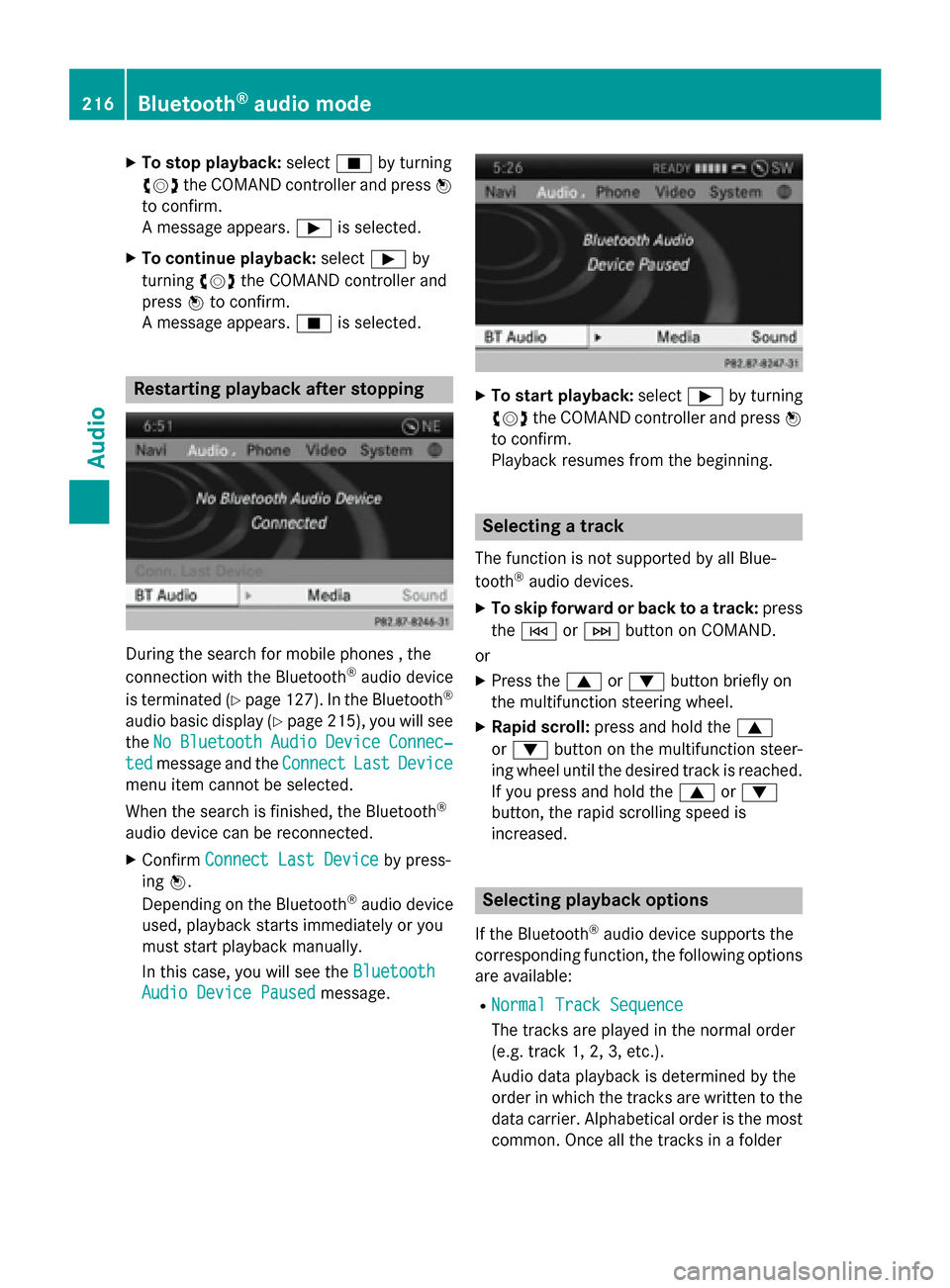
During the search for mobile phones , the
connection with the Bluetooth ®
audio device
is terminated (Y page 127). In the Bluetooth ®
audio basic display (Y page 215), you will see
the No
No Bluetooth Bluetooth Audio
Audio Device
Device Connec‐
Connec‐
ted
ted message and the Connect
ConnectLast
LastDevice
Device
menu item cannot be selected.
When the search is finished, the Bluetooth ®
audio device can be reconnected. X Confirm Connect Last Device
Connect Last Device by press-
ing 0098.
Depending on the Bluetooth ®
audio device
used, playback starts immediately or you
must start playback manually.
In this case, you will see the Bluetooth Bluetooth
Audio Device Paused
Audio Device Paused message. X
To start playback: select00D0by turning
00790052007A the COMAND controller and press 0098
to confirm.
Playback resumes from the beginning. Selecting a track
The function is not supported by all Blue-
tooth ®
audio devices.
X To skip forward or back to a track: press
the 0048 or0049 button on COMAND.
or
X Press the 0063or0064 button briefly on
the multifunction steering wheel.
X Rapid scroll: press and hold the 0063
or 0064 button on the multifunction steer-
ing wheel until the desired track is reached.
If you press and hold the 0063or0064
button, the rapid scrolling speed is
increased. Selecting playback options
If the Bluetooth ®
audio device supports the
corresponding function, the following options
are available:
R Normal Track Sequence Normal Track Sequence
The tracks are played in the normal order
(e.g. track 1, 2, 3, etc.).
Audio data playback is determined by the
order in which the tracks are written to the
data carrier. Alphabetical order is the most
common. Once all the tracks in a folder 216
Bluetooth ®
audio modeAudio
Page 219 of 270
have been played, the tracks in the next
folder are played.
R Random Tracks
Random Tracks
All the tracks on the medium are played in
random order (e.g. track 3, 8, 5 etc.).
X Select BT
BT Audio Audio by sliding 00520064and turning
00790052007A the COMAND controller and press 0098
to confirm.
The 003Bdot indicates the option selected.
X Select the option by turning 00790052007Athe
COMAND controller and press 0098to con-
firm.
If you select Random
Random Tracks Tracks, you will see a
corresponding symbol in the display/
selection window. Increasing the volume on COMAND
X
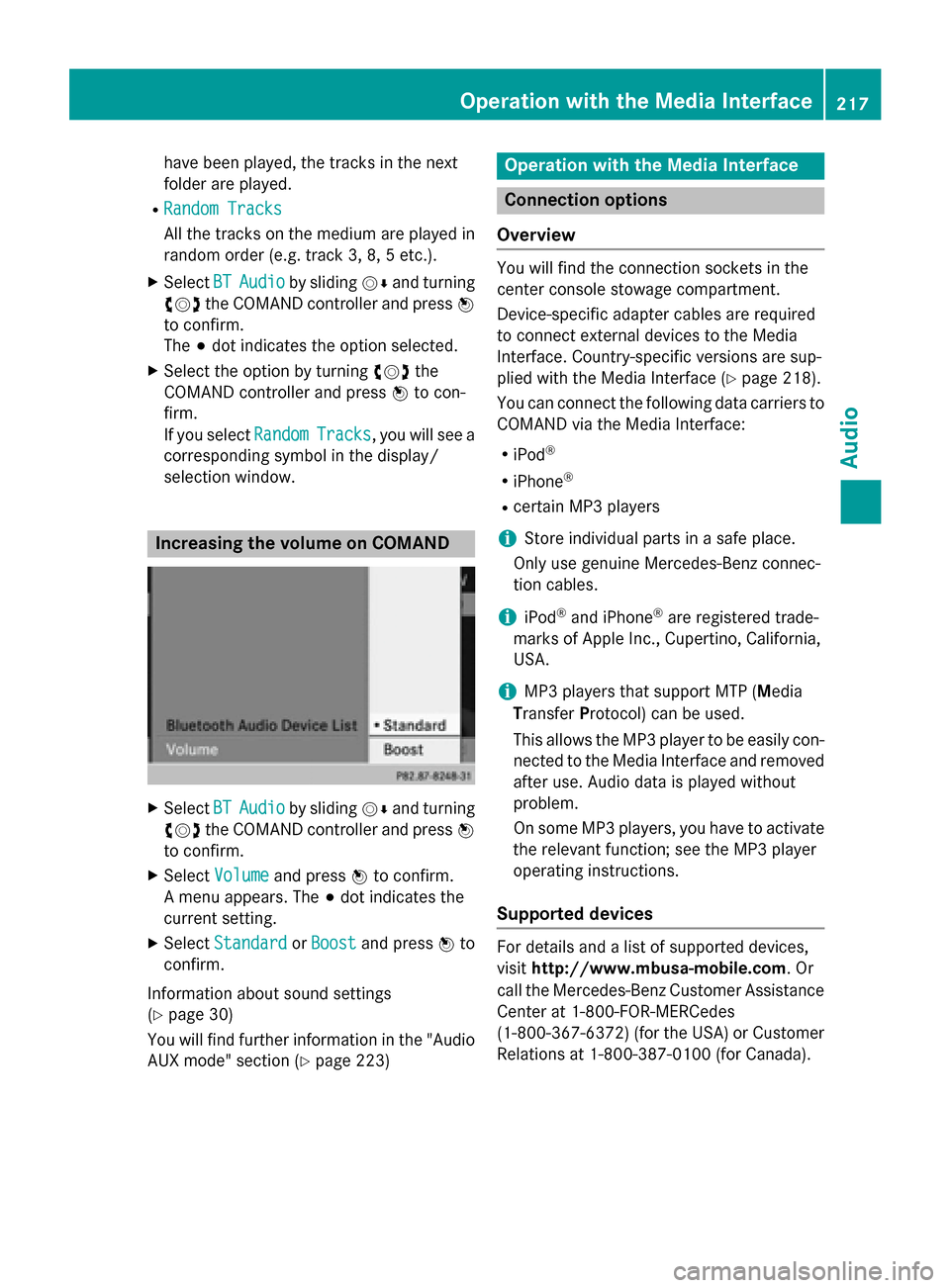
Select BT
BTAudio
Audio by sliding 00520064and turning
00790052007A the COMAND controller and press 0098
to confirm.
X Select Volume
Volume and press 0098to confirm.
A menu appears. The 003Bdot indicates the
current setting.
X Select Standard
Standard orBoost
Boost and press 0098to
confirm.
Information about sound settings
(Y page 30)
You will find further information in the "Audio AUX mode" section (Y page 223) Operation with the Media Interface
Connection options
Overview You will find the connection sockets in the
center console stowage compartment.
Device-specific adapter cables are required
to connect external devices to the Media
Interface. Country-specific versions are sup-
plied with the Media Interface (Y
page 218).
You can connect the following data carriers to
COMAND via the Media Interface:
R iPod ®
R iPhone ®
R certain MP3 players
i Store individual parts in a safe place.
Only use genuine Mercedes-Benz connec-
tion cables.
i iPod ®
and iPhone ®
are registered trade-
marks of Apple Inc., Cupertino, California,
USA.
i MP3 players that support MTP (
Media
Transfer Protocol) can be used.
This allows the MP3 player to be easily con- nected to the Media Interface and removed
after use. Audio data is played without
problem.
On some MP3 players, you have to activate
the relevant function; see the MP3 player
operating instructions.
Supported devices For details and a list of supported devices,
visit
http://www.mbusa-mobile.com. Or
call the Mercedes-Benz Customer Assistance
Center at 1-800-FOR-MERCedes
(1-800-367-6372) (for the USA) or Customer
Relations at 1-800-387-0100 (for Canada). Operation with the Media Interface
217Audio Z
Page 221 of 270
Switching on automatically
X
Connect an external device (Y page 218).
COMAND activates the device (if connec-
ted via the iPod ®
connector or USB socket).
The basic display then appears.
Switching on using the DISC button The external device is connected to the Media
Interface.
X Press the 003Abutton one or more times.
By pressing the DISC button repeatedly, you
can switch modes in the following order:
R CD/MP3 (disc)
R Memory card mode
R MUSIC REGISTER
R USB storage device
R Media Interface or audio AUX mode
R Bluetooth ®
audio mode
Switching on using a number key X
Press the 0085number key (single DVD
drive).
This selects the connected external audio
device directly.
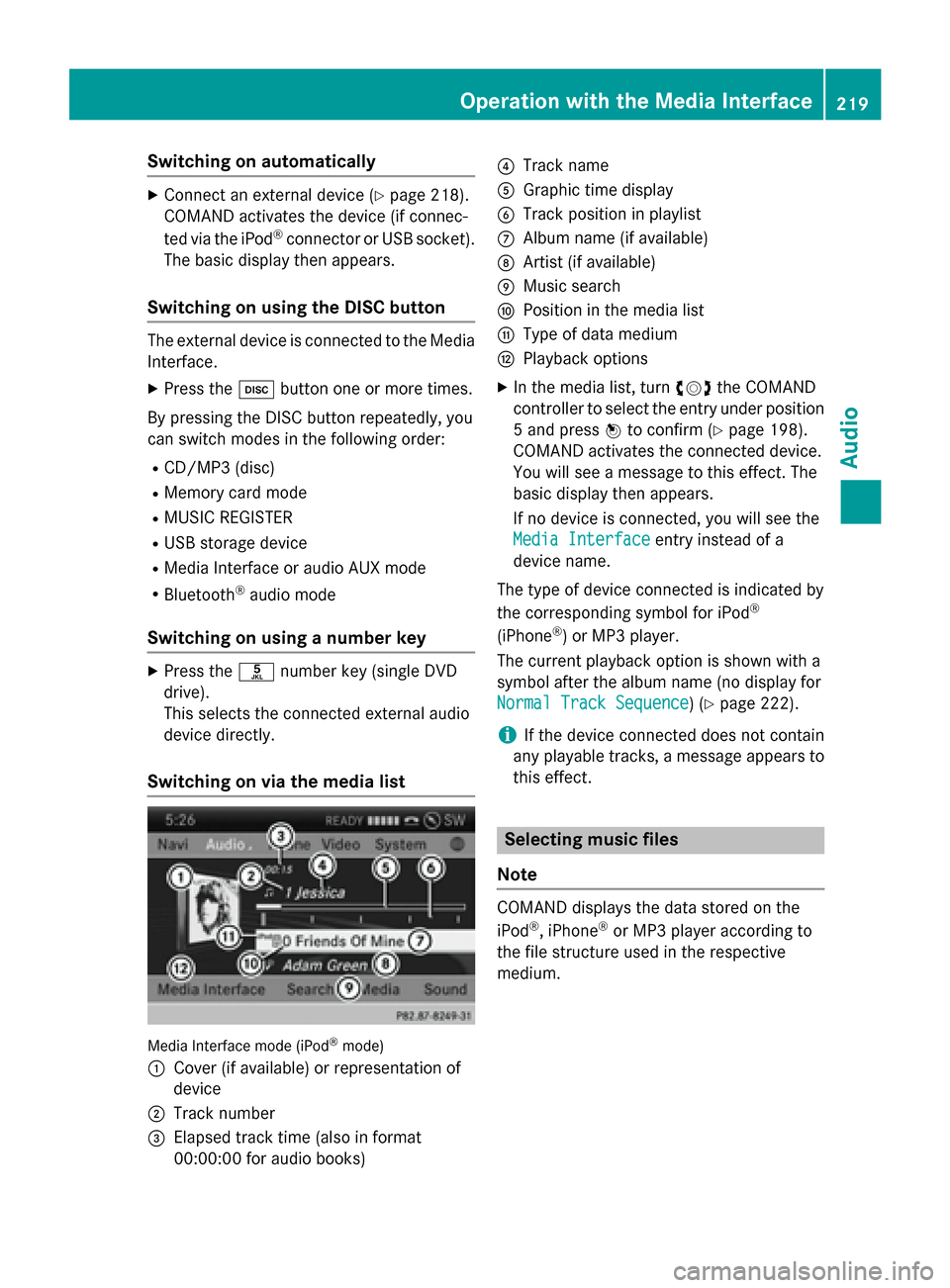
Switching on via the media list Media Interface mode (iPod
®
mode)
0043 Cover (if available) or representation of
device
0044 Track number
0087 Elapsed track time (also in format
00:00:00 for audio books) 0085
Track name
0083 Graphic time display
0084 Track position in playlist
006B Album name (if available)
006C Artist (if available)
006D Music search
006E Position in the media list
006F Type of data medium
0070 Playback options
X In the media list, turn 00790052007Athe COMAND
controller to select the entry under position
5 and press 0098to confirm (Y page 198).
COMAND activates the connected device.
You will see a message to this effect. The
basic display then appears.
If no device is connected, you will see the
Media Interface Media Interface entry instead of a
device name.
The type of device connected is indicated by
the corresponding symbol for iPod ®
(iPhone ®
) or MP3 player.
The current playback option is shown with a
symbol after the album name (no display for
Normal Track Sequence Normal Track Sequence) (Y page 222).
i If the device connected does not contain
any playable tracks, a message appears to
this effect. Selecting music files
Note COMAND displays the data stored on the
iPod ®
, iPhone ®
or MP3 player according to
the file structure used in the respective
medium. Operation with the Media Interface
219Audio Z
Page 222 of 270
Selecting by skipping to a track
X
To skip forwards or back to a track: turn
00790052007A the COMAND controller when the dis-
play/selection window is active.
or
X Press the 0048or0049 button.
The skip forward function skips to the next track. The skip back function skips to the
beginning of the current track if the track
has been playing for more than eight sec-
onds. If the track has been playing for less
than eight seconds, it skips to the start of
the previous track. If you have selected a
playback option other than Normal
NormalTrack
Track
Sequence
Sequence, the track sequence is random.
Selecting using the number keypad X
To make an entry: press the003Ebutton.
An input menu appears. The number of
characters available for input depends on
the number of stored tracks.
X To enter a track number: press a number
key, e.g. 0087.
The digit is entered in the first position in
the input line.
i COMAND will ignore and not display an
invalid digit.
X Enter more numbers if desired.
The track plays after the last possible num-
ber is entered.
i Pressing and holding a number key for
more than two seconds completes the
entry, and the corresponding track is
played.
Fast forwarding/rewinding X
While the display/selection window is
active, slide 009500520096and hold the COMAND
controller until the desired position has
been reached.
or
X Press and hold the 0048or0049 button
until the desired position is reached. i
On an iPod ®
or iPhone ®
, fast rewind only
functions within the current track. Selecting a category/playlist/folder
Overview For an iPod
®
, iPhone ®
or certain MP3 players,
you can select tracks using categories or fold- ers.
Depending on the device connected, the fol-
lowing categories may be available, for exam- ple:
R Current Tracklist Current Tracklist
R Select By Cover
Select By Cover
R Keyword Search
Keyword Search
R Playlists
Playlists (e.g.All
All)
R Artists
Artists
R Albums
Albums
R Tracks
Tracks
R Podcasts
Podcasts
R Genres
Genres
R Composers
Composers
R Audiobooks
Audiobooks
R Videos
Videos (except for Hong Kong)
i Some playback categories contain the
entry All
All. If this entry has been selected,
the entire content of the category selected
will be played.
The Videos Videos category is available for iPods ®
and iPhones ®
(except for Hong Kong).
i The functions are available as soon as the
entire media content has been read and
analyzed. For certain functions, such as
keyword search and selection by cover, this can take several minutes, depending on the
scope of media and the connected device.
If the same device is reconnected with
unchanged media content, these functions
are available much more quickly.
However, if you change the media content, it has to be read and analyzed again. 220
Operation with the Media InterfaceAudio
Page 223 of 270
Calling up a category list
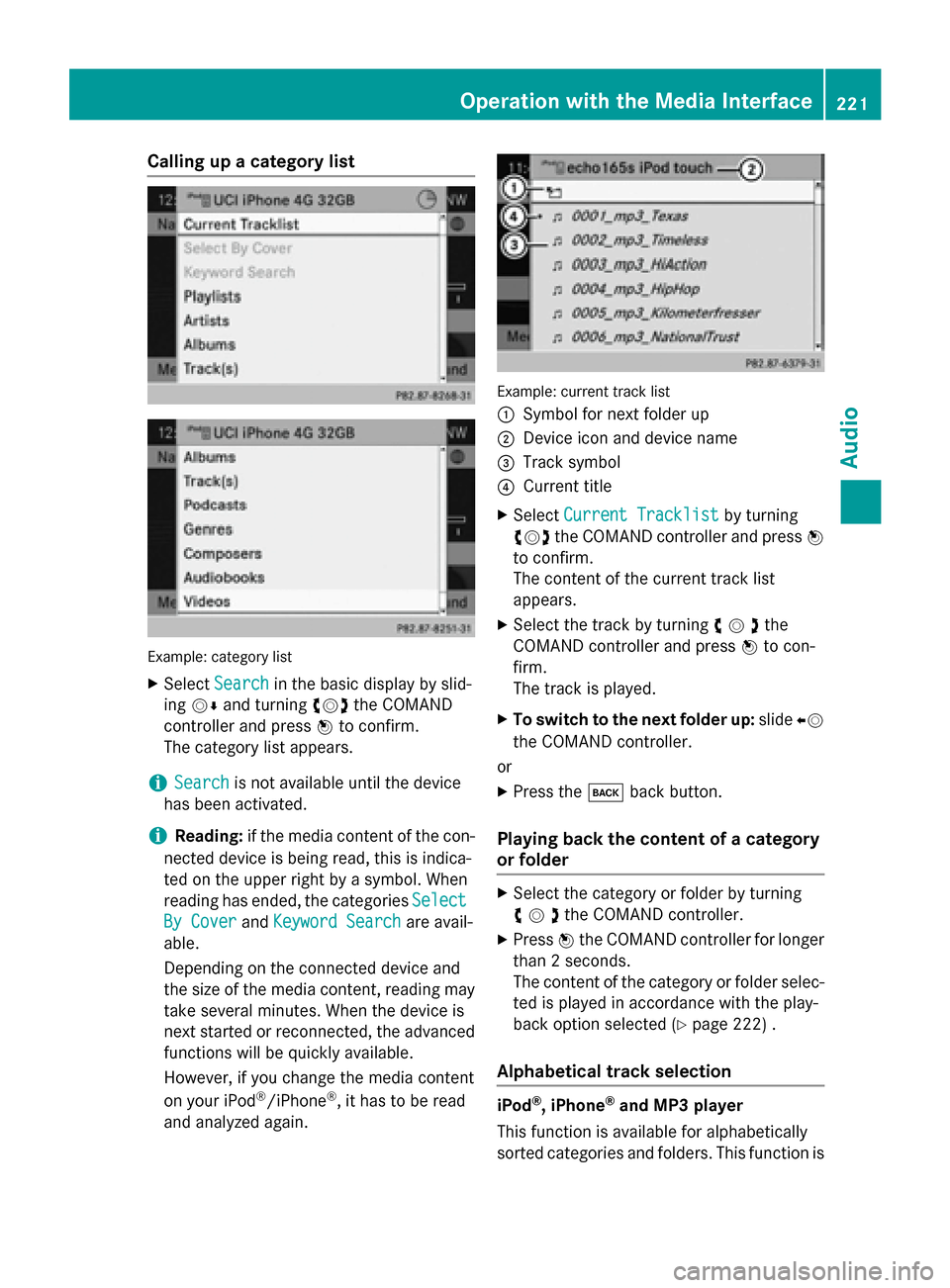
Example: category list
X Select Search
Search in the basic display by slid-
ing 00520064 and turning 00790052007Athe COMAND
controller and press 0098to confirm.
The category list appears.
i Search
Search is not available until the device
has been activated.
i Reading:
if the media content of the con-
nected device is being read, this is indica-
ted on the upper right by a symbol. When
reading has ended, the categories Select
Select
By Cover
By Cover andKeyword Search Keyword Search are avail-
able.
Depending on the connected device and
the size of the media content, reading may
take several minutes. When the device is
next started or reconnected, the advanced
functions will be quickly available.
However, if you change the media content
on your iPod ®
/iPhone ®
, it has to be read
and analyzed again. Example: current track list
0043
Symbol for next folder up
0044 Device icon and device name
0087 Track symbol
0085 Current title
X Select Current Tracklist
Current Tracklist by turning
00790052007A the COMAND controller and press 0098
to confirm.
The content of the current track list
appears.
X Select the track by turning 00790052007Athe
COMAND controller and press 0098to con-
firm.
The track is played.
X To switch to the next folder up: slide00950052
the COMAND controller.
or
X Press the 003Dback button.
Playing back the content of a category
or folder X
Select the category or folder by turning
00790052007Athe COMAND controller.
X Press 0098the COMAND controller for longer
than 2 seconds.
The content of the category or folder selec-
ted is played in accordance with the play-
back option selected (Y page 222) .
Alphabetical track selection iPod
®
, iPhone ®
and MP3 player
This function is available for alphabetically
sorted categories and folders. This function is Operation
withthe Media Interface
221Audio Z
Page 224 of 270
not available for albums or playlists, for exam-
ple.
X Select a category, e.g. Artists
Artists, by turning
00790052007A the COMAND controller and press 0098
to confirm.
The available artists are displayed.
X Press the corresponding number key once
or repeatedly to select the initial letter of
the desired artist. For example, to select an
artist whose name begins with C, press the 0082 number key three times.
The available letters are listed at the lower
edge of the display.
After a message, the first entry in the list
which matches the letter entered is high-
lighted.
i If no corresponding entry exists, the last
entry corresponding to a previous letter is
highlighted instead.
i iPods and MP3 players: the quality of the
search results is highly dependent on the
version and language variant of the soft-
ware used to populate the device. A well-
known example of such software is
iTunes ®
.
If different sorting rules are defined (e.g. in iTunes ®
), the search is canceled without
any result.
Additional selection functions R
Select By Cover Select By Cover
Albums can be chosen by cover using the
menu item.
The first time the Select By Cover Select By Cover func-
tion is used, additional data must be loaded
from the iPod ®
/iPhone ®
. The current
music playback is interrupted to allow
access to this data. The process may take a
few minutes and should not be canceled.
Otherwise it will start again from the begin-
ning the next time Select By Cover
Select By Cover is
selected. Covers are initially searched for in the Gracenote Media Database and are
then added to during playback from the
connected device (Y page 200). The avail- ability depends on the use and the tracks
already selected.
R Keyword Search
Keyword Search
Selecting keyword search allows you to
search through all categories on the con-
nected device for keywords.
i More information on
Select By Cover Select By Cover
and Keyword Search
Keyword Search can be found under
"Music search, selecting category"
(Y page 220).
i For an iPod ®
/iPhone ®
, the available cov-
ers are added most efficiently if the entire
media content is in the current playlist. This is the case if you have selected the play-
back option Tracks TracksorRandom Medium
Random Medium
(Y page 222).
Special feature in iPod ®
/iPhone ®
mode i
If the connected iPod ®
/iPhone ®
is not
functioning or paused, you can search for
tracks but cannot select them. After con-
firming a new track, the Function Function
Unavailable
Unavailable message appears. Playback options
X To select a playback option: select
Media Interface
Media Interface in the basic display by
sliding 00520064and turning 00790052007Athe COMAND
controller and press 0098to confirm.
The options list appears. The 003Bdot indi-
cates the option selected.
X Select an option and press 0098to confirm.
The following options are available: R Normal Track Sequence
Normal Track Sequence
Normal track sequence: you hear the
tracks in their normal order (e.g. numerical
or alphabetical).
R Random Medium Random Medium
All the tracks on the medium are played in
random order.
R Random Track List Random Track List 222
Operation with the Media InterfaceAudio
Page 225 of 270
The tracks in the currently active category
or folder, including any subfolders, are
played in random order.
i If the connected iPod ®
/iPhone ®
is not
functioning or paused, the playback
options are inactive. The display of options is grayed out. MP3 player instructions
General information Up to 30,000 tracks per medium are suppor-
ted.
You can speed up some functions and
improve the search results by:
R making sure the names of tracks, albums
and artists, for example, are written the
same way
R labeling albums featuring various artists as
"compilations"
i Multiple entries of tracks in playlists are
filtered out for some players.
Data formats MP3 and WMA are supported as data formats
with fixed and variable bit rates (up to
320 kbits/s).
Special considerations when using MP3
players Up to eight directory levels with up to 1,000
tracks per directory are supported.
Do not use USB extension leads or adapters. They can impair functionality.
i DRM (Digital Rights Management) protec-
ted files are not supported by the Media
Interface. Audio AUX mode
Notes on audio AUX mode
External audio sources may have different
volumes, which can mean that system mes-
sages such as traffic announcements and
navigation system announcements are much louder. If necessary, deactivate the system
messages or adjust their volume manually.
You can connect an external audio source
(AUX) to COMAND.
Depending on the vehicle model series, the
connection is made using a jack in the stow-
age compartment in the center console or a
USB port (Y page 197).
If COMAND is equipped with the Media Inter-
face, external audio sources are connected
using the cable set provided. An AUX socket
is not provided. The connections for the
Media Interface are located in the stowage
compartment in the center console.
i You will find further information online at
http://www.mbusa-mobile.com. Or call
the Mercedes-Benz Customer Assistance
Center at 1-800-FOR-MERCedes
(1-800-367-6372) (for the USA) or Cus-
tomer Relations at 1-800-387-010 0(for
Canada). Switching to audio AUX mode
Switching on using the DISC button The external device is connected to the audio
AUX input.
X Press the 003Abutton one or more times.
By pressing the function button repeatedly,
you can change the operating mode in the
following order:
R CD/MP3 (disc)
R Memory card mode
R MUSIC REGISTER
R USB storage device Audio AUX mode
223Audio Z
Page 238 of 270
Your COMAND equipment
These operating instructions describe all the
standard and optional equipment for your
COMAND system, as available at the time of
going to print. Country-specific differences
are possible. Please note that your
COMAND system may not be equipped with
all the features described. Overview
Important safety notes
G
WARNING
The CD/DVD drive is a class 1 laser product. If you open the housing of the CD/DVD drive,
there is a risk of exposure to invisible laser
radiation. This laser radiation could damage
your retina. There is a risk of injury.
Never open the housing. Always have main-
tenance and repair work carried out at a quali- fied specialist workshop. G
WARNING
If objects such as headphones/headsets or
external audio/video sources are not secured in the passenger compartment, they can be
flung around and hit vehicle occupants. There
is a risk of injury, for example in the event of
sudden braking or a sudden change in direc-
tion.
Always stow these items or similar objects
carefully so that they cannot be flung around, for example in a lockable vehicle stowage
compartment. equipment
Observe that a range of Rear Seat Entertain-
ment Systems are available for Mercedes-
Benz vehicles. In this Operator's Manual, the
Rear Seat Entertainment System Code 864 is
used for illustration purposes. If you have a
different Rear Seat Entertainment System in your vehicle, please refer to the separate prin-
ted operating instructions . Components
The Rear Seat Entertainment System
includes:
R two screens for the rear behind the front-
seat head restraints
R two remote controls
R a CD/DVD drive
R AUX jacks on both screens (AUX display)
and on the CD/DVD drive (AUX drive)
R two sets of cordless headphones 236
OverviewRea
r Seat Entertainment System
Page 241 of 270
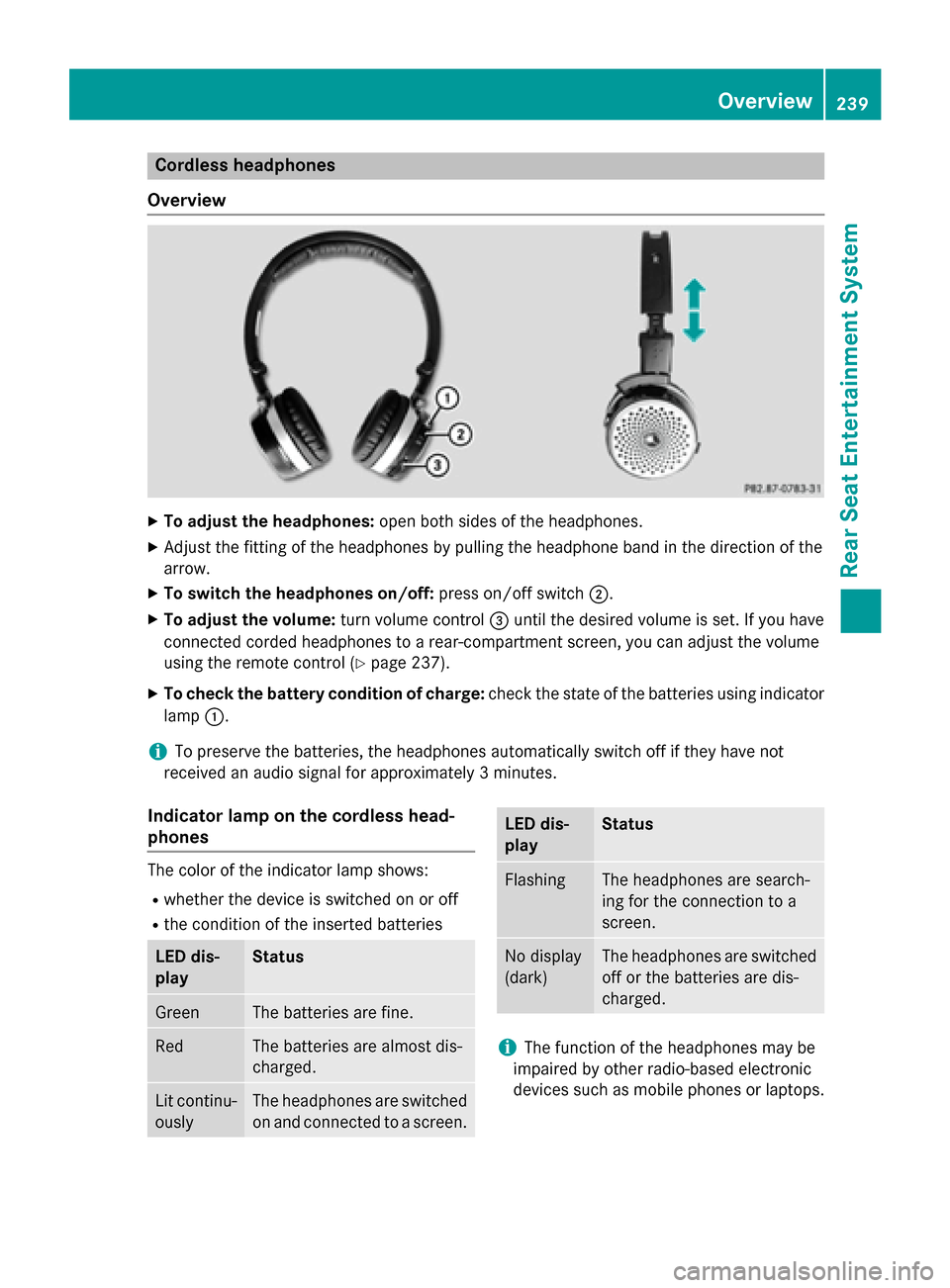
Cordless headphones
Overview X
To adjust the headphones: open both sides of the headphones.
X Adjust the fitting of the headphones by pulling the headphone band in the direction of the
arrow.
X To switch the headphones on/off: press on/off switch0044.
X To adjust the volume: turn volume control0087until the desired volume is set. If you have
connected corded headphones to a rear-compartment screen, you can adjust the volume
using the remote control (Y page 237).
X To check the battery condition of charge: check the state of the batteries using indicator
lamp 0043.
i To preserve the batteries, the headphones automatically switch off if they have not
received an audio signal for approximately 3 minutes.
Indicator lamp on the cordless head-
phones The color of the indicator lamp shows:
R whether the device is switched on or off
R the condition of the inserted batteries LED dis-
play Status
Green The batteries are fine.
Red The batteries are almost dis-
charged.
Lit continu-
ously The headphones are switched
on and connected to a screen. LED dis-
play Status
Flashing The headphones are search-
ing for the connection to a
screen.
No display
(dark) The headphones are switched
off or the batteries are dis-
charged. i
The function of the headphones may be
impaired by other radio-based electronic
devices such as mobile phones or laptops. Overview
239Rear Seat Entertainment System Z