light MERCEDES-BENZ M-Class 2015 W166 Owners Manual
[x] Cancel search | Manufacturer: MERCEDES-BENZ, Model Year: 2015, Model line: M-Class, Model: MERCEDES-BENZ M-Class 2015 W166Pages: 466, PDF Size: 8.92 MB
Page 194 of 466
Driving off-road increases the likelihood of
damage to the vehicle, which, in turn, can lead to failure of the mechanical assembly or sys-
tems. Adapt your driving style to suit the ter- rain conditions. Drive carefully. Have damage
to the vehicle rectified immediately at a quali-
fied specialist workshop.
Do not switch to transmission position N
when driving off-road. You could lose control
of the vehicle if you attempt to brake using
the service brake. If the gradient is too steep, drive backwards in reverse gear.
General notes Read this section carefully before driving your
vehicle off-road. Practice by driving over more gentle off-road terrain first.
Familiarize yourself with the characteristics
of your vehicle and the gear shift operation
before driving through difficult terrain.
The following driving systems are specially
adapted to off-road driving:
R Off-road program 1 and 2 (vehicles with the
ON&OFFROAD package) (Y page 251)
R LOW RANGE off-road gear (vehicles with
the ON&OFFROAD package)
(Y page 253)
R Differential lock (vehicles with the
ON&OFFROAD package) (Y page 252)
R Off-road ABS (Y page 68)
R Off-road 4ETS (Y page 73)
R AIRMATIC package (vehicle level)
(Y page 211)
R DSR (Downhill Speed Regulation)
(Y page 250)
Observe the following notes:
R Stop the vehicle before starting to drive
along an off-road route.
R For vehicles with the AIRMATIC pack-
age: select a vehicle level that is suitable
for the off-road terrain. To avoid damaging
the vehicle, make sure there is always suf-
ficient ground clearance. R
Check that items of luggage and loads are
stowed safely and are well secured
(Y page 339).
R Always keep the engine running and in gear
when driving on a downhill gradient. Acti-
vate DSR (Y page 250).
R Always keep the doors, tailgate, windows
and sliding sunroof closed while driving.
R Adapt your speed to the terrain. The
rougher, steeper or more ruts on the ter-
rain, the slower your speed should be.
R Drive slowly and at an even speed through
the water. Ensure that a bow wave does not
form as you drive.
R Drive with extreme care on unfamiliar off-
road routes where visibility is poor. For
safety reasons, get out of the vehicle first
and survey the off-road route.
R Look out for obstacles, such as rocks,
holes, tree stumps and furrows.
R Check the depth of water before fording
rivers and streams.
R When fording, do not stop and do not
switch off the engine.
R On sand, drive quickly to overcome the roll-
ing resistance. Otherwise the vehicle's
wheels could become stuck in loose
ground.
R Do not jump with the vehicle as this will
interrupt the vehicle's propulsion.
R Always keep the engine running and in gear
when driving on a slope.
R Do not shift the automatic transmission to
transmission position N.
i Do not use the HOLD function when driv-
ing off-road, on steep uphill or downhill gra-
dients or on slippery or loose surfaces. The HOLD function cannot hold the vehicle on
such surfaces.
Checklist before driving off-road !
If the engine oil warning lamp lights up
while the vehicle is in motion, stop the vehi-
cle in a safe place as soon as possible. 192
Driving
tipsDriving an d parking
Page 195 of 466
Check the engine oil level. The engine oil
warning lamp warning must not be ignored. Continuing the journey while the symbol is
displayed could lead to engine damage.
X Engine oil level: check the engine oil level
and add oil if necessary.
When driving on steep gradients, the
engine oil level must be sufficiently high to
ensure a correct oil supply in the vehicle.
X DEF tank (BlueTEC vehicles): check the
level and top up if necessary (Y page 180).
X Tire-changing tool kit: check that the jack
is working and make sure you have the lug
wrench, a robust tow cable and a folding
spade in the vehicle.
X Wheels and tires: check the tire tread
depth and tire pressure.
X Check for damage and remove any foreign
objects, e.g. small stones, from the
wheels/tires.
X Replace any missing valve caps.
X Replace dented or damaged wheels.
X Rims: dented or bent rims can result in a
loss of tire pressure and damage the tire
bead. Therefore, check your rims before
driving off-road and replace them as
required.
Checklist after driving off-road !
If you detect damage to the vehicle after
driving off-road, have the vehicle checked
immediately at a qualified specialist work-
shop.
X Vehicles with the ON&OFFROAD pack-
age: activate the on-road program
(Y page 251).
X Deactivate the LOW RANGE off-road gear
(Y page 253).
X Deactivate DSR (Y page 250).
X Vehicles with the AIRMATIC package:
lower the vehicle to a ride height suitable
for the road conditions, e.g. to the high-
way/high-speed level. X
Clean the headlamps and rear lights and
check for damage.
X Clean the front and rear license plates.
X Clean the wheels/tires with a water jet and
remove any foreign objects.
X Clean the wheels, wheel housings and the
vehicle underside with a water jet; check
for any foreign objects and damage.
X Check whether twigs or other parts of
plants have become trapped. These
increase the risk of fire and can damage
fuel pipes, brake hoses or the rubber bel-
lows of the axle joints and propeller shafts.
X After the trip, examine without fail the
entire undercarriage, wheels, tires, brakes,
bodywork structure, steering, chassis and
exhaust system for damage.
X After driving for extended periods across
sand, mud, gravel, water or in similarly dirty
conditions, have the brake discs, wheels,
brake pads/linings and axle joints checked
and cleaned.
X If you detect strong vibrations after off-road
travel, check for foreign objects in the
wheels and drive train and remove them if
necessary. Foreign objects can disturb the
balance and cause vibrations.
Driving over rough terrain places greater
demands on your vehicle than driving on nor-
mal roads. After driving off-road, check the
vehicle. This allows you to detect damage
promptly and reduce the risk of an accident to
yourself and other road users.
Driving on sand Observe the following rules when driving on
sand:
R Vehicles with the ON&OFFROAD pack-
age: select off-road program 1
(Y page 251).
R Vehicles with the AIRMATIC package:
select a raised vehicle level.
R Avoid high engine speeds. Driving tips
193Driving and pa rking Z
Page 197 of 466
R
When driving down an incline, make use of
the engine's braking effect. Observe the
engine speed; do not overrev the engine.
R Before driving on extreme uphill and down-
hill gradients, select the LOW RANGE off-
road gear (Y page 253).
R Drive slowly.
R Avoid high engine speeds. Drive at appro-
priate engine speeds (maximum
3,000 rpm).
R Use the left-hand paddle shifter to shift into
a lower gear in good time on long and steep
downhill gradients.
R Check the brakes after prolonged off-road
driving.
i Hill start assist will aid you when pulling
away on a hill.
For further information about hill start
assist, see (Y page 161).
Do not switch to transmission position N
when driving off-road. If you try to brake the
vehicle using the service brake, you could
lose control of the vehicle. If the gradient is
too steep for your vehicle, drive back down in
reverse gear.
Always observe the approach/departure
angle values (Y page 458).
Maximum gradient-climbing capability Always observe the maximum gradient climb-
ing ability values (Y page 458).
Hilltops When driving up an uphill gradient, slightly
reduce pressure on the accelerator immedi-
ately before reaching the brow of the hill. Use
the vehicle's own impetus to drive over the
top of the hill.
This style of driving prevents:
R the vehicle from lifting off the ground on the
brow of a hill
R the vehicle from traveling too quickly down
the other side Driving downhill R
Drive slowly.
R Do not drive at an angle down steep
inclines. Steer into the line of fall and drive
with the front wheels aligned straight. Oth- erwise, the vehicle could slip sideways, tip
and rollover.
R Shift to a lower gear using the left-hand
paddle shifter before tackling steep down-
hill gradients.
R Activate DSR. If this is not sufficient, brake
gently. When doing so, make sure that the
vehicle is facing in the direction of the line
of fall.
R Check that the brakes are working normally
after a long downhill stretch.
i The special off-road ABS setting enables a
precise, brief and repeated locking of the
front wheels. This causes them to dig into
loose earth. Be aware that the front wheels easily skid across the ground surface if
completely braked and therefore lose their
ability to steer. Driving systems
Cruise control
General notes Cruise control maintains a constant road
speed for you. It brakes automatically in order
to avoid exceeding the set speed. You must
select a lower gear in good time on long and
steep downhill gradients, especially if the
vehicle is laden or towing a trailer. By doing
so, you will make use of the braking effect of
the engine. This relieves the load on the brake
system and prevents the brakes from over-
heating and wearing too quickly.
Use cruise control only if road and traffic con-
ditions make it appropriate to maintain a
steady speed for a prolonged period. You can store any road speed above 20 mph
(30 km/h). Driving systems
195Driving and parking Z
Page 200 of 466
Cruise control is automatically deactivated if:
R you engage the electric parking brake
R you are driving at less than 20 mph
(30 km/h)
R ESP ®
intervenes or you deactivate ESP ®
R you activate DSR
R you activate off-road program 2 on vehicles
with the ON&OFFROAD package
R you shift the transmission to position N
while driving
If cruise control is deactivated, you will hear a warning tone. You will see the Cruise Con‐
Cruise Con‐
trol Off
trol Off message in the multifunction dis-
play for approximately five seconds.
i When you switch off the engine, the last
speed stored is cleared. DISTRONIC PLUS
General notes DISTRONIC PLUS regulates the speed and
automatically helps you maintain the dis-
tance to the vehicle detected in front. DIS-
TRONIC PLUS brakes automatically so that
the set speed is not exceeded.
You must select a lower gear in good time on
long and steep downhill gradients, especially
if the vehicle is laden or towing a trailer. By
doing so, you will make use of the braking
effect of the engine. This relieves the load on
the brake system and prevents the brakes
from overheating and wearing too quickly.
If DISTRONIC PLUS detects a slower-moving
vehicle in front, your vehicle is braked in order
to maintain the preset distance to the vehicle in front.
If DISTRONIC PLUS detects that there is a risk
of a collision, you will be warned visually and acoustically. DISTRONIC PLUS cannot pre-
vent a collision without your intervention. An
intermittent warning tone will then sound and
the distance warning lamp will light up in the instrument cluster. Brake immediately in
order to increase the distance to the vehicle in front or take evasive action provided it is
safe to do so.
For DISTRONIC PLUS to assist you, the radar
sensor system must be operational.
If there is no vehicle in front, DISTRONIC
PLUS operates in the same way as cruise
control in the speed range between 20 mph
(Canada: 30 km/h) and 120 mph (Canada:
200 km/h). If a vehicle is driving in front of
you, it operates in the speed range between
0 mph (0 km/h) and 120 mph (Canada:
200 km/h).
Do not use DISTRONIC PLUS while driving on roads with steep gradients.
As DISTRONIC PLUS transmits radar waves, it
can resemble the radar detectors of the
responsible authorities. You can refer to the
relevant chapter in the Operator's Manual if
questions are asked about this.
i USA only:
This device has been approved by the FCC as a "Vehicular Radar System". The radar
sensor is intended for use in an automotiveradar system only. Removing, tampering
with, or altering the device will void any
warranties, and is not permitted by the
FCC. Do not tamper with, alter, or use in
any non-approved way.
Any unauthorized modification to this
device could void the user’s authority to
operate the equipment.
i Canada only: This device complies with
RSS-210 of Industry Canada. Operation is
subject to the following two conditions:
1. This device may not cause harmful inter-
ference, and
2. this device must accept any interference received, including interference that may
cause undesired operation of the device.
Removal, tampering, or altering of the
device will void any warranties, and is not
permitted. Do not tamper with, alter, or use in any non-approved way. 198
Driving systemsDriving and pa
rking
Page 206 of 466
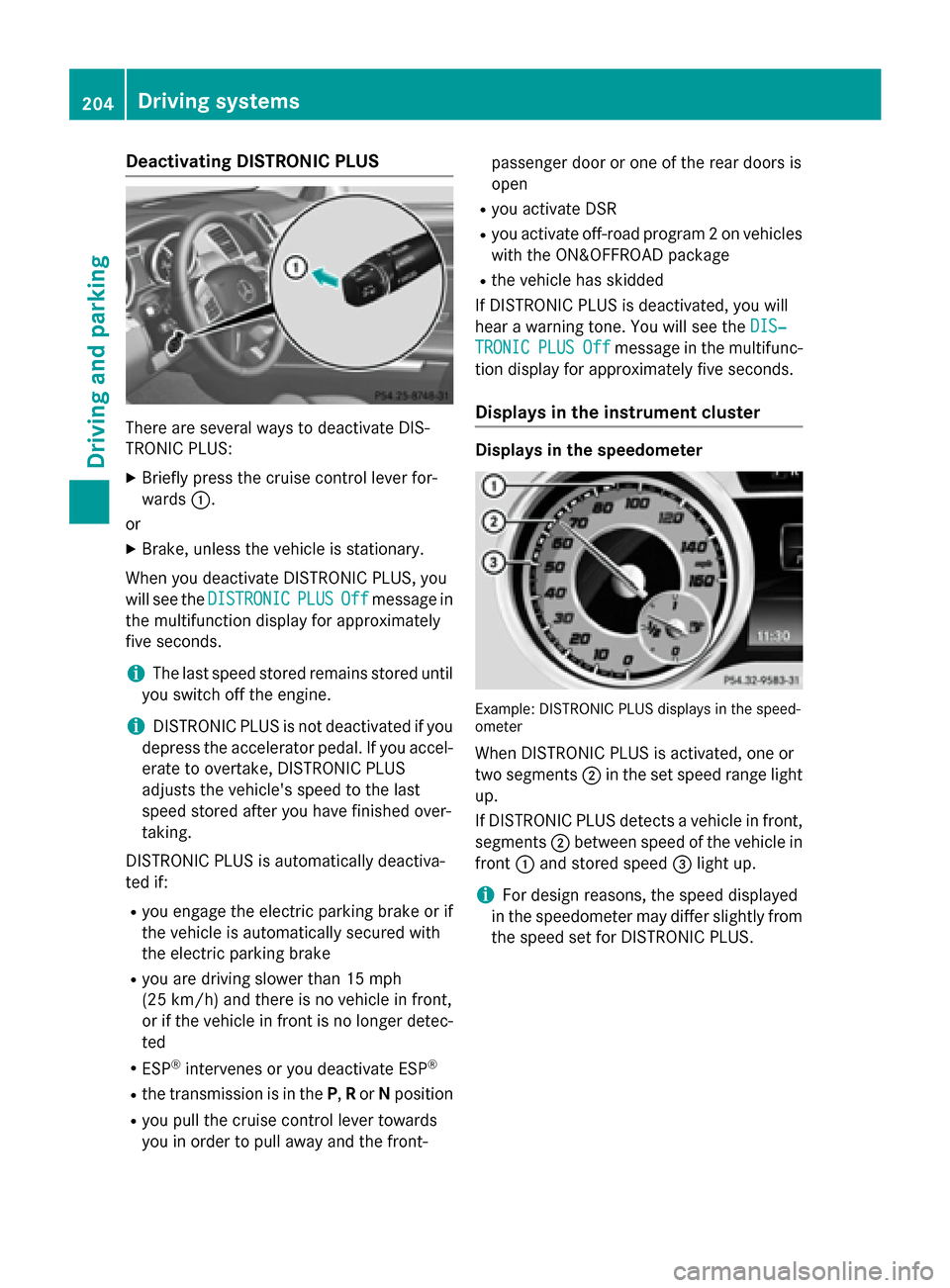
Deactivating DISTRONIC PLUS
There are several ways to deactivate DIS-
TRONIC PLUS:
X Briefly press the cruise control lever for-
wards 0043.
or X Brake, unless the vehicle is stationary.
When you deactivate DISTRONIC PLUS, you
will see the DISTRONIC
DISTRONIC PLUS PLUSOff
Offmessage in
the multifunction display for approximately
five seconds.
i The last speed stored remains stored until
you switch off the engine.
i DISTRONIC PLUS is not deactivated if you
depress the accelerator pedal. If you accel-
erate to overtake, DISTRONIC PLUS
adjusts the vehicle's speed to the last
speed stored after you have finished over-
taking.
DISTRONIC PLUS is automatically deactiva-
ted if:
R you engage the electric parking brake or if
the vehicle is automatically secured with
the electric parking brake
R you are driving slower than 15 mph
(25 km/h) and there is no vehicle in front,
or if the vehicle in front is no longer detec-
ted
R ESP ®
intervenes or you deactivate ESP ®
R the transmission is in the P,Ror Nposition
R you pull the cruise control lever towards
you in order to pull away and the front- passenger door or one of the rear doors is
open
R you activate DSR
R you activate off-road program 2 on vehicles
with the ON&OFFROAD package
R the vehicle has skidded
If DISTRONIC PLUS is deactivated, you will
hear a warning tone. You will see the DIS‐
DIS‐
TRONIC TRONIC PLUS
PLUSOff
Offmessage in the multifunc-
tion display for approximately five seconds.
Displays in the instrument cluster Displays in the speedometer
Example: DISTRONIC PLUS displays in the speed-
ometer
When DISTRONIC PLUS is activated, one or
two segments 0044in the set speed range light
up.
If DISTRONIC PLUS detects a vehicle in front, segments 0044between speed of the vehicle in
front 0043and stored speed 0087light up.
i For design reasons, the speed displayed
in the speedometer may differ slightly from
the speed set for DISTRONIC PLUS. 204
Driving syste
msDriving and parking
Page 208 of 466
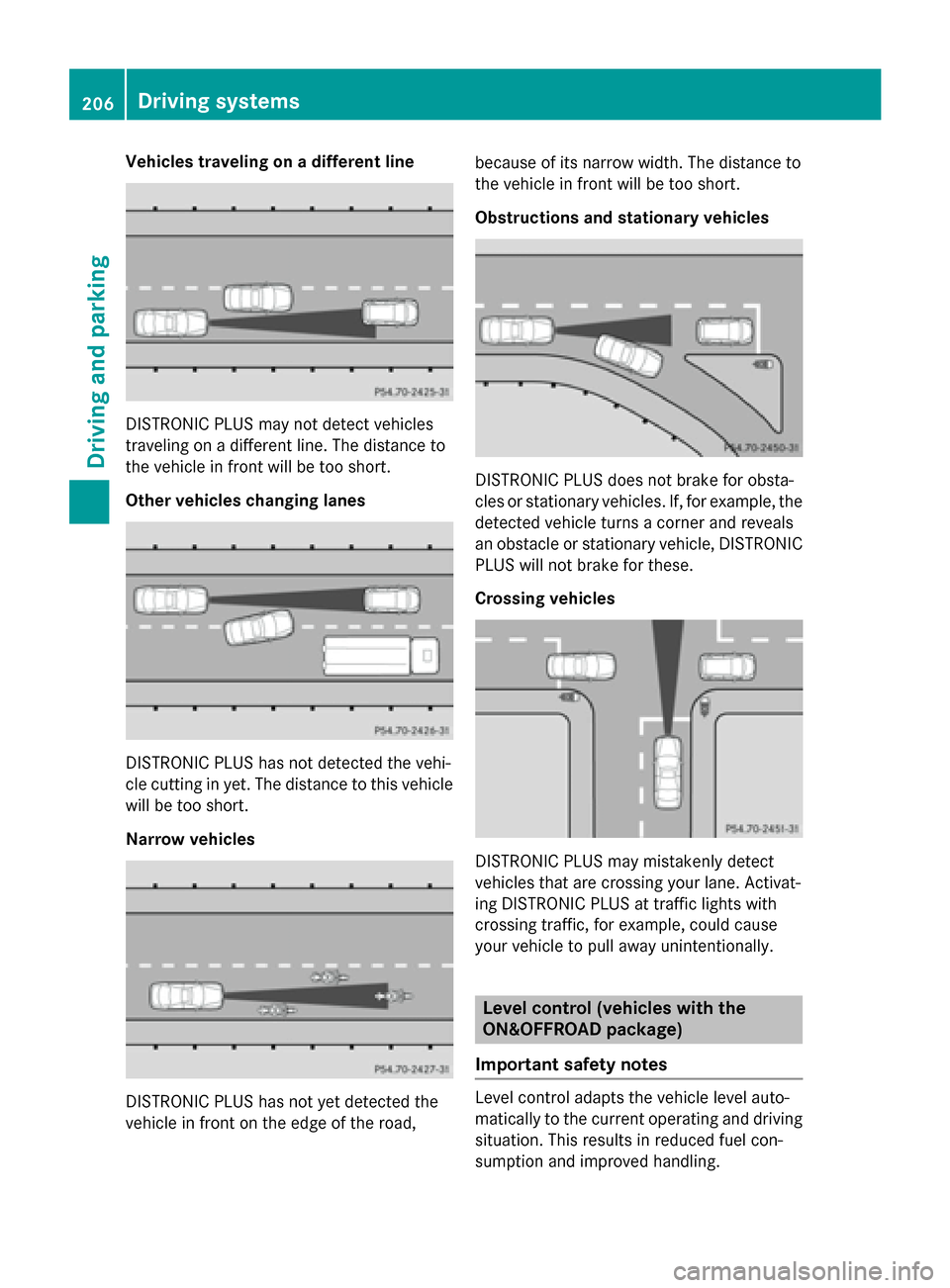
Vehicles traveling on a different line
DISTRONIC PLUS may not detect vehicles
traveling on a different line. The distance to
the vehicle in front will be too short.
Other vehicles changing lanes DISTRONIC PLUS has not detected the vehi-
cle cutting in yet. The distance to this vehicle will be too short.
Narrow vehicles DISTRONIC PLUS has not yet detected the
vehicle in front on the edge of the road, because of its narrow width. The distance to
the vehicle in front will be too short.
Obstructions and stationary vehicles
DISTRONIC PLUS does not brake for obsta-
cles or stationary vehicles. If, for example, the
detected vehicle turns a corner and reveals
an obstacle or stationary vehicle, DISTRONIC PLUS will not brake for these.
Crossing vehicles DISTRONIC PLUS may mistakenly detect
vehicles that are crossing your lane. Activat-
ing DISTRONIC PLUS at traffic lights with
crossing traffic, for example, could cause
your vehicle to pull away unintentionally. Level control (vehicles with the
ON&OFFROAD package)
Important safety notes Level control adapts the vehicle level auto-
matically to the current operating and driving
situation. This results in reduced fuel con-
sumption and improved handling. 206
Driving systemsDriving and parking
Page 211 of 466
Only select an off-road level when this is
appropriate for road conditions. Otherwise,
fuel consumption increases and handling may
be affected.
X Start the engine.
X Selector wheel 0043
0043 engaged: briefly press
selector wheel 0043.
Selector wheel 0043extends.
X To raise: turn selector wheel 0043clock-
wise 0044.
The vehicle is raised.
or
X To lower: turn selector wheel 0043counter-
clockwise 0085.
The vehicle is lowered.
Indicator lamps 0087for the desired off-road
level flash:
R Off-road level 1: the lower indicator lamp
flashes
R Off-road level 2: the lower and center indi-
cator lamps flash
R Off-road level 3: all three indicator lamps
flash
The vehicle adjusts to the off-road level selec-
ted. As soon as an off-road level is reached,
the corresponding indicator lamp stops flash- ing and lights up constantly.
Raising the vehicle
During the adjustment, the Vehicle Rising
Vehicle Rising
message, for example, appears in the multi-
function display.
The vehicle rises from highway level to off-
road level 1.
If you press the 0038or0076 button on the
multifunction steering wheel, the message
will disappear.
i Up to off-road level 2, you can hide the
messages using the 0038or0076 button
on the multifunction steering wheel.
Once off-road level 2 has been reached, the
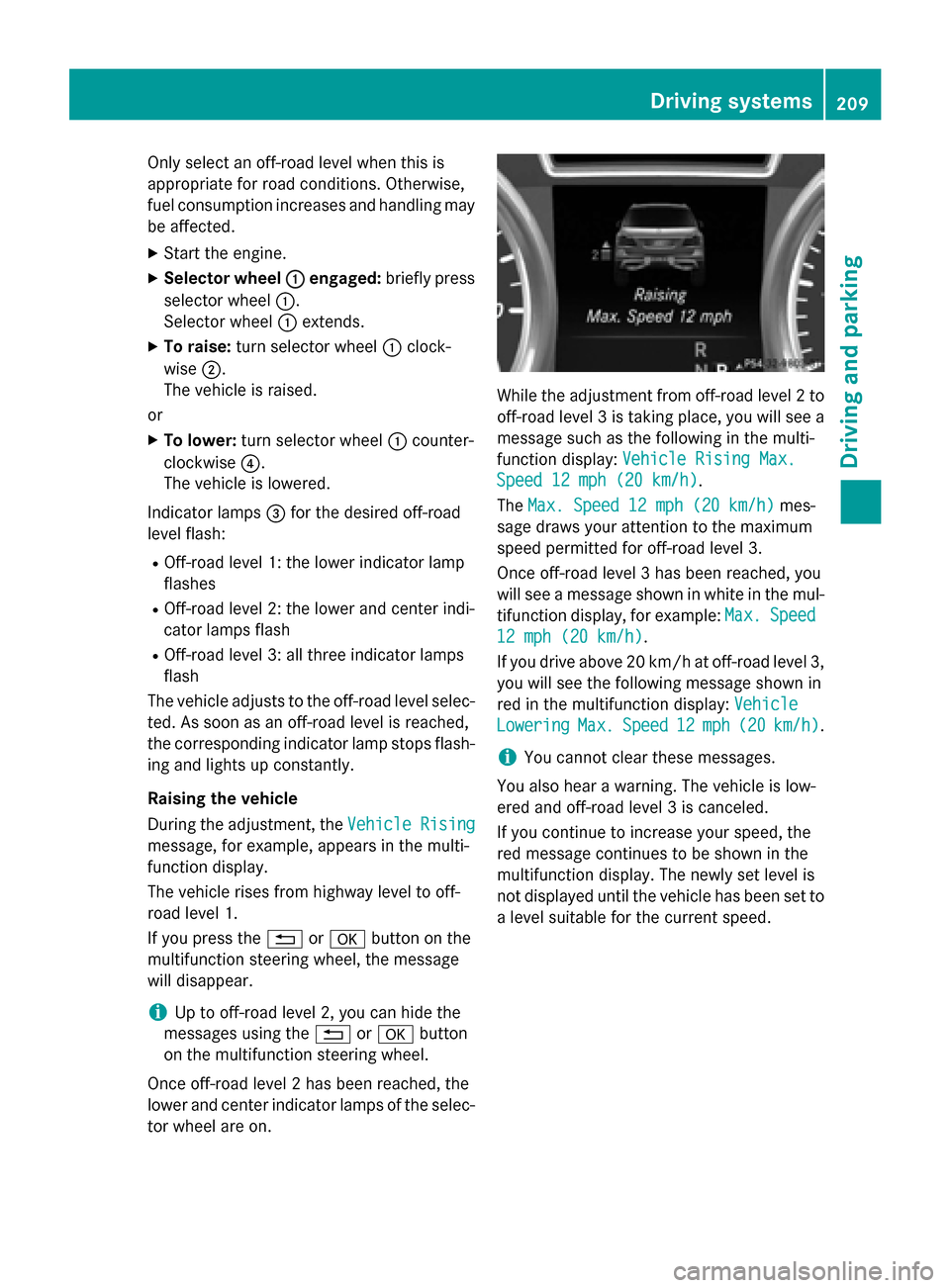
lower and center indicator lamps of the selec- tor wheel are on. While the adjustment from off-road level 2 to
off-road level 3 is taking place, you will see a message such as the following in the multi-
function display: Vehicle Rising Max. Vehicle Rising Max.
Speed 12 mph (20 km/h)
Speed 12 mph (20 km/h).
The Max. Speed 12 mph (20 km/h) Max. Speed 12 mph (20 km/h) mes-
sage draws your attention to the maximum
speed permitted for off-road level 3.
Once off-road level 3 has been reached, you
will see a message shown in white in the mul-
tifunction display, for example: Max. Max.Speed
Speed
12 mph (20 km/h)
12 mph (20 km/h).
If you drive above 20 km/h at off-road level 3, you will see the following message shown in
red in the multifunction display: Vehicle Vehicle
Lowering
Lowering Max.
Max.Speed
Speed 12
12mph (
mph (20 20km/h)
km/h).
i You cannot clear these messages.
You also hear a warning. The vehicle is low-
ered and off-road level 3 is canceled.
If you continue to increase your speed, the
red message continues to be shown in the
multifunction display. The newly set level is
not displayed until the vehicle has been set to
a level suitable for the current speed. Driving systems
209Driving and parking Z
Page 214 of 466
ADS (Adaptive Damping System)
General notes
ADS adapts the damping characteristics to
the current operating and driving situation.
This depends on:
R your driving style
R the road surface conditions
R the ADS setting
R the vehicle level setting
Your selection remains stored even if you
remove the SmartKey from the ignition lock.
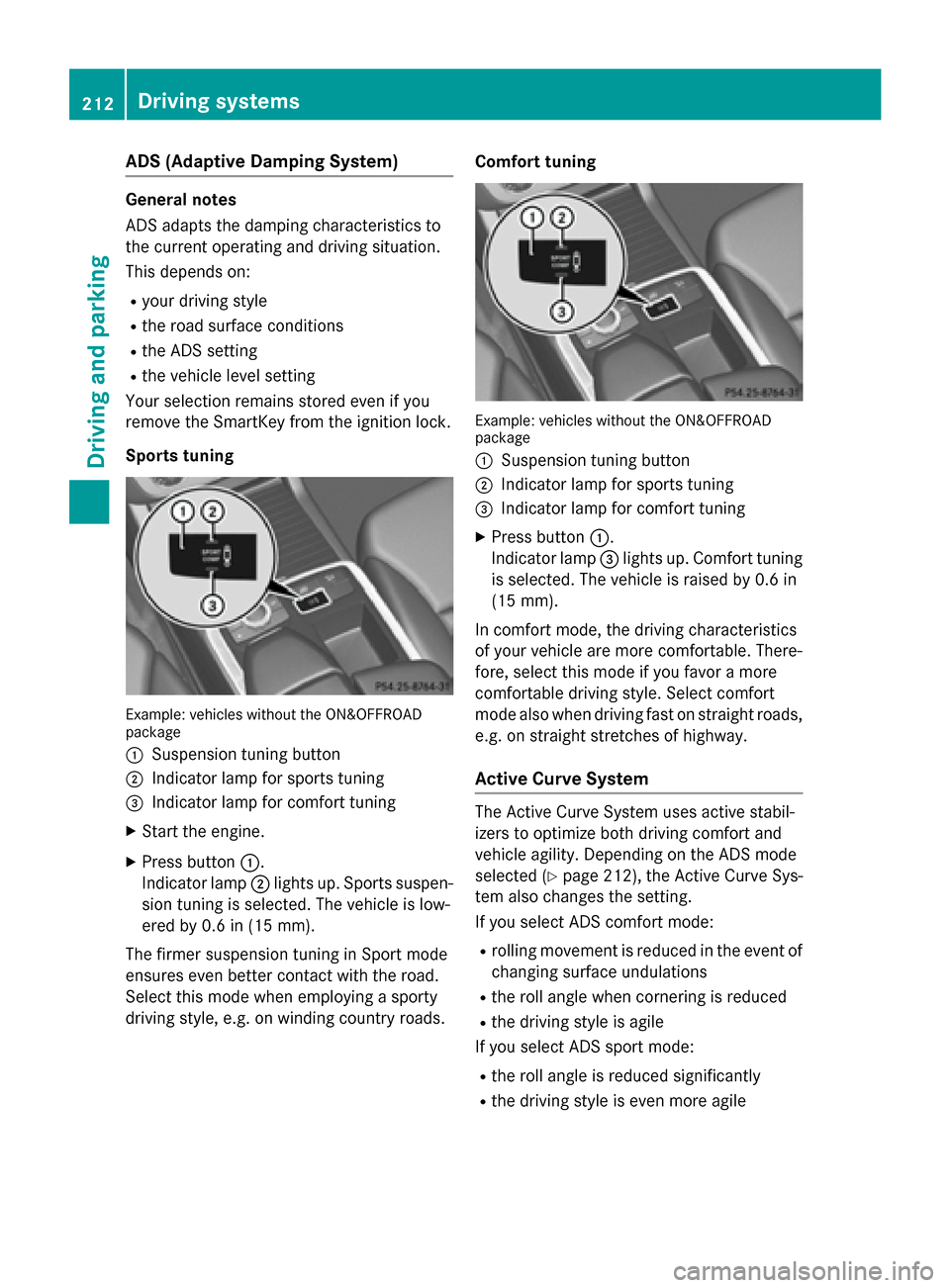
Sports tuning Example: vehicles without the ON&OFFROAD
package
0043 Suspension tuning button
0044 Indicator lamp for sports tuning
0087 Indicator lamp for comfort tuning
X Start the engine.
X Press button 0043.
Indicator lamp 0044lights up. Sports suspen-
sion tuning is selected. The vehicle is low-
ered by 0.6 in (15 mm).
The firmer suspension tuning in Sport mode
ensures even better contact with the road.
Select this mode when employing a sporty
driving style, e.g. on winding country roads. Comfort tuning Example: vehicles without the ON&OFFROAD
package
0043 Suspension tuning button
0044 Indicator lamp for sports tuning
0087 Indicator lamp for comfort tuning
X Press button 0043.
Indicator lamp 0087lights up. Comfort tuning
is selected. The vehicle is raised by 0.6 in
(15 mm).
In comfort mode, the dr iving characteristics
of your vehicle are more comfortable. There-
fore, select this mode if you favor a more
comfortable driving style. Select comfort
mode also when driving fast on straight roads,
e.g. on straight stretches of highway.
Active Curve System The Active Curve System uses active stabil-
izers to optimize both driving comfort and
vehicle agility. Depending on the ADS mode
selected (Y page 212), the Active Curve Sys-
tem also changes the setting.
If you select ADS comfort mode:
R rolling movement is reduced in the event of
changing surface undulations
R the roll angle when cornering is reduced
R the driving style is agile
If you select ADS sport mode:
R the roll angle is reduced significantly
R the driving style is even more agile 212
Driving systemsDriving and parking
Page 218 of 466
Vehicle level
Level control adapts the vehicle level auto-
matically to the current operating and driving
situation. Level control ensures the best pos-
sible suspension and constant ground clear-
ance, even with a laden vehicle. This improves
driving safety and fuel consumption.
The AIRMATIC package and ACTIVE CURVE
SYSTEM are always components of AMG
adaptive suspension system (Y page 211).
Due to the sportier suspension settings com- pared to standard vehicles, the levels and
speed thresholds for sinking and raising the
vehicle are different.
In Comfort and Sport driving modes, after
locking the vehicle it lowers to the Sport+
level. When locking the vehicle at the raised
level, the vehicle does not lower.
The settings will remain stored after you
switch off the engine. When starting the
engine, the selected setting, e.g. AMG adap-
tive suspension system Comfort, is restored.
i The vehicle level may change visibly if you
park the vehicle and the outside tempera-
ture changes. If the temperature drops, the vehicle level lowers; with an increase in
temperature, the vehicle level rises.
Suspension tuning General notes
The electronically controlled damping system
works continuously. This improves driving
safety and ride comfort.
The damping is tuned individually to each
wheel and depends on:
R your driving style
R the road surface conditions
R your individual selection of Sport, Sport +
or Comfort
Your selection remains stored even if you
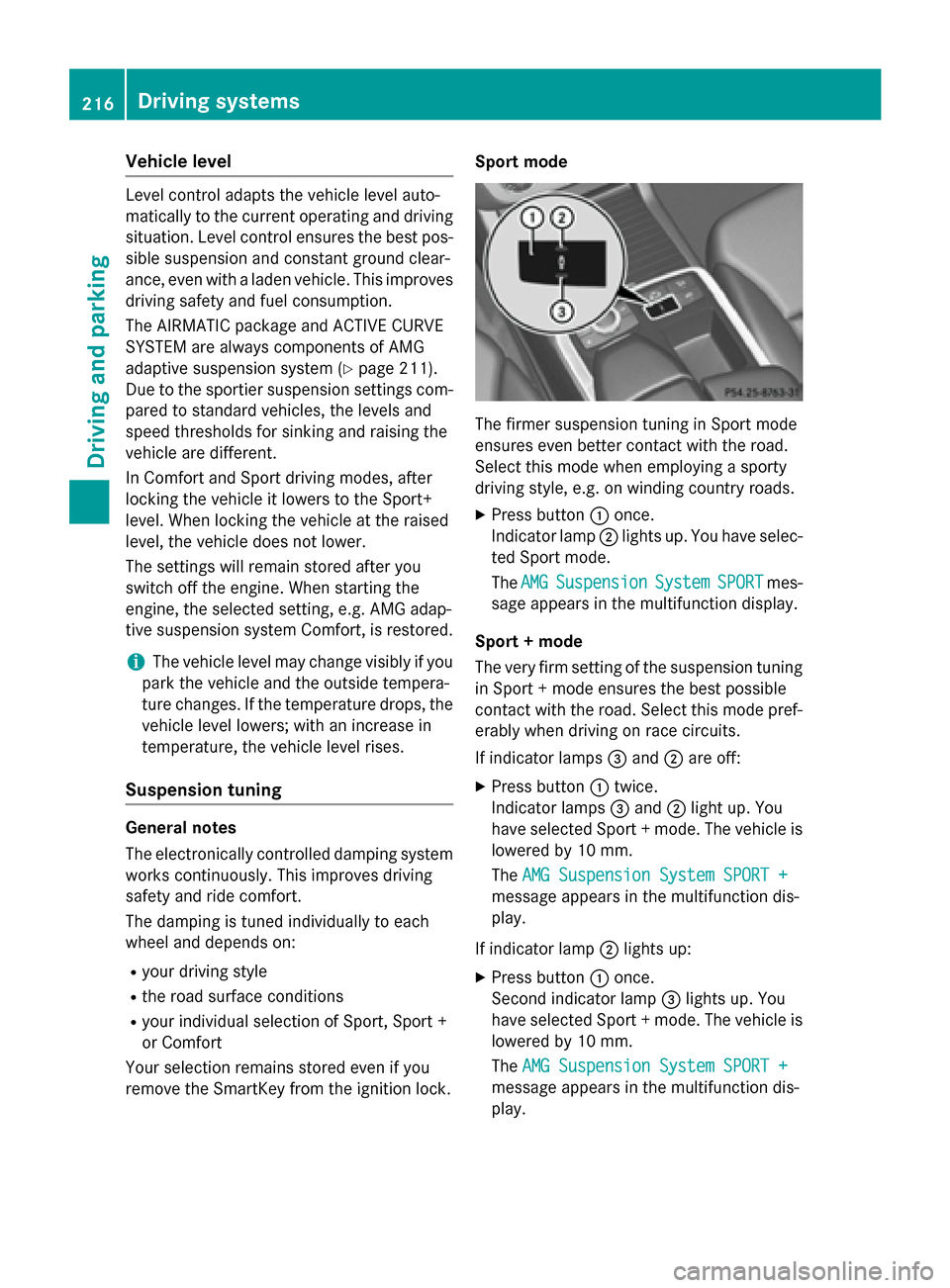
remove the SmartKey from the ignition lock. Sport mode
The firmer suspension tuning in Sport mode
ensures even better contact with the road.
Select this mode when employing a sporty
driving style, e.g. on winding country roads.
X Press button 0043once.
Indicator lamp 0044lights up. You have selec-
ted Sport mode.
The AMG
AMG Suspension Suspension System
SystemSPORT
SPORTmes-
sage appears in the multifunction display.
Sport + mode
The very firm setting of the suspension tuning in Sport + mode ensures the best possible
contact with the road. Select this mode pref-
erably when driving on race circuits.
If indicator lamps 0087and 0044are off:
X Press button 0043twice.
Indicator lamps 0087and 0044light up. You
have selected Sport + mode. The vehicle is
lowered by 10 mm.
The AMG Suspension System SPORT + AMG Suspension System SPORT +
message appears in the multifunction dis-
play.
If indicator lamp 0044lights up:
X Press button 0043once.
Second indicator lamp 0087lights up. You
have selected Sport + mode. The vehicle is
lowered by 10 mm.
The AMG Suspension System SPORT + AMG Suspension System SPORT +
message appears in the multifunction dis-
play. 216
Driving systemsDriving an
d parking
Page 220 of 466
Side view
Top view
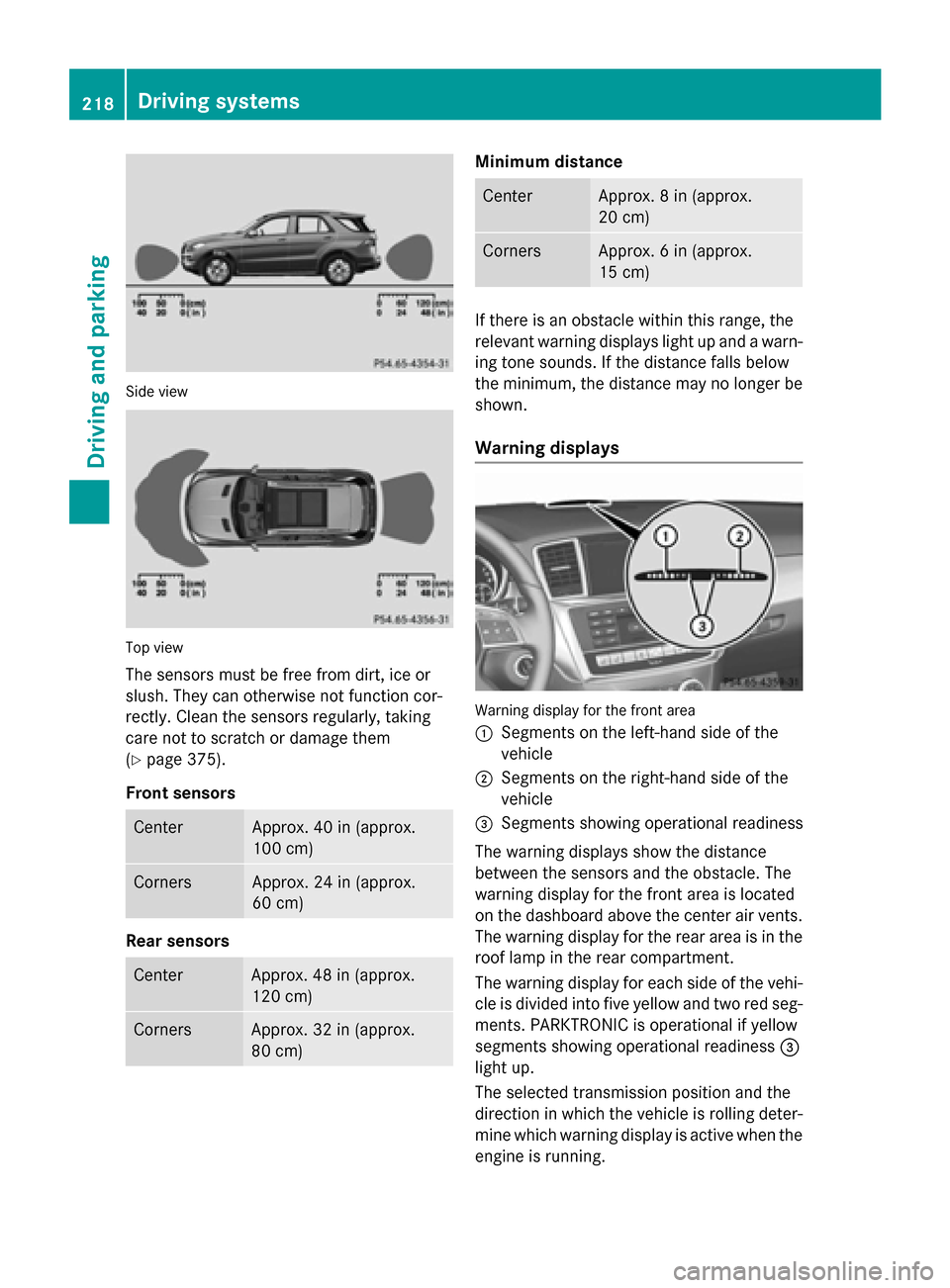
The sensors must be free from dirt, ice or
slush. They can otherwise not function cor-
rectly. Clean the sensors regularly, taking
care not to scratch or damage them
(Y page 375).
Front sensors Center Approx. 40 in (approx.
100 cm)
Corners Approx. 24 in (approx.
60 cm)
Rear sensors
Center Approx. 48 in (approx.
120 cm)
Corners Approx. 32 in (approx.
80 cm) Minimum distance
Center Approx. 8 in (approx.
20 cm)
Corners Approx. 6 in (approx.
15 cm)
If there is an obstacle within this range, the
relevant warning displays light up and a warn- ing tone sounds. If the distance falls below
the minimum, the distance may no longer be
shown.
Warning displays Warning display for the front area
0043
Segments on the left-hand side of the
vehicle
0044 Segments on the right-hand side of the
vehicle
0087 Segments showing operational readiness
The warning displays show the distance
between the sensors and the obstacle. The
warning display for the front area is located
on the dashboard above the center air vents.
The warning display for the rear area is in the
roof lamp in the rear compartment.
The warning display for each side of the vehi- cle is divided into five yellow and two red seg-ments. PARKTRONIC is operational if yellow
segments showing operational readiness 0087
light up.
The selected transmission position and the
direction in which the vehicle is rolling deter-
mine which warning display is active when the engine is running. 218
Driving systemsDriving and parking