bulb MERCEDES-BENZ M-Class 2015 W166 User Guide
[x] Cancel search | Manufacturer: MERCEDES-BENZ, Model Year: 2015, Model line: M-Class, Model: MERCEDES-BENZ M-Class 2015 W166Pages: 466, PDF Size: 8.92 MB
Page 131 of 466
Crash-responsive emergency lighting
The interior lighting is activated automatically
if the vehicle is involved in an accident.
X To switch off the crash-responsive
emergency lighting: press the hazard
warning lamp button.
or X Lock and then unlock the vehicle using the
SmartKey. Replacing bulbs
Important safety notes
G
DANGER
Xenon bulbs carry a high voltage. You can get an electric shock if you remove the cover of
the Xenon bulb and touch the electrical con-
tacts. There is a risk of fatal injury.
Never touch the parts or the electrical con-
tacts of the Xenon bulb. Always have work on
the Xenon bulbs carried out at a qualified spe-
cialist workshop.
If your vehicle is equipped with Xenon bulbs,
you can recognize this by the following: the
cone of light from the Xenon bulbs moves
from the top to the bottom and back again
when you start the engine. For this to be
observed, the lights must be switched on
before starting the engine. G
WARNING
Bulbs, lamps and connectors can get very hot when operating. If you change a bulb, you
could burn yourself on these components.
There is a risk of injury.
Allow these components to cool down before changing a bulb.
Do not use a bulb that has been dropped or if
its glass tube has been scratched.
The bulb may explode if:
R you touch it
R it is hot R
you drop it
R you scratch it
Only operate bulbs in enclosed lamps
designed for that purpose. Only install spare
bulbs of the same type and the specified volt- age.
Marks on the glass tube reduce the service
life of the bulbs. Do not touch the glass tube
with your bare hands. If necessary, clean the
glass tube when cold with alcohol or spirit and
rub it off with a lint-free cloth.
Protect bulbs from moisture during opera-
tion. Do not allow bulbs to come into contact
with liquids.
There are bulbs other than the Xenon bulbs
that you cannot replace. Replace only the
bulbs listed (Y page 129). Have the bulbs that
you cannot replace yourself changed at a
qualified specialist workshop.
If you require assistance changing bulbs, con- sult a qualified specialist workshop.
If the new bulb still does not light up, consult
a qualified specialist workshop.
Bulbs and lamps are an important aspect of
vehicle safety. You must therefore make sure that these function correctly at all times.
Have the headlamp setting checked regularly. Overview: changing bulbs/bulb types
You can change the following bulbs. The bulb type can be found in the legend. Replacing bulbs
129Lights and windshield wipers Z
Page 132 of 466
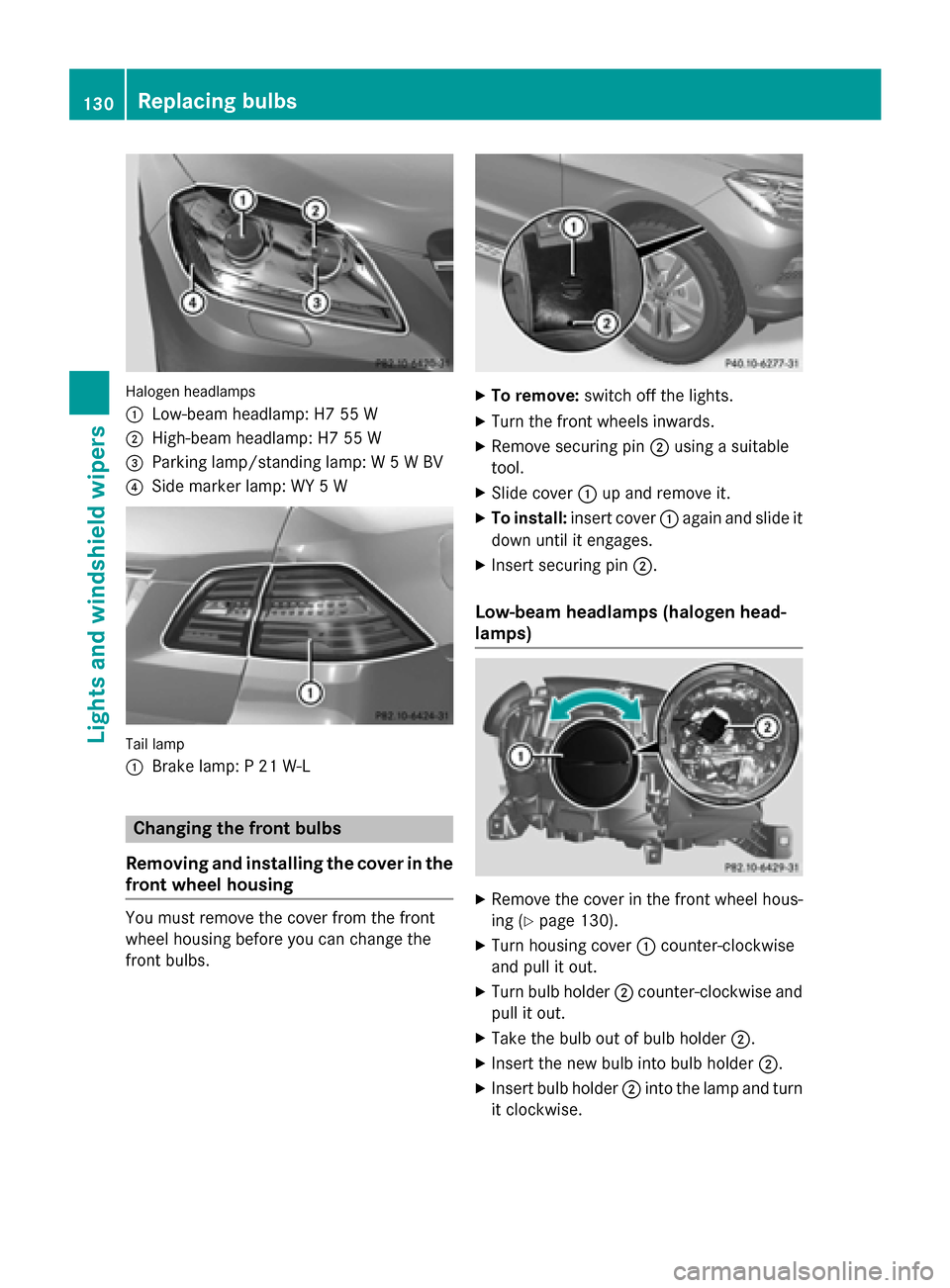
Halogen headlamps
0043
Low-beam headlamp: H7 55 W
0044 High-beam headlamp: H7 55 W
0087 Parking lamp/standing lamp: W 5 W BV
0085 Side marker lamp: WY 5 W Tail lamp
0043
Brake lamp: P 21 W-L Changing the front bulbs
Removing and installing the cover in the
front wheel housing You must remove the cover from the front
wheel housing before you can change the
front bulbs. X
To remove: switch off the lights.
X Turn the front wheels inwards.
X Remove securing pin 0044using a suitable
tool.
X Slide cover 0043up and remove it.
X To install: insert cover 0043again and slide it
down until it engages.
X Insert securing pin 0044.
Low-beam headlamps (halogen head-
lamps) X
Remove the cover in the front wheel hous-
ing (Y page 130).
X Turn housing cover 0043counter-clockwise
and pull it out.
X Turn bulb holder 0044counter-clockwise and
pull it out.
X Take the bulb out of bulb holder 0044.
X Insert the new bulb into bulb holder 0044.
X Insert bulb holder 0044into the lamp and turn
it clockwise. 130
Replacing bulbsLights and windshield wipers
Page 133 of 466
X
Align housing cover 0043and turn it clock-
wise until it engages.
X Replace the cover in the front wheel hous-
ing (Y page 130).
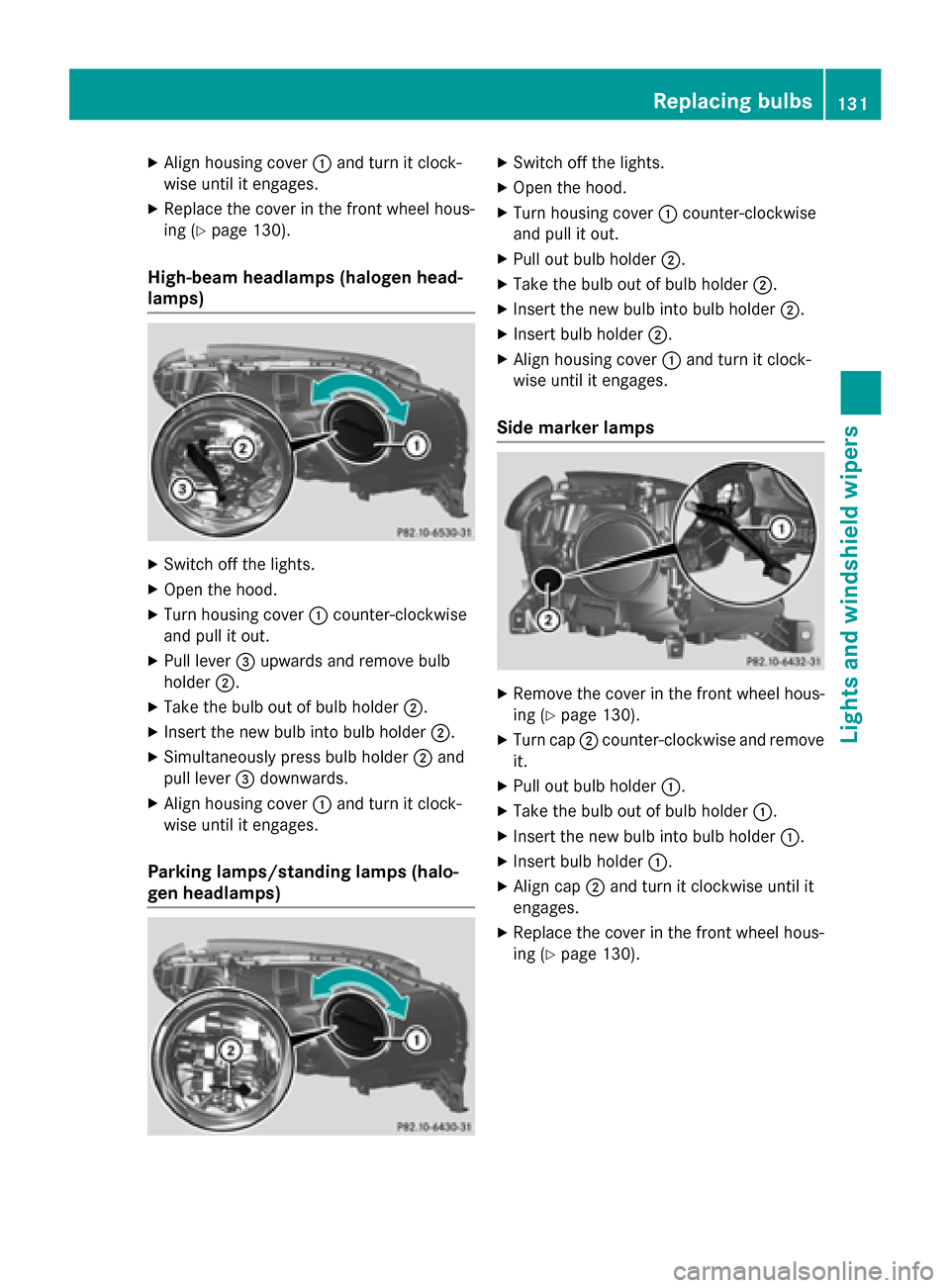
High-beam headlamps (halogen head-
lamps) X
Switch off the lights.
X Open the hood.
X Turn housing cover 0043counter-clockwise
and pull it out.
X Pull lever 0087upwards and remove bulb
holder 0044.
X Take the bulb out of bulb holder 0044.
X Insert the new bulb into bulb holder 0044.
X Simultaneously press bulb holder 0044and
pull lever 0087downwards.
X Align housing cover 0043and turn it clock-
wise until it engages.
Parking lamps/standing lamps (halo-
gen headlamps) X
Switch off the lights.
X Open the hood.
X Turn housing cover 0043counter-clockwise
and pull it out.
X Pull out bulb holder 0044.
X Take the bulb out of bulb holder 0044.
X Insert the new bulb into bulb holder 0044.
X Insert bulb holder 0044.
X Align housing cover 0043and turn it clock-
wise until it engages.
Side marker lamps X
Remove the cover in the front wheel hous-
ing (Y page 130).
X Turn cap 0044counter-clockwise and remove
it.
X Pull out bulb holder 0043.
X Take the bulb out of bulb holder 0043.
X Insert the new bulb into bulb holder 0043.
X Insert bulb holder 0043.
X Align cap 0044and turn it clockwise until it
engages.
X Replace the cover in the front wheel hous-
ing (Y page 130). Replacing bulbs
131Lights andwindshield wipers Z
Page 134 of 466
Changing the rear bulbs
Opening and closing the service flap Left-hand service flap
Right-hand service flap
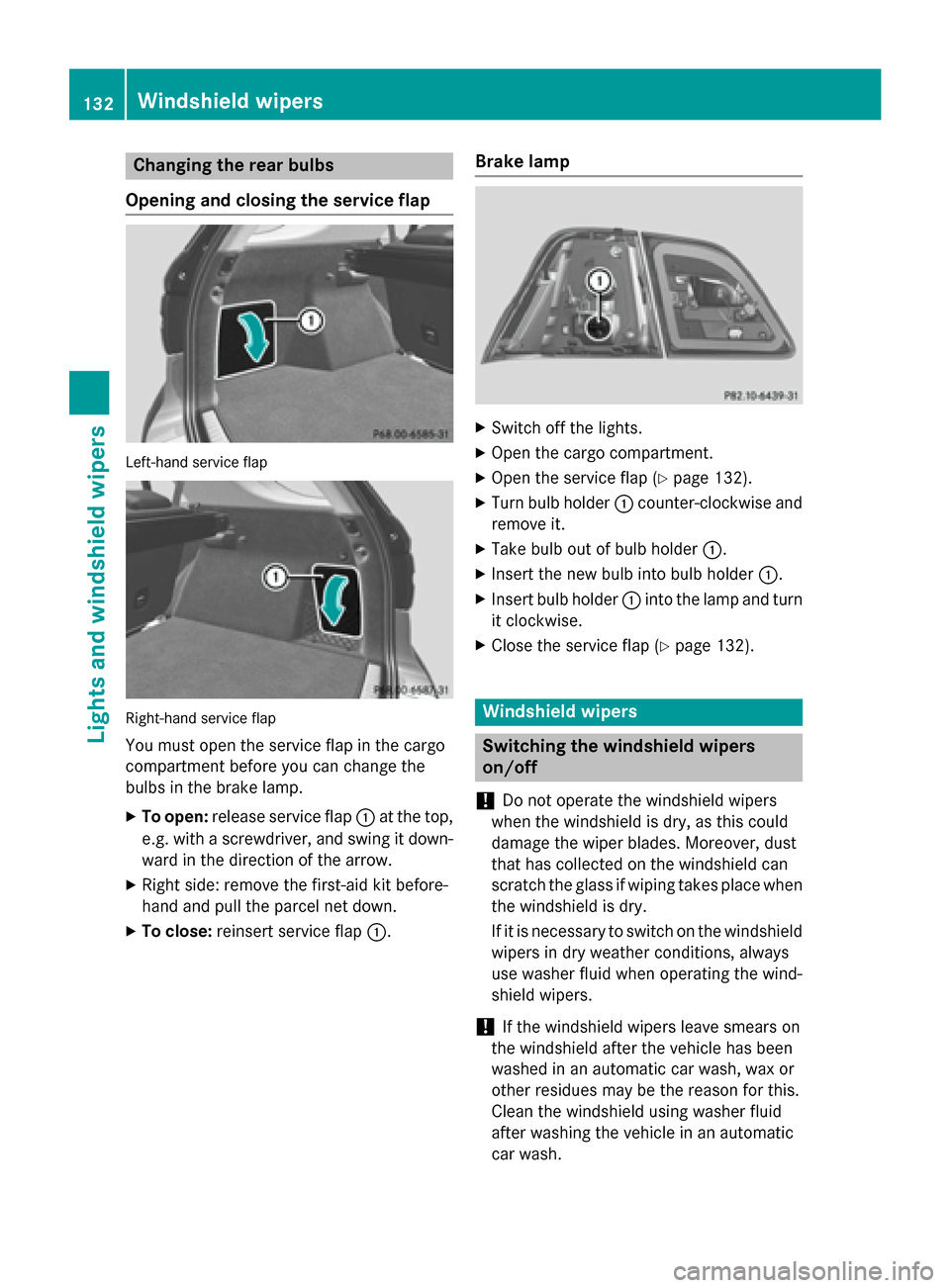
You must open the service flap in the cargo
compartment before you can change the
bulbs in the brake lamp.
X To open: release service flap 0043at the top,
e.g. with a screwdriver, and swing it down- ward in the direction of the arrow.
X Right side: remove the first-aid kit before-
hand and pull the parcel net down.
X To close: reinsert service flap 0043.Brake lamp X
Switch off the lights.
X Open the cargo compartment.
X Open the service flap (Y page 132).
X Turn bulb holder 0043counter-clockwise and
remove it.
X Take bulb out of bulb holder 0043.
X Insert the new bulb into bulb holder 0043.
X Insert bulb holder 0043into the lamp and turn
it clockwise.
X Close the service flap (Y page 132). Windshield wipers
Switching the windshield wipers
on/off
! Do not operate the windshield wipers
when the windshield is dry, as this could
damage the wiper blades. Moreover, dust
that has collected on the windshield can
scratch the glass if wiping takes place when the windshield is dry.
If it is necessary to switch on the windshield wipers in dry weather conditions, always
use washer fluid when operating the wind-
shield wipers.
! If the windshield wipers leave smears on
the windshield after the vehicle has been
washed in an automatic car wash, wax or
other residues may be the reason for this.
Clean the windshield using washer fluid
after washing the vehicle in an automatic
car wash. 132
Windshield wipersLights and windshield wipers
Page 227 of 466
Under the following circumstances, the rear
view camera will not function, or will function
in a limited manner:
R if the tailgate is open
R in heavy rain, snow or fog
R at night or in very dark places
R if the camera is exposed to very bright light
R if the area is lit by fluorescent bulbs or LED
lighting (the display may flicker)
R if there is a sudden change in temperature,
e.g. when driving into a heated garage in
winter
R if the camera lens is dirty or obstructed
R if the rear of your vehicle is damaged. In this
event, have the camera position and setting checked at a qualified specialist workshop
The field of vision and other functions of the
rear view camera may be restricted due to
additional accessories on the rear of the vehi-
cle (e.g. license plate holder, bicycle rack).
Activating/deactivating the rear view
camera X
To activate: make sure that the SmartKey
is in position 2in the ignition lock.
X Make sure that the function "show rear
view camera display" is selected in
COMAND.
X Engage reverse gear.
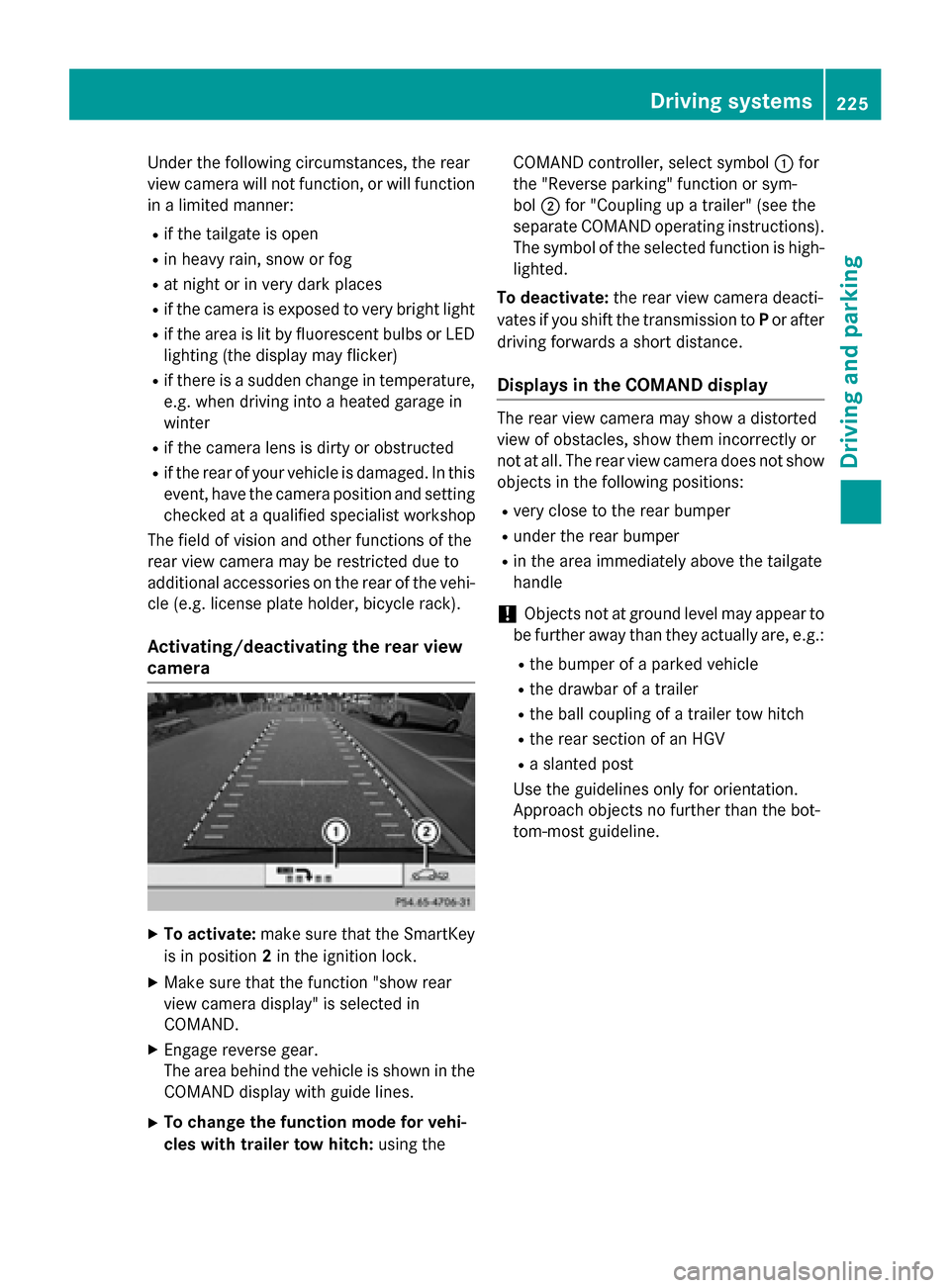
The area behind the vehicle is shown in the
COMAND display with guide lines.
X To change the function mode for vehi-
cles with trailer tow hitch: using theCOMAND controller, select symbol
0043for
the "Reverse parking" function or sym-
bol 0044for "Coupling up a trailer" (see the
separate COMAND operating instructions). The symbol of the selected function is high- lighted.
To deactivate: the rear view camera deacti-
vates if you shift the transmission to Por after
driving forwards a short distance.
Displays in the COMAND display The rear view camera may show a distorted
view of obstacles, show them incorrectly or
not at all. The rear view camera does not show
objects in the following positions:
R very close to the rear bumper
R under the rear bumper
R in the area immediately above the tailgate
handle
! Objects not at ground level may appear to
be further away than they actually are, e.g.:
R the bumper of a parked vehicle
R the drawbar of a trailer
R the ball coupling of a trailer tow hitch
R the rear section of an HGV
R a slanted post
Use the guidelines only for orientation.
Approach objects no further than the bot-
tom-most guideline. Driving systems
225Driving and parking Z
Page 232 of 466
R
if the tailgate is open
R in heavy rain, snow or fog
R at night or in very dark places
R if the cameras are exposed to very bright
light
R if the area is lit by fluorescent bulbs or LED
lighting (the display may flicker)
R if there is a sudden change in temperature,
e.g. when driving into a heated garage in
winter
R if the camera lenses are dirty or covered
R if the vehicle components in which the
cameras are installed are damaged. In this
event, have the camera position and setting
checked at a qualified specialist workshop.
Do not use the 360° camera in this case. You
can otherwise injure others or cause damage to objects or the vehicle.
Activation conditions The 360° camera image can be displayed if:
R your vehicle is equipped with a 360° cam-
era
R COMAND is switched on, see the separate
COMAND operating instructions
R the 360° Camera
360° Camera function is activated
Activating the 360° camera using the
SYS button X
Press and hold the 0066button for longer
than 2 seconds, see the separate COMAND
operating instructions.
Depending on whether position Dor Ris
engaged, the following is shown:
R full screen display with the image from
the front camera
R full screen display with the image from
the rear view camera Activating the 360° camera with
COMAND X
Press the 0066button, see the separate
COMAND operating instructions.
X Select System System by turning 00790052007Athe
COMAND controller and press 0098to con-
firm.
X Select 360° camera 360° camera and press0098to con-
firm.
Depending on whether position Dor Ris
engaged, the following is shown:
R a split screen with top view and the
image from the front camera or
R a split screen with top view and the
image from the rear view camera
For further information about the COMAND
controller, see the separate COMAND oper-
ating instructions.
Activating the 360° camera using
reverse gear The 360° camera images can be automati-
cally displayed by engaging reverse gear.
X Make sure that the SmartKey is in position
2 in the ignition lock.
X Make sure that the Activation by R Activation by R
gear
gear function is selected in COMAND, see
the separate COMAND operating instruc-
tions.
X To show the 360° camera image: engage
reverse gear.
The COMAND display shows the area
behind the vehicle in split screen:
R vehicle with guide lines
R top view of the vehicle
Selecting the split-screen and full
screen displays X
To switch between split screen views:
switch to the line with the vehicle icons by
sliding 00970052the COMAND controller.
X Turn 00790052007A the COMAND controller and
select one of the vehicle symbols. 230
Driving systemsDriving an
d parking
Page 299 of 466
Display messages
Possible causes/consequences and
0050
0050Solutions If these conditions are fulfilled, the front-passenger seat can be
occupied again. Whether the PASSENGER AIR BAG OFF indicator
lamp remains lit or goes out depends on how OCS classifies the
occupant.
If the conditions are not fulfilled, the system is not operating cor- rectly.
X Visit a qualified specialist workshop immediately. Lights
i Display messages about LEDs:
This display message will only appear if all LEDs have failed. Display messages
Possible causes/consequences and
0050 0050Solutions 0049
Check Left Corner‐ Check Left Corner‐
ing Light ing Light
orCheck
Check
Right Cornering
Right Cornering
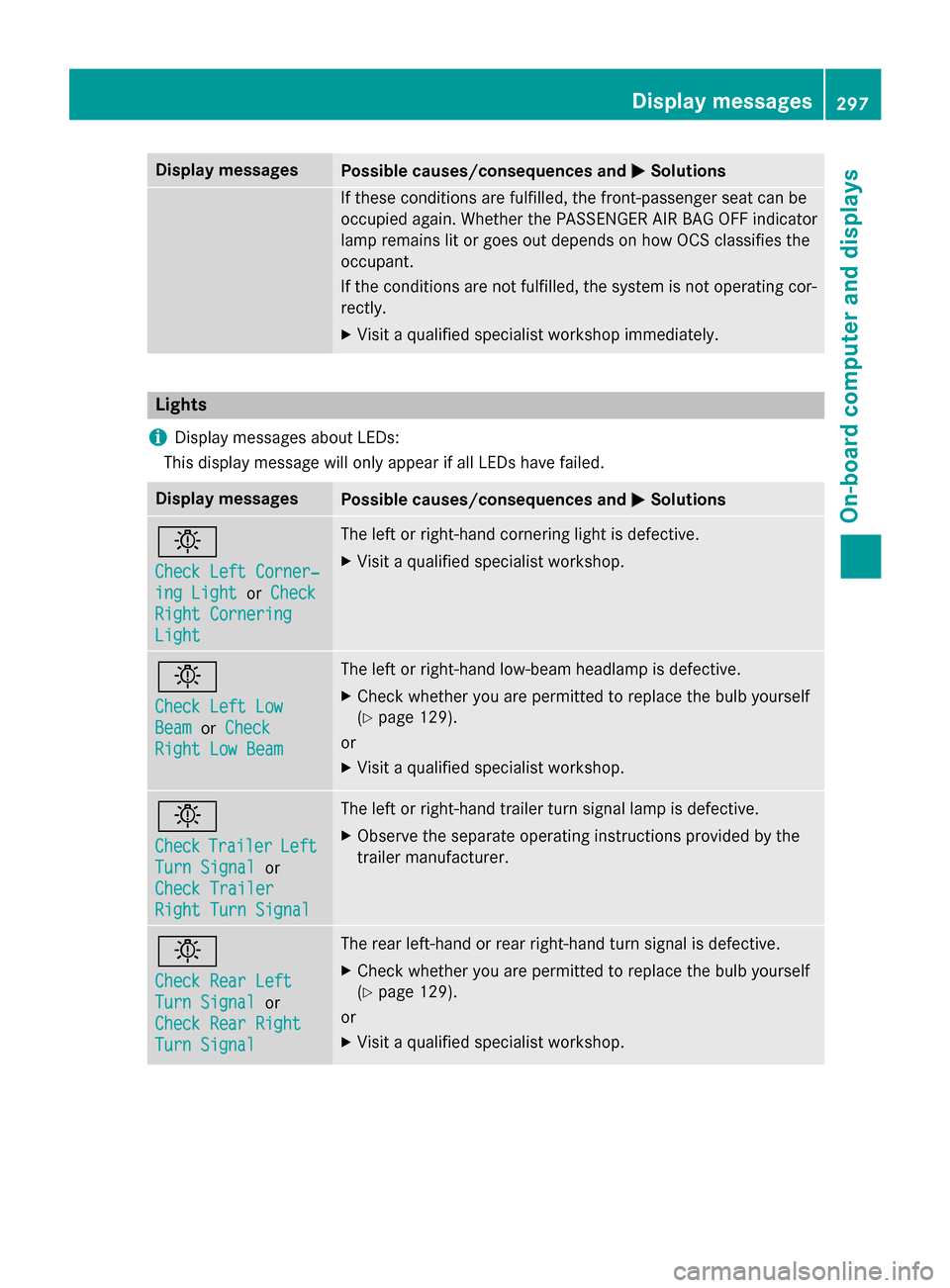
Light Light The left or right-hand cornering light is defective.
X Visit a qualified specialist workshop. 0049
Check Left Low Check Left Low
Beam Beam
orCheck
Check
Right Low Beam
Right Low Beam The left or right-hand low-beam headlamp is defective.
X Check whether you are permitted to replace the bulb yourself
(Y page 129).
or
X Visit a qualified specialist workshop. 0049
Check Check
Trailer
Trailer Left
Left
Turn Signal
Turn Signal or
Check Trailer
Check Trailer
Right Turn Signal Right Turn Signal The left or right-hand trailer turn signal lamp is defective.
X Observe the separate operating instructions provided by the
trailer manufacturer. 0049
Check Rear Left Check Rear Left
Turn Signal Turn Signal
or
Check Rear Right
Check Rear Right
Turn Signal Turn Signal The rear left-hand or rear right-hand turn signal is defective.
X Check whether you are permitted to replace the bulb yourself
(Y page 129).
or
X Visit a qualified specialist workshop. Display
messages
297On-board computer and displays Z
Page 300 of 466
Display messages
Possible causes/consequences and
0050
0050Solutions 0049
Check Front Left Check Front Left
Turn Signal Turn Signal
or
Check Front Right
Check Front Right
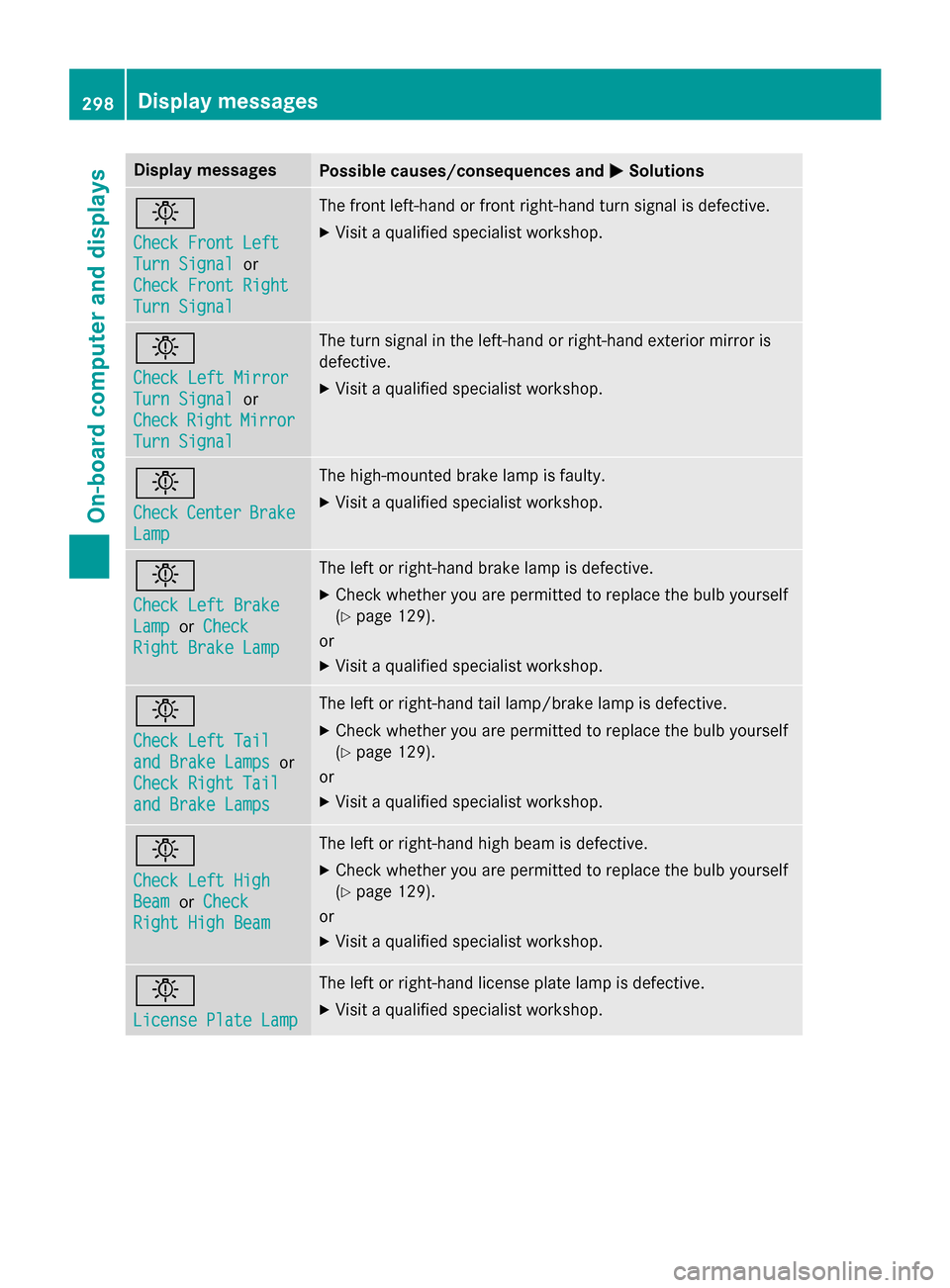
Turn Signal Turn Signal The front left-hand or front right-hand turn signal is defective.
X Visit a qualified specialist workshop. 0049
Check Left Mirror Check Left Mirror
Turn Signal Turn Signal
or
Check
Check Right
RightMirror
Mirror
Turn Signal
Turn Signal The turn signal in the left-hand or right-hand exterior mirror is
defective.
X Visit a qualified specialist workshop. 0049
Check Check
Center
Center Brake
Brake
Lamp
Lamp The high-mounted brake lamp is faulty.
X
Visit a qualified specialist workshop. 0049
Check Left Brake Check Left Brake
Lamp Lamp
orCheck
Check
Right Brake Lamp
Right Brake Lamp The left or right-hand brake lamp is defective.
X Check whether you are permitted to replace the bulb yourself
(Y page 129).
or
X Visit a qualified specialist workshop. 0049
Check Left Tail Check Left Tail
and Brake Lamps and Brake Lamps
or
Check Right Tail
Check Right Tail
and Brake Lamps and Brake Lamps The left or right-hand tail lamp/brake lamp is defective.
X Check whether you are permitted to replace the bulb yourself
(Y page 129).
or
X Visit a qualified specialist workshop. 0049
Check Left High Check Left High
Beam Beam
orCheck
Check
Right High Beam
Right High Beam The left or right-hand high beam is defective.
X Check whether you are permitted to replace the bulb yourself
(Y page 129).
or
X Visit a qualified specialist workshop. 0049
License Plate Lamp License Plate Lamp The left or right-hand license plate lamp is defective.
X Visit a qualified specialist workshop. 298
Display
messagesOn-board computer and displays
Page 301 of 466
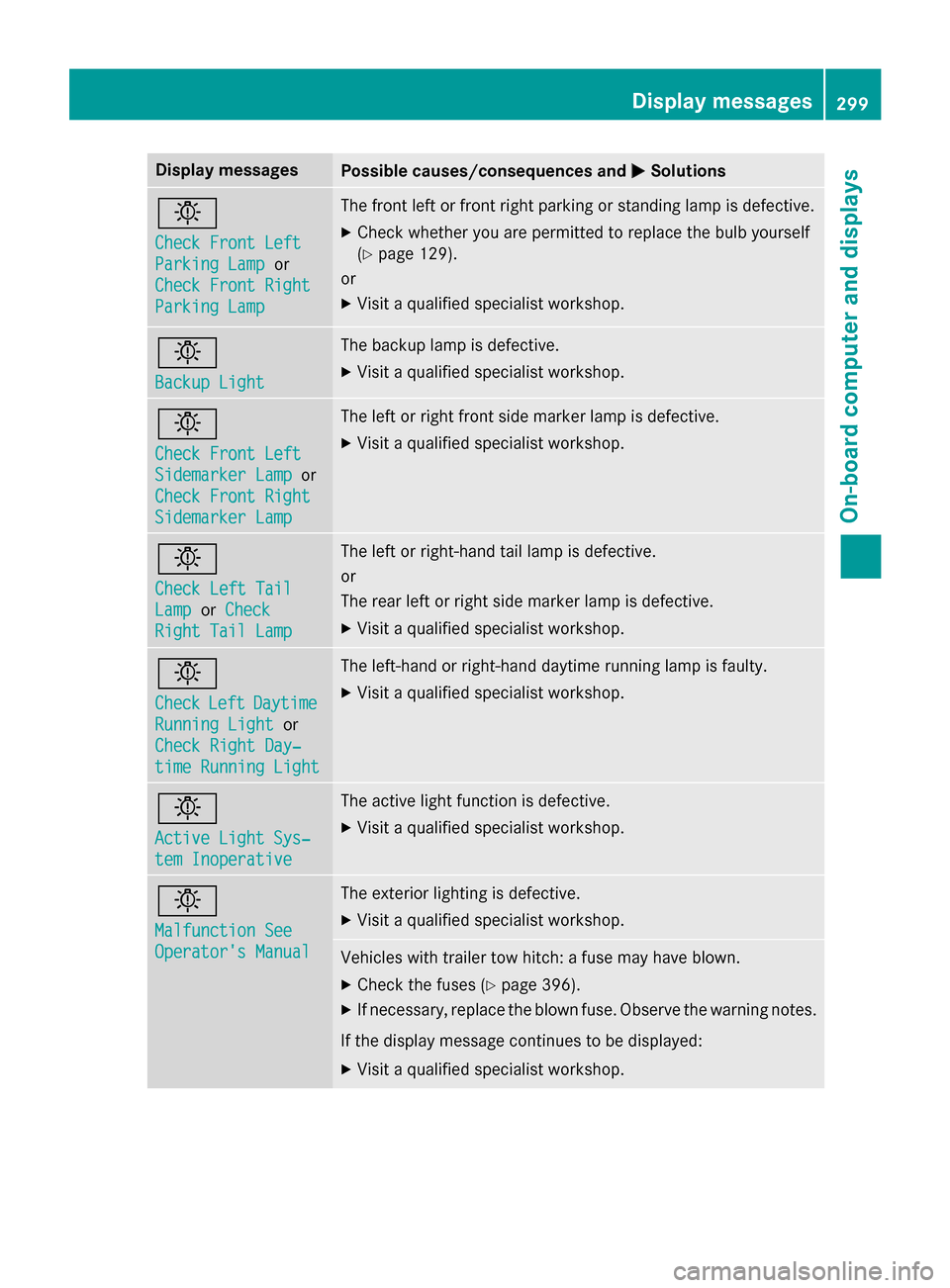
Display messages
Possible causes/consequences and
0050
0050Solutions 0049
Check Front Left Check Front Left
Parking Lamp Parking Lamp
or
Check Front Right
Check Front Right
Parking Lamp Parking Lamp The front left or front right parking or standing lamp is defective.
X Check whether you are permitted to replace the bulb yourself
(Y page 129).
or
X Visit a qualified specialist workshop. 0049
Backup Light Backup Light The backup lamp is defective.
X Visit a qualified specialist workshop. 0049
Check Front Left Check Front Left
Sidemarker Lamp Sidemarker Lamp
or
Check Front Right
Check Front Right
Sidemarker Lamp Sidemarker Lamp The left or right front side marker lamp is defective.
X Visit a qualified specialist workshop. 0049
Check Left Tail Check Left Tail
Lamp Lamp
orCheck
Check
Right Tail Lamp
Right Tail Lamp The left or right-hand tail lamp is defective.
or
The rear left or right side marker lamp is defective.
X Visit a qualified specialist workshop. 0049
Check Check
Left
LeftDaytime
Daytime
Running Light
Running Light or
Check Right Day‐
Check Right Day‐
time Running Light time Running Light The left-hand or right-hand daytime running lamp is faulty.
X Visit a qualified specialist workshop. 0049
Active Light Sys‐ Active Light Sys‐
tem Inoperative tem Inoperative The active light function is defective.
X Visit a qualified specialist workshop. 0049
Malfunction See Malfunction See
Operator's Manual Operator's Manual The exterior lighting is defective.
X Visit a qualified specialist workshop. Vehicles with trailer tow hitch: a fuse may have blown.
X Check the fuses (Y page 396).
X If necessary, replace the blown fuse. Observe the warning notes.
If the display message continues to be displayed: X Visit a qualified specialist workshop. Display
messages
299On-board computer and displays Z