alarm MERCEDES-BENZ M-Class 2015 W166 Owner's Manual
[x] Cancel search | Manufacturer: MERCEDES-BENZ, Model Year: 2015, Model line: M-Class, Model: MERCEDES-BENZ M-Class 2015 W166Pages: 466, PDF Size: 8.92 MB
Page 6 of 466
1, 2, 3 ...
115 V socket ...................................... 350
12 V socket see Sockets
360° camera
Cleaning .........................................3 76
Function/notes ............................ .229
4ETS
see ETS/4ETS (Electronic Trac-
tion System)
4MATIC (permanent four-wheel
drive) ................................................. .249 A
ABS (Anti-lock Braking System) Display message ............................ 285
Function/notes ................................ 68
Important safety notes .................... 68
Warning lamp ................................. 321
Accident
Automatic measures after an acci-
dent ................................................. 60
Activating/deactivating cooling
with air dehumidification ................. 144
Active Blind Spot Assist Activating/deactivating (on-
board computer) ............................ 276
Display message ............................ 308
Function/informatio n.................... 241
Trailer towing ................................. 244
Active Curve System
Display message ............................ 305
Function/note s............................. 212
Active Driving Assistance package .. 241
Active Lane Keeping Assist Activating/deactivating (on-
board computer) ............................ 276
Display message ............................ 307
Function/information .................... 244
Trailer towing ................................. 247
Active light function ......................... 125
Active Parking Assist Display message ............................ 308
Exiting a parking space .................. 223
Function/note s............................. 220
Important safety notes .................. 220 Parking .......................................... 222
Towing a trailer .............................. 224
ADAPTIVE BRAKE ................................. 75
Adaptive Brake Assist Display message ............................ 292
Function/note s................................ 71
Adaptive damping system
see ADS (Adaptive Damping System)
Adaptive Highbeam Assist
Display message ............................ 300
Function/note s............................. 126
Switching on/of f........................... 126
Additives (engine oil) ........................ 453
ADS (Adaptive Damping System) Function/note s............................. 212
Air bags
Deployment ..................................... 58
Display message ............................ 295
Front air bag (driver, front
passenger) ....................................... 51
Important safety notes .................... 50
Introduction ..................................... 50
Knee bag .......................................... 52
PASSENGER AIR BAG OFF indica-
tor lamp ........................................... 45
Side impact air bag .......................... 52
Window curtain air bag .................... 52
Air-conditioning system
see Climate control
Air filter (display message) .............. 303
AIR FLOW ........................................... 147
AIRMATIC package ADS (Adaptive Damping System) ... 212
Function/note s............................. 211
Level control .................................. 213
Air vents
Glove box ....................................... 153
Important safety notes .................. 152
Rear ............................................... 153
Setting ........................................... 152
Setting the center air vents ........... 152
Setting the side air vents ............... 153
Alarm
ATA (Anti-Theft Alarm system )......... 77
Switching off (ATA) .......................... 77
Switching the function on/off
(ATA) ................................................ 77 4
Index
Page 7 of 466
Alarm system
see ATA (Anti-Theft Alarm system)
Ambient lighting
Setting the brightness (on-board
computer) ...................................... 278
Setting the color (on-board com-
puter) ............................................ .278
AMG adaptive sport suspension
system ................................................ 215
AMG menu (on-board computer) ..... 281
Anti-lock braking system see ABS (Anti-lock Braking System)
Anti-Theft Alarm system
see ATA (Anti-Theft Alarm system)
Approach/departure angle .............. 194
Ashtray ............................................... 348
Assistance display (on-board com-
puter) ................................................. .275
Assistance menu (on-board com-
puter) ................................................. .275
ASSYST PLUS Displaying a service message ....... .371
Hiding a service message .............. 371
Notes ............................................. 370
Resetting the service interval dis-
play ................................................ 371
Service message ............................ 370
Special service requirements ......... 371
ATA (Anti-Theft Alarm system)
Activating/deactivating ................... 77
Function .......................................... .77
Switching off the alarm .................... 77
ATTENTION ASSIST
Activating/deactivating ................. 276
Display message ............................ 304
Function/note s............................. 233
Audio menu (on-board computer) .... 272
Audio system see separate operating instructions
Authorized Mercedes-Benz Center
see Qualified specialist workshop
Authorized workshop
see Qualified specialist workshop
AUTO lights
Display message ............................ 300
see Lights
Automatic car wash (care) ............... 372Automatic engine start (ECO start/
stop function) .................................... 163
Automatic engine switch-off (ECO
start/stop function) .......................... 162
Automatic headlamp mode .............. 120
Automatic transmission Accelerator pedal position ............. 171
Automatic drive program ............... 173
Changing gear ............................... 171
DIRECT SELECT lever ..................... 168
Display message ............................ 315
Drive program display .................... 168
Driving tips .................................... 171
Emergency running mode .............. 177
Engaging drive position .................. 170
Engaging neutral ............................ 169
Engaging park position automati-
cally ............................................... 169
Engaging reverse gear ................... 169
Engaging the park position ............ 168
Kickdown ....................................... 171
Manual drive progra m.................... 173
Manual drive program (AMG vehi-
cles) ............................................... 174
Manual drive program (vehicles
with the ON&OFFROAD package) .. 174
Overview ........................................ 168
Problem (malfunction) ................... 177
Program selector button ................ 172
Pulling away ................................... 160
Starting the engine ........................ 160
Steering wheel paddle shifters ...... 172
Trailer towing ................................. 171
Transmission position display ........ 168
Transmission positions .................. 170
Automatic transmission emer-
gency mode ....................................... 177
Axle load, permissible (trailer tow-
ing) ...................................................... 460 B
Bag hook ............................................ 339
Ball coupling Installing ........................................ 258
Removing ....................................... 262
Storing ........................................... 262
BAS (Brake Assist System) ................. 68 Index
5
Page 16 of 466
Loading guidelines
............................ 334
Locking see Central locking
Locking (doors)
Automatic ........................................ 88
Emergency locking .......................... .88
From inside (central locking but-
ton) .................................................. 87
Locking centrally
see Central locking
Locking verification signal (on-
board computer) ............................... 279
Low-beam headlamps Changing bulb s.............................. 130
Display message ............................ 297
Setting for driving abroad (sym-
metrical) ........................................ 120
Switching on/of f........................... 121
LOW RANGE
Display message ............................ 306
Off-road gear ................................. 253
LOW RANGE off-road gear ................ 253
Luggage holder (EASY-PACK load-
securing kit) ....................................... 343
Lumbar support Adjusting (on the seat) .................. 108
Luxury head restraints ..................... 107M
M+S tires ............................................ 402
Malfunction message see Display messages
Matte finish (cleaning instruc-
tions) .................................................. 374
mbrace Call priority .................................... 356
Display message ............................ 291
Downloading destinations
(COMAND) ..................................... 356
Downloading routes ....................... 359
Emergency call .............................. 353
General notes ................................ 352
Geo fencing ................................... 360
Locating a stolen vehicle ............... 358
MB info call button ........................ 355
Remote vehicle locking .................. 358 Roadside Assistance button .......... 354
Search & Send ............................... 357
Self-test ......................................... 353
Speed alert .................................... 360
System .......................................... 353
Triggering the vehicle alarm ........... 360
Vehicle remote malfunction diag-
nosis .............................................. 359
Vehicle remote unlocking .............. 358
Mechanical key
Function/note s................................ 82
Inserting .......................................... 83
Locking vehicle ................................ 88
Removing ......................................... 82
Unlocking the driver's door .............. 88
Media Interface
see Separate operating instructions
Memory card (audio) ......................... 273
Memory function ............................... 116
Message memory (on-board com-
puter) .................................................. 284
Mirrors see Exterior mirrors
see Rear-view mirror
see Vanity mirror (in the sun visor)
Mobile phone
Menu (on-board computer) ............ 273
Modifying the programming
(SmartKey) ........................................... 81
MOExtended tires .............................. 383
Mounting wheels Lowering the vehicle ...................... 428
Mounting a new whee l................... 427
Preparing the vehicle ..................... 424
Raising the vehicl e......................... 425
Removing a whee l.......................... 427
Securing the vehicle against roll-
ing away ........................................ 424
MP3
Operation ....................................... 273
see separate operating instructions
Multifunction display
Function/note s............................. 268
Permanent display ......................... 277
Multifunction steering wheel
Operating the on-board compute r..2 67
Overview .......................................... 37 14
Index
Page 18 of 466
Opening and closing the side trim
panels .................................................1 32
Operating safety Declaration of conformity ................ 28
Important safety notes .................... 27
Operating system
see On-board computer
Operator's Manual
Vehicle equipment ........................... 25
Outside temperature display ........... 267
Overhead control panel ......................41
Override feature Rear side windows ........................... 67 P
Paint code number ............................446
Paintwork (cleaning instructions) ... 373
Panic alarm .......................................... 44
Panorama roof with power tilt/
sliding panel
Important safety notes .................... 97
Opening/closing .............................. 99
Opening/closing the roller sun-
blind ............................................... 100
Problem (malfunction) ................... 101
Resetting ....................................... 100
Parking
Important safety notes .................. 182
Parking brake ................................ 184
Position of exterior mirror, front-
passenger side ............................... 116
Rear view camera .......................... 224
see PARKTRONIC
Parking aid
Active Parking Assist ..................... 220
see Exterior mirrors
see PARKTRONIC
Parking assistance
see PARKTRONIC
Parking brake
Display message ............................ 288
Electric parking brake .................... 184
Warning lamp ................................. 326
Parking lamps
Switching on/off ........................... 122
Parking lamps (changing bulbs) ...... 131PARKTRONIC
Deactivating/activating ................. 219
Driving system ............................... 217
Function/notes ............................ .217
Important safety notes .................. 217
Problem (malfunction) ................... 220
Range of the sensors ..................... 217
Trailer towing ................................. 219
Warning displa y............................. 218
PASSENGER AIR BAG OFF
Indicator lamp .................................. 45
Problems (malfunction) .................. 295
Pets in the vehicle ............................... 67
Plastic trim (cleaning instruc-
tions) .................................................. 378
Power closing feature ......................... 88
Power washers .................................. 373
Power windows see Side windows
PRE-SAFE ®
(anticipatory occupant
protection) Display message ............................ 291
Operation ......................................... 60
PRE-SAFE ®
Brake
Activating/deactivating ................. 276
Display message ............................ 293
Function/note s................................ 75
Warning lamp ................................. 330
Program selector button .................. 172
Protection of the environment General notes .................................. 24
Pulling away
Trailer ............................................ 161
Pulling away (automatic transmis-
sion) .................................................... 160 Q
Qualified specialist workshop ........... 29 R
RACETIMER (on-board computer) .... 282
Radar sensor system Activating/deactivating ................. 279
Display message ............................ 307
Radiator cover ................................... 36716
Index
Page 22 of 466
Roadside Assistance butto
n ..........354
Search & Send ............................... 357
Self-test ......................................... 353
Speed alert ................................... .360
System .......................................... 353
Triggering the vehicle alarm ........... 360
Vehicle remote malfunction diag-
nosis .............................................. 359
Vehicle remote unlocking .............. 358
Telephone
Accepting a call ............................ .274
Display message ............................ 316
Menu (on-board computer) ............ 273
Number from the phone book ....... .274
Redialing ........................................ 274
Rejecting/ending a call ................. 274
Telescopic rod (EASY-PACK load-
securing kit) ....................................... 343
Temperature Coolant .......................................... 266
Coolant (on-board computer) ......... 281
Engine oil (on-board computer) ...... 281
Outside temperature ..................... .267
Setting (climate control) ................ 147
Theft deterrent systems
ATA (Anti-Theft Alarm system) ......... 77
Immobilizer ...................................... 77
Through-loading ................................ 337
Time see separate operating instructions
Timing (RACETIMER) ......................... 282
TIREFIT kit .......................................... 384
Tire pressure Calling up (on-board computer) ..... 408
Checking manually ........................ 407
Display message ............................ 312
Important safety notes .................. 408
Maximum ....................................... 406
Notes ............................................. 405
Not reached (TIREFIT) .................... 386
Reached (TIREFIT) .......................... 386
Recommended ............................... 404
Tire pressure loss warning sys-
tem
General notes ................................ 407
Important safety notes .................. 407
Restarting ...................................... 408 Tire pressure monitor
Checking the tire pressure elec-
tronically ........................................ 410
Function/notes ............................ .408
General notes ................................ 408
Important safety notes .................. 409
Radio type approval for the tire
pressure monitor ........................... 411
Restarting ...................................... 411
Warning lamp ................................. 331
Warning message .......................... 410
Tires
Aspect ratio (definition) ................. 422
Average weight of the vehicle
occupants (definition) .................... 421
Bar (definition) ............................... 420
Changing a wheel .......................... 423
Characteristics .............................. 420
Checking ........................................ 401
Curb weight (definition) ................. 422
Definition of terms ......................... 420
Direction of rotatio n...................... 423
Display message ............................ 312
Distribution of the vehicle occu-
pants (definition) ............................ 423
DOT, Tire Identification Number
(TIN) ............................................... 420
DOT (Department of Transporta-
tion) (definition) ............................. 421
GAWR (Gross Axle Weight Rating)
(definition) ..................................... 421
GTW (Gross Trailer Weight) (defi-
nition) ............................................ 421
GVW (Gross Vehicle Weight) (def-
inition) ........................................... 421
GVWR (Gross Vehicle Weight Rat-
ing) (definition) .............................. 421
Important safety notes .................. 400
Increased vehicle weight due to
optional equipment (definition) ...... 421
Kilopascal (kPa) (definition) ........... 421
Labeling (overview) ........................ 417
Load bearing index (definition) ...... 422
Load index ..................................... 419
Load index (definition) ................... 421
M+S tire s....................................... 402
Maximum loaded vehicle weight
(definition) ..................................... 421 20
Index
Page 45 of 466
Useful information
..............................44
Panic alarm .......................................... 44
Occupant safety .................................. 44
Children in the vehicle ........................61
Pets in the vehicle .............................. 67
Driving safety systems .......................67
Theft deterrent locking system .........77 43Safety
Page 46 of 466
Useful information
i This Operator's Manual describes all
models and all standard and optional equip- ment of your vehicle available at the time of
publication of the Operator's Manual.
Country-specific differences are possible.
Please note that your vehicle may not be
equipped with all features described. This
also applies to safety-related systems and
functions.
i Read the information on qualified special-
ist workshops (Y page 29). Panic alarm
X
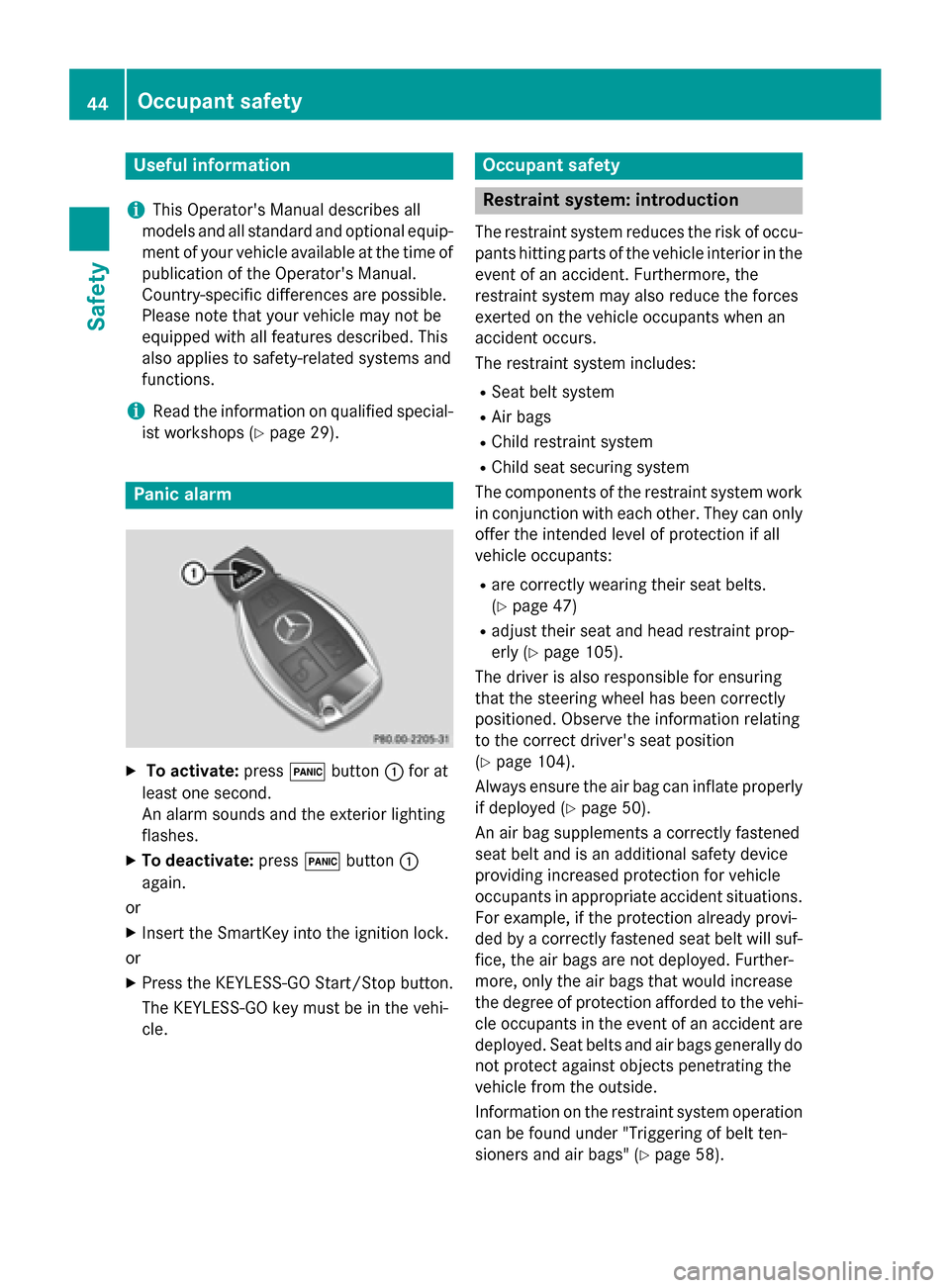
To activate: press0033button 0043for at
least one second.
An alarm sounds and the exterior lighting
flashes.
X To deactivate: press0033button 0043
again.
or
X Insert the SmartKey into the ignition lock.
or X Press the KEYLESS-GO Start/Stop button.
The KEYLESS-GO key must be in the vehi-
cle. Occupant safety
Restraint system: introduction
The restraint system reduces the risk of occu-
pants hitting parts of the vehicle interior in the
event of an accident. Furthermore, the
restraint system may also reduce the forces
exerted on the vehicle occupants when an
accident occurs.
The restraint system includes:
R Seat belt system
R Air bags
R Child restraint system
R Child seat securing system
The components of the restraint system work
in conjunction with each other. They can only
offer the intended level of protection if all
vehicle occupants:
R are correctly wearing their seat belts.
(Y page 47)
R adjust their seat and head restraint prop-
erly (Y page 105).
The driver is also responsible for ensuring
that the steering wheel has been correctly
positioned. Observe the information relating
to the correct driver's seat position
(Y page 104).
Always ensure the air bag can inflate properly if deployed (Y page 50).
An air bag supplements a correctly fastened
seat belt and is an additional safety device
providing increased protection for vehicle
occupants in appropriate accident situations.
For example, if the protection already provi-
ded by a correctly fastened seat belt will suf-
fice, the air bags are not deployed. Further-
more, only the air bags that would increase
the degree of protection afforded to the vehi- cle occupants in the event of an accident are deployed. Seat belts and air bags generally do
not protect against objects penetrating the
vehicle from the outside.
Information on the restraint system operation can be found under "Triggering of belt ten-
sioners and air bags" (Y page 58).44
Occupant safetySafety
Page 79 of 466
STEER CONTROL
General information STEER CONTROL helps you by transmitting a
noticeable steering force to the steering
wheel in the direction required for vehicle
stabilization.
This steering assistance is provided in partic-
ular if:
R both right wheels or both left wheels are on
a wet or slippery road surface when you
brake.
R the vehicle starts to skid.
Important safety notes i
Observe the "Important safety notes" sec-
tion (Y page 67).
No steering support is provided from STEER
CONTROL, if:
R ESP ®
is malfunctioning.
R the lighting is faulty.
Power steering will, however, continue to
function. Theft deterrent locking system
Immobilizer
X To activate with the SmartKey: remove
the SmartKey from the ignition lock.
X To activate with KEYLESS-GO: switch the
ignition off and open the driver's door.
X To deactivate: switch on the ignition.
The immobilizer prevents your vehicle from
being started without the correct SmartKey.
When leaving the vehicle, always take the
SmartKey with you and lock the vehicle. Any-
one can start the engine if a valid SmartKey
has been left inside the vehicle.
i The immobilizer is always deactivated
when you start the engine.
In the event that the engine cannot be star- ted when the starter battery is fully charged, the immobilizer may be faulty.
Contact an authorized Mercedes-Benz
Center or call 1-800-FOR-MERCedes (in the
USA) or 1-800-387-0100 (in Canada). ATA (anti-theft alarm system)
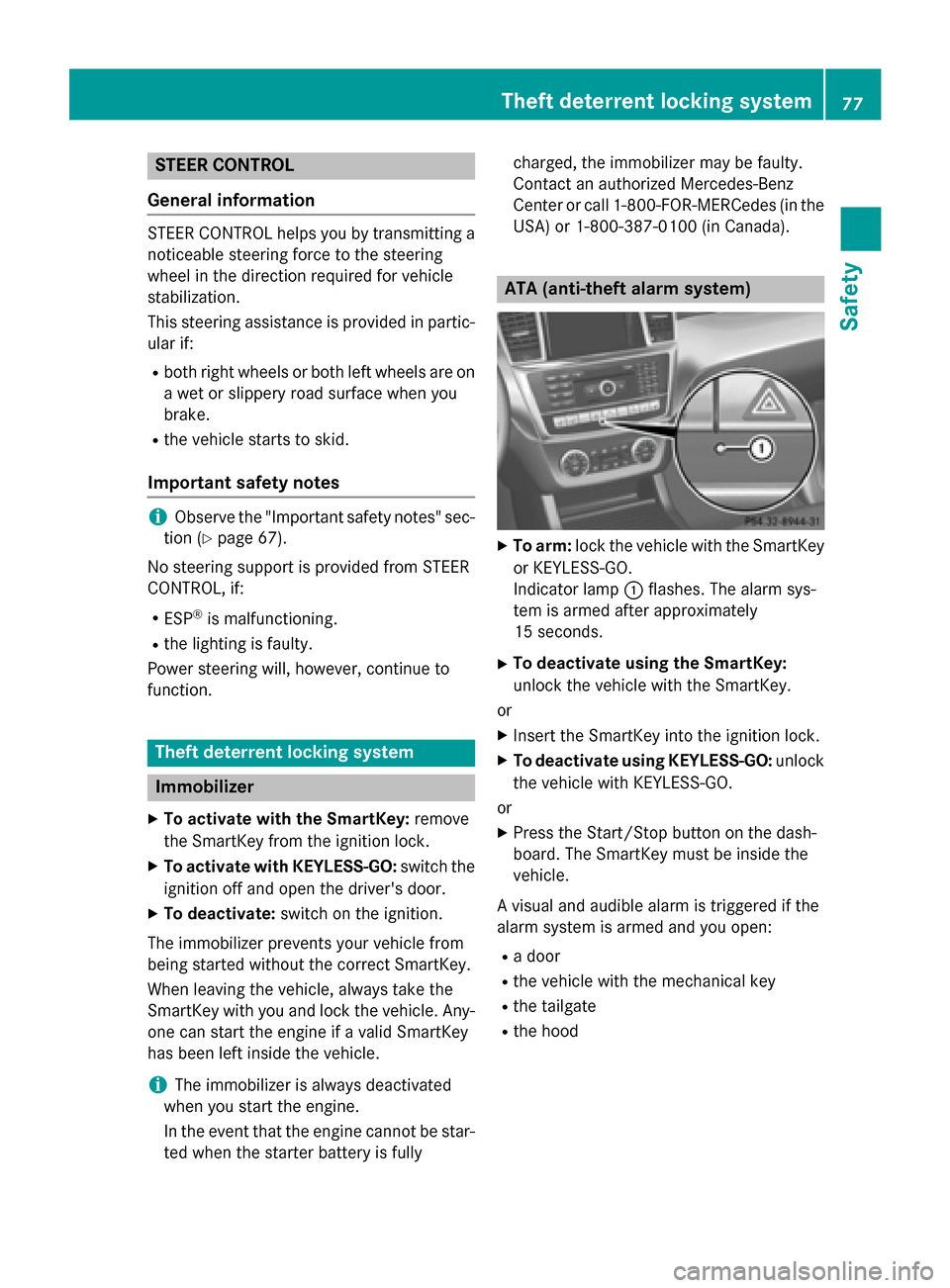
X
To arm: lock the vehicle with the SmartKey
or KEYLESS-GO.
Indicator lamp 0043flashes. The alarm sys-
tem is armed after approximately
15 seconds.
X To deactivate using the SmartKey:
unlock the vehicle with the SmartKey.
or X Insert the SmartKey into the ignition lock.
X To deactivate using KEYLESS-GO: unlock
the vehicle with KEYLESS-GO.
or X Press the Start/Stop button on the dash-
board. The SmartKey must be inside the
vehicle.
A visual and audible alarm is triggered if the
alarm system is armed and you open:
R a door
R the vehicle with the mechanical key
R the tailgate
R the hood Theft deterrent locking system
77Safety Z
Page 80 of 466
X
To turn the alarm off with the SmartKey:
press the 0036or0037 button on the
SmartKey.
The alarm is switched off.
or
X Insert the SmartKey into the ignition lock.
The alarm is switched off.
X To stop the alarm using KEYLESS-GO:
grasp the outside door handle. The Smart-
Key must be outside the vehicle.
The alarm is switched off.
or
X Press the Start/Stop button on the dash-
board. The SmartKey must be inside the
vehicle.
The alarm is switched off.
The alarm is not switched off, even if you
close the open door that triggered it, for
example.
i If the alarm continues for more than
30 second s,the mbrace emergency call
system automatically notifies the Cus-
tomer Assistance Center. This is done
either by text message or data connection.
The emergency call system sends the mes- sage or data provided that:
R you have subscribed to the mbrace ser-
vice.
R the mbrace service has been activated
properly.
R the necessary mobile phone network is
available. 78
Theft deterrent locking systemSafety
Page 84 of 466
the battery check lamp flashes twice
(Y page 83).
i If the setting of the locking system is
changed within the signal range of the vehi- cle, pressing the 0037or0036 button:
R locks or
R unlocks the vehicle
The SmartKey now functions as follows:
X To unlock the driver's door: press the
0036 button once.
X To unlock centrally: press the0036but-
ton twice.
X To lock centrally: press the0037button.
The KEYLESS-GO function is changed as fol-
lows:
X To unlock the driver's door: touch the
inner surface of the door handle on the
driver's door.
X To unlock centrally: touch the inner sur-
face of the door handle on the front-
passenger door or the rear door.
X To lock centrally: touch the outer sensor
surface on one of the door handles
(Y page 81).
X To restore the factory settings: press
and hold down the 0036and0037 buttons
simultaneously for approximately six sec-
onds until the battery check lamp flashes
twice (Y page 83). Mechanical key
General notes If the vehicle can no longer be locked or
unlocked with the SmartKey, use the
mechanical key.
If you use the mechanical key to unlock and
open the driver's door, the anti-theft alarm
system will be triggered (Y page 77).There are several ways to turn off the alarm:
X To deactivate the alarm with the Smart-
Key: press the 0036or0037 button on the
SmartKey.
or
X Insert the SmartKey into the ignition lock.
or
X To deactivate the alarm with KEYLESS-
GO: press the Start/Stop button in the igni-
tion lock. The SmartKey must be in the
vehicle.
or
X Lock or unlock the vehicle using KEYLESS-
GO. The SmartKey must be outside the
vehicle.
If you unlock the vehicle using the mechanical key, the fuel filler flap will not be unlocked
automatically.
X To unlock the fuel filler flap: insert the
SmartKey into the ignition lock.
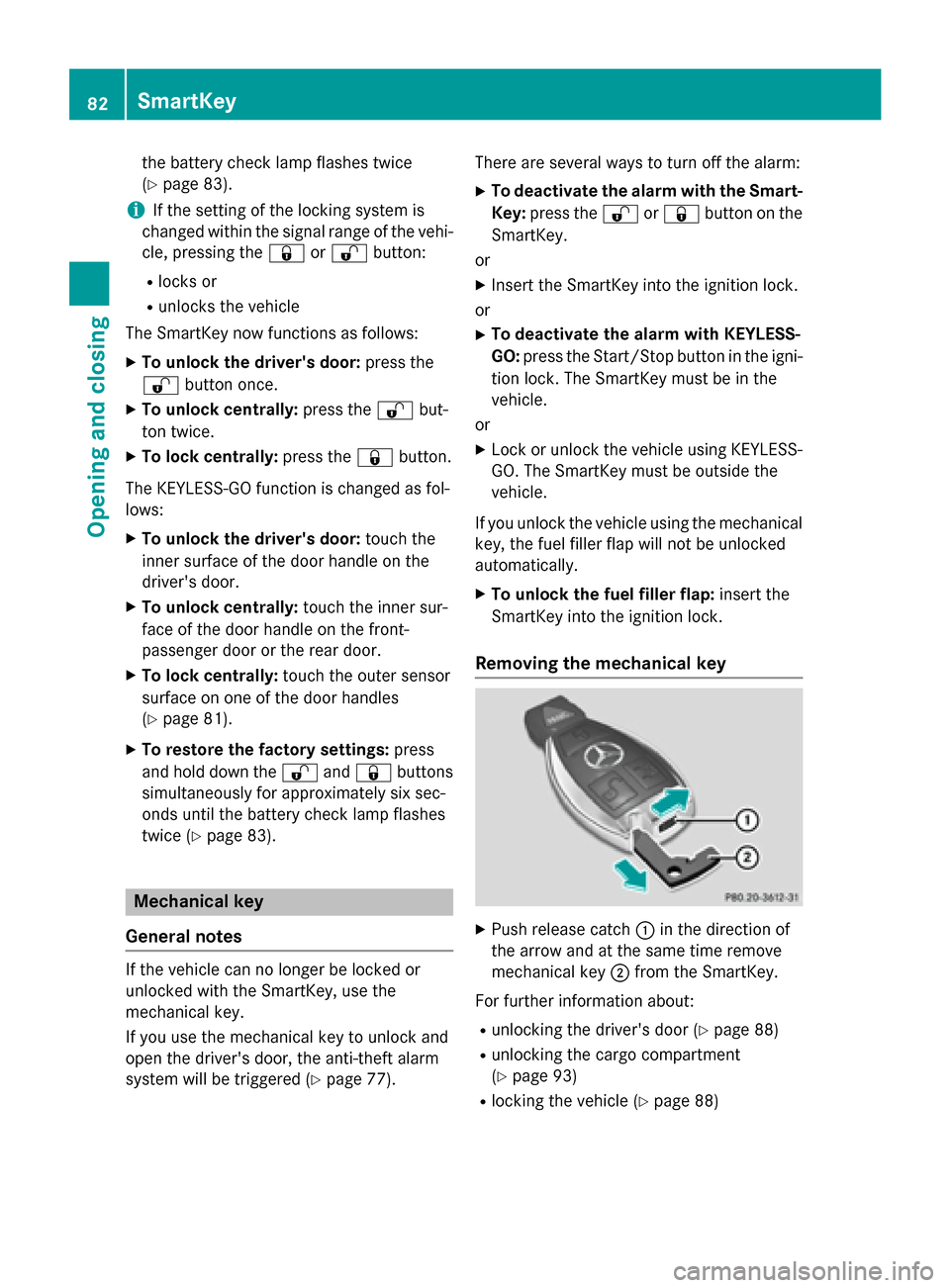
Removing the mechanical key X
Push release catch 0043in the direction of
the arrow and at the same time remove
mechanical key 0044from the SmartKey.
For further information about: R unlocking the driver's door (Y page 88)
R unlocking the cargo compartment
(Y page 93)
R locking the vehicle (Y page 88)82
SmartKeyOpening and closing