light MERCEDES-BENZ METRIS 2016 MY16 Operator’s Manual
[x] Cancel search | Manufacturer: MERCEDES-BENZ, Model Year: 2016, Model line: METRIS, Model: MERCEDES-BENZ METRIS 2016Pages: 310, PDF Size: 7.28 MB
Page 20 of 310
Cleaning .........................................259
Correct usage .................................. 45
Fastening ......................................... 46
Important safety guidelines ............. 45
Introduction ..................................... 44
Releasing ......................................... 47
Warning lamp ................................. 219
Warning lamp (function) ................... 47
Seats
Adjusting (manually). ....................... 84
Adjusting lumba rsuppo rt ................ 84
Adjusting the hea drestraint ............ 88
Armrest ............................................ 89
Cleaning the cove r......................... 259
Correct driver' sseatp osition ........... 83
Important safety notes .................... 83
Seath eating .................................... 89
Selecting gear
see Automati ctransmission
Selecto rlever
Cleaning ......................................... 259
see Automati ctransmission
Sensors (cleaning instructions) ....... 257
Servic ecenter
see Qualifie dspecialist workshop
Servic einterva ldisplay
Calling up the service du edate. ..... 248
Hiding service messages ............... 248
Note s............................................. 247
Servic emenu( on-board com-
puter) .................................................. 184
Servic ephon enumber ...................... 262
Servic eproducts
Brake fluid ..................................... 300
Coolant (engine) ............................ 300
Engine oil. ...................................... 298
Fue l................................................ 296
Important safety notes .................. 295
Power steering fluid ....................... 300
Refrigerant (air-conditioning sys-
tem) ............................................... 301
Transmission oil. .................... 299 ,300
Washe rfluid ................................... 302
Setting the air distribution ............... 113
Setting the airflow ............................ 113 Settings
Factory (vehicle with steering
wheelb uttons) ............................... 187
Factory (vehicle withou tsteering
wh eelb
uttons) ............................... 173
On-b
oard compute r(vehicle with
steering wheelb uttons) ................. 185
On-board compute r(vehicle with-
outs teering wheelb uttons) ........... 173
Side impac tair bag ............................. 49
Side windows
Cleaning ......................................... 256
Convenience closing feature ............ 81
Convenience opening feature .......... 81
Hinged sid ewindow s....................... 80
Important safety information ........... 80
Opening/closing .............................. 81
Overview .......................................... 80
Problem (malfunction) ..................... 82
Resetting ......................................... 81
Signal and ambien tlight
Changing abulb. .............................. 98
Sliding door
Child-proo floc ks .............................. 61
Cleaning ......................................... 258
Important safety notes .................... 73
Indicato rlam p................................ 227
Opening/closing from the inside ..... 74
Opening/closing from the out-
side .................................................. 73
see Electric sliding door
SmartKey
Changing the battery ....................... 69
Changing the programming ............. 68
Checking the battery ....................... 69
Convenience closing fea-
ture .......................................... 81 ,116
Convenience opening feature .......... 81
Door centra lloc king/unlocking ....... 67
Important safety notes .................... 67
Loss. ................................................ 71
Mechanical key ................................ 68
Problem (malfunction) ..................... 71
SmartKey position s(igni tion lock) .. 120
Sno wchains ...................................... 270
Sockets .............................................. 231
Spare wheel
Genera lnotes ................................ 291
18Index
Page 21 of 310
Important safety notes .................. 291
Removing/mounting ...................... 292
Special seat beltr etractor.................. 57
Specialist workshop ............................ 29
Speed, controlling
see Cruise control
Speedometer
Activating/deactivating the addi-
tional speedometer (vehicle with
steering whee lbuttons) .................1 85
Activating/deactivating the addi-
tional speedometer (vehicle with-
out steering wheel buttons) ........... 174
Digita l(vehicle with steering
wheel buttons) ............................... 178
Digita l(vehicle without steering
wheel buttons) ............................... 172
General notes ................................ 169
In the instrument cluster (vehicle
with steering wheel buttons) ............ 37
In the instrument cluster (vehicle
without steering wheel buttons) ...... 35
Setting the displa yunit (vehicle
with steering wheel buttons) ......... 185
Setting the displa yunit (vehicle
without steering wheel buttons) .... 174
Standin glamp
Display messages (vehicle with
steering wheel buttons) ................. 210
Standin glamps
Display messages (vehicle with-
out steering wheel buttons) ........... 196
Replacing bulbs (front) ................... 100
Replacing bulbs (rear) .................... 101
Switching on/off .............................. 92
Start/stop function
see ECO start/stop function
Starting
see Starting (engine)
Starting (engine) ................................ 121
Status overview (on-board com-
puter) ..................................................1 83
Steering
Display messages (vehicle with
steering wheel buttons) ................. 218
Display messages (vehicle with-
out steering wheel buttons) ........... 201
Warning lamps ............................... 227 Steering wheel
Adjusting ......................................... 90
Button overview ............................... 39
Buttons (on-board computer) ......... 175
Cleaning ................................... ...... 259
Pa d
dle shifters ............................... 130
Steering wheel paddle shifters ........130
Stickers
General safety notes ........................ 27
Stowage net ....................................... 229
Stowage spaces
see Stowag espaces and stowage
compartments
Stowage space sand stowage com-
partments
Eyeglasses compartment ...............2 28
Glove box ....................................... 228
Important safety notes .................. 228
Stowag enet ................................... 229
Summer opening
see Convenience opening feature
Summer tires ..................................... 269
Sun visor
Changing abulb( mirror lamp) ......... 97
Overview ........................................ 229
Surround lighting (on-board com-
puter) ..................................................1 86
Switchin gair-recirculation mode
on/off ................................................. 115
Switchin goff the alarm (ATA) ............ 66
T
Tachometer........................................ 169
Tail lamps
Display messages (vehicle with-
out steering wheel buttons) ........... 195
Replacing bulbs .............................1 01
Trailer displa ymessages (vehicle
with steering wheel but-
tons) .............................................. 209
Trailer displa ymessages (vehicle
without steering wheel buttons) .... 195
Tailgate
Changing bulbs (ambient lamp) ....... 97
Changing bulbs (signal and ambi-
ent light) .......................................... 98
Index19
Page 23 of 310
GAWR(Gross Axle WeightR ating)
(definition) .................................... .284
GTW (Gross Trailer Weight) (defi-
nition) ............................................ 284
GVW (Gross Vehicle Weight) (def-
inition) ...........................................2 85
GVW R(Gross Vehicle Weight Rat-
ing) (definition) .............................. 285
Important safety notes .................. 267
Increase dvehicle weight due to
optional equipment (definition) ...... 284
Information on driving .................... 267
Kilopascal (kPa)( definition) ........... 285
Labeling (overview )........................ 281
Loadb earing index (definition) ...... 286
Loadi ndex ..................................... 283
Loadi ndex (definition) ................... 285
M+S tire s....................................... 269
Maximu mloadona tire (defini-
tion) ............................................... 285
Maximu mloaded vehicleweigh t
(definition) ..................................... 285
Maximu mpermissibl etire pres-
sure (definition) ............................. 285
Maximu mtire load ......................... 283
Maximu mtire load (definition) ....... 285
Optionale quipmentweight (defi-
nition) ............................................ 285
PSI (pounds pe rsquare inch )(de f-
inition) ........................................... 285
Replacing ....................................... 286
Service life ..................................... 268
Sidewal l(de finition) ....................... 285
Snow chains .................................. 270
Speed rating (definition) ................ 284
Storing ........................................... 286
Structure and characteristics
(definition) ..................................... 284
Summer tire s................................. 269
TIN (Tire Identification Number)
(definition) ..................................... 286
Tire bead (definition) ...................... 285
Tire pressure (definition) ................ 285
Tire pressures (recommended )...... 284
Tire size (data )............................... 290
Tire size desi
gnation, load-bearing
ca
pacity, speed rating .................... 281
Tire trea d....................................... 268 Tire trea
d(definition) ..................... 285
Tota lloa dlim it (definition) ............. 286
Tractio n(definition) ....................... 286
TWR (permissibl etraile rdrawbar
noseweight) (definition) ................. 286
Uniform Tire Quality Grading
Standard s(de finition) .................... 284
Wea rindicator (definition) ............. 286
Wheel and tire combination ........... 291
Wheel rim (definition) .................... 284
Top Tether ............................................ 59
Tow-starting
Emergency engine starting ............ 266
Important safety notes .................. 264
Towing
If the vehicl eisstuck ..................... 266
Installing/removing the towing
eye. ................................................ 265
Towin gatrailer
Active Parking Assist ..................... 154
Axle load ,permissibl e.................... 305
Cleaning the traile rtow hitch ......... 258
Coupling up atraile r...................... 165
Decoupling atraile r....................... 166
Driving tip s.................................... 162
Note sonr etrofitting ...................... 305
Power supply ................................. 167
Trailer load s................................... 305
Towin gaway
Important safety guideline s........... 264
With both axles on the ground ....... 266
With the rea raxler aised ................ 265
Towin geye......................................... 260
Trailer coupling
see Towing atrailer
Trailer loads and drawbar nose-
weights ............................................... 166
Trailer operation
Lights display messages (vehicle
with steering wheelb uttons) ......... 208
Lights display messages (vehicle
withou tsteering wheelb uttons) .... 194
Trailer towing
Blind Spot Assist ............................ 147
ESP
®................................................ 65
PARKTRONIC ................................. 153
Index21
Page 34 of 310
Mercedes-Benztests genuine Mercedes-Benz
parts, conversion parts and accessories that
have been specifically approved for the type of
vehicle for:
Rreliability
Rsafety
Rsuitability
Despite ongoing market research, Mercedes-
Benz is unable to assess other parts. Even if an
independent or official approval has been pro-
vided in exceptional cases, Mercedes-Benz
accepts no responsibility for the use of such
parts in Mercedes-Benzv ehicles.
In some countries, certain parts are only offi-
cially approved for installation or modification if
they comply with legal requirements. All genu-
ine Mercedes-Benzp arts satisfy these require-
ments .Make sure that all parts are suitable for
your vehicle.
Always specify the vehicle identification number
(VIN) (
Ypage 294) and engine number when
ordering genuine Mercedes-Benzp arts
(
Ypage 295).
QR code for rescue card
The QR Code stickers are affixed to the B-pillar
on the driver's and front-passenger side.
In the event of an accident the rescue services
use the QR Code to quickly find the rescue card
for your vehicle. The current rescue card con-
tains the most important information on your
vehicle, e.g. the electric cable routes, in acom-
pact form.
Further information can be found under http://
portal.aftersales.i.daimler.com.
Data stored in the vehicle
Data Recording
Aw ide range of electronic components in your
vehicle contain data memories.
These data memories temporarily or perma-
nently store technical information about:
Rthe vehicle's operating state
Revents
Rfaults In general, this technical information docu-
ments the state of
acomponent, amodule, a
system or the surroundings.
These include, for example:
Roperating conditionsofs ystem components,
e.g. fluid levels
Rthe vehicle's status messages and those of its
individual components, e.g. number of wheel
revolutions/speed, deceleration in move-
ment, lateral acceleration, accelerator pedal
position
Rmalfunctions and defects in important system
components, e.g. lights, brakes
Rvehicle reactions and operating conditionsi n
special driving situations, e.g. airbag deploy-
ment, intervention of stability control sys-
tems
Rambient conditions, e.g. outside temperature
This data is of an exclusively technical nature
and can be used to:
Rassist in detectin gand rectifying faults and
defects
Ranalyze vehicle functions, e.g. after an acci-
dent
Roptimize vehicle functions
The data cannot be used to trace the vehicle's
movements.
When your vehicle is serviced, technical infor-
mation can be read from the event data memory
and fault data memory.
Services include, for example:
Rrepair services
Rservice processes
Rwarranty events
Rquality assurance
The vehicle is read out by employees of the ser- vice network (including the manufacturer) using
special diagnostic testers .You can obtain more
information there, if required.
After afault has been rectified, the information
is deleted from the fault memory or is continu-
ally overwritten.
When operating the vehicle, situations are con-
ceivable in which this technical data, in connec-
tion with other information (if necessary, after
consultation with an authorized expert), could
be traced to aperson.
32Introduction
Page 36 of 310
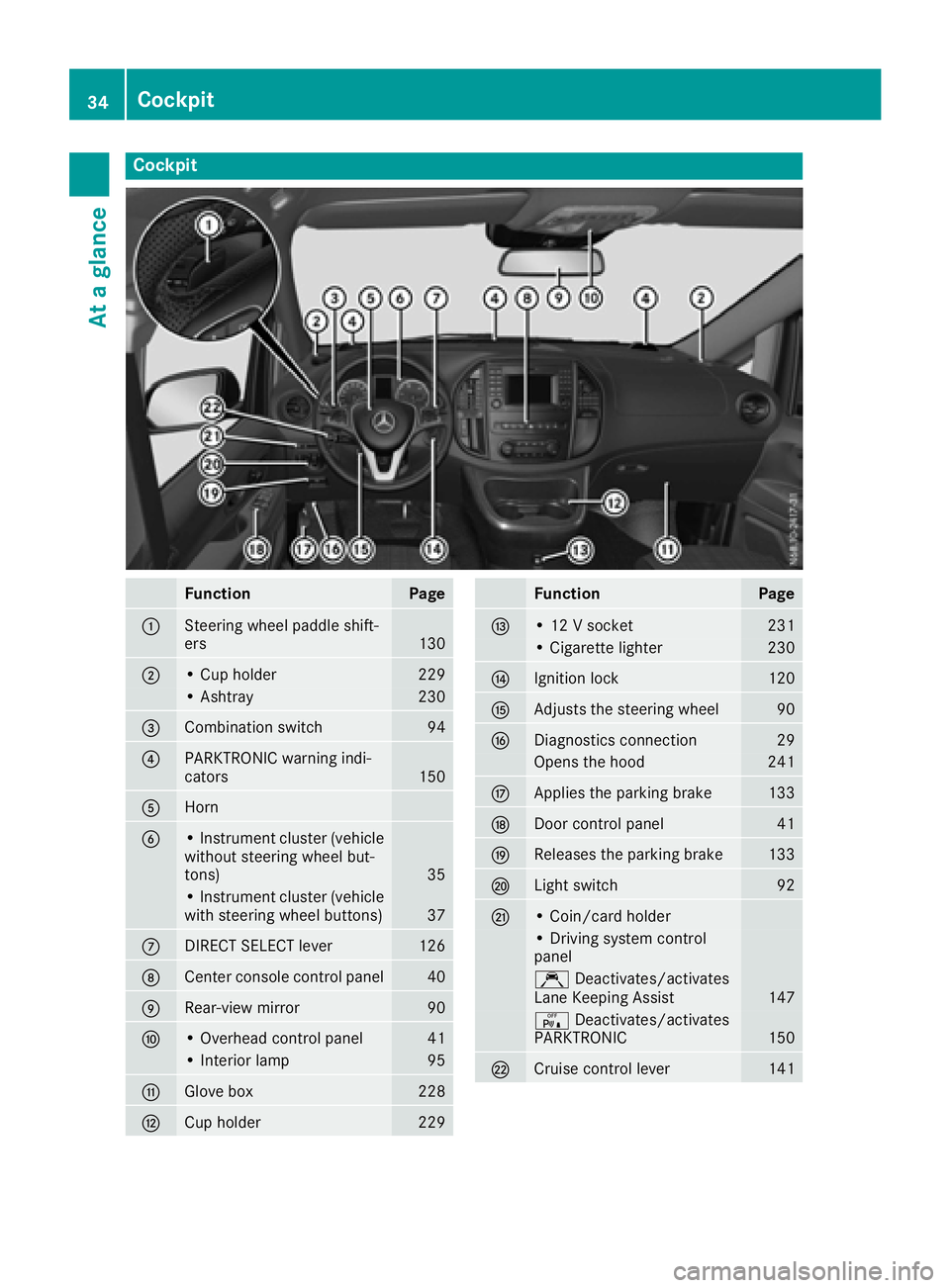
Cockpit
FunctionPage
:Steering wheel paddle shift-
ers130
;•Cup holder229
•Ashtr ay230
=Combination switch94
?PARKTRONIC warning indi-
cators150
AHorn
B•Instr umentc luster(vehicle
without steering wheel but-
tons)
35
•I nstr umentc luster(vehicle
withs teering wheel buttons)37
CDIRECT SELECT lever126
DCente rconsole control panel40
ERear-view mirror90
F•O verhead control panel41
•Inter ior lamp95
GGlove box228
HCup holder229
FunctionPage
I•12Vs ocket231
•Cigarett elighter230
JIgnition lock120
KAdjusts th esteering wheel90
LDiagnostics connection29
Openst hehood241
MApplies th eparking brake133
NDoor control panel41
OReleasest heparking brake133
PLights witch92
Q•Coin/card holder
•D rivin gs ystem control
panel
Ç Deactivates/activates
LaneK eeping Assist147
cDeactivates/activates
PARKTRONIC150
RCruis econtrol lever141
34Cockpit
At ag lance
Page 37 of 310
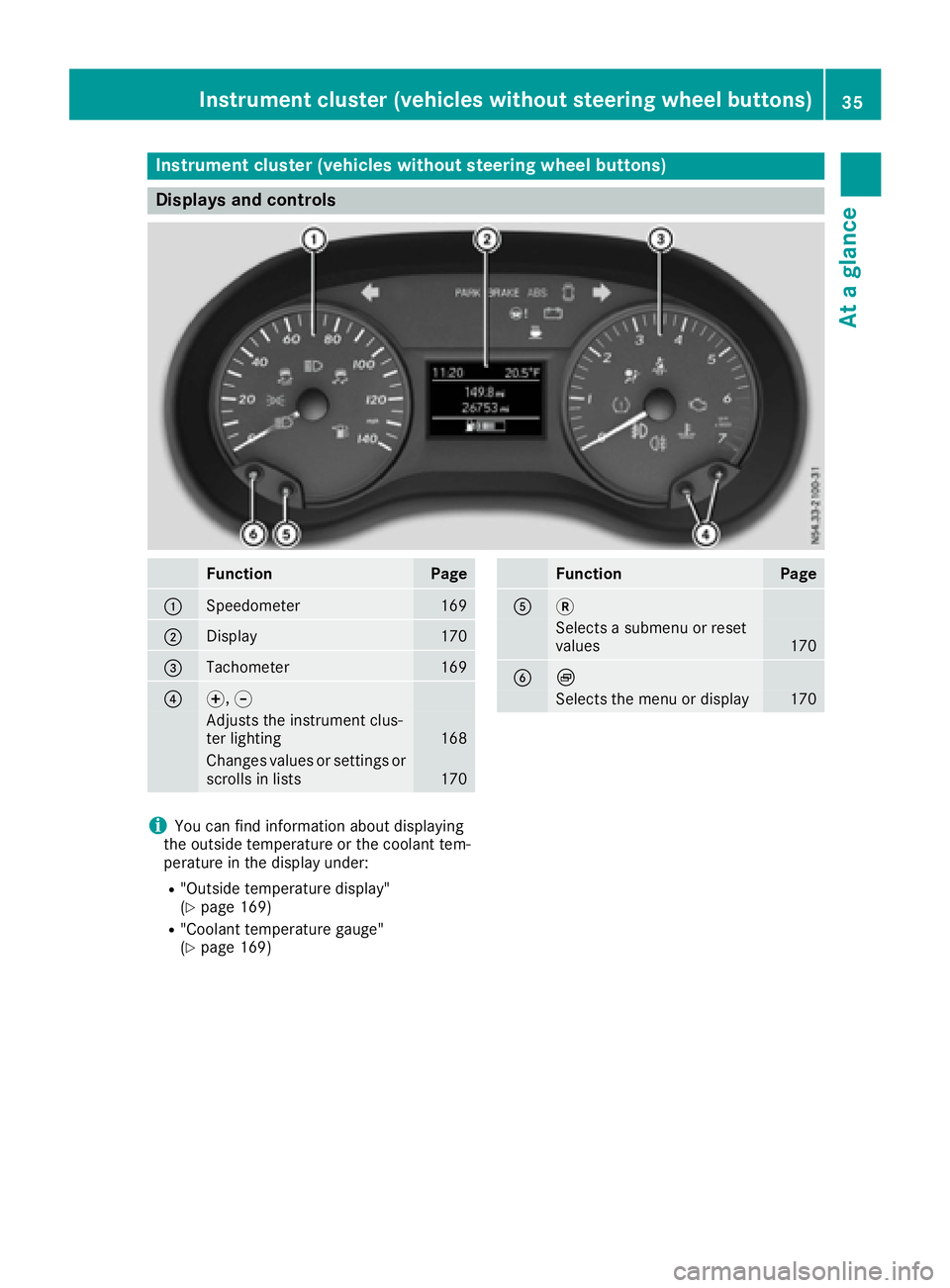
Instrumentcluster (vehicles without steering wheel buttons)
Display sand controls
FunctionPag e
:Speedometer169
;Display170
=Tachometer169
?f, g
Adjusts th einstrumen tclus -
te rlighting16 8
Changes value sorsetting sor
scrolls in list s170
FunctionPag e
A3
Selects asubmen uorreset
value s170
BÈ
Selects th emenuord isplay170
iYou can fin dinformation about displayin g
th eo utside temperature or th ecoolan ttem -
peratur einthedisplay under:
R"Outside temperature display"
(Ypage 169)
R"Coolan ttem perature gauge "
(Ypage 169)
Instrumen tcluster (vehicles without steering wheel buttons)35
At ag lance
Page 39 of 310
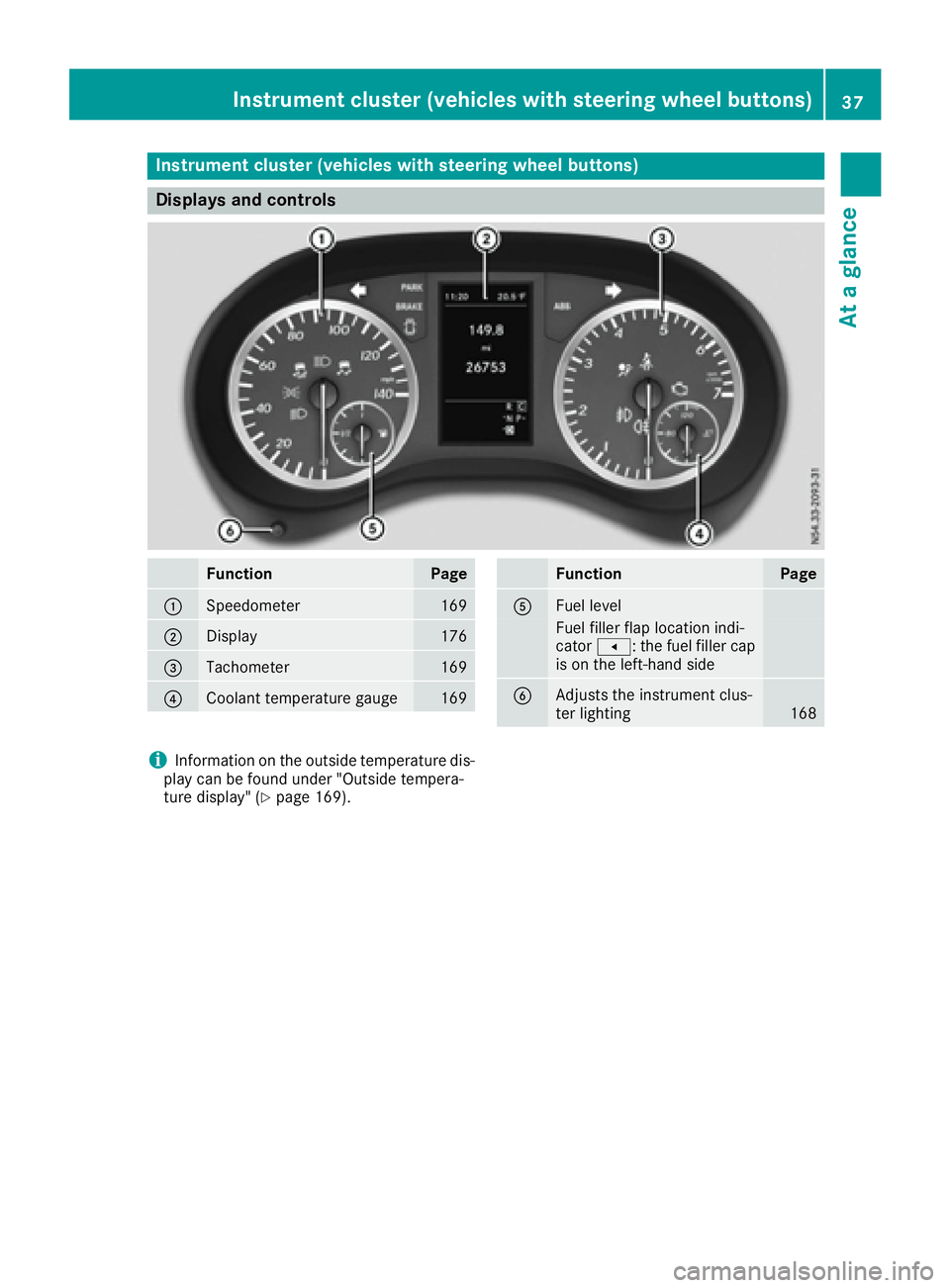
Instrumentcluster (vehicles with steering wheel buttons)
Display sand controls
FunctionPag e
:Speedometer169
;Display176
=Tachometer169
?Coolan ttem perature gauge169
FunctionPag e
AFuellevel
Fue lfiller flap location indi-
cator t:t hefuel filler cap
is on th eleft-han dside
BAdjusts th einstrumen tclus -
te rlighting16 8
iInformation on th eoutside temperature dis-
play can be foun dunder "Outside tempera-
tur ed isplay" (
Ypage 169).
Instrumen tcluster (vehicles with steering wheel buttons)37
At ag lance
Page 43 of 310
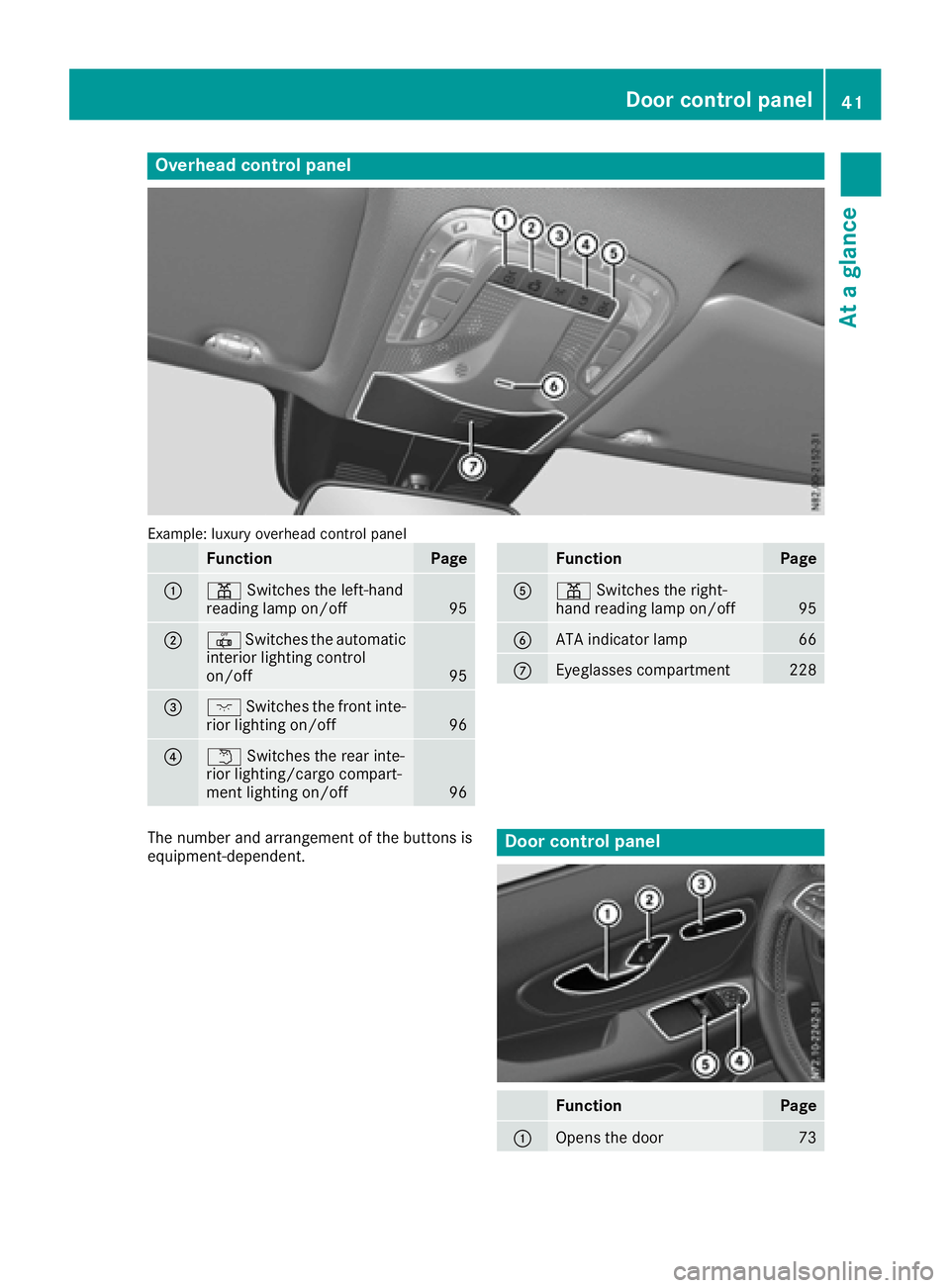
Overheadcontrol panel
Example: luxury overhead control panel
FunctionPage
:p Switches the left-hand
reading lamp on/off95
;| Switches the automatic
interior lighting control
on/off
95
=c Switches the fronti nte-
rior lighting on/off96
?w Switches the rear inte-
rior lighting/cargo compart-
ment lighting on/off
96
FunctionPage
Ap Switches the right-
hand reading lamp on/off95
BATA indicator lamp66
CEyeglasses compartment228
The number and arrangemen tofthe button sis
equipment-dependent.Door control panel
FunctionPage
:Opens the door73
Door control panel41
At ag lance
Page 45 of 310
Useful information
This Operator's Manual describes all models as
well as standard and optional equipment of your
vehicle that were available at the time of going
to print.Country-specific variation sare possi-
ble. Note that your vehicle may not be equipped
with all of the described functions. This also
applies to system sand function srelevantt o
safety.
Read the information on qualified specialist
workshops (
Ypage 29).
Occupant safety
Restraint system introduction
The restraint system can reduce the risk of vehi- cle occupants comingi ntoc ontact with parts of
the vehicle' sinterior in the eventofana ccident.
Furthermore, the restraint system may also
reduce the forces exerted on the vehicle occu-
pant swhen an acciden toccurs.
The restraint system includes:
RSeat belt system
RAir bags
RChild restraint system
RChild seat securings ystem
The components of the restraint system work in
conjunction with each other .They can only offer
the intended level of protection if all vehicle
occupants:
Rare correctly wearing their seat belts.
(Ypage 45)
Radjust their seat and head restraint properly
(Ypage 83).
The driver is also responsible for ensurin gthat
the steering wheel has been correctly posi-
tioned. Observet he information relatin gtothe
correct driver'ss eat position (
Ypage 83).
Always ensure the air bag can inflat eproperly if
deployed (
Ypage 48).
An air bag supplement sacorrectly fastened
seat belt. As an additional safetyd evice, the air
bag increases the level of protection for vehicle
occupants in the eventofana ccident. For exam-
ple, if the protection already provided by acor-
rectly fastened seat belt will suffice, the air bags
are not deployed. Furthermore, only the air bags
that would increase the degree of protection
afforded to the vehicle occupants in the evento fan acciden
tare deployed. Seat belts and air
bags generally do not protect against objects
penetratin gthe vehicle from the outside.
Information on restraint system operatio ncan
be found under "TriggeringofE mergencyTen-
sionin gDevices and air bags" (
Ypage 54).
See “Children in the vehicle” for information on children traveling with you as well as vehicle
restraint system s(
Ypage 56).
Important safetyn otes
GWARNING
If the restraint system is modified, it may no
longer work as intended. The restraint system
may then not performi ts intended protective
function by failing in an acciden tortriggering
unexpectedly, for example. There is an
increased risk of injury, possibly even fatal.
Never modify parts of the restraint system .Do
not attempt to modify the wiring as well as
electronic components or their software.
If it is necessary to modify an air bag system to
accommodate aperson with disabilities, con-
tact aMercedes-Benz Commercial Van Cen-
ter for details. USA only: contact our
Mercedes-Benz Customer Assistance Center
at 1-877-762-8267 for details.
Restraint system warning lamp
The restraint system sfunction sare checked
after the ignition is switched on and at regular
intervals when the engin eisrunning. This allows
malfunction stobedetected in good time.
The 6 restraint system warnin glamp in the
instrumentc luster lights up when the ignition is
switched on. It goes out no later than afew sec-
onds after the vehicle is started. The compo-
nents of the restraint system are on standby.
Am alfunction has occurred if the 6restraint
system warnin glamp:
Rdoes not light up after the ignition is switched
on.
Rdoes not go out after afew seconds when the
engin eisrunning.
Rlights up again when the engin eisrunning.
Occupant safety43
Safety
Z
Page 46 of 310
GWARNING
If restraint system is malfunctioning, restraint
system components may be triggere dunin-
tentionall yormight not be triggere datall in
the event of an accident with ahigh rate of
vehicled eceleration. This can affect the Emer-
gency Tensioning Device or air bag ,for exam-
ple.T his poses an increased risk of injury or
even fatal injury.
Have the restraint system checked and
repaired in aqualified specialist worksho pas
soon as possible.
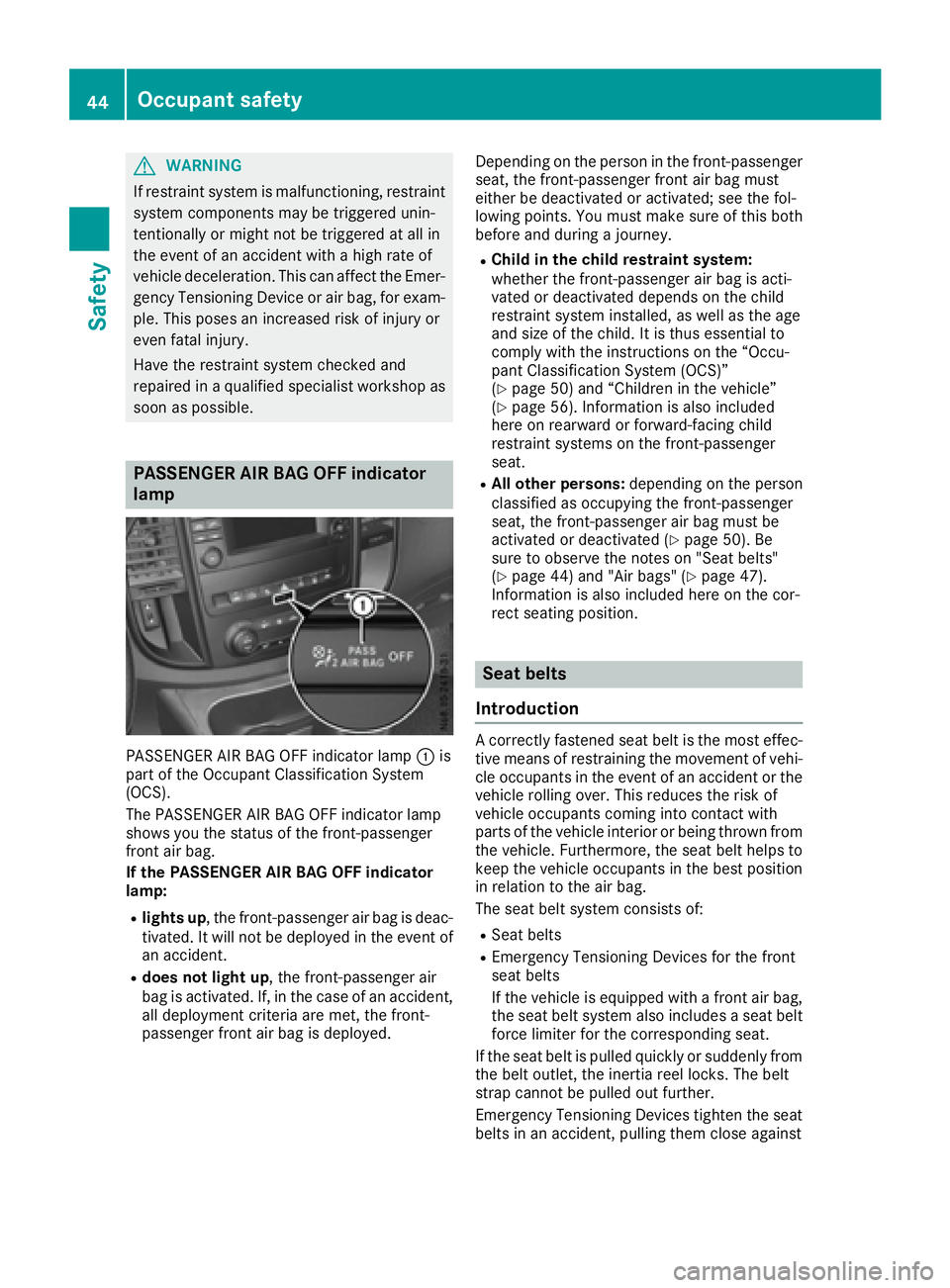
PASSENGER AI RBAG OFF indicator
lamp
PASSENGER AIR BAG OFF indicator lamp :is
part of the Occupant Classification System
(OCS).
The PASSENGER AIR BAG OFF indicator lamp
showsy ou the status of the front-passenger
front air bag.
If the PASSENGER AI RBAG OFF indicator
lamp:
Rlights up,t he front-passenge rair bag is deac-
tivated. It wil lnot be deploye dinthe event of
an accident.
Rdoes not light up,t he front-passengerair
bag is activated. If, in the case of an accident,
all deployment criteria are met, the front-
passenger front air bag is deployed. Depending on the personint
he front-passenger
seat, the front-passenge rfront air bag must
either be deactivated or activated; see the fol-
lowing points. You must make sure of this both
before and during ajourney.
RChil dint he chil drestraint system:
whethe rthe front-passenge rair bag is acti-
vated or deactivated depends on the child
restraint system installed, as wel lasthe age
and size of the child .Itisthus essentialt o
comply with the instructions on the “Occu-
pant Classification System (OCS)”
(
Ypag e50) and “Childre ninthe vehicle”
(Ypag e56). Information is als oincluded
here on rearward or forward-facing child
restraint systems on the front-passenger
seat.
RAll other persons: depending on the person
classifie dasoccupying the front-passenger
seat, the front-passenge rair bag must be
activated or deactivated (
Ypag e50). Be
sure to observe the notes on "Sea tbelts"
(
Ypag e44) and "Air bags" (Ypag e47).
Information is als oincluded here on the cor-
rect seating position.
Seat belts
Introduction
Ac orrectly fastened seat beltist he most effec-
tive means of restraining the movement of vehi- cle occupants in the event of an accident or the
vehicler olling over. This reduces the risk of
vehicleo ccupants coming into contact with
parts of the vehiclei nterior or being thrown from
the vehicle. Furthermore ,the seat belth elpsto
keep the vehicleo ccupants in the best position
in relation to the air bag.
The seat belts ystem consists of:
RSeat belts
REmergency Tensioning Devices for the front
seat belts
If the vehicleise quipped withafront air bag,
the seat belts ystem alsoincludes aseat belt
force limiter for the corresponding seat.
If the seat beltisp ulled quickly or suddenly from
the belto utlet, the inertia reel locks. The belt
strap cannot be pulled out further.
Emergency Tensioning Devices tighten the seat belts in an accident, pulling them close against
44Occupant safety
Safety