park assist MERCEDES-BENZ METRIS 2020 MY20 Operator’s Manual
[x] Cancel search | Manufacturer: MERCEDES-BENZ, Model Year: 2020, Model line: METRIS, Model: MERCEDES-BENZ METRIS 2020Pages: 320, PDF Size: 26.38 MB
Page 39 of 320
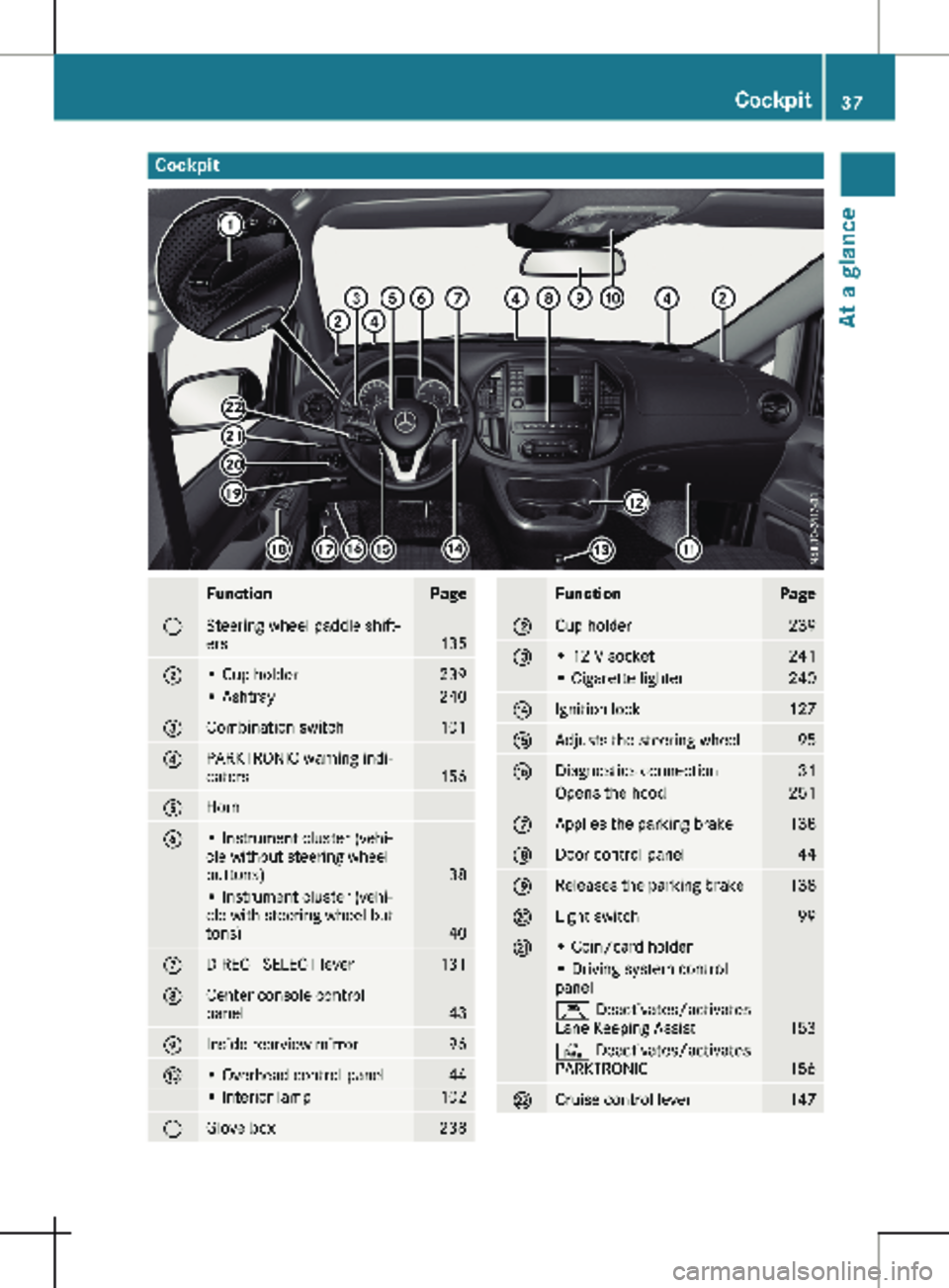
Cockpit
Function Page
:
Steering wheel paddle shift-
ers
135
;
• Cup holder 239
• Ashtray 240
=
Combination switch 101
?
PARKTRONIC warning indi-
cators
156
A
Horn
B
• Instrument cluster (vehi-
cle without steering wheel
buttons)
38
• Instrument cluster (vehi-
cle with steering wheel but-
tons)
40
C
DIRECT SELECT lever 131
D
Center console control
panel
43
E
Inside rearview mirror 96
F
• Overhead control panel 44
• Interior lamp 102
G
Glove box 238 Function Page
H
Cup holder 239
I
• 12 V socket 241
• Cigarette lighter 240
J
Ignition lock 127
K
Adjusts the steering wheel 95
L
Diagnostics connection 31
Opens the hood 251
M
Applies the parking brake 138
N
Door control panel 44
O
Releases the parking brake 138
P
Light switch 99
Q
• Coin/card holder
• Driving system control
panel
Ç Deactivates/activates
Lane Keeping Assist
153
c Deactivates/activates
PARKTRONIC
156
R
Cruise control lever 147Cockpit
37At a glance
Page 41 of 320
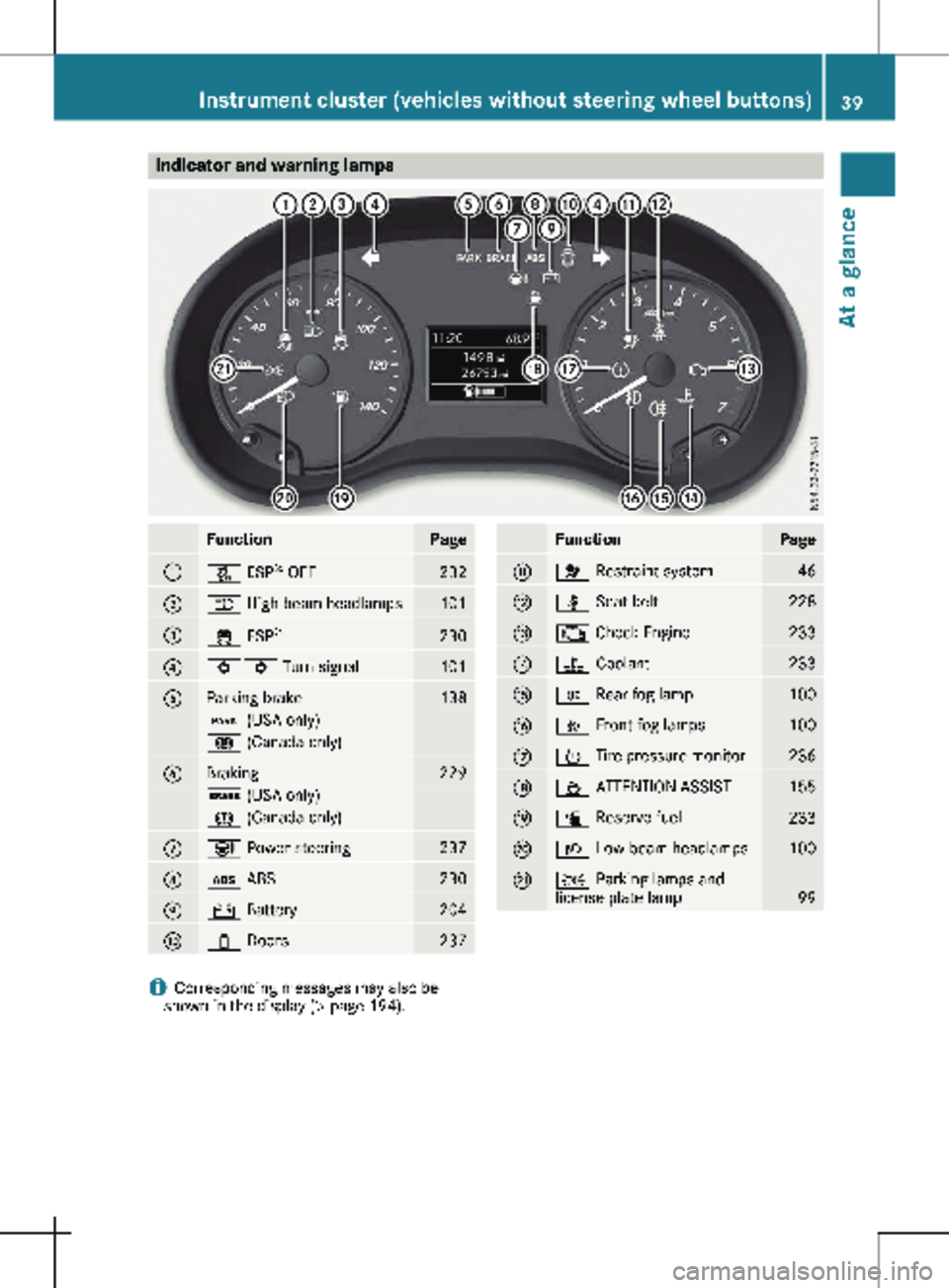
Indicator and warning lamps
Function Page
:
å ESP
®
OFF 232
;
K High-beam headlamps
101
=
÷ ESP
® 230
?
#! Turn signal
101
A
Parking brake 138
F (USA only)
! (Canada only)
B
Braking 229
$ (USA only)
J (Canada only)
C
Ð Power steering
237
D
ò ABS
230
E
# Battery
204
F
1 Doors
237 Function Page
G
6 Restraint system
46
H
ü Seat belt
228
I
; Check Engine
233
J
? Coolant
233
K
R Rear fog lamp
100
L
O Front fog lamps
100
M
h Tire pressure monitor
236
N
À ATTENTION ASSIST
155
O
æ Reserve fuel
233
P
L Low-beam headlamps
100
Q
T Parking lamps and
license plate lamp
99
i
Corresponding messages may also be
shown in the display (Y page 194).Instrument cluster (vehicles without steering wheel buttons)
39
At a glance
Page 108 of 320
R
Have lamps with LED bulbs repaired at a
qualified specialist workshop only.
R Have the bulbs of the following lamps
replaced at a qualified specialist workshop
only:
- Additional brake lamps
- The license plate lighting
- Front fog lamp
- Side marker lamp
Please also observe the notes on the inte-
rior lights
(Y page 103).
If you require assistance changing bulbs, con-
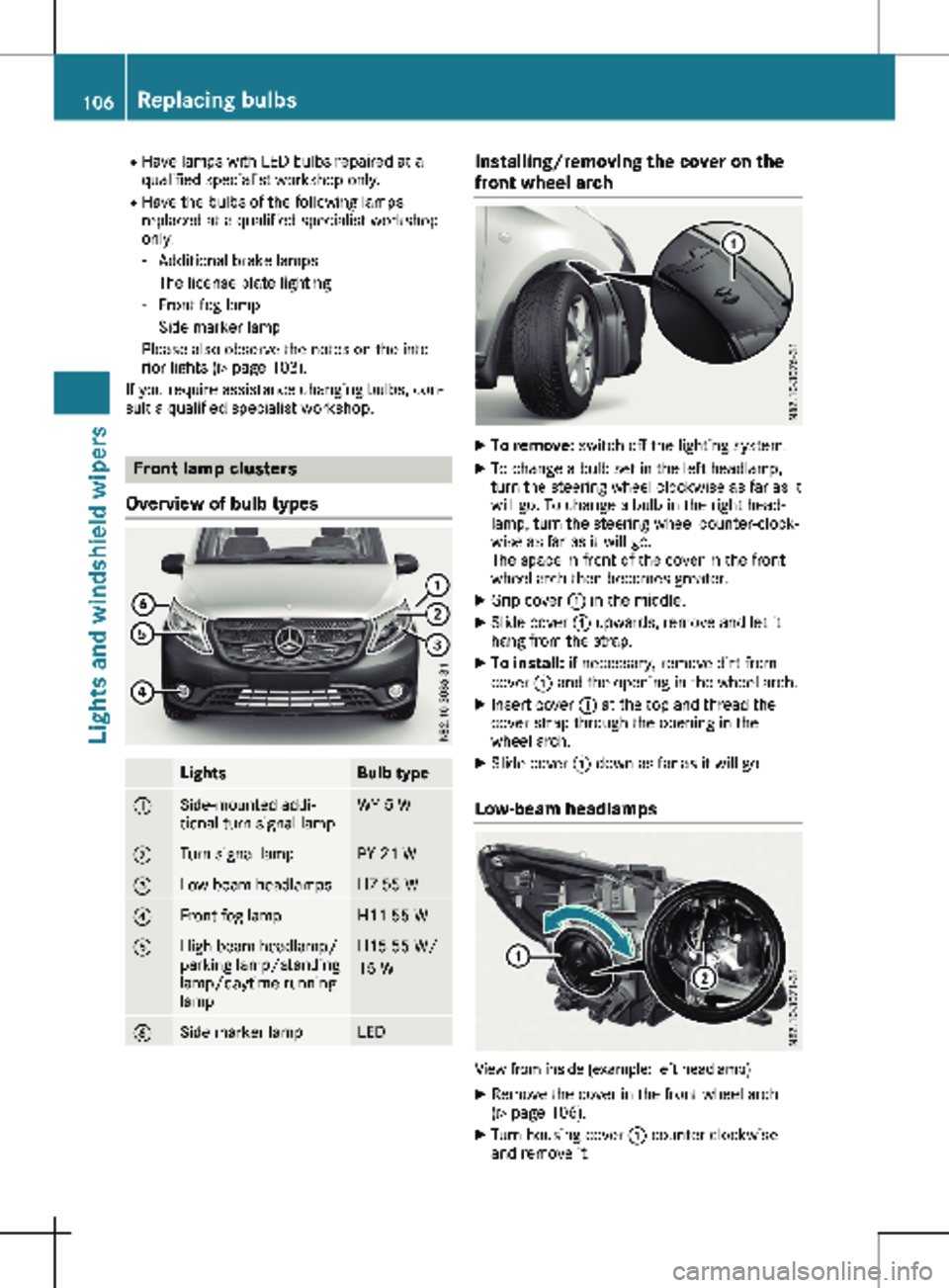
sult a qualified specialist workshop. Front lamp clusters
Overview of bulb types Lights Bulb type
:
Side-mounted addi-
tional turn signal lamp WY 5 W
;
Turn signal lamp PY 21 W
=
Low-beam headlamps H7 55 W
?
Front fog lamp H11 55 W
A
High-beam headlamp/
parking lamp/standing
lamp/daytime running
lamp H15 55 W/
15 W
B
Side marker lamp LED Installing/removing the cover on the
front wheel arch
X
To remove: switch off the lighting system.
X To change a bulb set in the left headlamp,
turn the steering wheel clockwise as far as it
will go. To change a bulb in the right head-
lamp, turn the steering wheel counter-clock-
wise as far as it will go.
The space in front of the cover in the front
wheel arch then becomes greater.
X Grip cover : in the middle.
X Slide cover : upwards, remove and let it
hang from the strap.
X To install: if necessary, remove dirt from
cover : and the opening in the wheel arch.
X Insert cover : at the top and thread the
cover strap through the opening in the
wheel arch.
X Slide cover : down as far as it will go.
Low-beam headlamps View from inside (example: left headlamp)
X Remove the cover in the front wheel arch
(Y page
106).
X Turn housing cover : counter-clockwise
and remove it. 106
Replacing bulbs
Lights and windshield wipers
Page 129 of 320
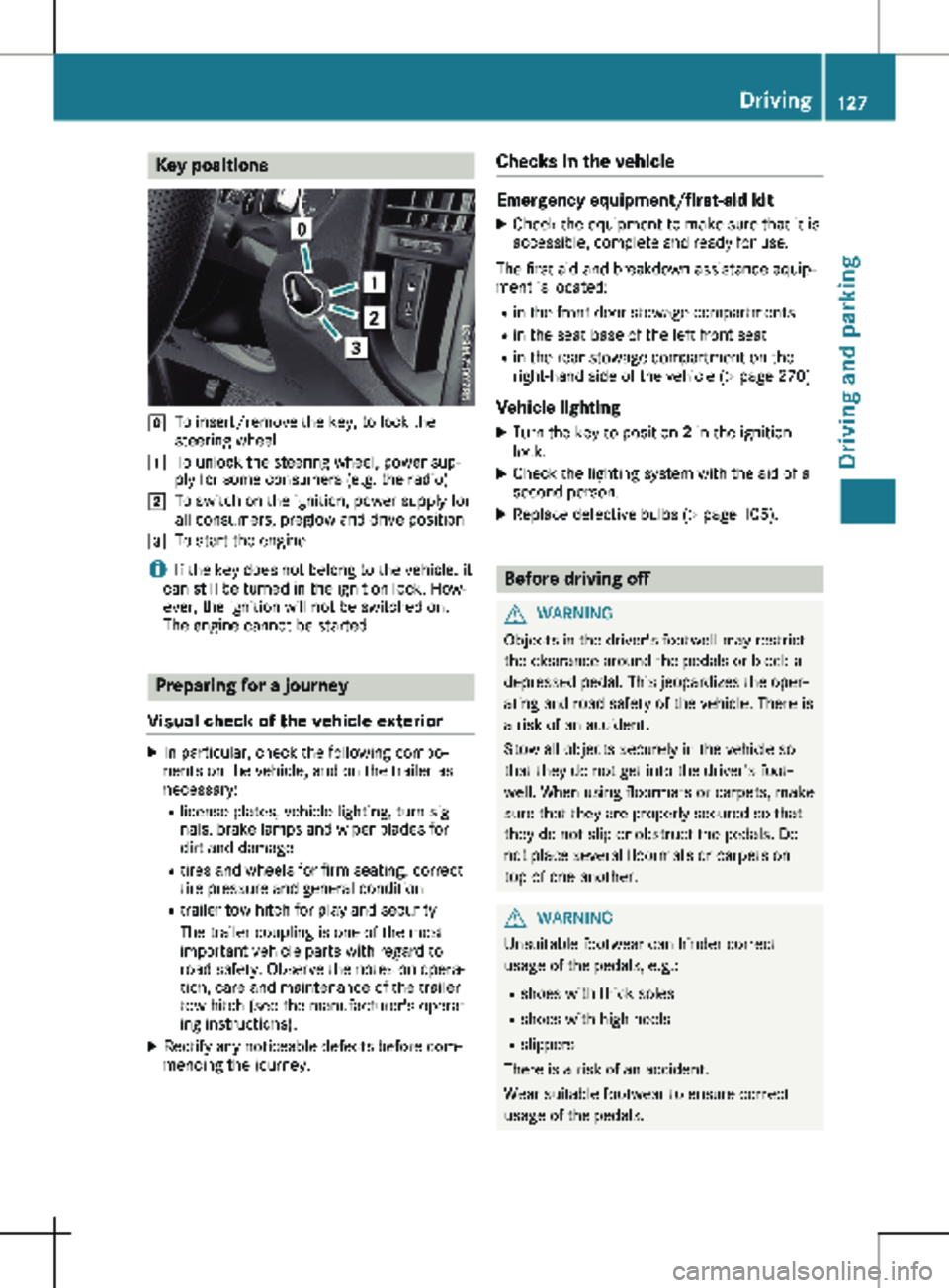
Key positions
g
To insert/remove the key, to lock the
steering wheel
1 To unlock the steering wheel, power sup-
ply for some consumers (e.g. the radio)
2 To switch on the ignition, power supply for
all consumers, preglow and drive position
3 To start the engine
i If the key does not belong to the vehicle, it
can still be turned in the ignition lock. How-
ever, the ignition will not be switched on.
The engine cannot be started. Preparing for a journey
Visual check of the vehicle exterior X
In particular, check the following compo-
nents on the vehicle, and on the trailer as
necessary:
R
license plates, vehicle lighting, turn sig-
nals, brake lamps and wiper blades for
dirt and damage
R tires and wheels for firm seating, correct
tire pressure and general condition
R trailer tow hitch for play and security
The trailer coupling is one of the most
important vehicle parts with regard to
road safety. Observe the notes on opera-
tion, care and maintenance of the trailer
tow hitch (see the manufacturer's operat-
ing instructions).
X Rectify any noticeable defects before com-
mencing the journey. Checks in the vehicle Emergency equipment/first-aid kit
X Check the equipment to make sure that it is
accessible, complete and ready for use.
The first aid and breakdown assistance equip-
ment is located:
R in the front door stowage compartments
R in the seat base of the left front seat
R in the rear stowage compartment on the
right-hand side of the vehicle
(Y page 270)
Vehicle lighting
X Turn the key to position 2 in the ignition
lock.
X Check the lighting system with the aid of a
second person.
X Replace defective bulbs (Y page
105). Before driving off
G
WARNING
Objects in the driver's footwell may restrict
the clearance around the pedals or block a
depressed pedal. This jeopardizes the oper-
ating and road safety of the vehicle. There is
a risk of an accident.
Stow all objects securely in the vehicle so
that they do not get into the driver's foot-
well. When using floormats or carpets, make
sure that they are properly secured so that
they do not slip or obstruct the pedals. Do
not place several floormats or carpets on
top of one another. G
WARNING
Unsuitable footwear can hinder correct
usage of the pedals, e.g.:
R shoes with thick soles
R shoes with high heels
R slippers
There is a risk of an accident.
Wear suitable footwear to ensure correct
usage of the pedals. Driving
127
Driving and parking Z
Page 130 of 320
X
Stow luggage items securely. Secure the
load as per the loading guidelines
(Y page
242).
X Make sure that the floormats and carpets
are properly secured so that they cannot
slip and obstruct the pedals.
X Close all doors. Starting the engine
Important safety notes G
DANGER
Combustion engines emit poisonous
exhaust gases such as carbon monoxide.
Inhaling these exhaust gases is hazardous to
health and can result in poisoning. There is a
risk of fatal injury. Therefore, never leave the
engine running an enclosed space without
adequate ventilation.
! Do not depress the accelerator when start-
ing the engine.
X Before starting the engine, ensure the fol-
lowing:
R all the doors are closed.
R all the vehicle occupants are wearing their
seat belts correctly.
R the parking brake is applied.
i If you depress the brake pedal before
starting the engine, the pedal travel may be
shorter and pedal resistance higher.
If you depress the brake pedal again after
starting the engine, pedal travel and resist-
ance will be back to normal again.
Automatic transmission X
Shift the transmission to position j
(Y page
131).
The transmission position indicator in the
display shows j.
You can also start the engine in neutral posi-
tion i. Starting the engine X
Turn the key to position 3 in the ignition
lock
(Y page 127) and release it as soon as
the engine is running. Driving off
Automatic transmission G
WARNING
The vehicle can suddenly accelerate if the
engine speed is above the engine idling
speed and you then select transmission
position h or k. There is a risk of an acci-
dent.
When engaging transmission position h or
k at a standstill, always keep the brake
pedal depressed firmly and do not depress
the accelerator pedal at the same time.
! Only shift into reverse gear when the vehi-
cle is stationary k. Otherwise, you could
damage the transmission.
X Depress the brake pedal and keep it
depressed.
X Shift the transmission to position h or k.
On vehicles with a reverse warning feature,
when reverse gear k is engaged a warning
tone sounds to alert other road users
(Y page
129).
X Release the parking brake (Y page
138).
The F (only USA) or J (only Canada)
indicator lamp in the instrument cluster
goes out.
X Release the brake pedal.
Hill start assist automatically maintains the
brake pressure for about another two sec-
onds after the brake pedal is released. This
makes it possible to pull away without the
vehicle immediately rolling back
(Y page
129).
X Carefully depress the accelerator pedal.
i It is only possible to shift the transmission
from position j to the desired transmis-
sion position if you depress the brake pedal.
If the brake pedal is not depressed, the
DIRECT SELECT lever can still be moved but
the j position remains engaged. 128
Driving
Driving and parking
Page 131 of 320
i
The vehicle locks centrally once you have
pulled away. The locking knobs in the doors
drop down. You can open the doors from
the inside at any time.
You can also deactivate the automatic lock-
ing feature
(Y page 76).Hill start assist
Hill start assist helps you when pulling away
forwards or in reverse on an uphill gradient.
Hill start assist automatically maintains the
brake pressure for about another second, after
you have taken your foot off the brake pedal.
This gives you enough time to move your foot
from the brake pedal to the accelerator pedal
and depress it before the vehicle begins to
roll. G
WARNING
After a short time, hill start assist will no lon-
ger brake your vehicle and it could roll away.
There is a risk of an accident and injury.
Therefore, quickly move your foot from the
brake pedal to the accelerator pedal. Never
leave the vehicle when it is held by hill start
assist.
Hill start assist is not active if:
R you are pulling away on a level road or a
downhill gradient
R the transmission is in position N
R the parking brake is applied
R ESP ®
is malfunctioning Backing up warning device
G
WARNING
Other road users may ignore or fail to hear
the warning tone of the reverse warning fea-
ture. There is a risk of injury if you fail to
ensure that the area in which you are
maneuvering is clear.
Make sure that there are no persons or
objects in the area in which you are maneu-
vering. It may be necessary to enlist the
help of a second person when maneuvering.
The reverse warning feature is a system
designed to assist you in ensuring the safety
of other road users.
A warning signal sounds to alert other road
users when reverse gear is engaged. The vol-
ume of the warning tone can be reduced for
night-time driving.
X To reduce the volume of the warning
tone: engage reverse gear twice in quick
succession.
The warning tone is now quieter.
i The warning tone sounds at a normal vol-
ume by default. The volume of the warning
tone has to be reduced each time you
engage reverse gear if necessary. Driving
129
Driving and parking Z
Page 138 of 320
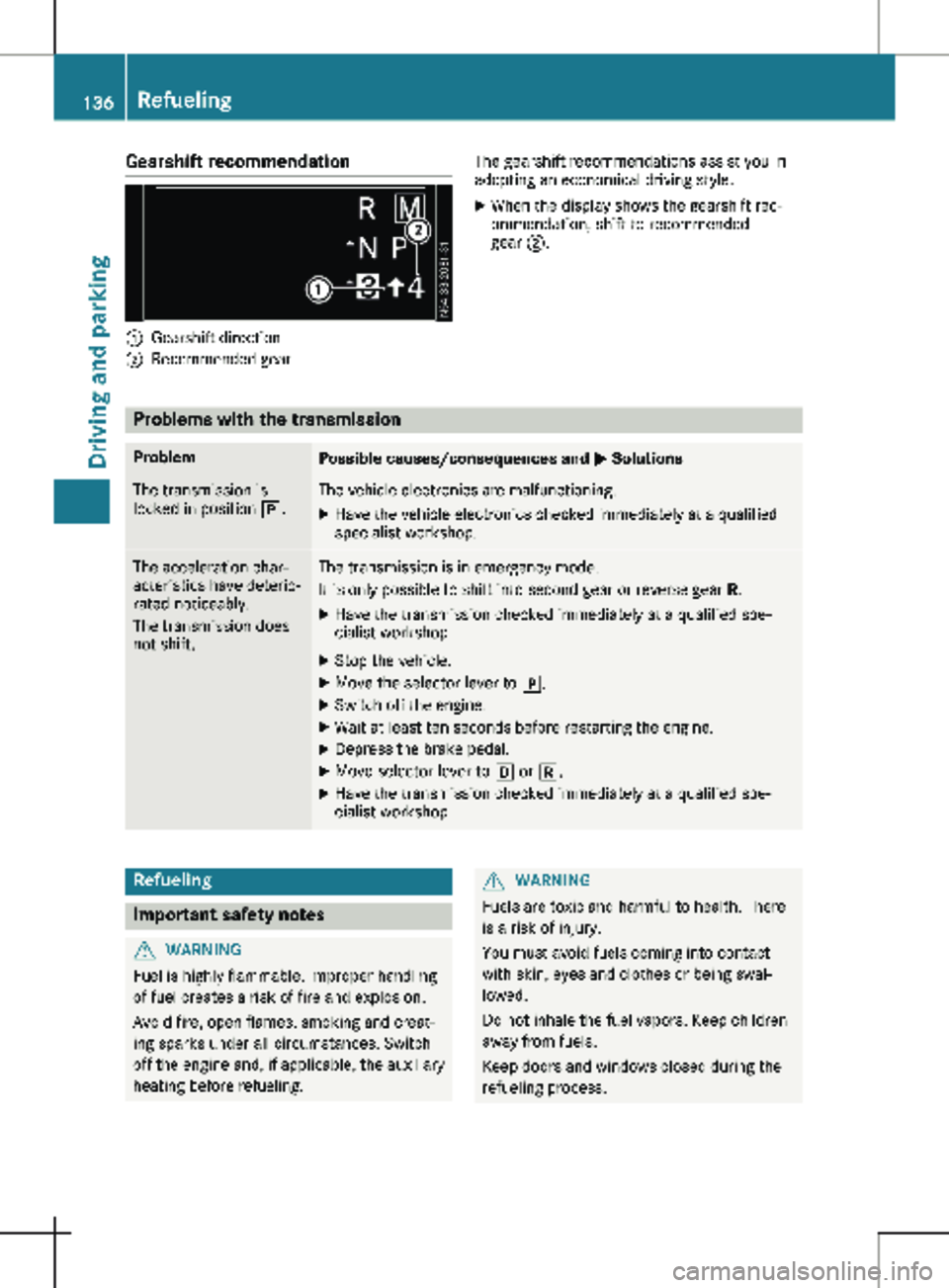
Gearshift recommendation
:
Gearshift direction
; Recommended gear The gearshift recommendations assist you in
adopting an economical driving style.
X When the display shows the gearshift rec-
ommendation, shift to recommended
gear ;. Problems with the transmission
Problem
Possible causes/consequences and
M SolutionsThe transmission is
locked in position j. The vehicle electronics are malfunctioning.
X Have the vehicle electronics checked immediately at a qualified
specialist workshop. The acceleration char-
acteristics have deterio-
rated noticeably.
The transmission does
not shift. The transmission is in emergency mode.
It is only possible to shift into second gear or reverse gear
R.
X Have the transmission checked immediately at a qualified spe-
cialist workshop.
X Stop the vehicle.
X Move the selector lever to j.
X Switch off the engine.
X Wait at least ten seconds before restarting the engine.
X Depress the brake pedal.
X Move selector lever to h or k.
X Have the transmission checked immediately at a qualified spe-
cialist workshop. Refueling
Important safety notes
G
WARNING
Fuel is highly flammable. Improper handling
of fuel creates a risk of fire and explosion.
Avoid fire, open flames, smoking and creat-
ing sparks under all circumstances. Switch
off the engine and, if applicable, the auxiliary
heating before refueling. G
WARNING
Fuels are toxic and harmful to health. There
is a risk of injury.
You must avoid fuels coming into contact
with skin, eyes and clothes or being swal-
lowed.
Do not inhale the fuel vapors. Keep children
away from fuels.
Keep doors and windows closed during the
refueling process. 136
RefuelingDriving and parking
Page 151 of 320
R
you shift to neutral i while the vehicle is in
motion
R ESP ®
intervenes or you deactivate ESP ®
R there is a malfunction in the ESP ®
or ABS
system
If cruise control automatically deactivates, a
warning tone sounds and the Cruise Con‐
trol Off message appears briefly in the dis-
play.
The V symbol and the display of the stored
speed in the header or in the status area of
the display are then not shown.
Problems with cruise control The speed cannot be set when cruise control
is activated.
The display is showing a message of high pri-
ority and cannot therefore show a change in
speed.
X Proceed as instructed by the message in the
display. COLLISION PREVENTION ASSIST
General notes COLLISION PREVENTION ASSIST helps you:
R to minimize the risk of a front-end collision
with a detected obstacle in the path of your
vehicle
R to reduce the consequences of a collision
with the vehicle in front
The system uses radar sensors to detect vehi-
cles in front.
COLLISION PREVENTION ASSIST consists of
the distance warning function and Adaptive
Brake Assist.
If COLLISION PREVENTION ASSIST is malfunc-
tioning, the display shows a corresponding
message
(Y page 222). Distance warning function Important safety notes
G
WARNING
The distance warning function does not
react:
R to people or animals
R to oncoming vehicles
R to crossing traffic
R when cornering
The distance warning function may not give
warnings in all critical situations. There is a
risk of an accident.
Always pay careful attention to the traffic
situation and be ready to brake.
Always adapt your speed to suit the prevail-
ing road and traffic conditions. G
WARNING
The distance warning function cannot
always clearly identify objects and complex
traffic situations.
In such cases, the distance warning function
may:
R give an unnecessary warning
R not give a warning
There is a risk of an accident.
Always pay careful attention to the traffic
situation and do not rely solely on the dis-
tance warning function.
In particular, the detection of obstacles can be
impaired in the case of: R dirt on the sensors or anything else covering
the sensors
R snow or heavy rain
R interference from other radar sources
R strong radar reflections, for example, in
parking garages
R a narrow vehicle traveling in front, e.g. a
motorbike
R a vehicle traveling in front on a different line
Due to the nature of the system, particularly
complicated but non-critical driving conditions Driving systems
149
Driving and parking Z
Page 152 of 320

may also cause the system to display a warn-
ing.
If you fail to adapt your driving style, the dis-
tance warning function can neither reduce the
risk of an accident nor override the laws of
physics. The distance warning function cannot
take into account road, weather or traffic con-
ditions. The distance warning function is only
an aid. You are responsible for the distance to
the vehicle in front, for vehicle speed, braking
in good time and for staying in your lane.
Following damage to the front end of the vehi-
cle, have the configuration and operation of
the radar sensor checked at a qualified spe-
cialist workshop. This also applies to collisions
at slow speeds where there is no visible dam-
age to the front of the vehicle.
If you change wheel size, make sure they cor-
respond to the correct wheel size category
(Y page
278). If the category is changed with-
out recoding the control units in the vehicle,
the functioning of the distance warning feature
may be impaired. COLLISION PREVENTION
ASSIST may then detect a malfunction and
switch itself off.
Operation
X To activate/deactivate: activate or deacti-
vate the distance warning function in the on-
board computer
(Y page 190).
If the distance warning function of COLLI-
SION PREVENTION ASSIST is activated, the
display shows the Ä symbol:
R in the header
R in the Status Overview of the Assist.
menu (Y page 189)
At speeds up to approx 20 mph (30 km/h)
the display in vehicles with Active Parking
Assist first shows the í status indicator.
Only from a speed of about 20 mph
(30 km/h) does the display show the
Äsymbol instead of the í status indica-
tor.
The distance warning function can help you to
minimize the risk of a front-end collision with a
vehicle ahead or reduce the effects of such a
collision. With the help of the radar sensor sys-
tem, the distance warning function can detect
obstacles that are in the path of your vehicle
for an extended period of time. If the distance
warning function detects that there is a risk of
a collision, you will be warned visually and,
where necessary, acoustically. Without your intervention, the distance warning function
cannot prevent a collision.
The distance warning function issues a warn-
ing at speeds:
R from about
4 mph (7 km/h) if you approach
a vehicle traveling in front or a stationary
vehicle too quickly. The · warning lamp
in the instrument cluster then lights up and
an intermittent warning tone also sounds.
At speeds up to about 45 mph (70 km/h),
the system also detects stationary obsta-
cles, for example stopped or parked vehi-
cles.
X Brake immediately until the distance from
the obstacle increases and the risk of a
front-end collision passes.
or X Take evasive action, provided it is safe to do
so.
Adaptive Brake Assist General notes
Adaptive Brake Assist evaluates the traffic sit-
uation with the help of the radar sensor sys-
tem and can detect obstacles which have been
in your vehicle's path for an extended period
of time. From speeds above 4 mph (7 km/h
),
Adaptive Brake Assist aids you in braking dur-
ing hazardous situations.
Up to a speed of approximately 125 mph
(200 km/h), Adaptive Brake Assist is capable
of reacting to moving obstacles that have
already been detected as such at least once
over the period of observation.
Important safety notes G
WARNING
Adaptive Brake Assist does not react:
R to people or animals
R to oncoming vehicles
R to crossing traffic
R to stationary obstacles
R when cornering
As a result, the Adaptive Brake Assist may
not intervene in all critical conditions. There
is a risk of an accident. 150
Driving systems
Driving and parking
Page 153 of 320

Always pay careful attention to the traffic
situation and be ready to brake. G
WARNING
Adaptive Brake Assist cannot always clearly
identify objects and complex traffic situa-
tions.
In such cases, Adaptive Brake Assist can:
R intervene unnecessarily
R not intervene
There is a risk of an accident.
Always pay careful attention to the traffic
situation and be ready to brake. Terminate
the intervention in a non-critical driving sit-
uation.
In particular, the detection of obstacles can be
impaired in the case of:
R dirt on the sensors or anything else covering
the sensors
R snow or heavy rain
R interference from other radar sources
R strong radar reflections, for example, in
parking garages
R a narrow vehicle traveling in front, e.g. a
motorbike
R a vehicle traveling in front on a different line
Due to the nature of the system, particularly
complicated but non-critical driving conditions
may also cause Adaptive Brake Assist to inter-
vene.
If you fail to adapt your driving style, Adaptive
Brake Assist can neither reduce the risk of
accident nor override the laws of physics.
Adaptive Brake Assist cannot take into
account road, weather or traffic conditions.
Adaptive Brake Assist is only an aid. You are
responsible for the distance to the vehicle in
front, for vehicle speed, braking in good time
and for staying in your lane.
Following damage to the front end of the vehi-
cle, have the configuration and operation of
the radar sensor checked at a qualified spe-
cialist workshop. This also applies to collisions
at slow speeds where there is no visible dam-
age to the front of the vehicle.
If you change wheel size, make sure they cor-
respond to the correct wheel size category
(Y page
278). If the category is changed with- out recoding the control units in the vehicle,
the functioning of Adaptive Brake Assist may
be impaired. COLLISION PREVENTION ASSIST
may then detect a malfunction and switch
itself off.
If Adaptive Brake Assist is not available due to
a malfunction in the radar sensor system, the
brake system remains available with full brake
boosting effect and BAS.
Operation With the help of the radar sensor system,
Adaptive Brake Assist can detect obstacles
that have been in the path of your vehicle for
an extended period of time. Adaptive Brake
Assist does not react to stationary obstacles.
If Adaptive Brake Assist detects a risk of colli-
sion with a vehicle traveling in front or with a
stationary obstacle, the system calculates the
braking force necessary to avoid this collision.
If you apply the brakes forcefully, Adaptive
Brake Assist will automatically increase the
braking force to a level suitable for the traffic
conditions.
X Brake until the distance to the obstacle
increases and the risk of a collision passes.
ABS prevents the wheels from locking.
The brakes function as usual again if:
R you release the brake pedal
R there is no longer any danger of a collision
R no obstacle is detected in front of your vehi-
cle
Braking assistance is then ended. Blind Spot Assist
General notes Blind Spot Assist monitors the areas on either
side of the vehicle that are not visible to the
driver with two lateral, rear-facing radar sen-
sors in the bumper. It supports you from
speeds of approximately
20 mph (30 km/h). A
warning display in the exterior mirrors draws
your attention to vehicles detected in the
monitored area. If you then switch on the cor-
responding turn signal to change lane, you will
also receive an optical and audible collision
warning. Driving systems
151
Driving and parking Z