door lock MERCEDES-BENZ METRIS 2020 MY20 Operator’s Manual
[x] Cancel search | Manufacturer: MERCEDES-BENZ, Model Year: 2020, Model line: METRIS, Model: MERCEDES-BENZ METRIS 2020Pages: 320, PDF Size: 26.38 MB
Page 131 of 320
i
The vehicle locks centrally once you have
pulled away. The locking knobs in the doors
drop down. You can open the doors from
the inside at any time.
You can also deactivate the automatic lock-
ing feature
(Y page 76).Hill start assist
Hill start assist helps you when pulling away
forwards or in reverse on an uphill gradient.
Hill start assist automatically maintains the
brake pressure for about another second, after
you have taken your foot off the brake pedal.
This gives you enough time to move your foot
from the brake pedal to the accelerator pedal
and depress it before the vehicle begins to
roll. G
WARNING
After a short time, hill start assist will no lon-
ger brake your vehicle and it could roll away.
There is a risk of an accident and injury.
Therefore, quickly move your foot from the
brake pedal to the accelerator pedal. Never
leave the vehicle when it is held by hill start
assist.
Hill start assist is not active if:
R you are pulling away on a level road or a
downhill gradient
R the transmission is in position N
R the parking brake is applied
R ESP ®
is malfunctioning Backing up warning device
G
WARNING
Other road users may ignore or fail to hear
the warning tone of the reverse warning fea-
ture. There is a risk of injury if you fail to
ensure that the area in which you are
maneuvering is clear.
Make sure that there are no persons or
objects in the area in which you are maneu-
vering. It may be necessary to enlist the
help of a second person when maneuvering.
The reverse warning feature is a system
designed to assist you in ensuring the safety
of other road users.
A warning signal sounds to alert other road
users when reverse gear is engaged. The vol-
ume of the warning tone can be reduced for
night-time driving.
X To reduce the volume of the warning
tone: engage reverse gear twice in quick
succession.
The warning tone is now quieter.
i The warning tone sounds at a normal vol-
ume by default. The volume of the warning
tone has to be reduced each time you
engage reverse gear if necessary. Driving
129
Driving and parking Z
Page 133 of 320
G
WARNING
The automatic transmission switches to neu-
tral position N when you switch off the
engine. The vehicle may roll away. There is a
risk of an accident.
Before switching off the engine, always
switch to parking position P. Prevent the
parked vehicle from rolling away by applying
the parking brake.
! When the engine is switched off, rolling in
idle i can damage the power transmission
and result in transmission damage.
Always observe the instructions and safety
notes under "Tow starting and towing away"
( Y page
274).
Bear in mind that power transmission between
the engine and the transmission is interrupted
when the engine is switched off. For this rea-
son, shift the automatic transmission to trans-
mission position j before switching off the
engine when the vehicle is stationary. Apply
the parking brake to prevent the vehicle from
rolling away. DIRECT SELECT lever
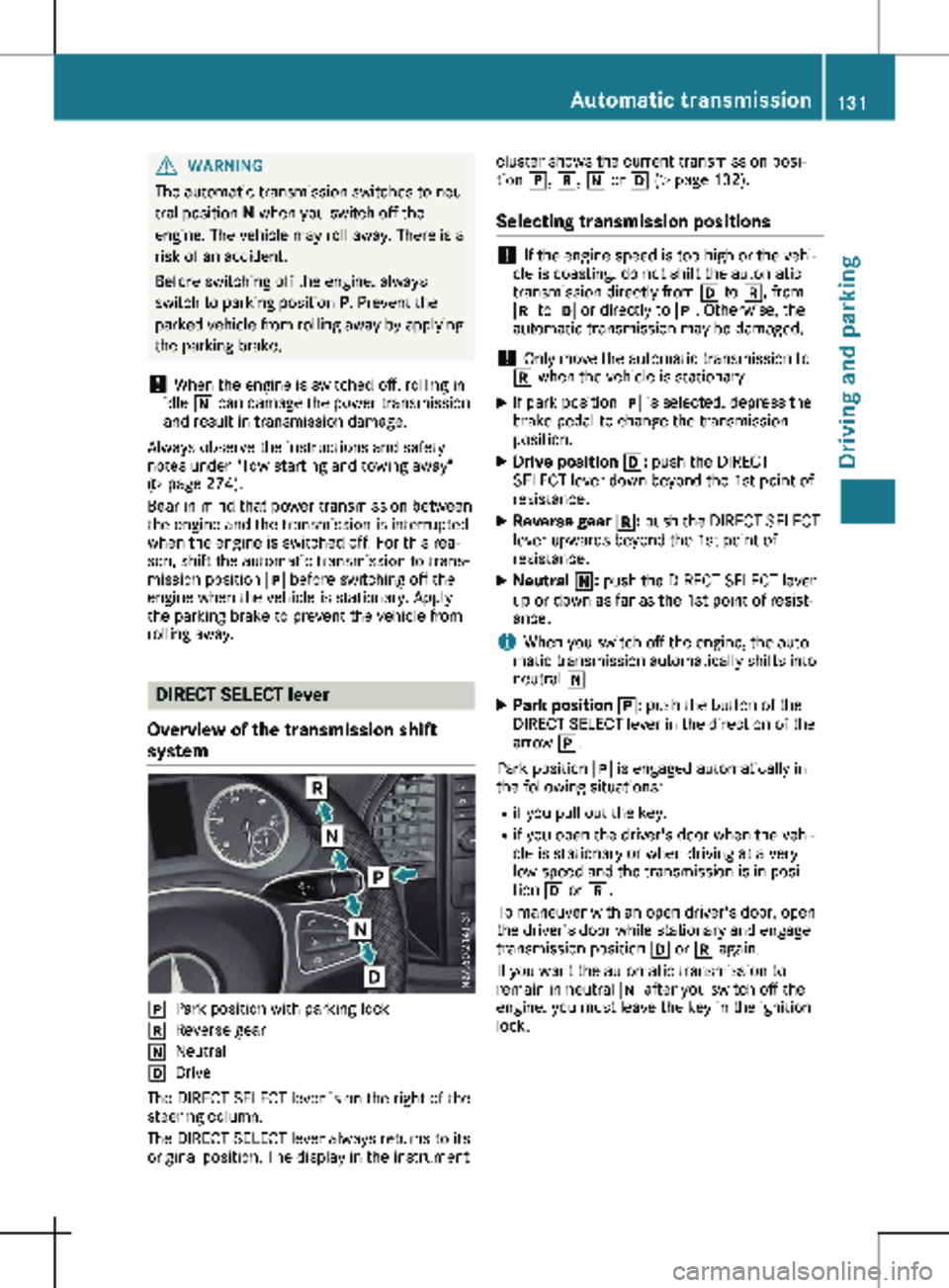
Overview of the transmission shift
system j
Park position with parking lock
k Reverse gear
i Neutral
h Drive
The DIRECT SELECT lever is on the right of the
steering column.
The DIRECT SELECT lever always returns to its
original position. The display in the instrument cluster shows the current transmission posi-
tion j, k, i or h (Y page
132).
Selecting transmission positions !
If the engine speed is too high or the vehi-
cle is coasting, do not shift the automatic
transmission directly from h to k, from
k to h or directly to j. Otherwise, the
automatic transmission may be damaged.
! Only move the automatic transmission to
k when the vehicle is stationary.
X If park position j is selected, depress the
brake pedal to change the transmission
position.
X Drive position h: push the DIRECT
SELECT lever down beyond the 1st point of
resistance.
X Reverse gear k: push the DIRECT SELECT
lever upwards beyond the 1st point of
resistance.
X Neutral i: push the DIRECT SELECT lever
up or down as far as the 1st point of resist-
ance.
i When you switch off the engine, the auto-
matic transmission automatically shifts into
neutral i.
X Park position j: push the button of the
DIRECT SELECT lever in the direction of the
arrow j.
Park position j is engaged automatically in
the following situations:
R if you pull out the key.
R if you open the driver's door when the vehi-
cle is stationary or when driving at a very
low speed and the transmission is in posi-
tion h or k.
To maneuver with an open driver's door, open
the driver's door while stationary and engage
transmission position h or k again.
If you want the automatic transmission to
remain in neutral i after you switch off the
engine, you must leave the key in the ignition
lock. Automatic transmission
131
Driving and parking Z
Page 134 of 320
Transmission positions
B Park position
This prevents the vehicle from roll-
ing away when stopped. Only shift
the transmission to
j when the
vehicle is stationary.
The automatic transmission shifts
to j automatically in the following
situations:
R if you pull out the key.
R if you open the driver's door
when the vehicle is stationary or
when driving at a very low speed
and the transmission is in posi-
tion h or k.
The parking lock should not be used
as a brake when parking. Always
apply the parking brake as well
once you have parked the vehicle. C Reverse gear
Only shift the transmission to
k
when the vehicle is stationary. A Neutral
No power is transmitted from the
engine to the drive wheels. Releas-
ing the brakes will allow you to
move the vehicle freely, e.g. by
pushing or towing.
If ESP
®
is deactivated or faulty: shift
the transmission to position i if
the vehicle is in danger of skidding,
e.g. on icy roads.
When you switch off the engine, the
automatic transmission automati-
cally shifts into neutral i.
! When the engine is switched
off, rolling in idle i can damage
the power transmission and
result in transmission damage. 7 Drive
The automatic transmission
changes gear itself. All forward
gears are available.
You can influence gearshifts with
your choice of drive program. You
can also restrict the shift range. Transmission position and drive pro-
gram display
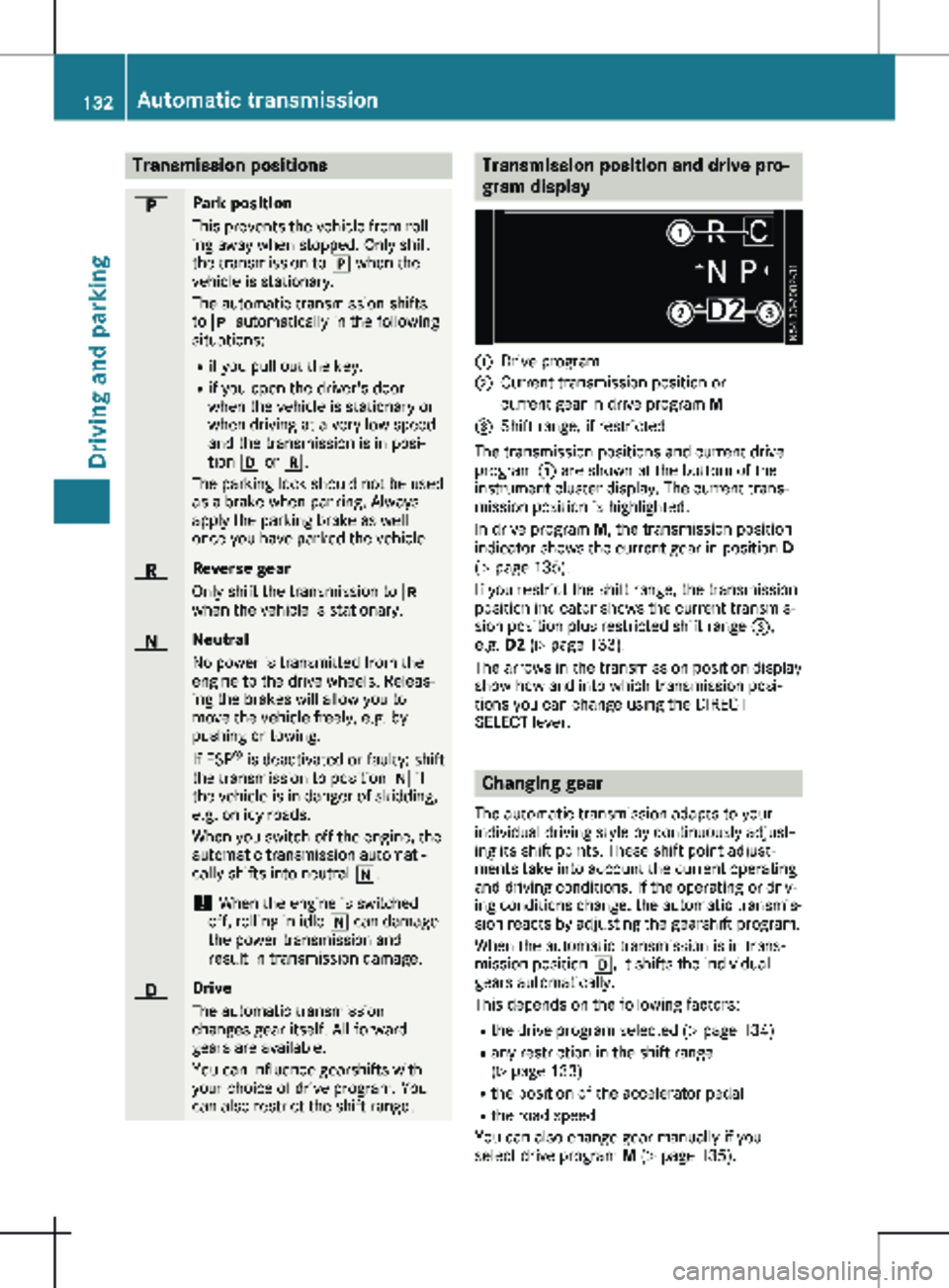
:
Drive program
; Current transmission position or
current gear in drive program M
= Shift range, if restricted
The transmission positions and current drive
program : are shown at the bottom of the
instrument cluster display. The current trans-
mission position is highlighted.
In drive program M, the transmission position
indicator shows the current gear in position D
( Y page
135).
If you restrict the shift range, the transmission
position indicator shows the current transmis-
sion position plus restricted shift range =,
e.g. D2 ( Y page 133).
The arrows in the transmission position display
show how and into which transmission posi-
tions you can change using the DIRECT
SELECT lever. Changing gear
The automatic transmission adapts to your
individual driving style by continuously adjust-
ing its shift points. These shift point adjust-
ments take into account the current operating
and driving conditions. If the operating or driv-
ing conditions change, the automatic transmis-
sion reacts by adjusting the gearshift program.
When the automatic transmission is in trans-
mission position h, it shifts the individual
gears automatically.
This depends on the following factors:
R the drive program selected ( Y page 134)
R any restriction in the shift range
(Y page
133)
R the position of the accelerator pedal
R the road speed
You can also change gear manually if you
select drive program M (Y page 135).132
Automatic transmission
Driving and parking
Page 138 of 320
Gearshift recommendation
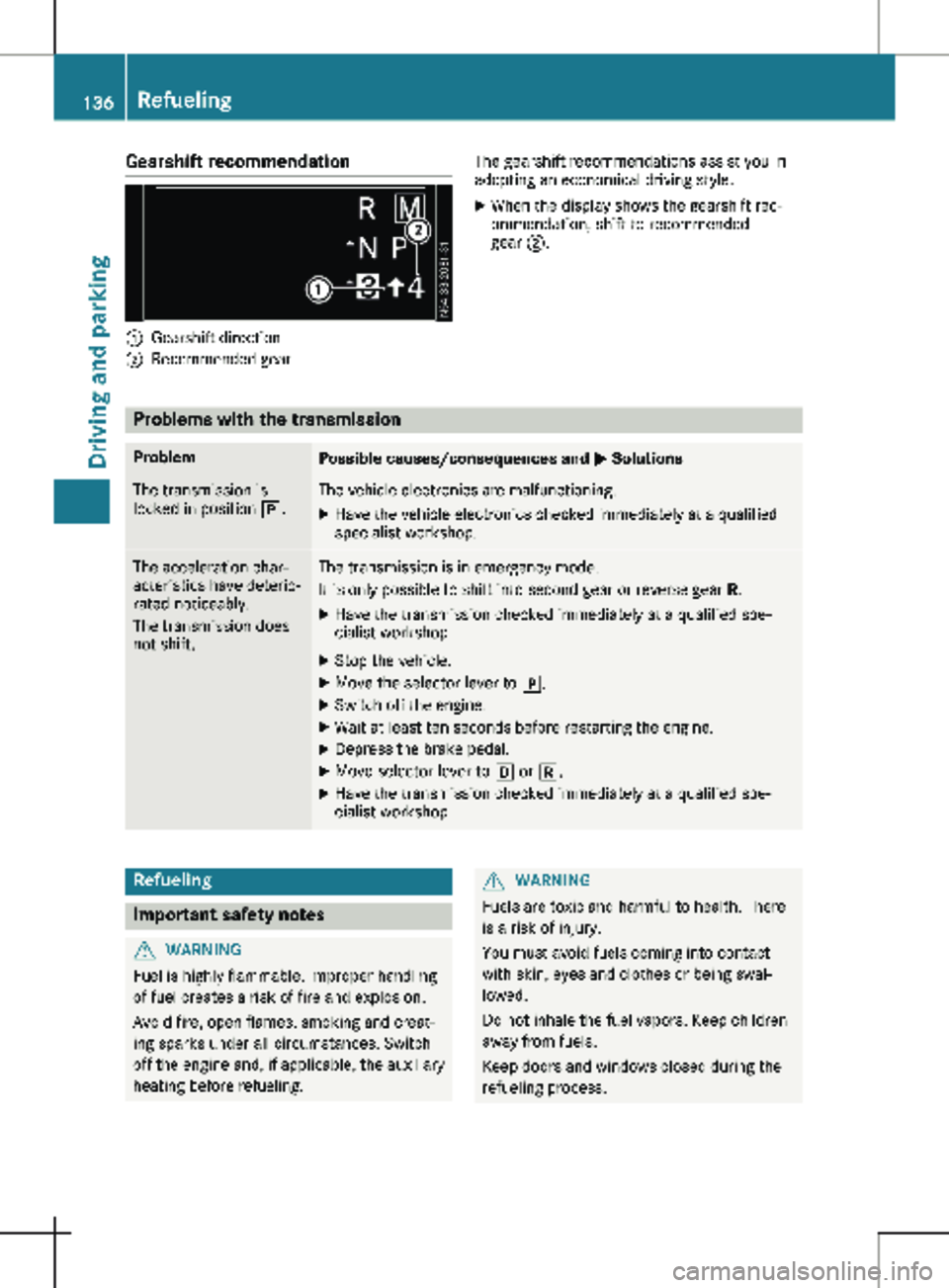
:
Gearshift direction
; Recommended gear The gearshift recommendations assist you in
adopting an economical driving style.
X When the display shows the gearshift rec-
ommendation, shift to recommended
gear ;. Problems with the transmission
Problem
Possible causes/consequences and
M SolutionsThe transmission is
locked in position j. The vehicle electronics are malfunctioning.
X Have the vehicle electronics checked immediately at a qualified
specialist workshop. The acceleration char-
acteristics have deterio-
rated noticeably.
The transmission does
not shift. The transmission is in emergency mode.
It is only possible to shift into second gear or reverse gear
R.
X Have the transmission checked immediately at a qualified spe-
cialist workshop.
X Stop the vehicle.
X Move the selector lever to j.
X Switch off the engine.
X Wait at least ten seconds before restarting the engine.
X Depress the brake pedal.
X Move selector lever to h or k.
X Have the transmission checked immediately at a qualified spe-
cialist workshop. Refueling
Important safety notes
G
WARNING
Fuel is highly flammable. Improper handling
of fuel creates a risk of fire and explosion.
Avoid fire, open flames, smoking and creat-
ing sparks under all circumstances. Switch
off the engine and, if applicable, the auxiliary
heating before refueling. G
WARNING
Fuels are toxic and harmful to health. There
is a risk of injury.
You must avoid fuels coming into contact
with skin, eyes and clothes or being swal-
lowed.
Do not inhale the fuel vapors. Keep children
away from fuels.
Keep doors and windows closed during the
refueling process. 136
RefuelingDriving and parking
Page 139 of 320
If you or others come into contact with fuel,
observe the following points:
R Immediately rinse the fuel off your skin
with soap and water.
R If you get fuel into your eyes, immediately
rinse your eyes throughly with clean
water. Seek medical attention immedi-
ately.
R Seek medical attention immediately if fuel
has been swallowed. Do not induce vomit-
ing.
R Immediately change out of clothing which
has come into contact with fuel. G
WARNING
Electrostatic charging can lead to the crea-
tion of sparks and ignite fuel vapor. There is
a risk of fire and explosion.
Touch the metallic body of the vehicle
before you open the fuel filler cap or handle
the pump nozzle. Any possible electrostatic
charge present will in this way be depleted.
Do not get into the vehicle again during the
refueling process. Otherwise, electrostatic
charge could build up again. H
Environmental note
If fuels are handled improperly, they pose a
danger to persons and the environment. Do
not allow fuels to run into the sewage sys-
tem, the surface waters, the ground water or
into the ground.
! Do not switch on the ignition if you acci-
dentally refuel with the wrong fuel. Other-
wise, the fuel will enter the fuel lines. Notify
a qualified specialist workshop and have the
fuel tank and fuel lines drained completely.
! Overfilling the fuel tank could damage the
fuel system.
! Take care not to spill any fuel on painted
surfaces. You could otherwise damage the
paintwork.
! Use a filter when adding fuel from a fuel
can. The fuel lines and/or the fuel injection system could otherwise be blocked by parti-
cles from the fuel can.
You will find further information about fuel and
fuel grades under "Service products and
capacities"
(Y page 306). Refueling procedure
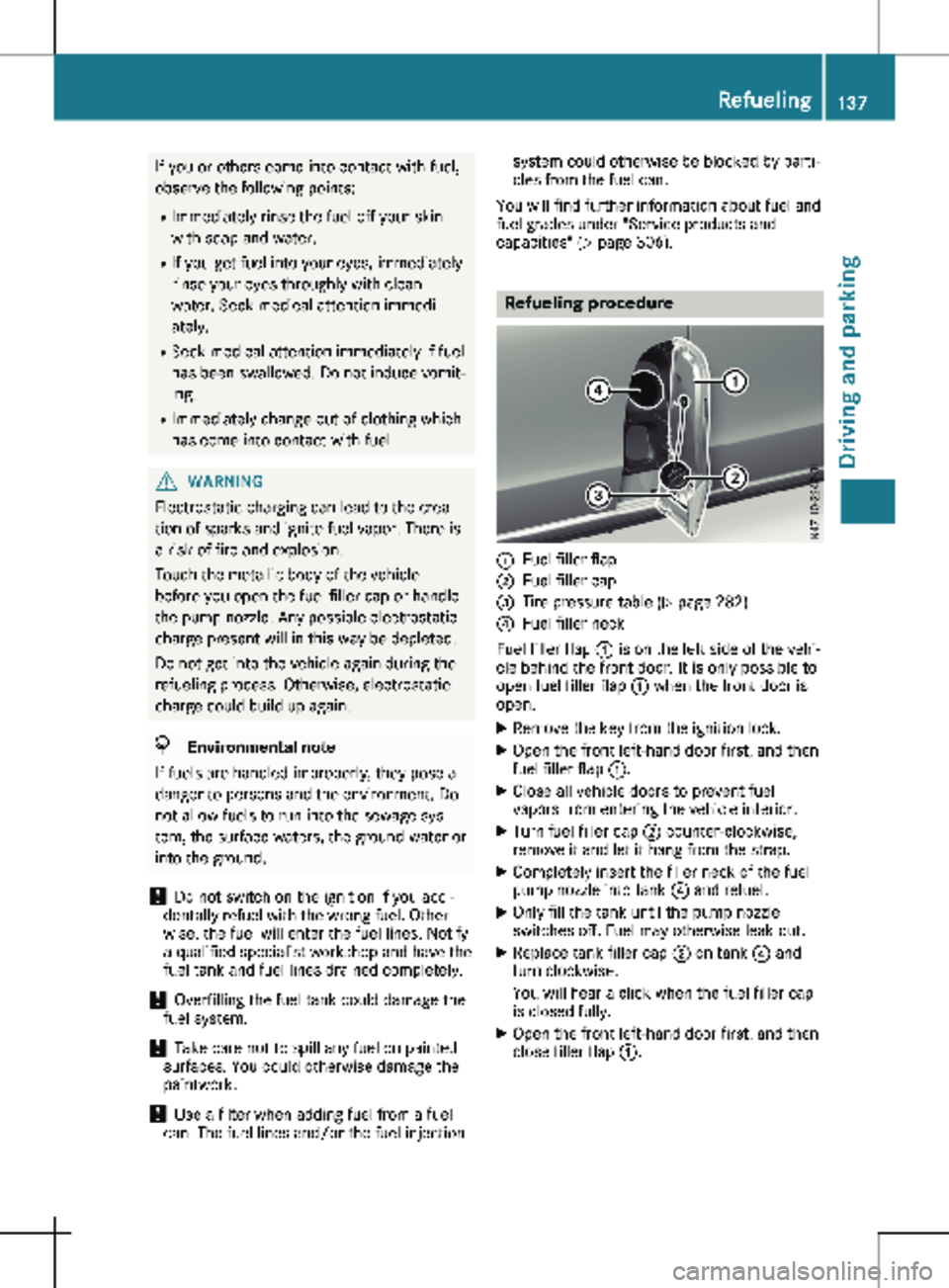
:
Fuel filler flap
; Fuel filler cap
= Tire pressure table (Y page
282)
? Fuel filler neck
Fuel filler flap : is on the left side of the vehi-
cle behind the front door. It is only possible to
open fuel filler flap : when the front door is
open.
X Remove the key from the ignition lock.
X Open the front left-hand door first, and then
fuel filler flap :.
X Close all vehicle doors to prevent fuel
vapors from entering the vehicle interior.
X Turn fuel filler cap ; counter-clockwise,
remove it and let it hang from the strap.
X Completely insert the filler neck of the fuel
pump nozzle into tank ? and refuel.
X Only fill the tank until the pump nozzle
switches off. Fuel may otherwise leak out.
X Replace tank filler cap ; on tank ? and
turn clockwise.
You will hear a click when the fuel filler cap
is closed fully.
X Open the front left-hand door first, and then
close filler flap :. Refueling
137
Driving and parking Z
Page 141 of 320
is an increased danger of skidding and acci-
dents.
Only use the parking brake to brake the
vehicle when the service brake is faulty. Do
not apply the parking brake too firmly. If the
wheels lock, release the parking brake until
the wheels begin turning again. The brake lamps are not illuminated when you
brake the vehicle using the parking brake.
As a rule, you may only apply the parking
brake when the vehicle is stationary.
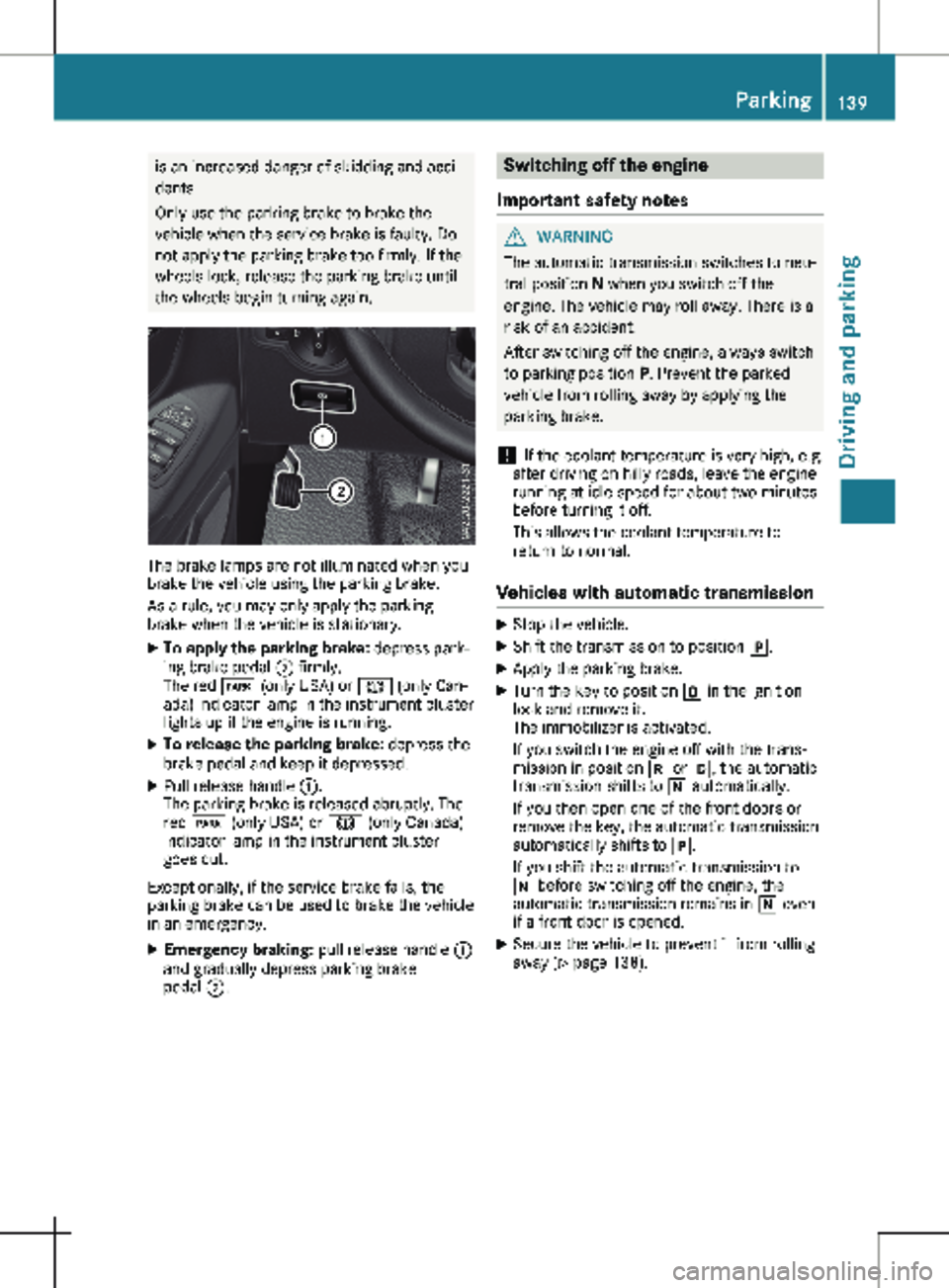
X To apply the parking brake: depress park-
ing brake pedal ; firmly.
The red F (only USA) or J (only Can-
ada) indicator lamp in the instrument cluster
lights up if the engine is running.
X To release the parking brake: depress the
brake pedal and keep it depressed.
X Pull release handle :.
The parking brake is released abruptly. The
red F (only USA) or J (only Canada)
indicator lamp in the instrument cluster
goes out.
Exceptionally, if the service brake fails, the
parking brake can be used to brake the vehicle
in an emergency.
X Emergency braking: pull release handle :
and gradually depress parking brake
pedal ;. Switching off the engine
Important safety notes G
WARNING
The automatic transmission switches to neu-
tral position N when you switch off the
engine. The vehicle may roll away. There is a
risk of an accident.
After switching off the engine, always switch
to parking position P. Prevent the parked
vehicle from rolling away by applying the
parking brake.
! If the coolant temperature is very high, e.g.
after driving on hilly roads, leave the engine
running at idle speed for about
two minutes
before turning it off.
This allows the coolant temperature to
return to normal.
Vehicles with automatic transmission X
Stop the vehicle.
X Shift the transmission to position j.
X Apply the parking brake.
X Turn the key to position u in the ignition
lock and remove it.
The immobilizer is activated.
If you switch the engine off with the trans-
mission in position k or h, the automatic
transmission shifts to i automatically.
If you then open one of the front doors or
remove the key, the automatic transmission
automatically shifts to j.
If you shift the automatic transmission to
i before switching off the engine, the
automatic transmission remains in i even
if a front door is opened.
X Secure the vehicle to prevent it from rolling
away
(Y page 138). Parking
139
Driving and parking Z
Page 163 of 320
Active Parking Assist does not assist you park-
ing in spaces at right angles to the direction of
travel if:
R two parking spaces are located directly next
to one another
R the parking space is directly next to a low
obstacle such as a low curb
R you forward park
Active Parking Assist does not assist you park-
ing in spaces that are parallel or at right angles
to the direction of travel if:
R the parking space is on a curb
R the system reads the parking space as being
blocked, for example by foliage or grass
paving blocks
R the area is too small for the vehicle to
maneuver into
R the parking space is bordered by an obsta-
cle, e.g. a tree, a post or a trailer :
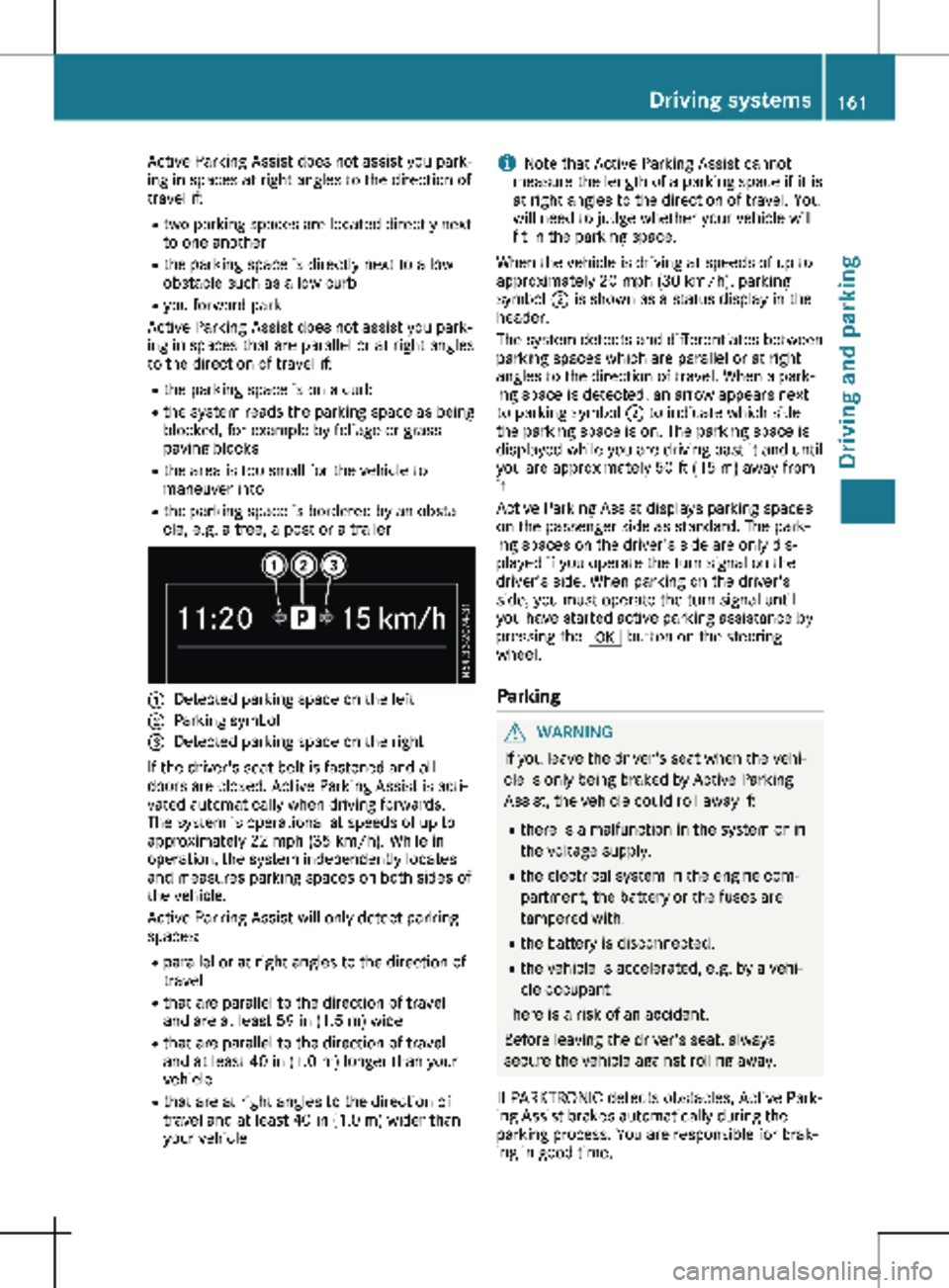
Detected parking space on the left
; Parking symbol
= Detected parking space on the right
If the driver's seat belt is fastened and all
doors are closed, Active Parking Assist is acti-
vated automatically when driving forwards.
The system is operational at speeds of up to
approximately
22 mph (35 km/h). While in
operation, the system independently locates
and measures parking spaces on both sides of
the vehicle.
Active Parking Assist will only detect parking
spaces:
R parallel or at right angles to the direction of
travel
R that are parallel to the direction of travel
and are at least 59 in (1.5 m) wide
R that are parallel to the direction of travel
and at least 40 in (1.0 m) longer than your
vehicle
R that are at right angles to the direction of
travel and at least 40 in (1.0 m) wider than
your vehicle i
Note that Active Parking Assist cannot
measure the length of a parking space if it is
at right angles to the direction of travel. You
will need to judge whether your vehicle will
fit in the parking space.
When the vehicle is driving at speeds of up to
approximately
20 mph (30 km/h), parking
symbol ; is shown as a status display in the
header.
The system detects and differentiates between
parking spaces which are parallel or at right
angles to the direction of travel. When a park-
ing space is detected, an arrow appears next
to parking symbol ; to indicate which side
the parking space is on. The parking space is
displayed while you are driving past it and until
you are approximately 50 ft (15 m) away from
it.
Active Parking Assist displays parking spaces
on the passenger side as standard. The park-
ing spaces on the driver's side are only dis-
played if you operate the turn signal on the
driver's side. When parking on the driver's
side, you must operate the turn signal until
you have started active parking assistance by
pressing the a button on the steering
wheel.
Parking G
WARNING
If you leave the driver's seat when the vehi-
cle is only being braked by Active Parking
Assist, the vehicle could roll away if:
R there is a malfunction in the system or in
the voltage supply.
R the electrical system in the engine com-
partment, the battery or the fuses are
tampered with.
R the battery is disconnected.
R the vehicle is accelerated, e.g. by a vehi-
cle occupant.
There is a risk of an accident.
Before leaving the driver's seat, always
secure the vehicle against rolling away.
If PARKTRONIC detects obstacles, Active Park-
ing Assist brakes automatically during the
parking process. You are responsible for brak-
ing in good time. Driving systems
161
Driving and parking Z
Page 195 of 320

X
Press : or 9 to select the Date:
function.
The display shows the current date.
X To set the date: press a again.
X Press = or ; to switch between day,
month and year.
X Press : or 9 to set the day, month or
year.
X Then press a to confirm.
The display shows the updated date.
Lights submenu Activating/deactivating the surround
lighting and exterior lighting delayed
switch-off
If you activate the Locator Lighting func-
tion and the light switch is turned to the Ã
position, the following functions are activated
when it is dark:
R surround lighting: the exterior lighting
remains on for
40 seconds after the doors
are unlocked. When you start the engine,
the surround lighting is deactivated and the
automatic headlamp feature is activated
(Y page 100).
R exterior lighting delayed switch-off: the
exterior lighting remains lit for 60 seconds
after the engine is switched off. When you
close all the doors and the tailgate/rear
doors, the exterior lighting switches off after
15 seconds.
Using the steering wheel buttons
X Use the = or ; button to select the
Settings. menu.
X Use : or 9 to select Lights.
X Press a to confirm.
X Use : or 9 to select the Locator
Lighting function.
The current status appears.
X To switch on/off: press a again.
If you change the setting, conversion does
not take place until the next time the vehicle
is stationary. Deactivating exterior lighting delayed switch-
off temporarily:
X Before leaving the vehicle, turn the key to
position g in the ignition lock.
X Turn the key to position 2 in the ignition
lock.
The exterior lighting delayed switch-off is
deactivated until the next time the engine is
started.
With surround lighting and exterior lighting
delayed switch-off, the following light up
depending on the vehicle's equipment:
R Parking lamps
R Fog lamps
R Low-beam headlamps
R Daytime running lamps
Activating/deactivating interior lighting
delayed switch-off If you activate the Interior Lighting
Delay: function, the interior lighting remains
lit for a further 20 seconds.
Using the steering wheel buttons
X Use the = or ; button to select the
Settings. menu.
X Use : or 9 to select Lights.
X Press a to confirm.
X Use : or 9 to select the Interior
Lighting Delay function.
The current status appears.
X To switch on/off: press a again.
Vehicle submenu Setting the sensitivity of the rain sensor
Using the steering wheel buttons
X Press = or ; to select the Settings
menu.
X Press : or 9 to select Vehicle.
X Press a to confirm.
X Press : or 9 to select the Rain
Sensor Sensitivity function.
The display shows the current setting.
X Press a to change the setting.
X Press : or 9 to select the High,
Standard or Low setting. This setting con-
trols the rain sensor's sensitivity to precipi-
tation. The windshield wiper then wipes On-board computer (vehicles with steering wheel buttons)
193
On-board computer and displays Z
Page 196 of 320
more or less frequently at the same precipi-
tation intensity.
X Press the a button to store the entry.
You can find further information under "Wind-
shield wiper" (Y page 109).
Switching the automatic locking feature
on/off
Using the steering wheel buttons
X Press = or ; to select the Settings
menu.
X Press : or 9 to select Vehicle.
X Press a to confirm.
X Press : or 9 to select the Auto‐
matic Door Lock function.
The current status is shown.
X To activate/deactivate: press a again.
If you activate the Automatic Door Lock
function, your vehicle will lock automatically
from a speed of approximately
15 km/h.
You can find further information under "Auto-
matic door lock" (Y page 76).
Activating/deactivating the acoustic
locking confirmation i The selected setting of the acoustic lock-
ing verification signal must comply with the
relevant national road traffic rules. In some
countries, including Germany, the use of the
acoustic locking verification signal is not
permitted under national road traffic regula-
tions (in Germany according to § 16 para. 1
and § 30 para. 1 StVO). Compliance must be ensured by the driver of the vehicle. In
countries where the use of this function is
not permitted, this function is not and must
not be activated in your vehicle.
Using the steering wheel buttons
X Press = or ; to select the Settings
menu.
X Press : or 9 to select Vehicle.
X Press a to confirm.
X Press : or 9 to select Acoustic
lock feedback.
The current status is shown.
X To activate/deactivate: press a again.
If you activate the Acoustic lock feedback function, an acoustic tone sounds when the
vehicle is locked.
Restoring the factory settings Using the steering wheel buttons
X Press = or ; to select the Settings
menu.
X Press : or 9 to select Factory
Setting.
X Press a to confirm.
The Reset All Settings? function is dis-
played.
X Press : or 9 to select No or Yes.
X Press a to confirm the choice.
If you select Yes, the display shows a confir-
mation message. Display messages (vehicles without steering wheel buttons)
Introduction
Important safety notes G
WARNING
If the instrument cluster has failed or malfunctioned, you may not recognize function restric-
tions in systems relevant to safety. The operating safety of your vehicle may be impaired.
There is a risk of an accident.
Drive on carefully. Have the vehicle checked at a qualified specialist workshop immediately.
The on-board computer only shows messages or warnings from certain systems in the instru-
ment cluster display. You should therefore make sure your vehicle is operating safely at all
times. If the operating safety of your vehicle is impaired, stop the vehicle as soon as possible,
paying attention to road and traffic conditions. Then consult a qualified specialist workshop. 194
Display messages (vehicles without steering wheel buttons)On-board computer and displays
Page 210 of 320

Display messages
Possible causes/consequences and
M SolutionsTire Press. Moni‐
tor Currently
Unavail. Due to a source of radio interference, no signals can be received
from the wheel sensors. The tire pressure monitor is temporarily
malfunctioning.
The tire pressure monitor restarts automatically as soon as the
problem has been solved. Tire Press. Moni‐
tor Inoperative The tire pressure monitor is malfunctioning and switched off. Either
the installed wheels do not have suitable tire pressure sensors or
the system is malfunctioning, e.g. because a tire pressure sensor is
faulty.
X Install wheels with suitable tire pressure sensors.
The tire pressure monitor is activated automatically after driving
for a few minutes.
or X Visit a qualified specialist workshop. Vehicle
Display messages
Possible causes/consequences and
M SolutionsÒ The tailgate is open.
X Close the tailgate. Ñ The rear door is open.
X Close the rear door(s). Ó An additional warning tone sounds. The hood is open.
G WARNING
The open hood may then block your view when the vehicle is in
motion.
There is a risk of an accident.
X Stop the vehicle immediately, paying attention to road and traffic
conditions.
X Secure the vehicle to prevent it from rolling away (Y page 138).
X Close the hood. 0 An additional warning tone sounds while the vehicle is in motion.
The display shows the open door(s).
X Close all doors. Ð
Pwr. Steering Mal‐
funct.
+ An additional warning tone sounds. The steering power assistance
could be malfunctioning. You may need to steer more forcefully.
X Carefully continue to a qualified specialist workshop and have the
steering checked immediately. 208
Display messages (vehicles without steering wheel buttons)
On-board computer and displays