audio MERCEDES-BENZ ML320 1997 Complete Repair Manual
[x] Cancel search | Manufacturer: MERCEDES-BENZ, Model Year: 1997, Model line: ML320, Model: MERCEDES-BENZ ML320 1997Pages: 4133, PDF Size: 88.89 MB
Page 1829 of 4133
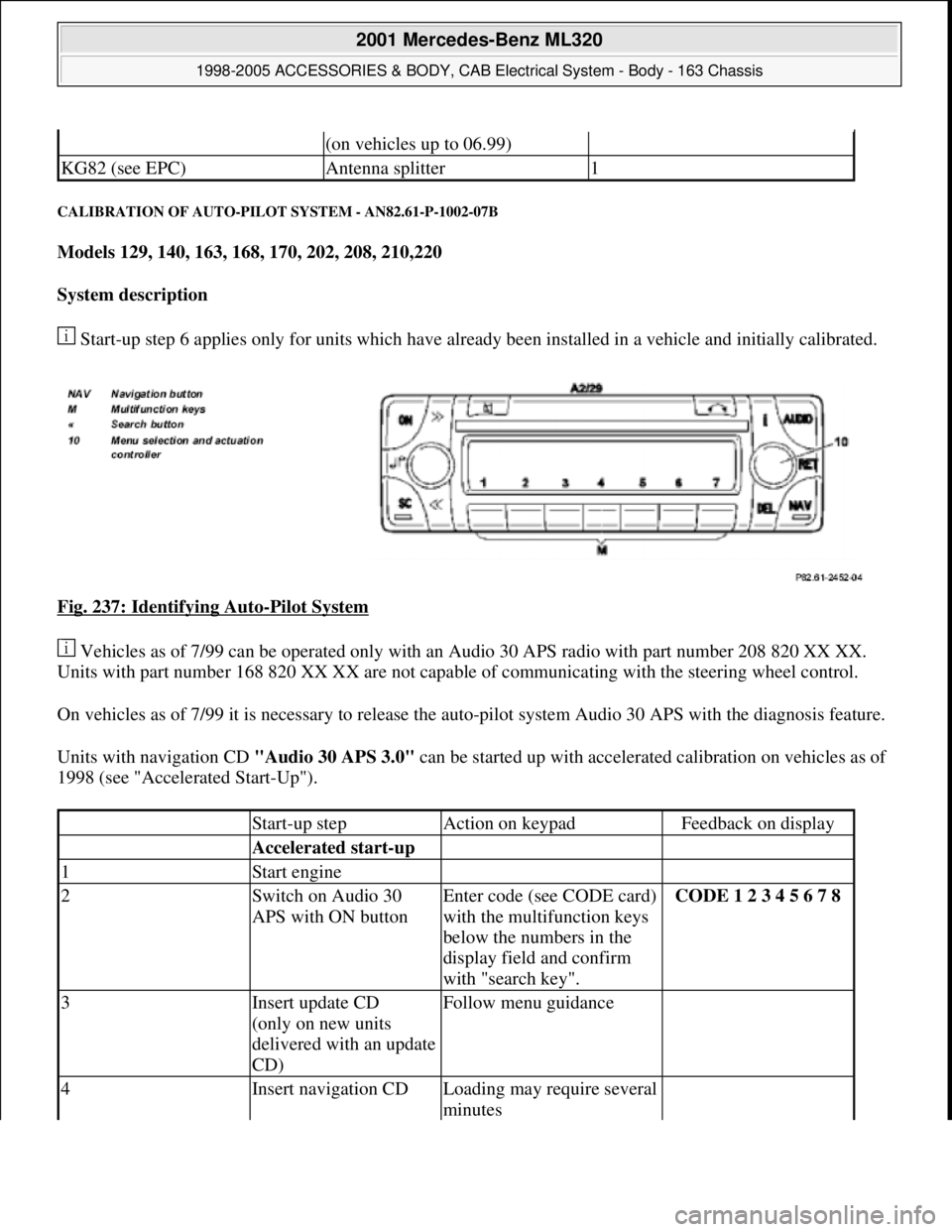
CALIBRATION OF AUTO-PILOT SYSTEM - AN82.61-P-1002-07B
Models 129, 140, 163, 168, 170, 202, 208, 210,220
System description
Start-up step 6 applies only for units which have already been installed in a vehicle and initially calibrated.
Fig. 237: Identifying Auto
-Pilot System
Vehicles as of 7/99 can be operated only with an Audio 30 APS radio with part number 208 820 XX XX.
Units with part number 168 820 XX XX are not capable of communicating with the steering wheel control.
On vehicles as of 7/99 it is necessary to release the auto-pilot system Audio 30 APS with the diagnosis feature.
Units with navigation CD "Audio 30 APS 3.0" can be started up with accelerated calibration on vehicles as of
1998 (see "Accelerated Start-Up").
(on vehicles up to 06.99)
KG82 (see EPC)Antenna splitter1
Start-up stepAction on keypadFeedback on display
Accelerated start-up
1Start engine
2Switch on Audio 30
APS with ON buttonEnter code (see CODE card)
with the multifunction keys
below the numbers in the
display field and confirm
with "search key".CODE 1 2 3 4 5 6 7 8
3Insert update CD
(only on new units
delivered with an update
CD)Follow menu guidance
4Insert navigation CDLoading may require several
minutes
2001 Mercedes-Benz ML320
1998-2005 ACCESSORIES & BODY, CAB Electrical System - Body - 163 Chassis
me
Saturday, October 02, 2010 3:30:11 PMPage 334 © 2006 Mitchell Repair Information Company, LLC.
Page 1830 of 4133
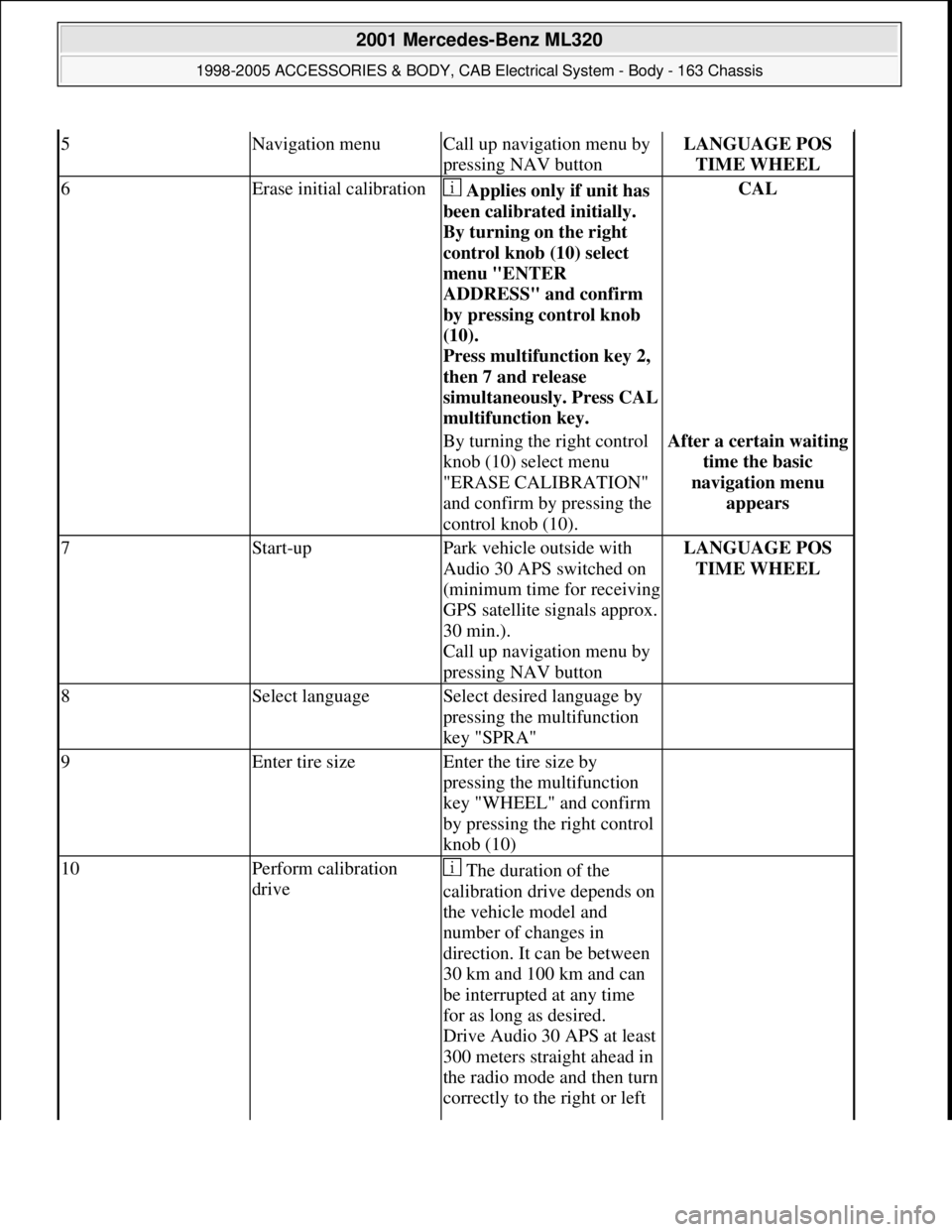
5Navigation menuCall up navigation menu by
pressing NAV buttonLANGUAGE POS
TIME WHEEL
6Erase initial calibration Applies only if unit has
been calibrated initially.
By turning on the right
control knob (10) select
menu "ENTER
ADDRESS" and confirm
by pressing control knob
(10).
Press multifunction key 2,
then 7 and release
simultaneousl
y. Press CAL
multifunction key.
CAL
By turning the right control
knob (10) select menu
"ERASE CALIBRATION"
and confirm by pressing the
control knob (10).After a certain waiting
time the basic
navigation menu
appears
7Start-upPark vehicle outside with
Audio 30 APS switched on
(minimum time for receiving
GPS satellite signals approx.
30 min.).
Call up navigation menu by
pressing NAV buttonLANGUAGE POS
TIME WHEEL
8Select languageSelect desired language by
pressing the multifunction
key "SPRA"
9Enter tire sizeEnter the tire size by
pressing the multifunction
key "WHEEL" and confirm
by pressing the right control
knob (10)
10Perform calibration
drive The duration of the
calibration drive depends on
the vehicle model and
number of changes in
direction. It can be between
30 km and 100 km and can
be interrupted at any time
for as long as desired.
Drive Audio 30 APS at least
300 meters straight ahead in
the radio mode and then turn
correctly to the right or left
2001 Mercedes-Benz ML320
1998-2005 ACCESSORIES & BODY, CAB Electrical System - Body - 163 Chassis
me
Saturday, October 02, 2010 3:30:11 PMPage 335 © 2006 Mitchell Repair Information Company, LLC.
Page 1831 of 4133
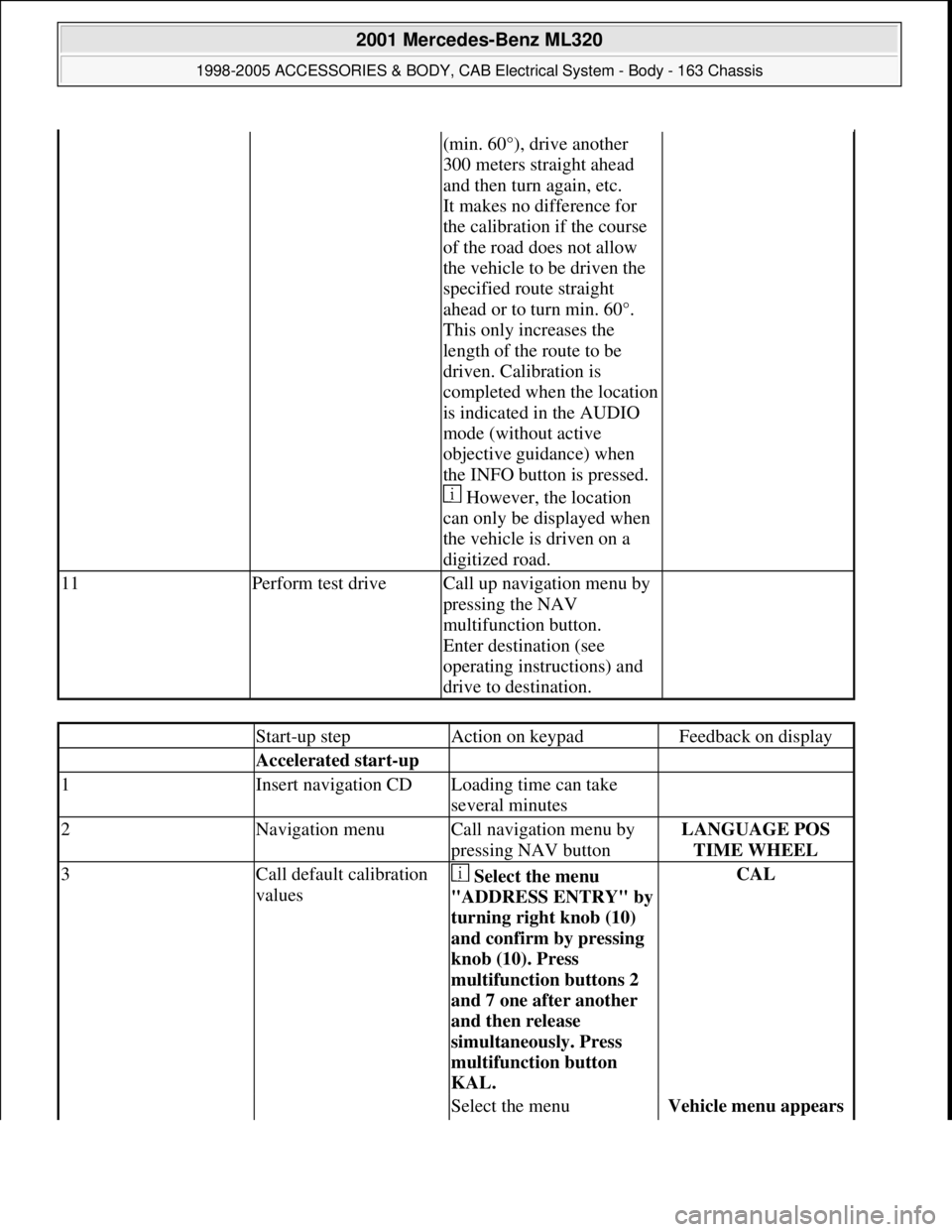
(min. 60°), drive another
300 meters straight ahead
and then turn again, etc.
It makes no difference for
the calibration if the course
of the road does not allow
the vehicle to be driven the
specified route straight
ahead or to turn min. 60°.
This only increases the
length of the route to be
driven. Calibration is
completed when the location
is indicated in the AUDIO
mode (without active
objective guidance) when
the INFO button is pressed.
However, the location
can only be displayed when
the vehicle is driven on a
digitized road.
11Perform test driveCall up navigation menu by
pressing the NAV
multifunction button.
Enter destination (see
operating instructions) and
drive to destination.
Start-up stepAction on keypadFeedback on display
Accelerated start-up
1Insert navigation CDLoading time can take
several minutes
2Navigation menuCall navigation menu by
pressing NAV buttonLANGUAGE POS
TIME WHEEL
3Call default calibration
values Select the menu
"ADDRESS ENTRY" b
y
turning right knob (10)
and confirm by pressing
knob (10). Press
multifunction buttons 2
and 7 one after another
and then release
simultaneously. Press
multifunction button
KAL.
CAL
Select the menu Vehicle menu appears
2001 Mercedes-Benz ML320
1998-2005 ACCESSORIES & BODY, CAB Electrical System - Body - 163 Chassis
me
Saturday, October 02, 2010 3:30:11 PMPage 336 © 2006 Mitchell Repair Information Company, LLC.
Page 1913 of 4133
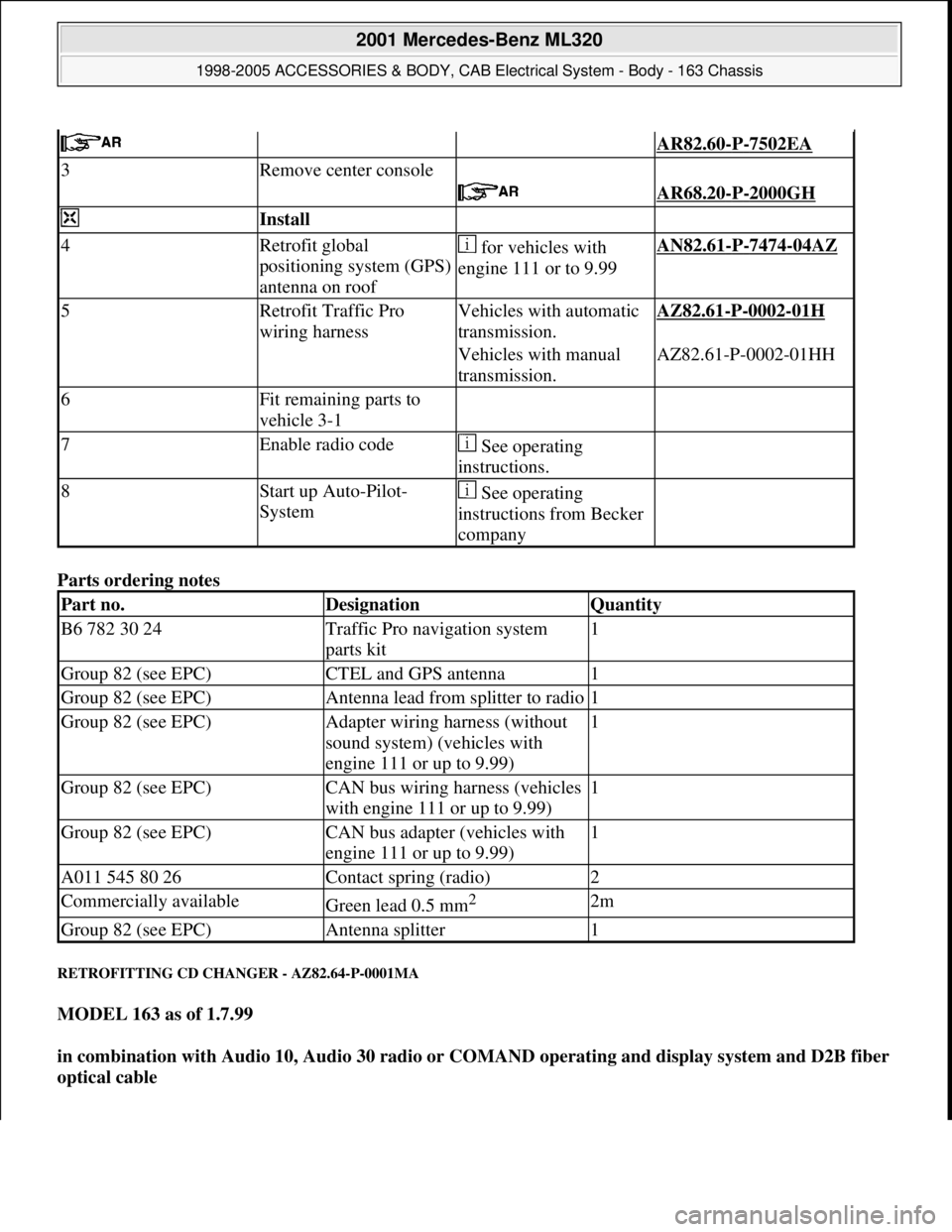
Parts ordering notes
RETROFITTING CD CHANGER - AZ82.64-P-0001MA
MODEL 163 as of 1.7.99
in combination with Audio 10, Audio 30 radio or COMAND operating and display system and D2B fiber
optical cable
AR82.60-P-7502EA
3Remove center console
AR68.20-P-2000GH
Install
4Retrofit global
positioning system (GPS)
antenna on roof for vehicles with
engine 111 or to 9.99AN82.61-P-7474-04AZ
5Retrofit Traffic Pro
wiring harnessVehicles with automatic
transmission.AZ82.61-P-0002-01H
Vehicles with manual
transmission.AZ82.61-P-0002-01HH
6Fit remaining parts to
vehicle 3-1
7Enable radio code See operating
instructions.
8Start up Auto-Pilot-
System See operating
instructions from Becker
company
Part no.DesignationQuantity
B6 782 30 24Traffic Pro navigation system
parts kit1
Group 82 (see EPC)CTEL and GPS antenna1
Group 82 (see EPC)Antenna lead from splitter to radio1
Group 82 (see EPC)Adapter wiring harness (without
sound system) (vehicles with
engine 111 or up to 9.99)1
Group 82 (see EPC)CAN bus wiring harness (vehicles
with engine 111 or up to 9.99)1
Group 82 (see EPC)CAN bus adapter (vehicles with
engine 111 or up to 9.99)1
A011 545 80 26Contact spring (radio)2
Commercially availableGreen lead 0.5 mm2 2m
Group 82 (see EPC)Antenna splitter1
2001 Mercedes-Benz ML320
1998-2005 ACCESSORIES & BODY, CAB Electrical System - Body - 163 Chassis
me
Saturday, October 02, 2010 3:30:13 PMPage 418 © 2006 Mitchell Repair Information Company, LLC.
Page 1923 of 4133
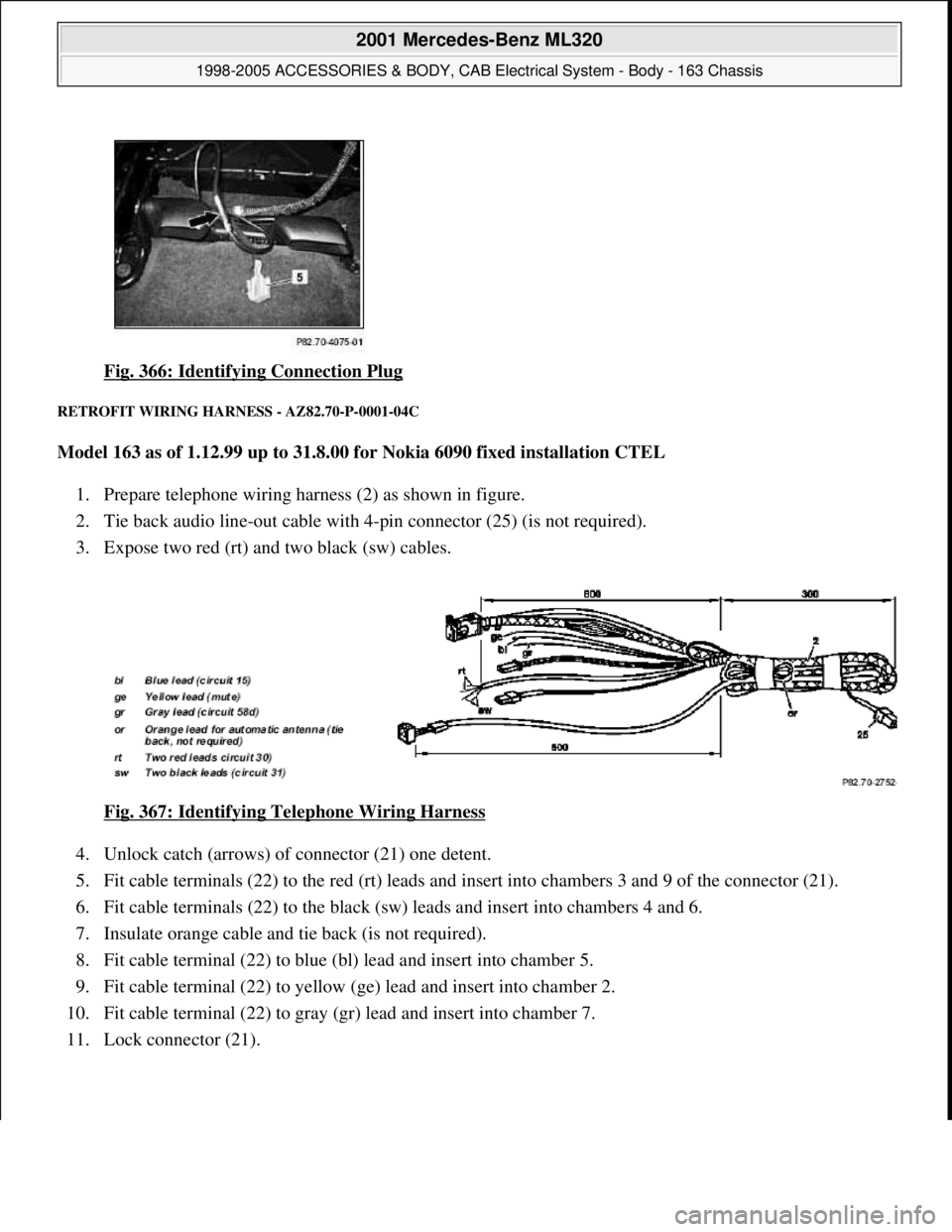
Fig. 366: Identifying Connection Plug
RETROFIT WIRING HARNESS - AZ82.70-P-0001-04C
Model 163 as of 1.12.99 up to 31.8.00 for Nokia 6090 fixed installation CTEL
1. Prepare telephone wiring harness (2) as shown in figure.
2. Tie back audio line-out cable with 4-pin connector (25) (is not required).
3. Expose two red (rt) and two black (sw) cables.
Fig. 367: Identifying Telephone Wiring Harness
4. Unlock catch (arrows) of connector (21) one detent.
5. Fit cable terminals (22) to the red (rt) leads and insert into chambers 3 and 9 of the connector (21).
6. Fit cable terminals (22) to the black (sw) leads and insert into chambers 4 and 6.
7. Insulate orange cable and tie back (is not required).
8. Fit cable terminal (22) to blue (bl) lead and insert into chamber 5.
9. Fit cable terminal (22) to yellow (ge) lead and insert into chamber 2.
10. Fit cable terminal (22) to gray (gr) lead and insert into chamber 7.
11. Lock connector (21).
2001 Mercedes-Benz ML320
1998-2005 ACCESSORIES & BODY, CAB Electrical System - Body - 163 Chassis
me
Saturday, October 02, 2010 3:30:13 PMPage 428 © 2006 Mitchell Repair Information Company, LLC.
Page 1932 of 4133
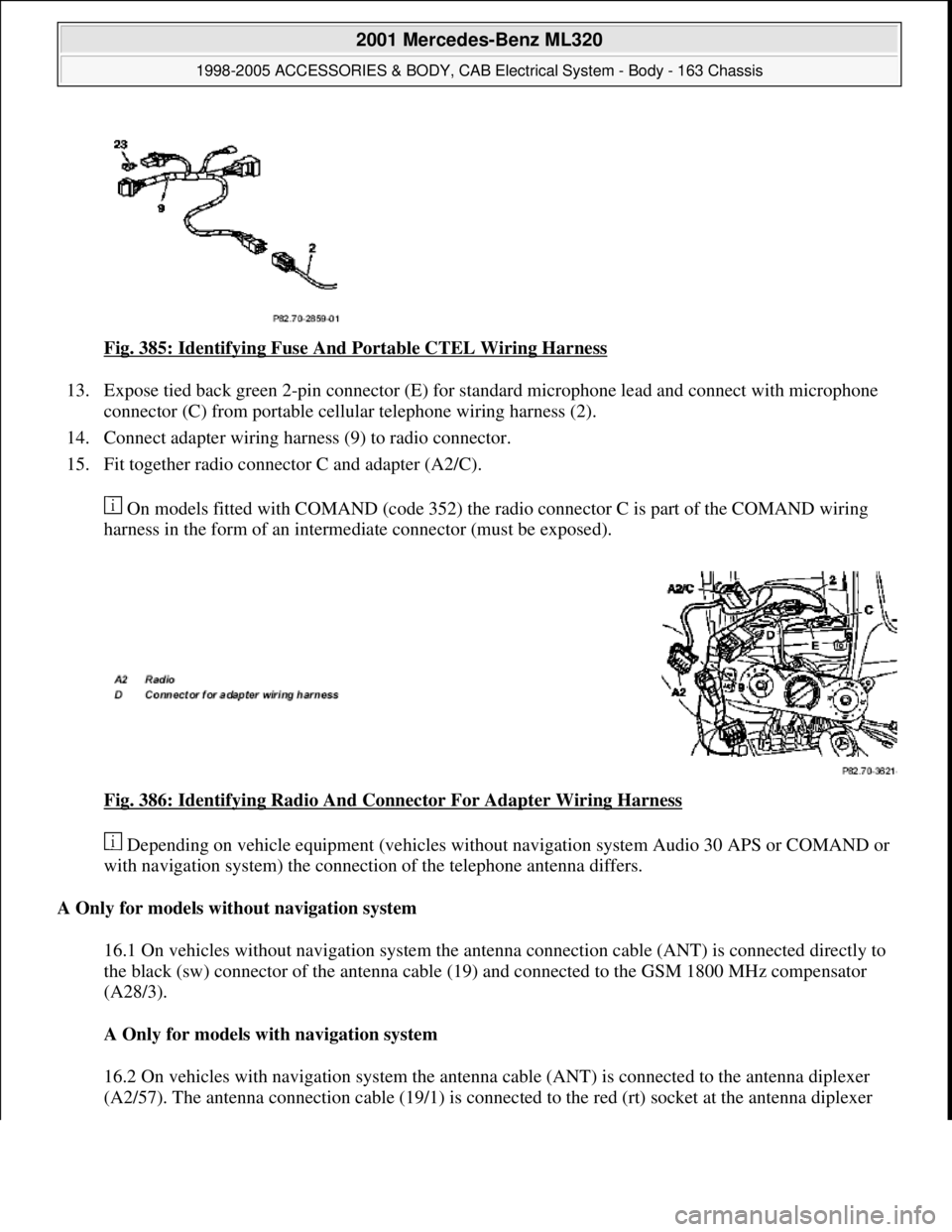
Fig. 385: Identifying Fuse And Portable CTEL Wiring Harness
13. Expose tied back green 2-pin connector (E) for standard microphone lead and connect with microphone
connector (C) from portable cellular telephone wiring harness (2).
14. Connect adapter wiring harness (9) to radio connector.
15. Fit together radio connector C and adapter (A2/C).
On models fitted with COMAND (code 352) the radio connector C is part of the COMAND wiring
harness in the form of an intermediate connector (must be exposed).
Fig. 386: Identifying Radio And Connector For Adapter Wiring Harness
Depending on vehicle equipment (vehicles without navigation system Audio 30 APS or COMAND or
with navigation system) the connection of the telephone antenna differs.
A Only for models without navigation system
16.1 On vehicles without navigation system the antenna connection cable (ANT) is connected directly to
the black (sw) connector of the antenna cable (19) and connected to the GSM 1800 MHz compensator
(A28/3).
A Only for models with navigation system
16.2 On vehicles with navigation system the antenna cable (ANT) is connected to the antenna diplexer
(A2/57). The antenna connection cable (19/1) is connected to the red (rt) socket at the antenna diplexer
2001 Mercedes-Benz ML320
1998-2005 ACCESSORIES & BODY, CAB Electrical System - Body - 163 Chassis
me
Saturday, October 02, 2010 3:30:13 PMPage 437 © 2006 Mitchell Repair Information Company, LLC.
Page 1933 of 4133
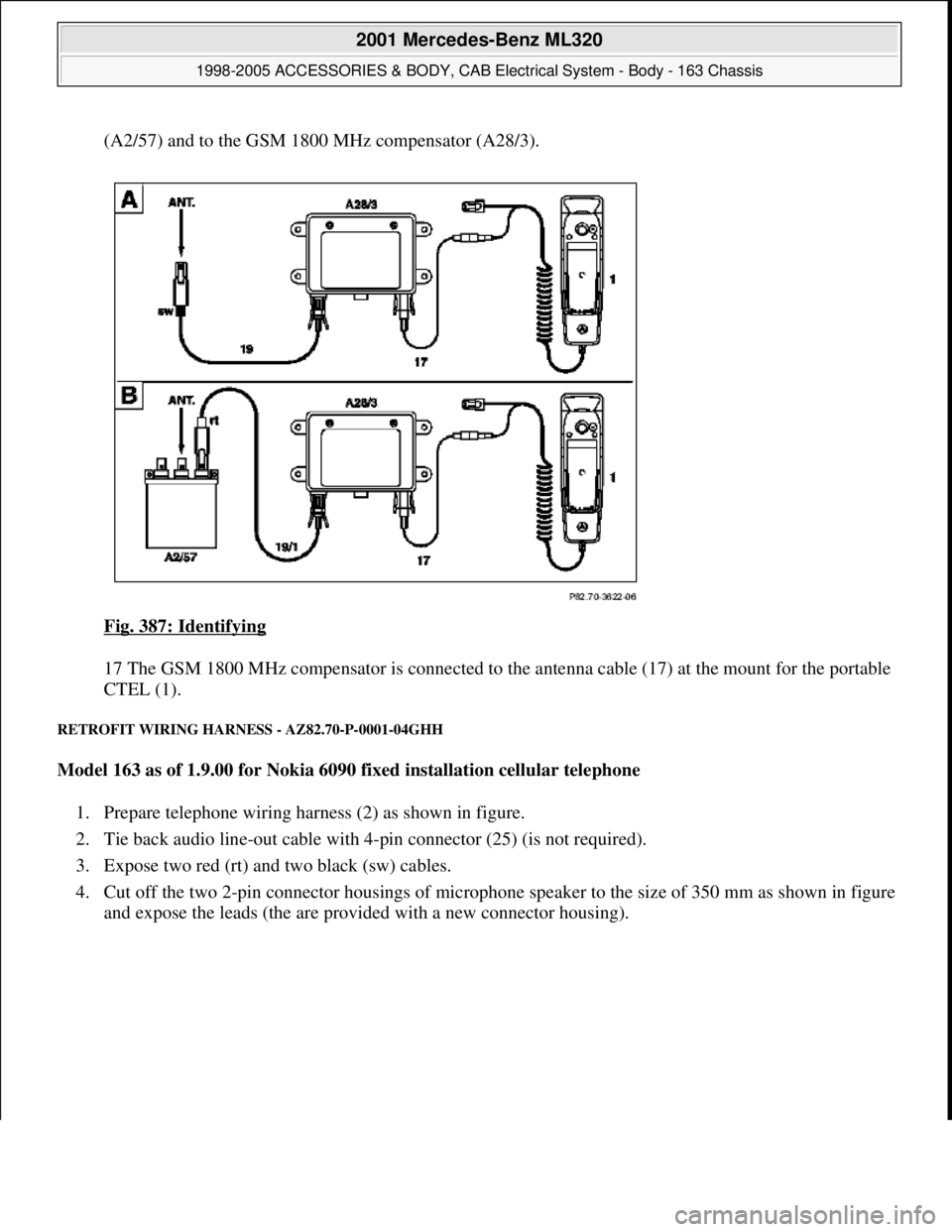
(A2/57) and to the GSM 1800 MHz compensator (A28/3).
Fig. 387: Identifying
17 The GSM 1800 MHz compensator is connected to the antenna cable (17) at the mount for the portable
CTEL (1).
RETROFIT WIRING HARNESS - AZ82.70-P-0001-04GHH
Model 163 as of 1.9.00 for Nokia 6090 fixed installation cellular telephone
1. Prepare telephone wiring harness (2) as shown in figure.
2. Tie back audio line-out cable with 4-pin connector (25) (is not required).
3. Expose two red (rt) and two black (sw) cables.
4. Cut off the two 2-pin connector housings of microphone speaker to the size of 350 mm as shown in figure
and expose the leads (the are provided with a new connector housin
g).
2001 Mercedes-Benz ML320
1998-2005 ACCESSORIES & BODY, CAB Electrical System - Body - 163 Chassis
me
Saturday, October 02, 2010 3:30:13 PMPage 438 © 2006 Mitchell Repair Information Company, LLC.
Page 1941 of 4133
Parts ordering notes
telephone console
11Install hands-free
microphone AZ82.70-P-0001-02A
12Modify wiring harness
and install AZ82.70-P-0001-04D
13Install loudspeaker AZ82.70-P-0001-03D
14Install D-net antenna on
roof See installation
instructions from the
Kathrein company.
Install antenna without
modification.
15Retrofit antenna lead Only on vehicles with
Audio 30 APS radioAZ82.70-P-0002-01A
16Check portable cellular
telephone for proper
function
17Reassemble vehicle, 8-1
Part no.DesignationQuantity
B6 787 41 55Nokia 3110 portable cellular
telephone1
B6 787 41 60Motor vehicle installation kit,
Nokia CARK-741
B6 788 01 28Antenna radiator, Kathrein1
B6 787 41 62Wiring harness assy.1
B6 788 03 46Telephone console, anthracite,
left-hand steering1
B6 788 03 49Telephone console, anthracite,
right-hand steering1
B6 788 03 47Telephone console, medium orion-
gray, left-hand steering1
B6 788 03 50Telephone console, medium orion-
gray, right-hand steering1
B6 788 03 48Telephone console, java, left-hand
steering1
B6 788 03 51Telephone console, java, right-
hand steering1
A035 545 0328Packard connector housing1
A035 545 1128Packard terminals5
N007 985 004 107Screw5
N304 032 004 002Nut5
commercially availableFoam rubberas required
2001 Mercedes-Benz ML320
1998-2005 ACCESSORIES & BODY, CAB Electrical System - Body - 163 Chassis
me
Saturday, October 02, 2010 3:30:14 PMPage 446 © 2006 Mitchell Repair Information Company, LLC.
Page 1942 of 4133
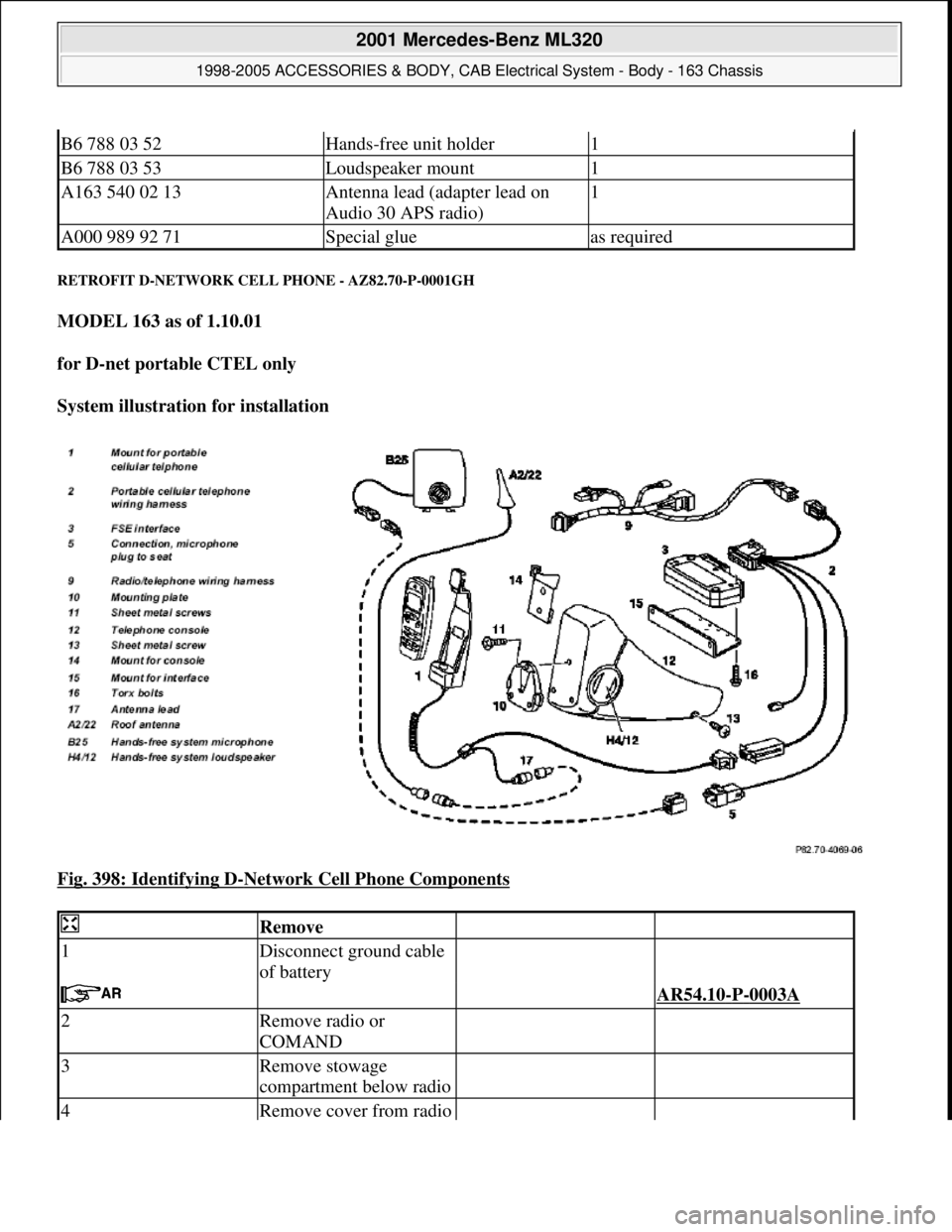
RETROFIT D-NETWORK CELL PHONE - AZ82.70-P-0001GH
MODEL 163 as of 1.10.01
for D-net portable CTEL only
System illustration for installation
Fig. 398: Identifying D
-Network Cell Phone Components
B6 788 03 52Hands-free unit holder1
B6 788 03 53Loudspeaker mount1
A163 540 02 13Antenna lead (adapter lead on
Audio 30 APS radio)1
A000 989 92 71Special glueas required
Remove
1Disconnect ground cable
of battery
AR54.10-P-0003A
2Remove radio or
COMAND
3Remove stowage
compartment below radio
4Remove cover from radio
2001 Mercedes-Benz ML320
1998-2005 ACCESSORIES & BODY, CAB Electrical System - Body - 163 Chassis
me
Saturday, October 02, 2010 3:30:14 PMPage 447 © 2006 Mitchell Repair Information Company, LLC.
Page 1947 of 4133
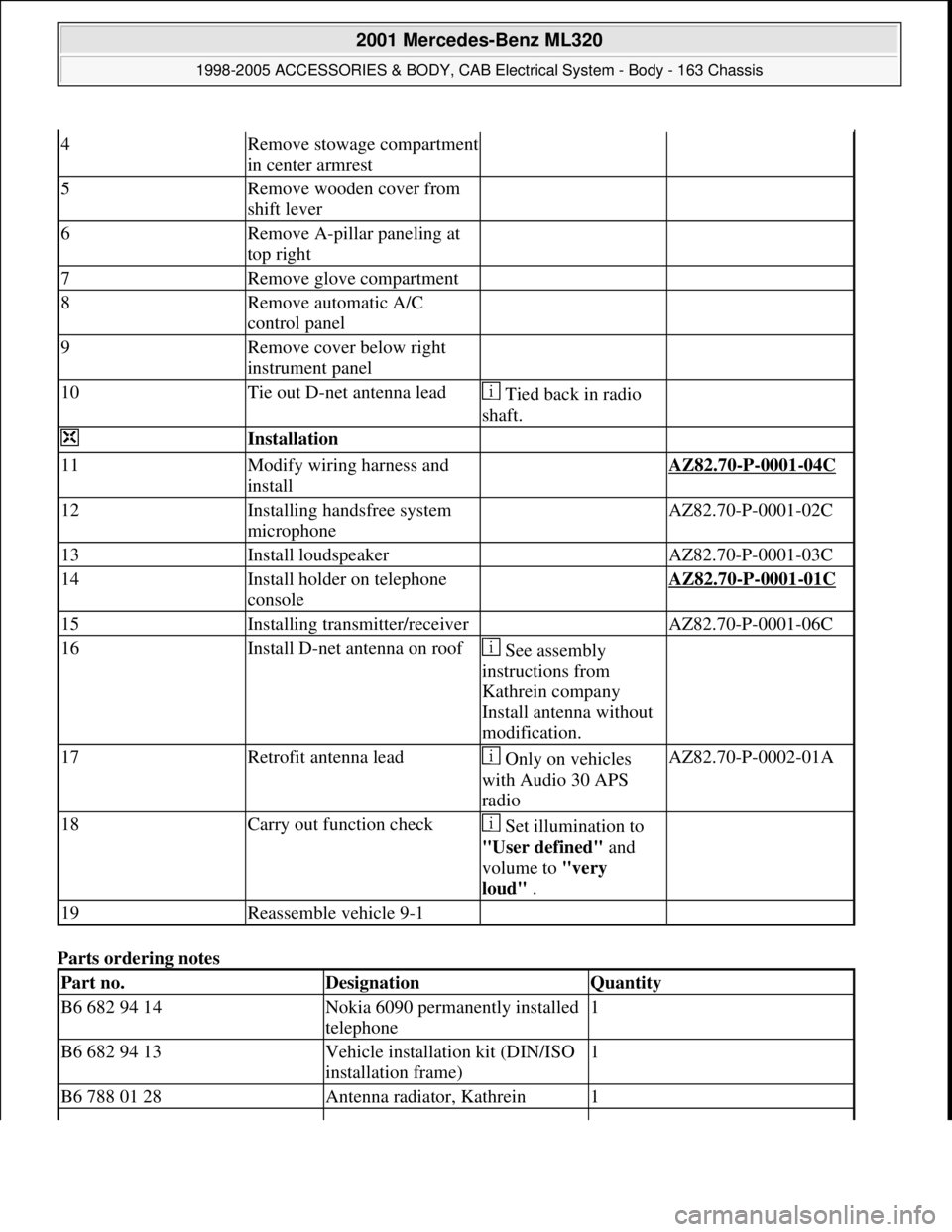
Parts ordering notes
4Remove stowage compartment
in center armrest
5Remove wooden cover from
shift lever
6Remove A-pillar paneling at
top right
7Remove glove compartment
8Remove automatic A/C
control panel
9Remove cover below right
instrument panel
10Tie out D-net antenna lead Tied back in radio
shaft.
Installation
11Modify wiring harness and
install AZ82.70-P-0001-04C
12Installing handsfree system
microphone AZ82.70-P-0001-02C
13Install loudspeaker AZ82.70-P-0001-03C
14Install holder on telephone
console AZ82.70-P-0001-01C
15Installing transmitter/receiver AZ82.70-P-0001-06C
16Install D-net antenna on roof See assembly
instructions from
Kathrein company
Install antenna without
modification.
17Retrofit antenna lead Only on vehicles
with Audio 30 APS
radioAZ82.70-P-0002-01A
18Carry out function check Set illumination to
"User defined" and
volume to "very
loud" .
19Reassemble vehicle 9-1
Part no.DesignationQuantity
B6 682 94 14Nokia 6090 permanently installed
telephone1
B6 682 94 13Vehicle installation kit (DIN/ISO
installation frame)1
B6 788 01 28Antenna radiator, Kathrein1
2001 Mercedes-Benz ML320
1998-2005 ACCESSORIES & BODY, CAB Electrical System - Body - 163 Chassis
me
Saturday, October 02, 2010 3:30:14 PMPage 452 © 2006 Mitchell Repair Information Company, LLC.