radio controls MERCEDES-BENZ ML320 1997 Complete Owner's Guide
[x] Cancel search | Manufacturer: MERCEDES-BENZ, Model Year: 1997, Model line: ML320, Model: MERCEDES-BENZ ML320 1997Pages: 4133, PDF Size: 88.89 MB
Page 1742 of 4133
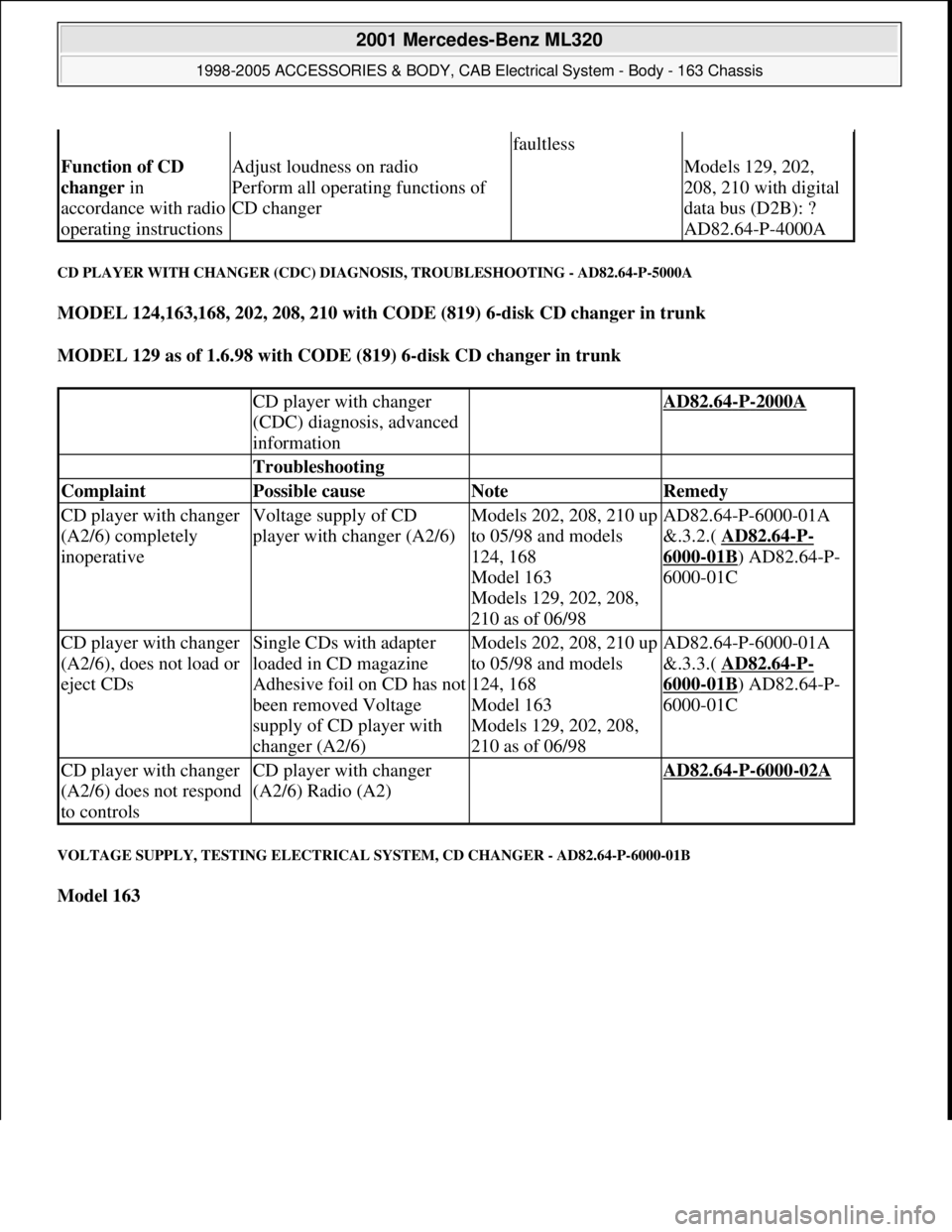
CD PLAYER WITH CHANGER (CDC) DIAGNOSIS, TROUBLESHOOTING - AD82.64-P-5000A
MODEL 124,163,168, 202, 208, 210 with CODE (819) 6-disk CD changer in trunk
MODEL 129 as of 1.6.98 with CODE (819) 6-disk CD changer in trunk
VOLTAGE SUPPLY, TESTING ELECTRICAL SYSTEM, CD CHANGER - AD82.64-P-6000-01B
Model 163
faultless
Function of CD
changer in
accordance with radio
operating instructionsAdjust loudness on radio
Perform all operating functions of
CD changer Models 129, 202,
208, 210 with digital
data bus (D2B): ?
AD82.64-P-4000A
CD player with changer
(CDC) diagnosis, advanced
information AD82.64-P-2000A
Troubleshooting
Complaint Possible cause Note Remedy
CD player with changer
(A2/6) completely
inoperativeVoltage supply of CD
player with changer (A2/6)Models 202, 208, 210 up
to 05/98 and models
124, 168
Model 163
Models 129, 202, 208,
210 as of 06/98AD82.64-P-6000-01A
&.3.2.( AD82.64
-P-
6000-01B) AD82.64-P-
6000-01C
CD player with changer
(A2/6), does not load or
eject CDsSingle CDs with adapter
loaded in CD magazine
Adhesive foil on CD has not
been removed Voltage
supply of CD player with
changer (A2/6)Models 202, 208, 210 up
to 05/98 and models
124, 168
Model 163
Models 129, 202, 208,
210 as of 06/98AD82.64-P-6000-01A
&.3.3.( AD82.64
-P-
6000-01B) AD82.64-P-
6000-01C
CD player with changer
(A2/6) does not respond
to controlsCD player with changer
(A2/6) Radio (A2) AD82.64-P-6000-02A
2001 Mercedes-Benz ML320
1998-2005 ACCESSORIES & BODY, CAB Electrical System - Body - 163 Chassis
me
Saturday, October 02, 2010 3:30:08 PMPage 247 © 2006 Mitchell Repair Information Company, LLC.
Page 3424 of 4133
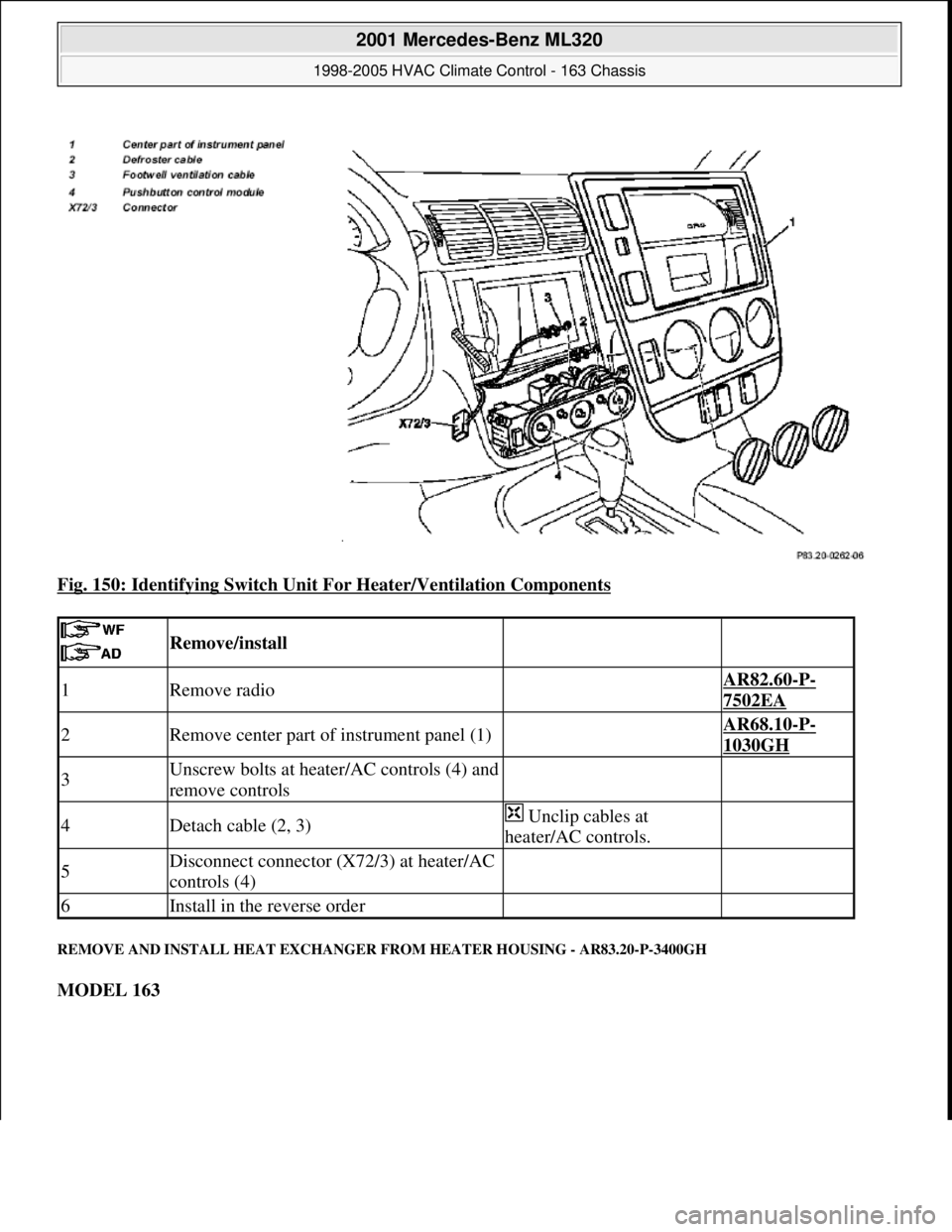
Fig. 150: Identifying Switch Unit For Heater/Ventilation Components
REMOVE AND INSTALL HEAT EXCHANGER FROM HEATER HOUSING - AR83.20-P-3400GH
MODEL 163
Remove/install
1Remove radio AR82.60-P-
7502EA
2Remove center part of instrument panel (1) AR68.10-P-
1030GH
3Unscrew bolts at heater/AC controls (4) and
remove controls
4Detach cable (2, 3) Unclip cables at
heater/AC controls.
5Disconnect connector (X72/3) at heater/AC
controls (4)
6Install in the reverse order
2001 Mercedes-Benz ML320
1998-2005 HVAC Climate Control - 163 Chassis
me
Saturday, October 02, 2010 3:23:18 PMPage 180 © 2006 Mitchell Repair Information Company, LLC.
Page 3509 of 4133
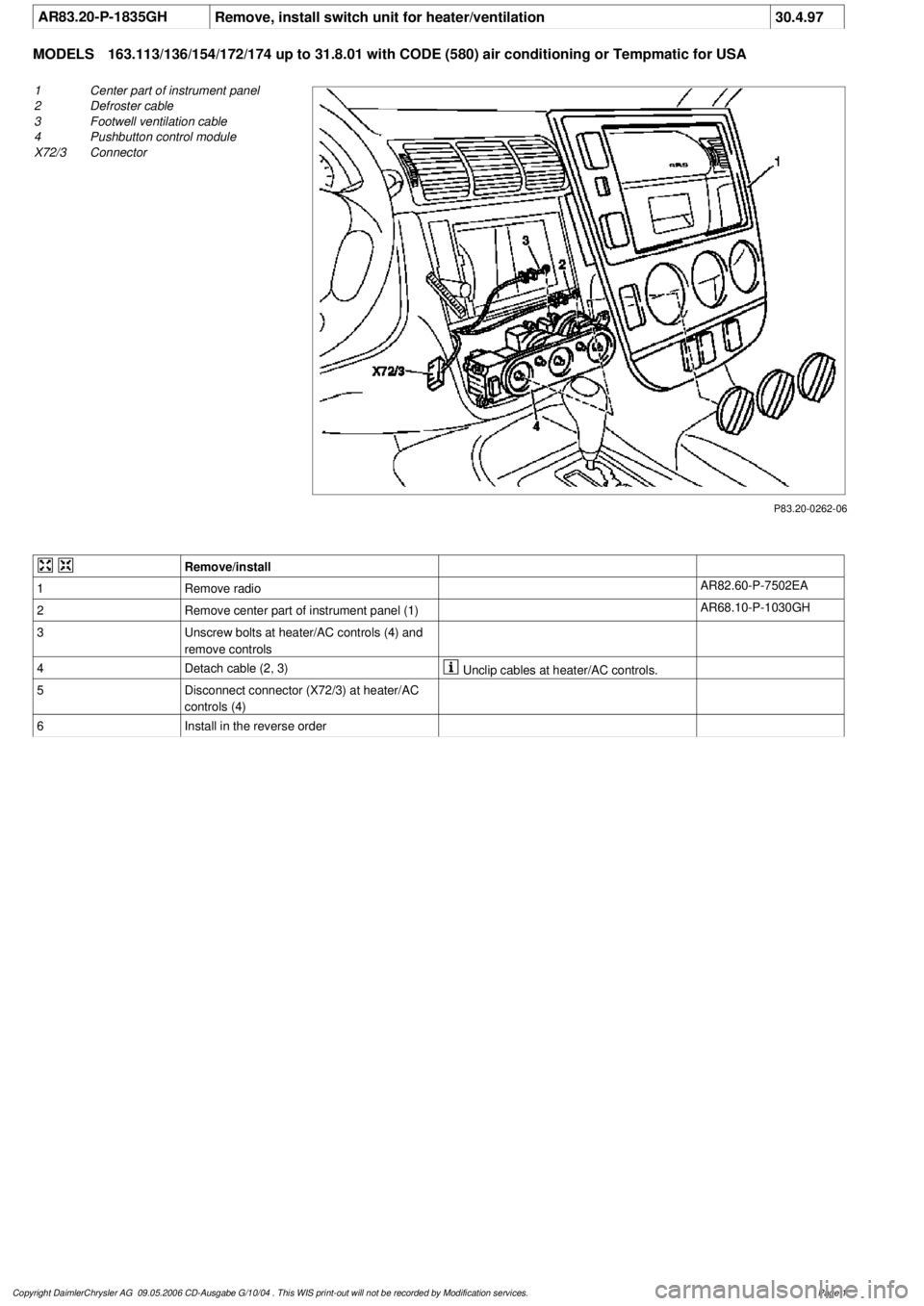
AR83.20-P-1835GH
Remove, install switch unit for heater/ventilation
30.4.97
MODELS
163.113/136/154/172/174 up to 31.8.01 with CODE (580) air conditioning or Tempmatic for USA
P83.20-0262-06
1
Center part of instrument panel
2
Defroster cable
3
Footwell ventilation cable
4
Pushbutton control module
X72/3
Connector
Remove/install
1
Remove radio
AR82.60-P-7502EA
2
Remove center part of instrument panel (1)
AR68.10-P-1030GH
3
Unscrew bolts at heater/AC controls (4) and
remove controls
4
Detach cable (2, 3)
Unclip cables at heater/AC controls.
5
Disconnect connector (X72/3) at heater/AC
controls (4)
6
Install in the reverse order
Copyright DaimlerChrysler AG 09.05.2006 CD-Ausgabe G/10/04 . This WIS print-out will not be recorde
d by Modification services.
Page 1
Page 3966 of 4133

3
Features
This telephone system is fully integrated with your Mercedes-Benz audio system and steering wheel switches
*
. You can
scroll through the first 99 entries in your phone book and access the entire phone number memory; place, receive, and
terminate calls; change volume; and view call status (such as Ready, Dialing, Incoming Call, Call Active, No Service, Redial,
etc.). Because exact phone features are dependent on the particular audio system installed in your vehicle, detailed oper-
ation is covered in your audio system manual. Please refer to it.
Notes:
• In order for your Mercedes-Benz volume controls to work in conjunction with your Motorola phone (to change ringer
volume or adjust call volume), the vehicle must have either the engine running or the ignition key turned clockwise
to the last position before starting the engine.
• Your phone includes many new features that take additional time to initialize, resulting in increased power up/down
time. Please wait until the phone is completely powered up before using any feature from both the radio and phone
controls.
Finding Information on Phone Features
Your new Mercedes-Benz telephone operates in two modes:
•
Vehicular Mode
—when the phone is inserted and snapped into the privacy cradle in the vehicle
•
Portable Mode
—when the phone is operating as a stand alone device (NOT inserted and snapped into the privacy
cradle in the vehicle)
Most features of your new Mercedes-Benz telephone are available in both modes.
This guide contains basic information on using your phone in Vehicular Mode to place and receive calls.
* Not available on all models.
Page 3975 of 4133
12
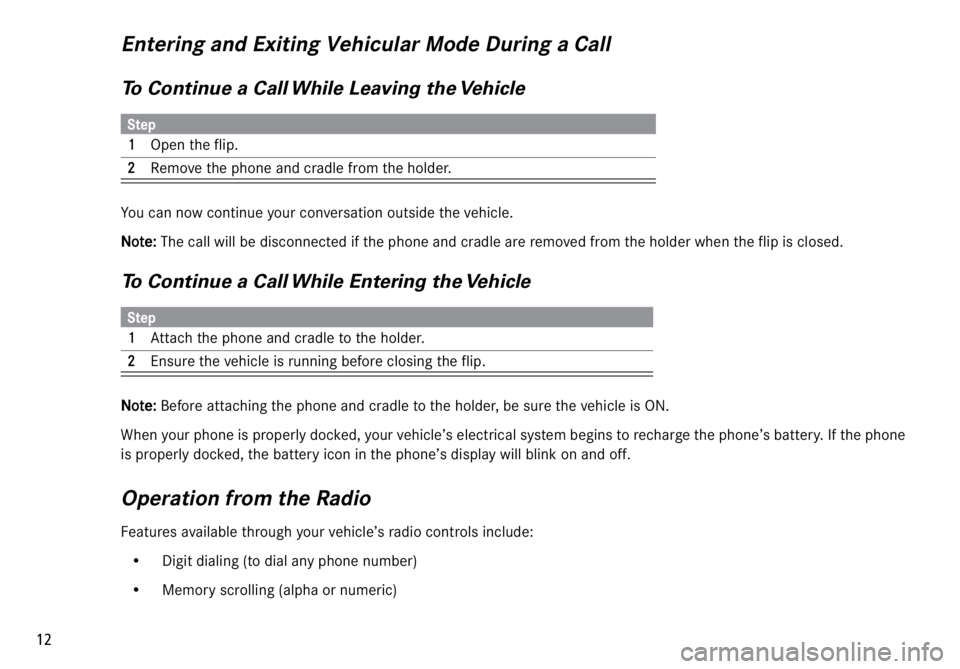
Entering and Exiting Vehicular Mode During a Call
To Continue a Call While Leaving the Vehicle
You can now continue your conversation outside the vehicle.
NN N N
oo o o
tt t t
ee e e
::: :
The call will be disconnected if the phone and cradle are removed from the holder when the flip is closed.
To Continue a Call While Entering the Vehicle
NN N N
oo o o
tt t t
ee e e
::: :
Before attaching the phone and cradle to the holder, be sure the vehicle is ON.
When your phone is properly docked, your vehicle’s electrical system begins to recharge the phone’s battery. If the phone
is properly docked, the battery icon in the phone’s display will blink on and off.
Operation from the Radio
Features available through your vehicle’s radio controls include:
• Digit dialing (to dial any phone number)
• Memory scrolling (alpha or numeric)
Step
11 1 1
Open the flip.
22 2 2Remove the phone and cradle from the holder.
Step
11 1 1
Attach the phone and cradle to the holder.
22 2 2Ensure the vehicle is running before closing the flip.