steering MERCEDES-BENZ ML320 1997 Complete Repair Manual
[x] Cancel search | Manufacturer: MERCEDES-BENZ, Model Year: 1997, Model line: ML320, Model: MERCEDES-BENZ ML320 1997Pages: 4133, PDF Size: 88.89 MB
Page 3938 of 4133

BT27.51-P-0001-01A
Thickness of friction and steel disks K3
changed
TRANSMISSION
722.6
Production breakpoint data/changes/new features
Transmission/
Steering gear
Transmission ident.
end no. as of
Type of and reason for modification
722.6
Phased in
The thickness of the friction disks has been increased by 0.5 mm and
the thickness of the steel disks reduced by 0.7mm.
This improves heat dissipation and prevents shift judder
The clearance adjustment has not changed.
Copyright DaimlerChrysler AG 28.05.2006 CD-Ausgabe G/10/04 . This WIS print-out will not be recorde
d by Modification services.
Page 1
Page 3940 of 4133
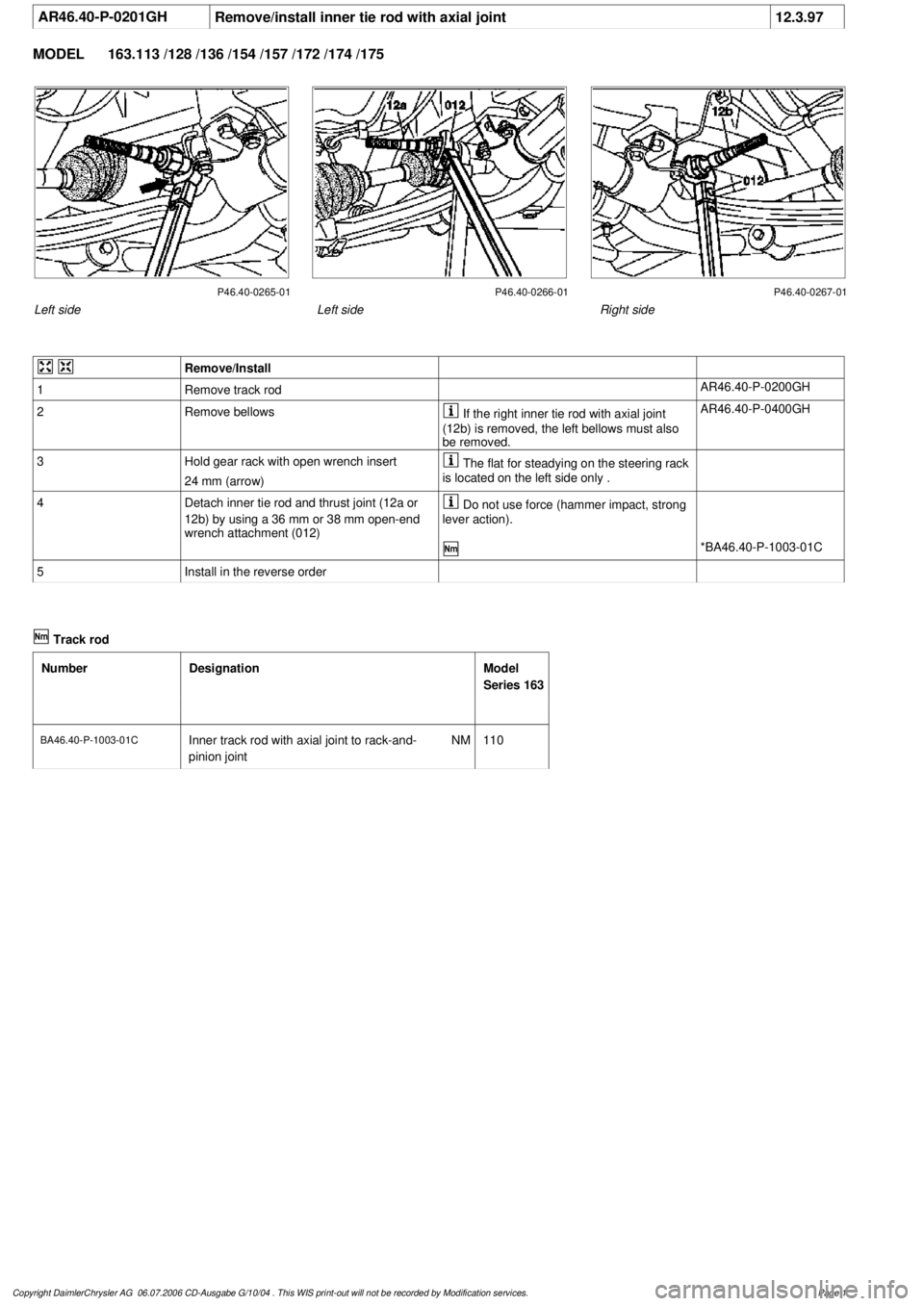
AR46.40-P-0201GH
Remove/install inner tie rod with axial joint
12.3.97
MODEL
163.113 /128 /136 /154 /157 /172 /174 /175
P46.40-0265-01 P46.40-0266-01 P46.40-0267-01
Left side
Right side
Left side
Remove/Install
1
Remove track rod
AR46.40-P-0200GH
2
Remove bellows
If the right inner tie rod with axial joint
(12b) is removed, the left bellows must also
be removed.
AR46.40-P-0400GH
3
Hold gear rack with open wrench insert
24 mm (arrow)
The flat for steadying on the steering rack
is located on the left side only .
4
Detach inner tie rod and thrust joint (12a or
12b) by using a 36 mm or 38 mm open-end
wrench attachment (012)
Do not use force (hammer impact, strong
lever action).
*BA46.40-P-1003-01C
5
Install in the reverse order
Track rod
Number
Designation
Model
Series 163
BA46.40-P-1003-01C
Inner track rod with axial joint to rack-and-
pinion joint
NM
110
Copyright DaimlerChrysler AG 06.07.2006 CD-Ausgabe G/10/04 . This WIS print-out will not be recorde
d by Modification services.
Page 1
Page 3941 of 4133
AR46.40-P-0200-02C
Pressing out and attaching track rod joint at
steering knuckle
k
Surface protection on track rod screw
connection to steering knuckle modified
BT46.40-P-0001-01A
Modification notes
24.3.99
Surface protection on track rod screw connection to
steering knuckle modified
Model 210
BT46.40-P-0001-01A
New tightening torques incorporated
*BA46.40-P-1002-01A
Track rod
Number
Designation
Model 210
BA46.40-P-1002-01A
Self-locking nut, track rod to steering
knuckle
yellow
Nm
60
silver or blue
Nm
70
Track rod
Number
Designation
Model 163
BA46.40-P-1001-01C
Self-locking nut, track rod to steering knuckle
Nm
55
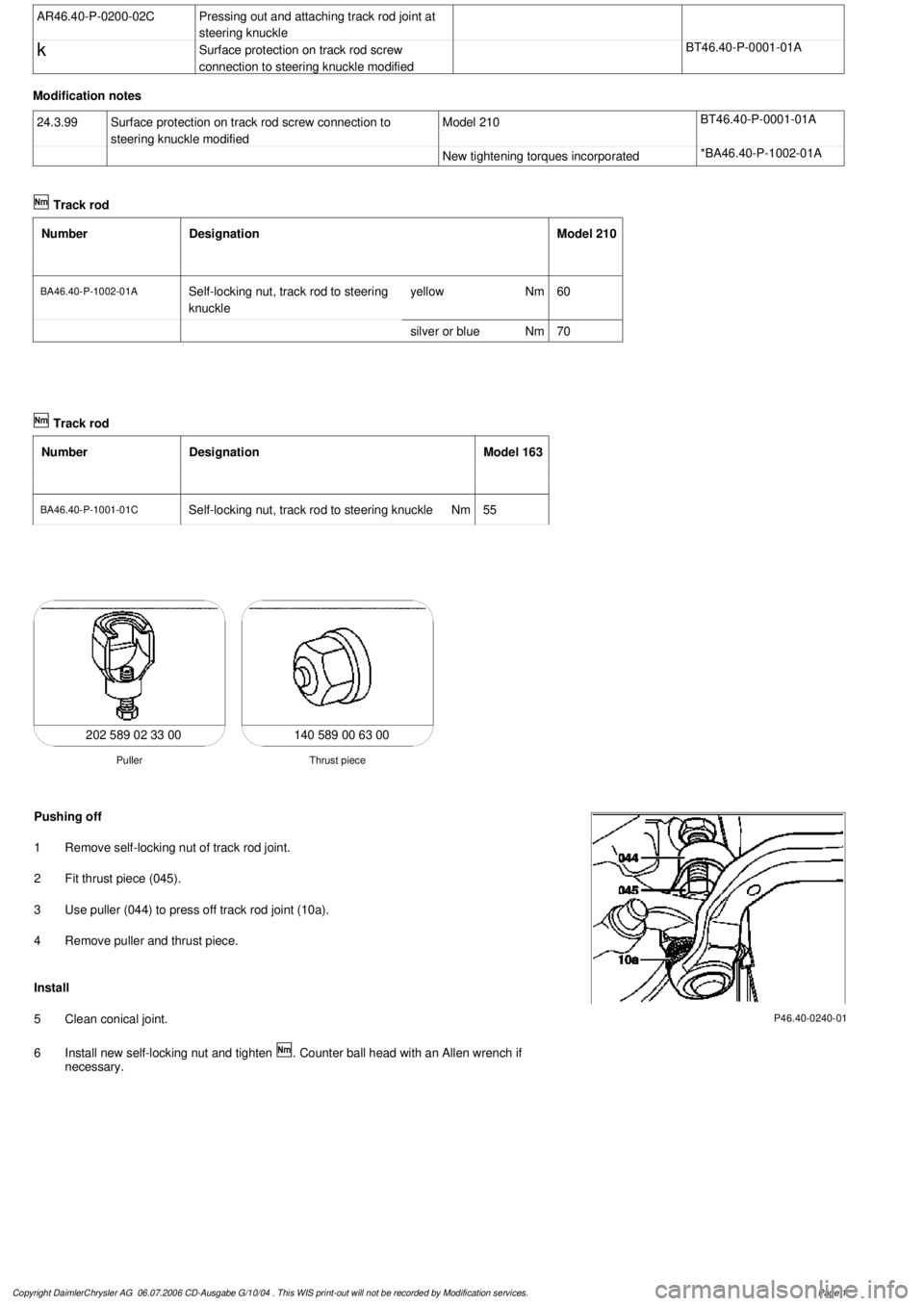
140 589 00 63 00
Thrust piece
Puller
202 589 02 33 00
P46.40-0240-01
Pushing off
1
Remove self-locking nut of track rod joint.
2
Fit thrust piece (045).
3
Use puller (044) to press off track rod joint (10a).
4
Remove puller and thrust piece.
Install
5
Clean conical joint.
6
Install new self-locking nut and tighten
. Counter ball head with an Allen wrench if
necessary.
Copyright DaimlerChrysler AG 06.07.2006 CD-Ausgabe G/10/04 . This WIS print-out will not be recorde
d by Modification services.
Page 1
Page 3942 of 4133
AR46.40-P-0200GH
Removing and installing tie rod
12.3.97
MODEL
163.113 /128 /136 /154 /157 /172 /174 /175
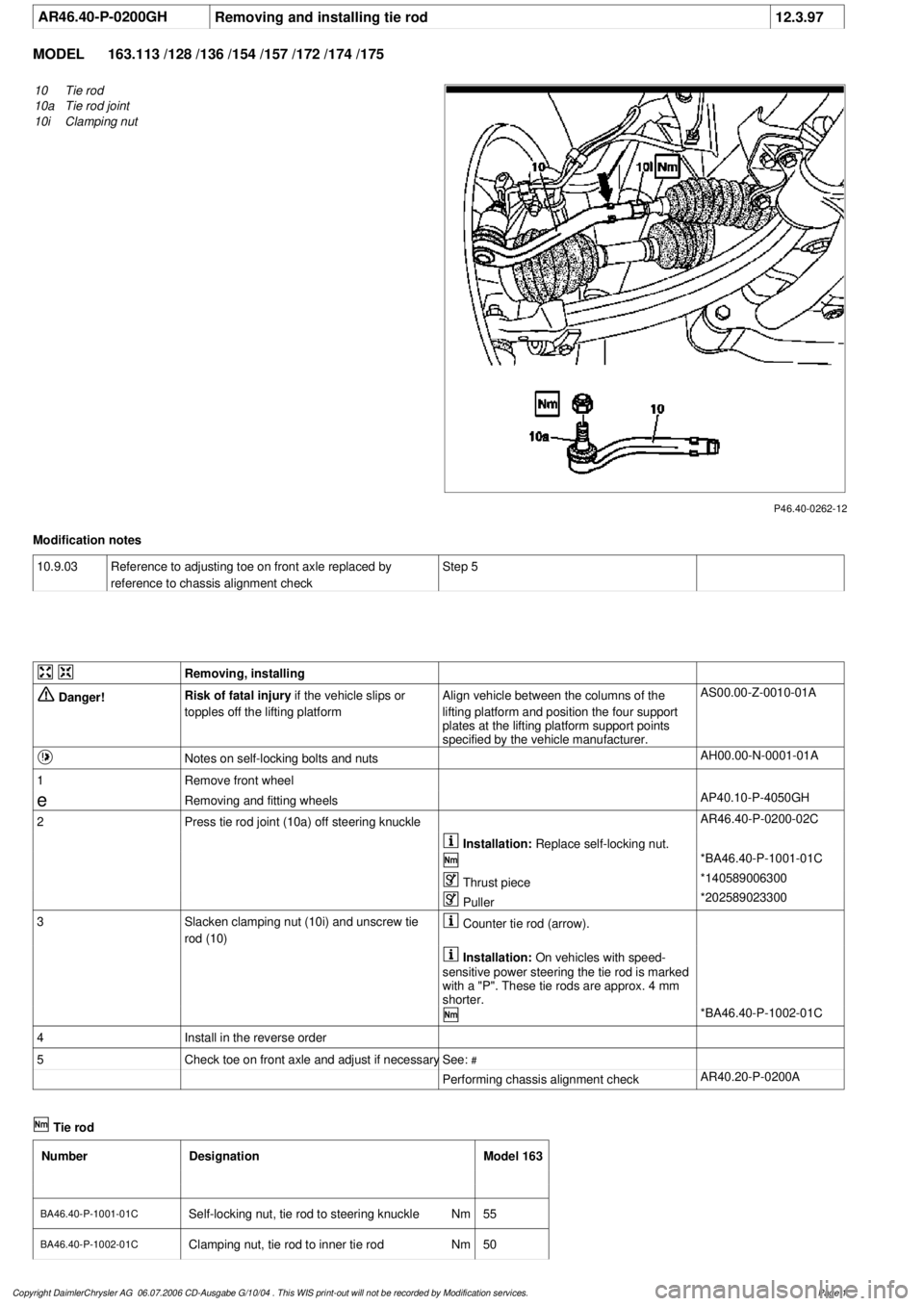
P46.40-0262-12
10
Tie rod
10a
Tie rod joint
10i
Clamping nut
Modification notes
10.9.03
Reference to adjusting toe on front axle replaced by
reference to chassis alignment check
Step 5
Removing, installing
Danger!
Risk of fatal injury
if the vehicle slips or
topples off the lifting platform
Align vehicle between the columns of the
lifting platform and position the four support
plates
at the lifting platform support points
specified by the vehicle manufacturer.
AS00.00-Z-0010-01A
Notes on self-locking bolts and nuts
AH00.00-N-0001-01A
1
Remove front wheel
e
Removing and fitting wheels
AP40.10-P-4050GH
2
Press tie rod joint (10a) off steering knuckle
AR46.40-P-0200-02C
Installation:
Replace self-locking nut.
*BA46.40-P-1001-01C
Thrust piece
*140589006300
Puller
*202589023300
3
Slacken clamping nut (10i) and unscrew tie
rod (10)
Counter tie rod (arrow).
Installation:
On vehicles with speed-
sensitive power steering the tie rod is marked
with a "P". These tie rods are approx. 4 mm
shorter.
*BA46.40-P-1002-01C
4
Install in the reverse order
5
Check toe on front axle and adjust if necessary
See:
#
Performing chassis alignment check
AR40.20-P-0200A
Tie rod
Number
Designation
Model 163
BA46.40-P-1001-01C
Self-locking nut, tie rod to steering knuckle
Nm
55
BA46.40-P-1002-01C
Clamping nut, tie rod to inner tie rod
Nm
50
Copyright DaimlerChrysler AG 06.07.2006 CD-Ausgabe G/10/04 . This WIS print-out will not be recorde
d by Modification services.
Page 1
Page 3944 of 4133
AP46.00-P-4653GH
Checking tie rod and drag link joints for play and checking rubber boots
3.5.00
MODEL
163.113 /128 /136 /154 /157 /172 /174 /175
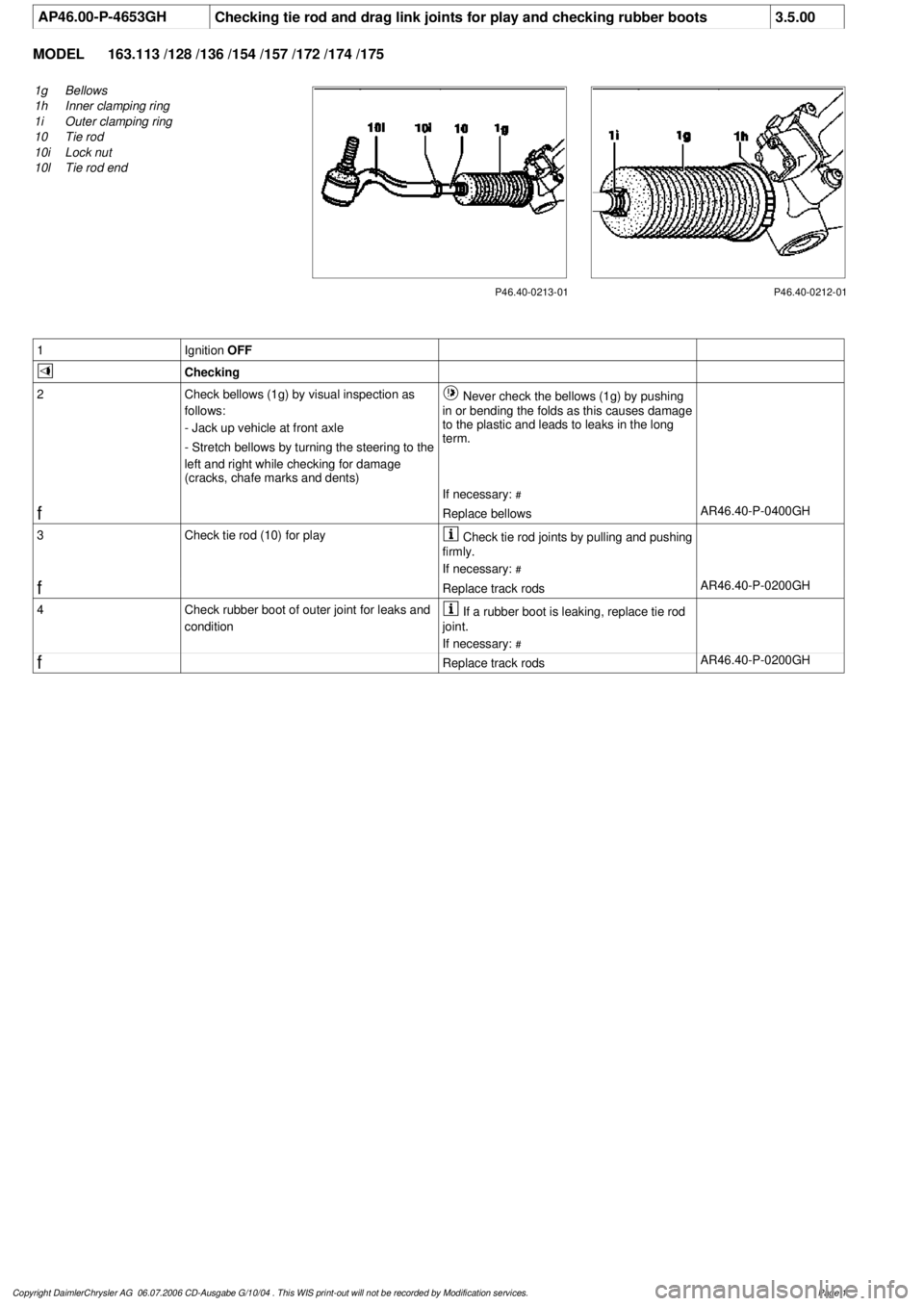
P46.40-0213-01
1g
Bellows
1h
Inner clamping ring
1i
Outer clamping ring
10
Tie rod
10i
Lock nut
10l
Tie rod end
P46.40-0212-01
1
Ignition
OFF
Checking
2
Check bellows (1g) by visual inspection as
follows:
- Jack up vehicle at front axle
- Stretch bellows by turning the steering to the
left and right while checking for damage
(cracks, chafe marks and dents)
Never check the bellows (1g) by pushing
in or bending the folds as this causes damage
to the plastic and leads to leaks in the long
term.
If necessary:
#
f
Replace bellows
AR46.40-P-0400GH
3
Check tie rod (10) for play
Check tie rod joints by pulling and pushing
firmly.
If necessary:
#
f
Replace track rods
AR46.40-P-0200GH
4
Check rubber boot of outer joint for leaks and
condition
If a rubber boot is leaking, replace tie rod
joint.
If necessary:
#
f
Replace track rods
AR46.40-P-0200GH
Copyright DaimlerChrysler AG 06.07.2006 CD-Ausgabe G/10/04 . This WIS print-out will not be recorde
d by Modification services.
Page 1
Page 3960 of 4133

AD54.30-P-5000-03A
Directly controlled display instruments
troubleshooting chart IC
Directly controlled display instruments or indicator
lamp/warning message:
D
Outside temperature indicator
D
Fuel gauge
D
Oil pressure gauge (models 129 and 140 only)
D
Left turn signal indicator lamp
D
Right turn signal indicator lamp
D
High beam indicator lamp
D
Fuel reserve indicator lamp
D
Airbag SRS indicator lamp/MIL
D
AIRBAG OFF indicator lamp (only model 163 except
I )
D
Low brake fluid level/parking brake indicator lamp (only brake
fluid direct)
(both functions via CAN on model 163)
D
Low windshield washer fluid level indicator lamp (except
models 163 and 168)
D
Low ECL indicator lamp (except models 163 and 168)
D
Generator charge indicator lamp
D
Seat belt reminder lamp
D
Seat belt/backrest lock reminder lamp
D
Exterior lamp failure indicator lamp
D
Hydraulic fluid level indicator lamp (models 202 and 210 only)
D
ADS MIL, suspension
D
Turn signal clicking
D
Seat belt reminder lamp
D
Light reminder lamp
D
Key reminder lamp
D
Soft top reminder lamp (model 170 only)
D
Steering lock warning lamp (
I )
Copyright DaimlerChrysler AG 05.06.2006 CD-Ausgabe G/10/04 . This WIS print-out will not be recorde
d by Modification services.
Page 1
Page 3966 of 4133

3
Features
This telephone system is fully integrated with your Mercedes-Benz audio system and steering wheel switches
*
. You can
scroll through the first 99 entries in your phone book and access the entire phone number memory; place, receive, and
terminate calls; change volume; and view call status (such as Ready, Dialing, Incoming Call, Call Active, No Service, Redial,
etc.). Because exact phone features are dependent on the particular audio system installed in your vehicle, detailed oper-
ation is covered in your audio system manual. Please refer to it.
Notes:
• In order for your Mercedes-Benz volume controls to work in conjunction with your Motorola phone (to change ringer
volume or adjust call volume), the vehicle must have either the engine running or the ignition key turned clockwise
to the last position before starting the engine.
• Your phone includes many new features that take additional time to initialize, resulting in increased power up/down
time. Please wait until the phone is completely powered up before using any feature from both the radio and phone
controls.
Finding Information on Phone Features
Your new Mercedes-Benz telephone operates in two modes:
•
Vehicular Mode
—when the phone is inserted and snapped into the privacy cradle in the vehicle
•
Portable Mode
—when the phone is operating as a stand alone device (NOT inserted and snapped into the privacy
cradle in the vehicle)
Most features of your new Mercedes-Benz telephone are available in both modes.
This guide contains basic information on using your phone in Vehicular Mode to place and receive calls.
* Not available on all models.
Page 3971 of 4133

8
Placing a Call Using Hands Free Operation
Hands Free operation allows you to use the phone while it is docked in the cradle. The phone audio is projected through
your vehicle’s audio system speakers. The Hands Free microphone allows both driver and passenger to engage in the con-
versation.
Step
11 1 1
Prepare the phone for Hands Free use:
• Dock the phone. (See “Switching into Vehicular Mode” on page 5.)
• Ensure the flip is closed.
22 2 2
Dial the telephone number via the radio keypad or via voice command.
*
NN N N
oo o o
tt t t
ee e e
::: :
You can enter up to 32 digits.
* Not available on all models.
33 3 3
Press Send on the radio keypad or steering wheel, or speak the voice command: “Dial.”
*
If the network is busy, you hear a fast busy signal. Your phone automatically redials over the next four minutes. When the call
goes through, your phone rings one time and connects the call.
44 4 4
Begin your conversation.
55 5 5
To end the call, press the End key on the radio keypad, steering wheel, or voice activation stalk.
*
Page 3972 of 4133

9
Placing a Call Using Handset Operation
In handset operation, the cellular phone remains in the cradle, but the cradle is removed from the holder and the phone is
held to your ear with the flip open. In this mode, passengers in the vehicle are prevented from hearing the person on the
other end of the call.
Step
11 1 1
With the phone properly docked, dial the number you are calling.
NN N N
oo o o
tt t t
ee e e
::: :
You may also dial the number with the phone out of the cradle.
If your audio system is on when you make a call, it automatically mutes to allow the person you are calling to be heard.
22 2 2
Press the Send button on the phone, radio keypad, or steering wheel
*
to initiate the call.
* Not available on all models.
33 3 3
Remove the phone and cradle from the holder, lift the phone to your ear, and begin your conversation.
NN N N
oo o o
tt t t
ee e e
::: :
Your phone will display the In Use icon while the call is active.
44 4 4
When you are finished with the call, press
O
on the phone, head unit, or steering wheel.
Page 3973 of 4133

10
Answering a Call Using Hands Free Operation
NN N N
oo o o
tt t t
ee e e
::: :
If your phone is set to silent mode while it is docked, you will not hear a hands free ring tone when you receive a call.
Answering a Call Using Privacy Mode
Step
11 1 1
Prepare the phone for Hands Free use:
aa a a
Close the flip on the phone.
bb b b
Dock the phone. (See “Switching into Vehicular Mode” on page 5.)
22 2 2
Press Send on the radio keypad or steering wheel
*
to answer the call.
* Not available on all models.
33 3 3
Speak clearly in order for the Hands Free microphone to deliver your conversation.
44 4 4
After you finish your conversation, end the call by pressing the End key on the radio keypad or steering wheel.
*
Step
11 1 1
Remove the cradle from the holder.
22 2 2
Open the flip on your phone.
33 3 3
Lift the phone to your ear.
44 4 4
Begin speaking.