turn signal MERCEDES-BENZ R-Class 2012 W251 Owner's Manual
[x] Cancel search | Manufacturer: MERCEDES-BENZ, Model Year: 2012, Model line: R-Class, Model: MERCEDES-BENZ R-Class 2012 W251Pages: 368, PDF Size: 15.19 MB
Page 8 of 368
Cargo compartment floor ................. 296
Cargo net Attaching ....................................... 261
Important safety information .........260
Cargo tie down rings ......................... 257
Car wash (care) ................................. 288
CD player/CD changer (on-board
computer) .......................................... 203
Cell phone see Mobile phone
Center console
2nd row of seats ............................ 251
Lower section .................................. 33
Upper section .................................. 32
Central locking
Automatic locking (on-board
computer) ...................................... 208
Locking/unlocking (SmartKey) ........72
Changing bulbs
High-beam headlamps ...................122
Important safety notes ..................119
License plate lighting .....................124
Low-beam headlamps ....................121
Overview of bulb types ..................120
Parking lamps ................................ 122
Removing/replacing the cover
(front wheel arch) .......................... 121
Reversing lamps ............................ 123
Side marker lamps .........................123
Standing lamps (front) ...................122
Turn signals (front) ......................... 122
Child-proof locks
Important safety notes ....................63
Rear doors ....................................... 63
Children
In the vehicle ................................... 56
Restraint systems ............................ 56
Child seat
LATCH-type (ISOFIX ) child seat
anchors ............................................ 58
Special seat belt retractor ...............58
Top Tether ....................................... 60
Cigarette lighter ................................ 266
Classification system for
occupants (OCS) Faults ............................................... 48
Operation ......................................... 44
System self-test ............................... 47Climate control
Automatic climate control (3-
zone) .............................................. 132
Controlling automatically ...............136
Cooling with air dehumidification ..135
Defrosting the windshield ..............138
Demisting the windows .................. 139
Dual-zone automatic climate
control ........................................... 131
Important safety notes ..................130
Indicator lamp ................................ 136
Notes on using automatic climate
control ................................... 131, 134
Overview of systems ......................130
Problems with cooling with air
dehumidification ............................ 136
Problem with the rear window
defroster ........................................ 139
Rear control panel .........................132
Refrigerant ..................................... 359
Setting the air distribution .............138
Setting the airflow .........................138
Setting the air vents ......................141
Setting the temperature ................137
Switching air-recirculation mode
on/off ............................................ 140
Switching on/off ........................... 134
Switching residual heat on/off ......140
Switching the MONO function on/
off .................................................. 138
Switching the rear window
heating on/off ............................... 139
Clock (on-board computer) ............... 206
Cockpit Overview .......................................... 28
see Instrument cluster
Collapsible spare wheel
Inflating ......................................... 307
see Emergency spare wheel
COMAND
see separate operating instructions
Combination switch .......................... 117
Compass Calling up ....................................... 278
Consumption statistics (on-board
computer) .......................................... 210
Convenience closing feature .............. 88
Convenience opening feature ............ 876Index
Page 13 of 368
Delayed switch-off (on-board
computer) ...................................... 208
Emergency lighting ........................119
Manual control ............................... 119
Overview ........................................ 118
Reading lamp ................................. 118
see Interior lighting
J
Jack Storage location ............................ 296
Using ............................................. 305
Jump starting (engine) ...................... 313
K
Key see SmartKey
KEYLESS-GO
Convenience closing feature ............88
Display message ............................ 236
Locking ............................................ 73
Start/Stop button .......................... 145
Starting the engine ........................147
Unlocking ......................................... 73
Key positions
KEYLESS-GO .................................. 145
SmartKey ....................................... 145
Kickdown ........................................... 153
L
Lamps see Warning and indicator lamps
Lane-change assistant
see Blind Spot Assist
Language (on-board computer) ........ 206
LATCH-type (ISOFIX) child seat
anchors ................................................ 58
Level control (display message) ...... 229
License plate lamp Changing bulbs .............................. 124
Display message ............................ 223
Lighting
see Lights
Lights
Activating/deactivating the
exterior lighting delayed switch-
off .................................................. 207
Activating/deactivating the
interior lighting delayed switch-off . 208
Automatic headlamp mode ............115
Display message ............................ 222
Driving abroad ............................... 114
Fog lamps ...................................... 116
Hazard warning lamps ...................117
High beam flasher .......................... 117
High-beam headlamps ...................117
Light switch ................................... 114
Low-beam headlamps ....................115
Parking lamps ................................ 114
Rear fog lamp ................................ 116
Switching the daytime running
lamps on/off (on-board
computer) ...................................... 206
Switching the daytime running
lamps on/off (switch) ....................115
Switching the surround lighting
on/off (on-board computer) ..........207
Turn signals ................................... 117
see Changing bulbs
see Interior lighting
Light sensor (display message) ....... 225
LIM indicator lamp Cruise control ................................ 171
DISTRONIC .................................... 175
Loading guidelines ............................ 248
Locking see Central locking
Locking (doors)
Automatic ........................................ 80
Emergency locking ........................... 81
From inside (central locking
button) ............................................. 80
Locking centrally
see Central locking
Locking verification signal (on-
board computer) ............................... 208
Low-beam headlamps Changing bulbs .............................. 121
Display message ............................ 222Index11
Page 20 of 368
Maximum load on a tire
(definition) ..................................... 345
Maximum permissible tire
pressure (definition) ....................... 344
Maximum tire load .........................337
Maximum tire load (definition) .......344
Optional equipment weight
(definition) ..................................... 345
PSI (pounds per square inch)
(definition) ..................................... 345
Replacing ....................................... 346
Service life ..................................... 323
Sidewall (definition) .......................345
Speed index (definition) .................344
Storing ........................................... 347
Structure and characteristics
(definition) ..................................... 343
Temperature .................................. 339
TIN (Tire Identification Number)
(definition) ..................................... 345
Tire bead (definition) ......................345
Tire pressure (definition) ................345
Tire pressures (recommended) ......343
Tire size (data) ............................... 347
Tire size designation, load-bearing
capacity, speed index ....................340
Tire tread ....................................... 323
Tire tread (definition) .....................345
Total load limit (definition) .............346
Traction ......................................... 338
Traction (definition) .......................345
Tread wear ..................................... 338
TWR (permissible trailer drawbar
noseweight) (definition) .................345
Uniform Tire Quality Grading
Standards ...................................... 338
Uniform Tire Quality Grading
Standards (definition) ....................343
Unladen weight (definition) ............344
Wear indicator (definition) .............346
Wheel rim (definition) ....................344
see Flat tire
Top Tether ............................................ 60
Towing Important safety guidelines ...........315
Installing the towing eye ................315
Removing the towing eye ...............316Towing a trailer
Coupling up a trailer ......................192
Decoupling a trailer .......................193
Driving tips .................................... 191
Important safety notes ..................191
Lights display message ..................222
Power supply ................................. 194
Shift range ..................................... 153
Towing away
With both axles on the ground .......316
Tow-starting
Emergency engine starting ............317
Important safety notes ..................315
Trailer
Towing ........................................... 192
Trailer loads and drawbar
noseweights ...................................... 194
Trailer towing Blind Spot Assist ............................ 191
ESP ®
................................................ 67
PARKTRONIC ................................. 186
Permissible trailer loads and
drawbar noseweights .....................194
Towing a trailer .............................. 192
Transmission
see Automatic transmission
Transporting the vehicle .................. 316
Trim pieces (cleaning instructions) . 293
Trip computer (on-board
computer) .......................................... 210
Trip meter see Trip odometer
Trip odometer
Calling up ....................................... 202
Resetting (on-board computer) ......211
Trunk
see Tailgate
Turn signals
Changing bulbs (front) ...................122
Display message ............................ 222
Switching on/off ........................... 117
see Turn signals
TWR (Tongue Weight Rating)
(definition) ......................................... 345
Type identification plate see Vehicle identification plate 18Index
Page 32 of 368
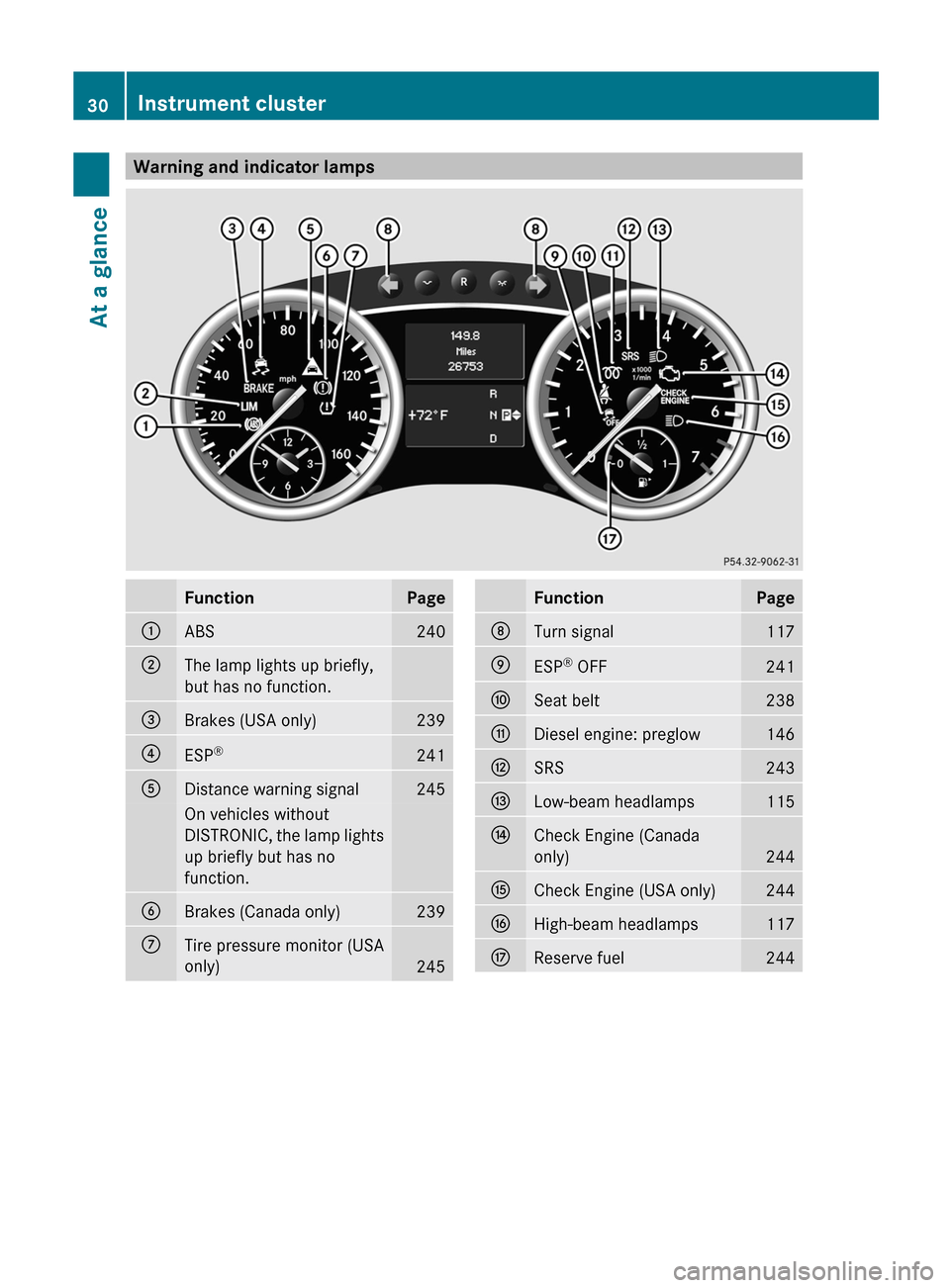
Warning and indicator lampsFunctionPage:ABS240;The lamp lights up briefly,
but has no function.=Brakes (USA only)239?ESP ®241ADistance warning signal245On vehicles without
DISTRONIC, the lamp lights
up briefly but has no
function.BBrakes (Canada only)239CTire pressure monitor (USA
only)
245
FunctionPageDTurn signal117EESP ®
OFF241FSeat belt238GDiesel engine: preglow146HSRS243ILow-beam headlamps115JCheck Engine (Canada
only)
244
KCheck Engine (USA only)244LHigh-beam headlamps117MReserve fuel24430Instrument clusterAt a glance
Page 75 of 368
Any unauthorized modification to this
device could void the user’s authority to
operate the equipment.
The product label with FCC ID and IC
certification number can be found in the
battery case of the SmartKey.
i Canada only:
This device complies with RSS-210 of
Industry Canada. Operation is subject to
the following two conditions:
1. This device may not cause interference,
and
2. this device must accept any interference
received, including interference that may
cause undesired operation of the device.
Any unauthorized modification to this
device could void the user’s authority to
operate the equipment.
The product label with FCC ID and IC
certification number can be found in the
battery case of the SmartKey.
Locking and unlocking centrally
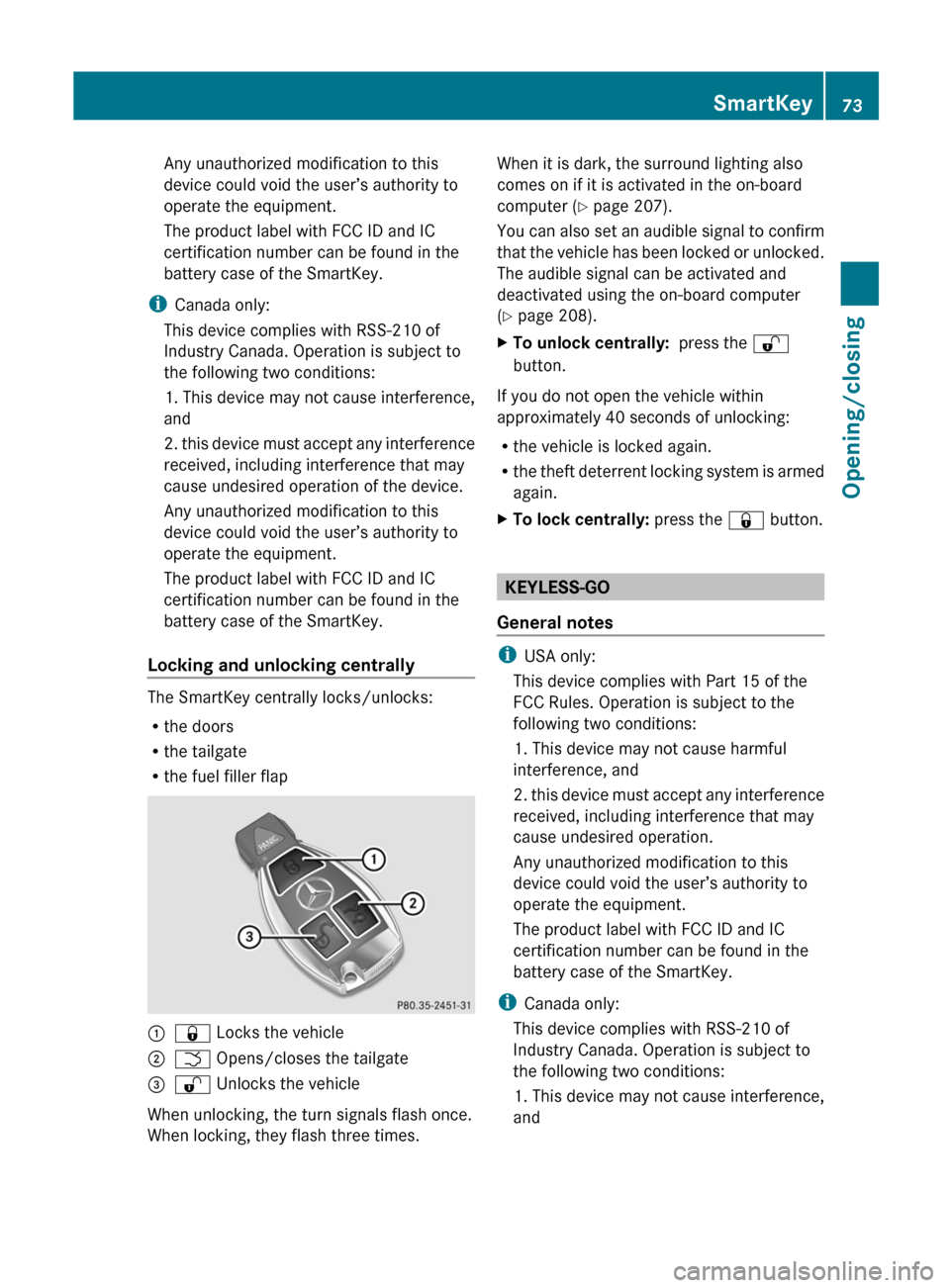
The SmartKey centrally locks/unlocks:
R the doors
R the tailgate
R the fuel filler flap
:& Locks the vehicle;F Opens/closes the tailgate=% Unlocks the vehicle
When unlocking, the turn signals flash once.
When locking, they flash three times.
When it is dark, the surround lighting also
comes on if it is activated in the on-board
computer ( Y page 207).
You can also set an audible signal to confirm
that the vehicle has been locked or unlocked.
The audible signal can be activated and
deactivated using the on-board computer
( Y page 208).XTo unlock centrally: press the %
button.
If you do not open the vehicle within
approximately 40 seconds of unlocking:
R the vehicle is locked again.
R the theft deterrent locking system is armed
again.
XTo lock centrally: press the & button.
KEYLESS-GO
General notes
i USA only:
This device complies with Part 15 of the
FCC Rules. Operation is subject to the
following two conditions:
1. This device may not cause harmful
interference, and
2. this device must accept any interference
received, including interference that may
cause undesired operation.
Any unauthorized modification to this
device could void the user’s authority to
operate the equipment.
The product label with FCC ID and IC
certification number can be found in the
battery case of the SmartKey.
i Canada only:
This device complies with RSS-210 of
Industry Canada. Operation is subject to
the following two conditions:
1. This device may not cause interference,
and
SmartKey73Opening/closingZ
Page 77 of 368
X To unlock the vehicle: touch the inner
surface of the door handle.XTo lock the vehicle: press locking
button :.XConvenience closing feature: press
locking button : for an extended period
( Y page 88).
If you pull on the handle of the tailgate, only
the cargo compartment of the vehicle is
unlocked.
Changing the settings of the locking
system
You can change the setting of the locking
system in such a way that only the driver's
door and the fuel filler flap are unlocked. This
is useful if you frequently travel on your own.
XTo change the setting: press and hold
down the % and & buttons
simultaneously for approximately six
seconds until the battery check lamp
( Y page 76) flashes twice.
i
If the setting of the locking system is
changed within the signal range of the
vehicle, pressing the & or % button
locks or unlocks the vehicle.
The SmartKey now functions as follows:
XTo unlock the driver's door: press the
% button once.XTo unlock centrally: press the %
button twice.XTo lock centrally: press the & button.The KEYLESS-GO function is changed as
follows:XTo unlock the driver's door: touch the
inner surface of the door handle on the
driver's door.XTo unlock centrally: touch the inner
surface of the door handle on the front-
passenger door or the rear door.XTo lock centrally: press the locking button
on one of the door handles.
Restoring the factory settings
XPress the % and & buttons
simultaneously for approximately six
seconds until the battery check lamp
flashes twice.
Mechanical key
General notes
If the vehicle can no longer be unlocked with
the SmartKey, use the mechanical key.
If you use the mechanical key to unlock and
open the driver's door, the anti-theft alarm
system will be triggered ( Y page 69).
There are several ways to turn off the alarm:
XTo turn the alarm off with the
SmartKey: press the % or & button
on the SmartKey.
or
XInsert the SmartKey into the ignition lock.
or
XTo deactivate the alarm with KEYLESS-
GO: press the Start/Stop button in the
ignition lock. The SmartKey must be in the
vehicle.
or
XLock or unlock the vehicle using KEYLESS-
GO. The SmartKey must be outside the
vehicle.SmartKey75Opening/closingZ
Page 116 of 368
Useful information
i This Operator's Manual describes all
models and all standard and optional
equipment of your vehicle available at the
time of publication of the Operator's
Manual. Country-specific differences are
possible. Please note that your vehicle may
not be equipped with all features
described. This also applies to safety-
related systems and functions.
i Please read the information on qualified
specialist workshops ( Y page 24).
Exterior lighting
Important safety notes
For reasons of safety, Mercedes-Benz
recommends that you drive with the lights
switched on even during the daytime. In some
countries, operation of the headlamps varies
due to legal requirements and self-imposed
obligations.
Information about driving abroad
Converting to symmetrical low beam
when driving abroad: switch the headlamps
to symmetrical low beam in countries in
which traffic drives on the opposite side of the
road to the country where the vehicle is
registered. This prevents glare to oncoming
traffic. Symmetrical lights do not illuminate
as large an area of the edge of the road.
Have the headlamps converted at a qualified
specialist workshop, e.g. an authorized
Mercedes-Benz Center, as close to the border
as possible before driving in these countries.
Converting to asymmetrical low beam
after returning: have the headlamps
converted back to asymmetrical low beam at
a qualified specialist workshop, e.g. an
authorized Mercedes-Benz Center, as soon as
possible after crossing the border again.
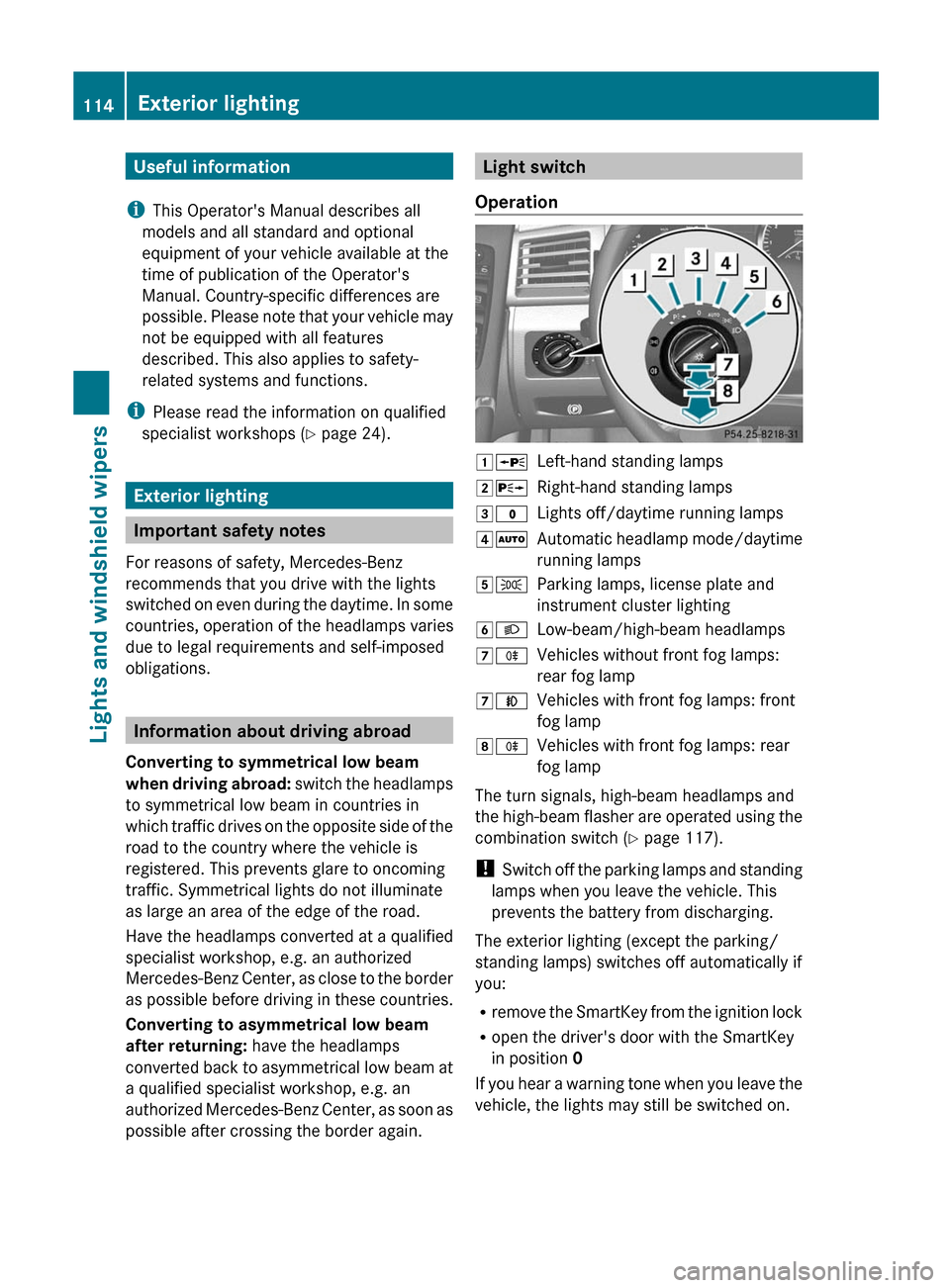
Light switch
Operation1 WLeft-hand standing lamps2XRight-hand standing lamps3$Lights off/daytime running lamps4ÃAutomatic headlamp mode/daytime
running lamps5 TParking lamps, license plate and
instrument cluster lighting6 LLow-beam/high-beam headlamps7RVehicles without front fog lamps:
rear fog lamp7 NVehicles with front fog lamps: front
fog lamp8 RVehicles with front fog lamps: rear
fog lamp
The turn signals, high-beam headlamps and
the high-beam flasher are operated using the
combination switch ( Y page 117).
! Switch off the parking lamps and standing
lamps when you leave the vehicle. This
prevents the battery from discharging.
The exterior lighting (except the parking/
standing lamps) switches off automatically if
you:
R remove the SmartKey from the ignition lock
R open the driver's door with the SmartKey
in position 0
If you hear a warning tone when you leave the
vehicle, the lights may still be switched on.
114Exterior lightingLights and windshield wipers
Page 119 of 368
XTo switch off the rear fog lamp: press the
light switch in as far as it will go.
The yellow R indicator lamp on the light
switch goes out.XTo switch off the rear fog lamp: press the
light switch in as far as it will go.
The yellow R indicator lamp in the
instrument cluster goes out.
Headlamp cleaning system
The headlamps are cleaned automatically if
the "Wipe with washer fluid" function is
operated ten times while the lights are on and
the engine is running (Y page 124). When you
switch off the ignition, the automatic
headlamp cleaning system is reset and
counting is resumed from 0.
Combination switch
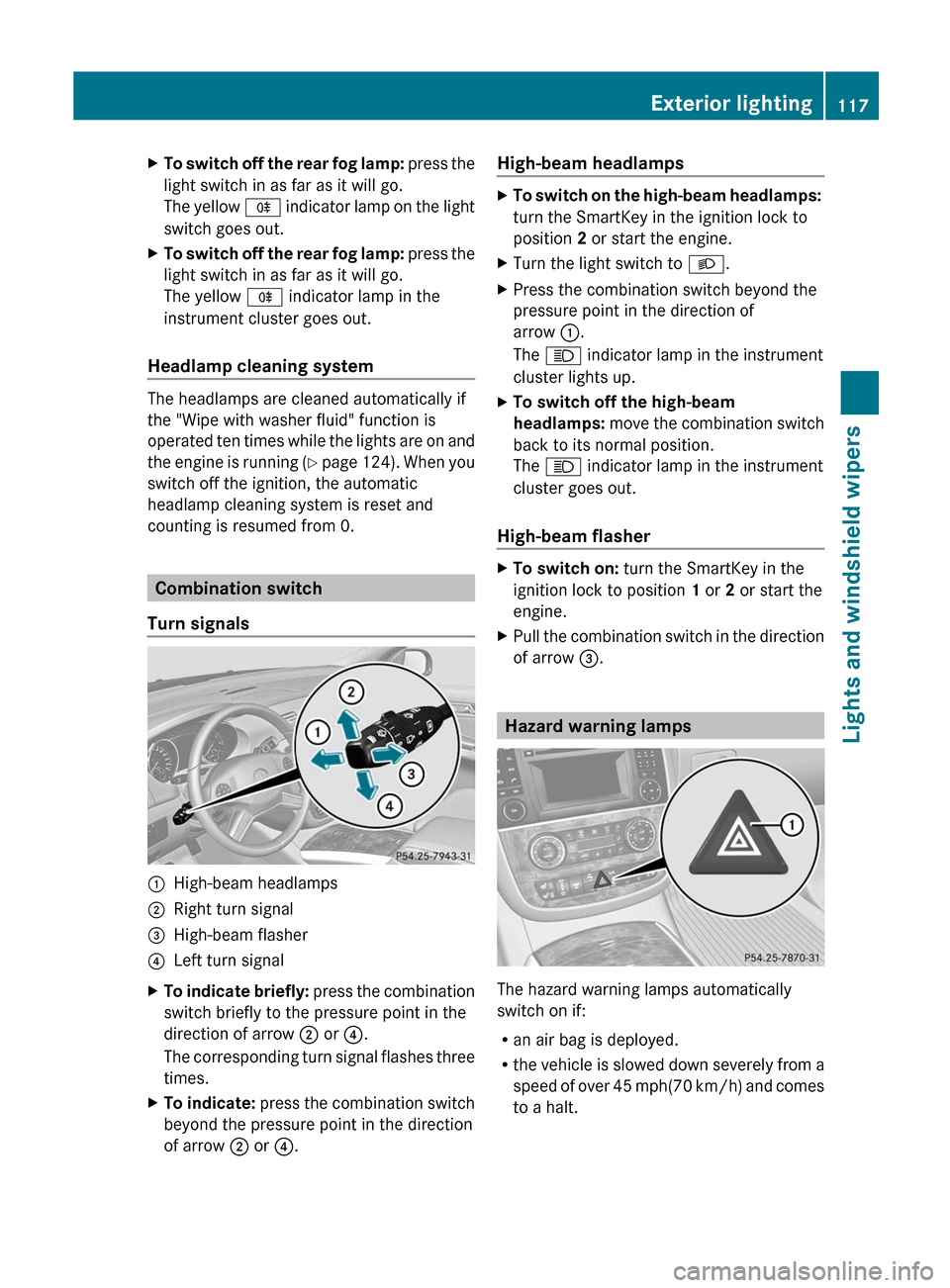
Turn signals
:High-beam headlamps;Right turn signal=High-beam flasher?Left turn signalXTo indicate briefly: press the combination
switch briefly to the pressure point in the
direction of arrow ; or ?.
The corresponding turn signal flashes three
times.XTo indicate: press the combination switch
beyond the pressure point in the direction
of arrow ; or ?.High-beam headlampsXTo switch on the high-beam headlamps:
turn the SmartKey in the ignition lock to
position 2 or start the engine.XTurn the light switch to L.XPress the combination switch beyond the
pressure point in the direction of
arrow :.
The K indicator lamp in the instrument
cluster lights up.XTo switch off the high-beam
headlamps: move the combination switch
back to its normal position.
The K indicator lamp in the instrument
cluster goes out.
High-beam flasher
XTo switch on: turn the SmartKey in the
ignition lock to position 1 or 2 or start the
engine.XPull the combination switch in the direction
of arrow =.
Hazard warning lamps
The hazard warning lamps automatically
switch on if:
R an air bag is deployed.
R the vehicle is slowed down severely from a
speed of over 45 mph (70 km/h) and comes
to a halt.
Exterior lighting117Lights and windshield wipersZ
Page 120 of 368
XTo switch on the hazard warning lamps:
press button :.
All turn signals flash. If you now switch on
a turn signal using the combination switch,
only the turn signal lamp on the
corresponding side of the vehicle will flash.XTo switch off the hazard warning
lamps: press button :.
The hazard warning lamps are deactivated
automatically if the vehicle returns to a speed
of over 6 mph(10 km/h) after a full
application of the brakes.
i The hazard warning lamps still operate if
the ignition is switched off.
Headlamps fogged up on the inside
The headlamps may fog up on the inside if
there is high atmospheric humidity.
XDrive with the headlamps switched on.
The level of moisture diminishes,
depending on the length of the journey and
the weather conditions (humidity and
temperature).
If the level of moisture does not diminish:
XHave the headlamps checked at a qualified
specialist workshop.Interior lighting
Overview of interior lighting
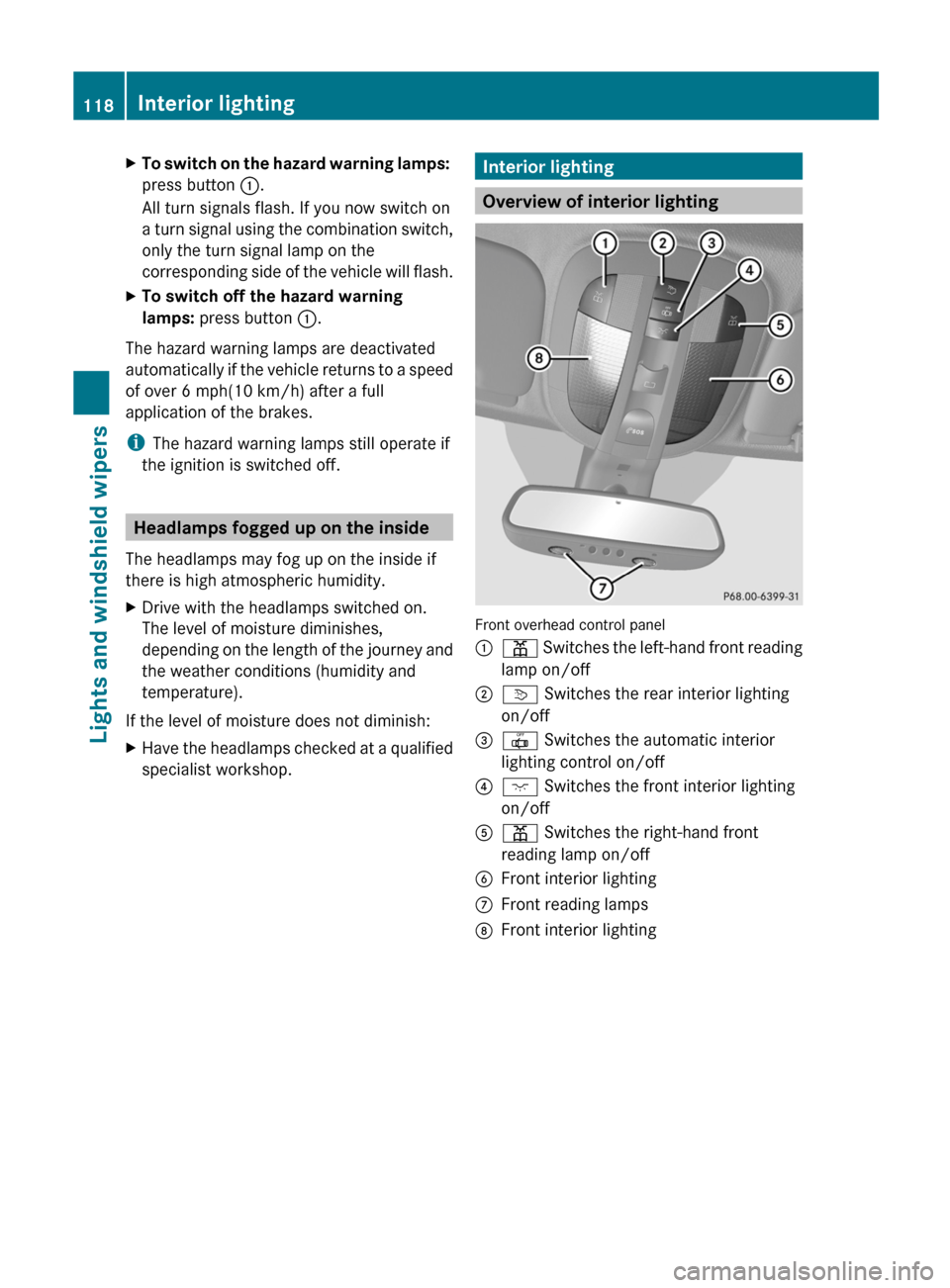
Front overhead control panel
:p Switches the left-hand front reading
lamp on/off;v Switches the rear interior lighting
on/off=| Switches the automatic interior
lighting control on/off?c Switches the front interior lighting
on/offAp Switches the right-hand front
reading lamp on/offBFront interior lightingCFront reading lampsDFront interior lighting118Interior lightingLights and windshield wipers
Page 122 of 368
GDANGER
Xenon bulbs carry a high voltage. You could
get an electric shock and be seriously or even
fatally injured if you touch the electric
contacts on Xenon bulbs. Therefore, never
remove the cover from Xenon bulbs.
Do not change Xenon bulbs yourself, but have
them replaced at a qualified specialist
workshop which has the necessary specialist
knowledge and tools to carry out the work
required.
Mercedes-Benz recommends that you use an
authorized Mercedes-Benz Center for this
purpose. In particular, work relevant to safety
or on safety-related systems must be carried
out at a qualified specialist workshop.
Bulbs and lamps are an important aspect of
vehicle safety. You must therefore make sure
that these function correctly at all times.
Have the headlamp setting checked regularly.
Other bulbs
There are bulbs other than the Xenon bulbs
that you cannot replace. Replace only the
bulbs listed (Y page 120). Have the bulbs that
you cannot replace yourself changed at a
qualified specialist workshop.
Mercedes-Benz recommends that you use an
authorized Mercedes-Benz Center for this
purpose. In particular, work relevant to safety
or on safety-related systems must be carried
out at a qualified specialist workshop.
If you require assistance changing bulbs,
consult a qualified specialist workshop.
Do not touch the glass tube of new bulbs with
your bare hands. Even minor contamination
can burn into the glass surface and reduce
the service life of the bulbs. Always use a lint-
free cloth or only touch the base of the bulb
when installing.
Only use bulbs of the correct type.
If the new bulb still does not light up, consult
a qualified specialist workshop.
Bulbs and lamps are an important aspect of
vehicle safety. You must therefore make sure
that these function correctly at all times.
Have the headlamp setting checked regularly.GWARNING
Bulbs and lamps can be very hot. You should
therefore allow them to cool down before you
change them. Otherwise, you could be burned
if you touch them.
Keep bulbs out of the reach of children.
Otherwise, they could damage the bulbs, for
example, and injure themselves.
Never use a bulb which has been dropped.
Such a bulb may break or even explode and
injure you.
Halogen bulbs are pressurized and can
explode when you change them, particularly
if they are very hot. You should therefore wear
eye protection and gloves when you are
changing them.
Overview: changing bulbs/bulb types
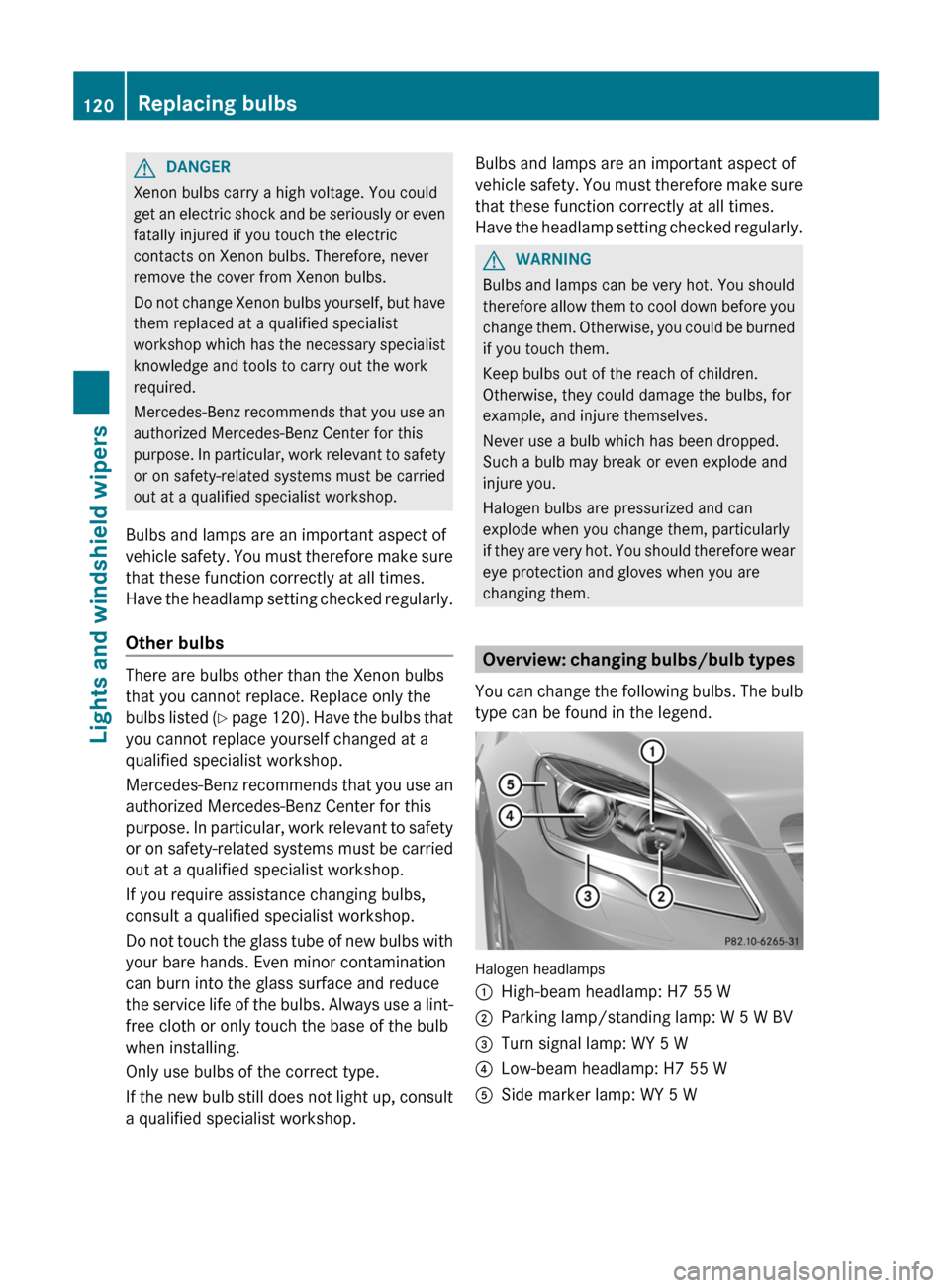
You can change the following bulbs. The bulb
type can be found in the legend.
Halogen headlamps
:High-beam headlamp: H7 55 W;Parking lamp/standing lamp: W 5 W BV=Turn signal lamp: WY 5 W?Low-beam headlamp: H7 55 WASide marker lamp: WY 5 W120Replacing bulbsLights and windshield wipers