brake MERCEDES-BENZ S-CLASS CABRIOLET 2018 Owner's Guide
[x] Cancel search | Manufacturer: MERCEDES-BENZ, Model Year: 2018, Model line: S-CLASS CABRIOLET, Model: MERCEDES-BENZ S-CLASS CABRIOLET 2018Pages: 502, PDF Size: 6.27 MB
Page 150 of 502
RStarting the engine.
In addition, they may operate vehicle equip‐
ment and become trapped.
#Ne ver lea vechildren unatte nded inthe
ve hicle.
#When leaving theve hicle, alw aysta ke
th e SmartK eywith you and lock the
ve hicle.
The electric parking brake is applied if the trans‐
mission is in position jand one of thefo llow‐
ing conditions is fulfilled:
RThe engine is switched off.
RThe seat belt tongue is not inser ted in the
seat belt buckle of the driver's seat and the
driver's door is opened.
% Toprev ent application: pull the handle of the
electric parking brake.
In thefo llowing situations, the electric parking
brake is also engaged:
RAc tive Dis tance Assist DISTRONIC is bringing
th eve hicle toast andstill.
RThe HOLD function is keeping theve hicle sta‐
tionar y.
RActive Parking Assist is keeping theve hicle
st ationar y.
This is only the case if one of thefo llowing con‐
ditions is also fulfilled:
RThe engine is switched off.
RThe seat belt tongue is not inser ted in the
seat belt buckle of the driver's seat and the
driver's door is opened.
RThere is a sy stem malfunction.
RThe po wer supply is insuf ficient.
RThe vehicle is stationary for a lengt hyperiod.
When the electric parking brake is applied, the
re dF (USA) or !(Canada) indicator lamp
appears in the instrument clus ter.
The electric parking brake is not automatically
applied if the engine is switched off bythe ECO
st art/ stop function. Electric parking brake function (releasing
automatically)
The electric parking brake is
released when the
fo llowin
g conditions are fulfilled:
RThe engine is running.
RThe seat belt tongue is inser ted into the seat
belt buckle of the driver's seat.
RThe transmission is in position hork and
yo u depress the accelera tor pedal or you
shift from transmission position jtoh or
k.
RIf th e transmission is in position k,the
trunk lid must be closed.
If th e seat belt tongue is not inser ted into the
seat belt buckle of the driver's seat, thefo llow‐
ing conditions must be fulfilled:
RThe driver's door is closed.
RYo u mo vethe transmission out of transmis‐
sion position joryou ha veprev iously
driven faster than 2 mph (3 km/h).
RIfth e transmission is in position k,the
trunk lid must be closed.
148
Driving and pa rking
Page 151 of 502
Whenthe electric parking brake is released, the
re dF (USA) or !(Canada) indicator lamp
in the instrument clus ter goes out.
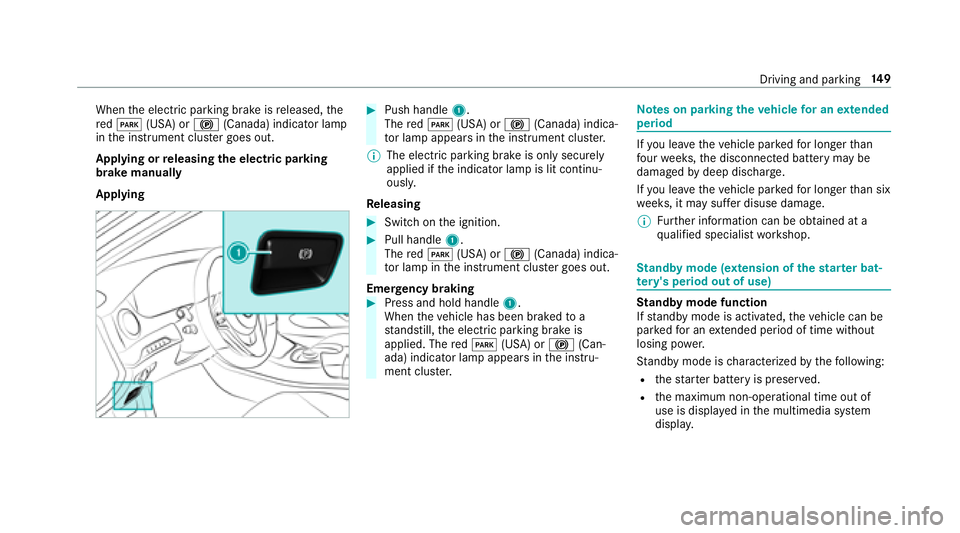
Applying or releasing the electric pa rking
brake manually
Applying#Push handle 1.
The redF (USA) or !(Canada) indica‐
to r lamp appears in the instrument clus ter.
% The electric parking brake is only securely
applied if the indicator lamp is lit continu‐
ously.
Re leasing
#Swit chon the ignition.
#Pull handle 1.
The redF (USA) or !(Canada) indica‐
to r lamp in the instrument clus ter goes out.
Emer gency braking
#Press and hold handle 1.
When theve hicle has been braked toa
st andstill, the electric parking brake is
applied. The redF (USA) or !(Can‐
ada) indicator lamp appears in the instru‐
ment clus ter.
Note s on parking theve hicle for an extended
period
If yo u lea vetheve hicle par kedfo r longer than
fo ur we eks, the disconnected battery may be
damaged bydeep dischar ge.
If yo u lea vetheve hicle par kedfo r longer than six
we eks, it may suf fer disuse dama ge.
% Further information can be obtained at a
qu alified specialist workshop.
St andby mode (extension of the star ter bat‐
te ry 's period out of use)
St andby mode function
If standby mode is activated, theve hicle can be
par kedfo r an extended pe riod of time without
losing po wer.
St andby mode is characterized bythefo llowing:
Rth est ar ter battery is preser ved.
Rthe maximum non-operational time out of
use is displa yed in the multimedia sy stem
displa y.
Driving and pa rking 14
9
Page 153 of 502
Overview of driving systems and driving
saf ety sy stems
In this section, youwill find information about
th efo llowing driving sy stems and driving saf ety
sy stems:
R360° Camera (→page 187)
RABS ( Anti-lo ckBra king Sys tem)
(→page 151)
RAc tive Dis tance Assist DISTRONIC
(→pa ge 162)
RAIR BODY CONTROL (→page 174)
RAc tive Brake Assi st(→page 155)
RAc tive Lane Keeping Assist (→page 205)
RATTENTION ASSIST (→page 195)
RBA S (Bra keAssist System) (→page 151)
REBD ( Electronic Brakefo rc eDistribution)
(→page 155)
RESP®(E lectronic Sta bility Program)
(→page 152)
RHill Start Assist (→page 173)
RHOLD function (→page 173)
RST EER CONTROL (→page 155)
RAc tive Steering Assist (→page 167)
RAc tive Parking Assist (→page 190)
RParking Assist PARKTRONI C (→page18 2)
RRe ar view camera (→page 185)
(→pag e18 7)
RCruise control (→page 159) (→pag e16 0)
RBlind Spot Assist andActive Blind Spot Assi st
(→page 202) (→page 203) (→page 202)
RTr af fic Sign Assist (→page197)
Fu nctions of ABS (Anti-lock Brake Sy stem)
ABS regulates the brake pressure in critical driv‐
ing situations:
RDuring braking, e.g. at maximum full-s top
braking or insuf ficient traction of the tires,
th e wheels are pr evented from blocking.
RVehicle steerability while braking is ensured.
If ABS inter venes when braking, youwill feel a
pulsing in the brake pedal. The pulsating brake
pedal can be an indication of hazardous road conditions and can ser
veas a reminder totake
ex tra care while driving.
Sy stem limitations
RABS is active from speeds of appr ox. 5 mph
(8 km/h).
RABS may be impaired or may not function if a
malfunction has occur red and theye l‐
low ! ABSwarning lamp lights up contin‐
uously in the instrument clus ter af terth e
engine is star ted.
Fu nction of BAS (Brake Assist Sy stem)
&
WARNING Risk of an accident caused by
a malfunction in BAS (Brake Assist Sys‐
te m)
If BA S is malfunctioning, the braking dis tance
in an eme rgency braking situation is
increased.
#Depress the brake pedal with full forc e
in emer gency braking situations. ABS
pr eve nts the wheels from locking.
Driving and parking 15
1
Page 154 of 502
BAS suppo rts yo ur eme rgency braking situation
with additional brake forc e.
If yo udepr essthe brake pedal quickl y,BA S is
acti vated:
RBA S au tomatical lyboosts the brake pres‐
sure.
RBA S can short enthe braking dis tance.
RABS pr events the wheels from locking.
The brakes will function as usual once you
re lease the brake pedal. BAS is deactivated.
Functions of ESP®(Electronic Stability Pro‐
gr am)
&
WARNING Risk of skidding if ESP®is
malfunctioning
If ESP
®is malfunctioning, ESP®cannot car ry
out vehicle stabilization. In addition, other
driving saf etysy stems are switched off.
#Drive on carefull y.
#Have ESP®checked at a qualified spe‐
cialist workshop.
&
WARNING Risk of skidding if ESP®is
deactivated
If yo u deactivate ESP
®, ESP®cannot car ry
out vehicle stabilization.
#ESP®should only be deactivated in the
fo llowing situations.
Mercedes‑AMG vehicles: observeth e no tes in
th e Supplement. Otherwise, you may failto rec‐
ognize dangers.
ESP
®can monito r and improvedriving stability
and traction in thefo llowing situations, within
ph ysical limits:
RWhen pulling away on wet or slippe ryroads.
RWhen braking.
RIn stro ng side winds when you are driving
fast erthan 50 mph (80 km/h). If
th eve hicle deviates from the direction desired
by the driver, ESP
®can stabilize theve hicle by
inter vening in thefo llowing ways:
ROne or more wheels are braked.
RThe engine output is adap ted according to
th e situation.
ESP
®is deactivated if theå ESP®OFFwarn‐
ing lamp lights up continuously in the instrument
clus ter:
RDriving stability will no longe r be improved.
RCrosswind Assist is no longer active.
RThe drive wheels could spin.
RETS/4ETS traction control is still active.
% When ESP
®is deactivated, you are still assis‐
te dby ESP®when braking.
ESP
®is inter vening if the÷ ESP®warning
lamp flashes in the instrument clus ter:
RDo not deacti vate ESP®.
ROnly depress the accelera tor pedal as far as
is necessar y.
152
Driving and pa rking
Page 155 of 502
RAdapt your drivin gst yle to suit the cur rent
ro ad and weather conditions.
It can make sense todeactivate ESP
®inthefo l‐
lowing situations toimpr ovetraction:
RWhen using snow chains.
RIn deep snow .
ROn sand or gr avel.
% Spinning the wheels results in a cutting
action which pr ovides better grip.
If th e÷ ESP
®warning lamp lights up continu‐
ousl y,ESP®is not available due toa malfunction. Observ
eth efo llowing information:
RWa rning and indicator lamps (→page 445)
RDispl aymessage s (→page 404)
ETS/4ETS (Electronic Traction Sy stem)
ETS/4E TStraction control is pa rtof ESP
®and
makes it possible topull away or accelerate on a
slippery sur face.
ETS/4ETS can impr ovetheve hicle's traction by
inter vening in thefo llowing ways:
RThe drive wheels are braked individually if
they spin.
RMore drive torque is transferred tothe wheel
or wheels with traction.
Influence of drive prog rams on ESP
®
The drive prog rams enable ESP®to adapt todif‐
fe re nt we ather and road conditions as well as
th e driver's prefer red driving style. You can
select the drive prog rams using theDY NA MIC
SELECT switch (
→page 136).
Driving and pa rking 15
3
Page 157 of 502
125mp h(2 00 km/h) when driving stra ight
ahead or cornering slightly.
RThe vehicle is stabilized bymeans of individ‐
ual brake application on one side.
Fu nction of EBD (Electronic Brake forc e Dis‐
tribution)
EBD is characterized bythefo llowing:
RMonitoring and regulating the brake pressure
on there ar wheels.
RImpr oved driving stability when braking,
especially on bends.
ST EER CONT ROL function
STEER CONTROL helps youby transmitting a
noticeable steering forc eto thesteering wheel in
th e direction requiredforve hicle stabilization.
This steering recommendation is given part icu‐
lar lyin thefo llowing situations:
RBo th right wheels or bo thleft wheels are on
a we t or slippe ryroad sur face when you
brake.
RThe vehicle starts toskid.
Sy stem limitations
ST EER CONTROL may be impaired or may not
function in thefo llowing situations:
RESP®is deactivated.
RESP®is malfunctioning.
RThe steering is malfunctioning.
If ESP
®is malfunctioning, you will beassis ted
fur ther by the electric po werst eering.
Fu nction of Active Brake Assi st
Active Brake Assi stconsist s of:
RDistance warning function
RAu tonomous braking function
RSituation-dependent braking assist ance
RVehicles with Driving Assistance Pack‐
age: Evasi veSteering Assist
Ac tive Brake Assi stcan help youto minimize the
ri sk of a collision with vehicles or pedestrians or
to reduce the ef fects of such a collision. If
Ac tive Brake Assi sthas de tected a risk of colli‐
sion, youwill bewarned visually and acousti‐
cally.
If yo udo not react tothe visual or acoustic warn‐
ing, autonomous braking can be initiated in criti‐
cal situations.
In especially critical situations, Active Brake
Assi stcan initiate autonomous braking direct ly.
In this case, the visual and acoustic warning
occurs simultaneously with the braking applica‐
tion.
If yo uappl yth e brake yourself in a critical situa‐
tion or applyth e brake during autonomous brak‐
ing, situation-dependent braking assis tance
occurs . This increases the brake pressure up to
maximum full-s top braking if necessar y.
If th e autonomous braking function or the situa‐
tion-dependent braking assis tance is trig gered,
additional pr eventive measure sfo r occupant
pr otection (PRE-SAFE®) may also be initiated, if
th eve hicle is equipped with these.
Driving and parking 15
5
Page 158 of 502
&WARNING Risk of an accident caused by
limited de tection per form ance of Active
Brake Assi st
Ac tive Brake Assi stcannot al ways clear ly
identify objects and complex traf fic situa‐
tions.
In such cases,Active Brake Assi stmight:
RGive a warning or brake without reason
RNo t give a warning or not brake
#Alw ays pay careful attention tothe traf‐
fi c situation; do not rely on Active Brake
Assi stalone. Active Brake Assi stis only
an aid. The driver is responsible for
maintaining a sui table dis tance tothe
ve hicle in front, vehicle speed and for
braking in good time.
#Be prepared tobrake or swer veif nec‐
essar y.
Also obser vethe sy stem limitations of Active
Brake Assi st.
The individual subfunctions are available in
th efo llowing speed ranges:
Distance warning function The dis
tance warning function issues a warning
at speeds:
RFr om appr oximately 4 mph (7 km/h), if your
ve hicle is critically close toave hicle or
pedestrian. An intermittent warning tone
sounds and the· distance warning lamp
lights up in the instrument clus ter.
Brake immediately or take evasive action, pr ovi‐
ded it is safe todo so and the traf fic situation
allo wsthis.
The distance warning function can aid you in thefo llowing situations with an intermit tent wa rning tone and a warning lamp:
Ve hicles tr aveling in
front St
ationary vehicles Crossing vehicles Crossing pedestrians Stationary pedes‐
trians
Ve hicles without Driv‐
ing Assis tance Pack‐
age up
toappr ox.15 5mp h
(250 km/h) up
toappr ox. 50 mph
(80 km/h) no
reaction uptoappr ox.37 mph
(60 km/h) no
reaction
Ve hicles with Driving
Assis tance Package up
toappr ox.15 5mp h
(250 km/h) up
toappr ox. 62 mph
(100 km/h) up
toappr ox. 43 mph
(70 km/h) up
toappr ox. 43 mph
(70 km/h) up
toappr ox. 43 mph
(70 km/h)
15 6
Driving and pa rking
Page 160 of 502
Canceling a brake application ofActive Brake
Assi st
Yo u can cancel a brake applic ation of Active
Brake Assi stat any time by:
RDep ressing the accelera tor pedal fully.
RRe leasing the brake pedal.
Ac tive Brake Assi stmay cancel the brake appli‐
cation when one of thefo llowing conditions is
fulfilled:
RYo u maneuver to avoidthe obs tacle.
RThere is no longer a risk of collision.
RAn obs tacle is no longer de tected in front of
yo ur vehicle.
Evasive Steering Assist (only vehicles with
Driving Assistance Package)
Evasi veSteering Assist has thefo llowing charac‐
te rist ics:
RCan de tect stationary or crossing pedes‐
trians.
RCan assist the driver with additional steering
assis tance if it de tects a swerving maneuver.
RCan be acti vatedby an abrupt steering mo ve‐
ment during a swerving maneu ver.
RCan assist during swerving and stra ightening
of theve hicle.
RCan react from a speed of appr oximately
12 mp h(2 0 km/h) up toa speed of appr ox‐
imately 43 mph(7 0 km/h).
RYo u can preve ntthe assis tance at any time
by actively steering.
&
WARNING Risk of an accident despite
Evasive Steering Assist
Evasive Steering Assist cannot always clearly
identify objects and complex traf fic situa‐
tions.
In addition, thesteering support of Evasive
St eering Assist is generally not suff icientto
av oid a collision.
In such cases Evasive Steering Assist can:
Rgive an unnecessary warning or pr ovide
assis tance
Rnot give awa rning or not pr ovide assis‐
ta nce
#Alw ays pay careful attention tothe traf‐
fi c situation; do not rely on Ev asive
St eering Assist alone.
#Be ready tobrake and take evasive
action if necessar y.
#Preve ntthe assis tance byactively steer‐
ing in non-critical driving situations.
#Drive at an appropriate speed if pedes‐
trians are close tothe path of your vehi‐
cle.
Also obser vethe sy stem limitations of Evasive
St eering Assist.
Sy stem limitations
The sy stem may be impaired or may not function
in thefo llowing situations:
RIn sno w,rain, fog, heavy spr ay, if there is
gl are, in direct sunlight or in greatlyvarying
ambient light.
RIf th e sensors are dirty, fogged up, damaged
or co vered.
15 8
Driving and pa rking
Page 161 of 502
RIfth e sensors malfunction due to otherradar
source inter fere nce, forex ample strongradar
re flections in parking garage s.
RIf a loss of tire pressure or a defective tire
has been de tected and displ ayed.
The sy stem may not react cor rectly:
RIn complex traffic situations whe reobjects
cannot always be clearly identified.
RTo pedestrians or vehicles if they mo ve
qu ickly into the sensor de tection range.
RTo pedestrians who are hidden by other
objects.
RIf th e typical outline of a pedestrian cannot
be distinguished from the bac kground.
RIfa pedestrian isnot recognized as such , e.g.
due tospecial clo thing or other objects.
ROn bends with a tight radius.
Setting Active Brake Assi st
Multimedia system:
,Vehicle.k Assistance.Active
Brake Assist
Ve hicles without Driving Assistance Pack‐
age: The settings can be made af terst arting the
ve hicle.
Ve hicles with Driving Assistance Package:
The settings can be made when the ignition is
switched on.
% It is recommended that you alw ays lea ve
Ac tive Brake Assi stactivated.
Select one of thefo llowing settings:
#Early :yo ur selection isretained when the
ve hicle is next star ted.
#Medium :yo ur selection isretained when the
ve hicle is next star ted.
#Late: your selection isretained when the
ve hicle is next star ted.
#Off:
Ve hicles without Driving Assistance Pack‐
age: The dis tance warning function and the
autonomous braking function are deactiva‐
ted. When theve hicle is next star ted, the
middle setting is auto matically selected.
Ve hicles with Driving Assistance Pack‐
age: The dis tance warning function and the
autonomous braking function are deactiva‐
te d. Evasive Steering Assist is una vailable.
When the ignition is next star ted, the middle
setting is selected automatically and Evasive
St eering Assist is available.
% When Active Brake Assi stis deactivated, the
æ symbol appears inthe assis tance
graphic in the multifunction displa y.
Speed control cruise control
Function of cruise control
Cruise cont rol accelerates and brakes theve hi‐
cle automatically in order tomaintain a pr evi‐
ously stored speed.
If yo u accelerate toove rtake, forex ample, the
st ored speed is not dele ted. If youre mo veyour
fo ot from the accelerator pedal af terove rtaking,
cruise control will resume speed regulation back
to thestored speed.
Driving and parking 15
9
Page 162 of 502
Cruise cont rol is operated using the cor respond‐
ing steering wheel buttons. You can store any
ro ad speed abo ve15 mp h (20 km/h) up tothe
maximum speed.
If yo ufa ilto adapt your drivin gst yle, cruise con‐
trol can neither reduce therisk of an accident
nor override the la wsof ph ysics. It cannot take
into account road, weather or traf fic conditions.
Cruise control is only an aid. You are responsible
fo rth e dis tance totheve hicle in front, forve hi‐
cle speed, for braking in good time and forst ay ‐
ing in lane.
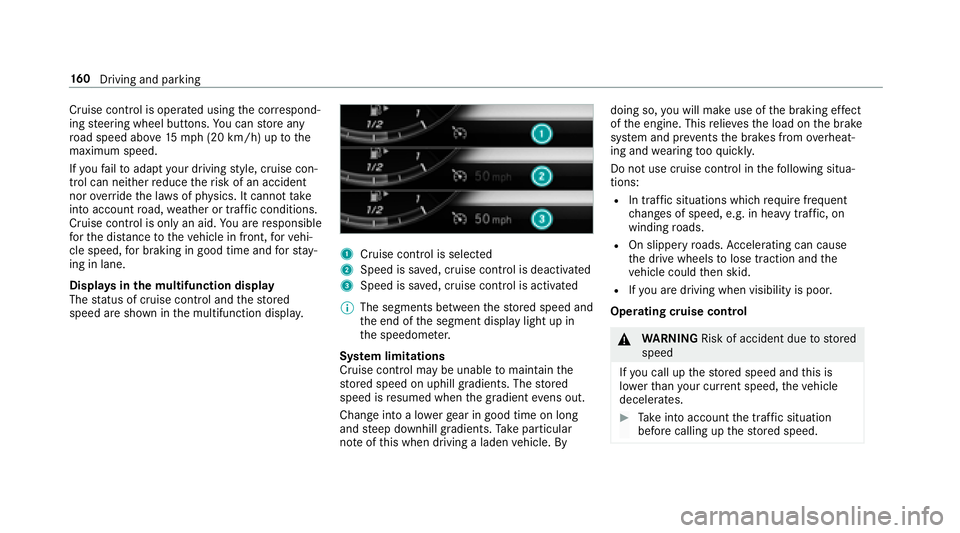
Displa ysinthe multifunction display
The status of cruise control and thestored
speed are shown in the multifunction displa y.
1Cruise cont rol is selecte d
2Speed is sa ved, cruise control is deactivated
3Speed is sa ved, cruise control is activated
% The segments between thestored speed and
th e end of the segment display light up in
th e speedome ter.
Sy stem limitations
Cruise control may be unable tomaintain the
st ored speed on uphill gradients. The stored
speed is resumed when the gradient evens out.
Change into a lo werge ar in good time on long
and steep downhill gradients. Take particular
no te ofthis when driving a laden vehicle. By doing so,
youwill make use of the braking ef fect
of the engine. This relie vesth e load on the brake
sy stem and pr events the brakes from overheat‐
ing and wearing tooqu ickl y.
Do not use cruise control in thefo llowing situa‐
tions:
RIn traf fic situations whi chrequ ire frequent
ch anges of speed, e.g. in heavy traf fic, on
winding roads.
ROn slippery roads. Accelerating can cause
th e drive wheels tolose traction and the
ve hicle could then skid.
RIfyo u are driving when visibility is poor.
Ope rating cruise control
&
WARNING Risk of accident due tostored
speed
If yo u call up thestored speed and this is
lo we rth an your cur rent speed, theve hicle
decelerates.
#Ta ke into account the tra ffic situation
before calling up thestored speed.
16 0
Driving and pa rking