ECU MERCEDES-BENZ S-CLASS CABRIOLET 2018 Service Manual
[x] Cancel search | Manufacturer: MERCEDES-BENZ, Model Year: 2018, Model line: S-CLASS CABRIOLET, Model: MERCEDES-BENZ S-CLASS CABRIOLET 2018Pages: 502, PDF Size: 6.27 MB
Page 254 of 502
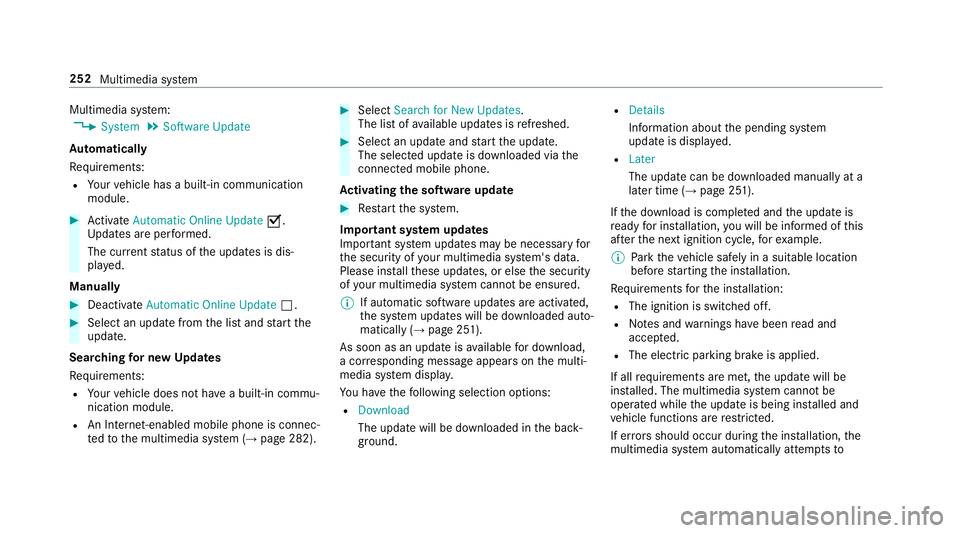
Multimedia system:
,System.Software Update
Au tomatically
Re quirements:
RYour vehicle has a built-in communication
module.
#Ac tivate Automatic Online Update O.
Up dates are per form ed.
The cur rent status of the updates is dis‐
pla yed.
Manually
#Deactivate Automatic Online Update ª.
#Select an update fromthe list and start the
update.
Search ingfor new Updates
Re quirements:
RYour vehicle does not ha vea built-in commu‐
nication module.
RAn Inte rnet-enabled mobile phone is connec‐
te dto the multimedia sy stem (→page 282).
#Select Search for New Updates.
The list of available updates is refreshed.
#Select an update and start the update.
The selected update is downloaded via the
connected mobile phone.
Ac tivating the so ftwa reupdate
#Restart the sy stem.
Important sy stem upda tes
Impor tant sy stem updates may be necessary for
th e security of your multimedia sy stem's data.
Please ins tallth ese updates, or else the security
of your multimedia sy stem cannot be ensured.
% If automatic software updates are activated,
the sy stem updates will be downloaded auto‐
matically (
→page 251).
As soon as an update is available for download,
a cor responding message appears onthe multi‐
media sy stem displa y.
Yo u ha vethefo llowing selection options:
RDownload
The update will be downloaded in the back‐
ground.
RDetails
Information about the pending sy stem
update is displa yed.
RLater
The update can be downloaded manually at a
later time (
→page 251).
If th e download is comple ted and the update is
re ady for ins tallation, youwill be informed of this
af te rth e next ignition cycle, forex ample.
% Park theve hicle safely in a suitable location
before starting the ins tallation.
Re quirements forth e ins tallation:
RThe ignition is switched off.
RNo tes and warnings ha vebeen read and
accep ted.
RThe elect ric park ing brake is applied.
If all requirements are met, the update will be
ins talled. The multimedia sy stem cannot be
operated while the update is being ins talled and
ve hicle functions are restricte
d.
If er rors should occur during the ins tallation, the
multimedia sy stem automatically attem ptsto
252
Multimedia sy stem
Page 284 of 502
This could also causeyouto lose control of
th eve hicle.
Only operate this equipment when theve hi‐
cle is stationar y.
You must observ eth e legal requ irements forth e
country in whi chyou are cur rently driving when
operating mobile communication equipment in
th eve hicle.
Fu rther information can be obtained from an
authorized Mercedes-Benz Center or at: http://
www.mercedes-benz.com/connect.
Information on telephony
The following situations can lead tothe call
being disconnected while theve hicle is in
motion:
Rth ere is insuf ficient network co verage inthe
area
Ryo u mo vefrom one GSM or MUST transmit‐
te r/receiver area (cell) into ano ther and no
communication channels are free
Rthe SIM card used is not compatible with the
network available
Ra mobile phone with "Twin card" is logged
into the network with the second SIM card at
th e same time
HD Voice
®
RTo impr ovevoice quality, the multimedia sys‐
te m supports telephone calls in HD Voice®.
RIn order touse this function, the mobile
phones and the mobile phone network pro‐
vider of the person you are calling must sup‐
port HD Voice
®.
Depending on thequ ality of the connection, the
vo ice quality may fluctuate.
Connecting a mobile phone (Blu etoo th
®tel‐
ephony)
Re quirements:
RBlue tooth®is activated on the mobile phone
(see the manufacturer's operating instruc‐
tions).
RBlue tooth®is activated on the multimedia
sy stem (→page 244). Mul
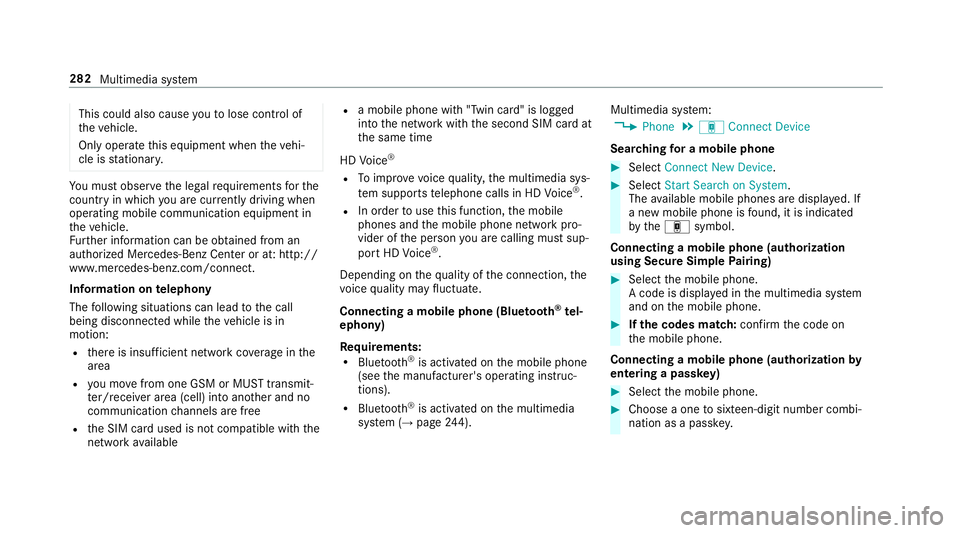
timedia sy stem:
,Phone.á Connect Device
Sear ching for a mobile phone
#Select Connect New Device .
#SelectStart Search on System .
The available mobile phones are displa yed. If
a new mobile phone is found, it is indicated
by theá symbol.
Connecting a mobile phone (authorization
using Secure Simple Pairing)
#Select the mobile phone.
A code is displa yed in the multimedia sy stem
and on the mobile phone.
#If th e codes match: confirm the code on
th e mobile phone.
Connecting a mobile phone (authorization by
entering a passk ey)
#Select the mobile phone.
#Choose a one tosixteen-digit number combi‐
nation as a passk ey.
282
Multimedia sy stem
Page 297 of 502
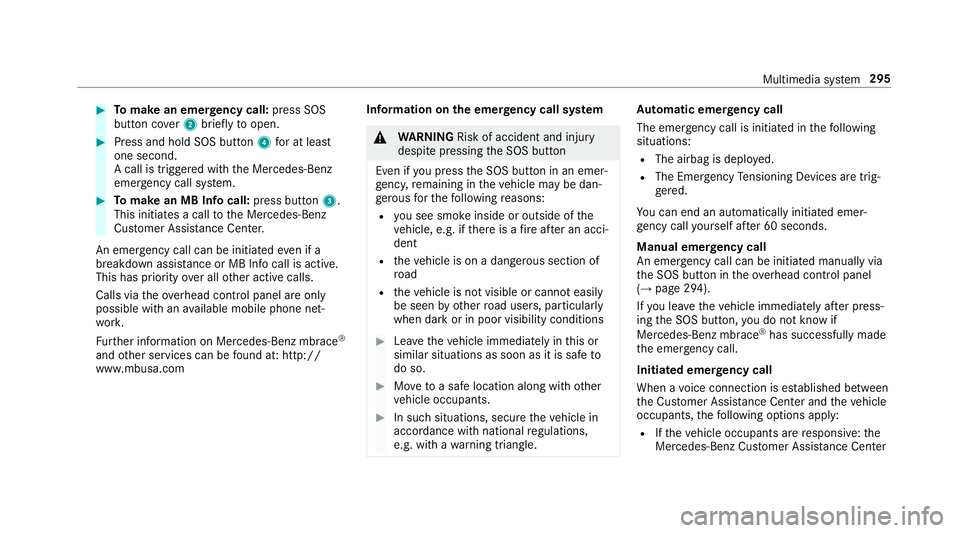
#Tomake an eme rgency call: press SOS
button co ver2 briefly toopen.
#Press and hold SOS button 4for at least
one second.
A call is triggered with the Mercedes-Benz
emer gency call sy stem.
#To make an MB In focall: press button 3.
This initiates a call tothe Mercedes-Benz
Cus tomer Assis tance Center.
An emergency call can be initia tedeve n if a
breakdown assist ance or MB Infocall is active.
This has priority over all other active calls.
Calls via theove rhead control panel are only
possible with an available mobile phone net‐
wo rk.
Fu rther information on Mercedes-Benz mbrace
®
and other services can be found at: http://
www .mbusa.com Inf
ormation onthe emer gency call sy stem
&
WARNING Risk of accident and injury
despite pressing the SOS button
Even if youpr ess the SOS button in an emer‐
ge ncy, remaining in theve hicle may be dan‐
ge rous forth efo llowing reasons:
Ryo u see smo keinside or outside of the
ve hicle, e.g. if there is a fire afte r an acci‐
dent
Rth eve hicle is on a dangerous section of
ro ad
Rtheve hicle is not visible or cannot easily
be seen by otherroad users, particular ly
when dark or in poor visibility conditions
#Lea vetheve hicle immediately in this or
similar situations as soon as it is safe to
do so.
#Mo vetoa safe location along with other
ve hicle occupants.
#In such situations, secure theve hicle in
accordance with national regulations,
e.g. with a warning triangle.
Au tomatic eme rgency call
The emer gency call is initia ted in thefo llowing
situations:
RThe airbag is deplo yed.
RThe Emer gency Tensioning Devices are trig‐
ge red.
Yo u can end an automatically initiated emer‐
ge ncy call yourself af ter 60 seconds.
Manual emer gency call
An emer gency call can be initia ted manually via
th e SOS button in theove rhead control panel
(
→page 294).
If yo u lea vetheve hicle immediately af ter press‐
ing the SOS button, you do not kn owif
Mercedes-Benz mbrace
®has successfully made
th e emer gency call.
Initiated eme rgency call
When a voice connection is es tablished between
th e Cus tomer Assis tance Center and theve hicle
occupants, thefo llowing options apply:
RIf th eve hicle occupants are responsive: the
Mercedes-Benz Cus tomer Assis tance Center
Multimedia sy stem 295
Page 354 of 502
RThe jumper/charging cable must not come
into contact with any parts which may move
when the engine is running.
RAlw ays make sure that nei ther you nor the
battery is elect rostatically charge d.
RKe ep away from fire and open flames.
RDo not lean overth e batter y.
RWhencharging: only use battery charge rs
te sted and appr oved byMercedes-Benz, and
please read the battery charge r's operating
instructions before charging the batter y.
Obser vethe additional following points during
st arting assis tance:
RSt arting assis tance may only be pr ovided
using batteries with a nominal voltage of
12 V.
RThe vehicles must not touch.
RGa soline engine: onlyaccept starting assis‐
ta nce if the engine and exhaust sy stem are
cold.
#Secure theve hicle byapplying the electric
parking brake.
#Au tomatic transmission: shiftthe transmis‐
sion toposition B.
#Make sure that the ignition and all electrical
consumers are switched off.
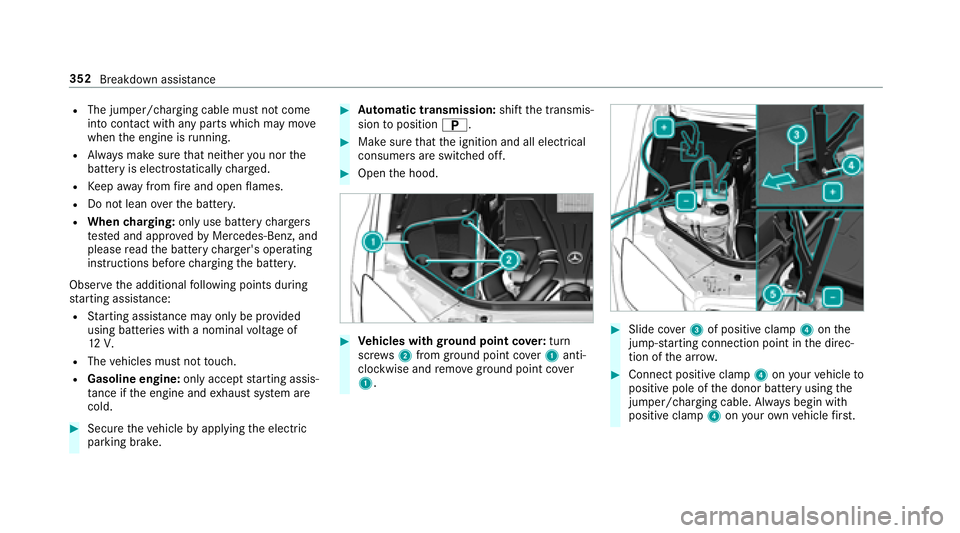
#Open the hood.
#Ve hicles with ground point co ver:tur n
sc rews 2 from ground point co ver1 anti-
clockwise and remo veground point co ver
1.#Slide co ver3 of positive clamp 4onthe
jump-s tarting connection point in the direc‐
tion of the ar row.
#Connect positive clamp 4onyour vehicle to
positive pole of the donor battery using the
jumper/charging cable. Alw ays begin with
positive clamp 4onyour ow nve hicle firs t.
352
Breakdown assist ance
Page 358 of 502
#Make surethat thesteering wheel can
mo vefreely, before towing theve hicle
aw ay.
* NO
TEDama gedue toexcessive tracti ve
po we r
Ifyo upull away sharpl y,the tractive po wer
may be too high and theve hicles could be
damaged.
#Pull away slowly and smoo thly.
Loading the vehicle for transport
#Obser vethe no tes on towing away
(→page 354).
#Connect theto w bar totheto wing eyeto
load theve hicle.
#Shift the automatic transmission toposition
i.
% The automatic transmission may be loc ked
in position jintheeve nt of damage tothe
electrics. Toshift toi, pr ovide the on- board electrical sy
stem with po wer
(
→page 350).
#Load theve hicle onto the transpor ter.
#Shift the automatic transmission toposition
j.
#Only secure theve hicle bythe wheels.
Ve hicles with ADS PLUS (Adaptive Damping
Sy stem PLUS)
&
WARNING Risk of an accident when
transporting vehicles with Adaptive
Damping Sy stem PLUS
The reduced damping forc es on theve hicle
being transpor ted can cause theve hicle/
trailer combination tostart toswing.
As a result, when transporting vehicles with
th eAd aptive Damping Sy stem PLUS, the
ve hicle/trailer combination may start toskid.
Consequentl y,yo u could lose cont rol of your
ve hicle.
#When transporting, ensure that:RThe vehicle has been loaded onto
th e transpor ter cor rectly
RThe vehicle is secured at all four
wheels with suitable tensioning
st ra ps
RThe maximum permissible speed of
35 mph(6 0 km/h) is not exceeded
when transporting
* NO
TEDama getotheve hicle from secur‐
ing it incor rectly
#Af ter loading, theve hicle must be
secured on all four wheels. Otherwise,
th eve hicle could be damaged.
#A minimum dis tance of 4 in (10 cm)
up wa rds and 8 in (20 cm) down wards
must be kept tothe transport platform.
%
Transport le vel is not available forth efo llow‐
ing vehicles:
RMercedes‑AMG vehicles
RVe hicles with MAGIC BODY CONTROL
356
Breakdown assis tance
Page 361 of 502
Electrical fuses
Notes on electrical fuses
&
WARNING Risk of accident and injury
due to ov erloaded lines
If yo u man ipulate orbridg e afaulty fuse or if
yo ure place it with a fuse with a higher
amperage, the electric line could be overloa‐
ded.
This could result in a fire .
#Alw aysre place faulty fuses with speci‐
fi ed new fuses conta iningthe cor rect
amperage.
* NO
TEDama gecaused byincor rect fuses
Incor rect fuses may cause damage toelectri‐
cal components or sy stems.
#Only use Mercedes-Benz appr oved
fuses with the cor rect fuse rating.
Blown fuses must bereplaced with fuses of the
same rating, which you can recognize bythe
color and fuse rating. The fuse ratings are li sted in
the fuse assignment diagram. The fuse assign‐
ment diagram is in theve hicle document wallet.
* NO
TEDama geor malfunctions caused
by moisture
Moisture may cause dama getothe electrical
sy stem or cause it tomalfunction.
#When the fuse box is open, make sure
th at no moisture can enter the fuse
box.
#When closing the fuse box, make sure
th at the seal of the lid is positioned cor‐
re ctly on the fuse box.
Ifth e newly inser ted fuse also blo ws, ha vethe
cause traced and rectified at a qualified special‐
ist workshop, e.g. an authorized Mercedes-Benz
Center.
Ensure thefo llowing before replacing a fuse:
RThe vehicle is secured against rolling away.
RAll electrical consumers are switched off.
RThe ignition is switched off. The electrical fuses are located in
thefo llowing
fuse bo xes:
RFu se box in the engine compartment on the
driver's side (→page 359)
RFu se box on the driver's side of the dash‐
board (→page 361)
RFu se box in the front-passen gerfo ot we ll
(→page 361)
RFu se box in the trunk on theright-hand side
of theve hicle, when vie wed in the direction
of tra vel (
→page 361)
Opening and closing the fuse box in the
engine compa rtment
Requ irements:RObser vethe no tes on electrical fuses
(→page 359).
RHa ve thefo llowing tools readily available:
-A dry clo th
-A screwdriver
Breakdown assis tance 359
Page 368 of 502
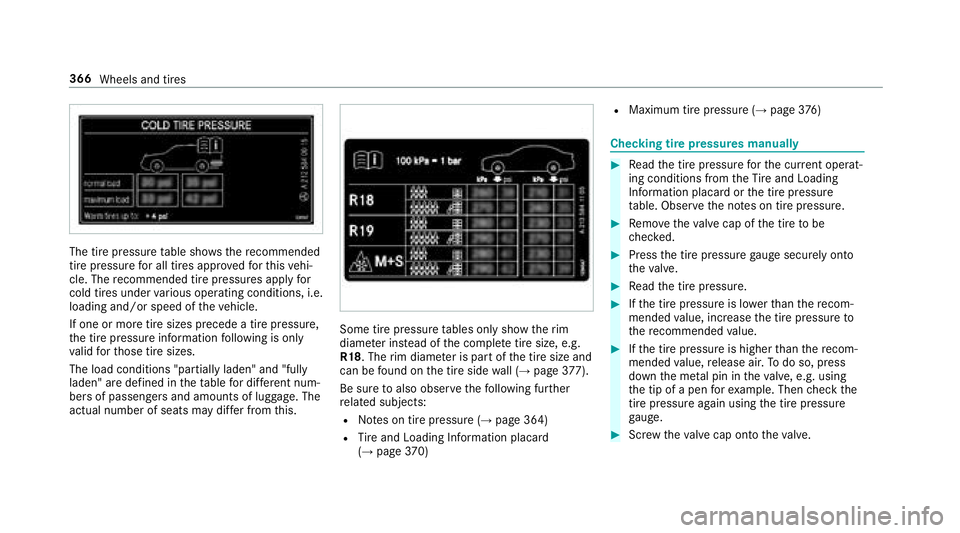
The tire pressuretable sho ws there commended
tire pressure for all tires app rove dfo rth is vehi‐
cle. The recommended tire pressures apply for
cold tires under various operating conditions, i.e.
loading and/or speed of theve hicle.
If one or more tire sizes precede a tire pressure,
th e tire pressure information following is only
va lid forth ose tire sizes.
The load conditions "partially laden" and "fully
laden" are defined in theta ble for dif fere nt num‐
be rs of passengers and amounts of luggage. The
actual number of seats may dif fer from this.
Some tire pressure tables only show therim
diame ter ins tead of the comple tetire size, e.g.
R18 . The rim diame ter is part of the tire size and
can be found on the tire side wall (
→page 377).
Be sure toalso observ eth efo llowing fur ther
re lated subjects:
RNo tes on tire pressure (→page 364)
RTire and Loading Info rmation placard
(→page 370)
RMa ximum tire pressure (→page 376)
Che cking tire pressures manually
#Re ad the tire pressure forth e cur rent operat‐
ing conditions from theTire and Loading
Info rmation placard or the tire pressure
ta ble. Obser vethe no tes on tire pressure.
#Re mo vetheva lve cap of the tire tobe
ch ecked.
#Press the tire pressure gauge securely onto
th eva lve.
#Re ad the tire pressure.
#Ifth e tire pressure is lo werth an there com‐
mended value, inc rease the tire pressure to
th ere commended value.
#Ifth e tire pressure is higher than there com‐
mended value, release air. Todo so, press
down the me tal pin in theva lve, e.g. using
th e tip of a pen forex ample. Then check the
tire pressure again usingthe tire pressure
ga uge.
#Sc rew theva lve cap onto theva lve.
366
Wheels and tires
Page 383 of 502
these are ins talled on theve hicle, but does not
include passengers or luggage.
Maximum tire load: the maximum tire load is
th e maximum permissible weight in kilog rams or
lbs for which a tire is appr oved.
Maximum permissible tire pressure: maxi‐
mum permissible tire pressure for one tire.
Maximum load on one tire: maximum load on
one tire. This is calculated bydividing the maxi‐
mum axle load of one axle bytwo.
PSI (pounds per square in ch):standard unit of
measurement for tire pressure .
Aspect ratio: ratio between tire height and tire
width in pe rcent.
Ti re pressure: pressure inside the tire applying
an outward forc eto eve rysquare inch of the tire.
The tire pressure is specified in pounds per
square inch (psi), in kilopascals (kPa) or in bar.
The tire pressure should only be cor rected when
th e tires are cold.
Cold tire pressure: the tires are cold when the
ve hicle has been par kedfo r at least 3 hours without direct sunlight on
the tires or theve hicle
has been driven for less than 1 mile (1.6 km).
Ti re contact sur face: the part of the tire that
comes into con tact wi th thero ad.
Ti re bead: the purpose of the tire bead is to
ensure that the tire sits securely on the wheel
ri m. There are se veral wire cores in the tire bead
to pr
eve ntthe t
ire fromchanging length on the
wheel rim.
Side wall:the part of the tire between the tread
and the tire bead.
We ight of optional equipment: the combined
we ight of the optional equipment weighing more
th an there placed standard parts and more than
5 lbs (2.3 kg).This optional equipment, such as
high-per form ance brakes, le vel control sy stem, a
ro of luggage rack or high-per form ance batte ries,
is not included in the curb weight and thewe ight
of the accessories.
TIN (Tire Identification Number): a unique
identification number which can be used bya
tire manufactu rerto identify tires, forex ample,
in a product recall, and thus identify the pur‐
ch asers. The TIN is made up of the manufactur‐ er's identity code, tire size, tire type code and
th
e manufacturing date.
Load-bearing index: the load-bearing index is a
code that con tains the maximum load-bearing
capacity of a tire.
Tr action: traction is the grip resulting from fric‐
tion between the tires and thero ad sur face.
We ar indicator: narrow bars (tread wear bars)
th at are distributed overth e tire conta ct surface.
If th e tire tread is le vel with the bars, thewe ar
limit of 1/ 16in (1.6 mm) has been reached.
Distribution of vehicle occupants: distribution
of vehicle occupants ov
er design
ated seat posi‐
tions in a vehicle.
Maximum permissible pa yload weight: nomi‐
nal load and luggage load plus 150 lb (68 kg)
multiplied bythe number of seats in theve hicle.
Wheels and tires 381
Page 420 of 502
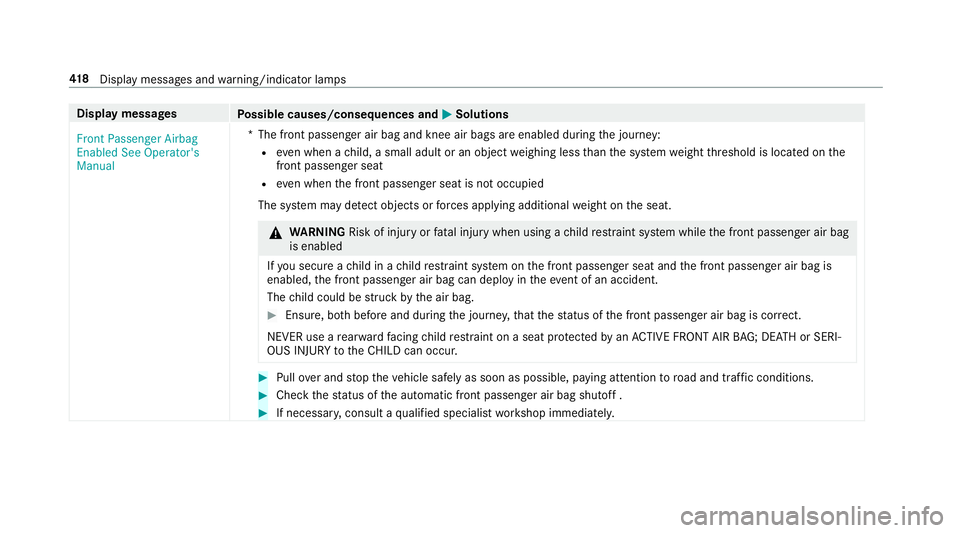
Displaymessages
Possible causes/consequences and MSolutions
Front Passenger Airbag
Enabled See Operator's
Manual *T
he front passenger air bag and knee air bags are enabled during the journey:
Reve n when a child, a small adult or an object weighing less than the sy stem weight thre shold is located on the
front passenger seat
Reve n when the front passenger seat is not occupied
The sy stem may de tect objects or forc es applying additional weight on the seat.
&
WARNING Risk of injury orfata l injury when using a child restra int sy stem while the front passenger air bag
is enabled
If yo u secure a child in a child restra int sy stem on the front passenger seat and the front passenger air bag is
enabled, the front passenger air bag can deploy in theev ent of an accident.
The child could be stru ck bythe air bag.
#Ensure, bo thbefore and during the journe y,that thest atus of the front passenger air bag is cor rect.
NEVER use a rear wa rdfacing child restra int on a seat pr otected byan ACTIVE FRONT AIR BAG; DE ATH or SERI‐
OUS INJU RYtotheCH ILD can occur.
#Pull over and stop theve hicle safely as soon as possible, paying attention toroad and traf fic conditions.
#Check thest atus of the automatic front passenger air bag shutoff .
#If necessar y,consult a qualified specialist workshop immediatel y.
418
Displ aymessage s andwarning/indicator lamps
Page 481 of 502
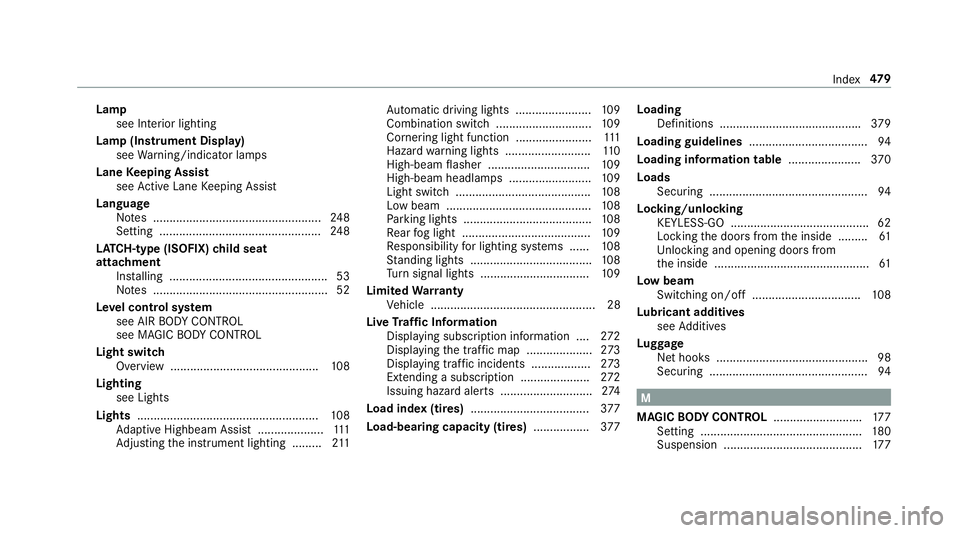
Lampsee Inte rior lighting
Lamp (Instrument Display) see Warning/indicator lamps
Lane Keeping Assist
see Active Lane Keeping Assist
Language Notes ................................................... 248
Setting ................................................. 248
LA TC H-type (ISOFIX) child seat
attachment
Installing ................................................ 53
No tes ..................................................... 52
Le vel control sy stem
see AIR BODY CONTROL
see MAGIC BODY CONTROL
Light switch Overview .............................................1 08
Lighting see Lights
Lights ....................................................... 108
Ad aptive Highbeam Assist .................... 111
Ad justing the instrument lighting ......... 211 Au
tomatic driving lights ....................... 109
Combination switch............................. 109
Corne ring light function ....................... 111
Hazard warning lights .......................... 110
High-beam flasher .............................. .109
High-beam headlamp s .........................109
Light switch ......................................... 108
Low beam ............................................ 108
Pa rking lights ...................................... .108
Re ar fog light ....................................... 109
Re sponsibility for lighting sy st
ems ..
.... 108
St anding lights .................................... .108
Tu rn signal lights ................................. 109
Limited Warranty
Ve hicle .................................................. 28
Live Traf fic Information
Displaying subscri ption information .... 272
Displ aying the tra ffic map .................... 273
Displ aying traf fic incidents .................. 273
Extending a subscription ..................... 272
Issuing hazard alert s ............................2 74
Load index (tires) .................................... 377
Load-bea ring capacity (tires) .................377 Loading
Definitions .......................................... .379
Loading guidelines ....................................9 4
Loading information table ......................370
Loads Securing ................................................ 94
Locking/unlocking KEYLESS-GO .......................................... 62
Locking the doors from the inside ......... 61
Un locking and opening doors from
th e inside ............................................... 61
Low beam Swit ching on/off ................................ .108
Lu bricant addit
ives
see Additives
Lu ggage
Net hooks .............................................. 98
Securing ................................................ 94
M
MAGIC BODY CONT ROL.......................... .177
Setting ................................................. 180
Suspension .......................................... 177
Index 47
9