tow MERCEDES-BENZ S-CLASS CABRIOLET 2018 Service Manual
[x] Cancel search | Manufacturer: MERCEDES-BENZ, Model Year: 2018, Model line: S-CLASS CABRIOLET, Model: MERCEDES-BENZ S-CLASS CABRIOLET 2018Pages: 502, PDF Size: 6.27 MB
Page 106 of 502
Therefrigerator box reduces its cooling capacity
or switches off in thefo llowing cases:
Rto o many electrical consumers are turned on
Rth est ar ter battery is not suf ficiently charge d
If th is is the case, the indicator lamps flash in
th e button toswitch there frigerator box on and
off. The cooling function will au tomatically
switch back on as soon as there is suf ficient
vo ltage.
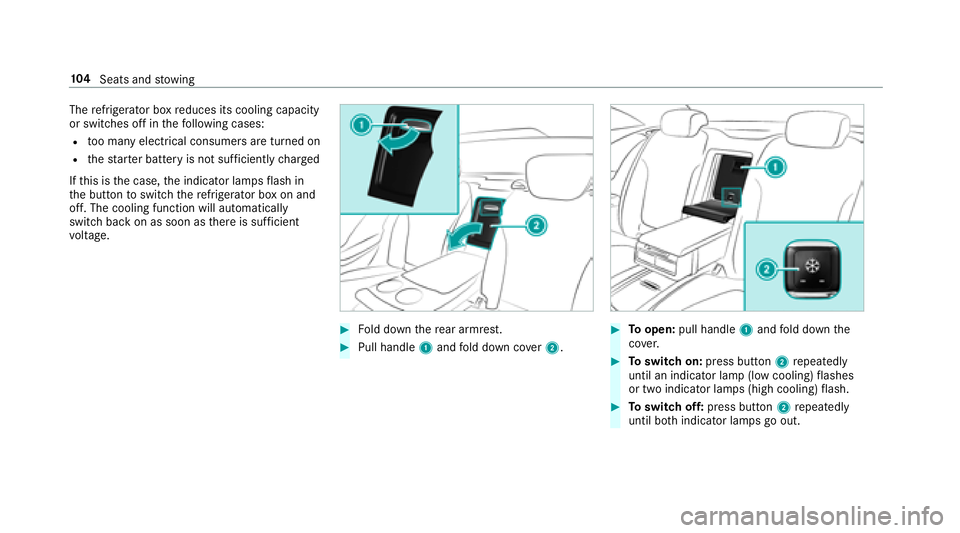
#Fo ld down there ar armrest.
#Pull handle 1and fold down co ver2.
#To open: pull handle 1and fold down the
co ver.
#To switch on: press button 2repeatedly
until an indicator lamp (low cooling) flashes
or two indicator lamps (high cooling) flash.
#To switch off: press button 2repeatedly
until bo thindicator lamps go out.
10 4
Seats and stowing
Page 107 of 502
Removing or in stalling there frigerator box
Re moving
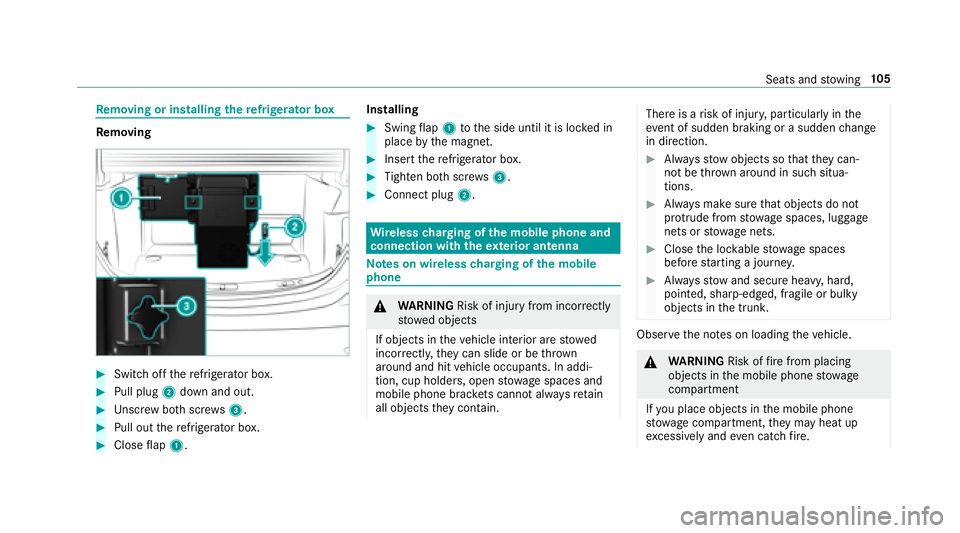
#Switch off there frigerator box.
#Pull plug 2down and out.
#Unscr ew both scr ews3.
#Pull out there frigerator box.
#Close flap 1. Installing
#Swing
flap 1 tothe side until it is loc ked in
place bythe magnet.
#Insert there frigerator box.
#Tighten bo thscr ews3.
#Connect plug 2.
Wirelesscharging of the mobile phone and
connection with theex terior antenna
Note s on wireless charging of the mobile
phone
& WARNING Risk of injury from incorrectly
stowe d objects
If objects in theve hicle interior are stowed
incor rectly, they can slide or be throw n
around and hit vehicle occupants. In addi‐
tion, cup holders, open stowage spaces and
mobile phone brac kets cann otalw aysre tain
all objects they contain.
There is arisk of injur y,particularly in the
ev ent of sudden braking or a sudden change
in direction.
#Alw aysstow objects so that they can‐
not be throw n around in such situa‐
tions.
#Alw ays make sure that objects do not
pr otru de from stowage spaces, luggage
nets or stowage nets.
#Close the loc kable stow age spaces
before starting a journe y.
#Alwaysstow and secure heavy, hard,
pointe d, sharp-edged, fragile or bulky
objects in the trunk.
Obser vethe no tes on loading theve hicle.
&
WARNING Risk offire from placing
objects in the mobile phone stowage
compartment
If yo u place objects in the mobile phone
stow age compartment, they may heat up
exc essively and even catch fire .
Seats and stowing 10
5
Page 108 of 502
#Do not place additional objects, espe‐
ciallythose mode of me tal, in the
mobile phone stowage compartment.
* NO
TEDama getoobjects caused by
placing them in the mobile phone stow‐
age compartment
If yo uplac e objects inthe mobile phone
stow age compartment, these may be dam‐
aged byelectromagnetic fields.
#Do not place credit cards, storage
media or other objects sensitive to
electromagnetic fields in the mobile
phone stowage compartment.
* NO
TEDama getothe mobile phone
stow age compartment caused byliquids
If liquids enter the mobile phone stowage
compartment, the compartment may be
damaged.
#Ensure that no liquids enter the mobile
phone stowage compartment.
RDepending on theve hicle equipment, the
mobile phone is connected totheve hicle's
ex terior aerial via thech arging module.
RThe charging function and wireless connec‐
tion of the mobile phone totheve hicle's
ex terior aerial are only available if the ignition
is switched on.
RSmall mobile phones may not be able tobe
ch arge d in everyposition of the mobile
phone stowage compartment.
RLargemobile phones which do not rest flat in
th e mobile phone stowage compartment may
not be able tobe charge d or connec ted with
th eve hicle's exterior aerial.
RThe mobile phone may heat up during the
ch arging process. This depends on the appli‐
cations (apps) cur rently running.
RTo ensure more ef ficient charging and con‐
nection with theve hicle's exterior aerial,
re mo vethe pr otective co ver from the mobile
phone. Pr otective co vers which are designed
fo r wireless charging are excluded.
RWhen charging, the mat should be used if
possible.
Wire lesscharging of the mobile phone in the
front
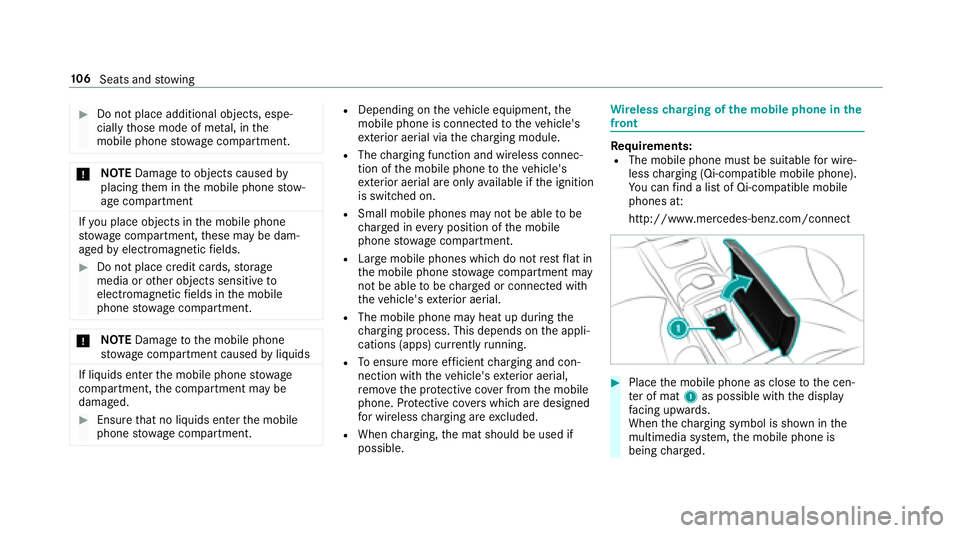
Re quirements:RThe mobile phone must be suitable for wire‐
less charging (Qi-compatible mobile phone).
Yo u can find a li stof Qi-compatible mobile
phones at:
http://www.mercedes-benz.com/connect
#Place the mobile phone as close tothe cen‐
te r of mat 1as possible with the display
fa cing up wards.
When thech arging symbol is shown in the
multimedia sy stem, the mobile phone is
being charge d.
10 6
Seats and stowing
Page 109 of 502
Malfunctions duringthech arging process are
shown in the multimedia sy stem displa y.
% The mat can be remo vedfo r cleaning, e.g.
using clean, luk ewarmwate r.
Installing or removing the floor mats
&
WARNING Risk of accident due to
objects in the driver's foot we ll
Objects in the driver's foot we ll may impede
pedal tr avel or block a depressed pedal.
This jeopardizes the operating and road
saf etyof theve hicle.
#Stow all objects in theve hicle securely
so that they cannot getinto the driver's
fo ot we ll.
#Alw ays ins tallth efloor mats securely
and as prescribed in order toensure
th at there is alw ays suf ficient room for
th e pedals.
#Do not use loose floor mats and do not
place floor mats on top of one ano ther.
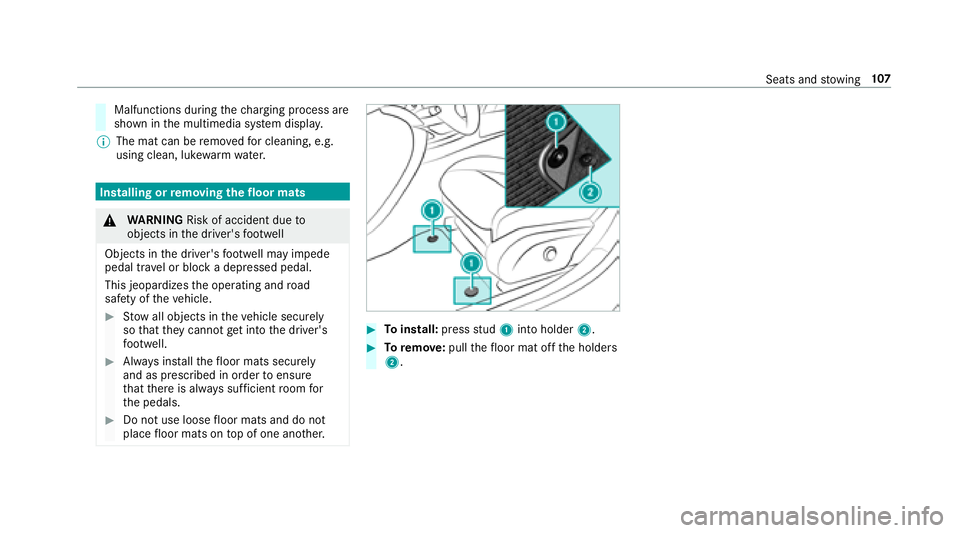
#To install: pressstud 1 into holder 2.
#Toremo ve:pull thefloor mat off the holders
2.
Seats and stowing 10
7
Page 134 of 502
Notes on driving
&
WARNING Risk of accident due to
objects in the driver's foot we ll
Objects in the driver's foot we ll may impede
pedal tr avel or block a depressed pedal.
This jeopardizes the operating and road
saf etyof theve hicle.
#Stow all objects in theve hicle securely
so that they cannot getinto the driver's
fo ot we ll.
#Alw ays ins tallth efloor mats securely
and as prescribed in order toensure
th at there is alw ays suf ficient room for
th e pedals.
#Do not use loose floor mats and do not
place floor mats on top of one ano ther.
&
WARNING Risk of accident due to
unsuitable foot we ar
Operation of the pedals may be restricted
due tounsuit ablefoot we ar such as:
RShoes with platfo rmsoles
RShoes with high heels
RSlippers
#When driving alw ayswe ar suitable
shoes in order tobe able tooperate the
pedals safel y.
&
WARNING Risk of accident when switch‐
ing off the ignition when driving
If yo uswit choff the ignition while driving,
saf etyfunction sar ere stricted or no longer
av ailable. This may af fect the po werst eering
sy stem and the brake forc e boosting, for
ex ample.
Yo uwill then need touse considerably more
fo rc eto steer and brake.
#Do not switch off the ignition while driv‐
ing.
& WARNING Risk ofexhaust gas poisoning
Combustion engines emit poisonous exhaust
ga ses such as carbon monoxide. Inhaling
th ese exhaust gases causes poisoning.
#Ne ver lea vethe engine running in an
enclosed space wi thout suf ficient venti‐
lation.
& WARNING Risk of skidding and of an
accident due toshifting down on slippery
ro ad sur faces
If yo u shift do wnon slippery road sur faces to
inc rease the engine braking ef fect, the drive
wheels may lose traction.
#Do not shift down on slippery road sur‐
fa ces toinc rease the engine braking
ef fect.
13 2
Driving and pa rking
Page 140 of 502
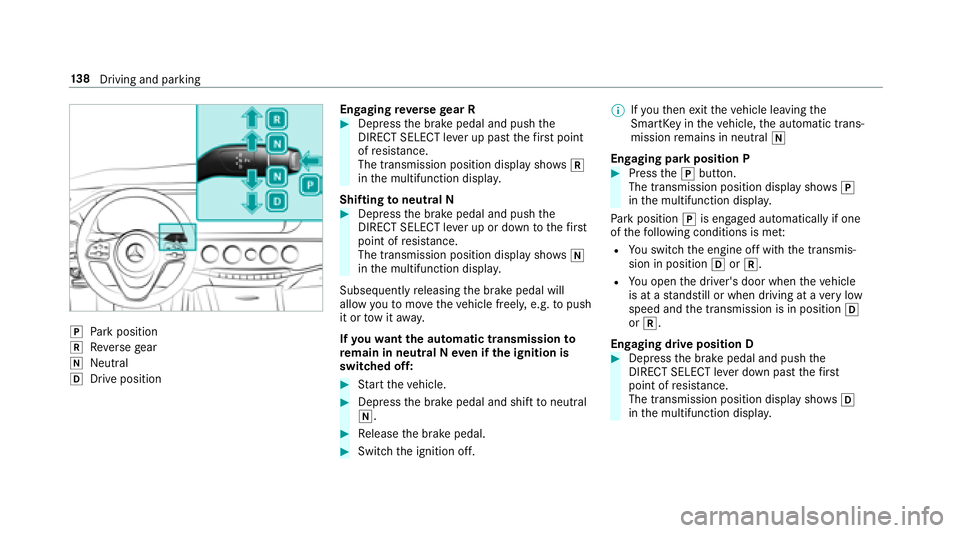
jPark position
kReversege ar
iNeutra l
hDrive position En
gaging reve rsege ar R
#Depress the brake pedal and push the
DIRECT SELECT le ver up past thefirs t point
of resis tance.
The transmission position displ aysho wsk
in the multifunction displa y.
Shifting toneutral N
#Depress the brake pedal and push the
DIRECT SELECT le ver up or down tothefirs t
point of resis tance.
The transmission position displ aysho wsi
in the multifunction displa y.
Subsequently releasing the brake pedal will
allow youto mo vetheve hicle freel y,e.g. topush
it or tow it away.
If yo uwa ntthe automatic transmission to
re main in neutral N even if the ignition is
switched off:
#St art theve hicle.
#Depress the brake pedal and shift toneutral
i.
#Re lease the brake pedal.
#Switch the ignition off. %
Ifyo uth en exitth eve hicle leaving the
SmartK eyintheve hicle, the automatic trans‐
mission remains in neutral i
Engaging park position P
#Press thej button.
The transmission position display sho wsj
in the multifunction displa y.
Pa rk position jis engaged automatically if one
of thefo llowing conditions is me t:
RYou switch the engine off with the transmis‐
sion in position hork.
RYou open the driver's door when theve hicle
is at a standstill or when driving at a very low
speed and the transmission is in position h
or k.
Engaging drive position D
#Depress the brake pedal and push the
DIRECT SELECT le ver down past thefirs t
point of resis tance.
The transmission position displ aysho wsh
in the multifunction displa y.
138
Driving and pa rking
Page 145 of 502
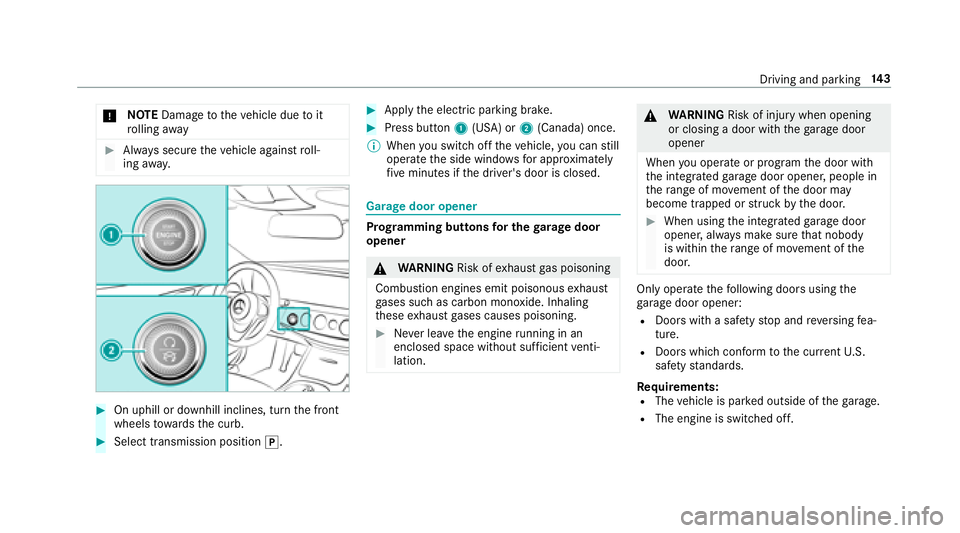
*NO
TEDama getotheve hicle due toit
ro lling away
#Alw ays secure theve hicle against roll‐
ing away.
#On uphill or downhill inclines, turn the front
wheels towa rdsth e curb.
#Select transmission position j.
#Applythe electric parking brake.
#Press button 1(USA) or 2(Canada) once.
% When youswit choff theve hicle, you can still
opera tethe side windo wsfor app roxima tely
fi ve minutes if the driver's door is closed.
Garage door opener
Prog ramming buttons for the garage door
opener
& WARNING Risk ofexhaust gas poisoning
Combustion engines emit poisonous exhaust
ga ses such as carbon monoxide. Inhaling
th ese exhaust gases causes poisoning.
#Ne ver lea vethe engine running in an
enclosed space wi thout suf ficient venti‐
lation.
& WARNING Risk of injury when opening
or closing a door with thega rage door
opener
When you operate or program the door with
th e integrated garage door opener, people in
th era nge of mo vement of the door may
become trapped or stru ck bythe door.
#When using the integrated garage door
opener, alw ays make sure that nobody
is within thera nge of mo vement of the
door.
Only operate thefo llowing doors using the
ga rage door opener:
RDoors with a saf etyst op and reve rsing fea‐
ture.
RDoors which con form tothe cur rent U.S.
safe tystandards.
Requ irements:
RThevehicle is par ked outside of thega rage .
RThe engine is switched off.
Driving and parking 14
3
Page 146 of 502
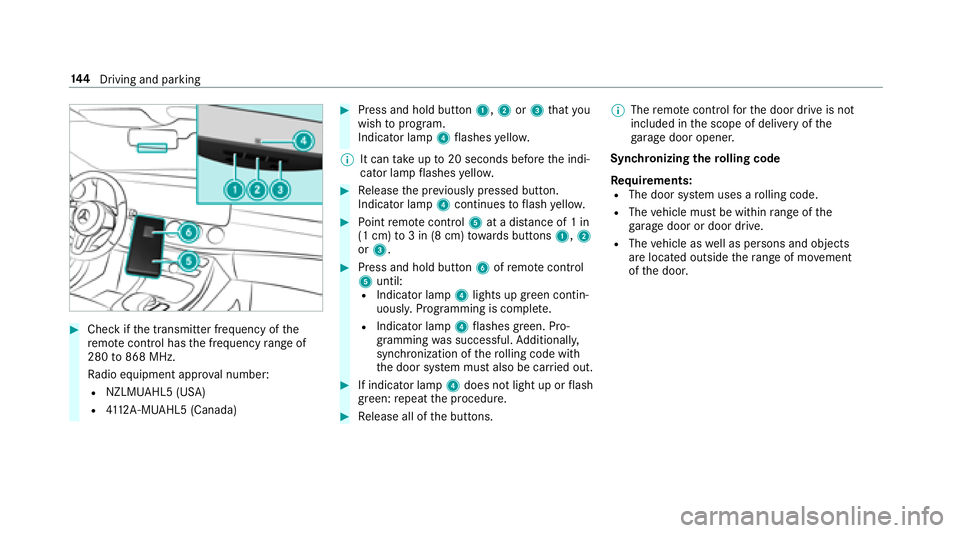
#Checkifth e transmit ter frequency of the
re mo tecontrol has the frequency range of
280 to868 MHz.
Ra dio equipment appr oval number:
RNZLMUA HL5 (USA)
R4112 A-MUAHL5 (Canada)
#Press and hold button 1,2or3 that you
wish toprog ram.
Indicator lamp 4flashes yello w.
% It can take up to20 seconds before the indi‐
cator lamp flashes yello w.
#Re lease the pr eviously pressed button.
Indicator lamp 4continues toflash yello w.
#Po int remo tecontrol 5at a dist ance of 1 in
(1 cm) to3 in (8 cm) towa rds buttons 1,2
or 3.
#Press and hold button 6ofremo tecontrol
5 until:
RIndicator la mp4lights up greencontin‐
uousl y.Programming is comple te.
RIndicator lamp 4flashes green. Pro‐
gr amming was successful. Additionally,
synchronization of thero lling code with
th e door sy stem must also be car ried out.
#If indicator lamp 4does not light up or flash
green: repeat the procedure.
#Re lease all of the buttons. %
The remo tecontrol forth e door drive is not
included in the scope of delivery of the
ga rage door opener.
Synchronizing thero lling code
Re quirements:
RThe door sy stem uses a rolling code.
RThe vehicle must be within range of the
ga rage door or door drive.
RThe vehicle as well as persons and objects
are located outside thera nge of mo vement
of the door.
14 4
Driving and pa rking
Page 168 of 502
System limitations
Te mp orary speed restrictions (e.g. for a cer tain
time or due towe ather conditions) cannot be
proper lyde tected bythe sy stem. The maximum
permissible speed applying for a vehicle with a
trailer is not de tected bythe sy stem. In these sit‐
uations you must adjust your speed yourself.
&
WARNING Risk of accident due toActive
Speed Limit Assi stadapting theve hicle's
speed
The speed adop tedby Active Speed Limit
Assi stmay be too high or incor rect in some
individual cases, such as:
RInthewe t or in fog
RWhen towing a trailer
#Ensure that the driven speed complies
with traf fic re gulations.
#Ad just the driving speed tosuit cur rent
traf fic and weather conditions.
Function of route-based speed adaptation
%
The availability of thefo llowing function is
countr y-dependent.
When Dis tance Assist DISTRONIC is acti ve,th e
function adju ststh e speed depending on the
ro ute events ahead. Depending on the drive pro‐
gram selected, theve hicle negotiates thero ute
eve nt ahead in a fuel-s aving, com fortable or
dynamic manner. When thero ute event has been
passed, theve hicle accelerates again tothe
st ored speed. The set dis tancetotheve hicle
ahead, vehicles de tected ahead and speed
re strictions ahead are take n into account.
Ro ute-based speed adjustment can byconfig‐
ured in the multimedia sy stem (
→page 167).
Ro ute events ahead are:
RBends
RT-intersection, traf fic circles and tollst ations
RTu rns and exits
% When theto llst ation is reached, Active Dis‐
ta nce Assist DISTRONIC adopts the speed as
th estored speed. Also,
the speed is reduced if the turn signal to
ch ange lanes is switch ed on and one ofthefo l‐
lowing situations is de tected:
RTu rning off at intersections
ROn slowing-down lanes
ROn lanes adjacent toslowing-down lanes
The driver is responsible forch oosing theright
speed and observing other road users. This
applies in particular tointersections, traf fic cir‐
cles and sets of traf fic lights, as route-based
speed adap tati
on does not brake theve hicle toa
st andstill.
When route guidance isactive, thefirs t speed
adjustment is car ried out automatically. If the
turn signal indica tor is switched on, the selected
ro ute isconfirmed and fur ther speed adjustment
is activated.
Speed adjustment is canceled in thefo llowing
cases:
RIf th e turn signal indicator is switched off
before thero ute event.
RIfth e driver depresses the accelera tor or
brake pedal during the process.
16 6
Driving and pa rking
Page 169 of 502
System limitations
Ro ute-based speed adap tation does not take
ri ght of wayre gulations into account. The driver
is responsible for complying with road traf fic
re gulations and driving at a suitable speed.
In dif ficult conditions (e.g. unclear roads, nar row
lanes, wetro ad sur faces, snow or ice) or when
driving wi tha trailer, the speed adjustment made
by the sy stem may not alw ays be suitable. In
th ese situations the driver must inter vene
acco rdingly.
&
WARNING Risk of accident in spite of
ro ute-based speed adjustment
Ro ute-based speed adjustment might mal‐
function or betemp orarily una vailable in the
fo llowing situations:
RIf map data is not up todate or available
RIfyo udo not follow the selected route
guidance
RIf th e set route isre-planned
RIn road con stru ction areas
RWhen towing a trailer
RIn bad weather or road conditions
RIfth e accelerator pedal is depressed
#Ad just the speed tothe traf fic situation.
Setting route-based speed adjustment
Re quirements:RActive Dis tance Assist DISTRONIC is acti va‐
te d.
Multimedia sy stem:
,Vehicle.k Assistance.Speed
Adjustment
#Select DYNAMIC SELECT Op. orOff.
Ac tive Steering Assist
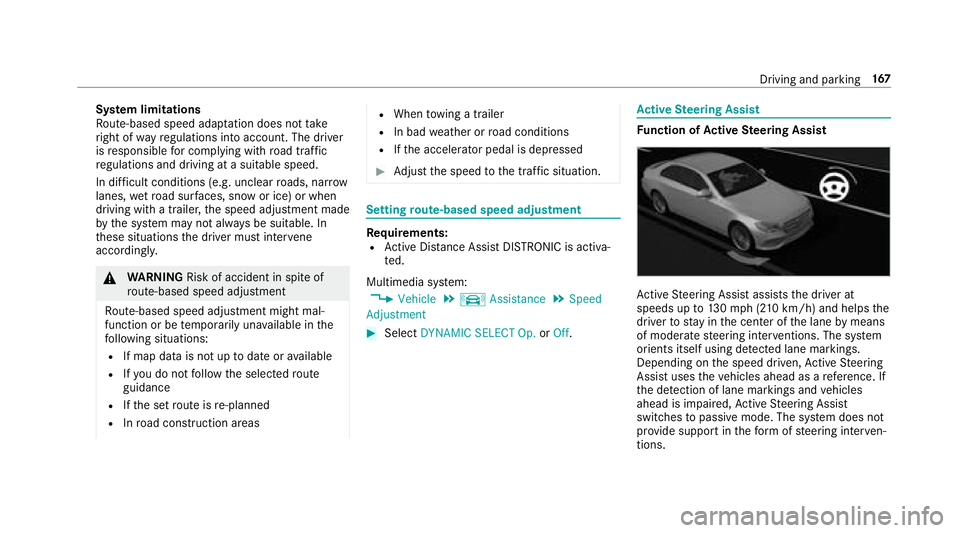
Function of Active Steering Assist
Active Steering Assist assists the driver at
speeds up to130mp h (2 10km/h) and helps the
driver tostay inthe center of the lane bymeans
of moderate steering inter ventions. The sy stem
orients itself using de tected lane markings.
Depending on the speed driven, Active Steering
Assist uses theve hicles ahead as a refere nce. If
th e de tection of lane markings and vehicles
ahead is impaired, Active Steering Assist
switches topassive mode. The sy stem does not
pr ov ide support in thefo rm ofsteering inter ven‐
tions.
Driving and pa rking 16
7