manual transmission MERCEDES-BENZ S-CLASS COUPE 2017 Owners Manual
[x] Cancel search | Manufacturer: MERCEDES-BENZ, Model Year: 2017, Model line: S-CLASS COUPE, Model: MERCEDES-BENZ S-CLASS COUPE 2017Pages: 533, PDF Size: 10.75 MB
Page 151 of 533
app:
them obile phone is in thes towa ge com‐
partment (→ page150). #
Shif tthe transmission toposition jori. #
Depress theb rake pedal and push button 1
once. #
Ifth ev ehicle does no tstart:s witc hoffnon-
essential consumer sand press button 1
once. #
Ifth ev ehicle still does no tstart and the
Place the key in the marked space See Own-
er's Manual displaymessag ealso appear sin
th em ultifunction display: star tt he vehicle in
emer gency operation mode.
Yo uc an swit chofft he engine while driving by
pressing button 1fora bout thre es econds. Be
sur etoo bservethes afet yn otes under "Driving
instructions".
St arting avehicle using amobilep hone
Re quirements:
R thev ehicle is equipped wit hthe "Digital Vehi‐
cle Key" function. R
the" Digital Vehicle Key" function is activated
via theM ercedes me connect weba pp:
http://www.mercedes.me.
R suitable mobile phone wit hNFC aerial (Near
Field Communication) and Secur eElement.
R Suf ficient charge status of them obile
phone. On some mobile phones, thef unction
is also available when theb atter yisd is‐
ch arge d.
% Youc an checkt he suitability of your mobile
phon ebye ntering thep hone number at
http://www.mercedes.me.
Information about suitable mobile phones
can be obtained from your Mercedes-Benz
servic ecentr eorath ttp://www.mercedes-
benz.com/connect.
% Mercedes-Ben zrecommends that youc arry
th ee mer gency keye lemen tincaseoff unc‐
tion restrictions.
% The function is only available in combination
wit hM ercedes me connec tand on lyin cer‐
ta in countries. %
Protectiv ecases around them obile phone
can impair thef unctionality. #
Mak esuret hat thec har gestatus of the
mobil ephone is suf ficient. If necessar y,
ch arge them obile phone befor estartin gt he
journe y.
St arting thev ehicle fort he firs tt ime af ter
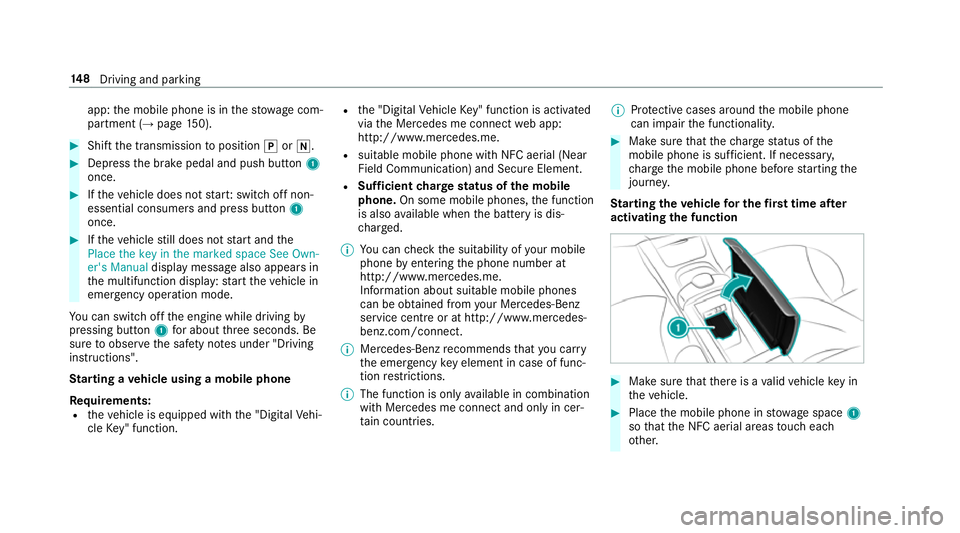
activating the function #
Mak esuret hat ther eisav alidvehicle keyin
th ev ehicle. #
Place them obile phone in stowages pace 1
so that theN FC aerial areas touc he ach
ot her. 14 8
Driving and pa rking
Page 161 of 533
Pa
rk position jis engaged automaticall yifone
of thef ollowing condition sismet:
R Ifyo us wit ch thee ngine of fwitht he trans‐
mission in position hork.
R Ifyo uo pen thed rive r's door when thev ehi‐
cle is stationar yorwhen drivin gataveryl ow
speed and thet ransmission is in position h
or k.
Engaging driv eposition D #
Depress theb rake pedal and push the
DIRECT SELEC Tleve rdow np astthe first
point of resis tance.
The transmission positio ndispl ay sho wsh
in them ultifunction displa y.
When thea utomatic transmission is in transmis‐
sion position h,itshiftstheg ear sautomati‐
call y.This depends on thef ollowing factors:
R The selected driv eprogram
R The position of thea ccelera torp edal
R The road speed Manua
lgearshifting &
WARNING Risk of skidding and of an
accident du etoshifting down on slippery
ro ad sur faces
If yo us hiftd ow nons lipperyroad sur faces to
inc rease thee ngine braking ef fect, thed rive
wheels ma ylose traction. #
Do no tshif td ow nons lipperyroad sur‐
fa ces toinc rease thee ngine braking
ef fect. #
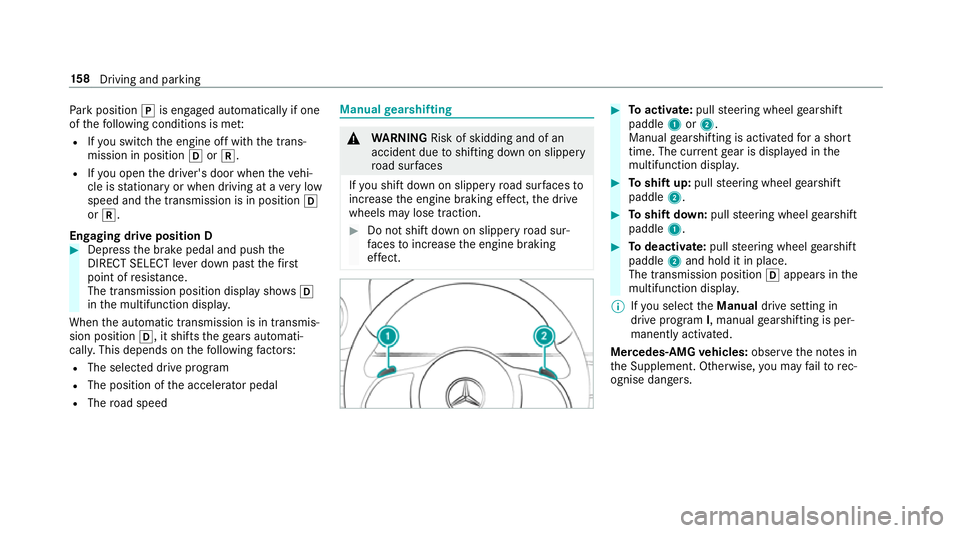
Toactivate: pullsteering wheel gearshift
paddle 1or2.
Manual gearshiftin gisactivated foras hort
time. The cur rent gear is displa yedint he
multifunction displa y. #
Toshif tup:pull steering wheel gearshift
paddle 2. #
Toshif tdow n:pull steering wheel gearshift
paddle 1. #
Todeactivate: pullsteering wheel gearshift
paddle 2and hold it in place.
The transmissio nposition happear sinthe
multifunction displa y.
% Ifyo us elect theManual drivesetting in
driv eprogram I,m anua lgearshifting is per‐
manently activated.
Mercedes-AMG vehicles: observet he no tesin
th eS upplement .Otherwise, youm ayfailto rec‐
ognise dangers. 15 8
Driving and pa rking
Page 171 of 533
This is onl
ythe case if one of thef ollowing con‐
ditions is also fulfilled:
R The engine is switched off.
R The seat belt tongu eisn otinser tedint he
seat belt buckle of thed rive r's seat and the
driver's door is opened.
R Ther eisas ystemm alfunction.
R The po wersupp lyis insuf ficient.
R The vehicle is stationar yfor alengt hyperiod.
When thee lectric parking brak eisapplied,
the ! indicator lam plights up in thei nstru‐
ment clus ter.
The electric parking brak eisnotautomatically
applied if thee ngine is switched of fbythe ECO
st art/ stop function.
Fu nction of thee lectric pa rking brake
(releasing automatically)
The elect ricp arkin gb rake isreleased when the
fo llowing condition sarefulfilled:
R The engin eisrunning.
R Thes eatb eltt ongue is inser tedi ntot he seat
belt buckle of thed rive r's seat. R
The transmission is in position hork and
yo ud epress thea ccelera torp eda lory ou
shif tfromt ransmission position jtoh or
k.
R Ifth et ransmission is in position k,the boot
lid mus tbeclosed.
If th es eat belt tongu eisn otinser tedi ntot he
seat belt buckle of thed rive r's seat, thef ollow‐
ing condition smustbef ulfilled:
R The driver's door is closed.
R Youm ovet he transmission out of transmis‐
sion position joryouh ave prev iously
driven faster than 3k m/ h.
R Ifth et ransmission is in position k,the boot
lid mus tbeclosed.
If th ee lectric parking brak eisreleased,
the ! indicator lam pinthe instrument clus‐
te rg oes out. Applying or
releasing thee lectric pa rking
brak emanually
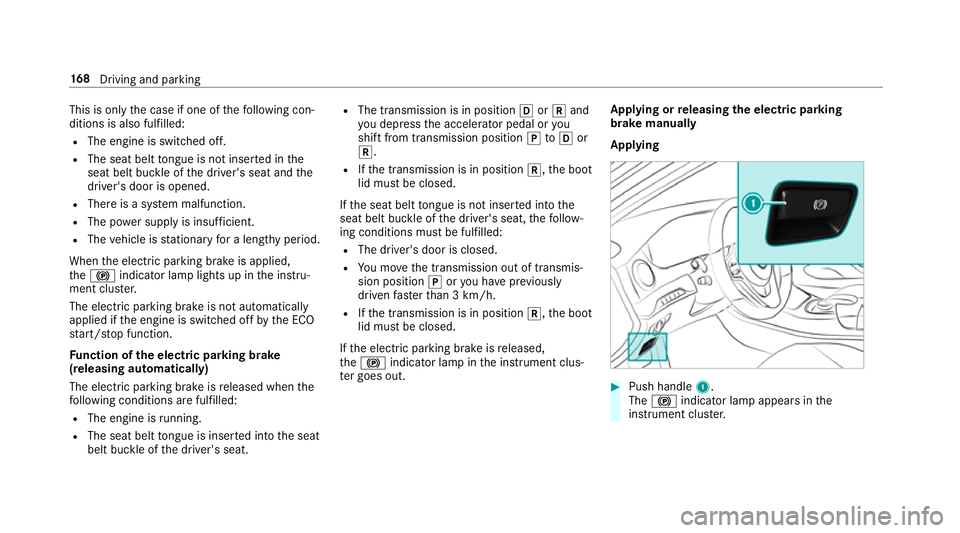
Applying #
Push handle 1.
The ! indicator lam pappear sinthe
instrument clus ter. 16 8
Driving and pa rking
Page 200 of 533
R
The engine is running or ha sbeena utomati‐
cally switched of fbythe EC Ostart/s top
function.
R The electric parking brak eisreleased.
R ActiveD ista nce Assi stDISTRONI Cisdeacti‐
va ted.
R The transmission is in position h,kori.
Ac tivatin gthe HOL Dfunction #
Dep ress theb rake pedal and af teras hort
time quickl ydepress fur ther until theë
displa yappear sinthe multifunction displa y.#
Release theb rake pedal.
Deactivating the HOLD function #
Depress thea ccelerator pedal topull away.
or #
Depress theb rake pedal until theë dis‐
pla yd isappear sfromt he multifunction dis‐
pla y. The HOLD function is deactivated in
thef ollow‐
ing situations:
R ActiveD ista nce Assi stDISTRONI Cisactiva‐
te d.
R The transmission is switched toposition j.
R The vehicle is secured wit hthe electric park‐
ing brake.
In thef ollowing situations, thev ehicle is held by
th et ransmission position jorby thee lectric
parking brake:
R The seat belt is unfas tened and thed rive r's
door is opened.
R The engine is switched off.
R Ther eisam alfunction in thes ystemort he
po we rsupply is insuf ficient. AI
RB ODYC ONT ROL AIR
BODY CONT ROLfunction
AI RB ODYC ONTROL is an air suspension sy stem
wit hvariable dampin gfor impr oveddriving com‐ fo
rt.T he all-round le velc ontrol sy stem ensures
th eb estp ossible suspension and const ant
groun dclearance, evenw ithal aden vehicle.
When driving at speed, thev ehicle is lo wered
automaticall ytoimprove driving saf etya nd to
re duce fuel consum ption. The option of manually
adjustin gthe vehicle le velisa lsoavailable.
AI RB ODYC ONTROL comprises:
R Air suspension wit hautomatic all-round le vel
control
R Speed-dependent lo wering toreduce fuel
consum ption
R Manuall yselec table high-le vels etting for
greater ground clearance
R ADS PLUS (Adaptiv eDamping Sy stem with
const ant dampin gforce adjustment)
R DYNA MIC SELECT switc hand le velb utton Drivin
gand parking 197
Page 267 of 533
#
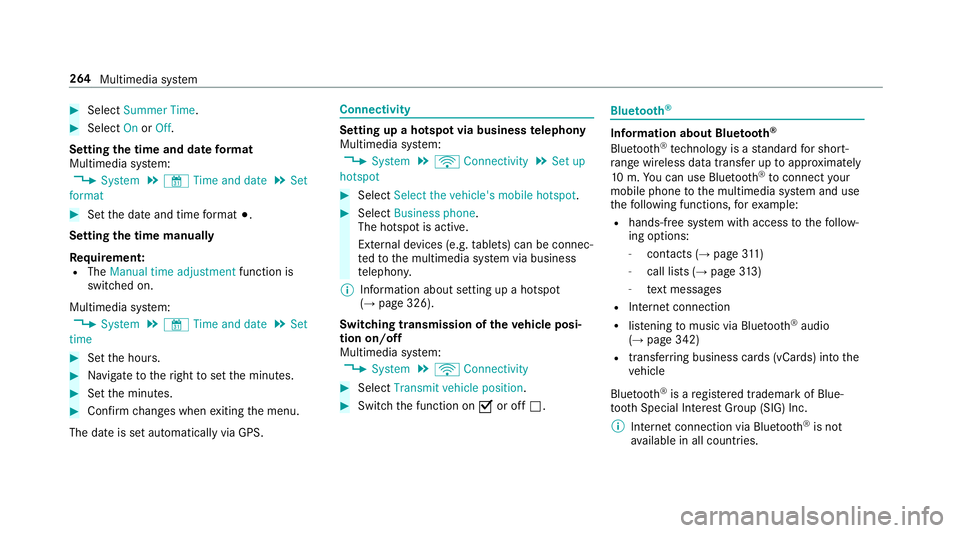
Select Summer Time. #
Select OnorOff.
Setting the time and dat eformat
Multimedia sy stem:
, System .
& Time and date .
Set
format #
Setthe dat eand time form at#.
Setting thet imem anually
Re quirement:
R The Manual time adjustment function is
switched on.
Multimedia sy stem:
, System .
& Time and date .
Set
time #
Setthe hours. #
Navigat etot heright tosetthe minutes. #
Setthe minutes. #
Confir mchanges when exitin gthe menu.
The dat eissetautomaticall yvia GPS. Connectivity
Setting up
ahotspo tvia business telephony
Multimedia sy stem:
, System .
ö Connectivity .
Set up
hotspot #
Select Select the vehicle's mobile hotspot . #
Select Business phone.
The hotspo tisactive.
Exte rnal devices (e.g. tablets) can be connec‐
te dtot he multimedia sy stem via business
te lephon y.
% Information abouts etting up ahotspot
(→ pag e326).
Switching transmission of thev ehicle posi‐
tio no n/off
Multimedi asystem:
, System .
ö Connectivity #
Select Transmit vehicle position . #
Switc hthe function on Oor off ª. Blue
tooth ® Information abou
tBluet oo th®
Bl ue tooth ®
tech nology is astandar dfor short-
ra ng ew ireles sdatat ransfer up toappr oximately
10 m.Youc an use Blue tooth®
to connect your
mobile phon etothe multimedia sy stem and use
th ef ollowing functions, fore xamp le:
R hands-free sy stem wit haccess tothef ollow‐
ing options:
- contacts (→ page311 )
- call lists (→ page313 )
- text messa ges
R Interne tconnection
R listening tomusi cvia Blue tooth®
audio
(→ pag e342)
R trans ferring business cards (vCards) int othe
ve hicle
Blue tooth ®
is ar egis tere dt rademar kofBlue‐
toot hSpecial Interes tGroup (SIG) Inc.
% Interne tconnection via Blue tooth®
is not
av ailable in all countries. 264
Multimedia sy stem
Page 320 of 533

#
Select Accept &Start .
or #
Select Decline &End.
Ac tivatin gautomati cstart #
Select Startautomatically O.
St arting manually #
Select them obile phone from thed evice list.
Exiting Android Auto #
Press theò button on them ultifunction
st eering wheel, fore xamp le.
% If Android Autowa sn otdispla yedint hefore‐
ground befor edisconnecting, thea pplication
st arts in theb ackg round when reconnected.
Yo uc an call up Android Autointhem ain
menu.
Calling up theA ndroid Autosound settings
Multimedia sy stem:
, Connect .
Android Auto .
Sound #
Selecting thet one men u(→ page 356). Ending Android
Auto
Multimedia sy stem:
, Connect .
Android Auto #
Select Disconnect.
The connection is ended.
The mobile phone continues tobe supplied
wit he lect ricity.
or #
Disconnect thec onnecting cable between
th em obile phone and multimedia sy stem.
Mercedes-Benz recommends disconnecting
th ec onnecting cable onl ywhen thev ehicle is
st ationar y. Tr
ansfer redv ehicle dat awhenu sing Apple
CarPlay™ and Android Auto Information on trans
ferred vehicl edata
When using Android Autoor Apple CarPlay™,
cer tain vehicle dat aistransfer redtot he mobile
phone. This enables youtog ettheb esto ut of
selected mobile phone services. Vehicle dat ais
no td irectl yaccessible. Sy
stem information:
R Softwar erelease of them ultimedia sy stem
R System ID (anonymised)
The transfer of this dat aisusedtooptimise
communication between thev ehicle and the
mobil ephone.
To do this, and toassig nseve ralv ehicles tothe
mobil ephone, avehicle identifier is randomly
ge nerated.
Thi sh asno connectio ntothevehicle identifica‐
tion number (VIN) and is dele tedw hen them ulti‐
media sy stem is rese t(→pag e273).
Driving status data:
R Transmission position engaged
R Distinction between par ked, standstill, rolling
and driving
R Day/night mode of thei nstrument clus ter
The transfer of this dat aisusedtoalter how
con tent is displ ayed tocor respond tothed riving
situation. Multimedia sy
stem 317
Page 412 of 533
R
The vehicle is no tonaslope.
R The vehicle is on solid, non-slipper yand le vel
ground. #
Appl ythe electric parking brak emanually. #
Movethef ront wheels tothes traight-ahead
position. #
Vehicles with automatic transmission:
shif tint op osition j. #
Vehicles with AIRB ODYC ONT ROL:setthe
normal vehicle le vel(→pag e198). #
Switc hoffthee ngine. #
Mak esuret hat thee ngine cann otbe star ted. #
Place choc ks orother suitable items under
th ef ront and rear of thew heel that is diago‐
nall yopposit ethe wheel youw ish tochange. #
Remo vetheh ub caps if necessary
(→ pag e411). #
Raising thev ehicle (→ page412). Re
moving and fittin ghub caps Re
quirement:
R The vehicle is prepared foraw heelchange
(→ pag e408).
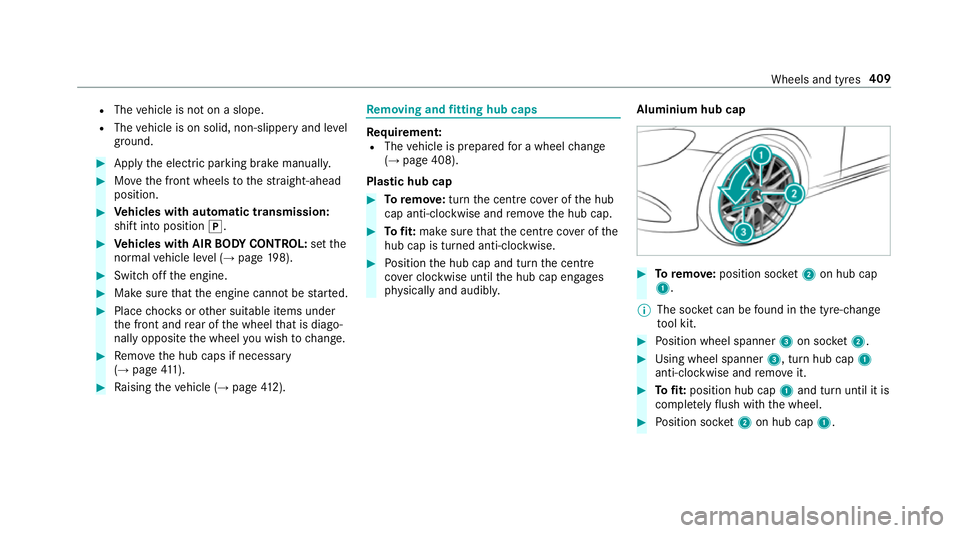
Pla stic hub cap #
Toremo ve: turnthe centre coveroft he hub
cap anti-clockwise and remo vetheh ub cap. #
Tofit: mak esuret hat thec ent recoveroft he
hub cap is turned anti-clockwise. #
Position theh ub cap and tur nthe centre
co verc lockwise until theh ub cap engages
ph ysicall yand audibly. Aluminium hub cap #
Toremo ve: positio nsocket 2on hu bcap
1.
% The soc ketc an be found in thet yre-change
to ol kit. #
Position wheel spanner 3on soc ket2. #
Using whee lspa nner 3,turnh ub cap 1
anti-clo ckwise and remo veit. #
Tofit: position hub cap 1and tur nuntil it is
comple tely flush wit hthe wheel. #
Position soc ket2on hu bcap 1. Wheels and tyres
409
Page 467 of 533
Displa
ymessages
Possible causes/consequences and M
MSolutions
Stop vehicle Leave engine
runnin gWait Transmission
cooling *T
he transmission has overheated. Pulling away can be temp orarily impaired or no tpossible. #
Pull overand stop thev ehicle safely as soon as possible, paying attention toroad and traf ficc onditions .Donot
continu edriving under an ycircums tances. #
Lea veengine running. #
Wait until thed ispla ymessag edisappear sbefor epulling away.
Auxiliar ybattery malfunc-
tion *T
he auxiliary batteryfor thet ransmission is no longer being charge d. #
Consult aqualified specialis tworks hop. #
Untilthen, alw aysm anually se tthe transmission toposition jbefor eyou switc hoffthee ngine. #
Befor eleaving thev ehicle, apply thee lectric parking brake.
Air conditionin gMalfunc-
tion See Owner's Manual *O
peration of thec limat econtrol sy stem is temp orarily restricted. Air flow and fresh air suppl yaresettoa utomatic
mode. #
Have thec limat econtrol sy stem checkedataq ualified specialis tworks hop. 464
Displa ymessages and warning/indicator lamps
Page 494 of 533
AT
TENTION ASSI ST.......................... 219, 220
Fu nctio n............................................... 219
Setting ................................................. 220
Sy stem limitations ...............................2 19
At tention assistant
see ATTENTION ASSIST
Au dio mode
Ac tivating media mod e........................ 333
Connecting USB devices ..................... 335
Co pyright ............................................. 333
Information .......................................... 331
Inserting/re moving an SD car d.......... .333
Medi asearch. ...................................... 338
Overvie w............................................. 334
Pa use and playbac kfunction .............. .335
Selecting atrack ................................. 335
Selecting playba ckoptions .................. 335
Tr ac kl ist. ............................................ .335
Au thorised workshop
see Qualified specialis tworks hop
Au tomatic activation
Ac tivating/deactivating ...................... .224
Au tomatic distanc econtrol
se eA ctiv eDista nce Assi stDISTRONIC Au
tomatic drivin glights ......................... 12 0
Au tomatic engine star t( EC Os tart/
sto pfunction) .......................................... 15 3
Au tomatic engine stop(EC Os tart/
sto pfunction) .......................................... 15 3
Au tomatic fron tpassen gera irbag
shu toff ........................................................ 40
Fu nctio noft he automatic front
passenger airbag shutof f....................... 40
Au tomatic fron tpassen gerfront air‐
bag deacti vatio ns ystem .................... 40, 42
PA SSENGER AIR BAGi ndicator lam p..... 42
Au tomatic fron tpassen gerfront air‐
bag deacti vatio ns ystem
see Automatic front passenger front
airbag deactivation sy stem
Au tomatic lateral suppor tadjustment
Setting ................................................... 93
Au tomatic mir rorf olding function
Ac tivating/deactivating ...................... .132
Au tomatic transmission
DIRECT SELEC Tleve r........................... 15 6
Driv eprogram displa y.......................... 15 5Driv
eprogram s.................................... 15 5
DY NA MIC SELECT switc h.................... 15 5
Engaging driv eposit ion. ...................... 15 8
Engaging reve rseg ear ........................ .157
Kickdown ............................................. 15 9
Manual gearshiftin g............................. 15 8
Selecting par kposition ........................ 157
Shifting toneutral ................................ 157
St eering wheel gearshif tpaddles ........ 15 8
Tr ansmission position displa y............. .156
Tr ansmission position s....................... .156
Axle load Perm issible .......................................... 419 B
BA S(Brak eAssis tSystem) .................... .171
Battery Charging (Remo teOnline) .................... 15 0
Ke y. ...................................................... .64
Re mo tecontrol (s tationar yheater) ...... 14 2
Batter y(vehicle)
Charging .............................................. 384
No tes. ................................................. 382
St artin gassis tance .............................. 384 Index
491
Page 501 of 533
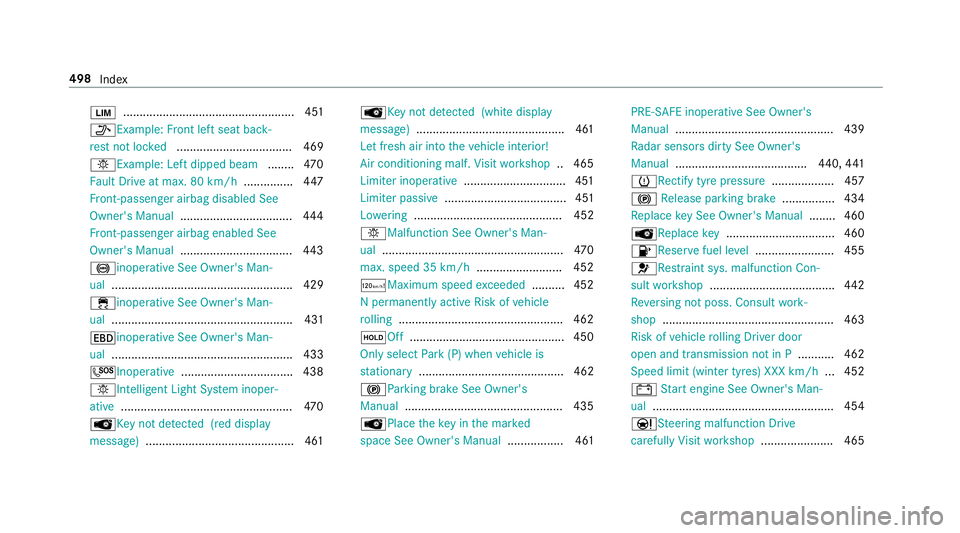
È
.................................................... 451
_Example: Front lef tseat back‐
re st notloc ked ................................... 469
bExample: Lef tdipped beam ........470
Fa ult Driv eatmax.80k m/h .............. .447
Fr ont-passenger airbag disabled See
Owner's Manual ..................................4 44
Fr ont-passenger airbag enabled See
Owner's Manual ..................................4 43
!inoperativ eSee Owner' sMan‐
ual ....................................................... 429
÷inoperativ eSee Owner' sMan‐
ual ....................................................... 431
Tinoperativ eSee Owner' sMan‐
ual ....................................................... 433
GInope rative ................................. .438
bIntelligent Ligh tSystemi noper‐
ative ....................................................4 70
ÂKe ynotdetected (red displ ay
messa ge).............................................4 61Â
Keyn otdetected (whit edispl ay
messa ge).............................................4 61
Le tfresh air int othe vehicle interior!
Air conditioningm alf.Visit workshop .. 465
Limiter inoperative ...............................4 51
Limiter passive ..................................... 451
Lo we ring ............................................. 452
bMalfunctio nSee Owner' sMan‐
ual ....................................................... 470
max. speed 35 km/h ..........................452
ðMaximum spee dexceeded ..........4 52
Np ermanently activ eRiskofv ehicle
ro lling .................................................. 462
ëOff .............................................. .450
Onl yselect Park (P) when vehicle is
st ationary ............................................ 462
!Pa rking brak eSee Owner's
Manual ................................................ 435
ÂPlace thek eyinthem arked
space See Owner's Manual ................. 461PRE-SAFE inoperativ
eSee Owner's
Manual ................................................ 439
Ra dar sensor sdirty See Owner's
Manual ........................................ 440,441
h Rectify tyr epressure ................... 457
! Release parkin gbrake ................ 434
Re place keyS eeOwner' sManual ........ 460
ÂRe placekey................................ .460
8Re servefuel le vel........................ 455
6Re stra int sys. malfunction Con‐
sult workshop ...................................... 442
Re versing no tposs. Consult work‐
shop ....................................................4 63
Risk of vehicle rolling Driver door
open and transmission no tinP...........462
Speed limi t(winter tyres) XXX km/h ... 452
# Starte ngine See Owner' sMan‐
ual ...................................................... .454
Ð Steering malfunction Drive
carefull yVisit workshop ......................4 65498
Index