steering MERCEDES-BENZ S-CLASS SEDAN 2012 Owners Manual
[x] Cancel search | Manufacturer: MERCEDES-BENZ, Model Year: 2012, Model line: S-CLASS SEDAN, Model: MERCEDES-BENZ S-CLASS SEDAN 2012Pages: 536, PDF Size: 39.39 MB
Page 421 of 536
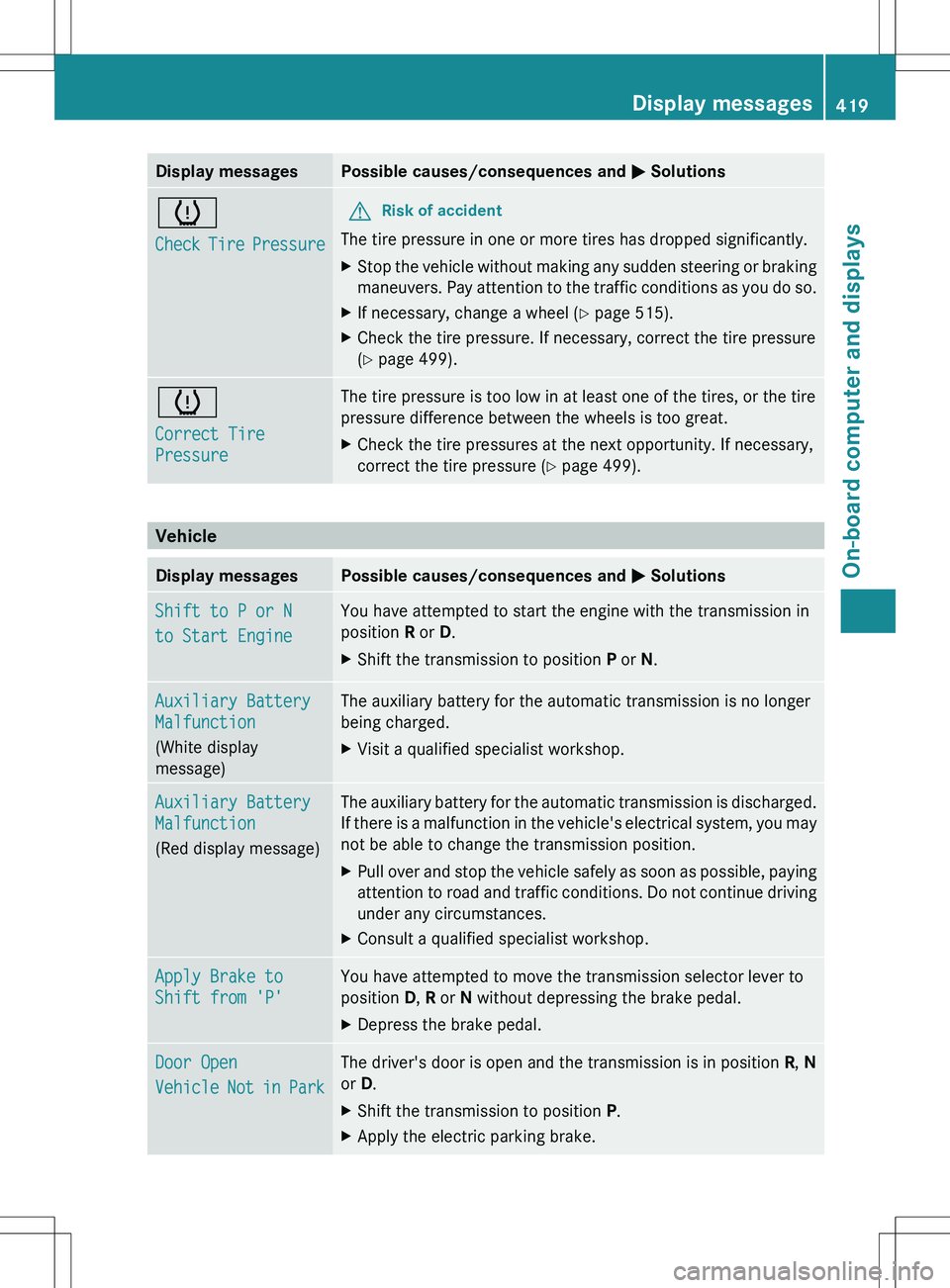
Display messagesPossible causes/consequences and M Solutionsh
Check Tire PressureGRisk of accident
The tire pressure in one or more tires has dropped significantly.
XStop the vehicle without making any sudden steering or braking
maneuvers. Pay attention to the traffic conditions as you do so.XIf necessary, change a wheel ( Y page 515).XCheck the tire pressure. If necessary, correct the tire pressure
( Y page 499).h
Correct Tire
PressureThe tire pressure is too low in at least one of the tires, or the tire
pressure difference between the wheels is too great.XCheck the tire pressures at the next opportunity. If necessary,
correct the tire pressure ( Y page 499).
Vehicle
Display messagesPossible causes/consequences and M SolutionsShift to P or N
to Start EngineYou have attempted to start the engine with the transmission in
position R or D.XShift the transmission to position P or N.Auxiliary Battery
Malfunction
(White display
message)The auxiliary battery for the automatic transmission is no longer
being charged.XVisit a qualified specialist workshop.Auxiliary Battery
Malfunction
(Red display message)The auxiliary battery for the automatic transmission is discharged.
If there is a malfunction in the vehicle's electrical system, you may
not be able to change the transmission position.XPull over and stop the vehicle safely as soon as possible, paying
attention to road and traffic conditions. Do not continue driving
under any circumstances.XConsult a qualified specialist workshop.Apply Brake to
Shift from 'P'You have attempted to move the transmission selector lever to
position D, R or N without depressing the brake pedal.XDepress the brake pedal.Door Open
Vehicle Not in ParkThe driver's door is open and the transmission is in position R, N
or D.XShift the transmission to position P.XApply the electric parking brake.Display messages419On-board computer and displaysZ
Page 422 of 536
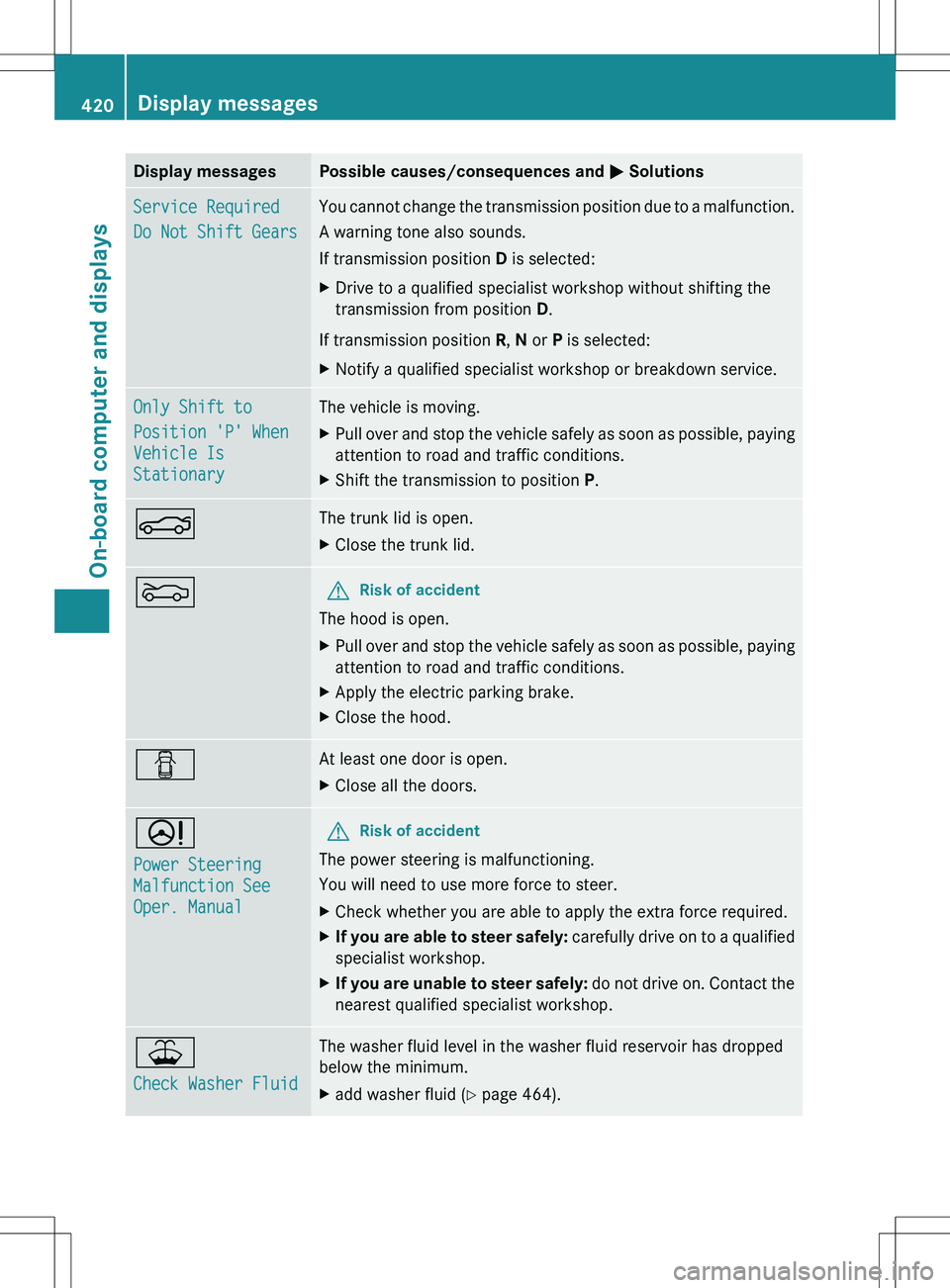
Display messagesPossible causes/consequences and M SolutionsService Required
Do Not Shift GearsYou cannot change the transmission position due to a malfunction.
A warning tone also sounds.
If transmission position D is selected:XDrive to a qualified specialist workshop without shifting the
transmission from position D.
If transmission position R, N or P is selected:
XNotify a qualified specialist workshop or breakdown service.Only Shift to
Position 'P' When
Vehicle Is
StationaryThe vehicle is moving.XPull over and stop the vehicle safely as soon as possible, paying
attention to road and traffic conditions.XShift the transmission to position P.NThe trunk lid is open.XClose the trunk lid.MGRisk of accident
The hood is open.
XPull over and stop the vehicle safely as soon as possible, paying
attention to road and traffic conditions.XApply the electric parking brake.XClose the hood.CAt least one door is open.XClose all the doors.D
Power Steering
Malfunction See
Oper. ManualGRisk of accident
The power steering is malfunctioning.
You will need to use more force to steer.
XCheck whether you are able to apply the extra force required.XIf you are able to steer safely: carefully drive on to a qualified
specialist workshop.XIf you are unable to steer safely: do not drive on. Contact the
nearest qualified specialist workshop.¥
Check Washer FluidThe washer fluid level in the washer fluid reservoir has dropped
below the minimum.Xadd washer fluid ( Y page 464).420Display messagesOn-board computer and displays
Page 427 of 536
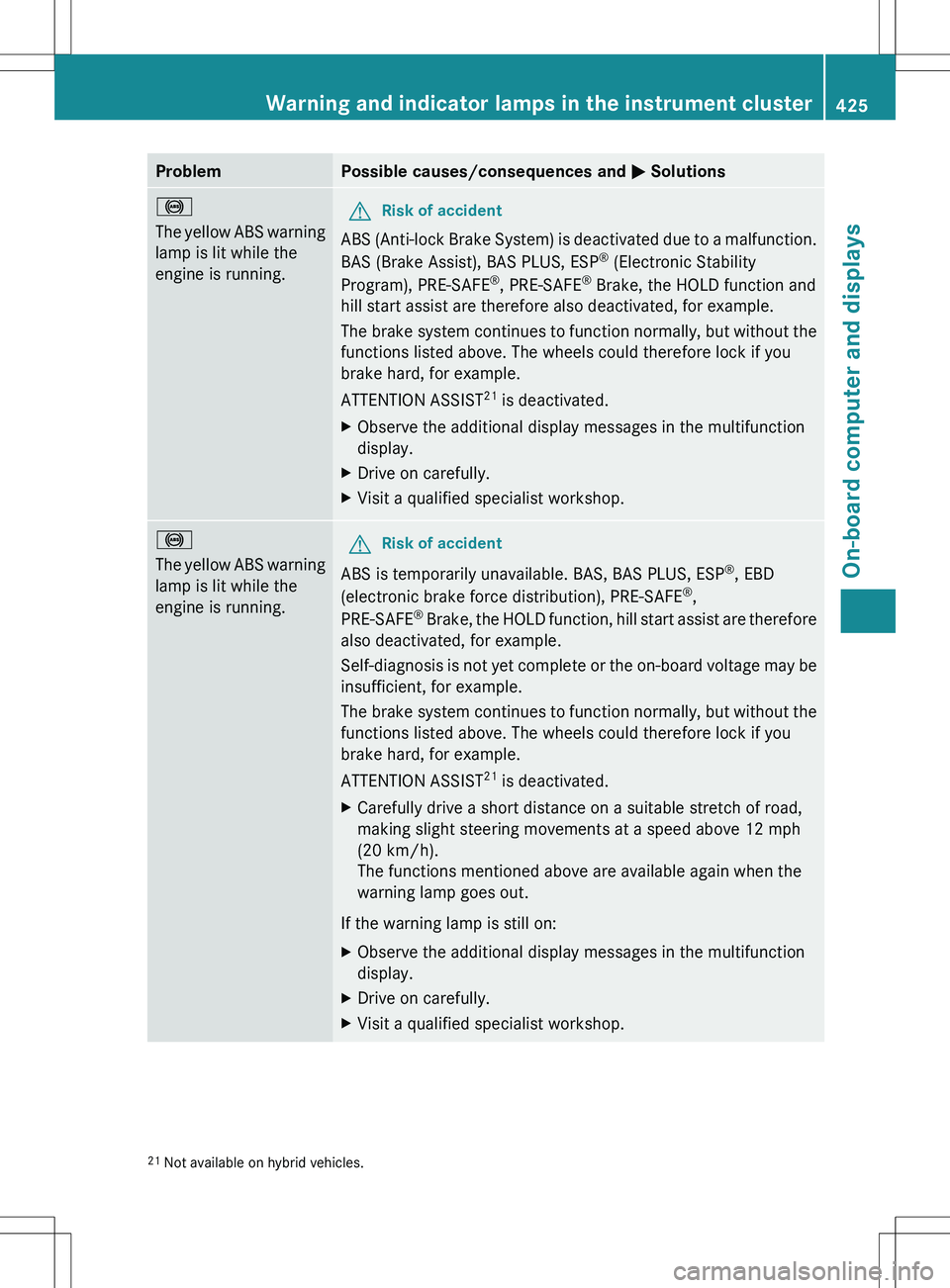
ProblemPossible causes/consequences and M Solutions!
The yellow ABS warning
lamp is lit while the
engine is running.GRisk of accident
ABS (Anti-lock Brake System) is deactivated due to a malfunction.
BAS (Brake Assist), BAS PLUS, ESP ®
(Electronic Stability
Program), PRE-SAFE ®
, PRE-SAFE ®
Brake, the HOLD function and
hill start assist are therefore also deactivated, for example.
The brake system continues to function normally, but without the
functions listed above. The wheels could therefore lock if you
brake hard, for example.
ATTENTION ASSIST 21
is deactivated.
XObserve the additional display messages in the multifunction
display.XDrive on carefully.XVisit a qualified specialist workshop.!
The yellow ABS warning
lamp is lit while the
engine is running.GRisk of accident
ABS is temporarily unavailable. BAS, BAS PLUS, ESP ®
, EBD
(electronic brake force distribution), PRE-SAFE ®
,
PRE-SAFE ®
Brake, the HOLD function, hill start assist are therefore
also deactivated, for example.
Self-diagnosis is not yet complete or the on-board voltage may be
insufficient, for example.
The brake system continues to function normally, but without the
functions listed above. The wheels could therefore lock if you
brake hard, for example.
ATTENTION ASSIST 21
is deactivated.
XCarefully drive a short distance on a suitable stretch of road,
making slight steering movements at a speed above 12 mph
(20 km/h).
The functions mentioned above are available again when the
warning lamp goes out.
If the warning lamp is still on:
XObserve the additional display messages in the multifunction
display.XDrive on carefully.XVisit a qualified specialist workshop.21 Not available on hybrid vehicles.Warning and indicator lamps in the instrument cluster425On-board computer and displaysZ
Page 430 of 536
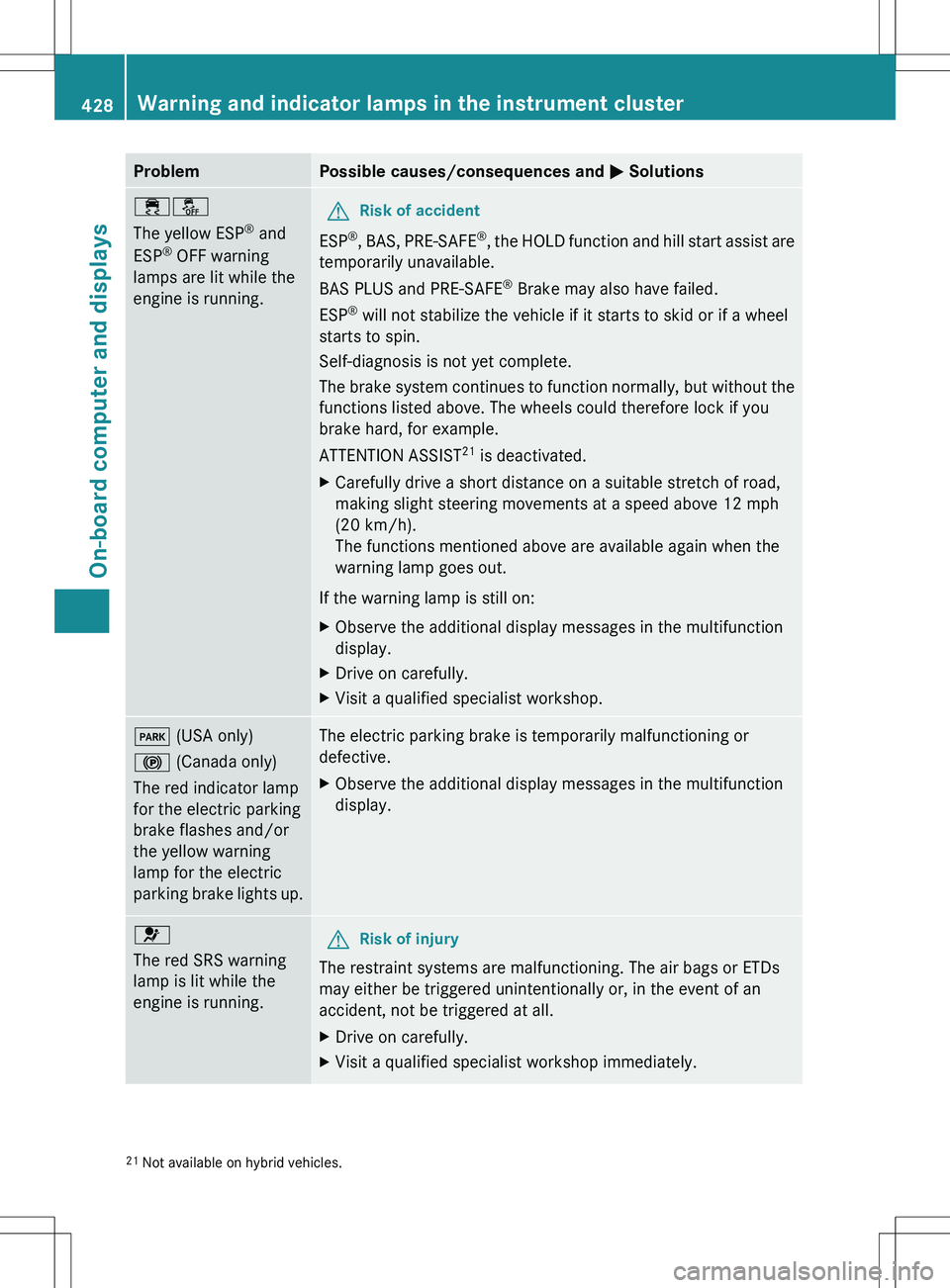
ProblemPossible causes/consequences and M Solutions֌
The yellow ESP ®
and
ESP ®
OFF warning
lamps are lit while the
engine is running.GRisk of accident
ESP ®
, BAS, PRE-SAFE ®
, the HOLD function and hill start assist are
temporarily unavailable.
BAS PLUS and PRE-SAFE ®
Brake may also have failed.
ESP ®
will not stabilize the vehicle if it starts to skid or if a wheel
starts to spin.
Self-diagnosis is not yet complete.
The brake system continues to function normally, but without the
functions listed above. The wheels could therefore lock if you
brake hard, for example.
ATTENTION ASSIST 21
is deactivated.
XCarefully drive a short distance on a suitable stretch of road,
making slight steering movements at a speed above 12 mph
(20 km/h).
The functions mentioned above are available again when the
warning lamp goes out.
If the warning lamp is still on:
XObserve the additional display messages in the multifunction
display.XDrive on carefully.XVisit a qualified specialist workshop.F (USA only)
! (Canada only)
The red indicator lamp
for the electric parking
brake flashes and/or
the yellow warning
lamp for the electric
parking brake lights up.The electric parking brake is temporarily malfunctioning or
defective.XObserve the additional display messages in the multifunction
display.6
The red SRS warning
lamp is lit while the
engine is running.GRisk of injury
The restraint systems are malfunctioning. The air bags or ETDs
may either be triggered unintentionally or, in the event of an
accident, not be triggered at all.
XDrive on carefully.XVisit a qualified specialist workshop immediately.21 Not available on hybrid vehicles.428Warning and indicator lamps in the instrument clusterOn-board computer and displays
Page 433 of 536
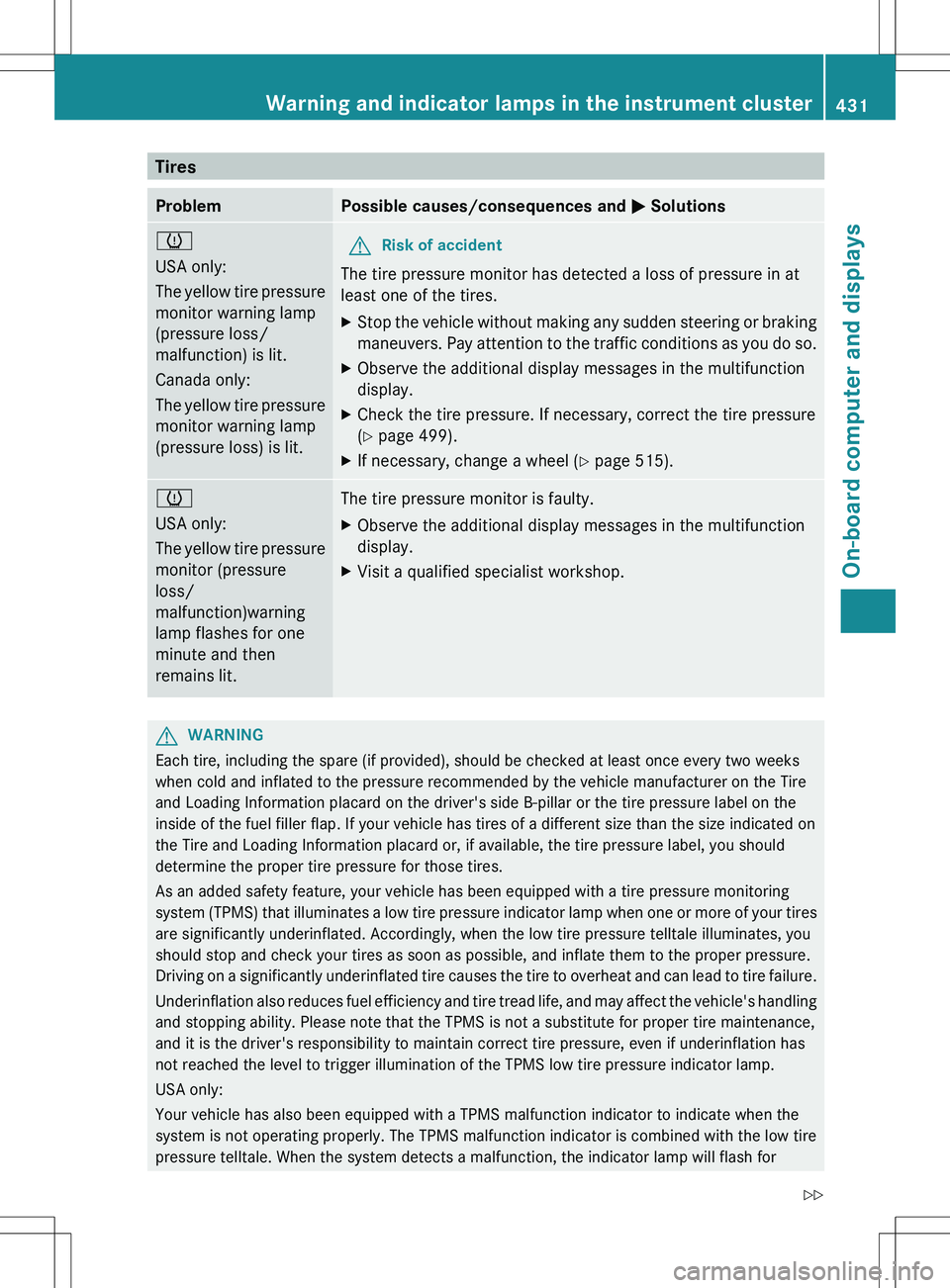
TiresProblemPossible causes/consequences and M Solutionsh
USA only:
The yellow tire pressure
monitor warning lamp
(pressure loss/
malfunction) is lit.
Canada only:
The yellow tire pressure
monitor warning lamp
(pressure loss) is lit.GRisk of accident
The tire pressure monitor has detected a loss of pressure in at
least one of the tires.
XStop the vehicle without making any sudden steering or braking
maneuvers. Pay attention to the traffic conditions as you do so.XObserve the additional display messages in the multifunction
display.XCheck the tire pressure. If necessary, correct the tire pressure
( Y page 499).XIf necessary, change a wheel ( Y page 515).h
USA only:
The yellow tire pressure
monitor (pressure
loss/
malfunction)warning
lamp flashes for one
minute and then
remains lit.The tire pressure monitor is faulty.XObserve the additional display messages in the multifunction
display.XVisit a qualified specialist workshop.GWARNING
Each tire, including the spare (if provided), should be checked at least once every two weeks
when cold and inflated to the pressure recommended by the vehicle manufacturer on the Tire
and Loading Information placard on the driver's side B-pillar or the tire pressure label on the
inside of the fuel filler flap. If your vehicle has tires of a different size than the size indicated on
the Tire and Loading Information placard or, if available, the tire pressure label, you should
determine the proper tire pressure for those tires.
As an added safety feature, your vehicle has been equipped with a tire pressure monitoring
system (TPMS) that illuminates a low tire pressure indicator lamp when one or more of your tires
are significantly underinflated. Accordingly, when the low tire pressure telltale illuminates, you
should stop and check your tires as soon as possible, and inflate them to the proper pressure.
Driving on a significantly underinflated tire causes the tire to overheat and can lead to tire failure.
Underinflation also reduces fuel efficiency and tire tread life, and may affect the vehicle's handling
and stopping ability. Please note that the TPMS is not a substitute for proper tire maintenance,
and it is the driver's responsibility to maintain correct tire pressure, even if underinflation has
not reached the level to trigger illumination of the TPMS low tire pressure indicator lamp.
USA only:
Your vehicle has also been equipped with a TPMS malfunction indicator to indicate when the
system is not operating properly. The TPMS malfunction indicator is combined with the low tire
pressure telltale. When the system detects a malfunction, the indicator lamp will flash for
Warning and indicator lamps in the instrument cluster431On-board computer and displaysZ
Page 443 of 536
Rear window roller sunblind
Important safety notesGWARNING
When leaving the vehicle, always remove the
SmartKey from the ignition lock. Always take
the SmartKey with you and lock the vehicle.
Do not leave children unattended in the
vehicle, even if they are secured in a child
restraint system, or with access to an
unlocked vehicle. A child's unsupervised
access to a vehicle could result in an accident
and/or serious personal injury. The children
could:
R injure themselves on parts of the vehicle
R be seriously or fatally injured through
excessive exposure to extreme heat or cold
R injure themselves or cause an accident with
vehicle equipment that can be operated
even if the SmartKey is removed from the
ignition lock or removed from the vehicle,
such as seat adjustment, steering wheel
adjustment, or the memory function
If children open a door, they could injure other
persons or get out of the vehicle and injure
themselves or be injured by following traffic.
Do not expose the child restraint system to
direct sunlight. The child restraint system's
metal parts, for example, could become very
hot, and the child could be burned on these
parts.
GWARNING
When adjusting a roller sunblind, the roller
blind moves up or down. You might become
trapped in the process.
In the event of danger, briefly press the button
for the roller sunblind to change the roller
blind's direction of movement.
Extending/retracting from the driver's
seat
! Make sure that the roller sunblind can
move freely. Otherwise, the roller sunblind
or other objects could be damaged.
At temperatures below Ò4 ‡ ( Ò20 †), the
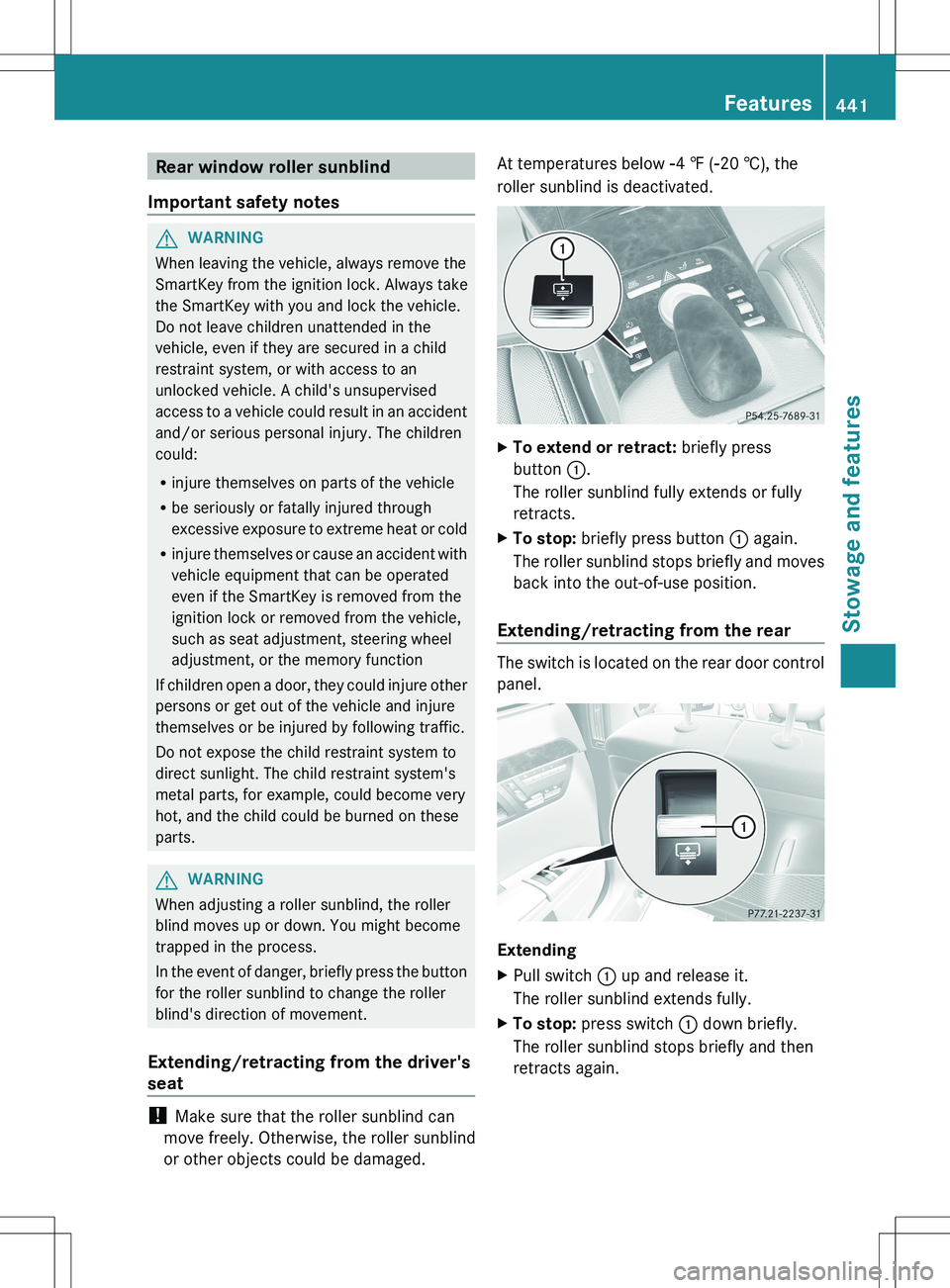
roller sunblind is deactivated.XTo extend or retract: briefly press
button :.
The roller sunblind fully extends or fully
retracts.XTo stop: briefly press button : again.
The roller sunblind stops briefly and moves
back into the out-of-use position.
Extending/retracting from the rear
The switch is located on the rear door control
panel.
Extending
XPull switch : up and release it.
The roller sunblind extends fully.XTo stop: press switch : down briefly.
The roller sunblind stops briefly and then
retracts again.Features441Stowage and featuresZ
Page 444 of 536
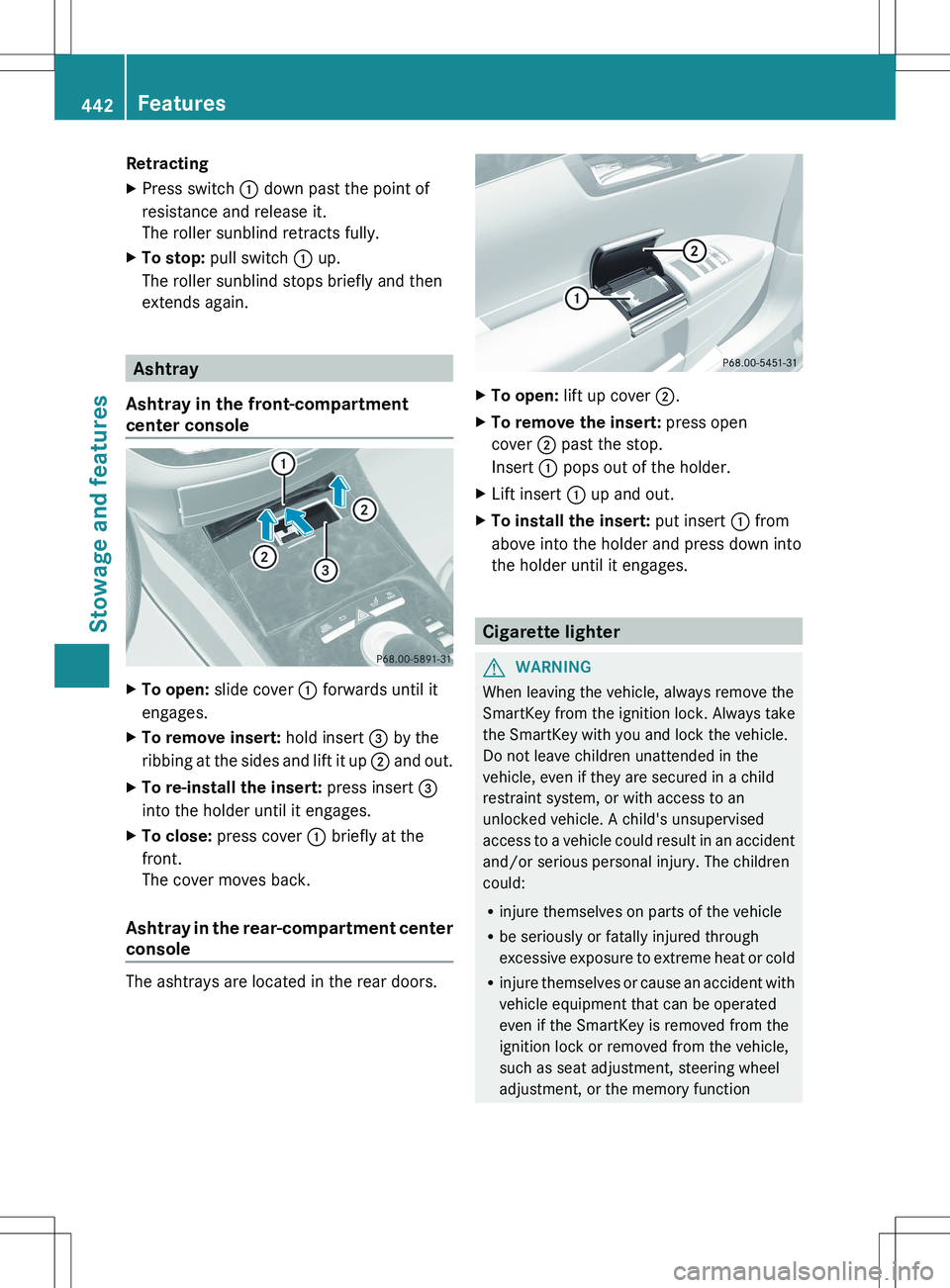
RetractingXPress switch : down past the point of
resistance and release it.
The roller sunblind retracts fully.XTo stop: pull switch : up.
The roller sunblind stops briefly and then
extends again.
Ashtray
Ashtray in the front-compartment
center console
XTo open: slide cover : forwards until it
engages.XTo remove insert: hold insert = by the
ribbing at the sides and lift it up ; and out.XTo re-install the insert: press insert =
into the holder until it engages.XTo close: press cover : briefly at the
front.
The cover moves back.
Ashtray in the rear-compartment center
console
The ashtrays are located in the rear doors.
XTo open: lift up cover ;.XTo remove the insert: press open
cover ; past the stop.
Insert : pops out of the holder.XLift insert : up and out.XTo install the insert: put insert : from
above into the holder and press down into
the holder until it engages.
Cigarette lighter
GWARNING
When leaving the vehicle, always remove the
SmartKey from the ignition lock. Always take
the SmartKey with you and lock the vehicle.
Do not leave children unattended in the
vehicle, even if they are secured in a child
restraint system, or with access to an
unlocked vehicle. A child's unsupervised
access to a vehicle could result in an accident
and/or serious personal injury. The children
could:
R injure themselves on parts of the vehicle
R be seriously or fatally injured through
excessive exposure to extreme heat or cold
R injure themselves or cause an accident with
vehicle equipment that can be operated
even if the SmartKey is removed from the
ignition lock or removed from the vehicle,
such as seat adjustment, steering wheel
adjustment, or the memory function
442FeaturesStowage and features
Page 448 of 536
To adjust the volume during an mbrace call,
proceed as follows:XPress the W or X button on the
multifunction steering wheel.
or
XUse the H volume controller of
COMAND ( Y page 123).
You can find further information and a
description of all available features under
"Owners Online" at http://
www.mbusa.com 23
.
System self-test
After you have switched on the ignition, the
system carries out a self-diagnosis.
GWARNING
A malfunction in the system has been
detected if one of the following conditions
occurs:
R the indicator lamp in the SOS button does
not light up during the system self-
diagnosis.
R the indicator lamp in the º Roadside
Assistance button does not light up during
the system self-diagnosis.
R the indicator lamp in the E information
button does not light up during the system
self-diagnosis.
R the indicator lamp in the SOS button,
º Roadside Assistance button or E
information button continues to be lit red
after the system self-diagnosis.
R the Tele Aid inoperative or Tele Aid
not activated message appears on the
multifunction display after the system self-
diagnosis.
If a malfunction is indicated as outlined above,
the system may not operate as expected. In
the event of an emergency, assistance must
be summoned by other means.
Have the system checked at the nearest
authorized Mercedes-Benz Center or contact
the following service hotlines:
R USA: Response Center at
1-888-990-9007
R Canada: Customer Service at
1-888-923-8367
Emergency call
Important safety notes
! A license agreement must exist in order
to activate the mbrace service. Ensure that
your system is activated and ready for use,
and press the E MB Info call button to
register. If any of the steps mentioned is
not carried out, the system may not be
activated.
If you have questions about the activation,
contact one of the following telephone
assistance services:
R USA: Mercedes-Benz Customer
Assistance Center under
1-888-990-9007
R Canada: Customer Service at
1-888-923-8367
An emergency call is dialed automatically if
an air bag or Emergency Tensioning Device is
triggered.
i An mbrace emergency call that has been
initiated automatically cannot be
terminated by the customer.
An emergency call can also be initiated
manually.
As soon as the emergency call has been
initiated, the indicator lamp in the SOS button
flashes. The Connecting Call message
appears on the multifunction display.
The COMAND display shows the Emergency
Call Activated message. The audio output
is muted.
23 USA only.446FeaturesStowage and features
Page 450 of 536
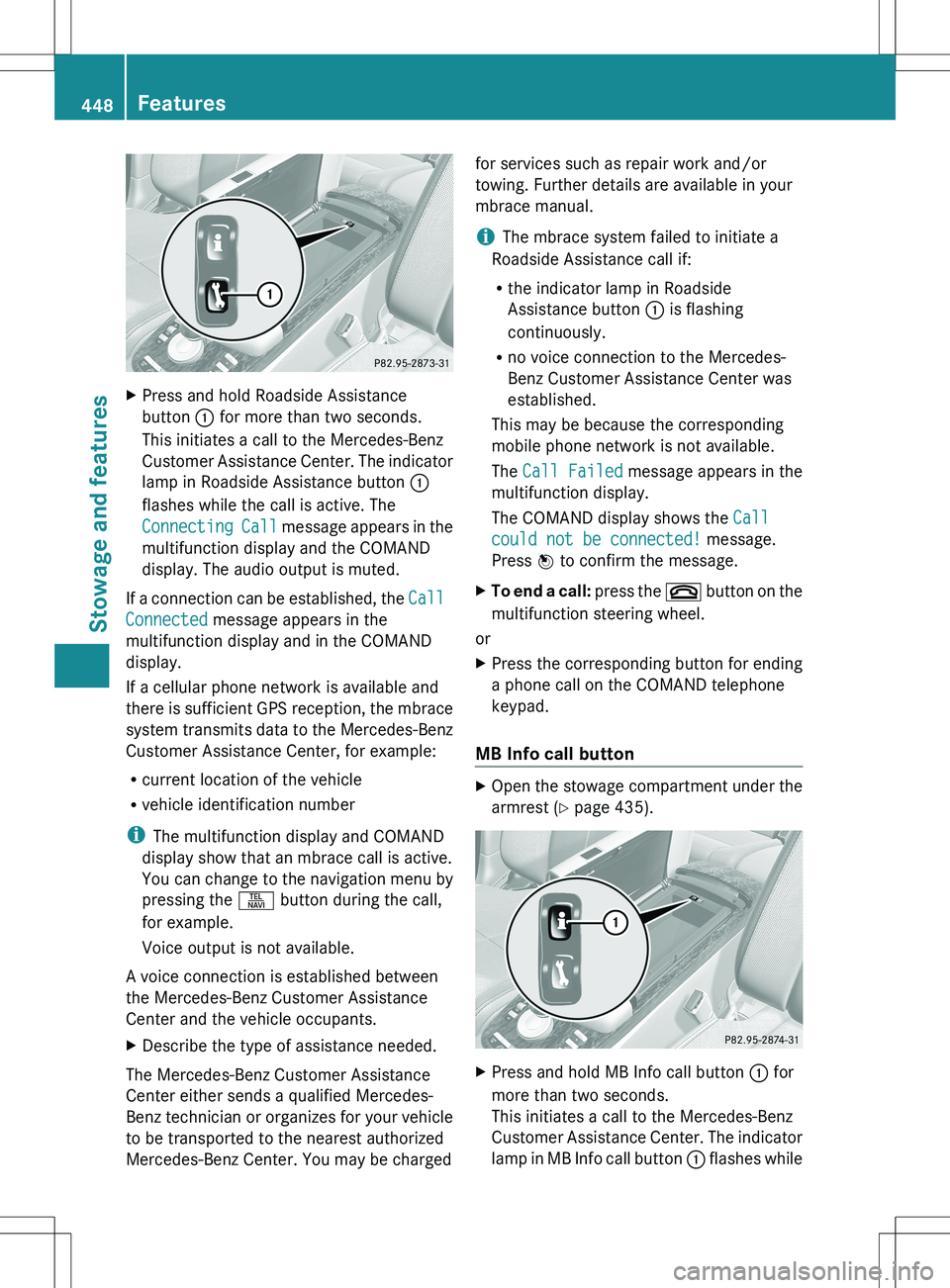
XPress and hold Roadside Assistance
button : for more than two seconds.
This initiates a call to the Mercedes-Benz
Customer Assistance Center. The indicator
lamp in Roadside Assistance button :
flashes while the call is active. The
Connecting Call message appears in the
multifunction display and the COMAND
display. The audio output is muted.
If a connection can be established, the Call
Connected message appears in the
multifunction display and in the COMAND
display.
If a cellular phone network is available and
there is sufficient GPS reception, the mbrace
system transmits data to the Mercedes-Benz
Customer Assistance Center, for example:
R current location of the vehicle
R vehicle identification number
i The multifunction display and COMAND
display show that an mbrace call is active.
You can change to the navigation menu by
pressing the S button during the call,
for example.
Voice output is not available.
A voice connection is established between
the Mercedes-Benz Customer Assistance
Center and the vehicle occupants.
XDescribe the type of assistance needed.
The Mercedes-Benz Customer Assistance
Center either sends a qualified Mercedes-
Benz technician or organizes for your vehicle
to be transported to the nearest authorized
Mercedes-Benz Center. You may be charged
for services such as repair work and/or
towing. Further details are available in your
mbrace manual.
i The mbrace system failed to initiate a
Roadside Assistance call if:
R the indicator lamp in Roadside
Assistance button : is flashing
continuously.
R no voice connection to the Mercedes-
Benz Customer Assistance Center was
established.
This may be because the corresponding
mobile phone network is not available.
The Call Failed message appears in the
multifunction display.
The COMAND display shows the Call
could not be connected! message.
Press W to confirm the message.XTo end a call: press the ~ button on the
multifunction steering wheel.
or
XPress the corresponding button for ending
a phone call on the COMAND telephone
keypad.
MB Info call button
XOpen the stowage compartment under the
armrest ( Y page 435).XPress and hold MB Info call button : for
more than two seconds.
This initiates a call to the Mercedes-Benz
Customer Assistance Center. The indicator
lamp in MB Info call button : flashes while448FeaturesStowage and features
Page 451 of 536
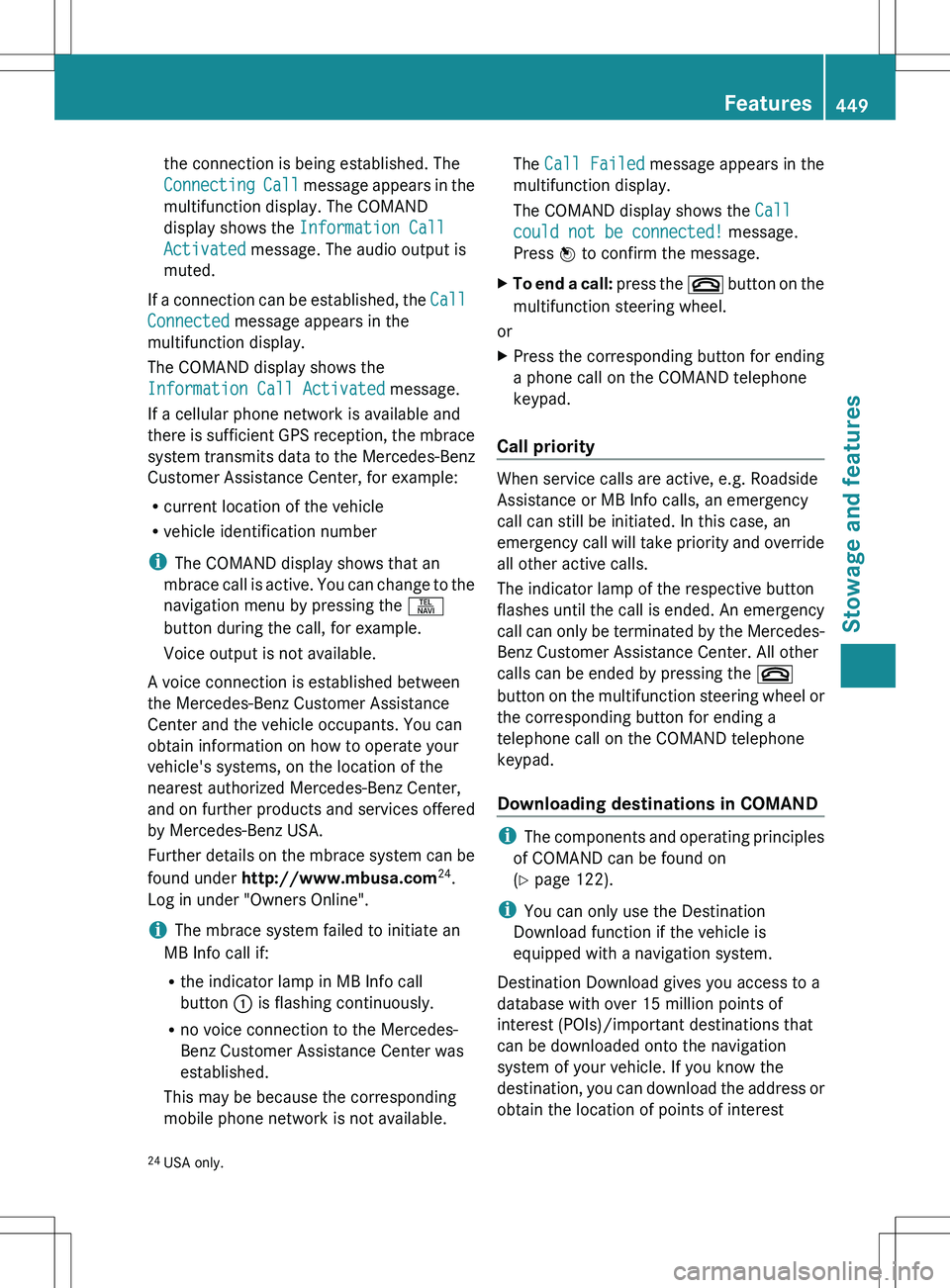
the connection is being established. The
Connecting Call message appears in the
multifunction display. The COMAND
display shows the Information Call
Activated message. The audio output is
muted.
If a connection can be established, the Call
Connected message appears in the
multifunction display.
The COMAND display shows the
Information Call Activated message.
If a cellular phone network is available and
there is sufficient GPS reception, the mbrace
system transmits data to the Mercedes-Benz
Customer Assistance Center, for example:
R current location of the vehicle
R vehicle identification number
i The COMAND display shows that an
mbrace call is active. You can change to the
navigation menu by pressing the S
button during the call, for example.
Voice output is not available.
A voice connection is established between
the Mercedes-Benz Customer Assistance
Center and the vehicle occupants. You can
obtain information on how to operate your
vehicle's systems, on the location of the
nearest authorized Mercedes-Benz Center,
and on further products and services offered
by Mercedes-Benz USA.
Further details on the mbrace system can be
found under http://www.mbusa.com 24
.
Log in under "Owners Online".
i The mbrace system failed to initiate an
MB Info call if:
R the indicator lamp in MB Info call
button : is flashing continuously.
R no voice connection to the Mercedes-
Benz Customer Assistance Center was
established.
This may be because the corresponding
mobile phone network is not available.
The Call Failed message appears in the
multifunction display.
The COMAND display shows the Call
could not be connected! message.
Press W to confirm the message.XTo end a call: press the ~ button on the
multifunction steering wheel.
or
XPress the corresponding button for ending
a phone call on the COMAND telephone
keypad.
Call priority
When service calls are active, e.g. Roadside
Assistance or MB Info calls, an emergency
call can still be initiated. In this case, an
emergency call will take priority and override
all other active calls.
The indicator lamp of the respective button
flashes until the call is ended. An emergency
call can only be terminated by the Mercedes-
Benz Customer Assistance Center. All other
calls can be ended by pressing the ~
button on the multifunction steering wheel or
the corresponding button for ending a
telephone call on the COMAND telephone
keypad.
Downloading destinations in COMAND
i The components and operating principles
of COMAND can be found on
( Y page 122).
i You can only use the Destination
Download function if the vehicle is
equipped with a navigation system.
Destination Download gives you access to a
database with over 15 million points of
interest (POIs)/important destinations that
can be downloaded onto the navigation
system of your vehicle. If you know the
destination, you can download the address or
obtain the location of points of interest
24 USA only.Features449Stowage and featuresZ