steering MERCEDES-BENZ S-CLASS SEDAN 2012 Manual Online
[x] Cancel search | Manufacturer: MERCEDES-BENZ, Model Year: 2012, Model line: S-CLASS SEDAN, Model: MERCEDES-BENZ S-CLASS SEDAN 2012Pages: 536, PDF Size: 39.39 MB
Page 388 of 536
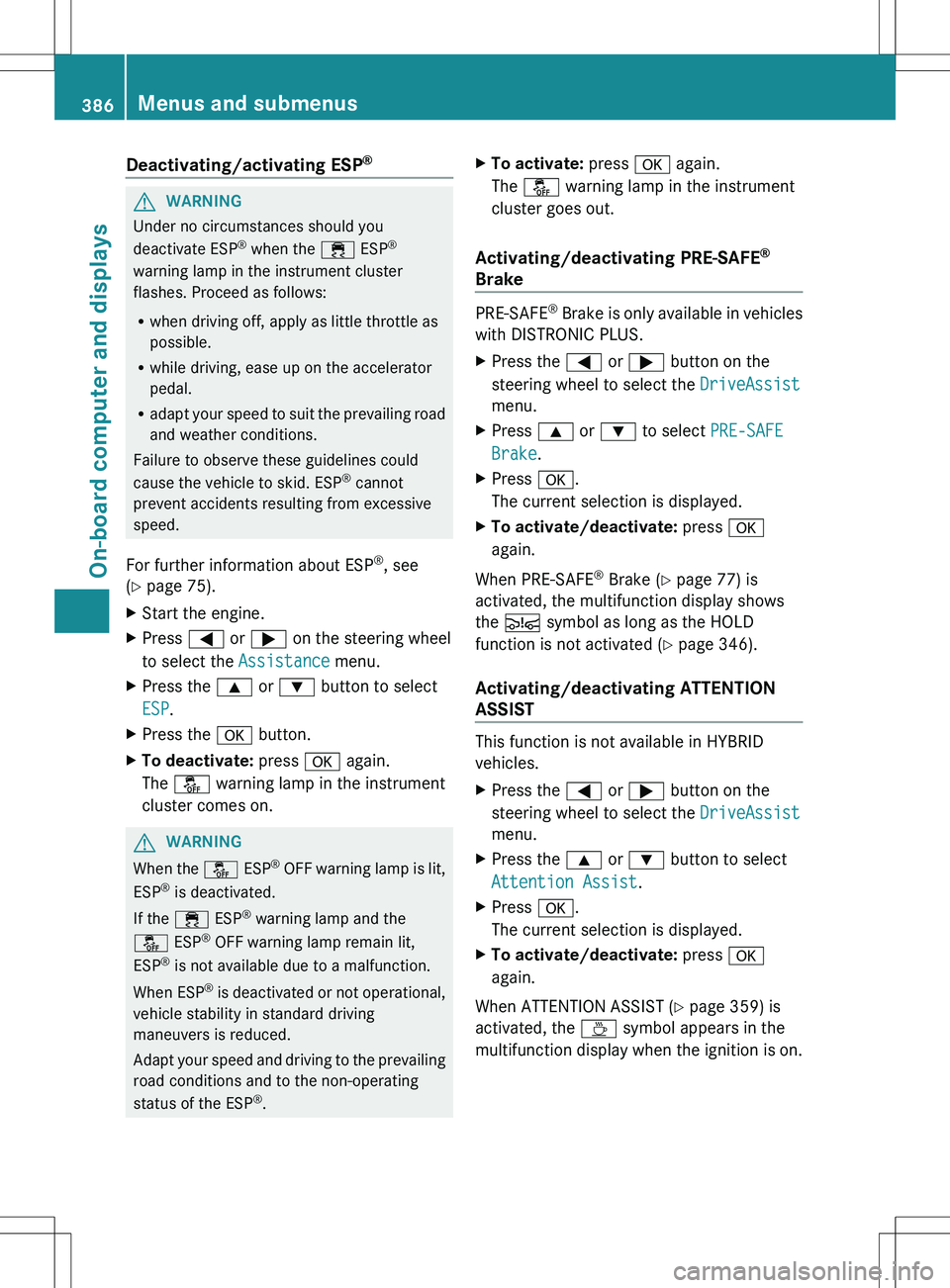
Deactivating/activating ESP®GWARNING
Under no circumstances should you
deactivate ESP ®
when the ÷ ESP®
warning lamp in the instrument cluster
flashes. Proceed as follows:
R when driving off, apply as little throttle as
possible.
R while driving, ease up on the accelerator
pedal.
R adapt your speed to suit the prevailing road
and weather conditions.
Failure to observe these guidelines could
cause the vehicle to skid. ESP ®
cannot
prevent accidents resulting from excessive
speed.
For further information about ESP ®
, see
( Y page 75).
XStart the engine.XPress = or ; on the steering wheel
to select the Assistance menu.XPress the 9 or : button to select
ESP .XPress the a button.XTo deactivate: press a again.
The å warning lamp in the instrument
cluster comes on.GWARNING
When the å ESP®
OFF warning lamp is lit,
ESP ®
is deactivated.
If the ÷ ESP®
warning lamp and the
å ESP®
OFF warning lamp remain lit,
ESP ®
is not available due to a malfunction.
When ESP ®
is deactivated or not operational,
vehicle stability in standard driving
maneuvers is reduced.
Adapt your speed and driving to the prevailing
road conditions and to the non-operating
status of the ESP ®
.
XTo activate: press a again.
The å warning lamp in the instrument
cluster goes out.
Activating/deactivating PRE-SAFE ®
Brake
PRE-SAFE ®
Brake is only available in vehicles
with DISTRONIC PLUS.
XPress the = or ; button on the
steering wheel to select the DriveAssist
menu.XPress 9 or : to select PRE-SAFE
Brake .XPress a.
The current selection is displayed.XTo activate/deactivate: press a
again.
When PRE-SAFE ®
Brake ( Y page 77) is
activated, the multifunction display shows
the Ä symbol as long as the HOLD
function is not activated ( Y page 346).
Activating/deactivating ATTENTION
ASSIST
This function is not available in HYBRID
vehicles.
XPress the = or ; button on the
steering wheel to select the DriveAssist
menu.XPress the 9 or : button to select
Attention Assist .XPress a.
The current selection is displayed.XTo activate/deactivate: press a
again.
When ATTENTION ASSIST ( Y page 359) is
activated, the À symbol appears in the
multifunction display when the ignition is on.
386Menus and submenusOn-board computer and displays
Page 389 of 536
activating/deactivating Blind Spot
Assist
You can use the Blind Spot Assist
function to activate or deactivate Blind Spot
Assist ( Y page 363) or Active Blind Spot
Assist ( Y page 367).
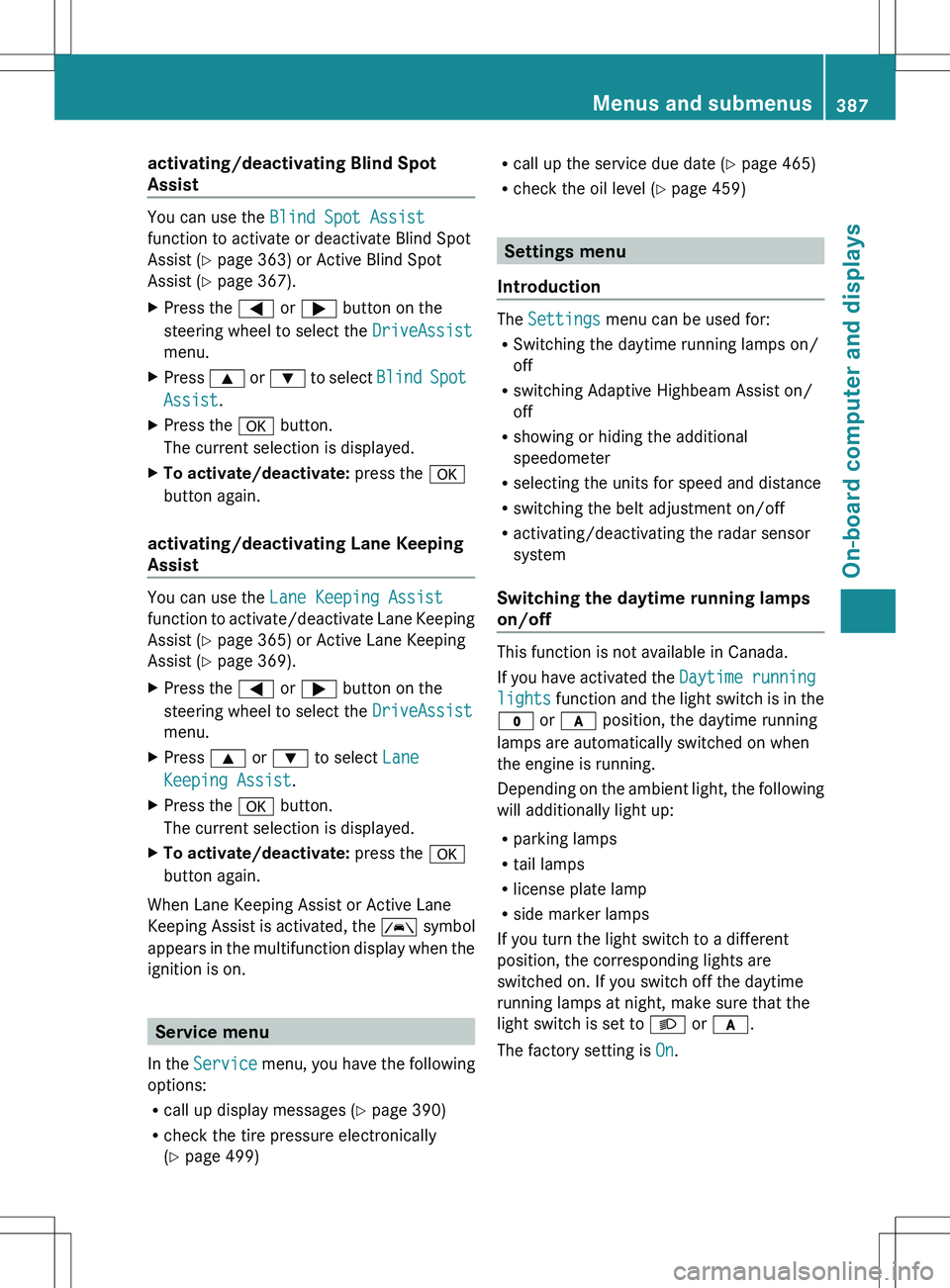
XPress the = or ; button on the
steering wheel to select the DriveAssist
menu.XPress 9 or : to select Blind Spot
Assist .XPress the a button.
The current selection is displayed.XTo activate/deactivate: press the a
button again.
activating/deactivating Lane Keeping
Assist
You can use the Lane Keeping Assist
function to activate/deactivate Lane Keeping
Assist ( Y page 365) or Active Lane Keeping
Assist ( Y page 369).
XPress the = or ; button on the
steering wheel to select the DriveAssist
menu.XPress 9 or : to select Lane
Keeping Assist .XPress the a button.
The current selection is displayed.XTo activate/deactivate: press the a
button again.
When Lane Keeping Assist or Active Lane
Keeping Assist is activated, the à symbol
appears in the multifunction display when the
ignition is on.
Service menu
In the Service menu, you have the following
options:
R call up display messages ( Y page 390)
R check the tire pressure electronically
( Y page 499)
R
call up the service due date ( Y page 465)
R check the oil level ( Y page 459)
Settings menu
Introduction
The Settings menu can be used for:
R Switching the daytime running lamps on/
off
R switching Adaptive Highbeam Assist on/
off
R showing or hiding the additional
speedometer
R selecting the units for speed and distance
R switching the belt adjustment on/off
R activating/deactivating the radar sensor
system
Switching the daytime running lamps
on/off
This function is not available in Canada.
If you have activated the Daytime running
lights function and the light switch is in the
$ or c position, the daytime running
lamps are automatically switched on when
the engine is running.
Depending on the ambient light, the following
will additionally light up:
R parking lamps
R tail lamps
R license plate lamp
R side marker lamps
If you turn the light switch to a different
position, the corresponding lights are
switched on. If you switch off the daytime
running lamps at night, make sure that the
light switch is set to L or c .
The factory setting is On.
Menus and submenus387On-board computer and displaysZ
Page 390 of 536
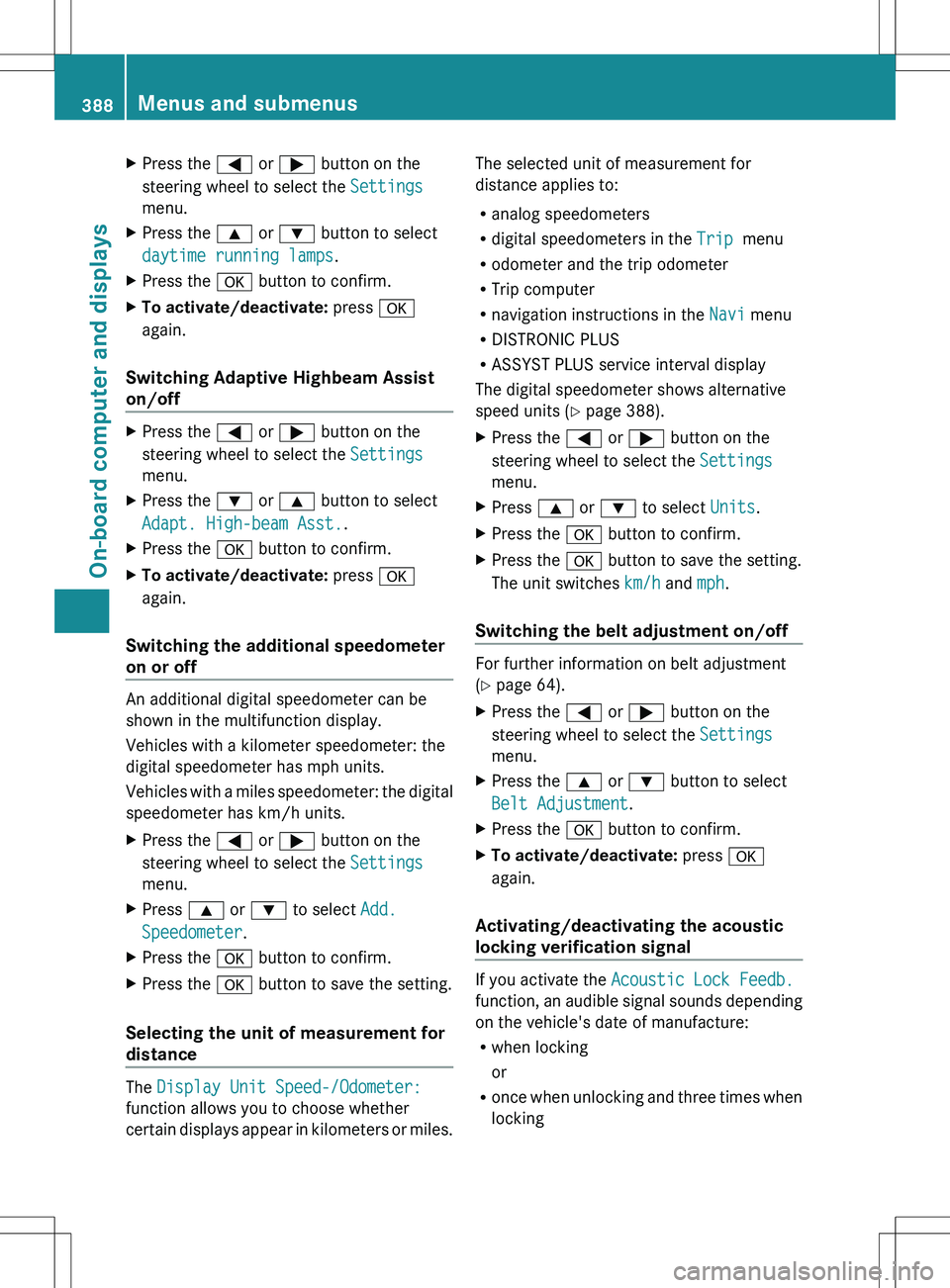
XPress the = or ; button on the
steering wheel to select the Settings
menu.XPress the 9 or : button to select
daytime running lamps .XPress the a button to confirm.XTo activate/deactivate: press a
again.
Switching Adaptive Highbeam Assist
on/off
XPress the = or ; button on the
steering wheel to select the Settings
menu.XPress the : or 9 button to select
Adapt. High-beam Asst. .XPress the a button to confirm.XTo activate/deactivate: press a
again.
Switching the additional speedometer
on or off
An additional digital speedometer can be
shown in the multifunction display.
Vehicles with a kilometer speedometer: the
digital speedometer has mph units.
Vehicles with a miles speedometer: the digital
speedometer has km/h units.
XPress the = or ; button on the
steering wheel to select the Settings
menu.XPress 9 or : to select Add.
Speedometer .XPress the a button to confirm.XPress the a button to save the setting.
Selecting the unit of measurement for
distance
The Display Unit Speed-/Odometer:
function allows you to choose whether
certain displays appear in kilometers or miles.
The selected unit of measurement for
distance applies to:
R analog speedometers
R digital speedometers in the Trip menu
R odometer and the trip odometer
R Trip computer
R navigation instructions in the Navi menu
R DISTRONIC PLUS
R ASSYST PLUS service interval display
The digital speedometer shows alternative
speed units ( Y page 388).XPress the = or ; button on the
steering wheel to select the Settings
menu.XPress 9 or : to select Units.XPress the a button to confirm.XPress the a button to save the setting.
The unit switches km/h and mph.
Switching the belt adjustment on/off
For further information on belt adjustment
( Y page 64).
XPress the = or ; button on the
steering wheel to select the Settings
menu.XPress the 9 or : button to select
Belt Adjustment .XPress the a button to confirm.XTo activate/deactivate: press a
again.
Activating/deactivating the acoustic
locking verification signal
If you activate the Acoustic Lock Feedb.
function, an audible signal sounds depending
on the vehicle's date of manufacture:
R when locking
or
R once when unlocking and three times when
locking
388Menus and submenusOn-board computer and displays
Page 391 of 536
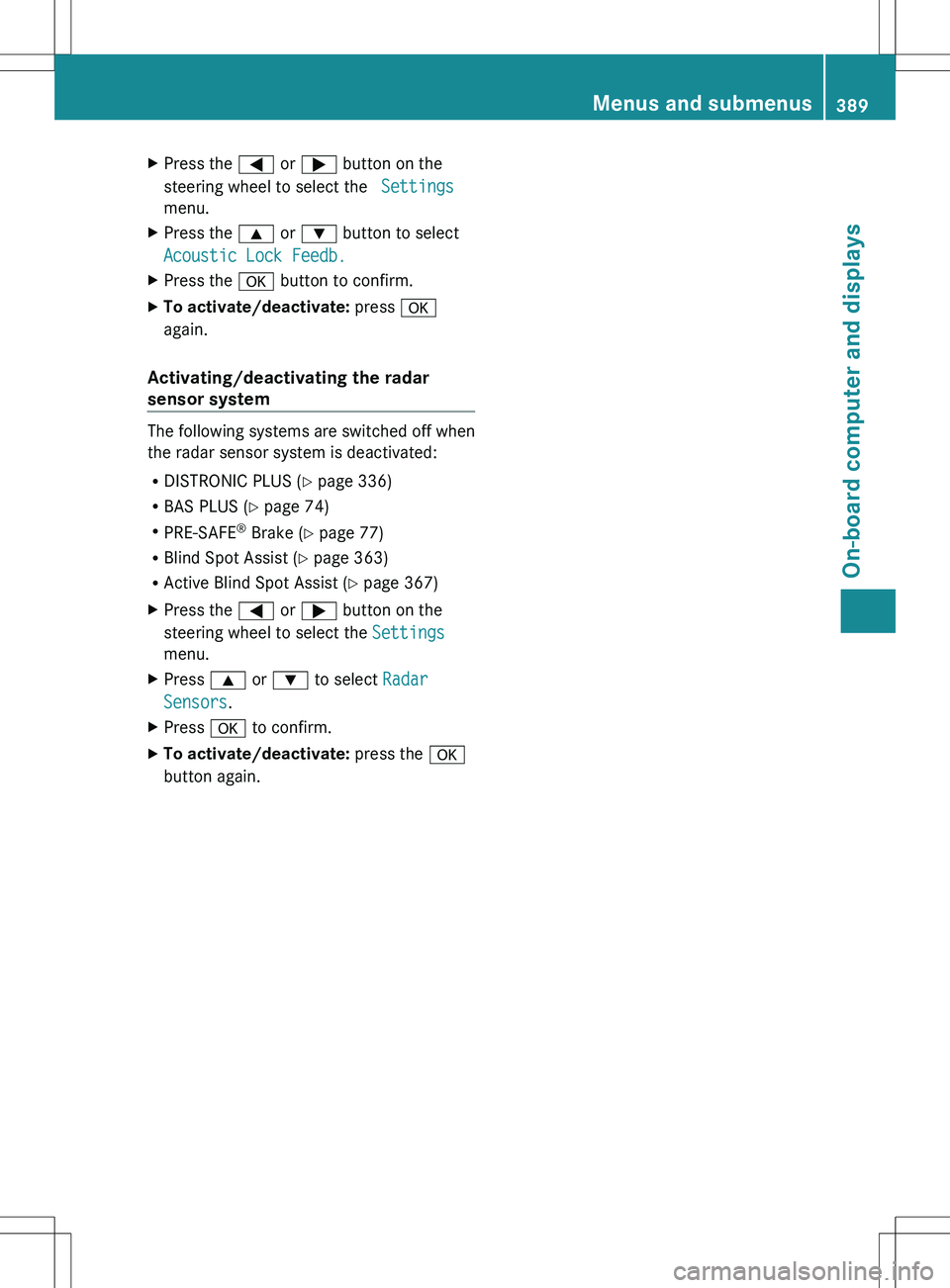
XPress the = or ; button on the
steering wheel to select the Settings
menu.XPress the 9 or : button to select
Acoustic Lock Feedb.XPress the a button to confirm.XTo activate/deactivate: press a
again.
Activating/deactivating the radar
sensor system
The following systems are switched off when
the radar sensor system is deactivated:
R DISTRONIC PLUS ( Y page 336)
R BAS PLUS ( Y page 74)
R PRE-SAFE ®
Brake ( Y page 77)
R Blind Spot Assist ( Y page 363)
R Active Blind Spot Assist ( Y page 367)
XPress the = or ; button on the
steering wheel to select the Settings
menu.XPress 9 or : to select Radar
Sensors .XPress a to confirm.XTo activate/deactivate: press the a
button again.Menus and submenus389On-board computer and displaysZ
Page 392 of 536
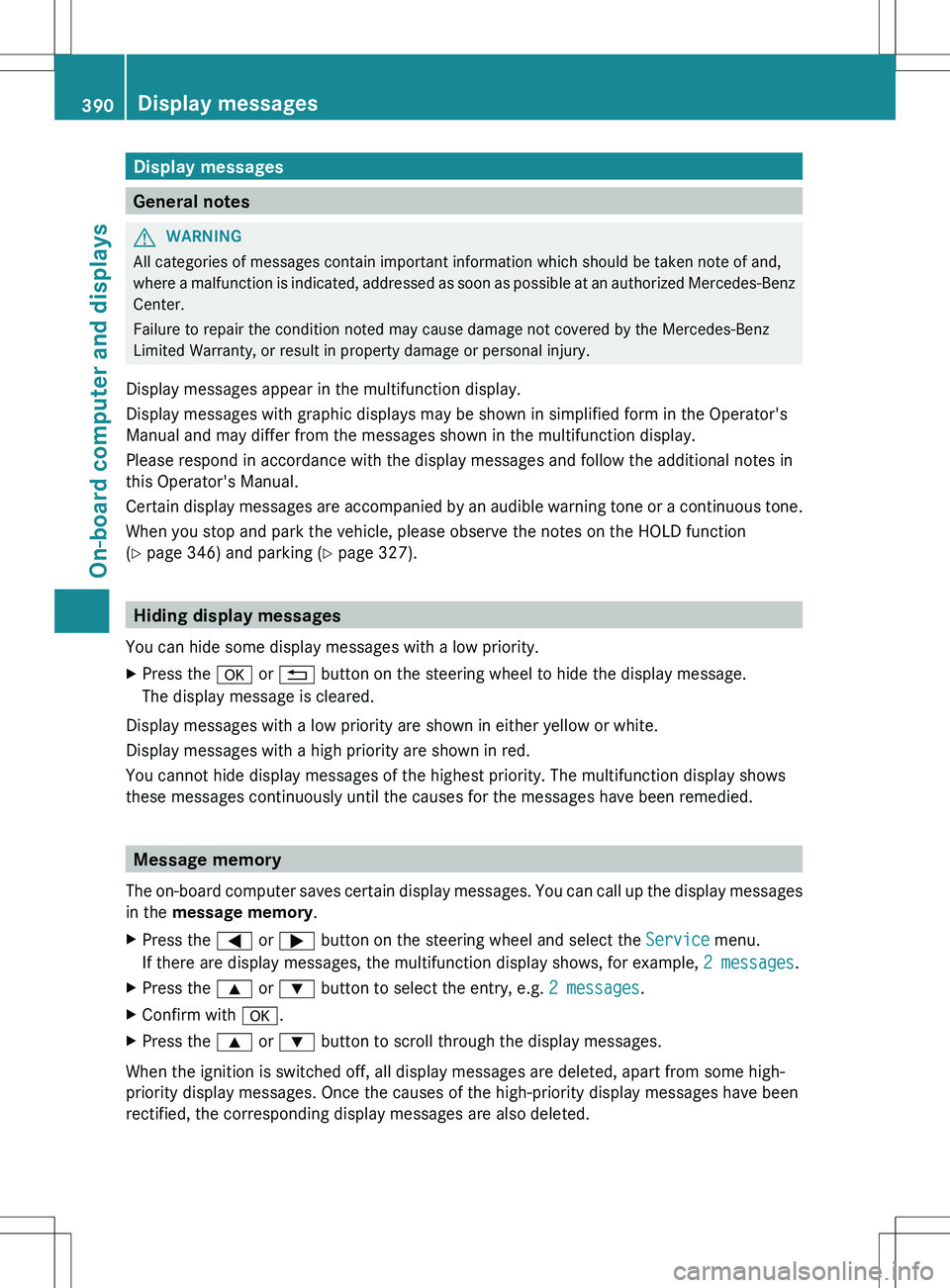
Display messages
General notes
GWARNING
All categories of messages contain important information which should be taken note of and,
where a malfunction is indicated, addressed as soon as possible at an authorized Mercedes-Benz
Center.
Failure to repair the condition noted may cause damage not covered by the Mercedes-Benz
Limited Warranty, or result in property damage or personal injury.
Display messages appear in the multifunction display.
Display messages with graphic displays may be shown in simplified form in the Operator's
Manual and may differ from the messages shown in the multifunction display.
Please respond in accordance with the display messages and follow the additional notes in
this Operator's Manual.
Certain display messages are accompanied by an audible warning tone or a continuous tone.
When you stop and park the vehicle, please observe the notes on the HOLD function
( Y page 346) and parking ( Y page 327).
Hiding display messages
You can hide some display messages with a low priority.
XPress the a or % button on the steering wheel to hide the display message.
The display message is cleared.
Display messages with a low priority are shown in either yellow or white.
Display messages with a high priority are shown in red.
You cannot hide display messages of the highest priority. The multifunction display shows
these messages continuously until the causes for the messages have been remedied.
Message memory
The on-board computer saves certain display messages. You can call up the display messages
in the message memory .
XPress the = or ; button on the steering wheel and select the Service menu.
If there are display messages, the multifunction display shows, for example, 2 messages.XPress the 9 or : button to select the entry, e.g. 2 messages.XConfirm with a.XPress the 9 or : button to scroll through the display messages.
When the ignition is switched off, all display messages are deleted, apart from some high-
priority display messages. Once the causes of the high-priority display messages have been
rectified, the corresponding display messages are also deleted.
390Display messagesOn-board computer and displays
Page 393 of 536
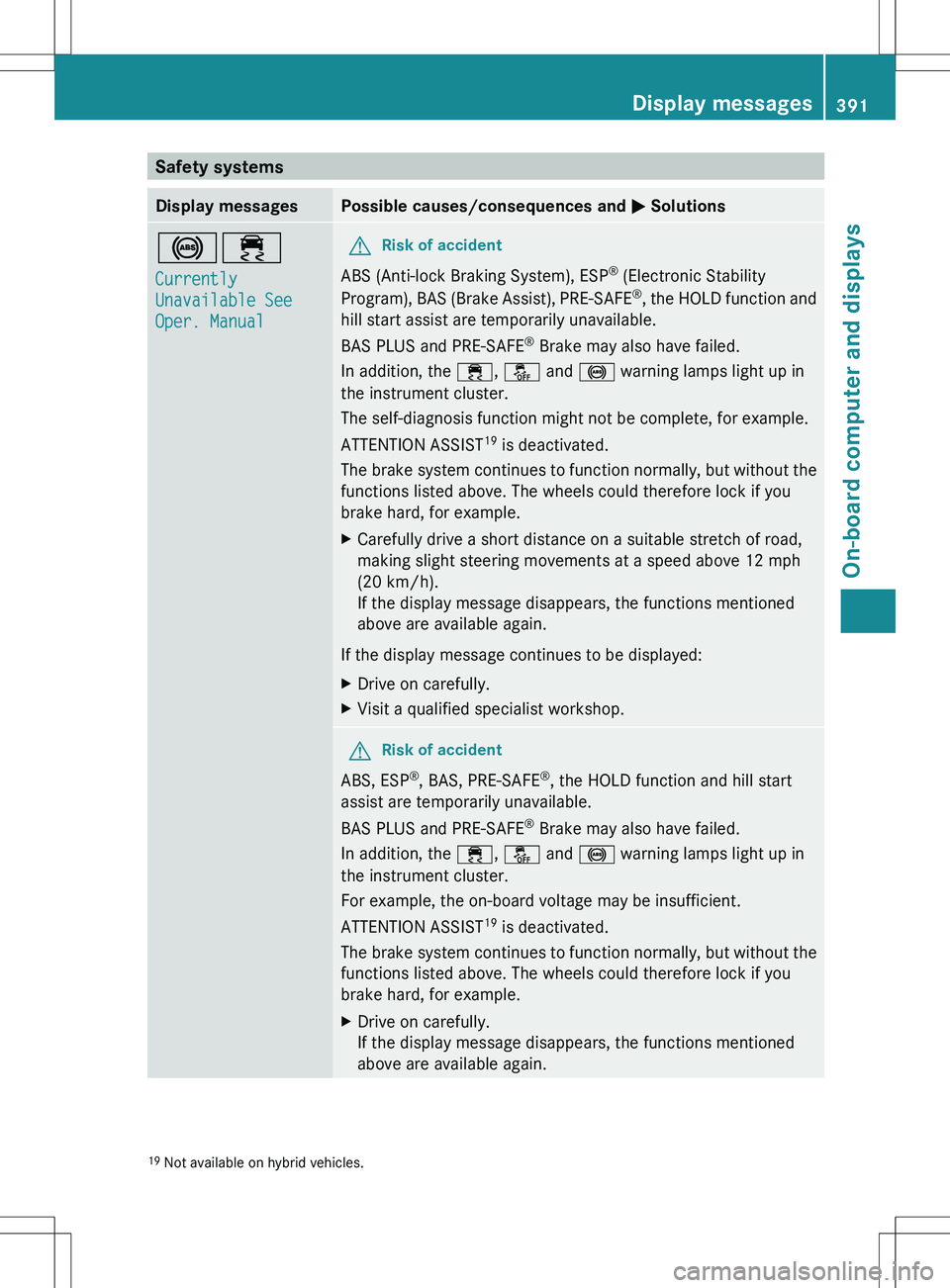
Safety systemsDisplay messagesPossible causes/consequences and M Solutions!÷
Currently
Unavailable See
Oper. ManualGRisk of accident
ABS (Anti-lock Braking System), ESP ®
(Electronic Stability
Program), BAS (Brake Assist), PRE-SAFE ®
, the HOLD function and
hill start assist are temporarily unavailable.
BAS PLUS and PRE-SAFE ®
Brake may also have failed.
In addition, the ÷, å and ! warning lamps light up in
the instrument cluster.
The self-diagnosis function might not be complete, for example.
ATTENTION ASSIST 19
is deactivated.
The brake system continues to function normally, but without the
functions listed above. The wheels could therefore lock if you
brake hard, for example.
XCarefully drive a short distance on a suitable stretch of road,
making slight steering movements at a speed above 12 mph
(20 km/h).
If the display message disappears, the functions mentioned
above are available again.
If the display message continues to be displayed:
XDrive on carefully.XVisit a qualified specialist workshop.GRisk of accident
ABS, ESP ®
, BAS, PRE-SAFE ®
, the HOLD function and hill start
assist are temporarily unavailable.
BAS PLUS and PRE-SAFE ®
Brake may also have failed.
In addition, the ÷, å and ! warning lamps light up in
the instrument cluster.
For example, the on-board voltage may be insufficient.
ATTENTION ASSIST 19
is deactivated.
The brake system continues to function normally, but without the
functions listed above. The wheels could therefore lock if you
brake hard, for example.
XDrive on carefully.
If the display message disappears, the functions mentioned
above are available again.19 Not available on hybrid vehicles.Display messages391On-board computer and displaysZ
Page 394 of 536
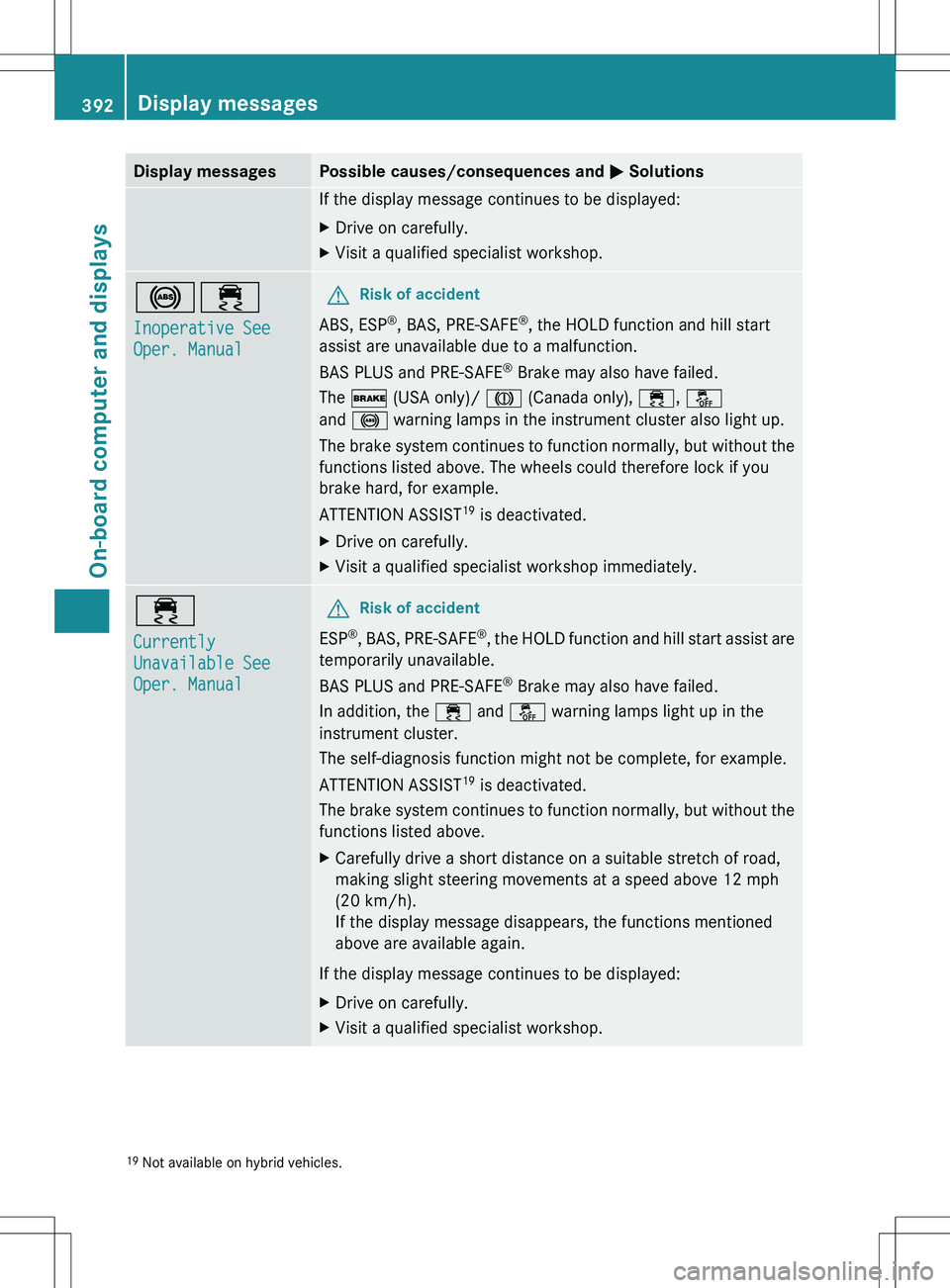
Display messagesPossible causes/consequences and M SolutionsIf the display message continues to be displayed:XDrive on carefully.XVisit a qualified specialist workshop.!÷
Inoperative See
Oper. ManualGRisk of accident
ABS, ESP ®
, BAS, PRE-SAFE ®
, the HOLD function and hill start
assist are unavailable due to a malfunction.
BAS PLUS and PRE-SAFE ®
Brake may also have failed.
The $ (USA only)/ J (Canada only), ÷, å
and ! warning lamps in the instrument cluster also light up.
The brake system continues to function normally, but without the
functions listed above. The wheels could therefore lock if you
brake hard, for example.
ATTENTION ASSIST 19
is deactivated.
XDrive on carefully.XVisit a qualified specialist workshop immediately.÷
Currently
Unavailable See
Oper. ManualGRisk of accident
ESP ®
, BAS, PRE-SAFE ®
, the HOLD function and hill start assist are
temporarily unavailable.
BAS PLUS and PRE-SAFE ®
Brake may also have failed.
In addition, the ÷ and å warning lamps light up in the
instrument cluster.
The self-diagnosis function might not be complete, for example.
ATTENTION ASSIST 19
is deactivated.
The brake system continues to function normally, but without the
functions listed above.
XCarefully drive a short distance on a suitable stretch of road,
making slight steering movements at a speed above 12 mph
(20 km/h).
If the display message disappears, the functions mentioned
above are available again.
If the display message continues to be displayed:
XDrive on carefully.XVisit a qualified specialist workshop.19 Not available on hybrid vehicles.392Display messagesOn-board computer and displays
Page 413 of 536
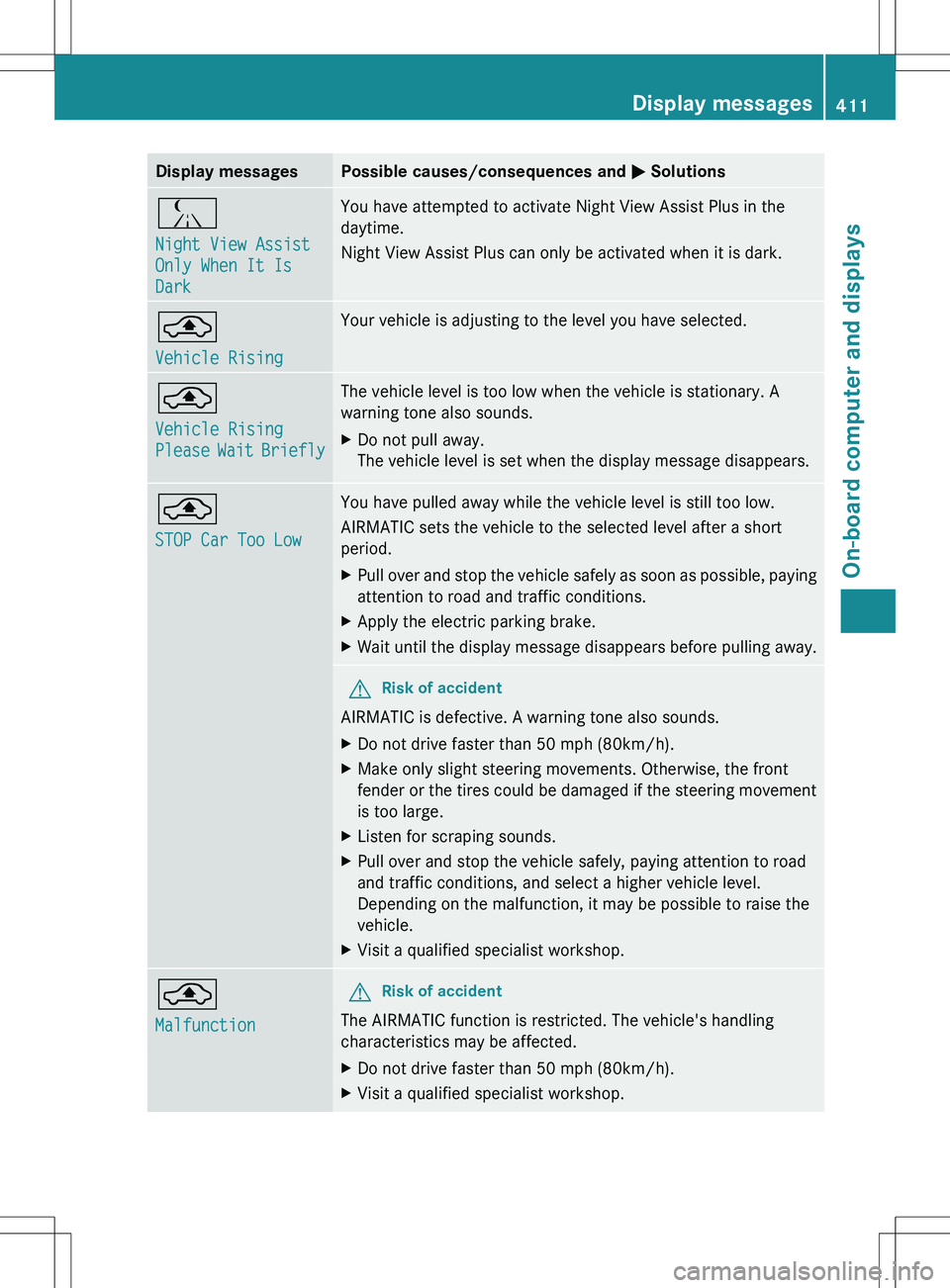
Display messagesPossible causes/consequences and M SolutionsÁ
Night View Assist
Only When It Is
DarkYou have attempted to activate Night View Assist Plus in the
daytime.
Night View Assist Plus can only be activated when it is dark.¨
Vehicle RisingYour vehicle is adjusting to the level you have selected.¨
Vehicle Rising
Please Wait BrieflyThe vehicle level is too low when the vehicle is stationary. A
warning tone also sounds.XDo not pull away.
The vehicle level is set when the display message disappears.¨
STOP Car Too LowYou have pulled away while the vehicle level is still too low.
AIRMATIC sets the vehicle to the selected level after a short
period.XPull over and stop the vehicle safely as soon as possible, paying
attention to road and traffic conditions.XApply the electric parking brake.XWait until the display message disappears before pulling away.GRisk of accident
AIRMATIC is defective. A warning tone also sounds.
XDo not drive faster than 50 mph (80km/h).XMake only slight steering movements. Otherwise, the front
fender or the tires could be damaged if the steering movement
is too large.XListen for scraping sounds.XPull over and stop the vehicle safely, paying attention to road
and traffic conditions, and select a higher vehicle level.
Depending on the malfunction, it may be possible to raise the
vehicle.XVisit a qualified specialist workshop.¨
MalfunctionGRisk of accident
The AIRMATIC function is restricted. The vehicle's handling
characteristics may be affected.
XDo not drive faster than 50 mph (80km/h).XVisit a qualified specialist workshop.Display messages411On-board computer and displaysZ
Page 414 of 536
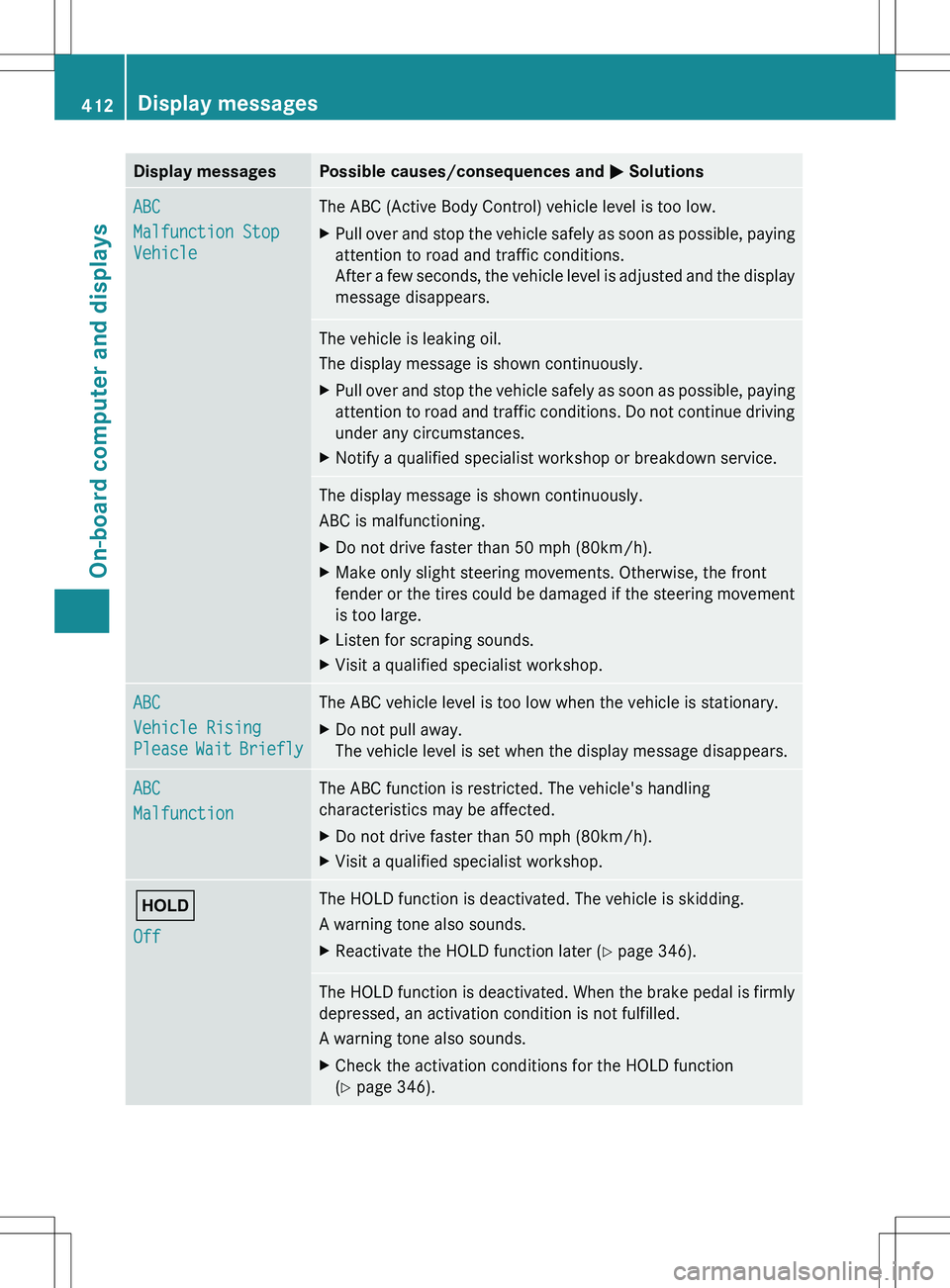
Display messagesPossible causes/consequences and M SolutionsABC
Malfunction Stop
VehicleThe ABC (Active Body Control) vehicle level is too low.XPull over and stop the vehicle safely as soon as possible, paying
attention to road and traffic conditions.
After a few seconds, the vehicle level is adjusted and the display
message disappears.The vehicle is leaking oil.
The display message is shown continuously.XPull over and stop the vehicle safely as soon as possible, paying
attention to road and traffic conditions. Do not continue driving
under any circumstances.XNotify a qualified specialist workshop or breakdown service.The display message is shown continuously.
ABC is malfunctioning.XDo not drive faster than 50 mph (80km/h).XMake only slight steering movements. Otherwise, the front
fender or the tires could be damaged if the steering movement
is too large.XListen for scraping sounds.XVisit a qualified specialist workshop.ABC
Vehicle Rising
Please Wait BrieflyThe ABC vehicle level is too low when the vehicle is stationary.XDo not pull away.
The vehicle level is set when the display message disappears.ABC
MalfunctionThe ABC function is restricted. The vehicle's handling
characteristics may be affected.XDo not drive faster than 50 mph (80km/h).XVisit a qualified specialist workshop.ë
OffThe HOLD function is deactivated. The vehicle is skidding.
A warning tone also sounds.XReactivate the HOLD function later ( Y page 346).The HOLD function is deactivated. When the brake pedal is firmly
depressed, an activation condition is not fulfilled.
A warning tone also sounds.XCheck the activation conditions for the HOLD function
( Y page 346).412Display messagesOn-board computer and displays
Page 420 of 536
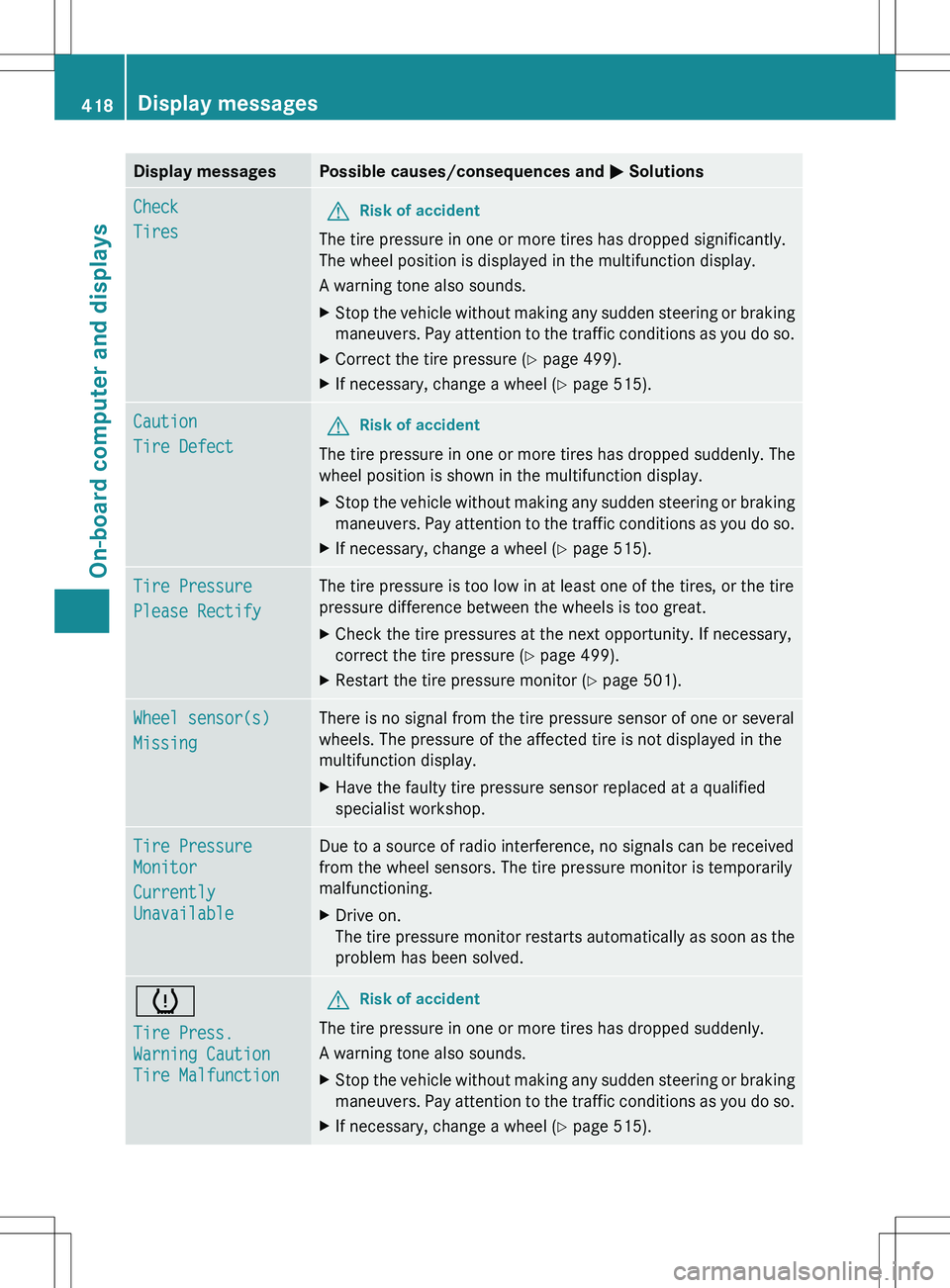
Display messagesPossible causes/consequences and M SolutionsCheck
TiresGRisk of accident
The tire pressure in one or more tires has dropped significantly.
The wheel position is displayed in the multifunction display.
A warning tone also sounds.
XStop the vehicle without making any sudden steering or braking
maneuvers. Pay attention to the traffic conditions as you do so.XCorrect the tire pressure ( Y page 499).XIf necessary, change a wheel ( Y page 515).Caution
Tire DefectGRisk of accident
The tire pressure in one or more tires has dropped suddenly. The
wheel position is shown in the multifunction display.
XStop the vehicle without making any sudden steering or braking
maneuvers. Pay attention to the traffic conditions as you do so.XIf necessary, change a wheel ( Y page 515).Tire Pressure
Please RectifyThe tire pressure is too low in at least one of the tires, or the tire
pressure difference between the wheels is too great.XCheck the tire pressures at the next opportunity. If necessary,
correct the tire pressure ( Y page 499).XRestart the tire pressure monitor ( Y page 501).Wheel sensor(s)
MissingThere is no signal from the tire pressure sensor of one or several
wheels. The pressure of the affected tire is not displayed in the
multifunction display.XHave the faulty tire pressure sensor replaced at a qualified
specialist workshop.Tire Pressure
Monitor
Currently
UnavailableDue to a source of radio interference, no signals can be received
from the wheel sensors. The tire pressure monitor is temporarily
malfunctioning.XDrive on.
The tire pressure monitor restarts automatically as soon as the
problem has been solved.h
Tire Press.
Warning Caution
Tire MalfunctionGRisk of accident
The tire pressure in one or more tires has dropped suddenly.
A warning tone also sounds.
XStop the vehicle without making any sudden steering or braking
maneuvers. Pay attention to the traffic conditions as you do so.XIf necessary, change a wheel ( Y page 515).418Display messagesOn-board computer and displays