lumbar support MERCEDES-BENZ S-CLASS SEDAN 2012 Owners Manual
[x] Cancel search | Manufacturer: MERCEDES-BENZ, Model Year: 2012, Model line: S-CLASS SEDAN, Model: MERCEDES-BENZ S-CLASS SEDAN 2012Pages: 536, PDF Size: 39.39 MB
Page 7 of 536
Alertness Assistantsee ATTENTION ASSIST
Alternative route ............................... 175
Ambient light setting (COMAND) ..... 268
AMG menu (on-board computer) ..... 381
Anti-lock Braking System see ABS (Anti-lock Braking System)
Anti-Theft Alarm system
see ATA (Anti-Theft Alarm system)
Ashtray ............................................... 442
Assistance menu (on-board
computer) .......................................... 385
ATA (Anti-Theft Alarm system) Activating/deactivating ...................79
Function ........................................... 79
Switching off the alarm ....................79
ATTENTION ASSIST
Activating/deactivating .................386
Display message ............................ 410
Function/notes ............................. 359
Audio
Radio mode ................................... 215
Audio database
see MUSIC REGISTER
Audio DVD
Mode, switching to ........................226
Pause function ............................... 227
Playback options ........................... 232
Safety notes .................................. 225
Setting the audio format ................232
Stop function ................................. 228
Audio format, setting
Audio DVD ..................................... 232
Rear Seat Entertainment System ...262
Video DVD ..................................... 249
Audio menu (on-board computer) .... 380
Authorized Mercedes-Benz Center see Qualified specialist workshop
Authorized workshop
see Qualified specialist workshop
AUTO lights
Display message ............................ 405
see Lights
Automatic engine start (ECO start/
stop function) .................................... 311
Automatic engine switch-off (ECO
start/stop function) .......................... 311Automatic headlamp mode .............. 281
Automatic transmission Automatic drive program ...............318
Changing gear ............................... 317
DIRECT SELECT lever .....................314
Display message ............................ 419
Drive position (ECO start/stop
function) ........................................ 315
Driving tips .................................... 317
Emergency running mode ..............321
Engaging drive position .................. 315
Engaging neutral ............................ 315
Engaging reverse gear ...................314
Engaging the park position ............314
Kickdown ....................................... 317
Manual drive program ....................319
Neutral (ECO start/stop function) . 315
Problem (malfunction) ...................321
Program selector button ................317
Pulling away ................................... 309
Shift ranges ................................... 318
Starting the engine ........................309
Steering wheel paddle shifters ......318
Transmission position display ........315
Transmission positions ..................316
Automatic transmission
emergency mode ............................... 321
Autostore ........................................... 217
see Station memory (radio)
AUX (audio)
Notes/socket ................................ 243
Switching to ................................... 244
AUX (video)
Setting the picture .........................244
Setting the volume and sound .......250
Showing/hiding the menu .............250
Switching to ................................... 250
B
Back button ....................................... 123
Back support see Lumbar support
Bag hook ............................................ 437
Balance, adjusting ............................. 139
Bang & Olufsen sound system ......... 141
BAS (Brake Assist System) ................. 74
Index5
Page 17 of 536
Logic 7®
(Harman Kardon ®
surround sound system) see 3D sound (Harman Kardon ®
surround sound system)
Low-beam headlamps
Display message ............................ 403
Setting for driving abroad
(symmetrical) ................................. 280
Switching on/off ........................... 281
Lubricant additives
see Additives
Lumbar support
Adjusting ....................................... 112
Lumbar support (COMAND) .............. 274
M
M+S tires ............................................ 494
Maintenance see ASSYST PLUS service interval
display
Malfunction message
see Display messages
Map (navigation)
Adjusting the scale ........................186
Arrival time/distance to the
destination ..................................... 189
City model ..................................... 190
Display ........................................... 188
Geo-coordinate display ..................190
Heading ......................................... 188
Information in the display ..............189
Moving ........................................... 187
North orientation ........................... 188
Notes ............................................. 186
Point of interest symbols ...............188
Road display .................................. 189
Saving the crosshair position .........187
Setting to the vehicle destination ..187
Topographical map ........................190
Map display (also see navigation)
Traffic reports ................................ 179
Massage function (PULSE) ............... 277
Matte finish (cleaning
instructions) ...................................... 468
mbrace
Automatic retrieval of vehicle data
(service due date) ..........................451
Call priority .................................... 449
Display message ............................ 398
Downloading destinations
(COMAND) ..................................... 449
Emergency call .............................. 446
Important safety notes ..................445
Locating a stolen vehicle ...............452
MB info call button ........................448
Remote vehicle locking ..................451
Roadside Assistance button ..........447
Search & Send ............................... 450
Self-test ......................................... 446
System .......................................... 445
Vehicle remote unlocking ..............451
Mechanical key
Function/notes ................................ 84
Unlocking the driver's door ..............90
Media Interface
Active partition .............................. 242
Alphabetical track selection ..........242
Connecting an external audio
source ............................................ 238
Connection options .......................238
iPod ®
............................................. 238
Mode ............................................. 238
Notes on USB devices ...................243
Playback options ........................... 242
Selecting categories ......................241
Selecting folders ............................ 241
Selecting music files ......................240
Selecting playlists ..........................241
Switching to ................................... 238
USB mass storage device ..............238
Media list
Audio mode (CD, DVD, MP3) .........228
Video DVD ..................................... 247
Memory card (audio) ......................... 381
Memory function ............................... 118
Menu item Selecting ........................................ 130
Message memory (on-board
computer) .......................................... 390
Messages
see Display messages Index15
Page 22 of 536
Roadside Assistance (breakdown) .... 29
Roller blind see Roller sunblind
Roller sunblind
Panorama roof with power tilt/
sliding panel .................................. 100
Rear side windows ...........................96
Rear window .................................. 441
Rear window (COMAND) ................266
Roller sunblind of the panorama
roof with power tilt/sliding panel Operating (front roller sunblind) ....101
Operating (rear roller sunblind) ......101
Roof carrier ........................................ 438
Roof lining and carpets (cleaning
guidelines) ......................................... 472
Roof load (maximum) ........................ 531
Route (navigation) Displaying the distance to the
destination ..................................... 176
Route overview .............................. 176
Selecting an alternative route ........175
Setting route options (avoiding:
highways, toll roads, tunnels,
ferries) ........................................... 156
Setting the route type (short
route, fast route, dynamic route or
economic route) ............................ 156
Starting calculation ........................160
see Route guidance (navigation)
Route guidance
Canceling ....................................... 173
Continuing ..................................... 173
Destination reached ......................174
Lane recommendations .................172
Off-road ......................................... 177
Traffic reports ................................ 178
Route guidance (navigation) ............ 379
Route guidance (on-board
computer) .......................................... 379
Route information see Dynamic route guidance/TMC
S
Safety Children in the vehicle .....................66
Child restraint systems ....................66
Occupant Classification System
(OCS) ............................................... 54
Overview of occupant safety
systems ........................................... 48
Safety notes
Audio CD/DVD and MP3 mode .....225
Operating safety ............................ 120
Video DVD mode ........................... 245
Safety systems
see Driving safety systems
SatRadio ............................................. 221
Displaying information ...................224
Registering .................................... 221
Selecting a category ......................222
Screen
Selecting for remote control (Rear
Seat Entertainment System) ..........144
Switching on/off (Rear Seat
Entertainment System) ..................129
see Display
SD memory card
Loading .......................................... 226
Seat belts
Adjusting the driver's and front-
passenger seat belt .........................64
Adjusting the height ......................... 64
Automatic comfort-fit feature ..........66
Belt force limiters ............................ 65
Cleaning ......................................... 472
Correct usage .................................. 62
Emergency Tensioning Devices ........ 65
Fastening ......................................... 63
Important safety guidelines .............61
Releasing ......................................... 64
Safety guidelines ............................. 49
Special seat belt retractor ...............68
Switching belt adjustment on/off
(on-board computer) ......................388
Warning lamp ................................. 422
Warning lamp (function) ................... 64
Seats
Active multicontour seat ........ 112, 276
Adjusting (electrically) ...................108
Adjusting (rear compartment) ........108
Adjusting lumbar support ..............112
Adjusting the head restraint ..........110
Cleaning the cover .........................472
Correct driver's seat position ........10620Index
Page 43 of 536

Center consoleFunctionPage:Function button for the
radio and CD/DVD/SD
card
123
;Back button123=Hazard warning lamps283?Lumbar support274Multicontour seat274AFunction button for the
telephone and navigation
system
155
BSwitches COMAND on/off137FunctionPageCAdjusts the volume138DProgrammable button124ETelephone keypad124FRear window roller sunblind441GRetracts the rear seat head
restraints
111
HSelects the drive program317ICOMAND controller122Center console41At a glance
Page 114 of 536

You can adjust side bolsters : of the luxury
head restraint individually.
XTo adjust the side bolsters of the head
restraint: push or pull side bolsters : into
the desired position.XTo adjust the head restraint angle: hold
the head restraint by the upper edge and
slide it forwards or back in the direction of
arrow ;.
Adjusting the multicontour seat
You can adjust the multicontour seat using
COMAND ( Y page 274).
Adjusting the multicontour seat in the
rear compartment
You can use the buttons on the center
console to adjust the multicontour seats for
the outer seats in the rear compartment.
XTo select a rear-compartment seat: push
or pull rocker switch : or C forwards or
backwards.
The indicator lamp in the selected button
lights up briefly.XTo adjust the side bolsters of the seat
backrest: push or pull rocker switch B
forwards or backwards.XTo adjust the backrest contour: push or
pull rocker switch A forwards or
backwards.XTo adjust the position of the backrest
contour: push or pull rocker switch ?
forwards or backwards.XTo activate/deactivate the gentle
massage function: push or pull rocker
switch = forwards or backwards.XTo activate/deactivate the strong
massage function: push or pull rocker
switch ; forwards or backwards.
Adjusting the active multicontour
seat
You can adjust the active multicontour seat
using COMAND ( Y page 276).
i If PRE-SAFE ®
has been activated, the air
pressure in the air chambers of the
multicontour seat or active multicontour
seat is increased. These air chambers are
located in the side bolsters of the seat
cushion and backrest.
Adjusting the lumbar support
You can adjust the lumbar support using
COMAND ( Y page 274).
112SeatsSeats, steering wheel and mirrors
Page 120 of 536
Calling up a stored parking position
settingXTurn the SmartKey to position 2 in the
ignition lock.XAdjust the exterior mirror on the front-
passenger side with the corresponding
button ( Y page 116).XEngage reverse gear.
The exterior mirror on the front-passenger
side moves to the stored parking position.
The exterior mirror on the front-passenger
side moves back to its original position:
R as soon as you exceed a speed of 9 mph
(15 km/h)
R about ten seconds after you have
disengaged reverse gear
R if you press button ? for the exterior
mirror on the driver's side
Memory function
Storing settings
GWARNING
Do not activate the memory function while
driving. Activating the memory function while
driving could cause the driver to lose control
of the vehicle.
With the memory function, you can store up
to three different settings, e.g. for three
different people.
The following settings are stored as a single
memory preset:
R seat, backrest, head restraint position and
contour of the backrest in the lumbar
region
R active multicontour seat: activated/
deactivated
R multicontour seat: the side bolsters of the
seat cushion and the backrest as well as
the contour of the backrest in the lumbar
and shoulder regions
R driver's side: steering wheel position
R driver's side: position of the exterior
mirrors on the driver's and front-passenger
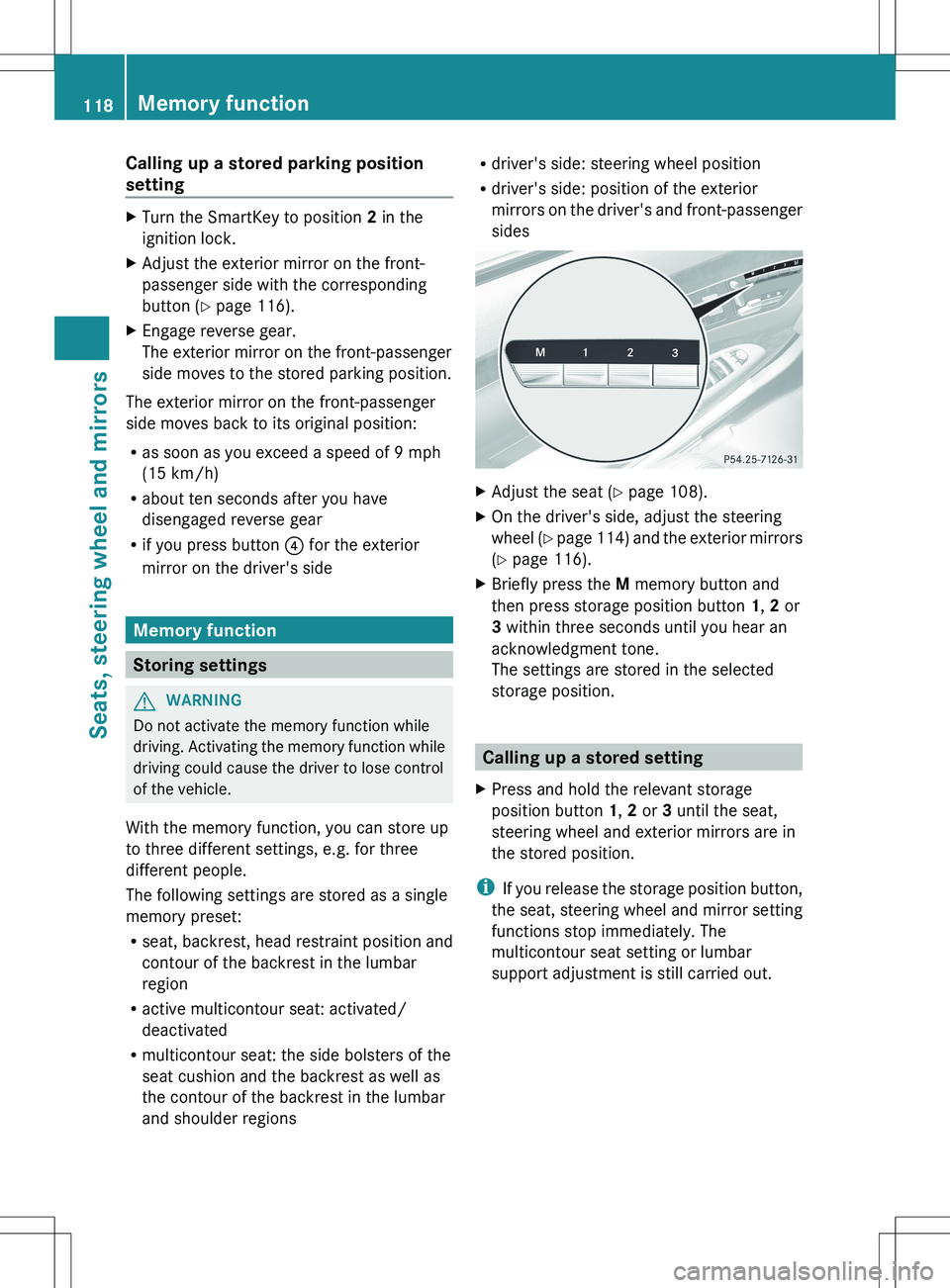
sidesXAdjust the seat ( Y page 108).XOn the driver's side, adjust the steering
wheel (Y page 114) and the exterior mirrors
( Y page 116).XBriefly press the M memory button and
then press storage position button 1, 2 or
3 within three seconds until you hear an
acknowledgment tone.
The settings are stored in the selected
storage position.
Calling up a stored setting
XPress and hold the relevant storage
position button 1, 2 or 3 until the seat,
steering wheel and exterior mirrors are in
the stored position.
i If you release the storage position button,
the seat, steering wheel and mirror setting
functions stop immediately. The
multicontour seat setting or lumbar
support adjustment is still carried out.
118Memory functionSeats, steering wheel and mirrors
Page 125 of 536
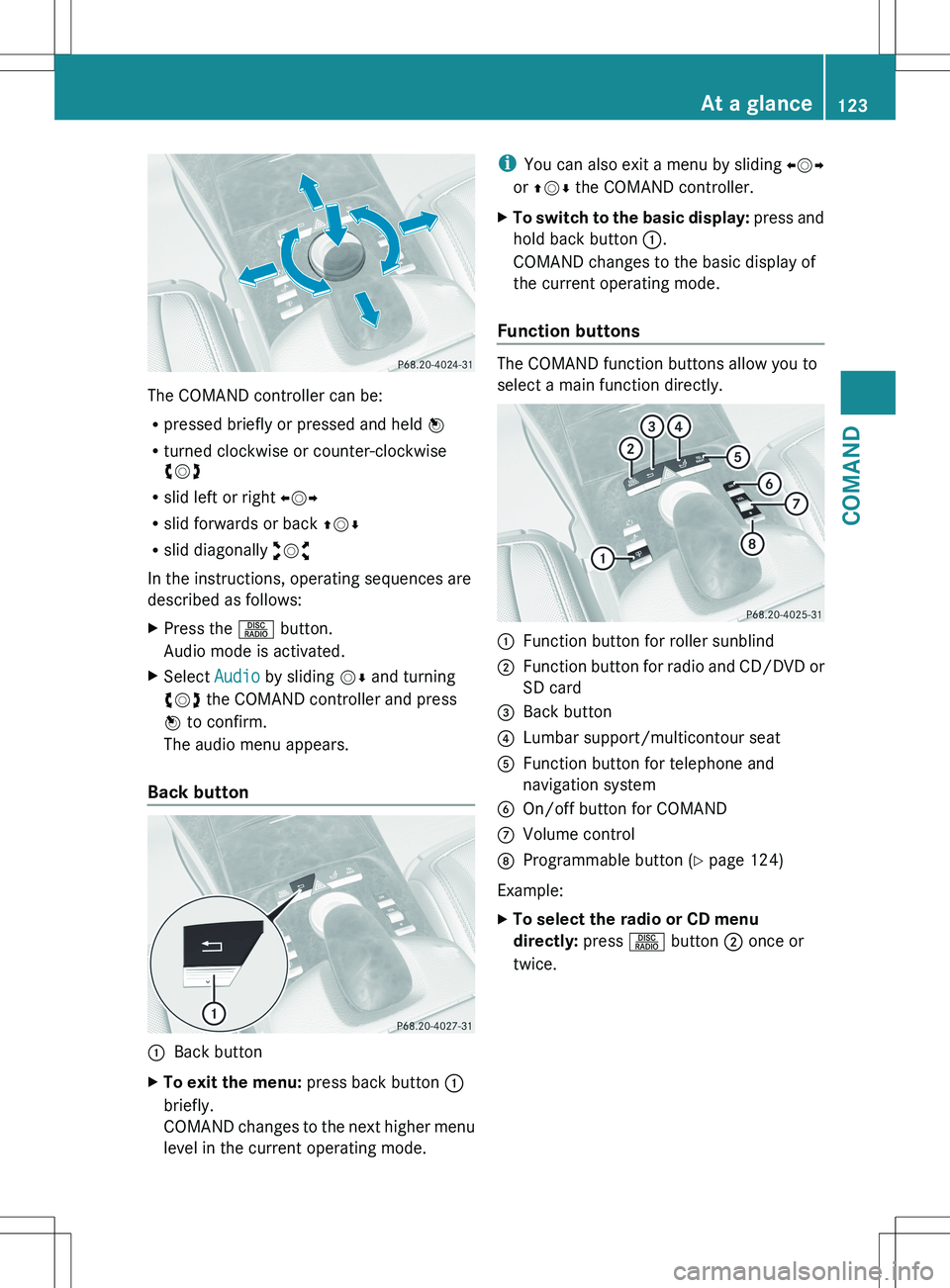
The COMAND controller can be:
R pressed briefly or pressed and held W
R turned clockwise or counter-clockwise
cVd
R slid left or right XVY
R slid forwards or back ZVÆ
R slid diagonally aVb
In the instructions, operating sequences are
described as follows:
XPress the R button.
Audio mode is activated.XSelect Audio by sliding VÆ and turning
cVd the COMAND controller and press
W to confirm.
The audio menu appears.
Back button
:Back buttonXTo exit the menu: press back button :
briefly.
COMAND changes to the next higher menu
level in the current operating mode.i You can also exit a menu by sliding XVY
or ZV Æ the COMAND controller.XTo switch to the basic display: press and
hold back button :.
COMAND changes to the basic display of
the current operating mode.
Function buttons
The COMAND function buttons allow you to
select a main function directly.
:Function button for roller sunblind;Function button for radio and CD/DVD or
SD card=Back button?Lumbar support/multicontour seatAFunction button for telephone and
navigation systemBOn/off button for COMANDCVolume controlDProgrammable button ( Y page 124)
Example:
XTo select the radio or CD menu
directly: press R button ; once or
twice.At a glance123COMANDZ
Page 276 of 536
To switch back to operation of the rear-
compartment air-conditioning system from
the front:XIn the climate control main menu, select
Front Climate Control and press W.
The air-conditioning function bar shows the
climate control settings for the driver and
front passenger.
To switch off the rear-compartment air
conditioning:
XIn the climate control main menu, select
Rear Climate Control OFF and press
W .
To switch on automatic mode for the rear-
compartment air conditioning:
XIn the climate control main menu, select
Rear Automatic and press W.
Automatic mode for the rear-compartment
air-conditioning system is switched on.
Seats
Lumbar supports
The lumbar support in the backrest of the
driver's and front-passenger seats can be
adjusted to provide optimum support for your
back.
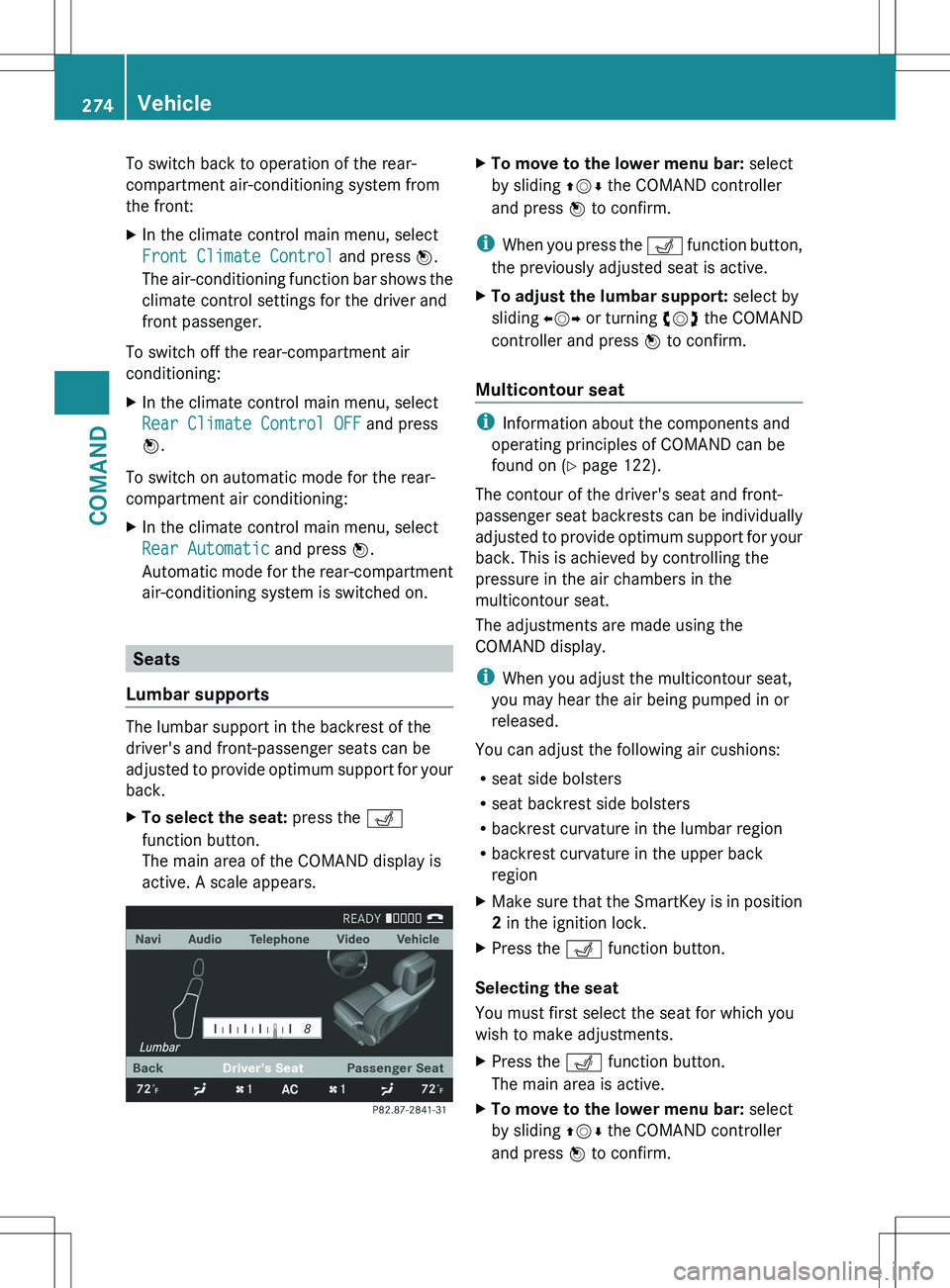
XTo select the seat: press the T
function button.
The main area of the COMAND display is
active. A scale appears.XTo move to the lower menu bar: select
by sliding ZVÆ the COMAND controller
and press W to confirm.
i
When you press the T function button,
the previously adjusted seat is active.
XTo adjust the lumbar support: select by
sliding XVY or turning cVd the COMAND
controller and press W to confirm.
Multicontour seat
i
Information about the components and
operating principles of COMAND can be
found on ( Y page 122).
The contour of the driver's seat and front-
passenger seat backrests can be individually
adjusted to provide optimum support for your
back. This is achieved by controlling the
pressure in the air chambers in the
multicontour seat.
The adjustments are made using the
COMAND display.
i When you adjust the multicontour seat,
you may hear the air being pumped in or
released.
You can adjust the following air cushions:
R seat side bolsters
R seat backrest side bolsters
R backrest curvature in the lumbar region
R backrest curvature in the upper back
region
XMake sure that the SmartKey is in position
2 in the ignition lock.XPress the T function button.
Selecting the seat
You must first select the seat for which you
wish to make adjustments.
XPress the T function button.
The main area is active.XTo move to the lower menu bar: select
by sliding ZVÆ the COMAND controller
and press W to confirm.274VehicleCOMAND
Page 278 of 536
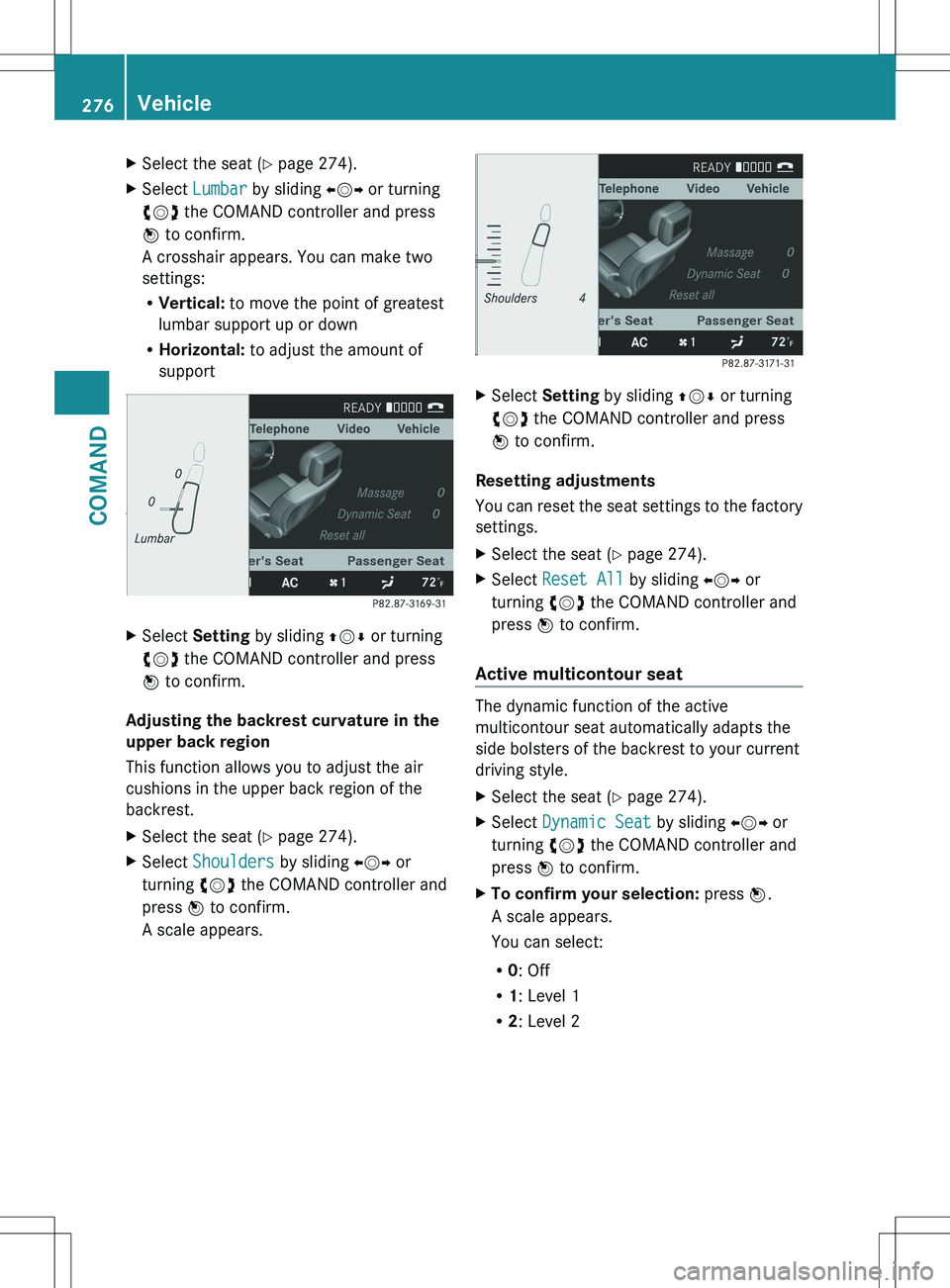
XSelect the seat (Y page 274).XSelect Lumbar by sliding XVY or turning
cVd the COMAND controller and press
W to confirm.
A crosshair appears. You can make two
settings:
R Vertical: to move the point of greatest
lumbar support up or down
R Horizontal: to adjust the amount of
supportXSelect Setting by sliding ZVÆ or turning
cVd the COMAND controller and press
W to confirm.
Adjusting the backrest curvature in the
upper back region
This function allows you to adjust the air
cushions in the upper back region of the
backrest.
XSelect the seat ( Y page 274).XSelect Shoulders by sliding XVY or
turning cVd the COMAND controller and
press W to confirm.
A scale appears.XSelect Setting by sliding ZVÆ or turning
cVd the COMAND controller and press
W to confirm.
Resetting adjustments
You can reset the seat settings to the factory
settings.
XSelect the seat ( Y page 274).XSelect Reset All by sliding XVY or
turning cVd the COMAND controller and
press W to confirm.
Active multicontour seat
The dynamic function of the active
multicontour seat automatically adapts the
side bolsters of the backrest to your current
driving style.
XSelect the seat ( Y page 274).XSelect Dynamic Seat by sliding XVY or
turning cVd the COMAND controller and
press W to confirm.XTo confirm your selection: press W.
A scale appears.
You can select:
R 0: Off
R 1: Level 1
R 2: Level 2276VehicleCOMAND