manual radio set MERCEDES-BENZ S-CLASS SEDAN 2012 Owners Manual
[x] Cancel search | Manufacturer: MERCEDES-BENZ, Model Year: 2012, Model line: S-CLASS SEDAN, Model: MERCEDES-BENZ S-CLASS SEDAN 2012Pages: 536, PDF Size: 39.39 MB
Page 7 of 536
Alertness Assistantsee ATTENTION ASSIST
Alternative route ............................... 175
Ambient light setting (COMAND) ..... 268
AMG menu (on-board computer) ..... 381
Anti-lock Braking System see ABS (Anti-lock Braking System)
Anti-Theft Alarm system
see ATA (Anti-Theft Alarm system)
Ashtray ............................................... 442
Assistance menu (on-board
computer) .......................................... 385
ATA (Anti-Theft Alarm system) Activating/deactivating ...................79
Function ........................................... 79
Switching off the alarm ....................79
ATTENTION ASSIST
Activating/deactivating .................386
Display message ............................ 410
Function/notes ............................. 359
Audio
Radio mode ................................... 215
Audio database
see MUSIC REGISTER
Audio DVD
Mode, switching to ........................226
Pause function ............................... 227
Playback options ........................... 232
Safety notes .................................. 225
Setting the audio format ................232
Stop function ................................. 228
Audio format, setting
Audio DVD ..................................... 232
Rear Seat Entertainment System ...262
Video DVD ..................................... 249
Audio menu (on-board computer) .... 380
Authorized Mercedes-Benz Center see Qualified specialist workshop
Authorized workshop
see Qualified specialist workshop
AUTO lights
Display message ............................ 405
see Lights
Automatic engine start (ECO start/
stop function) .................................... 311
Automatic engine switch-off (ECO
start/stop function) .......................... 311Automatic headlamp mode .............. 281
Automatic transmission Automatic drive program ...............318
Changing gear ............................... 317
DIRECT SELECT lever .....................314
Display message ............................ 419
Drive position (ECO start/stop
function) ........................................ 315
Driving tips .................................... 317
Emergency running mode ..............321
Engaging drive position .................. 315
Engaging neutral ............................ 315
Engaging reverse gear ...................314
Engaging the park position ............314
Kickdown ....................................... 317
Manual drive program ....................319
Neutral (ECO start/stop function) . 315
Problem (malfunction) ...................321
Program selector button ................317
Pulling away ................................... 309
Shift ranges ................................... 318
Starting the engine ........................309
Steering wheel paddle shifters ......318
Transmission position display ........315
Transmission positions ..................316
Automatic transmission
emergency mode ............................... 321
Autostore ........................................... 217
see Station memory (radio)
AUX (audio)
Notes/socket ................................ 243
Switching to ................................... 244
AUX (video)
Setting the picture .........................244
Setting the volume and sound .......250
Showing/hiding the menu .............250
Switching to ................................... 250
B
Back button ....................................... 123
Back support see Lumbar support
Bag hook ............................................ 437
Balance, adjusting ............................. 139
Bang & Olufsen sound system ......... 141
BAS (Brake Assist System) ................. 74
Index5
Page 23 of 536
Important safety notes ..................107
Multicontour seat .......................... 112
Seat heating problem ....................113
Seat ventilation problem ................114
Selecting (COMAND) .....................274
Storing settings (memory
function) ........................................ 118
Switching seat heating on/off .......113
Switching seat ventilation on/off ..113
Selecting stations (radio)
Using station presets .....................216
Using station search ......................216
Sending DTMF tones ......................... 207
Sensors (cleaning instructions) ....... 470
Service Center see Qualified specialist workshop
Service interval display
Displaying service messages .........465
Hiding service messages ...............465
Notes ............................................. 465
Service messages ..........................465
Service menu (on-board computer) . 387
Service products Brake fluid ..................................... 529
Coolant (engine) ............................ 530
DEF special additives .....................527
Engine oil ....................................... 528
Fuel ................................................ 525
Important safety notes ..................524
Washer fluid ................................... 531
Setting a station (radio)
Via manual frequency entry ...........217
Settings
Display ........................................... 147
Menu overview .............................. 125
On-board computer .......................387
Picture (COMAND) .........................244
Picture (Rear Seat Entertainment
System) ......................................... 253
Sound settings ............................... 139
System settings ............................. 147
Setting the language
COMAND ....................................... 153
Rear Seat Entertainment System ...262
Setting the night design ................... 147
Setting the text reader speed .......... 149
Setting the vehicle level ................... 349Setting the volume
Telephone calls .............................. 138
Video AUX ..................................... 250
Side impact air bag ............................. 52
Side marker lamp (display
message) ............................................ 405
Side windows Convenience closing feature ............97
Convenience opening feature ..........96
Important safety information ...........95
Opening/closing .............................. 96
Problem (malfunction) .....................98
Resetting ......................................... 98
Sliding sunroof
Important safety notes ....................98
Opening/closing .............................. 99
Problem (malfunction) ...................103
Resetting ....................................... 100
see Panorama roof with power
tilt/sliding panel
SmartKey
Changing the battery .......................85
Changing the programming .............84
Checking the battery .......................85
Convenience closing feature ............97
Convenience opening feature ..........96
Display message ............................ 421
Door central locking/unlocking .......82
Important safety notes ....................82
Loss ................................................. 87
Mechanical key ................................ 84
Positions (ignition lock) .................307
Problem (malfunction) .....................87
Starting the engine ........................309
SMS message
see Text message
Snow chains ...................................... 495
Socket Glove box ....................................... 444
Sockets
Points to observe before use .........443
Rear compartment .........................444
Trunk ............................................. 444
Sound menu ....................................... 139
Sounds see Sound settings Index21
Page 24 of 536
Sound settingsBalance and fader ..........................139
Calling up the sound menu ............139
Rear Seat Entertainment System ...253
Surround sound ............................. 140
Treble and bass ............................. 139
Spare wheel
Notes/data .................................... 518
Storage location ............................ 474
see Emergency spare wheel
Specialist workshop ............................ 31
Speech control see Voice Control System
Speed, controlling
see Cruise control
Speedometer
Activating/deactivating the
additional speedometer .................388
Digital ............................................ 378
In the Instrument cluster .................37
Selecting the unit of
measurement ................................ 388
see Instrument cluster
SPLITVIEW ......................................... 126
SRS (Supplemental Restraint
System) Display message ............................ 399
Introduction ..................................... 48
Warning lamp ................................. 428
Warning lamp (function) ................... 48
Standing lamps
Display message ............................ 404
Switching on/off ........................... 280
Starting (engine) ................................ 308
Station memory ................................. 217
Steering (display message) .............. 420
Steering wheel Adjusting (electrically) ...................114
Button overview ............................... 39
Buttons (on-board
computer) ...................................... 375
Cleaning ......................................... 472
Important safety notes ..................114
Paddle shifters ............................... 318
Steering wheel heating ..................114
Storing settings (memory
function) ........................................ 118Steering wheel heating
Switching on/off ........................... 114
Steering wheel paddle shifters ........ 318
Stop function Audio DVD ..................................... 228
Rear Seat Entertainment System ...260
Video DVD ..................................... 247
Stopwatch (RACETIMER) ................... 382
Storing stations Manually ........................................ 217
Storing stations (radio)
Automatically ................................. 217
Stowage areas ................................... 434
Stowage compartments Armrest (under) ............................. 435
Cup holders ................................... 439
Door ............................................... 435
Eyeglasses compartment ...............435
Glove box ....................................... 434
Important safety information .........434
Parcel net ...................................... 437
Rear ............................................... 436
Rear seat backrest ......................... 436
Rear seats (between) .....................436
Stowage well ..................................... 438
Stowage well beneath the trunk
floor .................................................... 438
Summer opening see Convenience opening feature
Summer tires ..................................... 494
Sun visor ............................................ 440
Supplemental Restraint System see SRS (Supplemental Restraint
System)
Surround sound
see 3D sound (Harman Kardon ®
surround sound system)
Surround sound (harman/
kardon ®
surround sound system)
Notes ............................................. 140
Switching on/off ........................... 140
Suspension tuning
Active Body Control .......................349
AIRMATIC ...................................... 348
Switching air-recirculation mode
on/off ................................................. 30122Index
Page 122 of 536
Useful information
i This Operator's Manual describes all
models and all standard and optional
equipment of your vehicle available at the
time of publication of the Operator's
Manual. Country-specific differences are
possible. Please note that your vehicle may
not be equipped with all features
described. This also applies to safety-
related systems and functions.
i Please read the information on qualified
specialist workshops ( Y page 31).
Introduction
Operating safety
Important safety notes
GWARNING
Vehicles with HYBRID: ensure that you read
the "HYBRID" supplement. You may otherwise
fail to recognize dangers.
GWARNING
Making alterations to electronic components
can cause malfunctions.
Radio, satellite radio, amplifier, DVD changer,
navigation module, phone and voice control
are networked. If one component is not
functional or if it has been incorrectly
removed/replaced, this could impair the
operation of other components.
This could seriously jeopardize the
operational safety of your vehicle.
We recommend that you always have
maintenance work on electronic components
carried out at an authorized Mercedes-Benz
Center.
GWARNING
In order to avoid distraction which could lead
to an accident, the driver should enter system
settings while the vehicle is at a standstill, and
operate the system only when permitted by
road, weather and traffic conditions.
Bear in mind that at a speed of just 30 mph
(approximately 50 km/h), your car covers a
distance of 44 feet (approximately 14 m) every
second.
COMAND supplies you with information to
help you select your route more easily and
guide you conveniently and safely to your
destination. For safety reasons, we
encourage the driver to stop the vehicle in a
safe place before answering or placing a call,
or consulting the COMAND screen to read
navigational maps, instructions, or
downloaded information.GWARNING
While the navigation system provides
directional assistance, the driver must remain
focused on safe driving behavior, especially
attention to traffic and street signs, and
should utilize the system's audio cues while
driving.
The navigation system does not supply any
information on stop signs, yield signs, traffic
regulations or traffic safety rules. Their
observance always remains in the driver's
personal responsibility. DVD maps do not
cover all areas nor all routes within an area.
GWARNING
This equipment complies with FCC radiation
exposure limits set forth for uncontrolled
equipment and meets the FCC radio
frequency (RF) Exposure Guidelines in
Supplement C to OET65.
This equipment has very low levels of RF
energy that is deemed to comply without
maximum permissive exposure evaluation
(MPE). But it is desirable that it should be
installed and operated with at least 8 inches
(20 cm) and more between the radiator and a
person's body (excluding extremities: hands,
wrists, feet and legs.)
120IntroductionCOMAND
Page 219 of 536
XDirectly in the station presets: select
Presets by sliding VÆ and turning cVd
the COMAND controller and press W to
confirm.
or
XPress W the COMAND controller when the
display/selection window is active.
The station preset memory appears. The
# dot indicates under which preset the
currently selected station is stored.XSelect a station by turning cVd and
pressing W to confirm or press a number
key, e.g. l.
Using the multifunction steering wheel
XPress = or ; to select the Audio
menu.XPress 9 or : briefly.
Selecting stations by entering the
frequency manually
XOption 1: press the Ä button.XOption 2: select Radio in the radio display
by sliding VÆ and turning cVd the
COMAND controller and press W to
confirm.XSelect Enter Frequency and press W to
confirm.
Irrespective of the option chosen, an input
menu will appear.XEnter a frequency using the number keys.
COMAND tunes in to the frequency
entered.WavebandFrequencyAM (MF)530 – 1700 kHzFM (VHF)87.7 – 107.9 MHzWB (Weather Band)Weather report
channels
i You can only enter currently permitted
numbers.
i If you enter a frequency in the FM or AM
wavebands which is outside the frequency
range, COMAND tunes in to the next lower
frequency.
Storing stations
Storing stations manually
There are twenty presets available for the FM
and AM wavebands.
XQuick save: press and hold a number key,
e.g. l , until you hear a tone.
The station is stored.XDirectly in the station presets: press W
the COMAND controller when the display/
selection window is active.
or
XSelect Presets by sliding VÆ and turning
cVd the COMAND controller and press
W to confirm.
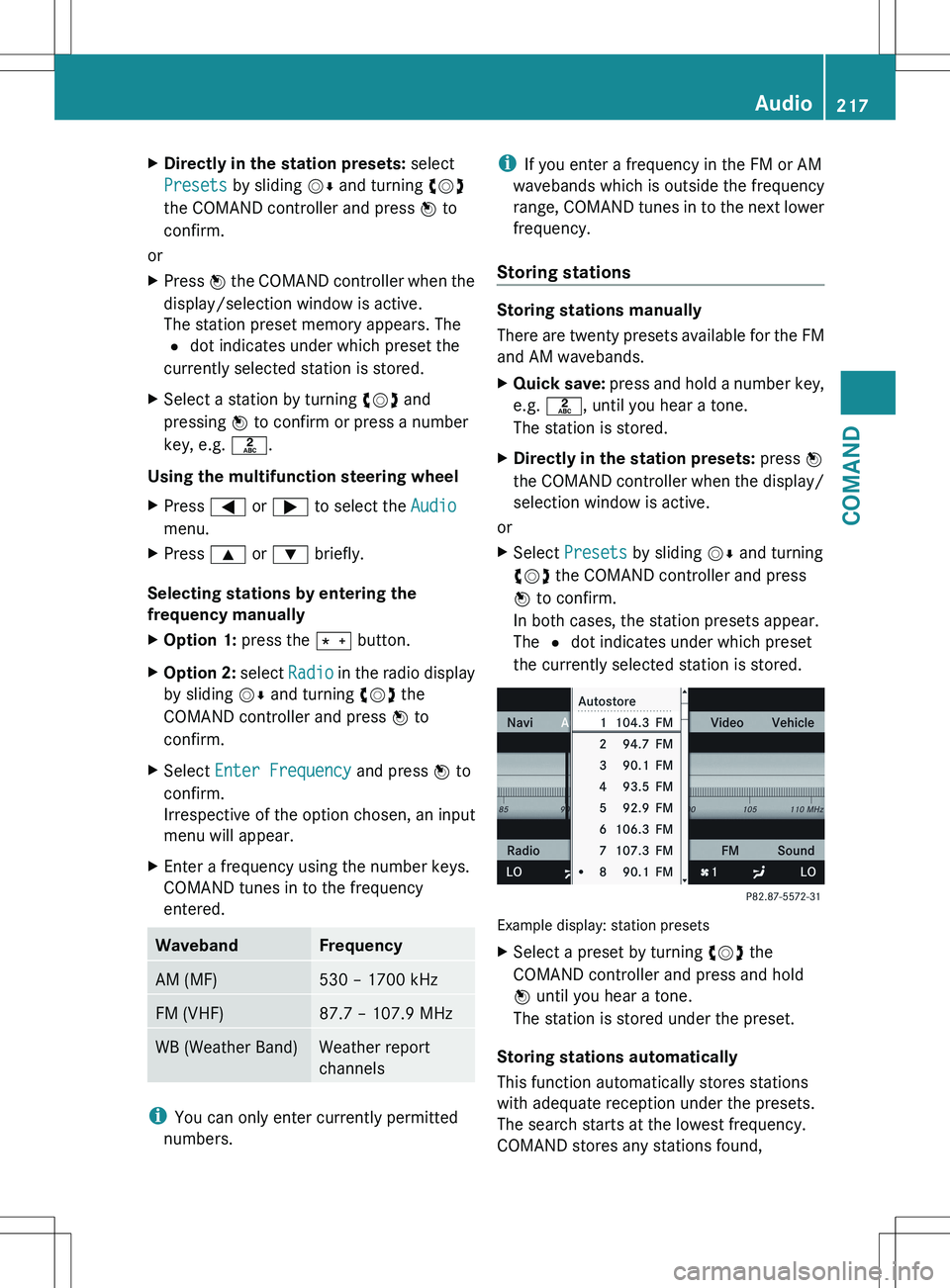
In both cases, the station presets appear.
The # dot indicates under which preset
the currently selected station is stored.
Example display: station presets
XSelect a preset by turning cVd the
COMAND controller and press and hold
W until you hear a tone.
The station is stored under the preset.
Storing stations automatically
This function automatically stores stations
with adequate reception under the presets.
The search starts at the lowest frequency.
COMAND stores any stations found,
Audio217COMANDZ
Page 226 of 536
XSelect a preset by turning cVd the
COMAND controller and press and hold
W until you hear a tone.
or
XPress and hold a number button, e.g. 4,
until you hear a tone.
The channel is stored under the preset.
Storing channels automatically
This function automatically stores channels
with adequate reception in the preset
memory. Channels stored manually in the
preset memory will be overwritten.
XOption 1: press W the COMAND controller
when the display/selection window is
active.XSelect Autostore in the presets by turning
cVd the COMAND controller and press
W to confirm.XOption 2: select Presets in the submenu
bar by sliding VÆ and turning cVd the
COMAND controller and press W to
confirm.XSelect Autostore and press W to confirm.
In both cases, COMAND searches for
channels that can be received. You will see
a message to this effect. The available
channels are automatically stored in the
preset positions.XTo cancel storing: select Cancel and
press W to confirm.
Selecting a channel from the preset list
XTo call up the channel list: select
Presets by turning cVd the COMAND
controller and press W to confirm.
The channel preset list appears.XTo set a channel: select a preset by
turning cVd the COMAND controller and
press W to confirm.
or
XPress a number key, e.g. 4.Using the multifunction steering wheelXPress = or ; to select the Audio
menu.XPress 9 or : briefly.
Displaying information
XSelect Info in the submenu bar by turning
cVd the COMAND controller and press
W to confirm.
Information on the currently received
program is displayed.XTo return to the SatRadio main display:
slide XVY the COMAND controller.
Displaying service information
The provider's customer service center is
available by phone at any time to answer any
general questions or questions on the
versions available.
XSelect Sat. Radio in the submenu bar by
turning cVd the COMAND controller and
press W to confirm.XSelect Service and press W to confirm.
The provider's details appear.XTo return to the SatRadio main display:
slide XVY the COMAND controller.
Channel list updates
When receiving a new channel list, the display
shows the Updating channel... message.
The station last selected is switched to mute
until the update has been completed.
Satellite radio mode is not available during
this process.
Once the update has been completed, the
satellite radio main menu appears. The
station last selected is played.
Sound settings
You will find details on the sound settings in
the "At a glance" section ( Y page 139).
224AudioCOMAND