steering rack MERCEDES-BENZ S500 2000 W220 Owner's Manual
[x] Cancel search | Manufacturer: MERCEDES-BENZ, Model Year: 2000, Model line: S500, Model: MERCEDES-BENZ S500 2000 W220Pages: 421, PDF Size: 20.52 MB
Page 8 of 421

5 Contents
Practical hintsFirst aid kit .....................................328
Stowing things in the vehicle ......328
Fuses ................................................329
Hood ................................................. 331
Checking engine oil level .............334
Automatic transmission
fluid level ...................................335
Active body control
(ABC) fluid level ........................335
Coolant level ...................................336
Adding coolant ...........................336
Windshield and
headlamp washer system ........337
Windshield and
headlamp washer fluid
mixing ratio ................................337
Spare wheel, vehicle tools,
storage compartment ................338
Vehicle jack .....................................339
Wheels .............................................340
Tire Replacement .......................340
Rotating wheels .......................... 341
Spare wheel .................................... 341Changing wheels ........................... 343
Tire inflation pressure ................. 348
Battery ............................................. 349
Jump starting ................................. 351
Towing the vehicle ........................ 353
Exterior lamps ............................... 356
Headlamp assembly .................. 357
Taillamp assemblies .................. 360
Trunk lamp ..................................... 362
Changing batteries in the
electronic main key .................. 363
Synchronizing
remote control ............................ 365
Changing batteries in the
KEYLESS-GO-card .................... 366
Emergency engine
shut-down .................................. 368
Fuel filler flap,
manual release ......................... 368
Emergency operation of
sliding/pop-up roof .................. 369
Replacing wiper blades ................ 370
Roof rack ..........................................371
Vehicle careCleaning and care
of the vehicle ............................. 374
Power washer ..............................375
Tar stains ..................................... 376
Paintwork, painted body
components ................................. 376
Engine cleaning .......................... 376
Vehicle washing ......................... 376
Ornamental moldings ................377
Headlamps, taillamps,
turn signal lenses ......................377
Cleaning the Distronic
system sensor .............................378
Cleaning the parktronic
system sensors ...........................378
Wiper blades ...............................379
Light alloy wheels ......................380
Instrument cluster .....................380
Steering wheel and
gear selector lever ......................380
Cup holder ...................................380
Seat belts ..................................... 381
Page 129 of 421
126 Multifunction steering wheel, multifunction display
Te ch n ica l
data Instruments
and controlsOperationDrivingInstrument
cluster displayPractical hints Car care Index
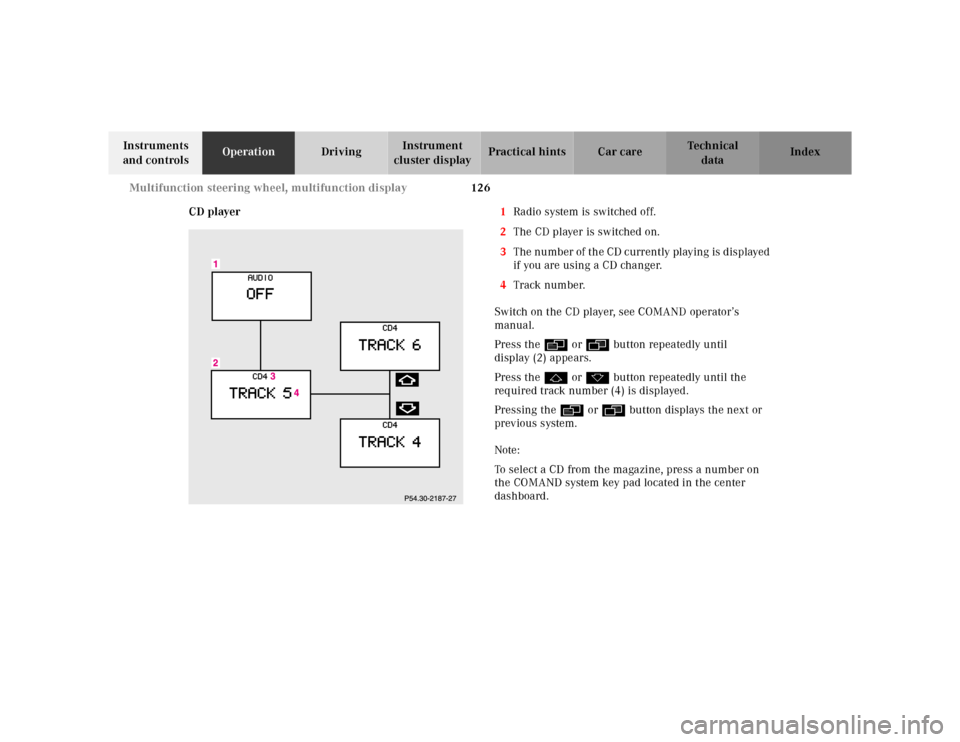
CD player1Radio system is switched off.
2The CD player is switched on.
3The number of the CD currently playing is displayed
if you are using a CD changer.
4Track number.
Switch on the CD player, see COMAND operator’s
manual.
Press the è or ÿ button repeatedly until
display (2) appears.
Press the j or k button repeatedly until the
required track number (4) is displayed.
Pressing the è or ÿ button displays the next or
previous system.
Note:
To select a CD from the magazine, press a number on
the COMAND system key pad located in the center
dashboard.
Page 130 of 421
127 Multifunction steering wheel, multifunction display
Te ch n ica l
data Instruments
and controlsOperationDrivingInstrument
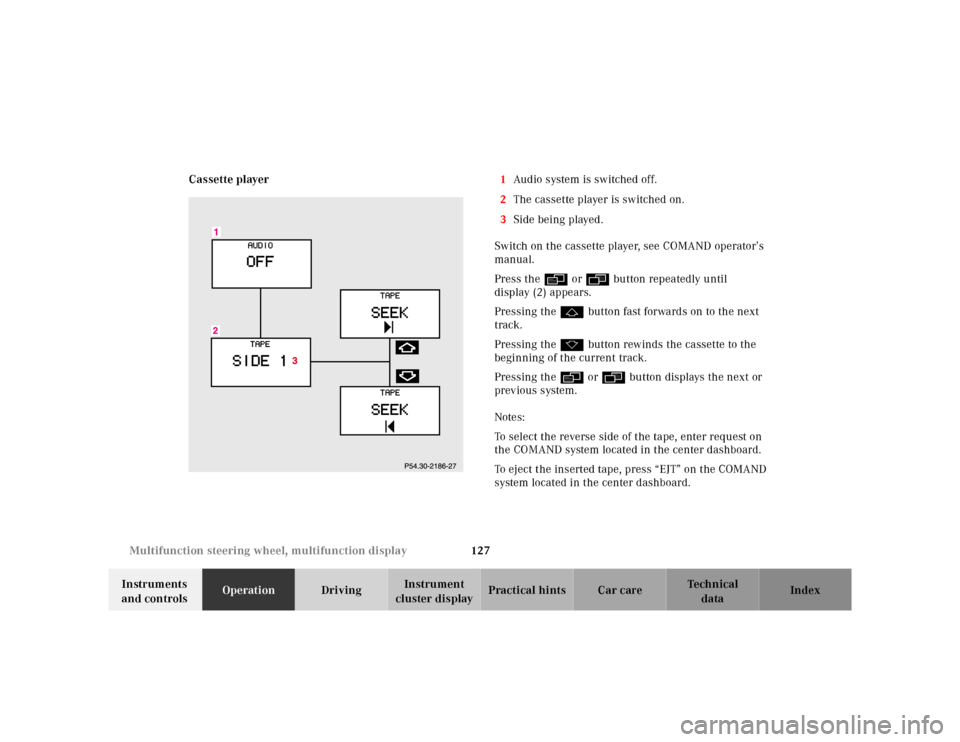
cluster displayPractical hints Car care Index Cassette player1Audio system is switched off.
2The cassette player is switched on.
3Side being played.
Switch on the cassette player, see COMAND operator’s
manual.
Press the è or ÿ button repeatedly until
display (2) appears.
Pressing the j button fast forwards on to the next
track.
Pressing the k button rewinds the cassette to the
beginning of the current track.
Pressing the è or ÿ button displays the next or
previous system.
Notes:
To select the reverse side of the tape, enter request on
the COMAND system located in the center dashboard.
To eject the inserted tape, press “EJT” on the COMAND
system located in the center dashboard.