climate control MERCEDES-BENZ S600 2010 W221 User Guide
[x] Cancel search | Manufacturer: MERCEDES-BENZ, Model Year: 2010, Model line: S600, Model: MERCEDES-BENZ S600 2010 W221Pages: 548, PDF Size: 12.48 MB
Page 217 of 548
Adjusting air flow from air vents
iIn automatic mode, this setting optimizes
the air flow when outside temperatures are
high.
The Airflow setting defines air distribution
and air volume in automatic mode:
RFocused (default setting, increased air
flow)
RMedium (reduced air flow)
RDiffuse (minimal air flow)
iWhen the interior ambient temperature of
the vehicle is very hot and the climate
control is cooling the interior, the setting
for air flow is temporarily overridden.
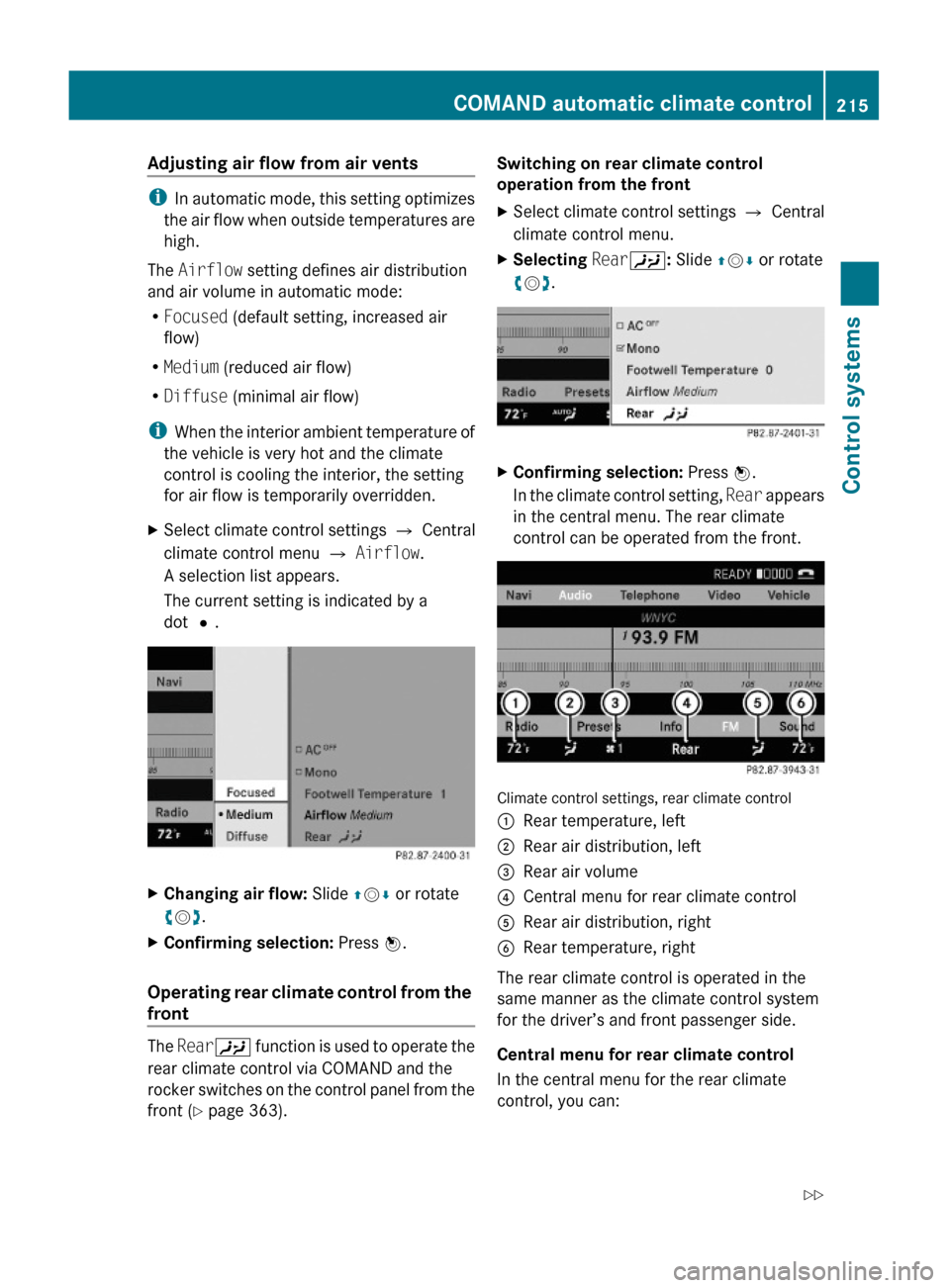
XSelect climate control settings Q Central
climate control menu Q Airflow.
A selection list appears.
The current setting is indicated by a
dot #.
XChanging air flow: Slide ZVÆ or rotate
cVd.
XConfirming selection: Press W.
Operating rear climate control from the
front
The RearY function is used to operate the
rear climate control via COMAND and the
rocker switches on the control panel from the
front (Y page 363).
Switching on rear climate control
operation from the front
XSelect climate control settings Q Central
climate control menu.
XSelecting RearY: Slide ZVÆ or rotate
cVd.
XConfirming selection: Press W.
In the climate control setting, Rear appears
in the central menu. The rear climate
control can be operated from the front.
Climate control settings, rear climate control
:Rear temperature, left;Rear air distribution, left=Rear air volume?Central menu for rear climate controlARear air distribution, rightBRear temperature, right
The rear climate control is operated in the
same manner as the climate control system
for the driver’s and front passenger side.
Central menu for rear climate control
In the central menu for the rear climate
control, you can:
COMAND automatic climate control215Control systems221_AKB; 6; 20, en-USd2ugruen,Version: 2.11.8.12009-09-24T13:28:17+02:00 - Seite 215Z
Page 218 of 548
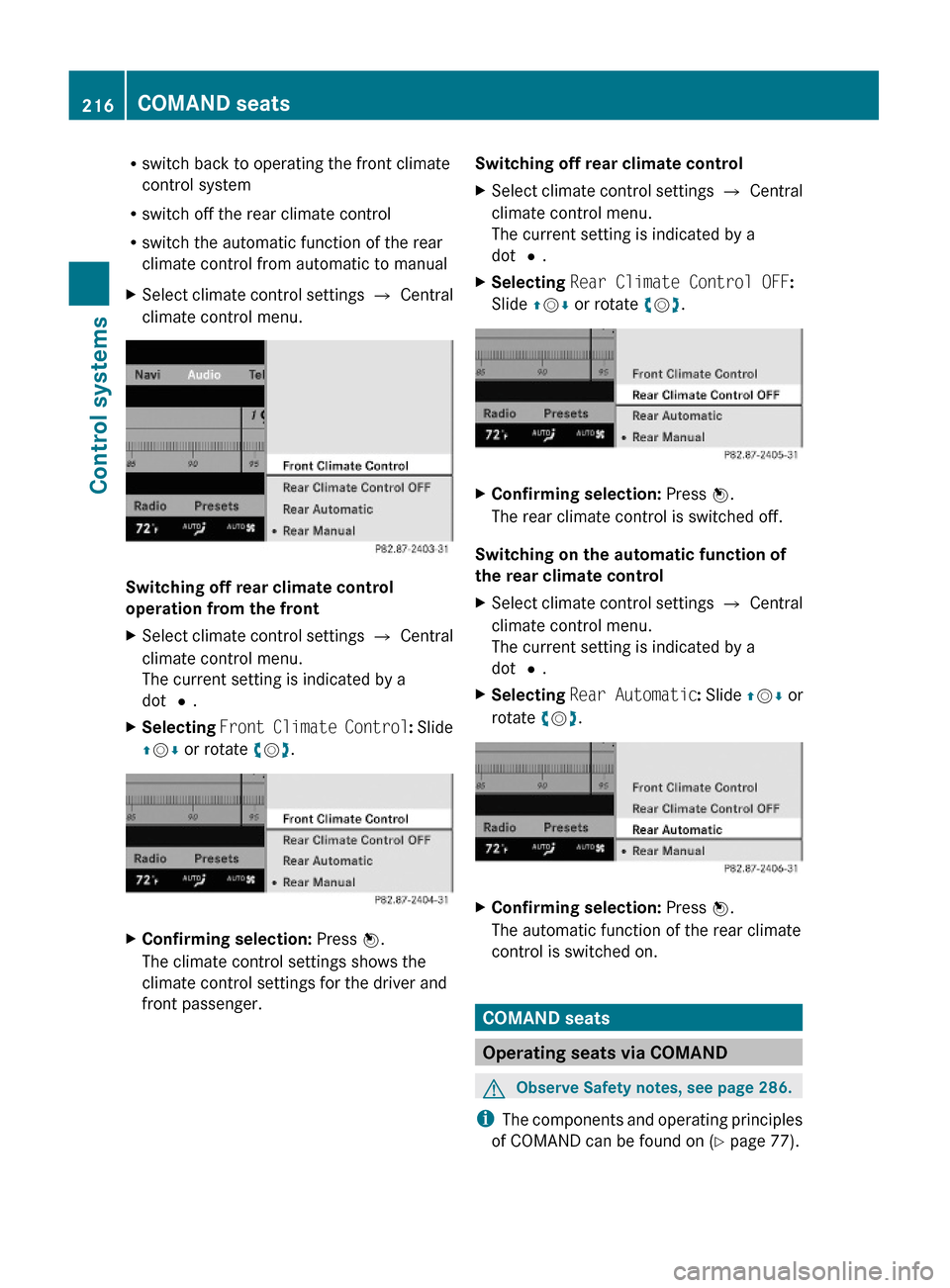
Rswitch back to operating the front climate
control system
Rswitch off the rear climate control
Rswitch the automatic function of the rear
climate control from automatic to manual
XSelect climate control settings Q Central
climate control menu.
Switching off rear climate control
operation from the front
XSelect climate control settings Q Central
climate control menu.
The current setting is indicated by a
dot #.
XSelecting Front Climate Control: Slide
ZVÆ or rotate cVd.
XConfirming selection: Press W.
The climate control settings shows the
climate control settings for the driver and
front passenger.
Switching off rear climate controlXSelect climate control settings Q Central
climate control menu.
The current setting is indicated by a
dot #.
XSelecting Rear Climate Control OFF:
Slide ZVÆ or rotate cVd.
XConfirming selection: Press W.
The rear climate control is switched off.
Switching on the automatic function of
the rear climate control
XSelect climate control settings Q Central
climate control menu.
The current setting is indicated by a
dot #.
XSelecting Rear Automatic: Slide ZVÆ or
rotate cVd.
XConfirming selection: Press W.
The automatic function of the rear climate
control is switched on.
COMAND seats
Operating seats via COMAND
GObserve Safety notes, see page 286.
iThe components and operating principles
of COMAND can be found on (Y page 77).
216COMAND seatsControl systems
221_AKB; 6; 20, en-USd2ugruen,Version: 2.11.8.12009-09-24T13:28:17+02:00 - Seite 216
Page 275 of 548
Vehicle equipment ............................274
Locking and unlocking .....................274
Starter switch positions ...................284
Seats ..................................................286
Multifunction steering wheel ..........293
Mirrors ...............................................294
Memory function ..............................297
Lighting ..............................................298
Wipers ................................................305
Power windows .................................307
Driving and parking ..........................311
Automatic transmission ...................317
Transfer case ....................................325
Instrument cluster ............................326
Driving systems ................................327
Climate control system ....................363
Rear window defroster .....................372
Power tilt/sliding sunroof ...............373
Panorama roof with power tilt/
sliding panel ......................................375
Loading and storing ..........................379
Useful features .................................384
273Controls in detail221_AKB; 6; 20, en-USd2ugruen,Version: 2.11.8.12009-09-24T13:28:17+02:00 - Seite 273
Page 361 of 548
XDimming illumination: Turn knob :
counterclockwise.
Dirty or fogged-up windshield
The Night View Assist Plus image is
diminished when the windshield in front of the
camera is
R dirty
R fogged up on the outside
R fogged up on the inside
GWarning!
Please do not forget that your primary
responsibility is to drive the vehicle. A driver’s
attention to the road must always be his/her
primary focus when driving. For your safety
and the safety of others, stop before trying to
remove window fogging or cleaning the
windshield in front of the Night View Assist
Plus camera.
Bear in mind that at a speed of just 30 mph
(approximately 50 km/h), your vehicle is
covering a distance of 44 feet
(approximately 14 m) every second.
XRemoving condensation: Check settings
of the climate control and change them, if
necessary ( Y page 363).XSwing the camera cover downward
( Y page 444).XCleaning inside of windshield: Use a soft,
non-scratching cloth ( Y page 444).
Blind Spot Assist
The Blind Spot Assist uses radar sensors to
monitor the area on both sides of your
vehicle. It will assist you when you change
lanes driving at speeds of above 20 mph
(30 km/h). A red warning lamp will come on
in the exterior rear view mirror as soon as
another vehicle is detected. If you then
activate the corresponding turn signals to
change lanes, the red warning lamp flashes
and warning sounds (collision warning). The
Blind Spot Assist operates using sensors in
the rear bumper.GWarning!
The Blind Spot Assist is only a driving aid and
may not detect all vehicles.
The Blind Spot Assist may not be able to
detect narrow vehicles such as motorcycles
or bicycles, or it may not detect them until it
is too late.
The monitoring function may be impaired if
your sensors are dirty, subject to heavy spray,
or if visibility is poor due to e.g. snow, rain, or
fog. This can result in vehicles not being
detected or being detected too late.
The Blind Spot Assist cannot detect road,
traffic and weather conditions.
It is the driver’s responsibility at all times to
be attentive to road, weather and traffic
conditions and to provide the steering,
braking and other driving inputs necessary to
retain control of the vehicle. Failure to do so
could result in recognizing dangers too late,
possibly resulting in an accident and serious
injury to yourself and others.
In order for the Blind Spot Assist to function,
the radar sensors must be switched on and
operational.
When traveling in Canada in a vehicle not
registered in Canada, you must switch off the
radar sensor system ( Y page 236). Canadian
law does not permit the use of the radar
sensor system for vehicles from outside of
Canada. When you switch off the radar sensor
system, the following functions are
deactivated:
R Blind Spot Assist
R BAS PLUS ( Y page 64)
R PRE-SAFE ®
Brake ( Y page 69)
R DISTRONIC PLUS ( Y page 330)
i USA only:
This device has been approved by the FCC
as a “Vehicular Radar System”. The radar
Driving systems359Controls in detail221_AKB; 6; 20, en-USd2ugruen,Version: 2.11.8.12009-09-24T13:28:17+02:00 - Seite 359Z
Page 365 of 548
conditions and to provide the steering,
braking and other driving inputs necessary to
retain control of the vehicle. Failure to do so
could result in recognizing dangers too late,
possibly resulting in an accident and serious
injury to yourself and others.
Switching on or offXSwitch on or off the Lane Keeping Assist via
the control system (Y page 233).
The Lane Keeping Assist indicator Ã
appears in the multifunction display.
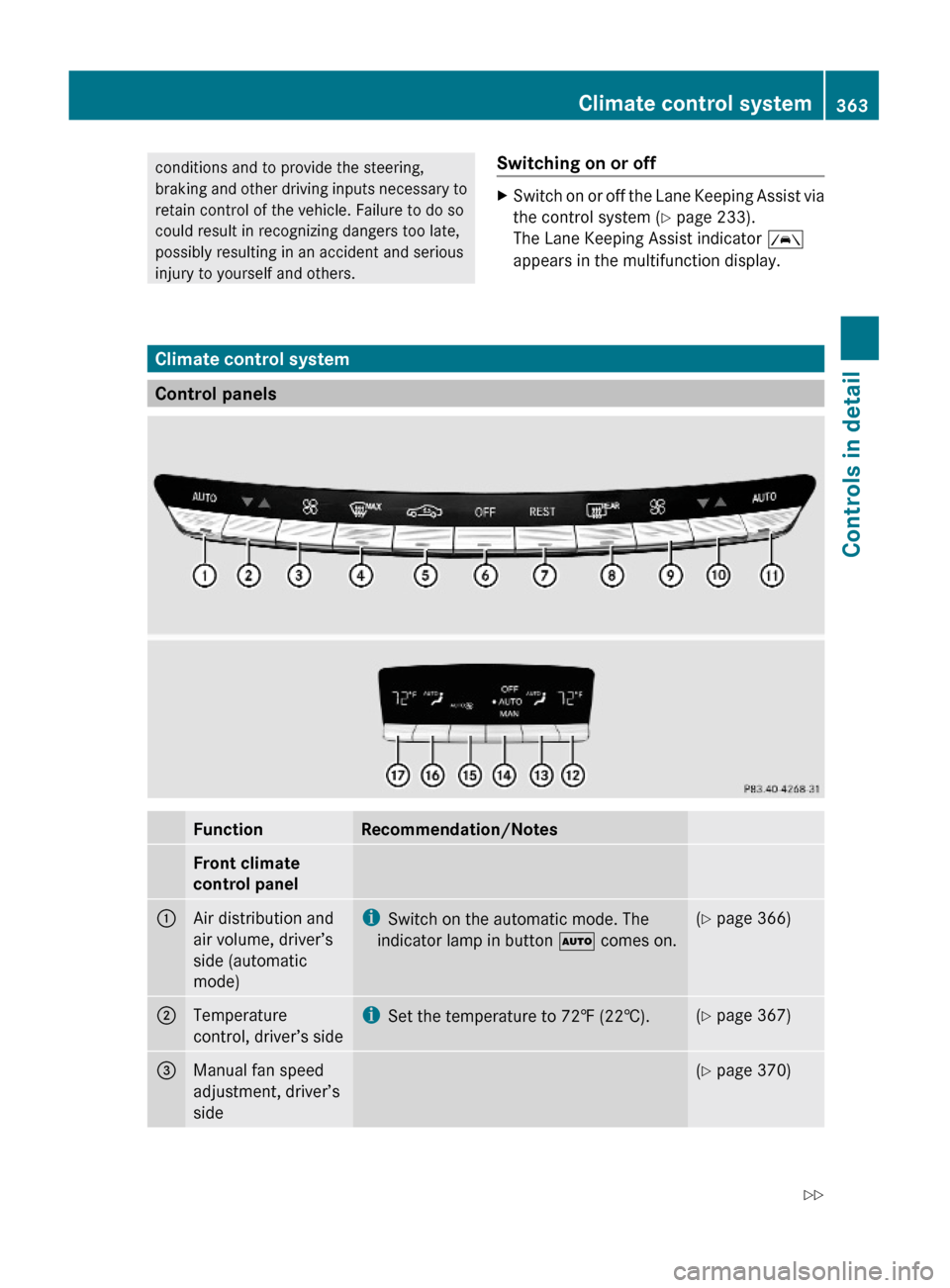
Climate control system
Control panels
FunctionRecommendation/NotesFront climate
control panel
1Air distribution and
air volume, driver’s
side (automatic
mode)
iSwitch on the automatic mode. The
indicator lamp in button à comes on.
(Y page 366)2Temperature
control, driver’s side
iSet the temperature to 72‡ (22†).(Y page 367)3Manual fan speed
adjustment, driver’s
side
(Y page 370)Climate control system363Controls in detail221_AKB; 6; 20, en-USd2ugruen,Version: 2.11.8.12009-09-24T13:28:17+02:00 - Seite 363Z
Page 366 of 548
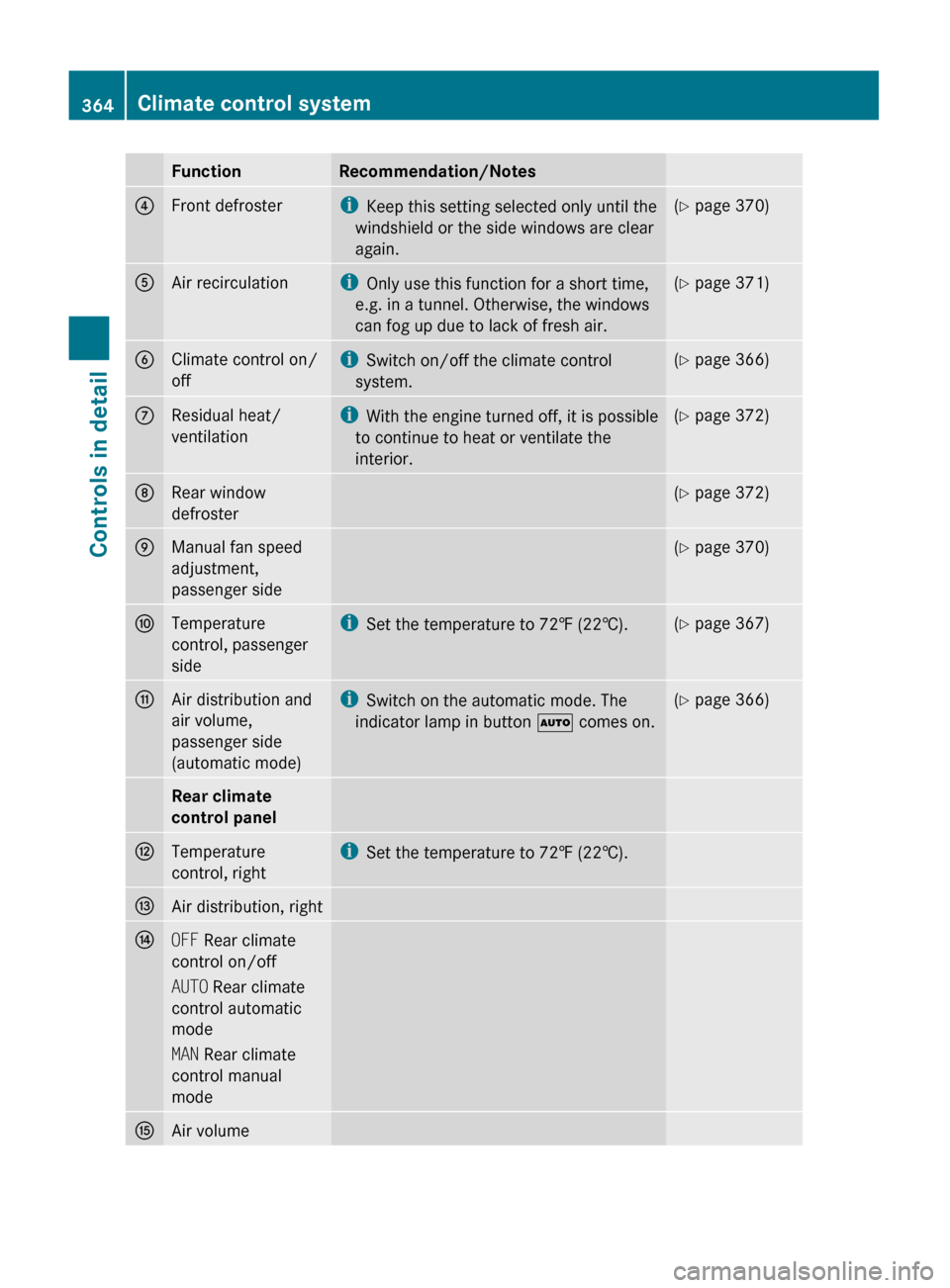
FunctionRecommendation/Notes4Front defrosteriKeep this setting selected only until the
windshield or the side windows are clear
again.( Y page 370)5Air recirculationi
Only use this function for a short time,
e.g. in a tunnel. Otherwise, the windows
can fog up due to lack of fresh air.( Y page 371)6Climate control on/
offi Switch on/off the climate control
system.( Y page 366)7Residual heat/
ventilationi With the engine turned off, it is possible
to continue to heat or ventilate the
interior.( Y page 372)8Rear window
defroster( Y page 372)9Manual fan speed
adjustment,
passenger side( Y page 370)aTemperature
control, passenger
sidei Set the temperature to 72‡ (22†).(Y page 367)bAir distribution and
air volume,
passenger side
(automatic mode)i Switch on the automatic mode. The
indicator lamp in button à comes on.(Y page 366)Rear climate
control panelHTemperature
control, righti Set the temperature to 72‡ (22†).IAir distribution, rightJOFF Rear climate
control on/off
AUTO Rear climate
control automatic
mode
MAN Rear climate
control manual
modeKAir volume364Climate control systemControls in detail
221_AKB; 6; 20, en-USd2ugruen,Version: 2.11.8.12009-09-24T13:28:17+02:00 - Seite 364
Page 367 of 548
FunctionRecommendation/NotesLAir distribution, leftMTemperature
control, lefti Set the temperature to 72‡ (22†).Notes on climate control system
i If you have the air distribution and air
volume automatically controlled, you can
adjust the temperature, footwell
temperature and air flow. The following
basic settings are recommended:
R Automatic air distribution control
( Y page 366)
R Temperature: 72‡ (22†) ( Y page 367)
R Footwell temperature: 0 ( Y page 214)
R Air flow: focused ( Y page 215)
The climate control system is operational
whenever the engine is running. You can
operate the climate control system in either
the automatic or manual mode. The system
cools or heats the interior depending on the
selected interior temperature.
It can only function optimally when you are
driving with the windows, the tilt/sliding
sunroof or tilt/sliding panel closed.
Nearly all dust particles, pollutants and odors
are filtered out before outside air enters the
passenger compartment through the air
distribution system.GWarning!
Severe conditions (e.g. strong air pollution)
may require replacement of the filter before
its scheduled replacement interval. A clogged
filter will reduce the air volume to the interior
and the windows could fog up, impairing
visibility and endangering you and others.
Have a clogged filter replaced as soon as
possible at an authorized Mercedes-Benz
Center.
GWarning!
Follow the recommended settings for heating
and cooling given on the following pages and
in the “COMAND automatic climate control”
section. Otherwise the windows could fog up,
impairing visibility and endangering you and
others.
XKeep the air intake grille in front of the
windshield free of snow and debris.
Do not obstruct air flow by placing objects on
the air flow-through exhaust slots below the
rear window.
i If the vehicle interior is hot, ventilate the
interior before driving off, see “Summer
opening feature” (Y page 309). The climate
control will then adjust the interior
temperature to the set value much faster.
The following climate control functions can
be operated via COMAND:
R Temperature ( Y page 211)
R Air distribution ( Y page 212)
R Air volume ( Y page 212)
R Switching off cooling ( Æ) (Y page 213)
R Central climate control ( Mono)
( Y page 214)
R Footwell temperature ( Y page 214)
R Air flow from air vents ( Y page 215)
R Rear climate control ( Y page 215)
Climate control system365Controls in detail221_AKB; 6; 20, en-USd2ugruen,Version: 2.11.8.12009-09-24T13:28:17+02:00 - Seite 365Z
Page 368 of 548
Deactivating the climate control
systemGWarning!
When the climate control system is
deactivated, the outside air supply and
circulation are also deactivated. Only choose
this setting for a short time. Otherwise the
windows could fog up, impairing visibility and
endangering you and others.
Deactivating the front climate control
XDeactivating: Press rocker switch ^ up
or down.
The indicator lamp in the rocker switch
comes on. You will see Climate Control
OFF in the COMAND display.XReactivating: Press rocker switch ^ up
or down.
The indicator lamp in the rocker switch
goes out. You will see the previous settings
in the COMAND display.
Deactivating the rear climate control
Operating on the front climate control
panel
XActivate the RearY function via
COMAND ( Y page 215). This function is
used to operate the rear climate control via
COMAND and the rocker switches on the
control panel from the front.XDeactivating: Press rocker switch ^ up
or down.
The indicator lamp in the rocker switch
comes on.XReactivating: Press rocker switch ^ up
or down.
The indicator lamp in the rocker switch
goes out. The previous settings are once
again in effect.Operating on the rear climate control
panelXDeactivating: Press rocker switch J
( Y page 363) up or down repeatedly until
OFF mode is selected in display.XReactivating: Press rocker switch J up or
down repeatedly until AUTO mode is
selected in display.
or
XPress rocker switch J up or down
repeatedly until MAN mode is selected in
display.
Air conditioning
The air conditioning is operational while the
engine is running and cools the interior air to
the temperature set by the operator. In
addition, the air conditioning dehumidifies
the interior air and helps prevent window
fogging.
GWarning!
If you deactivate the air conditioning, the
vehicle will not be cooled when weather
conditions are warm. The windows can fog up
more quickly. Window fogging may impair
visibility and endanger you and others.
i Condensated water may drip out from
underneath the vehicle. This is normal and
not an indication of a malfunction.
The air conditioning uses the refrigerant
R134a. This refrigerant is free of CFCs which
are harmful to the ozone layer.
The cooling function can be activated or
deactivated via COMAND ( Y page 213).
Automatic mode
When operating the climate control system in
automatic mode, the interior air temperature,
air volume and air distribution are adjusted
automatically.
366Climate control systemControls in detail
221_AKB; 6; 20, en-USd2ugruen,Version: 2.11.8.12009-09-24T13:28:17+02:00 - Seite 366
Page 369 of 548
In automatic mode, cooling with
dehumidification is switched on. This function
can be switched off if necessary.
GWarning!
If you deactivate the air conditioning, the
vehicle will not be cooled when weather
conditions are warm. The windows can fog up
more quickly. Window fogging may impair
visibility and endanger you and others.
Automatic mode with the front climate
control
XSet the desired temperature
(Y page 367).
XActivating: Press rocker switch à up or
down.
The indicator lamp in the rocker switch
comes on.
XDeactivating: Press rocker switch K up
or down.
or
XAdjust air distribution via COMAND
(Y page 212).
The indicator lamp in rocker switch Ã
goes out.
Automatic mode with the rear climate
control
Operating on the front climate control
panel
XSet the desired temperature
(Y page 367).
XActivate the RearY function via
COMAND (Y page 215). This function is
used to operate the rear climate control via
COMAND and the rocker switches on the
control panel from the front.
XActivating: Press rocker switch à up or
down.
The indicator lamp in the rocker switch
comes on.
XDeactivating: Press rocker switch K up
or down.
orXAdjust air distribution via COMAND
(Y page 212).
The indicator lamp in rocker switch Ã
goes out.
iTo return to the standard display, activate
the Front Climate Control function via
COMAND (Y page 216).
Operating on the rear climate control
panel
XSet the desired temperature
(Y page 367).
XActivating: Press rocker switch J
(Y page 363) repeatedly until AUTO mode is
selected in the display.
XDeactivating: Press rocker switch J
repeatedly until MAN mode or OFF mode is
selected in the display.
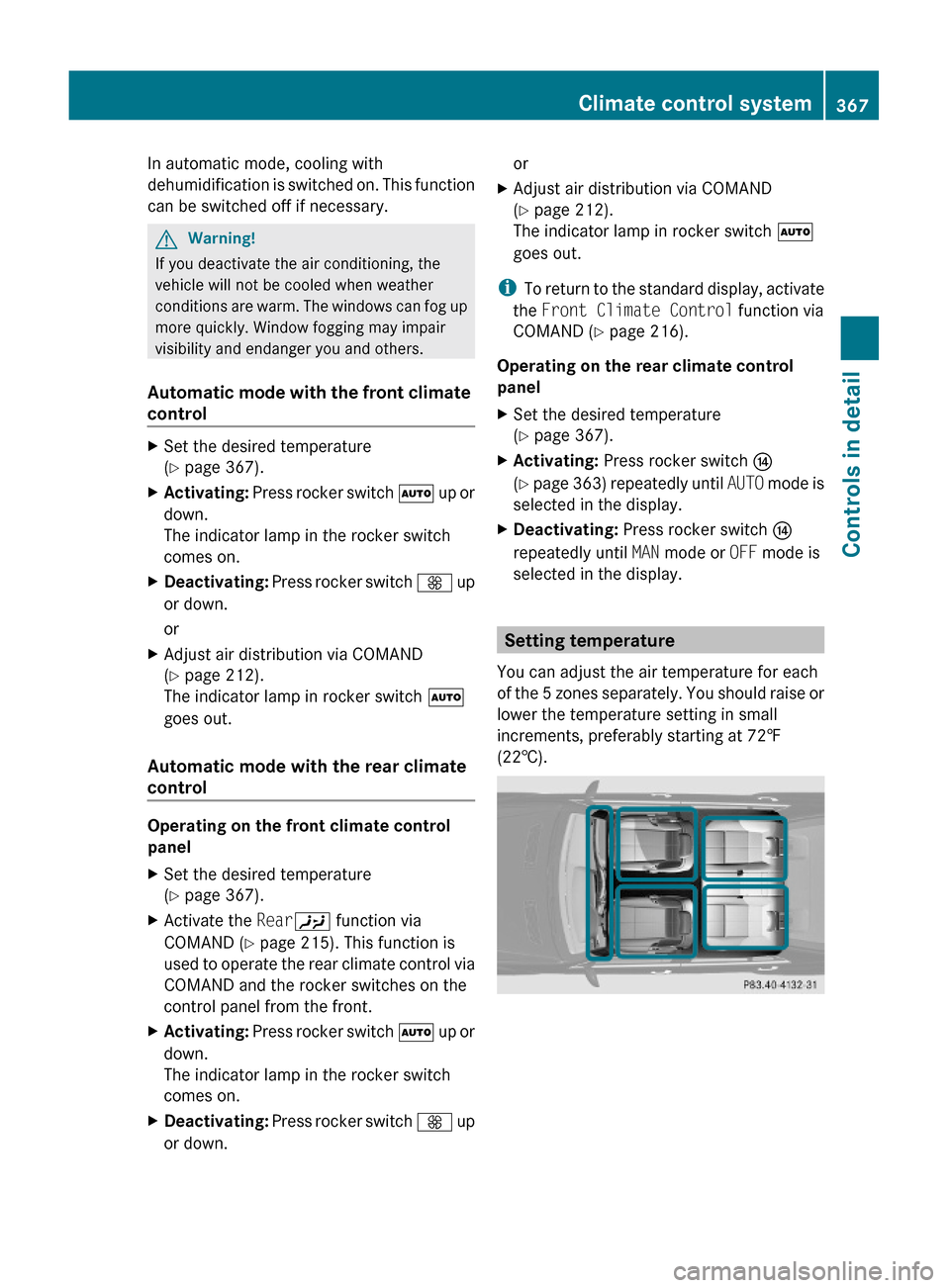
Setting temperature
You can adjust the air temperature for each
of the 5 zones separately. You should raise or
lower the temperature setting in small
increments, preferably starting at 72‡
(22†).
Climate control system367Controls in detail221_AKB; 6; 20, en-USd2ugruen,Version: 2.11.8.12009-09-24T13:28:17+02:00 - Seite 367Z
Page 370 of 548
Front temperature with front climate
control panel
XIncreasing/decreasing: Press rocker
switches w up or down or use COMAND
(Y page 211).
The climate control system will
correspondingly adjust the interior air
temperature.
Rear temperature with front climate
control panel
XActivate the RearY function via
COMAND (Y page 215). This function is
used to operate the rear climate control via
COMAND and the rocker switches on the
control panel from the front.
XIncreasing/decreasing: Press rocker
switches w up or down.
Rear temperature with rear climate
control panel
XIncreasing/decreasing: Press rocker
switches w up or down.
Adjusting air vents
GWarning!
When operating the climate control, the air
that enters the passenger compartment
through the air vents can be very hot or very
cold (depending on the set temperature). This
may cause burns or frostbite to unprotected
skin in the immediate area of the air vents.
Always keep sufficient distance between
unprotected parts of the body and the air
vents. If necessary, use the air distribution
adjustment to direct the air to air vents in the
vehicle interior that are not in the immediate
area of unprotected skin.
For best possible performance of the climate
control:
XKeep the air intake grille in front of the
windshield free of snow, leaves, sticks, and
any other debris.
XAlways keep all air vents and grilles in the
passenger compartment free from
obstruction.
iFor draft-free ventilation, move the
adjustable center and side air vents to the
middle position.
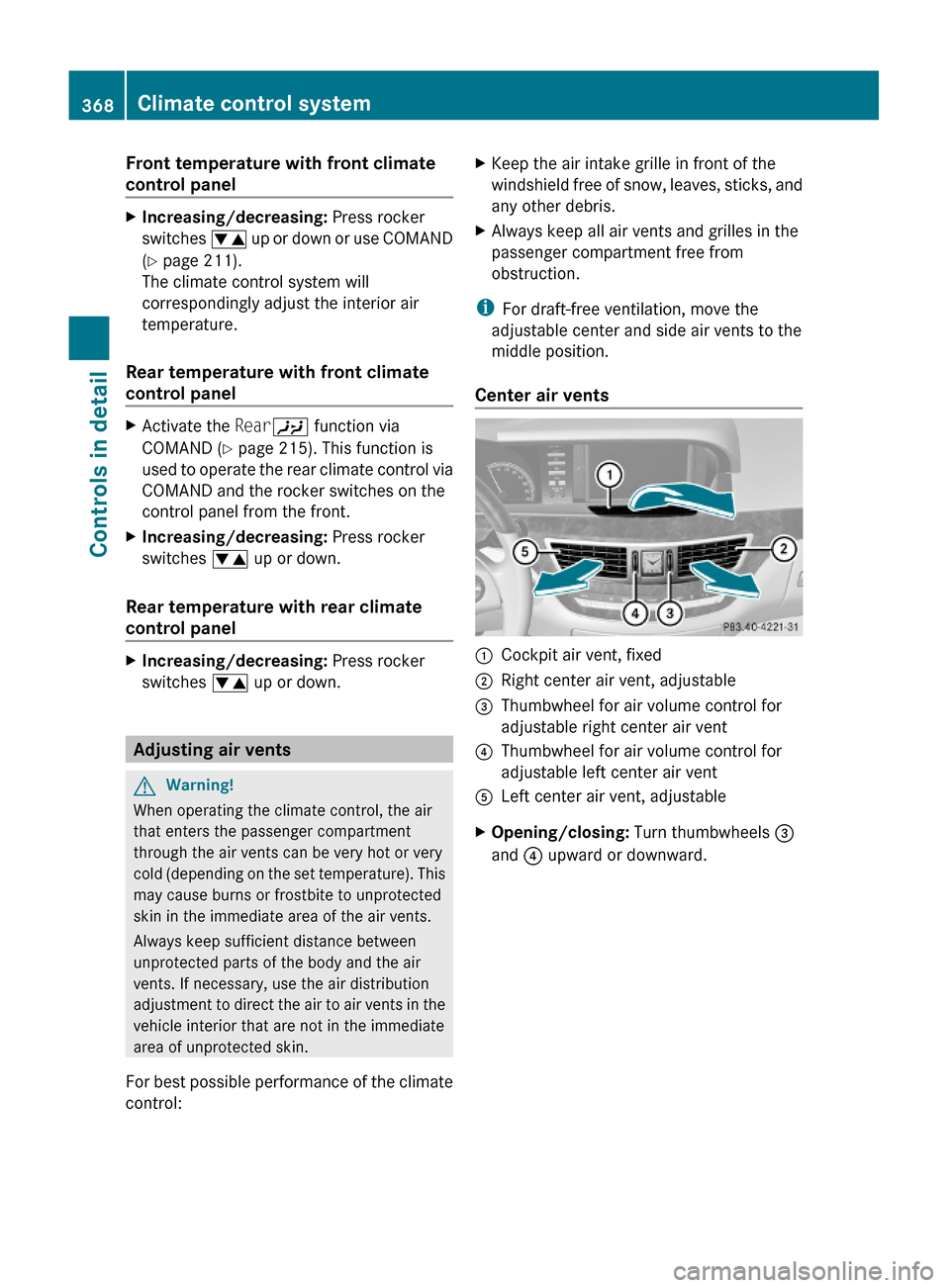
Center air vents
:Cockpit air vent, fixed;Right center air vent, adjustable=Thumbwheel for air volume control for
adjustable right center air vent
?Thumbwheel for air volume control for
adjustable left center air vent
ALeft center air vent, adjustableXOpening/closing: Turn thumbwheels =
and ? upward or downward.
368Climate control systemControls in detail
221_AKB; 6; 20, en-USd2ugruen,Version: 2.11.8.12009-09-24T13:28:17+02:00 - Seite 368