ESP MERCEDES-BENZ SPRINTER 2012 MY12 Operator’s Manual
[x] Cancel search | Manufacturer: MERCEDES-BENZ, Model Year: 2012, Model line: SPRINTER, Model: MERCEDES-BENZ SPRINTER 2012Pages: 292, PDF Size: 6.75 MB
Page 69 of 292
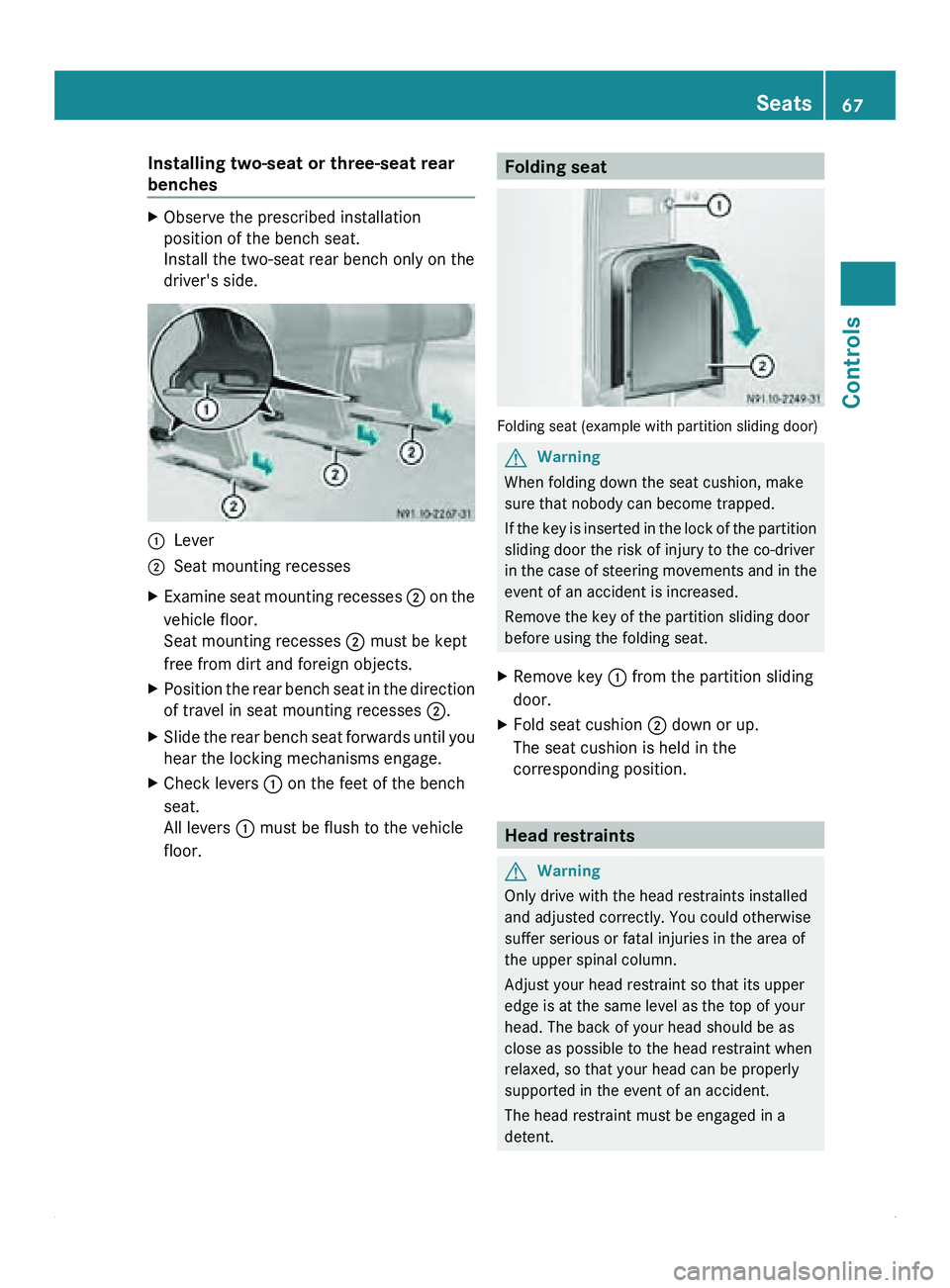
Installing two-seat or three-seat rear
benches
X
Observe the prescribed installation
position of the bench seat.
Install the two-seat rear bench only on the
driver's side. 0046
Lever
0047 Seat mounting recesses
X Examine seat mounting recesses 0047 on
the
vehicle floor.
Seat mounting recesses 0047
must be kept
free from dirt and foreign objects.
X Position the rear bench seat in the direction
of travel in seat mounting recesses 0047.
X Slide the rear bench seat forwards until you
hear the locking mechanisms engage.
X Check levers 0046 on the feet of the bench
seat.
All levers 0046 must be flush to the vehicle
floor. Folding seat
Folding seat (example with partition sliding door)
G
Warning
When folding down the seat cushion, make
sure that nobody can become trapped.
If the key
is inserted in the lock of the partition
sliding door the risk of injury to the co-driver
in the case of steering movements and in the
event of an accident is increased.
Remove the key of the partition sliding door
before using the folding seat.
X Remove key 0046 from the partition sliding
door.
X Fold seat cushion 0047 down or up.
The seat cushion is held in the
corresponding position. Head restraints
G
Warning
Only drive with the head restraints installed
and adjusted correctly. You could otherwise
suffer serious or fatal injuries in the area of
the upper spinal column.
Adjust your head restraint so that its upper
edge is at the same level as the top of your
head. The back of your head should be as
close as possible to the head restraint when
relaxed, so that your head can be properly
supported in the event of an accident.
The head restraint must be engaged in a
detent. Seats
67
Controls Z
Page 75 of 292
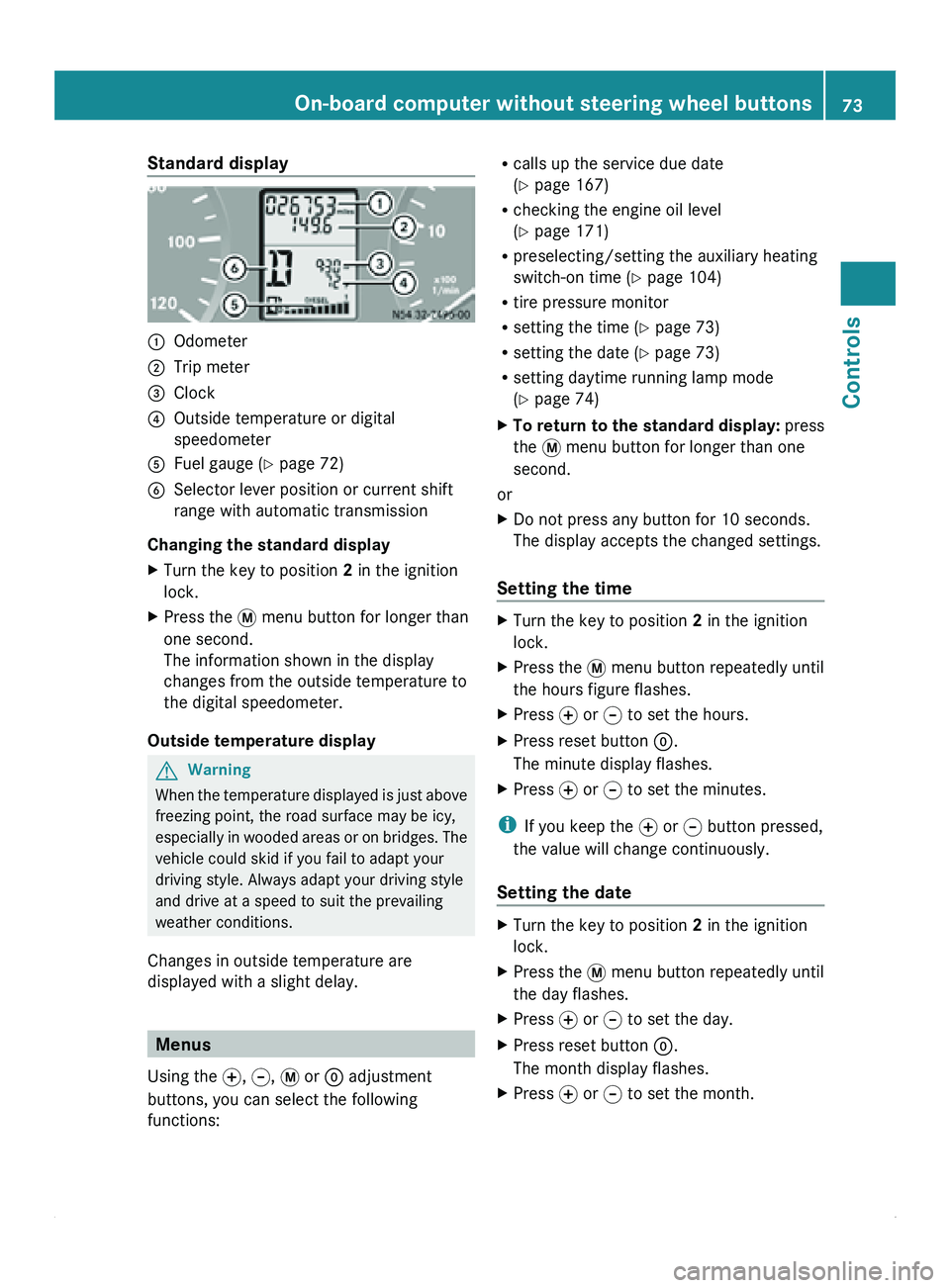
Standard display
0046
Odometer
0047 Trip meter
008A Clock
0088 Outside temperature or digital
speedometer
0086 Fuel gauge ( Y page 72)
0087 Selector lever position or current shift
range with automatic transmission
Changing the standard display
X Turn the key to position 2 in the ignition
lock.
X Press the 007B menu button for longer than
one second.
The information shown in the display
changes from the outside temperature to
the digital speedometer.
Outside temperature display G
Warning
When the temperature displayed is just above
freezing point, the road surface may be icy,
especially in wooded
areas or on bridges. The
vehicle could skid if you fail to adapt your
driving style. Always adapt your driving style
and drive at a speed to suit the prevailing
weather conditions.
Changes in outside temperature are
displayed with a slight delay. Menus
Using the 0069, 006A, 007B or 0048 adjustment
buttons, you can select the following
functions: R
calls up the service due date
(Y page 167)
R checking the engine oil level
(Y page 171)
R preselecting/setting the auxiliary heating
switch-on time ( Y page 104)
R tire pressure monitor
R setting the time (Y
page 73)
R setting the date ( Y page 73)
R setting daytime running lamp mode
(Y page 74)
X To return to the standard display: press
the 007B menu button for longer than one
second.
or
X Do not press any button for 10 seconds.
The display accepts the changed settings.
Setting the time X
Turn the key to position 2 in the ignition
lock.
X Press the 007B menu button repeatedly until
the hours figure flashes.
X Press 0069 or 006A to set the hours.
X Press reset button 0048.
The minute display flashes.
X Press 0069 or 006A to set the minutes.
i If you keep the 0069 or 006A button pressed,
the value will change continuously.
Setting the date X
Turn the key to position 2 in the ignition
lock.
X Press the 007B menu button repeatedly until
the day flashes.
X Press 0069 or 006A to set the day.
X Press reset button 0048.
The month display flashes.
X Press 0069 or 006A to set the month. On-board computer without steering wheel buttons
73
Controls Z
Page 76 of 292
X
Press reset button 0048.
The year display flashes.
X Press 0069 or 006A to set the year.
i If you keep the 0069 or 006A button pressed,
the value will change continuously.
Setting daytime running lamp mode If you have switched daytime running lamp
mode on and the light switch is in the 0027
position, the following light up automatically
when the engine is running: the parking
lamps, the low-beam headlamps, the tail
lamps and the license plate lamps.
For safety reasons, it is only possible to
change this setting when the vehicle is
stationary. The factory setting is ON in
countries in which daytime running lamp
mode is mandatory.
X
Turn the key to position 2 in the ignition
lock.
X Press the 007B menu button repeatedly until
the 0064 indicator lamp in the instrument
cluster flashes and the message ON or
OFF appears in the display.
X Press 0069 or 006A to activate or deactivate
daytime running lamp mode.
i USA only:
If you turn the light switch to 006C or
0064, the corresponding light is switched
on. Daytime running lamp mode remains
activated if the light switch is turned to
005A.
Canada only:
If you turn
the light switch to 0064, the low-
beam headlamps are switched on. Daytime
running lamp mode remains activated if the
light switch is turned to 006C or 005A. On-board computer with steering
wheel buttons
Layout and controls
The on-board computer is activated as soon
as you turn
the key to position 1 in the ignition
lock. G
Warning
Only use the on-board computer when road
and traffic conditions permit. You would
otherwise be distracted and unable to
concentrate properly on driving, and could
cause an accident.
The on-board computer shows vehicle
information and settings in the display.
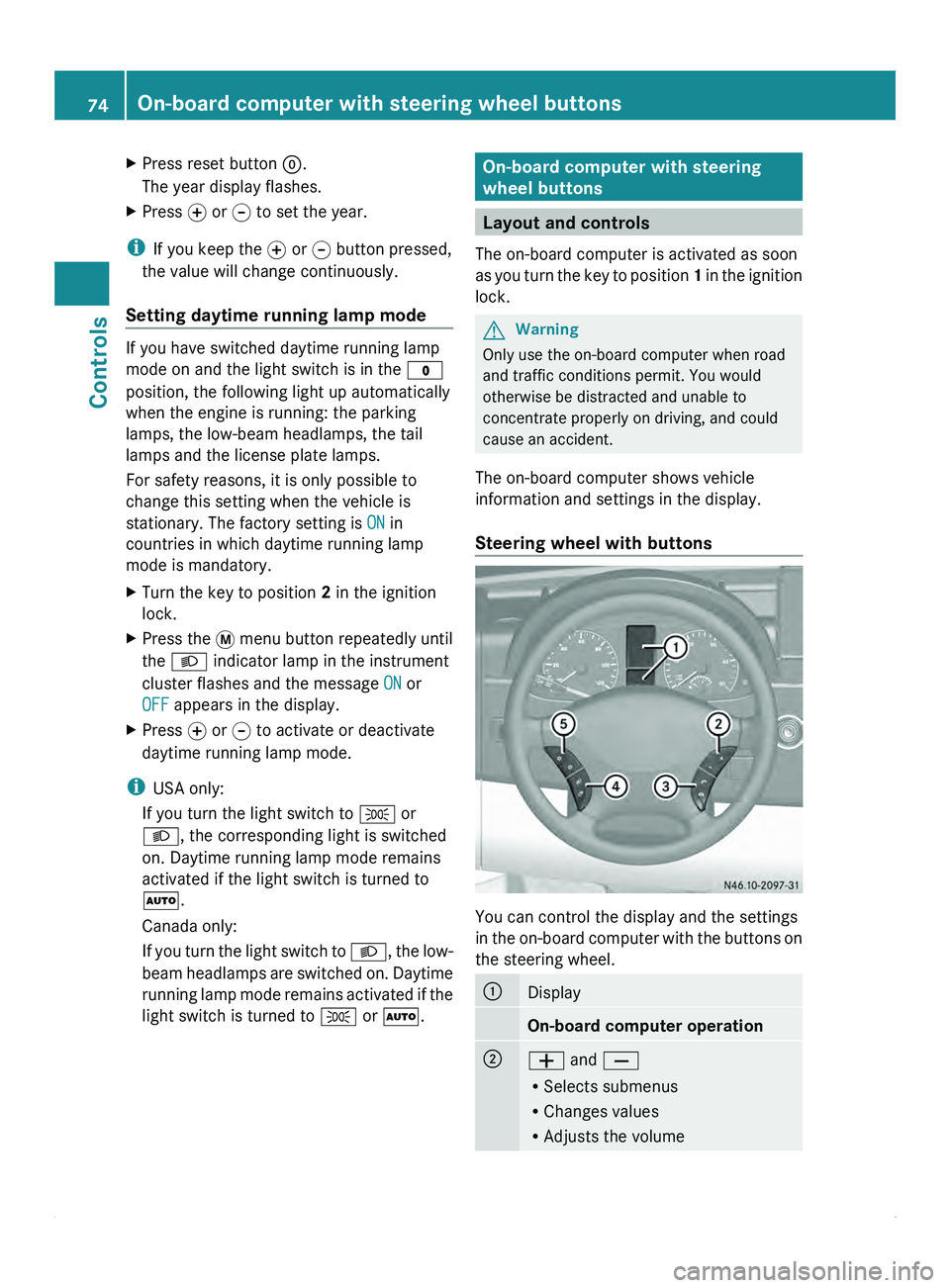
Steering wheel with buttons You can control the display and the settings
in the
on-board
computer with the buttons on
the steering wheel. 0046
Display
On-board computer operation
0047
005A and 005B
R
Selects submenus
R Changes values
R Adjusts the volume74
On-board computer with steering wheel buttons
Controls
Page 85 of 292
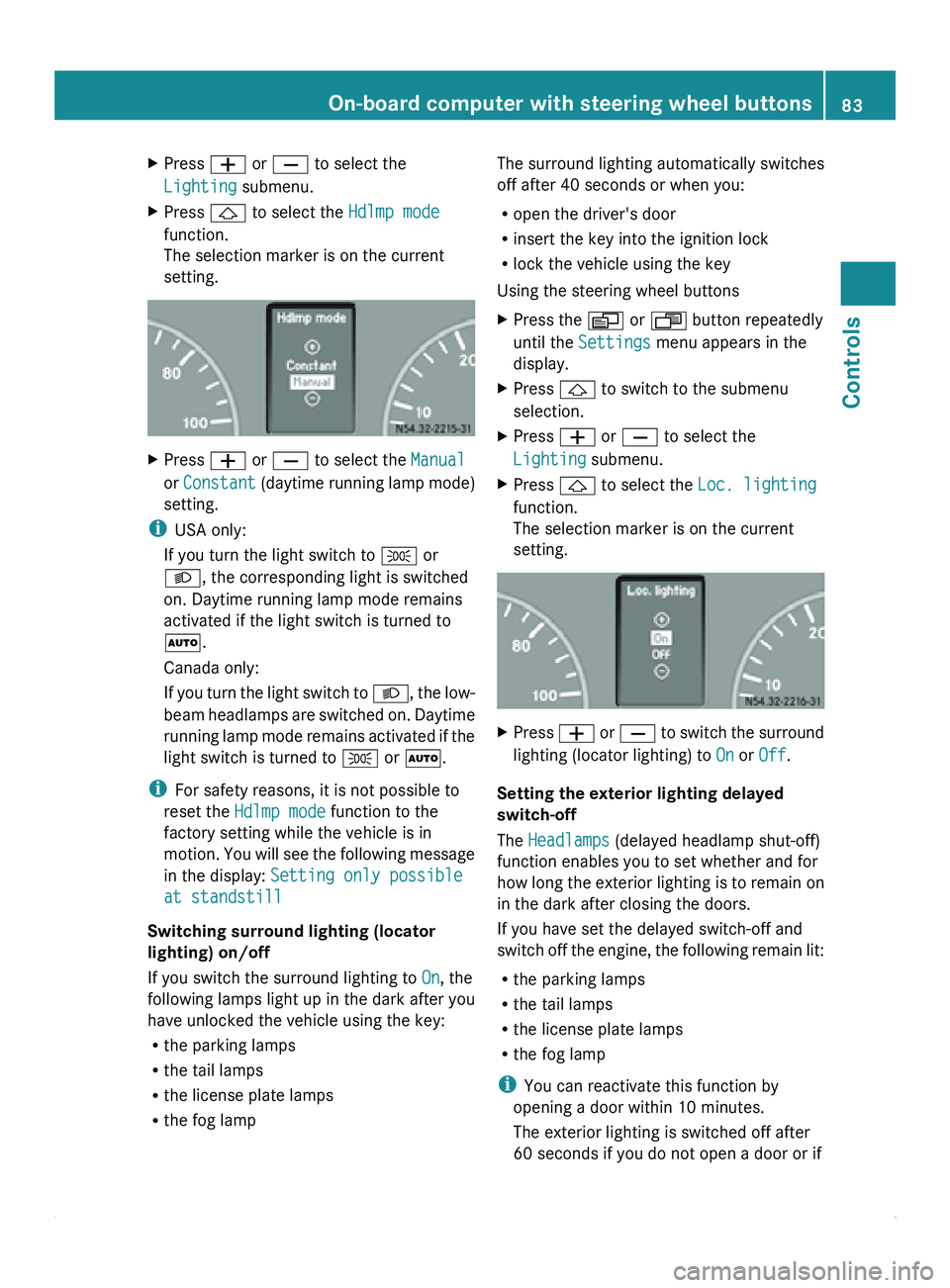
X
Press 005A or 005B to select the
Lighting submenu.
X Press 0029 to select the Hdlmp mode
function.
The selection marker is on the current
setting. X
Press 005A or 005B to select the Manual
or Constant (daytime running
lamp mode)
setting.
i USA only:
If you turn the light switch to 006C or
0064, the corresponding light is switched
on. Daytime running lamp mode remains
activated if the light switch is turned to
005A.
Canada only:
If you turn
the light switch to 0064, the low-
beam headlamps are switched on. Daytime
running lamp mode remains activated if the
light switch is turned to 006C or 005A.
i For safety reasons, it is not possible to
reset the Hdlmp mode function to the
factory setting while the vehicle is in
motion. You will see the following message
in the display: Setting only possible
at standstill
Switching surround lighting (locator
lighting) on/off
If you switch the surround lighting to On, the
following lamps light up in the dark after you
have unlocked the vehicle using the key:
R the parking lamps
R the tail lamps
R the license plate lamps
R the fog lamp The surround lighting automatically switches
off after 40 seconds or when you:
R
open the driver's door
R insert the key into the ignition lock
R lock the vehicle using the key
Using the steering wheel buttons
X Press the 0059 or 0058 button repeatedly
until the Settings menu appears in the
display.
X Press 0029 to switch to the submenu
selection.
X Press 005A or 005B to select the
Lighting submenu.
X Press 0029 to select the Loc. lighting
function.
The selection marker is on the current
setting. X
Press 005A
or 005B
to switch the surround
lighting (locator lighting) to On or Off.
Setting the exterior lighting delayed
switch-off
The Headlamps (delayed headlamp shut-off)
function enables you to set whether and for
how long
the
exterior lighting is to remain on
in the dark after closing the doors.
If you have set the delayed switch-off and
switch off the engine, the following remain lit:
R the parking lamps
R the tail lamps
R the license plate lamps
R the fog lamp
i You can reactivate this function by
opening a door within 10 minutes.
The exterior lighting is switched off after
60 seconds if you do not open a door or if On-board computer with steering wheel buttons
83
Controls Z
Page 89 of 292
X
Press 006A.
The display shows the call duration.
Rejecting or ending a call X
Press 007F.
The caller then hears the engaged tone.
The display shows the operational
readiness symbol again.
Dialing a number from the phone book You may select and dial a number from the
phone book
at
any time, provided the mobile
phone is ready to receive calls.
i It is only possible to create new phone
number entries in the phone book using the
mobile phone itself. See the separate
operating instructions.
X Press the 0059 or 0058 button repeatedly
until the TEL menu appears in the display.
The operational readiness
display is shown.
X Press 0029 or 002D
to switch to the phone
book.
The on-board computer reads the phone
book stored on the SIM card or in the
mobile phone. This may take more than a
minute. The display shows the
Processing (Audio 20) message.
Reading is complete when the message
disappears.
X Press 0029 or 002D to select the desired
name.
The display shows the stored names in
alphabetical order.
i The display scrolls through the names
rapidly if
you
press 0029 or 002D for longer
than one second. Releasing the button
stops the rapid scroll.
If you do not wish to make a call, press the
007F button.
X Press 006A.
The on-board computer dials the
corresponding phone number. The display
shows the dialing (Audio 20) message. The on-board computer stores the phone
numbers in the redial memory.
When a connection is made, the display
shows the name of the other person and
the call duration.
Redialing The on-board computer stores the last phone
numbers dialed. This means that you do not
have to search through the entire phone
book.
X
Press the 0059 or 0058 button repeatedly
until the TEL menu appears in the display.
The operational readiness
display is shown.
X Press 006A.
The display
shows
the most recently dialed
numbers or names in the redial memory.
X Press the 0029 or 002D button repeatedly
until the number or name you are looking
for is displayed.
X Press 006A.
The on-board computer dials the
corresponding phone number.
If a connection is made, the display shows
the call duration and name of the person
you are calling,
if stored in the phone book,
or the number you are dialing continues to
be displayed. Power supply
Battery isolating switch
You can use the battery isolating switch to
disconnect the power supply to all your
vehicle's consumers. This will prevent
uncontrolled battery discharge
caused by off-
load current consumption. G
Warning
If the vehicle is equipped with an additional
battery in the engine compartment, it is
necessary to disconnect
both batteries when
working on the vehicle electrical circuit. Only Power supply
87
Controls
Z
Page 91 of 292
Lamp failure indicator
The bulb failure indicator monitors all lamps
of the exterior lighting with the exception of
the front position lamps and the trailer
lighting. If a bulb fails, either the
0055( Y page
197)
indicator lamp lights up or
a corresponding message is shown in the
display ( Y page 209).
i Depending on the equipment, the bulb
failure indicator can be omitted for all
lamps with the exception of the turn signal
lamps. G
Warning
The bulb failure indicator is only an aid. You
are responsible for the proper functioning of
the vehicle lighting. Insufficient or non-
functioning vehicle lighting
puts the operating
safety of the vehicle at risk. You could cause
an accident and injure yourself or others.
Therefore, check the lighting equipment of
the vehicle before each journey and, if
necessary, check the operation and condition
of the trailer lighting equipment. Light switch
Configuration You can switch the vehicle lighting on or off
using the light switch.
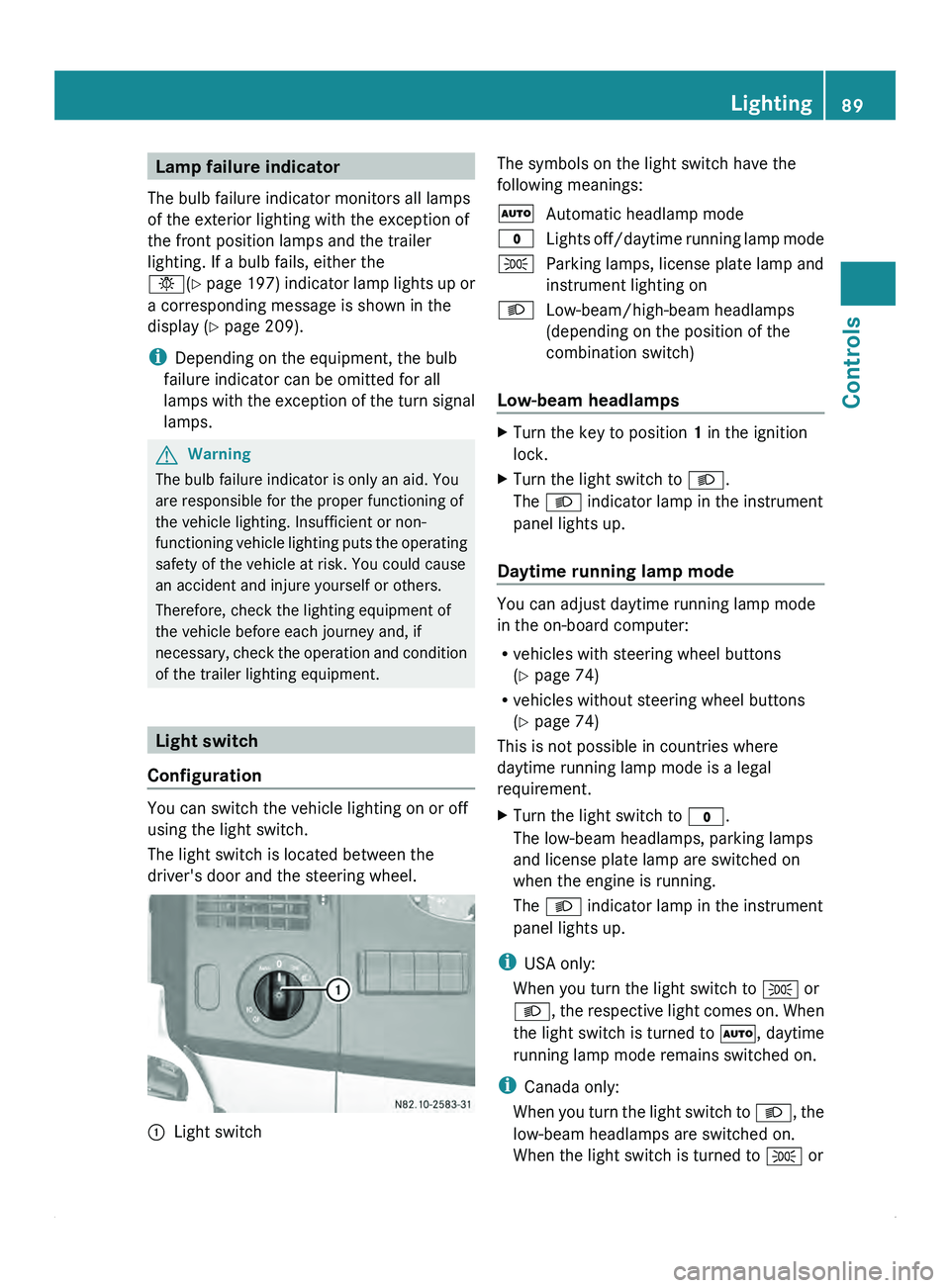
The light switch is located between the
driver's door and the steering wheel.
0046
Light switch The symbols on the light switch have the
following meanings:
005A
Automatic headlamp mode
0027 Lights off/daytime
running lamp mode
006C Parking lamps, license plate lamp and
instrument lighting on
0064 Low-beam/high-beam headlamps
(depending on the position of the
combination switch)
Low-beam headlamps X
Turn the key to position 1 in the ignition
lock.
X Turn the light switch to 0064.
The 0064 indicator lamp in the instrument
panel lights up.
Daytime running lamp mode You can adjust daytime running lamp mode
in the on-board computer:
R
vehicles with steering wheel buttons
(Y page 74)
R vehicles without steering wheel buttons
(Y page 74)
This is not possible in countries where
daytime running lamp mode is a legal
requirement.
X Turn the light switch to 0027.
The low-beam headlamps, parking lamps
and license plate lamp are switched on
when the engine is running.
The 0064 indicator lamp in the instrument
panel lights up.
i USA only:
When you turn the light switch to 006C or
0064, the respective
light comes on. When
the light switch is turned to 005A, daytime
running lamp mode remains switched on.
i Canada only:
When you turn the light switch to 0064, the
low-beam headlamps are switched on.
When the light switch is turned to 006C or Lighting
89
Controls Z
Page 92 of 292
005A, daytime running lamp mode remains
switched on.
Automatic headlamp mode Parking lamps, low-beam headlamps and the
license plate lamp are switched on
automatically depending on the ambient
light.
G
Warning!
If the light switch is set to 005A,
the low-beam
headlamps will not come on automatically if
it is foggy. This could endanger you and
others. Therefore, turn the light switch to
0064
in fog.
The automatic headlamp feature is only an
aid. The driver is responsible for the vehicle's
lighting at all times.
X Turn the light switch to 005A.
The parking lamps are switched on/off
automatically when the key is in position
1 in the ignition lock.
Parking lamps, low-beam headlamps and
the license plate
lamp are switched on/off
automatically, depending on ambient light
conditions, when the engine is running.
Front fog lamps/rear fog lamp X
Turn light switch 0046 to 0064 or 006C.
i If your vehicle is only equipped with rear
fog lamps, you
must turn the light switch to
0064.
X Front fog lamps: pull light switch 0046 out
to the first stop.
The green 0067 indicator lamp next to the
light switch lights up.
X Rear fog lamp: pull light switch 0046 out to
the second stop.
The yellow 006A
indicator lamp next to the
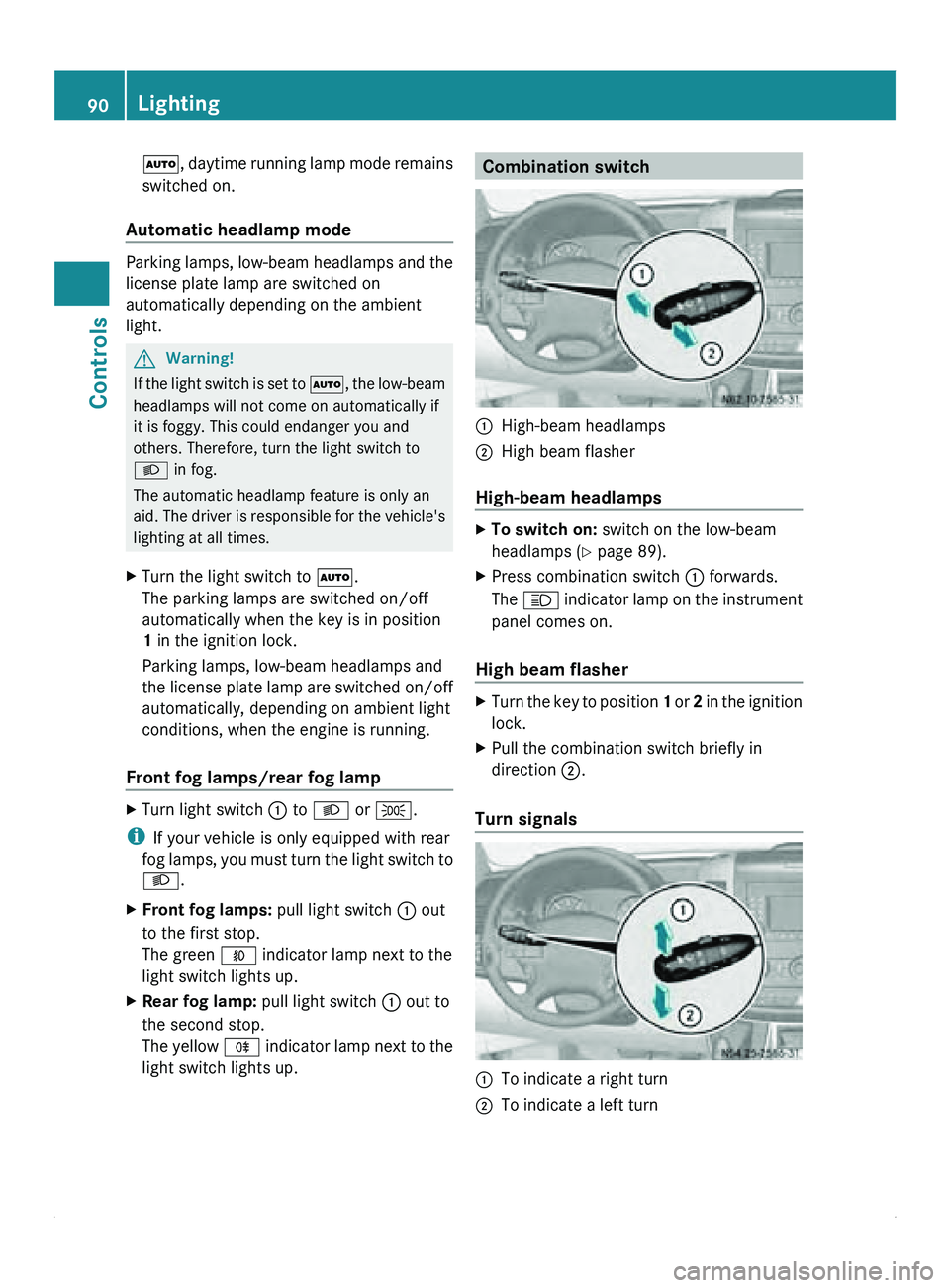
light switch lights up. Combination switch
0046
High-beam headlamps
0047 High beam flasher
High-beam headlamps X
To switch on: switch on the low-beam
headlamps ( Y page 89).
X Press combination switch
0046 forwards.
The 0063 indicator lamp
on the instrument
panel comes on.
High beam flasher X
Turn the key to position 1 or 2
in the ignition
lock.
X Pull the combination switch briefly in
direction 0047.
Turn signals 0046
To indicate a right turn
0047 To indicate a left turn90
Lighting
Controls
Page 93 of 292
X
To indicate: press the combination switch
in desired direction 0046 or 0047, until it
engages.
The combination switch automatically
returns to its original position after large
steering movements.
X To indicate briefly: press the
combination
switch briefly in desired direction 0046
or 0047.
The corresponding turn signal flashes three
times. Cornering light function (vehicles
with Bi-Xenon headlamps)
When the low-beam
headlamps are switched
on, the cornering light function improves the
illumination of the road in the direction you
are turning.
The cornering light function switches on
automatically, if:
R you are traveling at a speed of less than
25 mph (40 km/h) and you switch on the
indicator lamp or turn the steering wheel.
R you are traveling at a speed of between
25 mph (40 km/h) and 43 mph
(70 km/h) and you turn the steering wheel.
The cornering light may continue to be lit for
a short time, but is deactivated automatically
after a maximum of three minutes. Hazard warning lamps
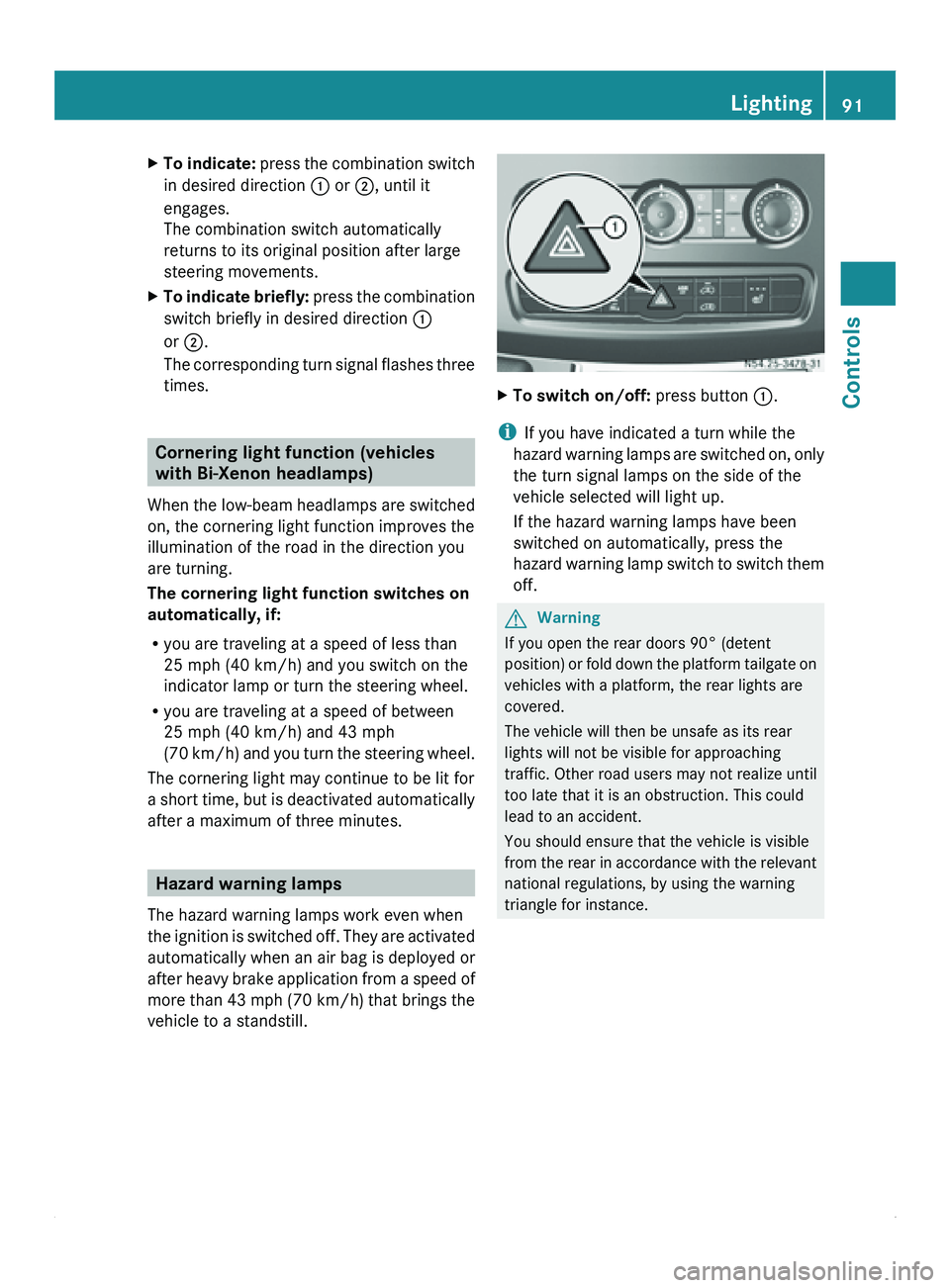
The hazard warning lamps work even when
the ignition is
switched off. They are activated
automatically when an air bag is deployed or
after heavy brake application from a speed of
more than 43 mph (70 km/h) that brings the
vehicle to a standstill. X
To switch on/off: press button 0046.
i If you have indicated a turn while the
hazard warning lamps
are switched on, only
the turn signal lamps on the side of the
vehicle selected will light up.
If the hazard warning lamps have been
switched on automatically, press the
hazard warning lamp switch to switch them
off. G
Warning
If you open the rear doors 90° (detent
position) or fold
down the platform tailgate on
vehicles with a platform, the rear lights are
covered.
The vehicle will then be unsafe as its rear
lights will not be visible for approaching
traffic. Other road users may not realize until
too late that it is an obstruction. This could
lead to an accident.
You should ensure that the vehicle is visible
from the rear in accordance with the relevant
national regulations, by using the warning
triangle for instance. Lighting
91
Controls Z
Page 96 of 292
Good visibility
Windshield wipers
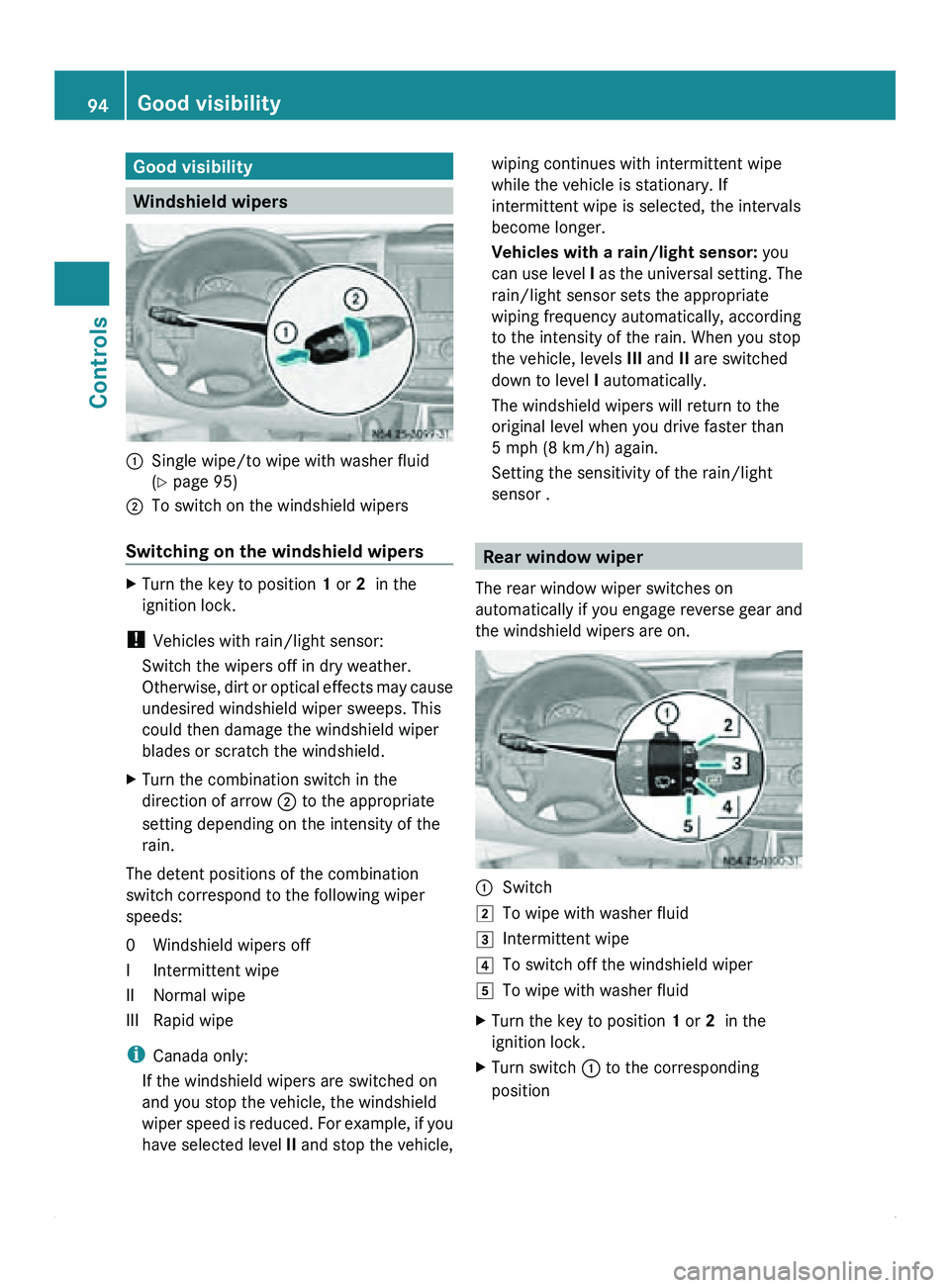
0046
Single wipe/to wipe with washer fluid
(Y page 95)
0047 To switch on the windshield wipers
Switching on the windshield wipers X
Turn the key to position 1 or 2 in the
ignition lock.
! Vehicles with rain/light sensor:
Switch the wipers off in dry weather.
Otherwise, dirt or
optical effects may cause
undesired windshield wiper sweeps. This
could then damage the windshield wiper
blades or scratch the windshield.
X Turn the combination switch in the
direction of arrow 0047 to the appropriate
setting depending on the intensity of the
rain.
The detent positions of the combination
switch correspond to the following wiper
speeds:
0 Windshield wipers off
I Intermittent wipe
II Normal wipe
III Rapid wipe
i Canada only:
If the windshield wipers are switched on
and you stop the vehicle, the windshield
wiper speed is
reduced. For example, if you
have selected level II and stop the vehicle, wiping continues with intermittent wipe
while the vehicle is stationary. If
intermittent wipe is selected, the intervals
become longer.
Vehicles with a rain/light sensor:
you
can use level I as
the universal setting. The
rain/light sensor sets the appropriate
wiping frequency automatically, according
to the intensity of the rain. When you stop
the vehicle, levels III and II are switched
down to level I automatically.
The windshield wipers will return to the
original level when you drive faster than
5 mph (8 km/h) again.
Setting the sensitivity of the rain/light
sensor . Rear window wiper
The rear window wiper switches on
automatically if you
engage reverse gear and
the windshield wipers are on. 0046
Switch
004B To wipe with washer fluid
004C Intermittent wipe
004D To switch off the windshield wiper
004E To wipe with washer fluid
X Turn the key to position 1
or 2 in the
ignition lock.
X Turn switch 0046 to the corresponding
position94
Good visibility
Controls
Page 104 of 292
X
Turn thumbwheel 008A up to open and down
to close side air vent 0046.
If the 0062 symbol can be seen on
thumbwheel 008A, defroster vent 0047 is open.
Air vents You can use the air vents to ventilate the
vehicle interior
on
the left and right, in the rear
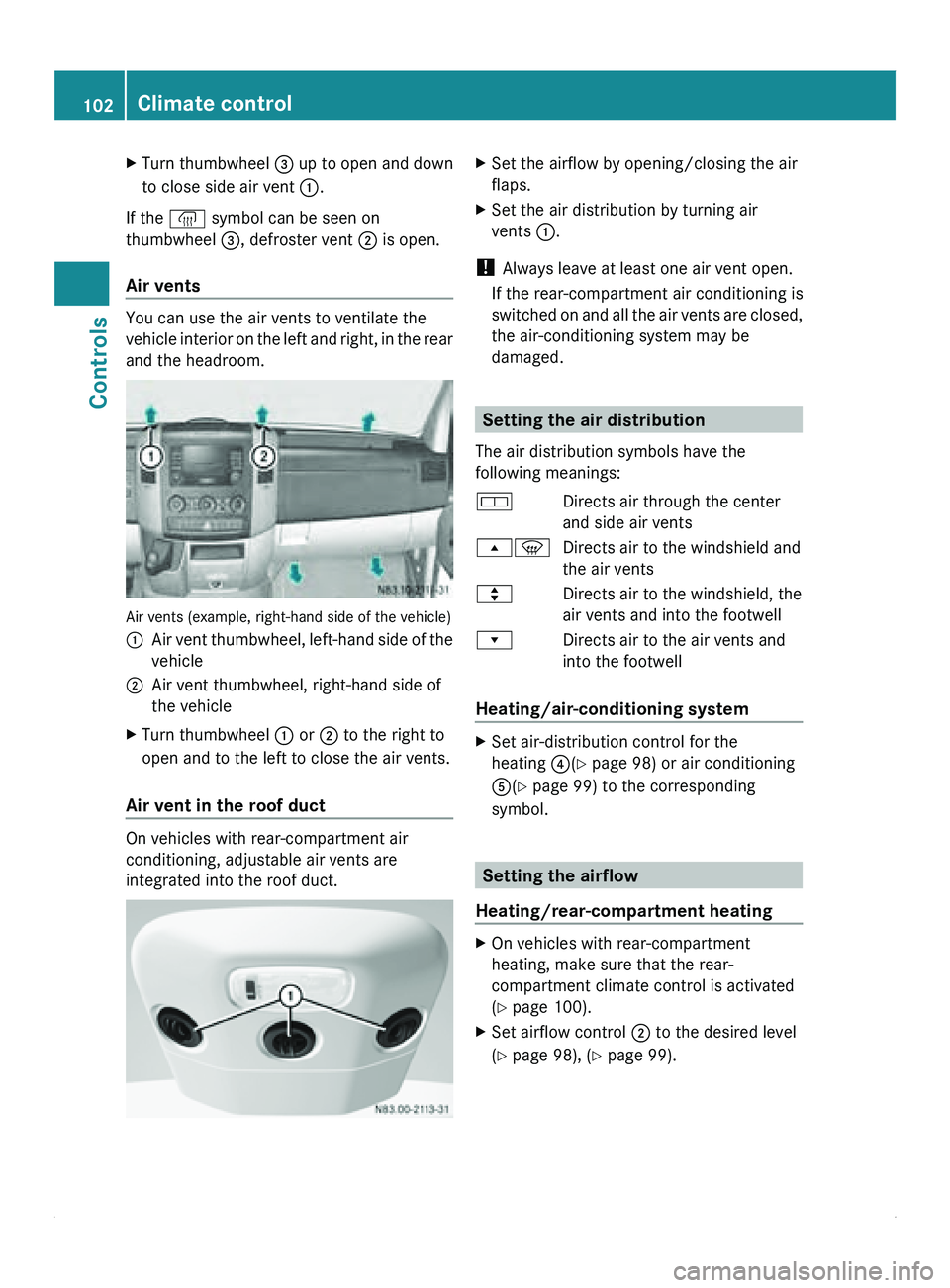
and the headroom. Air vents (example, right-hand side of the vehicle)
0046
Air vent thumbwheel, left-hand side of the
vehicle
0047 Air vent thumbwheel, right-hand side of
the vehicle
X Turn thumbwheel 0046 or 0047 to the right to
open and to the left to close the air vents.
Air vent in the roof duct On vehicles with rear-compartment air
conditioning, adjustable air vents are
integrated into the roof duct. X
Set the airflow by opening/closing the air
flaps.
X Set the air distribution by turning air
vents 0046.
! Always leave at least one air vent open.
If the rear-compartment air conditioning is
switched on and
all the air vents are closed,
the air-conditioning system may be
damaged. Setting the air distribution
The air distribution symbols have the
following meanings:
007A Directs air through the center
and side air vents
00800087 Directs air to the windshield and
the air vents
007E Directs air to the windshield, the
air vents and into the footwell
007F Directs air to the air vents and
into the footwell
Heating/air-conditioning system X
Set air-distribution control for the
heating 0088(Y page 98) or air conditioning
0086(Y page 99) to the corresponding
symbol. Setting the airflow
Heating/rear-compartment heating X
On vehicles with rear-compartment
heating, make sure that the rear-
compartment climate control is activated
(Y page 100).
X Set airflow control 0047 to the desired level
(Y page 98), ( Y page 99).102
Climate control
Controls