light MERCEDES-BENZ SPRINTER 2013 MY13 Operator’s Manual
[x] Cancel search | Manufacturer: MERCEDES-BENZ, Model Year: 2013, Model line: SPRINTER, Model: MERCEDES-BENZ SPRINTER 2013Pages: 334, PDF Size: 3.88 MB
Page 107 of 334
!
Never open the hood if a windshield wiper
arm has been folded away from the
windshield.
Never fold a windshield wiper arm without
a wiper blade back onto the windshield/
rear window.
Hold the windshield wiper arm firmly when
you change the wiper blade. If you release
the windshield wiper arm without a wiper
blade and it falls onto the windshield, the
windshield may be damaged by the force of
the impact.
We recommend that you have the wiper
blades replaced at a qualified specialist
workshop.
! Only hold the wiper blade by the wiper
arm. You could otherwise damage the
wiper rubber.
The windshield will no longer be wiped
properly if the wiper blades are worn. Replace
the wiper blades twice a year, ideally in spring
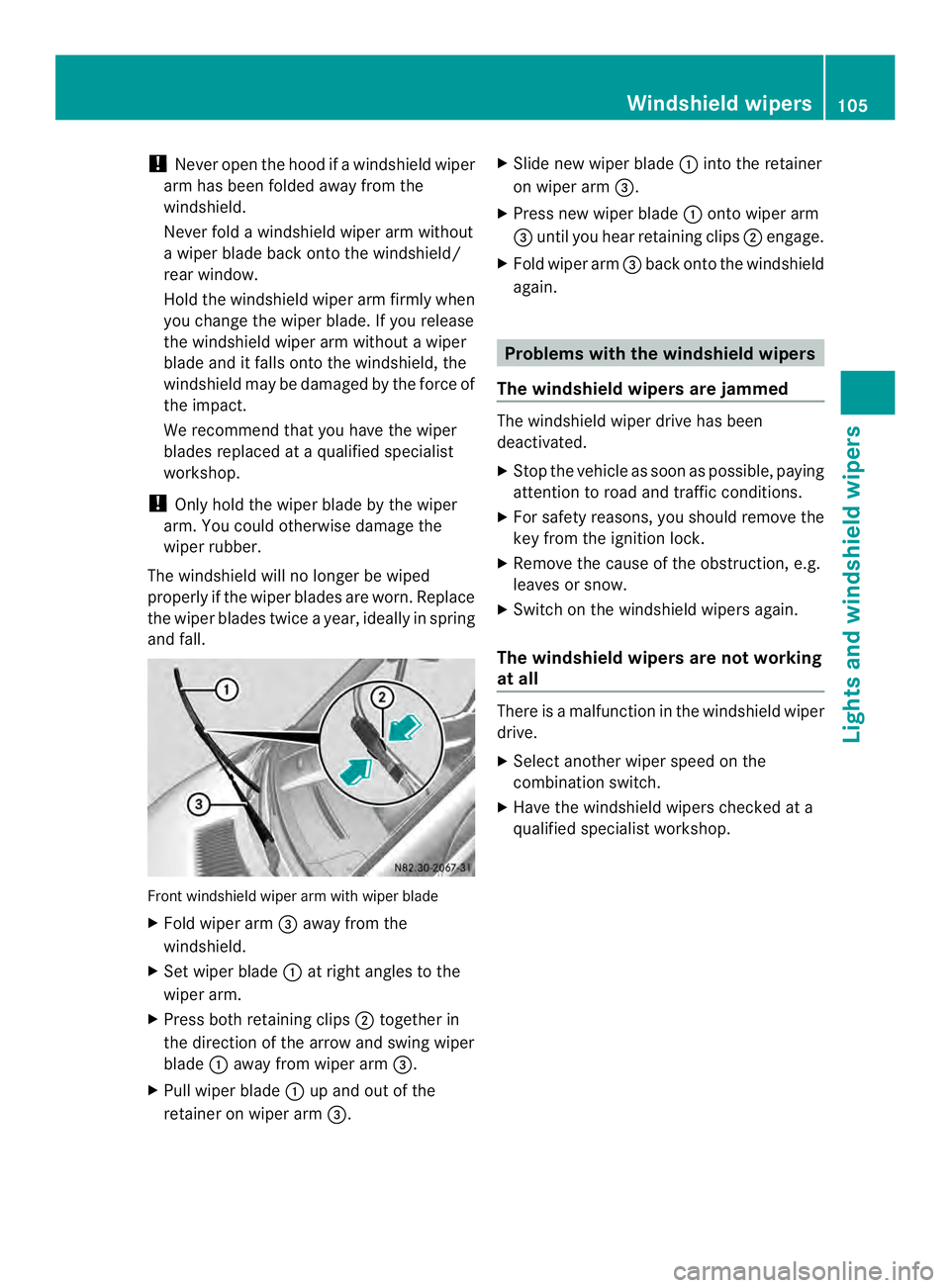
and fall. Front windshield wiper arm with wiper blade
X Fold wiper arm 0026away from the
windshield.
X Set wiper blade 0005at right angles to the
wiper arm.
X Press both retaining clips 0006together in
the direction of the arrow and swing wiper
blade 0005away from wiper arm 0026.
X Pull wiper blade 0005up and out of the
retainer on wiper arm 0026. X
Slide new wiper blade 0005into the retainer
on wiper arm 0026.
X Press new wiper blade 0005onto wiper arm
0026 until you hear retaining clips 0006engage.
X Fold wiper arm 0026back onto the windshield
again. Problems with the windshield wipers
The windshield wipers are jammed The windshield wiper drive has been
deactivated.
X
Stop the vehicle as soon as possible, paying
attention to road and traffic conditions.
X For safety reasons, you should remove the
key from the ignition lock.
X Remove the cause of the obstruction, e.g.
leaves or snow.
X Switch on the windshield wipers again.
The windshield wipers are not working
at all There is a malfunction in the windshield wiper
drive.
X
Select another wiper speed on the
combination switch.
X Have the windshield wipers checked at a
qualified specialist workshop. Windshield wipers
105Lights and windshield wipers Z
Page 112 of 334
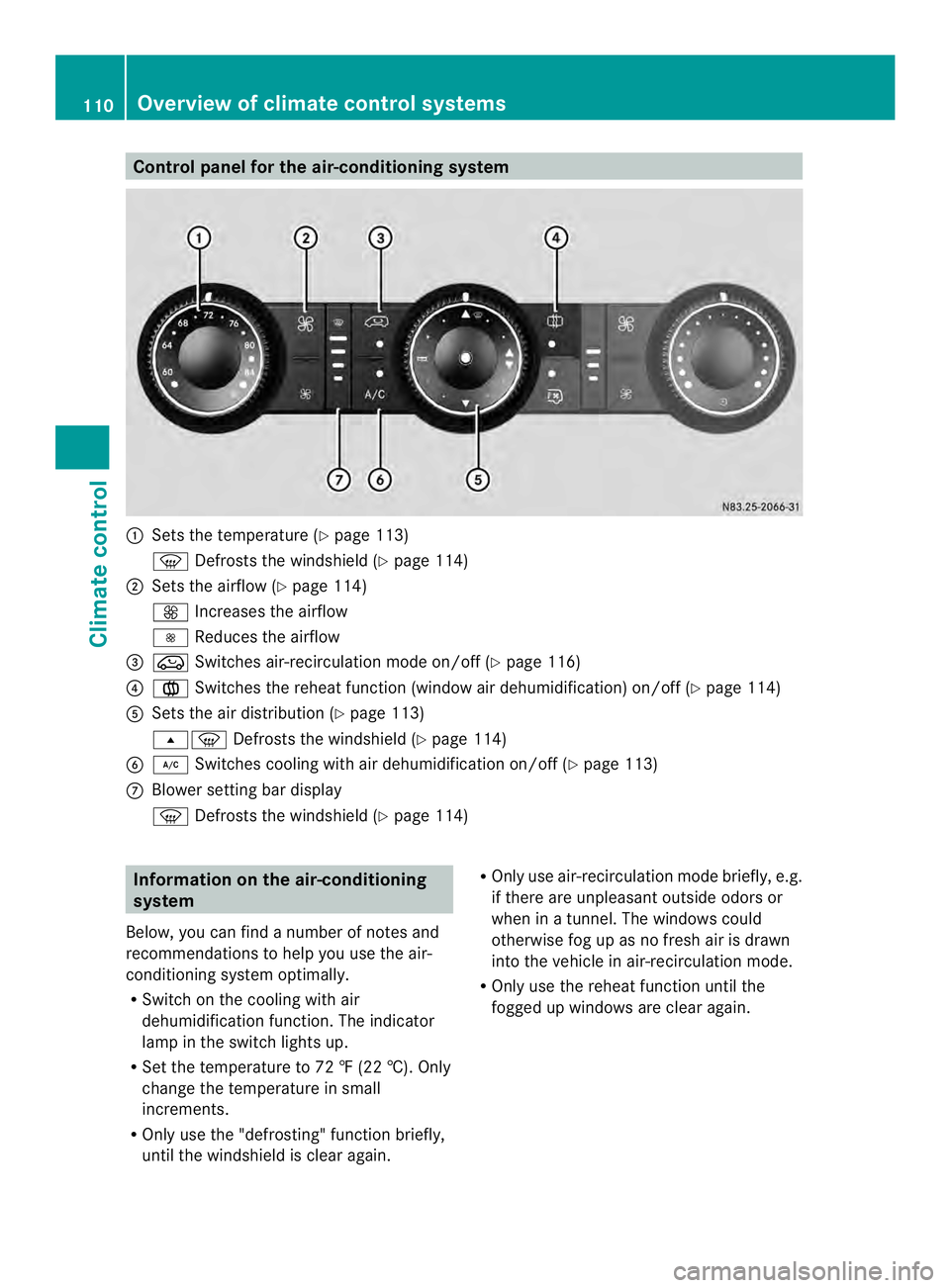
Control panel for the air-conditioning system
0005
Sets the temperature (Y page 113)
0021 Defrosts the windshield (Y page 114)
0006 Sets the airflow (Y page 114)
0026 Increases the airflow
0025 Reduces the airflow
0026 0022 Switches air-recirculation mode on/off (Y page 116)
0025 001F Switches the reheat function (window air dehumidification) on/of f(Ypage 114)
0023 Sets the air distribution (Y page 113)
000B0021 Defrosts the windshield (Y page 114)
0024 0008 Switches cooling with air dehumidification on/off ( Ypage 113)
0018 Blower setting bar display
0021 Defrosts the windshield (Y page 114)Information on the air-conditioning
system
Below, you can find a number of notes and
recommendations to help you use the air-
conditioning system optimally.
R Switch on the cooling with air
dehumidification function .The indicator
lamp in the switch lights up.
R Set the temperature to 72 ‡ (22 †). Only
change the temperature in small
increments.
R Only use the "defrosting" function briefly,
until the windshield is clear again. R
Only use air-recirculation mode briefly, e.g.
if there are unpleasant outside odors or
when in a tunnel. The windows could
otherwise fog up as no fresh air is drawn
into the vehicle in air-recirculation mode.
R Only use the reheat function until the
fogged up windows are clear again. 110
Overview of climate control systemsClimate control
Page 115 of 334
Activating/deactivating rear-
compartment climate control via the
control panel X
Turn the key to position 2in the ignition
lock.
Vehicle with rear-compartment heating/
rear-compartment air conditioning
X To switch on/off: press the001Bswitch.
If the indicator lamp in the butto nlights up,
the rear-compartment heating/rear-
compartmen tair conditioning is switched
on. Switching the cooling with air
dehumidification function on/off
Important information If you switch off the "Cooling with air
dehumidification" function, the air inside the
vehicle will not be cooled (in warm weather)
or dehumidified. The windows could fog up
more quickly.
The cooling with air dehumidification function
is only available when the engine is running.
The air inside the vehicle is cooled and
dehumidified according to the temperature
selected.
Condensatio nmay appear on the underside
of the vehicle when in cooling mode. This is
normal and not a sign that there is a
malfunction.
Switching on/off Vehicle with air conditioning
X
Press the 0008button.
If the indicator lamp in the butto nlights up,
cooling with air dehumidification is
switched on. Setting the temperature
Increasing/reducing temperature in
the front compartment via the control
panel Only change the temperature in small
increments. Start at the center position, or at
22 †.
X
Switch on climate control (Y page 112).
X Turn temperature control 0005clockwise to
increase or counterclockwise to reduce the
temperature (Y page 110).
Increasing/reducing temperature in
the rear compartment via the control
panel Only change the temperature in small
increments.
X
Switch on climate control (Y page 112).
X Turn rear-compartment temperature
control 0026(Ypage 111) or rear-
compartment air-conditioning system 0006
(Y page 112) clockwise to increase or
counterclockwise to reduce the
temperature.
i Vehicles with additional air conditioning
and heating in the rear compartment: if you
set the temperature control to the center
position, only one of the two climate
control systems works in the rear
compartmen tand in air-recirculation mode
(Y page 116). Setting the air distribution
Ai rd istribution settings The air distribution symbols have the
following meanings:
0027
Directs air through the center
and side air vents
000B0021 Directs air to the windshield and
the air vents Operating the climate control system
113Climate control
Page 116 of 334
000C
Directs airto the windshield, the
air vents and into the footwell
000D Directs air to the air vents and
into the footwell
Adjusting X
Switch on climate control (Y page 112).
X Set air-distribution control 0025for the
heating (Y page 109) or air-conditioning
system 0023(Ypage 110) to the
corresponding symbol. Setting the airflow
X Switch on climate control (Y page 112).
X Vehicle with heating/rear-
compartment heating: set airflow
control 0006of the heating (Y page 109) or
of the rear-compartment heating
(Y page 111) to the desired level.
X Vehicle with air conditioning/rear-
compartment air conditioning: press the
0025 button to reduce or the 0026button
to increase the airflow.
The blower speeds are shown in bars next
to the buttons. Defrosting the windows
You can use the "defrosting" function to
defrost the windshield or to demist the inside
of the windshield and the side windows.
Only use the following settings until the
windows are clear again.
X Vehicle with window heating: switch on
the front (Y page 115) and/or rear window
defroster (Y page 116) .
X Switch on climate control (Y page 112).Vehicle with heating
X
Set temperature control 0005and airflow
control 0006to0021 (Ypage 109).
X Set air-distribution control 0025to
000B0021(Y page 109).
X Close the center air vents (Y page 117) and
the air outlets for the headroom and the
rear compartment (Y page 117).
X Direct the side air vents towards the side
windows and open the defroster vents for
the side windows (Y page 117).
Vehicle with air conditioning
X Set temperature control 0005to
0021 (Ypage 110).
X Press the 0026button until the maximum
blower output is reached.
All bars in the display next to the button
light up.
X Set air-distribution control 0023to
000B0021(Y page 110).
X Close the center air vents (Y page 117) and
the air outlets for the headroom and the
rear compartment (Y page 117).
X Direct the side air vents towards the side
windows and open the defroster vents for
the side windows (Y page 117). Defrosting the windows
Windows fogged up on the inside You should only select this setting until the
windows are clear again.
X
Vehicle with window heating: switch on
the front (Y page 115) and/or rear window
defroster (Y page 116) .
X Switch on climate control (Y page 112).
X Switch off air-recirculation mode
(Y page 116). 114
Operating the climate control systemClimate control
Page 117 of 334
Vehicle with heating
X
Set temperature control 0005to a higher
temperature (Y page 109).
X Set airflow control 0006to a highe rblower
setting. It should be set at least to level two
(Y page 109).
X Set air-distribution control 0025to
000B0021(Y page 109).
i If the windows still fog up, set the control
as described for defrosting (Y page 114).
Vehicle with air conditioning
X Activate cooling with air dehumidification
(Y page 113).
X Press the 0011button (Y page 110).
The reheat function is switched on. The
indicator lamp in the switch lights up.
To switch off the reheat function, press the
0011 button again. The indicator lamp in
the button goes out.
Windows fogged up on the outside You should only selec
tthis setting until the
windshield is clear again.
X Switch on the windshield wipers
(Y page 103).
X Switch on climate control (Y page 112).
X Adjust air distribution to the footwell
(Y page 113).
X Close the air vents (Y page 117). Windshield defroster
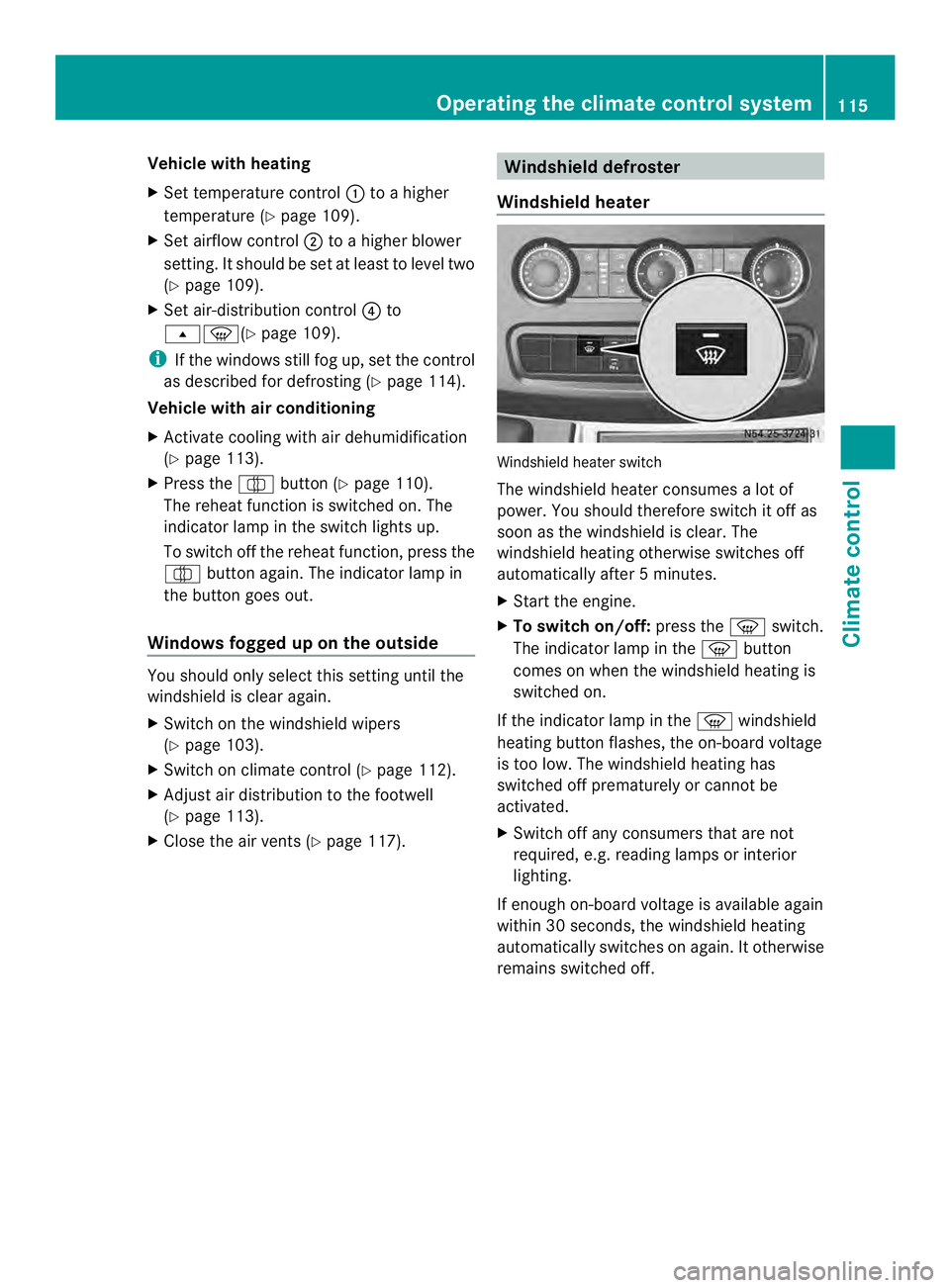
Windshield heater Windshield heater switch
The windshield heater consumes
alot of
power. You should therefore switch it off as
soon as the windshield is clear. The
windshield heating otherwise switches off
automatically after 5minutes.
X Start the engine.
X To switch on/off: press the0021switch.
The indicator lamp in the 0021button
comes on when the windshield heating is
switched on.
If the indicator lamp in the 0021windshield
heating button flashes, the on-board voltage
is too low. The windshield heating has
switched off prematurely or cannot be
activated.
X Switch off any consumers that are not
required, e.g. reading lamps or interior
lighting.
If enough on-board voltage is available again
within 30 seconds, the windshield heating
automatically switches on again. It otherwise
remains switched off. Operating the climate control system
115Climate control
Page 118 of 334
Rear window defroster
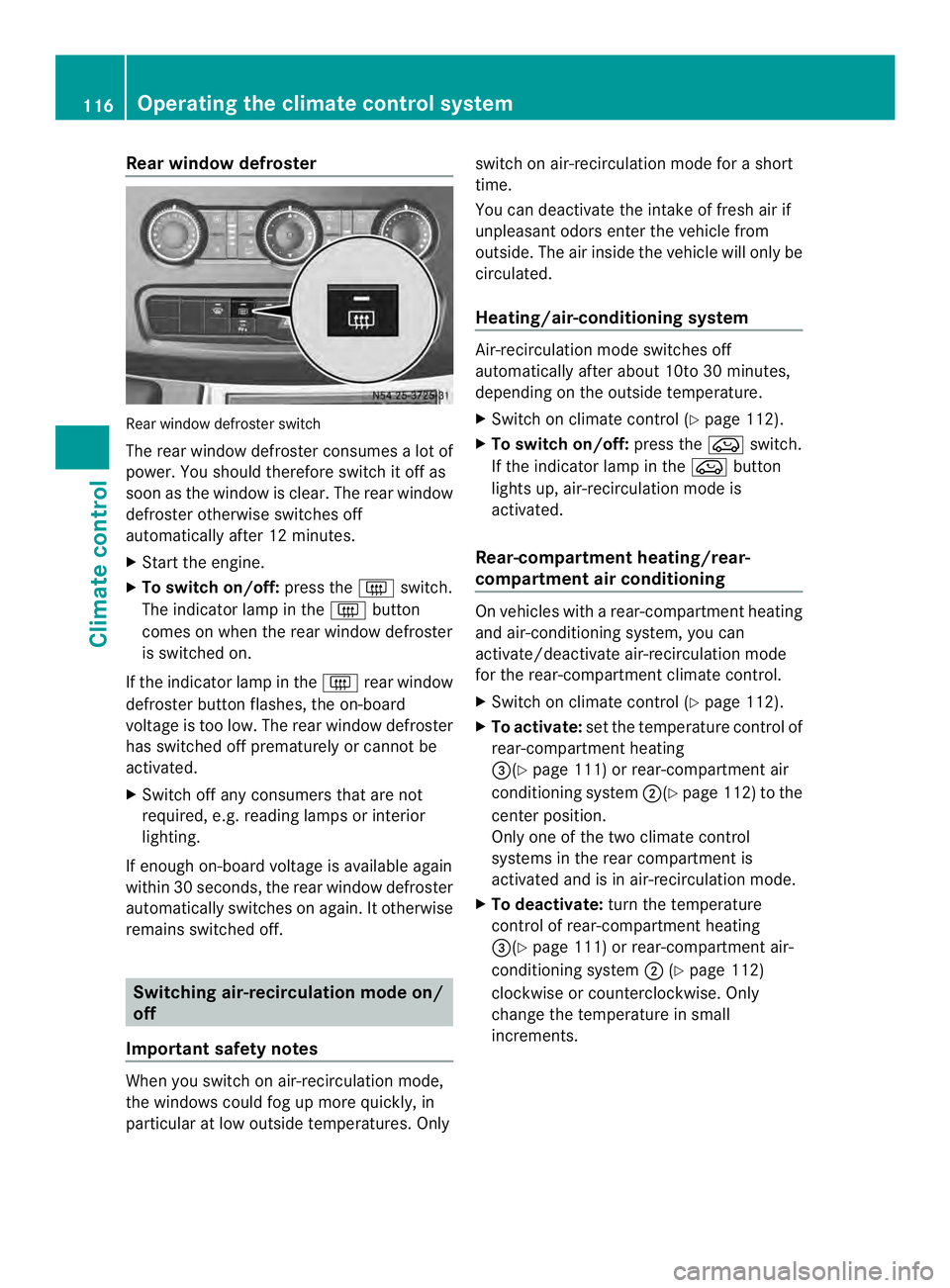
Rear window defroste
rswitch
The rear window defroster consumes a lot of
power. You should therefore switch it off as
soon as the window is clear .The rear window
defroster otherwise switches off
automatically after 12 minutes.
X Start the engine.
X To switch on/off: press the0019switch.
The indicator lamp in the 0019button
comes on when the rear window defroster
is switched on.
If the indicator lamp in the 0019rear window
defroster button flashes, the on-board
voltage is too low. The rear window defroster
has switched off prematurely or cannot be
activated.
X Switch off any consumers that are not
required, e.g. reading lamps or interior
lighting.
If enough on-board voltage is available again
within 30 seconds, the rear window defroster
automatically switches on again. It otherwise
remains switched off. Switching air-recirculation mode on/
off
Important safety notes When you switch on air-recirculation mode,
the windows could fog up more quickly, in
particular at low outside temperatures. Only switch on air-recirculation mode for a short
time.
You can deactivate the intake of fresh air if
unpleasant odors enter the vehicle from
outside. The air inside the vehicle will only be
circulated.
Heating/air-conditioning system
Air-recirculation mode switches off
automatically after about 10to 30 minutes,
depending on the outside temperature.
X
Switch on climate control (Y page 112).
X To switch on/off: press the0022switch.
If the indicator lamp in the 0022button
lights up, air-recirculation mode is
activated.
Rear-compartment heating/rear-
compartment air conditioning On vehicles with a rear-compartment heating
and air-conditioning system, you can
activate/deactivate air-recirculation mode
for the rear-compartment climate control.
X Switch on climate control (Y page 112).
X To activate: set the temperature control of
rear-compartment heating
0026(Y page 111) or rear-compartment air
conditioning system 0006(Ypage 112) to the
center position.
Only one of the two climate control
systems in the rear compartment is
activated and is in air-recirculation mode.
X To deactivate: turn the temperature
control of rear-compartment heating
0026(Y page 111) or rear-compartment air-
conditioning system 0006(Ypage 112)
clockwise or counterclockwise. Only
change the temperature in small
increments. 116
Operating the climate control systemClimate control
Page 121 of 334
The auxiliary heating works independently of
the engine and supplements the climate
control system in the vehicle. The auxiliary
heating heats the air in the vehicle interior to
the temperature set.
If your vehicle is equipped with a hot-water
auxiliary heater, the auxiliary heating also
keeps the coolant warm. This way, the load
on the engine is minimized and fuel is saved.
The heater booster function of the auxiliary
heating supports the climate control system
when the engine is runnin gand the outside
temperature is low.
You can use the auxiliary heating at an
outside temperature of up to 39 ‡ (4 †). At
an outside temperature above 39 ‡(4† ) the
auxiliary heating system and the heater
booster function switch off automatically.
i If the interior motion sensor (Y page 61)
is armed and the auxiliary heating is
switched on, it is possible that the interior
temperature monitoring may cause a false
alarm. In this case, either deactivate the
interior motion sensor or switch off the
auxiliary heating. Before switching on
X Check the fuel level and top up if necessary.
The auxiliary heating is operated directly
using the vehicle's fuel. The tan kmust be
at least a quarter full to ensure that the
auxiliary heating functions.
X Switch on climate control (Y page 112).
X Se tthe temperature control to the desired
temperature (Y page 113).
X Set the air distribution as required
(Y page 113).
X Open the center (Y page 117) and side air
vents (Y page 117) and set them to the
middle position.
i The auxiliary heating automatically
switches to heater booster mode after the
engine is started. Operating with the button (control
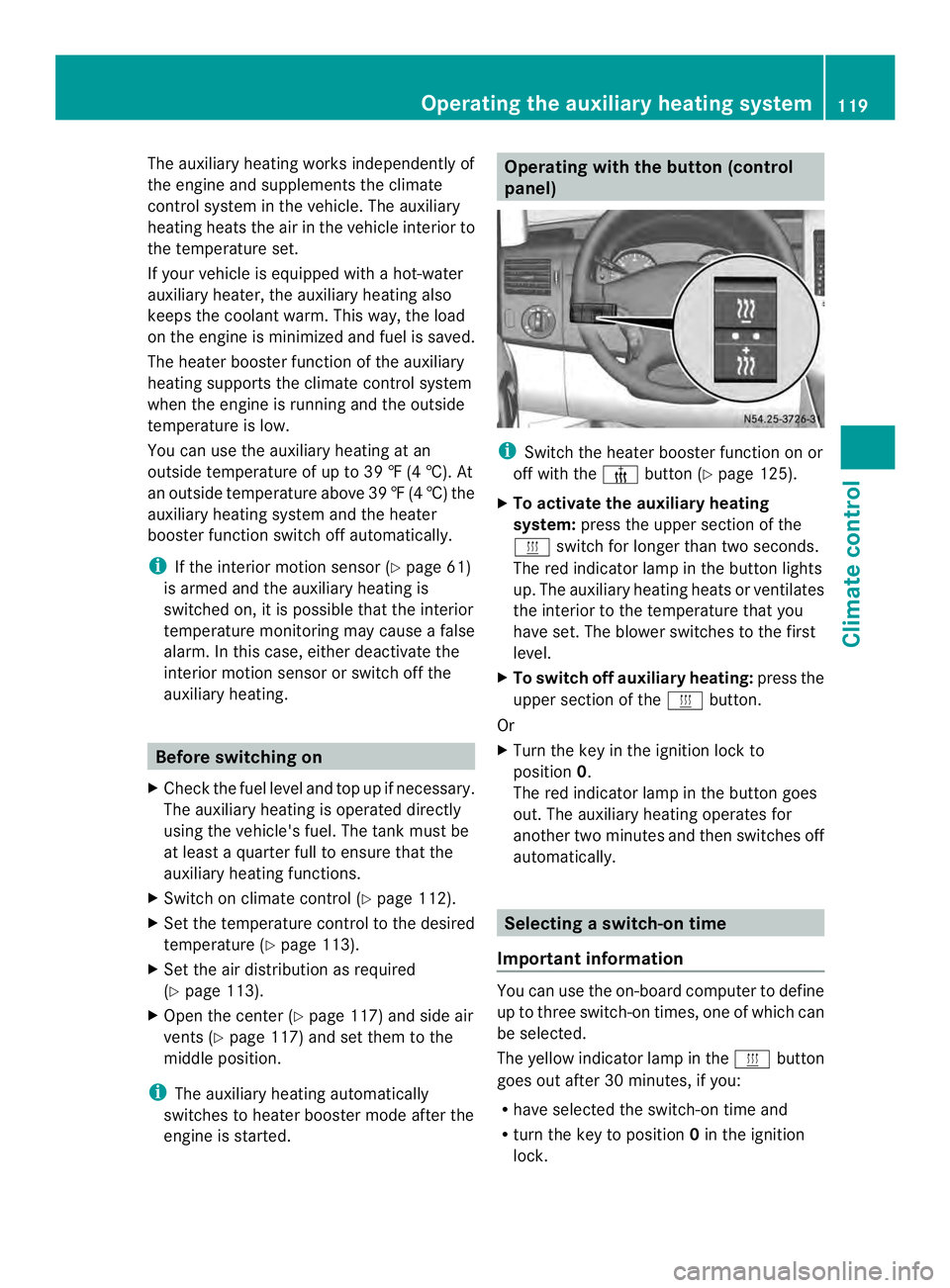
panel)
i
Switch the heater booster function on or
off with the 0013button (Y page 125).
X To activate the auxiliary heating
system: press the upper section of the
0020 switch for longer than two seconds.
The red indicator lamp in the button lights
up. The auxiliary heating heats or ventilates
the interior to the temperature that you
have set. The blower switches to the first
level.
X To switch off auxiliary heating: press the
upper section of the 0020button.
Or
X Turn the key in the ignition lock to
position 0.
The red indicator lamp in the button goes
out. The auxiliary heating operates for
another two minutes and then switches off
automatically. Selecting
aswitch-on time
Important information You can use the on-boar
dcomputer to define
up to three switch-on times, one of which can
be selected.
The yellow indicator lamp in the 0020button
goes out after 30 minutes, if you:
R have selected the switch-on time and
R turn the key to position 0in the ignition
lock. Operating the auxiliary heating system
119Climate control Z
Page 122 of 334
On-board computer without steering
wheel buttons
X
Turn the key to position 2in the ignition
lock.
X Press the 0020button.
The 0020 symbol flashes in the display.
Or
X Press the 0004menu button on the
instrument cluster repeatedly until the
0020 symbol flashes in the display.
X Use the 000Eor000F buttons on the instrument
cluster to select the switch-on time 1 to
3 .
The switch-on time selected is displayed.
X Wait 10 seconds for the standard display to
appear.
The switch-on time is selected. The yellow
indicator lamp in the 0020button lights up.
If you do not preselect a switch-on time,
and --:-- is shown in the display, this
means that the automatic switch-on mode
is switched off. The yellow indicator lamp
in the 0020button goes out.
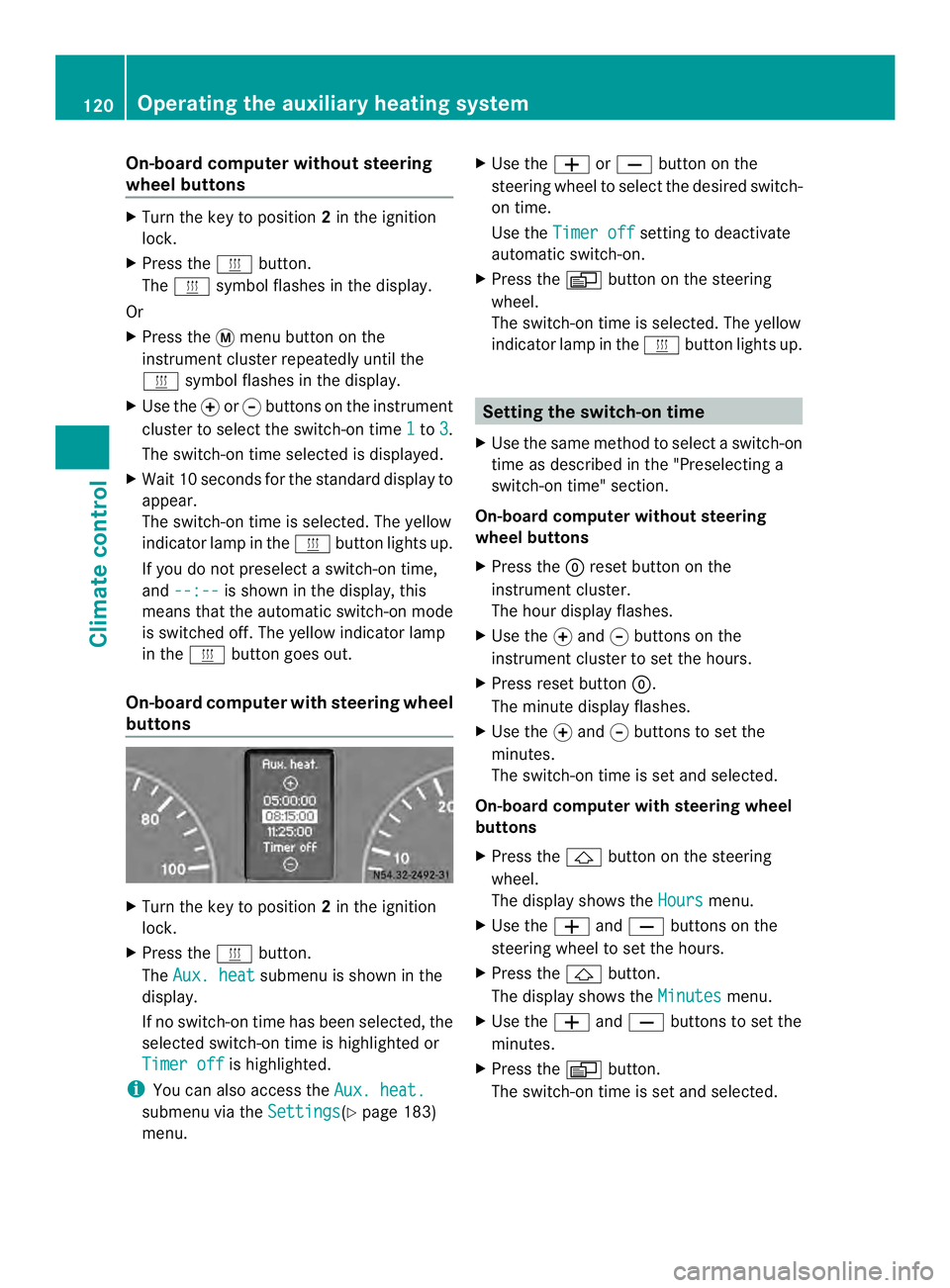
On-boar dcomputer with steering wheel
buttons X
Turn the key to position 2in the ignition
lock.
X Press the 0020button.
The Aux. heat submenu is shown in the
display.
If no switch-on time has been selected, the
selected switch-on time is highlighted or
Timer off is highlighted.
i You can also access the Aux. heat.submenu via the
Settings (Y
page 183)
menu. X
Use the 0011or0012 button on the
steering wheel to selec tthe desired switch-
on time.
Use the Timer off setting to deactivate
automatic switch-on.
X Press the 0010button on the steering
wheel.
The switch-on time is selected. The yellow
indicator lamp in the 0020button lights up. Setting the switch-on time
X Use the same method to select a switch-on
time as described in the "Preselecting a
switch-on time" section.
On-board computer without steering
wheel buttons
X Press the 0007reset button on the
instrument cluster.
The hour display flashes.
X Use the 000Eand 000Fbuttons on the
instrument cluster to set the hours.
X Press reset button 0007.
The minute display flashes.
X Use the 000Eand 000Fbuttons to set the
minutes.
The switch-on time is set and selected.
On-board computer with steering wheel
buttons
X Press the 0001button on the steering
wheel.
The display shows the Hours menu.
X Use the 0011and0012 buttons on the
steering wheel to set the hours.
X Press the 0001button.
The display shows the Minutes menu.
X Use the 0011and0012 buttons to set the
minutes.
X Press the 0010button.
The switch-on time is set and selected. 120
Operating the auxiliary heating systemClimate control
Page 123 of 334
Operation with the remote control
Important information You can switch the auxiliary heating on/off
and set the operating duration using the
remote control. You can use up to 4 remote
control units on the vehicle. These must be
synchronized for the receiver in your vehicle
(Y page 122).
The remote control has a maximum range of
approximately 600 meters. This range is
reduced by:
R sources of interference
R solid objects between the remote control
and the vehicle
R the remote control being in an unfavorable
position in relation to the vehicle
R transmitting from an enclosed space
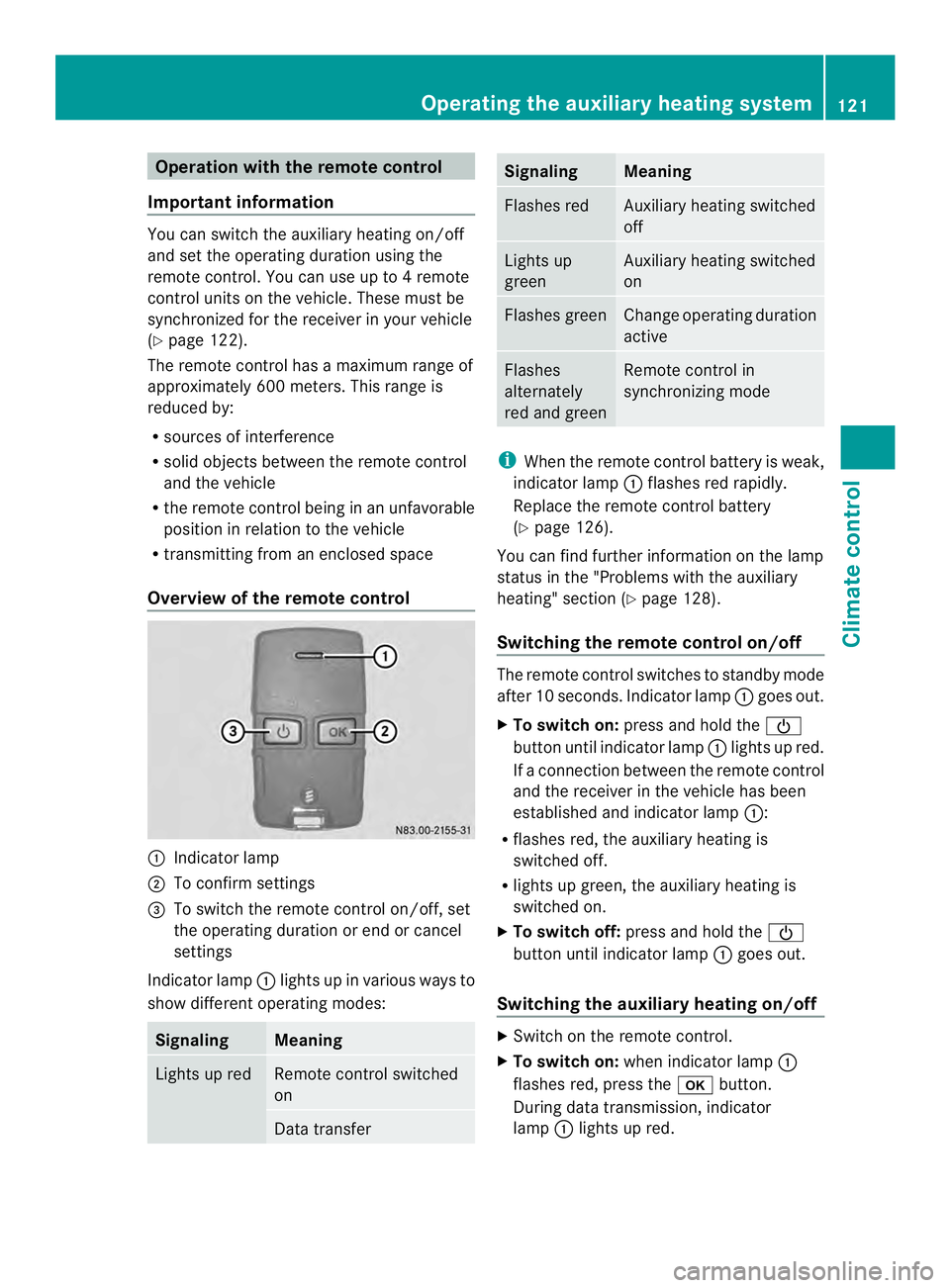
Overview of the remote control 0005
Indicator lamp
0006 To confirm settings
0026 To switch the remote control on/off, set
the operating duration or end or cancel
settings
Indicator lamp 0005lights up in various ways to
show differen toperating modes: Signaling Meaning
Lights up red Remote control switched
on
Data transfer Signaling Meaning
Flashes red Auxiliary heating switched
off
Lights up
green Auxiliary heating switched
on
Flashes green Change operating duration
active
Flashes
alternately
red and green Remote control in
synchronizing mode
i
When the remote control battery is weak,
indicator lamp 0005flashes red rapidly.
Replace the remote control battery
(Y page 126).
You can find further information on the lamp
status in the "Problems with the auxiliary
heating" section (Y page 128).
Switching the remote control on/off The remote control switches to standby mode
after 10 seconds. Indicator lamp
0005goes out.
X To switch on: press and hold the 0002
button until indicator lamp 0005lights up red.
If ac onnection between the remote control
and the receiver in the vehicle has been
established and indicator lamp 0005:
R flashes red, the auxiliary heating is
switched off.
R lights up green, the auxiliary heating is
switched on.
X To switch off: press and hold the 0002
button until indicator lamp 0005goes out.
Switching the auxiliary heating on/off X
Switch on the remote control.
X To switch on: when indicator lamp 0005
flashes red, press the 000Abutton.
During data transmission, indicator
lamp 0005lights up red. Operating the auxiliary heating system
121Climate control Z
Page 124 of 334
When indicato
rlamp 0005lights up green, the
auxiliary heating is switched on.
X To switch off: when indicator lamp 0005
lights up green, press the 000Abutton.
During data transmission, indicator
lamp 0005lights up red.
When indicator lamp 0005flashes red, the
auxiliary heating is switched off.
Changing the operating duration X
Switch on the remote control.
X When indicator lamp 0005flashes red, press
0002 and000A simultaneously.
Indicato rlamp 0005flashes green.
X Press the 0002buttonrepeatedly until the
desired operating duration is shown.
R 20 minutes
Indicator lamp 0005flashes green twice.
R 30 minutes
Indicator lamp 0005flashes green three
times.
R 40 minutes
Indicator lamp 0005flashes green four
times.
R 60 minutes
Indicator lamp 0005flashes green six
times.
X Press the 000Abutton.
During data transmission, indicator
lamp 0005lights up red.
If indicator lamp 0005emits two long, green
flashes, the selected operatin gduration is
stored.
i If no adjustmen tis made, indicator
lamp 0005flashes six times and the remote
control goes into standby mode. Synchronizing the remote control X
Press the 0020auxiliary heating button in
the control panel (Y page 119) for longer
than 10 seconds.
When you press and hold the 0020button,
the red indicator lamp lights up in the
button.
When the red indicator lamp in the 0020
button flashes, the receiver in the vehicle
is ready for synchronizing.
X Press and hold the 0002remote control
button until indicator lamp 0005lights up red.
If there is an active connection between the
remote control and the receiver, indicator
lamp 0005flashes alternately red and green.
The remote control is in synchronizing
mode.
i If you press the 0002button againont he
remote control after starting
synchronization, you will only synchronize
this remote control unit with the receiver.
Any other remote control units that were
synchronized will be cleared. Indicator
lamp 0005flashes alternately red and green
(very slowly).
X Press the 000Abutton on the remote
control.
During data transmission, indicator
lamp 0005lights up red.
When remote control indicator lamp 0005
emits two long green flashes, the selected
operating time is synchronized. The
indicator lamp in the 0020auxiliary heating
button goes out. Operation with the timer
Important safety notes This is only for vehicles with a hot-water
auxiliary heater.
G
DANGER
If a switch-on time has been selected, the
auxiliary heating switches on automatically. 122
Operating the auxiliary heating systemClimate control