belt MINI COOPER 2014 User Guide
[x] Cancel search | Manufacturer: MINI, Model Year: 2014, Model line: COOPER, Model: MINI COOPER 2014Pages: 230, PDF Size: 11.58 MB
Page 62 of 230
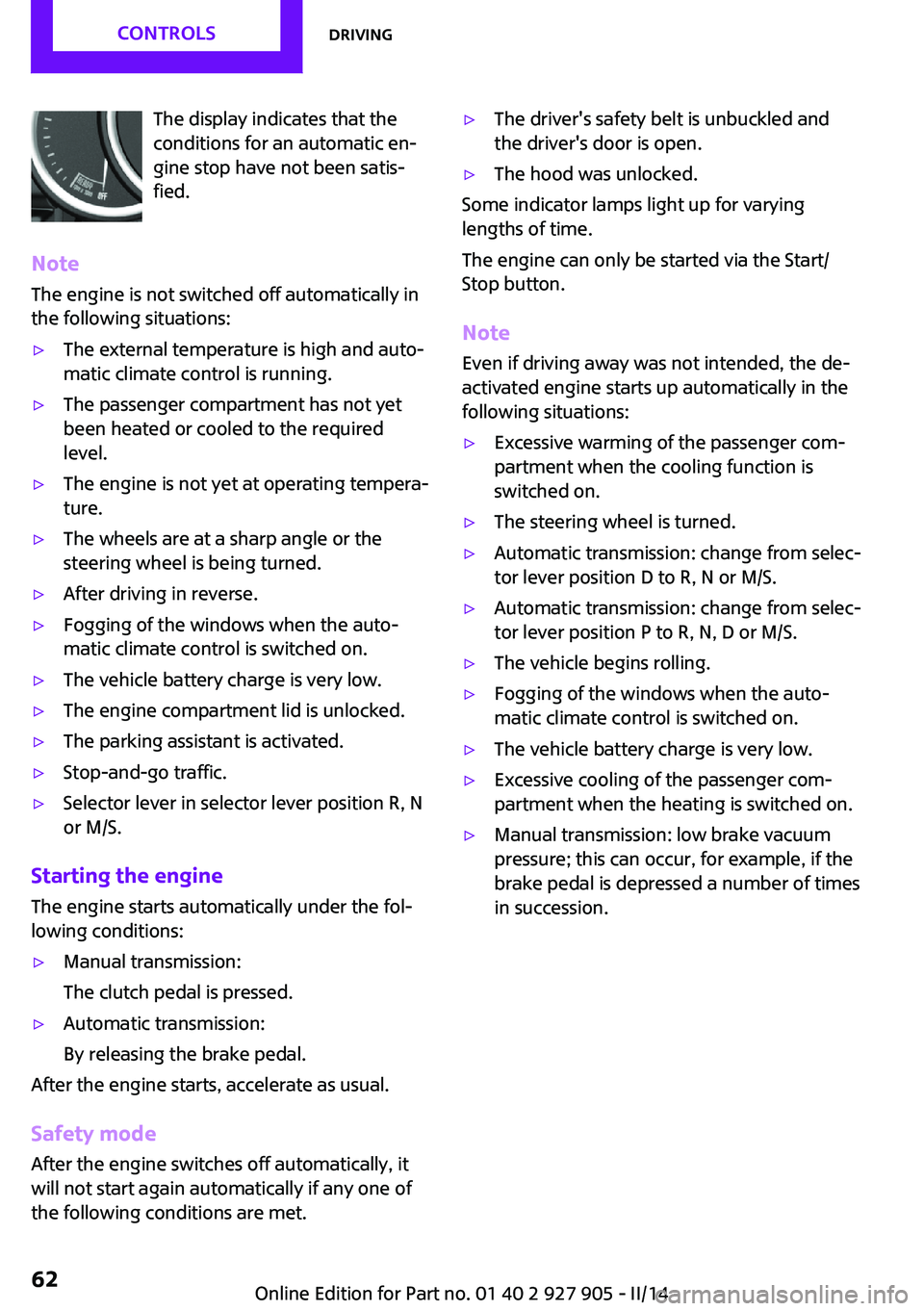
The display indicates that the
conditions for an automatic en‐
gine stop have not been satis‐
fied.
Note
The engine is not switched off automatically in
the following situations:▷The external temperature is high and auto‐
matic climate control is running.▷The passenger compartment has not yet
been heated or cooled to the required
level.▷The engine is not yet at operating tempera‐
ture.▷The wheels are at a sharp angle or the
steering wheel is being turned.▷After driving in reverse.▷Fogging of the windows when the auto‐
matic climate control is switched on.▷The vehicle battery charge is very low.▷The engine compartment lid is unlocked.▷The parking assistant is activated.▷Stop-and-go traffic.▷Selector lever in selector lever position R, N
or M/S.
Starting the engine
The engine starts automatically under the fol‐
lowing conditions:
▷Manual transmission:
The clutch pedal is pressed.▷Automatic transmission:
By releasing the brake pedal.
After the engine starts, accelerate as usual.
Safety mode
After the engine switches off automatically, it
will not start again automatically if any one of
the following conditions are met.
▷The driver's safety belt is unbuckled and
the driver's door is open.▷The hood was unlocked.
Some indicator lamps light up for varying
lengths of time.
The engine can only be started via the Start/
Stop button.
Note
Even if driving away was not intended, the de‐
activated engine starts up automatically in the
following situations:
▷Excessive warming of the passenger com‐
partment when the cooling function is
switched on.▷The steering wheel is turned.▷Automatic transmission: change from selec‐
tor lever position D to R, N or M/S.▷Automatic transmission: change from selec‐
tor lever position P to R, N, D or M/S.▷The vehicle begins rolling.▷Fogging of the windows when the auto‐
matic climate control is switched on.▷The vehicle battery charge is very low.▷Excessive cooling of the passenger com‐
partment when the heating is switched on.▷Manual transmission: low brake vacuum
pressure; this can occur, for example, if the
brake pedal is depressed a number of times
in succession.Seite 62CONTROLSDriving62
Online Edition for Part no. 01 40 2 927 905 - II/14
Page 73 of 230
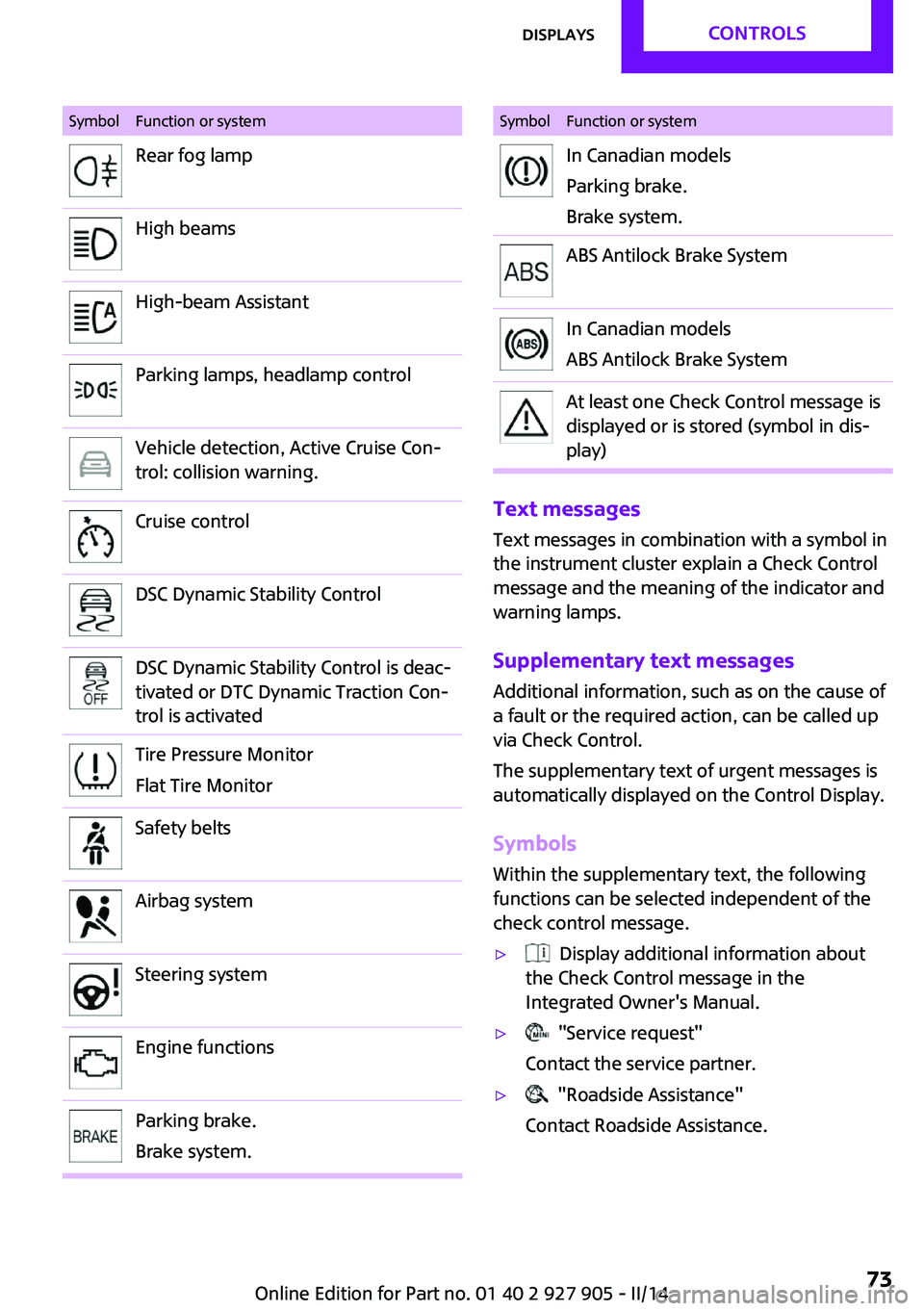
SymbolFunction or systemRear fog lampHigh beamsHigh-beam AssistantParking lamps, headlamp controlVehicle detection, Active Cruise Con‐
trol: collision warning.Cruise controlDSC Dynamic Stability ControlDSC Dynamic Stability Control is deac‐
tivated or DTC Dynamic Traction Con‐
trol is activatedTire Pressure Monitor
Flat Tire MonitorSafety beltsAirbag systemSteering systemEngine functionsParking brake.
Brake system.SymbolFunction or systemIn Canadian models
Parking brake.
Brake system.ABS Antilock Brake SystemIn Canadian models
ABS Antilock Brake SystemAt least one Check Control message is
displayed or is stored (symbol in dis‐
play)
Text messages
Text messages in combination with a symbol in
the instrument cluster explain a Check Control
message and the meaning of the indicator and
warning lamps.
Supplementary text messages Additional information, such as on the cause of
a fault or the required action, can be called up
via Check Control.
The supplementary text of urgent messages is
automatically displayed on the Control Display.
Symbols Within the supplementary text, the following
functions can be selected independent of the
check control message.
▷ Display additional information about
the Check Control message in the
Integrated Owner's Manual.▷ "Service request"
Contact the service partner.▷ "Roadside Assistance"
Contact Roadside Assistance.Seite 73DisplaysCONTROLS73
Online Edition for Part no. 01 40 2 927 905 - II/14
Page 91 of 230
SafetyVehicle equipment
All standard, country-specific and optional
equipment that is offered in the model series is
described in this chapter. Therefore, equipmentis also described that is not available in a vehi‐
cle, e. g., because of the selected optional
equipment or country variant. This also applies
for safety-related functions and systems.
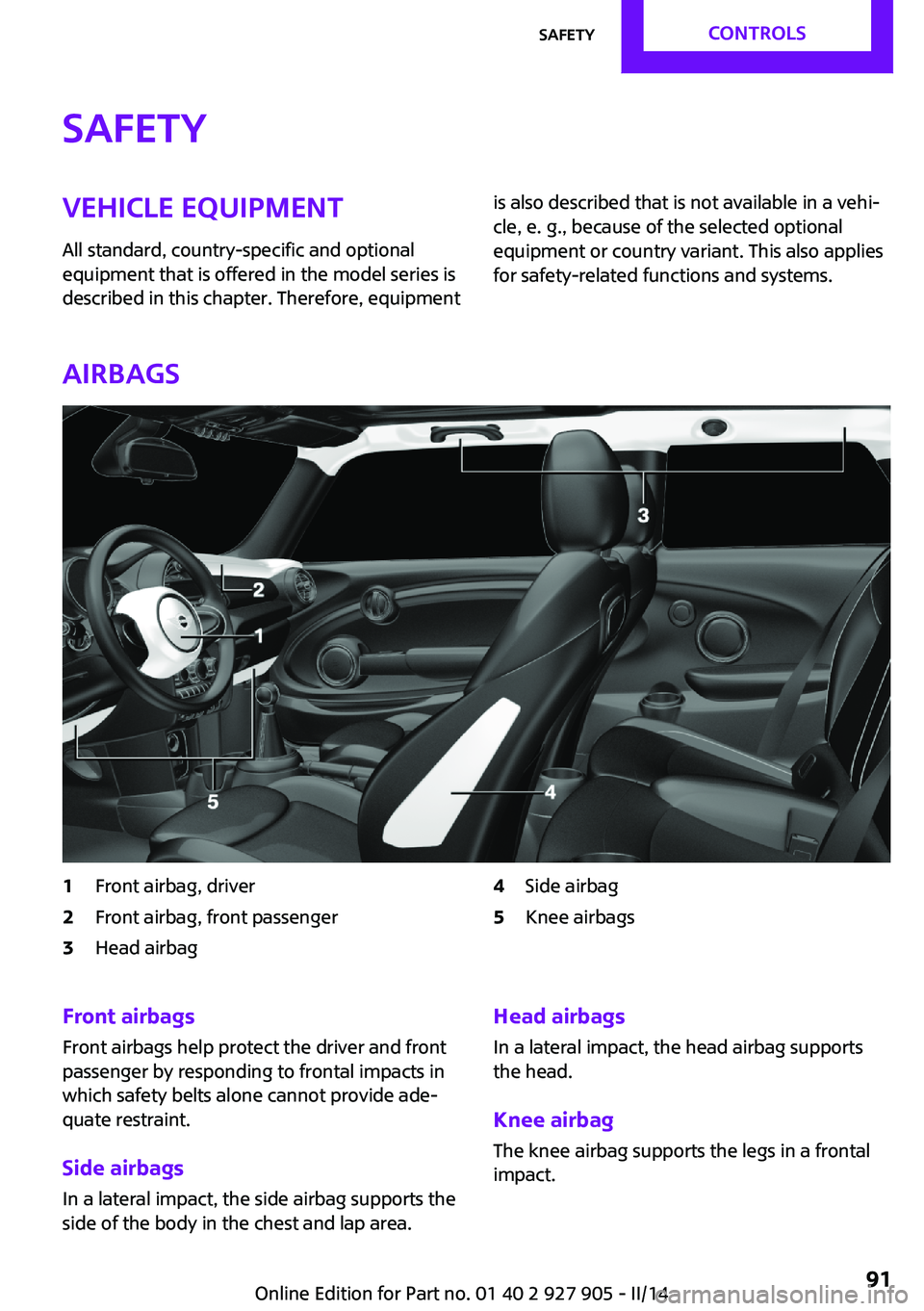
Airbags
1Front airbag, driver2Front airbag, front passenger3Head airbag4Side airbag5Knee airbagsFront airbags
Front airbags help protect the driver and front
passenger by responding to frontal impacts in
which safety belts alone cannot provide ade‐
quate restraint.
Side airbags
In a lateral impact, the side airbag supports the
side of the body in the chest and lap area.Head airbags
In a lateral impact, the head airbag supports
the head.
Knee airbag
The knee airbag supports the legs in a frontal
impact.Seite 91SafetyCONTROLS91
Online Edition for Part no. 01 40 2 927 905 - II/14
Page 92 of 230
Protective action
Airbags are not triggered in every impact situa‐
tion, e.g., in less severe accidents or rear-end
collisions.
Information on how to ensure the opti‐
mal protective effect of the airbags▷Keep at a distance from the airbags.▷Always grasp the steering wheel on the
steering wheel rim, holding your hands at
the 3 o'clock and 9 o'clock positions, to
keep the danger of injury to your hands or
arms as low as possible if the airbag is trig‐
gered.▷There should be no people, animals, or ob‐
jects between an airbag and a person.▷Do not use the cover of the front airbag on
the front passenger side as a storage area.▷Keep the dashboard and window on the
front passenger side clear, i.e. do not cover
with adhesive labels or coverings, and do
not attach holders such as for navigation in‐
struments and mobile phones.▷Make sure that the front passenger is sitting
correctly, i.e., keeps his or her feet and legs
in the footwell; otherwise, leg injuries can
occur if the front airbag is triggered.▷Do not place slip covers, seat cushions or
other objects on the front passenger seat
that are not approved specifically for seats
with integrated side airbags.▷Do not hang pieces of clothing, such as
jackets, over the backrests.▷Make sure that occupants keep their heads
away from the side airbag and do not rest
against the head airbag; otherwise, injuries
can occur if the airbags are triggered.▷Do not remove the airbag restraint system.▷Do not remove the steering wheel.▷Do not apply adhesive materials to the air‐
bag cover panels, cover them or modify
them in any way.▷Never modify either the individual compo‐
nents or the wiring in the airbag system.
This also applies to steering wheel covers,
the dashboard, the seats, the roof pillars
and the sides of the headliner. ◀
Even when all instructions are followed closely,
injury from contact with the airbags cannot be
ruled out in certain situations.
The ignition and inflation noise may lead to
short-term and, in most cases, temporary hear‐
ing impairment in sensitive individuals.
In the case of a malfunction, deactivation
and after triggering of the airbags
Do not touch the individual components imme‐
diately after the system has been triggered;
otherwise, there is the danger of burns.
Only have the airbags checked, repaired or dis‐
mantled and the airbag generator scrapped by
the service center or a workshop that has the
necessary authorization for handling explo‐
sives.
Non-professional attempts to service the sys‐
tem could lead to failure in an emergency or
undesired triggering of the airbag, either of
which could result in injury. ◀
Warnings and information on the airbags are
also found on the sun visors.
Functional readiness of the airbag
system
When the ignition is switched on, thewarning lamp in the instrument cluster
lights up briefly and thereby indicates
the operational readiness of the entire airbag
system and the belt tensioner.
Airbag system malfunctioning
▷Warning lamp does not come on when the
ignition is turned on.▷The warning lamp lights up continuously.Seite 92CONTROLSSafety92
Online Edition for Part no. 01 40 2 927 905 - II/14
Page 139 of 230
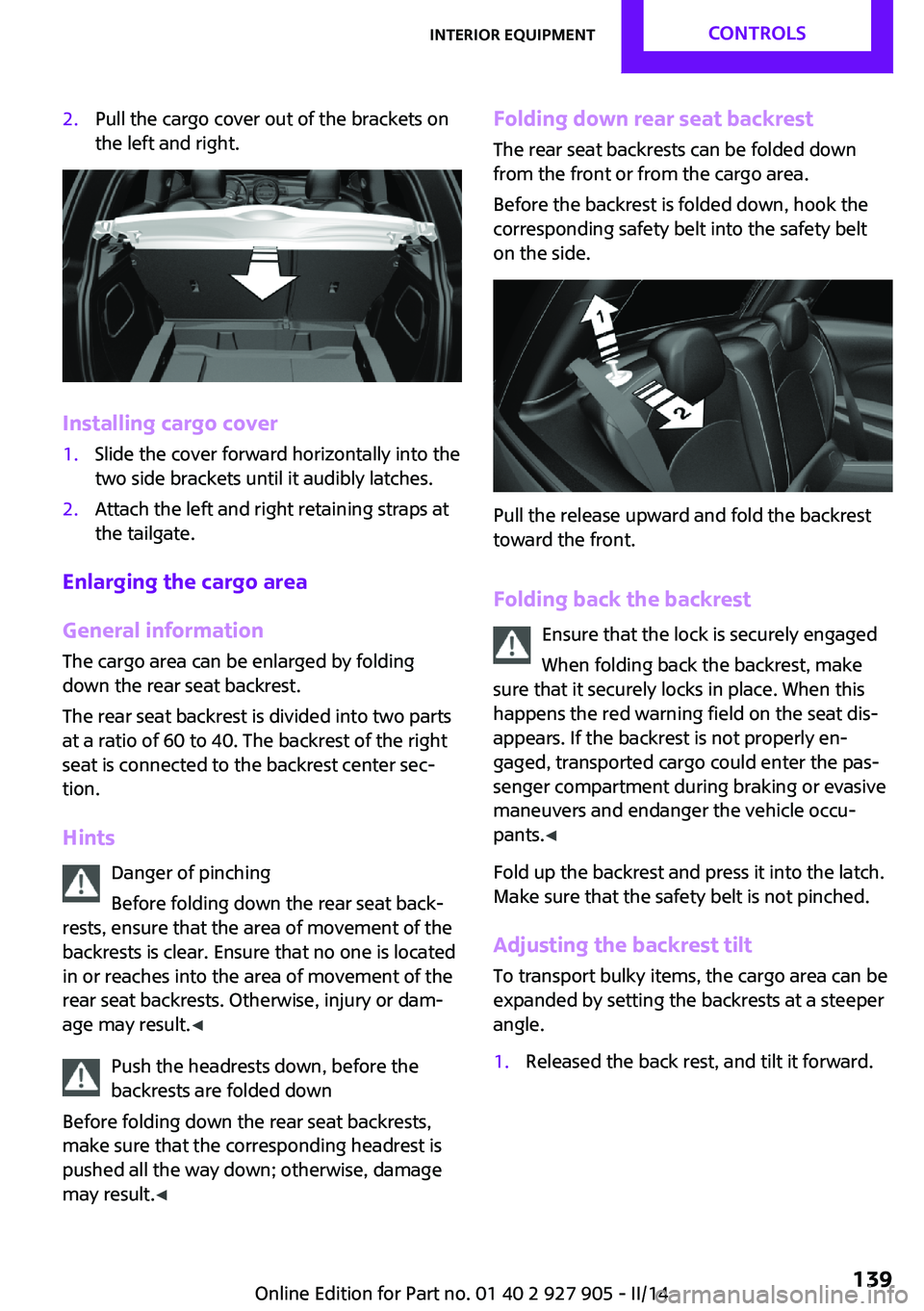
2.Pull the cargo cover out of the brackets on
the left and right.
Installing cargo cover
1.Slide the cover forward horizontally into the
two side brackets until it audibly latches.2.Attach the left and right retaining straps at
the tailgate.
Enlarging the cargo area
General information
The cargo area can be enlarged by folding
down the rear seat backrest.
The rear seat backrest is divided into two parts
at a ratio of 60 to 40. The backrest of the right
seat is connected to the backrest center sec‐
tion.
Hints Danger of pinching
Before folding down the rear seat back‐
rests, ensure that the area of movement of the
backrests is clear. Ensure that no one is located
in or reaches into the area of movement of the
rear seat backrests. Otherwise, injury or dam‐
age may result. ◀
Push the headrests down, before the
backrests are folded down
Before folding down the rear seat backrests,
make sure that the corresponding headrest is
pushed all the way down; otherwise, damage
may result. ◀
Folding down rear seat backrest
The rear seat backrests can be folded down
from the front or from the cargo area.
Before the backrest is folded down, hook the
corresponding safety belt into the safety belt
on the side.
Pull the release upward and fold the backrest
toward the front.
Folding back the backrest Ensure that the lock is securely engaged
When folding back the backrest, make
sure that it securely locks in place. When this
happens the red warning field on the seat dis‐
appears. If the backrest is not properly en‐
gaged, transported cargo could enter the pas‐
senger compartment during braking or evasive
maneuvers and endanger the vehicle occu‐
pants. ◀
Fold up the backrest and press it into the latch.
Make sure that the safety belt is not pinched.
Adjusting the backrest tilt To transport bulky items, the cargo area can be
expanded by setting the backrests at a steeper
angle.
1.Released the back rest, and tilt it forward.Seite 139Interior equipmentCONTROLS139
Online Edition for Part no. 01 40 2 927 905 - II/14
Page 144 of 230
Folded up positionThe variable cargo area may not be used
as a partition net to separate the cargo
area and the passenger compartment.▷Only use the variable cargo floor in the
folded-up position when the backrests are
folded up and locked.▷Always secure cargo against shifting, using
straps, belts and lashing eyes, for example.
If you do not observe this precaution, you can
endanger vehicle occupants and damage the
cargo floor during braking. ◀
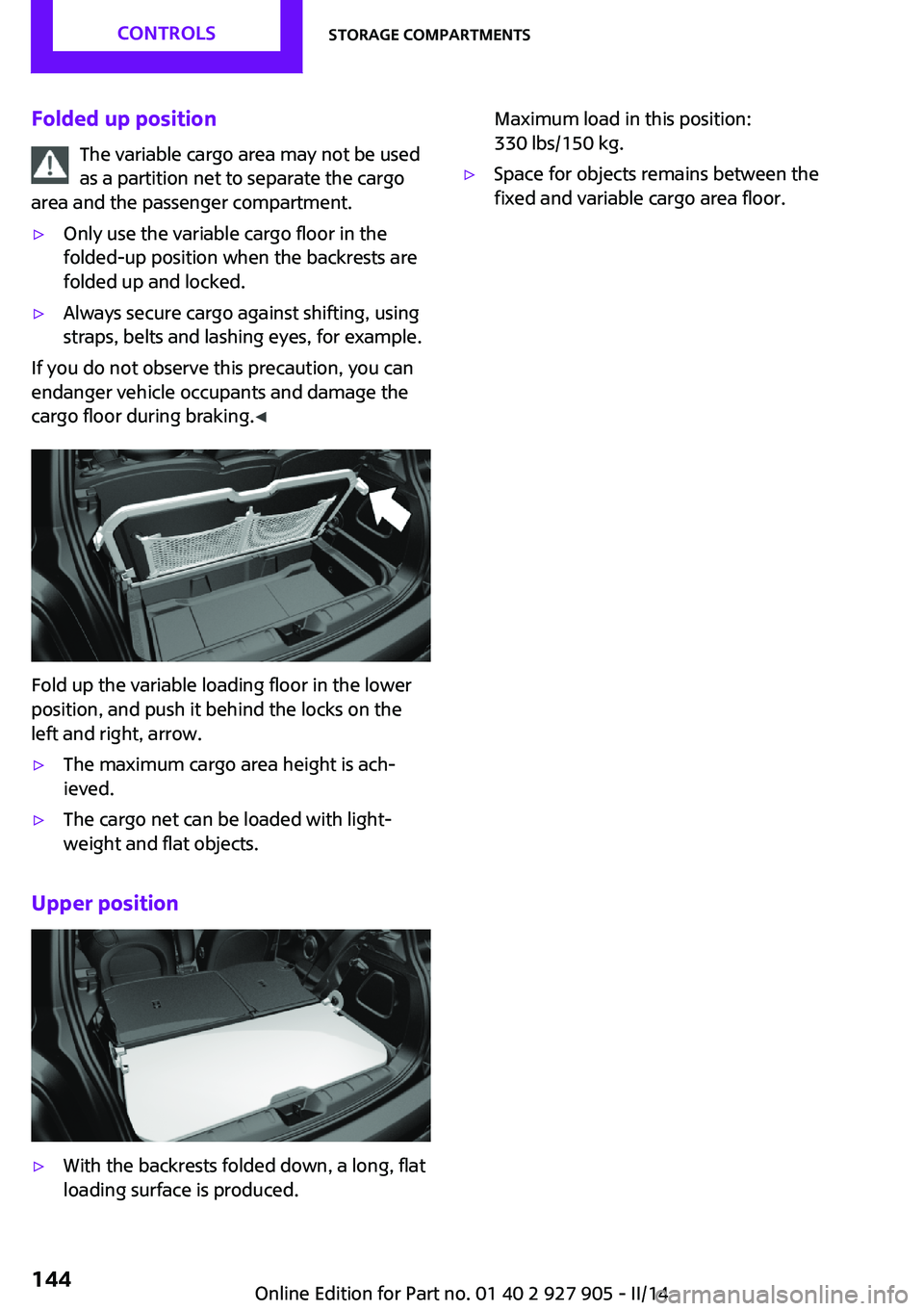
Fold up the variable loading floor in the lower
position, and push it behind the locks on the
left and right, arrow.
▷The maximum cargo area height is ach‐
ieved.▷The cargo net can be loaded with light‐
weight and flat objects.
Upper position
▷With the backrests folded down, a long, flat
loading surface is produced.Maximum load in this position:
330 lbs/150 kg.▷Space for objects remains between the
fixed and variable cargo area floor.Seite 144CONTROLSStorage compartments144
Online Edition for Part no. 01 40 2 927 905 - II/14
Page 152 of 230
Load
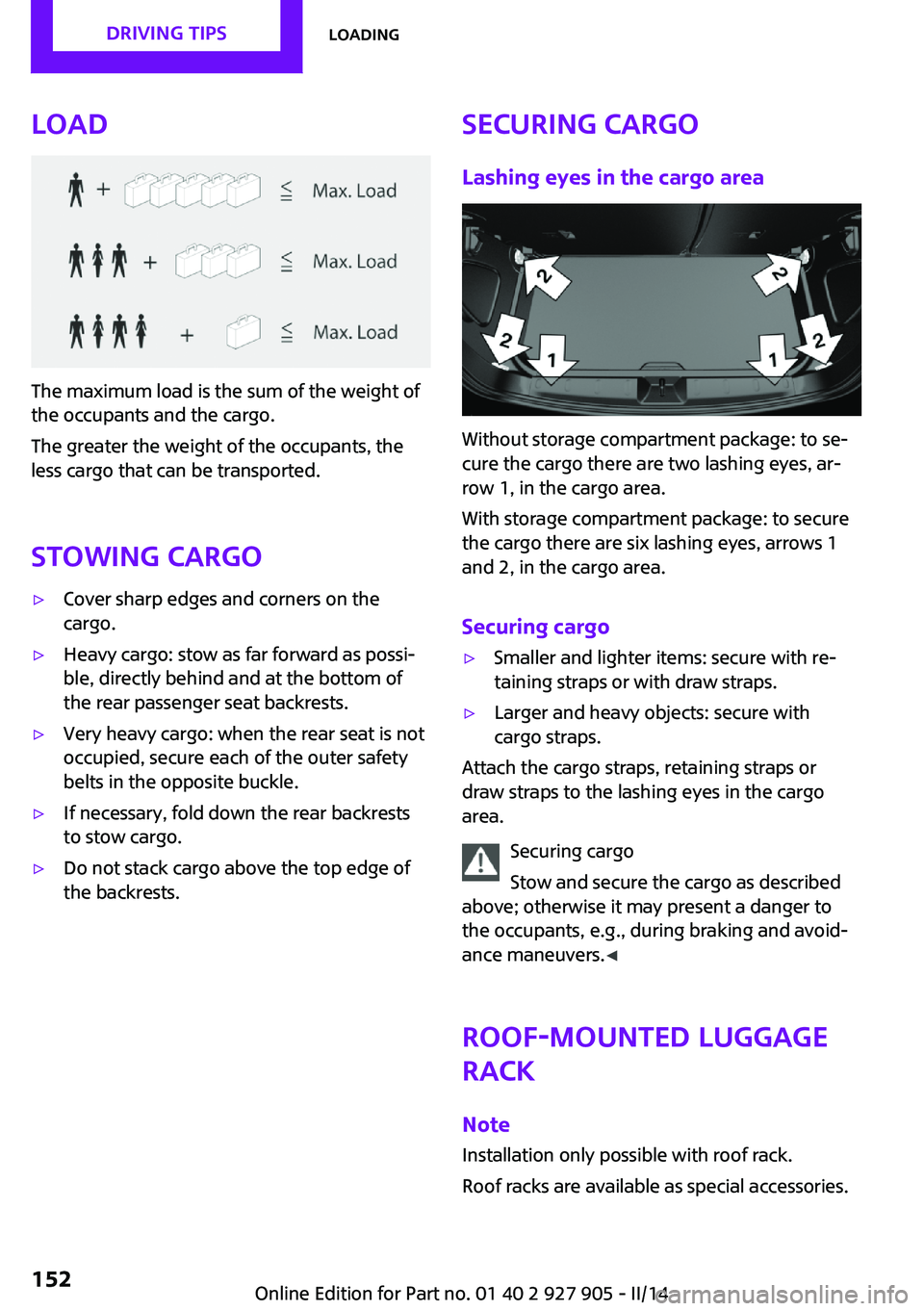
The maximum load is the sum of the weight of
the occupants and the cargo.
The greater the weight of the occupants, the
less cargo that can be transported.
Stowing cargo
▷Cover sharp edges and corners on the
cargo.▷Heavy cargo: stow as far forward as possi‐
ble, directly behind and at the bottom of
the rear passenger seat backrests.▷Very heavy cargo: when the rear seat is not
occupied, secure each of the outer safety
belts in the opposite buckle.▷If necessary, fold down the rear backrests
to stow cargo.▷Do not stack cargo above the top edge of
the backrests.Securing cargo
Lashing eyes in the cargo area
Without storage compartment package: to se‐
cure the cargo there are two lashing eyes, ar‐
row 1, in the cargo area.
With storage compartment package: to secure
the cargo there are six lashing eyes, arrows 1
and 2, in the cargo area.
Securing cargo
▷Smaller and lighter items: secure with re‐
taining straps or with draw straps.▷Larger and heavy objects: secure with
cargo straps.
Attach the cargo straps, retaining straps or
draw straps to the lashing eyes in the cargo
area.
Securing cargo
Stow and secure the cargo as described
above; otherwise it may present a danger to
the occupants, e.g., during braking and avoid‐
ance maneuvers. ◀
Roof-mounted luggage
rack
Note Installation only possible with roof rack.
Roof racks are available as special accessories.
Seite 152DRIVING TIPSLoading152
Online Edition for Part no. 01 40 2 927 905 - II/14
Page 209 of 230
Use leather care products; otherwise, dirt and
grease will gradually break down the protective
layer of the leather surface.
Suitable care products are available from the
service center.
Upholstery material care
Vacuum regularly with a vacuum cleaner.
If they are very dirty, e.g., beverage stains, use
a soft sponge or microfiber cloth with a suitable
interior cleaner.
Clean the upholstery down to the seams using
large sweeping motions. Avoid rubbing the ma‐
terial vigorously.
Damage from Velcro® fasteners
Open Velcro® fasteners on pants or other
articles of clothing can damage the seat covers.
Ensure that any Velcro® fasteners are closed. ◀
Caring for special components Light-alloy wheels
When cleaning the vehicle, use only neutral
wheel cleaners having a pH value from 5 to 9.
Do not use abrasive cleaning agents or steam
jets above 140 ℉/60 ℃. Follow the manufac‐
turer's instructions.
Aggressive, acidic or alkaline cleaning agents
can destroy the protective layer of adjacent
components, such as the brake disk.
Chrome surfaces
Carefully clean components such as the radia‐
tor grille or door handles with an ample supply
of water, possibly with shampoo added, partic‐
ularly when they have been exposed to road
salt.
Rubber components Aside from water, treat only with rubber cleans‐
ers.When cleaning rubber seals, do not use any sili‐
con-containing car care products in order to
avoid damage or reduced noise damping.
Fine wood parts Clean fine wood facing and fine wood compo‐
nents only with a moist rag. Then dry with a
soft cloth.
Plastic components
These include:▷Imitation leather surfaces.▷Headliner.▷Lamp lenses.▷Instrument cluster cover.▷Matte black spray-coated components.▷Painted parts in the interior.
Clean with a microfiber cloth.
Lightly dampen the cloth with water.
Do not soak the headliner.
Do not use cleansers that contain alcohol
or solvents
Do not use cleansers that contain alcohol or
solvents, such as lacquer thinners, heavy-duty
grease removers, fuel, or such; this could lead
to surface damage. ◀
Safety belts
Dirty belt straps impede the reeling action and
thus have a negative impact on safety.
Chemical cleaning
Do not clean chemically; this can destroy
the webbing. ◀
Use only a mild soapy solution, with the safety
belts clipped into their buckles.
Do not allow the reels to retract the safety belts
until they are dry.
Seite 209CareMOBILITY209
Online Edition for Part no. 01 40 2 927 905 - II/14
Page 220 of 230
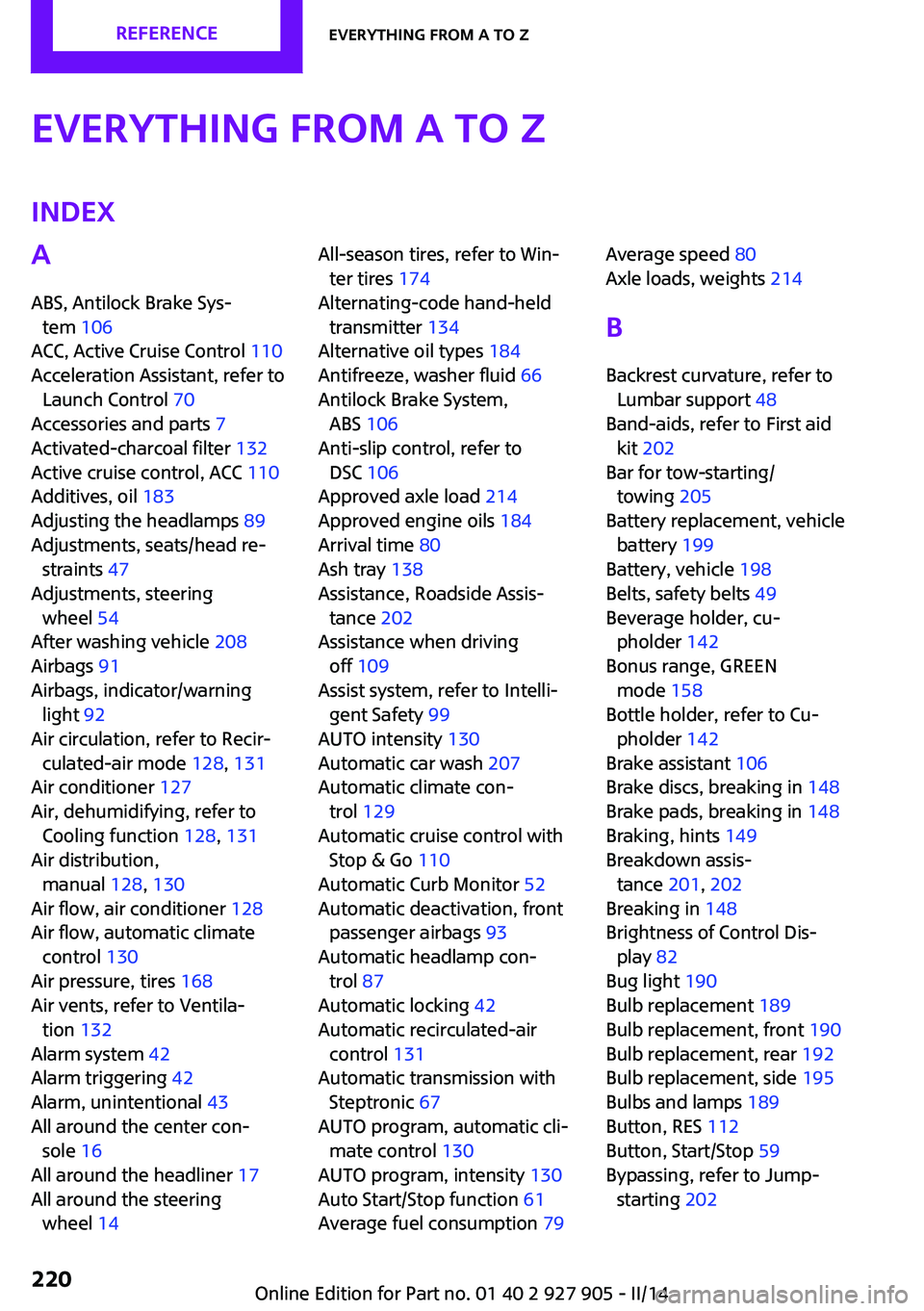
Everything from A to ZIndexA
ABS, Antilock Brake Sys‐ tem 106
ACC, Active Cruise Control 110
Acceleration Assistant, refer to Launch Control 70
Accessories and parts 7
Activated-charcoal filter 132
Active cruise control, ACC 110
Additives, oil 183
Adjusting the headlamps 89
Adjustments, seats/head re‐ straints 47
Adjustments, steering wheel 54
After washing vehicle 208
Airbags 91
Airbags, indicator/warning light 92
Air circulation, refer to Recir‐ culated-air mode 128, 131
Air conditioner 127
Air, dehumidifying, refer to Cooling function 128, 131
Air distribution, manual 128, 130
Air flow, air conditioner 128
Air flow, automatic climate control 130
Air pressure, tires 168
Air vents, refer to Ventila‐ tion 132
Alarm system 42
Alarm triggering 42
Alarm, unintentional 43
All around the center con‐ sole 16
All around the headliner 17
All around the steering wheel 14 All-season tires, refer to Win‐
ter tires 174
Alternating-code hand-held transmitter 134
Alternative oil types 184
Antifreeze, washer fluid 66
Antilock Brake System, ABS 106
Anti-slip control, refer to DSC 106
Approved axle load 214
Approved engine oils 184
Arrival time 80
Ash tray 138
Assistance, Roadside Assis‐ tance 202
Assistance when driving off 109
Assist system, refer to Intelli‐ gent Safety 99
AUTO intensity 130
Automatic car wash 207
Automatic climate con‐ trol 129
Automatic cruise control with Stop & Go 110
Automatic Curb Monitor 52
Automatic deactivation, front passenger airbags 93
Automatic headlamp con‐ trol 87
Automatic locking 42
Automatic recirculated-air control 131
Automatic transmission with Steptronic 67
AUTO program, automatic cli‐ mate control 130
AUTO program, intensity 130
Auto Start/Stop function 61
Average fuel consumption 79 Average speed 80
Axle loads, weights 214
B
Backrest curvature, refer to Lumbar support 48
Band-aids, refer to First aid kit 202
Bar for tow-starting/ towing 205
Battery replacement, vehicle battery 199
Battery, vehicle 198
Belts, safety belts 49
Beverage holder, cu‐ pholder 142
Bonus range, GREEN mode 158
Bottle holder, refer to Cu‐ pholder 142
Brake assistant 106
Brake discs, breaking in 148
Brake pads, breaking in 148
Braking, hints 149
Breakdown assis‐ tance 201, 202
Breaking in 148
Brightness of Control Dis‐ play 82
Bug light 190
Bulb replacement 189
Bulb replacement, front 190
Bulb replacement, rear 192
Bulb replacement, side 195
Bulbs and lamps 189
Button, RES 112
Button, Start/Stop 59
Bypassing, refer to Jump- starting 202 Seite 220REFERENCEEverything from A to Z220
Online Edition for Part no. 01 40 2 927 905 - II/14
Page 226 of 230

Remote control, malfunc‐tion 38
Remote control, replacing the battery 34
Remote control, univer‐ sal 133
Replacement fuse 199
Replacing parts 188
Replacing the battery, remote control 34
Replacing wheels/tires 173
Reporting safety defects 9
RES button 112
Reserve warning, refer to Range 75
Reset, Tire Pressure Monitor TPM 95
Retaining straps, securing cargo 152
Retreaded tires 174
Right-hand traffic, lamp set‐ ting 89
Roadside parking lamps 86
RON recommended fuel grade 166
Roof load capacity 214
Roof-mounted luggage rack 152
Rope for tow-starting/ towing 205
RSC Run Flat System Compo‐ nent, refer to Run-flat
tires 175
Rubber components, care 209
Run-flat tires 175
S
Safe braking 149
Safety 7
Safety belt reminder for driv‐ er's seat and front passenger
seat 50
Safety belts 49
Safety belts, care 209 Safety systems, airbags 91
Saving fuel 155
Screen, refer to Control Dis‐ play 18
Screwdriver 188
Screw thread for tow fit‐ ting 205
Sealant 175
Seat belts, refer to Safety belts 49
Seat heating, front 49
Seating position for chil‐ dren 55
Seats 47
Selection list in instrument cluster 78
Selector lever, automatic transmission 68
Sensors, care 210
Service and warranty 8
Service requirements, Condi‐ tion Based Service CBS 186
Service requirements, dis‐ play 76
Service, Roadside Assis‐ tance 202
Settings, locking/unlocking 42
Settings, mirrors 52
Settings on Control Display 81
Shifting, automatic transmis‐ sion 67
Shifting, manual transmis‐ sion 67
Shift paddles on steering wheel 69
Side airbags 91
Signaling, horn 14
Signals when unlocking 42
Sitting safely 47
Size 214
Slide/tilt glass roof 45
Snow chains 178
Socket 137
Socket, OBD Onboard Diag‐ nostics 186
Soot particulate filter 149 SOS button 201
Spare fuse 199
Specified engine oil types 184
Speed, average 80
Speed limit detection, on‐ board computer 80
Speed limiter, display 77
Speed Limit Information 77
Speed warning 81
Split screen 23
Sport automatic transmis‐ sion 69
Sport displays 80
SPORT program, Dynamic Driving Control 108
Sport program, transmis‐ sion 68
Stability control systems 106
Standard view, Head-up Dis‐ play 84
Start/stop, automatic func‐ tion 61
Start/Stop button 59
Start function during malfunc‐ tion 35
Starting the engine 60
Status display, tires 94
Status information, onboard monitor 23
Status of Owner's Manual 6
Steering wheel, adjusting 54
Steptronic, automatic trans‐ mission 67
Stopping the engine 60
Storage compartments 141
Storage, tires 174
Storing the vehicle 210
Summer tires, tread 172
Supplementary text mes‐ sages 73
Switch for Dynamic Driv‐ ing 108
Switch-on times, parked-car ventilation 132
Switch, refer to Cockpit 14
Symbols 6 Seite 226REFERENCEEverything from A to Z226
Online Edition for Part no. 01 40 2 927 905 - II/14