radio MINI Countryman 2015 Owner's Manual (Mini Connected)
[x] Cancel search | Manufacturer: MINI, Model Year: 2015, Model line: Countryman, Model: MINI Countryman 2015Pages: 283, PDF Size: 6.76 MB
Page 7 of 283
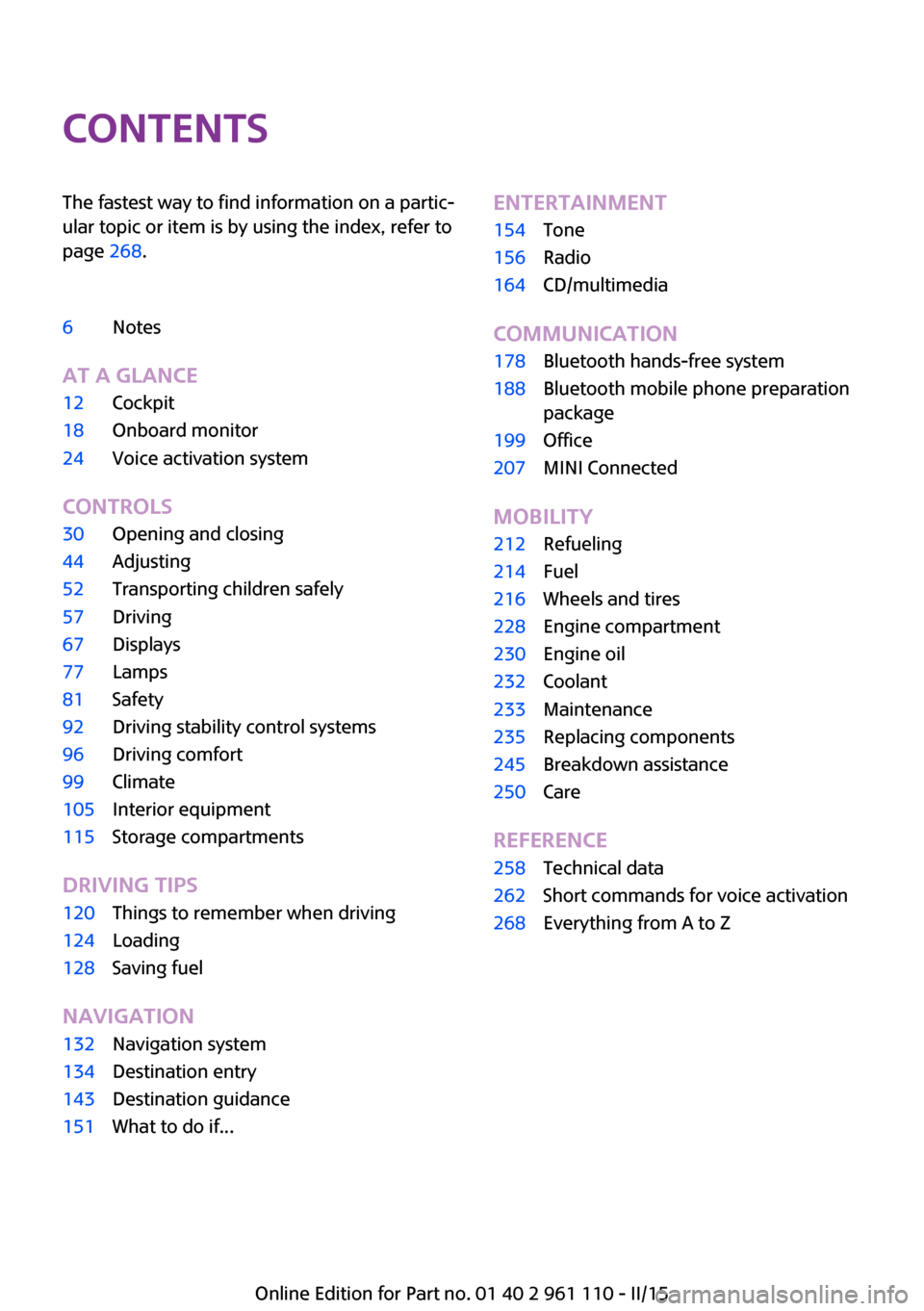
ContentsThe fastest way to find information on a partic‐
ular topic or item is by using the index, refer to
page 268.6Notes
AT A GLANCE
12Cockpit18Onboard monitor24Voice activation system
CONTROLS
30Opening and closing44Adjusting52Transporting children safely57Driving67Displays77Lamps81Safety92Driving stability control systems96Driving comfort99Climate105Interior equipment115Storage compartments
DRIVING TIPS
120Things to remember when driving124Loading128Saving fuel
NAVIGATION
132Navigation system134Destination entry143Destination guidance151What to do if...ENTERTAINMENT154Tone156Radio164CD/multimedia
COMMUNICATION
178Bluetooth hands-free system188Bluetooth mobile phone preparation
package199Office207MINI Connected
MOBILITY
212Refueling214Fuel216Wheels and tires228Engine compartment230Engine oil232Coolant233Maintenance235Replacing components245Breakdown assistance250Care
REFERENCE
258Technical data262Short commands for voice activation268Everything from A to Z
Online Edition for Part no. 01 40 2 961 110 - II/15
Page 9 of 283
sary to adapt your vehicle to potentially differ‐
ing operating conditions and permit
requirements. If your vehicle does not comply
with the homologation requirements in a cer‐
tain country you cannot lodge warranty claims
for your vehicle there. Further information can
be obtained from your Service Center.
Maintenance and repairs Advanced technology, e.g., the use of modern
materials and high-performance electronics,
requires suitable maintenance and repair
methods.
Therefore, have this work performed only by a
MINI service center or a workshop that works
according to MINI repair procedures with ap‐
propriately trained personnel.
If this work is not carried out properly, there is
the danger of subsequent damage and related
safety hazards.
Parts and accessories
For your own safety, it is recommended that
you use genuine parts and accessories ap‐
proved by MINI. When you purchase accesso‐
ries tested and approved by MINI and Genuine
MINI Parts, you simultaneously acquire the as‐
surance that they have been thoroughly tested
by MINI to ensure optimum performance when
installed on your vehicle. MINI warrants these
parts to be free from defects in material and
workmanship. MINI will not accept any liability
for damage resulting from installation of parts
and accessories not approved by MINI. MINI
cannot test every product made by other man‐
ufacturers to verify if it can be used on a MINI
safely and without risk to either the vehicle, its
operation, or its occupants. Genuine MINI Parts,
MINI Accessories and other products approved
by MINI, together with professional advice on
using these items, are available from all MINI
centers. Installation and operation of non MINI
approved accessories such as alarms, radios,
amplifiers, radar detectors, wheels, suspension
components, brake dust shields, telephones,including operation of any mobile phone from
within the vehicle without using an externally
mounted antenna, or transceiver equipment,
for instance, CBs, walkie-talkies, ham radios or
similar accessories, may cause extensive dam‐
age to the vehicle, compromise its safety, inter‐
fere with the vehicle's electrical system or af‐
fect the validity of the MINI Limited Warranty.
See your MINI center for additional informa‐
tion. Maintenance, replacement, or repair of
the emission control devices and systems may
be performed by any automotive repair estab‐
lishment or individual using any certified auto‐
motive part.
California Proposition 65 Warning California laws require us to state the following
warning:
Engine exhaust and a wide variety of automo‐
bile components and parts, including compo‐
nents found in the interior furnishings in a vehi‐
cle, contain or emit chemicals known to the
State of California to cause cancer and birth de‐
fects and reproductive harm. In addition, cer‐
tain fluids contained in vehicles and certain
products of component wear contain or emit
chemicals known to the State of California to
cause cancer and birth defects or other repro‐
ductive harm. Battery posts, terminals and re‐
lated accessories contain lead and lead com‐
pounds. Wash your hands after handling. Used
engine oil contains chemicals that have caused
cancer in laboratory animals. Always protect
your skin by washing thoroughly with soap and
water.
Service and warranty
We recommend that you read this publication
thoroughly. Your vehicle is covered by the fol‐
lowing warranties:▷New Vehicle Limited Warranty.▷Rust Perforation Limited Warranty.▷Federal Emissions System Defect Warranty.▷Federal Emissions Performance Warranty.Seite 7Notes7
Online Edition for Part no. 01 40 2 961 110 - II/15
Page 15 of 283
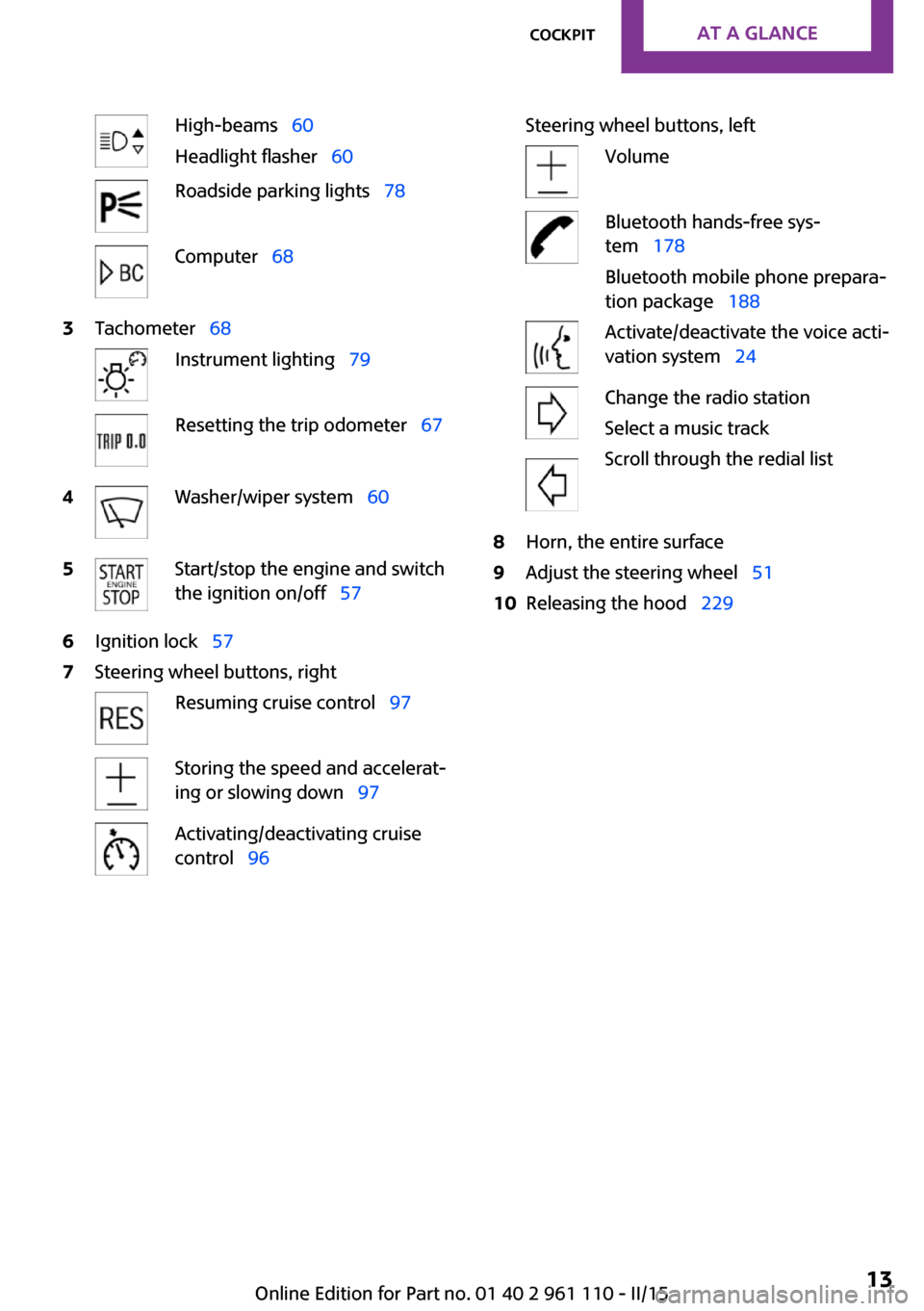
High-beams 60
Headlight flasher 60Roadside parking lights 78Computer 683Tachometer 68Instrument lighting 79Resetting the trip odometer 674Washer/wiper system 605Start/stop the engine and switch
the ignition on/off 576Ignition lock 577Steering wheel buttons, rightResuming cruise control 97Storing the speed and accelerat‐
ing or slowing down 97Activating/deactivating cruise
control 96Steering wheel buttons, leftVolumeBluetooth hands-free sys‐
tem 178
Bluetooth mobile phone prepara‐
tion package 188Activate/deactivate the voice acti‐
vation system 24Change the radio station
Select a music track
Scroll through the redial list8Horn, the entire surface9Adjust the steering wheel 5110Releasing the hood 229Seite 13CockpitAT A GLANCE13
Online Edition for Part no. 01 40 2 961 110 - II/15
Page 18 of 283
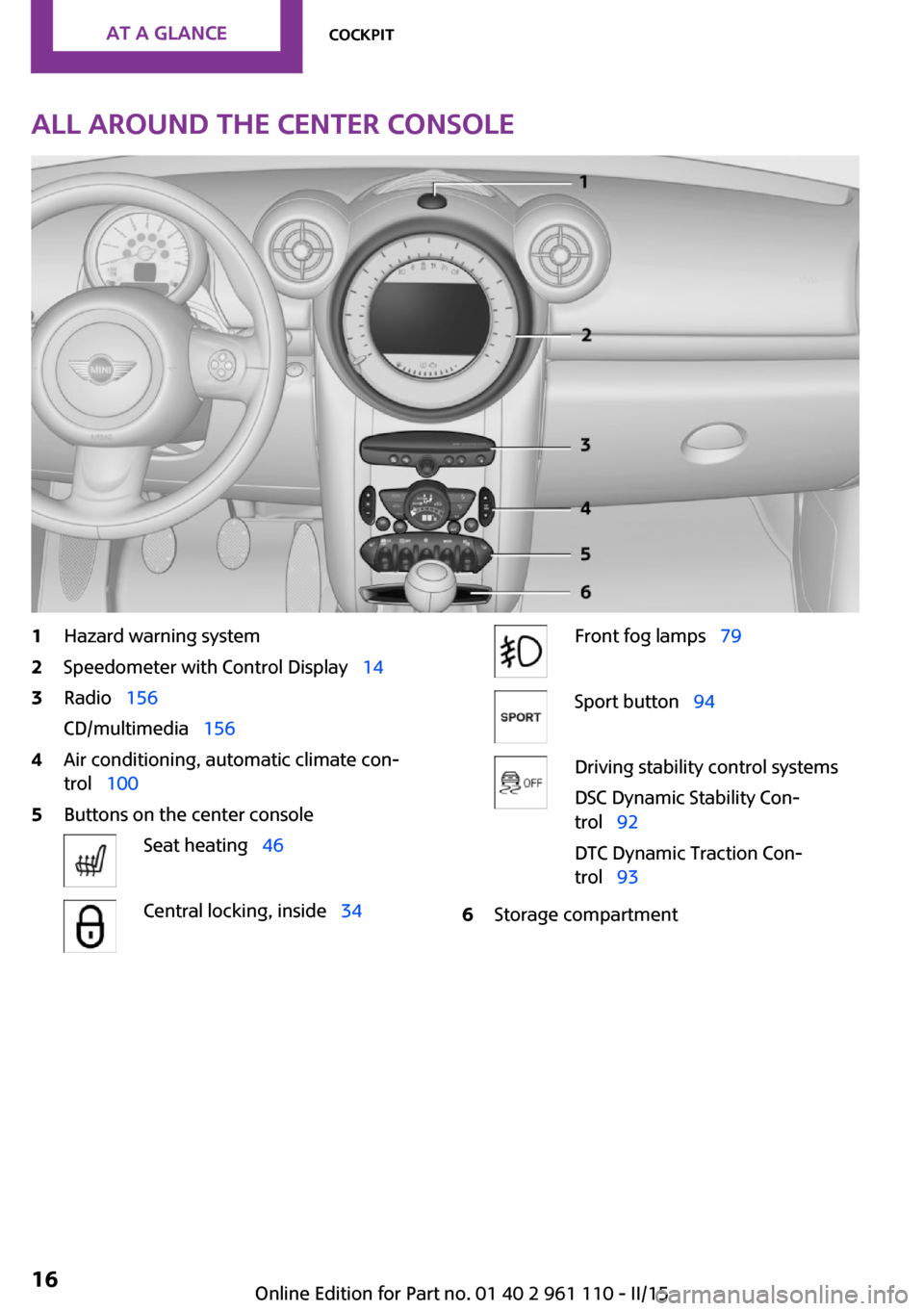
All around the center console1Hazard warning system2Speedometer with Control Display 143Radio 156
CD/multimedia 1564Air conditioning, automatic climate con‐
trol 1005Buttons on the center consoleSeat heating 46Central locking, inside 34Front fog lamps 79Sport button 94Driving stability control systems
DSC Dynamic Stability Con‐
trol 92
DTC Dynamic Traction Con‐
trol 936Storage compartmentSeite 16AT A GLANCECockpit16
Online Edition for Part no. 01 40 2 961 110 - II/15
Page 21 of 283
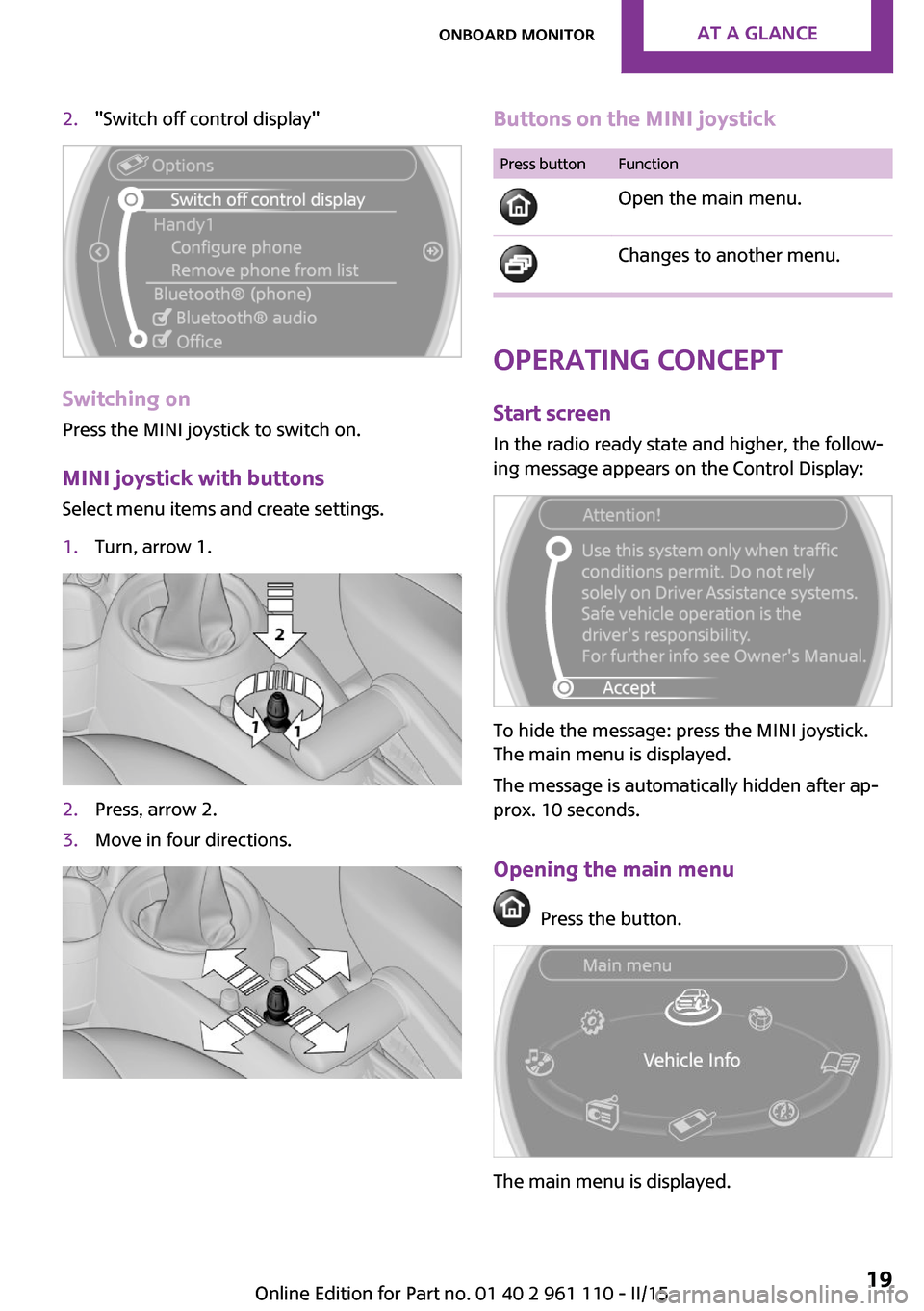
2."Switch off control display"
Switching on
Press the MINI joystick to switch on.
MINI joystick with buttonsSelect menu items and create settings.
1.Turn, arrow 1.2.Press, arrow 2.3.Move in four directions.Buttons on the MINI joystickPress buttonFunction
Open the main menu. Changes to another menu.
Operating concept
Start screen In the radio ready state and higher, the follow‐
ing message appears on the Control Display:
To hide the message: press the MINI joystick.
The main menu is displayed.
The message is automatically hidden after ap‐
prox. 10 seconds.
Opening the main menu
Press the button.
The main menu is displayed.
Seite 19Onboard monitorAT A GLANCE19
Online Edition for Part no. 01 40 2 961 110 - II/15
Page 22 of 283
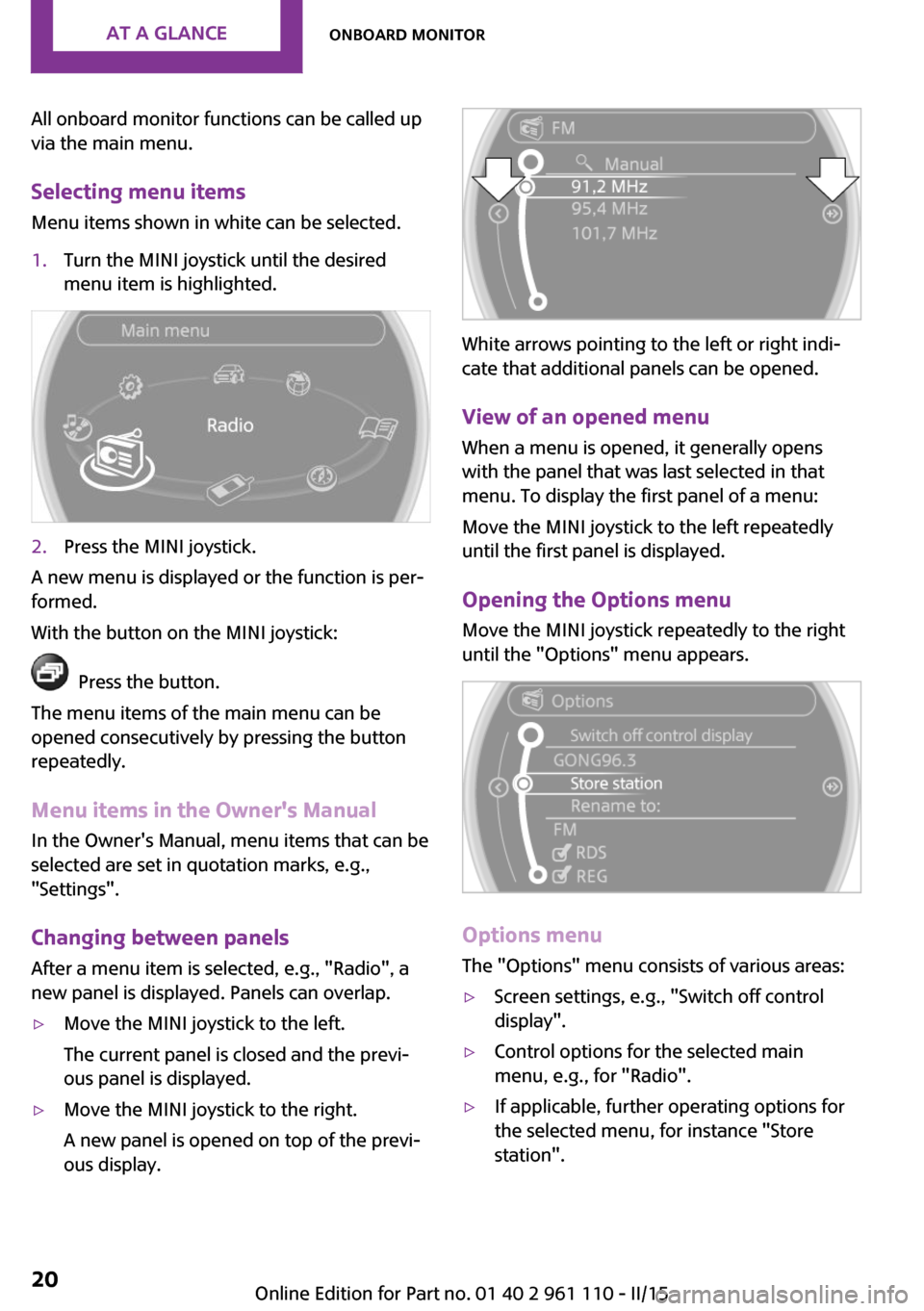
All onboard monitor functions can be called up
via the main menu.
Selecting menu items Menu items shown in white can be selected.1.Turn the MINI joystick until the desired
menu item is highlighted.2.Press the MINI joystick.
A new menu is displayed or the function is per‐
formed.
With the button on the MINI joystick:
Press the button.
The menu items of the main menu can be
opened consecutively by pressing the button
repeatedly.
Menu items in the Owner's Manual
In the Owner's Manual, menu items that can be
selected are set in quotation marks, e.g.,
"Settings".
Changing between panelsAfter a menu item is selected, e.g., "Radio", a
new panel is displayed. Panels can overlap.
▷Move the MINI joystick to the left.
The current panel is closed and the previ‐
ous panel is displayed.▷Move the MINI joystick to the right.
A new panel is opened on top of the previ‐
ous display.
White arrows pointing to the left or right indi‐
cate that additional panels can be opened.
View of an opened menu
When a menu is opened, it generally opens
with the panel that was last selected in that
menu. To display the first panel of a menu:
Move the MINI joystick to the left repeatedly
until the first panel is displayed.
Opening the Options menu Move the MINI joystick repeatedly to the right
until the "Options" menu appears.
Options menu
The "Options" menu consists of various areas:
▷Screen settings, e.g., "Switch off control
display".▷Control options for the selected main
menu, e.g., for "Radio".▷If applicable, further operating options for
the selected menu, for instance "Store
station".Seite 20AT A GLANCEOnboard monitor20
Online Edition for Part no. 01 40 2 961 110 - II/15
Page 24 of 283
▷Time.▷Current entertainment source.▷Sound output, on/off.▷Wireless network reception strength.▷Telephone status.▷Traffic bulletin reception.
Check Control messages and entries using the
voice activation system temporarily hide the
status information.
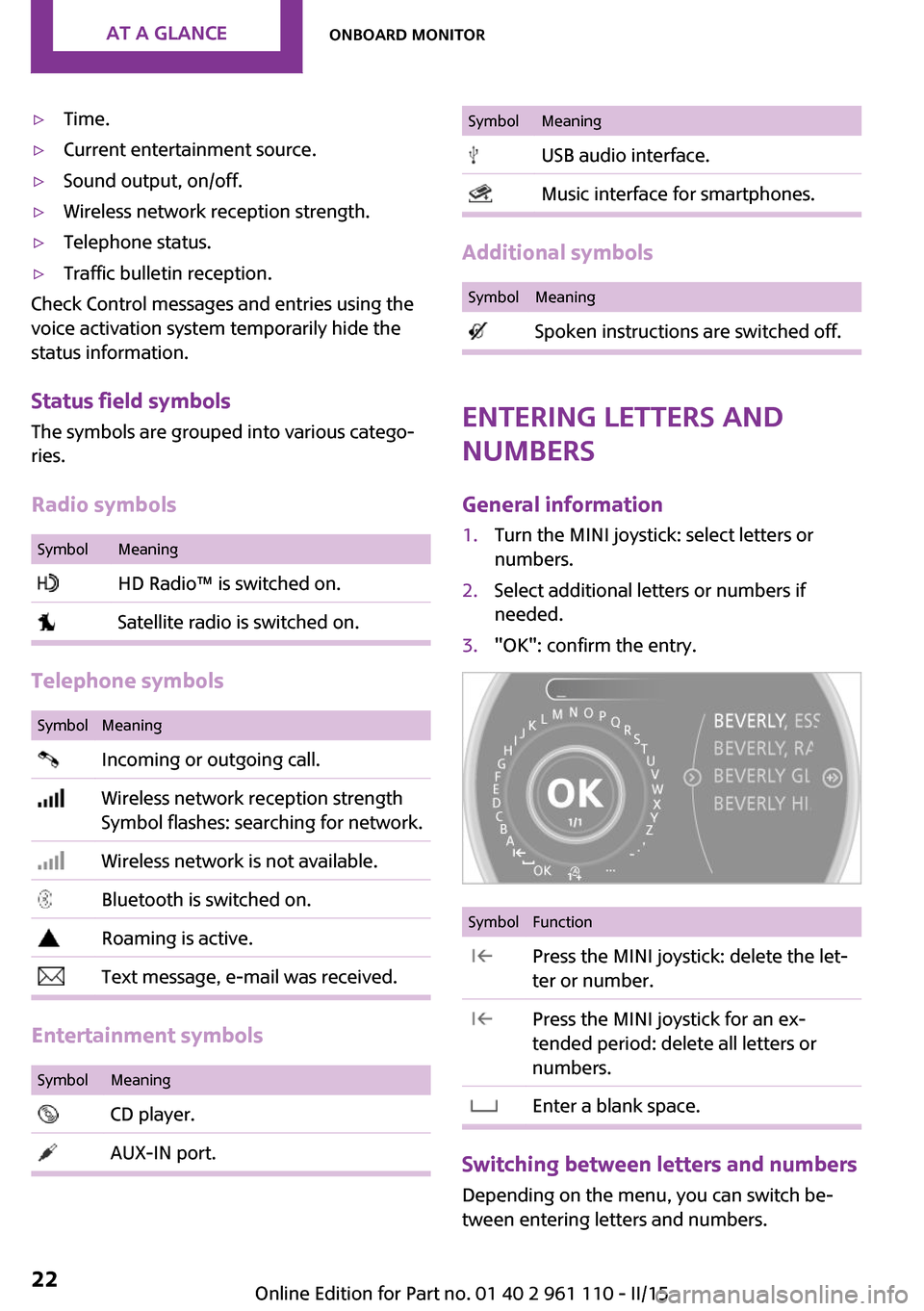
Status field symbols
The symbols are grouped into various catego‐
ries.
Radio symbols
SymbolMeaning HD Radio™ is switched on. Satellite radio is switched on.
Telephone symbols
SymbolMeaning Incoming or outgoing call. Wireless network reception strength
Symbol flashes: searching for network. Wireless network is not available. Bluetooth is switched on. Roaming is active. Text message, e-mail was received.
Entertainment symbols
SymbolMeaning CD player. AUX-IN port.SymbolMeaning USB audio interface. Music interface for smartphones.
Additional symbols
SymbolMeaning Spoken instructions are switched off.
Entering letters and
numbers
General information
1.Turn the MINI joystick: select letters or
numbers.2.Select additional letters or numbers if
needed.3."OK": confirm the entry.SymbolFunction Press the MINI joystick: delete the let‐
ter or number. Press the MINI joystick for an ex‐
tended period: delete all letters or
numbers. Enter a blank space.
Switching between letters and numbers
Depending on the menu, you can switch be‐
tween entering letters and numbers.
Seite 22AT A GLANCEOnboard monitor22
Online Edition for Part no. 01 40 2 961 110 - II/15
Page 35 of 283
Convenient closing with the remote control is
not possible.
Locking
Press the button.
Locking from the outside
Do not lock the vehicle from the outside if
there are people in it, as the vehicle cannot be
unlocked from inside without special knowl‐
edge. ◀
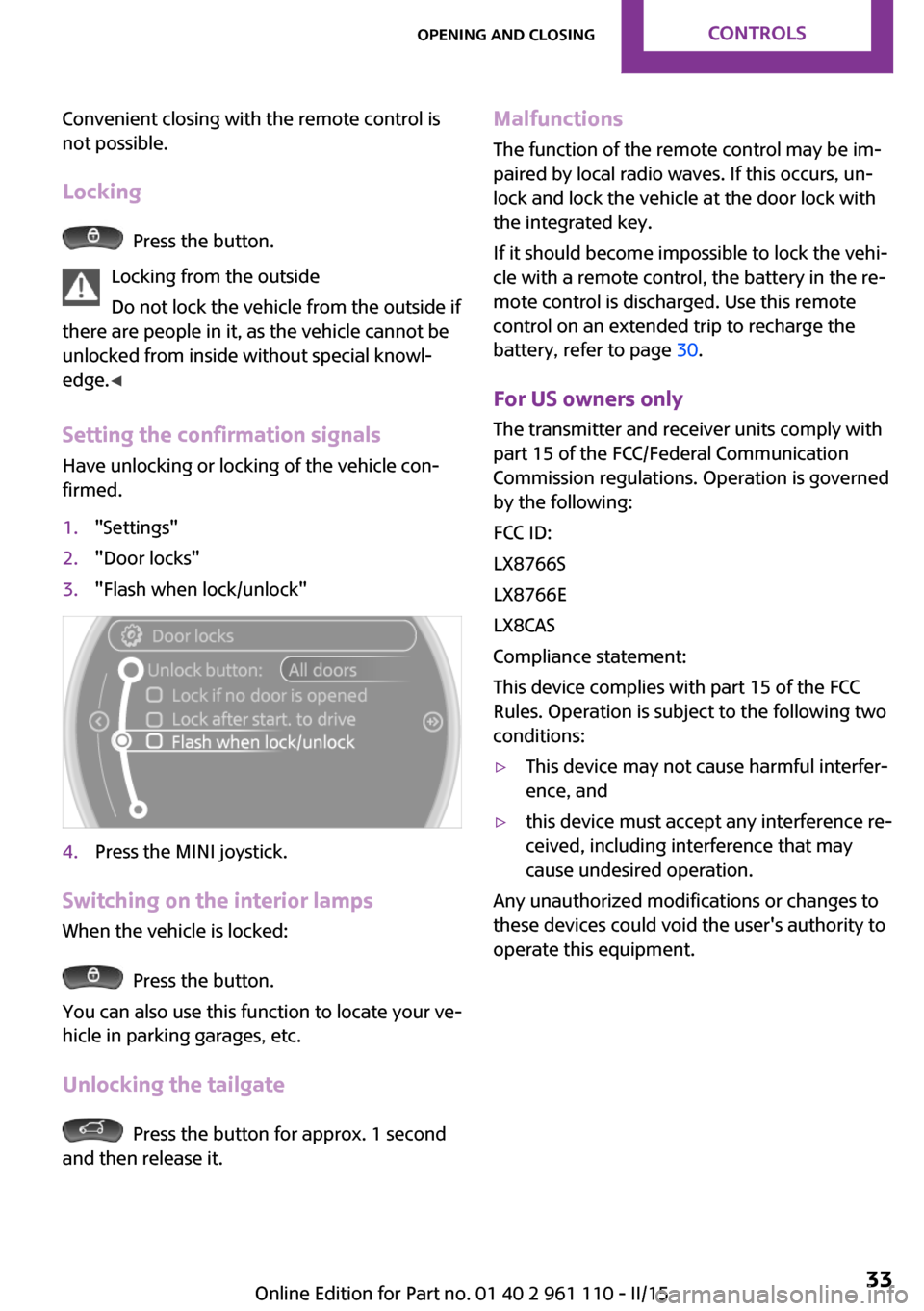
Setting the confirmation signals
Have unlocking or locking of the vehicle con‐
firmed.
1."Settings"2."Door locks"3."Flash when lock/unlock"4.Press the MINI joystick.
Switching on the interior lamps
When the vehicle is locked:
Press the button.
You can also use this function to locate your ve‐
hicle in parking garages, etc.
Unlocking the tailgate
Press the button for approx. 1 second
and then release it.
Malfunctions
The function of the remote control may be im‐
paired by local radio waves. If this occurs, un‐ lock and lock the vehicle at the door lock with
the integrated key.
If it should become impossible to lock the vehi‐
cle with a remote control, the battery in the re‐
mote control is discharged. Use this remote control on an extended trip to recharge the
battery, refer to page 30.
For US owners only The transmitter and receiver units comply with
part 15 of the FCC/Federal Communication
Commission regulations. Operation is governed
by the following:
FCC ID:
LX8766S
LX8766E
LX8CAS
Compliance statement:
This device complies with part 15 of the FCC
Rules. Operation is subject to the following two
conditions:▷This device may not cause harmful interfer‐
ence, and▷this device must accept any interference re‐
ceived, including interference that may
cause undesired operation.
Any unauthorized modifications or changes to
these devices could void the user's authority to
operate this equipment.
Seite 33Opening and closingCONTROLS33
Online Edition for Part no. 01 40 2 961 110 - II/15
Page 40 of 283
If a remote control accidentally left in the cargo
area is detected in the locked vehicle after the
tailgate is closed, the tailgate opens again
slightly. The hazard warning system flashes and
an acoustic signal sounds.
Power windows and electrical glass
sunroof
When the engine is switched off, the windows
and the sunroof can be operated as long as
neither the doors nor the tailgate are opened.
When the door and tailgate are closed again
and the remote control is detected inside the
vehicle, the windows and the sunroof can be
operated again.
Insert the remote control into the ignition lock
to be able to operate the windows and the sun‐
roof while the engine is switched off and the
doors are open.
Switching on the radio ready state Press the Start/Stop button to switch on the
radio ready state, refer to page 57.
Do not depress the brake or the clutch; other‐
wise, the engine will start.
Starting the engine The engine can be started or the ignition can
be switched on, refer to page 57, when a re‐
mote control is inside the vehicle. It is not nec‐
essary to insert a remote control into the igni‐
tion lock.
Switching off the engine in cars with
Steptronic transmission
The engine can only be switched off with the
selector lever in position P, refer to page 64.
To switch off the engine with the selector lever
in position N, the remote control must be in‐
serted in the ignition lock.Before driving a vehicle with Steptronic
transmission into a car wash1.Insert the remote control into the ignition
switch.2.Depress the brake pedal.3.Move the selector lever to position N.4.Switch the engine off.
The vehicle can roll.
Malfunction The Comfort Access functions can be disturbed
by local radio waves, such as by a mobile
phone in the immediate vicinity of the remote
control or when a mobile phone is being
charged in the vehicle.
If this occurs, open or close the vehicle using
the buttons on the remote control or use the
integrated key in the door lock.
To start the engine afterward, insert the remote
control into the ignition switch.
Warning lights The warning light in the instrument
cluster lights up when you attempt to
start the engine: the engine cannot be
started.
The remote control is not in the vehicle or has a
malfunction. Take the remote control with you
inside the vehicle or have it checked. If neces‐
sary, insert another remote control into the ig‐
nition switch.
The warning lamp in the instrument
cluster lights up while the engine is run‐
ning: the remote control is no longer in‐
side the vehicle.
After switching off the engine, the engine can
only be started again within approx. 10 sec‐
onds if no door has been opened.
The indicator lamp lights up and a mes‐
sage appears on the Control Display: re‐
place the remote control battery.
Seite 38CONTROLSOpening and closing38
Online Edition for Part no. 01 40 2 961 110 - II/15
Page 44 of 283
Take the remote control with you
Take the remote control with you when
leaving the vehicle so that children, for exam‐
ple, cannot operate the power windows and in‐
jure themselves. ◀
If, after having been opened and closed a num‐
ber of times in close succession, a window can
only be closed, the system is overheated. Let
the system cool down for several minutes with
the ignition switched on or the engine running.
Opening, closing
Front windows
To open:
▷Press the switch to the resistance point. The
window opens while the switch is held.▷Press the switch beyond the resistance
point. The window opens automatically in
the radio ready state and higher.
Press again briefly to stop the opening pro‐
cedure.
To close:
▷Pull the switch to the resistance point. The
window closes while the switch is held.▷Pull the switch beyond the resistance point.
The window closes automatically.
Pressing the switch stops the motion.
MINI Countryman: rear windows
To open:
▷Press the switch to the resistance point. The
window opens while the switch is held.▷Press the switch beyond the resistance
point. The window opens automatically in
the radio ready state and higher.
To close:
▷Pull the switch to the resistance point. The
window closes while the switch is held.▷Pull the switch beyond the resistance point.
The window closes automatically.
Pressing the switch stops the motion.
After the ignition is switched off
The windows can be operated for approx. 1 mi‐
nute after the remote control is removed or the
ignition is switched off.
Take the remote control with you
Take the remote control with you when
leaving the vehicle so that children, for exam‐
ple, cannot operate the power windows and in‐
jure themselves. ◀
Pinch protection system If the closing force exceeds a specific value as a
window closes, the closing action is inter‐
rupted.
The window reopens slightly.
Seite 42CONTROLSOpening and closing42
Online Edition for Part no. 01 40 2 961 110 - II/15