fuel type MITSUBISHI ASX 2012 (in English) User Guide
[x] Cancel search | Manufacturer: MITSUBISHI, Model Year: 2012, Model line: ASX, Model: MITSUBISHI ASX 2012Pages: 378, PDF Size: 18.2 MB
Page 111 of 378
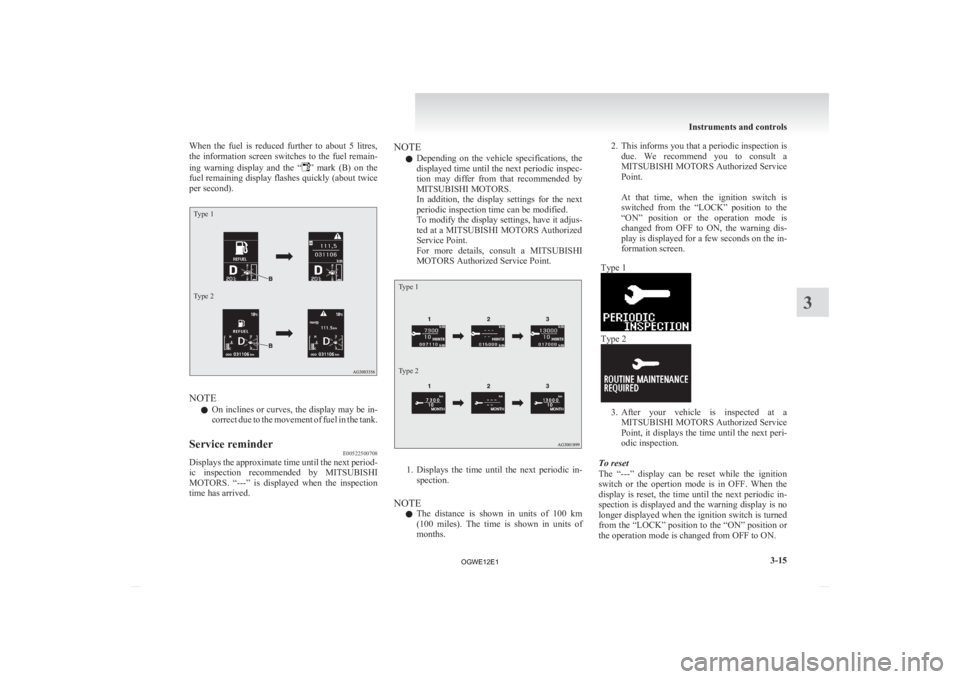
When the fuel is reduced further to about 5 litres,
the
information screen switches to the fuel remain-
ing warning display and the “ ”
mark (B) on the
fuel remaining display flashes quickly (about twice
per second).
Type 1
Type 2 NOTE
l On
inclines or curves, the display may be in-
correct due to the movement of fuel in the tank.
Service reminder E00522500708
Displays the approximate time until the next period-
ic
inspection recommended by MITSUBISHI
MOTORS. “---” is displayed when the inspection
time has arrived. NOTE
l Depending
on the vehicle specifications, the
displayed time until the next periodic inspec-
tion may differ from that recommended by
MITSUBISHI MOTORS.
In addition, the display settings for the next
periodic inspection time can be modified.
To modify the display settings, have it adjus-
ted at a MITSUBISHI MOTORS Authorized
Service Point.
For more details, consult a MITSUBISHI
MOTORS Authorized Service Point.
Type 1
Type 2 1. Displays
the time until the next periodic in-
spection.
NOTE l The distance is shown in units of 100 km
(100 miles). The time is shown in units of
months. 2. This
informs you that a periodic inspection is
due. We recommend you to consult a
MITSUBISHI MOTORS Authorized Service
Point.
At that time, when the ignition switch is
switched from the “LOCK” position to the
“ON” position or the operation mode is
changed from OFF to ON, the warning dis-
play is displayed for a few seconds on the in-
formation screen.
Type 1 Type 2
3. After
your vehicle is inspected at a
MITSUBISHI MOTORS Authorized Service
Point, it displays the time until the next peri-
odic inspection.
To reset
The “---” display can be reset while the ignition
switch or the opertion mode is in OFF. When the
display is reset, the time until the next periodic in-
spection is displayed and the warning display is no
longer displayed when the ignition switch is turned
from the “LOCK” position to the “ON” position or
the operation mode is changed from OFF to ON. Instruments and controls
3-15 3
OGWE12E1
Page 113 of 378
CAUTION
l
Before moving your vehicle, check that
the warning lamp is OFF.
Changing the function settings (when
the ignition switch or the operation
mode is ON) E00522700348
1. Stop the vehicle in a safe place.
Firmly
apply the parking brake and put the
gearshift lever into the “N” (Neutral) posi-
tion (M/T) or the selector lever into the “P”
(PARK) position (CVT).
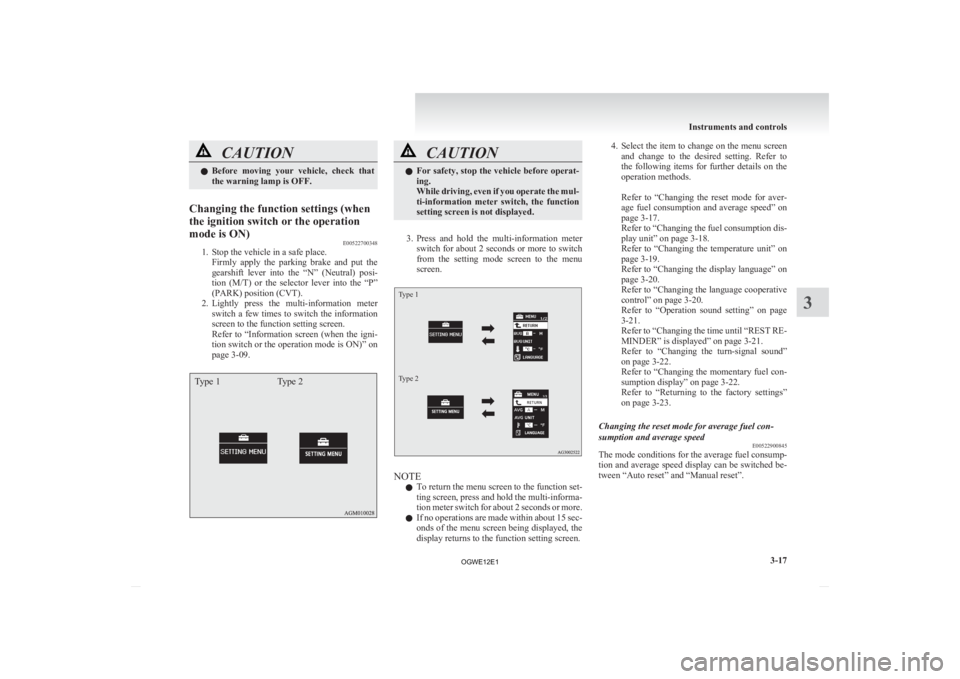
2. Lightly press the multi-information meter switch a few times to switch the information
screen to the function setting screen.
Refer to “Information screen (when the igni-
tion switch or the operation mode is ON)” on
page 3-09.
Type 1 Type 2 CAUTION
l
For
safety, stop the vehicle before operat-
ing.
While driving, even if you operate the mul-
ti-information meter switch, the function
setting screen is not displayed.
3. Press
and hold the multi-information meter switch for about 2 seconds or more to switch
from the setting mode screen to the menu
screen.
Type 1
Type 2 NOTE
l To
return the menu screen to the function set-
ting screen, press and hold the multi-informa-
tion meter switch for about 2 seconds or more.
l If no operations are made within about 15 sec-
onds of the menu screen being displayed, the
display returns to the function setting screen. 4. Select
the item to change on the menu screen
and change to the desired setting. Refer to
the following items for further details on the
operation methods.
Refer to “Changing the reset mode for aver-
age fuel consumption and average speed” on
page 3-17.
Refer to “Changing the fuel consumption dis-
play unit” on page 3-18.
Refer to “Changing the temperature unit” on
page 3-19.
Refer to “Changing the display language” on
page 3-20.
Refer to “Changing the language cooperative
control” on page 3-20.
Refer to “Operation sound setting” on page
3-21.
Refer to “Changing the time until “REST RE-
MINDER” is displayed” on page 3-21.
Refer to “Changing the turn-signal sound”
on page 3-22.
Refer to “Changing the momentary fuel con-
sumption display” on page 3-22.
Refer to “Returning to the factory settings”
on page 3-23.
Changing the reset mode for average fuel con-
sumption and average speed E00522900845
The mode conditions for the average fuel consump-
tion
and average speed display can be switched be-
tween “Auto reset” and “Manual reset”. Instruments and controls
3-17 3
OGWE12E1
Page 114 of 378
1. Press and hold the multi-information meter
switch for about 2 seconds or more to switch
from the setting mode screen to the menu
screen.
Refer to “Changing the function settings
(when the ignition switch or the operation
mode is ON)” on page 3-17.
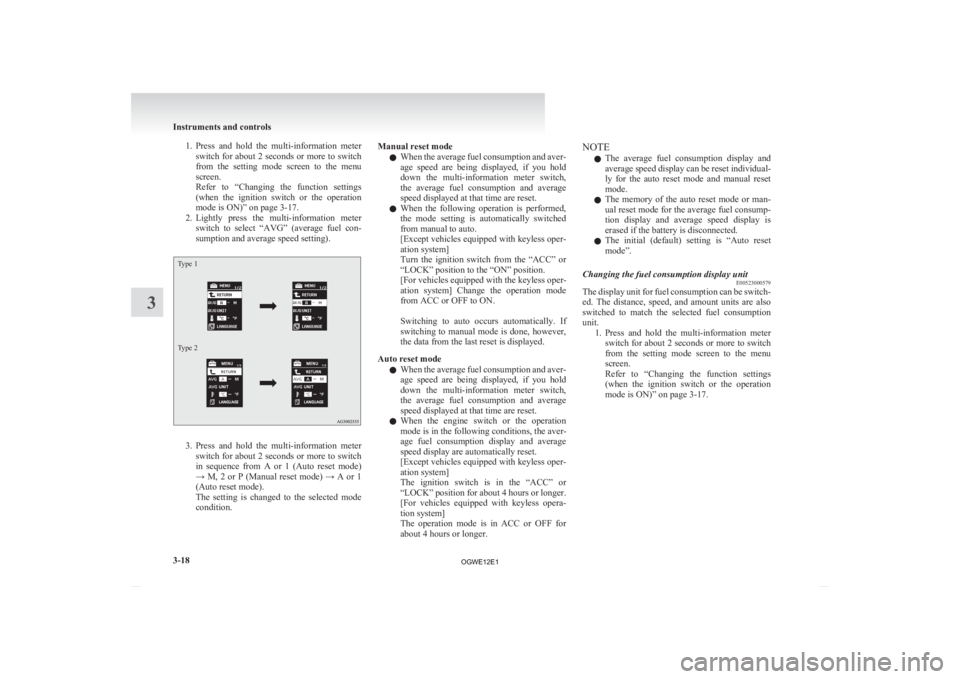
2. Lightly press the multi-information meter switch to select “AVG” (average fuel con-
sumption and average speed setting).
Type 1
Type 2 3. Press
and hold the multi-information meter
switch for about 2 seconds or more to switch
in sequence from A or 1 (Auto reset mode)
→ M, 2 or P (Manual reset mode) → A or 1
(Auto reset mode).
The setting is changed to the selected mode
condition. Manual reset mode
l When
the average fuel consumption and aver-
age speed are being displayed, if you hold
down the multi-information meter switch,
the average fuel consumption and average
speed displayed at that time are reset.
l When the following operation is performed,
the mode setting is automatically switched
from manual to auto.
[Except vehicles equipped with keyless oper-
ation system]
Turn the ignition switch from the “ACC” or
“LOCK” position to the “ON” position.
[For vehicles equipped with the keyless oper-
ation system] Change the operation mode
from ACC or OFF to ON.
Switching to auto occurs automatically. If
switching to manual mode is done, however,
the data from the last reset is displayed.
Auto reset mode l When the average fuel consumption and aver-
age speed are being displayed, if you hold
down the multi-information meter switch,
the average fuel consumption and average
speed displayed at that time are reset.
l When the engine switch or the operation
mode is in the following conditions, the aver-
age fuel consumption display and average
speed display are automatically reset.
[Except vehicles equipped with keyless oper-
ation system]
The ignition switch is in the “ACC” or
“LOCK” position for about 4 hours or longer.
[For vehicles equipped with keyless opera-
tion system]
The operation mode is in ACC or OFF for
about 4 hours or longer. NOTE
l The
average fuel consumption display and
average speed display can be reset individual-
ly for the auto reset mode and manual reset
mode.
l The memory of the auto reset mode or man-
ual reset mode for the average fuel consump-
tion display and average speed display is
erased if the battery is disconnected.
l The initial (default) setting is “Auto reset
mode”.
Changing the fuel consumption display unit E00523000579
The display unit for fuel consumption can be switch-
ed.
The distance, speed, and amount units are also
switched to match the selected fuel consumption
unit. 1. Press and hold the multi-information meterswitch for about 2 seconds or more to switch
from the setting mode screen to the menu
screen.
Refer to “Changing the function settings
(when the ignition switch or the operation
mode is ON)” on page 3-17. Instruments and controls
3-18
3
OGWE12E1
Page 115 of 378
2. Lightly press the multi-information meter
switch to select “AVG UNIT” (fuel consump-
tion display setting).
Type 1
Type 2 3. Press
and hold the multi-information meter
switch for about 2 seconds or more to dis-
play “AVG UNIT” (fuel consumption dis-
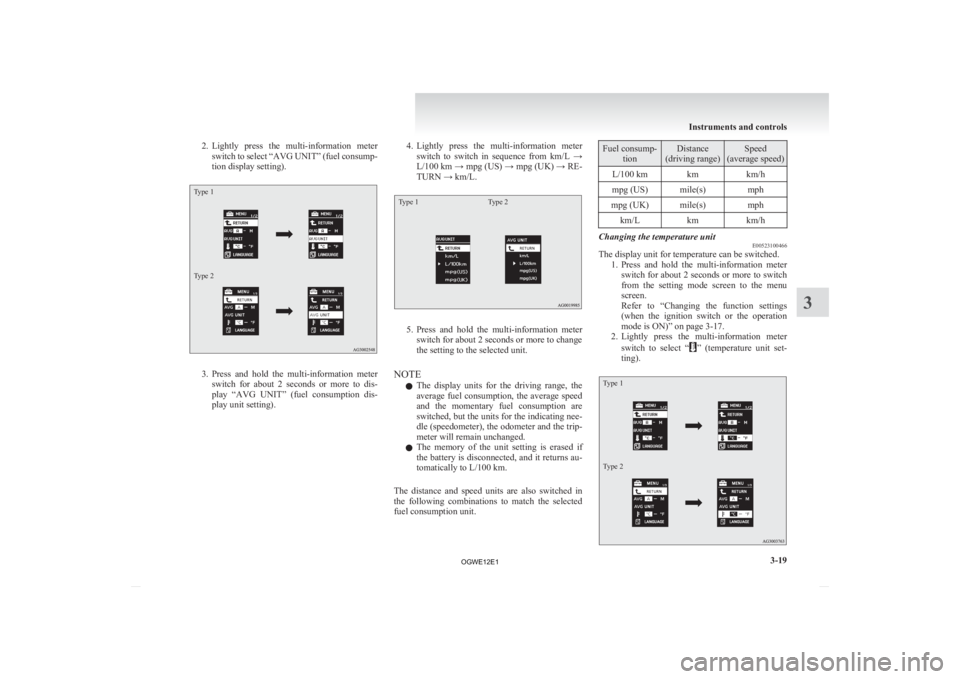
play unit setting). 4. Lightly
press the multi-information meter
switch to switch in sequence from km/L →
L/100 km → mpg (US) → mpg (UK) → RE-
TURN → km/L.
Type 1 Type 2 5. Press
and hold the multi-information meter
switch for about 2 seconds or more to change
the setting to the selected unit.
NOTE l The display units for the driving range, the
average fuel consumption, the average speed
and the momentary fuel consumption are
switched, but the units for the indicating nee-
dle (speedometer), the odometer and the trip-
meter will remain unchanged.
l The memory of the unit setting is erased if
the battery is disconnected, and it returns au-
tomatically to L/100 km.
The distance and speed units are also switched in
the following combinations to match the selected
fuel consumption unit. Fuel consump-
tion Distance
(driving range) Speed
(average speed)
L/100 km km km/h
mpg (US) mile(s) mph
mpg (UK) mile(s) mph km/L kmkm/h Changing the temperature unit
E00523100466
The display unit for temperature can be switched.
1. Press
and hold the multi-information meter
switch for about 2 seconds or more to switch
from the setting mode screen to the menu
screen.
Refer to “Changing the function settings
(when the ignition switch or the operation
mode is ON)” on page 3-17.
2. Lightly press the multi-information meter
switch to select “ ”
(temperature unit set-
ting).
Type 1
Type 2 Instruments and controls
3-19 3
OGWE12E1
Page 118 of 378
2. Lightly press the multi-information meter
switch to select “ALARM” (rest time setting).
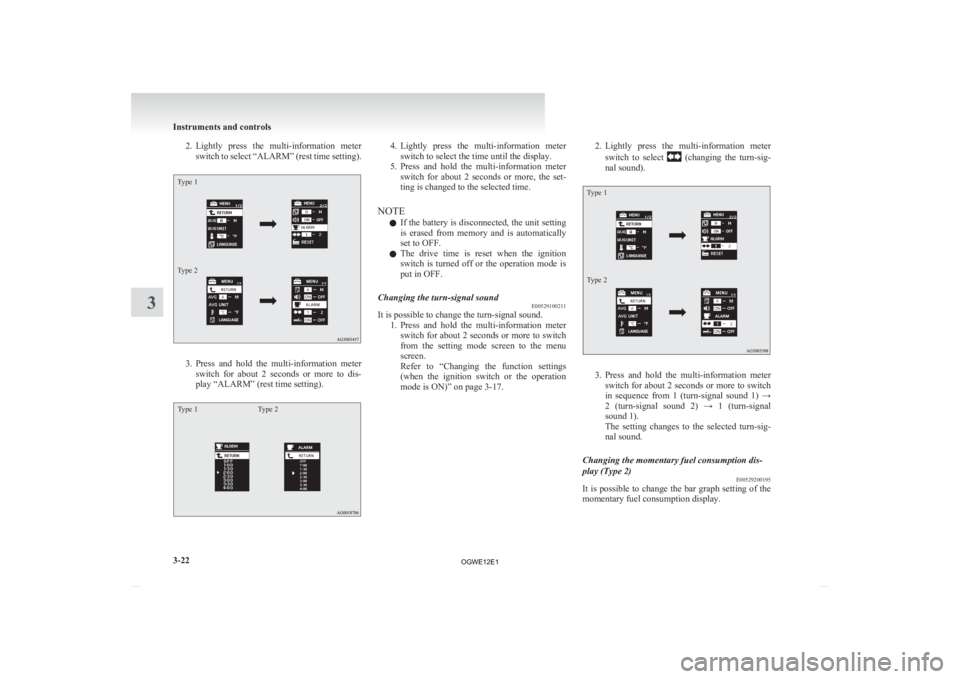
Type 1
Type 2 3. Press
and hold the multi-information meter
switch for about 2 seconds or more to dis-
play “ALARM” (rest time setting).
Type 1 Type 2 4. Lightly
press the multi-information meter
switch to select the time until the display.
5. Press and hold the multi-information meter switch for about 2 seconds or more, the set-
ting is changed to the selected time.
NOTE l If the battery is disconnected, the unit setting
is erased from memory and is automatically
set to OFF.
l The drive time is reset when the ignition
switch is turned off or the operation mode is
put in OFF.
Changing the turn-signal sound E00529100211
It is possible to change the turn-signal sound.
1. Press
and hold the multi-information meter
switch for about 2 seconds or more to switch
from the setting mode screen to the menu
screen.
Refer to “Changing the function settings
(when the ignition switch or the operation
mode is ON)” on page 3-17. 2. Lightly
press the multi-information meter
switch to select (changing the turn-sig-
nal sound).
Type 1
Type 2 3. Press
and hold the multi-information meter
switch for about 2 seconds or more to switch
in sequence from 1 (turn-signal sound 1) →
2 (turn-signal sound 2) → 1 (turn-signal
sound 1).
The setting changes to the selected turn-sig-
nal sound.
Changing the momentary fuel consumption dis-
play (Type 2) E00529200195
It is possible to change the bar graph setting of the
momentary fuel consumption display. Instruments and controls
3-22
3
OGWE12E1
Page 119 of 378
1. Press and hold the multi-information meter
switch for about 2 seconds or more to switch
from the setting mode screen to the menu
screen.
Refer to “Changing the function settings
(when the ignition switch or the operation
mode is ON)” on page 3-17.
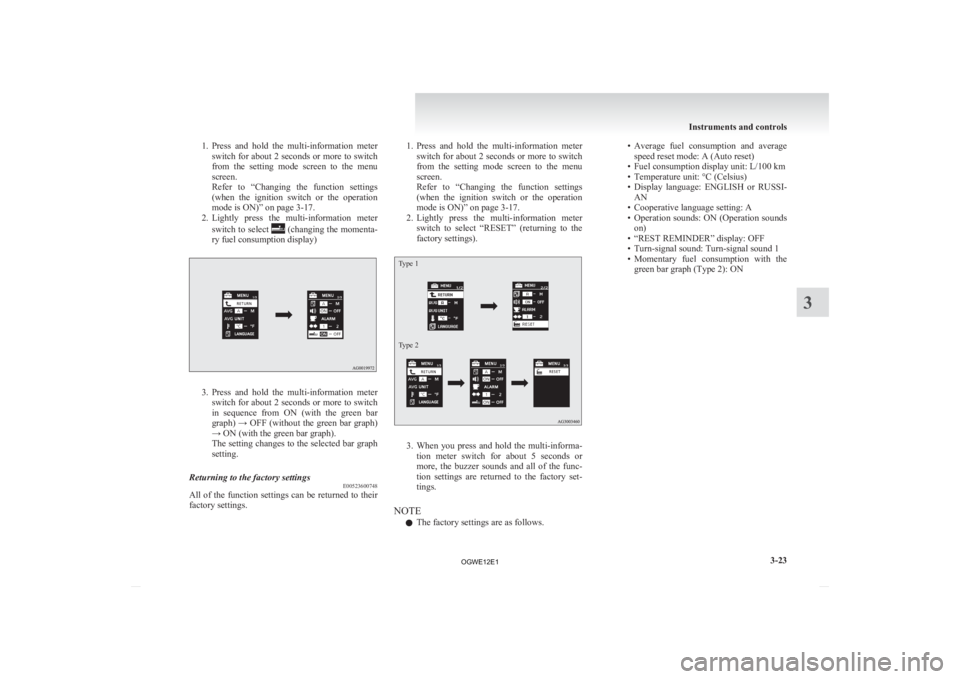
2. Lightly press the multi-information meter
switch to select (changing the momenta-
ry fuel consumption display) 3. Press
and hold the multi-information meter
switch for about 2 seconds or more to switch
in sequence from ON (with the green bar
graph) → OFF (without the green bar graph)
→ ON (with the green bar graph).
The setting changes to the selected bar graph
setting.
Returning to the factory settings E00523600748
All of the function settings can be returned to their
factory settings. 1. Press
and hold the multi-information meter
switch for about 2 seconds or more to switch
from the setting mode screen to the menu
screen.
Refer to “Changing the function settings
(when the ignition switch or the operation
mode is ON)” on page 3-17.
2. Lightly press the multi-information meter switch to select “RESET” (returning to the
factory settings).
Type 1
Type 2 3. When
you press and hold the multi-informa-
tion meter switch for about 5 seconds or
more, the buzzer sounds and all of the func-
tion settings are returned to the factory set-
tings.
NOTE l The factory settings are as follows. • Average
fuel consumption and average
speed reset mode: A (Auto reset)
• Fuel consumption display unit: L/100 km
• Temperature unit: °C (Celsius)
• Display language: ENGLISH or RUSSI- AN
• Cooperative language setting: A
• Operation sounds: ON (Operation sounds on)
• “REST REMINDER” display: OFF
• Turn-signal sound: Turn-signal sound 1
• Momentary fuel consumption with the green bar graph (Type 2): ON Instruments and controls
3-23 3
OGWE12E1
Page 129 of 378
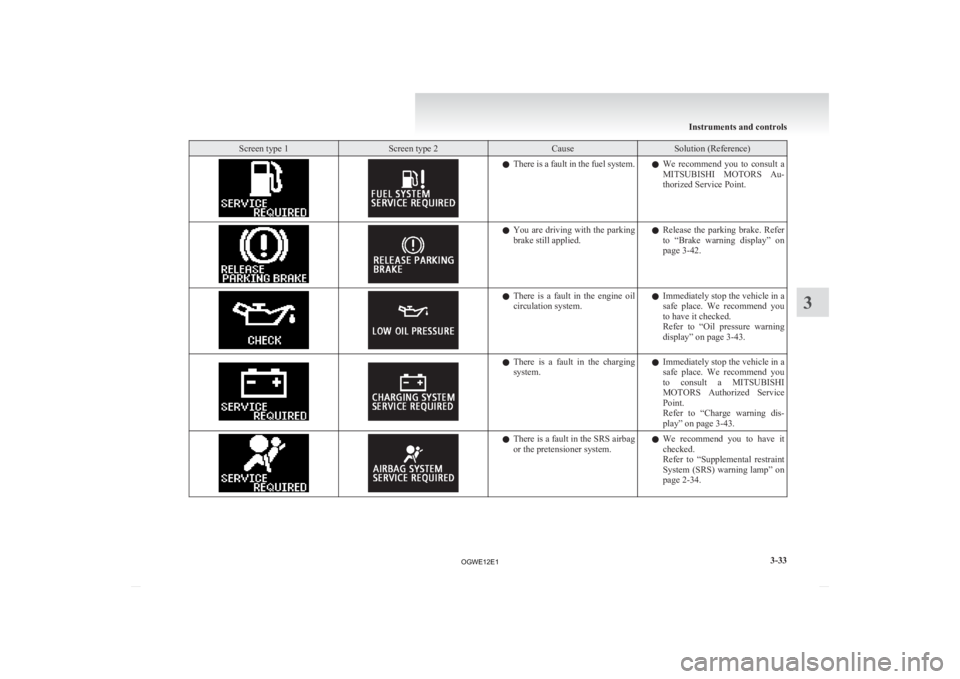
Screen type 1 Screen type 2 Cause Solution (Reference)
l
There is a fault in the fuel system.
lWe recommend you to consult a
MITSUBISHI MOTORS Au-
thorized Service Point. l
You
are driving with the parking
brake still applied. l
Release the parking brake. Refer
to “Brake warning display” on
page 3-42. l
There
is a fault in the engine oil
circulation system. l
Immediately stop the vehicle in a
safe place. We recommend you
to have it checked.
Refer to “Oil pressure warning
display” on page 3-43. l
There
is a fault in the charging
system. l
Immediately stop the vehicle in a
safe place. We recommend you
to consult a MITSUBISHI
MOTORS Authorized Service
Point.
Refer to “Charge warning dis-
play” on page 3-43. l
There
is a fault in the SRS airbag
or the pretensioner system. l
We recommend you to have it
checked.
Refer to “Supplemental restraint
System (SRS) warning lamp” on
page 2-34. Instruments and controls
3-33 3
OGWE12E1
Page 131 of 378
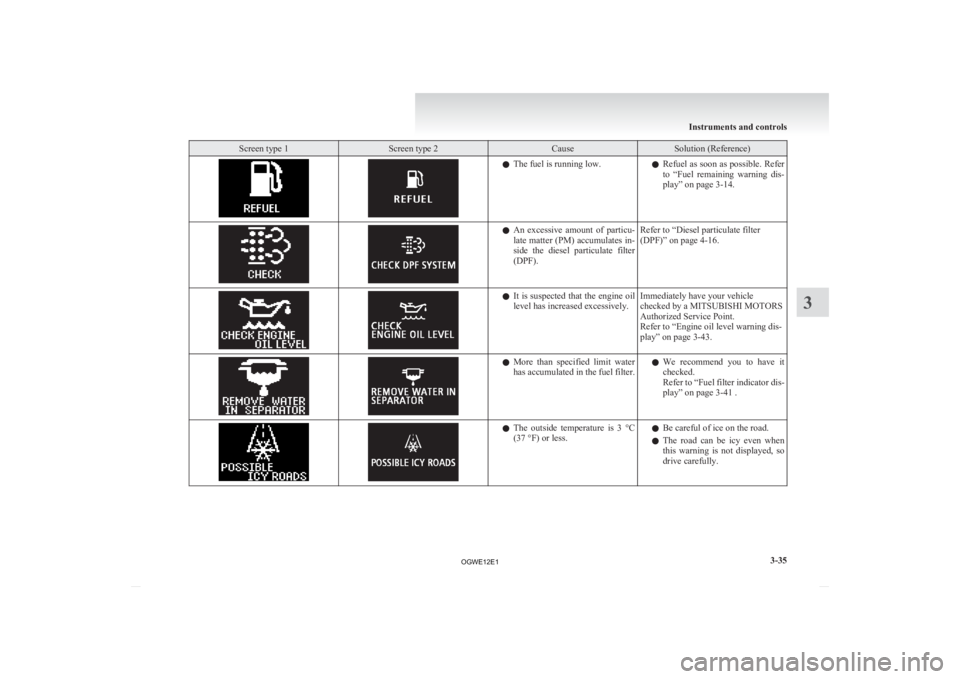
Screen type 1 Screen type 2 Cause Solution (Reference)
l
The fuel is running low.
lRefuel as soon as possible. Refer
to “Fuel remaining warning dis-
play” on page 3-14. l
An
excessive amount of particu-
late matter (PM) accumulates in-
side the diesel particulate filter
(DPF). Refer to “Diesel particulate filter
(DPF)” on page 4-16. l
It
is suspected that the engine oil
level has increased excessively. Immediately have your vehicle
checked by a MITSUBISHI MOTORS
Authorized Service Point.
Refer to “Engine oil level warning dis-
play” on page 3-43. l
More
than specified limit water
has accumulated in the fuel filter. l
We recommend you to have it
checked.
Refer to “Fuel filter indicator dis-
play” on page 3-41 . l
The
outside temperature is 3 °C
(37 °F) or less. l
Be careful of ice on the road.
l The
road can be icy even when
this warning is not displayed, so
drive carefully. Instruments and controls
3-35 3
OGWE12E1
Page 137 of 378
CAUTION
l
If the lamp illuminates while
the engine is running, avoid
driving at high speeds and have
the system inspected by a
MITSUBISHI MOTORS Au-
thorized Service Point as soon
as possible.
Accelerator pedal and brake
pedal response may be negative-
ly influenced under these condi-
tions.
NOTE l The
engine electronic control mod-
ule accommodating the onboard di-
agnostic system has various fault
data (especially about the exhaust
emission) stored. Charge warning lamp
E00502701192
This
lamp illuminates when the ignition
switch is turned “ON” or the operation
mode is put in ON, and goes off after the
engine has started.
A warning is also displayed on the multi-
information display. CAUTION
l
If
it illuminates while the en-
gine is running, there is a prob-
lem in the charging system. Im-
mediately park your vehicle in
a safe place and we recommend
you to have it checked. Information screen display
E00524600051
Fuel filter indicator display* E00529400083
Type 1 Type 2
When the ignition switch is turned to the “ON” po-
sition
or the operation mode is put in ON, if more
water than the specified limit has accumulated in
the fuel filter, the warning display is displayed on
the information screen in the multi-information dis-
play. CAUTION
l
If
this warning display is displayed we rec-
ommend you to have it checked.
Prolonged driving with the warning dis-
play shown may damage the engine. Instruments and controls
3-41 3
OGWE12E1
Page 170 of 378
NOTE
l If
the engine is cold, the diesel preheat indi-
cation lamp is on for a longer time.
l When the engine has not been started within
about 5 seconds after the diesel preheat indi-
cation lamp went out, return the ignition key
to the “LOCK” position. Then, turn the key
to the “ON” position to preheat the engine
again.
l When the engine is warm, the diesel preheat
indication lamp does not come on even if the
ignition key is placed in the “ON” position.
Start the engine by turning the ignition key
right to the “START” position.
7. Turn the ignition key to the “START” posi- tion without depressing the accelerator pedal,
and release it when the engine starts.
NOTE l Minor noises may be heard on engine start-
up. These will disappear as the engine warms
up.
Using the MIVEC engine*
The MIVEC engine automatically switches its in-
take-valve control between a low-speed mode and
a high-speed mode in accordance with driving con-
ditions for maximum engine performance.
NOTE l To protect the engine, the high-speed mode
may not be selected while the engine coolant
temperature is low. Fuel injection amount learning proc-
ess (diesel-powered vehicles)
E00627900043
To
keep exhaust emissions and engine noise low,
the engine very occasionally performs a learning
process for the fuel injection amount.
The engine sounds slightly different from usual
while the learning process is taking place. The
change in the engine sound does not indicate a fault. Diesel particulate filter (DPF)*
E00619800245
The
diesel particulate filter (DPF) is a device that
captures most of the particulate matter (PM) in the
exhaust emissions of the diesel engine. The DPF au-
tomatically burns away trapped PM during vehicle
operation. Under certain driving conditions, howev-
er, the DPF is not able to burn away all of the trap-
ped PM and, as a result, an excessive amount of
PM accumulates inside it. WARNING
l The DPF reaches very high temperatures.
Do
not park your vehicle in areas where
combustible materials such as dry grass
or leaves can come in contact with a hot
exhaust system since a fire could occur. CAUTION
l
Do
not use any type of fuel or engine oil
that is not specified for your vehicle. Al-
so, do not use any moisture-removing
agent or other fuel additive. Such substan-
ces could have a detrimental effect on the
DPF.
Refer to “Fuel selection” on page 02 and
“Engine oil” on page 8-04.
NOTE l To
minimize the likelihood of excessive ac-
cumulation of PM, try to avoid driving for
long periods at low speeds and repeatedly
driving short distances. Starting and driving
4-16
4
OGWE12E1