ECO mode MITSUBISHI MIRAGE 2015 6.G Repair Manual
[x] Cancel search | Manufacturer: MITSUBISHI, Model Year: 2015, Model line: MIRAGE, Model: MITSUBISHI MIRAGE 2015 6.GPages: 300, PDF Size: 43.44 MB
Page 215 of 300

To play tracks from USB device (if so equipped) 7-34 Comfort controls
7
N00703100012
Operate the SEL switch to
select desired file.
When this mode is activated by pressing the SEL switch, the SEL i
ndicator will be dis-
played in the display.
N00764500024
Press the RPT button to show “RPT” in the display. To cancel this
mode, press the button
again.
N00764600038
Press and hold the RPT button until you hear a beep to show “F-RPT” in the display. All tracks in the current folder are played repeatedly. To exit this mode, press the button again.
N00764700039
Press the RDM button to show “F-RDM” inthe display.The audio randomly selects tracks from the current folder and plays the selected tracks. To exit this mode, press the button again.
N00764800030
Press and hold the RDM button until you hear a beep to show “RDM” in the display. The audio randomly selects tracks from allfolders and plays the selected tracks.
To exit this mode, press the button again.
N00765100043
You can displays titles with tag information. The display changes as follows every time the DISP button is pressed during playback:Folder name
File name
Normal display.
1. Press and hold the DISP button until you hear a beep.2. The display changes
as follows every time
the DISP button is pressed briefly: Album TA G
Track TAG
Artist TAG
Genre TAG (vehicles with Bluetooth
® 2.0
interface)
Normal display.
To find a file
Press the SEL switch :To start this mode or
to select the folder or file.
Turn the SEL switch :To show the folder or
file.
NOTE
To cancel the selection, press the button to return to the previous step. If no operation is perfo
rmed for 10 seconds
or more or other butt
on is operated after the
SEL switch has been turned, searching of the desired file is canceled. If no operation is performed for 5 seconds or more after the file is
displayed, playback
starts. When the SEL indicato
r is not shown on the
display and the SEL switch is operated, thevolume adjustment is activated.
To play the same file repeatedly
To play the files in the same folder repeatedly
To play a folder in random order
To play all folders in random order
To switch the display
Folder title Tag information
NOTE
Press and hold the DISP button again until you hear a beep, and the tag information dis-play returns to the folder title display. Up to 11 characters are shown in the display at once. If the title is cut off in the middle, press the PAGE button. The next characters are displayed every time this button ispressed.
BK0212400US.book 34 ページ 2014年4月1日 火曜日 午後2時21分
Page 216 of 300
To play tracks from a Bluetooth® device (vehicles with Bluetooth® 2.0 interface)
Comfort controls 7-35
7
N00765200073
Desired tracks can be
selected and played
from your USB memory device by “Artist”, “Album”, “Playlist”
and “Genre” using voice
commands.For information concerning the voice recog- nition function or spea
ker registration func-
tion, refer to “Bluetooth
® 2.0 interface” on
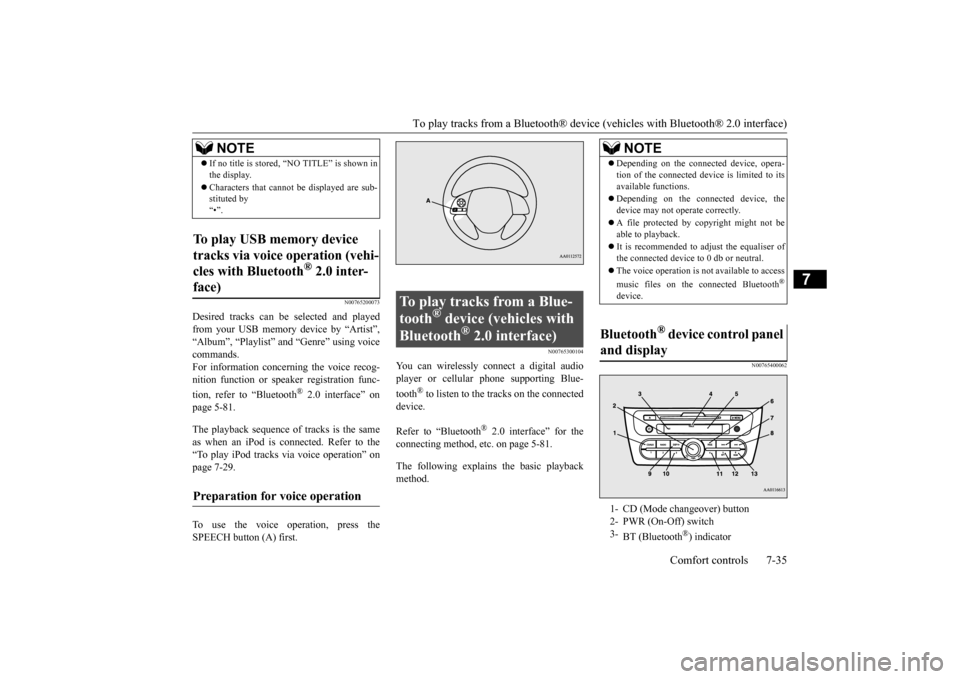
page 5-81. The playback sequence of tracks is the same as when an iPod is connected. Refer to the “To play iPod tracks via voice operation” onpage 7-29. To use the voice operation, press the SPEECH button (A) first.
N00765300104
You can wirelessly c
onnect a digital audio
player or cellular phone supporting Blue- tooth
® to listen to the tracks on the connected
device. Refer to “Bluetooth
® 2.0 interface” for the
connecting method, etc. on page 5-81. The following explains
the basic playback
method.
N00765400062
If no title is stored, “NO TITLE” is shown in the display. Characters that cannot
be displayed are sub-
stituted by “•”.
To play USB memory device tracks via voice operation (vehi- cles with Bluetooth
® 2.0 inter-
face)
Preparation for voice operation
NOTE
To play tracks from a Blue- tooth
® device (vehicles with
Bluetooth
® 2.0 interface)
NOTE
Depending on the connected device, opera- tion of the connected de
vice is limited to its
available functions. Depending on the connected device, the device may not ope
rate correctly.
A file protected by c
opyright might not be
able to playback. It is recommended to adjust the equaliser of the connected device to 0 db or neutral. The voice operation is not
available to access
music files on the c
onnected Bluetooth
®
device.
Bluetooth
® device control panel
and display 1- CD (Mode changeover) button 2- PWR (On-Off) switch 3-
BT (Bluetooth
®) indicator
BK0212400US.book 35 ページ 2014年4月1日 火曜日 午後2時21分
Page 234 of 300
Tire repair kit (if so equipped)
For emergencies 8-9
8
12. Pull out the compressor’s power cord (K),
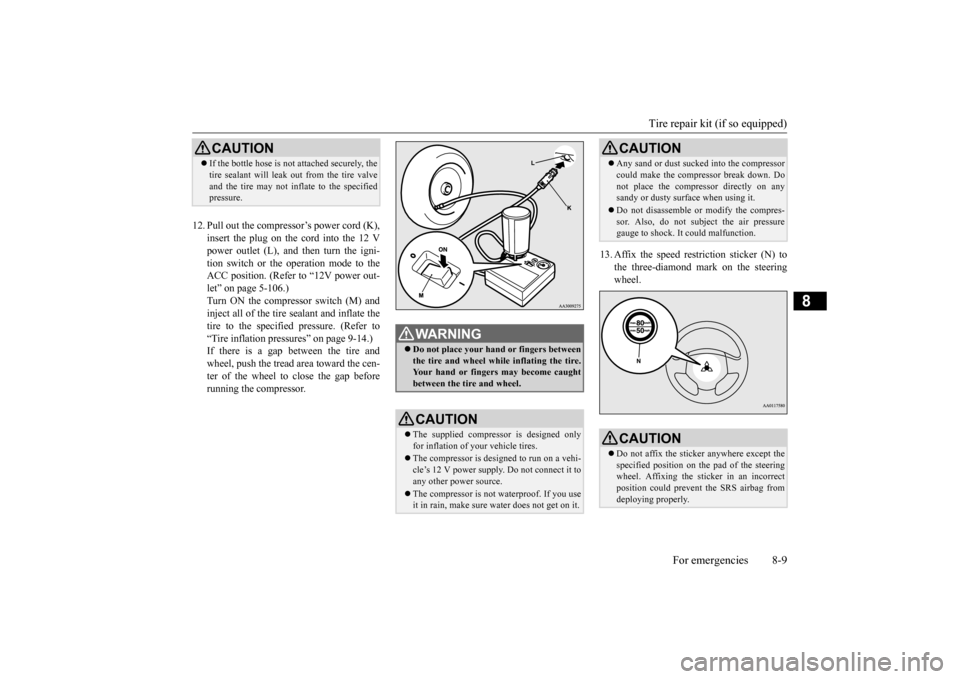
insert the plug on the cord into the 12 Vpower outlet (L), and then turn the igni- tion switch or the operation mode to the ACC position. (Refer to “12V power out-let” on page 5-106.) Turn ON the compressor switch (M) and inject all of the tire sealant and inflate thetire to the specified pressure. (Refer to “Tire inflation pressures” on page 9-14.) If there is a gap between the tire andwheel, push the tread area toward the cen- ter of the wheel to close the gap before running the compressor.
13. Affix the speed rest
riction sticker (N) to
the three-diamond mark on the steeringwheel.
CAUTION If the bottle hose is not attached securely, the tire sealant will leak out from the tire valveand the tire may not inflate to the specifiedpressure.
WA R N I N G Do not place your hand or fingers between the tire and wheel while inflating the tire. Your hand or fingers may become caughtbetween the tire and wheel.CAUTION The supplied compressor is designed only for inflation of your vehicle tires. The compressor is designed to run on a vehi- cle’s 12 V power supply. Do not connect it to any other power source. The compressor is not waterproof. If you use it in rain, make sure water does not get on it.
Any sand or dust sucked into the compressor could make the compressor break down. Donot place the compressor directly on anysandy or dusty surface when using it. Do not disassemble or modify the compres- sor. Also, do not subject the air pressure gauge to shock. It
could malfunction.
CAUTIONDo not affix the sticke
r anywhere except the
specified position on th
e pad of the steering
wheel. Affixing the sticker in an incorrect position could prevent the SRS airbag from deploying properly.CAUTION
BK0212400US.book 9 ページ 2014年4月1日 火曜日 午後2時21分
Page 243 of 300
Operation under adverse driving conditions 8-18 For emergencies
8
Set the gearshift lever to the “N” (Neutral) position. Secure the steering whee
l in a straight-ahead
position with a rope or tie-down strap.
Release the parking brake. Place the gearshift lever in the “N” (Neutral)position (manual transaxle) or the selector lever in the “N” (NEUTRAL) position (CVT).
N00837200750
If your vehicle becomes
stuck in snow, sand,
or mud, it can often be moved by a rocking motion. Rock your vehicle back and forth tofree it. Do not rev the engine or spin the wheels. Constant efforts to free a stuck vehicle cancause overheating and tr
ansaxle failure. Let
the engine idle for a few minutes to cool the transaxle before trying again.If your vehicle is still
stuck after several rock-
ing attempts, call for a commercial tow truck service.
Towing the vehicle by a tow truck
CAUTION This vehicle must not be towed by a tow truck using sling lift
type equipment (Type
A) as illustrated. Usi
ng a sling lift will dam-
age the bumper and front end. Do not tow continuously variable transmis- sion (CVT) vehicles with the driving wheels on the ground (Type B) as illustrated. If the vehicle is towed like
this, the continuously
variable transmission (CVT) fluid may not reach all parts of the transmission, thus dam- aging it.If you tow CVT vehicles, use Type C, D or E equipment. If the manual transaxle is malfunctioning or damaged, transport the
vehicle with the driv-
ing wheels on a carriage (Type C, D or E) asillustrated.
If the vehicle is towed with the ignition switch in the “ON” pos
ition or the operation
mode in ON and only the front wheels oronly the rear wheels raised off the ground (Type B or C), the Acti
ve Stability Control
(ASC) may operate, resul
ting in an accident.
When towing the vehicle with the rear wheels raised, turn the ignition switch to the “ACC” position or put
the operation mode in
ACC. When towing the vehicle with the front wheels raised, ke
ep the ignition switch
or the operation mode as follows.[Except for vehicles equipped with the F. A . S . T. - k e y ] The ignition switch is in “OFF” or “ACC”position. [Vehicles equipped with the F.A.S.T.-key] The operation mode is in OFF or ACC.
Towing with rear wheels off the ground (Type B - M/T vehicles only)
CAUTION
Towing a front-wheel drive vehi- cle with front wheels off the ground (Type C) Operation under adverse driving conditions If your vehicle becomes stuck in sand, mud or snow
BK0212400US.book 18 ページ 2014年4月1日 火曜日 午後2時21分
Page 257 of 300
Tires 9-12 Vehicle care and maintenance
9
N00939200566
It is important to familiarize yourself with the following terms:
Cold tire pressure: • The measured pressure after the vehiclehas been parked for at least three hours, or • The measured pressure when the vehicleis driven less than 1 mile (1.6 km) after having been parked for three hours.
Maximum pressure: the maximum per- missible cold tire inflation pressure for this tire. Recommended inflation pressure: the inflation pressure for optimum tire perfor- mance. Intended outboard sidewall: • The sidewall that c
ontains a whitewall,
bears white letteri
ng or bears manufac-
turer, brand, and/or model name molding that is higher or deeper than the same molding on the other sidewall of the tire,or • The outward facing si
dewall of an asym-
metrical tire that has a particular sidethat must always face outward when mounted on a vehicle.
Passenger car tire: a
tire intended for use
on passenger cars, multipurpose passen- ger vehicles, and trucks that have a gross vehicle weight rati
ng (GVWR) of 10,000
pounds or less.
Light truck (LT) tire
: a tire designated by
its manufacturer as primarily intended foruse on lightweight tr
ucks or multipurpose
passenger vehicles. Tread: portion of a tire that comes into contact with the road. Tread rib: a tread se
ction running circum-
ferentially around a tire. Tread separation: pulling away of the tread from the tire carcass. Carcass: the tire structure, except tread and sidewall rubber which, when inflated, bears the load. Sidewall: portion of a tire between the tread and bead. Section width: the line
ar distance between
the exteriors of the sidewalls of an inflated tire, excluding elevations due to labeling, decoration, or protective bands. Bead: the part of the tire that is made of steel wires, wrapped
or reinforced by ply
cords and that is shaped to fit the rim. Ply: a layer of rubber-coated parallel cords. Cord: the strands forming the plies in the tire. Rim: a metal support for a tire or a tire and tube assembly upon which the tirebeads are seated. Rim diameter: nominal diameter of the bead seat.
Check to see that the battery is securely installed and cannot be moved. Also checkeach terminal for tightness. If you will not be driving your vehicle for a long period of time, remove the battery andstore it in a place where the battery fluid will not freeze. The battery only should be stored with a full charge. Before cleaning the battery, tighten all the filler port caps to keep
dirt and moisture out.
Tires
WA R N I N GDriving with tires that are worn, damaged or improperly inflated is dangerous. These type tire conditions will adverselyaffect vehicle performance. These type tire conditions can also cause a tread separation or blowout which mayresult in an accide
nt causing serious
injury or death. Tires, including spar
e tire, degrade over
time with age even when they are not being used. It is recommended that tires over 6 yearsgenerally be replaced even if damage is not obvious.NOTE
BK0212400US.book 12 ページ 2014年4月1日 火曜日 午後2時21分
Page 300 of 300

N09348201045
NOTE Name of Owner Date of Purchase
Address of Owner Model of Vehicle
Name and Address of Dealer Vehicle Identification NumberMaintenance record
Service Performed DateKilometers
MilesInspection and Maintenance Item
BK0212400US.book 1 ページ 2014年4月1日 火曜日 午後2時21分