brake light MITSUBISHI OUTLANDER 2019 (in English) Owner's Guide
[x] Cancel search | Manufacturer: MITSUBISHI, Model Year: 2019, Model line: OUTLANDER, Model: MITSUBISHI OUTLANDER 2019Pages: 451, PDF Size: 58.02 MB
Page 251 of 451
![MITSUBISHI OUTLANDER 2019 (in English) Owners Guide Multi Information display - Type 1
Features and controls 5-169
5
[When the ignition switch is turned to the “OFF” or “LOCK” position or the operationmode is put in OFF] The display shows the](/img/19/34859/w960_34859-250.png "MITSUBISHI OUTLANDER 2019 (in English) Owners Guide Multi Information display - Type 1
Features and controls 5-169
5
[When the ignition switch is turned to the “OFF” or “LOCK” position or the operationmode is put in OFF] The display shows the")
Multi Information display - Type 1
Features and controls 5-169
5
[When the ignition switch is turned to the “OFF” or “LOCK” position or the operationmode is put in OFF] The display shows the overall ECO score the function has counted from the time when theignition switch is turn
ed to the “ON” position
to the time when it is turned to the “OFF” or “LOCK” or “ACC” position, or from the timewhen the operation mode is set to “ON” to the time when it is set to “OFF”.
N00556801270
1. Park your vehicle in a safe place. Firmly apply the parking brake and move the selector lever into the “P” (PARK) position.
2. When you lightly press the multi informa- tion meter switch, the information screenswitches to the function setting screen. Refer to “Information screen” on page 5-161. 3. Press and hold the multi information dis- play switch (for about 2 seconds or more) to switch from the setting mode screen to the menu screen.
4. Select the item to change on the menu screen and change to
the desired setting.
For further details on the operation meth- ods, refer to the following sections. Refer to “Changing the reset mode for average fuel consumption and average speed” on page 5-170.Refer to “Changing the fuel consumption display unit” on page 5-171. Refer to “Changing the temperature unit”on page 5-172. Refer to “Changing the display language” on page 5-172.Refer to “Changing the language on other system to match the multi information display” on page 5-173.Refer to “Operation
sound setting” on
page 5-173.
Changing the function settings
ECO drive level
Low High
CAUTION For safety, stop the vehicle before operating. While driving, even if you operate the multi information display switch, the function set- ting screen is not displayed.
NOTE
To return the menu screen to the function set- ting screen, press and hold the multi infor-mation display switch
(for about 2 seconds
or more). If no operations are made within about 30 seconds of the menu screen being displayed, the display returns to the function setting screen.
BK0264300US.book 169 ページ 2018年2月28日 水曜日 午後5時16分
Page 265 of 451
Indicator light, warning light, and information screen display list (multi information display - Type 1)
Features and controls 5-183
5
N00557701074 N00557801349
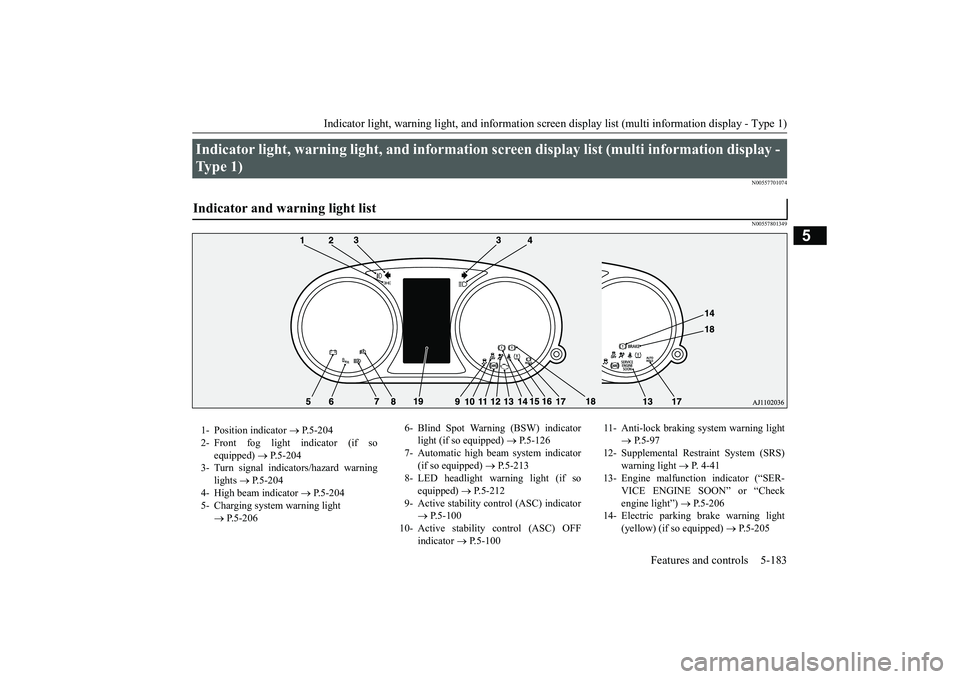
Indicator light, warning light, and information
screen display list (multi information display -
Type 1) Indicator and warning light list 1- Position indicator
P.5-204
2- Front fog light indicator (if so
equipped)
P.5-204
3- Turn signal indicators/hazard warning
lights
P.5-204
4- High beam indicator
P.5-204
5- Charging system warning light
P.5-206
6- Blind Spot Warning (BSW) indicator
light (if so equipped)
P.5-126
7- Automatic high beam system indicator
(if so equipped)
P.5-213
8- LED headlight warning light (if so
equipped)
P.5-212
9- Active stability control (ASC) indicator
P.5-100
10- Active stability
control (ASC) OFF
indicator
P.5-100
11- Anti-lock braking
system warning light
P.5-97
12- Supplemental Restra
int System (SRS)
warning light
P. 4 - 4 1
13- Engine malfuncti
on indicator (“SER-
VICE ENGINE SOON” or “Check engine light”)
P.5-206
14- Electric parking
brake warning light
(yellow) (if so equipped)
P.5-205
BK0264300US.book 183 ページ 2018年2月28日 水曜日 午後5時16分
Page 266 of 451
Indicator light, warning light, and information screen display list (multi information display - Type 1) 5-184 Features and controls
5
N00557901119
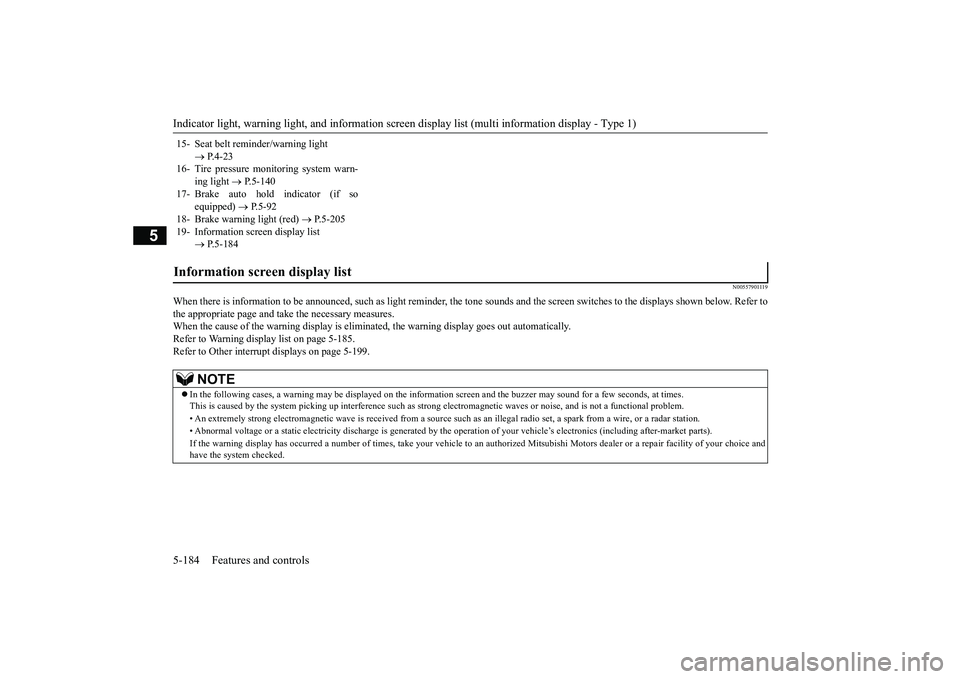
When there is information to be announced,
such as light reminder, the
tone sounds and the screen sw
itches to the displays show
n below. Refer to
the appropriate page and ta
ke the necessary measures.
When the cause of the warning display is elimin
ated, the warning displa
y goes out automatically.
Refer to Warning disp
lay list on page 5-185.
Refer to Other interrupt displays on page 5-199. 15- Seat belt remi
nder/warning light
P.4-23
16- Tire pressure monitoring system warn-
ing light
P.5-140
17- Brake auto hold indicator (if so
equipped)
P.5-92
18- Brake warning light (red)
P.5-205
19- Information screen display list
P.5-184
Information screen display list
NOTE
In the following cases, a warning may be
displayed on the information screen and th
e buzzer may sound for a
few seconds, at tim
es.
This is caused by the system picking up in
terference such as strong el
ectromagnetic waves
or noise, and is not a functional pro
blem.
• An extremely strong electrom
agnetic wave is received from a s
ource such as an illegal radio se
t, a spark from a wire, or a rad
ar station.
• Abnormal voltage or a static
electricity disc
harge is generated by the operation of
your vehicle’s electr
onics (including afte
r-market parts).
If the warning display has oc
curred a number of times, take your
vehicle to an author
ized Mitsubishi Motors
dealer or a repair
facility of your choice and
have the system checked.
BK0264300US.book 184 ページ 2018年2月28日 水曜日 午後5時16分
Page 272 of 451
Indicator light, warning light, and information screen display list (multi information display - Type 1) 5-190 Features and controls
5
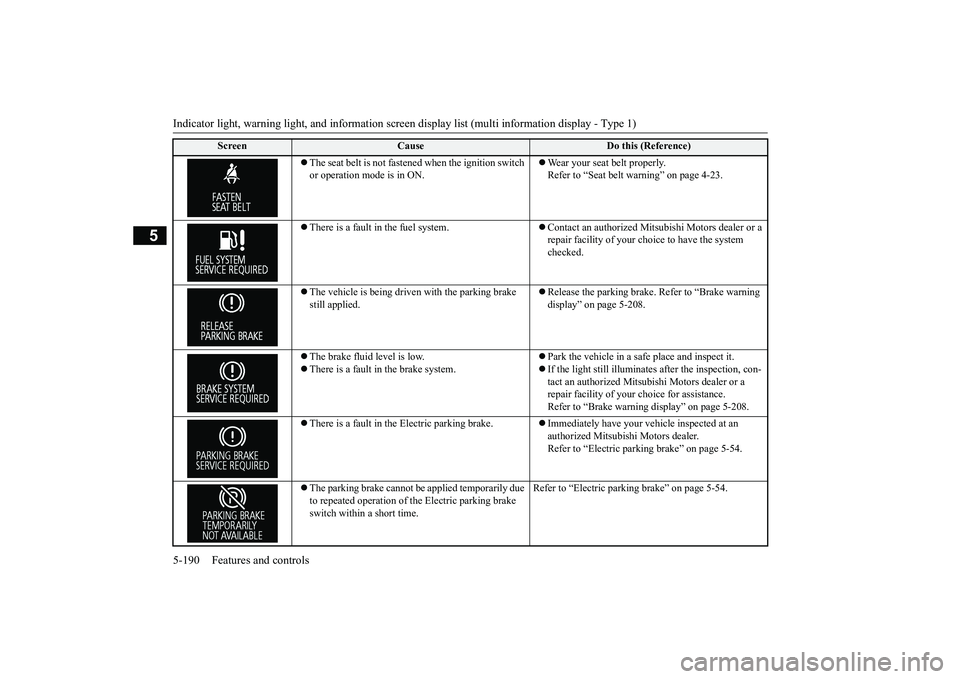
The seat belt is not fasten
ed when the ignition switch
or operation mode is in ON.
Wear your seat belt properly. Refer to “Seat belt
warning” on page 4-23.
There is a fault in the fuel system.
Contact an authorized Mits
ubishi Motors dealer or a
repair facility of your c
hoice to have the system
checked.
The vehicle is being driven with the parking brake still applied.
Release the parking brake. Refer to “Brake warning display” on page 5-208.
The brake fluid level is low. There is a fault in the brake system.
Park the vehicle in a safe place and inspect it. If the light still illuminates after the inspection, con- tact an authorized Mitsub
ishi Motors dealer or a
repair facility of your
choice for assistance.
Refer to “Brake warning
display” on page 5-208.
There is a fault in the Electric parking brake.
Immediately have your ve
hicle inspected at an
authorized Mitsubishi Motors dealer. Refer to “Electric parking brake” on page 5-54.
The parking brake cannot be
applied temporarily due
to repeated operation of the Electric parking brake switch within a short time.
Refer to “Electric parkin
g brake” on page 5-54.
Screen
Cause
Do this (Reference)
BK0264300US.book 190 ページ 2018年2月28日 水曜日 午後5時16分
Page 273 of 451
Indicator light, warning light, and information screen display list (multi information display - Type 1)
Features and controls 5-191
5
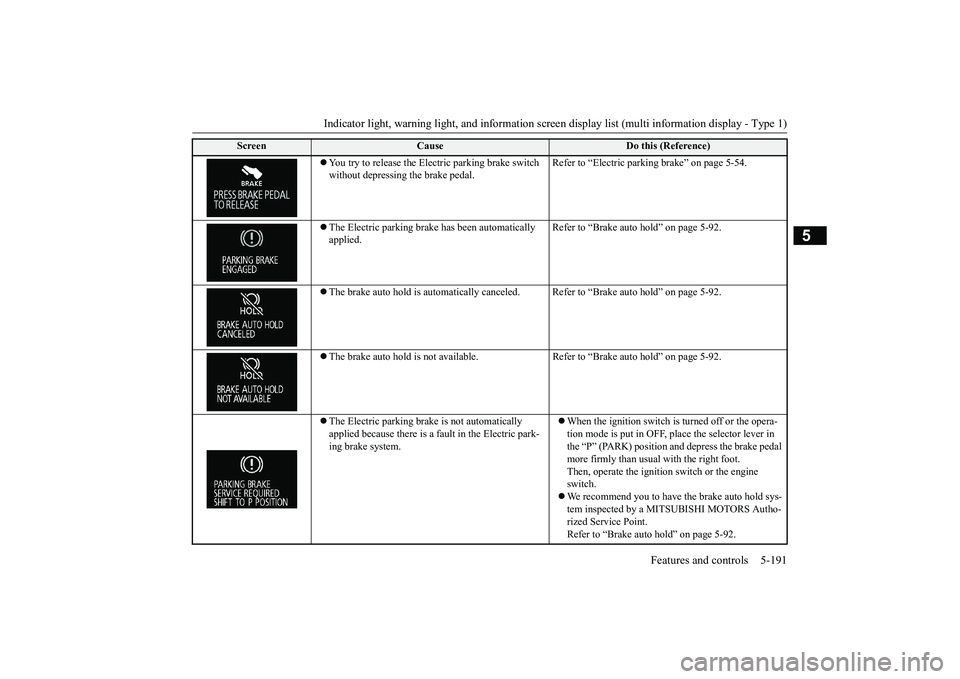
You try to release the Elec
tric parking brake switch
without depressing the brake pedal.
Refer to “Electric parki
ng brake” on page 5-54.
The Electric parking brak
e has been automatically
applied.
Refer to “Brake auto hold” on page 5-92.
The brake auto hold is automatically canceled
. Refer to “Brake auto hold” on page 5-92.
The brake auto hold is not available. Re
fer to “Brake auto hold” on page 5-92.
The Electric parking brake is not automatically applied because there is a fault in the Electric park-ing brake system.
When the ignition switch is
turned off or the opera-
tion mode is put in OFF, pl
ace the selector lever in
the “P” (PARK) position and depress the brake pedal more firmly than usual with the right foot. Then, operate the ignition switch or the engine switch. We recommend you to have the brake auto hold sys- tem inspected by a MITSUBISHI MOTORS Autho- rized Service Point. Refer to “Brake auto hold” on page 5-92.
Screen
Cause
Do this (Reference)
BK0264300US.book 191 ページ 2018年2月28日 水曜日 午後5時16分
Page 274 of 451
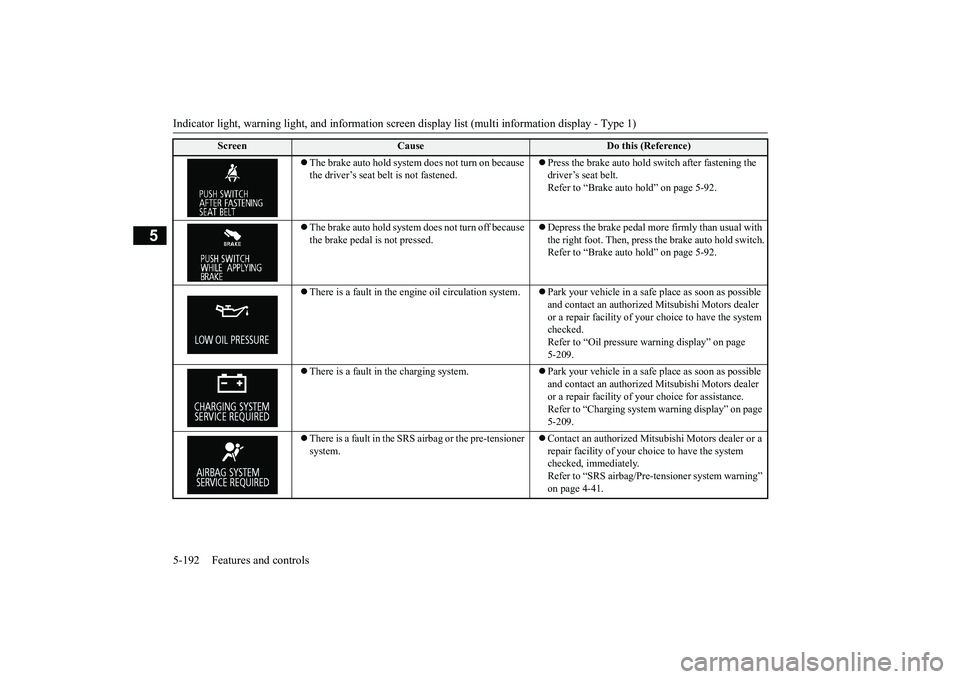
Indicator light, warning light, and information screen display list (multi information display - Type 1) 5-192 Features and controls
5
The brake auto hold system does not turn on because the driver’s seat belt is not fastened.
Press the brake auto hold switch after fastening the driver’s seat belt.Refer to “Brake auto hold” on page 5-92.
The brake auto hold system does not turn off because the brake pedal is not pressed.
Depress the brake pedal more firmly than usual with the right foot. Then, press
the brake auto hold switch.
Refer to “Brake auto hold” on page 5-92.
There is a fault in the engi
ne oil circulation system.
Park your vehicle in a safe place as soon as possible and contact an authorized
Mitsubishi Motors dealer
or a repair facility of your
choice to have the system
checked. Refer to “Oil pressure wa
rning display” on page
5-209.
There is a fault in the charging system.
Park your vehicle in a safe place as soon as possible and contact an authorized
Mitsubishi Motors dealer
or a repair facility of
your choice for assistance.
Refer to “Charging system
warning display” on page
5-209.
There is a fault in the SRS airbag or the pre-tensioner system.
Contact an authorized Mits
ubishi Motors dealer or a
repair facility of your c
hoice to have the system
checked, immediately.Refer to “SRS airbag/Pre-t
ensioner system warning”
on page 4-41.
Screen
Cause
Do this (Reference)
BK0264300US.book 192 ページ 2018年2月28日 水曜日 午後5時16分
Page 276 of 451
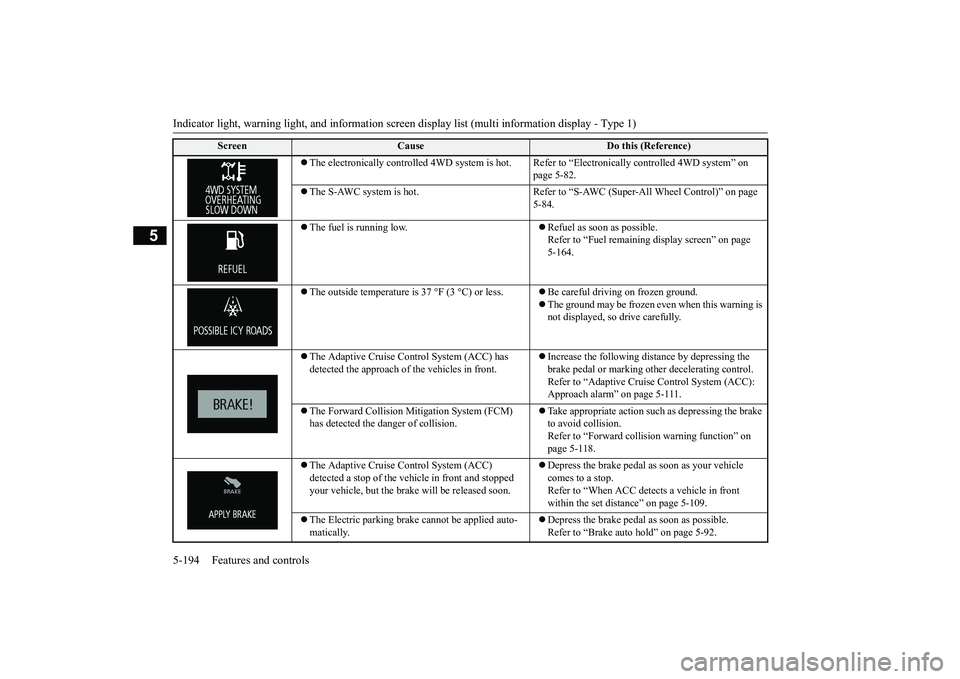
Indicator light, warning light, and information screen display list (multi information display - Type 1) 5-194 Features and controls
5
The electronically controlled 4WD
system is hot. Refer to “Electr
onically controlled
4WD system” on
page 5-82.
The S-AWC system is hot. Refer to “S-A
WC (Super-All Wheel Control)” on page
5-84.
The fuel is running low.
Refuel as soon as possible. Refer to “Fuel remaining
display screen” on page
5-164.
The outside temperature is
37 °F (3 °C) or less.
Be careful driving on frozen ground. The ground may be frozen even when this warning is not displayed, so drive carefully.
The Adaptive Cruise Control System (ACC) has detected the approach of
the vehicles in front.
Increase the following di
stance by depressing the
brake pedal or marking ot
her decelerating control.
Refer to “Adaptive Cruise
Control System (ACC):
Approach alarm” on page 5-111.
The Forward Collision Mitigation System (FCM) has detected the da
nger of collision.
Take appropriate action such
as depressing the brake
to avoid collision.Refer to “Forward colli
sion warning function” on
page 5-118.
The Adaptive Cruise Control System (ACC) detected a stop of the vehi
cle in front and stopped
your vehicle, but the brake
will be released soon.
Depress the brake pedal as soon as your vehicle comes to a stop. Refer to “When ACC dete
cts a vehicle in front
within the set distance” on page 5-109.
The Electric parking brake
cannot be applied auto-
matically.
Depress the brake pedal as soon as possible. Refer to “Brake auto hold” on page 5-92.
Screen
Cause
Do this (Reference)
BK0264300US.book 194 ページ 2018年2月28日 水曜日 午後5時16分
Page 281 of 451
Indicator light, warning light, and information screen display list (multi information display - Type 1)
Features and controls 5-199
5
N00558201395
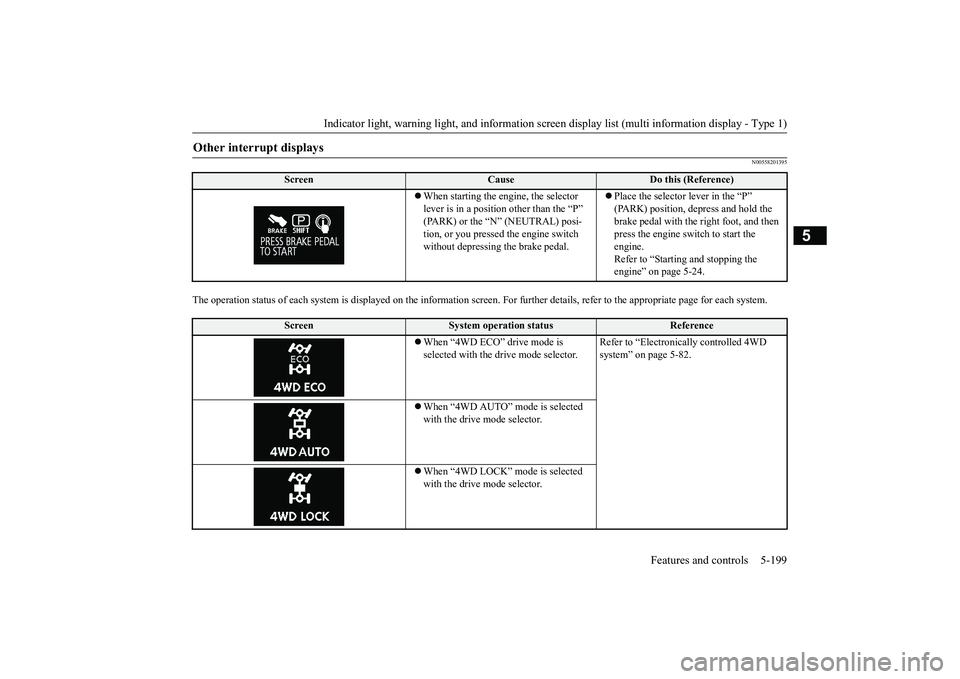
The operation status of each syst
em is displayed on the informat
ion screen. For furthe
r details, refer to
the appropriate page
for each system.
Other interrupt displays
Screen
Cause
Do this (Reference)
When starting the engine, the selector lever is in a positi
on other than the “P”
(PARK) or the “N” (NEUTRAL) posi-tion, or you pressed the engine switch without depressing the brake pedal.
Place the selector lever in the “P” (PARK) position, depress and hold the brake pedal with the right foot, and then press the engine switch to start the engine. Refer to “Starting and stopping the engine” on page 5-24.
Screen
System operation status
Reference
When “4WD ECO” drive mode is selected with the drive mode selector.
Refer to “Electronica
lly controlled 4WD
system” on page 5-82.
When “4WD AUTO” mode is selected with the drive mode selector. When “4WD LOCK” mode is selected with the drive mode selector.
BK0264300US.book 199 ページ 2018年2月28日 水曜日 午後5時16分
Page 286 of 451
Indicators 5-204 Features and controls
5
N00519900127 N00520000216
The arrows will flash in time with the corre- sponding exterior turn signals when the turnsignal lever is used. Both arrows will flash
when the hazard warn-
ing flasher swit
ch is pressed.
N00520100086
A blue light comes on when the headlights are on high beam.
N00520200175
This indicator comes on while the front foglights are on.
N00551301078
This indicator light illuminates while theparking lights are on.
N00575601020
This indicator comes on in blue while thecoolant temperature is low.
N00579200030
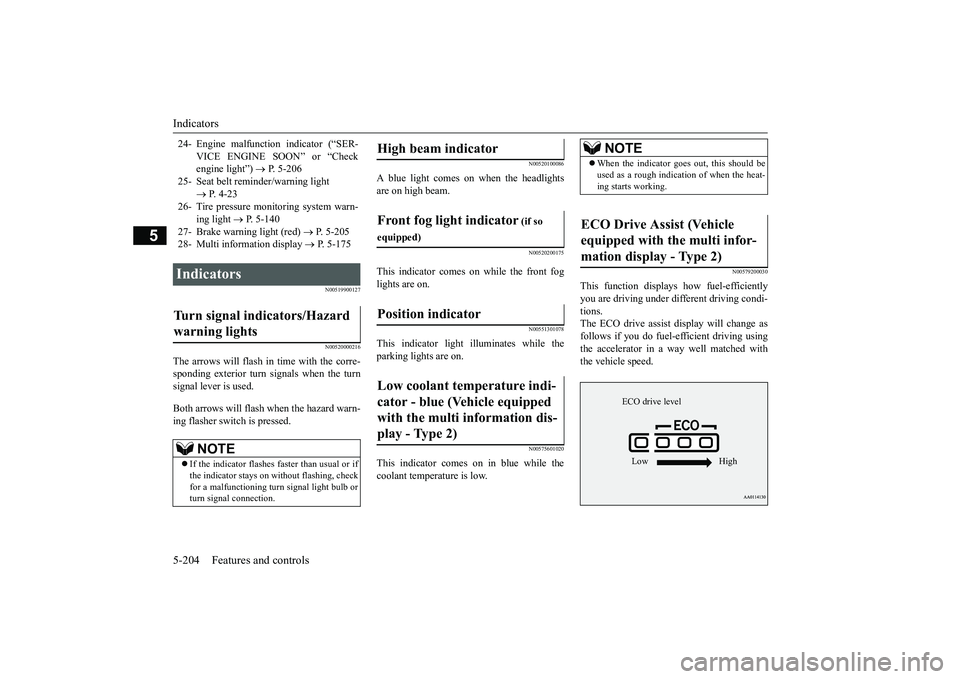
This function displays
how fuel-efficiently
you are driving under different driving condi- tions. The ECO drive assist di
splay will change as
follows if you do fuel-efficient driving using the accelerator in a way well matched with the vehicle speed.
24- Engine malfuncti
on indicator (“SER-
VICE ENGINE SOON” or “Check engine light”)
P. 5-206
25- Seat belt remi
nder/warning light
P. 4-23
26- Tire pressure moni
toring system warn-
ing light
P. 5-140
27- Brake warning light (red)
P. 5-205
28- Multi information display
P. 5-175
Indicators Turn signal indicators/Hazard warning lights
NOTE
If the indicator flashes faster than usual or if the indicator stays on wi
thout flashing, check
for a malfunctioning turn signal light bulb or turn signal connection.
High beam indicator Front fog light indicator
(if so
equipped)Position indicator Low coolant temperature indi- cator - blue (Vehicle equipped with the multi information dis- play - Type 2)
NOTE
When the indicator go
es out, this should be
used as a rough indication of when the heat-ing starts working.
ECO Drive Assist (Vehicle equipped with the multi infor-mation display - Type 2)
ECO drive level Low High
BK0264300US.book 204 ページ 2018年2月28日 水曜日 午後5時16分
Page 287 of 451
Warning lights
Features and controls 5-205
5
N00520300147 N00520401552
This light comes on when the ignition switch is turned to the “ON” position (engine off) orthe operation mode is put in ON. When the engine is started, the light should go off a few seconds later. A warning is alsodisplayed in the multi information display. The warning light also illuminates after start- ing the engine under the following condi-tions. When the parking brake is still applied. When the brake fluid level is low. When the brake system circuit is not working properly.
When the vehicle is moving at more than 5 mph (8 km/h) and parking brake applied, abuzzer will sound to inform the driver that the parking brake is not properly release. Before driving, be sure that the parking brake is fully released and brake warning light isoff.
N00591200030
This warning light will illuminate when there is a fault in the Electr
ic parking brake system.
Normally, this warning light illuminateswhen the operation mode is put in ON, and goes off in a few seconds.
NOTE
The ECO drive assist is displayed only when vehicle is driven with the selector lever inthe “D” (DRIVE) position or when vehicle isdriven in the sport mode (for vehicles equipped with sportroni
c steering wheel pad-
dle shifter).
Warning lights Brake warning light (red) and buzzer
CAUTION If the brake warning light and the Anti-lock braking system warning
light are illuminated
at the same time, the braking force distribu- tion function will not ope
rate, so the vehicle
may be destabilized during sudden brakingunder the following conditions.• When the brake warning light does not goout even when the parking brake is released.• When the brake warning light stays onwhile driving.• If the above occurs, avoid sudden brakingand high-speed driving. Park the vehicle in a safe place, and contact an authorized Mit-subishi Motors dealer or a repair facility of your choice as soon as possible.
The vehicle should be brought to a halt in the following manner when brake performance is deteriorated.• Confirm that the vehicle slows down whenyou press down on the brake pedal harderthan usual. In some cases, the brake pedal may go all the way to the floor.
• Should the brakes fail, use engine braking to reduce your speed and observe the fol-lowings.[Vehicles with the parking brake of the lever type] Carefully pull the pa
rking brake lever.
[Vehicles with the Electric parking brake] Keep pulling the Elec
tric parking brake
switch. (Refer to “Electric parking brake”on page 5-54) Depress the brake pedal to illuminate the stop lights to alert th
e vehicles behind you.
Electric parking brake warning light (yellow)
(if so equipped)
CAUTION
BK0264300US.book 205 ページ 2018年2月28日 水曜日 午後5時16分