tyre pressure MITSUBISHI OUTLANDER PHEV 2016 Owner's Manual (in English)
[x] Cancel search | Manufacturer: MITSUBISHI, Model Year: 2016, Model line: OUTLANDER PHEV, Model: MITSUBISHI OUTLANDER PHEV 2016Pages: 490, PDF Size: 22.02 MB
Page 2 of 490
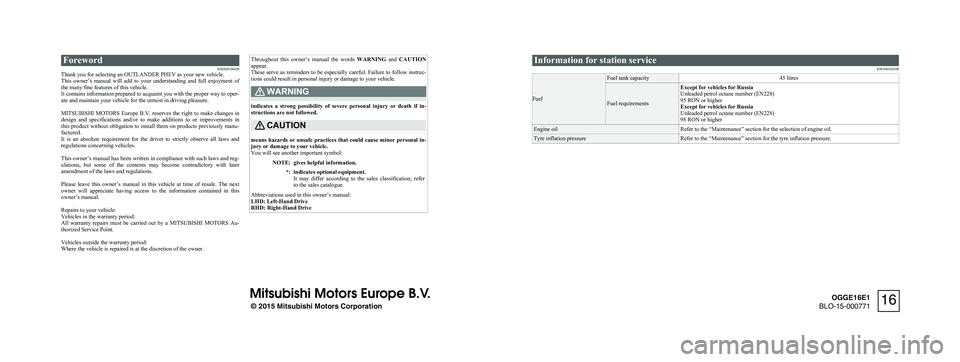
ForewordE09200106429
Thank you for selecting an OUTLANDER PHEV as your new vehicle.
This owner’s manual will add to your understanding and full enjoyment of
the many fine features of this vehicle.
It contains information prepared to acquaint you with the proper way to oper-
ate and maintain your vehicle for the utmost in driving pleasure.
MITSUBISHI MOTORS Europe B.V. reserves the right to make changes in
design and specifications and/or to make additions to or improvements in
this product without obligation to install them on products previously manu- factured.
It is an absolute requirement for the driver to strictly observe all laws and
regulations concerning vehicles.
This owner’s manual has been written in compliance with such laws and reg- ulations, but some of the contents may become contradictory with later amendment of the laws and regulations.
Please leave this owner’s manual in this vehicle at time of resale. The next
owner will appreciate having access to the information contained in this
owner’s manual.
Repairs to your vehicle:
Vehicles in the warranty period:
All warranty repairs must be carried out by a MITSUBISHI MOTORS Au-
thorized Service Point.
Vehicles outside the warranty period:
Where the vehicle is repaired is at the discretion of the owner.
Throughout this owner’s manual the words WARNING and CAUTION
appear.
These serve as reminders to be especially careful. Failure to follow instruc-
tions could result in personal injury or damage to your vehicle.WARNING
indicates a strong possibility of severe personal injury or death if in- structions are not followed.
CAUTION
means hazards or unsafe practices that could cause minor personal in-
jury or damage to your vehicle.
You will see another important symbol:
NOTE:gives helpful information.*:indicates optional equipment.
It may differ according to the sales classification; refer to the sales catalogue.
Abbreviations used in this owner’s manual:
LHD: Left-Hand Drive
RHD: Right-Hand Drive
Information for station service
E09300104208
Fuel
Fuel tank capacity45 litres
Fuel requirements
Except for vehicles for Russia
Unleaded petrol octane number (EN228)
95 RON or higher
Except for vehicles for Russia
Unleaded petrol octane number (EN228)
98 RON or higherEngine oilRefer to the “Maintenance” section for the selection of engine oil.Tyre inflation pressureRefer to the “Maintenance” section for the tyre inflation pressure.
© 2015 Mitsubishi Motors Corporation
16
OGGE16E1
BLO-15-000771
Page 14 of 490
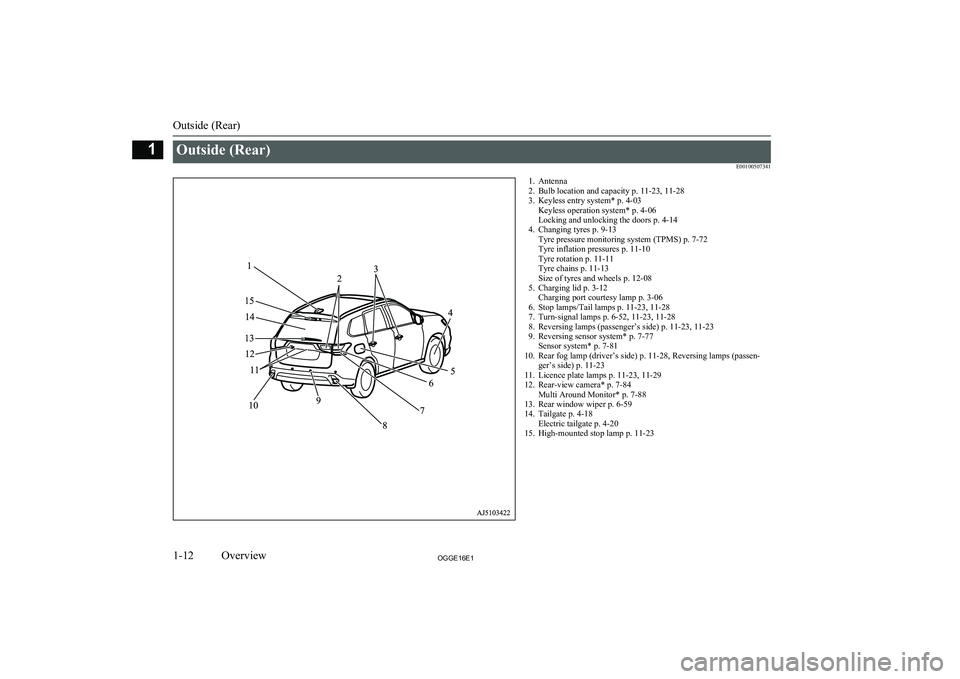
Outside (Rear)E001005073411. Antenna2. Bulb location and capacity p. 11-23, 11-28
3. Keyless entry system* p. 4-03 Keyless operation system* p. 4-06
Locking and unlocking the doors p. 4-14
4. Changing tyres p. 9-13 Tyre pressure monitoring system (TPMS) p. 7-72
Tyre inflation pressures p. 11-10
Tyre rotation p. 11-11
Tyre chains p. 11-13
Size of tyres and wheels p. 12-08
5. Charging lid p. 3-12 Charging port courtesy lamp p. 3-06
6. Stop lamps/Tail lamps p. 11-23, 11-28
7. Turn-signal lamps p. 6-52, 11-23, 11-28
8. Reversing lamps (passenger’s side) p. 11-23, 11-23
9. Reversing sensor system* p. 7-77 Sensor system* p. 7-81
10. Rear fog lamp (driver’s side) p. 11-28, Reversing lamps (passen- ger’s side) p. 11-23
11. Licence plate lamps p. 11-23, 11-29
12. Rear-view camera* p. 7-84 Multi Around Monitor* p. 7-88
13. Rear window wiper p. 6-59
14. Tailgate p. 4-18 Electric tailgate p. 4-20
15. High-mounted stop lamp p. 11-23
Outside (Rear)
1-12OGGE16E1Overview1
Page 153 of 490
NOTElTo return the menu screen to the function
setting screen, press and hold the multi in-formation display switch for about 2 seconds or more.
l If no operations are made within about 30
seconds of the menu screen being displayed, the display returns to the function setting
screen.
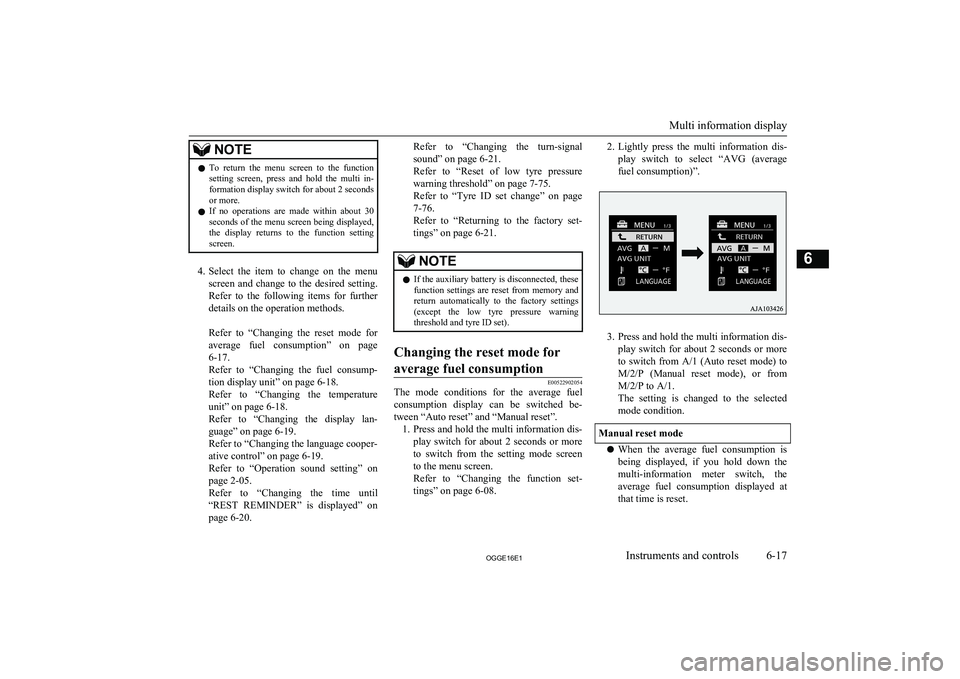
4. Select the item to change on the menu
screen and change to the desired setting. Refer to the following items for further
details on the operation methods.
Refer to “Changing the reset mode for
average fuel consumption” on page
6-17.
Refer to “Changing the fuel consump- tion display unit” on page 6-18.
Refer to “Changing the temperature
unit” on page 6-18.
Refer to “Changing the display lan- guage” on page 6-19.
Refer to “Changing the language cooper-
ative control” on page 6-19.
Refer to “Operation sound setting” on
page 2-05.
Refer to “Changing the time until “REST REMINDER” is displayed” on
page 6-20.
Refer to “Changing the turn-signal
sound” on page 6-21.
Refer to “Reset of low tyre pressure warning threshold” on page 7-75.
Refer to “Tyre ID set change” on page
7-76.
Refer to “Returning to the factory set- tings” on page 6-21.NOTEl If the auxiliary battery is disconnected, these
function settings are reset from memory and
return automatically to the factory settings (except the low tyre pressure warning threshold and tyre ID set).Changing the reset mode for
average fuel consumption
E00522902054
The mode conditions for the average fuel consumption display can be switched be- tween “Auto reset” and “Manual reset”. 1. Press and hold the multi information dis-
play switch for about 2 seconds or more to switch from the setting mode screen
to the menu screen.
Refer to “Changing the function set-
tings” on page 6-08.
2. Lightly press the multi information dis-
play switch to select “AVG (average fuel consumption)”.
3. Press and hold the multi information dis-
play switch for about 2 seconds or more to switch from A/1 (Auto reset mode) to M/2/P (Manual reset mode), or fromM/2/P to A/1.
The setting is changed to the selected
mode condition.
Manual reset mode
l When the average fuel consumption is
being displayed, if you hold down the multi-information meter switch, the
average fuel consumption displayed at that time is reset.
Multi information display
6-17OGGE16E1Instruments and controls6
Page 157 of 490
3.Press and hold the multi information dis-
play switch for about 2 seconds or more to display “ALARM”.
4. Lightly press the multi information dis-
play switch to select the time until thedisplay.
5. Press and hold the multi information dis-
play switch for about 2 seconds or more, the setting is changed to the selected time.NOTEl The drive time is reset when the operation
mode of the power switch is put in OFF.Changing the turn-signal sound
E00529100396
It is possible to change the turn-signal sound.
1. Press and hold the multi information dis-
play switch for about 2 seconds or more to switch from the setting mode screen
to the menu screen.
Refer to “Changing the function set-
tings” on page 6-16.
2. Lightly press the multi information dis-
play switch to select
(changing the
turn-signal sound).
3. Press and hold the multi information dis-
play switch for about 2 seconds or moreto switch from 1 (turn-signal sound 1) to
2 (turn-signal sound 2), or from 2 to 1.
The setting changes to the selected turn-
signal sound.Returning to the factory set-
tings
E00523601921
Many of the function settings can be returned
to their factory settings. 1. Press and hold the multi information dis-
play switch for about 2 seconds or more to switch from the setting mode screen
to the menu screen.
Refer to “Changing the function set- tings” on page 6-16.
2. Lightly press the multi information dis-
play switch to select “RESET” (return- ing to the factory settings).
3. When you press and hold the multi in-
formation display switch for about 5 sec-
onds or more, the buzzer sounds and all of the function settings are returned to
the factory settings.
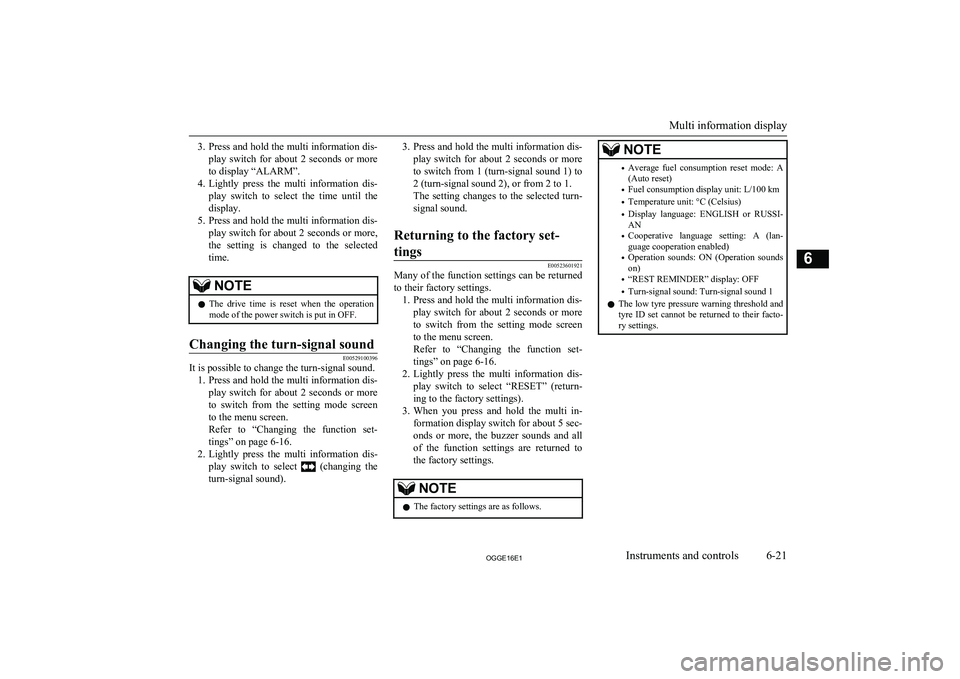
NOTEl The factory settings are as follows.NOTE•
Average fuel consumption reset mode: A
(Auto reset)
• Fuel consumption display unit: L/100 km
• Temperature unit: °C (Celsius)
• Display language: ENGLISH or RUSSI-
AN
• Cooperative language setting: A (lan-
guage cooperation enabled)
• Operation sounds: ON (Operation sounds
on)
• “REST REMINDER” display: OFF
• Turn-signal sound: Turn-signal sound 1
l The low tyre pressure warning threshold and
tyre ID set cannot be returned to their facto- ry settings.
Multi information display
6-21OGGE16E1Instruments and controls6
Page 159 of 490
14- Active Stability Control (ASC) OFF in-dication lamp ® p. 7-33
15- Anti-lock brake system (ABS) warning lamp ® p. 7-2916- Supplement Restraint System (SRS)
warning lamp ® p. 5-38
17- Ready indicator ® p. 6-44
18- Seat belt warning lamp ® p. 5-1119- Tyre pressure monitoring system warn-
ing lamp ® p. 7-72
20- Check engine warning lamp ® p. 6-45
21- Brake warning lamp ® p. 6-44
Information screen display list
E00523901344
When there is information to be announced, such as lamp reminder, the buzzer sounds and the screen switches to the displays shown below.
Refer to the appropriate page and take the necessary measures.
When the cause of the warning display is eliminated, the warning display goes out automatically. Refer to “Warning display list” on page 6-24.
Refer to “Navigation information display” on page 6-36. Refer to “Other interrupt displays” on page 6-38.
NOTEl A warning may be displayed on the information screen and the buzzer may sound in the following rare cases.
This is caused by the system picking up interference such as noise or strong electromagnetic waves, and is not a functional problem.
• An extremely strong electromagnetic wave is received from a source such as an illegal radio set, a spark from a wire, or a radar station.
• Abnormal voltage or a static electricity discharge is generated by the operation of installed electrical equipment (including after-market parts).
If the warning display appears many times, we recommend you to consult a MITSUBISHI MOTORS Authorized Service Point.
Indication lamp, warning lamp, and information screen display list
6-23OGGE16E1Instruments and controls6
Page 164 of 490
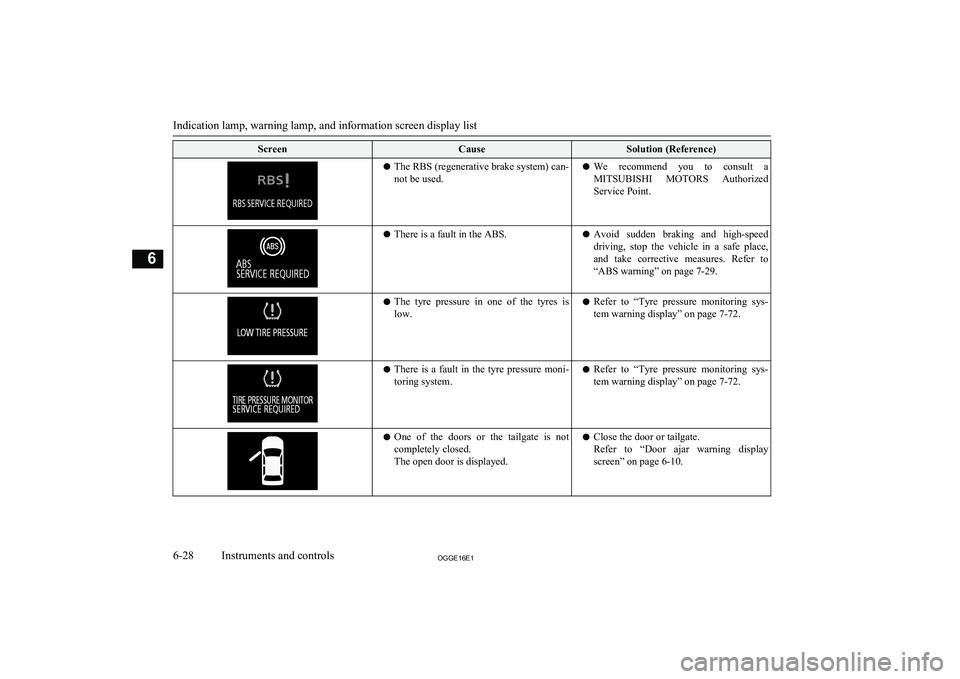
ScreenCauseSolution (Reference)lThe RBS (regenerative brake system) can-
not be used.l We recommend you to consult a
MITSUBISHI MOTORS Authorized
Service Point.l There is a fault in the ABS.l Avoid sudden braking and high-speed
driving, stop the vehicle in a safe place, and take corrective measures. Refer to“ABS warning” on page 7-29.l The tyre pressure in one of the tyres is
low.l Refer to “Tyre pressure monitoring sys-
tem warning display” on page 7-72.l There is a fault in the tyre pressure moni-
toring system.l Refer to “Tyre pressure monitoring sys-
tem warning display” on page 7-72.l One of the doors or the tailgate is not
completely closed.
The open door is displayed.l Close the door or tailgate.
Refer to “Door ajar warning display screen” on page 6-10.
Indication lamp, warning lamp, and information screen display list
6-28OGGE16E1Instruments and controls6
Page 201 of 490
Economical driving............................................................................. 7-02
Driving, alcohol and drugs.................................................................. 7-02
Safe driving techniques....................................................................... 7-02
Parking brake...................................................................................... 7-03 Parking................................................................................................ 7-04
Steering wheel height and reach adjustment....................................... 7-05
Inside rear-view mirror....................................................................... 7-05
Outside rear-view mirrors................................................................... 7-07
Power switch....................................................................................... 7-09 Starting and stopping the Plug-in Hybrid EV System........................ 7-11
Selector Lever (Joystick Type)........................................................... 7-13
Select Position indicator......................................................................7-14
Electrical Parking switch.................................................................... 7-15
Regenerative braking level selector (paddle)*.................................... 7-16
S-AWC (Super All Wheel Control).................................................... 7-17
4-wheel drive operation...................................................................... 7-19
Inspection and maintenance following rough road operation............. 7-20
Cautions on handling of 4-wheel drive vehicles................................. 7-21
Battery save switch............................................................................. 7-21
Battery charge switch.......................................................................... 7-22
Acoustic Vehicle Alerting System (AVAS)....................................... 7-23
Braking................................................................................................ 7-25
Hill start assist..................................................................................... 7-26
Brake assist system............................................................................. 7-27
Emergency stop signal system............................................................ 7-28
Anti-lock brake system (ABS)............................................................ 7-28
Electric power steering system (EPS)................................................. 7-31 Active stability control (ASC)............................................................ 7-32Cruise control*.................................................................................... 7-34Speed Limiter*.................................................................................... 7-38
Adaptive Cruise Control System (ACC)*...........................................7-43 Forward Collision Mitigation System (FCM)*...................................7-55Ultrasonic misacceleration Mitigation System*................................. 7-63Lane Departure Warning (LDW)*...................................................... 7-69
Tyre pressure monitoring system (TPMS).......................................... 7-72 Reversing sensor system*................................................................... 7-77
Sensor system*....................................................................................7-81
Rear-view camera*............................................................................. 7-84 Multi Around Monitor*...................................................................... 7-88
Cargo loads......................................................................................... 7-96 Trailer towing......................................................................................7-97Starting and driving
OGGE16E17
Page 202 of 490
Economical drivingE00600102220
For economical driving, there are some tech- nical requirements that have to be met. Theprerequisite for low fuel consumption is a
properly adjusted engine. In order to achieve longer life of the vehicle and the most eco- nomical operation, we recommend you tohave the vehicle checked at regular intervals in accordance with the service standards.
Fuel economy and generation of exhaust gas
and noise are highly influenced by personal
driving habits as well as the particular operat- ing conditions. The following points shouldbe observed in order to minimize wear of
brakes, tyres and engine as well as to reduce
environmental pollution.
Starting and acceleration
Avoid driving when the accelerator pedal ispushed way down, such as for unnecessarily sudden starts, acceleration and deceleration.
Smoothly depress the accelerator pedal.
Observe the speed limit and keep the speed
as constant as possible while driving.
Idling
Parking for a long period with the ready indi-
cator illuminated will shorten the cruising
range.
Speed
The higher the vehicle speed, the more drive
battery is consumed. Avoid driving at full speed. Even a slight release of the accelerator
pedal will save a significant amount of drive battery.
Tyre inflation pressure
Check the tyre inflation pressures at regular intervals. Low tyre inflation pressure increa-ses road resistance and fuel consumption. In addition, low tyre pressures adversely affect
tyre wear and driving stability.
Cargo loads
Do not drive with unnecessary articles in the
luggage compartment. Especially during city
driving where frequent starting and stopping is necessary, the increased weight of the ve-
hicle will greatly affect fuel consumption. Al- so avoid driving with unnecessary luggage or carriers, etc., on the roof; the increased air re- sistance will increase fuel consumption.
Air conditioning
Too much cooling/heating can affect the cruising range, so maintain an appropriatetemperature to extend the cruising range.
Driving, alcohol and drugs
E00600200070
Driving after drinking alcohol is one of the
most frequent causes of accidents.
Your driving ability can be seriously im- paired even with blood alcohol levels far be-
low the legal minimum. If you have been drinking, don’t drive. Ride with a designated non-drinking driver, call a cab or a friend, or
use public transportation. Drinking coffee or
taking a cold shower will not make you so- ber.
Similarly, prescription and nonprescription
drugs affect your alertness, perception and re- action time. Consult with your doctor or
pharmacist before driving while under the in- fluence of any of these medications.WARNINGl NEVER DRINK AND DRIVE.
Your perceptions are less accurate, your
reflexes are slower and your judgment is impaired.Safe driving techniques
E00600301775
Driving safety and protection against injury
cannot be fully ensured. However, we recom- mend that you pay extra attention to the fol-
lowing:
Economical driving
7-02OGGE16E1Starting and driving7
Page 221 of 490
lInspect the headlamps. If the headlamp
bulb is flooded with water, we recom- mend you to have it drained.Cautions on handling of 4-
wheel drive vehicles E00606801844
Tyres and wheels
Since the driving torque can be applied to the
4 wheels, the driving performance of the ve- hicle when operating in 4-wheel drive is
greatly affected by the condition of the tyres.
Pay close attention to the tyres.
l Install only the specified tyres on all
wheels. Refer to “Tyres and wheels” on page 12-08.
l Be sure all 4 tyres and wheels are the
same size and type.
When it is necessary to replace any of
the tyres or wheels, replace all 4 tyres.
l All tyres should be rotated before the
wear difference between the front and
rear tyres is recognizable.
Good vehicle performance cannot be expec- ted if there is a difference in wear between tyres. Refer to “Tyre rotation” on page 11-11.
l Check the tyre inflation pressure regular-
ly.CAUTIONl Always use tyres of the same size, same
type, and same brand, and which have no wear differences. Using tyres of differentsize, type, brands or degree of wear, will in-
crease the differential oil temperature, result-
ing in possible damage to the driving sys-
tem. Further, the drive train will be subjec- ted to excessive loading possibly leading tooil leakage, component seizure, or other seri-
ous faults.
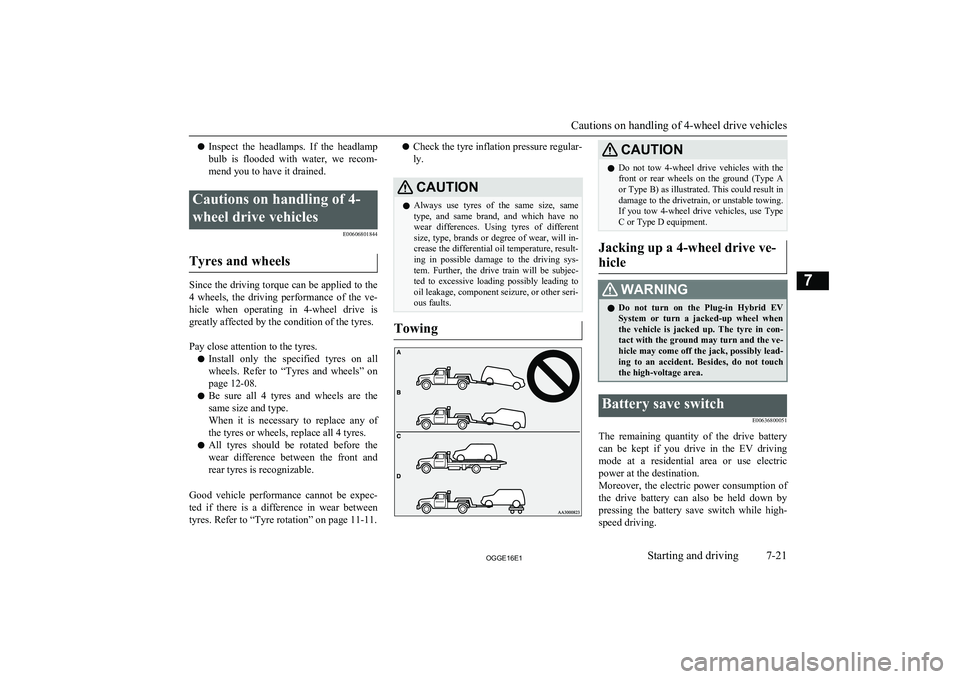
Towing
CAUTIONl Do not tow 4-wheel drive vehicles with the
front or rear wheels on the ground (Type Aor Type B) as illustrated. This could result in
damage to the drivetrain, or unstable towing. If you tow 4-wheel drive vehicles, use Type
C or Type D equipment.
Jacking up a 4-wheel drive ve-
hicle
WARNINGl Do not turn on the Plug-in Hybrid EV
System or turn a jacked-up wheel whenthe vehicle is jacked up. The tyre in con-
tact with the ground may turn and the ve- hicle may come off the jack, possibly lead-
ing to an accident. Besides, do not touch
the high-voltage area.Battery save switch
E00636800051
The remaining quantity of the drive battery
can be kept if you drive in the EV driving mode at a residential area or use electric
power at the destination.
Moreover, the electric power consumption of
the drive battery can also be held down by
pressing the battery save switch while high- speed driving.
Cautions on handling of 4-wheel drive vehicles
7-21OGGE16E1Starting and driving7
Page 245 of 490
CAUTION•On roads with slippery surfaces, such as
frozen, snow-covered, and dirt roads.
• Under adverse weather conditions (rain,
snow, sand storms, etc.).
• On steep downslopes.
• On roads including steep up and down
slopes or many changes in inclination.
• In traffic requiring frequent acceleration
and deceleration.
• When the proximity alarm sounds fre-
quently.
• When your vehicle is towed or your vehi-
cle tows another vehicle.
• When your vehicle is on a chassis dyna-
mometer or free rollers.
• When the air pressure in the tyres is not
correct.
• When installing the spare tyre for emer-
gency.
• When snow traction device (tyre chains)
are attached.
l Be sure to take the following precautions to
keep the system in good operating condi-
tions.
Improper handling of the system compo-
nents may result in degraded sensor per- formance.
• Avoid application of strong shock loads to
the sensor and never tamper with or re-
move the sensor mounting screws.
• The cover in front of the sensor and the
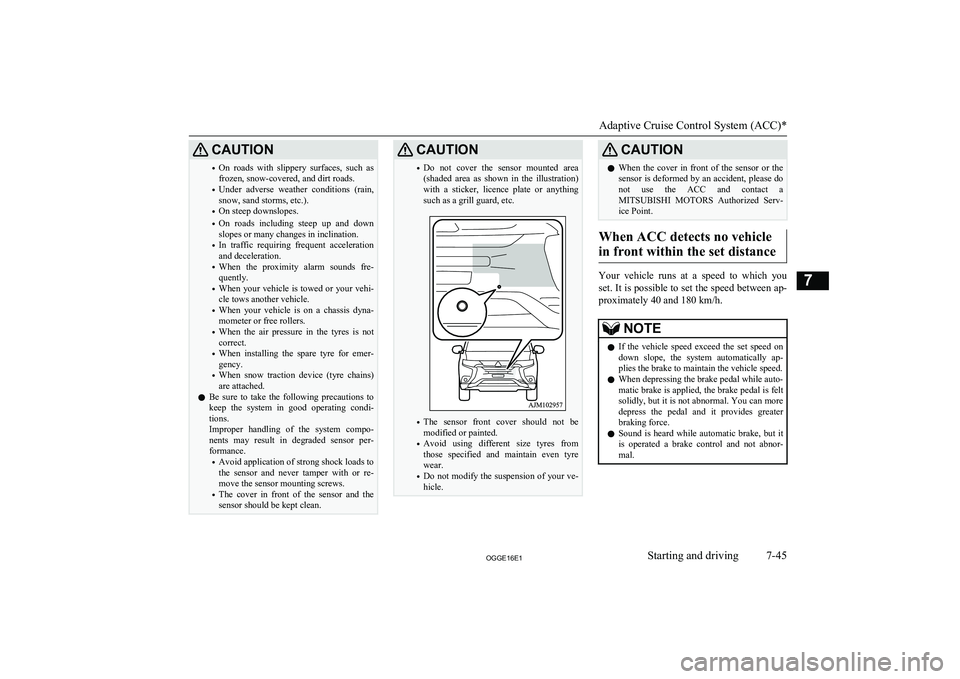
sensor should be kept clean.CAUTION• Do not cover the sensor mounted area
(shaded area as shown in the illustration)
with a sticker, licence plate or anything
such as a grill guard, etc.
• The sensor front cover should not be
modified or painted.
• Avoid using different size tyres from
those specified and maintain even tyre
wear.
• Do not modify the suspension of your ve-
hicle.
CAUTIONl When the cover in front of the sensor or the
sensor is deformed by an accident, please do
not use the ACC and contact a
MITSUBISHI MOTORS Authorized Serv-
ice Point.
When ACC detects no vehicle
in front within the set distance
Your vehicle runs at a speed to which you set. It is possible to set the speed between ap-
proximately 40 and 180 km/h.
NOTEl If the vehicle speed exceed the set speed on
down slope, the system automatically ap-plies the brake to maintain the vehicle speed.
l When depressing the brake pedal while auto-
matic brake is applied, the brake pedal is felt solidly, but it is not abnormal. You can moredepress the pedal and it provides greater
braking force.
l Sound is heard while automatic brake, but it
is operated a brake control and not abnor-
mal.
Adaptive Cruise Control System (ACC)*
7-45OGGE16E1Starting and driving7