battery location MITSUBISHI OUTLANDER PHEV 2017 Owner's Manual (in English)
[x] Cancel search | Manufacturer: MITSUBISHI, Model Year: 2017, Model line: OUTLANDER PHEV, Model: MITSUBISHI OUTLANDER PHEV 2017Pages: 548, PDF Size: 25.5 MB
Page 31 of 548
lSince the air conditioning (cooling or
heating) consumes power of the drive battery, its operation results in a shorterEV cruising range. Maintain an appro-
priate temperature.
l Put the selector lever to “B” (BRAKE)
position according to the road condition. To charge the drive battery with appro-priate use of the regenerative brake, it
can be increased the EV cruising range.Acoustic Vehicle Alerting
System (AVAS) E00205200042
The Acoustic Vehicle Alerting System(AVAS) is a device that uses sound to alert
pedestrians of the presence of the vehicle. The system operates when the vehicle speed
is about 35 km/h (22 mph) or less and the en-
gine is not running.
Refer to “Acoustic Vehicle Alerting System
(AVAS)” on page 7-29.
WARNINGl Even if the Acoustic Vehicle Alerting Sys-
tem (AVAS) sounds, pay special attention
to pedestrians.
Pedestrians may not notice the oncoming vehicle, which may cause an accident re-
sulting in serious personal injury or death.Operating sound under
charging or Remote ClimateControl E00205700050
Even if the operation mode of the powerswitch is OFF, you may hear an operating
sound such as the cooling fan for cooling the drive battery during charging, the air condi-
tioning compressor and for remote climate control (if so equipped).
This is not a malfunction.
Refer to “MITSUBISHI Remote control: Re-
mote Climate Control” on page 3-24.
In case of a collision
E00205300030
A crash or impact significant enough to re-
quire an emergency response for convention- al vehicles would also require the same re-sponse for Outlander PHEV.
Also follow the instructions described below
to avoid severe burns and electrical shock
that may result in serious injury or death.WARNINGl If your vehicle is drivable, pull your vehi-
cle off the road to a safe, nearby location
and remain on the scene.
Also, if possible, do the following opera- tions and stay out of the way of any on- coming traffic while awaiting the arrival
of emergency responders.
• Apply chocks to the wheels.
• Put the select position in “P” (PARK)
position.
• Apply the parking brake.
• Open the windows, doors and tailgate.
• Put the operation mode in OFF.
• Turn on the hazard warning flashers.
• Move the key away from the vehicle to
prevent unintended start-up of the sys- tem by inadvertent contact with a switch or impact from the crash.
l Never touch high-voltage wiring, connec-
tors, and other high-voltage parts, such as
the inverter unit and drive battery. An electric shock may occur if exposed elec-
tric wires are visible when viewed from inside or outside of your vehicle. For their locations, see “High-voltage components”
on page 2-08.
Acoustic Vehicle Alerting System (AVAS)
2-06OGGE17E1General information2
Page 98 of 548
NOTElThe tailgate easy closer operates even when
the electric tailgate power switch is OFF.
l Repeated continuous operation of the handle
could activate the protection circuit and tem-
porarily prevent the tailgate easy closer from
operating.
If this occurs, wait about 1 minute before
operating the tailgate easy closer again.Inside tailgate release
E00303400298
The inside tailgate release is designed to pro-
vide a way to open the tailgate in the case of a discharged battery.
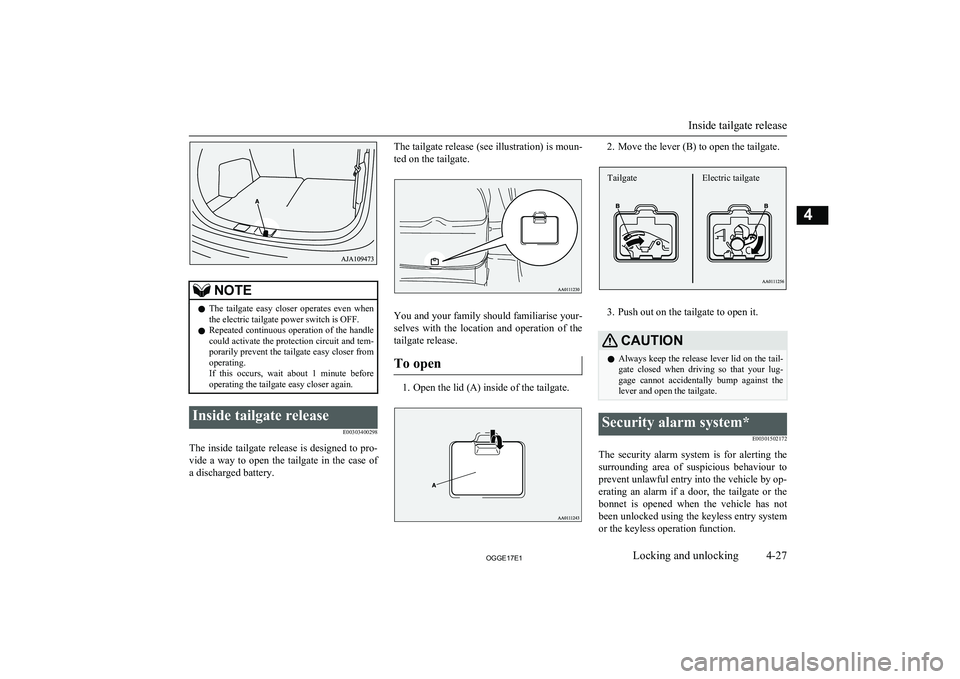
The tailgate release (see illustration) is moun-
ted on the tailgate.
You and your family should familiarise your- selves with the location and operation of the
tailgate release.
To open
1. Open the lid (A) inside of the tailgate.
2. Move the lever (B) to open the tailgate.
3. Push out on the tailgate to open it.
CAUTIONl Always keep the release lever lid on the tail-
gate closed when driving so that your lug-
gage cannot accidentally bump against the lever and open the tailgate.Security alarm system*
E00301502172
The security alarm system is for alerting thesurrounding area of suspicious behaviour to
prevent unlawful entry into the vehicle by op- erating an alarm if a door, the tailgate or the bonnet is opened when the vehicle has not
been unlocked using the keyless entry system or the keyless operation function.
Inside tailgate release
4-27OGGE17E1Locking and unlocking4 Electric tailgateTailgate
Page 193 of 548
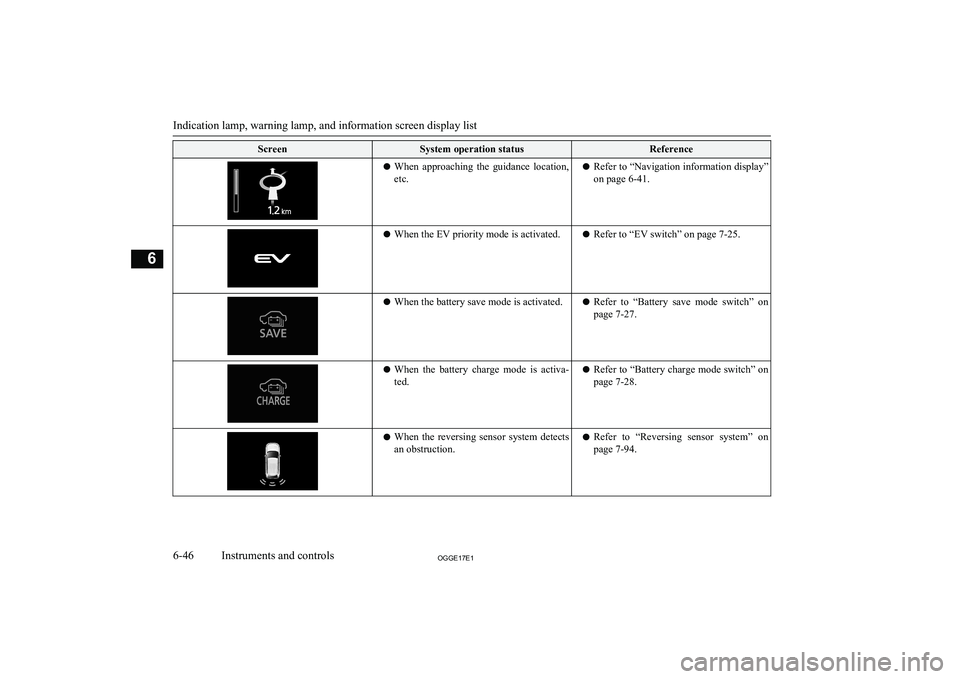
ScreenSystem operation statusReferencelWhen approaching the guidance location,
etc.l Refer to “Navigation information display”
on page 6-41.l When the EV priority mode is activated.l Refer to “EV switch” on page 7-25.lWhen the battery save mode is activated.l Refer to “Battery save mode switch” on
page 7-27.l When the battery charge mode is activa-
ted.l Refer to “Battery charge mode switch” on
page 7-28.l When the reversing sensor system detects
an obstruction.l Refer to “Reversing sensor system” on
page 7-94.
Indication lamp, warning lamp, and information screen display list
6-46OGGE17E1Instruments and controls6
Page 401 of 548
Switching between hands-freemode and private mode
E00761400036
The Bluetooth ®
2.0 interface can switch be-
tween Hands-free mode (Hands-free calls) and private mode (calls using cellular phone).
If you press the SPEECH button and say “Transfer call” during a Hands-free call, you
can stop the Hands-free mode and talk in pri- vate mode.
To return to Hands-free mode, press the
SPEECH button again and say “Transfer
call”.
Phone book function
E00763700017
The Bluetooth ®
2.0 interface has 2 types of
unique phone books that are different from
the phone book stored in the cellular phone. They are the vehicle phone book and the mo-
bile phone book.
These phone books are used to register tele- phone numbers and to make calls to desired
numbers via the voice recognition function.
NOTEl Disconnecting the battery cable will not de-
lete information registered in the phone
book.Vehicle phone book
E00763801262
This phone book is used when making calls
with the voice recognition function.
Up to 32 names can be registered in the vehi-
cle phone book per language.
Also, each entry has 4 locations associated with: home, work, mobile and other. You can
register one telephone number for each loca- tion.
You can register a desired name as a name
for any phone book entry registered in the ve- hicle phone book.
Names and telephone numbers can be
changed later on.
The vehicle phone book can be used with all paired cellular phones.
To register a telephone number in the ve- hicle phone book
You can register a telephone number in thevehicle phone book in the following 2 ways:
Reading out a telephone number, and select- ing and transferring 1 phone book entry fromthe phone book of the cellular phone.
To register by reading out a telephone
number
1. Press the SPEECH button.
2. Say “Phone book.”
3. The voice guide will say “Select one of
the following: new entry, edit number,
edit name, list names, delete, erase all, or
import contact.” Say “New entry.”
4. The voice guide will say “Name please.”
Say your preferred name to register it.NOTEl If the maximum number of entries are al-
ready registered, the voice guide will say“The phone book is full. Would you like to
delete a name?” Say “Yes” if you want to
delete a registered name.
Say “No,” to return to the main menu.
5. When the name has been registered, the
voice guide will say “home, work, mo- bile, or other?” Say the location forwhich you want to register a telephone
number.
NOTEl When the confirmation function is on, the
voice guide will say “
If a telephone number has been registered for the selected location, the voice guide will say “The current number is
If you do not want to change the telephone number, say “cancel” or the original number to keep it registered.
Bluetooth ®
2.0 interface*
8-64OGGE17E1For pleasant driving8
Page 412 of 548
CAUTIONlDo not touch the heating element or the cig-
arette lighter housing, hold the knob only to prevent burns.
l Do not allow children to operate or play with
the cigarette lighter as burns may occur.
l Something is wrong with the cigarette light-
er if it does not pop back out within approxi-
mately 30 seconds of being pushed in.
Pull it out and have the problem corrected at MITSUBISHI MOTORS Authorized Serv-
ice Point.
l Do not use any electric appliance that is not
approved by MITSUBISHI MOTORS . Do-
ing so could damage the socket. If you used
the cigarette lighter after damaging the sock- et, the cigarette lighter might pop out or fail
to come out after being pushed in.
l When the cigarette lighter socket is used as a
power source for an electric appliance, be sure that the electric appliance operates at
12 V and has an electric capacity of 120 W or less. In addition, long use of the electricappliance when the ready indicator is not il-
luminated may run down the auxiliary bat- tery.Accessory socket
E00711602864CAUTIONlBe sure to use a “plug-in” type accessory op-
erating at 12 V and at 120 W or less.
When using more than one socket at the same time, make sure that the electrical ac-
cessories are 12 V accessories and that the total power consumption does not exceed
120 W.
l Long use of the electric appliance when the
ready indicator is not illuminated may run
down the auxiliary battery.
l When the accessory socket is not in use, be
sure to close the lid or install the cap, be-
cause the socket might become clogged by foreign material and be short-circuited.
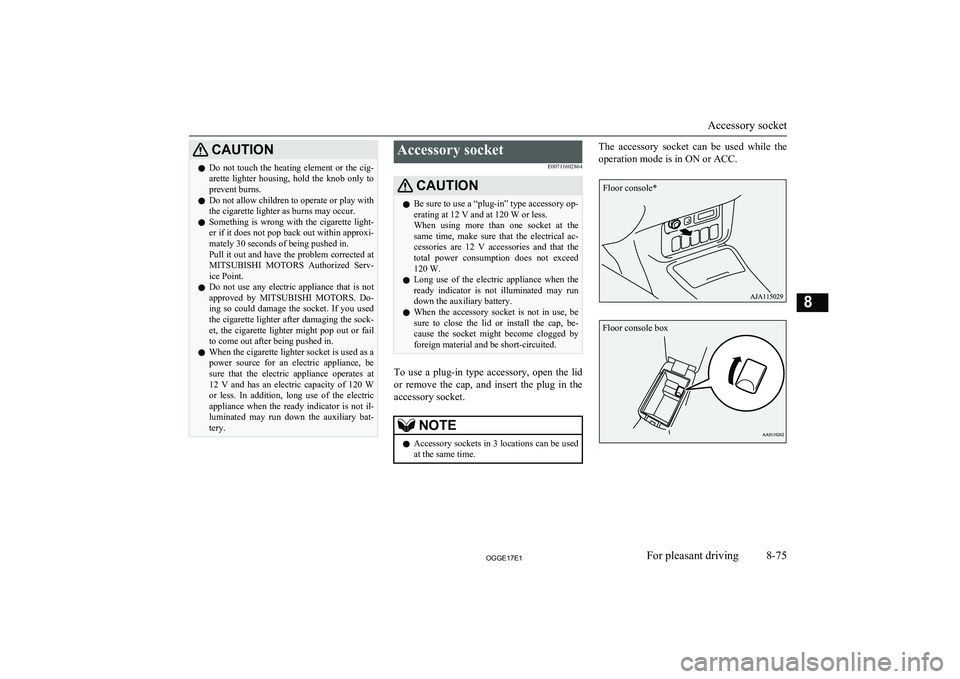
To use a plug-in type accessory, open the lid
or remove the cap, and insert the plug in the accessory socket.
NOTEl Accessory sockets in 3 locations can be used
at the same time.The accessory socket can be used while the
operation mode is in ON or ACC.
Accessory socket
8-75OGGE17E1For pleasant driving8 Floor console* Floor console box
Page 430 of 548
SituationIndication lampCauseSolutionRed lampGreen lampAfter approximately 20
seconds after setting the
operation mode to “ON”ExtinguishesExtinguishesThe system works normally.−IlluminatesExtinguishesThere is a possible failure in the
system or the auxiliary battery
may be exhausted.Immediately have the system in-
spected at a MITSUBISHI
MOTORS Authorized Service
Point.While the emergency call
is activatedExtinguishesBlinks (at a 0.5-sec-
ond interval)The system calls the emergency
call centre.−ExtinguishesBlinks (at a 2-second
interval)The system transmits the location
and vehicle information to the
emergency call centre.−ExtinguishesIlluminatesA conversation with an operator
of the emergency call centre is
available.Mutually confirm the details of
the emergency call with the oper-
ator of the emergency call centre.
If the green lamp does not extin-
guish even after the emergency
call ends, have the system inspec-
ted at a MITSUBISHI MOTORS
Authorized Service Point.When the emergency call
failedIlluminates (for ap-
proximately 60 sec-
onds)ExtinguishesThe emergency call failed.Make an emergency call again, or
directly arrange an emergency ve-
hicle or road service with the
nearest public telephone, etc.Test Mode
You can check if the system is in the normal
standby state by the following process.
Before operation, stop the vehicle in a safe place, with good visibility, where radio
waves can be transmitted and received.Change to Test Mode
1. When the operation mode is set to
“OFF”, set the operation mode to “ON” while pressing the SOS switch.ERA-GLONASS*
9-05OGGE17E1For emergencies9
Page 434 of 548
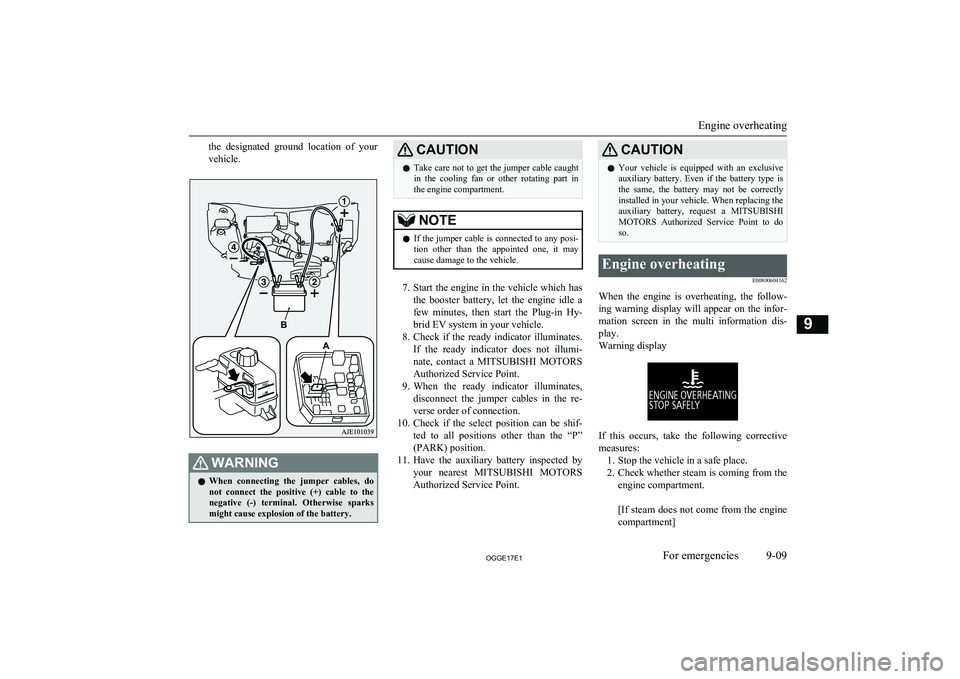
the designated ground location of your
vehicle.WARNINGl When connecting the jumper cables, do
not connect the positive (+) cable to the
negative (-) terminal. Otherwise sparks
might cause explosion of the battery.CAUTIONl Take care not to get the jumper cable caught
in the cooling fan or other rotating part in
the engine compartment.NOTEl If the jumper cable is connected to any posi-
tion other than the appointed one, it may
cause damage to the vehicle.
7. Start the engine in the vehicle which has
the booster battery, let the engine idle a
few minutes, then start the Plug-in Hy- brid EV system in your vehicle.
8. Check if the ready indicator illuminates.
If the ready indicator does not illumi- nate, contact a MITSUBISHI MOTORS
Authorized Service Point.
9. When the ready indicator illuminates,
disconnect the jumper cables in the re-
verse order of connection.
10. Check if the select position can be shif-
ted to all positions other than the “P” (PARK) position.
11. Have the auxiliary battery inspected by
your nearest MITSUBISHI MOTORS
Authorized Service Point.
CAUTIONl Your vehicle is equipped with an exclusive
auxiliary battery. Even if the battery type is the same, the battery may not be correctly
installed in your vehicle. When replacing the auxiliary battery, request a MITSUBISHI
MOTORS Authorized Service Point to do
so.Engine overheating
E00800604162
When the engine is overheating, the follow-ing warning display will appear on the infor-
mation screen in the multi information dis- play.
Warning display
If this occurs, take the following corrective measures: 1. Stop the vehicle in a safe place.
2. Check whether steam is coming from the
engine compartment.
[If steam does not come from the engine
compartment]
Engine overheating
9-09OGGE17E1For emergencies9