clock MITSUBISHI OUTLANDER PHEV 2017 Owner's Manual (in English)
[x] Cancel search | Manufacturer: MITSUBISHI, Model Year: 2017, Model line: OUTLANDER PHEV, Model: MITSUBISHI OUTLANDER PHEV 2017Pages: 548, PDF Size: 25.5 MB
Page 41 of 548
Refueling
1.Before filling with fuel, stop the plug-in
hybrid EV system.
2. The fuel tank filler is located on the rear
left side of your vehicle.
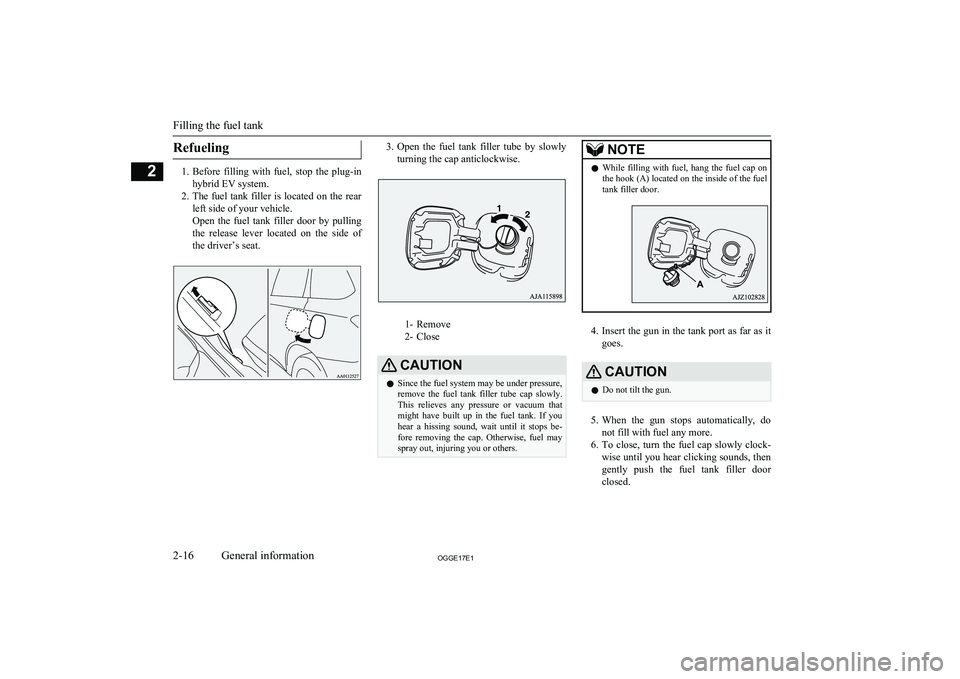
Open the fuel tank filler door by pulling the release lever located on the side of the driver’s seat.
3. Open the fuel tank filler tube by slowly
turning the cap anticlockwise.
1- Remove
2- Close
CAUTIONl Since the fuel system may be under pressure,
remove the fuel tank filler tube cap slowly. This relieves any pressure or vacuum that
might have built up in the fuel tank. If you hear a hissing sound, wait until it stops be-
fore removing the cap. Otherwise, fuel may
spray out, injuring you or others.NOTEl While filling with fuel, hang the fuel cap on
the hook (A) located on the inside of the fuel
tank filler door.
4. Insert the gun in the tank port as far as it
goes.
CAUTIONl Do not tilt the gun.
5.
When the gun stops automatically, do
not fill with fuel any more.
6. To close, turn the fuel cap slowly clock-
wise until you hear clicking sounds, then
gently push the fuel tank filler door
closed.
Filling the fuel tank
2-16OGGE17E1General information2
Page 242 of 548
Yaw control function display
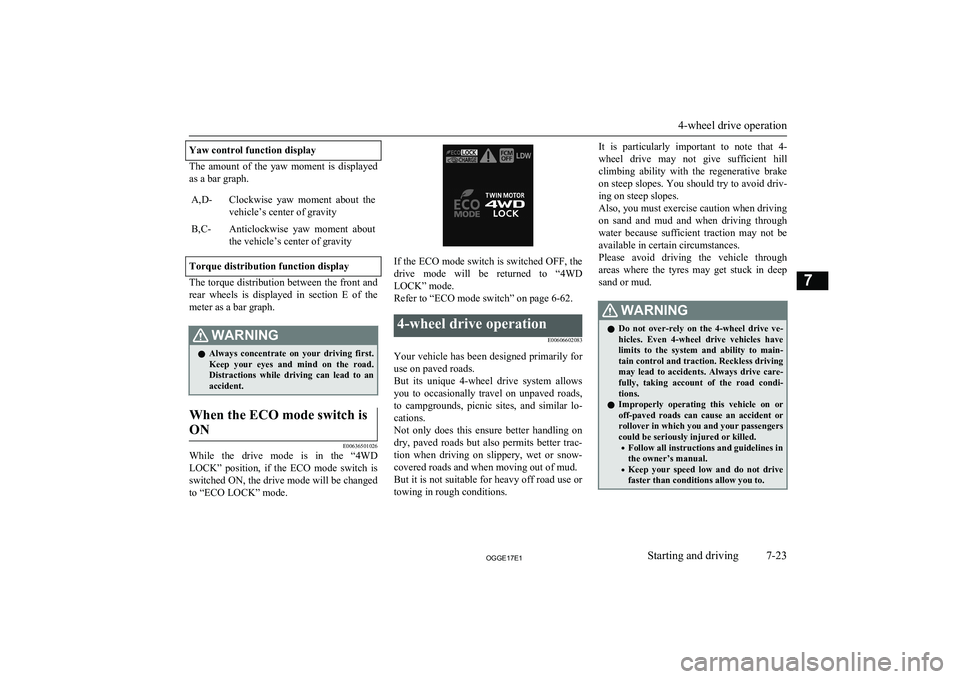
The amount of the yaw moment is displayed
as a bar graph.
A,D-Clockwise yaw moment about the vehicle’s center of gravityB,C-Anticlockwise yaw moment about
the vehicle’s center of gravity
Torque distribution function display
The torque distribution between the front and rear wheels is displayed in section E of the
meter as a bar graph.
WARNINGl Always concentrate on your driving first.
Keep your eyes and mind on the road.
Distractions while driving can lead to an accident.When the ECO mode switch is
ON
E00636501026
While the drive mode is in the “4WD
LOCK” position, if the ECO mode switch is switched ON, the drive mode will be changed to “ECO LOCK” mode.
If the ECO mode switch is switched OFF, the
drive mode will be returned to “4WD LOCK” mode.
Refer to “ECO mode switch” on page 6-62.
4-wheel drive operation
E00606602083
Your vehicle has been designed primarily foruse on paved roads.
But its unique 4-wheel drive system allows
you to occasionally travel on unpaved roads, to campgrounds, picnic sites, and similar lo-
cations.
Not only does this ensure better handling on
dry, paved roads but also permits better trac-
tion when driving on slippery, wet or snow- covered roads and when moving out of mud.
But it is not suitable for heavy off road use or
towing in rough conditions.
It is particularly important to note that 4-
wheel drive may not give sufficient hill
climbing ability with the regenerative brake on steep slopes. You should try to avoid driv- ing on steep slopes.
Also, you must exercise caution when driving on sand and mud and when driving through
water because sufficient traction may not be
available in certain circumstances.
Please avoid driving the vehicle through
areas where the tyres may get stuck in deep sand or mud.WARNINGl Do not over-rely on the 4-wheel drive ve-
hicles. Even 4-wheel drive vehicles have
limits to the system and ability to main- tain control and traction. Reckless driving may lead to accidents. Always drive care-
fully, taking account of the road condi-
tions.
l Improperly operating this vehicle on or
off-paved roads can cause an accident or
rollover in which you and your passengers
could be seriously injured or killed.
• Follow all instructions and guidelines in
the owner’s manual.
• Keep your speed low and do not drive
faster than conditions allow you to.
4-wheel drive operation
7-23OGGE17E1Starting and driving7
Page 361 of 548
2. Press the PWR/VOL key.Turn the power OFF.NOTEl Hold down the steering SOURCE button to
also turn the audio function ON/OFF.Adjust Volume
E00737300025
1. Turn the PWR/VOL key to adjust the
volume.
Turn the PWR/VOL key clockwise toincrease, and counter- clockwise to de-
crease the volume.
NOTEl The maximum value for volume is 45, and
the minimum is 0.NOTEl The initial setting for volume is “17”.Insert/Eject Discs
E00737400026
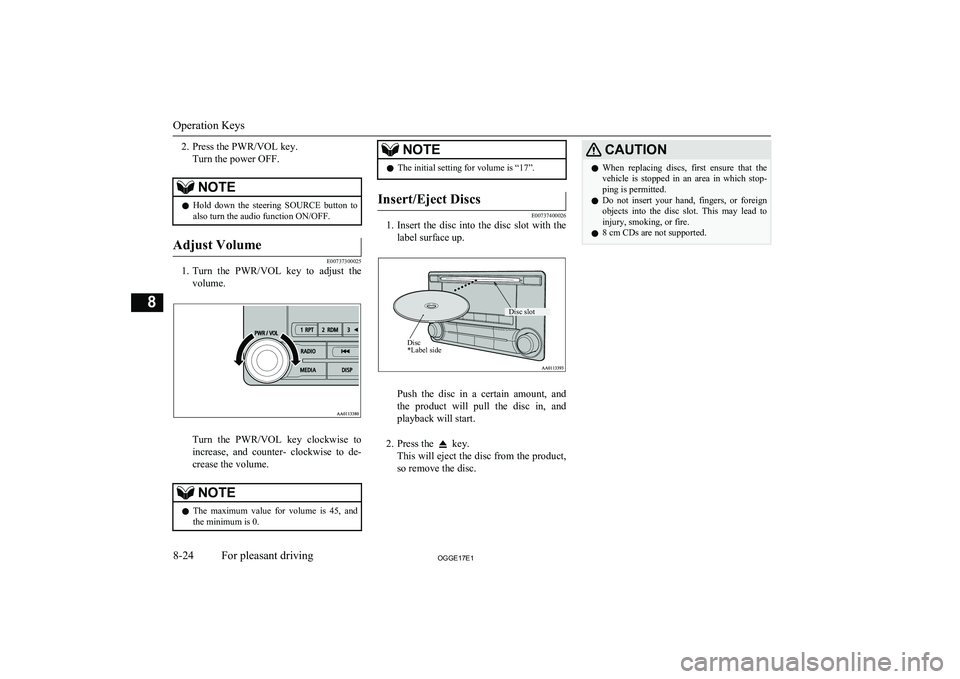
1.
Insert the disc into the disc slot with the
label surface up.
Push the disc in a certain amount, and
the product will pull the disc in, and playback will start.
2. Press the
key.
This will eject the disc from the product,
so remove the disc.
CAUTIONl When replacing discs, first ensure that the
vehicle is stopped in an area in which stop-ping is permitted.
l Do not insert your hand, fingers, or foreign
objects into the disc slot. This may lead to injury, smoking, or fire.
l 8 cm CDs are not supported.
Operation Keys
8-24OGGE17E1For pleasant driving8 Disc *Label sideDisc slot
Page 364 of 548
NOTElThis switches in the order FM1, FM2, FM3,
DAB1*, DAB2*, DAB3*, MW, and LW. *:When a DAB tuner is connected.
Manual/Seek Station Selection
Turn the /SEL key to the frequency to lis-
ten to.
/SEL key
(counter-
clockwise)Reduces the frequency being
received./SEL key
(clockwise)Increases the frequency be-
ing received. key
(hold down)Release the button to start
seek station selection, and
when a station is received,
scanning stops. key
(hold down)
Preset Memory
Register the broadcast station in advance, and select this at a later time.
1. Tune in to the frequency to register.
2. Hold down any of the keys from the
1RPT key to the 6
key.
A “Beep” sounds, and the preset key is registered.NOTEl The preset memory can register a maximum
of 6 stations for each band (FM1, FM2,
FM3).
l If a preset key that already has a station reg-
istered is selected, then this is overwritten with the new preset.
l Pressing the preset key will select the previ-
ously registered frequency.
Auto Memory (Auto Store)
The top 6 stations with a strong signal can be
automatically registered in order with preset keys.
Hold down the RADIO key.
After completion of auto store operations, the
product will receive the station registered in
the preset key [1].
CAUTIONl Please be aware that the formerly-registered
frequency in the memory will be overwrit- ten.NOTEl Using auto store for FM1 and FM2 switches
to FM3.
PTY Search
Select PTY (program content), and automati-
cally scan for stations. 1. During FM reception, press the PTY/
SCAN key.
This switches to the PTY selection mode.
2. Turn the
/SEL key to select PTY.
The PTY (program content) indicator
will flash, and station selection will au- tomatically start. When a station is re-
ceived, the station name is displayed.
NOTEl This receives the station detected first.
l 10 seconds after reception, PTY search
mode will be cancelled.Listen to DAB*
E00739100014
This explains how to listen to DAB.
Listen to DAB*
8-27OGGE17E1For pleasant driving8
Page 379 of 548
NOTElIf the text information for the service name
and ensemble name cannot be obtained, then
nothing is displayed.
During CD-DA playback
This switches in the order “Disc title”,
“Track title”, and “Operating status”.
NOTEl If there is no text information to display,
then “NO TITLE” is displayed.
During MP3/WMA/AAC Play-
back
This switches in the order “Folder title”,
“File title”, and “Operating status”.
NOTEl If there is no text information to display,
then “NO TITLE” is displayed.
Display the ID3tag
Hold down the DISP key.
This switches the ID3tag display.
[DISP] Each time the key is pressed, this
switches in the order “Album name”, “Track name”, “Artist name”, “Genre name”*, and “Operating status”.*:Displayed when playing back audio
files on a USB device (vehicles with a
Bluetooth ®
2.0 interface).NOTEl During display of the ID3tag, hold down the
DISP key to switch to the folder title dis- play.
l The genre name display may not be possible.During iPod Playback
E00738901096
This switches in the order “Albums”, “Track
name”, “Artist name”, “Genre name”*, and
“Operating status”.
NOTEl If there is no text information to display,
then “NO TITLE” is displayed.
l Displayed genre name in equipment by type
(vehicles with a Bluetooth ®
2.0 interface).
l The genre name display may not be possible.During Bluetooth ®
2.0 Audio
Playback*
E00739001036
Operating details are the same as in “During
iPod Playback” on page 8-42.
Audio Quality and Volume
Balance Adjustment E00738201161
Change audio quality settings.
Adjust Audio Quality and Vol-ume Balance
1. Press the /SEL key to select settings
items.
Each time the
/SEL key is pressed,
this switches in the order BASS, TRE-
BLE, FADER, BALANCE, SCV (speed
compensated volume), and Cancel.
2. Turn the
/SEL key to adjust.
Adjust-
ment
itemsTurn counter- clockwiseTurn clock- wiseBASS-6 to 0
(low low-pass volume)0 to +6
(high low-pass volume)
Audio Quality and Volume Balance Adjustment
8-42OGGE17E1For pleasant driving8
Page 380 of 548
Adjust-ment
itemsTurn counter- clockwiseTurn clock- wiseTREBLE-6 to 0
(Low high-pass volume)0 to +6
(High high-pass
volume)FADERCENTER to
REAR 11
(emphasise
REAR)FRONT 11 to CENTER
(emphasise
FRONT)BAL-
ANCELEFT 11 to
CENTER
(emphasise
LEFT)CENTER to
RIGHT 11
(emphasise
RIGHT)SCVOFF, LOW
(SCV effect is
OFF/low)MID, HIGH
(SCV effect is middle/high)System Settings
E00738301188
Change system settings such as product time.1. Press the MENU key.
2. Press the
/SEL key to select settings
items.
Each time the
/SEL key is pressed,
this switches in the order DAB setting* 1
,
Gracenote DB* 2
, AF, REG, TP-S, PI-S,
PTY language settings, PHONE settings,
CT, Adjust time, and Cancel.
3. Turn the
/SEL key to set.
4. Press the /SEL key to determine.
This completes settings, and displays the
next settings item.
* 1
:Displayed when a DAB tuner is con-
nected.* 2
:Displayed when playing back audio
files (vehicles with a Bluetooth ®
2.0 in-
terface).
DAB Setting*
Change DAB settings
(“Set value” bold typeface indicates factory
default settings.)
Settings
nameSettings val- ueSettings con-tentDAB-DAB
Link settingsOFFIf low recep-
tion sensitivi-
ty, switch to
another serv-
ice.ONDAB Band settingsBAND IIISet used
broadcast
band to 174
to 239 MHz.Settings nameSettings val- ueSettings con-tentDAB BandsettingsL-BANDSet used
broadcast
band to 1452
to 1490 MHz.BOTHSet used
broadcast
band to Band
III and L-
Band.
RDS Setting
Change RDS settings
(“Set value” bold typeface indicates factory
default settings.)
Settings
nameSettings val- ueSettings con-tentAFAF ONAutomatical-
ly track the
same station
as the pro-
gram being
received.
System Settings
8-43OGGE17E1For pleasant driving8
Page 439 of 548

NOTE•The tyre is punctured in the side wall (A),
not in the tread (B).
• The vehicle has been driven with the tyre
almost completely flat.
• The tyre has completely slipped over the
wheel rim and has come off the wheel.
• The wheel is damaged.
l Use the tyre sealant only at ambient temper-
atures of -30 °C to + 60 °C.
l Effect an emergency repair without pulling
out the object (nail, screw, etc.) that is stuck
in the tyre.
l Do not use the tyre sealant if the tyre has
been damaged by being driven when insuffi- ciently inflated (e.g. bumps, cuts, cracks etc.
on the tyre).
l Wipe tyre sealant off the paintwork immedi-
ately with a damp cloth.
l Immediately wash clothes contaminated
with tyre sealant.
Before repairing a tyre, first stop your vehicle
in a safe, flat location.
1. Park the vehicle on level and stable
ground.
2. Set the parking brake firmly.
3. Put the select position in “P” (PARK)
position and stop the Plug-in Hybrid EV
system.
4. Turn on the hazard warning flashers and
set up a warning triangle, flashing signal
lamp, etc., at an adequate distance from
the vehicle, and have all your passengers
leave the vehicle.
5. Take out the tyre repair kit.
6. Take the valve cap (C) off the tyre valve
(D), then press the valve remover (E)
onto the valve as illustrated. Allow all of the air in the tyre to escape.
7. Remove the valve insert (F) by turning it
anticlockwise using the valve remover (E). Put the removed valve insert in a
clean place so it does not get dirty.
CAUTIONl If there is any air left in the tyre when you
remove the valve insert, the valve insert may
fly out and injure you. Make sure the tyre
contains no air before removing the valve in- sert.
8. Shake the tyre sealant bottle well.
Tyre repair kit
9-14OGGE17E1For emergencies9
Page 446 of 548
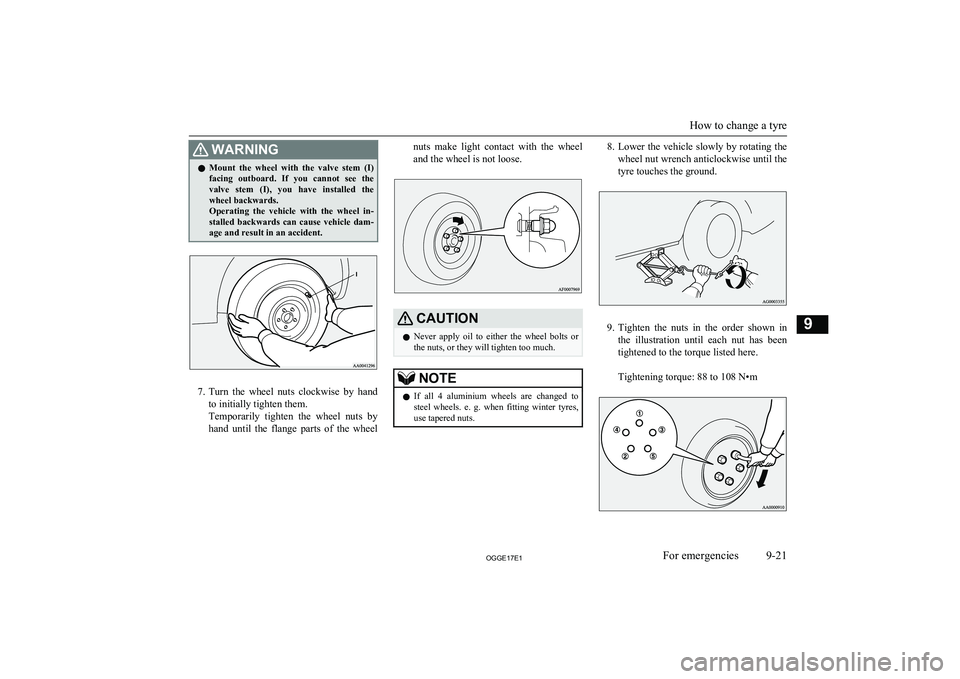
WARNINGlMount the wheel with the valve stem (I)
facing outboard. If you cannot see the
valve stem (I), you have installed the wheel backwards.
Operating the vehicle with the wheel in-
stalled backwards can cause vehicle dam- age and result in an accident.
7. Turn the wheel nuts clockwise by hand
to initially tighten them.
Temporarily tighten the wheel nuts by hand until the flange parts of the wheel
nuts make light contact with the wheel
and the wheel is not loose.CAUTIONl Never apply oil to either the wheel bolts or
the nuts, or they will tighten too much.NOTEl If all 4 aluminium wheels are changed to
steel wheels. e. g. when fitting winter tyres,
use tapered nuts.8. Lower the vehicle slowly by rotating the
wheel nut wrench anticlockwise until the
tyre touches the ground.
9. Tighten the nuts in the order shown in
the illustration until each nut has been tightened to the torque listed here.
Tightening torque: 88 to 108 N•m
How to change a tyre
9-21OGGE17E1For emergencies9
Page 485 of 548
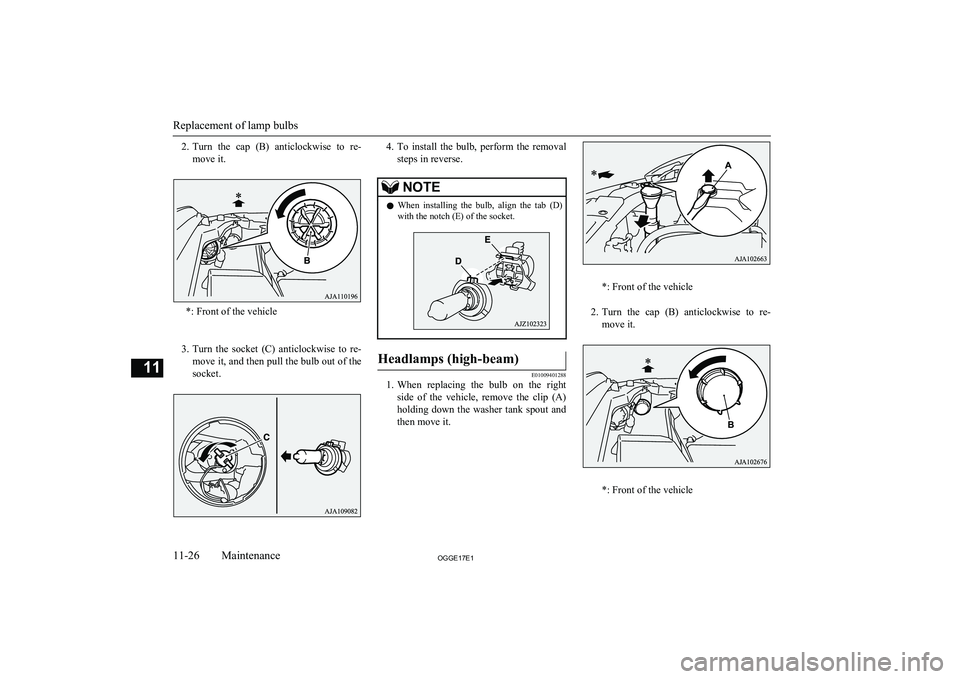
2.Turn the cap (B) anticlockwise to re-
move it.
*: Front of the vehicle
3. Turn the socket (C) anticlockwise to re-
move it, and then pull the bulb out of the
socket.
4. To install the bulb, perform the removal
steps in reverse.NOTEl When installing the bulb, align the tab (D)
with the notch (E) of the socket.Headlamps (high-beam)
E01009401288
1. When replacing the bulb on the right
side of the vehicle, remove the clip (A) holding down the washer tank spout and
then move it.
*: Front of the vehicle
2. Turn the cap (B) anticlockwise to re-
move it.
*: Front of the vehicle
Replacement of lamp bulbs
11-26OGGE17E1Maintenance11
Page 486 of 548
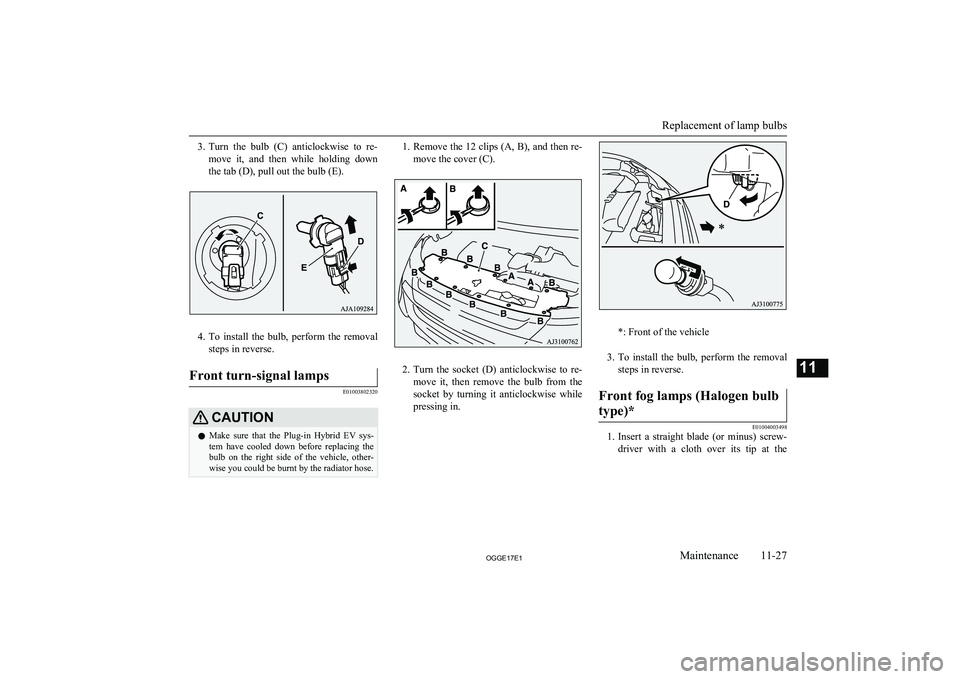
3.Turn the bulb (C) anticlockwise to re-
move it, and then while holding down
the tab (D), pull out the bulb (E).
4. To install the bulb, perform the removal
steps in reverse.
Front turn-signal lamps
E01003802320
CAUTIONl Make sure that the Plug-in Hybrid EV sys-
tem have cooled down before replacing the bulb on the right side of the vehicle, other-wise you could be burnt by the radiator hose.1. Remove the 12 clips (A, B), and then re-
move the cover (C).
2. Turn the socket (D) anticlockwise to re-
move it, then remove the bulb from the socket by turning it anticlockwise while
pressing in.
*: Front of the vehicle
3. To install the bulb, perform the removal
steps in reverse.
Front fog lamps (Halogen bulb
type)*
E01004003498
1. Insert a straight blade (or minus) screw-
driver with a cloth over its tip at the
Replacement of lamp bulbs
11-27OGGE17E1Maintenance11